❌

Reading view

There are new articles available, click to refresh the page.

One Lucky 3DS Gets A Switch-Style Dock

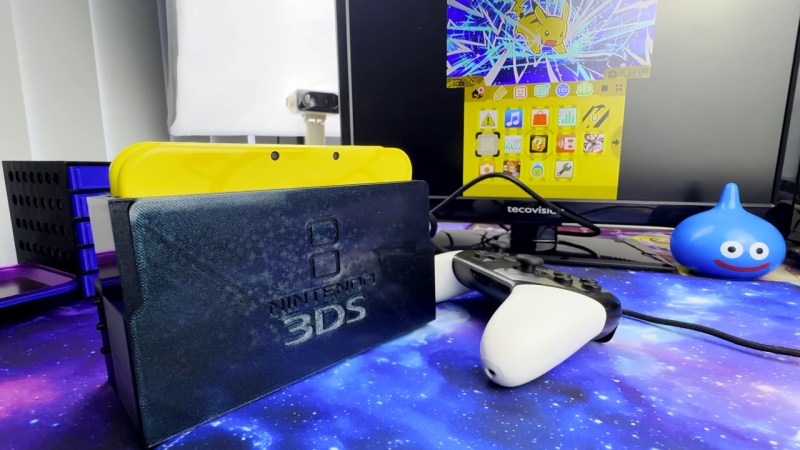
The Nintendo Switch dock set a new bar for handheld docking user experience – just plug your console in to charge it, output image to your monitor, and keep it working with any USB peripherals of your choice. What if a 3DS is more your jam? [KOUZEX] shows off a Switch-style dock design for his gorgeous yellow 3DS, with Switch Pro controller support, and this dock wasn’t just a 3D printing job – there’s a fair bit of electronics to show, too.

While the 3DS looks stock at a glance, it has already been upgraded internally – there’s a USB-C capture card built in, half-ticking the β€œmonitor output” requirement, and a Raspberry Pi board turns that output into HDMI. Building a charging dock is also pretty simple, with just two contacts on the side that desire 5V. Now, the pro controller support was a fair bit harder – requiring an internal modchip for emulating buttons, and trying out receiver boards for the Switch controller until a well-functioning one was found.

The build video is quite satisfying to watch, from assembling some QFNs onto tiny OSHPark boards using a hotplate and soldering them into the 3DS, to planning out, building, and dremeling some prints to create a true slide-console-into-dock experience, same way the Switch pulled it off. It even has the same USB-C and HDMI arrangement as the Switch dock, too! Want a simpler dock for your 3DS? Don’t forget that you can build a charger dock for yours with just a 3D print and a few wires.
Wavebird Controller Soars Once More with Open Source Adapter

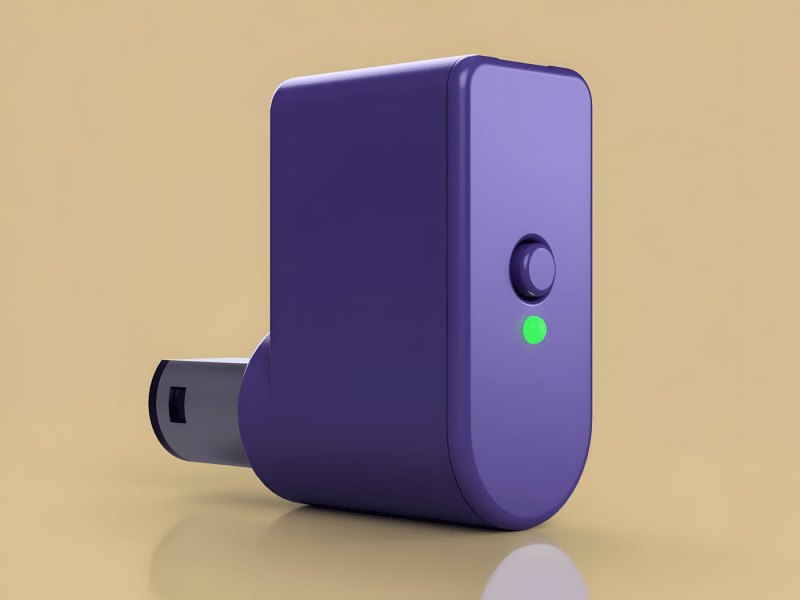
Computer rendering of a DIY, purple Nintendo Wavebird controller adapter

After scouring the second-hand shops and the endless pages of eBay for original video game hardware, a pattern emerges. The size of the accessory matters. If a relatively big controller originally came with a tiny wireless dongle, after twenty years, only the controller will survive. It’s almost as if these game controllers used to be owned by a bunch of irresponsible children who lose things (wink). Such is the case today when searching for a Nintendo Wavebird controller, and [James] published a wireless receiver design to make sure that the original hardware can be resurrected.

The project bears the name Wave Phoenix. The goal was to bring new life to a legendary controller by utilizing inexpensive, readily available parts. Central to the design is the RF-BM-BG22C3 Bluetooth module. Its low power draw and diminutive footprint made it a great fit for the limited controller port space of a Nintendo GameCube. The module itself is smaller than the GameCube’s proprietary controller connector.Β  Luckily for projects like this, there are plenty of third-party connector options available.

When it comes to assembly, [James] insists it is possible to wire everything up by hand. He included an optional custom PCB design for those of us who aren’t point-to-point soldering masters. The PCB nestles cleanly into the 3D-printed outer casing seen in the image above in the iconic GameCube purple. Once the custom firmware for the Bluetooth module is flashed, pairing is as simple as pressing the Wave Phoenix adapter pairing button, followed by pressing X and Y simultaneously on the Wavebird controller. The two devices should stay paired as long as the controller’s wireless channel dial remains on the same channel. Better yet, any future firmware updates can be transferred wirelessly over Bluetooth.

Those who have chosen to build their own Wave Phoenix adapter have been pleased with the performance. The video below from Retrostalgia on YouTube shows that input responsiveness seems to be on par with the original Nintendo adapter. Mix in a variety of 3D printed shell color options, and this project goes a long way to upcycle Wavebird controllers that may have been doomed to end up in a dumpster. So it might be time to fire up a round of Kirby Air Ride and mash the A button unencumbered by a ten-foot cord.

There are even more open source video game controller designs out there like this previous post about the Alpakka controller by Dave.

❌