Picture this: yet another Excel report lands in my inbox, and, once again, it's a nightmare of leading spaces, inconsistent spelling, and useless rows. Previously, I would spend hours fixing it manually. Now, however, I use Power Query to profile the mess, sanitize the text, clean up the structure, and remove all the needless clutter.
Many Excel spreadsheets use the IFERROR function to handle errors, but this masks critical structural and data issues. Although other functions like ISERROR offer more control, IFNA is the best option because it forces all serious issues to remain visible for debugging.
Data validation in Microsoft Excel is a great way to limit what can be entered into a cell. However, creating rules using a formula allows you to enforce even more precise parameters—and there are three that I use in most of my spreadsheets.
Finding and fixing problems in Microsoft Excel is essential for a fully functioning workbook, but it can take forever. So, I made a note of the keyboard shortcuts that let me trace broken logic, see the dependencies, and fix complex calculations in just a few seconds—and I haven't looked back since.
The FORMULATEXT function is often dismissed because it merely transforms a formula into text. However, that raw text is exactly what makes it so valuable. So, stop thinking of it as a one-trick pony—it's the perfect tool for auditing, input control, and logic validation.
Email remains the main means of business correspondence at organizations. It can be set up either using on-premises infrastructure (for example, by deploying Microsoft Exchange Server) or through cloud mail services such as Microsoft 365 or Gmail. However, some organizations do not provide domain-level access to their cloud email. As a result, attackers who have compromised the domain do not automatically gain access to email correspondence and must resort to additional techniques to read it.
This research describes how ToddyCat APT evolved its methods to gain covert access to the business correspondence of employees at target companies. In the first part, we review the incidents that occurred in the second half of 2024 and early 2025. In the second part of the report, we focus in detail on how the attackers implemented a new attack vector as a result of their efforts. This attack enables the adversary to leverage the user’s browser to obtain OAuth 2.0 authorization tokens. These tokens can then be utilized outside the perimeter of the compromised infrastructure to access corporate email.
In a previous post on the ToddyCat group, we described the TomBerBil family of tools, which are designed to extract cookies and saved passwords from browsers on user hosts. These tools were written in C# and C++.
Yet, analysis of incidents from May to June 2024 revealed a new variant implemented in PowerShell. It retained the core malicious functionality of the previous samples but employed a different implementation approach and incorporated new commands.
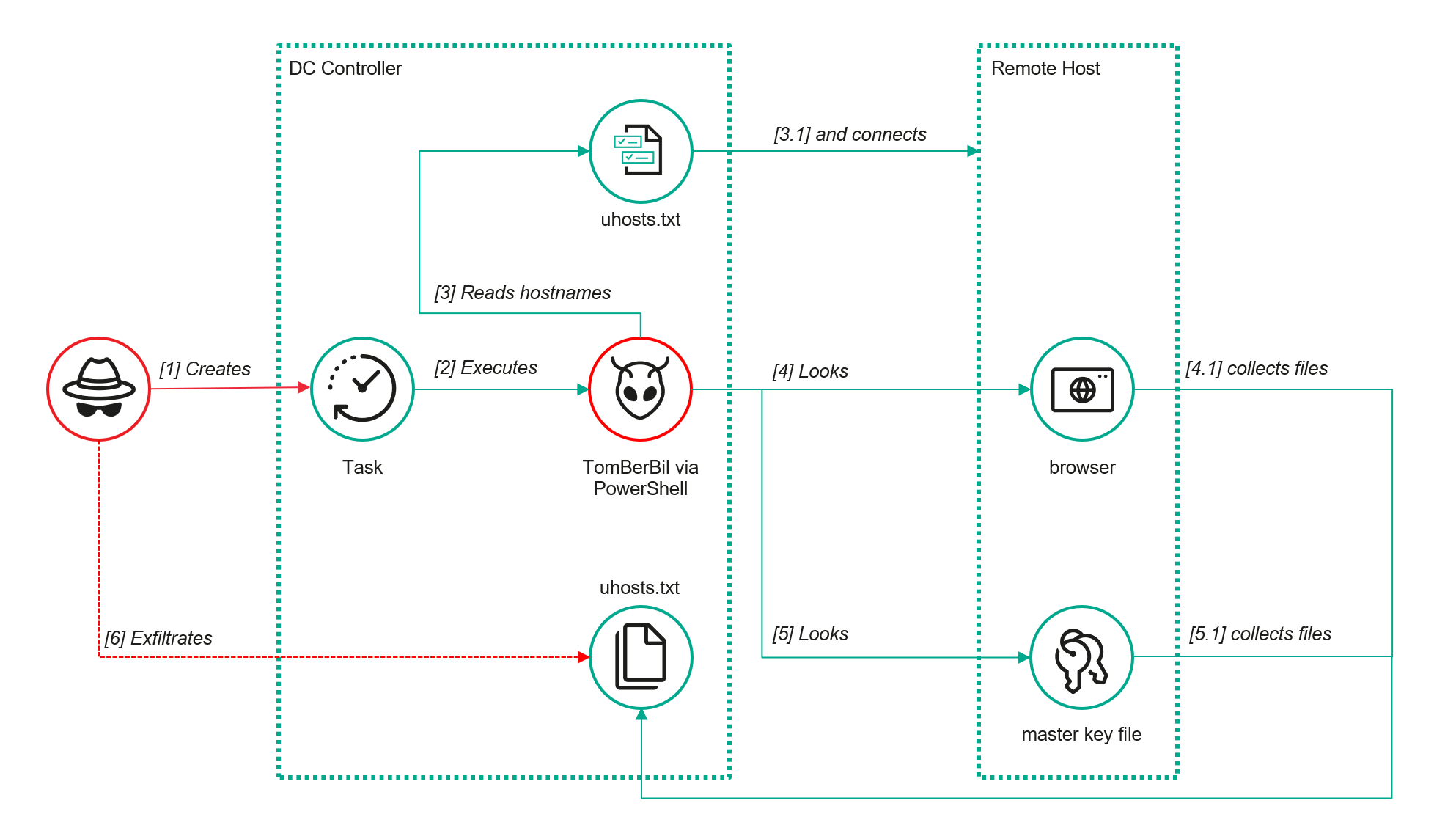
A key feature of this version is that it was executed on domain controllers on behalf of a privileged user, accessing browser files via shared network resources using the SMB protocol.
Besides supporting the Chrome and Edge browsers, the new version also added processing for Firefox browser files.
The tool was launched using a scheduled task that executed the following command line:
The script begins by creating a new local directory, which is specified in the $baseDir variable. The tool saves all data it collects into this directory.
The script defines a function named parseFile, which accepts the full file path as a parameter. It opens the C:\programdata\uhosts.txt file and reads its content line by line using .NET Framework classes, returning the result as a string array. This is how the script forms an array of host names.
For each host in the array, the script attempts to establish an SMB connection to the shared resource c$, constructing the path in the \\\c$\users\ format. If the connection is successful, the tool retrieves a list of user directories present on the remote host. If at least one directory is found, a separate folder is created for that host within the $baseDir working directory:
In the next stage, the script iterates through the user folders discovered on the remote host, skipping any folders specified in the $filter_users variable, which is defined upon launching the tool. For the remaining folders, three directories are created in the script’s working folder for collecting data from Google Chrome, Mozilla Firefox, and Microsoft Edge.
Next, the tool uses the default account to search for the following Chrome and Edge browser files on the remote host:
Login Data: a database file that contains the user’s saved logins and passwords for websites in an encrypted format
Local State: a JSON file containing the encryption key used to encrypt stored data
Cookies: a database file that stores HTTP cookies for all websites visited by the user
History: a database that stores the browser’s history
These files are copied via SMB to the local folder within the corresponding user and browser folder hierarchy. Below is a code snippet that copies the Login Data file:
The same procedure is applied to Firefox files, with the tool additionally traversing through all the user profile folders of the browser. Instead of the files described above for Chrome and Edge, the script searches for files which have names from the $firefox_files array that contain similar information. The requested files are also copied to the tool’s local folder.
The copied files are encrypted using the Data Protection API (DPAPI). The previous version of TomBerBil ran on the host and copied the user’s token. As a result, in the user’s current session DPAPI was used to decrypt the master key, and subsequently, the files. The updated server-side version of TomBerBil copies files containing the user encryption keys that are used by DPAPI. These keys, combined with the user’s SID and password, grant the attackers the ability to decrypt all the copied files locally.
With TomBerBil, the attackers automatically collected user cookies, browsing history, and saved passwords, while simultaneously copying the encryption keys needed to decrypt the browser files. The connection to the victim’s remote hosts was established via the SMB protocol, which significantly complicated the detection of the tool’s activity.
TomBerBil in PowerShell
As a rule, such tools are deployed at later stages, after the adversary has established persistence within the organization’s internal infrastructure and obtained privileged access.
Detection
To detect the implementation of this attack, it’s necessary to set up auditing for access to browser folders and to monitor network protocol connection attempts to those folders.
title: Access To Sensitive Browser Files Via Smb
id: 9ac86f68-9c01-4c9d-897a-4709256c4c7b
status: experimental
description: Detects remote access attempts to browser files containing sensitive information
author: Kaspersky
date: 2025-08-11
tags:
    - attack.credential-access
    - attack.t1555.003
logsource:
    product: windows
    service: security
detection:
    event:
        EventID: '5145'
    chromium_files:
        ShareLocalPath|endswith:
            - '\User Data\Default\History'
            - '\User Data\Default\Network\Cookies'
            - '\User Data\Default\Login Data'
            - '\User Data\Local State'
    firefox_path:
        ShareLocalPath|contains: '\AppData\Roaming\Mozilla\Firefox\Profiles'
    firefox_files:
        ShareLocalPath|endswith:
            - 'key3.db'
            - 'signons.sqlite'
            - 'key4.db'
            - 'logins.json'
    condition: event and (chromium_files or firefox_path and firefox_files)
falsepositives: Legitimate activity
level: medium
In addition, auditing for access to the folders storing the DPAPI encryption key files is also required.
title: Access To System Master Keys Via Smb
id: ba712364-cb99-4eac-a012-7fc86d040a4a
status: experimental
description: Detects remote access attempts to the Protect file, which stores DPAPI master keys
references:
    - https://www.synacktiv.com/en/publications/windows-secrets-extraction-a-summary
author: Kaspersky
date: 2025-08-11
tags:
    - attack.credential-access
    - attack.t1555
logsource:
    product: windows
    service: security
detection:
    selection:
        EventID: '5145'
        ShareLocalPath|contains: 'windows\System32\Microsoft\Protect'
    condition: selection
falsepositives: Legitimate activity
level: medium
Stealing emails from Outlook
The modified TomBerBil tool family proved ineffective at evading monitoring tools, compelling the threat actor to seek alternative methods for accessing the organization’s critical data. We discovered an attempt to gain access to corporate correspondence files in the local Outlook storage.
The Outlook application stores OST (Offline Storage Table) files for offline use. The names of these files contain the address of the mailbox being cached. Outlook uses OST files to store a local copy of data synchronized with mail servers: Microsoft Exchange, Microsoft 365, or Outlook.com. This capability allows users to work with emails, calendars, contacts, and other data offline, then synchronize changes with the server once the connection is restored.
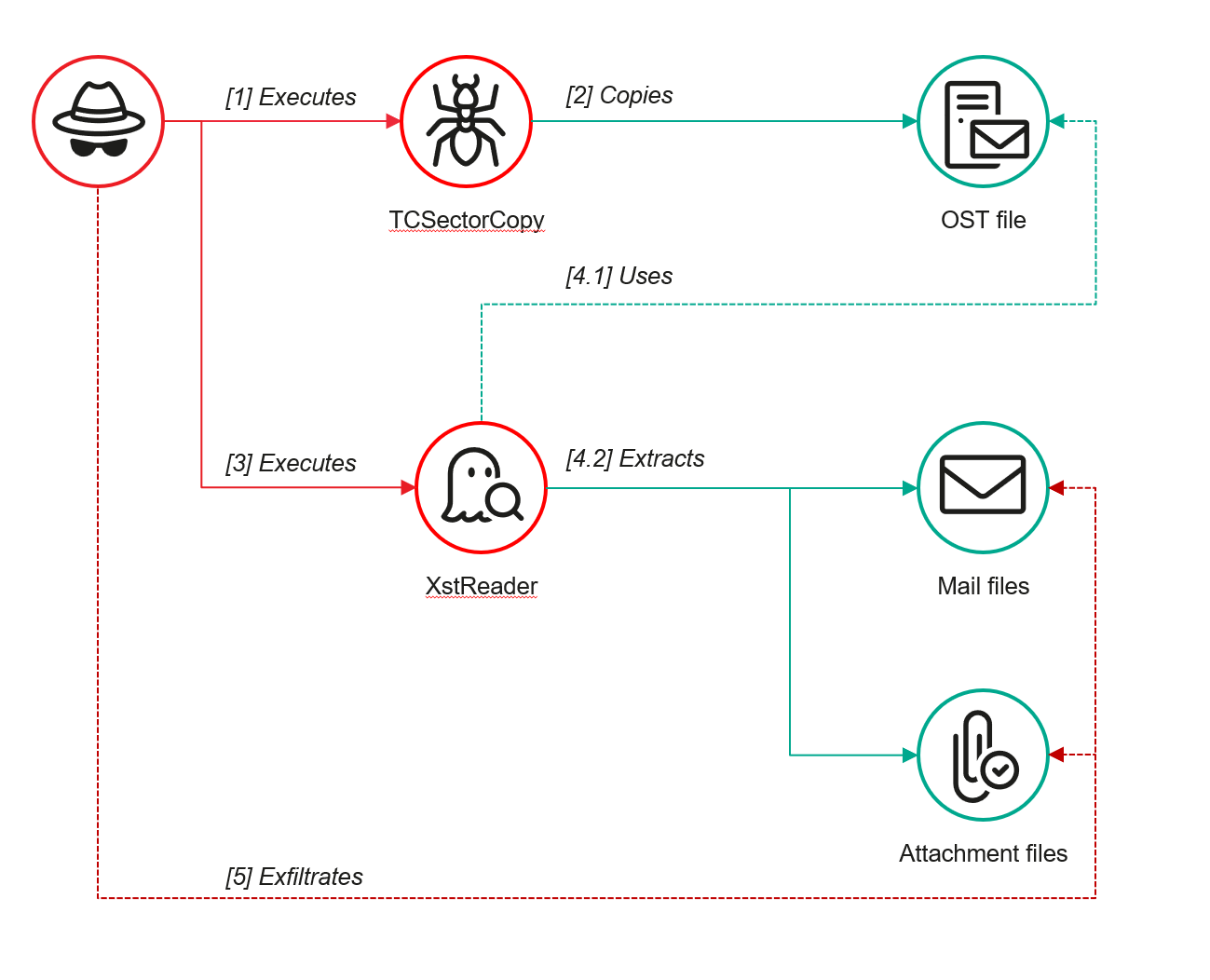
However, access to an OST file is blocked by the application while Outlook is running. To copy the file, the attackers created a specialized tool called TCSectorCopy.
TCSectorCopy
This tool is designed for block-by-block copying of files that may be inaccessible by applications or the operating system, such as files that are locked while in use.
The tool is a 32-bit PE file written in C++. After launch, it processes parameters passed via the command line: the path to the source file to be copied and the path where the result should be saved. The tool then validates that the source path is not identical to the destination path.
Validating the TCSectorCopy command line parameters
Next, the tool gathers information about the disk hosting the file to be copied: it determines the cluster size, file system type, and other parameters necessary for low-level reading.
Determining the disk’s file system type
TCSectorCopy then opens the disk as a device in read-only mode and sequentially copies the file content block by block, bypassing the standard Windows API. This allows the tool to copy even the files that are locked by the system or other applications.
The adversary uploaded this tool to target host and used it to copy user OST files:
Having obtained the OST files, the attackers processed them using a separate tool to extract the email correspondence content.
XstReader
XstReader is an open-source C# tool for viewing and exporting the content of Microsoft Outlook OST and PST files. The attackers used XstReader to export the content of the previously copied OST files.
XstReader is executed with the -e parameter and the path to the copied file. The -e parameter specifies the export of all messages and their attachments to the current folder in the HTML, RTF, and TXT formats.
XstExport.exe -e <email>@<domain>.ost2
After exporting the data from the OST file, the attackers review the list of obtained files, collect those of interest into an archive, and exfiltrate it.
Stealing data with TCSectorCopy and XstReader
Detection
To detect unauthorized access to Outlook OST files, it’s necessary to set up auditing for the %LOCALAPPDATA%\Microsoft\Outlook\ folder and monitor access events for files with the .ost extension. The Outlook process and other processes legitimately using this file must be excluded from the audit.
title: Access To Outlook Ost Files
id: 2e6c1918-08ef-4494-be45-0c7bce755dfc
status: experimental
description: Detects access to the Outlook Offline Storage Table (OST) file
author: Kaspersky
date: 2025-08-11
tags:
    - attack.collection
    - attack.t1114.001
logsource:
    product: windows
    service: security
detection:
    event:
        EventID: 4663
    outlook_path:
        ObjectName|contains: '\AppData\Local\Microsoft\Outlook\'
    ost_file:
        ObjectName|endswith: '.ost'
    condition: event and outlook_path and ost_file
falsepositives: Legitimate activity
level: low
The TCSectorCopy tool accesses the OST file via the disk device, so to detect it, it’s important to monitor events such as Event ID 9 (RawAccessRead) in Sysmon. These events indicate reading directly from the disk, bypassing the file system.
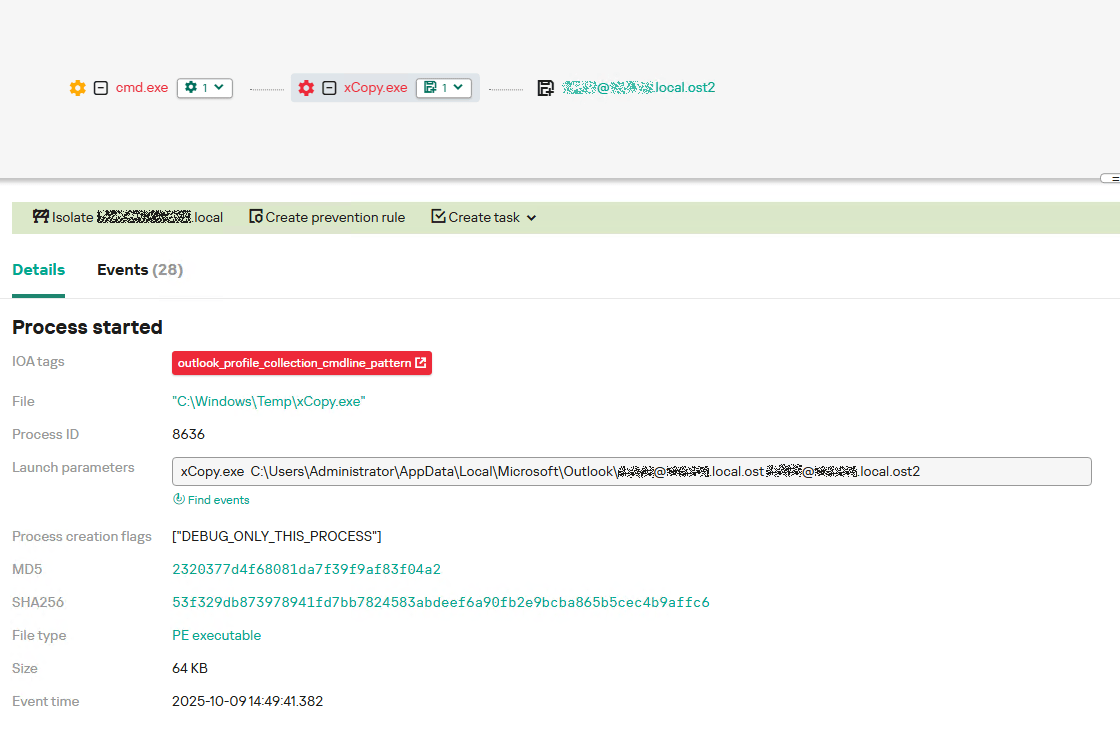
As we mentioned earlier, TCSectorCopy receives the path to the OST file via a command line. Consequently, detecting this tool’s malicious activity requires monitoring for a specific OST file naming pattern: the @ symbol and the .ost extension in the file name.
Example of detecting TCSectorCopy activity in KATA
Stealing access tokens from Outlook
Since active file collection actions on a host are easily tracked using monitoring systems, the attackers’ next step was gaining access to email outside the hosts where monitoring was being performed. Some target organizations used the Microsoft 365 cloud office suite. The attackers attempted to obtain the access token that resides in the memory of processes utilizing this cloud service.
In the OAuth 2.0 protocol, which Microsoft 365 uses for authorization, the access token is used when requesting resources from the server. In Outlook, it is specified in API requests to the cloud service to retrieve emails along with attachments. Its disadvantage is its relatively short lifespan; however, this can be enough to retrieve all emails from a mailbox while bypassing monitoring tools.
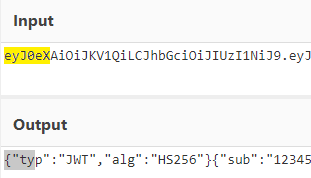
The access token is stored using the JWT (JSON Web Tokens) standard. The token content is encoded using Base64. JWT headers for Microsoft applications always specify the typ parameter with the JWT value first. This means that the first 18 characters of the encoded token will always be the same.
The attackers used SharpTokenFinder to obtain the access token from the user’s Outlook application. This tool is written in C# and designed to search for an access token in processes associated with the Microsoft 365 suite. After launch, the tool searches the system for the following processes:
“TEAMS”
“WINWORD”
“ONENOTE”
“POWERPNT”
“OUTLOOK”
“EXCEL”
“ONEDRIVE”
“SHAREPOINT”
If these processes are found, the tool attempts to open each process’s object using the OpenProcess function and dump their memory. To do this, the tool imports the MiniDumpWriteDump function from the dbghelp.dll file, which writes user mode minidump information to the specified file. The dump files are saved in the dump folder, located in the current SharpTokenFinder directory. After creating dump files for the processes, the tool searches for the following string pattern in each of them:
"eyJ0eX[a-zA-Z0-9\\._\\-]+"
This template uses the first six symbols of the encoded JWT token, which are always the same. Its structures are separated by dots. This is sufficient to find the necessary string in the process memory dump.
Example of a JWT Token
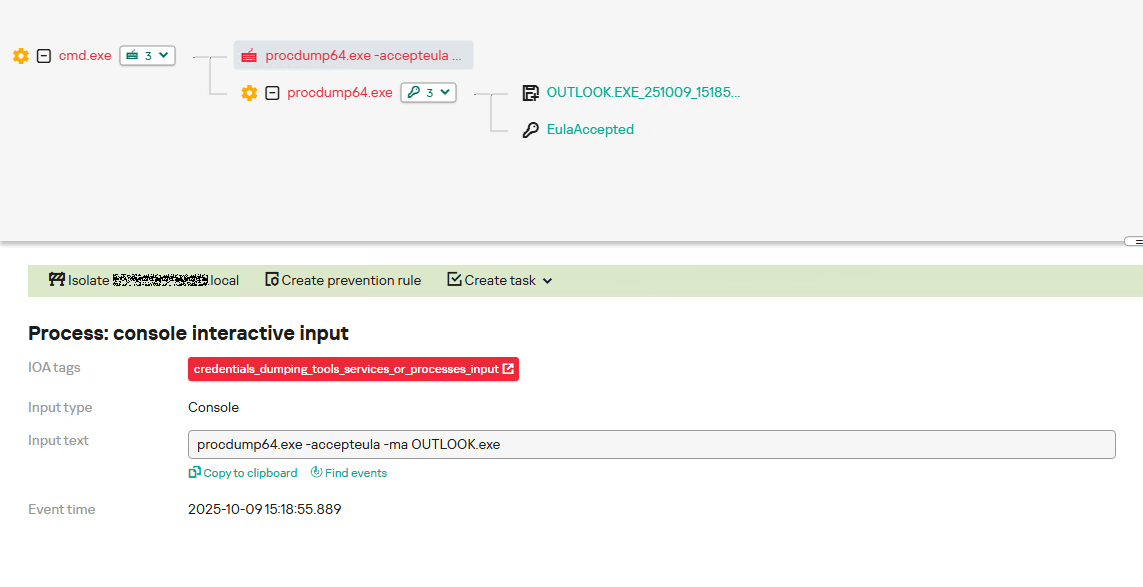
In the incident being described, the local security tools (EPP) blocked the attempt to create the OUTLOOK.exe process dump using SharpTokenFinder, so the operator used ProcDump from the Sysinternals suite for this purpose:
procdump64.exe -accepteula -ma OUTLOOK.exe
dir c:\windows\temp\OUTLOOK.EXE_<id>.dmp
c:\progra~1\winrar\rar.exe a -k -r -s -m5 -v100M %temp%\dmp.rar c:\windows\temp\OUTLOOK.EXE_<id>.dmp
Here, the operator executed ProcDump with the following parameters:
accepteula silently accepts the license agreement without displaying the agreement window.
ma indicates that a full process dump should be created.
exe is the name of the process to be dumped.
The dir command is then executed as a check to confirm that the file was created and is not zero size. Following this validation, the file is added to a dmp.rar archive using WinRAR. The attackers sent this file to their host via SMB.
Detection
To detect this technique, it’s necessary to monitor the ProcDump process command line for names belonging to Microsoft 365 application processes.
title: Dump Of Office 365 Processes Using Procdump
id: 5ce97d80-c943-4ac7-8caf-92bb99e90e90
status: experimental
description: Detects Office 365 process names in the command line of the procdump tool
author: kaspersky
date: 2025-08-11
tags:
    - attack.lateral-movement
    - attack.defense-evasion
    - attack.t1550.001
logsource:
  category: process_creation
  product: windows
detection:
    selection:
        Product: 'ProcDump'
        CommandLine|contains:
            - 'teams'
            - 'winword'
            - 'onenote'
            - 'powerpnt'
            - 'outlook'
            - 'excel'
            - 'onedrive'
            - 'sharepoint'
    condition: selection
falsepositives: Legitimate activity
level: high
Below is an example of the ProcDump tool from the Sysinternals package used to dump the Outlook process memory, detected by Kaspersky Anti Targeted Attack (KATA).
Example of Outlook process dump detection in KATA
Takeaways
The incidents reviewed in this article show that ToddyCat APT is constantly evolving its techniques and seeking new ways to conceal its activity aimed at gaining access to corporate correspondence within compromised infrastructure. Most of the techniques described here can be successfully detected. For timely identification of these techniques, we recommend using both host-based EPP solutions, such as Kaspersky Endpoint Security for Business, and complex threat monitoring systems, such as Kaspersky Anti Targeted Attack. For comprehensive, up-to-date information on threats and corresponding detection rules, we recommend Kaspersky Threat Intelligence.
This bundle gives you lifetime access to 2019 versions of Excel, Word, Outlook, PowerPoint, Access, Publisher, and OneNote with no subscription or license fees.
This bundle gives you lifetime access to 2019 versions of Excel, Word, Outlook, PowerPoint, Access, Publisher, and OneNote with no subscription or license fees.
Vulnerability registrations in Q2 2025 proved to be quite dynamic. Vulnerabilities that were published impact the security of nearly every computer subsystem: UEFI, drivers, operating systems, browsers, as well as user and web applications. Based on our analysis, threat actors continue to leverage vulnerabilities in real-world attacks as a means of gaining access to user systems, just like in previous periods.
This report also describes known vulnerabilities used with popular C2 frameworks during the first half of 2025.
Statistics on registered vulnerabilities
This section contains statistics on assigned CVE IDs. The data is taken from cve.org.
Let’s look at the number of CVEs registered each month over the last five years.
Total vulnerabilities published each month from 2021 to 2025 (download)
This chart shows the total volume of vulnerabilities that go through the publication process. The number of registered vulnerabilities is clearly growing year-on-year, both as a total and for each individual month. For example, around 2,600 vulnerabilities were registered as of the beginning of 2024, whereas in January 2025, the figure exceeded 4,000. This upward trend was observed every month except May 2025. However, it’s worth noting that the registry may include vulnerabilities with identifiers from previous years; for instance, a vulnerability labeled CVE-2024-N might be published in 2025.
We also examined the number of vulnerabilities assigned a “Critical” severity level (CVSS > 8.9) during the same period.
Total number of critical vulnerabilities published each month from 2021 to 2025 (download)
The data for the first two quarters of 2025 shows a significant increase when compared to previous years. Unfortunately, it’s impossible to definitively state that the total number of registered critical vulnerabilities is growing, as some security issues aren’t assigned a CVSS score. However, we’re seeing that critical vulnerabilities are increasingly receiving detailed descriptions and publications – something that should benefit the overall state of software security.
Exploitation statistics
This section presents statistics on vulnerability exploitation for Q2 2025. The data draws on open sources and our telemetry.
Windows and Linux vulnerability exploitation
In Q2 2025, as before, the most common exploits targeted vulnerable Microsoft Office products that contained unpatched security flaws.
Kaspersky solutions detected the most exploits on the Windows platform for the following vulnerabilities:
CVE-2018-0802: a remote code execution vulnerability in the Equation Editor component
CVE-2017-11882: another remote code execution vulnerability, also affecting Equation Editor
CVE-2017-0199: a vulnerability in Microsoft Office and WordPad allowing an attacker to gain control over the system
These vulnerabilities are traditionally exploited by threat actors more often than others, as we’ve detailed in previous reports. These are followed by equally popular issues in WinRAR and exploits for stealing NetNTLM credentials in the Windows operating system:
CVE-2023-38831: a vulnerability in WinRAR involving improper handling of files within archive contents
CVE-2025-24071: a Windows File Explorer vulnerability that allows for the retrieval of NetNTLM credentials when opening specific file types (.library-ms)
CVE-2024-35250: a vulnerability in the ks.sys driver that allows arbitrary code execution
Dynamics of the number of Windows users encountering exploits, Q1 2024 — Q2 2025. The number of users who encountered exploits in Q1 2024 is taken as 100% (download)
All of the vulnerabilities listed above can be used for both initial access to vulnerable systems and privilege escalation. We recommend promptly installing updates for the relevant software.
For the Linux operating system, exploits for the following vulnerabilities were detected most frequently:
CVE-2022-0847, also known as Dirty Pipe: a widespread vulnerability that allows privilege escalation and enables attackers to take control of running applications
CVE-2019-13272: a vulnerability caused by improper handling of privilege inheritance, which can be exploited to achieve privilege escalation
CVE-2021-22555: a heap overflow vulnerability in the Netfilter kernel subsystem. The widespread exploitation of this vulnerability is due to the fact that it employs popular memory modification techniques: manipulating msg_msg primitives, which leads to a Use-After-Free security flaw.
Dynamics of the number of Linux users encountering exploits, Q1 2024 — Q2 2025. The number of users who encountered exploits in Q1 2024 is taken as 100% (download)
It’s critically important to install security patches for the Linux operating system, as it’s attracting more and more attention from threat actors each year – primarily due to the growing number of user devices running Linux.
Most common published exploits
In Q2 2025, we observed that the distribution of published exploits by software type continued the trends from last year. Exploits targeting operating system vulnerabilities continue to predominate over those targeting other software types that we track as part of our monitoring of public research, news, and PoCs.
Distribution of published exploits by platform, Q1 2025 (download)
Distribution of published exploits by platform, Q2 2025 (download)
In Q2, no public information about new exploits for Microsoft Office systems appeared.
Vulnerability exploitation in APT attacks
We analyzed data on vulnerabilities that were exploited in APT attacks during Q2 2025. The following rankings are informed by our telemetry, research, and open-source data.
TOP 10 vulnerabilities exploited in APT attacks, Q2 2025 (download)
The Q2 TOP 10 list primarily draws from the large number of incidents described in public sources. It includes both new security issues exploited in zero-day attacks and vulnerabilities that have been known for quite some time. The most frequently exploited vulnerable software includes remote access and document editing tools, as well as logging subsystems. Interestingly, low-code/no-code development tools were at the top of the list, and a vulnerability in a framework for creating AI-powered applications appeared in the TOP 10. This suggests that the evolution of software development technology is attracting the attention of attackers who exploit vulnerabilities in new and increasingly popular tools. It’s also noteworthy that the web vulnerabilities were found not in AI-generated code but in the code that supported the AI framework itself.
Judging by the vulnerabilities identified, the attackers’ primary goals were to gain system access and escalate privileges.
C2 frameworks
In this section, we’ll look at the most popular C2 frameworks used by threat actors and analyze the vulnerabilities whose exploits interacted with C2 agents in APT attacks.
The chart below shows the frequency of known C2 framework usage in attacks on users during the first half of 2025, according to open sources.
TOP 13 C2 frameworks used by APT groups to compromise user systems in Q1–Q2 2025 (download)
The four most frequently used frameworks – Sliver, Metasploit, Havoc, and Brute Ratel C4 – can work with exploits “out of the box” because their agents provide a variety of post-compromise capabilities. These capabilities include reconnaissance, command execution, and maintaining C2 communication. It should be noted that the default implementation of Metasploit has built-in support for exploits that attackers use for initial access. The other three frameworks, in their standard configurations, only support privilege escalation and persistence exploits in a compromised system and require additional customization tailored to the attackers’ objectives. The remaining tools don’t work with exploits directly and were modified for specific exploits in real-world attacks. We can therefore conclude that attackers are increasingly customizing their C2 agents to automate malicious activities and hinder detection.
After reviewing open sources and analyzing malicious C2 agent samples that contained exploits, we found that the following vulnerabilities were used in APT attacks involving the C2 frameworks mentioned above:
CVE-2025-31324: a vulnerability in SAP NetWeaver Visual Composer Metadata Uploader that allows for remote code execution and has a CVSS score of 10.0
CVE-2024-1709: a vulnerability in ConnectWise ScreenConnect 23.9.7 that can lead to authentication bypass, also with a CVSS score of 10.0
CVE-2024-31839: a cross-site scripting vulnerability in the CHAOS v5.0.1 remote administration tool, leading to privilege escalation
CVE-2024-30850: an arbitrary code execution vulnerability in CHAOS v5.0.1 that allows for authentication bypass
CVE-2025-33053: a vulnerability caused by improper handling of working directory parameters for LNK files in Windows, leading to remote code execution
Interestingly, most of the data about attacks on systems is lost by the time an investigation begins. However, the list of exploited vulnerabilities reveals various approaches to the vulnerability–C2 combination, offering insight into the attack’s progression and helping identify the initial access vector. By analyzing the exploited vulnerabilities, incident investigations can determine that, in some cases, attacks unfold immediately upon exploit execution, while in others, attackers first obtain credentials or system access and only then deploy command and control.
Interesting vulnerabilities
This section covers the most noteworthy vulnerabilities published in Q2 2025.
CVE-2025-32433: vulnerability in the SSH server, part of the Erlang/OTP framework
This remote code execution vulnerability can be considered quite straightforward. The attacker needs to send a command execution request, and the server will run it without performing any checks – even if the user is unauthenticated. The vulnerability occurs during the processing of messages transmitted via the SSH protocol when using packages for Erlang/OTP.
CVE-2025-6218: directory traversal vulnerability in WinRAR
This vulnerability is similar to the well-known CVE-2023-38831: both target WinRAR and can be exploited through user interaction with the GUI. Vulnerabilities involving archives aren’t new and are typically exploited in web applications, which often use archives as the primary format for data transfer. These archives are processed by web application libraries that may lack checks for extraction limits. Typical scenarios for exploiting such vulnerabilities include replacing standard operating system configurations and setting additional values to launch existing applications. This can lead to the execution of malicious commands, either with a delay or upon the next OS boot or application startup.
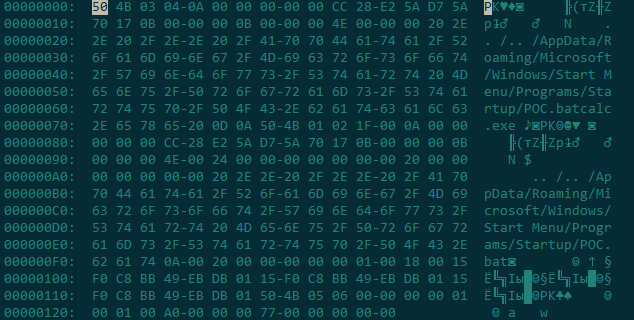
To exploit such vulnerabilities, attackers need to determine the location of the directory to modify, as each system has a unique file layout. Additionally, the process is complicated by the need to select the correct characters when specifying the extraction path. By using specific combinations of special characters, archive extraction outside of the working directory can bypass security mechanisms, which is the essence of CVE-2025-6218. A PoC for this vulnerability appeared rather quickly.
Hex dump of the PoC file for CVE-2025-6218
As seen in the file dump, the archive extraction path is altered not due to its complex structure, but by using a relative path without specifying a drive letter. As we mentioned above, a custom file organization on the system makes such an exploit unstable. This means attackers will have to use more sophisticated social engineering methods to attack a user.
CVE-2025-3052: insecure data access vulnerability in NVRAM, allowing bypass of UEFI signature checks
UEFI vulnerabilities almost always aim to disable the Secure Boot protocol, which is designed to protect the operating system’s boot process from rootkits and bootkits. CVE-2025-3052 is no exception.
Researchers were able to find a set of vulnerable UEFI applications in which a function located at offset 0xf7a0 uses the contents of a global non-volatile random-access memory (NVRAM) variable without validation. The vulnerable function incorrectly processes and can modify the data specified in the variable. This allows an attacker to overwrite Secure Boot settings and load any modules into the system – even those that are unsigned and haven’t been validated.
CVE-2025-49113: insecure deserialization vulnerability in Roundcube Webmail
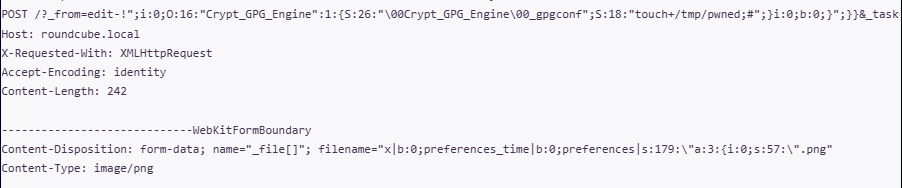
This vulnerability highlights a classic software problem: the insecure handling of serialized objects. It can only be exploited after successful authentication, and the exploit is possible during an active user session. To carry out the attack, a malicious actor must first obtain a legitimate account and then use it to access the vulnerable code, which lies in the lack of validation for the _from parameter.
Post-authentication exploitation is quite simple: a serialized PHP object in text format is placed in the vulnerable parameter for the attack. It’s worth noting that an object injected in this way is easy to restore for subsequent analysis. For instance, in a PoC published online, the payload creates a file named “pwned” in /tmp.
CVE-2025-1533: stack overflow vulnerability in the AsIO3.sys driver
This vulnerability was exploitable due to an error in the design of kernel pool parameters. When implementing access rights checks for the AsIO3.sys driver, developers incorrectly calculated the amount of memory needed to store the path to the file requesting access to the driver. If a path longer than 256 characters is created, the system will crash with a “blue screen of death” (BSOD). However, in modern versions of NTFS, the path length limit is not 256 but 32,767 characters. This vulnerability demonstrates the importance of a thorough study of documentation: it not only helps to clearly understand how a particular Windows subsystem operates but also impacts development efficiency.
Conclusion and advice
The number of vulnerabilities continues to grow in 2025. In Q2, we observed a positive trend in the registration of new CVE IDs. To protect systems, it’s critical to regularly prioritize the patching of known vulnerabilities and use software capable of mitigating post-exploitation damage. Furthermore, one way to address the consequences of exploitation is to find and neutralize C2 framework agents that attackers may use on a compromised system.
To secure infrastructure, it’s necessary to continuously monitor its state, particularly by ensuring thorough perimeter monitoring.
Beyond basic protection, corporate infrastructures need to implement a flexible and effective system that allows for the rapid installation of security patches, as well as the configuration and automation of patch management. It’s also important to constantly track active threats and proactively implement measures to strengthen security, including mitigating risks associated with vulnerabilities. Our Kaspersky Next product line helps to detect and analyze vulnerabilities in the infrastructure in a timely manner for companies of all sizes. Moreover, these modern comprehensive solutions also combine the collection and analysis of security event data from all sources, incident response scenarios, an up-to-date database of cyberattacks, and training programs to improve the level of employees’ cybersecurity awareness.
Whether you're starting a new business venture and need Microsoft Office's help or you just want to get better organized in your personal life, it's a good time to take advantage of this deal.
Whether you're starting a new business venture and need Microsoft Office's help or you just want to get better organized in your personal life, it's a good time to take advantage of this deal.

 Login
Login