 Login
LoginAmazon’s new Kindle Scribe and Kindle Scribe Colorsoft launch on December 10
The new Kindle Scribe has a larger 11-inch glare-free display, is just 5.4 mm thick, and weighs only 400 g. It’s also 40% faster when writing or turning pages.

So you buy a Kindle and you think to yourself, "I sure would like to turn the pages from way over here, surely there's a solution for that?" Well, to my personal surprise, I have recently learned both that people who want to turn eReader pages at a distance exist (it makes sense when you think about it) and that Kindles in particular have no elegant way of achieving this goal. Hence, the existence of weird and wacky "Kindle page turners."
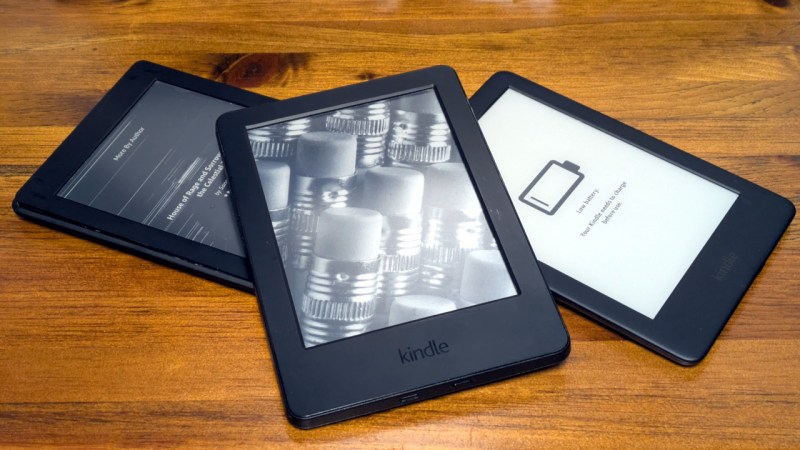
In the closing hours of JawnCon 0x2, I was making a final pass of the “Free Stuff for Nerds” table when I noticed a forlorn Kindle that had a piece of paper taped to it. The hand-written note explained that the device was in shambles — not only was its e-ink display visibly broken, but the reader was stuck in some kind of endless boot loop. I might have left it there if it wasn’t for the closing remark: “Have Fun!”
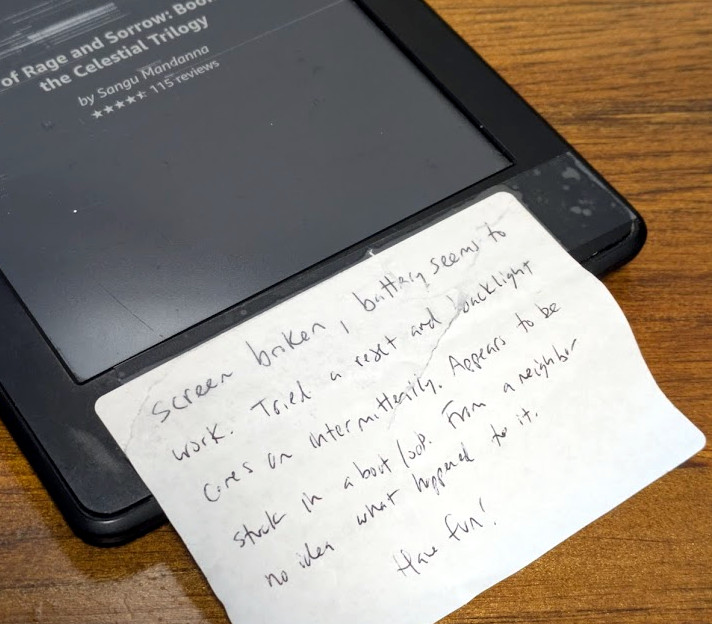 Truth is, the last thing I needed was another Kindle. My family has already managed to build up a collection of the things. But taking a broken one apart and attempting to figure out what was wrong with it did seem like it would be kind of fun, as I’d never really had the opportunity to dig into one before. So I brought it home and promptly forgot about it as Supercon was only a few weeks away and there was plenty to keep me occupied.
The following isn’t really a story about fixing a Kindle, although it might seem like it on the surface. It’s more about the experience of working on the device, and the incredible hacking potential of these unassuming gadgets. Whether you’ve got a clear goal in mind, or just want to get your hands dirty in the world of hardware hacking, you could do far worse than picking a couple of busted Kindles up for cheap on eBay.
If there’s a singular takeaway, it’s that the world’s most popular e-reader just so happens to double as a cheap and impressively capable embedded Linux development environment for anyone who’s willing to crack open the case.
We start with what’s essentially Hardware Hacking 101: the hidden serial debug port. It’s the sort of thing you learn to look for when taking apart a new gadget, and unsurprisingly, it’s also at the heart of Kindle hacking. While there’s plenty of software modifications you can do depending on the age and version of your particular Kindle, opening up the case and tapping into the serial port is always the most direct way to gain access to the system.
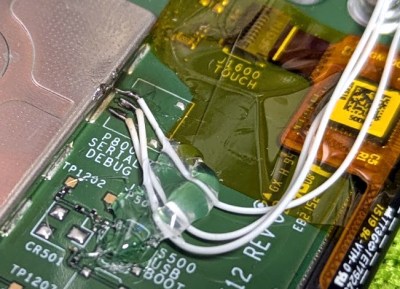
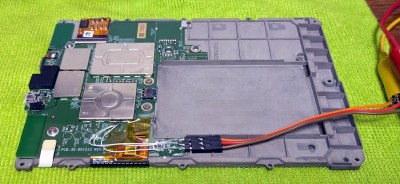
From my research, every Kindle (with the possible exception of the very latest models from the 2020s) have an unpopulated serial port on the board. In the case of this Kindle Paperwhite 2 from 2013, it’s even labeled. I simply soldered on some jumper wires and ran them out to a pin header to make connecting to it a little less fiddly. The only thing to watch out for is the voltage; it seems that the serial port on the majority of Kindles is 1.8 V, and connecting up a higher voltage USB-serial adapter without a level shifter could release the Magic Smoke.

With the hardware connected and my favorite serial communications tool running, it was easy to see what ailed this particular Kindle. As evidenced by the final few lines of the kernel messages, a failure of one of the voltage regulators in the MAX77696 — a power management IC designed specifically for e-ink readers — was preventing the driver module from loading fully. This in turn was triggering a reboot, presumably because some sort of watchdog routine was in place to bail out if any critical hardware issues were detected.
Coming from the “normal” Linux world, the solution seemed easy enough. Since the screen was toast anyway, all I needed to do to get the Kindle booting was to prevent the kernel module from loading. That way I could at least use it for something, perhaps an energy efficient minimalist server.
But according to the MAX77696 datasheet, the chip was responsible for quite a bit more than simply driving the e-ink panel. If I pulled the kernel module entirely, there was a good chance I’d also lose features like the real-time clock and the ability to read the battery voltage as well. So I decided to change tactics: rather than keeping the driver from loading, I’d take out the watchdog that was forcing the system to reboot. But where was it?
Amazon makes it easy to manually download the latest firmware for each member of the Kindle family, and the aptly named KindleTool lets you manipulate them. In this case I used the extract function to pull out the root filesystem image, which I could then locally mount as a basic EXT3 volume.
That was refreshingly straightforward, but unfortunately didn’t get me where I needed to go. Using grep to search all the files within the filesystem for the string “failed to load eink driver” showed no hits. If the watchdog wasn’t in the root filesystem, then where was it?

Unpacking the firmware update with KindleTool also got me the kernel image, and running Binwalk against it showed there was a compressed filesystem at 0x466C. I reasoned this must be an initramfs — essentially a minimal Linux system that lives in RAM and gives the kernel a place to work as it brings up the rest of the system. If the system has some self-check capability, it’s reasonable to assume that’s where it lives.

After drilling down a few times with Binwalk’s extract function, I was able to get to the contents of the initramfs. Sure enough, another search for the error message revealed our sentinel: /bin/recovery-util.
I had considered trying to simply remove the recovery-util program from the kernel image, but since I wasn’t 100% sure how the whole watchdog system functioned, there was no guarantee that would have worked without more trial and error. So, emboldened by how well this was all going for me so far, I took the nuclear option and decided to rebuild the kernel with my own initramfs.
It’s here that the Kindle software environment, and the community around it, really started to shine. Once again, Amazon made it ridiculously easy to get the source code for the exact firmware I was working with, and the community provided an actively maintained toolchain to build it with. A little more searching even pulled up some pre-compiled builds that were ready to use.
Actually building the kernel for the Kindle was essentially the same process as doing it on my desktop computer, with the notable addition of supplying the location of the cross compiler into each make command. But if I ever got off track, there were plenty of write-ups online to reference. I even found one that went over building a custom initramfs with BusyBox that doesn’t include any of Amazon’s programs.

But perhaps the best part was that, once I had compiled Amazon’s modified kernel and built my initramfs, installing it on the Kindle was as simple as using a modified version of Android’s fastboot command. There were no cryptographic hoops to jump through, you just give it the new kernel and away it went. It’s my understanding that newer Kindles might not be so understanding, but with at least the hardware of this vintage, there’s nothing stopping you from doing whatever you want.
With the source code, tools, and knowledge floating around out there, I was able to build my own kernel and initramfs that lets me boot into a full Linux environment on what was previously a non-functional Kindle. There are a few things I haven’t gotten to work yet, but I believe that’s largely because I’m still using the root filesystem provided by Amazon.
 Now that I know how easy it is to work with Linux on the Kindle, I’m looking to push further and put together my own stripped-down environment without any of Amazon’s frameworks installed. Given how ridiculously cheap early Kindles are on the second hand market — especially if they have a busted screen — there are all sorts of tasks that I could see them performing if I had a solid base to build on.
Make no mistake, I’m greatly appreciative of the fact that we now have mature single-board computers like the Raspberry Pi available for a reasonable cost. But taking what’s essentially consumer e-waste and turning it into a useful platform for learning and experimentation is the true hacker way. So whether you’ve got a Kindle collecting dust somewhere at home, or end up grabbing a few off of eBay for a song, I invite you to bust out the USB-serial adapter and start exploring.
