The European Commission is launching an antitrust investigation into Meta's move to ban other AI companies from using WhatsApp's business tools to offer their own AI chatbots to users.
Today, we’re exploring mobile forensics, a field that matters deeply in modern crime investigations. Think about how much our phones know about us. They carry our contacts, messages, locations, and app history in many ways. They are a living log of our daily lives. Because they travel with us everywhere, they can be a goldmine of evidence when something serious happens, like a crime. In a murder investigation, for instance, a suspect’s or a victim’s phone can help us answer critical questions: Who were they in touch with right before the crime? Where did they go? What were they doing? What kind of money dealings were they involved in? All of this makes mobile forensics powerful for investigators. As digital forensic specialists, we use that data to reconstruct timelines, detect motives, and understand relationships. Because of this, even a seemingly small app on a phone might have huge significance. For example, financial trading apps may reveal risky behavior or debt. Chat apps might contain confessions or threats. Location logs might show the victim visiting unusual places.
The Difference Between Android and iOS Forensics
When we do mobile forensics, we usually see Android and iOS devices. These two operating systems are quite different under the hood, and that affects how we work with them. On Android, there’s generally more openness. The file system for many devices is more accessible, letting us examine data stored in app directories, caches, logs, and more. Because Android is so widespread and also fragmented with many manufacturers and versions, the data we can access depends a lot on the model and version.
On iOS, things are tighter. Apple uses its own file system (APFS), and there’s strong encryption, often backed by secure hardware. That means extracting data can be more challenging. Because of this, forensic tools must be very sophisticated to handle iOS devices.
When it comes to which has more usable data, Android often gives us more raw artifacts because of its flexibility. But iOS can also be very rich, especially when data is backed up to iCloud or when we can legally access the device in powerful ways.
The Tools For the Job
One of the most powerful tools is Cellebrite, which is used by law enforcement and digital forensic labs. Cellebrite’s tools are capable of extracting data from both Android and iOS devices, sometimes even from locked devices. But the ability to extract depends a lot on the device model, its security patch level, and how encrypted it is.
There’s an interesting twist when it comes to GrapheneOS, which is a very security-focused version of Android. According to reports, Cellebrite tools struggle more with GrapheneOS, especially on devices updated after 2022. In some cases, they may be able to do a “consent-based” extraction (meaning the phone has to be unlocked by the user), but they can’t fully bypass the security on a fully patched GrapheneOS phone. Because of that, from a security perspective, users are strongly encouraged to keep their firmware and operating system updated. Regular updates close vulnerabilities. Also, using strong passcodes, enabling encryption, and being careful about where sensitive data is stored can make a real difference in protecting personal data.
Our Case: Investigating a Murder Using an Android Phone
Now, let’s turn to our case. We are in the middle of a murder investigation, and we’ve managed to secure the victim’s Android phone. After talking with witnesses and people who were close to the victim, we believe this phone holds critical evidence. To analyze all of that, we are using ALEAPP, a forensic tool made specifically for parsing Android data.
ALEAPP and How It Works
ALEAPP stands for Android Logs, Events, And Protobuf Parser. It’s an open-source tool maintained by the forensic community. Basically, ALEAPP allows us to take the extracted data from an Android phone, whether it’s a logical extraction, a TAR or ZIP file, or a file-system dump and turn that raw data into a human-readable, well-organized report. ALEAPP can run through a graphical interface, which is very friendly and visual, or via command line, depending on how you prefer to work. As it processes data, it goes through different modules for things like call logs, SMS, app usage, accounts, Wi-Fi events, and more. In the end, it outputs a report, so you can easily explore and navigate all the findings.
We started by examining the internal storage of the Android device, especially the /data folder. This is where apps keep their private data, caches, and account information. Then, we prepared a separate place on our investigation workstation, a folder called output, where ALEAPP would save its processed data.
Once ALEAPP was ready, we launched it and pointed it to the extracted directories. We left all its parsing modules turned on so we wouldn’t miss any important artifact. We clicked “Process,” and depending on the size of the extracted data, we waited for a few minutes while ALEAPP parsed everything.
When the processing was done, a new folder appeared inside our output directory. In that folder, there was a file called index.html, that’s our main report. We opened it with a browser and the GUI showed us different categories. The interface is clean and intuitive, so even someone not deeply familiar with command-line tools can navigate it.
Evidence That Stood Out
One of the first things that caught our attention was a trading app. ALEAPP showed an installed application named OlympTrade. A quick web search confirmed that OlympTrade is a real online trading platform. That fits with what witnesses told us. The victim was involved in trading, possibly borrowing or investing money. We also noted a hash value for the app in our report, which helps prove the data’s integrity. This means we can be more confident that what we saw hasn’t been tampered with.
Next, we turned to text messages. According to the victim’s best friend’s testimony, the victim avoided some calls and said he owed a lot of money. When we checked SMS data in ALEAPP, we found a thread where the victim indeed owed $25,000 USD to someone.
We looked up the number in the contacts list, and it was saved under the name John Oberlander. That makes John an important person of interest in this investigation.
Then, we dove into location data. The victim’s family said that on September 20, 2023, he left his home without saying where he was going. In ALEAPP’s “Recent Activity” section, which tracks events like Wi-Fi connections, GPS logs, and other background activity, we saw evidence placing him at The Nile Ritz-Carlton in Cairo, Egypt. This is significant. A 5-star hotel, which could have security footage, check-in records, or payment logs. Investigators would almost certainly reach out to the hotel to reconstruct his stay.
The detective pressed on with his investigation and spoke with the hotel staff, hoping to fill in more of the victim’s final days. The employees confirmed that the victim had booked a room for ten days and was supposed to take a flight afterward. Naturally, the investigator wondered whether the victim had saved any ticket information on the phone, since many people store their travel plans digitally nowadays. Even though no tickets turned up in the phone’s files, the search did reveal something entirely different, and potentially much more important. We looked at Discord, since the app appeared in the list of installed applications. Discord logs can reveal private chats, plans, and sometimes illicit behavior. In this case, we saw a conversation indicating that the victim changed his travel plans. He postponed a flight to October 1st, according to the chat.
Later, he agreed to meet someone in person at a very specific place. It was the Fountains of Bellagio in Las Vegas. That detail could tie into motive or meetings related to the crime.
What Happens Next
At this stage, we’ve collected and parsed digital evidence, but our work is far from over. Now, we need to connect the phone-based data to the real world. That means requesting more information from visited places, checking for possible boarding or ticket purchases, and interviewing people named in the phone, like John Oberlander, or the person from Discord.
We might also want to validate financial trail through the trading platform (if we can access it legally), bank statements, or payment records. And importantly, we should search for other devices or backups. Maybe the victim had cloud backups, like Google Drive, or other devices that shed more light.
Reconstructed Timeline
The victim was heavily involved in trading and apparently owed $25,000 USD to John Oberlander. On September 20, 2023, he left his residence without telling anyone where he was headed. The phone’s location data places him later that day at The Nile Ritz-Carlton in Cairo, suggesting he stayed there. Sometime afterward, according to Discord chats, he changed his travel plans and his flight was rescheduled for October 1. During these chats, he arranged a meeting with someone at the Fountains of Bellagio in Las Vegas.
Summary
Mobile forensics is a deeply powerful tool when investigating crimes. A single smartphone can hold evidence that helps reconstruct what happened, when, and with whom. Android devices often offer more raw data because of their openness, while iOS devices pose different challenges due to their strong encryption. Tools like ALEAPP let us parse all of that data into meaningful and structured reports.
In the case we’re studying, the victim’s phone has offered us insights into his financial troubles, his social connections, his movements, and his plans. But digital evidence is only one piece. To solve a crime, we must combine what we learn from devices with interviews, external records, and careful collaboration with other investigators.
Our team provides professional mobile forensics services designed to support individuals, organizations, and legal professionals who need clear, reliable answers grounded in technical expertise. We also offer a comprehensive digital forensics course for those who want to build their own investigative skills and understand how evidence is recovered, analyzed, and preserved. And if you feel that your safety or your life may be at risk, reach out immediately. Whether you need guidance, assistance, or a deeper understanding of the digital traces surrounding your case, we are here to help.
Check out our Mobile Forensics training for more in-depth training
Welcome back, aspiring digital forensic investigators!
The world of cybercrime continues to grow every year, and attackers constantly discover new opportunities and techniques to break into systems. One of the most dangerous and well-organized ransomware groups in recent years was Conti. Conti operated almost like a real company, with dedicated teams for developing malware, gaining network access, negotiating with victims, and even providing “customer support” for payments. The group targeted governments, hospitals, corporations, and many other high-value organizations. Their attacks included encrypting systems, stealing data, and demanding extremely high ransom payments.
For investigators, Conti became an important case study because their operations left behind a wide range of forensic evidence from custom malware samples to fast lateral movement and large-scale data theft. Even though the group officially shut down after their internal chats were leaked, many of their operators, tools, and techniques continued to appear in later attacks. This means Conti’s methods still influence modern ransomware operations which makes it a valid topic for forensic investigators.
Today, we are going to look at a ransomware incident involving Conti malware and analyze it with Splunk to understand how an Exchange server was compromised and what actions the attackers performed once inside.
Splunk
Splunk is a platform that collects and analyzes large amounts of machine data, such as logs from servers, applications, and security tools. It turns this raw information into searchable events, graphs, and alerts that help teams understand what is happening across their systems in real time. Companies mainly use Splunk for monitoring, security operations, and troubleshooting issues. Digital forensics teams also use Splunk because it can quickly pull together evidence from many sources and show patterns that would take much longer to find manually.
Time Filter
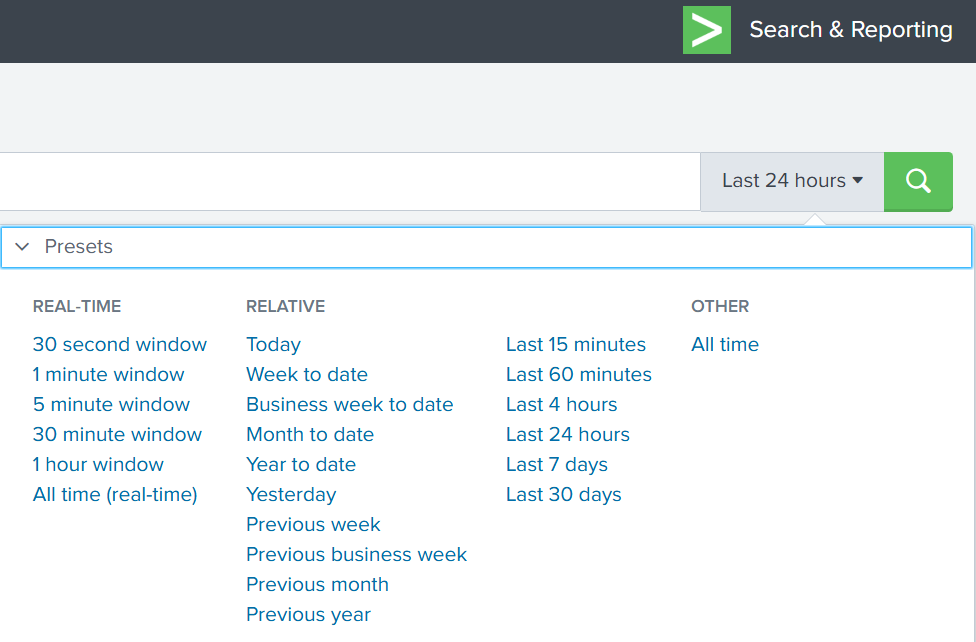
Splunk’s default time range is the last 24 hours. However, when investigating incidents, especially ransomware, you often need a much wider view. Changing the filter to “All time” helps reveal older activity that may be connected to the attack. Many ransomware operations begin weeks or even months before the final encryption stage. Keep in mind that searching all logs can be heavy on large environments, but in our case this wider view is necessary.
Index
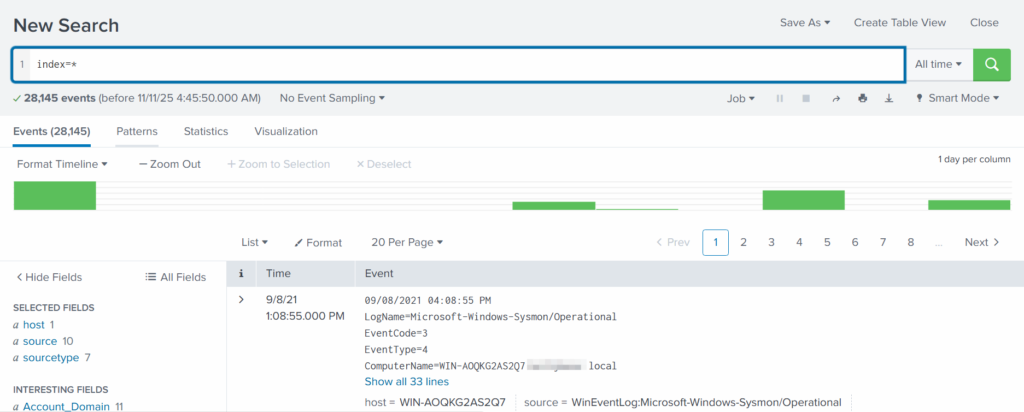
An index in Splunk is like a storage folder where logs of a particular type are placed. For example, Windows Event Logs may go into one index, firewall logs into another, and antivirus logs into a third. When you specify an index in your search, you tell Splunk exactly where to look. But since we are investigating a ransomware incident, we want to search through every available index:
index=*
This ensures that nothing is missed and all logs across the environment are visible to us.
Fields
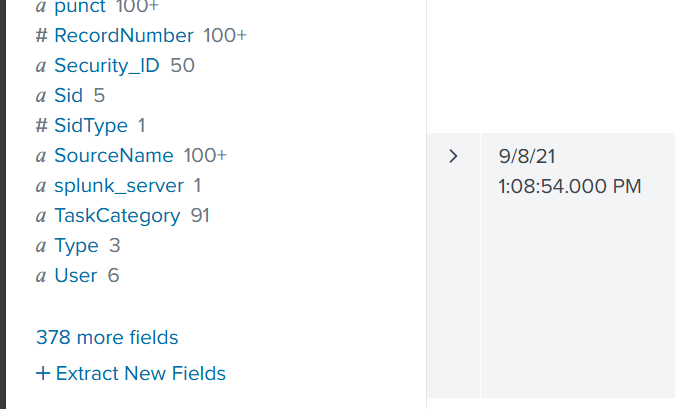
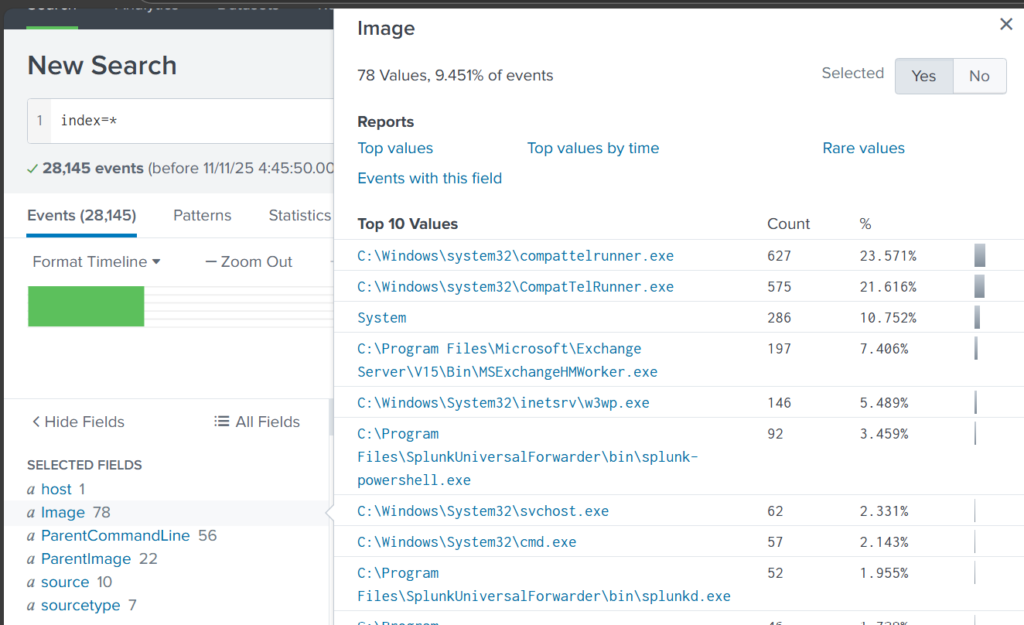
Fields are pieces of information extracted from each log entry, such as usernames, IP addresses, timestamps, file paths, and event IDs. They make your searches much more precise, allowing you to filter events with expressions like src_ip=10.0.0.5 or user=Administrator. In our case, we want to focus on executable files and that is the “Image”. If you don’t see it in the left pane, click “More fields” and add it.
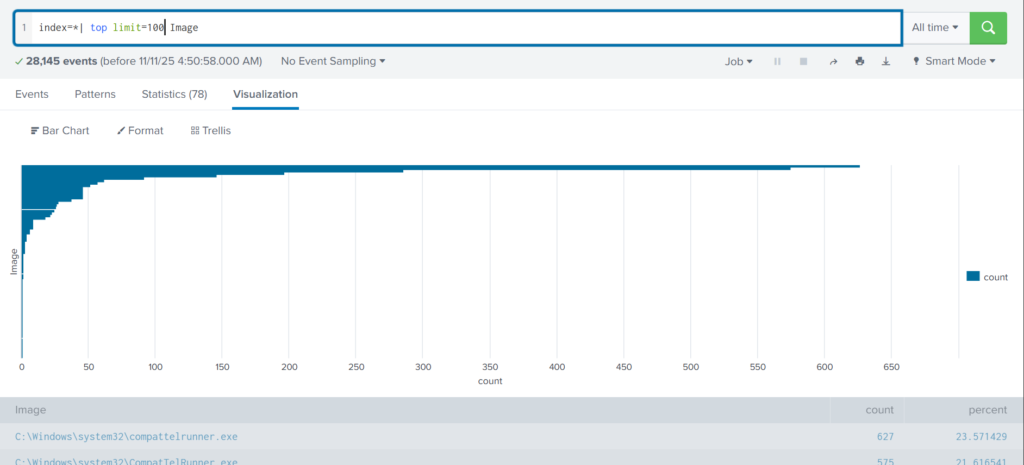
Once you’ve added it, click Image in the left pane to see the top 10 results.
These results are definitely not enough to begin our analysis. We can expand the list using top:
index=* | top limit=100 Image
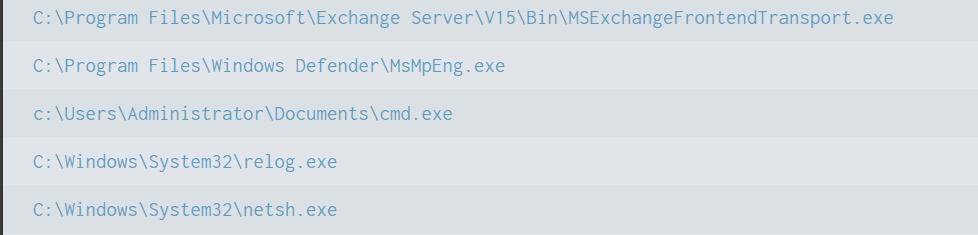
Here the cmd.exe process running in the Administrator’s user folder looks very suspicious. This is unusual, so we should check it closely. We also see commands like net1, net, whoami, and rundll32.
In one of our articles, we learned that net1 works like net and can be used to avoid detection in PowerShell if the security rules only look for net.exe. The rundll32 command is often used to run DLL files and is commonly misused by attackers. It seems the attacker is using normal system tools to explore the system. It also might be that the hackers used rundll32 to stay in the system longer.
At this point, we can already say the attacker performed reconnaissance and could have used rundll32 for persistence or further execution.
Hashes
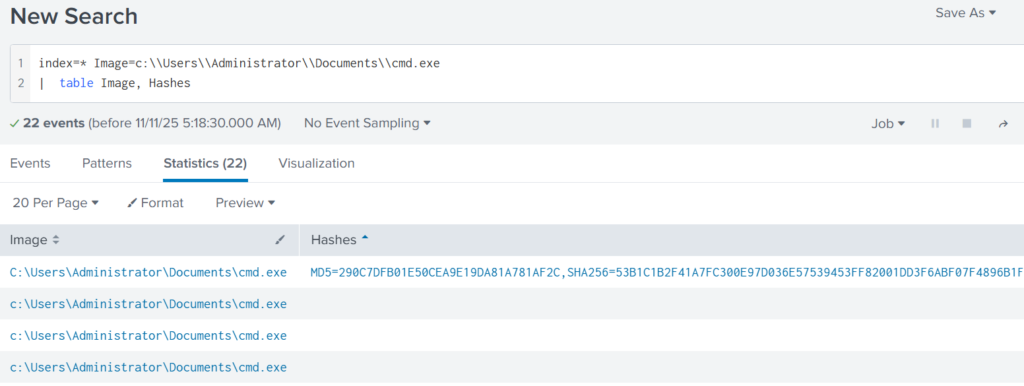
Next, let’s investigate the suspicious cmd.exe more closely. Its location alone is a red flag, but checking its hashes will confirm whether it is malicious.
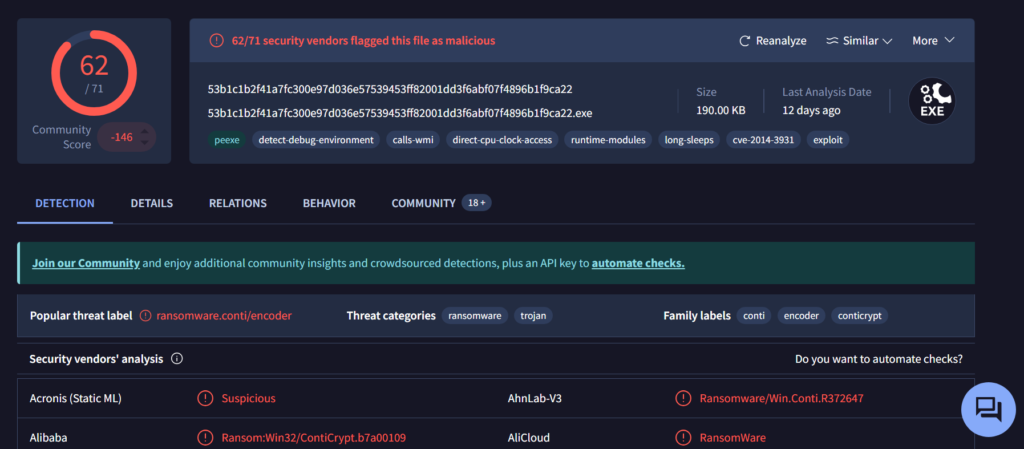
Copy one of the hashes and search for it on VirusTotal.
The results confirm that this file belongs to a Conti ransomware sample. VirusTotal provides helpful behavior analysis and detection labels that support our findings. When investigating, give it a closer look to understand exactly what happened to your system.
Net1
Now let’s see what the attacker did using the net1 command:
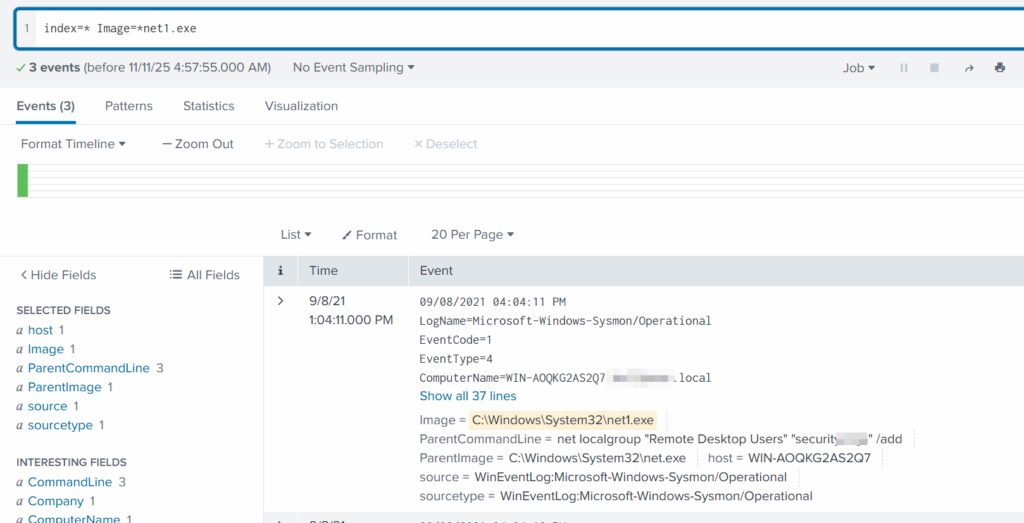
index=* Image=*net1.exe
The logs show that a new user was added to the Remote Desktop Users local group. This allows the attacker to log in through RDP on that specific machine. Since this is a local group modification, it affects only that workstation.
In MITRE ATT&CK, this action falls under Persistence. The hackers made sure they could connect to the host even if other credentials were lost. Also, they may have wanted to log in via GUI to explore the system more comfortably.
TargetFilename
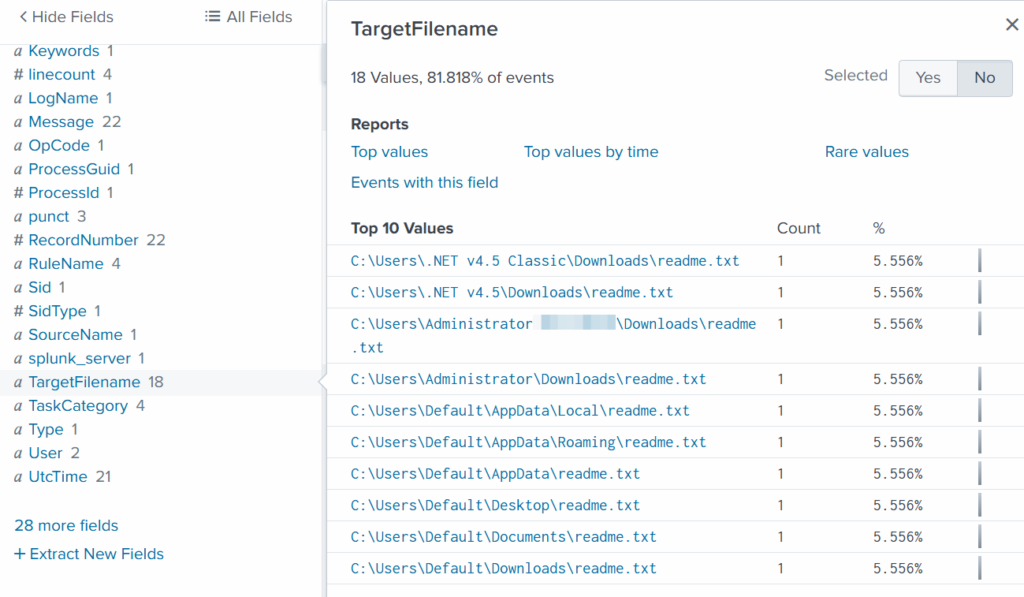
This field usually appears in file-related logs, especially Windows Security Logs, Sysmon events, or EDR data. It tells you the exact file path and file name that a process interacted with. This can include files being created, modified, deleted, or accessed. That means we can find files that malware interacted with. If you can’t find the TargetFilename field in the left pane, just add it.
We see that the ransomware created many “readme” files with a ransom note. This is common behavior for ransomware to spread notes everywhere. Encrypting data is the last step in attacks like this. We need to figure out how the attacker got into the system and gained high privileges.
Before we do that, let’s see how the ransomware was propagated across the domain:
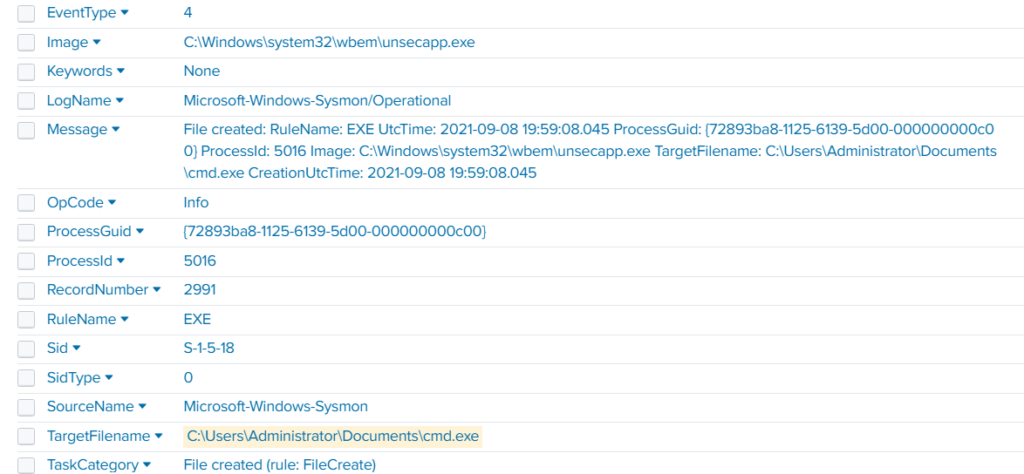
index=* TargetFileName=*cmd.exe
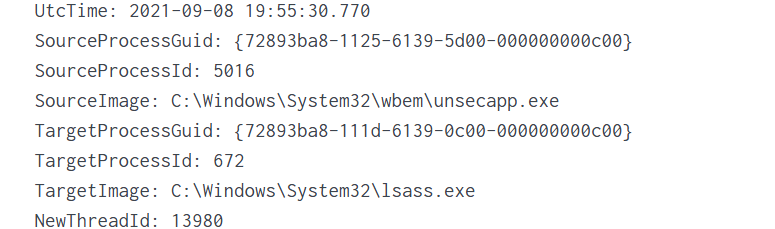
While unsecapp.exe is a legitimate Microsoft binary. When it appears, it usually means something triggered WMI activity, because Windows launches unsecapp.exe only when a program needs to receive asynchronous WMI callbacks. In our case the ransomware was spread using WMI and infected other hosts where the port was open. This is a very common approach.
Sysmon Events
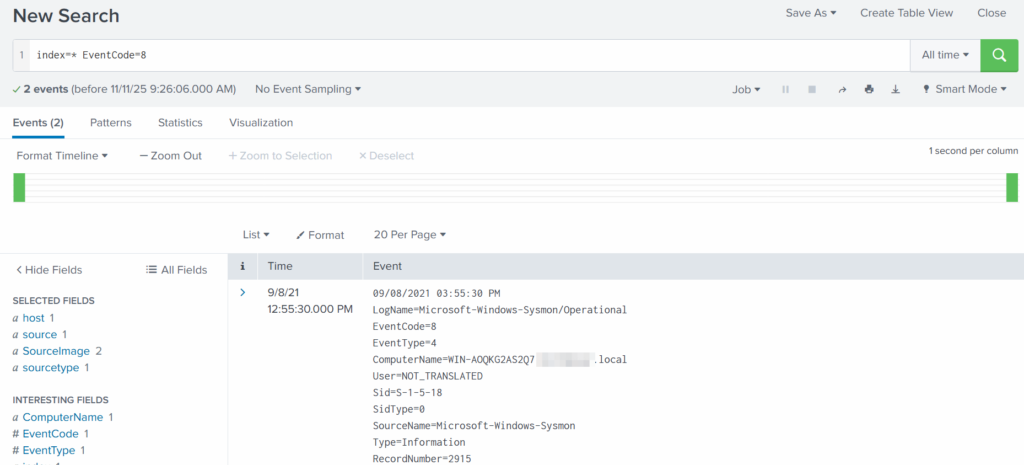
Sysmon Event ID 8 indicates a CreateRemoteThread event, meaning one process created a thread inside another. This is a strong sign of malicious activity because attackers use it for process injection, privilege escalation, or credential theft.
List these events:
index=* EventCode=8
Expanding the log reveals another executable interacting with lsass.exe. This is extremely suspicious because lsass.exe stores credentials. Attacking LSASS is a common step for harvesting passwords or hashes.
Another instance of unsecapp.exe being used. It’s not normal to see it accessing lsass.exe. Our best guess here would be that something used WMI, and that WMI activity triggered code running inside unsecapp.exe that ended up touching LSASS. The goal behind it could be to dump LSASS every now and then until the domain admin credentials are found. If the domain admins are not in the Protected Users group, their credentials are stored in the memory of the machine they access. If that machine is compromised, the whole domain is compromised as well.
Exchange Server Compromise
Exchange servers are a popular target for attackers. Over the years, they have suffered from multiple critical vulnerabilities. They also hold high privileges in the domain, making them valuable entry points. In this case, the hackers used the ProxyShell vulnerability chain. The exploit abused the mailbox export function to write a malicious .aspx file (a web shell) to any folder that Exchange can access. Instead of a harmless mailbox export, Exchange unknowingly writes a web shell directly into the FrontEnd web directory. From there, the attacker can execute system commands, upload tools, and create accounts with high privileges.
To find the malicious .aspx file in our logs we should query this:
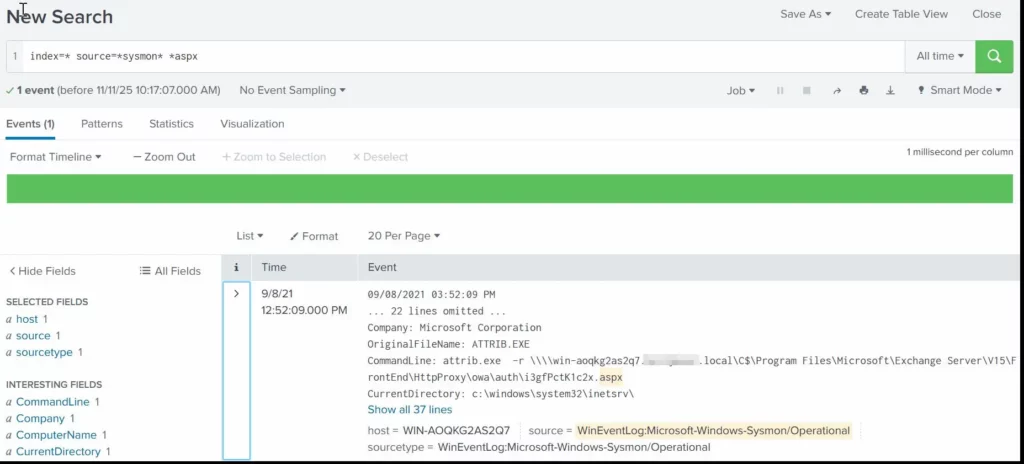
index=* source=*sysmon* *aspx
We can clearly see that the web shell was placed where Exchange has web-accessible permissions. This webshell was the access point.
Timeline
The attack began when the intruder exploited the ProxyShell vulnerabilities on the Exchange server. By abusing the mailbox export feature, they forced Exchange to write a malicious .aspx web shell into a web-accessible directory. This web shell became their entry point and allowed them to run commands directly on the server with high privileges. After gaining access, the attacker carried out quiet reconnaissance using built-in tools such as cmd.exe, net1, whoami and rundll32. Using net1, the attacker added a new user to the Remote Desktop Users group to maintain persistence and guarantee a backup login method. The attacker then spread the ransomware across the network using WMI. The appearance of unsecapp.exe showed that WMI activity was being used to launch the malware on other hosts. Sysmon Event ID 8 logged remote thread creation where the system binary attempts to access lsass.exe. This suggests the attacker tried to dump credentials from memory. This activity points to a mix of WMI abuse and process injection aimed at obtaining higher privileges, especially domain-level credentials.
Finally, once the attacker had moved laterally and prepared the environment, the ransomware (cmd.exe) encrypted systems and began creating ransom note files throughout these systems. This marked the last stage of the operation.
Summary
Ransomware is more than just a virus, it’s a carefully planned attack where attackers move through a network quietly before causing damage. In digital forensics we often face these attacks and investigating them means piecing together how it entered the system, what tools it used, which accounts it compromised, and how it spread. Logs, processes, file changes tell part of the story. By following these traces, we understand the attacker’s methods, see where defenses failed, and learn how to prevent future attacks. It’s like reconstructing a crime scene. Sometimes, we might be lucky enough to shut down their entire infrastructure before they can cause more damage.
If you need forensic assistance, you can hire our team to investigate and mitigate incidents. Additionally, we provide classes on digital forensics for those looking to expand their skills and understanding in this field.
Los Angeles Unified School District, or LAUSD — the second largest district in the U.S. with more than 1,000 schools and 600,000 students — confirmed this week that it was hit by a cyberattack over the weekend, disrupting access to its IT systems. Details about the incident, described as “criminal in nature” and later confirmed […]
Russian institutions have responded to a call from а public movement for joint efforts to identify cryptocurrency transfers related to drug trade. The anti-drug organization, Stopnarkotik, recently asked the interior ministry and the central bank to investigate alleged connections between U.S.-sanctioned crypto exchange Suex and a darknet market operating in the region.
Russian Authorities Respond to Stopnarkotik’s Request for Action Against Drug Trade
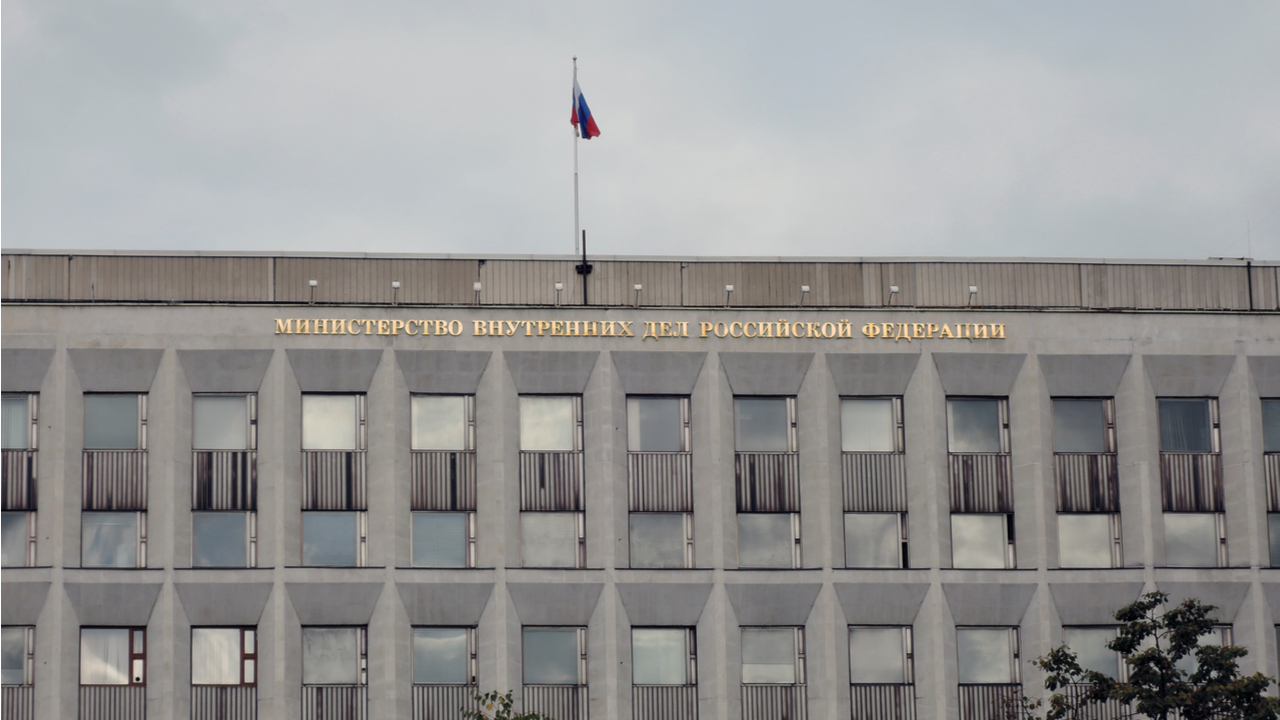
The Ministry of Internal Affairs of the Russian Federation (MVD) and Bank of Russia have agreed to cooperate with the All-Russian Public Movement Stopnarkotik on identifying financial flows involving cryptocurrencies obtained as a result of drug sales. The Russian online news portal Lenta.ru reported on the agreement, quoting a letter from a high-ranking MVD official.
The letter signed by Major General Andrei Yanishevsky, head of the Drug Control Department at the Interior Ministry, has been issued after a working meeting with representatives of the anti-drug organization. It comes in response to Stopnarkotik’s call for the two institutions to carry out an investigation focused on Suex, a Russia-based OTC crypto broker, and its links to other companies and banks.
In September, the U.S. Treasury Department blacklisted the Czech-registered entity Suex OTC s.r.o. which operates out of physical offices in Moscow and Saint Petersburg. The crypto platform is suspected of processing hundreds of millions of dollars in coin transactions related to scams, ransomware attacks, darknet markets, and the infamous Russian BTC-e exchange.
Since launching in 2018, Suex is believed to have received over $481 million in BTC alone. Close to $13 million came from ransomware operators such as Ryuk, Conti, and Maze, over $24 million was sent by crypto scams like Finiko, $20 million came from mixers, and another $20 million from darknet markets such as the Russia-targeting Hydra, blockchain forensics firm Chainalysis detailed in a report.
In its request to the Russian authorities, following the announcement of the U.S. sanctions, Stopnarkotik noted that Suex had been “involved in money laundering for the largest drug-selling platform.” The organization pointed out that the market’s drug trafficking in the Russian Federation amounts to an estimated $1.5 billion a year or more.
It also mentioned the name of one of Suex’s co-founders and highlighted its alleged connections with other crypto companies and financial institutions such as Exmo, a major digital asset exchange in Eastern Europe, financial services company Qiwi, a leading payment provider in Russia and the CIS countries, as well as the Ukraine-based Concord Bank.
Stopnarkotik asked Bank of Russia to provide its assessment on the matter, check if the operations of Suex and other entities are being conducted in accordance with the law in Russia, and consider blocking Russian payments to a Ukrainian organization.
“We received a response from the Ministry of Internal Affairs and the Central Bank. We also had a personal meeting with the Ministry of Internal Affairs so that they had an understanding of how we receive information, including about money laundering,” the movement’s chairman, Sergei Polozov, has been quoted as saying. He added that the Russian Interior Ministry is ready to accept Stopnarkotik’s data and work together with the organization.
Do you expect the cooperation between Stopnarkotik and Russian government institutions to develop further? Tell us in the comments section below.

 Login
Login