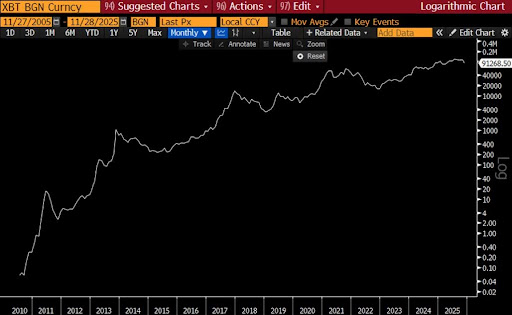
A leading finance expert believes that the current growth stage of the Bitcoin price mirrors Google’s expansion in 2017, suggesting that the network is yet to reach its true potential. The expert’s comparison positions Bitcoin as a maturing digital system that has established core utility, with a larger phase of value capture still ahead. His remarks about BTC come at a time when its price is navigating sharp downside risks and heightened market volatility
How The Bitcoin Price Compares To Google In 2017
Raoul Pal, the founder and Chief Executive Officer (CEO) of Real Vision, has highlighted a compelling connection between Bitcoin’s current price growth and Google’s early years. In an X post this week, Pal argued that digital assets clearly follow a network-driven growth model, comparing the sector to major technology giants that expanded rapidly as their user base increased.
The Real Vision founder emphasized that crypto behaves like a Metcalfe’s Law network, similar to Google, Amazon, Meta, and Tesla, where value scales with the number of participants rather than traditional financial metrics. He stated that attempting to value cryptocurrencies using cash flow models overlooks the essence of what makes a network valuable.
In his view, the structure of blockchain ecosystems means that their worth is tied to usage, adoption, and the network effects generated by millions of users. This unique framework underpins Pal’s belief that Bitcoin’s price growth today is a reflection of Google’s position in 2017. The financial expert supported his argument with a GOOGL US equity chart, showing its multi-year growth curve on a logarithmic scale. During 2017, Google was already dominant in areas like search, yet many of its long-term value drivers, such as cloud and Artificial Intelligence (AI), were still developing.
While the Bitcoin network is secure, widely adopted, and increasingly integrated into the global financial system, Pal’s view suggests that the cryptocurrency’s long-term development and true potential are still far from realized. He added that Ethereum may be even earlier in its growth curve, suggesting the second-largest cryptocurrency could follow a longer trajectory as its technology and applications evolve.
The True Value of Crypto Networks
Pal’s remarks on X, which compares Bitcoin to Google, were made in response to statements from Santiago Roel Santos, the founder and CEO of Inversion, a technology-first investment company. Santos initially argued that network effects in crypto have been overstated and are often misused to justify valuations resembling those of social networking companies.
Santos suggested that many cryptocurrencies have not demonstrated meaningful value capture and therefore resemble open source software systems like Linux rather than platforms such as Facebook, which benefit directly from rising user numbers. Pal challenged this view by insisting that crypto networks exhibit real and measurable network effects. His entire argument is built on the idea that user activity and transaction volume support the growing value of digital networks like Bitcoin.
We are continuing our PowerShell for Hackers module and today we will look at another range of scripts. Some of them will focus on stealth, like checking if the user is still at the keyboard before taking action. Others are about making your presence felt with changing wallpapers or playing sounds. We also have scripts for moving data around by turning files into text, or avoiding restrictions by disguising PowerShell scripts as batch files. We also added a script with detailed system report as a part of privilege escalation. On top of that, we will cover a quick way to establish your persistence and make it run again after a restart.
Studying these is important for both sides. Attackers see how they can keep access without suspicion and get the information they need. Defenders get to see the same tricks from the other side, which helps them know what to look out for in logs and unusual system behavior.
The first script is focused on detecting whether the target is actually using the computer. This is more important than it sounds. Especially useful when you are connecting to a compromised machine through VNC or RDP. If the legitimate user is present, your sudden appearance on their screen will immediately raise suspicion. On the other hand, waiting until the workstation is unattended allows you to do things quietly.
The script has two modes:
Target-Comes: Watches the horizontal movement of the mouse cursor. If no movement is detected, it sends a harmless Caps Lock keypress every few seconds to maintain activity. This keeps the session alive and prevents the screen from locking. As soon as the cursor moves, the function stops, letting you know that the user has returned.
Target-Leaves: Observes the cursor position over a set interval. If the cursor does not move during that time, the script assumes the user has left the workstation. You can specify your own time of inactivity.
Usage is straightforward:
PS > . .\watch.ps1
PS > Target-Comes
PS > Target-Leaves -Seconds 10
For stealthier use, the script can also be loaded directly from memory with commands like iwr and iex, avoiding file drops on disk. Keep in mind that these commands may be monitored in well-secured environments.
Playing a sound file on a compromised machine may not have a direct operational benefit, but it can be an effective psychological tool. Some hackers use it at the end of an operation to make their presence obvious, either as a distraction or as a statement.
The script plays any .wav file of your choice. Depending on your objectives, you could trigger a harmless notification sound, play a long audio clip as harassment, or use it in combination with wallpaper changes for maximum effect.
Changing the target’s wallpaper is a classic move, often performed at the very end of an intrusion. It is symbolic and visible, showing that someone has taken control. Some groups have used it in politically motivated attacks, others as part of ransomware operations to notify or scare victims.
This script supports common formats such as JPG and PNG, though Windows internally converts them to BMP. Usage is simple, and it can be combined with a sound to make an even greater impression.
When working with compromised machines, data exfiltration is often constrained. You may have limited connectivity or may be restricted to a simple PowerShell session without file transfer capabilities. In such cases, converting files to Base64 is a good workaround.
This script lets you encode images into Base64 and save the results into text files. Since text can be easily copied and pasted, this gives you a way to move pictures or other binary files without a download. The script can also decode Base64 back into an image once you retrieve the text.
Base64 encoding is not just for images. It is one of the most reliable methods for handling small file transfers or encoding command strings. Some commands can break when copied directly when special characters are involved. By encoding them, you can make sure it works.
This script can encode and decode both files and strings:
Some environments enforce strict monitoring of PowerShell, logging every script execution and sometimes outright blocking .ps1 files. Batch files, however, are still widely accepted in enterprise settings and are often overlooked.
This script converts any .ps into a .bat file while also encoding it in Base64. This combination not only disguises the nature of the script but also reduces the chance of it being flagged by keyword filters. It is not foolproof, but it can buy you time in restrictive environments.
PS > . .\ps2bat.ps1
PS > ".\script.ps1" | P2B
The output will be a new batch file in the same directory, ready to be deployed.
This is a persistence mechanism that ensures a payload is executed automatically whenever the system or user session starts. It downloads the executable from the provided URL twice, saving it into both startup directories. The use of Invoke-WebRequest makes the download straightforward and silent, without user interaction. Once placed in those startup folders, the binary will be executed automatically the next time Windows starts up or the user logs in.
This is particularly valuable for maintaining access to a system over time, surviving reboots, and ensuring that any malicious activities such as backdoors, keyloggers, or command-and-control agents are reactivated automatically. Although basic, this approach is still effective in environments where startup folders are not tightly monitored or protected.
First edit the script and specify your URL and executable name, then run it as follows:
The script is essentially a reconnaissance and system auditing tool. It gathers a wide range of system information and saves the results to a text file in the Windows temporary directory. Hackers would find such a script useful because it gives them a consolidated report of a compromised system’s state. The process and service listings can help you find security software or monitoring tools running on the host. Hardware usage statistics show whether the system is a good candidate for cryptomining. Open ports show potential communication channels and entry points for lateral movement. Installed software is also reviewed for exploitable versions or valuable enterprise applications. Collecting everything into a single report, you save a lot of time.
To avoid touching the disk after the first compromise, execute the script in memory:
All of this data is not only displayed in the console but also written into a report file stored at C:\Windows\Temp\scan_result.txt
Summary
Today we walked through some PowerShell tricks that you can lean on once you have a foothold. The focus is practical. You saw how to stay unnoticed, how to leave a mark when you want to, you also know how to sneak data out when traditional channels are blocked, and how to make sure your access survives a reboot. Alongside that, there is a handy script that pulls tons of intelligence if you know what you’re looking for.
These are small and repeatable pieces hackers can use for bigger moves. A mouse-watch plus an in-memory loader buys you quiet initial access. Add an autostart drop and that quiet access survives reboots and becomes a persistent backdoor. Then run the enumerator to map high value targets for escalation. Encoding files to Base64 and pasting them out in small chunks turns a locked-down host into a steady exfiltration pipeline. Wrapping PowerShell in a .bat disguises intent long enough to run reconnaissance in environments that heavily log PowerShell. Simple visual or audio changes can be used as signals in coordinated campaigns while the real work happens elsewhere.
Prime: 1 is a challenging boot2root machine created by Suraj Pandey. It is designed for those who are preparing for the OSCP exam and is a great way to practice your penetration testing skills. In this blog post, I will walk you through the steps I took to root the machine, including: Performing a port […]

 Login
Login