Reading view

There are new articles available, click to refresh the page.

Get to the Games on Time with This Ancient-Style Waterclock

One easy way to make a very accurate clock is with a WiFi-enabled microcontroller like an ESP32 and a display: set up NTP, and you’ll never be off by more than a minute. This water clock project by [Liebregts] is not like that — there are no electronics to speak of, and if the clock is ever in sync to within a single minute, well, we’d be surprised.

We’re impressed to see it working regardless. Sure, it’s not exactly high-tech; the floating siphon mechanism [Liebregts] is using to get a steady flow out of the main reservoir dates back to 250 BC. On the other hand, since this style of time keeper has been out of fashion since the fall of Rome, [Liebregts] couldn’t just grab something off GitHub or ask ChatGPT to design it for them. This is real human engineering. The reservoir is even scaled to the four-hour timing of [Liebregts] workday — it gets refilled at lunch along with its maker.
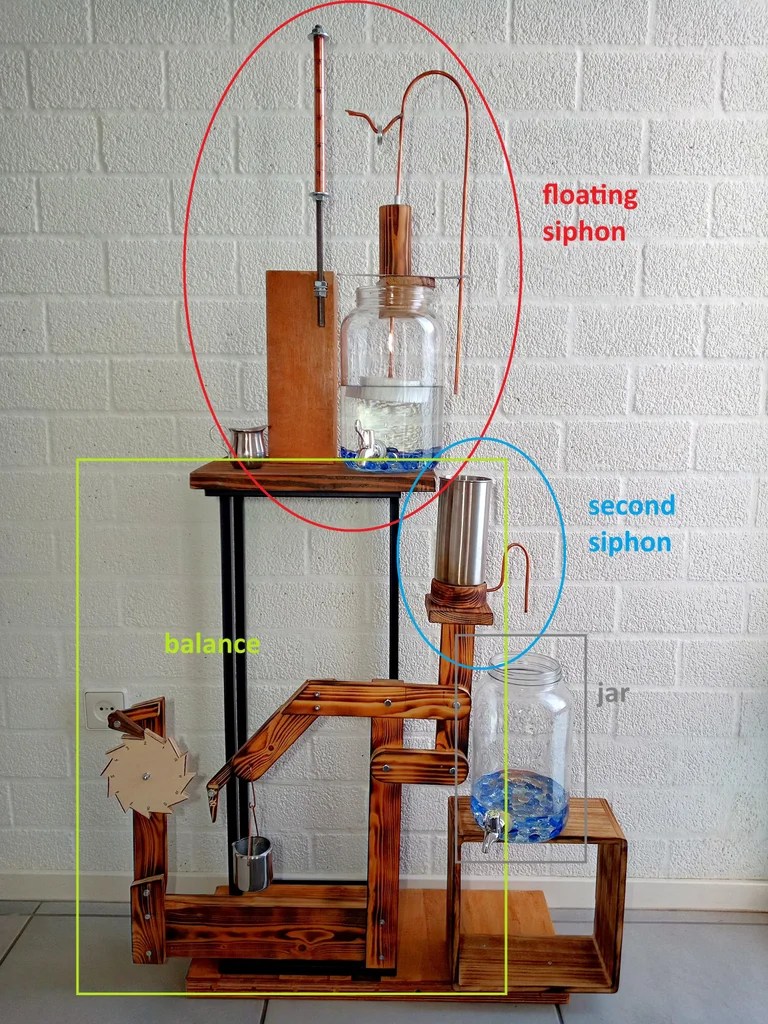
The water clock in all its glory, plus diagrammatic labels.

In a clever build detail, the floating siphon tube also holds a pointer to an hour indicator. For minutes, his mechanism seems unique, though it’s related to another ancient trick, the Pythagorean cup. Pythagoras’s devious cup had a hidden siphon that spilled its contents if you filled it beyond a set level, and so does the secondary reservoir of [Liebregts] water clock.

Since the secondary reservoir is linked to a counterweight with a pivot, it goes up and down over the course of approximately 5 minutes — but rather than linking that to another linear indicator, [Liebregts] is using that mechanism to advance a saw-toothed gear that is marked with 5-12 in analog-clock fashion for a touch of modernity. See it in action in the demo video below.

That last part might confuse a time traveler from Ancient Rome or Greece, but they’d instantly recognize this creation as a clock, which many modern observers might not. Still, once they learn to read it you can be sure that [Liebergts]’s friends will never be late to a gladiator fight again — and not just because Constantine banned them in 325 AD. Apparently nobody listened to that ban anyway.
A Stylish Moon And Tide Clock For The Mantlepiece

By: Lewin Day

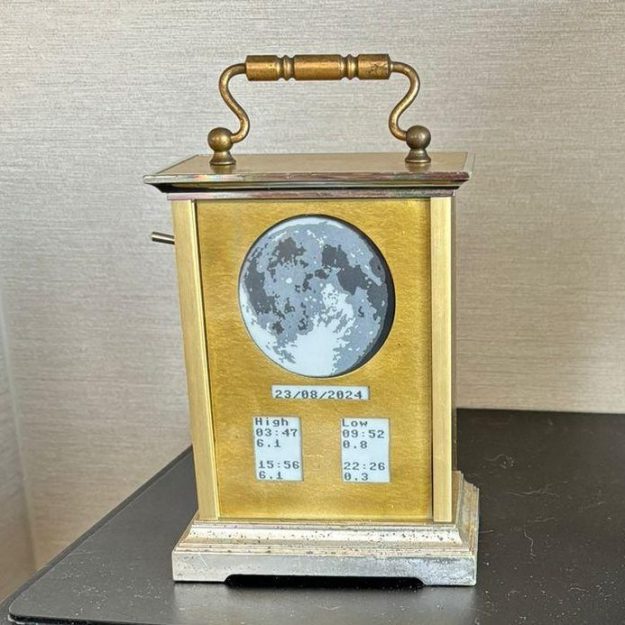
Assuming you’re not stuck in a prison cell without windows, you could feasibly keep track of the moon and tides by walking outside and jotting things down in your notebook. Alternatively, you could save a lot of hassle by just building this moon and tide clock from [pjdines1994] instead.

The build is based on a Raspberry Pi Pico W, which is hooked up to a real-time clock module and a Waveshare 3.7-inch e-paper display. Upon this display, the clock draws an image relevant to the current phase of the moon. As the write-up notes, it was a tad fussy to store 24 images for all the different lunar phases within the Pi Pico, but it was achieved nonetheless with a touch of compression. As for tides, it covers those too by pulling in tide information from an online resource.

It’s specifically set up to report the local tides for [pjdines1994], reporting the high tide and low tide times for Whitstable in the United Kingdom. If you’re not in Whitstable, you’d probably want to reconfigure the clock before using it yourself. Unless you really want to know what’s up in Whitstable, of course. If you so wish, you can set the clock up to make its own tide predictions by running local calculations, but [pjdines1994] notes that this is rather more complicated to do. The finished result look quite good, because [pjdines1994] decided to build it inside an old carriage clock that only reveals parts of the display showing the moon and the relevant tide numbers.

We’ve featured some other great tide clocks before, like this grand 3D printed design. If you’ve built your own arcane machine to plot the dances of celestial objects, do be sure to let us know on the tipsline!

A Holographic Seven-Segment Clock

By: Lewin Day

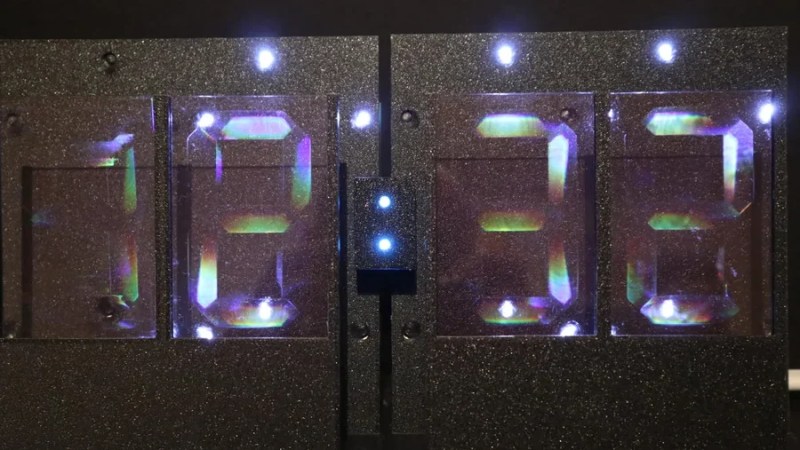
Seven-segment displays are one of the most ho-hum ways to display the time. They were cool for a little bit in the 70s, but by now, they’re a little bit old hat. That is, unless you get weird with it. This holographic seven-segment clock from [mosivers] qualifies neatly in that category.

The first step was to make the holographic segment displays, because they’re not really something you can just buy off the shelf. [mosivers] achieved this by using a kit from LitiHolo, which enables you to create holograms by shooting a laser at special holographic film. Only, a few upgrades were made to use the kit with a nicer red diode laser that [mosivers] had on hand for better performance. The seven-segment layouts were carefully recorded on to the film to form the basic numerals of the clock, such that illuminating the films from different angles would light different segments of the numeral. It’s quite involved, but it’s explained well in the build video.

As for the timekeeping side of things, an ESP32 was used, setup to query a network time server to stay accurate. The microcontroller then commands a series of LEDs to light up as needed to illuminate the relevant segments of the holographic film to show the time.

Ultimately, [mosivers] built a cool clock with a look you won’t find anywhere else. It’s a lot more work than just wiring up some classic seven-segment LEDs, but we think the result is worth it. If you fancy other weird seven-segment builds, though, we’ve got plenty of others in the till.

[Thanks to Moritz for the tip!]

Any Old TV Can Be A Clock With Arduino

By: Lewin Day

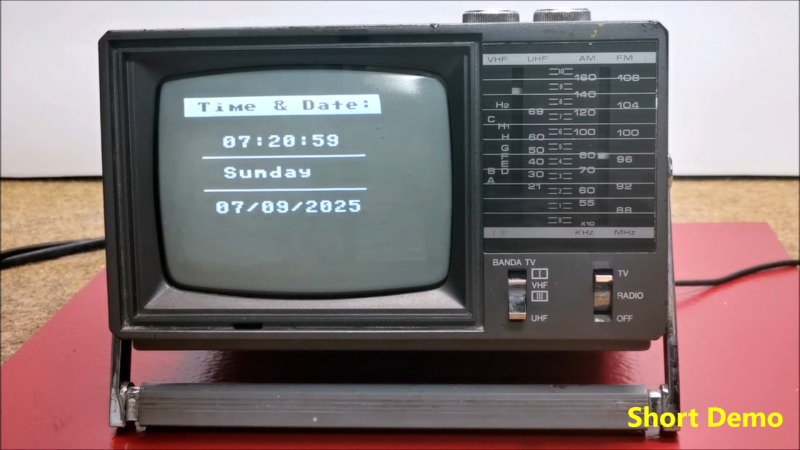
If you’ve got an old black and white TV, it’s probably not useful for much. There are precious few analog broadcasters left in the world and black and white isn’t that fun to watch, anyway. However, with a little work, you could repurpose that old tube as a clock, as [mircemk] demonstrates.

The build is based around an Arduino Nano R3. This isn’t a particularly powerful microcontroller board, but it’s good enough to run the classic TVOut library. This library lets you generate composite video on an Atmel AVR microcontroller with an absolute minimum of supporting circuitry. [mircemk] paired the Arduino with a DS3231 real-time clock, and whipped up code to display the time and date on the composite video output. He then also demonstrates how to hack the signal into an old TV that doesn’t have a specific input for composite signals.

You’ll note the headline says “any old TV can be a clock,” and that’s for good reason. Newer TVs tend to eschew the classic composite video input, so the TVOut library won’t be any good if you’re trying to get a display up on your modern-era flatscreen. In any case, we’ve seen the TVOut library put to good use before, too. Video after the break.

There’s Nothing Backwards About This Laser Cut Retrograde Clock

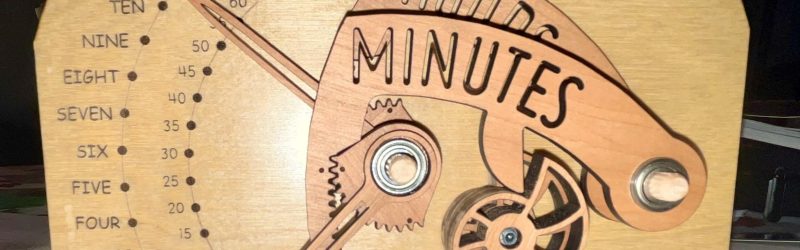
It’s clock time again on Hackaday, this time with a lovely laser-cut biretrograde clock by [PaulH175] over on Instructables. If you’ve never heard of a ‘biretrograde clock,’ well, we hadn’t either. This is clearly a form of retrograde clock, which unlike the name implies doesn’t spin backwards but oscillates in its motion– the hands ‘go retrograde’ the same way the planets do.

The oscillating movement is achieved via a pair of cams mounted on the hour and minute shafts of a common clock mechanism. As the shafts (and thus cams) turn, the minute and hour arms are raised and drop. While that could itself be enough to tell the time, [Paul] goes one further and has the actual hands on pivots driven by a gear mechanism on the cam-controlled arms. You might think that that extra reversal is what makes this a ‘biretrograde clock’ but in the clockmaker’s world that’s just saying it’s a retrograde clock with two indicators: in this case, minute and hour.

It’s a fairly rare way to make a clock, but we’ve seen one before. That older project was 3D printed, which might be more your speed; if you prefer laser-cutting, though, [Paul]’s Instructable includes SVG files. Alternatively, you could take a different approach and use voltmeters to get the same effect.

Binary Clock Also Monitors Weather

By: Lewin Day

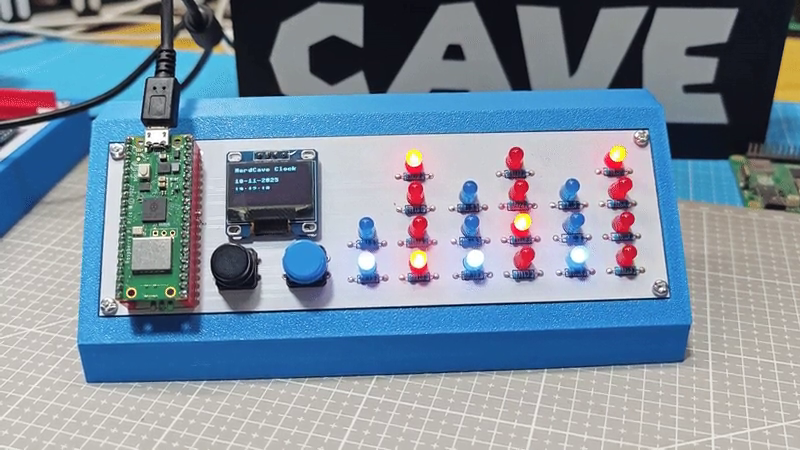
There are two things most of us want to know on a daily basis—the weather, and what time it is. [Guitarman9119] built a single device that can provide both pieces of information with a pleasingly nerdy aesthetic.

The heart of the build is a Raspberry Pi Pico W, which is proudly displayed on the front panel of the device. It’s responsible for driving the array of LEDs that display the time in hours, minutes, and seconds in binary format. The Pi Pico W uses its wireless connection to query the WorldTime API and an IP geolocation server. This provides the local date and time, and the location is then used to query the OpenWeather service for current weather information. The weather information is thankfully not displayed in binary format, because that would be straining to read. Instead, it’s displayed in human-readable format on a small OLED display.

There’s something about the way this is built—the discrete LEDs, that weird blue color that seemed to disappear by 1984—that gives this a wonderfully old school charm. You could imagine it turning up in a college lab full of old blinkenlights gear. Video after the break.

❌