The following is a discussion about a small portion of the chapter "Hernando's Barbacoa" in the book From Barbycu to Barbecue. The book is published by the University of South Carolina Press. It was peer reviewed for two years and cites over 2000 primary and secondary sources. It is available from online booksellers and from many of the best local bookstores.
The widely accepted tall tale of how barbecue was
"discovered" begins with the ancient Taino people of what is today
Haiti and the word the Spanish borrowed from them "barbacoa."
Sixteenth-century Spanish explorers, we are told, soon adopted the Taino way of
cooking, which is sometimes described as cooking pork low and slow with
indirect heat. From there, English speakers adopted the word barbacoa with an
Anglo spin pronouncing it as "barbecue." This theory of the origins
of barbecue is entertaining, but it is far from the facts as they are recorded
in historical records.
It is true that 16th-century Spanish explorers witnessed
ancient Taino people using barbacoas. However, the word "barbacoa"
was used only as a noun and it did not refer to the food on a barbacoa nor did
it refer to the way of cooking. Records from the 1500s through the 1800s refer
to barbacoas only as wooden grills suspended on three or four forked corner
posts and, sometimes, as being attached to a tree trunk on one end and two forked
posts on the other. At some point, people in Mexico adopted the word
"barbacoa" to refer earthen ovens, which are holes dug into the
ground and filled with hot rocks before wrapping food in leaves and placing it
in the pit before covering it with leaves and soil. Even so, to this day, the
word "barbacoa" is used in Mexico only as a noun to refer to the
earthen oven and the food that is cooked in one.
The notion that word "barbacoa" refers to a way of
cooking was invented in the United States after the end of World War II.
Americans invented the verb "barbacoa" and promoted the idea that
because Spanish explorers were the first to use the word "barbacoa,"
that must be how barbecue was created. Nevertheless, firsthand accounts from
the 16th through 19th centuries do not support those assertions.
It is true that Spaniards who came to the Americas in the
16th and 17th centuries were fascinated by barbacoas, but it wasn't because
they craved a delicious pork barbecue sandwich topped with a tangy, spicy sauce
and coleslaw. The truth about the 16th-century Spanish love affair with
barbacoas is far more fascinating than the modern myth about it.
Early records of Spanish exploits in the Americas
occasionally mention barbacoas. The word is used to describe wooden grills on
which foods were cooked, smoked, and dried. The word "barbacoa" was
also used to describe porticos, bridges, and even tree houses inhabited by
indigenous people. "So," you may ask, "just why were Spaniards
so fascinated by barbacoas?" One reason was how indigenous people used
barbacoas to store things like clothing skins, corn, and other foods. Warm
animal skins and food was always in high demand among Spanish conquistadors and
their armies. But, that's not the main reason Spaniards sought out barbacoas.
The Spanish conquistador Vasco Núñez de Balboa (1475–1519)
was the first European to lead a quest across Panama’s Isthmus and to march to
the Pacific Ocean. In the year 1513 he sent a secret communique to King
Ferdinand II (1452–1516) that contained a closely guarded secret. The secret
was so closely guarded, it escaped detection by people who study barbecue
history since it was revealed to King Ferdinand until now. The top secret,
highly classified information in that communique was this: Caciques, leaders of
indigenous tribes, hid vast amounts of gold in barbacoas.
Because one of the main goals of a conquistador’s mission
was to find treasure for the king, this discovery was significant. It is also
why it was to be kept secret and only shared with those the king sent to the
Americas. Indeed, to King Ferdinand and his conquistadors, the closely guarded
secret message was clear. Find a barbacoa, and you will find treasures. From
that point forward, one of the main missions of Spanish explorers was to seek
out barbacoas. Barbacoas stored corn that could feed their army and gold that
could feed their greed. That explains why records show that one of the first
things Spanish explorers did when encountering a Native American village was to
head straight to the barbacoas. It also explains why the indigenous people
defended them with their lives.
When carefully reviewing credible historical records, it is
easy to see that the modern American tale of the origin of barbecue just does
not stand up to facts. Get a copy of From Barbycu to Barbecue for
a fresh look at barbecue history and how history tells us that southern barbecuing
in the United States is an original style of barbecuing that was born in the
southern United States and was not imported from the Caribbean.
In this write-up, we’ll go step-by-step through the Haze machine from Hack The Box, rated medium difficulty. The box involves exploring a Windows Active Directory (AD) environment with Splunk services. The path includes abusing a Splunk vulnerability, moving through Active Directory, and escalating privileges to grab both the user and root flags.
Objective
The goal is to complete Haze by achieving the following:
User Flag:
Using the decrypted paul.taylor password (Ld@p_Auth_Sp1unk@2k24) from splunksecrets, I gained WinRM access as mark.adams. After enumerating AD with netexec and retrieving the Haze-IT-Backup gMSA NTLM hash, I used PyWhisker and Certipy for a Shadow Credentials attack on edward.martin. This provided edward.martin’s NT hash, enabling WinRM access to read the user flag with type user.txt. Troubleshooting BloodyAD authentication issues was key to progressing through AD exploitation.
Root Flag:
With Splunk admin credentials from a decrypted backup hash, I uploaded a malicious .tar.gz app containing a reverse shell to Splunk’s web interface (port 8000). The shell, caught via nc -lvnp 4444, had SeImpersonatePrivilege. Using SweetPotato, I escalated to NT SYSTEM and read the root flag with type root.txt. Fixing tar file upload errors ensured successful shell delivery.
Enumerating the Haze Machine
Reconnaissance
We begin with a basic Nmap scan to identify services on the machine:
The Splunk 9.2.1authentication.conf documentation explains how Splunk manages user authentication. It defines how credentials are stored, including LDAP bindings, and supports integrating with external authentication systems. Misconfigurations here can expose sensitive data—like encrypted passwords and bindDNs—making it a critical target for exploitation during assessments
Understanding CVE-2024-36991: A Simple Explanation
Think of your computer or phone as a house with many doors and windows. Each one is a way to interact with the device. Now, imagine one of the locks isn’t working properly—it looks secure, but a clever intruder could still get in.
CVE-2024-36991 is like that broken lock, but in software. It’s a hidden flaw that, if found by the wrong person, could let them sneak into the system without permission. They might steal data, cause damage, or disrupt how things work.
The good news is that once these flaws are discovered, the developers usually fix them quickly, like calling a locksmith to repair a faulty lock. That’s why it’s so important to keep your apps and devices updated. Updates are your best defence against these types of security issues.
Leveraging CVE-2024-36991 for Exploitation
Downloaded the CVE-2024-36991 PoC to test the LFI vulnerability
I downloaded the publicly available proof-of-concept (PoC) and tested it using curl to retrieve sensitive configuration files, such as authentication.conf
The exploit was successful and allowed access to /etc/passwd, dumping several user password hashes
Although hashcat didn’t crack the hashes within a 5-minute test, the PoC also revealed an encrypted bindDNpassword used in Splunk’s LDAP integration:
Knowing that Splunk stores a symmetric key in splunk.secret, I used the same LFI to retrieve that key. With both the encrypted password and the key, I used the splunksecrets tool to attempt decryption.
Unlocking Splunk Credentials via splunksecrets
Installed Splunksecrets to decrypt the hash
Fixing Cryptography Module Reference in SplunkSecrets
Diagnosis:
Using Python 3.12, as per the traceback.
The cryptography.hazmat.decrepit module was deprecated in newer cryptography versions.
Ran pip show cryptography—found a version >36.0.0, where decrepit was removed.
I’m currently facing a fairly common issue—it’s related to how a Python package references the cryptography library. In this case, the splunksecrets package is trying to import a module from cryptography.hazmat.decrepit, which doesn’t exist. The correct path should be cryptography.hazmat.primitives.
To fix this, I’ll need to manually edit the file located at:
The splunksecrets tool offers various commands to encrypt and decrypt passwords related to Splunk and its components. It supports decrypting and encrypting credentials used for database connections (dbconnect), as well as passwords associated with Phantom assets. The tool also provides functionality to handle passwords encrypted with both current and legacy Splunk algorithms. Additionally, it can generate password hashes compatible with Splunk’s authentication system. This versatility makes splunksecrets a useful utility for recovering sensitive information during security assessments involving Splunk environments.
I decrypted the encrypted LDAP password by running the splunksecrets tool with the Splunk secret file and the captured ciphertext. This process successfully revealed the plaintext password for the user paul.taylor as Ld@p_Auth_Sp1unk@2k24, which can be used for LDAP authentication or further privilege escalation.
Enumerate using the netexec command
Tested credentials on SMB and LDAP
Attempted WinRM access with paul.taylor, but it failed
Enumerated AD users to find other accounts
Manually extracting the username is tedious, so the screenshot above shows a quicker way I used to identify it.
Discovered mark.adams and tested the same password, gaining WinRM access
Successfully connected to the machine via evil-winrm.
Enumerating AD for Privilege Escalation
The easiest way to understand mark.adams’s connections are by using BloodHound
The user mark.adams is a member of the gMSA Administrators group, granting access to retrieve and decrypt managed service account passwords from Active Directory. This privilege enables direct access to sensitive credentials (msDS-ManagedPassword), allowing privilege escalation or impersonation. It also opens paths for advanced attacks like NTLM relay or the Golden gMSA attack, which can provide persistent, stealthy access across the domain.
The details above display the properties of mark.adam.
I used a tool to connect to the target computer using the username “mark.adams” and the password I found. This confirmed that the credentials were correct and allowed me to access the system, which is running a recent version of Windows Server. The connection used standard network services to communicate securely with the target.
Bloodhound enumeration
The command executes BloodHound-python to collect Active Directory data using the machine account Haze-IT-Backup$. Instead of using a password, it authenticates with an NTLM hash (735c02c6b2dc54c3c8c6891f55279ebc)—a common technique during post-exploitation. The domain is specified as haze.htb, and the domain controller being queried is dc01.haze.htb, with the nameserver IP 10.10.11.61. The -c all flag instructs BloodHound to perform a full collection of all supported data types (such as sessions, ACLs, group memberships, etc.), and --zip compresses the output into a ZIP archive for easier ingestion into the BloodHound UI.
The machine account haze-it-backup$@haze.htb is a member of both support_services@haze.htb and Domain Computers@haze.htb groups. Membership in the Domain Computers group is standard for all domain-joined machines and typically grants basic permissions within the domain. However, its inclusion in the support services group may indicate elevated privileges or specific access rights related to IT support operations. This group membership may present an opportunity for privilege escalation, particularly if the support_services group has delegated permissions over high-value domain objects or privileged user accounts.
Attempted to retrieve gMSA NTLM hash, initially blank
I imported the Active Directory module and set the variable $gMSAName to “Haze-IT-Backup” and $principal to “mark.adams”. Then, I configured the managed service account so that the user mark.adams is authorised to retrieve the managed password.
You can also perform the same action using a one-liner command
We obtained the NTLM hash, but keep in mind that each user has a unique NTLM hash, so everyone will get a different one.
As shown by the results, the LDAP permissions now exceed regular permissions, allowing you to easily collect Domain Objects and DACLs, making enumeration straightforward for the user mark.adams.
BloodyAD and Pywhisker enumeration
An attempt to use BloodyAD for further exploitation failed due to invalid credentials, preventing successful authentication.
I had to rack my brain to figure out the issue, but after removing the $ from the Haze-IT-Backup username and running the ntpdate command, everything worked smoothly.
I also executed the BloodyAD commands displayed earlier to assign permissions and add group memberships to the Haze-IT-Backup account.
These commands attempt to escalate privileges by granting the Haze-IT-Backup account full control (genericAll) over the SUPPORT_SERVICES group and adding the service account as a member of that group.
I also ran a series of PyWhisker commands to manage permissions for the user edward.martin using the Haze-IT-Backup$ account:
This generated a certificate and key, updated the msDS-KeyCredentialLink attribute for edward.martin, and saved a PFX certificate file protected by a password. This certificate can be used to obtain a Ticket Granting Ticket (TGT) with external tools.
This showed the new DeviceID and its creation timestamp.
#!/bin/bash# Variables - replace with actual valuesIP="10.10.11.61"DOMAIN="haze.htb"USER="Haze-IT-Backup$"PASSWORD=":YOUR_PASSWORD_HERE"TARGET_USER="edward.martin"HASH=""# Set this at runtime or before running commands# Change owner of SUPPORT_SERVICES groupbloodyAD--host"$IP"-d"$DOMAIN"-u"$USER"-p"$PASSWORD"-frc4setowner'SUPPORT_SERVICES'"$USER"# Grant GenericAll permission to SUPPORT_SERVICES groupbloodyAD--host"$IP"-d"$DOMAIN"-u"$USER"-p"$PASSWORD"-frc4addgenericAll"SUPPORT_SERVICES""$USER"# Add user as member of SUPPORT_SERVICES groupbloodyAD--host"$IP"-d"$DOMAIN"-u"$USER"-p"$PASSWORD"-frc4addgroupMember'SUPPORT_SERVICES'"$USER"# Prompt user to enter the hash at runtime if emptyif [ -z "$HASH" ]; thenread-p"Enter the NTLM hash: "HASHfi# List KeyCredentialLink attribute for target userpywhisker-d"$DOMAIN"-u"$USER"-H"$HASH"--target"$TARGET_USER"--action"list"# Add KeyCredential to target userpywhisker-d"$DOMAIN"-u"$USER"-H"$HASH"--target"$TARGET_USER"--action"add"# Confirm KeyCredentialLink attribute updatepywhisker-d"$DOMAIN"-u"$USER"-H"$HASH"--target"$TARGET_USER"--action"list"
I utilised an existing script to automate the execution of all the necessary commands, streamlining the process and ensuring accuracy during exploitation.
I used impacket-getTGT to request a Kerberos Ticket Granting Ticket (TGT) for the Haze-IT-Backup$ account on the haze.htb domain, authenticating with the NTLM hash instead of a plaintext password. After successfully obtaining the ticket, I set the KRB5CCNAME environment variable to point to the ticket cache file, allowing subsequent Kerberos-authenticated actions to use this ticket.
Gaining Access as edward.martin
The image reveals that Haze-IT-Backup$ can modify the Owner attribute of the SUPPORT_SERVICES object. Notably, SUPPORT_SERVICES holds the privilege to issue certificates on behalf of the EDWARD account. This chain of permissions enables a classic Shadow Credentials attack. To exploit this path, the first step is to leverage the DACL misconfiguration on SUPPORT_SERVICES to gain control over the object and escalate privileges accordingly.
I used Certipy to perform an automated Shadow Credentials attack targeting the user edward.martin. By authenticating Haze-IT-Backup$ with the NTLM hash, Certipy generated and added a temporary Key Credential (certificate) to edward.martin’s account. This allowed the tool to authenticate edward.martin using the certificate and obtain a Ticket Granting Ticket (TGT). After successfully retrieving the TGT and saving it to a credential cache file, Certipy reverted the Key Credential changes to avoid detection. Finally, the tool extracted the NT hash for edward.martin, which can be used for further attacks or lateral movement.
I used evil-winrm to connect to the target machine as edward.martin, authenticating with the NT hash I had previously extracted. This granted me an interactive WinRM session with the privileges of edward.martin, allowing direct access to the system for further enumeration or exploitation.
We can read the user flag by simply running the command type user.txt inside the WinRM session.
Escalate the Root Privileges Access
Privileges Access
While exploring the system, I navigated to C:\Backups\Splunk and found a backup file named splunk_backup_2024-08-06.zip. I downloaded the file for offline analysis using the download command in Evil-WinRM.
Analyse the Splunk_backup file
After downloading splunk_backup_2024-08-06.zip, I extracted its contents locally to analyse the files inside.
It appeared to be a standard Splunk directory structure.
It turned out that Splunk had created a copy of the active configuration file, which contained the hash above
An error occurred while attempting to use splunksecrets.
By running splunksecrets splunk-decrypt -S etc/auth/splunk.secret, I was able to decrypt the ciphertext
There was no user account associated with this password, resulting in a STATUS_LOGON_FAILURE During login attempts.
Uploading a malicious zip file to get a shell
I tested this password by logging into the previously discovered website.
The login attempt was successful, confirming the password’s validity.
This means accessing and reviewing the part of the system where applications or services are controlled and configured. It involves looking at how apps are set up, what permissions they have, and possibly making changes to their settings.
Before proceeding, I conducted research to understand how to leverage the admin access effectively.
I then proceeded to use a reverse shell tool from this repository to gain remote shell access on the Splunk system.
I downloaded the reverse shell tool repository directly onto the target machine to prepare for the next steps.
The content matches the example shown above.
I added the reverse shell command to the appropriate script file.
The attempt to create (zip) the archive file failed.
I started a listener on my machine to catch the incoming reverse shell connection.
An attempt to upload the tar file through the app’s interface resulted in an error stating that the application does not exist.
I modified the reverse shell command to address the issues encountered.
This time, the zip file was created successfully without any issues.
The file was successfully uploaded to the application.
I successfully received the reverse shell connection from the target.
Exploiting SeImpersonatePrivilege with SweetPotato
The current user has the SeImpersonatePrivilege permission enabled, as shown above. This privilege is commonly exploited using tools like Juicy Potato to escalate to NT SYSTEM.
Privilege Escalation to Alexander Green
The user alexander.green@haze.htb is a member of multiple Active Directory groups, including splunk_admins@haze.htb, Domain Users@haze.htb, and users@haze.htb. The splunk_admins group likely grants administrative privileges over the Splunk environment, which could provide access to sensitive logs, configurations, or even execution capabilities within Splunk. Additionally, being part of the Domain Users group confirms that the account is a standard domain-joined user. The users group, which includes Domain Users as members, may be used to manage or apply policies to a broader set of accounts. This nested group membership structure could potentially be leveraged to escalate privileges or pivot further within the domain, depending on the permissions assigned to each group.
I downloaded the SweetPotato binary to the target machine to leverage the SeImpersonatePrivilege for privilege escalation.
I tested SweetPotato by running it with the whoami command, confirming that privilege escalation to NT SYSTEM was successful.
Using this privilege escalation method, I gained NT SYSTEM access and was able to read the root flag.
Barbecued brisket with a low and slow bark cooked using the hot and fast method.
Many people struggle with the appearance of their backyard barbecue. It's either way too dark, sometimes burned, or it ends up looking pale with little appetizing color. If your barbecued chicken is always too dark in color or the bark on your pork barbecue isn't as well-developed as you would like, read on. Here is a very-little known secret to making your barbecue look appetizing with the perfect color and bark.
The appetizing color and bark on barbecue is the result of several things going on during the cooking process but one of the most important things is known as the Maillard Reaction. This is where the natural sugars and proteins in meat begin to brown while cooking. There are several things that influence this reaction: sugar, protein, heat, and the pH level of the surface of the meat are a few. Sugar is often used to create a faux bark. Rather than a natural, delicious bark that is produced from only the interaction of heat, smoke and the natural sugars and proteins in the meat, the sugar on the surface caramelizes and becomes a crust. Too often, it burns and results in an unappetizing flavor and appearance.
One of the least-known aspects of how the Maillard Reaction produces bark on barbecue is the pH level of the surface of the meat. When meat has the proper pH level for the heat and length of time it is barbecued, the bark comes out perfect every time. So, to up your game as a pitmaster, I suggest that you dump the sugar in your barbecue rub and move to ingredients that balance the pH of the surface of the meat so that a natural bark is produced to your taste. If you have to have sugar, apply it late in the cooking process so that it can caramelize without burning or turning too dark.
There are several ways to influence the pH level of the surface of meat. Here are the essentials.
The pH of a substance is an indication of its acidity
The pH of pure water is 7. That means it's pH is neutral.
The pH level of vinegar is between 2 and 3.
Natural cocoa powder has a pH of 5.3 to 5.8. IMPORTANT NOTE - Dutch process cocoa powder is not recommended because it's not acidic enough. The way it's processed makes its pH level neutral.
Baking soda, also known as sodium bicarbonate, has a pH of 9.
When the pH of a substance is below 7, it slows the Maillard Reaction.
When the pH of a substance is above 7, it speeds up the Maillard Reaction.
Lower pH in food means it will take longer to brown.
Higher pH in food means it will brown faster.
So, if your barbecue is always coming out too dark or with a burned bark, use an ingredient that can slow the Maillard Reaction. If your barbecue is too pale and you want to increase the production of bark and browning, add an ingredient that speeds up the Maillard Reaction. Here is how I change the pH of the surface of meat.
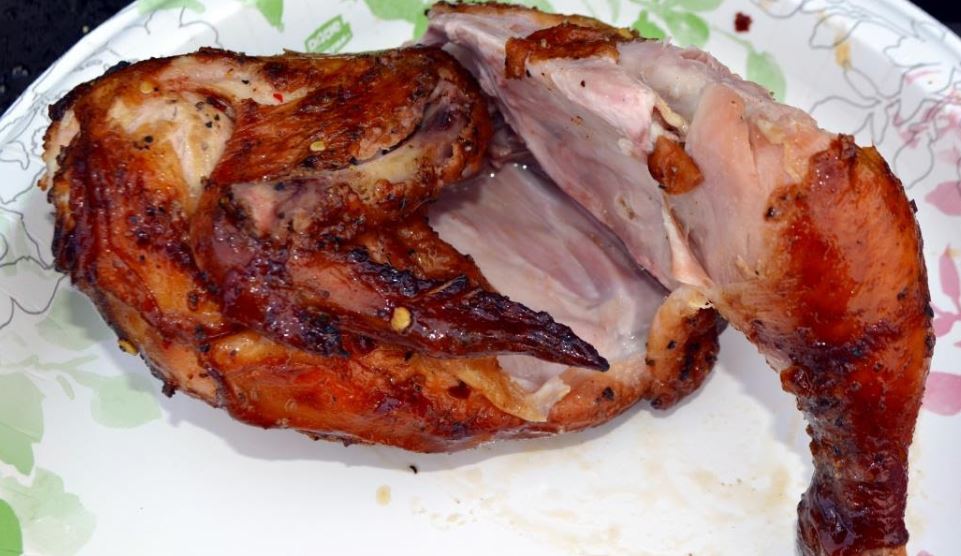
Delicious appetizing Shenandoah Valley Barbecue Chicken
cooked for several hours over direct heat.
When I cook Shenandoah Valley style barbecued chicken, I barbecue it old-school style directly over hot coals. The way I control the color of the meat and prevent it from becoming too brown and dark colored is with the vinegar-based Shenandoah Valley Virginia-style barbecue sauce. I start the chicken skin side down. When it starts to get a little color, I flip it over and baste it with the vinegar-based sauce. That not only adds flavor, it also lowers the pH of the surface of the meat. Once the other side gets a little color, I flip the meat again and baste it. I continue that process for several hours until the meat is perfectly done. The color always comes out a deep, rich, appetizing brown.
When I want to lower the pH of meat without using vinegar, I add about 1/2 teaspoon of natural cocoa to enough of my rub recipe for a single brisket or pork butt. It won't change the flavor of your rub but will help slow down the production of bark.
When I cook barbecue hot and fast, I like to speed up the production of bark because I don't have 8 hours for the bark to develop. In those cases, I add something to increase the pH level of the meat such as baking soda. I add about 1/2 teaspoon to the rub recipe for one brisket or pork butt, for example. It doesn't take much baking soda, so don't worry about making a perceptible change to the flavor of your barbecue.

 Login
Login