 Login
LoginAuthentication Flood | Wireless Network Attacks [FREE COURSE CONTENT]
This video tutorial presents how to deal with e-mails leading to malicious links. It is a part of our online course 'Authentication Flood' by Saeed Dehqan. Dive in!

This video tutorial presents how to deal with e-mails leading to malicious links. It is a part of our online course 'Authentication Flood' by Saeed Dehqan. Dive in!
This video tutorial presents how to deal with e-mails leading to malicious links. It is a part of our online course 'Client-Side Exploitation' by Krenar Kepuska. Dive in!
META: We’re breaking down what the most common security weaknesses are of the cloud and how to avoid these weaknesses.
The cloud has been hugely impactful on the everyday running of many businesses. Basic operations and data are now stored in the cloud, making for a more organized and more secure data storage option than past examples of physical documents or even data stored in hard drives. However, the cloud isn’t faultless.
The importance of cloud based network monitoring, especially in the case of cloud-based networks, cannot be overstated, but it is just one element of the overall weakness in cloud storage. A weakness that businesses really cannot afford to fall to. In this guide we’re breaking down what the most common security weaknesses are of the cloud and how to avoid these weaknesses.
What is the cloud?
Putting it simply, the cloud is an on-demand data storage facility. With the right authorisation anyone can access the cloud via an internet connection. It puts all your files and data in a non-physical storage bank that are typically run by various servers across different locations.
A common example is Dropbox or Google Drive. You can access these clouds with your own authorisation, typically a login username or email and password, and store and access your documents as you need them.
Businesses use far larger clouds to store all their business and customer data in a remote place that is considered safer to hacking, but as we’ll go on to point out, things are rarely that simple.
Why would anyone hack the cloud?
Data is one of the most valuable assets in the world right now. Oil and gold have nothing on people’s information, and the ability to simply take it “legally” through social media and website browsing is becoming increasingly restricted. The most common way you might see data being siphoned from users and used by businesses is via third-party cookies, but these are about to be scrapped by Google for an alternative expected to drop in 2024. And then there is personal data that is private, like bank details, browsing history, applications, etc.
And that’s just the consumer side of things. The real danger is the data that businesses are holding. Both business and customer documents being stored in the cloud makes for a very attractive target to hackers who might want to infiltrate these systems for many reasons. The most common include ransom, blackmail, activism, or for the sheer challenge.
So, how do these hackers get into the cloud when it was initially deemed so secure?
Unauthorized access
A lot of the methods used to access the cloud illegally come down to authorized and unauthorized access. Unauthorized access is the Mr Robot you’re imagining: someone at a computer using back doors via the public internet to enter the cloud. These methods are possible due to improperly configured security or compromised credentials and might allow them to access the cloud without the awareness of anyone in the organization.
Authorized access
Authorized access is the use of the proper account details and security measures to access the cloud but were perhaps acquired illegally or passed on to someone who isn’t approved to use the details. Unfortunately, a vast majority of cloud and cybersecurity breaches in general are perpetrated internally. That is to say, by employees of the company using the cloud. They can pass on passwords, login details, and some verification details for a fee to hackers, or simply use the information to access the cloud themselves for their own purposes.
Others?
Both of these instances are possible due to an improperly maintained cloud, which leads to various problems like misconfiguration, insecure interfaces, and phishing.
Phishing uses manipulation tactics, often in the form of emails or calls, to ask you to give them your personal information, which hackers can then use to access the cloud. Misconfiguration is the leading cause of cloud security breaches and is simply a lack of cloud security management due to the nature of the cloud, which allows for convenient access and data sharing from anywhere in the world. Interfaces designed to make things simpler for the customer is also a security risk since it is the customer’s responsibility to secure their details.
How do you avoid breaches in cloud security?
A lot of these problems can be solved with proper security management to the cloud services by servers and businesses. Unauthorized access is available and exploited due to holes in the system that allow the hacker in. Regular configuration and cloud based network monitoring is vital to keeping a secure cloud.
Elsewhere, the high risk in cybersecurity comes down to education. Retraining of employees is hugely beneficial to cybersecurity. Training on avoiding phishing scams, proper password and verification exercises would aid to plug some of the gaps in your cloud security, as will information on what makes for strong customer security when customers are interfacing with your company website.
Conclusion
It is true that the cloud has better security, but it’s not true that it’s infallible. The user-friendly and convenience-based nature of the cloud allows for a lot of areas that a hacker can get in, even if the end-to-end encryption that is making it popular makes it safer.
This video tutorial presents how to deal with improper error handling. It is a part of our online course 'Penetration testing OWASP Top 10 Vulnerabilities' by Atul Tiwari. Dive in!
This video tutorial presents the introduction to Open-Source Intelligence (OSINT). It is a part of our online course 'OSINT Fundamentals' by Lakshit Verma. Dive in! JOIN THE FULL COURSE!
In the last few years, container utilization to build, share, and run applications has grown significantly. This growth comes from the fact that containers give developers the ability to package application code and all its dependencies. Also, with containers, users can gain an extra layer of security thanks to the isolation capabilities it provides. The introduction of Docker containers has paved the way for many organizations to easily host applications within containers. Docker containers are standardized, lightweight, and secure runtime instances of a Docker image.
Containers out-of-the-box do not provide security monitoring. Therefore, it is important to have a comprehensive view of what is happening in runtime. This ensures that containers operate smoothly without security issues that can easily affect other containers and the entire infrastructure. Some security aspects to continuously watch out for when running Docker containers are:
Organizations need to identify and resolve threats quickly and proactively to avoid risks of compromise. For this, keeping track of the above criteria is indispensable and can be accomplished through the use of security monitoring solutions.
Wazuh is an open source security platform with unified XDR and SIEM capabilities. Its architecture comprises the Wazuh central components (server, indexer, and dashboard) and a universal agent. The solution provides protection for devices in clouds and on-premises infrastructures. Wazuh has many features ranging from container monitoring, file integrity monitoring, vulnerability detection, security configuration assessment, and more. Wazuh is multi-platform and expands its flexibility through integration with other security solutions.
Figure 1 below shows an example of real-time monitoring of Docker containers using Wazuh.
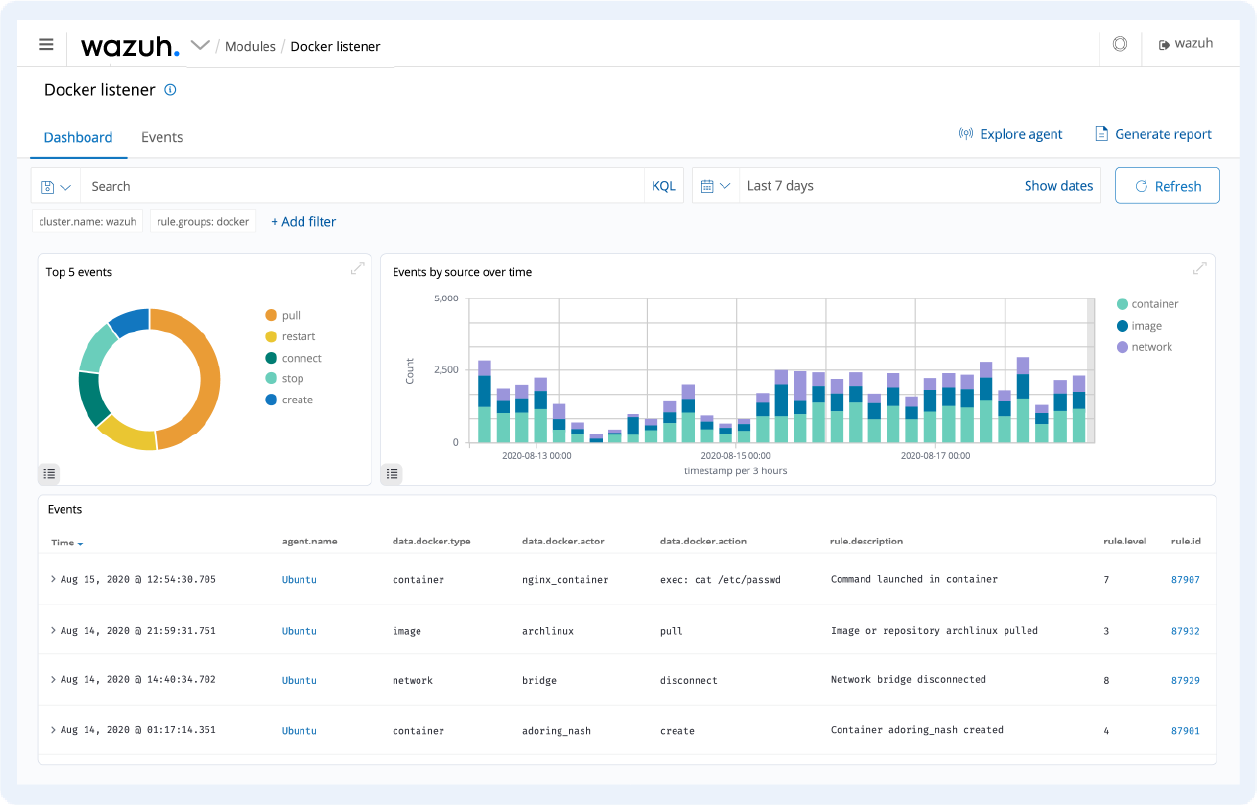
Figure 1: Real-time monitoring of Docker containers using Wazuh
For the use cases below, the Wazuh agent is installed on endpoints running Docker containers. The agent collects security and runtime data from the containers and forwards it to the Wazuh server for log analysis, correlation, and alerting.
Wazuh has a Docker module that communicates with the Docker Engine API to gather information on Docker containers. The only configuration necessary is to enable the Docker listener module to allow us to monitor Docker events. The Wazuh dashboard in Figure 2 below shows an example of detected container events in a Docker environment.
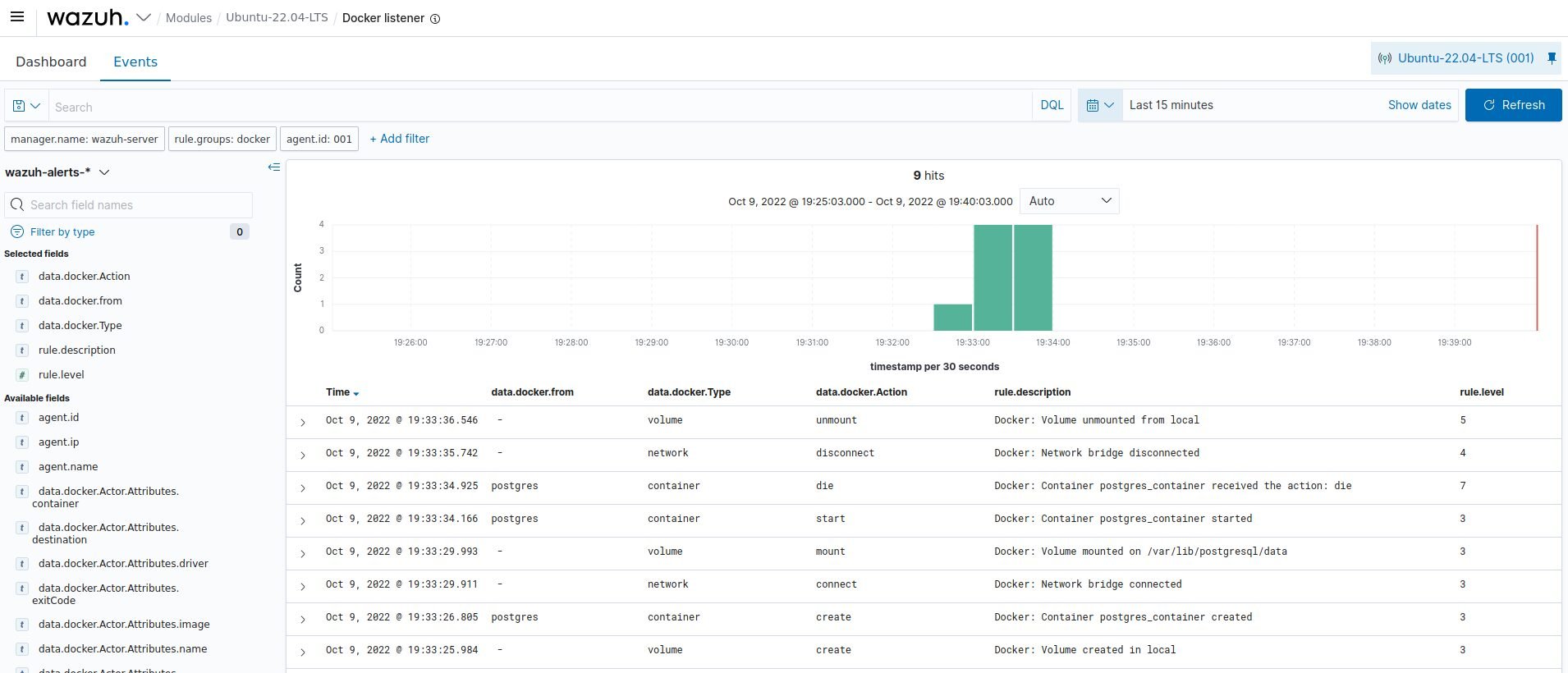
Figure 2: Docker events detected in a Docker environment
Wazuh can be used to monitor the performance of Docker containers in an endpoint. The Wazuh command monitoring module allows you to monitor the output of specific commands and trigger alerts accordingly. This gives organizations a clear view of the container for abnormal activities. The Wazuh dashboard in Figure 3 below shows the CPU, memory, and network traffic consumption of containers in an endpoint.
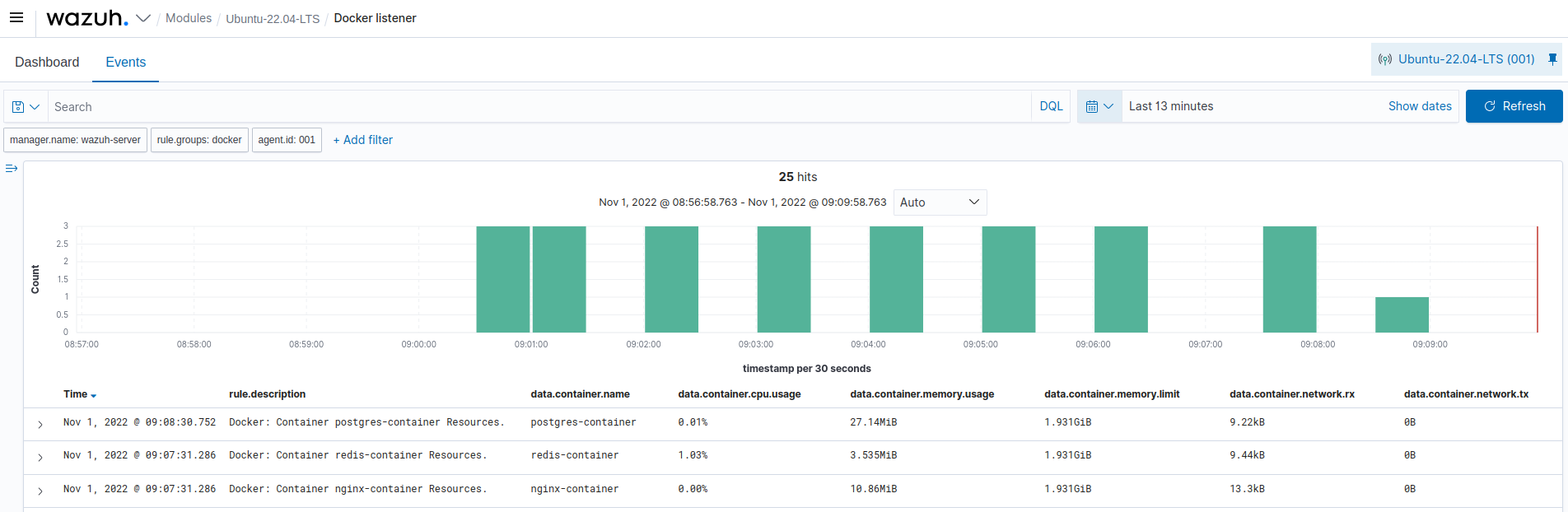
Figure 3: Resource consumption of containers in a Docker environment
The Wazuh command monitoring module is used to monitor the health status of containers in Dockerized environments. Figure 4 below shows the health status of containers running on an endpoint.
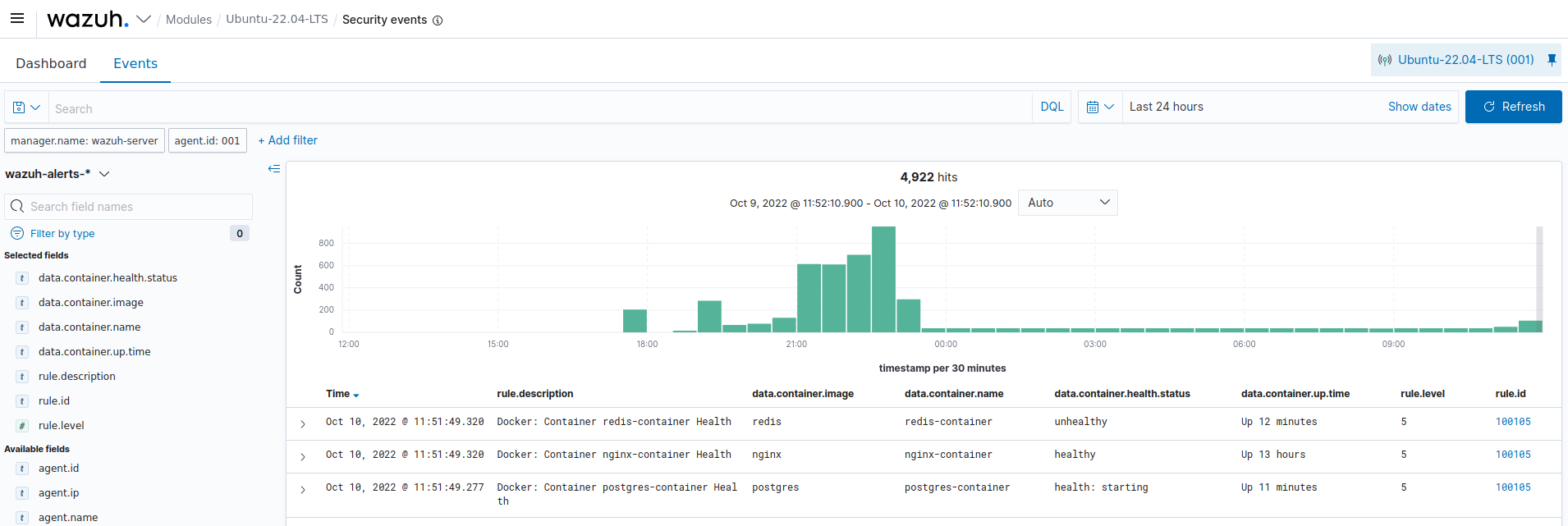
Figure 4: Health status of containers in a Docker environment
Robust monitoring and easy debugging are key factors for container security. This ensures complete coverage of metrics and the events happening in your Dockerized container infrastructures. We have seen how Wazuh facilitates and improves an organization's visibility through its container security monitoring capabilities. Visit this documentation to get a detailed explanation of how to perform container monitoring with Wazuh.
Wazuh is free to use, easy to deploy, and has a continuously growing community that supports thousands of users. To get started with Wazuh, visit the Quickstart installation guide and explore the features it provides.
Organizations have a hard time keeping track of vulnerabilities due to the large number of these that are discovered daily. From January to October 2022, over 19,000 vulnerabilities have been discovered, according to CVE Details. These vulnerabilities are disclosed in a publicly known list called the Common Vulnerabilities and Exposures (CVE).
A vulnerability is a weakness, bug, or flaw in a system that makes it open to exploitation by threat actors. Some notable vulnerabilities include Log4Shell, Follina, and Spring4Shell.
Threat actors make use of exploits to compromise vulnerable endpoints. Exploits are commands, software, or scripts that leverage vulnerabilities to breach an endpoint and compromise the confidentiality, integrity, or availability of data. In the case of Follina, a Remote Code Execution (RCE) vulnerability, a successful exploit grants complete computer control to the attacker.
Due to the ever-increasing vulnerabilities and the risks they pose to organizations, it is necessary to implement a vulnerability management system.
Vulnerability management involves identifying, classifying, remediating, and mitigating vulnerabilities. Vulnerability management solutions proactively scan devices in a network and identify weaknesses in them. They also categorize these vulnerabilities based on severity and provide remediation steps. These remediation steps can range from software updates to changing default passwords and configuration. Thereby preventing security breaches that can occur if these vulnerabilities get exploited. There are several advantages of having a vulnerability management system. These include:
Wazuh is a free and open source unified XDR and SIEM platform. It protects workloads across on-premises, virtualized, containerized, and cloud-based environments.
The Wazuh platform uses a server/agent model:
The Wazuh solution also supports agentless monitoring. This can be used for devices such as routers, firewalls, switches, and endpoints on which the Wazuh agent cannot be installed.
Wazuh has several capabilities that help organizations of all sizes protect their assets against security threats. The vulnerability management capabilities of Wazuh include Security Configuration Assessment (SCA), and vulnerability detection.
Security configuration assessments and hardening are effective ways to reduce an organization’s attack surface. The Wazuh SCA capability access system configurations and generates alerts when these configuration does not meet defined secure system policies.
The SCA policies included out-of-the-box with Wazuh can be used to check for compliance with the Center of Internet Security (CIS) benchmarks. The CIS benchmarks are configuration baselines, best practices, and recommendation that ensures the secure configuration of a system.
These SCA policies are written in YAML, which is easy to understand. Users can also create new policies or modify existing policies to fit their requirements.

Fig. 1: The Wazuh dashboard showing the result of an SCA check on a Windows device
The result of an SCA check on the Wazuh dashboard provides information about the configuration that was checked and recommendations to harden the system. With the SCA capability, organizations can check for misconfigurations in their infrastructure, remediate them, and ensure compliance with various regulatory frameworks (PCI DSS, GDPR, and NIST).
Wazuh helps users gain security visibility into the endpoints within their environment using the vulnerability detection module. This module allows you to discover vulnerabilities in the operating system and applications installed on the endpoints monitored by Wazuh.
Vulnerability detection is done through the native integration of Wazuh with external vulnerability feeds indexed by Canonical, Debian, Red Hat, Arch Linux, Amazon Linux Advisories Security (ALAS), Microsoft, and the National Vulnerability Database (NVD).
Wazuh agents extract software inventory data from the monitored endpoints and send this information to the Wazuh server. The software inventory data is correlated with CVE databases maintained on the Wazuh server to identify known vulnerable software.

Fig. 2: The Wazuh dashboard showing the result of a vulnerability detection scan on an Ubuntu device
The result from the vulnerability detection scan includes the CVE entry, the description, the severity level, and the condition of the vulnerability, which suggests possible remediation steps.
Vulnerability management programs help to keep your organization's infrastructure safe by detecting vulnerabilities before it gets exploited while ensuring compliance with regulatory requirements. It allows you to identify and remediate known vulnerabilities that can compromise the integrity of the computer systems and the information stored on them.
With more than 10 million annual downloads and dependable community support, Wazuh stands out as a free open source tool with SIEM and XDR capabilities. It is a free solution that integrates well with third-party solutions and technologies. To deploy Wazuh and explore use cases around vulnerability management, check out the Wazuh documentation.
