
❌

Reading view

There are new articles available, click to refresh the page.

Photographic Revision vs Reality

Last month, one of my PTSD (People Tech Support Duties) requests led me down a deep path related to AI-alterations inside images. It began with a plea to help photograph a minor skin irritation. But this merged with another request concerning automated AI alterations, provenance, and detection. Honestly, it looks like this rush to embrace "AI in everything" is resulting in some really bad manufacturer decisions.

What started with a request to photograph a minor skin rash ended up spiraling into a month-long investigation into how AI quietly rewrites what we see.

Cameras Causing Minor Irritations

The initial query came from a friend. Her kid had a recurring rash on one arm. These days, doctor visits are cheaper and significantly faster when done online or even asynchronously over email. In this case, the doctor sent a private message over the hospital's online system. He wanted a photo of the rash.

This sounds simple enough. Take out the camera, hold out the arm, take a photo, and then upload it to the doctor. Right?

Here's the problem: Her camera kept automatically applying filters to make the picture look better. Visually, the arm clearly had a rash. But through the camera, the picture just showed regular skin. It was like one of those haunted house scenes where the mirror shows something different. The camera wasn't capturing reality.


These days, smart cameras often automatically soften wrinkles and remove skin blemishes -- because who wants a picture of a smiling face with wrinkles and acne? But in this case, she really did want a photo showing the skin blemishes. No matter what she did, her camera wouldn't capture the rash. Keep in mind, to a human seeing it in real life, it was obvious: a red and pink spotted rash over light skin tone. We tried a couple of things:
  • Turn off all filters. (There are some hidden menus on both Android and iOS devices that can enable filters.) On the Android, we selected the "Original" filter option. (Some Androids call this "None".) Nope, it was still smoothing the skin and automatically removing the rash.

  • Try different orientations. On some devices (both Android and iOS), landscape and portrait modes apply different filters. Nope, the problem was still present.

  • Try different lighting. While bright daylight bulbs (4500K) helped a little, the camera was still mitigating most of it.

  • Try a different camera. My friend had both an Android phone and an Apple tablet; neither was more than 3 years old. Both were doing similar filterings.
We finally did find a few ways to get good pictures of the rash:
  • Use a really old digital camera. We had a 10+ year old Sony camera (not a phone; a real standalone camera). With new batteries, we could photograph the rash.

  • On my older iPhone 12 mini, I was able to increase the exposure to force the rash's red tint to stand out. I also needed bright lighting to make this work. While the colors were far from natural, they did allow the doctor to see the rash's pattern and color differential.

  • My laptop has a built-in camera that has almost no intelligence. (After peeling off the tape that I used to cover the camera...) We tried a picture and it worked well. Almost any desktop computer's standalone webcam, where all enhancements are expected to be performed by the application, should be able to take an unaltered image.
I'm glad my friend's kid found this entire experimentation process fascinating. But if this had been a more time-sensitive issue, I honestly don't know what a typical user with a newer device could have done.

This irritating experience was just a scratch of a much larger issue that kept recurring over the month. Specifically, how modern cameras' AI processing is quietly rewriting reality.

AI Photos

Since the start of digital photography, nearly all cameras have included some form of algorithmic automation. Normally it is something minor, like auto-focus or auto-contrast. We usually don't think of these as being "AI", but they are definitely a type of AI. However, it wasn't until 2021 when the first camera-enabled devices with smart-erase became available. (The Google Pixel 6, Samsung Galaxy S21, and a few others. Apple didn't introduce its "Clean Up" smart erase feature until 2024.)

Following the rash problem, I had multiple customer requests asking whether their pictures were real or AI. Each case concerned the same camera: The new Google Pixel 10. This is the problem that I predicted at the beginning of last month. Specifically, every picture from the new Google Pixel 10 is tagged by Google as being processed by AI. This is not something that can be turned off. Even if you do nothing more than bring up the camera app and take a photo, the picture is tagged with the label:
Digital Source Type: http://cv.iptc.org/newscodes/digitalsourcetype/computationalCapture
According to IPTC, this means:
The media is the result of capturing multiple frames from a real-life source using a digital camera or digital recording device, then automatically merging them into a single frame using digital signal processing techniques and/or non-generative AI. Includes High Dynamic Range (HDR) processing common in smartphone camera apps.

In other words, this is a composite image. And while it may not be created using a generative AI system ("and/or"), it was definitely combined using some kind of AI-based system.

In industries that are sensitive to fraud, including banking, insurance, know-your-customer (KYC), fact checking, legal evidence, and photojournalism, seeing any kind of media that is explicitly labeled as using AI is an immediate red flag. What's worse is that analysis tools that are designed to detect AI alterations, including my tools and products from other developers, are flagging Pixel 10 photos as being AI. Keep in mind: Google isn't lying -- every image is modified using AI and is properly labeled. The problem is that you can't turn it off.

One picture (that I'm not allowed to share) was part of an insurance claim. If taken at face value, it looked like the person's car had gone from 60-to-zero in 0.5 seconds (but the tree only sustained minor injuries). However, the backstory was suspicious and the photos, from a Google Pixel 10, had inconsistencies. Adding to these problems, the pictures were being flagged as being partially or entirely AI-generated.

We can see this same problem with a sample "original" Pixel 10 image that I previously used.


At FotoForensics, the Error Level Analysis (ELA) permits visualizing compression artifacts. All edges should look similar to other edges, surfaces should look like surfaces, and similar textures should look similar. With this image, we can see a horizontal split in the background, where the upper third of the picture is mostly black, while the lower two thirds shows a dark bluish tinge. The blue is due to a chrominance separation, which is usually associated with alterations. Visually, the background looks the same above and below (it's the same colors above and below), so there should not be a compression difference. The unexpected compression difference denotes an alteration.
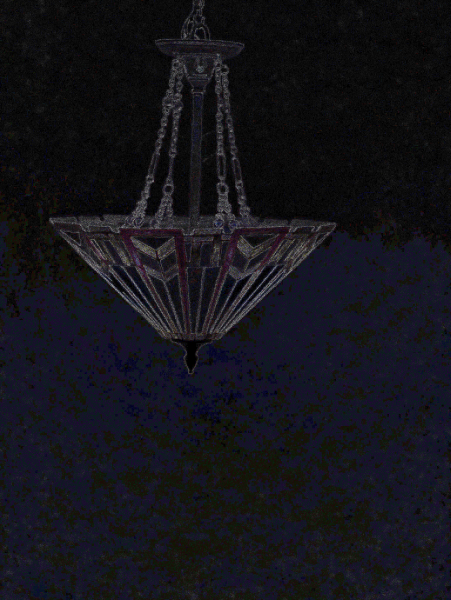


The public FotoForensics service has limited analyzers. The commercial version also detects:
  • A halo around the light fixture, indicating that either the background was softened or the chandelier was added or altered. (Or all of the above.)

  • The chevrons in the stained glass were digitally altered. (The Pixel 10 boosted the colors.)

  • The chandelier has very strong artifacts that are associated with content from deep-learning AI systems.
None of these were intentional alterations. (Jeff just opened the camera app and took a picture. Nothing fancy by the human.) These are all AI-alterations by the Google Pixel 10 and they cannot be disabled.

In my previous blog entry, I showed that Google labels all photos as AI and that the metadata can be altered without detection. But with these automatic alterations baked into the image, we can no longer distinguish reality from revision.

Were the pictures real? With the car photos (that I cannot include here), my professional opinion was that, ignoring the AI and visual content, the photos were being misrepresented. (But doesn't the Pixel 10 use C2PA and sign every photo? Yes it does, but it doesn't help here because the C2PA signatures don't protect the metadata.) If I ignored the metadata, I'd see the alterations and AI fingerprints, and I'd be hard-pressed to determine if the detected artifacts were human initiated (intentional) or automated (unintentional). This isn't the desired AI promise, where AI generates content that looks like it came from a human. This is the opposite: AI forcing content from a human to look like AI.

Other Tools

After examining how these AI-enabled systems alter photos, the next question becomes: how well can our current tools even recognize these changes?

My analysis tools rely on deterministic algorithms. (That's why I call the service "FotoForensics" -- "Forensics" as in, evidence suitable for a court of law.) However, there are other online services that use AI to detect AI. Keep in mind, we don't know how well these AI systems were trained, what they actually learned, what biases they have, etc. This evaluation is not a recommendation to use any of these tools.

This inconsistency between different AI-based detection tools is one of the big reasons I don't view any of them as serious analyzers. For the Pixel 10 images, my clients had tried some of these systems and saw conflicting results. For example, using the same "original" Pixel 10 baseline image:
  • Hive Moderation trained their system to detect a wide range of specific AI systems. They claim a 0% chance that this Pixel 10 photo contains AI, because it doesn't look like any of the systems they had trained on. Since the Pixel 10 uses a different AI system, they didn't detect it.


  • Undetectable AI gives no information about what they detect. They claim this picture is "99% REAL". (Does that mean it's 1% fake?)


  • SightEngine decided that it was "3%" AI, with a little generative AI detected.


  • Illuminarty determined that it was "14.9%" AI-generated. I don't know if that refers to 14.9% of the image, or if that is the overall confidence level.


  • At the other extreme, Was It AI determined that this Google Pixel 10 picture was definitely AI. It concluded: "We are quite confident that this image, or significant part of it, was created by AI."

The ground truth is that the Pixel 10 always uses AI to auto-enhance the picture. If you work in a field that forbids any AI enhancement, then the Pixel 10 is a serious problem. (You can't just tell your client that they need to go back to the site of the accident and take pictures with a different camera.)

Fear the Future

Once upon a time, "taking a picture" meant pressing a button and capturing something that looked like reality. Today, it's more like negotiating with an algorithm about what version of reality it's willing to show you. The irony is that the more "intelligent" cameras become, the less their output can be trusted. When even a simple snapshot passes through layers of algorithmic enhancement, metadata rewriting, and AI tagging, the concept of an "original" photo starts to vanish.

People use AI for lots of tasks these days. This includes helping with research, editing text, or even assisting with diagnostics. However, each of these uses still leaves the human with the final decision about what to accept, reject, or cross-validate. In contrast, the human photographer has no option to reject the AI's alterations to these digital photos.

From medical photos and insurance claims to legal evidence, the line between "photo" and "AI-enhanced composite" has blurred. For fields that rely on authenticity, that's not a minor inconvenience; it's a systemic problem. Until manufacturers return real control to the photographer, sometimes the most reliable camera is the old one in the junk drawer -- like a decade-old Sony camera with no Wi-Fi, no filters, and no agenda.

P.S. Brain Dead Frogs turned this blog entry in a song for an upcoming album. Enjoy!

Google Pixel 10 and Massive C2PA Failures

Google recently released their latest-greatest Android phone: the Google Pixel 10. The device has been met with mostly-positive reviews, with the main criticisms around the over-abundance of AI in the device.

However, I've been more interested in one specific feature: the built-in support for C2PA's Content Credentials. For the folks who are new to my blog, I've spent years pointing out problem after problem with C2PA's architecture and implementation. Moreover, I've included working demonstrations of these issues; these problems are not theoretical. C2PA is supposed to provide "provenance" and "authenticity" (the P and A in C2PA), but it's really just snake oil. Having a cryptographically verifiable signature doesn't prove anything about whether the file is trustworthy or how it was created.

A Flawed Premise

A great movie script usually results in a great movie, regardless of how bad the actors are. (In my opinion, The Matrix is an incredible movie despite Keanu Reeves' lackluster performance.) In contrast, a bad script will result in a bad movie, regardless of how many exceptional actors appear in the film, like Cloud Atlas or Movie 43. The same observation applies to computer software: a great architecture usually results in a great implementation, regardless of who implements it, while a bad design will result in a bad implementation despite the best developers.

C2PA starts from a bad architecture design: it makes assumptions based on vaporware, depends on hardware that doesn't exist today, and uses the wrong signing technology.

Google Pixel 10

I first heard that the Google Pixel 10 was going to have built-in C2PA support from Google's C2PA Product Lead, Sherif Hanna. As he posted on LinkedIn:
It's official β€” the Google Pixel 10 is the first smartphone to integrate C2PA Content Credentials in the native Pixel Camera app. This is not just for AI: *every photo* will get Content Credentials at capture, and so will every edit in Google Photosβ€”with or without AI.

Best of all, both Pixel Camera and Google Photos are *conformant Generator Products*, having passed through the C2PA Conformance Program.

If you didn't know better, this sounds like a great announcement! However, when I heard this, I knew it would be bad. But honestly, I didn't expect it to be this bad.

Sample Original Photo

One of my associates (Jeff) received the Google Pixel 10 shortly after it became available. He took a sample photo with C2PA enabled (the default configuration) and sent it to me. Here's the unaltered original picture (click to view it at FotoForensics):


If we evaluate the file:
  • Adobe (a C2PA steering committee member) provides the official "Content Credentials" web service for validating C2PA metadata. According to them, all digital signatures are valid. The site reports that this came from the "Google C2PA SDK for Android" and the signature was issued by "Google LLC" on "Aug 28, 2025 at 8:10 PM MDT" (they show the time relative to your own time zone). According to them, the image is legitimate.

  • Truepic (another C2PA steering committee member) runs a different "Content Credentials" web service. According to them, "Content credentials are invalid because this file was signed by an untrusted source."


    If we ignore that Truepic haven't updated their trusted certificate list in quite some time, then they claim that the manifest was signed by this signer and that it indicates no AI:
    detected_attributes: {
    is_ai_generated: false,
    is_ai_edited: false,
    contains_ai: false,
    is_camera_captured: false,
    is_visual_edit: false
    }
    Both authoritative sites should authenticate the same content the same way. This contradiction will definitely lead to user confusion.

  • My FotoForensics and Hintfo services display the metadata inside the file. This picture includes a rich set of EXIF, XMP, and MPF metadata, which is typical for a camera-original photo. The EXIF identifies the make and model (Google Pixel 10 Pro), capture timestamp (2025-08-28 22:10:17), and more. (Jeff didn't include GPS information or anything personal.)

  • There's also a C2PA manifest for the "Content Credentials". (It's in the JUMBF metadata block.) FotoForensics shows the basic JUMBF contents, but it's not easy to read. (FotoForensics doesn't try to format the data into something readable because all C2PA information is unreliable. Displaying it will confuse users by giving the C2PA information false credibility.) My Hintfo service shows the parsed data structure:

    • The manifest says it was created using "Google C2PA SDK for Android" and "Created by Pixel Camera".

    • There is a cryptographically signed timestamp that says "2025-08-29T02:10:21+00:00". This is not when the picture was created; this is when the file was notarized by Google's online timestamp service. This timestamp is four seconds after the EXIF data says the picture was captured. This is because it required a network request to Google in order to sign the media.

    • The manifest includes a chain of X.509 certificates for the signing. The signer's name is "Google LLC" and "Pixel Camera". If you trust the name in this certificate, then you can trust the certificate. However, it's just a name. End-users cannot validate that the certificate actually belongs to Google. Moreover, this does not include any unique identifiers for the device or user. Seeing this name is more "branding" than authentication. It's like having "Levi's" stamped on the butt of your jeans.

    Notice that the C2PA manifest does not list the camera's make, model, photo capture time, lens settings, or anything else. That information is only found in the EXIF metadata.

  • Inside the C2PA actions is a notation about the content:
    "digitalSourceType": "http://cv.iptc.org/newscodes/digitalsourcetype/computationalCapture"
    According to IPTC, this means:
    The media is the result of capturing multiple frames from a real-life source using a digital camera or digital recording device, then automatically merging them into a single frame using digital signal processing techniques and/or non-generative AI. Includes High Dynamic Range (HDR) processing common in smartphone camera apps.

    In other words, this is a composite image. And while it may not be created using a generative AI system ("and/or"), it was definitely combined using some kind of AI-based system.

    (Truepic's results are wrong when they say that no AI was used. They are also wrong when they say that it is not from a camera capture. Of course, someone might point out that Truepic only supports C2PA v2.1 and this picture uses C2PA v2.2. However, there is no C2PA version number in the metadata.)

    As an aside, Jeff assures me that he just took a photo; he didn't do anything special. But the metadata clearly states that it is a composite: "capturing multiple frames" and "automatically merging them". This same tag is seen with other Pixel 10 pictures. It appears that Google's Pixel 10 is taking the same route as the iPhone: they cannot stop altering your pictures and are incapable of taking an unaltered photo.

  • The most disturbing aspect comes from the manifest's exclusion list:
    "assertion_store":  {
    "c2pa.hash.data": {
    "exclusions": {
    [
    {
    "start": "6",
    "length": "11572"
    }
    ],
    [
    {
    "start": "11596",
    "length": "4924"
    }
    ],
    [
    {
    "start": "17126",
    "length": "1158"
    }
    ],
    [
    {
    "start": "18288",
    "length": "65458"
    }
    ],
    [
    {
    "start": "83750",
    "length": "7742"
    }
    ]
    },
    When computing the digital signature, it explicitly ignores:

    • 11,572 bytes beginning at byte 6 in the file. That's the EXIF data. None of the EXIF data is protected by this signature. Unfortunately, that's the only part that defines the make, model, settings, and when the photo was taken.

    • 4,924 bytes starting at position 11,596. That's the JUMBF C2PA manifest. This is the only component that's typically skipped when generating a C2PA record because most of it is protected by different C2PA digital signatures.

    • 1,158 bytes beginning at position 17,126 is the XMP data.

    • 65,458 bytes beginning at position 18,288 is the extended XMP metadata that includes Google's Makernotes.

    • 7,742 bytes beginning at position 83,750 is the continuation of the extended XMP metadata record.

    That's right: everything that identifies when, where, and how this image was created is unprotected by the C2PA signature. C2PA's cryptographic signatures only covers the manifest itself and the visual content. It doesn't cover how the content was created.
Without C2PA, anyone can alter the EXIF or XMP metadata. (It's a very common forgery approach.)

With the Google Pixel's C2PA implementation, anyone can still alter the EXIF or XMP metadata. But now there's a digital signature, even if it doesn't identify any alterations.

The problem is that nothing on either of the "Content Credentials" web services reports the exclusion range. If you're a typical user, then you haven't read through the C2PA specifications and will likely assume that the file is trustworthy with tamper-evident protection since the cryptographic signature is valid.

Forgery Time!

Knowing what I can and cannot edit in the file, I altered the image to create a forgery. Here's my forgery:


  • If you use the official Adobe/CAI Content Credentials validation tool, you will see that the entire file is still cryptographically sound and shows the same authoritative information. There is no indication of alteration or tampering. (The results at Truepic's validation service also haven't changed.)

  • The metadata displayed by FotoForensics and Hintfo shows some of the differences:

    • The device model is "Pixel 11 Pro" instead of "Pixel 10 Pro". I changed the model number.

    • The EXIF software version was "HDR+ 1.0.790960477zd". Now it is "HDR+ 3.14156926536zd". (Really, I can change it to anything.)

    • The EXIF create and modify date has been backdated to 2025-07-20 12:10:17. (One month, 8 days, and 12 hours earlier than the original.)

    Although this is all of the EXIF data that I changed for this example, I could literally change everything.

  • Hintfo shows the decoded JUMBF data that contains the C2PA manifest. I changed the manifest's UUID from "urn:c2pa:486cba89-a3cc-4076-5d91-4557a68e7347" to "urn:neal:neal-wuz-here-neal-wuz-here-neal-wuz". Although the signatures are supposed protect the manifest, they don't. (This is not the only part of the manifest that can be altered without detection.)
While I cannot change the visual content without generating a new signature, I can change everything in the metadata that describes how the visual content came to exist.

Consistently Inconsistent

Forgeries often stand out due to inconsistencies. However, the Pixel 10's camera has been observed making inconsistent metadata without any malicious intervention. For example:


According to Digital Photography Review, this photo of a truck is an out-of-the-camera original picture from a Pixel 10 using 2x zoom. The EXIF metadata records the subject distance. In this case, the distance claims to be "4,294,967,295 meters", or about 11 times the distance from the Earth to the Moon. (That's one hell of a digital zoom!) Of course, programmers will recognize that as uint32(-1). This shows that the Pixel 10 can naturally record invalid values in the metadata fields.

As another example:


DP Review describes this graffiti picture as another out-of-the-camera original using 2x zoom. It also has the "4,294,967,295 meters" problem, but it also has inconsistent timestamps. Specifically:
  • The EXIF metadata has a creation date of "2025-08-25 19:45:28". The time zone is "-06:00", so this is 2025-08-26 01:45:28 GMT.

  • The C2PA-compliant external trusted timestamp authority operated by Google says it notarized the file at 2025-08-26 01:45:30 GMT. This means it took about 2 seconds for the signing request to go over the network.

  • This picture has a few attached parasites. (A parasite refers to non-standard appended data after the end of the main JPEG image.) The XMP metadata identifies these extra JPEG images as the GainMap, Depth, and Confidence maps. Each of these images have their own EXIF data.

    ExifTool only displays the EXIF data for the main image. However, these parasites have their own EXIF data. Using the Strings analyzer at FotoForensics, you can see their EXIF dates. (Scroll to the bottom of the strings listing, then page-up about 3 times.) The data looks like:
    0x0030ed57: 2025:08:25 19:45:31
    0x0030ed8d: 0232
    0x0030ee35: 0100
    0x0030ef09: 2025:08:25 19:45:31
    0x0030ef1d: 2025:08:25 19:45:31
    0x0030ef31: -06:00
    0x0030ef39: -06:00
    0x0030ef41: -06:00
    This data says that the parasites were created at 2025-08-25 19:45:31 -06:00 (that's 2025-08-26 01:45:31 GMT). That is one second after the file was notarized. Moreover, while the C2PA's manifest excludes the main image's EXIF data, it includes these parasites and their EXIF data! This indicates that the parasites were created after the file was notarized by Google.
With photos, it's possible for the times to vary by a second. This is because the timestamps usually don't track fractions of a second. For example, if the picture was taken at 28.99 seconds and the file took 0.01 seconds to write, then the created and modified times might be truncated to 28 and 29 seconds. However, there is no explanation for the parasite's timestamp to be 3 seconds after the file was created, or any time after being notarized by the trusted timestamp provider.

Remember: this is not one of my forgeries. This is native to the camera, and I have no explanation for how Google managed to either post-date the parasites before notarizing, or generated the manifest after having the file notarized. This inconsistent metadata undermines the whole point of C2PA. When genuine Pixel 10 files look forged, investigators will conclude "tampering", even if the file is not manually altered.

With the Pixel 10's C2PA implementation, either the timestamps are untrustworthy, or the C2PA signatures are untrustworthy. But in either case, the recipient of the file cannot trust the data.

However, the problems don't stop there. Both of these sample pictures also include an MPF metadata field. The MPF data typically includes pointers to parasitic images at different resolutions. In the lamp picture, the MPF properly points to the Gain Map (a JPEG attached as a parasite). However, in these truck and graffiti examples, the MPF doesn't point to a JPEG. Typically, applications fail to update the MPF pointers after an alteration, which permits tamper detection. With these examples, we have clear indications of tampering: inconsistent metadata, inconsistent timestamps, evidence of post-dating or an untrusted signature, and a broken MPF. Yet, these are due to the camera app and Google's flawed implementation; they are not caused by a malicious user. Unfortunately, a forensic investigator cannot distinguish an altered Pixel 10 image from an unaltered photo.

Google Pixel 10: Now with Fraud Enabled by Default!

There's a very common insurance fraud scheme where someone will purchase their new insurance policy right after their valuable item is damaged or stolen. They will alter the date on their pre- and post-damage photos so that it appears to be damaged after the policy becomes active.
  • Without C2PA, the insurance investigator will need to carefully evaluate the metadata in order to detect signs of alterations.

  • With C2PA in a Google Pixel 10, the investigator still needs to evaluate the metadata, but now also needs to prove that the C2PA cryptographic signature from Google is meaningless.
Typical users might think that the cryptographic signature provides some assurance that the information is legitimate. However, the Pixel 10's implementation with C2PA is grossly flawed. (Both due to the Pixel 10 and due to C2PA.) There are no trustworthy assurances here.

Privacy Concerns

Beyond their inadequate implementation of the flawed C2PA technology, the Google Pixel 10 introduces serious privacy issues. Specifically, the camera queries Google each time a picture needs to be digitally signed by a trusted signing authority. Moreover, every picture taken on the Google Pixel 10 gets signed.

What can Google know about you?
  • The C2PA signing process generates a digest of the image and sends that digest to the remote trusted timestamp service for signing. Because your device contacted Google to sign the image, Google knows which signature they provided to which IP address and when. The IP address can be used for a rough location estimation. Google may not have a copy of the picture, but they do have a copy of the signature.

  • Since the Pixel 10 queries Google each time a photo is captured, Google knows how often you take pictures and how many pictures you take.

  • While the C2PA metadata can be easily removed, the Pixel 10 reportedly also uses an invisible digital watermark called "SynthID". Of course, the details are kept proprietary because, as Google describes it, "Each watermarking configuration you use should be stored securely and privately, otherwise your watermark may be trivially replicable by others." This means, the only way to validate the watermark is to contact Google and send them a copy of the media for evaluation.
All of this enables user and content tracking. As I understand it, there is no option to disable any of it. If Google's web crawler, email, messaging system, etc. ever sees that signature again, then they know who originated the image, when and where it was created, who received a copy of the media and, depending on how Google acquired the data, when it was received.

With any other company, you might question the data collection: "While they could collect this, we don't know if they are collecting it." However, Google is widely known to collect as much user information as possible. While I have no proof, I have very little doubt that Google is collecting all of this information (and probably much more).

The inclusion of C2PA into the Pixel 10 appears to be more about user data collection and tracking than authenticity or provenance.

Security and Conformance

C2PA recently introduced their new conformance program. This includes two assurance levels. Level 1 has minimal security requirements, while Level 2 is supposed to be much more difficult to achieve and provides greater confidence in the information within the file.

There is currently only one device on the conforming products list that has achieved assurance level 2: The Google Pixel Camera. That's right, the same one that I just used to create an undetectable forgery and that normally generates inconsistent metadata.

The Provenance and Authenticity Standards Assessment Working Group (PASAWG) is performing a formal evaluation on C2PA. Some folks in the group posed an interesting theory: perhaps the Google Pixel Camera is compliant with assurance level 2. Since Google explicitly excludes everything about the hardware, they are technically conforming by omitting that information. Think of this like intentionally not attaching your bicycle lock to the entire bike. Sure, the bike can get stolen, but the lock didn't fail!


What if they fixed it?

You're probably wondering how something like this could happen at Google. I mean, regardless of whether you like the company, Google is usually known for cutting edge technology, high quality, and above-average security.
  • Maybe this is just an implementation bug. Maybe nobody at Google did any kind of quality assurance testing on this functionality and it slipped past quality control.

  • Maybe they were so focused on getting that "we use C2PA" and "Assurance Level 2" checkbox for marketing that they didn't mind that it didn't protect any of the metadata.

  • Maybe nobody in Google's security group evaluated C2PA. This would certainly explain how they could put their corporate reputation on this flawed solution.

  • Maybe nobody in Google's legal department was consulted about Google's liability regarding authenticating a forgery that could be used for financial fraud, harassment, or propaganda.
You might be thinking that Google could fix this if they didn't exclude the EXIF and XMP metadata from the cryptographic protection. (That would certainly be a step in the right direction.) Or maybe they could put some device metadata in the manifest for protection? However, you'd still be wrong. The C2PA implementation is still vulnerable to file system and hardware exploits.

These are not the only problems I've found with Google Pixel 10's C2PA implementation. For example:
  • In the last few days, FotoForensics has received a handful of these pictures, including multiple pictures from the same physical device. As far as I can tell, Google uses the exact same four root certificates on every camera:

    • Google LLC, s/n 4B06ED7C78A80AFEB7193539E42F8418336D2F27
    • Google LLC, s/n 4FCA31F82632E6E6B03D6B83AB98B9D61B453722
    • Google LLC, s/n 5EF6120CF4D31EBAEAF13FB9288800D8446676BA
    • Google LLC, s/n 744428E3A7477CEDFDE9BD4D164607A9B95F5730

    I don't know why Google uses multiple root certs. It doesn't seem to be tied to the selected camera or photo options.

    While there are a limited number of root certs, every picture seems to use a different signing certificate, even if it comes from the same camera. It appears that Google may be generating a new signing certificate per picture. What this means: if a device is compromised and used for fraud, they cannot revoke the certificate for that device. Either they have to revoke a root cert that is on every device (revoking everyone's pictures), or they have to issue revocations on a per-photo basis (that doesn't scale).

  • My associates and I have already identified easy ways to alter the timestamps, GPS information, and more. This includes ways that require no technical knowledge. The C2PA proponents will probably claim something like "The C2PA manifest don't protect that information!" Yeah, but tell that to the typical user who doesn't understand the technical details. They see a valid signature and assume the picture is valid.

  • There's a physical dismantling (teardown) video on YouTube. At 12:27 - 12:47, you can see the cable for the front-facing camera. At 14:18 - 14:35 and 15:30 - 16:20, you can see how to replace the back-facing cameras. Both options provide a straightforward way for hardware hackers to feed in a false image signal for signing. With this device, the C2PA cryptographic signature excludes the metadata but covers the visual content. Unfortunately, you cannot inherently trust the signed image.

  • Even if you assume that the hardware hasn't been modified, every picture has been tagged by Google as a composite image. That will impact insurance claims, legal evidence, and photo journalism. In fields where a composite image is not permitted, the Google Pixel 10 should not be used.
With Google's current implementation, their C2PA cryptographic signature is as reliable as signing a blank piece of paper. It doesn't protect the important information. But even if they fix their exclusion list, they are still vulnerable to C2PA's fundamental limitations. C2PA gives the appearance of authentication and provenance without providing any validation, and Google's flawed implementation just makes it worse. It's a snake oil solution that provides no meaningful information and no reliable assurances.

A lot of people are excited about the new Google Pixel 10. If you want a device that takes a pretty picture, then the Pixel 10 works. However, if you want to prove that you took the picture, value privacy, or plan to use the photos for proof or evidence, then absolutely avoid the Pixel 10. The cryptographic "proof" provided by the Pixel 10 is worse than having a device without a cryptographic signature. Every picture requires contacting Google, the unaltered metadata is inconsistent, the visual content is labeled as an AI-generated composite, the signed data may be post-dated, and there is no difference between an altered picture and an unaltered photo. I have honestly never encountered a device as untrustworthy as the Pixel 10.

Eleven Years of FotoForensics

Today, FotoForensics turns 11 years old! When I first introduced FotoForensics, I didn't know if it would be used by anyone or even if the implementation would have problems with the load. (As I originally wrote, "I wonder how it will scale?") Today, it has received over 6,050,000 unique pictures (with over 800,000 in the last year) and it's in the top 80,000 of internet destinations (the exact position changes every few minutes, but it's around 80,000 right now). As far as scaling is concerned, it seems to be holding up well.

Science!

Even though the site is popular, there are always some people who wonder if it is "scientific" or if it really works. A quick search on Google Scholar turns up lots of scientific journal articles that discuss FotoForensics and Error Level Analysis. They all conclude that it does, in fact, work as advertised. Google Scholar returns over 400 results. Here is a random selection of examples:
  • K., P. B. M., Singh, K., Pandey, S. S., & O'Kennedy, R. (2019). Identification of the forged images using image forensic tools. In Communication and computing systems: Proceedings of the 2nd International Conference on Communication and Computing Systems (ICCCS 2018), December 1-2, 2018, Gurgaon, India. essay, CRC Press.
    Abstract
    The contents of the digital images can be easily manipulated with image editing software like Adobe Photoshop, Pixelmator, Inkscape, Fireworks, etc. In real life applications, it is indispensable to check the authenticity of the digital images because forged images could deliver misleading information and messages to our community. Different tools have been developed to detect the forged images. In literature, there is no study which presents an insight into image forensic tools and their evaluation on the basis of different criteria. Therefore, to address this issue, we present an insight into digital image forensic tools; and evaluate it on the basis of 15 different parameters like β€œerror level analysis”, β€œmetadata analysis”, β€œJPEG luminance and chrominance data”, etc. For our experimental work, we choose β€œFotoForensics” tool to show the forged region in digital images; and JPEGsnoop tool has been used to extract the metadata of the images.

  • Kageyama, K., Kumaki, T., Ogura, T., & Fujino, T. (2015). Digital image forensics using morphological pattern spectrum. Journal of Signal Processing, 19(4), 159–162. https://www.jstage.jst.go.jp/article/jsp/19/4/19_159/_article/-char/ja/

  • Scheidt, N., Adda, M., Chateau, L., & Kutlu, Y. E. (2021). Forensic tools for IOT device investigations in regards to human trafficking. 2021 IEEE International Conference on Smart Internet of Things (SmartIoT). https://doi.org/10.1109/smartiot52359.2021.00010

  • Almalki, S., Almalki, H., & Almansour, A. (2018, November). Detecting Deceptive Images in Online Content. In 2018 14th International Conference on Signal-Image Technology & Internet-Based Systems (SITIS) (pp. 380-386). IEEE. https://ieeexplore.ieee.org/abstract/document/8706216
This is nowhere near the complete list. I'm seeing dozens of journal articles every year. Some evaluate FotoForensics, some use it to support conclusions, and others treat it as a baseline for evaluating new techniques. Moreover, those are just the articles that talk about "FotoForensics". The number of journal articles is even higher if I search for "Error Level Analysis".

Legal Use

"Forensics" means "for use in a court of law." When it comes to understanding forensic tools, the courts use a few criteria to determine if the tool or expert witness is qualified. In the United States, the criteria varies by state, but it's usually either the Daubert standard (from Daubert v. Merrell Dow Pharmaceuticals Inc., 509 U.S. 579 (1993)) or the Frye standard (from Frye v. United States, 293 F. 1013 (D.C. Cir. 1923)). In either case, there are five criteria for determining if evidence and expert testimony should be considered or accepted by the court. I think FotoForensics addresses each of them to the extreme:
  1. Has the theory or technique in question been tested?
    In the case of FotoForensics, every algorithm and technique has been tested. Both by myself and by other experts in the field. The public FotoForensics service has a commercial counterpart. Every single one of the commercial customers has relied on their own independent tests before regularly using the tools.

  2. Has it has been subjected to peer review and publication?
    This is a definite yes. It has both formally and informally been repeatedly subjected to peer review. While the original algorithms were published in a conference white paper, subsequent publications include this blog, the training material at FotoForensics, and the more than 400 third-party book and journal publications. (It's not just me writing about it.)

  3. Does it have known or potential error rates?
    The question of "error rate" has always been difficult to answer. Confidence intervals are part of a statistical hypothesis. The cryptographic hashes from the Digest analyzer are good examples here. We can compute the SHA1 hash of two pictures and determine the likelihood of a mismatch. With cryptographic hashes, different hash values means that there were different input data sets. The likelihood of a false-negative match, where two byte-per-byte identical files are marked as being different, is zero (0); it doesn't happen. However, two different files could generate the same SHA1 hash value. The computed odds are about 1 in 2160 (a huge number). It drops to 280 if we incorporate the Birthday Paradox.

    (Not all cryptographic hashes are the same. MD5 is considered 'weak'. A collision can be forced in around 218 tries, or about 1 in 262,144.)

    In contrast, ELA, Hidden Pixels, Metadata, and the other data extraction systems do not use not a statistical hypothesis. These tools work like a microscope. What are the false-positive and false-negative rates for a microscope? It's a trick question; a microscope does not have them. As with other non-statistical systems, a microscope only identifies artifacts. The tests are deterministic and repeatable. It is up to a human to identify possible scenarios that are consistent with the observations. The documentation at FotoForensics identifies the various caveats and issues, but the tools never draw a conclusion. It's up to the human expert to evaluate the results and draw a conclusion.

    Since the various caveats and corner-case conditions are identified, it meets this requirement.

  4. Are there existing and maintained standards controlling its operation?
    Yes. Most of the algorithms are documented and fixed (have not changed in a decade). If there is an implementation error, then we perform updates (maintenance). And some of the dependent applications, like ExifTool for metadata extraction, are regularly updated for detecting more information. This meets the criteria.

  5. Has it attracted widespread acceptance within a relevant scientific community?
    Absolutely yes. Both the public and commercial versions are regularly used across a wide range of communities: mass media, financial, legal, insurance, UFO photo analysis (don't laugh), sales verification (receipt fraud is a big problem), contest validation, and more.
The courts also like to see historical precedence. The tools used at FotoForensics have been repeatedly used in legal cases. Everything from child custody battles and human trafficking to insurance and banking fraud. (I'm not the only expert using these tools.)

One Oversight

In my original (February 2012) announcement, I voiced some concerns about making tools publicly available. I was primarily concerned about possible misuse and the risks from educating criminals.

As for the tool being misused: I addressed this by releasing tutorials and challenges. Based on my web logs, these are some of the most popular documents I've ever written. Shortly after FotoForensics went live, a few trollish people posted bogus analysis on a wide range of topics to social media sites (Reddit, Twitter, Facebook, etc.). Each claimed that FotoForensics supported their arguments. I knew I did something right when those bogus claims would immediately be corrected by people who saw and understood the tutorials. (I don't have to police the internet; the community is doing that all by themselves.)

With regards to criminal behavior, I went so far as to write:
From an ethical viewpoint, I don't think this site violates concerns about educating criminals since (1) I don't distribute code, (2) bad guys generally don't like to submit their content to remote servers for evaluation, and (3) with the tutorial, people have the option to learn how to use the tool and are not left with a push-button solution.
Boy, was I wrong. Bad guys do like to submit their content to remote systems for evaluation! The public FotoForensics service regularly sees people developing new fraud techniques. Because new techniques stand out, I can often identify their tools and methods before they have a chance to deploy (weaponize) it for widespread fraud. Often, I can develop automated detectors before they distribute their forgery software. Over the years, I've written about everything from fraudulent scientific publications and government-sponsored techniques to widespread passport forgeries and commercially-sponsored fraud from Bayer and AvtoVaz.

FotoForensics is hardly a deploy-once-and-done service. I'm constantly learning new things and regularly improving it. I'm very thankful to my friends, partners, various collaborators, and the public for over a decade of helpful feedback, assistance, and insights. This year, I especially want to thank my mental support group (including Bill, Bob, and Dave), my totally technical support group (Marc, Jim, Richard, Wendy, Troy, and everyone else), Joe, Joe, Joe, AXT, the Masters and their wandering slaves, Evil Neal, Loris, and The Boss. Their advice, support, assistance, and feedback has been invaluable. And most importantly, I want to thank the literally millions of people who have used FotoForensics and helped make it what it is today.

Six Million Pictures

Last Saturday we hit a milestone at FotoForensics: 6 million unique pictures! I was really hoping that this achievement wouldn't be marred by porn so I could do a deep dive into it. (SPOILER ALERT: Not porn! Woo hoo!)

Here's the picture! It arrived on 2023-01-14 at 11:50:55 GMT:


I'm not big on following sports, celebrities, or pop culture, so I approached this picture with zero knowledge. The picture shows two women and a guy at some kind of club or restaurant. However, I don't know the people or the situation. This sounds like a great opportunity to do some image sleuthing. (Click on the picture to view it at FotoForensics.)

Side note: I'm writing this as a streaming flow of consciousness. I didn't gather the pictures or complete this investigation before I started writing.

Where to start? Metadata!

When evaluating a picture, it's always good to check the metadata. A camera-original picture will often include date, time, camera settings, and other information that can help track down the source. For example, an embedded time zone or region-specific device can provide a good guess about where the photo was taken. Similarly, many photo editors leave details in the metadata.

On the downside, many applications re-encode the image and strip out the source metadata. If the metadata was stripped, then there may be no camera or location information.

Unfortunately with this picture, there is no informative metadata. At minimum, this means that the picture has been resaved from some other photo.

The only interesting thing in the metadata is the ICC Profile. This specific profile is from Google and indicates that the picture was processed by an app -- either through an Android application or a Google service.

Hidden Pixels and Quality

JPEG encodes pixels using an 8x8 grid. If the image doesn't align with the grid, then there are hidden pixel along the right and bottom edges that pad out the image. This image size is 940x788 -- neither dimension is divisible by 8, so there are 4x4 hidden pixels. (940+4 = 944, which is divisible by 8. Similarly, 788+4 = 792 which is also dibisible by 8.) The encoded image is 944x792 pixels, but automatically cropped to 940x788 before being displayed.

Different applications use different approaches for filling the JPEG padding. Adobe uses a mirrored pattern than often produces a butterfly-wing shape on high-contrast curves. In contrast, libjpeg just repeats the last pixel value, creating a stretched effect. However, a lossless crop often leaves the original uncropped pixels. With this picture, there is a stretched pattern used for the padding. That's consistent with libjpeg and not an Adobe product.


Similarly, different applications use different encoding tables. The 'JPEG %' analyzer shows that this image was encoded as a JPEG at 92% using the JPEG Standard.

While this doesn't tell us who these people are, the results from the metadata, hidden pixels, and JPEG % are consistent: this was re-encoded using a standard JPEG library. (Google uses standard libraries.) This was not last saved using an Adobe product.

The final quality test is the error level analysis (ELA). ELA evaluates the compression quality. Bright colors indicates the areas that will change more during a JPEG re-encoding. You should compare similar surfaces, similar textures, and similar edges. Any inconsistencies, such as a flat surface that is at a different intensity from other flat surfaces, denotes an alteration.


With this picture, there are a couple of things that stand out:
  • All of the flat, smooth surfaces are equally dark. The dark clothing, dark ceiling, and even the smooth skin. (No comment about any potential plastic surgery to remove wrinkles.) An image that is this dark -- and yet last encoded at a high quality like 92% -- means that it has been re-encoded multiple times.

  • The areas with fine details (high frequencies), such as the lace, hair, and jewerly, are very high quality. This could be due to someone dramatically scaling the picture smaller, but it also could be due to selectively editing. Someone likely touched up the faces and hair. In addition, Adobe products can boost high frequency regions. While this was not last processed by an Adobe product, the second-to-last processing could have been with an Adobe product.
If we can find the original picture, then I'd expect the people to not be as brightly lit or crisp; they appear to be selectively touched up. I also would expect to find an Adobe application, like Photoshop or Lightroom.

External Sources

Back in 2016, I wrote about different search-by-picture systems. FotoForensics includes quick links for sending the pictures to TinEye, Google Image Search, and Bing Image Search. These might find different web sites that host similar pictures. If they find any, then it can provide context.

Google's image search has undergone many changes. Prior to 2015, it was really good at finding variations of the same picture. Then they changed it to a system that uses AI to identify the content and shows you similar content. (In my 2016 example, I used a photo of Brad Pitt. Google's AI identified 'Brad Pitt' as the key term and returned lots of different photos of Brad Pitt, but none of the same photo.) Last year, Google replaced their system with Google Lens. According to Google Lens, this photo visually matches "Boys Tails Tuxedo with Cummerbund" from Walmart. (It's not even the same tux! And he doesn't have a cummerbund!)


At the top of the image in Google Lens is a button that says "Find image source". This does the type of "find similar picture" search that I want. Google associated the picture with the name "Lisa Marie Presley" and found news articles that included variations of the picture. For example, People Magazine has an article from last week titled, "Lisa Marie Presley, Daughter of Elvis and Priscilla, Dead at 54: 'The Most Strong and Loving Woman'". (Oddly, People put this in the "Entertainment" category. Do they think people's deaths are entertainment?) People's article included this picture:


The metadata includes a caption: "Priscilla Presley, Austin Butler and Lisa Marie Presley at the Golden Globes on Jan. 10, 2023. Shutterstock for HFPA". Now we know the who, where, and when. We can also see that this picture is vertically taller and contains more content. However, the image's URL shows that it was also post-processed by People's web site:
https://people.com/thmb/K08A8Ur6jWci4DJwdFzNT-vlzxg=/1500x0/filters:no_upscale():max_bytes(150000):strip_icc():focal(924x19:926x21):format(webp)/Lisa-Marie-Presley-Hospitalized-after-Cardiac-Arrest-011223-5512728ae3084977bd9eb9e0001c3411.jpg

In order to serve this picture, their web server:
  • Stripped out any ICC Profile information. (The "strip_icc()" parameter.)

  • Selected a focal point. ("focal(924x19:926x21)")

  • Converted the file format to webp (dropping all JPEG metadata; "format(webp)").

  • Used variable compression to ensure the file size is no longer than 150,000 bytes ("max_bytes(150000)"). The resulting webp is 136,214 bytes.
However, these alterations imply that there is another source image out there somewhere that isn't altered.

Bing Image Search worked similarly to Google Lens. However, instead of identifying clothing, it identified the people. Oddly, when I first ran this test last night, it only identified Austin Butler and Priscilla Presley. Today (as I proofread my writing), it also identifies Lisa Marie Presley.

TinEye was more interesting. It didn't just find the picture, it found an expanded version of the picture at The Daily Mail! If you scroll past all of the disturbing paparazzi photos, you'll eventually find this image:


The picture is annotated with credits at the bottom and scaled very small; there's no original metadata. The only informative metadata says "Copyright Shutterstock 2023;121266844;5372;4000;1673420322096;Wed, 11 Jan 2023 06:58:42 GMT;0". However, this version is wider, showing another man in the photo! Who's he? The movie Elvis won an award at the Golden Globes. Priscilla and Lisa Marie are the real Elvis's wife/widow and daughter. The tall man in the middle is Austin Butler, who won Best Actor for his role as Elvis in the movie. The man who was cropped out is the movie's director, Mark Anthony "Baz" Luhrmann, who didn't win his nomination. (They cropped him out! Oh, the burn!)

You might also notice that the faces and hair are not as bright as the 6 millionth image. This version of the picture is darker. (The photo was likely taken in a room with bad lighting.)

Bigger Version?

I found another version of the picture at US Magazine.


This is a large image distributed by Shutterstock. It's not original, but it's much closer than my starting point.
  • The metadata says it was processed by Adobe Photoshop 2022 on a Mac.

  • There are still hidden pixels (not the original dimensions) and they show padding that is consistent with Adobe's butterfly pattern.

  • The JPEG quantization tables (JPEG %) are consistent with Adobe Save-for-Web quality 100 (equivalent to 99%).

  • ELA shows that the faces and hair of Austin, Lisa Marie, and Baz were selectively touched up. Priscilla's eyes appear touched up, but not her face.
Interestingly, even though this picture was touched up, the faces are visually darker and not as digitally sharpened compared to the previous versions. This picture shows edits, while the previous versions are edits on top of edits.

The Shutterstock ID "13707319l" finds the source picture's sale page: https://www.shutterstock.com/editorial/image-editorial/13707319l. (They list it as "Editorial" and not "Entertainment".) According to them, the largest size should be 5372x4000 pixels.

Much Closer!

I ended up finding the 5372x4000 picture at Closure Weekly. The URL is https://www.closerweekly.com/wp-content/uploads/2023/01/Lisa-Marie-Presley-Then-and-Now-Elvis-Daughter-Over-the-Years-.jpg. However, depending on your web browser, their web server may return a JPEG or WebP file. My Firefox web browser could only download the WebP version, but FotoForensics was able to retrieve the JPEG. The WebP lacks any informative metadata, but the JPEG has everything that was provided by Shutterstock.


The metadata still doesn't identify the type of camera. The annotated metadata was added using ExifTool 10.80. (ExifTool 10.80 is a production release that came out on 2018-02-22. Shutterstock really should update to get the latest patches.) The embedded information still identifies the people, but also includes the location!
Mandatory Credit: Photo by Shutterstock for HFPA (13707319l)..Priscilla Presley, Austin Butler, Lisa Marie Presley and Baz Luhrmann..80th Annual Golden Globe Awards, Inside, Beverly Hilton, Los Angeles, USA - 10 Jan 2023

(I find it interesting that none of the other photos include this "mandatory" credit.)

The ELA is also interesting -- it's almost entirely dark. That indicates a resave but no significant alterations.


With this version, there is no indication of selective editing to the faces. Visually, the faces are even darker (bad lighting) than the previous version. If you look at the full size picture, you can see that everyone has acne, freckles, pores, and other human features that were removed by the selective edits.

Now we know the history of this 6 millionth image:
  1. The Golden Globe Awards were held on 10 Jan 2023 at the Beverly Hilton in Los Angeles. (Technically, it's in a suburb called Beverly Hills). Priscilla Presley, Austin Butler, Lisa Marie Presley, and Baz Luhrmann posed for a photo at around 8:24pm (local time, according to the metadata). That same evening, Austin Butler won Best Actor for his role in the movie Elvis.

  2. A photo was taken of the ensemble. The metadata does not identify the photographer or the type of camera.

  3. The photo was sent to Shutterstock, where it was re-encoded (resaved) and metadata was added using a five-year-old version of ExifTool.

  4. The Shutterstock image went to a media outlet (like US Magazine), where the faces were selectively touched up using an Adobe application.

  5. The touched up version was then cropped on the right to remove Baz (maybe because he didn't win). Their faces were further brightened up and digitally smoothed out.

  6. The cropped version was further cropped (bottom, left, right, and top) with some kind of Google application. The cropping focused the content on the three people.

  7. Then the picture was uploaded to FotoForensics.
I'm certain that the source image used by the media came from Shutterstock (or related company owned by Shutterstock). However, I don't know if the picture went from Shutterstock to Closure Weekly to US Magazine to The Daily Mail to People to somewhere else before ending up at FotoForensics, or whether it took some alternate path. In addition, different media outlets may have applied similar brightness and sharpening edits; these may be branches of variations and not a linear chain of edits. However, given the similarities in cropping, nested edits, and handling artifacts, I don't think the final version took a much shorter path.

The picture originally had limited circulation since it was only associated with the Golden Globes. However, two days later, Lisa Marie Presley was hospitalized and then died. This picture received a resurgence in reporting and viral dissemination because it was taken shortly before her death.

When I first started FotoForensics (back in 2012), I was thrilled to see it receiving a few hundred pictures per day. These days, it receives over a thousand a day (and some days with over 10,000). Excluding two network outages, the last time it received fewer than 1000 pictures in a single day was 2016-12-31. (Dec 31 is always a very slow day, weekends are usually slower, and Dec 31 on a weekend? Only 818 uploads.) Still, six million pictures is quite a milestone. And every one of those pictures has some kind of story behind it.

No Apps!

I recently received requests from two different people who wanted help with their FotoForensics apps. It seems that their apps stopped working.

I do not provide a "FotoForensics app". Over the last decade, I have identified over a half-dozen knock-off apps that claimed to be "FotoForensics". These fake apps fall into 3 basic categories:
  • Malware. A few of the knock-offs install viruses on the user's device. They just reuse a good product's name in order to lure the victim into installing the software. If the application is not from the official vendor, then assume it is malicious.

  • Ads. Some of these knock-offs just wrapped my web service in their own application. This way, they can show ads and collect revenue from views and clicks. (I never see a penny of it, but my servers do all of the work.) My sites do not have ads. If you ever see an ad when viewing FotoForensics, this blog, RootAbout, Hintfo, or any of my other services, then your device is likely infected with adware or some other kind of unwanted application. I don't use ads.

  • Theft. One knock-off just wanted to use my service's name for their app. Basically, he wanted to hijack the name recognition. (Apple gave them 24 hours to change their apps name or be kicked out of Apple's app store.)
When I learn of these knock-offs, I have them pulled from the Apple and Android stores. I also look for their application signatures on my site. If I detect an unauthorized app, I block access and return some kind of nasty notice.

Last month, I blocked another unofficial app. These users had likely installed something with adware and malware.

Why no app?

For other projects (including some research-only testing), I've made everything from Apple-specific apps using Swift to cross-platform apps using Flutter and Progressive Web Apps (PWA). (Personally, I found PWAs to be the easiest to build.) It isn't that I don't know how to build an app. Rather, it's that I understand the limitations. Some things just don't work well in apps and FotoForensics is one of them.

With any kind of forensic analysis, you want consistent results. If you run a test on your computer and your friend runs the same test on his computer, then both computers should show the exact same results. If everyone runs the same software, then we all get the same result. However, different libraries sometimes do different things. For example, in 2014 I mentioned that I use the old libjpeg6b (with patches) for image analysis. This is because the newer libjpeg8 does something "more than JPEG". You won't get the same results from a forensic test with libjpeg8 and the differences from libjpeg8 are not part of the JPEG Standard.

For my tools, I make no assumption about which image library you use. FotoForensics does the processing on the server side (using consistent libraries) and then shows the results in the web browser. The results are always PNG files, so I don't have to worry the client's JPEG library version. I also remove any ICC color profile information in order to mitigate any color shifting by the web client.

Inconsistent JPEG Libraries

Whenever someone talks to me about creating an app for FotoForensics, I channel my inner Edna Mode: "No apps!"

Error Level Analysis (ELA) might seem like a really simple algorithm. You load a JPEG, save it at a known quality level (e.g., 75%), and then see how much it changed. However, ELA is very dependent on the JPEG library. Different JPEG libraries implement things just a little differently. libjpeg6b is different from libjpeg8, libjpeg-turbo, Microsoft's JPEG library, Apple's JPEG library, etc.

Many years ago, I create a small "corrupt JPEG" test file that demonstrates these rendering differences. While this JPEG is intentionally corrupted, it's not bad enough to prevent any JPEG library from rendering it. The thing is, every JPEG library renders it differently.

Here's the test image. The different color blobs that you see will depend on your web browser:


I've been using this image for years to profile the underlying JPEG libraries. Depending on what is rendered, I can determine exactly which JPEG library and version some application is running.

For example:
libjpeg6b (follows the JPEG Standard)
libjpeg8. It may start the same as libjpeg6b, but bottom half is very different.
libjpeg-turbo (2.1.3 or earlier); Microsoft Edge and older Chrome and Firefox browsers.
libjpeg-turbo (2.1.4 or later); current Chrome and Firefox browsers. It might look similar to the previous libjpeg-turbo, but there is a little difference:
libjpeg-turbo 2.1.4, but using Firefox on a Mac. The colors are a little different.
Apple's library used by Safari (desktop) and iOS browsers (Mobile Safari, Mobile Chrome, and Mobile Firefox -- on an iPhone or iPad) is the only one that just gave up. (Of all of the libraries, this is probably the correct solution when encountering a corruption.)
I need to dig into Mastodon and see what they use for re-encoding images. It looks like the default Windows 10 library.

This isn't the entire list. Older Androids used a different library than current Androids. Windows 7 is different from Windows 8 is different from Windows 10, etc.

It's not good science if the results cannot be reproduced by someone else. You don't want to do media forensics on any device where the results can vary based on some unspecified library version. This is why I don't have an app. If I provided an app, it would need to be massive in order to include all of the known, trusted, and vetted libraries. Instead, I use a web interface and have the server perform the evaluation. The FotoForensics web site provides consistent results regardless of your web browser.

Unnecessary Apps

There are many different types of apps that you should never install. These includes redundant functionality apps (flashlights, keyboards, etc.) that duplicate existing functionality while requiring invasive access to your device, customer loyalty apps that are really nothing more than a front for deep user-tracking, and ineffective apps. For example, most anti-virus apps are ineffective due to localized sandboxing and may actually be trojan malware.

In addition, there are some apps that really should make you wonder: why does it need to be an app? For example, do you really need an app for your coffee maker or washing machine? Then again, I'm opposed to apps that disable the house alarm and unlock the front door. (Lose your phone, lose you home.) Beyond the physical, there are some impressive apps for making fake photos. Fake images for fun is one thing, but some of these apps seem clearly designed for people interested in committing insurance and banking fraud. Do we really need to make crime easier?

Finally, there are some things that should not be apps for various technical reasons. Kim Rust wrote a great list of technical reasons why you shouldn't build an app. The list includes insufficient resources (time, money, engineering effort) to support the app and apps that provide minimal functionality. Her reason #4 really matches my concerns: "Don't Build an App When it provides no improvement upon your mobile website".

Weird Science

Over at FotoForensics, we see pictures that are related to scientific journals almost daily. These stand out because they are not your common social media, celebrity, or conspiracy images that we typically receive. We often see photos of cells, western blots, gel assays, things growing in petri dishes, and related results from science experiments. Sometimes these images come from people who are trying to validate the authenticity of the images, while other times the pictures seem to come from researchers who are intentionally making altered images.

Just Flesh and Blood

Fraud in scientific publications is a serious problem. This includes the widespread use of altered pictures in journal papers. The alterations may be simple, like copying the same picture and claiming it is from different experiments. However, they can also include editing, creative cropping, or "touching up" photos. The wholesale fabrication of "proof" pictures is also becoming more common. (And this is before we get to outright plagiarism.)

When this fraud is discovered, the journals sometimes issue retractions. However, any retraction can be too late. Subsequent research papers may continue to cite the previously retracted articles.

Sometimes these retractions are associated with a bunch of papers from one set of researchers, while other times it is a systemic problem within a particular research field. For example, the NIH identified four anaesthesiologists who had articles retracted due to "research misconduct". Some of their articles had been retracted, while others had not. (One of the authors, Yoshitaka Fujii, tops the leaderboard at Retraction Watch. They note that he has had 183 total article retractions.)

Back in 2014, RIKEN (a Japanese institute) began investigating over 20,000 papers for doctored images and plagiarism. During that same time, FotoForensics began to receive a large number of altered cell photos. Here's a small sample that were uploaded by someone at the Research Organization of Information and Systems, National Institute of Informatics in Japan:


Most of the pictures show cells and nearly all were digitally altered. Looking at the sequence of preview images, you might notice the same cells in the same positions but with more cells appearing in subsequent photo uploads. For example, here's one of the images:


With a little experience, you can probably tell that these are cells photographed through a microscope. With a some biology background, you might be able to tell that they are blood cells. With a lot of advanced education, you might be able to tell that these are fish blood cells.

At FotoForensics, we don't need marine biology lessons to know that something's fishy. It's faint, but FotoForensics shows the boxes around every cell that was pasted into the picture:


The commercial FotoForensics service includes more ways to highlight the alterations. (Ignore the colors; just focus on the edges of the colored regions.)


This one example is from the series of cell pictures where the "researcher" continually added cells and adjusted their positions in the picture. However, even without the sequence of images, advanced tools permit detecting the alterations from a single picture. These are not artifacts from some background lighting. This is a composite image where someone tried to blend the different cells into one picture.

Not What Teacher Said To Do

It's not just photos of cells. It's all sorts of sciency things. For example, these types of "western blot" images are common among the molecular biology community. These show dark lines where different chemical compounds cluster.


These examples are 2 of 56 pictures that were uploaded to FotoForensics in 2014 from someone associated with the University of Illinois in Urbana-Champaign. (The first four came from a Chinese research paper. The remaining 52 appear to be different revisions of alterations.) In these two examples, someone first pasted six dark lines into the gray background, then they tried to digitally erase three of the lines. In both cases, the annotation (2-T) and the hairline scratch below the annotation were added after the rest of the picture had been created.

The Magic from the Hand

While lots of different people upload science test images to FotoForensics, the people who do bulk uploading really stand out. (Bulk uploading is a violation of the public site's terms of service.)

A week ago, a user in India uploaded dozens of photos showing cultures in petri dishes. Many of the pictures were variations of base images, showing iterations and development cycles for the alteration process. The user appears to have been trying to develop a process that would avoid detection at the public FotoForensics service. Here are two of the base images that the user uploaded:


The first image shows five dark dots in a petri dish. Error level analysis (ELA) evaluates the image's compression artifacts. In this case, ELA highlights where the user erased some of the petri dish's contents. Because of how it was erased, I cannot tell you whether the person only erased around the five dots, or if the five dots were each pasted into the image before the erasure. The second picture has four crystals pasted into the image. I think that they're trying to show that the crystals repel the cultures, but the only thing repellent is their use of PicsArt for their scientific imagery.

Magic and Technology

These types of scientific publication alterations are not limited to biology. Since September, a user in China has uploaded hundreds of pictures of solar panel test results. (So many pictures, that we created a special auto-ban rule just for him.) A few of his pictures are unaltered, but many of them are modified. Here's just one (of over a hundred) examples:


The picture contains tiny gray squares of photovoltaic (PV) elements. The PV elements are arranged in small rectangular blocks. Each set of 12x6 blocks are organized into panels, and there are two panels per picture. (That's a lot of science!)

Using ELA, you might notice the lens effects. These are patterns created by a digital camera. This one picture is a composite made from small photos that were then captured in rows of blocks by a digital camera, leaving the camera's lens effect signatures. Each row of blocks was cropped and combined to form the final composite. After all of the compositing, someone replicated elements in the 2nd row in order to digitally alter the results. (The alteration distorts the ELA's lens effect patterns.)


But the alterations don't stop there. Some of FotoForensics' commercial tools highlight other edits. This example highlights the 1st and 9th elements on the first row, and 6 blocks on the 2nd row.


Considering that China dominates the world's supply of solar panels, it makes sense that someone might want to fake their test results in order to justify cost cutting methods or ways to manufacture inferior products. (But the products look great in the "test results"!)

As an aside, one of my associates speculated that these could be training images for an AI-based solar panel quality control system. Other researchers have papers that demonstrate this type of AI detection. (E.g. PDF1 and PDF2) However, we ruled that out since the time codes at the bottom of the chinese pictures shows them being produced at a slow rate (at most, a few per day). AI researchers would mass-produce training images at a much faster rate.

Diagrams and Charts

There has been a growing movement of anti-alteration researchers who want to identify altered imagery in journal papers. There problem is, most of the uploads to FotoForensics are not as easy to evaluate as the previous examples. Instead, we usually see complex pictures like these two examples:


Both of these examples were received within the last week, and they were uploaded by different people. These pictures are very representative of the scientific images received by FotoForensics almost daily for over a decade. The problems with analyzing these pictures are numerous:
  • PDF. Most of these pictures come from published (or pre-published) journal articles. That means they are already converted to PDF. PDF files typically strip out the image's metadata, re-encode the image at a low quality, and scale the image to fit the space on the page. Moreover, they are often converted to grayscale. (Few journals publish in color.)

    For image analysis, it's all about how the evidence was handled. I typically use the analogy that evaluating an image is like trying to pull fingerprints off of a drinking glass. With a PDF, it's like running the glass through the dishwasher twice before trying to pull off any fingerprints. I can detect the encoding patterns used by most PDF encoders. But what happened before it was crammed into the PDF? That information is likely gone.

  • Extractions. Making matters worse, how do you get the image out of the PDF? A lot of amateur sleuths just take a screenshot of the PDF page that is rendered on the screen. I can tell you about the tool that took the screenshot, but that doesn't tell you whether the science experiment's results were altered. However, even if you correctly extract the image (use pdfimages with -j to avoid any additional format conversions), you're still left with a picture that has been grossly abused by the PDF encoder.

  • Annotations. Part of the scientific process is to communicate findings. I don't fault scientists for annotating their images. The problem is that the annotations are an edit to the picture and usually added last. If there was a misleading alteration in the scientific findings, the artifacts from those edits may have been obliterated when the image was annotated and formatted for publication.

  • Composites. Along with annotations, it's common to see cut-and-paste results placed side-by-site. This is usually done for readability (a side-by-side comparison of results). However, the composite side-by-side image is still an edit that can distort or remove trace artifacts that would have identified other types of manipulations.

  • Grayscale renderings. Assuming you get the pre-PDF image without annotations, you might still not have a "photo". For example:


    This one picture is a composite made from six separate images. It also includes annotations. However, each of those six pictures are not from a typical "photo". Instead, they appear to be from grayscale renderings of medical scans that were digitally colorized (and likely scaled and cropped). None of this is unusual in scientific papers, and it doesn't represent any intentional deception. However, the combination of a grayscale scan that was colorized, scaled, and cropped, plus the annotations and composition, makes it extremely difficult to tell if any of the original six scans were digitally altered.
A lot of amateur sleuths just rely on their eyes. And don't get me wrong, this can be extremely useful for spotting reused pictures or obvious alterations. With the right kind of science background, an experience molecular biologist might see something wrong in the experiment results.


However, I'm not a biologist. As a non-biologist who only relies on image analysis, I cannot evaluate these images and conclusively determine that the blank regions in these western blots from FOXO3a and p-ATM were digitally altered. For me, they are suspect but not conclusive due to the image's handling.

Bits and Pieces and, Bits and Pieces, Weird Science!

I periodiclly see articles about scientific imagery sleuths who spot image manipulation. Many have been successful in having pre-publication articles rejected and published works retracted. I've also seen reviews about tools like SILA, which tries to evaluate images from PDF documents. However, like most scientific papers, they only discuss the corner cases where it works. For example, SILA doesn't mention the problems with grayscale imagery, cropping or scaling, or the impact from annotations. It also uses a copy-clone algorithm which has limitations related to the image's resolution and false positives from similar imagery. At a small enough resolution, the edges along most western blot images should look like a copy-clone, even if they are not. (When I teach people how to do image analysis, I always provide some examples that are not obvious or definitive. An analyst should always consider the likelihood of other options and be willing to accept "inconclusive" or "I don't know" as viable results.)

Ideally, the publications should request full-sized unedited versions of any imagery for pre-publication analysis. However as far as I can tell, they do not. Then again, I doubt that they have the staff necessary to evaluate the media that they receive. Moreover, there is the arms race problem that is common to all types of image analysis tools: if the tools were shared beyond the publication's forensic analysts, then unscrupulous researchers could start testing their fraud techniques against the tools. Eventually they will make something that the tools cannot detect.

But let's assume that we have the pre-edited imagery and the tools (and ignore the arms race problem). Then we'll spot all of the problems and alterations, right? Well, not every alteration is as clear-cut as the examples in the beginning of this blog entry. There's a recent paper from PNAS titled, "Observing many researchers using the same data and hypothesis reveals a hidden universe of uncertainty" by Nate Breznau, Eike Mark Rinke, Alexander Wuttke, and Tomasz Ε»Γ³Ε‚tak, who conducted a fascinating experiment. They gave the same complex data to "seventy-three independent research teams". None of the teams reached the same conclusion about the data. As their paper concluded, "Considering this variation, scientists, especially those working with the complexities of human societies and behavior, should exercise humility and strive to better account for the uncertainty in their work."

(Huge thanks to Oingo Boingo for their album Dead Man's Party, including their song "Weird Science", which felt oddly appropriate for this topic.)
❌