I'm continuing to look for ways to lower my energy bill, even if only by a few dollars. One of my ideas was to use solar panels. However, the roof on the office building isn't ideal for solar.
- The optimal direction is East to South-East for morning and South-West to West for afternoon. Unfortunately, the southern facing parts of the roof have lots of small sections, so there's no place to mount a lot of solar panels. But I do have space for a few panels on the roof; probably enough to power the server rack.
- All of the professional solar installation companies either don't want to install panels if it's less than 100% of your energy needs, or they want to charge so much that it won't be worth the installation costs. This rules out the "few solar panels" option from a professional installer.
Last year, I decided that it would be a good learning experience to make my own solar panel Energy Storage System (ESS). My goal was
not to power the entire office or sell power back to the electric company. Rather, I wanted an off-grid solution to just power the server rack for a few hours each day. If it worked, it should save me somewhere between 20kWh and 40kWh per month. That's less than 10% of my utility bill, but it's better than nothing. And assuming I ran the numbers correctly, it should pay itself off in about 5 years. (I hoped to keep the costs significantly lower by doing the installation by myself.)
In the worst case, it may never earn enough to pay itself off. But at least I'll learn something about solar panels, energy storage systems, and high voltage.
Having said that, developing it myself was certainly full of unexpected surprises and learning curves. Each time I thought I had everything I needed, I ended up finding another problem. (Now I know why professional installers charge tens of thousands of dollars. I don't even want to think about how much of my labor that went into this.)
The Basic Idea
I started this project with a basic concept. For the rest of the details, I decided that I'd figure it out as I went along.
- Goal: I want an off-grid solar powered system for my server rack. It is not intended to run 24 hours a day, cover all of my energy needs, or sell excess power back to the utilities. I only want to reduce my power usage and related costs by a little. (When I consulted with professional solar installers, this is a concept that they could not comprehend.)
- Low budget: A professional installation can cost over $20,000. I want to keep it under $1,000. For me, I wanted this to be a learning experience that included solar power and embedded controllers.
- Roof: The original plan was to put some panels on the roof. Since I don't have much roof space, I was only going to have two panels that, under ideal conditions, could generate about 100 watts of power each, forming a 200W solar system. This won't power the entire office, but it should power the server rack for a few hours each day. (I ended up not going with a roof solution, but I'll cover that in a moment.)
The entire architecture is kind of overwhelming. Here's a drawing that shows what I'm doing:

And here's the final system:

Note: I'm naming a lot of brands to denote what I finally went with. This is not an endorsement or sponsorship; this is what (eventually) worked for me. I'm sure there are other alternatives, and I didn't necessarily choose the least expensive route. (This
was a learning experience.)
- Solar charger: The solar panels connect to a battery charger, or Maximum Power Point Tracking (MPPT) system. The MPPT receives power from the solar cells and optimally charges the battery. Make sure to get an MPPT that can handle all of the power from your panels! My MPPT is a Renogy Rover 20, a 20-amp charger that can handle a wide range of batteries. The two black wires coming out the bottom go to the battery. There's also a thin black line that monitors the battery's temperature, preventing overcharging and heat-related problems. Coming off the left side are two additional black lines that connect to the solar panels. (The vendor only included black cables. I marked one with red electrical tape so I could track which one carried the positive charge.) There's also a 10-amp fuse (not pictured) from the solar panels to the MPPT.
- Battery: The MTTP receives power form the panels and charges up a moderately large battery: 12V 100Ah LiFePO4 deep cycle battery. (Not pictured; it's in the cabinet.) When fully charged, the battery should be able to keep the servers running for about 30 minutes.
- Inverter: On the right is a Renogy 2000W power inverter. It converts the 12V DC battery into 120V 60Hz AC power. It has two thick cables that go to the battery, with red going through a 20-amp fuse. (Always put fuses on the red/positive lines.)
- Automatic Transfer Switch (ATS): At the top (yellow box) is the automatic transfer switch (ATS) that toggles between utility/wall power and the inverter's power. It has a 30ms transfer speed. I had been using this box for years to manually switch between power sources without interruption. The three cables coming out of it go to the two inputs: primary is the inverter and fallback is the wall outlet. The output line goes to the UPS in the server rack. The UPS ensures that there isn't an outage during the power transfer. It also includes a power smoother to resolve any potential power spikes or phase issues.
- Output power: The ATS's output AC power (from grid or inverter) goes into a smart outlet (not pictured in the line drawing, but visible in the photo below as a white box plugged into the yellow connector at the top). This allows me to measure how much power the server rack consumes. There's a second smart outlet (not pictured) between the wall outlet and the ATS, allowing me to measure the power consumption from the utility. When I'm running off grid power, both smart outlets report the same power consumption (+/- a few milliamps). But when I'm running off the inverter, the grid usage drops to zero.
- Controller: In the middle (with the pretty lights) is my DIY embedded controller. It reads the battery level and charging state from the MPPT and has a line that can remotely turn on and off the inverter. It decides when the inverter runs based on the battery charge level and available voltage. It also has a web interface so I can query the current status, adjust parameters, and manually override when it runs.
- Ground: Not seen in the picture, there's grounding wire from the inverter's external ground screw to the server rack. The server rack is tied to the building's "earth ground". Proper grounding is essential for safety.
Everything is mounted vertically to a board that is hung from the side of the server rack. This allows me to easily take it down for any maintenance issues. (And when doing the initial testing, I could carry the entire thing outside.)
Even though I knew I'd be starting this project around March of this year, I started ordering supplies five months earlier (last November). This included solar panels, a solar charger, battery, and an inverter. I ordered other components as I realized I needed them. Why did I start this so early? I believed Trump when he said he would be imposing stiff tariffs, making everything more expensive. (In hindsight, this was a great decision. If I started ordering everything today, some items would cost nearly twice as much.)
Measuring Power
Before starting this project, I needed to understand how much power I'd require and how much it might save me on my utility bill.
As a software (not hardware) person, I'm definitely not an electrical engineer. For you non-electricians, there are three parts of electricity that need to be tracked:
- Voltage (V). This is the amount of power supplied on the wires. Think of it like the pressure in a water pipe.
- Amps (A). This is the amount of current available. Think of this like the size of the water pipe. A typical desktop computer may require a few amps of power. Your refrigerator probably uses around 20 amps when the compressor is running, while an IoT embedded device usually uses 200mA (milliamps, or 0.2A, that's flea power).
- Watts (W). This is the amount of work available. W=A×V.
These measurements are often compared to flowing water. Volts identify how fast a river is flowing (the water pressure). Amps identify how large the river is, and watts is the total energy delivered by the river. A wide but slow moving river has high amps but low voltage. A narrow but fast flowing river has a low current (low amps) but a high voltage.
Because of the relationship between W, A, and V, the electronics can adjust the A and V distribution while mantaining the same W.
W, A, and V are instantaneous values. To measure over time, you typically see Watt-hours (Wh) and Amp-hours (Ah). Your utility bill usually specifies how many Wh you used (or kilowatts for 1000 Wh; kWh), while your battery will identify the amount of power it can store in terms of Ah at a given V. If you use fewer amps, then the battery will last longer.
Keep in mind, this can really screw up the power calculations if you get them wrong. For example, my 12V 100Ah DC battery is being converted to 120V AC power. If the AC uses a 1-amp load (like one server in the rack), then that's not 100 hours of battery; that's 10 hours. Why? 12V at 100Ah is 1200Wh. 1200Wh÷120V=10Ah, or 10 hours of power. (And with inverter's overhead and conversion loss, it's actually less.)
Parts and Parts
While I work with computers daily, I'm really a "software" specialist. Besides a few embedded systems, I don't do much with hardware. Moreover, the computer components that I deal with are typically low voltage DC (3.3V, 5V, or 12V and milliamps of power; it's hard to kill yourself if you briefly short out a 9V battery).
When it comes to high voltage, my electrical engineering friends all had the same advice:
- Don't kill yourself.
- Assume that all wires have enough power to kill you. Even when turned off.
- When possible, over-spec the components. If you need 5 amps, get something that can handle 10 amps. If you need 12 gauge wire (12awg), then use 8awg (a thicker wire). If you need 2 hours of power, get something that can provide 4 hours of power. You can never go wrong by over-spec'ing the components. (Not exactly true, but it's a really good heuristic.)
For the last year, I've been using some
Shelly plugs to monitor the energy consumption of my server rack. Every hour I take a reading and store it in a database. I also wrote a web interface that can display the real-time information and graph the hourly usage. (Every vertical bar is an hour, and every color is one day.)
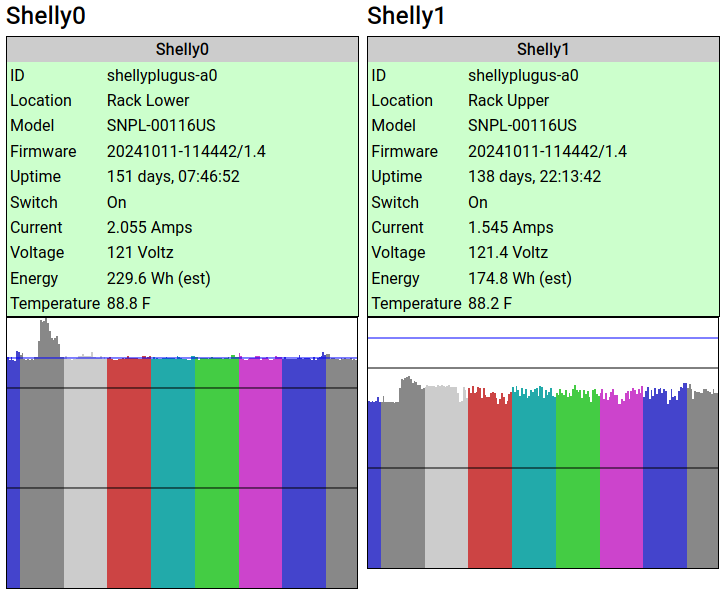
The lower part of the rack hosts FotoForensics, Hacker Factor, and my other primary services. It usually consumes about 230W of power, or 2A. (It can fluctuate up to almost 300W during a reboot or high load, but those don't last long.) The upper rack is for the development systems, and uses around 180W. (180W at 120V is 1.5A.) That's right, the entire rack is usually consuming less than 4Ah of power at any given time.
For this solar experiment, I decided to initially only power the upper rack with solar. (If it turns out to be really successful, then I might add in the lower rack's power needs.)
The Bad Experiences
I had a few bad experiences while getting this to work. I chalk all of them up to the learning curve.
Problem #1: The Battery
Setting up the MPPT, inverter, and ATS was easy. The battery, on the other hand, was problematic. There are lots of batteries available and the prices range wildly. I went with a LiFePO4 "deep cycle" battery because they last longer than typical lead acid and lithium batteries and are designed for repeatedly powering up and draining. LiFePO4 also doesn't have the "toxic fumes" or "runaway heat" problems that the other batteries often have.
I found a LiFePO4 battery on Amazon that said it was UL-1973 certified. (That means for use with a solar project.) However when it arrived, it didn't say "UL 1973" anywhere on the battery or manuals. I then checked with Underwriter Labs web site. The battery was not listed. The model was not listed. The brand was listed, but none of their products had UL certifications. This is a knock-off forgery of a battery. If they lied about their certification, then I'm not going to trust the battery.
Amazon said that the vendor handles returns directly. My first request to the vendor was answered quickly with an unrelated response. I wrote to them: "I'd like to return the battery since it is not UL certified, as stated on your product description page." The reply? "The bluetooth battery needs to be charged before you can use it." (This battery doesn't even have bluetooth!)
My second request to the vendor received no response at all.
I told my credit card company. They stopped payment, sent an inquiry to the vendor, and gave them 15 days to respond. Two weeks later, with no response, I was refunded the costs. The day after the credit card issued the refund, the vendor reached out to me. After a short exchange, they paid to have the battery returned to them.
The second battery that I ordered, from a different vendor, had all of the certificates that they claimed.
Problem #2: The Inverter
The first inverter that I got looked right. However, when I connected it to the ATS, the wall outlet's circuit breaker immediately tripped. Okay, that's really bad. (But also, really good that the circuit breaker did its job and I didn't die.) It turns out, inverters above a certain wattage are required to have a "neutral-ground bond". The typical American three-prong outlet has a hot, neutral, and ground wire. The N-G bond means that neutral and ground are tied together. This is a required safety feature. Every home and office circuit has exactly one N-G bond. (It's in the home or building's circuit breaker panel.)
The four-poll (4P) ATS ties all grounds together while it switches the hot and neutrals. The problem: If the inverter and wall outlet both have a N-G bond, then it creates a grounding loop. (That's bad and immediately trips the circuit breaker.) For most inverters, this functionality is either not documented or poorly documented. Some inverters have a built-in N-G bond, some have a floating neutral (no bond) and are expected to be used with an ATS, and some have a switch to enable/disable the N-G bond.
My first inverter didn't mention the N-G bond and it couldn't be disabled. Fortunately, I was able to replace it with one that has a switch. With the N-G bond safely disabled, I can use it with the ATS without tripping the circuit breaker.
Keep this in mind when looking for an inverter. Most of the ones I looked at don't mention how they are bonded (or unbonded).
Problem #3: The ATS
I spent days tracking down this problem. The ATS output goes to a big UPS. This way, any transfer delays or phase issues are cleaned up before reaching the computers. When the inverter turned on, I would see a variety of different problems:
- Sometimes the UPS would run fine.
- Sometimes the UPS would scream about an input problem, but still run off the input power.
- Sometimes the UPS would not scream, and would slowly drain its internal battery while also using the inverter's power.
- Sometimes the UPS would scream and refuse to use the input power, preferring to run off the UPS battery.
The problem was incredibly inconsistent.
If I removed the ATS, then the UPS had no problem running off utility power. If I moved the electrical plug manually to the inverter (with the N-G bond enabled), it also ran without any problems.
Long story short: Most automatic transfer switches have a "direction". If primary is utility and backup is the generator (or solar), then it demands to be installed in that direction. For my configuration, I want a battery-priority ATS, but most ATSs (including mine) are utility-priority. You cannot just swap the inputs to the ATS and have it work. If, like me, you swap them, then the results become incredibly inconsistent and will lead you down the wrong debugging path.
My solution? Someday I'll purchase a smart switch that is battery-priority. In the meantime, I have a Shelly smart-plug monitoring the utility power. My DIY smart controller tells the Shelly plug to turn on or off utility power. When it turns off, the ATS immediately switches over to using the inverter's power. And when my DIY controller see that the solar battery is getting low, it turns the utility grid back on.
The added benefit for my method of turning on or off the utility power is that I can control the switching delay. The inverter takes a few seconds to start up. I have a 15-second timer between turning on the inverter (letting it power up and normalize) and turning off the utility power. This seems to help the UPS accept the transfer faster.
Problem #4: Over-spec'd Inverter
Remember that advice I got? Always over-spec the equipment? Well, that's not always a good idea. As it turns out, a bigger inverter requires more energy to run (18Wh for a 2000W inverter vs 12Wh for a 1000W inverter). It also has a worse conversion rate for a low load. (The inverter claims to have >92% conversion rate, meaning that the 100Ah battery should last for 92Ah. But with a light load, it may be closer to 80%.)
I'll stick with the inverter that I got, but I could probably have used the next smaller model.
Problem #5: The Roof
I wanted to put the solar panels on the roof. I really thought
this was going to be the easiest part. Boy, was I wrong.
There are federal, municipal, and local building requirements, and that means getting a permit. The city requires a formal report from a licensed structural engineer to testify that the roof can hold the solar panels. Keep in mind, I'm talking about two panels that weigh 14lbs (6kg) each. The inspector who goes up on the roof weighs more. If a big bird lands on my roof (we have huge Canadian geese), it weighs more. We get snow in the winter and the snow weighs more!
Unfortunately, the city made it clear that there is no waiver. I had earmarked $1000 for everything, from the panels to the battery, inverter, wires, fuses, mounting brackets, etc. I got quotes from multiple structural engineers -- they all wanted around $500. (There goes my budget!) And that's before paying for the permit. In effect, the project was no longer financially viable.
Fortunately, I found a workaround: awnings. The
city says that you don't need a permit for awnings if they (1) are attached to an exterior wall, (2) require no external support, and (3) stick out less than 54 inches. My solar panels are mounted at an angle and act as an awning that sticks out 16 inches. (The mounts are so sturdy that I think they can hold my body weight.) No permit needed.
The awnings turned out to be great! They receive direct sunlight starting an hour after sunrise and it lasts until about 1pm in the summer. (It should get even more in the winter.) They continue generating power from ambient lighting until an hour before sundown. This is as good as having them on the roof!
The Scariest Part
High voltage scares me. (That's probably a healthy fear.) Connecting cables to the powered-off system doesn't bother me. But connecting wires to the big battery is dangerous.
Using rubber-gripped tools, I attached one cable. However, when I tried to connect the other cable, there was a big spark. It's a 100Ah battery, so that's expected. But it still scared the donuts out of me! I stopped all work and ordered some rubber electrical gloves. (Get rubber or nitrile, and make sure they are class 00 or higher.)
Along with the gloves, I ordered a huge on/off switch. This isn't your typical light switch. This monster can handle 24V at 275 amps! (It's good to over-spec.)
I connected the MPPT and inverter to one side of the switch. An 8awg cable that can handle 50 amps connects to the battery's negative pole. (Since the MPPT and inverter are both limited to 20 amps, the 50 amp cable shouldn't be a problem.)
With the gloves on, the switch powered off, and rubber-gripped tools in hand, I connected the switch to the battery. No zap or spark at all. Turning the switch on is easy and there is no spark or pop.
This is the right way to do it.
Expected Savings
Without the solar project (just using the utility power), the server rack costs me about $35 per month in electricity to run.
I've been running some tests on the solar project's performance, and am very happy with the results.
Under theoretically ideal conditions, two 100W panels should generate a maximum of 200W. However, between power conversion loss, loss from cabling, and other factors, this theoretical maximum never happens. I was told to be happy if it generated a maximum of 150W. Well, I'm very happy because I've measured daily maximums between 170W and 180W received at the MPPT.
Fort Collins gets over
300 sunny days a year, so clear skies are the norm. With clear skies, the battery starts charging about 30 minutes after sunrise and gets direct (optimal) sunlight between 9am and 1pm. It generates an incredible amount of power -- the inverter drains the battery slower than the panels can charge it. For the rest of the afternoon, it slowly charges up the battery through indirect ambient light. The net result? It can run the upper half of the rack for over 10 hours.
This kind of makes sense:
- The battery usually starts the day at about 50% capacity. It charges to 90% in under 2 hours of direct daylight.
- In theory, I run the battery from 90% down to 20%. In practice, the battery usually hits 100% charged during the morning because if charges faster than it drains. It doesn't start running below 100% until the afternoon. (That's wasted power! I need to turn on more computers!)
- I'm only using the upper rack right now (1.5Ah, 180Wh). The inverter consumes another 18W, so call it 200W of power. Assume a fully-charged 1200Wh battery with 920Wh available, draining at a rate of 200Wh. It should last about 4.5 hours. If I power the entire rack, it will be closer to 2 hours. And in either case, that countdown only starts when it's running off of battery in the late afternoon.
We had one dark and stormy day, and one very overcast day so far. In both instances, it took most of the morning to charge the battery, but it still managed to run the upper rack for a few hours.
Fort Collins has "surge pricing" for electricity. In the summer, than means 2pm to 7pm has the most expensive power (about 3x more than non-surge times). Fortunately, the batteries keep the rack running during much of that expensive period.
I'm aiming to use the battery during the surge pricing period. If I ran the numbers correctly, the server might reduce my $35/month cost by $20-$25/month. At that rate, it will pay off the $1000 investment in under 4.5 years. If we have a lot of bad weather, then it might end up being 5 years. The batteries and panels will need to be replaced in 8-10 years, so as long as it pays off before then, I'll be in the profit range.
As self-paced learning goes, I don't recommend high voltage as an introductory project. Having said that, I really feel like I've learned a lot from this experiment. And who knows? Maybe next time I'll try wind power. Fort Collins has lots of windy days!

 Login
Login