Lisa Su leads Nvidia’s biggest rival in the AI chip market. When asked at WIRED’s Big Interview event if AI is a bubble, the company’s CEO said, “Emphatically, from my perspective, no.”
The latest addition to Proton's workplace suite is a spreadsheet tool called Proton Sheets. It will offer real-time collaboration, and users can control who has access to view and edit files. Proton Sheets can also be accessed on any device, including mobile ones. It supports importing CSV and XLS files, and the spreadsheets also support commonly used formulas for calculations.
A big part of Proton's pitch is privacy, promising that users' information won't be used for training AI. The company also protects user data with end-to-end encryption by default; the press release pointedly notes that products like Google Sheets and Microsoft Excel don't do the same.
The Sheets app will be a part of Proton Drive, which already includes a Docs platform with several features similar to those offered by other productivity tools from big tech brands. Proton also offers a VPN and a Mail app.
This article originally appeared on Engadget at https://www.engadget.com/apps/proton-sheets-joins-the-companys-productivity-suite-110000344.html?src=rss
India will no longer require smartphone makers to preinstall the Sanchar Saathi "security" app. After blowback from Apple, Samsung and opposition leaders, the Modi government issued a statement saying it "has decided not to make the pre-installation mandatory for mobile manufacturers." The app is still available as a voluntary download.
India's Ministry of Communications framed the U-turn as a result of strong voluntary adoption. The nation said 14 million users (around 1 percent of the nation’s population) have downloaded the app. "The number of users has been increasing rapidly, and the mandate to install the app was meant to accelerate this process and make the app available to less aware citizens easily," the statement read.
In a statement sent to Engadget, the Electronic Frontier Foundation (EFF) celebrated India’s reversal. "This was a terrible and dangerous idea by the Indian government that lasted 24 hours longer than it ever should have," EFF Civil Liberties Director David Greene wrote. "We thank our colleague organizations in India, such as SFLC.in and Internet Freedom Foundation, for promptly opposing it."
The Indian government had previously given smartphone makers 90 days to preinstall the Sanchar Saathi app on all new phones. They were also required to deliver it to existing devices via software updates. India claims its app exists solely for cybersecurity purposes. It includes tools allowing users to report and lock lost or stolen devices.
But privacy advocates warned that it could be used as a government backdoor for mass surveillance. According to the BBC, the app’s privacy policy allows it to make and manage calls and send messages. It can access call and message histories, files, photos and the camera.
Reutersreports that industry experts cited Russia as the only known precedent for such a requirement. In August, Vladimir Putin's regime ordered the messenger app MAX to be preinstalled on all mobile devices in the country. Like with India's example, experts warned that it could be used for surveillance.
On Tuesday, Reuters reported that Apple would not comply with India's order, citing privacy and security concerns. Samsung reportedly followed. Opposition leaders in the Indian government also joined the fray. Senior Congress leader Randeep Singh Surjewala called on the Modi government to clarify its legal authority for "mandating a non-removable app." Despite India's framing, it seems likely that the two companies' stances, along with domestic political pressure, played no small role in the reversal.
Update, December 3, 2025, 2:50 PM ET: This story has been updated to add a statement from the EFF.
This article originally appeared on Engadget at https://www.engadget.com/cybersecurity/india-will-no-longer-require-smartphone-makers-to-preinstall-its-state-run-cybersecurity-app-171500923.html?src=rss
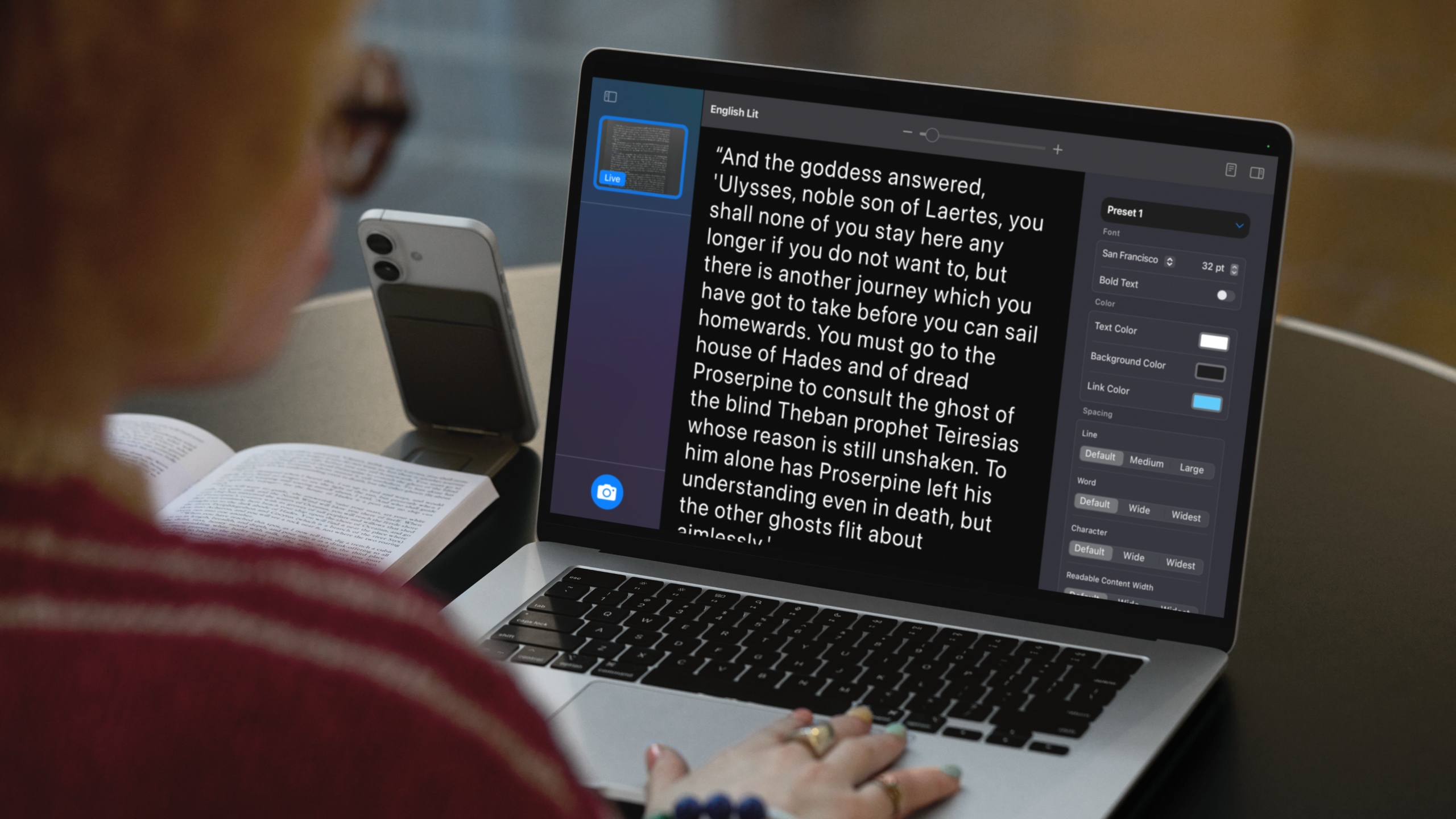
One of the iPhone’s many accessibility features is something Apple calls "Magnifier," which uses the smartphone's cameras to magnify and identify objects in the world around you. For Global Accessibility Awareness Day in May this year, Apple brought Magnifier to the Mac, opening up even more places the assistive tool can be used, like classroom or work environments where you might already have a MacBook pulled out.
Magnifier requires macOS 26 Tahoe and can work with a built-in webcam, a connected third-party camera or an iPhone via Apple's Continuity feature. Provided your MacBook can run Apple’s latest software update, it’s a natural fit for zooming in on a whiteboard at the back of a large lecture hall or getting a closer look at documents on a desk in front of you. You can use the app to both capture an individual image you want to refer to later, or to analyze text in a live video feed. But where to begin? Here’s how to set up and use Magnifier on your Mac.
How to use Magnifier to identify and display text
A MacBook using Magnifier and a connected iPhone to identify and format text from a book.
Apple
Magnifier's most powerful feature uses the MacBook's machine learning capabilities to identify, display and format text that your camera captures. This works with text your camera can see in the room around you, and things it captures via macOS' Desk View feature. For example, to view documents on your desk:
Open Magnifier.
Click on the Camera section in Magnifier's menu bar and then select your Desk View camera from the dropdown menu.
Click on the Reader icon (a simple illustration of a document) near the top-right of your Magnifier window.
Click on the sidebar menu icon to access settings to format text.
Apple gives you options to change the color, font and background of text Magnifier identifies, among other customization options. If you'd prefer to capture faraway text, you can position a webcam or iPhone camera facing away from you and swap to it via the Camera section in Magnifier's menu bar.
You can also listen to any text Magnifier has identified by clicking on the Play button in the top-right corner of Magnifier's reader mode. Clicking the Pause button will pause playback, clicking the Skip Forward or Skip Backward buttons skip through lines of text, and if you want to adjust playback speed, you can click on the 1x button and pick a speed from the dropdown menu.
How to use Magnifier to zoom in on yourself
Magnifier can identify text, but it also works as a way to get a zoomed in view of your own face.
Ian Carlos Campbell for Engadget
By default, Magnifier uses your MacBook's built-in webcam, which means you'll see a view of yourself and whatever's behind you if you don't have another camera selected. This might not be usual for seeing faraway text, but it is handy if you're applying makeup, putting in contacts or doing anything else where you need a detailed view of your face.
In my tests, using Magnifier worked the best with my MacBook's built-in webcam or an iPhone. When I tried using a third-party webcam from Logitech, my live camera feed was noticeably laggy. Your mileage may vary, but if you experience any issues with your own webcam, it's worth trying your built-in webcam to see if that helps. You can swap between cameras and zoom in to your camera feed inside the Magnifier app:
Open Magnifier.
In the top menu bar, select Camera and then click on the camera you'd like to use in the dropdown menu.
Use the slider in the top center of the Magnifier window to zoom in on yourself.
You can see a live feed of your zoomed in view in Magnifier's main window. If you click on the Camera button in the bottom-left corner of the app, you can also snap a photo to review later. Any photos you capture will appear in Magnifier's left sidebar menu. Clicking on them lets you view them, zoom in on them and adjust their visual appearance (Brightness, Contrast and other visual settings) via the Image section in Magnifier's menu bar.
This article originally appeared on Engadget at https://www.engadget.com/computing/laptops/how-to-use-magnifier-on-a-macbook-to-zoom-in-on-faraway-text-080100677.html?src=rss
ExpressVPN, one of the best VPNs, is launching two brand-new features that sound confusingly like things it already does. Users on Android, Mac and iOS (but apparently not Windows, Linux or smart TVs) can now use Fastest Location to automatically pick the VPN server with the fastest download speed and lowest latency. Mac users are also getting an overhauled ExpressVPN app designed to work natively with MacOS.
If you've used ExpressVPN before, your first reaction probably went something like "Wait, didn't it already have a Fastest Location button and a Mac app?" You're not wrong, but there's still a meaningful difference with these new features. In the past, ExpressVPN didn't technically pick the fastestlocation, but the Smart Location, which picks the best available server using "metrics such as download speed, latency, and distance" (emphasis mine). Those are the same metrics as the new feature, but the such as makes me think there are, or were, other ingredients in the "smart location" algorithm.
My guess is that ExpressVPN is rebranding "smart" to "fastest" in response to customer complaints that "smart" was picking sub-optimal server locations. That's not a behavior I noticed when I last reviewed ExpressVPN — the smart location was always plenty fast for me — but I'm just one user. Only testing can show whether they actually changed the algorithm or just the name.
The new Mac app is a more straightforward upgrade. While ExpressVPN has always had a client for Mac, it's thus far been a port of an app originally developed for iPad. This makes its otherwise-excellent interface feel a bit like, well, a phone app you use on your desktop. In contrast, the new app was built using Project Catalyst, which lets Mac developers turn their iOS apps into desktop-native software. The new interface looks a lot richer, using the screen space a lot like Proton VPN does. And being more like Proton VPN is rarely a bad thing.
This article originally appeared on Engadget at https://www.engadget.com/cybersecurity/vpn/expressvpn-adds-a-fastest-location-button-and-launches-a-new-native-mac-app-205837728.html?src=rss
Android 16 first came out in June but, in a change from its usual yearly update schedule, a second iteration is now on the way. Android has announced new features ranging from AI-powered notification summaries to built-in parental controls. As usual, the update will roll out to eligible Pixel devices first.
Anyone who has used Apple Intelligence, will find some of these Android 16 features familiar. Such is the case for new notification tools, like AI-powered message summaries and a notification organizer. Other updates also align with existing Apple tools like built-in parental controls, for things like screen time and app usage.
Android 16's second release has additional new features, including custom icon shapes, themed icons and an expanded dark theme. The company claims the latter should improve battery life.
Outside of Android 16's second go around, the company is also rolling out a series of general updates. There's Circle To Search, which uses an AI Overview to find out if a message is likely to be spam — and gives advice on next steps. Similarly, Google Messages will now send an alert any time an unknown number sends a group invite. It will offer a one-tap option to leave, block and report.
In what could be helpful or get annoying really fast, Android is beta testing something titled Call Reason. It allows Android users to mark their call as "urgent" when calling a saved contact. It will not only show as urgent on the call screen, but keeps the note if they miss the call. Pinned Tabs are also now available on Chrome for Android, staying saved and upfront, just like in Chrome on desktop. Plus, a feature called Expressive Captions is coming that should shine a light on a person's emotion in a video, despite the sound being turned off.
These Expressive Captions are also coming to YouTube as part of Android's new accessibility updates. Additional features include Fast Pair for hearing aids and Guided Frame with Gemini, which gives a description of what's in view on the Pixel camera app. Learn more about all of Android's accessibility updates here.
This article originally appeared on Engadget at https://www.engadget.com/mobile/android-16-updates-include-ai-powered-notification-summaries-and-built-in-parental-controls-190057208.html?src=rss
Update December 3 2025, 10:43am ET: India has withdrawn its mandate requesting manufacturers to install the Sanchar Saathi app, according to reporting from Reuters. The text below has been left unaltered.
India has issued a mandate to all smartphone manufacturers and importers requiring them to install a state-owned cyber security app. But Apple is reportedly not going to comply, citing privacy and security concerns, according to Reuters.
The app, called Sanchar Saathi (meaning Communication Companion), is supposed to expedite the process of finding lost or stolen devices and stopping their misuse, according to a government press release on Monday. It further states that companies, including the likes of Samsung and Xiaomi, should "endeavor" to use software updates to download the app on previously purchased smartphones.
The Sanchar Saathi app comes alongside an entire website designed for reporting fraudulent communication and tracking missing phones. However, critics worry that the app is a means for Prime Minister Narendra Modi's government to gain access to every smartphone in India.
The messages coming out of the Indian government have been mixed so far. In Monday's public announcement, it said companies must comply within 90 days and submit a report within 120 days. It also states that the app should be "readily visible and accessible to the end users at the time of first use or device setup and that its functionalities are not disabled or restricted."
Yet, today, India's Union Communications Minister Shri Jyotiraditya Scindia stated that the app is "completely democratic and fully voluntary." He added that users can deactivate or delete it "at any time."
At the same time, industry sources told Reuters that Apple will not comply with preinstalling the app. Whether that pushback lasts remains to be seen — Apple has bowed to government mandates in the past. Recently, it removed two of China's biggest LGBTQ+ dating apps, following orders from the country's internet regulator and censor.
This article originally appeared on Engadget at https://www.engadget.com/big-tech/apple-will-reportedly-refuse-to-pre-install-indias-state-mandated-security-app-143050110.html?src=rss

 Login
Login