Reading view

There are new articles available, click to refresh the page.

What Happens When You Pump 30,000 Watts Into a Tungsten Incandescent Light Bulb?

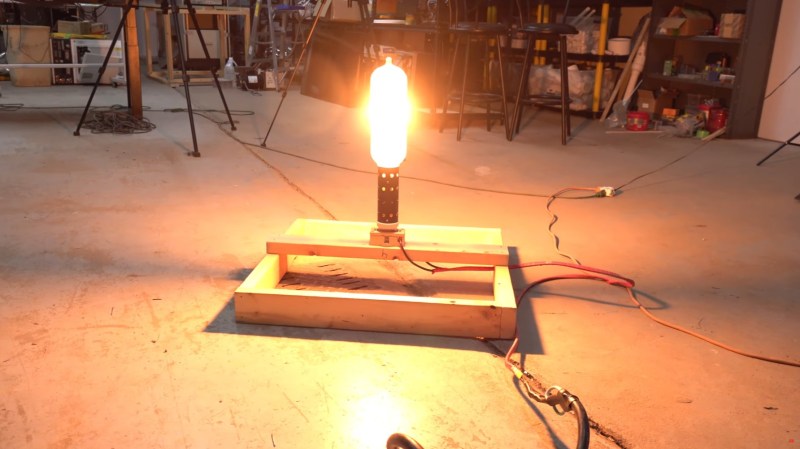
A photo of tye blub glowing in the workshop

Over on YouTube [Drake] from the [styropyro] channel investigates what happens when you take an enormous tungsten incandescent light bulb and pump 30,000 watts through it.

The answer: it burns bright enough to light up the forest at night, and hot enough to cook food and melt metal. And why on Earth would anybody do such a thing? Well [Drake] said it was because he wanted to outdo [Photonicinduction] who had already put 20,000 watts through a light bulb. Nothing like a little friendly competition to drive… progress?

[Drake] says he has purchased the most powerful incandescent light bulb ever made for commercial production. Rated for 24,000 watts (and operated at 30,000 watts) the enormous filament is made from tungsten. The starting current drawn by a light bulb is higher than the operating current, because the resistance of the filament increases with temperature, so it’s prudent to warm the device slowly. To this end [Drake] builds some custom wiring and dials to power the thing. Once that’s done, it’s off to the forest to play!

If you’re interested in over-the-top lighting shenanigans, you might enjoy reading about The World’s Longest Range LED Flashlight.

A Deep Dive into Using PIO and DMA on the RP2350

[Piers] explains his code

Here’s a fun rabbit hole to run down if you don’t already have the RP2040/RP2350 PIO feather in your cap: how to serve data without CPU intervention using PIO and DMA on the RP2350.

If you don’t know much about the RP2040 or RP2350 here’s the basic run down: the original Raspberry Pi Pico was released in 2021 with the RP2040 at its heart, with the RP2350 making its debut in 2024 with the Pico 2. Both microcontrollers include a feature known as Programmed I/O (PIO), which lets you configure tiny state machines and other facilities (shift registers, scratch registers, FIFO buffers, etc) to process simple I/O logic, freeing up the CPU to do other tasks.

The bottom line is that you can write very simple programs to do very fast and efficient I/O and these programs can run separately to the other code running on your micro. In the video below, [piers] explains how it works and how he’s used it in his One ROM project.

This is the latest installment from [piers rocks] whose One ROM project we’ve been tracking since July this year when we first heard about it. Since then we’ve been watching this project grow up and we were there when it was only implemented on the STM32F4, when it was renamed to One ROM, and when it got its USB stack. Along the way [piers rocks] was on FLOSS Weekly Episode 850: One ROM To Rule Them All too.

Have you seen PIO being put to good use in other projects? Let us know in the comments, or on the tips line!

The Busch Electronic Digital-Technik 2075 Digital Lab from the 1970s

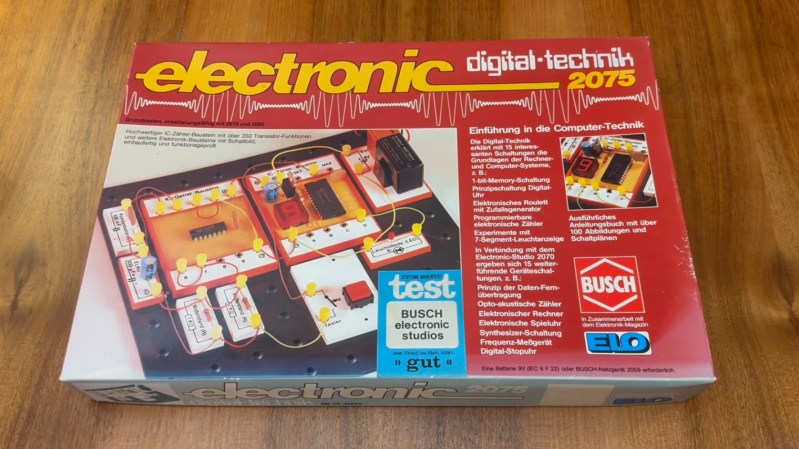
The box of the Busch Electronic Digital-Technik 2075

In a recent video, [Jason Jacques] demos the Busch Electronic Digital-Technik 2075 which was released in West Germany in the 1970s.

The Digital-Technik 2075 comes with a few components including a battery holder and 9 V battery, a push button, two 1 K resistors, a red LED, a 100 nF ceramic capacitor, a 100 µF electrolytic capacitor, a quad NAND gate IC, and a counter module which includes an IC and a 7-segment display. The kit also comes with wires, plugs, a breadboard, and a tool for extracting modules.

The Digital-Technik 2075 doesn’t use the spring terminals we see in other project labs of the time, such as the Science Fair kits from Radio Shack, and it doesn’t use modular Denshi blocks, such as we saw from the Gakken EX-150, but rather uses wire in conjunction with yellow plastic plugs. This seems to work well enough.

In the video, after showing us how to do switch debouncing, [Jason] runs us through making a counter with the digital components and then getting the counter to reset after it counts to five. This is done using NAND gates. Before he gets stuck into doing a project he takes a close look at the manual (which is in German) including some of the advertisements for other project labs from Busch which were available at the time. As he doesn’t speak German [Jason] prints out an English translation of the manual before working through it.

We’ve heard from [Jason] at Hackaday in recent history when we saw his Microtronic Phoenix Computer System which referenced the 2090 Microtronic Computer System which was also made by Busch.

Barcodes, “Lasers”, and Fourier Transforms

[Usagi Electric] brandishing his raygun

The Bomem DA3 is a type of Fourier transform spectrometer used for measuring various spectral data and [Usagi Electric] has one. On his quest to understand it he runs down a number of rabbit holes, including learning about various barcode formats, doing a teardown of the Telxon LS-201 barcode scanner, and exploring how lasers work. That’s right: lasers!

His reason for looking at the Telxon LS-201 barcode scanner is that it has the same type of helium-neon laser as his Bomem DA3 uses. Since he’s learning about barcode scanners he thinks it’s prudent to learn about barcode formats too, and he has a discussion with our very own Adam Fabio about such things, including the UPC-A standard barcodes.

It’s fun seeing the mainboard of the Telxon LS-201 sporting the familiar 555 timer, LM393 comparator, and three op-amps: 5532, LF347, and TL062; no discrete logic in sight! If you’re interested in barcode tech you might like to read Barcodes Enter The Matrix In 2027 and Old Barcode Scanner Motherboards Live Again. The particular Hackaday article mentioned in the video is this one: The Eloquence Of The Barcode.

Also, in the interest of public health and safety, make sure you’re wearing laser protection glasses if you’re working with laser technology. Even low power lasers can do damage to your eyes. Laser emissions can be invisible to the human eye and you don’t have nerves that tell you when your eyeballs are being roasted, so take care out there!

Making Actually Useful Schematics in KiCad

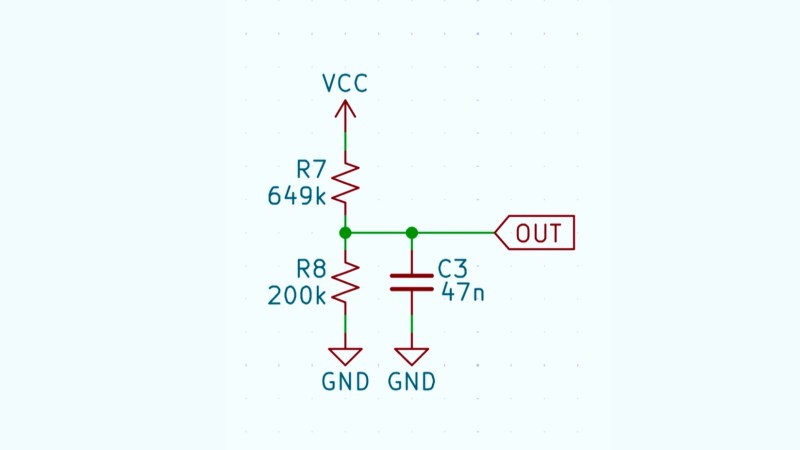
Schematic of a voltage divider

[Andrew Greenberg] has some specific ideas for how open-source hardware hackers could do a better job with their KiCad schematics.

In his work with students at Portland State University, [Andrew] finds his students both reading and creating KiCad schematics, and often these schematics leave a little to be desired.

To help improve the situation he’s compiling a checklist of things to be cognisant of when developing schematics in KiCad, particularly if those schematics are going to be read by others, as is the hope with open-source hardware projects.

In the video and in his checklist he runs us through some of the considerations, covering: visual design best practices; using schematic symbols rather than packages; nominating part values; specific types of circuit gotchas; Design for Test; Design for Fail; electric rule checks (ERC); manufacturer (MFR), part number (MPN), and datasheet annotations for Bill of Materials (BOM); and things to check at the end of a design iteration, including updating the date and version number.

(Side note: in the video he refers to the book The Visual Display of Quantitative Information which we have definitely added to our reading list.)

Have some best practices of your own you would like to see on the checklist? Feel free to add your suggestions!

If you’re interested in KiCad you might like to read about what’s new in version 9 and how to customize your KiCad shortcut keys for productivity.

Internet Archive Hits One Trillion Web Pages

Server racks branded with Internet Archive

In case you didn’t hear — on October 22, 2025, the Internet Archive, who host the Wayback Machine at archive.org, celebrated a milestone: one trillion web pages archived, for posterity.

Founded in 1996 by Brewster Kahle the organization and its facilities grew through the late nineties; in 2001 access to their archive was greatly improved by the introduction of the Wayback Machine. From their own website on Oct 21 2009 they explained their mission and purpose:

Most societies place importance on preserving artifacts of their culture and heritage. Without such artifacts, civilization has no memory and no mechanism to learn from its successes and failures. Our culture now produces more and more artifacts in digital form. The Archive’s mission is to help preserve those artifacts and create an Internet library for researchers, historians, and scholars.

We were curious about the Internet Archive technology. Storing a copy (in fact two copies!) of the internet is no mean feat, so we did some digging to find out how it’s done. The best information available is in this article from 2016: 20,000 Hard Drives on a Mission. They keep two copies of every “item”, which are stored in Linux directories. In 2016 they had over 30 petabytes of content and were ingesting at a rate of 13 to 15 terabytes per day, web, and television being the most voluminous.

In 2016 they had around 20,000 individual disk drives, each housed in specialized computers called “datanodes”. The datanodes have 36 data drives plus two operating system drives per machine. Datanodes are organized into racks of 10 machines, having 360 data drives per rack. These racks are interconnected via high-speed Ethernet to form a storage cluster.

Even though content storage tripled over 2012 to 2016, the count of disk drives stayed about the same; this is because of disk drive technology improvements. Datanodes that were once populated with 36 individual 2 terabyte drives are today filled with 8 terabyte drives, moving single node capacity from 72 terabytes (64.8 T formatted) to 288 terabytes (259.2 T formatted) in the same physical space. The evolution of disk density did not happen in a single step, so there are populations of 2, 3, 4, and 8 T drives in the storage clusters.

We will leave you with the visual styling of Hackaday Beta in 2004, and what an early google.com or amazon.com looked like back in the day. Super big shout out to the Internet Archive, thanks for providing such an invaluable service to our community, and congratulations on this excellent achievement.

Exploring The Performance Gains Of Four-Pin MOSFETs

Photo of [DENKI OTAKU] with his test circuit and oscilloscope

Over on YouTube [DENKI OTAKU] runs us through how a 4-pin MOSFET works and what the extra Kelvin source pin does.

A typical MOSFET might come in a 3-pin TO-247 package, but there are 4-pin variants which include an extra pin for the Kelvin source, also known as source sense. These 4-pin packages are known as TO-247-4. The fourth pin provides an additional source for gate current return which can in turn lessen the effect of parasitic inductance on the gate-source when switching current, particularly at high speed.

In the video [DENKI OTAKU] uses his custom made testing board to investigate the performance characteristics of some 4-pin TO-247-4 MOSFETs versus their 3-pin TO-247 equivalents. Spoiler alert: the TO-247-4 MOSFETs have better performance characteristics. The video takes a close look at the results on the oscilloscope. The downside is that as the switching speed increases the ringing in the Vds waveform increases, too. If you’re switching to a 4-pin MOSFET from a 3-pin MOSFET in your design you will need to be aware of this Vds overshoot and make accommodations for it.

If you’d like to go deeper with MOSFET technology check out Introduction To MOSFET Switching Losses and MOSFETs — The Hidden Gate.

TMS9900-based Home Brew Computer

[Usagi Electric] and his home brew computer

[Usagi Electric] is known for minicomputers, but in a recent video, he shows off his TMS9900-based homebrew computer. The TMS9900 CPU was an early 16-bit CPU famously used in the old TI-99/4A computer, but as the video points out, it wasn’t put to particularly good use in the TI-99/4A because its RAM was hidden behind an inefficient interface and it didn’t leverage its 16-bit address space.

The plan is for this computer to have 2K words of ROM, 6K words of RAM, and three serial lines: one for the console terminal, another for a second user console terminal, and the third for access to a tape drive.

Note that we have two user terminals: this is a multiuser system! The computer will use the TI series 10 “Insight” data terminal.

In the video, [Usagi Electric] spends a fair bit of time making the rack-mount casing for his computer and its two power supplies. The UART for 300-baud terminal access is currently in breadboard format, but it is set up to transmit and is functional so far! Up next will be support for receiving. The UART he’s using is the TR1602B, and he spends some time reviewing its datasheet in this video.

If you’re interested in the TMS9900, you might like to check out TMS9900 Retro Build and How The TI-99/4A Home Computer Worked.

An Introduction to DC Motor Technology

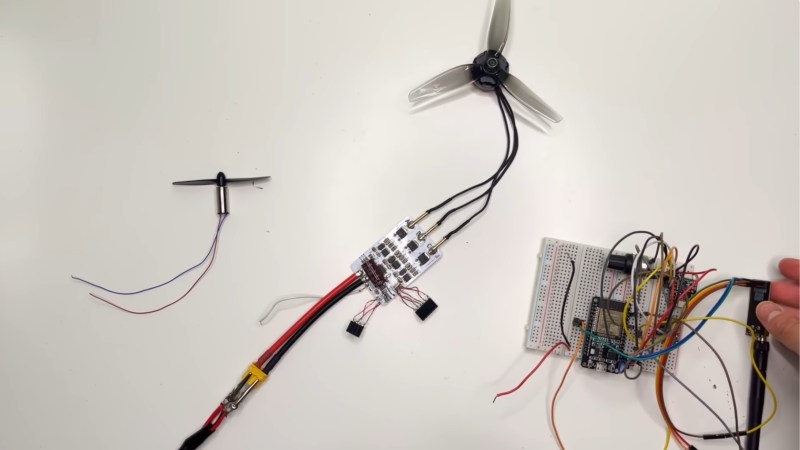
A photo of a brushed motor and brushless motor with a brushless controller board

[Thinking Techie] takes us back to basics in a recent video explaining how magnets, coils, brushed DC motors, and brushless DC motors work. If this is on your “to learn” list, or you just want a refresher, you can watch the video below. It’ll be ten minutes well-spent.

The video covers the whole technology stack behind the humble DC motor in its various incarnations. Starting with basic magnetic effects, it then proceeds through 2-wire brushed DC motors and finally into 3-wire brushless DC motors (BLDC motors).

It’s worth knowing that the 3-wires in a BLDC motor are for three power phases; they are not, as in an RC servo, positive, negative, and signal leads. But, confusingly, the BLDC motors in your PC fans do have positive, negative, and signal pins. But that’s because, like an RC servo, the fans have controllers built into the case.

Thanks to [Keith Olson] for writing in about this one. If you’d like to go deeper into BLDC controller tech, check out Take A Ride Through The Development Of A Custom BLDC Motor Controller and Moteus Open Source BLDC Controller Gets Major Upgrade.

Making a Machine to Sort One Million Pounds of LEGO

A photo of the LEGO sorter

You know what’s not fun? Sorting LEGO. You know what is fun? Making a machine to sort LEGO! That’s what [LegoSpencer] did, and you can watch the machine do its thing in the video below.

[Spencer] runs us through the process: first, quit your day job so you can get a job playing with LEGO; then research what previous work has been done in this area (plenty, it turns out); and then commit to making your own version both reproducible and extensible.

A sorting machine needs three main features: a feeder to dispense one piece at a time, a classifier to decide the type of piece, and a distributor to route the piece to a bin. Of course, the devil is in the details.

If you want to build your own, you might want to track the new Sorter V2 that is under development. If you are building V1, you can find what you need on GitHub.

Once you’ve got your LEGO sorted, you’re free to take on other projects such as Building A Drivable, Life-Size 3D-Printed LEGO Technic Buggy, Making Steam-Powered LEGO Machines, and Building The DVD Logo Screensaver With LEGO.

❌