❌

Reading view

There are new articles available, click to refresh the page.

NeatLabs - Fused Analysis Report Sample

Β 

OSINT Fusion Analysis Report

Word Cloud


Entity Relationship Network

Sentiment Analysis


Geospatial Analysis


Topic Modeling


Fused Text Report

OSINT Fusion Analysis Report

Input Sources:
Source 1: https://insiderpaper.com/us-european-chinese-firms-seek-to-draw-vietnam-arms-deals-from-russia/

Fused OSINT Analysis (including all sources and image analysis if provided):
# Fused Intelligence Report: Analysis of Vietnam's Arms Procurement Shift

## Executive Summary
Vietnam's recent arms fair in Hanoi marks a significant shift in its defense procurement strategy, moving from a long-standing reliance on Russian arms to exploring partnerships with US, European, and Chinese defense firms. This pivot reflects broader geopolitical trends and a reassessment of defense dependencies influenced by global conflicts, particularly the Ukraine crisis. The implications of this arms diversification are profound, potentially altering regional security dynamics while raising concerns about military cooperation, arms proliferation, and cybersecurity risks. 

## Integrated Analysis of Identified Entities
### Key Entities:
- **Vietnamese Government**: Actively seeking diversified arms suppliers, indicating a strategic shift in national security policy.
- **US Firms (Boeing, Lockheed Martin)**: Their involvement underscores a push for greater US influence in Southeast Asia and a commitment to security partnerships.
- **European Firms (Airbus)**: Participation highlights EU interests in expanding defense ties with Vietnam, reflecting a collective Western approach to countering Russian influence.
- **Chinese Firms (Norinco)**: Their engagement suggests China's desire to maintain and strengthen its foothold in Vietnam amidst rising tensions in the South China Sea.
- **Stockholm International Peace Research Institute (SIPRI)**: Provides critical data on arms imports and trends, reinforcing the analysis of Vietnam's evolving military partnerships.

## Synthesis of Relationships and Connections
The arms fair serves as a confluence of interests among multiple nations, with Vietnam leveraging its position to attract diverse partners while reducing dependency on Russia. The historical context of Vietnam's arms procurement, which has been over 80% reliant on Russian sources until 2023, highlights a significant shift in strategy. The event not only showcases new military technologies but also signifies a potential realignment of alliances in the region. 

Geographically, Hanoi's selection as the venue is strategic, signaling Vietnam's central role in Southeast Asian security matters. The presence of firms from the US, Europe, and China underscores a competitive landscape where Vietnam can negotiate terms favorable to its security needs.

## Assessment of Potential Security Implications
1. **Increased Military Cooperation**: Enhanced ties with Western nations may lead to joint exercises and intelligence sharing, potentially altering the power balance in Southeast Asia.
2. **Arms Proliferation Risks**: The introduction of advanced military technologies from diverse sources increases the likelihood of technology leakage or misuse.
3. **Cybersecurity Vulnerabilities**: As Vietnam engages with various military technologies, the risk of cyber threats from adversarial nations could escalate, necessitating enhanced cybersecurity measures.

## Holistic View of General OSINT Context
The arms fair is indicative of a broader trend where nations reassess their defense strategies in light of geopolitical shifts and sanctions. Vietnam's pivot from Russian systems reflects an effort to modernize its military while navigating complex regional dynamics. This diversification can lead to increased resilience against potential aggressors but also brings challenges related to managing new technology integrations.

## Recommendations for Further Investigation
- **Social Media Monitoring**: Track discussions and sentiments regarding the arms fair to gauge public and governmental reactions.
- **Corporate Reports Review**: Analyze financial disclosures from participating firms to uncover strategic intentions and potential contracts.
- **Geolocation Analysis**: Utilize satellite imagery to assess military assets showcased at the fair.

## Overall Credibility Assessment
The information is credible due to sourcing from reputable news agencies and the presence of established defense firms. The involvement of government officials and the acknowledgment from research institutions like SIPRI further enhance reliability.

## Suggested OSINT Techniques for Additional Data Collection
- **Social Media Analysis**: Leverage tools like Brandwatch or Hootsuite to monitor sentiment and trends related to the arms fair.
- **Geospatial Analysis**: Apply GIS tools to visualize military capabilities and potential deployments resulting from new procurement deals.
- **Database Cross-Referencing**: Utilize arms trade databases to track historical import patterns and emerging trends in Vietnam's military acquisitions.

## Integrated Risk Assessment
The shift in arms procurement presents both opportunities and risks. While Vietnam may enhance its military capabilities and partnerships, it simultaneously risks escalating regional tensions, particularly with China and Russia. 

## Timeline of Key Events
1. **1995-2023**: Vietnam’s arms imports predominantly sourced from Russia.
2. **2022-Present**: Decline in Russian arms imports due to sanctions following the Ukraine conflict.
3. **December 19, 2024**: Arms fair in Hanoi marks a pivotal moment in Vietnam's defense strategy.

## Geographical Locations and Their Significance
- **Hanoi, Vietnam**: Central to Vietnam's defense strategy and the arms fair, highlighting its geopolitical importance.
- **Russia**: Historically the main arms supplier; current sanctions affect this long-standing relationship.
- **Countries of Participating Firms (US, China, Europe)**: Their involvement indicates shifting military alliances and increasing competition for influence in Vietnam.

## Technical Indicators Synthesis
No specific technical indicators were identified in the source, as the focus remains on diplomatic engagements rather than cyber or IT-specific details.

## Social Media Activity Patterns
Monitoring platforms for discussions surrounding the arms fair can reveal public sentiment and potential governmental narratives about diversification efforts. Analysis of engagement metrics will inform the impact of the fair on public perception.

## Financial Implications and Patterns
Further investigation into defense contracts and financial transactions involving participating firms will clarify potential impacts on Vietnam's military budget and foreign investments.

## Legal and Regulatory Landscape
Vietnam may need to develop new regulatory frameworks governing foreign military sales and compliance with international arms trade treaties, particularly regarding Russian sanctions.

## Historical Trends and Future Projections
Historically reliant on Russian arms, Vietnam's shift to a diverse procurement strategy is likely to enhance its military autonomy and capability. Future projections suggest increased collaboration with Western nations, potentially reshaping Southeast Asian security dynamics.

## Identification of Potential Intelligence Gaps
Further insights into the nature of the arms deals being negotiated at the fair and the specific technologies being considered would enhance understanding of Vietnam's military modernization efforts.

## Assessment of Potential Disinformation or Influence Campaigns
Monitoring for narratives from state-sponsored media, particularly from Russia and China, is essential to assess the impact of disinformation campaigns intended to undermine Vietnam's pivot away from Russian arms.

## Recommendations for Actionable Intelligence
- Conduct targeted analyses of emerging defense collaborations and their implications for regional security.
- Monitor geopolitical developments closely, particularly reactions from China and Russia regarding Vietnam’s arms procurement strategy.
- Evaluate the potential for new influence campaigns from adversarial states aimed at shaping the discourse surrounding Vietnam's defense decisions.

By synthesizing insights from all sources, this report provides a nuanced understanding of Vietnam's arms diversification strategy within the context of contemporary geopolitical challenges.

NeatLabs - OSINT Demo - Far East Activity

Β 

NeatLabs Image Analysis Report

Analyzed Image

Details

From an OSINT (Open Source Intelligence) perspective, here are the key elements identified in the screenshot from Flightradar24:

1. **Aircraft Information:**
   - **ROGUE83:**
     - **Type:** Boeing RC-135S Cobra Ball
     - **Operator:** United States - US Air Force
     - **Origin:** DNA (Not Available)
     - **Destination:** Okinawa (Not Available)
     - **Registration:** 62-4128
     - **Altitude:** 18,300 ft
   - **N/A (Top Right):**
     - **Type:** Boeing P-8A Poseidon
     - **Operator:** United States - Navy
     - **Origin:** DNA (Not Available)
     - **Destination:** Okinawa (Not Available)
     - **Altitude:** 28,000 ft
   - **N/A (Bottom Left):**
     - **Type:** N/A
     - **Operator:** N/A
     - **Origin:** N/A
     - **Destination:** N/A
     - **Altitude:** 54,900 ft

2. **Geographical Context:**
   - The map shows the East Asian region, including parts of China, North Korea, South Korea, and Japan.
   - The aircraft ROGUE83 is located in the East China Sea, near the coast of China.
   - The other two aircraft are also in the same general region, with one near North Korea and the other over the Yellow Sea.

3. **Flight Paths and Altitudes:**
   - The flight paths of the aircraft are visible, with ROGUE83 flying at a lower altitude compared to the other two aircraft.
   - The high altitude of the unidentified aircraft (54,900 ft) suggests it might be a reconnaissance or surveillance aircraft.

4. **Time and Date:**
   - The timestamp on the screenshot is 18:05 UTC, which can be used to correlate with other events or data points.

5. **Flightradar24 Interface:**
   - The interface shows various controls and options such as Settings, Weather, Filters, Widgets, and Playback, indicating the user has access to detailed flight tracking and analysis tools.

6. **Potential Military Activity:**
   - The presence of US Air Force and Navy aircraft in this region could indicate military surveillance or reconnaissance missions, especially given the proximity to North Korea and China.

7. **Data Limitations:**
   - Some data fields are marked as "N/A" or "NOT AVAILABLE," which could be due to the aircraft's transponder settings or restrictions on sharing certain information.

8. **User Interface Elements:**
   - The "GOLD" subscription status indicates the user has access to premium features on Flightradar24.
   - The map includes labels for major cities and regions, aiding in geographical orientation.

From an OSINT perspective, this information can be used to infer potential military activities, track aircraft movements, and understand the operational patterns of military aircraft in sensitive geopolitical areas.

NeatLabs - Image Analysis - Flight Radar

Β 

Analysis Report

Analyzed Image
This screenshot from Flightradar24 provides several key elements from an OSINT (Open Source Intelligence) perspective:

1. **Aircraft Information:**
- **Aircraft Type:** Northrop Grumman MQ-4C Triton (a high-altitude, long-endurance unmanned aerial vehicle used for surveillance).
- **Registration:** 166002
- **Country of Registration:** United States (Navy)
- **Serial Number:** N/A
- **Year of Manufacture:** 2023
- **Barometric Altitude:** 48,000 ft
- **Vertical Speed:** +64 fpm
- **Ground Speed:** 176 kts
- **True Airspeed:** 240 kts
- **Indicated Airspeed:** 0.428 Mach
- **Wind:** 103 kts
- **Temperature:** -66.0Β°C

2. **Flight Path:**
- The flight path is shown with a red dashed line, indicating the trajectory of the aircraft.
- The path covers areas over the Persian Gulf, near the coastlines of Iran, United Arab Emirates, and Oman.

3. **Geographical Context:**
- The map shows the Middle East region, specifically the Persian Gulf area.
- Key locations marked include Dubai, Abu Dhabi, and Muscat.
- The flight path seems to be avoiding Iranian airspace, which could be significant for geopolitical analysis.

4. **Time and Date:**
- The screenshot was taken at 14:44 UTC.

5. **Flightradar24 Interface:**
- The interface shows various options like 3D view, route, follow, share, settings, weather, filters, widgets, and playback.
- The "Gold" subscription option is visible, indicating premium features.

6. **Potential Implications:**
- **Surveillance Operations:** The MQ-4C Triton is used for surveillance, indicating potential monitoring activities in the region.
- **Geopolitical Tensions:** The flight path near sensitive areas like the Strait of Hormuz could imply monitoring of maritime traffic or military activities.
- **International Relations:** The presence of a US Navy UAV in this region might be related to ongoing geopolitical tensions or alliances.
- **Security Concerns:** Such surveillance could be interpreted as a sign of increased military presence or intelligence gathering, which might affect regional security dynamics.

From an OSINT perspective, this information can be used to infer military activities, regional tensions, and strategic interests. Analysts might cross-reference this data with other sources to understand the broader context of military movements and international relations in the area.

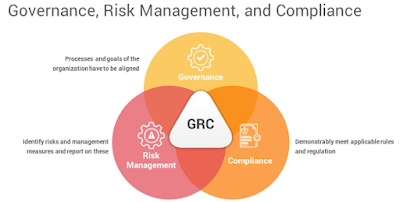
Governance of Risk and Compliance: Overview


Β 

Governance of Risk and Compliance


Governance of Risk and Compliance: Overview


In today's complex business landscape, organisations face a myriad of risks that can impact their operations, reputation, and bottom line. Effective governance of risk and compliance is crucial to mitigate these risks and ensure that organizations operate ethically and within the bounds of the law. This article provides a comprehensive overview of the governance of risk and compliance in a thousand words, highlighting its importance, key principles, and best practices.


1. Understanding Risk and Compliance:


Risk refers to the possibility of an event occurring that could have an adverse effect on the achievement of an organization's objectives. These risks can be categorized into various types, including financial, operational, strategic, and reputational. Compliance, on the other hand, involves adhering to laws, regulations, industry standards, and internal policies and procedures.


2. The Importance of Governance:


Governance in the context of risk and compliance refers to the processes, structures, and leadership in place to oversee and manage these aspects of business operations. Effective governance is crucial for several reasons:


a. Legal and Ethical Obligations: Organizations have a legal and ethical responsibility to operate within the boundaries of the law and to conduct business ethically. Failure to do so can result in legal penalties, fines, and damage to reputation.


b. Protecting Stakeholder Interests: Governance ensures that an organization's actions align with the interests of its stakeholders, including shareholders, employees, customers, and the broader community.


c. Risk Mitigation: Governance processes help identify, assess, and mitigate risks, reducing the likelihood and impact of adverse events.


d. Enhancing Decision-Making: Effective governance provides a framework for informed decision-making, considering risks and compliance requirements in strategic planning.


3. Key Principles of Governance of Risk and Compliance:


To establish robust governance of risk and compliance, organizations should adhere to the following key principles:


a. Leadership and Culture: Top leadership must set the tone for risk awareness and compliance. A culture of integrity and accountability should be fostered throughout the organization.


b. Risk Assessment: Regularly assess and prioritize risks to the organization. This involves identifying potential threats, evaluating their impact, and determining the likelihood of occurrence.


c. Policies and Procedures: Develop and implement clear policies and procedures that address compliance requirements and risk management strategies.


d. Training and Awareness: Ensure that employees are educated about compliance requirements and risk management practices. Ongoing training programs are essential.


e. Monitoring and Reporting: Establish mechanisms to monitor compliance with policies and procedures. Implement reporting systems that allow for the timely identification and resolution of compliance issues.


f. Continuous Improvement: Regularly review and update governance processes to adapt to changing risks and compliance requirements. Continuous improvement is key to staying ahead of emerging threats.


4. Best Practices in Governance of Risk and Compliance:


To effectively implement the principles of governance, organizations can adopt best practices:


a. Board Oversight: The board of directors should provide oversight and guidance on risk and compliance matters. Establish risk and compliance committees to focus on these specific areas.


b. Risk Appetite: Define the organization's risk appetite – the level of risk it is willing to accept to achieve its objectives. This helps guide decision-making.


c. Risk Management Framework: Develop a comprehensive risk management framework that includes risk identification, assessment, mitigation, monitoring, and reporting.


d. Compliance Programs: Implement robust compliance programs that incorporate regulatory requirements, industry standards, and internal policies. Regularly audit and assess compliance.


e. Technology and Data Analytics: Leverage technology and data analytics tools to enhance risk assessment and compliance monitoring. These tools can provide real-time insights into potential issues.


f. Whistleblower Mechanism: Establish a confidential whistleblower mechanism that allows employees and stakeholders to report potential compliance violations without fear of retaliation.


g. External Partnerships: Collaborate with industry associations, regulatory bodies, and external experts to stay updated on evolving risks and compliance standards.


h. Crisis Management: Develop a crisis management plan to respond effectively to unexpected events, such as data breaches or regulatory investigations.


5. Case Studies:


Examining real-world examples of governance of risk and compliance can provide valuable insights. For instance, the Enron scandal in the early 2000s highlights the devastating consequences of poor governance, including financial fraud and bankruptcy. In contrast, companies like Johnson & Johnson are often praised for their proactive approach to product recalls, demonstrating a commitment to compliance and consumer safety.


6. Conclusion:


In conclusion, the governance of risk and compliance is an essential aspect of modern business operations. It ensures that organizations adhere to legal and ethical standards, manage risks effectively, and protect stakeholder interests. By following key principles and best practices, organizations can build a robust governance framework that enhances their resilience and sustainability in an ever-changing business environment. Ultimately, governance of risk and compliance is not just a regulatory requirement; it's a fundamental element of responsible and successful business management.


Governance of Risk and Compliance


How Internet affected Education

Β How Internet affected Education| Internet and Education

How Internet affected Education


The internet has had a profound impact on education, with the advent of the internet of education (IoE) further expanding this impact. IoE refers to the integration of various technologies, such as the internet, artificial intelligence, and machine learning, to improve education outcomes. Here are some of the impacts of IoE on education:


1. Access to educational resources: IoE has made it easier for students to access educational resources from anywhere and at any time. With online courses, e-books, and virtual learning environments, students can learn at their own pace and convenience.


2. Personalized learning: IoE technologies can be used to personalize learning experiences for individual students. Adaptive learning algorithms can tailor the curriculum to meet the needs of each student, resulting in better learning outcomes.


3. Collaboration: IoE technologies can facilitate collaboration between students, teachers, and peers across the globe. Students can engage in collaborative projects, share knowledge and ideas, and learn from each other.


4. Cost-effective: IoE can make education more affordable, especially for students who live in remote or underserved areas. Online courses and digital resources can be accessed at a fraction of the cost of traditional education.


5. Data-driven insights: IoE technologies can generate valuable data insights that can be used to improve teaching and learning outcomes. By analyzing student data, teachers can identify areas where students are struggling and provide personalized support.


Β 

The internet has revolutionized education, and online education is one of its most significant applications. Online education refers to learning experiences that are delivered over the internet, using various digital technologies. Here are some of the ways in which the internet is used for online education:

Β 

1. Online courses: The internet is used to deliver courses online, allowing students to learn at their own pace and from anywhere in the world. Online courses can include text-based lessons, videos, interactive quizzes, and assessments.

Β 

2. Virtual classrooms: The internet is used to create virtual classrooms where students can interact with teachers and peers in real-time. Virtual classrooms can include live lectures, discussions, and group projects.

Β 

3. E-books and digital resources: The internet is used to provide students with access to e-books, digital resources, and other educational materials. This makes it easier for students to access learning materials, regardless of their location.

Β 

4. Online collaboration: The internet is used to facilitate collaboration between students and teachers. Online collaboration tools such as discussion forums, messaging apps, and video conferencing make it easy for students to work together and learn from each other.

Β 

5. Gamification: The internet is used to gamify the learning experience, making it more engaging and interactive. Gamification uses game mechanics such as points, badges, and leader boards to motivate students and encourage them to learn.

Β 


How Internet affected Education


While the internet has had a significant impact on education, it also has some drawbacks. Here are some of the drawbacks of using the internet in education:

Β 

1. Lack of social interaction: One of the primary drawbacks of online education is the lack of social interaction. Students who learn online may miss out on the social aspect of traditional education, including face-to-face interactions with teachers and peers.

Β 

2. Limited engagement: Online learning can be less engaging than traditional learning. Students may be more likely to get distracted or lose focus while learning online, resulting in lower levels of engagement and retention.

Β 

3. Dependence on technology: Online education is dependent on technology, and technical difficulties can disrupt the learning process. Poor internet connectivity or software issues can cause frustration for both students and teachers.

Β 

4. Quality concerns: The internet has made it easier for anyone to create and distribute educational materials, but not all of this material is of high quality. There is a risk that students may be exposed to inaccurate or unreliable information, which could impact their learning outcomes.

Β 

5. Cheating and plagiarism: The internet has also made it easier for students to cheat and plagiarize. With online resources readily available, students may be tempted to cut corners or take shortcuts in their work.

Β 

Conclusion-

1. The internet has revolutionized education by providing access to online courses, virtual classrooms, digital resources, online collaboration, and gamification. These tools have made education more accessible, engaging, and effective, opening up new opportunities for learners all over the world.

2. The internet of education has revolutionized education by making it more accessible, affordable, and personalized. It has opened up new opportunities for students to learn, collaborate, and grow, while also enabling educators to provide a more effective and efficient learning experience.

Β 3. While the internet has many benefits for education, it also has some drawbacks. These drawbacks include a lack of social interaction, limited engagement, dependence on technology, quality concerns, and increased opportunities for cheating and plagiarism. It is important to be aware of these drawbacks and work to mitigate them to ensure that online education remains effective and beneficial for students.


OffensivePipeline - Allows You To Download And Build C# Tools, Applying Certain Modifications In Order To Improve Their Evasion For Red Team Exercises

By: Unknown


OfensivePipeline allows you to download and build C# tools, applying certain modifications in order to improve their evasion for Red Team exercises.
A common use of OffensivePipeline is to download a tool from a Git repository, randomise certain values in the project, build it, obfuscate the resulting binary and generate a shellcode.


Features

  • Currently only supports C# (.Net Framework) projects
  • Allows to clone public and private (you will need credentials :D) git repositories
  • Allows to work with local folders
  • Randomizes project GUIDs
  • Randomizes application information contained in AssemblyInfo
  • Builds C# projects
  • Obfuscates generated binaries
  • Generates shellcodes from binaries
  • There are 79 tools parameterised in YML templates (not all of them may work :D)
  • New tools can be added using YML templates
  • It should be easy to add new plugins...

What's new in version 2.0

  • Almost complete code rewrite (new bugs?)
  • Cloning from private repositories possible (authentication via GitHub authToken)
  • Possibility to copy a local folder instead of cloning from a remote repository
  • New module to generate shellcodes with Donut
  • New module to randomize GUIDs of applications
  • New module to randomize the AssemblyInfo of each application
  • 60 new tools added

Examples

  • List all tools:
OffensivePipeline.exe list
  • Build all tools:
OffensivePipeline.exe all
  • Build a tool
OffensivePipeline.exe t toolName
  • Clean cloned and build tools
OffensivePipeline.exe 

Output example

PS C:\OffensivePipeline> .\OffensivePipeline.exe t rubeus

ooo
.osooooM M
___ __ __ _ ____ _ _ _ +y. M M
/ _ \ / _|/ _| ___ _ __ ___(_)_ _____| _ \(_)_ __ ___| (_)_ __ ___ :h .yoooMoM
| | | | |_| |_ / _ \ '_ \/ __| \ \ / / _ \ |_) | | '_ \ / _ \ | | '_ \ / _ \ oo oo
| |_| | _| _| __/ | | \__ \ |\ V / __/ __/| | |_) | __/ | | | | | __/ oo oo
\___/|_| |_| \___|_| |_|___/_| \_/ \___|_| |_| .__/ \___|_|_|_| |_|\___| oo oo
|_| MoMoooy. h:
M M .y+
M Mooooso.
ooo

@aetsu
v2.0.0


[+] Loading tool: Rubeus
Clonnig repository: Rubeus into C:\OffensivePipeline\Git\Rubeus
Repository Rubeus cloned into C:\OffensivePipeline\Git\Rubeus

[+] Load RandomGuid module
Searching GUIDs...
> C:\OffensivePipeline\Git\Rubeus\Rubeus.sln
> C:\OffensivePipeline\Git\Rubeus\Rubeus\Rubeus.csproj
> C:\OffensivePipeline\Git\Rubeus\Rubeus\Properties\AssemblyInfo.cs
Replacing GUIDs...
File C:\OffensivePipeline\Git\Rubeus\Rubeus.sln:
> Replacing GUID 658C8B7F-3664-4A95-9572-A3E5871DFC06 with 3bd82351-ac9a-4403-b1e7-9660e698d286
> Replacing GUID FAE04EC0-301F-11D3-BF4B-00C04F79EFBC with 619876c2-5a8b-4c48-93c3-f87ca520ac5e
> Replacing GUID 658c8b7f-3664-4a95-9572-a3e5871dfc06 with 11e0084e-937f-46d7-83b5-38a496bf278a
[+] No errors!
File C:\OffensivePipeline\Git\Rubeus\Rubeus\Rubeus.csproj:
> Replacing GUID 658C8B7F-3664-4A95-9572-A3E5871DFC06 with 3bd82351-ac9a-4403-b1e7-9660e698d286
> Replacing GUID FAE04EC0-301F-11D3-BF4B-00C04F79EFBC with 619876c2-5a8b-4c48-93c3-f87ca520ac5e
> Replacing GUID 658c8b7f-3664-4a95-9572-a3e5871dfc06 with 11e0084e-937f-46d7-83b5-38a496bf278a
[+] No errors!
File C:\OffensivePipeline\Git\Rubeus\Rubeus\Properties\AssemblyInfo.cs:
> Replacing GUID 658C8B7F-3664-4A95-9572-A3E5871DFC06 with 3bd82351-ac9a-4403-b1e7-9660e698d286
> Replacing GUID FAE04EC0-301F-11D3-BF4B-00C04F79EFBC with 619876c2-5a8b-4c48-93c3-f87ca520ac5e
> Replacing GUID 658c8b7f-3664-4a95-9572-a3e5871dfc06 with 11e0084e-937f-46d7-83b5-38a496bf278a
[+] No errors!


[+] Load RandomAssemblyInfo module
Replacing strings in C:\OffensivePipeline\Git\Rubeus\Rubeus\Properties\AssemblyInfo.cs
[assembly: AssemblyTitle("Rubeus")] -> [assembly: AssemblyTitle("g4ef3fvphre")]
[assembly: AssemblyDescription("")] -> [assembly: AssemblyDescription("")]
[assembly: AssemblyConfiguration("")] -> [assembly: AssemblyConfiguration("")]
[assembly: AssemblyCompany("")] -> [assembly: AssemblyCompany("")]
[assembly: AssemblyProduc t("Rubeus")] -> [assembly: AssemblyProduct("g4ef3fvphre")]
[assembly: AssemblyCopyright("Copyright Β© 2018")] -> [assembly: AssemblyCopyright("Copyright Β© 2018")]
[assembly: AssemblyTrademark("")] -> [assembly: AssemblyTrademark("")]
[assembly: AssemblyCulture("")] -> [assembly: AssemblyCulture("")]


[+] Load BuildCsharp module
[+] Checking requirements...
[*] Downloading nuget.exe from https://dist.nuget.org/win-x86-commandline/latest/nuget.exe
[+] Download OK - nuget.exe
[+] Path found - C:\Program Files (x86)\Microsoft Visual Studio\2022\BuildTools\Common7\Tools\VsDevCmd.bat
Solving dependences with nuget...
Building solution...
[+] No errors!
[+] Output folder: C:\OffensivePipeline\Output\Rubeus_vh00nc50xud


[+] Load ConfuserEx module
[+] Checking requirements...
[+] Downloading ConfuserEx from https://github.com/mkaring/ConfuserEx/releases/download/v1.6.0/ConfuserEx-CLI.zip
[+] Download OK - ConfuserEx
Confusing...
[+] No errors!


[+] Load Donut module
Generating shellcode...

Payload options:
Domain: RMM6XFC3
Runtime:v4.0.30319

Raw Payload: C:\OffensivePipeline\Output\Rubeus_vh00nc50xud\ConfuserEx\Donut\Rubeus.bin
B64 Payload: C:\OffensivePipeline\Output\Rubeus_vh00nc50xud\ConfuserEx\Donut\Rubeus.bin.b64

[+] No errors!


[+] Generating Sha256 hashes
Output file: C:\OffensivePipeline\Output\Rubeus_vh00nc50xud


-----------------------------------------------------------------
SUMMARY

- Rubeus
- RandomGuid: OK
- RandomAssemblyInfo: OK
- BuildCsharp: OK
- ConfuserEx: OK
- Donut: OK

-----------------------------------------------------------------

Plugins

  • RandomGuid: randomise the GUID in .sln, .csproj and AssemblyInfo.cs files
  • RandomAssemblyInfo: randomise the values defined in AssemblyInfo.cs
  • BuildCsharp: build c# project
  • ConfuserEx: obfuscate c# tools
  • Donut: use Donut to generate shellcodes. The shellcode generated is without parameters, in future releases this may be changed.

Add a tool from a remote git

The scripts for downloading the tools are in the Tools folder in yml format. New tools can be added by creating new yml files with the following format:

  • Rubeus.yml file:
tool:
- name: Rubeus
description: Rubeus is a C# toolset for raw Kerberos interaction and abuses
gitLink: https://github.com/GhostPack/Rubeus
solutionPath: Rubeus\Rubeus.sln
language: c#
plugins: RandomGuid, RandomAssemblyInfo, BuildCsharp, ConfuserEx, Donut
authUser:
authToken:

Where:

  • Name: name of the tool
  • Description: tool description
  • GitLink: link from git to clone
  • SolutionPath: solution (sln file) path
  • Language: language used (currently only c# is supported)
  • Plugins: plugins to use on this tool build process
  • AuthUser: user name from github (not used for public repositories)
  • AuthToken: auth token from github (not used for public repositories)

Add a tool from a private git

tool:
- name: SharpHound3-Custom
description: C# Rewrite of the BloodHound Ingestor
gitLink: https://github.com/aaaaaaa/SharpHound3-Custom
solutionPath: SharpHound3-Custom\SharpHound3.sln
language: c#
plugins: RandomGuid, RandomAssemblyInfo, BuildCsharp, ConfuserEx, Donut
authUser: aaaaaaa
authToken: abcdefghijklmnopqrsthtnf

Where:

  • Name: name of the tool
  • Description: tool description
  • GitLink: link from git to clone
  • SolutionPath: solution (sln file) path
  • Language: language used (currently only c# is supported)
  • Plugins: plugins to user on this tool build process
  • AuthUser: user name from GitHub
  • AuthToken: auth token from GitHub (documented at GitHub: creating a personal access token)

Add a tool from local git folder

tool:
- name: SeatbeltLocal
description: Seatbelt is a C# project that performs a number of security oriented host-survey "safety checks" relevant from both offensive and defensive security perspectives.
gitLink: C:\Users\alpha\Desktop\SeatbeltLocal
solutionPath: SeatbeltLocal\Seatbelt.sln
language: c#
plugins: RandomGuid, RandomAssemblyInfo, BuildCsharp, ConfuserEx, Donut
authUser:
authToken:

Where:

  • Name: name of the tool
  • Description: tool description
  • GitLink: path where the tool is located
  • SolutionPath: solution (sln file) path
  • Language: language used (currently only c# is supported)
  • Plugins: plugins to user on this tool build process
  • AuthUser: user name from github (not used for local repositories)
  • AuthToken: auth token from github (not used for local repositories)

Requirements for the release version (Visual Studio 2019/2022 is not required)

In the OffensivePipeline.dll.config file it's possible to change the version of the build tools used.

  • Build Tools 2019:
<add key="BuildCSharpTools" value="C:\Program Files (x86)\Microsoft Visual Studio\2019\BuildTools\Common7\Tools\VsDevCmd.bat"/>
  • Build Tools 2022:
<add key="BuildCSharpTools" value="C:\Program Files (x86)\Microsoft Visual Studio\2022\BuildTools\Common7\Tools\VsDevCmd.bat"/>

Requirements for build

Credits

Supported tools


OffensivePipeline - Allows You To Download And Build C# Tools, Applying Certain Modifications In Order To Improve Their Evasion For Red Team Exercises

By: Unknown


OfensivePipeline allows you to download and build C# tools, applying certain modifications in order to improve their evasion for Red Team exercises.
A common use of OffensivePipeline is to download a tool from a Git repository, randomise certain values in the project, build it, obfuscate the resulting binary and generate a shellcode.


Features

  • Currently only supports C# (.Net Framework) projects
  • Allows to clone public and private (you will need credentials :D) git repositories
  • Allows to work with local folders
  • Randomizes project GUIDs
  • Randomizes application information contained in AssemblyInfo
  • Builds C# projects
  • Obfuscates generated binaries
  • Generates shellcodes from binaries
  • There are 79 tools parameterised in YML templates (not all of them may work :D)
  • New tools can be added using YML templates
  • It should be easy to add new plugins...

What's new in version 2.0

  • Almost complete code rewrite (new bugs?)
  • Cloning from private repositories possible (authentication via GitHub authToken)
  • Possibility to copy a local folder instead of cloning from a remote repository
  • New module to generate shellcodes with Donut
  • New module to randomize GUIDs of applications
  • New module to randomize the AssemblyInfo of each application
  • 60 new tools added

Examples

  • List all tools:
OffensivePipeline.exe list
  • Build all tools:
OffensivePipeline.exe all
  • Build a tool
OffensivePipeline.exe t toolName
  • Clean cloned and build tools
OffensivePipeline.exe 

Output example

PS C:\OffensivePipeline> .\OffensivePipeline.exe t rubeus

ooo
.osooooM M
___ __ __ _ ____ _ _ _ +y. M M
/ _ \ / _|/ _| ___ _ __ ___(_)_ _____| _ \(_)_ __ ___| (_)_ __ ___ :h .yoooMoM
| | | | |_| |_ / _ \ '_ \/ __| \ \ / / _ \ |_) | | '_ \ / _ \ | | '_ \ / _ \ oo oo
| |_| | _| _| __/ | | \__ \ |\ V / __/ __/| | |_) | __/ | | | | | __/ oo oo
\___/|_| |_| \___|_| |_|___/_| \_/ \___|_| |_| .__/ \___|_|_|_| |_|\___| oo oo
|_| MoMoooy. h:
M M .y+
M Mooooso.
ooo

@aetsu
v2.0.0


[+] Loading tool: Rubeus
Clonnig repository: Rubeus into C:\OffensivePipeline\Git\Rubeus
Repository Rubeus cloned into C:\OffensivePipeline\Git\Rubeus

[+] Load RandomGuid module
Searching GUIDs...
> C:\OffensivePipeline\Git\Rubeus\Rubeus.sln
> C:\OffensivePipeline\Git\Rubeus\Rubeus\Rubeus.csproj
> C:\OffensivePipeline\Git\Rubeus\Rubeus\Properties\AssemblyInfo.cs
Replacing GUIDs...
File C:\OffensivePipeline\Git\Rubeus\Rubeus.sln:
> Replacing GUID 658C8B7F-3664-4A95-9572-A3E5871DFC06 with 3bd82351-ac9a-4403-b1e7-9660e698d286
> Replacing GUID FAE04EC0-301F-11D3-BF4B-00C04F79EFBC with 619876c2-5a8b-4c48-93c3-f87ca520ac5e
> Replacing GUID 658c8b7f-3664-4a95-9572-a3e5871dfc06 with 11e0084e-937f-46d7-83b5-38a496bf278a
[+] No errors!
File C:\OffensivePipeline\Git\Rubeus\Rubeus\Rubeus.csproj:
> Replacing GUID 658C8B7F-3664-4A95-9572-A3E5871DFC06 with 3bd82351-ac9a-4403-b1e7-9660e698d286
> Replacing GUID FAE04EC0-301F-11D3-BF4B-00C04F79EFBC with 619876c2-5a8b-4c48-93c3-f87ca520ac5e
> Replacing GUID 658c8b7f-3664-4a95-9572-a3e5871dfc06 with 11e0084e-937f-46d7-83b5-38a496bf278a
[+] No errors!
File C:\OffensivePipeline\Git\Rubeus\Rubeus\Properties\AssemblyInfo.cs:
> Replacing GUID 658C8B7F-3664-4A95-9572-A3E5871DFC06 with 3bd82351-ac9a-4403-b1e7-9660e698d286
> Replacing GUID FAE04EC0-301F-11D3-BF4B-00C04F79EFBC with 619876c2-5a8b-4c48-93c3-f87ca520ac5e
> Replacing GUID 658c8b7f-3664-4a95-9572-a3e5871dfc06 with 11e0084e-937f-46d7-83b5-38a496bf278a
[+] No errors!


[+] Load RandomAssemblyInfo module
Replacing strings in C:\OffensivePipeline\Git\Rubeus\Rubeus\Properties\AssemblyInfo.cs
[assembly: AssemblyTitle("Rubeus")] -> [assembly: AssemblyTitle("g4ef3fvphre")]
[assembly: AssemblyDescription("")] -> [assembly: AssemblyDescription("")]
[assembly: AssemblyConfiguration("")] -> [assembly: AssemblyConfiguration("")]
[assembly: AssemblyCompany("")] -> [assembly: AssemblyCompany("")]
[assembly: AssemblyProduc t("Rubeus")] -> [assembly: AssemblyProduct("g4ef3fvphre")]
[assembly: AssemblyCopyright("Copyright Β© 2018")] -> [assembly: AssemblyCopyright("Copyright Β© 2018")]
[assembly: AssemblyTrademark("")] -> [assembly: AssemblyTrademark("")]
[assembly: AssemblyCulture("")] -> [assembly: AssemblyCulture("")]


[+] Load BuildCsharp module
[+] Checking requirements...
[*] Downloading nuget.exe from https://dist.nuget.org/win-x86-commandline/latest/nuget.exe
[+] Download OK - nuget.exe
[+] Path found - C:\Program Files (x86)\Microsoft Visual Studio\2022\BuildTools\Common7\Tools\VsDevCmd.bat
Solving dependences with nuget...
Building solution...
[+] No errors!
[+] Output folder: C:\OffensivePipeline\Output\Rubeus_vh00nc50xud


[+] Load ConfuserEx module
[+] Checking requirements...
[+] Downloading ConfuserEx from https://github.com/mkaring/ConfuserEx/releases/download/v1.6.0/ConfuserEx-CLI.zip
[+] Download OK - ConfuserEx
Confusing...
[+] No errors!


[+] Load Donut module
Generating shellcode...

Payload options:
Domain: RMM6XFC3
Runtime:v4.0.30319

Raw Payload: C:\OffensivePipeline\Output\Rubeus_vh00nc50xud\ConfuserEx\Donut\Rubeus.bin
B64 Payload: C:\OffensivePipeline\Output\Rubeus_vh00nc50xud\ConfuserEx\Donut\Rubeus.bin.b64

[+] No errors!


[+] Generating Sha256 hashes
Output file: C:\OffensivePipeline\Output\Rubeus_vh00nc50xud


-----------------------------------------------------------------
SUMMARY

- Rubeus
- RandomGuid: OK
- RandomAssemblyInfo: OK
- BuildCsharp: OK
- ConfuserEx: OK
- Donut: OK

-----------------------------------------------------------------

Plugins

  • RandomGuid: randomise the GUID in .sln, .csproj and AssemblyInfo.cs files
  • RandomAssemblyInfo: randomise the values defined in AssemblyInfo.cs
  • BuildCsharp: build c# project
  • ConfuserEx: obfuscate c# tools
  • Donut: use Donut to generate shellcodes. The shellcode generated is without parameters, in future releases this may be changed.

Add a tool from a remote git

The scripts for downloading the tools are in the Tools folder in yml format. New tools can be added by creating new yml files with the following format:

  • Rubeus.yml file:
tool:
- name: Rubeus
description: Rubeus is a C# toolset for raw Kerberos interaction and abuses
gitLink: https://github.com/GhostPack/Rubeus
solutionPath: Rubeus\Rubeus.sln
language: c#
plugins: RandomGuid, RandomAssemblyInfo, BuildCsharp, ConfuserEx, Donut
authUser:
authToken:

Where:

  • Name: name of the tool
  • Description: tool description
  • GitLink: link from git to clone
  • SolutionPath: solution (sln file) path
  • Language: language used (currently only c# is supported)
  • Plugins: plugins to use on this tool build process
  • AuthUser: user name from github (not used for public repositories)
  • AuthToken: auth token from github (not used for public repositories)

Add a tool from a private git

tool:
- name: SharpHound3-Custom
description: C# Rewrite of the BloodHound Ingestor
gitLink: https://github.com/aaaaaaa/SharpHound3-Custom
solutionPath: SharpHound3-Custom\SharpHound3.sln
language: c#
plugins: RandomGuid, RandomAssemblyInfo, BuildCsharp, ConfuserEx, Donut
authUser: aaaaaaa
authToken: abcdefghijklmnopqrsthtnf

Where:

  • Name: name of the tool
  • Description: tool description
  • GitLink: link from git to clone
  • SolutionPath: solution (sln file) path
  • Language: language used (currently only c# is supported)
  • Plugins: plugins to user on this tool build process
  • AuthUser: user name from GitHub
  • AuthToken: auth token from GitHub (documented at GitHub: creating a personal access token)

Add a tool from local git folder

tool:
- name: SeatbeltLocal
description: Seatbelt is a C# project that performs a number of security oriented host-survey "safety checks" relevant from both offensive and defensive security perspectives.
gitLink: C:\Users\alpha\Desktop\SeatbeltLocal
solutionPath: SeatbeltLocal\Seatbelt.sln
language: c#
plugins: RandomGuid, RandomAssemblyInfo, BuildCsharp, ConfuserEx, Donut
authUser:
authToken:

Where:

  • Name: name of the tool
  • Description: tool description
  • GitLink: path where the tool is located
  • SolutionPath: solution (sln file) path
  • Language: language used (currently only c# is supported)
  • Plugins: plugins to user on this tool build process
  • AuthUser: user name from github (not used for local repositories)
  • AuthToken: auth token from github (not used for local repositories)

Requirements for the release version (Visual Studio 2019/2022 is not required)

In the OffensivePipeline.dll.config file it's possible to change the version of the build tools used.

  • Build Tools 2019:
<add key="BuildCSharpTools" value="C:\Program Files (x86)\Microsoft Visual Studio\2019\BuildTools\Common7\Tools\VsDevCmd.bat"/>
  • Build Tools 2022:
<add key="BuildCSharpTools" value="C:\Program Files (x86)\Microsoft Visual Studio\2022\BuildTools\Common7\Tools\VsDevCmd.bat"/>

Requirements for build

Credits

Supported tools


Misp-Extractor - Tool That Connects To A MISP Instance And Retrieves Attributes Of Specific Types (Such As IP Addresses, URLs, And Hashes)

By: Unknown


This code connects to a given MISP (Malware Information Sharing Platform) server and parses a given number of events, writing the IP addresses, URLs, and MD5 hashes found in the events to three separate files.


Usage

To use this script, you will need to provide the URL of your MISP instance and a valid API key. You can then call the MISPConnector.run() method to retrieve the attributes and save them to files.

To use the code, run the following command:

python3 misp_connector.py --misp-url <MISP_URL> --misp-key <MISP_API_KEY> --limit <EVENT_LIMIT>

Supported attribute types

The MISPConnector class currently supports the following attribute types:

  • ip-src
  • ip-dst
  • md5
  • url
  • domain

If an attribute of one of these types is found in an event, it will be added to the appropriate set (for example, IP addresses will be added to the network_set) and written to the corresponding file (network.txt, hash.txt, or url.txt).

Configuration

The code can be configured by passing arguments to the command-line script. The available arguments are:

  • misp-url: The URL of the MISP server. This argument is required.
  • misp-key: The API key for the MISP server. This argument is required.
  • limit: The maximum number of events to parse. The default is 2000.

Limitations

This script has the following limitations:

  • It only retrieves attributes of specific types (as listed above).
  • It only writes the retrieved attributes to files, without any further processing or analysis.
  • It only retrieves a maximum of 2000 events, as specified by the limit parameter in the misp.search() method.

License

This code is provided under the MIT License. See the LICENSE file for more details.


Misp-Extractor - Tool That Connects To A MISP Instance And Retrieves Attributes Of Specific Types (Such As IP Addresses, URLs, And Hashes)

By: Unknown


This code connects to a given MISP (Malware Information Sharing Platform) server and parses a given number of events, writing the IP addresses, URLs, and MD5 hashes found in the events to three separate files.


Usage

To use this script, you will need to provide the URL of your MISP instance and a valid API key. You can then call the MISPConnector.run() method to retrieve the attributes and save them to files.

To use the code, run the following command:

python3 misp_connector.py --misp-url <MISP_URL> --misp-key <MISP_API_KEY> --limit <EVENT_LIMIT>

Supported attribute types

The MISPConnector class currently supports the following attribute types:

  • ip-src
  • ip-dst
  • md5
  • url
  • domain

If an attribute of one of these types is found in an event, it will be added to the appropriate set (for example, IP addresses will be added to the network_set) and written to the corresponding file (network.txt, hash.txt, or url.txt).

Configuration

The code can be configured by passing arguments to the command-line script. The available arguments are:

  • misp-url: The URL of the MISP server. This argument is required.
  • misp-key: The API key for the MISP server. This argument is required.
  • limit: The maximum number of events to parse. The default is 2000.

Limitations

This script has the following limitations:

  • It only retrieves attributes of specific types (as listed above).
  • It only writes the retrieved attributes to files, without any further processing or analysis.
  • It only retrieves a maximum of 2000 events, as specified by the limit parameter in the misp.search() method.

License

This code is provided under the MIT License. See the LICENSE file for more details.


Web-Hacking-Playground - Web Application With Vulnerabilities Found In Real Cases, Both In Pentests And In Bug Bounty Programs

By: Unknown


Web Hacking Playground is a controlled web hacking environment. It consists of vulnerabilities found in real cases, both in pentests and in Bug Bounty programs. The objective is that users can practice with them, and learn to detect and exploit them.

Other topics of interest will also be addressed, such as: bypassing filters by creating custom payloads, executing chained attacks exploiting various vulnerabilities, developing proof-of-concept scripts, among others.


Important

The application source code is visible. However, the lab's approach is a black box one. Therefore, the code should not be reviewed to resolve the challenges.

Additionally, it should be noted that fuzzing (both parameters and directories) and brute force attacks do not provide any advantage in this lab.

Setup

It is recommended to use Kali Linux to perform this lab. In case of using a virtual machine, it is advisable to use the VMware Workstation Player hypervisor.

The environment is based on Docker and Docker Compose, so it is necessary to have both installed.

To install Docker on Kali Linux, run the following commands:

sudo apt update -y
sudo apt install -y docker.io
sudo systemctl enable docker --now
sudo usermod -aG docker $USER

To install Docker on other Debian-based distributions, run the following commands:

curl -fsSL https://get.docker.com -o get-docker.sh
sudo sh get-docker.sh
sudo systemctl enable docker --now
sudo usermod -aG docker $USER

It is recommended to log out and log in again so that the user is recognized as belonging to the docker group.

To install Docker Compose, run the following command:

sudo apt install -y docker-compose

Note: In case of using M1 it is recommended to execute the following command before building the images:

export DOCKER_DEFAULT_PLATFORM=linux/amd64

The next step is to clone the repository and build the Docker images:

git clone https://github.com/takito1812/web-hacking-playground.git
cd web-hacking-playground
docker-compose build

Also, it is recommended to install the Foxy Proxy browser extension, which allows you to easily change proxy settings, and Burp Suite, which we will use to intercept HTTP requests.

We will create a new profile in Foxy Proxy to use Burp Suite as a proxy. To do this, we go to the Foxy Proxy options, and add a proxy with the following configuration:

  • Proxy Type: HTTP
  • Proxy IP address: 127.0.0.1
  • Port: 8080

Deployment

Once everything you need is installed, you can deploy the environment with the following command:

git clone https://github.com/takito1812/web-hacking-playground.git
cd web-hacking-playground
docker-compose up -d

This will create two containers of applications developed in Flask on port 80:

  • The vulnerable web application (Socially): Simulates a social network.
  • The exploit server: You should not try to hack it, since it does not have any vulnerabilities. Its objective is to simulate a victim's access to a malicious link.

Important

It is necessary to add the IP of the containers to the /etc/hosts file, so that they can be accessed by name and that the exploit server can communicate with the vulnerable web application. To do this, run the following commands:

sudo sed -i '/whp-/d' /etc/hosts
echo "$(docker inspect -f '{{range .NetworkSettings.Networks}}{{.IPAddress}}{{end}}' whp-socially) whp-socially" | sudo tee -a /etc/hosts
echo "$(docker inspect -f '{{range .NetworkSettings.Networks}}{{.IPAddress}}{{end}}' whp-exploitserver) whp-exploitserver" | sudo tee -a /etc/hosts

Once this is done, the vulnerable application can be accessed from http://whp-socially and the exploit server from http://whp-exploitserver.

When using the exploit server, the above URLs must be used, using the domain name and not the IPs. This ensures correct communication between containers.

When it comes to hacking, to represent the attacker's server, the local Docker IP must be used, since the lab is not intended to make requests to external servers such as Burp Collaborator, Interactsh, etc. A Python http.server can be used to simulate a web server and receive HTTP interactions. To do this, run the following command:

sudo python3 -m http.server 80

Stages

The environment is divided into three stages, each with different vulnerabilities. It is important that they are done in order, as the vulnerabilities in the following stages build on those in the previous stages. The stages are:

  • Stage 1: Access with any user
  • Stage 2: Access as admin
  • Stage 3: Read the /flag file

Important

Below are spoilers for each stage's vulnerabilities. If you don't need help, you can skip this section. On the other hand, if you don't know where to start, or want to check if you're on the right track, you can extend the section that interests you.

Stage 1: Access with any user

Display

At this stage, a specific user's session can be stolen through Cross-Site Scripting (XSS), which allows JavaScript code to be executed. To do this, the victim must be able to access a URL in the user's context, this behavior can be simulated with the exploit server.

The hints to solve this stage are:

  • Are there any striking posts on the home page?
  • You have to chain two vulnerabilities to steal the session. XSS is achieved by exploiting an Open Redirect vulnerability, where the victim is redirected to an external URL.
  • The Open Redirect has some security restrictions. You have to find how to get around them. Analyze which strings are not allowed in the URL.
  • Cookies are not the only place where session information is stored. Reviewing the source code of the JavaScript files included in the application can help clear up doubts.

Stage 2: Access as admin

Display

At this stage, a token can be generated that allows access as admin. This is a typical JSON Web Token (JWT) attack, in which the token payload can be modified to escalate privileges.

The hint to solve this stage is that there is an endpoint that, given a JWT, returns a valid session cookie.

Stage 3: Read the /flag file

Display

At this stage, the /flag file can be read through a Server Site Template Injection (SSTI) vulnerability. To do this, you must get the application to run Python code on the server. It is possible to execute system commands on the server.

The hints to solve this stage are:

  • Vulnerable functionality is protected by two-factor authentication. Therefore, before exploiting the SSTI, a way to bypass the OTP code request must be found. There are times when the application trusts the requests that are made from the same server and the HTTP headers play an important role in this situation.

  • The SSTI is Blind, this means that the output of the code executed on the server is not obtained directly. The Python smtpd module allows you to create an SMTP server that prints messages it receives to standard output:

    sudo python3 -m smtpd -n -c DebuggingServer 0.0.0.0:25

  • The application uses Flask, so it can be inferred that the template engine is Jinja2 because it is recommended by the official Flask documentation and is widely used. You must get a Jinja2 compatible payload to get the final flag.

  • The email message has a character limitation. Information on how to bypass this limitation can be found on the Internet.

Solutions

Detailed solutions for each stage can be found in the Solutions folder.

Resources

The following resources may be helpful in resolving the stages:

Collaboration

Pull requests are welcome. If you find any bugs, please open an issue.


Web-Hacking-Playground - Web Application With Vulnerabilities Found In Real Cases, Both In Pentests And In Bug Bounty Programs

By: Unknown


Web Hacking Playground is a controlled web hacking environment. It consists of vulnerabilities found in real cases, both in pentests and in Bug Bounty programs. The objective is that users can practice with them, and learn to detect and exploit them.

Other topics of interest will also be addressed, such as: bypassing filters by creating custom payloads, executing chained attacks exploiting various vulnerabilities, developing proof-of-concept scripts, among others.


Important

The application source code is visible. However, the lab's approach is a black box one. Therefore, the code should not be reviewed to resolve the challenges.

Additionally, it should be noted that fuzzing (both parameters and directories) and brute force attacks do not provide any advantage in this lab.

Setup

It is recommended to use Kali Linux to perform this lab. In case of using a virtual machine, it is advisable to use the VMware Workstation Player hypervisor.

The environment is based on Docker and Docker Compose, so it is necessary to have both installed.

To install Docker on Kali Linux, run the following commands:

sudo apt update -y
sudo apt install -y docker.io
sudo systemctl enable docker --now
sudo usermod -aG docker $USER

To install Docker on other Debian-based distributions, run the following commands:

curl -fsSL https://get.docker.com -o get-docker.sh
sudo sh get-docker.sh
sudo systemctl enable docker --now
sudo usermod -aG docker $USER

It is recommended to log out and log in again so that the user is recognized as belonging to the docker group.

To install Docker Compose, run the following command:

sudo apt install -y docker-compose

Note: In case of using M1 it is recommended to execute the following command before building the images:

export DOCKER_DEFAULT_PLATFORM=linux/amd64

The next step is to clone the repository and build the Docker images:

git clone https://github.com/takito1812/web-hacking-playground.git
cd web-hacking-playground
docker-compose build

Also, it is recommended to install the Foxy Proxy browser extension, which allows you to easily change proxy settings, and Burp Suite, which we will use to intercept HTTP requests.

We will create a new profile in Foxy Proxy to use Burp Suite as a proxy. To do this, we go to the Foxy Proxy options, and add a proxy with the following configuration:

  • Proxy Type: HTTP
  • Proxy IP address: 127.0.0.1
  • Port: 8080

Deployment

Once everything you need is installed, you can deploy the environment with the following command:

git clone https://github.com/takito1812/web-hacking-playground.git
cd web-hacking-playground
docker-compose up -d

This will create two containers of applications developed in Flask on port 80:

  • The vulnerable web application (Socially): Simulates a social network.
  • The exploit server: You should not try to hack it, since it does not have any vulnerabilities. Its objective is to simulate a victim's access to a malicious link.

Important

It is necessary to add the IP of the containers to the /etc/hosts file, so that they can be accessed by name and that the exploit server can communicate with the vulnerable web application. To do this, run the following commands:

sudo sed -i '/whp-/d' /etc/hosts
echo "$(docker inspect -f '{{range .NetworkSettings.Networks}}{{.IPAddress}}{{end}}' whp-socially) whp-socially" | sudo tee -a /etc/hosts
echo "$(docker inspect -f '{{range .NetworkSettings.Networks}}{{.IPAddress}}{{end}}' whp-exploitserver) whp-exploitserver" | sudo tee -a /etc/hosts

Once this is done, the vulnerable application can be accessed from http://whp-socially and the exploit server from http://whp-exploitserver.

When using the exploit server, the above URLs must be used, using the domain name and not the IPs. This ensures correct communication between containers.

When it comes to hacking, to represent the attacker's server, the local Docker IP must be used, since the lab is not intended to make requests to external servers such as Burp Collaborator, Interactsh, etc. A Python http.server can be used to simulate a web server and receive HTTP interactions. To do this, run the following command:

sudo python3 -m http.server 80

Stages

The environment is divided into three stages, each with different vulnerabilities. It is important that they are done in order, as the vulnerabilities in the following stages build on those in the previous stages. The stages are:

  • Stage 1: Access with any user
  • Stage 2: Access as admin
  • Stage 3: Read the /flag file

Important

Below are spoilers for each stage's vulnerabilities. If you don't need help, you can skip this section. On the other hand, if you don't know where to start, or want to check if you're on the right track, you can extend the section that interests you.

Stage 1: Access with any user

Display

At this stage, a specific user's session can be stolen through Cross-Site Scripting (XSS), which allows JavaScript code to be executed. To do this, the victim must be able to access a URL in the user's context, this behavior can be simulated with the exploit server.

The hints to solve this stage are:

  • Are there any striking posts on the home page?
  • You have to chain two vulnerabilities to steal the session. XSS is achieved by exploiting an Open Redirect vulnerability, where the victim is redirected to an external URL.
  • The Open Redirect has some security restrictions. You have to find how to get around them. Analyze which strings are not allowed in the URL.
  • Cookies are not the only place where session information is stored. Reviewing the source code of the JavaScript files included in the application can help clear up doubts.

Stage 2: Access as admin

Display

At this stage, a token can be generated that allows access as admin. This is a typical JSON Web Token (JWT) attack, in which the token payload can be modified to escalate privileges.

The hint to solve this stage is that there is an endpoint that, given a JWT, returns a valid session cookie.

Stage 3: Read the /flag file

Display

At this stage, the /flag file can be read through a Server Site Template Injection (SSTI) vulnerability. To do this, you must get the application to run Python code on the server. It is possible to execute system commands on the server.

The hints to solve this stage are:

  • Vulnerable functionality is protected by two-factor authentication. Therefore, before exploiting the SSTI, a way to bypass the OTP code request must be found. There are times when the application trusts the requests that are made from the same server and the HTTP headers play an important role in this situation.

  • The SSTI is Blind, this means that the output of the code executed on the server is not obtained directly. The Python smtpd module allows you to create an SMTP server that prints messages it receives to standard output:

    sudo python3 -m smtpd -n -c DebuggingServer 0.0.0.0:25

  • The application uses Flask, so it can be inferred that the template engine is Jinja2 because it is recommended by the official Flask documentation and is widely used. You must get a Jinja2 compatible payload to get the final flag.

  • The email message has a character limitation. Information on how to bypass this limitation can be found on the Internet.

Solutions

Detailed solutions for each stage can be found in the Solutions folder.

Resources

The following resources may be helpful in resolving the stages:

Collaboration

Pull requests are welcome. If you find any bugs, please open an issue.


Invoke-Transfer - PowerShell Clipboard Data Transfer

By: Unknown

Invoke-Transfer

Invoke-Transfer is a PowerShell Clipboard Data Transfer.

This tool helps you to send files in highly restricted environments such as Citrix, RDP, VNC, Guacamole.. using the clipboard function.

As long as you can send text through the clipboard, you can send files in text format, in small Base64 encoded chunks. Additionally, you can transfer files from a screenshot, using the native OCR function of Microsoft Windows.

Requirements

  • Powershell 5.1
  • Windows 10 or greater

Download

It is recommended to clone the complete repository or download the zip file. You can do this by running the following command:

git clone https://github.com/JoelGMSec/Invoke-Transfer

Usage

.\Invoke-Transfer.ps1 -h

___ _ _____ __
|_ _|_ __ _ __ __ | | __ __ |_ _| __ __ _ _ __ ___ / _| ___ _ __
| || '_ \ \ / / _ \| |/ / _ \____| || '__/ _' | '_ \/ __| |_ / _ \ '__|
| || | | \ V / (_) | < __/____| || | | (_| | | | \__ \ _| __/ |
|___|_| |_|\_/ \___/|_|\_\___| |_||_| \__,_|_| |_|___/_| \___|_|

----------------------- by @JoelGMSec & @3v4Si0N ---------------------


Info: This tool helps you to send files in highly restricted environments
such as Citrix, RDP, VNC, Guacamole... using the clipboard function

Usage: .\Invoke-Transfer.ps1 -split {FILE} -sec {SECONDS}
Send 120KB chunks with a set time delay of seconds
Add -guaca to send files through Apache Guacamole

.\Invoke-Transfer.ps1 -merge {B64FILE} -out {FILE}
Merge Base64 file into original file in de sired path

.\Invoke-Transfer.ps1 -read {IMGFILE} -out {FILE}
Read screenshot with Windows OCR and save output to file

Warning: This tool only works on Windows 10 or greater
OCR reading may not be entirely accurate

The detailed guide of use can be found at the following link:

https://darkbyte.net/transfiriendo-ficheros-en-entornos-restringidos-con-invoke-transfer

License

This project is licensed under the GNU 3.0 license - see the LICENSE file for more details.

Credits and Acknowledgments

This tool has been created and designed from scratch by Joel GΓ‘mez Molina (@JoelGMSec) and HΓ©ctor de Armas PadrΓ³n (@3v4si0n).

Contact

This software does not offer any kind of guarantee. Its use is exclusive for educational environments and / or security audits with the corresponding consent of the client. I am not responsible for its misuse or for any possible damage caused by it.

For more information, you can find us on Twitter as @JoelGMSec, @3v4si0n and on my blog darkbyte.net.


Invoke-Transfer - PowerShell Clipboard Data Transfer

By: Unknown

Invoke-Transfer

Invoke-Transfer is a PowerShell Clipboard Data Transfer.

This tool helps you to send files in highly restricted environments such as Citrix, RDP, VNC, Guacamole.. using the clipboard function.

As long as you can send text through the clipboard, you can send files in text format, in small Base64 encoded chunks. Additionally, you can transfer files from a screenshot, using the native OCR function of Microsoft Windows.

Requirements

  • Powershell 5.1
  • Windows 10 or greater

Download

It is recommended to clone the complete repository or download the zip file. You can do this by running the following command:

git clone https://github.com/JoelGMSec/Invoke-Transfer

Usage

.\Invoke-Transfer.ps1 -h

___ _ _____ __
|_ _|_ __ _ __ __ | | __ __ |_ _| __ __ _ _ __ ___ / _| ___ _ __
| || '_ \ \ / / _ \| |/ / _ \____| || '__/ _' | '_ \/ __| |_ / _ \ '__|
| || | | \ V / (_) | < __/____| || | | (_| | | | \__ \ _| __/ |
|___|_| |_|\_/ \___/|_|\_\___| |_||_| \__,_|_| |_|___/_| \___|_|

----------------------- by @JoelGMSec & @3v4Si0N ---------------------


Info: This tool helps you to send files in highly restricted environments
such as Citrix, RDP, VNC, Guacamole... using the clipboard function

Usage: .\Invoke-Transfer.ps1 -split {FILE} -sec {SECONDS}
Send 120KB chunks with a set time delay of seconds
Add -guaca to send files through Apache Guacamole

.\Invoke-Transfer.ps1 -merge {B64FILE} -out {FILE}
Merge Base64 file into original file in de sired path

.\Invoke-Transfer.ps1 -read {IMGFILE} -out {FILE}
Read screenshot with Windows OCR and save output to file

Warning: This tool only works on Windows 10 or greater
OCR reading may not be entirely accurate

The detailed guide of use can be found at the following link:

https://darkbyte.net/transfiriendo-ficheros-en-entornos-restringidos-con-invoke-transfer

License

This project is licensed under the GNU 3.0 license - see the LICENSE file for more details.

Credits and Acknowledgments

This tool has been created and designed from scratch by Joel GΓ‘mez Molina (@JoelGMSec) and HΓ©ctor de Armas PadrΓ³n (@3v4si0n).

Contact

This software does not offer any kind of guarantee. Its use is exclusive for educational environments and / or security audits with the corresponding consent of the client. I am not responsible for its misuse or for any possible damage caused by it.

For more information, you can find us on Twitter as @JoelGMSec, @3v4si0n and on my blog darkbyte.net.


Email-Vulnerablity-Checker - Find Email Spoofing Vulnerablity Of Domains

By: Unknown


Verify whether the domain is vulnerable to spoofing by Email-vulnerablity-checker

Features

  • This tool will automatically tells you if the domain is email spoofable or not
  • you can do single and multiple domain input as well (for multiple domain checker you need to have text file with domains in it)

Usage:

Clone the package by running:

git clone  https://github.com/BLACK-SCORP10/Email-Vulnerablity-Checker.git

Step 1. Install Requirements

Linux distribution sudo apt update sudo apt install dnsutils # Install dig for CentOS sudo yum install bind-utils # Install dig for macOS brew install dig" dir="auto">
# Update the package list and install dig for Debian-based Linux distribution 
sudo apt update
sudo apt install dnsutils

# Install dig for CentOS
sudo yum install bind-utils

# Install dig for macOS
brew install dig

Step 2. Finish The Instalation

To use the Email-Vulnerablity-Checker type the following commands in Terminal:

apt install git -y 
apt install dig -y
git clone https://github.com/BLACK-SCORP10/Email-Vulnerablity-Checker.git
cd Email-Vulnerablity-Checker
chmod 777 spfvuln.sh

Run email vulnerablity checker by just typing:

./spfvuln.sh -h

Support

For Queries: Telegram
Contributions, issues, and feature requests are welcome!
Give a β˜… if you like this project!


Email-Vulnerablity-Checker - Find Email Spoofing Vulnerablity Of Domains

By: Unknown


Verify whether the domain is vulnerable to spoofing by Email-vulnerablity-checker

Features

  • This tool will automatically tells you if the domain is email spoofable or not
  • you can do single and multiple domain input as well (for multiple domain checker you need to have text file with domains in it)

Usage:

Clone the package by running:

git clone  https://github.com/BLACK-SCORP10/Email-Vulnerablity-Checker.git

Step 1. Install Requirements

Linux distribution sudo apt update sudo apt install dnsutils # Install dig for CentOS sudo yum install bind-utils # Install dig for macOS brew install dig" dir="auto">
# Update the package list and install dig for Debian-based Linux distribution 
sudo apt update
sudo apt install dnsutils

# Install dig for CentOS
sudo yum install bind-utils

# Install dig for macOS
brew install dig

Step 2. Finish The Instalation

To use the Email-Vulnerablity-Checker type the following commands in Terminal:

apt install git -y 
apt install dig -y
git clone https://github.com/BLACK-SCORP10/Email-Vulnerablity-Checker.git
cd Email-Vulnerablity-Checker
chmod 777 spfvuln.sh

Run email vulnerablity checker by just typing:

./spfvuln.sh -h

Support

For Queries: Telegram
Contributions, issues, and feature requests are welcome!
Give a β˜… if you like this project!


❌