Google has agreed to a $68 million settlement regarding claims that its voice assistant inappropriately spied on smartphone users. Plaintiffs claimed that the company’s Google Assistant platform began listening to them after it misheard conversations that sounded like its wake words. The suit argued that private information that Google Assistant shouldn't have heard was then used to deliver those individuals targeted ads.
Reuters reported that Google denied wrongdoing in the suit, but according to court papers, the company agreed to a settlement in order to avoid the risk and costs of litigating the issue. The preliminary class action settlement was filed on Friday and now awaits approval from U.S. District Judge Beth Labson Freeman.
Google has been transitioning away from the Google Assistant platform in the past year, replacing it with its Gemini tool. Not that AI chatbots should be trusted as paragons of privacy either.
Apple faced a very similar allegations around its Siri voice assistant in 2019; that class-action suit ended in a $95 million settlement in January 2025. Not sure if a reward of $20 per device feels sufficient when these companies are accidentally overhearing deeply personal conversations and details, but that's how the justice system shakes out some times.
This article originally appeared on Engadget at https://www.engadget.com/big-tech/google-agrees-to-68-million-settlement-in-voice-assistant-privacy-lawsuit-222405727.html?src=rss
Google is rolling out a Gemini feature that could turn out to be pretty useful for many folks. It's a Google Calendar tool that can help figure out the best time to schedule a meeting, taking into account attendees' schedules. When creating a meeting, you can click the "Suggested times" option and Gemini will look at the availability that people have marked on their calendar and potential conflicts. You'll then be able to choose from a list of suggested time slots.
But the time you pick may not work for everyone. So if multiple people decline the meeting invite, you can reschedule by going to the event. You'll see a time when everyone is available and you can quickly update the invite.
There are a few catches here. Naturally, this will only work properly when meeting organizers have access to attendees' calendars. It's also limited to paid users who are on Google Workspace Business (Standard and Plus) and Enterprise (Standard and Plus) plans, as well as those with the Google AI Pro for Education add-on. The feature is available now on Rapid Release domains and it'll start rolling out to Scheduled Release domains on February 2.
This article originally appeared on Engadget at https://www.engadget.com/ai/google-aims-to-take-the-sting-out-of-scheduling-meetings-with-a-new-gemini-feature-204853761.html?src=rss
It looks like Ubisoft is planning even more layoffs to accompany last week's studio closures and game cancellations, according to reporting by IGN. The company is planning a massive reduction of the workforce in its Paris headquarters. It has proposed the loss of up to 200 jobs, which is nearly 20 percent of the current staff.
This will be organized under France's Rupture Conventionnelle Collective (RCC) process, in which staff can agree to form a collective, voluntary mutual termination agreement. It's not a done deal just yet, with a company spokesperson saying "at this stage, this remains a proposal and no decision will be final until a collective agreement is reached."
The RCC process is voluntary, which is good for Ubisoft Paris employees, but the company hasn't made any statement regarding what it would do if it doesn't get 200 willing participants. The company recently introduced a mandate for employees to return to the office for five days each week, which could entice staffers with one foot out the door.
This is just the latest cost-cutting measure by Ubisoft, as the company has been experiencing difficulties for months. It shut down its Halifax studio just 16 days after employees entered into a unionization agreement. Last week, it shuttered its Stockholm studio and announced various restructuring efforts at several other developers under its umbrella.
It also announced the cancellation of six games, including the long-awaited Prince of Persia: Sands of Time remake. It didn't reveal the other five games that were scrapped. Ubisoft did announce, however, that seven additional games were being delayed. Inexplicably, Beyond Good and Evil 2wasn't cancelled, so we have that to (one day) look forward to.
Ubisoft's stock has absolutely plunged in the past several years. The company was riding high at $20 per share in 2021, but now the stock rests at around $1 per share.
This article originally appeared on Engadget at https://www.engadget.com/gaming/ubisoft-proposes-even-more-layoffs-after-last-weeks-studio-closures-and-game-cancellations-192703241.html?src=rss
Since March 2025, ChatGPT has been capable of generating images. Following a period where it briefly wasn't available to free users, you now don't even pay for one of OpenAI's subscriptions to use this feature. And while making images inside of ChatGPT is easy, there are some nuances worth explaining. For example, did you know you can ask ChatGPT to edit photos you've taken? It's more powerful than you might think. Here’s everything you need to know about generating AI images with ChatGPT.
How to create images with ChatGPT using text prompts
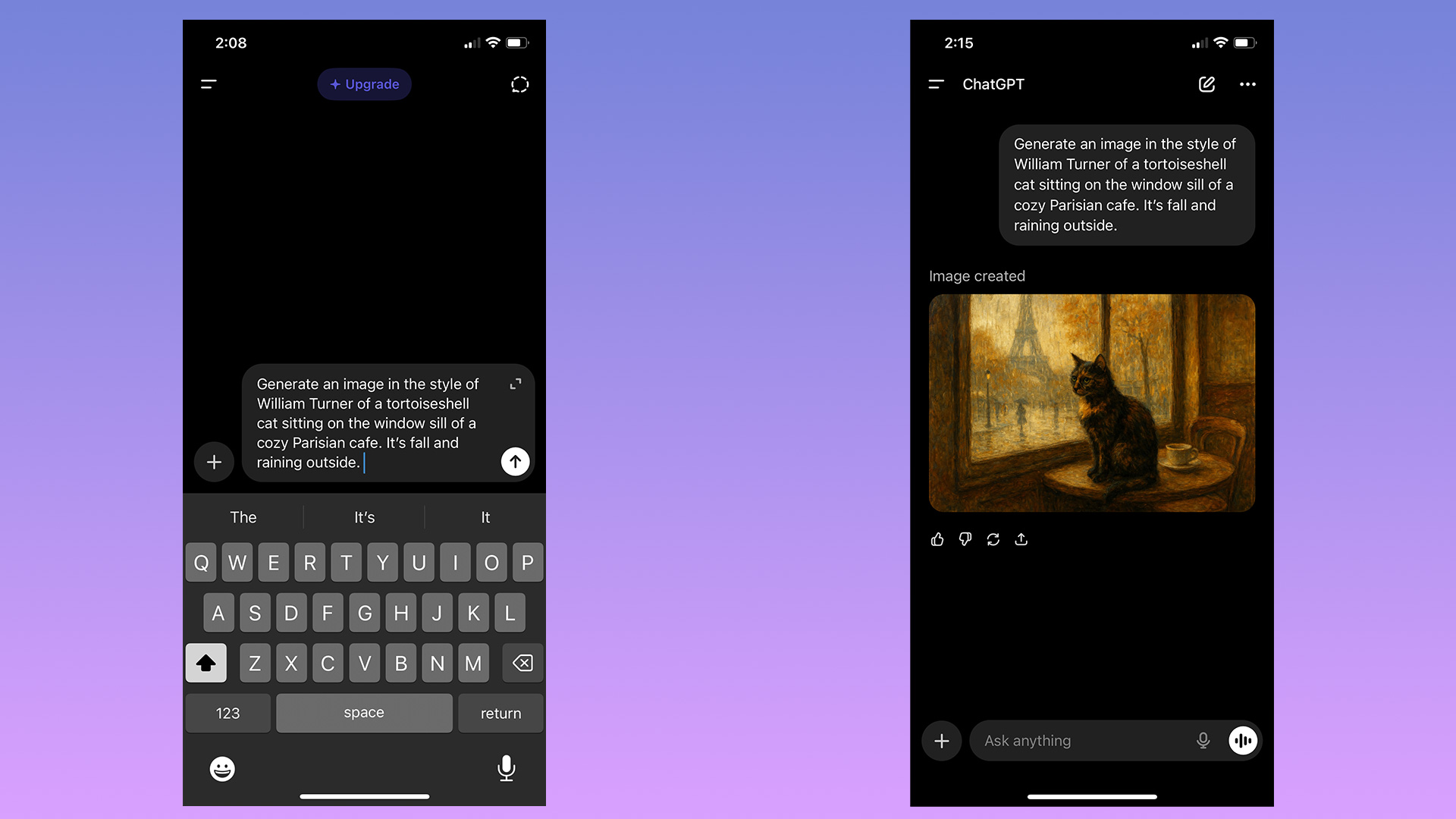
To begin making an image in ChatGPT, you can start by typing in the prompt bar.
Igor Bonifacic for Engadget
You can start generating images in ChatGPT simply by typing in the prompt bar what you want to see. There's no need to overthink things; as long as you have some version of "generate an image" followed by a description of your idea, ChatGPT will do the rest.
Depending on the complexity of the prompt and whether you pay for ChatGPT, it may take a minute or two for the chatbot to complete your image request. Sometimes the process can take longer if OpenAI's servers are experiencing greater traffic than usual.
At the end of last year, OpenAI updated the model powering image generation to make it faster, as well as better at rendering text and following instructions. At the same time, it added a dedicated "Images" section to ChatGPT's sidebar. Here you can see all the images you've made, alongside sample prompts and suggestions for styles to try out, making it a great place to start if you've never used an image generator before.
How to create images with ChatGPT using existing photos
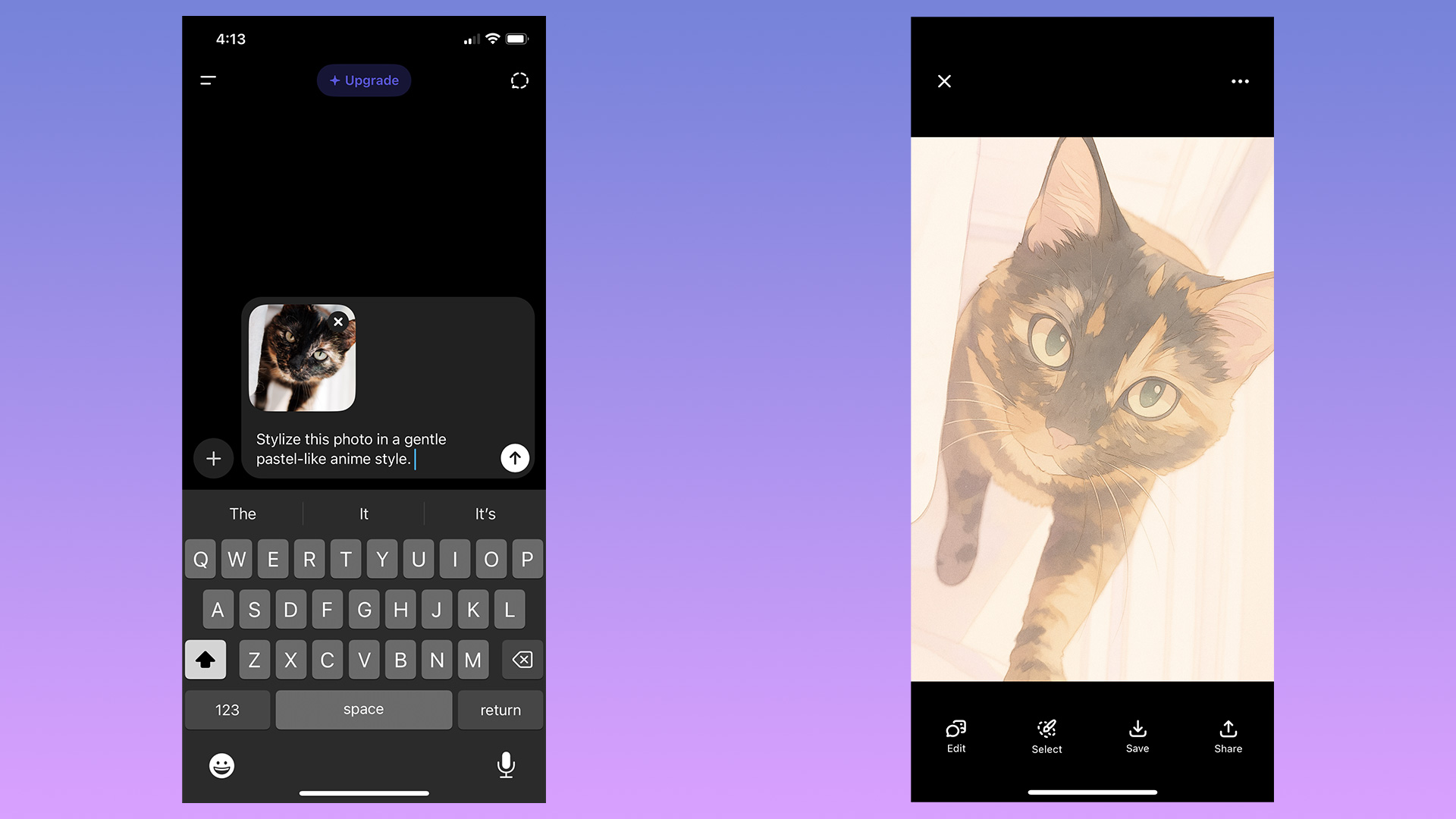
You can also upload images to ChatGPT.
Igor Bonifacic for Engadget
In addition to generating images from text prompts, ChatGPT can modify existing photos or images you upload. This is my preferred way of making images with ChatGPT; I don't need to describe the composition, I can use an existing one to guide the chatbot. To use an existing image as a starting point for a new generation, follow these steps:
Tap the "+"icon, located to the left of the prompt bar.
Select Add photos & files.
Select the image you want ChatGPT to edit. If uploading an image from your phone, you'll first need to grant ChatGPT access to your camera roll.
Write a prompt describing the changes you want.
If generating from the Images section, tap "Add photos" instead.
Keep in mind any photos you upload to OpenAI's servers may be used by the company to train future models. You can opt out of allowing your data to be used for training by following these steps:
Open the sidebar menu.
On mobile, tap the two lines on the top left of the interface; on desktop, click instead on the OpenAI logo.
Tap your name to access account settings.
Tap Data controls.
Toggle off Improve the model for everyone.
How to edit the images ChatGPT generates
ChatGPT gives you a few different ways to edit images.
Igor Bonifacic for Engadget
If you're unhappy with ChatGPT's output, you have two options. You can either prompt it to create an entirely new image, or edit parts of the picture it just generated. As always, the process for both involves simply typing what you want in the prompt bar. On mobile, OpenAI gives users a few different ways of accomplishing the same task.
To generate an entirely new image:
Tap the three dots icon below the image ChatGPT created.
Select Retry.
To edit part of an existing image generation:
Tap the image ChatGPT created.
Tap Select area.
Use your finger to mask the section of the image you want ChatGPT to tweak. The slider on the left allows you to adjust the size of the masking brush. On desktop, masking is also available if you click on an image and then click on the paintbrush icon on the top right.
Describe what you want ChatGPT to add, remove or replace through the prompt bar.
ChatGPT can also blend one of your photos with an image it has generated. To do this:
Tap an image ChatGPT created.
Tap Blend in a photo.
Upload the photo you wish
Like all AI systems, ChatGPT is non-deterministic, meaning even if you prompt it in the same way multiple times, it won't generate the exact same response each time.
Tips to create better images with ChatGPT
The best advice I can offer is to be specificwhen prompting ChatGPT. The more detail you can provide when describing what you want from it, the better the results. And remember: ChatGPT can hallucinate — as you may have noticed from one of the example pictures I included above. In the image of the tortoiseshell cat, not only is the tortie not sitting on the window sill as instructed, it's sitting on a table that doesn't make much sense. So, most of all, be patient. Prompting an AI model is not exact science, and it can take a few tries before it creates the result you want.
FAQs
How do you access ChatGPT?
ChatGPT is available on the web, desktop and mobile. To access it on your computer, open your preferred browser and navigate to chatgpt.com. OpenAI also offers dedicated Mac and Windows apps you can download from the company's website. On iOS and Android, you'll need to download the ChatGPT app from either the App Store or Google Play before you can start using the chatbot.
Since ChatGPT runs on OpenAI's servers, as long as you can access the chatbot, you'll be able to use it to create images no matter the age of your phone or computer.
Can ChatGPT generate images for free?
Yes, ChatGPT can generate images for free, as long as you create an OpenAI account. However, there is a daily rate cap and GPT-5 will take longer to make a free image. Following March 27, 2025, OpenAI briefly limited free users to three image generations per day. The company has since relaxed that restriction, though it doesn't list a specific limit on its website. In my experience, you'll be able to generate about six to seven images every 24 hours.
ChatGPT Go, which costs $8 per month, offers "more image creation."
ChatGPT Plus, which costs $20 per month, offers "expanded and faster image creation."
ChatGPT Pro, which costs $200 per month, offers "unlimited and faster image creation."
Note: ChatGPT Go will be included in OpenAI's forthcoming ads pilot, which will see the company display sponsored content alongside organic responses from ChatGPT. The company does not plan to display ads to Plus and Pro users.
Can ChatGPT generate an existing photo?
No. For copyright reasons, ChatGPT can't replicate photos or exact real world events. For example, when I asked it to recreate the photo of Zinedine Zidane's iconic 2006 World Cup headbutt, ChatGPT refused.
"I can make an artistic reinterpretation inspired by the emotion or energy of that moment — for example, a stylized painting showing the tension and intensity of competition, without depicting real individuals," it told me.
This article originally appeared on Engadget at https://www.engadget.com/ai/how-to-generate-ai-images-using-chatgpt-120000560.html?src=rss
Anthropic has been building out support for third-party apps inside of Claude. As of today, the chatbot can now connect to platforms like Slack and Canva, fetching up files from inside those apps or performing tasks within them on a user's behalf.
For instance, when connected to Box, Claude can now search for files, preview documents inline and answer questions about the content in front of you. Meanwhile, with a connection to Asana, it can now turn chats into projects, tasks and timelines your co-workers can then find and interact with on the project management app.
Box and Asana are just two of the platforms adding deeper integrations with Claude today. In total, there are nine launch partners, with some of the more notable ones including Canva, Figma and Slack.
As with Anthropic's past integrations, the new functionality is powered by Model Context Protocol (MCP) servers. MCP is a technology Anthropic released in fall 2024 to make it easier for third-party platforms to connect their systems to Claude. Since then, the protocol has become an industry standard. OpenAI, for instance, adopted MCP last year, and has been building additional support since then. At the end of last year, Anthropic donated the protocol to the Linux Foundation. The company says AI platforms will be able to bring similar integrations to their own products since they're built on a new open extension designed by Anthropic.
This article originally appeared on Engadget at https://www.engadget.com/ai/claude-now-offers-deeper-integrations-with-apps-like-canva-and-slack-180000604.html?src=rss
The Trump administration is planning on using Google Gemini to draft important federal regulations, as reported by ProPublica. This is starting with the Department of Transportation, according to interviews with agency staffers. Regulations created by the DOT help keep us safe when traveling.
The plan was initially presented to DOT staffers last month, with agency attorney Daniel Cohen writing to colleagues about AI's "potential to revolutionize the way we draft rulemakings." Gregory Zerzan, the agency's general counsel, has indicated that President Donald Trump is "very excited by this initiative" and that DOT will be "the first agency that is fully enabled to use AI to draft rules." This does suggest a pilot program of sorts, with eventual plans to bring AI to other departments.
NEW: The Trump administration is planning to use AI to write federal regulations despite the risk of hallucinations.
“We don't even need a very good rule,” @USDOT’s top lawyer said of the plan, per meeting notes reviewed by ProPublica. “We want good enough.” 🧵 pic.twitter.com/YKGvmlkMCt
Oddly, Zerzan doesn't seem that interested in high-quality regulations. ProPublica received transcripts of a meeting in which he declared that "we don't need the perfect rule on XYZ. We don't even need a very good rule on XYZ." He went on to say that "we want good enough" and that "we're flooding the zone."
Let me remind you that DOT regulates the safety standards of commercial aircraft, along with rules involving the transport of hazardous materials and driver qualifications. The agency's rules touch on every aspect of transportation safety. Why would the federal government rely on a new technology that's notorious for making mistakes?
AI “hallucinations” eg false/made-up info now becoming a problem in scientific publications. Kudos to @alexcdot et al on building an AI hallucination detector and finding that certain journals/authors have used LLMs to generate papers that also made it through peer review. Here’s… pic.twitter.com/i4Be1lS8xq
The answer is speed. Writing and revising complex federal regulations can take months, but Google Gemini can spit something out in minutes. A DOT employee giving a presentation on the program suggested that many parts of these regulations are just "word salad" anyways, so AI should be able to do just fine.
"It shouldn’t take you more than 20 minutes to get a draft rule out of Gemini," Zerzan said. The plan is to compress the timeline in which transportation regulations are written and reviewed. The department has already used AI to draft an unpublished Federal Aviation Administration rule.
Federal agencies have used AI for years, but not to actually write regulations. It's primarily been used for the purpose of translating documents, analyzing data and categorizing public comments. Trump, however, is a huge proponent of the technology. He has released multiple executive orders in support of AI and once shared an AI-created video in which he flew a fighter jet and dropped what appears to be feces on American citizens.
Skeptics say that large language models like Gemini shouldn't be in charge of drafting complicated and consequential regulations that impact millions of everyday Americans. Mistakes could lead to lawsuits and even injuries and deaths.
Mike Horton, DOT’s former acting chief artificial intelligence officer, said using Gemini to draft regulations was like “having a high school intern that’s doing your rulemaking.” He also said that agency leaders under Trump "want to go fast and break things, but going fast and breaking things means people are going to get hurt."
"Just because these tools can produce a lot of words doesn’t mean that those words add up to a high-quality government decision,” said Bridget Dooling, a professor at Ohio State University who studies administrative law. “It’s so tempting to try to figure out how to use these tools, and I think it would make sense to try. But I think it should be done with a lot of skepticism."
DOT has experienced a net loss of more than 4,000 employees since Trump started his second term. This includes over 100 attorneys.
This article originally appeared on Engadget at https://www.engadget.com/ai/trump-admin-reportedly-plans-to-use-ai-to-write-federal-regulations-175155111.html?src=rss
WASHINGTON, DC - SEPTEMBER 30: U.S. President Donald Trump (L) answers questions while childhood cancer survivors and their families gather in the Oval Office at the White House on September 30, 2025 in Washington, DC. According to Trump, the executive order he was signing will accelerate pediatric cancer research, including by harnessing the power of artificial intelligence. (Photo by Win McNamee/Getty Images)
It’s time to jump back into the pit. Ball x Pit is one of the very best games of 2025 and there’s now even more to play around with in the brick-busting roguelite. The first major free update for the game (one of three that’s on the cards this year) just arrived on all platforms. It added a bunch more stuff to the mix, including two new characters, eight extra special balls with powerful abilities and an endless mode.
Developer Kenny Sun wrote on the PlayStation Blog that because fans demanded it so much, endless mode jumped right to the top of the to-do list. After you beat a level’s boss, you can keep going as long as you can stay alive and really put your builds to the test.
The Regal Update brought two more playable hunters to the mix as well. Opt to use The Falconer, and you’ll fire balls from two birds, one at each side of the screen. When balls return to The Carouser, they orbit around him to deal extra damage. Sun added that this character “twists ball trajectories with a personal gravity field that pulls shots off their usual paths.”
Then there are the new balls. The Stone Ball is powerful, but disintegrates as it bounces. Two of the latest balls deal spins on fire damage and the Fireworks Ball seems like it’ll add even more chaotic visual flair. The update added a trio of passives too. I enjoy creating builds around baby balls (a secondary type of ball that doesn’t have a special ability), so I’m eager to try out Iron Onesie. This passive scales up the damage of special balls depending on how many baby balls are in play.
Finally, the update introduced support for more languages. You can play Ball x Pit in Spanish (Latin America), Polish, Italian, Thai, Turkish and Ukrainian.
This article originally appeared on Engadget at https://www.engadget.com/gaming/ball-x-pits-first-update-brings-an-endless-mode-and-much-more-to-the-chaos-174306548.html?src=rss
If your TikTok feed has felt a little off lately, it's not just you. TikTok says it's working to fix its service in the US following a power outage at one of its data centers that's caused widespread issues in the app. TikTok users have reported problems logging in and uploading videos, as well as with the app's "for you" algorithm.
"Since yesterday we’ve been working to restore our services following a power outage at a U.S. data center impacting TikTok and other apps we operate," the company wrote in a statement Monday. "We're working with our data center partner to stabilize our service. We're sorry for this disruption and hope to resolve it soon."
Since yesterday we’ve been working to restore our services following a power outage at a U.S. data center impacting TikTok and other apps we operate. We're working with our data center partner to stabilize our service. We're sorry for this disruption and hope to resolve it soon.
The issues come just days after TikTok finalized a deal to spin off its US business into a separate entity largely controlled by US investors. That timing hasn't gone unnoticed by users, many of whom are already suspicious of the company pushing a terms of service and privacy policy in the hours after the deal was finalized.
The problems affecting the app's recommendation algorithm have also raised questions about TikTok USDS Joint Venture's plans to "retrain" TikTok's central feature. Since Sunday, users have reported seeing a wave of generic videos flood their feeds, which are typically hyper-personalized. Other users have reported seeing the same few videos repeated over and over again.
This article originally appeared on Engadget at https://www.engadget.com/social-media/tiktok-says-a-power-outage-is-causing-issues-with-the-app-in-the-us-173426617.html?src=rss
The Milano Cortina 2026 Winter Olympics are coming up. (Mattia Ozbot/Getty Images)
Mattia Ozbot via Getty Images
The 2026 Winter Olympics are taking place in Italy this year, with all the action taking place in Milan and the Alpine city of Cortina. This year marks the fourth time Italy has hosted the Winter Games; most recently, Turin hosted in 2006. Of the 16 sports that will be featured at the Winter Olympics, there will be 15 returning favorites, including figure skating, Alpine skiing, curling, ice hockey, speedskating, snowboarding, freestyle skiing and ski jumping, and one entirely new sport, snow mountaineering. (Will it be as big a hit as the 2024 Summer Games' new addition, breaking? It remains to be seen.)
Live coverage of every event at the Olympic Winter Games Milano Cortina 2026 will be available to stream on Peacock — though thanks to the time difference between Italy and the U.S., to watch many of the events live, you'll have to wake up (or stay up) until 2AM or 3AM ET. Primetime replays and select live coverage will air on NBC. The games officially kick off with the opening ceremony on Feb. 6, 2026.
Here's what else you need to know about watching the 2026 Winter Olympics.
How to watch the 2026 Winter Olympics
Dates: Feb. 6 - Feb. 22
TV channel: NBC
Streaming: Peacock
When are the 2026 Winter Olympics?
The Winter Olympics officially begin with the opening ceremony on Feb. 6, although some events will start as early as Feb. 4). The Milano Cortina 2026 games will run through Feb. 22. The closing ceremony of the 2026 Winter Olympics will take place in the Arena di Verona on Feb. 22.
Where are the Winter Olympics this year?
The 2026 Winter Olympics will be held in Northern Italy, primarily in Milan and also the Alpine mountain resort town of Cortina d'Ampezzo, where events like bobsled, skeleton, alpine skiing, curling, para snowboard, and more will take place.
What channel are the Olympics on?
The 2026 Winter Olympics will air on NBC and stream live on Peacock.
How to watch the 2026 Winter Olympics without cable
When is the Winter Olympics opening ceremony?
The Milano Cortina 2026 opening ceremony will be held on Feb. 6, 2026. Due to the time difference, the ceremony will kick off around 2PM ET/11AM PT.
Winter Olympics time difference
This year's Olympic Games are in Italy, which is 6 hours ahead of U.S. Eastern Time. Meaning that some events will start bright and early for U.S. viewers, and live coverage will likely wrap up around 4PM ET each day. NBC will have primetime replays of the biggest moments each night.
Hockey (bronze medal games) – 1PM (Peacock – Live)
Friday, Feb. 20
Biathlon mass start – 6AM (Peacock – Live)
Speedskating final medals – 8AM (Peacock – Live)
Figure skating gala – 1PM (Peacock – Live)
Saturday, Feb. 21
Men’s hockey gold medal game – 12PM (Peacock – Live)
Women’s hockey gold medal game – 3PM (Peacock – Live)
Men’s hockey gold medal game – 8PM (NBC – Primetime)
Sunday, Feb. 22 – closing ceremony
Cross-country skiing final event – 6AM (Peacock – Live)
closing ceremony – 2PM (Peacock – Live)
closing ceremony – 8PM (NBC – Primetime)
More ways to watch the 2026 Winter Olympics on NBC
While Peacock is the best way to watch the Winter Olympics, there are other options if you restrict yourself to the NBC broadcasts. As our guide to the best live TV streaming services to cut cable notes, both YouTube TV and Hulu + Live TV are excellent options, but you'll want to skip Fubo until and unless the service resolves its contract dispute with Comcast, as NBC channels remain unavailable for now.
This article originally appeared on Engadget at https://www.engadget.com/entertainment/winter-olympics-how-to-watch-schedule-of-events-and-everything-else-you-need-to-know-about-the-2026-milano-cortina-games-172409424.html?src=rss
While we got a peek at a few Xbox Game Studios projects during last week’s Developer Direct event, neither Bethesda nor Activision Blizzard made appearances. Fans of several Blizzard franchises won’t need to wait too long to find out what’s next for their favorite games, though, as the publisher has lined up several showcases to help mark its 35th anniversary.
The developer-led streams will include “major game announcements,” according to Blizzard. They’ll all air over the next few weeks. Here’s where and when you can watch each stream:
January 29. 12PM ET — World of Warcraft State of Azeroth(YouTube and Twitch)
February 4, 1PM ET — Overwatch Spotlight (YouTube and Twitch)
February 9, 12:30PM ET — HearthstoneSpotlight on the (YouTube and Twitch)
February 11, 5PM ET — Diablo 30th Anniversary Spotlight (YouTube and Twitch)
With Blizzard not holding a BlizzCon in either 2024 or 2025, the announcements at these showcases should help fill the gap until the event returns in September. “This is only the start of what we’ll share around our games this year,” Blizzard president Johanna Faries said.
The WoW showcase will take place just over a month before the Midnight expansion arrives on March 2. Among other things, the developers will share their roadmaps for both modern and classic WoW.
Overwatch 2 has been teasing a takeover of the game by the villainous Talon faction, and with the next season only a couple of weeks away, we’ll surely hear more about that. Maybe Blizzard will reveal the long-rumored Overwatch mobile spinoff here too (and hopefully an animated series).
The second Diablo IV expansion, Lord of Hatred, is set to arrive on April 28 with a new campaign and fresh classes in tow, so expect to learn more during that franchise’s showcase. Hearthstone fans will also soon get a better sense of what to expect for that game this year.
This article originally appeared on Engadget at https://www.engadget.com/gaming/blizzard-lines-up-wow-overwatch-hearthstone-and-diablo-showcases-154912932.html?src=rss
Apple has launched its next-generation AirTag for $29 and brought a slew of new features along with it. But, first, it's important to get this out of the way: The new AirTag still doesn't have a keyring hole, so you'll still need a case or secure pocket.
Once you get over that, the new Apple AirTag does offer some nice improvements. For starters, it's now powered by Apple's second-generation Ultra Wideband chip — the same one used in the iPhone 17 lineup and for the Apple Watch Ultra 3. It also uses Precision Finding to reach items up to 50 percent further away than the previous AirTag model. This feature will now work with any Apple Watch Series 9, Ultra 2 or a later iteration of either.
The new AirTag is also 50 percent louder than before and has what Apple calls a "distinctive new chime." It still uses the Find My network to bounce off other Bluetooth users and locate the AirTag.
Apple
Launched in 2021, Apple's AirTag has long stood as our favorite Bluetooth tracker for iPhones. It's convenience within the Find My app is a big help and almost makes up for the fact that it doesn't have a key ring — almost.
This article originally appeared on Engadget at https://www.engadget.com/wearables/apples-new-airtag-still-doesnt-have-a-keyring-hole-150540254.html?src=rss
The ninth mainline Resident Evil is trying to split the difference between the series’ action-heavy entries and the stress-inducing hide-and-seek episodes. During a four-hour playthrough of some early parts of Resident Evil Requiem, I spent time with both of the two main characters, Grace and series mainstay Leon. They offer distinctly different playstyles, talents, strengths, and weaknesses. While it isn't an entirely new premise for the survival horror series (in the original, playing as Chris Redfield offered more challenge than playing as Jill Valentine) it’s never been this pronounced.
I started playing as Leon, entering a medical facility he seemed to have been invited to. With a cavernous main hall, it feels like yet another iconic Resident Evil hub, immediately reminding me of Raccoon City's Police Precinct and even the original's cavernous manor. Wings to explore? Check. Suspiciously quiet and empty central area that will almost definitely get overrun by zombies at some point? Probably.
Both Grace and Leon’s parts can be played in either third- or first-person perspective, though Leon’s segments seem better suited to the third-person view, since there's just a lot more shooting. Grace's segments were tense and demanded my full attention, more akin to Resident Evil 7. During this early part of the game, there is a lot of hiding, plenty of ammo conservation and a lot more learning from dumb mistakes. The parts of the game I played with Leon reminded me more of Resident Evil 4 (or 5 or 6 – but let’s gloss over those).
Once you take control of him, Leon is immediately attacked and has to fend off roughly 15 infected doctors, nurses and patients. It’s a significant tone shift from Grace skulking around the facility, hiding behind plants and sometimes just hoping for the best.
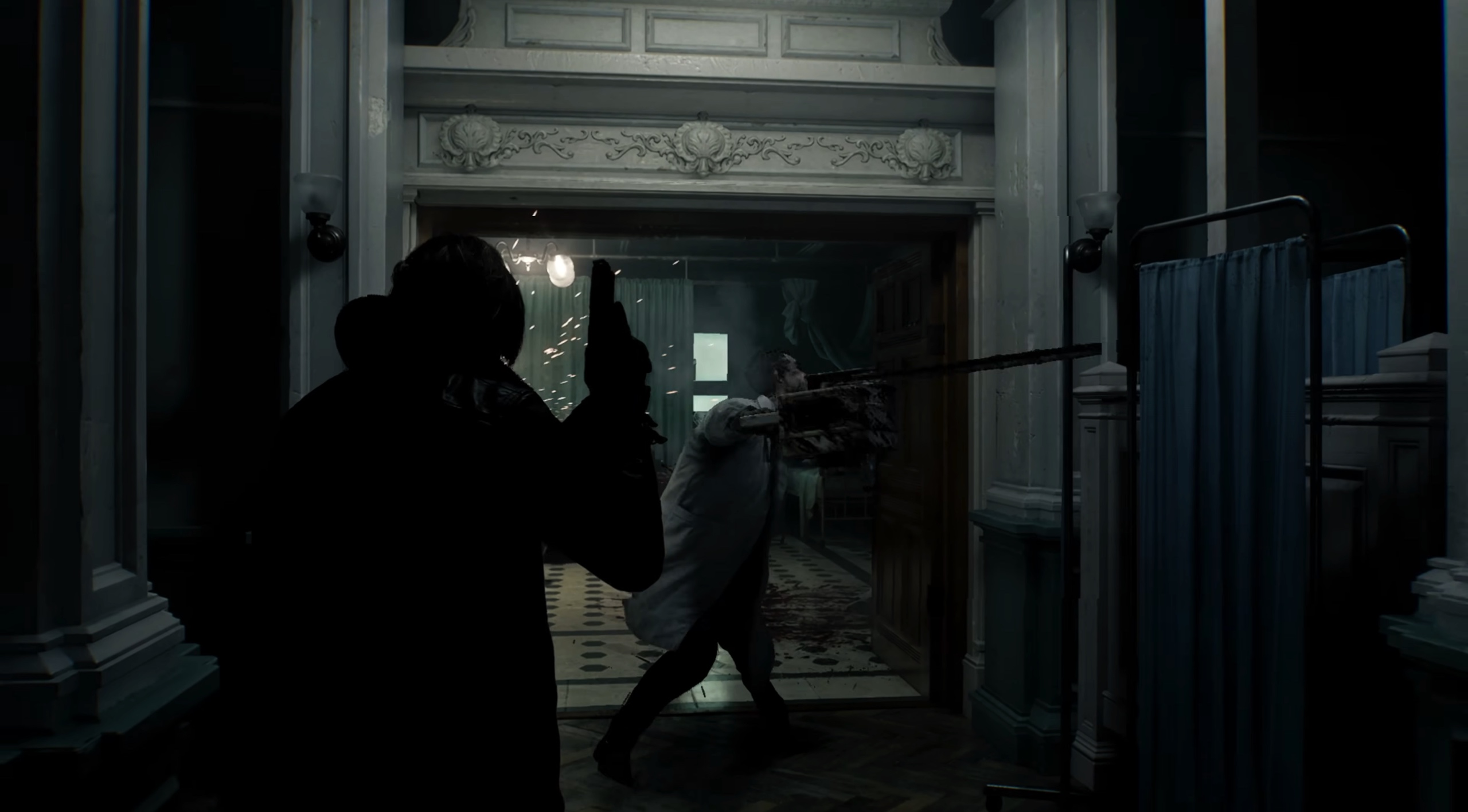
Leon faces off against a chainsaw-wielding doctor zombie. Best cut that arm off.
Capcom
Leon, fortunately, arrives with several weapons, including a new melee option, a hatchet. Using this, he can make targeted attacks to lop off limbs and aim at the head to deliver more damage. At least on these basic zombies, I found relentless slashing more effective than more targeted efforts – I’m sure future enemies will demand more… nuanced approaches. A later enemy must be decapitated to kill it.
After a set number of swings, you will need to retreat and sharpen the blade, which adds to the jeopardy while not disrupting the chaos. The hatchet can even be used to parry attacks – if you get the timing down.
Leon even gets to wield a chainsaw during this initial encounter, but only after claiming it from one particularly industrious zombie that seemed to find it inside a hospital. It was crucial to both disarm this zombie and grab the chainsaw before another corpse could take a turn on it. However, just because the chainsaw gets dropped doesn’t mean it’s turned off. I suffered significant damage when I repeatedly rushed into the spinning power tool.
The zombies in Requiem are also a little more nuanced compared to previous games – if a zombie can have nuance. While nearly all of the zombies will attack you on sight, they can be distracted or delayed based on the person they were before they turned. For example, the chef zombie (a hardy, bigger zombie than the ones you’ve come across until that point) will only chase you around his kitchen. Step out into the corridor and he’ll leave you alone. Elsewhere, a zombie (attached to an IV, cute) has his eyes bandaged and will react aggressively to any noise. I used this to my advantage, hurling an empty bottle at another zombie who stood nearby. The IV zombie killed him immediately. Another time, a senior exec who’s been turned is firing an employee of his… by killing them, moaning “You’re fired” as he does so. This little vignette gave me enough time to dim the lights and hide when he left his office.
In Requiem, players are expected to exploit individual zombie behaviors to outmaneuver them. It’s also a welcome dose of humor to the survival horror series, reminding me a little of the camp moments in Dead Rising, another zombie-centric Capcom series.
Leon doesn’t have to strategize quite as much, arriving with a particularly powerful handgun, the Requiem, that he eventually passes over to Grace. This is capable of stopping pretty much (but not all) enemies you come across, although it initially comes with only a single bullet, so you really have to make it count.
During a set-piece battle against a towering, swollen former patient, I got to test Requiem’s action-horror controls under pressure. Leon finds a shotgun and has to flank (and outrun) his “hungry” attacker. The environment in the rafters of the building is designed so it’s easy to figure out where you need to go and how to stop the giant zombie from cornering you. Ammo, at least during this fight, was scattered around, which was a relief after struggling to find bullets during Grace’s segment.
Despite the lack of traditional weapons, Grace eventually finds a blood injector (and its companion blood analysis system). These turn into Requiem’s crafting system. Powered by literal buckets and puddles of blood (you have to draw up infected blood from certain parts of the environment and enemies), samples can be combined with scraps, herbs and more to create high-powered first-aid shots, injectable explosive blood, ammunition and a lot of other things. Analysing different blood types (and solving some light puzzles) adds further crafting options.
Oh he's not going to help you.
Capcom
During the preview, the infected blood injector was exclusively for Grace’s use. It’ll be intriguing if only one character gets to benefit from the crafting system, although Capcom teased customizable weapons for Leon, which might better suit his playstyle. Grace might also be handicapped by the typewriter save system popularized in the first few RE games. This could mean you’ll only be able to save if you have an ink ribbon on you, a very stressful part of inventory management early on in the series — she really can’t catch a break. However, it appears to be adjustable in difficulty settings.
According to Capcom’s Resident Evil showcase last week, infected blood will apparently play a strong role in Requiem, touching on both Leon’s past (he’s apparently suffering from a mystery ailment) and the circumstances surrounding the death of Grace's mother. And it wouldn’t be a Resident Evil game with mystery, buckets of blood, and a pulpy villain. Capcom has primed another fascinating villain with Requiem’s Dr. Gideon, a former Umbrella virologist who was seemingly written for an actor to go full camp baddie – if the doctor’s hooded snakeskin trenchcoat wasn’t a giveaway.
Resident Evil Requiem will be released on February 27, 2026 for PC, PS5 and Xbox Series X|S.
This article originally appeared on Engadget at https://www.engadget.com/gaming/resident-evil-requiem-preview-150000849.html?src=rss
Europe is probing Elon Musk’s X for failing to take action to prevent the spread of AI-generated sexually explicit images including child sexual abuse material (CSAM), regulators said in a press release. The European Commission’s investigation could result in “further enforcement steps” against X, not long after it levied a $140 million fine against the platform.
“Sexual deepfakes of women and children are a violent, unacceptable form of degradation. With this investigation, we will determine whether X has met its legal obligations under the DSA [Digital Services Act], or whether it treated rights of European citizens — including those of women and children — as collateral damage of its service,” said the Commission’s executive VP, Henna Virkkunen in a statement.
The EU said that it will assess whether X took measures to reduce risks around the dissemination of illegal content when it deployed Grok onto the platform. Those risks include manipulated sexually explicit images including content that may amount to CSAM. “These risks seem to have materialized, exposing citizens in the EU to serious harm,” the Commission stated.
On top of the new inquiry, the EC is also expanding its 2023 investigation of X over its recommendation algorithm and tools used to prevent the spread of illicit content.
CBS Newsfound that, as of Monday morning, Grok was still able to generate undressed images of individuals. X previously claimed this ability had been removed for both free and paid users.
The investigation is coming at a delicate time for Europe, which is already in the Trump administration’s crosshairs over its scrutiny of American tech companies. And the EU would also be going up against Musk, who is the owner and has the biggest megaphone on X. After X was hit with a 120 million euro ($140 million fine) for breaching Europe’s Digital Services Act, Musk called the EU “the fourth Reich” and said in a post on X that it should be “abolished.”
In response to the inquiry, X reiterated previous comments it has made about Grok. “We remain committed to making X a safe platform for everyone and continue to have zero tolerance for any forms of child sexual exploitation, nonconsensual nudity and unwanted sexual content,” a spokesperson told The New York Times.
Update, January 26 2026, 11:42AM ET: Added additional coverage from CBS.
This article originally appeared on Engadget at https://www.engadget.com/ai/the-eu-is-investigating-grok-and-x-over-potentially-illegal-deepfakes-134506678.html?src=rss
It's that time of year where a great pair of headphones double as earmuffs and a current sale will ensure you get a great quality — and good looking — option. One of our favorite wireless headphones for 2026 is available for 35 percent off.
Amazon is offering the first-generation Bose QuietComfort Ultra Bluetooth Headphones for $279, down from $429. Since coming out last April, they've become our choice for best noise-canceling wireless headphones. Notably, the sale is only available in the headphone's nice limited edition Deep Plum model.
We gave the Bose QuietComfort Ultra headphones an 86 in our review, thanks, in part, to their incredible active-noise cancellation (ANC) — an industry-lead Bose has held for years. They also offers improved audio, producing a warmer and clearer sound than other Bose headphones. Plus, they live up to their name, remaining comfortable even after hours and hours thanks to cushioning inside the headband and earpads.
This article originally appeared on Engadget at https://www.engadget.com/deals/the-bose-quietcomfort-ultra-headphones-are-35-percent-off-130020033.html?src=rss
A good home theater setup goes beyond just having the right TV (although that certainly does help a lot). Getting the right sound for your space, the right lighting and making sure your streaming gear is up to date are all things that can go a long way to making your setup feel premium.
And don’t think that just because you’re not hosting movie night every weekend that a good home theater setup is a waste. Whether your family is full of cinephiles, you love playing video games with your kids or you plan on hosting friends to watch Super Bowl 2026, the right home theater equipment can make your experience much better. We test a ton of that technology here at Engadget; if you’re looking to make some changes to your setup, we’ve collected some of our favorite home theater gear here to make your shopping list a bit easier to compile.
Best home theater gear
This article originally appeared on Engadget at https://www.engadget.com/home/home-theater/the-best-gear-to-upgrade-your-home-theater-setup-130000755.html?src=rss
Whether you love cooking already or you want to try to cook more at home to spend less money on takeout, there are tons of gadgets that can make your time in the kitchen even more enjoyable. As food lovers and tech reviewers, the Engadget team has tried out pizza ovens, sous vide machines, air fryers, ice cream makers and more. Here, we gathered all of the best gear we’ve tested, reviewed and used in our own kitchens for when you’re looking to spice things up in yours. We’ve also linked to our reviews and buying guides so you can dive deeper into our recommendations for the best kitchen gadgets around.
Best kitchen gadgets for 2026
Nicole Lee contributed to this report.
This article originally appeared on Engadget at https://www.engadget.com/home/kitchen-tech/best-kitchen-tech-gadgets-small-appliances-124515179.html?src=rss
Never underestimate the chilling powers of grainy grayscale imagery and ethereal whooshing sounds. Outside Parties asks, "What if I Spy, but in an alien hell dimension?", and it is impressively unnerving despite the fact that nothing's really happening at any given time. It goes all in on atmosphere, to great effect. This is the Playdate horror game that I've been waiting for.
Adams Immersive's Outside Parties is a sort of scavenger hunt across a massive image of a realm called the Outside, which can only be visited by astral travel, according to the lore. There are lots of unknowns about what or where it really is, though explorers have mapped it fairly extensively through out-of-body excursions and they've encountered thousands of different entities there, including the spirits of the dead. As the player, you have come across a Hellscryer K5 — the communication device, psychic camera and recorder used for these trips — and now you're combing through the mission logs, getting sucked into the mystery of it all. Think of the K5 as your Playdate, except powered by blood and runes.
At the center of Outside Parties is a 1.44 gigapixel, 360-degree panoramic HDR image which has dozens of eerie scenes hidden within it: skeletons of human, animal and paranormal origin; scary robed figures and occult symbols etched all around; what appear to be fountains and rivers of blood; a Stonehenge of teeth. These are the targets you're meant to track down, and as you hone in and check them off your list, voice signals attached to each one will reveal more and more of the explorer's spellbinding story.
But this isn't a straightforward "find the object" puzzle game by any means. When you first look at the zoomed-out photo, it's akin to a strip of TV static with some heavily shadowed areas throughout. You can zoom to up to 64 times magnification to get a better look at specific zones, but you also have to adjust the image brightness using the crank to improve the clarity of the objects. Making it brighter or darker will reveal more objects in certain spots while simultaneously obscuring others. There are 150 targets according to the developer, which should take players somewhere from 10-20 hours to complete. I've been at it for hours and still have plenty left to find. (If you're stuck, you can turn to the helpful target lookup page, which provides hints with varying degrees of specificity.)
All the while as you're hunched over your Playdate, laser-focused on the screen to find targets that are buried in a sea of fuzz, unsettling audio transmissions are cutting in and out, disturbing images are flashing on-screen at random and a constant atmospheric whooshing is playing in your ear. The sound design of this game is seriously brilliant — it's worth playing for that alone, not to mention all the other cool stuff. From the startup page to the menus where you'll find bits of a background story, to the creepy clips of people wailing and ominously reciting numbers, the sounds of Outside Parties make for a truly immersive, disconcerting experience that I previously wouldn't have thought possible on a Playdate. It's really something special.
Outside Parties also comes with a screensaver that once again makes me yearn for the Playdate Stereo Dock. Pop on the Void Monitor, sit back, and enjoy the horrifying sights and sounds of the Outside.
This article originally appeared on Engadget at https://www.engadget.com/gaming/outside-parties-is-the-creepiest-playdate-game-yet-and-im-kind-of-obsessed-213142541.html?src=rss
Microsoft issued another out-of-band update to fix a bug that caused Outlook to crash for Windows 11 users. This second emergency patch addresses issues seen with Outlook and files stored in the cloud following Microsoft's January 2026 Windows security update.
According to Microsoft, this update fixes a bug where some apps that "open or save files stored in cloud-backed locations" became unresponsive or displayed error messages. Some users also experienced Outlook crashing or not opening when PST files are stored in cloud-based options like OneDrive.
This is the second time this year that Microsoft had to issue a last-minute fix for bugs related to its January security update. Last week, some Windows 11 devices couldn't shut down or hibernate, while other devices running Windows 10 or 11 couldn't log in through remote connections. For more context, Microsoft only issues out-of-band updates when there's a serious issue that can't wait until its regular update cycle. Fortunately, the latest out-of-band update is cumulative, so you only need to download and install this one to fix the issues seen with the January update.
This article originally appeared on Engadget at https://www.engadget.com/computing/microsoft-releases-second-emergency-windows-11-update-to-fix-outlook-crashes-192012812.html?src=rss
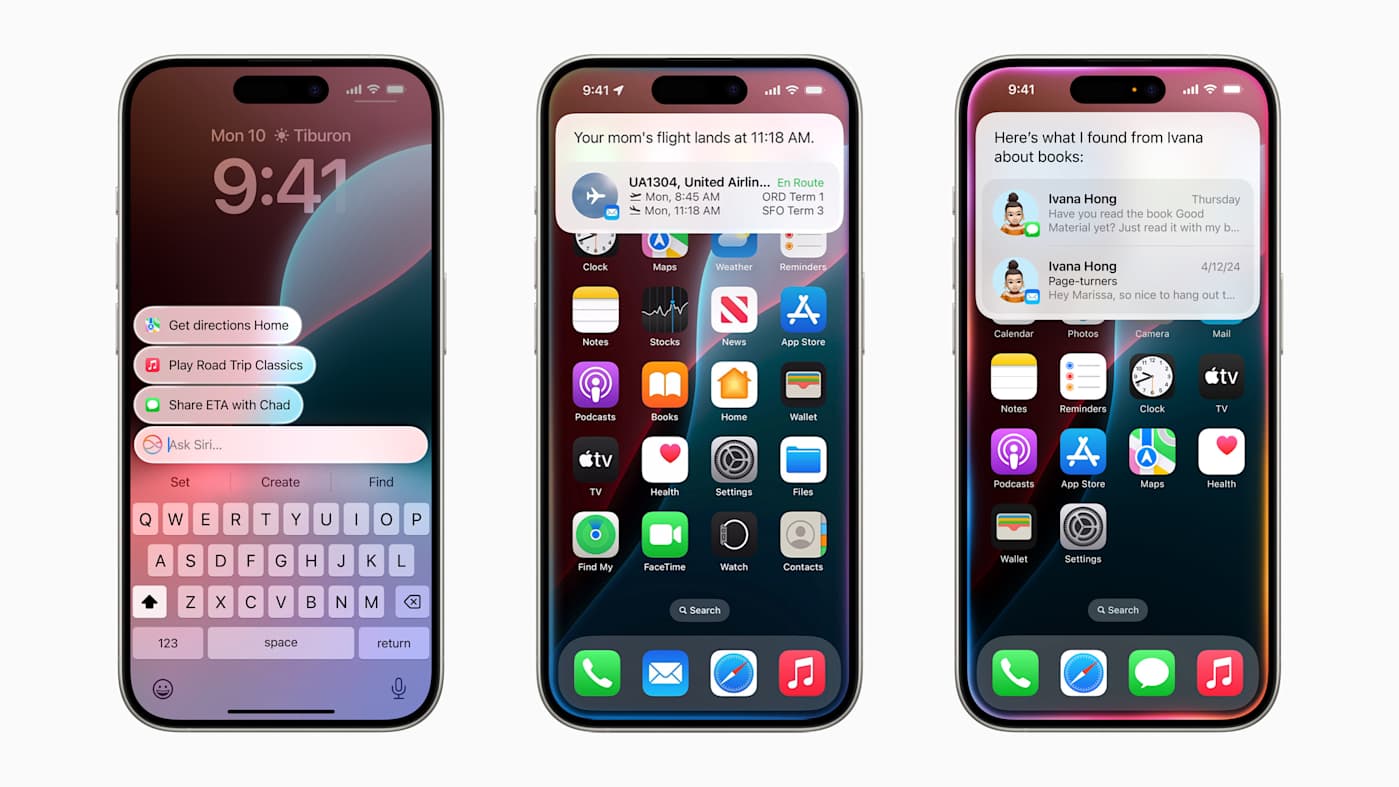
A new and improved Siri may finally make an appearance, but this time, it could be with a Google Gemini glow up. According to Bloomberg's Mark Gurman, Apple wants to announce a new Siri in "the second half of February" that will show off the results of its recently announced partnership with Google and offer demonstrations of the Gemini-powered capabilities.
After this reveal, Gurman reported that the new Siri will make its way to iOS 26.4, which is also slated to enter beta testing in February before its public release in March or early April. Apple has been meaning to launch its next-gen Siri ever since its announcement at WWDC 2024, but now we know that this Gemini-powered Siri will behave more like an AI chatbot, similar to OpenAI's ChatGPT, thanks to another Bloomberg report from last week.
Following the reported demo that's scheduled for late February, Gurman said Apple will have a grand reveal of the new Siri, which is currently codenamed Campos, at its annual developer conference in the summer. After that, the latest Siri and the accompanying Gemini-powered Apple Intelligence features are expected to arrive with iOS 27, iPadOS 27 and macOS 27, which are expected to be available as beta releases in the summer.
This article originally appeared on Engadget at https://www.engadget.com/ai/apple-reportedly-plans-to-reveal-its-gemini-powered-siri-in-february-174356923.html?src=rss
There's a new trailer for the upcoming Super Mario movie, The Super Mario Galaxy Movie, and it confirms some beloved characters are joining the crew for its latest adventure. The trailer provides our first official look at Yoshi in the new movie, whose appearance was leaked back in the fall by a Pillsbury cookie box design. And, just as exciting, we also see Birdo in the mix. The trailer was released during Nintendo's The Super Mario Galaxy Movie Direct.
The short event also confirmed that the movie is now in post-production. While a previous trailer set the release date at April 3, the movie is now scheduled to come out two days earlier, on April 1. The Super Mario Galaxy Movie stars Chris Pratt voicing Mario, Anya Taylor-Joy as Peach and Charlie Day as Luigi, along with Jack Black (Bowser), Keegan-Michael Key (Toad), Benny Safdie (Bowser Jr.), Kevin Michael Richardson (Kamek) and Brie Larson (Rosalina).
This article originally appeared on Engadget at https://www.engadget.com/entertainment/tv-movies/yoshi-and-birdo-arrive-in-new-trailer-for-the-super-mario-galaxy-movie-along-with-an-earlier-release-date-154455021.html?src=rss

 Login
Login