Reading view

There are new articles available, click to refresh the page.

12 steps you can take right now to be safer online

There's a fundamental question you can ask of both the internet and real life: "How do I enjoy my time here without taking unnecessary risks?" In grass-touching meatspace, you can cut out processed foods, carry pepper spray and avoid skydiving without a partner.

But the best methods for staying safe online aren't as intuitive. The internet is a massive town square where people are constantly bellowing deeply personal facts about themselves. It's no surprise that it's become a breeding ground for scams, theft and other criminal activity.

Given the breadth of dangers, it may feel easier to throw up your hands and say that whatever happens will happen. I'm here to tell you, though, that cybersecurity doesn't have to be complex, difficult or time-consuming. You don't need to be a hacker to foil a hacker — you only have to take advantage of simple tips and free apps designed to make you safer online. Whether you commit to all 12 detailed here or only focus on one, you'll be much more secure for it.

1. Install security updates immediately

One of the most important things you can do to ensure your digital security is to install all software updates as soon as they become available on your devices. When you see the notification, don't wait — train yourself to download the update immediately.

Not all software updates are about security, but the ones that are form your best line of defense against technical hacks. When developers discover a flaw that can be exploited, they ship an update to fix it. By the time the flaw gets patched, chances are very high that hackers also know about it, so any time lost means you could be the next to get exploited.

As you go down this list, you'll learn that cybersecurity threats are less technical than you think. To counter the ones that are, however, there's nothing more important you can do than install security updates.

2. Use strong passwords

Weak, easily guessed passwords are one of the most frequent causes of data breaches and malware attacks. If a password is one of the ten or so most common, an attacker may be able to guess it with no other information. If it's connected to you — your birthday, say, or mother's maiden name — it may be guessable from information anyone can look up online.

Even if your password is a random string of characters, it might still be guessable if it's too short. Hackers can use programs to guess all possible combinations and try each one on a target account. The longer a password is, the more exponentially difficult it is to guess.

Close up on screen of website sign in button
SEAN GLADWELL via Getty Images

That means you need passwords that are both long and meaningless to you. You might rightly complain that these are bastards to remember, but you're in luck: password managers can do that for you. A password manager app or browser extension can create passwords when you need them, store them securely and fill them in automatically. All you have to remember is the one master password that unlocks all the others.

3. Set up two-factor authentication

Even the strongest password might get revealed through no fault of your own, like if it's stored without encryption and leaked in a data breach. That's why it helps to have two-factor authentication (2FA), also known as multi-factor authentication (MFA), as a second secure layer on every account.

You probably already know 2FA as the irritating extra step that makes you go get your phone — but that's not the only way to do it. Many apps, including Google and Apple, now let you log in through passkeys. These not only don't require you to enter a code or password, but use asymmetric encryption, sharing credentials between your device and the service that runs the passkeys. It's a lot quicker for you, and leaves nothing to steal.

4. Back everything up

Ransomware and its cousins are a growth industry within the cybercrime economy. These attacks corrupt your files or lock you out of them until you pay a fee to get them back. The easiest way to foil a ransomware attack, or to clear any other kind of malware off a device, is to restore the entire system from the most recent backup.

To make sure you actually have a backup, experts recommend the 3-2-1 rule: three different backups, on two different types of storage, with at least one physically distant from the main system. For example, you could have one backup on another device in your house, one in the cloud and one on a portable hard drive. Automatic backup services can save disk images for you at set intervals so you don't have to remember to do it yourself.

5. Learn to spot social engineering

Despite all the technobabble flying around the cybersecurity world, a great many scams and hacks are accomplished through methods a 19th-century con artist would recognize. Scammers pose as experts or authority figures to gain your trust, and use frightening language to bypass your critical thinking. Ticking clocks, emotional manipulation and fake identities are all in the toolbox.

Bank fraud through phone messages.Businessman holding phone with scam message on digital screen. Fake text SMS scam.Scammers online.Cyber scam
Alex Cristi via Getty Images

Take phishing, in which hackers trick you into giving up your information willingly. A typical phishing email might pose as a bank, credit bureau or other authoritative service. In red letters, it may demand your bank password or social security number to immediately fix an irregularity with your account. Other common approaches include warning you about speeding tickets you never incurred or sending receipts for subscriptions you never bought.

Social engineering attacks are constantly evolving, but they often fall back on the same strategies. The best way to foil them is to take a deep breath every time you receive a frightening email or text message, then research it in detail: look up the email address, check the visual design to make sure the sender is who they claim to be, and ask yourself if there's any way the message could be true. I highly recommend working through this phishing quiz — it's tough, but fair, and extremely educational.

6. Always check links before clicking

This is a companion to the previous tip. Social engineering scams don't always try to get you to give up information yourself. They also get you to click on links that put secret malware on your device — like keyloggers that watch you type your passwords or ransomware programs that corrupt your files.

If you're ever not sure about an email attachment or a link you're being asked to click, copy the link (without opening it) and paste it into a URL checker like this one from NordVPN. These free tools can tell you if a link is associated with any known malware domains.

URL checker
Sam Chapman for Engadget

You can also mouse over any link, then look at the bottom-left of your browser to see what URL it will take you to. If an email is from your bank, any links within it should go to your bank's website. If it's going anywhere else, especially to an unidentifiable string of characters, be suspicious.

A related tip is to never copy and paste something into your URL bar if you aren't absolutely sure of what it will do. Social engineering doesn't always get you to click the link — sometimes attackers leave it un-hyperlinked so mousing over it doesn't reveal anything. This also goes for the command modules on desktop and laptop computers. In a recent documented attack, hackers convinced AI chatbots to suggest a command that gave them root access to the victim's device. Never copy-paste anything into the command window without verifying it first, especially if an AI told you to do it.

7. Don't overshare

Over the last two decades, lots of us have gotten into the habit of dumping all sorts of personal information on social media. This trend has supercharged the scam economy. It may seem harmless to broadcast the names of your kids or the dates you'll be on vacation, but every piece of data you put into the world makes it easier for a stranger to get hooks into you.

For example, "grandparent scams" are on the rise right now. Grifters contact a target, usually a senior, pretending to be their grandchild. They'll claim to be in a crisis and need money fast. The more information they have on their target, the more convincing their tale of woe will be. Social media is a prime place to study a potential victim.

Oversharing can also be a compounding problem. If you use weak passwords, your public information can be used to guess your credentials or answer your security questions. So, if you don't have a password manager yet, think twice before you engage with that quiz post on Facebook that asks for the name of your childhood pet.

8. Use a VPN

I'm a big booster of virtual private networks (VPNs), but it's important to be realistic about what they can and can't do. Even the best VPNs aren't total cybersecurity solutions — you can't just set one and assume you're safe forever. A VPN can't protect you if you use easily guessed passwords, for example, or click on a malware link. It's about hiding your identity, not making you invulnerable.

So what can a VPN do? In short, it replaces your IP address (a fingerprint that identifies you online) with another IP address, belonging to a server owned by the VPN. The VPN server does business with the internet on your behalf, while its conversations with your device are encrypted so it can't be traced back to you.

Proton VPN's app for Windows.
Sam Chapman for Engadget

This means no third party can connect your online actions with your real-world identity. Nobody will be harvesting data on the websites you visit to sell to advertisers, nor building a file on you that an unscrupulous government might misuse. VPNs also protect you from fake public Wi-Fi networks set up by cybercriminals — even if a hacker tricks you with a man-in-the-middle attack, they can't do much without your real IP address.

Many top VPNs, including my top pick Proton VPN, include ad blockers that can also keep cookies and tracking pixels from latching onto you. So, even if a VPN can't do everything, you'll be far safer and more private with one than without one. If you don’t want to pay for a new subscription right now, I've also compiled a list of the best free VPNs that are actually safe to use.

9. Run regular virus scans

The most important time to look for malware is when you're downloading a file from the internet. Not only can unwanted apps hitch rides on seemingly safe files, but links can start downloads in secret, even if you don't think they're meant to be downloading anything. A solid antivirus program can catch malware as it arrives on your system, and if it's uncertain, can lock suspicious files in quarantine until it knows whether they're safe or not.

Dedicated antivirus apps are sometimes even capable of catching malware that hasn't been seen or used yet. AV software uses machine learning to identify the common patterns of malware, filtering out new viruses that behave like old ones.

But what about malware that's already gotten through the perimeter? An antivirus app can also check your computer at set intervals in search of unwanted apps, including those that might be masquerading as system files. Windows computers now come pre-installed with Windows Defender, which is enough to handle most of these tasks, but I recommend at least one anti-malware program on any device.

10. Use email maskers and private search engines

If you're concerned about your information being misused or mishandled, remember that the less you put out into the world, the less danger you're in. Keeping your private data off social media is one important step, but there are other ways your data gets disseminated — and other options for responding.

For example, you often need an email address to sign up for an online account. If you use your real email, your contact information is now floating around online, increasing the chance of someone using it to scam you (or at least adding you to mailing lists you never signed up for). To stay safe, use an email masker. These services give you a fake email address you can use to create accounts, which automatically forwards messages to your real address.

DuckDuckGo
Sam Chapman for Engadget

Search engines, especially Google, are also notorious for building profiles on users by watching the terms they search for. You can dodge that by switching to a private search engine like DuckDuckGo, which doesn't track anything you do — it's funded by non-targeted ad sales on its search results pages, not by selling your data to brokers.

11. Use a data removal service

Speaking of data brokers: unfortunately, if you've been on the internet at any point in the last 10 years without taking intense precautions, your data is probably in the hands of at least one business that makes money by hoarding and selling it. These data brokers range from public-facing, people-search sites to private backend dealers.

Data brokers are poorly regulated and lax about safety. The longer one has your personal information, the more likely it is to leak. The good news is that most brokers (though not all of them) are legally required to delete your data if you ask them to.

However, there are a lot of data brokers out there, and they really want to keep your data. Each one makes opting out harder than uninstalling a Norton product — and hundreds of them may have files on you. To make the process easier, you can use a data removal service like DeleteMe or Surfshark VPN's partner service Incogni.

12. Practice physical security

Let's close out the list by getting a little old school. I've already discussed how many online scams depend on classic con artistry to work. By the same token, physical infiltration and smash-and-grab tactics still pose a threat to cybersecurity.

It doesn't take too much imagination to see how this could work. If you leave your laptop or phone unattended in public, for example, someone might insert a flash drive that loads malware onto the system. In one illustrative case, a thief in the Minneapolis area would loiter in bars, watch people unlock their phones, then steal those phones and unlock them himself.

I'm not saying you need to be paranoid every second you're in public. Just use the same level of caution you'd use to protect your car. Lock your phone with a biometric key so only you can open it, and make sure not to leave any device lying around if it can access your online accounts. And at work, be careful not to let anyone into a secure area if they don't have the proper credentials.

This article originally appeared on Engadget at https://www.engadget.com/cybersecurity/12-steps-you-can-take-right-now-to-be-safer-online-130008335.html?src=rss

©

© Oscar Wong via Getty Images

Over the shoulder view of young woman using smart phone while logging in personal banking account on laptop. Network security, data protection and privacy.

State Department: Calibri font was a DEI hire

The US Department of State is unwinding a 2023 decision to use san-serif Calibri font on all official communications and switching to Times New Roman instead, The New York Times reports. In a memo obtained by NYT titled "Return to Tradition: Times New Roman 14-Point Font Required for All Department Paper," Secretary of State Marco Rubio frames the change as a way to return professionalism to the State Department.

"Switching to Calibri achieved nothing except the degradation of the department’s official correspondence," Rubio said in the memo. That's because the font is "informal" and clashes with the State Department's letterhead, according to Rubio, while serif fonts like Times New Roman "connote tradition, formality and ceremony."

Former Secretary of State Antony Blinken originally switched the State Department to Calibri in 2023 to improve the accessibility of official communications. The curvy, flourish-free lines of sans-serif fonts work better with assistive technologies like screen readers and text-to-speech tools. Serif fonts, meanwhile, are typically used in things like newspapers to make small, printed text legible.

While Rubio notes that Calibri "was not among the department’s most illegal, immoral, radical or wasteful instances of D.E.I.A.," it seems clear that Rubio lumps the font in with those same diversity, equity, inclusion and accessibility initiatives. Getting rid of it is an easy (and weirdly petty) way to follow through on the second Trump administration's anti-DEI stance towards just about everything.

This article originally appeared on Engadget at https://www.engadget.com/big-tech/state-department-calibri-font-was-a-dei-hire-190454957.html?src=rss

©

Hackers tricked ChatGPT, Grok and Google into helping them install malware

Ever since reporting earlier this year on how easy it is to trick an agentic browser, I've been following the intersections between modern AI and old-school scams. Now, there's a new convergence on the horizon: hackers are apparently using AI prompts to seed Google search results with dangerous commands. When executed by unknowing users, these commands prompt computers to give the hackers the access they need to install malware.

The warning comes by way of a recent report from detection-and-response firm Huntress. Here's how it works. First, the threat actor has a conversation with an AI assistant about a common search term, during which they prompt the AI to suggest pasting a certain command into a computer's terminal. They make the chat publicly visible and pay to boost it on Google. From then on, whenever someone searches for the term, the malicious instructions will show up high on the first page of results.

Huntress ran tests on both ChatGPT and Grok after discovering that a Mac-targeting data exfiltration attack called AMOS had originated from a simple Google search. The user of the infected device had searched "clear disk space on Mac," clicked a sponsored ChatGPT link and — lacking the training to see that the advice was hostile — executed the command. This let the attackers install the AMOS malware. The testers discovered that both chatbots replicated the attack vector.

As Huntress points out, the evil genius of this attack is that it bypasses almost all the traditional red flags we've been taught to look for. The victim doesn't have to download a file, install a suspicious executable or even click a shady link. The only things they have to trust are Google and ChatGPT, which they've either used before or heard about nonstop for the last several years. They're primed to trust what those sources tell them. Even worse, while the link to the ChatGPT conversation has since been taken off Google, it was up for at least half a day after Huntress published their blog post.

This news comes at a time that's already fraught for both AIs. Grok has been getting dunked on for sucking up to Elon Musk in despicable ways, while ChatGPT creator OpenAI has been falling behind the competition. It's not yet clear if the attack can be replicated with other chatbots, but for now, I strongly recommend using caution. Alongside your other common-sense cybersecurity steps, make sure to never paste anything into your command terminal or your browser URL bar if you aren't certain of what it will do.

This article originally appeared on Engadget at https://www.engadget.com/cybersecurity/hackers-tricked-chatgpt-grok-and-google-into-helping-them-install-malware-185711492.html?src=rss

©

© Laurence Dutton via Getty Images

Stock image showing a black man’s face looking into a computer screen in an open plan working office. Type is being added to the screen by an Artificial intelligence, AI, chatbot.

YouTube TV Plans will let you choose genre-specific content packages

YouTube TV, which launched in 2017 as a $35-per-month all-in-one service, will soon introduce YouTube TV Plans. Although the announcement is light on details, we know the initiative will let you sign up for genre-specific packages, such as sports and news. In other words, it's the final step in the legacy-cable-ification of the service.

YouTube hasn't said anything about pricing. But it's probably safe to assume that narrowing your available content will reduce your bill. A year ago, the company raised its monthly cost to $83. That's 137 percent higher than the service’s launch price nearly nine years ago.

We don't yet have the full list of available plans, but YouTube mentioned packages for sports, news and "family and entertainment content." As expected, it promised that you can mix and match them. The YouTube TV Sports Plan will include access to all major broadcast channels and several sports networks, like all ESPN networks, FS1, and NBC Sports Network. It sounds similar to offerings from Fubo and DirecTV.

YouTube TV plans will launch in early 2026. The current $83 all-in-one model will remain available alongside it.

This article originally appeared on Engadget at https://www.engadget.com/entertainment/streaming/youtube-tv-plans-will-let-you-choose-genre-specific-content-packages-182909455.html?src=rss

©

Amazon brings same-day deliveries of perishable food items to 1,300 new areas

Amazon is introducing same-day delivery of perishable food items to 1,300 new cities and towns throughout the country, upping the total service area to more than 2,300 locations. This expansion covers cities like Boise, Salt Lake City, Fort Collins, Omaha, Des Moines and many more.

Check the link to see if it has expanded to where you live. The commerce giant says it will be bringing the service to even more cities in 2026, making the platform a real rival to stuff like Instacart and Walmart+.

Amazon introduced this feature earlier this year and it has proven to be quite the success, given today's move. It lets people order perishable food items like fruits, vegetables, dairy and meat alongside other more traditional items like electronics and books.

Amazon uses a "specialized temperature-controlled fulfillment network” to ensure that perishables remain in tip-top shape and they are delivered in insulated bags. The deliveries are free for Prime members, as long as the order exceeds $25. Everyone else has to pay $13 per order.

Some items.
Amazon

The company says that fresh groceries already make up nine of the top ten most-ordered items for quick delivery, which is a fairly astounding metric. People want their avocados. Amazon has been steadily increasing the number of items available via this method by incorporating Whole Foods products.

This article originally appeared on Engadget at https://www.engadget.com/big-tech/amazon-brings-same-day-deliveries-of-perishable-food-items-to-1300-new-areas-175746531.html?src=rss

©

© Amazon

Bags on a porch.

The UK government will 'look into' Rockstar's firing of union-organizing workers

Rockstar Games may have to answer for what appears to be union-busting behavior. UK Prime Minister Keir Starmer, under pressure from parliament, said the government will "look into" the firing of 31 employees in October.

The sacked workers were all part of a private trade union chat group on Discord. The company claimed the firings were "for gross misconduct" and accused the workers of sharing confidential information outside of the company.

But based on what we know, it's hard to see that characterization as anything but union-busting in search of legal cover. The Independent Workers' Union of Great Britain (IWGB) described the case as "the most blatant and ruthless act of union busting in the history of the games industry."

In November, IWGB issued legal claims against the Grand Theft Auto developer. The next day, over 200 staff at Rockstar North signed a letter condemning the firings and pressuring management to reinstate the workers. Earlier that month, the fired workers and their supporters protested outside Rockstar North's Edinburgh headquarters. Others picketed in Paris, London and New York.

People protesting and holding picket signs outside Rockstar North headquarters
Fired workers and supporters protesting outside Rockstar's headquarters
IWGB

“It’s clear to everyone close to this situation that this is a blatant, unapologetic act of vicious union busting,” one of the fired staffers said anonymously in a November statement. “Rockstar employs so many talented game developers, all of whom are crucial to making the games we put out.”

Edinburgh East and Musselburgh MP Chris Murray, who prompted Starmer's response, said in parliament that he recently met with Rockstar to discuss the case. "The meeting only entrenched my concerns about the process Rockstar used to dismiss so many of their staff members," he said. "I was not assured their process paid robust attention to UK employment law, I was not convinced that this course of action was necessary, and alarmingly, I did not leave informed on exactly what these 31 people had done to warrant their immediate dismissal."

Murray added that Rockstar initially refused entry to the MPs unless they signed a non-disclosure agreement. The company eventually relented on that front.

On Wednesday, Murray triggered Starmer's response in parliament. The MP asked the Prime Minister if he agreed that "all companies, regardless of profit size, must follow UK employment law and all workers have the right to join a union?"

Starmer replied that he found the case "deeply concerning." He added that "every worker has the right to join a trade union, and we're determined to strengthen workers' rights and ensure they don't face unfair consequences for being part of a union. Our ministers will look into the particular case the member raises and will keep him updated."

This article originally appeared on Engadget at https://www.engadget.com/gaming/the-uk-government-will-look-into-rockstars-firing-of-union-organizing-workers-174216696.html?src=rss

©

The next Nintendo Switch Online additions are N64 games Rayman 2: The Great Escape and Tonic Trouble

By: Matt Tate

Nintendo has announced its Nintendo Switch Online additions for December, which are for all the N64-era 3D platformer fans out there. On December 17, Rayman 2: The Great Escape and Tonic Trouble are joining the Switch’s Nintendo Classics library. As a reminder, N64 games are exclusive to Switch Online + Expansion Pack subscribers, along with the emulators for the Game Boy Advance, Sega Genesis and GameCube.

For retro gaming completionsists, Tonic Trouble might actually be the more interesting get for NSO, despite being far less well known than the Rayman series. It was Ubisoft’s first 3D platformer, but a number of delays meant it ended up releasing in the same year as Rayman 2, and therefore has become a bit lost to time. The game stars an alien janitor named Ed, who accidentally drops a powerful green tonic out of his spaceship and all over Earth, making a mutated mess of the planet that he has to clean up.

Tonic Trouble was also conceptualized by Rayman creator Michel Ancel, but Ubisoft clearly only had room for one limbless mascot going forward. Arriving in 1999, Rayman 2: The Great Escape was the series’ Super Mario 64 moment, reimagining the original 2D game as a 3D platformer that was met with critical acclaim at launch. These days, the superb Rayman Legends would probably be most fans’ pick for the best game in the long-running series, but Rayman 2 would likely be near the top of the list.

Today’s announcement means that Rayman arrives on the N64 NSO app before Nintendo's own Donkey Kong 64, which has been one of the most requested games for years. Why the company still hasn’t handed that one over in a year when the big ape made his triumphant 3D platformer comeback remains a mystery. But with the Rayman series kicking off its 30th anniversary celebrations back in September, the arrival of Rayman 2 makes a lot of sense.

Nintendo updated its N64 app for the launch of the Switch 2 earlier this year. Fire it up on today and you can make use of a rewind function, as well as a new CRT filter for optimum nostalgia.

This article originally appeared on Engadget at https://www.engadget.com/gaming/nintendo/the-next-switch-online-additions-are-n64-games-rayman-2-the-great-escape-and-tonic-trouble-171500122.html?src=rss

©

© Ubisoft

Rayman 2

Reddit is starting to verify public figures

Like it or not, the checkmark has become an almost universal symbol on most social platforms, even though its exact meaning can vary significantly between services. Now, Reddit, which historically hasn't cared that much about its users' identity, is joining the club and starting to test verification for public figures on its platform.

The company is beginning "a limited alpha test" of the feature with a small "curated" group of accounts that includes journalists from major media outlets like NBC News and the Boston Globe. Businesses that are already using an "official" badge, which Reddit started testing in 2023, will also now have a grey "verified" checkmark instead of the "official" label. 

Verification has long been a thorny issue for many platforms. For users, it's at times been a source of confusion, especially on sites where verified badges only require a paid subscription. Reddit's approach, at least for now, is closer to how Twitter handled verification prior to Elon Musk's takeover of the company.

The company has handpicked the initial group who will get checkmarks indicating they have verified their identity and seems to be geared around high-visibility accounts. "This feature is designed to help redditors understand who they're engaging with in moments when verification matters, whether it’s an expert or celebrity hosting an AMA, a journalist reporting news, or a brand sharing information," Reddit explains in a blog post. "Our approach to verification is voluntary, opt-in, and explicitly not about status. It’s designed to add clarity for redditors and ease the burden on moderators who often verify users manually." 

For now, Reddit users — even notable ones — won't be able to apply for verification. But the company notes that its intention isn't to limit checkmarks to famous people only. A Reddit spokesperson tells Engadget that "our goal is that anyone who wishes to self-identify will be able to do so in the future." 

The company also notes that verification doesn't come with any exclusive perks, like increased visibility or immunity from the rules of individual subreddits. Reddit requires accounts to be in good standing and already active on the platform in order to be eligible for verification. Accounts that are marked NSFW or that "primarily engage in NSFW-tagged communities" won't be eligible. 


This article originally appeared on Engadget at https://www.engadget.com/social-media/reddit-is-starting-to-verify-public-figures-170000833.html?src=rss

©

OpenAI's house of cards seems primed to collapse

OpenAI is in a far less commanding position than it was following the public release of ChatGPT a few short years ago. 

Back in 2022, the sudden popularity of ChatGPT sent Google into a panic. The company was so worried about the possibility of the upstart chatbot disrupting its Search business, executives sounded a "code red" alert inside of the company and called Sergey Brin and Larry Page out of retirement to help it formulate a response to OpenAI. It then rushed out Bard, announcing its first commercial chatbot on February 6, 2023. Google's stock tanked days later when the AI incorrectly answered a question about NASA's James Webb Space Telescope during a public demo. 

But it wasn't just Google that wanted a piece of OpenAI, while the search giant sought to compete with it, others — including Microsoft and Apple — made deals with the company to bring its technology to their products and services, all the promise that AI would eventually revolutionize every facet of the economy. 

Since then, OpenAI has seen its lead against Google and much of the AI industry evaporate, culminating in a series of successive blows throughout 2025. On January 20, the same day Altman was busy rubbing shoulders with other tech oligarchs at Donald Trump’s inauguration, China’s DeepSeek quietly released its R1 chain-of-thought model. A week later, the startup's chatbot surpassed ChatGPT as the most-download free app on the US App Store. The overnight success of DeepSeek eliminated $1 trillion worth of stock market value, and almost certainly left OpenAI blindsided.

In response, the company showed a newfound urgency. In one week, for instance, OpenAI released both o3-mini and Deep Research. It even went so far as to announce the latter on a Sunday evening. But for all its new urgency, OpenAI's biggest, most important release of the year was a miss. 

It's safe to say GPT-5 hasn't lived up to anyone's expectations, including OpenAI's own. The company touted the system as smarter, faster and better than all of its previous models, but after users got their hands on it, they complained of a chatbot that made surprisingly dumb mistakes and didn't have much of a personality. For many, GPT-5 felt like a downgrade compared to the older, simpler GPT-4o. That's a position no AI company wants to be in, let alone one that has taken on as much investment as OpenAI.    

Anthropic was quick to take advantage of the weakness, signing a deal with Microsoft to bring its Claude models to Copilot 365. Previously, Microsoft depended exclusively on OpenAI for partner models in Copilot. Before the company announced the integration, reporting from The Information said Microsoft made the decision based on the strength of Anthropic's Sonnet 4.0 model, judging it "perform[ed] better in subtle but important ways" relative to OpenAI's offerings.   

However, what will likely go down as the defining moment occurred a few short weeks after OpenAI announced the conclusion of its restructuring. On November 18, Google released Gemini 3 Pro, and immediately the new model leap-frogged the competition, including GPT-5. As of the writing of this article, Google's new model is at the top of LMArena, the site where humans compare outputs from different AI systems and vote on the best one. GPT-5, by contrast, is currently ranked sixth overall, behind models from Anthropic and Elon Musk's xAI.  

According to a December 2 report from The Wall Street Journal, Sam Altman sent a companywide memo following the release of Gemini 3 Pro. Echoing the words Google used to describe the situation it found itself against OpenAI in 2023, he called for a "code red" effort to improve ChatGPT. Altman reportedly told employees there would be temporary reassignments and that the company would delay some products, all in an effort to catch up to Google and Anthropic.    

The few numbers these companies are willing to share don't paint a promising picture for OpenAI. Each month, about 800 million people use ChatGPT. On paper, that's impressive, but Google is catching up there too. In October, the company said the Gemini app had 650 million users, up from 450 million just a few months earlier in July, thanks to the popularity of its Nano Banana Pro image generator

More importantly, OpenAI has an inherent disadvantage against Google. For the search giant, AI may touch everything the company does now, but Gemini is just one product in an extensive portfolio that includes many other popular services. Google can fund its AI advancements with money it makes elsewhere. OpenAI cannot say the same. The company is constantly raising money to stay afloat, and according to a financial roadmap obtained by The Journal, it will need its revenue to grow to about $200 billion annually to become profitable by 2030. In November, Altman said on X the company was on track to hit above $20 billion in annualized revenue this year. 

In an effort to grow revenue, Altman and company have adopted an incredibly risky strategy. In recent months, OpenAI has signed more than $1.4 trillion worth of infrastructure deals in a bid to outscale the competition that is already beating it. Many of those agreements can only be described as circular, and I think the fears about a financial bubble are real. In the first half of 2025, investment in data centers accounted for nearly all of US GDP growth. Even if there's not a repeat of the 2008 housing market crisis or the dot-com crash, the AI boom is at the very least poised to make everyday electronics (and utilities) more expensive for regular people in the short term.

Since late October, demand for server-grade computer components, including memory and storage, has sent the price of consumer PC parts skyrocketing as manufacturers devote more of their production capacity and wafers to high-margin customers like OpenAI and Google. Since late October, the cost of most RAM kits has doubled and tripled. In November, the price of some SSDs went up by as much as 60 percent. Next year, the cost of LPDDR5X memory, which is used in both smartphones and NVIDIA servers, is expected to climb as well.  

"Be it carmakers, smartphones or consumer electronics, everyone that uses memory is facing pressure from price hikes and supply constraints in the coming year," Zhao Haijun, the co-CEO of memory manufacturer SMIC told analysts, per Bloomberg.

Gita Gopinath, former chief economist for the International Monetary Fund, recently estimated that if the AI bubble were to burst, it would wipe out $20 trillion in wealth held by American households. The Great Recession, considered the worst financial meltdown since the Great Depression, reduced US household net worth by $11.5 trillion, and it took years before for American families to rebuild their wealth to pre-recession levels.   

The modern AI bubble may have been started by ChatGPT, but given the crowded field of chatbots and LLMs, it won't necessarily pop should OpenAI go bust. With novelty and technical prowess no longer on its side though, it's now on Altman to prove in short order why his company still deserves such unprecedented levels of investment. 

This article originally appeared on Engadget at https://www.engadget.com/ai/openais-house-of-cards-seems-primed-to-collapse-170000900.html?src=rss

©

Petco accidentally exposed heaps of customer information

Petco has accidentally exposed a whole lot of customer data and personal information, according to a report by TechCrunch. This is thanks to a security lapse involving its Vetco clinics website, forcing the company to take a portion of that site offline.

Petco has confirmed the leak and TechCrunch noted that the security lapse allowed anyone to download customer records without login information. The exposed data includes customer names, driver's license numbers, dates of birth, Social Security numbers and even financial information. It also includes customer records from visits to Vetco, like medical histories, pet names, vaccination records and other stuff like that.

This was due to an incorrect software setting that made a number of files accessible online, according to a notice filed by California’s attorney general and reported on by Mashable. The company has since corrected the setting, removed the exposed files and implemented security measures.

However, Petco hasn't said if any data was actually extracted during the security lapse or if it even has the means to suss out that kind of thing. Vetco customers should probably perform some due diligence to shore up personal security. The company is offering credit and identity monitoring services to impacted customers, but only in some states. We recommend giving Petco a call to discuss options. 

Data breaches of this sort are becoming an unfortunate part of modern life. Recent security breaches have impacted entities like AT&T, Discord, the social network Tea and the human resources company Workday, among others.

This article originally appeared on Engadget at https://www.engadget.com/big-tech/petco-accidentally-exposed-heaps-of-customer-information-163825302.html?src=rss

©

© Unsplash/Karsten Winegeart

A dog on grass.

CloverPit, a Balatro-style game with a grungy slot machine, hits iOS and Android on December 17

By: Kris Holt

CloverPit is one of my favorite games of the year so far. Developer Panik Arcade took the formula that helped make Balatro so successful — using various tools to bend the rules of the game to help you rack up obscenely high scores — and based it around a slot machine rather than poker. It’s been a hit so far on PC, where it has sold more than a million copies since September, and on Xbox. CloverPit has been among the top 20 most-played titles on Game Pass since its surprise debut there last month. Now, the horror-tinged roguelite is venturing into new territory, as it’s coming to iOS and Android on December 17.

The mobile versions of the game are said to have a fully-optimized interface, as well as all of the post-launch updates, such as the Hard Mode that Panik Arcade recently added. CloverPit will cost $5 on mobile and it will have no microtransactions or “predatory mechanics.” That might seem surprising for a game centered around a slot machine, but CloverPit isn’t really about gambling (which the developers say they don’t like anyway). It’s about breaking the rules to tilt the odds in your favor.

The setup is pretty straightforward. You’re imprisoned in a rusty cell and you have a rapidly increasing debt to pay off. The only way to do that, and hopefully leave through the door, is to earn enough coins from the slot machine to pay what you owe. There are more than 150 items (which are called charms here) to experiment with that affect things like the number of spins, how much each symbol or pattern is worth and how many tickets you earn. Tickets are what you need to buy more charms.

Figuring out combinations of items that work well together is key to quickly scaling up the number of coins and tickets you can earn from each visit to the slot machine. Fail to pay off your debt by a deadline (i.e. after a certain number of spins) and it’s game over, as you plunge into the titular pit.

CloverPit is strange and beguiling and heaps of fun. I’ve plowed around 39 hours into it on Steam, and I’m sure it’ll take up much of my attention on my phone after it hits mobile next week. Doomspinning seems slightly healthier for my brain than doomscrolling.

This article originally appeared on Engadget at https://www.engadget.com/gaming/cloverpit-a-balatro-style-game-with-a-grungy-slot-machine-hits-ios-and-android-on-december-17-154500028.html?src=rss

©

Apple's Studio Display is $230 off right now

By: Matt Tate

Apple’s Studio Display hasn’t been updated since it launched in 2022, but it remains one of the best monitors for the Mac-oriented, and right now you can pick one up for $230 off. This deal applies specifically to the tilt-adjustable model, which means you can’t adjust the height of the built-in stand. That might be a deal-breaker for some users, but if not, $1,368 is a near-record low.

The Studio Display was a product that Apple devotees had been asking the company to make for years. As well as being a solid 27-inch 5K LED monitor, it also packs in a variety of ports and some surprisingly good speakers. In our 80-scoring review at the time, we praised its bright and color-accurate screen, while bemoaning the fact that it isn't as smooth as Apple’s many ProMotion-equipped devices.

If you’re content with what's already on offer, this is a good deal on what has always been a very expensive luxury device, but bear in mind that there are swirling rumors of a next generation Studio Display that could arrive in 2026. Mark Gurman of Bloomberg reported earlier this year that Apple might currently have two new models in the works, though it isn’t clear if both will end up making it to retail.

Check out our coverage of the best Apple deals for more discounts, and follow @EngadgetDeals on X for the latest tech deals and buying advice.

This article originally appeared on Engadget at https://www.engadget.com/deals/apples-studio-display-is-230-off-right-now-152328981.html?src=rss

©

© Devindra Hardawar for Engadget

Apple Studio Display

MasterClass subscriptions are 40 percent off for the holiday season

If learning a new skill is one of your New Year's resolutions, then you might want to know that MasterClass subscriptions are currently 40 percent off. This brings the top-tier subscription with offline mode and use on up to six devices down from $240 annually to $144. The entry-level plan, which supports just one device and doesn't offer offline viewing, is marked down to $72 from $120.

Over the past few years, MasterClass has grown to over 200 classes, sessions and original series. You can learn about entrepreneurship from Richard Branson, screenwriting from Aaron Sorkin, cooking from Gordon Ramsay and heaps more. Each of these offers classes in a one-on-one format with slick instructional videos and often workbooks to accompany them.

MasterClass also appears on our list of the best subscription gifts for this Christmas. Loved ones will enjoy superb production quality and a rich library where they are sure to find something that piques their interest. Gift subscriptions can also be scheduled, so you can take advantage of the current sale even for future gifts. If you're buying it for yourself, know that MasterClass offers a 30-day money-back guarantee.

Whether you're looking to learn about business from Kim Kardashian or basketball skills from Steph Curry, MasterClass can help you expand your horizons in 2026. The "Holiday Head Start Offer" is available through December 15.

Follow @EngadgetDeals on X for the latest tech deals and buying advice.

This article originally appeared on Engadget at https://www.engadget.com/deals/masterclass-subscriptions-are-40-percent-off-for-the-holiday-season-150520277.html?src=rss

©

© Masterclass

MasterClass subscriptions are buy one, get one free in this last-minute gift deal

Projectors won us over in 2025

Not long ago, you may have thought of projectors as complicated, unreliable or just too expensive. In 2025, though, consumer sentiment started to flip. Companies like Anker and Valerion made the projector experience more practical and immersive, helping drive consumer interest and, ultimately, sales.

This shift has been quite a few years in the making. LG helped kickstart the projector renaissance back at CES 2018 when it introduced its unusual-looking CineBeam HU80K projector that could provide a 150-inch image. The next year at CES saw the dawn of the ultra short-throw (UST) laser projector that could create a similarly large display while sitting just inches from your wall. Another big technological upgrade over the following years was the bright and long-lasting laser light engines that replaced weaker, more fragile bulbs.

The timing couldn’t have been better for projector manufacturers. When COVID shut down theaters in 2020, consumers were forced to get their entertainment at home. Many wanted something akin to a movie theater experience — both indoors and out — and thus interest in projectors started to take off.

In 2025, though, projectors really entered the zeitgeist thanks to two new products. The first was Anker’s SoundCore Nebula X1, the highest-rated home theater product Engadget reviewed this year. It comes with a triple-laser engine that allows for 3,500 lumens of brightness — enough that you can watch it during the day. It also uses liquid cooling to reduce annoying fan noise and offers color-accurate picture quality with support for Dolby Vision HDR.

Even better, it can be carried outside easily via the retractable handle and used for movie nights under the stars. If you splurge for the Soundcore Nebula X1 Pro version that comes with huge party speakers, you can even expect excellent sound quality. It also looks sleek and modern, unlike the plasticky models normally aimed at mid-range buyers.

However, the most interesting feature — which is new for a projector in this price range — is the motorized tilting lens that automatically fits the picture to your screen or surface. That allows buyers to set up the Nebula X1 themselves in just a few minutes, rather than hours. That also makes it easy to move the projector around and use in another location.

Valerion VisionMaster Max
Valerion

The other model that captured our imagination was the Valerion VisionMaster Max. This projector shares many traits of the Nebula X1, like Dolby Vision, a triple laser system and automatic setup. It’s also a nice-looking, modern product.

However, it has two other innovations that made it extra interesting. The first is the dynamic iris and its Enhanced Black Level technology. That had reviewers raving about its deep black levels that were comparable to projectors like JVC’s NZ8 that cost twice as much. The other is the so-called anti-rainbow technology, which eliminates most of the rainbow-hued strobing that appears with models using Texas Instruments DLP chips. This resolves a common complaint with mid-range projectors.

For a similar price as a good quality TV ($1,500 - $3,000), these models can beam an image double the size. And to install one, you just need to position the projector in front of the screen, roughly center it and hit “calibrate” to get a perfect image.

Both the X1 and VisionMaster Max were first announced on Kickstarter and became the top two projectors ever sold on the site. Plus, several projector models, particularly from Anker/Soundcore, appeared on Google’s gadget search trends. All of that is helping the home projector market increase to the point that it’s, well, projected to nearly double by 2030.

As people researched these products, they may have noticed the other advantages. Along with movies, they’re also great for gaming and sports, particularly if you have a big group of people. In fact, they actually take up less room than a TV if both the projector and screen are ceiling mounted. And many models are portable, battery-powered and bright enough to use outside for parties and camping.

Formovie Theater projector
Steve Dent for Engadget

A prime example of a recent projector convert is Engadget editor and cinema podcaster Devindra Hardawar, who explained why he decided to make the leap. “I know big TVs have gotten cheaper, but they still can't reach the massive 120-inch screen size of my Formovie ultra-short throw projector,” he said. “It makes watching anything feel truly cinematic, and not like I'm just staring at another screen.”

Even though projectors are gaining some ground, they won’t replace TVs for most people. Mid-range televisions still cost less at around $1,000. TVs are obviously easier to install and more convenient to use, as all projectors need time to warm up. TVs are much brighter, too: even dim models put out at least 500 nits of brightness, compared to 200 to 300 nits max for very bright projectors. However, even though projector setups are less tricky than before, you still need to buy and install a screen for optimal performance, which adds cost and complexity.

How much more can projectors improve? I think they’ll continue to get brighter, more color accurate and even easier to install. Another piece of technology with potential to reduce complexity and improve image quality is the roll-up screen. If those come down in price enough, they may convince some buyers to replace their TVs with a projector. They’re still likely to remain a niche product, but for cinephiles who want a theater-like experience, projectors are now a more compelling option.

This article originally appeared on Engadget at https://www.engadget.com/home/home-theater/projectors-won-us-over-in-2025-143655492.html?src=rss

©

© Steve Dent for Engadget

You can purchase the Nebula X1 in a package with Nebula-branded satellite speakers and karaoke microphones.

Kindle Scribe Colorsoft review: A very particular set of skills, for a price

In a world where notifications persistently compete for our attention, distraction-free ereaders and writing tablets have found an audience. Putting your phone, laptop or iPad aside and curling up with a Kindle or a reMarkable tablet have become an almost ironic way for the tech-savvy to disconnect from online noise and focus on reading and writing. It’s debatable how broad the appeal of these devices is, but even in what appears to be a relatively small slice of the industry, the competition is fierce.

Amazon is arguably the biggest name in the space, with its Kindles dominating the ereader market for years. When it introduced the Kindle Scribe in 2022, the company made a play for the burgeoning E Ink writing tablet category, and just last year it launched its first color ereader with the Kindle Colorsoft. Put all those features — reading, writing and color — together, and you’ve got the ingredients for Amazon’s latest contender: the Kindle Scribe Colorsoft.

This time, Amazon expanded the Scribe line by releasing three new Scribes at once. The entry-level model is the black-and-white tablet without a front light, which costs $430. For $70 more, you’ll get the front light, and then the Colorsoft version goes for $630. There are upgrades from last year’s Scribe across the trio, and for this review we’ll be looking mostly at the Colorsoft, which has all of the new features.

Like with previous models of the Scribe, Amazon doesn’t indicate the generation number in the name, simply calling this lineup the “all-new Kindle Scribe,” attaching the word Colorsoft to the edition that renders colors. To avoid confusion, I’ll occasionally be referring to this generation of the device as the Scribe 3, and the version from last year as the Scribe 2.

Editor’s note: As I only received the Kindle Scribe Colorsoft on December 7 due to shipping delays, I won’t be assigning a score to this device until I have had more time to test it. My colleague Valentina Palladino received the new Kindle Scribe a few days before that, and has contributed testing and impressions to this review. It’s also worth noting that some new features, like “Send to Alexa+,” “Story so far” and “Ask this book” aren’t available to test yet. We will update this review with a score after spending more time with it so we can better gauge things like battery life and the usefulness of some software features.

What’s new with the Kindle Scribe Colorsoft

Aside from the obvious, which is that the Colorsoft can now render colors, the latest Kindle Scribes also feature a refined design, improved front light system, updated screen architecture, new quad-core chip, more memory and Oxide display technology. It has a larger 11-inch screen compared to the 10.2-inch display on its predecessor, and still manages to weigh 33 grams less at 400 grams (0.88 pounds). There’s also a revamped Home page that houses a Quick Note for easier access to the writing interface as well as some software and AI tools that aren’t available to test yet.

A lot of the hardware tweaks translated to a snappier, more responsive device overall. In my testing, the Scribe Colorsoft’s AI summarization and handwriting refinements took a bit less time than the Scribe 2, which I attribute most to the processor, but I also noticed improved fluidity in the writing experience.

Drawing on the Scribe Colorsoft brings me right back to my younger days testing out pens at bookstores. Amazon’s stylus feels like a pen with ink that flows more freely and consistently onto the page than others, and between the nib and the texture of the page there is a lack of resistance and overall smoothness that is very satisfying.

Side view of a person holding the Kindle Scribe Colorsoft in one hand and holding Amazon's Premium Pen in their other hand to write on the screen.
Cherlynn Low for Engadget

Amazon said that the Premium Pen that comes with the Scribes has been refined with a thicker and more rounded silhouette. With its latest Oxide display, the Scribe Colorsoft’s screen response rate of 14 milliseconds and the non-Colorsoft Scribe 3’s rates of 12ms are both much higher than the 20-21ms for the Scribe 2. Together, this probably is the main reason that the new Scribe feels more responsive in general, and why writing on it seems so smooth. Although, that new front light system might also be contributing to the overall feeling of freshness.

Speaking of, I put the Scribe 2 and Scribe Colorsoft side by side in my friend’s living room and the difference was stark. When I brought both devices next to the window, under direct sunlight, they both seemed similarly bright, with the typical glare-free finish you’d expect of ereaders. But when I took them into a darkened bedroom, the auto-adjusting panel on the Colorsoft lit up its screen and made it easier to read. Colors popped, and while I felt that there was a slight blue tinge to the light, it wasn’t something I would’ve noticed without a side-by-side comparison. It’s not an issue though because you can also adjust the warmth here like you can on other Kindles.

One of my complaints in my review of the Scribe 2 was the flimsy attachment method of magnets holding the pen to the tablet. While Amazon hasn’t built an onboard slot or holder for the stylus, it did increase the magnetic force on the Scribe 3. This was already noticeable during my hands-on with the device back in October, and in real-world use I appreciated this upgrade in keeping the Premium Pen tightly attached to the Scribe Colorsoft. I would still prefer a more secure approach, since I still do worry about the stylus getting lost in my purse and don’t want to have to buy a case just for this purpose. But it’s a small quibble and my concerns have largely been allayed with the increased magnetism.

The 2024 model of the Kindle Scribe propped up next to the Kindle Scribe Colorsoft, each showing hand-drawn words and doodles on their screens.
Cherlynn Low for Engadget

I still need to test some software features like Send to Alexa+, Ask This Book and Story So Far, but they’re not available yet. I’ve been focusing my testing on the Notebook section and need to spend more time marking up and annotating books to better evaluate that use case. But not much has changed there since Amazon rolled out the collapsible margins in February, and you can read my review of the Scribe 2 for my impressions there.

The new home page and AI-powered Notebook search

At the moment, I can speak to one of the new features: AI-powered Notebook search. The Search bar at the top of the Scribe can now answer questions about the contents of all your Notebooks (and books). At the time of the Scribe’s announcement, I thought this would be helpful in pulling together all the tasks I’d assigned to specific team members across the to-do lists I drew up for various events.

When I asked the Scribe “what tasks have I assigned Sam,” its results page showed six categories, pulling information from my library, notebooks, the Kindle Store, the Audible Store, Goodreads and text within books. Only the second one had any findings. Under “Results in your notebooks,” there was a label “AI-powered insights” followed by a header “Sam’s Assigned Tasks.” Below that was a bulleted list, which I’ll transcribe and include an image of here:

  • Add content to CES sheet

  • Handle KPBP company set

  • Track Samsung mobile developments

  • Handle OnePlus 13

  • Review device during CES

  • Attend meetings with: - Dell & ASUS on Thursday, MSI, Razer, HP, Lenovo, Potentially Sony Ateela 

  • Work on Sam Qi 2

  • Best-Sam host responsibilities

A close-up shot of the results to the query
Cherlynn Low for Engadget

I quickly realized that I’d need to fine-tune my requests to get results that made more sense, since random tasks divorced from their parent documents made little sense without context. Thankfully, there was a button below the results that prompted me to “Ask Notebooks” about “these insights, or ask something else.” However, tapping that only brought me to a different page showing the same list but with a new section to see the notes they were sourced from.

I’ll also point out that this list of tasks for Sam was not the same result I got from a query about “where do I mention Sam?” In addition to the two to-do lists that I created in December 2023 and January of this year, the Scribe told me “Sam appears on a Christmas shopping list as one of the checked-off friends.”

That’s fairly impressive, since that list did have Sam under a handwritten header “Friends,” as opposed to other pages titled “Gym” or “Neighbors.” But it appeared to only be able to determine that Sam’s name was checked off thanks to the template I used for the notebook. Other check marks I made outside the predefined boxes in that background weren’t deemed as checks and instead misrecognized as dashes. So later when I asked where my friend Michelle appeared in all my notebooks, the Scribe noted an entry for “Michelle-scart” in a different holiday shopping page.

Retrying the same question did yield more accurate results, though, with a subsequent search correctly stating “Michelle appears in a list with ‘scarf’ noted next to her name.” And whether it’s my overly messy handwriting to blame or Amazon’s technological deficiencies, there were still some words or sentences that it misidentified, like “Michelle-callin” instead of “Michelle — Callie.”

So far, the AI-powered Search feels like a hit-or-miss update. Sometimes, like when I took the bait and asked the questions it suggested, I would get shockingly accurate answers. “Try asking ‘which Ariana song is mentioned in the list,’” the Scribe prompted. Or “When is the HOA meeting occurring?” For the former, it told me that the song “Bang Bang” was on a list of karaoke songs, while the latter simply told me the date and time it had found in a note titled “Appointments Dec 2022.” I’ll need more time to think of better ways to use this feature, but for now I can’t decide if it’s actually helpful without some extra work.

A Kindle Scribe Colorsoft held up in mid-air in front of a Christmas tree, showing a library of book covers in color.
Cherlynn Low for Engadget

I already spent some time testing the Summarize and Refine tools introduced in the last Kindle Scribe, so I’ll just say that refining the handwriting of a to-do list on the Scribe Colorsoft was largely the same as before, just a tad faster. I didn’t really use either AI tool in the year since I reviewed the Scribe 2, so I was right last year in thinking I wouldn’t find much use for them in daily practice.

What I thought would be more practical is the redesigned Home screen and the Quick Note that takes up the top left corner of this page. Again, I’d need to spend much more time to understand how I’d navigate the device over weeks and months, but for the most part I find it easy to just hop in and out of notes I want without first going to the Home section. I’d prefer a hardware shortcut like Montblanc offers in its Digital Paper writing tablet. On that device, you can program the buttons on the pen so that a double click starts a new note, adds a blank page or brings you back home. 

While you can customize the button on Amazon’s Premium Pen, your options are limited to switching between tools like the highlighter, pen, shader or eraser for use while you’re writing. (And yes, like before, you can still use the top of the Premium Pen to erase content — no need to push any button.)

One last thing to note about the home page (for now) is that seeing the rows of book covers in color is a delight, and though it’s not something that impacts the function of the device, it certainly adds a layer of visual pleasure.

How does the Kindle Scribe Colorsoft compare to the competition?

One of the Scribe Colorsoft’s main competitors is the reMarkable Paper Pro. The latter has a larger 11.8-inch screen and, correspondingly, weighs a lot more at 525 grams (1.16 pounds). Though I prefer the sharp lines of the reMarkable to the rounded edges and corners of the Scribe, I find the Kindle’s size much more manageable, especially when I’m writing for more than five minutes.

Importantly, the Kindle Scribe Colorsoft simply has a better screen than the reMarkable. It delivers brighter, more saturated colors, and supports more hues, too. Plus, when I placed them next to each other, the Paper Pro seemed to have a yellow cast and a dimmer screen overall (even at maximum brightness). And when I use the highlight function on each, the reMarkable device “flashes” — meaning you have to give it a second for the color to appear in its final form after you put the stylus to the screen. Meanwhile, the color that shows up on the Colorsoft’s panel as soon as you write on it doesn’t change — no flashing takes place.

The Amazon Kindle Scribe Colorsoft and reMarkable Paper Pro laid side by side on a furry surface, with each device displaying words written in the colors they represent. The word
Cherlynn Low for Engadget

The Scribe’s other strengths are its superior performance and Amazon’s ecosystem of books (for those like me who already have large Kindle libraries, anyway). Though it does offer AI features that reMarkable doesn’t, I’m generally leery of those tools, and, as already detailed in this review, they don’t usually help me.

However, the reMarkable remains the winner when it comes to writing software. It’s way more versatile than Amazon in this respect, especially with its ability to have handwritten and typed text coexist within the same document. You can also edit a note from reMarkable’s app on your phone, typing in any last-minute additions to your shopping list and bolding, italicizing or formatting them if you like. And if you’re a power user, getting your favorite ebooks onto the reMarkable tablet isn’t too difficult, provided you have the EPUB files. The main problem for me here is that you'll need to pay $3 a month for its Connect subscription to continue having access to a lot of these features.

I’ll also shout out companies like Kobo and Boox, who also make color-rendering ereaders that you can write on. Boox’s Note Air 5c starts at $530 and includes the stylus and a magnetic case for that price. It supports apps via the Google Play Store, but, as our deputy editor Valentina Palladino cautions, isn’t the most beginner-friendly product. Kobo, on the other hand, makes color ereaders like the Libra Color. Although it does support stylus input, it is much smaller with its 7-inch display.

And for those who aren’t too fussed about color, there are plenty of black-and-white E Ink writing tablets, including the $905 Montblanc Digital Paper, which I’ve been testing for a few weeks. I’m finishing up my review but that one is clearly a luxury product targeted at a much more niche audience than the already limited target market for this category of devices. If your budget is tight, I’d recommend skipping the Colorsoft model unless it’s crucial to your process. $500 is a much easier price to stomach.

Who should get the Kindle Scribe Colorsoft?

I hesitate to recommend anyone buy anything before I’ve had enough time to assign a score, since things like battery life take longer to evaluate. And while I continue to test the device to get a better sense for its battery life, I’ve already noticed that like the Scribes before it, this version doesn’t last as long as other Kindles. Amazon promises weeks of reading and writing per charge, which could be anything between two and ten (or more) weeks.

In my experience so far, the Kindle Scribe Colorsoft dropped about 20 percent in two days, which, mathematically, means it would struggle to even last a week, not to mention multiple weeks. But because the Scribe 2 showed similar battery drain during my review (with heavier use) and manages to stay charged for at least a month when I’m not testing it all day every day, I’m willing to believe Amazon’s promise of greater runtime.

Aside from my reservations about battery life, the Kindle Scribe Colorsoft is a competent device that delivers on most of its promises so far. The biggest knock against it is its price. At $500 for the monochrome model and $630 for color, this is one Amazon product that can be more expensive than the competition.

But it’s not without its strengths. I’d think of the Kindle Scribe 3 (and Colorsoft) as an E Ink tablet that is more of a notebook than a portal for textbooks you can mark up, with a robust library of Kindle titles to boot. The AI features are not crucial to the experience, but they also stay out of the way. For those looking for a more sophisticated and versatile writing tablet that is less of a book replacement, the reMarkable Paper Pro is the superior device. And for people who don’t mind the notifications, apps and alerts that these purpose-driven tablets keep from distracting you, there’s always the option of buying an iPad or an Android tablet with a stylus. Just install minimal apps or block all notifications, and you might even save hundreds of dollars in the process.

A person holding the Kindle Scribe Colorsoft in their left hand while holding the Premium Pen in their right, finishing off a drawing of a heart on the device.
Cherlynn Low for Engadget

Wrap-up

I hate to admit it, but Amazon’s devices and services chief Panos Panay was right in calling the Kindle Scribe a 2-in-1. But the two functions it serves are very specific. I think of the Scribe devices as Kindles first and foremost. That means they’re ereaders, capable of substituting stacks of books thanks to their digital libraries and eye-friendly screens. The second role the Scribe plays well is that of a notebook substitute. It is a place to hold endless slips of digital paper, and its search function can competently help you find what you jotted down in a random note years ago.

But Amazon has not yet found a way to deliver on features like annotating and marking up ebooks that feels like pen-and-paper. Trying to mark up a digital textbook on the Scribe still feels unintuitive, involving virtual sticky notes, collapsible margins and inserting boxes within lines of text. And you won’t be able to easily edit your notes if you’re away from your Scribe, unlike how you can on a reMarkable product.

So the Kindle Scribe 3 is not a three- or four-in-one. I don’t have a problem with that, especially without the extra cost that comes with the color capabilities. While the Colorsoft model is superior to the competition at the moment, it also comes at a premium. If you’re looking for the best color E Ink writing tablet available and are willing to splurge, the Kindle Scribe Colorsoft is worth consideration.

This article originally appeared on Engadget at https://www.engadget.com/mobile/tablets/kindle-scribe-colorsoft-review-a-very-particular-set-of-skills-for-a-price-140014961.html?src=rss

©

© Cherlynn Low for Engadget

The Kindle Scribe Colorsoft held up in front of a window with sunlight streaming onto its screen, and the words "my Kindle Scribe Colorsoft review!" written on it in colors.

EU pledges 90 percent cut to carbon emissions by 2040

The European Union has provisionally agreed to reduce greenhouse gas emissions by 90 percent (based on 1990 levels) by 2040, the EU parliament announced in a press release. That goes beyond the goals of most other major economies, including China, but falls short of the original one recommended by the EU's climate science advisors. "The target delivers on the need for climate action while safeguarding our competitiveness and security," said Denmark's minister Lars Aagaard, who helped negotiate the deal. 

The new accord — a vital step in the bloc's long-term goal of achieving climate neutrality by 2050 — was a political compromise months in the making. On one hand, countries like Poland and Hungary argued that deeper cuts would be too onerous for industries already facing high energy costs. And on the other, members including Spain and Sweden said action was needed to help blunt extreme weather events and allow the EU to catch up with China in green tech manufacturing. 

To achieve the target, European industries will need to reduce emissions by 85 percent and sell carbon credits to developing nations to make up the balance. The EU also agreed on an option to use additional international carbon credits (up to five percent) to soften the impact on industry and to delay a carbon tax for fuel by a year to 2028. 

Even with the reduced targets Europe is more committed than all other major polluters, having already cut emissions 37 percent from 1990 levels. During the same period, the US has only managed a reduction of about 7 percent, according to Statista. And under the Trump administration, the US has once again pulled out of the Paris climate accord, scrubbed references to climate change from government sites and promoted polluting energy sectors like coal and gas. 

The deal must still be ratified by the EU parliament and individual countries to become law. Normally, though, that's a formality for such pre-agreed deals.

This article originally appeared on Engadget at https://www.engadget.com/general/eu-pledges-90-percent-cut-to-carbon-emissions-by-2040-133919256.html?src=rss

©

© Reuters / Reuters

European flags fly outside the European Commission headquarters in Brussels, Belgium September 20, 2023. REUTERS/Yves Herman

Instagram will let you control which topics its algorithm recommends

For the first time, Instagram will start letting you control the topics its algorithm recommends, much as you now can on TikTok. The new feature is starting with the Reels tab but will eventually come to Explore and other areas of the app. Like much of what Meta is doing right now (for better or worse), the "Your Algorithm" feature will be powered by AI. 

"As your interests evolve over time, we want to give you more meaningful ways to control what you see," Instagram wrote on its blog post. "Using AI, you can now more easily view and personalize the topics that shape your Reels, making recommendations feel even more tailored to you."

To see and control the Reels algorithm, tap the icon in the upper right corner (two lines with hearts) to open Your Algorithm. It will show what topics Instagram thinks you're interested in, then you can specify which ones you want to see more or less of and your recommendations will adapt. You can fine tune topics as well: 

  • See your top interests: View a summary of the topics Instagram thinks you care about most, right at the top.

  • Tune your preferences: Type in the topics you want to see more or less of, and your Reels will reflect your choices.

  • Share your algorithm: If you’d like, you can share your interests to your Story, so friends and followers can see what you’re into.

Another AI "feature" that surfaced yesterday on the platform didn't go over well with some users. It was discovered that Instagram was generating sensational and often inaccurate headlines that were likely created by an LLM. And you can expect AI to infiltrate its apps even more down the road, judging by the company's recent acquisitions and priority shifts. In any case, the new Your Algorithm feature for the Reels tab is debuting today in the US only and expanding to other territories in the future.

This article originally appeared on Engadget at https://www.engadget.com/social-media/instagram-will-let-you-control-which-topics-its-algorithm-recommends-133002612.html?src=rss

©

© Instagram

Instagram will let you control what topics its algorithm recommends

The 10 best last-minute Christmas gifts for the 2025 holiday season

By: Engadget

The holidays are nearly here and if you’re a bit behind on your gift shopping, you’re not alone. The holidays can truly sneak up on you, and this year that’s been more true than ever. Between wrapping things up at work before some well-deserved time off and making sure you have everything you need to host family and friends, it can be hard to find the time to go to a store to pick out presents. And when you do finally get there, you may be met with half-empty shelves. But this is where the internet comes in handy: you still have time to buy holiday gifts online.

At this point, we recommend picking up small, affordable gifts that will ship quickly from retailers like Amazon, Walmart and Target so you have plenty of time to wrap them up nicely and make it look like you had everything well-planned from the start. Here are the best last-minute Christmas gifts you can get right now and still have in time before the holidays.

Best last-minute Christmas gifts

Check out the rest of our gift ideas here.

This article originally appeared on Engadget at https://www.engadget.com/the-10-best-last-minute-christmas-gifts-for-the-2025-holiday-season-140037254.html?src=rss

©

© Engadget

Best last-minute Christmas gifts

The best things Engadget editors bought in 2025

By: Engadget

For many of us at Engadget, a big part of our jobs is testing out new tech on a regular basis. Our desks are cluttered with new smartphones, power banks, gaming accessories and more pretty much all the time, and there are plenty of winners and losers amongst them. Similarly, there are winners and losers in the things we buy for ourselves throughout the year, and we like to sing their praises just as much as we do for the best new tech that (professionally) comes across our desks. These are the best things Engadget staffers purchased in 2025 that will continue to get lots of use in the new year.

This article originally appeared on Engadget at https://www.engadget.com/the-best-things-engadget-editors-bought-in-2025-130000576.html?src=rss

©

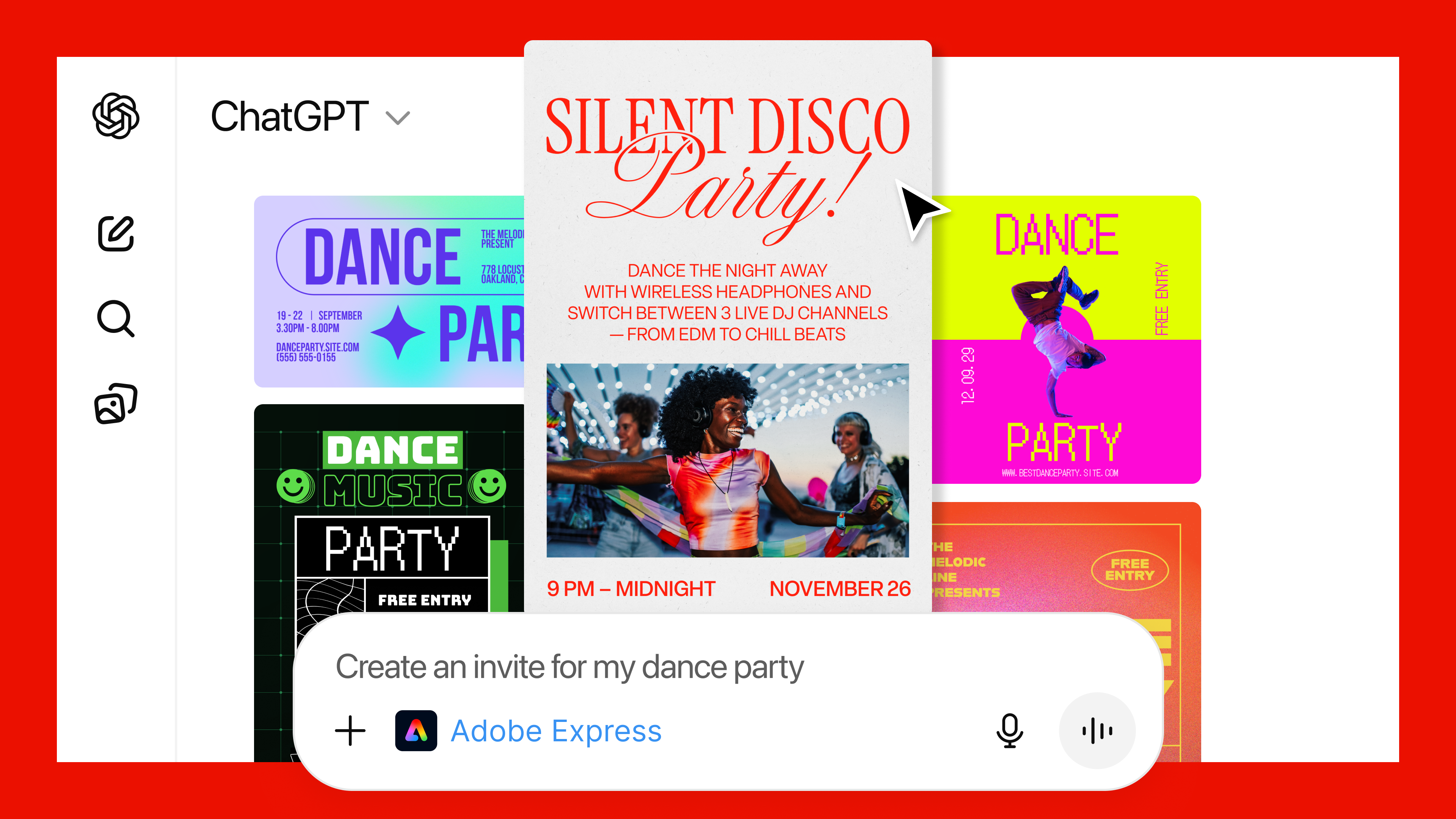
Adobe brings Photoshop, Acrobat and Adobe Express to ChatGPT

Back in October, OpenAI announced apps like Spotify and Canva would be accessible in ChatGPT. At the time, the company said more software was on the way, and now one of the most popular professional applications is available through the chatbot.    

Starting today, you can access Photoshop, Acrobat and Adobe Express inside of ChatGPT. All the apps are free to use through OpenAI’s website, though before you can begin generating PDFs and illustrations using Acrobat and Adobe Express, you'll need to sign into your Adobe account. To use any of the apps in ChatGPT, either name them in your prompt or select them from the plus menu.

Of the three apps, the way OpenAI's chatbot connects to Photoshop is probably the most interesting. Depending on the prompt, the interface will change to display the sliders most relevant to your request. For example, if you want to brighten an image, you'll see one slider allowing you to adjust the exposure, alongside other ones for the shadows and highlights. By comparison, if you want to add an effect to an image, ChatGPT might display options related to dithering and tri-tone, among others. 

What's interesting about all this is the way ChatGPT is interacting with Adobe's tools, through an MCP server, to offer a slice of the company's apps. I don't know about you, but I’ve always found Adobe software to be far too complicated, with often one too many ways to accomplish the same task. Granted, what I saw was a hands-off demo, but the routing Adobe created worked well. 

A ChatGPT user asks the chatbot to create a dance party invitation.
Adobe

"We build the Lego blocks, which are the MCP tools, and we create detailed instructions, and then ChatGPT figures out what it wants to do," Aubrey Cattell, vice-president of developer platform and partner ecosystem at Adobe, explains. "Sometimes it does what we want it, and sometimes it doesn't. That's the nature of it being non-deterministic, and we're continuing to hone as much as we can from users' intent and natural language to give them the result that they're looking for."

Of course, if you ever want more control, the web versions of Photoshop, Acrobat and Adobe Express are a click away.         

For OpenAI, this is easily the biggest coup to date of its push to reshape ChatGPT into an operating system for all the apps its more than 800 million users depend on daily. For Adobe, it feels like the company is partnering with an entity out to eat its lunch. After all, OpenAI offers its own image generation. However, Cattell said Adobe doesn't see it that way. 

"A couple weeks back, OpenAI dropped Apps SDK as a new paradigm for accessing ChatGPT, we saw there was a natural fit in the work we were doing with our applications," he said. "Essentially, they gave us an operating system we were able to leverage to bring our applications to their surface. There's a lot of natural affinity there between the workflows OpenAI is trying to enable and Adobe's best in class capabilities."  

Cattell promised Adobe would continue to explore what it could offer inside of ChatGPT, but added the company's apps will continue to be the place users can go if they want more power, precision and control.

This article originally appeared on Engadget at https://www.engadget.com/ai/adobe-brings-photoshop-acrobat-and-adobe-express-to-chatgpt-130000389.html?src=rss

©

❌