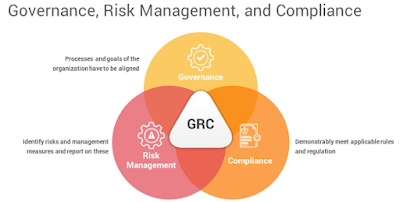
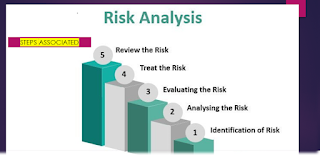
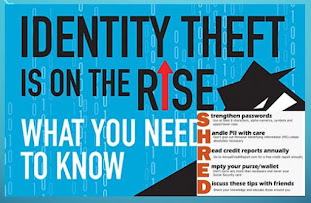
In today's complex business landscape, organisations face a myriad of risks that can impact their operations, reputation, and bottom line. Effective governance of risk and compliance is crucial to mitigate these risks and ensure that organizations operate ethically and within the bounds of the law. This article provides a comprehensive overview of the governance of risk and compliance in a thousand words, highlighting its importance, key principles, and best practices.
1. Understanding Risk and Compliance:
Risk refers to the possibility of an event occurring that could have an adverse effect on the achievement of an organization's objectives. These risks can be categorized into various types, including financial, operational, strategic, and reputational. Compliance, on the other hand, involves adhering to laws, regulations, industry standards, and internal policies and procedures.
2. The Importance of Governance:
Governance in the context of risk and compliance refers to the processes, structures, and leadership in place to oversee and manage these aspects of business operations. Effective governance is crucial for several reasons:
a. Legal and Ethical Obligations: Organizations have a legal and ethical responsibility to operate within the boundaries of the law and to conduct business ethically. Failure to do so can result in legal penalties, fines, and damage to reputation.
b. Protecting Stakeholder Interests: Governance ensures that an organization's actions align with the interests of its stakeholders, including shareholders, employees, customers, and the broader community.
c. Risk Mitigation: Governance processes help identify, assess, and mitigate risks, reducing the likelihood and impact of adverse events.
d. Enhancing Decision-Making: Effective governance provides a framework for informed decision-making, considering risks and compliance requirements in strategic planning.
3. Key Principles of Governance of Risk and Compliance:
To establish robust governance of risk and compliance, organizations should adhere to the following key principles:
a. Leadership and Culture: Top leadership must set the tone for risk awareness and compliance. A culture of integrity and accountability should be fostered throughout the organization.
b. Risk Assessment: Regularly assess and prioritize risks to the organization. This involves identifying potential threats, evaluating their impact, and determining the likelihood of occurrence.
c. Policies and Procedures: Develop and implement clear policies and procedures that address compliance requirements and risk management strategies.
d. Training and Awareness: Ensure that employees are educated about compliance requirements and risk management practices. Ongoing training programs are essential.
e. Monitoring and Reporting: Establish mechanisms to monitor compliance with policies and procedures. Implement reporting systems that allow for the timely identification and resolution of compliance issues.
f. Continuous Improvement: Regularly review and update governance processes to adapt to changing risks and compliance requirements. Continuous improvement is key to staying ahead of emerging threats.
4. Best Practices in Governance of Risk and Compliance:
To effectively implement the principles of governance, organizations can adopt best practices:
a. Board Oversight: The board of directors should provide oversight and guidance on risk and compliance matters. Establish risk and compliance committees to focus on these specific areas.
b. Risk Appetite: Define the organization's risk appetite – the level of risk it is willing to accept to achieve its objectives. This helps guide decision-making.
c. Risk Management Framework: Develop a comprehensive risk management framework that includes risk identification, assessment, mitigation, monitoring, and reporting.
d. Compliance Programs: Implement robust compliance programs that incorporate regulatory requirements, industry standards, and internal policies. Regularly audit and assess compliance.
e. Technology and Data Analytics: Leverage technology and data analytics tools to enhance risk assessment and compliance monitoring. These tools can provide real-time insights into potential issues.
f. Whistleblower Mechanism: Establish a confidential whistleblower mechanism that allows employees and stakeholders to report potential compliance violations without fear of retaliation.
g. External Partnerships: Collaborate with industry associations, regulatory bodies, and external experts to stay updated on evolving risks and compliance standards.
h. Crisis Management: Develop a crisis management plan to respond effectively to unexpected events, such as data breaches or regulatory investigations.
5. Case Studies:
Examining real-world examples of governance of risk and compliance can provide valuable insights. For instance, the Enron scandal in the early 2000s highlights the devastating consequences of poor governance, including financial fraud and bankruptcy. In contrast, companies like Johnson & Johnson are often praised for their proactive approach to product recalls, demonstrating a commitment to compliance and consumer safety.
6. Conclusion:
In conclusion, the governance of risk and compliance is an essential aspect of modern business operations. It ensures that organizations adhere to legal and ethical standards, manage risks effectively, and protect stakeholder interests. By following key principles and best practices, organizations can build a robust governance framework that enhances their resilience and sustainability in an ever-changing business environment. Ultimately, governance of risk and compliance is not just a regulatory requirement; it's a fundamental element of responsible and successful business management.
How Internet affected Education| Internet and Education
The internet has had a profound impact on education, with
the advent of the internet of education (IoE) further expanding this impact.
IoE refers to the integration of various technologies, such as the internet,
artificial intelligence, and machine learning, to improve education outcomes.
Here are some of the impacts of IoE on education:
1. Access to educational resources: IoE has made it easier for students to access educational resources from anywhere and at any time. With online courses, e-books, and virtual learning environments, students can learn at their own pace and convenience.
2. Personalized learning: IoE technologies can be used to personalize learning experiences for individual students. Adaptive learning algorithms can tailor the curriculum to meet the needs of each student, resulting in better learning outcomes.
3. Collaboration: IoE technologies can facilitate collaboration between students, teachers, and peers across the globe. Students can engage in collaborative projects, share knowledge and ideas, and learn from each other.
4. Cost-effective: IoE can make education more affordable, especially for students who live in remote or underserved areas. Online courses and digital resources can be accessed at a fraction of the cost of traditional education.
5. Data-driven insights: IoE technologies can generate valuable data insights that can be used to improve teaching and learning outcomes. By analyzing student data, teachers can identify areas where students are struggling and provide personalized support.
The internet has revolutionized education, and online
education is one of its most significant applications. Online education refers
to learning experiences that are delivered over the internet, using various
digital technologies. Here are some of the ways in which the internet is used for
online education:
1. Online courses: The internet is used to deliver courses
online, allowing students to learn at their own pace and from anywhere in the
world. Online courses can include text-based lessons, videos, interactive
quizzes, and assessments.
2. Virtual classrooms: The internet is used to create virtual
classrooms where students can interact with teachers and peers in real-time.
Virtual classrooms can include live lectures, discussions, and group projects.
3. E-books and digital resources: The internet is used to
provide students with access to e-books, digital resources, and other
educational materials. This makes it easier for students to access learning
materials, regardless of their location.
4. Online collaboration: The internet is used to facilitate
collaboration between students and teachers. Online collaboration tools such as
discussion forums, messaging apps, and video conferencing make it easy for
students to work together and learn from each other.
5. Gamification: The internet is used to gamify the learning
experience, making it more engaging and interactive. Gamification uses game
mechanics such as points, badges, and leader boards to motivate students and
encourage them to learn.
While the internet has had a significant impact on
education, it also has some drawbacks. Here are some of the drawbacks of using
the internet in education:
1. Lack of social interaction: One of the primary drawbacks of
online education is the lack of social interaction. Students who learn online
may miss out on the social aspect of traditional education, including
face-to-face interactions with teachers and peers.
2. Limited engagement: Online learning can be less engaging
than traditional learning. Students may be more likely to get distracted or
lose focus while learning online, resulting in lower levels of engagement and
retention.
3. Dependence on technology: Online education is dependent on
technology, and technical difficulties can disrupt the learning process. Poor
internet connectivity or software issues can cause frustration for both
students and teachers.
4. Quality concerns: The internet has made it easier for anyone
to create and distribute educational materials, but not all of this material is
of high quality. There is a risk that students may be exposed to inaccurate or
unreliable information, which could impact their learning outcomes.
5. Cheating and plagiarism: The internet has also made it
easier for students to cheat and plagiarize. With online resources readily
available, students may be tempted to cut corners or take shortcuts in their
work.
Conclusion-
1. The internet has revolutionized education by providing access to online courses, virtual classrooms, digital resources, online collaboration, and gamification. These tools have made education more accessible, engaging, and effective, opening up new opportunities for learners all over the world.
2. The internet of education has revolutionized education by making it more accessible, affordable, and personalized. It has opened up new opportunities for students to learn, collaborate, and grow, while also enabling educators to provide a more effective and efficient learning experience.
3. While the internet has many benefits for
education, it also has some drawbacks. These drawbacks include a lack of social
interaction, limited engagement, dependence on technology, quality concerns,
and increased opportunities for cheating and plagiarism. It is important to be
aware of these drawbacks and work to mitigate them to ensure that online
education remains effective and beneficial for students.
Cyber insurance is a type of policy that covers loss and damage caused by cyber-attacks
or related types of incidents such as infrastructure failure or service
outages. Most cyber insurance policies are for businesses, as they face much
greater risk and potential loss from a cyber-attack than private individuals.
Cyber
insurance is critical for any enterprise, especially those that deal with
exclusive or touchy information.
With the boom
of the internet inside the past 10 years, cyber dangers like social engineering
attacks, statistics breaches and cyber extortion (i.e., ransomware) have
additionally grown exponentially. Due to this, many coverage companies now
offer committed cyber insurance guidelines.
Whether or
not it’s cyber criminals gaining sensitive facts, a community security failure
or a statistics breach, probabilities are your business insurance don't cover
your losses. In case you’re concerned for a cyber incident, you’ll need to
start searching round for a cyber coverage quote.
Cyber
insurance covers things like liability attributable to data breaches, community
interruption and media legal responsibility. Cyber risk to business is much
higher than personal risk.
Cyber
insurance pricing varies wildly depending on what you need to include, the
dimensions of your deductibles and how large your business is. These elements
can change the rate from some hundred dollars per year to lots.
Given the relativity
of cyber coverage markets, there’s a terrific degree of variability in both
what’s blanketed and policy value. This makes it hard to generalize the entire
discipline, but we’ll talk what a cyber insurance coverage normally covers, as
well as what you might expect to pay for it.
Cyber
insurance coverage
Cyber
insurance generally provides protection against four distinct types of risk: privacy,
security, operational and service risk. These risks represent the
biggest cyber threats to business and are typically covered by four
different types of insurance policies within a cyber policy mentioned
below.
ØNetwork Security and Privacy
Responsibility
Network
Security and Privacy covers the most obvious risks and dangers posed by cyber-attacks.
On the security front, cyber policies will generally cover forensic efforts to
identify the attack path, legal expenses related to the attack, ransomware
payments, data recovery, consumer outreach and public relations costs.
Conversely,
privacy responsibility applies to you if your business maintains confidential
or private data that is governed by regulation or contract. For example, if
your business has a lot of customer personal records that were stolen in a cyber-attack,
privacy liability insurance will cover you if the people whose records were
stolen seek compensation.
ØNetwork business interruption
For many
businesses, a server outage can mean a catastrophic amount of lost revenue. For
this reason, cyber insurance will cover lost profit for the duration of a
network interruption that occurs as a result of a cyber-attack or system
failure.
ØMedia responsibility
If your
intellectual property is stolen as a result of your media presence, be it
advertising or something else, then cyber insurance can help with that. The
policy generally doesn't cover lost profit as a result, but it does cover
things like legal fees associated with enforcing your intellectual property.
ØErrors and omissions
In the event
of a cyber-attack or system failure, there is a good chance that your business
will be unable to continue providing its services, at least temporarily. If
this happens, cyber insurance will generally cover any liability you face from
customers.
What does
cyber insurance not cover?
Now that
we've covered what cyber insurance will generally cover, let's take a quick
look at what is typically not covered.
ØFuture lost profit
The first is
any future lost profits that arise as a result of a cyber security incident.
Whether it's the result of user exodus due to a significant data breach, data
loss, or anything else, cyber insurance generally won't cover lost revenue that
isn't a direct and immediate result of a cyber-attack or incident.
ØLosses from theft of intellectual
property
Next in line
are losses related to intellectual property theft. For example, if someone
steals your IP (Intellectual property) and uses it to create a product that
competes with yours, those lost profits won't be covered by your insurance.
ØProactive cyber security measures
Finally,
cyber insurance generally does not include coverage for any proactive
cybersecurity measures, such as upgrading infrastructure or software or
improving security procedures.
What does
cyber insurance cost?
The cost of
cyber insurance will vary greatly depending on the size of your company, the
insurance provider you go with, and what you want your policy to cover. Because
of this, it's hard to predict exactly how much an individual policy will cost,
but we can look at some averages.
Cyber
insurance for individuals generally costs $25 to $100 per month. However,
most private individuals do not need cyber insurance, as regular theft or home
owner insurance will often cover the aspects most useful to personal users.
Businesses,
on the other hand, can expect to pay $500 to $5,000 per year for cyber
insurance. As mentioned, there are many factors that determine where you end up
in this price range, and the biggest companies are likely to pay much more than
this.
Should You
Get Cyber Insurance?
Unless you're
handling some very sensitive data or have a specific reason to believe you're
at risk of an attack, you probably don't need cyber insurance as a private
individual.
If you're
concerned about the consequences of potential cyber-attacks or data breaches
affecting you, finding a home or theft insurance package that includes some
coverage for these types of events may be a better option.
However, for
many businesses, cyber insurance is an absolute necessity. Cyber security
statistics show that attacks and security breaches have been on the rise in
recent years, with cyber-attacks routinely targeting businesses large and
small.
This can take
the form of ransomware, where your systems and infrastructure are shut down
until you pay the hackers a fee, or a more traditional hack aimed at breaching
data security or stealing confidential information.
With a 600%
increase in cybercrime since the start of the COVID-19 pandemic, it is clear
that this has become such a common problem that it should be considered
alongside other "analog" threats such as burglaries, fires and the
like.
That's it for
our guide to the cyber insurance space.
We hope we
have given you a better understanding of what cyber incidents are covered by
cyber risk insurance as opposed to traditional insurance policies.
Most, if not
all, modern businesses should consider finding cyber insurance providers and
getting a cyber liability insurance quote. The cyber insurance market is still
relatively young and not every insurance company offers cyber insurance.
What do you
think of our guide to cyber insurance?
Do you feel
like you understand how cyber policies work and what cyber threats are
generally covered? Do you have cyber insurance? If so, has it helped protect
your business from various cyber exposures? Let us know in the comments section.
Seven Tips For Generating Website Traffic With A Limited Marketing Budget|
Get Organic traffic from Facebook| Adsense traffic from Facebook
Assume the scenario- You’re a marketing manager on digital platform and you’ve
been tasked with the responsibility of attracting consumers to your specific
brand, but you have very limited budget. You're questioning yourself, "How
am I supposed to roll in the big bucks with a small marketing budget?"
. Digital marketing doesn't have to be expensive. Truth be told, if you do
enough strategic planning from the very beginning and aim at realistic,
targeted outcomes, you can achieve success with a limited budget. Explosive marketing
budget to get anywhere online is a myth.
From my perspective, digital marketing shouldn't be expensive. You have to
plan the channels and resources you'll allocate to your marketing efforts
overall. It’s not a prime factor if it's SEO, pay-per-click advertising or
social media marketing, no matter what platform you're looking at tackling, you
can execute it with careful strategy and refinement.
You can opt for work with an agency to help you, or you can do this on your
own. Do keep in mind, however, that if you're not a marketing expert or are
trying to learn the ropes from the very beginning, your budget can quickly be
eaten up. Ensure you're weighing all of the options you have on-hand and
eliminating those that could potentially use your marketing budgets unnecessarily.
The good news is that even a beginner can take a few simple steps toward harvesting
traffic without spending too much money. If plunging into a dedicated,
expert-driven campaign isn't right up your alley yet, this is the best place to
start.
Here are a few ways you can begin generating website traffic:
1. Use search engines to your advantage.
You might need a bit of SEO insight here to help you, but in a nutshell,
you want to get as much traffic as possible from this organic platform. That
means optimizing your content and website for keywords and phrases you know
your target audience would be searching for. There are a few free tools
available that you can quickly find online.
2. Check for broken links.
You'll lose prospects and customers to links on your website that are
broken. Review your website and check whether you have any URLs that need
fixing. This is a quick way to get traffic back that you were otherwise letting
escape.
3. Assess who's talking about you.
Has anyone been writing or talking about your brand but not linking to
your page? Consider reaching out to them and politely asking them to do so.
This can help you gain more opportunistic traffic.
4. Update your old content.
This is a big one. If you've put effort into blogging in the past, have a
gander through Google Analytics and see what content is performing the best.
Update these posts with new stats, facts, quotes and images that will reap new
attention. Let your audience know it has been updated as a call to action at
the bottom of the article, and even with an "[UPDATED for 2020]" tag
in the headline.
5. Use manual outreach as your sidekick.
Going back to authentic relationships and connections to
build links and awareness for brands is an another alternative . That means scouring the web for those in
your industry who are like-minded and already writing about brands, services
and goods like yours. You can offer them an incentive to write about your
business and help turn their following into yours. Think of this as digital
public relations.
6. Refresh your ranking content.
Use your choice of SEO tool to see what content of yours is ranking on page
two of Google. This is the kind of content you want to refresh, optimize and
get up to page one. It's low-hanging fruit that will pay dividends in return.
Sometimes, generating website traffic with a limited marketing budget is a
lot to handle. There are many aspects to juggle, and you still have to ensure
you're keeping on track with branding and maintaining the compliance norms as well. But by setting honest
expectations and taking the steps mentioned above, you'll be on your way to
getting your brand out there with limited costs.
7. Facebook
Facebook is another brilliant platform for reaching your business
goals, and it doesn’t matter if you’re a B2B or B2C business. Facebook offers
tons of tools and capabilities which you can harness for you to connect with
your audiences regardless of the place and time.
Generating traffic from Facebook to your website is a popular strategy for increasing AdSense revenue. Here are some tips for optimizing your AdSense traffic from Facebook:
Create engaging content: Creating engaging and shareable content on your website can increase the likelihood that visitors from Facebook will share your content, thus driving more traffic to your site.
Utilize Facebook Ads: Facebook Ads can be a useful tool for driving traffic to your website. You can create targeted ads that reach your desired audience based on demographics, interests, and behaviors.
Optimize your website for mobile: Many people access Facebook on their mobile devices, so it's important to make sure your website is optimized for mobile devices. This can help improve the user experience and increase the likelihood of visitors staying on your site longer.
Use Facebook Groups: Joining and participating in relevant Facebook groups can help you connect with potential visitors who might be interested in your website's content. Just make sure to follow the group's rules and guidelines.
Track your traffic: Use Google Analytics or other tracking tools to monitor your traffic from Facebook. This can help you identify which types of content or posts are generating the most traffic, allowing you to adjust your strategy accordingly.
Hello Friends. Today we will take lesson on the importance
of protecting the social media account from being compromised. A strong social
media policy can protect your brand and avoid embarrassing posts. Social media
accounts are the latest phishing target.
Social
media has made its own place in the world of people. There are some people,
whose day is not complete without using it, but always be aware of the fraud
and cyber-crime that occur while using social media. So far, people have had to
pay the price for not doing so.
It's a good time to update existing policies to cover the
increase in remote work and set clear expectations for employees about using
social media during work hours.
One
fine day you may get email that someone is trying to log into your Instagram
account. But the thing is, you don’t have any Instagram account.
This is a very common phishing scam. A phishing scam is when
someone tries to impersonate a company or service that you might actually do
business with in an effort to steal your account information.
The scammers
assume you have a Instagram account and are hoping you will click on the link
and provide your login credentials so they can use this information to access
any account you might have.
These tend to
be more common with scammers claiming to be from your bank or other financial
institutions, but lately they have been targeting social media accounts. Their assumption is that if you use the same
login information at one site, you probably use it for another.
Once they get
a user name and password combination, these scammers will meticulously go
through every possible online service and try to access the accounts with the
information they have from this one phishing attack.
That is why it is always a good practice to use a unique password
for each one of your online accounts. And yes, that can be a real hassle.
I have been
using Google Chrome and logging in with a Google account. This allows me to
create and save complex and unique passwords for all of my online accounts.
If you’re not a fan of Google, look at a dedicated password
manager like LastPass or 1password for managing this.
Social media
platforms like #Facebook, #Twitter and #Instagram started out as a way to connect
with friends, family and people of interest. But anyone on social media these
days knows it’s increasingly a divisive landscape.
Undoubtedly
you’ve heard reports that hackers and even foreign governments are using social
media to manipulate and attack you. You may wonder how that is possible. As an information
security enthusiast I can explain – and offer some ideas for what you can do
about it.
Bots and sock puppets
Social media platforms don’t simply feed you
the posts from the accounts you follow. They use algorithms to curate what you
see based in part on “likes” or “votes.” A post is shown to some users, and the
more those people react – positively or negatively – the more it will be
highlighted to others. Sadly, lies and extreme content often garner more
reactions and so spread quickly and widely.
But who is doing this “voting”? Often it’s an
army of accounts, called bots, which do not correspond to real people. In fact,
they’re controlled by hackers, often on the other side of the world. For
example, researchers have reported that more than half of the Twitter accounts
discussing COVID-19 are bots.
As a social media researcher, I’ve seen
thousands of accounts with the same profile picture “like” posts in unison.
I’ve seen accounts post hundreds of times per day, far more than a human being
could. I’ve seen an account claiming to be an “All-American patriotic army
wife” from Florida post obsessively about immigrants in English, but whose
account history showed it used to post in Ukranian.
Fake accounts like this are called “sock
puppets” – suggesting a hidden hand speaking through another identity. In many
cases, this deception can easily be revealed with a look at the account
history. But in some cases, there is a big investment in making sock puppet
accounts seem real.
Sowing chaos
Trolls often don’t care about the issues as
much as they care about creating division and distrust. For example,
researchers in 2018 concluded that some of the most influential accounts on
both sides of divisive issues, like Black Lives Matter and Blue Lives Matter,
were controlled by troll farms.
More than just fanning disagreement, trolls
want to encourage a belief that truth no longer exists. Divide and conquer.
Distrust anyone who might serve as a leader or trusted voice. Cut off the head.
Demoralize. Confuse. Each of these is a devastating attack strategy.
Taking control
So what can you do about it? You probably
already know to check the sources and dates of what you read and forward, but
common-sense media literacy advice is not enough.
First, use social media more deliberately.
Choose to catch up with someone in particular, rather than consuming only the
default feed. You might be amazed to see what you’ve been missing. Help your
friends and family find your posts by using features like pinning key messages
to the top of your feed.
Second, pressure social media platforms to
remove accounts with clear signs of automation. Ask for more controls to manage
what you see and which posts are amplified. Ask for more transparency in how
posts are promoted and who is placing ads. For example, complain directly about
the Facebook news feed here or tell legislators about your concerns.
Third, be aware of the trolls’ favorite issues
and be skeptical of them. They may be most interested in creating chaos, but
they also show clear preferences on some issues. For example, trolls want to
reopen economies quickly without real management to flatten the COVID-19 curve.
They also clearly supported one of the 2016 U.S. presidential candidates over
the other. It’s worth asking yourself how these positions might be good for
Russian trolls, but bad for you and your family.
Because of the multi-purpose aspect of social media
platforms, they become valuable tools that the average person spends
approximately 100 minutes on every day, according to a recent
study. Because they are such omnipresent platforms, and being linked to an
increasing number of applications on smartphones and other devices, it becomes
even more necessary to secure them.
Users
can save themselves from all these things by taking care of few things.
Create
strong password
It
is very important to protect yourself while using any social media platform.
For this, first create a strong and different password. This is such a thing,
without which you cannot open your account. For this reason, create a password
that is difficult for the hacker to think and cannot easily break it. This will
keep your social media account safe and no personal information will be able to
go out. Also for the sake of protection please activate multi-factor authenticationpassword
while logging into the social media account.
Take
care of privacy
Have
you ever noticed that whoever is watching what you are sharing on social media?
If
you do not want everyone to see the photos, files and other things you have
shared, then take care of the privacy settings. While creating an account,
first make the settings related to privacy so that your things do not fall into
the wrong hands.
Report
offensive post
Many
times we see many such posts on social media which do not look right, but in
spite of this we ignore them. This is our biggest mistake.You should report such
posts immediately. It will be beneficial for you as well as the rest of the
people. By doing this you can secure multiple people at once.In
addition, you can also report fake IDs.
Do
not use third party app
Many
applications, software, and websites etc. give you the option to login with a
social media account. You must have thought many times to press the button of
Login with Facebook, but it can become a big problem for you. To avoid this,
tap on the app and website in the settings and see all the apps and websites
associated with the ID, immediately remove what you don't feel safe.
Conclusion
This article is
drafted to explore the privacy and security issues that affect social media
accounts. The topics covered herein reveals that users of social media post
personal information, which can be used by malicious criminals and businesses
to compromise the privacy and security of individuals in the real world. It has
been noted that people post personal information because they have a false
sense of security while using social media.
Irrespective
of the fact that there are laws and
policies that seek to protect users’ information from such vices, individuals
should exercise caution and filter information that they publish on social
media, because it becomes public as soon as it is posted. So prior to posting
any personal information in social media account please judge the personal
contents you are willing to publish.
Protect Social Media Account | Protect Your Facebook Account| Protect Your Instagram Account
Millions of people are still working from home due to
the COVID-19 crisis, which makes VPN access more essential than
ever. But in the ever-growing market for commercial virtual private networks,
finding the best VPN to suit your particular needs can be difficult. To
help you make the right choice, we've sifted through the multitude of overhyped
VPN providers touting their own private network to find the best VPN service
for you. .
Since we're living in a connected world, security and privacy are
critical to ensure our personal safety from nefarious hacks. From online
banking to communicating with coworkers on a daily basis, we're now frequently
transferring data on our computers and smartphones. It's extremely important to
find ways of securing our digital life and for this reason, VPNs have become
increasingly common.
What is a VPN?
A virtual private network is a technology that allows you to
create a secure connection over a less-secure network between your computer and
the internet. It protects your privacy by allowing you to anonymously appear to
be anywhere you choose.
A VPN works by routing your device's internet connection
through your chosen VPN's private server rather than your internet
service provider (ISP) so that when your data is transmitted to the internet,
it comes from the VPN rather than your computer.
How a Virtual Private Network
can help protect your privacy online
A VPN is beneficial because it
guarantees an appropriate level of security and privacy to the connected
systems. This is extremely useful when the existing network infrastructure
alone cannot support it.
When your computer is connected
to a VPN, the computer acts as if it's also on the same network as the VPN. All
of your online traffic is transferred over a secure connection to the VPN. The
computer will then behave as if it's on that network, allowing you to securely
gain access to local network resources. Regardless of your location, you'll be
given permission to use the internet as if you were present at the VPN's
location. This can be extremely beneficial for individuals using a public Wi-Fi
network or public Wi-Fi hotspots.
Therefore, when you browse the
internet while on a VPN, your computer will contact the website through an
encrypted connection. The VPN will then forward the request for you and forward
the response from the website back through a secure connection.
VPNs are really easy to use,
and they're considered to be highly effective tools. They can be used to do a
wide range of things. The most popular types of VPNs are remote-access VPNs and
site-to-site VPNs.
Understanding
the importance of a virtual private network
We may have heard of a VPN, but
we have little or no knowledge about the same. Known as Virtual Private
Network, it is a group of computers connected over a public network. The
internet is an example of such a network. But what does a VPN do? Read on to
find out.
There are numerous benefits
linked with the use of a VPN, and more of this is discussed in this article.
The VPN is meant to help you protect your internet privacy and also get around
your internet censorship.
Unknown to some computer users
connecting to a VPN, the data on your personal computer is encrypted to the
Virtual Private Network provider. The best thing is that entities that
try to censor some sites are not able to determine the site you are connected
to. The filtering entities that may be used to restrict access to specific
sites cannot determine whether your computer is accessing such sites or
not. For example, access to a specific site may be restricted in your country,
but you will comfortably use it when you access it when you connect to a VPN
because your connection is encrypted.
At the same time, you are sure
of internet privacy when your data is encrypted between your PC and the virtual
private network provider. No entity can access your internet connections to see
the specific websites you are accessing. Using a VPN keeps your data
protected.
Most internet users keep the
notion that connecting to a public network is not safe. The best thing to know
is that you will enjoy the benefits of connecting to a virtual private network,
even when connected to a public WIFI network.
If you are browsing from a
local café or a public park, some hackers can easily access your data if you
are not connected to a VPN. Luckily, you remain protected as long as you are
connected to a virtual private network which encrypts your data.
Therefore, you should always
ensure to connect to a virtual private network to use a private connection.
Another great thing about
virtual private networks is that they don’t require any sophisticated
equipment.
Most VPN providers use software
that is included in the windows operating system to allow subscribers to access
the network. The provider should give you this information before subscribing
for their service.
Virtual private network
services are highly affordable. They can cost as little as $5 or higher
depending on the quality and the extra features. Take time to find the
best VPN provider who will give you value for your money.
Whether you are accessing the
internet anonymously for business or personal reasons, you need to invest in
the best virtual private network. There are thousands of companies
offering VPN services out there. Free programs are not worth it since they
don’t use the best technologies. The best VPN providers will offer
unlimited customer support and give affordable rates.
Who needs a VPN?
People who access the internet from a computer, tablet or
smartphone will benefit from using a VPN. A VPN service will always boost your security
by encrypting and anonymizing all of your online activity. Communications that
happen between the VPN server and your device are encrypted, so a hacker or
website spying on you wouldn't know which web pages you access. They also won't
be able to see private information like passwords, usernames and bank or
shopping details and so on. Anyone who wants to protect their privacy and
security online should use a VPN.
How to choose a VPN service?
There's a vast range of VPN services on the internet. Some are
free VPN services, but the best ones require a monthly subscription. Before you
decide to download a VPN, make sure you consider these factors for
understanding a VPN.
Cost: VPNs aren't too pricey, but they vary from vendor to
vendor. If your main concern is price, then go with something inexpensive, or a
free VPN service -- like Spotflux Premium VPN or AnchorFree HotSpot Shield
Elite. Free servers are often slower, and since most are ad-supported, they
place adverts on the online pages you access. Others can even limit the speed
of your connection, as well as your online time or amount of data transferred.
It's also important to note that leading VPN providers offer
stronger security features to ensure you're digitally safe. When selecting a
paid VPN service, always be sure to check which countries it operates servers
in.
What VPNs are used for-?
At its core, a VPN makes you appear to be somewhere you're not. It
does this by connecting you to the internet via a server in a different part of
the country or a different part of the world.
There are a lot of ways people
use VPNs. VPNs let you:
Protect your identity while
downloading software, especially while using a service like BitTorrent. Whether
your downloads are legal or not, many ISPs don't like their customers to use
torrents. Using a VPN avoids being chastised by your ISP.
Hide your online activities.
Activists around the world need to worry about having their online activities
monitored or outright censored, and sometimes these activities can even put
them at risk of physical harm. A VPN is an effective tool for keeping your
online activities from being tracked.
Avoid geographic restrictions
on online content. Some websites and streaming media services are geo-blocked,
which means you need to live in a particular country to have access to them. A
VPN can help you bypass these blocks by connecting you to a server in any
location you want.
Securely access your home
computer while traveling. A VPN creates a secure and anonymous connection you
can use to remotely connect to your home PC when you're away from home.
There are two basic VPN types which are explained below.
1. Remote
Access VPN
Remote access VPN allows a user to connect to a private network
and access its services and resources remotely. The connection between the user
and the private network happens through the Internet and the connection is
secure and private.
Remote Access VPN is useful for business users as well as home
users.
A corporate employee, while traveling, uses a VPN to connect to
his/her company’s private network and remotely access files and resources on
the private network.
Home users, or private users of VPN, primarily use VPN services to
bypass regional restrictions on the Internet and access blocked websites. Users
conscious of Internet security also use VPN services to enhance their Internet
security and privacy.
2. Site – to
– Site VPN
A Site-to-Site VPN is also called as Router-to-Router VPN and is
mostly used in the corporates. Companies, with offices in different
geographical locations, use Site-to-site VPN to connect the network of one
office location to the network at another office location. When multiple
offices of the same company are connected using Site-to-Site VPN type, it is
called as Intranet based VPN. When companies use Site-to-site VPN type to
connect to the office of another company, it is called as Extranet based VPN.
Basically, Site-to-site VPN create a virtual bridge between the networks at
geographically distant offices and connect them through the Internet and
maintain a secure and private communication between the networks.
Since Site-to-site VPN is based on Router-to-Router communication,
in this VPN type one router acts as a VPN Client and another router as a VPN
Server. The communication between the two routers starts only after an
authentication is validated between the two.
VPNs Don’t Make
You Totally Secure
While as IT professional and an ITIL practitioner,
we always recommend using a VPN while connecting to the outer world over the
internet, it’s important to keep in mind that VPNs don’t make you totally secure.
Hackers having quality knowledge as well as the government and law enforcement
agencies — can still trace your identity and.
Still, VPNs are considered as one of the vital layers
of defense — either to lock out average hackers or convince expert hackers to
ignore you. It’s like analogous to home alarm. Experienced burglars can disable
pretty much anything. But if you have a good system, burglars are much more
likely to skip your house and find an easier target.
Hackers are much the same. These persons are usually
highly motivated by money and will focus on victims that present the easiest
opportunity. If you have a strong VPN, there’s a good chance they’ll skip you
and target someone else without a VPN (and the number of people who use the
public internet or open public wi-fi for internet access without a VPN is
shocking!).
Use Multi-Factor
Authentication (MFA) to Secure VPN
MFA extends primary authentication (such as passwords) with an additional layer of authentication (such
as using security tokens) to verify a user's identity. It usually includes at least two of the following categories: knowledge
(something they know), possession (something they have), and inherence
(something they are).
The goal of MFA
is to provide a higher level of identity assurance to users attempting to access resources via VPN. MFA prevents an attacker from accessing your account, even if they obtain your username and password. For
example, if you created a layered mechanism, an unauthorized user would have
to bypass all layers to gain access. However, not all MFA solutions and approaches are created equal. Traditional on-premises MFA solutions are often
cumbersome to deploy, solve limited use cases, and provide poor user experience. The net result is
limited end-user adoption in addition to sunk IT and security costs. Adaptive MFA (AMFA) integrates with your organization's applications and resources and adds an additional layer of identity assurance, making
it ideal for today's rapidly changing security landscape.
The process of identifying and evaluating risks for assets that could be affected by cyberattacks is known as cybersecurity risk assessment. In essence, you identify threats from both within and without; examine how they might affect things like the integrity, confidentiality, and availability of data; and figure out how much it would cost to suffer a cybersecurity incident. Using this data, you can fine-tune your cybersecurity and data protection measures to your company's actual risk tolerance.
You must respond to three crucial
questions in order to begin an IT security risk assessment:
1.What are
the data that, in the event of loss or exposure, would have a significant
impact on your company's operations? These are your organization's critical
information technology assets.
2.What
essential business procedures call for or make use of this data?
3.What
threats might make it harder for those business functions to function?
You are able to begin design
strategies once you are aware of what you need to safeguard. But before you
spend a penny or an hour of your time implementing a risk-reduction strategy,
think about the type of risk you're dealing with, how important it is to you,
and whether your approach is the most cost-effective.
The significance of conducting
comprehensive IT security assessments on a regular basis developing a solid
foundation for business success is aided by conducting comprehensive IT
security assessments on a regular basis.
In particular, it gives them the ability
to:
Assess potential security partners, Evaluate
potential security partners, Establish, maintain, and demonstrate compliance
with regulations Accurately forecast future needs.
Explanation of cyber risk (IT risk)
definition
According to the Institute of Risk
Management, a cyber risk is “any risk of financial loss, disruption, or
damage to the reputation of an organization from some sort of failure of its
information technology systems.”
Prevent data breaches, choose
appropriate protocols and controls to mitigate risks.
Cybersecurity risks include:
When taking stock of cyber risks, it
is essential to detail the specific financial damage they could cause to the
organization, such as legal fees, operational downtime and related profit loss,
and lost business due to customer distrust. Hardware damage and subsequent data
loss Malware and viruses Compromised credentials Company website failure.
The four essential components of an IT
risk assessment
In a moment, we'll talk about how to
evaluate each one, but first, a brief definition for each:
Threat: Anything
that has the potential to harm an organization's people or assets is a threat.
Natural disasters, website failures, and corporate espionage are examples.
A vulnerability is any potential flaw
that would permit a threat to cause harm. A vulnerability that can make it
possible for a malware attack to succeed, for instance, is out-of-date antivirus
software. A vulnerability that increases the likelihood of equipment damage and
downtime in the event of a hurricane or flood is a server room in the basement.
Disgruntled employees and outdated hardware are two additional examples of
vulnerabilities. A list of specific, code-based vulnerabilities is kept up to
date in the NIST National Vulnerability Database.
The total damage an organization would
suffer if a vulnerability were exploited by a threat is referred to as the
impact. A successful ransomware attack, for instance, could result in not only
lost productivity and costs associated with data recovery but also the
disclosure of customer data or trade secrets, which could result in lost
business as well as legal costs and penalties for compliance.
Probability — This is
the likelihood that a danger will happen. Usually, it's a range rather than a
single number.
Risk = Threat x Vulnerability x
Asset. The following equation can be used to understand risk: Despite
the fact that risk is represented here as a mathematical formula, it is not
about numbers; It is a well-thought-out plan. Take, for instance, the scenario
in which you want to determine the level of danger posed by the possibility of
a system being hacked. Your risk is high if the asset is crucial and your
network is extremely vulnerable (perhaps due to the absence of an antivirus
solution and firewall). However, even though the asset is still critical, your
risk will be medium if you have strong perimeter defences and a low
vulnerability.
There is more to this than just a
mathematical formula; It is a model for comprehending the connections among the
factors that contribute to determining risk:
Threat is an abbreviation for
"threat frequency," which is the anticipated frequency of an adverse
event. One in one million people will, for instance, be struck by lightning in
any given year.
The term "the likelihood that a weakness
or exposure will be exploited and a threat will succeed against an
organization's defences" is abbreviated as "vulnerability."
What is the organization's security
environment like? If a breach does occur, how quickly can it be mitigated to
avoid disaster? How likely is it that any given employee will pose an internal
threat to security control, and how many of them are there?
A security incident's total financial
impact is measured by its cost. Hard costs like hardware damage and soft costs
like lost business and consumer confidence are included. Other expenses
include:
Data loss: The
theft of trade secrets could result in your competitors taking your business.
Loss of trust and customer attrition could result from the theft of customer
information.
System or application downtime:
Customers may be unable to place orders, employees may be unable to perform
their duties or communicate, and so on if a system fails to perform its primary
function.
Legal repercussions: If someone steals
data from one of your databases, even if the data isn't particularly valuable,
you could be hit with fines and other legal fees because you didn't follow
HIPAA, PCI DSS, or other data security regulations.
How to conduct a security risk
assessment Now, let's go over how to conduct an IT risk assessment.
1.Identify
and prioritize assets- Servers, client contact information,
confidential documents from partners, trade secrets, and so on are all examples
of assets. Keep in mind that what you consider valuable as a technician
may not actually be the most valuable for the company. As a result, you
must collaborate with management and business users to compile a list of all
valuable assets. Collect, if necessary, the following data for each asset:
·Software
·Hardware
·Data
·Interfaces
·Users
·Support Personnel
·Mission or Purpose
·Criticality
·Functional requirements
·IT security policies
·IT security architecture
·Network topology
·Information storage protection
·Information flow
·Technical security controls
·Physical security environment
·Environmental security
Since most businesses only have a
small budget for risk assessment, you will probably only need to cover
mission-critical assets for the remaining steps. As a result, you must
establish a standard for assessing each asset's significance. The asset's
monetary value, legal status, and significance to the organization are common
criteria. Use the standard to classify each asset as critical, major, or minor
after it has been approved by management and formally incorporated into the
risk assessment security policy.
2.Identify
Threats- Anything that has the potential to harm your business is a
threat. While malware and hackers are probably the first to come to mind, there
are many other kinds of threats as well.
Natural catastrophes. Fire,
earthquakes, floods, hurricanes, and other natural disasters have the potential
to destroy not only data but also servers and appliances. Consider the
likelihood of various natural disasters when choosing a location for your
servers. For instance, there might be a low chance of tornadoes but a high risk
of flooding in your area.
Absence of hardware. The quality and
age of the server or other machine determine the likelihood of hardware
failure. The likelihood of failure is low for equipment of high quality that is
relatively new. However, the likelihood of failure is significantly increased
if the equipment is old or comes from a "no-name" vendor. No matter
what industry you operate in, you should put this threat on your watch list. It
is possible for people to accidentally delete important files, click on a
malicious link in an email, or spill coffee on critical systems-hosting
equipment.
There are three types of wrongdoing:
When someone damages your business by
physically stealing a computer or server, engineering a distributed denial of
service (DDOS) attack against your website, or deleting data, they are
committing interference.
Your data is stolen through
interception.
Impersonation is the misuse of another
person's credentials, which are typically obtained through social engineering,
brute force, or the dark web.
3.Identify
Vulnerabilities- A weakness that could allow a threat to harm your business is
a vulnerability. Analysis, audit reports, the NIST vulnerability database,
vendor data, information security test and evaluation (ST&E) procedures,
penetration testing, and automated vulnerability scanning tools are all methods
by which vulnerabilities can be identified.
Don't confine your thinking to
software flaws; Additionally, there are human and physical vulnerabilities.
Having your server room in the basement, for instance, increases your
vulnerability to flooding, and not informing employees about the dangers of
clicking on links in emails increases your vulnerability to malware.
4.Controls- To reduce
or eliminate the likelihood that a threat will exploit a vulnerability, analyse
the controls that are either in place or in the planning stage. Encryption,
methods for detecting intrusions, and solutions for identification and
authentication are all examples of technical controls. Security policies,
administrative actions, and physical and environmental mechanisms are examples
of nontechnical controls.
Nontechnical and technical controls
can be further divided into preventive and detective categories. Preventive
controls, as the name suggests, attempt to anticipate and avert attacks;
Devices for authentication and encryption are two examples. Detective controls
are used to find threats that have already happened or are about to happen;
They include intrusion detection systems and audit trails.
5.Determine the Likelihood of an Incident- Consider
the type of vulnerability, the capability and motivation of the threat source,
and the effectiveness of your controls to determine the likelihood that a
vulnerability will actually be exploited. When determining the likelihood of an
attack or other adverse event, many organizations use the categories high,
medium, and low rather than a numerical score.
The asset's mission and any processes
that are dependent on it; the asset's value to the organization; and the
asset's sensitivity. A business impact analysis (BIA) or mission impact
analysis report can provide this information. The impact of harm to the
organization's information assets, such as loss of confidentiality, integrity,
and availability, is quantified or qualitatively assessed in this document. The
impact on the system can be graded as high, medium, or low qualitatively.
6.Determine the Level of Risk to the IT
System for Each Threat/Vulnerability Pair Prioritize the Information Security
Risks
The risk-level matrix is a useful tool
for estimating risk in this manner. The likelihood that the threat will exploit
the vulnerability. The approximate cost of each of these occurrences. The
suitability of the planned or existing information system security controls for
eliminating or reducing the risk. A probability of 1.0 indicates that the
threat will be met; A value of 0.5 is assigned to a medium likelihood; and a
0.1 rating for a low likelihood of occurrence. In a similar vein, the values
for a high impact level are 100, a medium impact level is 50, and a low impact
level is 10. Risks are categorized as high, medium, or low based on the result
of multiplying the threat likelihood value by the impact value.
7.Recommend Controls - Determine the
necessary steps to reduce the risk using the risk level as a foundation. For
each level of risk, the following are some general guidelines:
High: As soon as possible, a plan for
corrective action should be created.
Medium:Within a reasonable amount of
time, a plan for corrective measures should be developed.
Low: The group must decide whether to
take the risk or do something about it.
Be sure to take into account the
following when evaluating controls to reduce each risk:
Policies of the organizationCost-benefit analysis Operational impact Feasibility Regulatory requirements in
effect.
The recommended controls' overall effectiveness, Safety and reliability of the Document ,the Results ,The development of a risk assessment report is the final
step in the risk assessment process.
This report will help management make good
decisions about the budget, policies, procedures, and other things. The report
ought to provide a description of the vulnerabilities that correspond to each
threat, the assets that are in danger, the impact on your IT infrastructure,
the likelihood of occurrence, and the control recommendations.
Report on the IT risk assessment- The
risk assessment report can point to important steps that can be taken to reduce
multiple risks. For instance, taking regular backups and storing them off-site
will reduce the likelihood of flooding and accidental file deletion. The
associated costs and business justifications for making the investment should
be explained in detail at each step.
Always keep in mind that the core of
cybersecurity are the enterprise risk management and information security risk
assessment processes. The information security management strategy as a whole
is built on these processes, which answer questions about which threats and vulnerabilities
can cost the company money and how to reduce them.
Data from a recently released Security Navigator report shows that companies still need 215 days to fix a reported vulnerability. Even critical vulnerabilities usually take more than 6 months to fix.
Good
vulnerability management does not mean that
all potential data breaches are fixed quickly
enough. The goal is to focus on real risk, prioritizing
vulnerabilities to fix
the most critical bugs
and reduce the company's attack surface as much as possible.
Business data and threat intelligence must be interconnected
and automated. This is necessary so
internal teams can focus on resolution. Appropriate techniques may
take the form of a global vulnerability intelligence platform. Such a
platform can help prioritize vulnerabilities using risk scores and allow
companies to focus on
their true
organizational risk.
Get started
Three facts to consider before building an
effective vulnerability management program:
1. The number of discovered vulnerabilities
increases every year. On average, 50
new security holes
are discovered every day, so
we can easily understand that it is
impossible to fix all of them.
2. Only a few vulnerabilities are actively exploited and pose a very high risk to all organizations. About 6 percent of all vulnerabilities are
exploited in the wild. We need to reduce the burden and focus on the real risks.
3. The same vulnerability can
have completely different effects on
the business operations and
infrastructure of two separate
companies, so both business exposure and vulnerability
severity mustbe considered.
Based on these facts, we
understand that there is no point in patching all
the security holes. Instead, we should focus on those that pose a real threat based on the threat landscape and organizational
context.
Risk-Based
Vulnerability Management Concept
The
goal is to focus on the most critical and
higher-risk assets that are targeted by threat actors. To approach a risk-based vulnerability program, we need to look at two environments.
Internal environment: The customer landscape represents the internal environment. As
corporate networks grow and diversify, so does their attack surface. The attack surface represents
all the components of the information system that
hackers can reach. A clear and up-to-date overview of your information system and attack surface is the first step. It is also important to consider the business environment.
Companies can actually be a bigger target depending on the industry because of the proprietary
information and documents they hold (intellectual property, classified protection,
etc.). A final important factor to consider is the unique context of the business
itself. The goal is to categorize assets according to their criticality and highlight the most
important. For example: assets that are unavailable would cause significant disruption to business continuity, or highly confidential assets that become available if the organization is involved in multiple lawsuits.
External Environment: The threatening landscape represents the external environment.
This information is not available from the intranet. Organizations must have the human and financial resources to find and manage
this information. Alternatively, this activity can be outsourced to specialists who monitor the threat landscape on behalf of the organization. Knowing about actively exploited security holes is important because they pose a greater threat to the enterprise. These actively exploited security holes can be tracked thanks to threat intelligence features and
vulnerabilities. Even better is to connect and correlate threat intelligence sources for the most effective
results.Understanding what attackers are doing is also valuable because it helps prevent potential threats. For example: intelligence about a new zero-day or a new ransomware attack can be reacted
in time to prevent a security incident. Combining and
understanding both environments help organizations define their true
risks and more effectively determine where preventive and remedial actions should be implemented. It is not necessary to install hundreds of patches, but ten of them, selected to significantly reduce the organization's attack surface.
Five
Key Steps to Implementing a Risk-Based Vulnerability Management ProgramDetection:1. Identify all your assets to find
the attack surface: Exploratory
scanning can help provide initial insight. Then regularly scan your internal and external environment and share the results with a vulnerability
intelligence platform.
2.
Contextualization:Determine the criticality of your business context and assets in a vulnerability intelligence
platform. The scan results are then put into context with a specific asset-based risk score.
3.
Enrichment:To prioritize the threat landscape, scan results must be enriched with additional sources provided by the vulnerability intelligence
platform, such as threat intelligence and attacker activity.
4.
Fix: A vulnerability-specific risk score that can be targeted based on threat intelligence criteria such as "easily exploited",
"exploitable in the wild", or "widely used" makes it much easier to prioritize effective
remediation.
5.
Evaluation:Track and measure the progress of your vulnerability management
program using KPIs and custom dashboards and reports. It is a continuous process of improvement!
Common
Enterprise Network Security Vulnerabilities That Need
Attention
A
few years ago, corporate network security viewed differently than they are
today. As companies began to apply modern technologies to their businesses,
they opened the door to digital attacks, exposing additional network
vulnerabilities that attackers could easily exploit. As such, "enterprise
web security" has become one of the key considerations for companies as
they grow their digital business. The web security at companies must
effectively control network threats to avoid the financial or reputational
damage normally associated with data breaches. Prioritizing web security as an
active part of an enterprise risk management solution can therefore help
organizations protect their sensitive digital assets.
Before we delve into the vulnerable areas of
corporate web security, let's understand what they are:
What is corporate security? It includes
systems, processes and controls to protect IT systems and critical data in an
organized manner.
Privacy and compliance regulations are
tightening around the world as organizations continue to rely on cloud-based
infrastructure. Therefore, appropriate measures should be taken to protect
critical assets.
Let's take a look at common cyber
vulnerabilities faced by organizations:
What are the common cyber vulnerabilities of
enterprise organizations? It has become one of the biggest concerns for
companies in the industry.
Review these common vulnerabilities and stay
alert.
Missing or Weak Data Encryption
Missing or weak encryption coverage makes it
easier for cyber attackers to access end-user and central server communication
data. Unencrypted data exchange makes it a very easy target for attackers to
access sensitive data and inject malicious files into your server.
Malware files can seriously undermine an
organization's cybersecurity compliance efforts and result in fines from
regulators. Organizations typically have multiple subdomains, so using a
multi-domain SSL certificate is ideal. Organization can protect the main
domain and multiple domains with a single certificate.
Certain software vulnerabilities that
are ultimately known to an attacker but have not yet been discovered by an
organization can be defined as zero-day vulnerabilities. Regarding the zero-day
vulnerability, there is no resolution or fix available as the vulnerability has
not yet been reported or detected by the system vendor. There is no protection
against such vulnerabilities until an attack takes place, so of course they are
very dangerous.
The least an organization can do is to stay
vigilant and regularly scan systems for vulnerabilities to minimize, if not
stop, zero-day attacks. Apart from that, businesses can be armed with a
comprehensive endpoint security solution to prepare for malicious events.
Social Engineering Attacks
Malicious actors launch social engineering
attacks to bypass verification and authorization security protocols. This is a
widely used method for accessing networks.
“Social engineering” can be defined as any
malicious activity carried out through human interaction. This is done through
psychological manipulation that tricks web users into making security mistakes
or accidentally sharing sensitive data.
Over the past five years, network
vulnerabilities have increased significantly, making it a lucrative business
for hackers. Internet users are not fully aware of Internet security and may
(unintentionally) pose a security risk to your organization. They accidentally
download malicious files thereby causing severe damages.
Common social engineering attacks include:
Phishing Email
Spear Phishing
Whaling
Vishing
Smiting
Spam
Pharming
Tailgating
Shoulder Surfing
Trash Diving
Accidentally exposing an organization's
network to the Internet is one of the biggest threats to an organization. If an
attacker is detected, they can snoop corporate web traffic, compromise a
network, or steal data for malicious purposes.
Network resources with weak settings or
conflicting security controls can lead to system misconfiguration.
Cybercriminals typically scan networks for system misconfigurations and use
them to misuse data. As digital transformation progresses, network
misconfigurations are also increasing.
To eliminate this, an organization often uses
a "firewall" in his DMZ. It acts as a buffer between your internal
network and the Internet, acting as your first line of defense. Therefore, it
tracks all outgoing and incoming traffic and decides to limit or allow traffic
based on a set of rules.
Outdated or Unpatched Software
Software vendors typically release updated
versions of their applications to patch known critical vulnerabilities or to
incorporate new features or vulnerabilities. Outdated or unrepaired software is
an easy target for sophisticated cybercriminals. Such vulnerabilities can be
easily exploited.
Software updates may contain important and
valuable security measures, but organizations should update their network and
each or all endpoints. However, it is quite possible that updates for various
software applications will be released daily.
This puts a heavy burden on the IT team and
can delay patching and updating. This situation paves the way for ransomware
attacks, malware, and multiple security threats.
These are some of the most common
vulnerabilities in enterprise web security. Therefore, take appropriate
measures to counter these threats.
There is always the risk of network
vulnerabilities being compromised as malicious actors try to find various ways
to exploit and gain access to systems. And as networks become more complex,
there is an imperative to proactively manage cyber vulnerabilities.
Vulnerability management is the
consistent practice of identifying, classifying, remediating, and mitigating
security vulnerabilities within organizational systems such as endpoints,
workloads, and systems.
Summary- An organization's IT
environment can have multiple cybersecurity vulnerabilities, so a robust
vulnerability management program is required. Use threat intelligence and IT
and business operations knowledge to identify risks and detect all cybersecurity
vulnerabilities in the shortest possible time.
Identity
theft is the use of someone else's personal information without permission,
typically to conduct financial transactions. By personal information, we mean
data that institutions use to recognize any individual associated with the
institutions. Examples are social security number, bank account number, address
history, and soon and so forth.
These types
of valuable information are in theory private and should be treated as SPII, but
in practice can often be discovered in a variety of ways by a dedicated
identity thief, who can then either access individual’s own accounts or open
new ones in your name. The latter practice can be particularly having a harmful effect, with just your social security number,
identity thieves can take out loans or credit cards that they never pay off —
and the resulting damage to your credit rating can be very difficult to undo.
While identity theft is a very old crime, in many ways it is a defining problem of our modern
digital age, in which your personal information can easily be exposed online
due to your own negligence or the poor security practices of companies you do business
with, and so much of your financial life rides on the accuracy of your credit
rating. The damage can be mitigated, but it's better to prevent the theft in
the first place.
Impact of identity theft on business
Identity
theft is most often associated with the act of stealing an individual's
identity.
Here we
are talking about an identity thief pretending to be someone within a company
who has the authority to make financial transactions, just like they might
pretend to be another individual.
The
consequences can be dire, particularly for small businesses where the founder's
or owner's finances are deeply entangled with the company's.
How is identity theft committed?
Every
act of identity theft begins with a thief gaining access to one or more pieces
of personal information about the victim. Thieves can, for instance:
·
Many of
these techniques would work on both individuals and businesses. Businesses are
often less strict about controlling "personally" identifying
information than individuals, since certain facts about businesses must be
public by law, and a business is run by multiple people and lines of
responsibility may be diffuse.
Identity theft examples
Once
identity thieves have identifying information about you or your company,
there's a lot of different techniques they can use to profit from it.
Accessing existing financial accounts. This is probably the most straightforward way to
profit from identity theft-- by simply stealing your money. With a credit card
or bank account number, identity thieves can make purchases until the fraud is
noticed and the accounts frozen. Businesses, which may have large amounts of
cash or credit for day-to-day operations, are a particularly tempting target.
Opening a fraudulent credit card or other line of
credit. This can be achieved with as little data as a name
and a social security number. Once the credit is available to the identity
thief, money can be withdrawn and spent or charges made to the card — and of
course they'll make no attempt to pay off the loan. Since the debt is attached
to the victim's social security number, there are little or no consequences for
the identity thief. Again, businesses are a particularly tempting victim of
these scams, as they can often acquire bigger lines of credit than individuals
can.
Identity
theft protection
There's
a wealth of information out there on how to protect yourself from identity
theft, from outlets ranging from credit agencies to government websites to
personal finance publications. While the details differ, there are some bits of
advice that almost everyone seems to agree on, and they apply to individuals
and businesses alike.
Following
are the points we can practice to our confidential data safe from theft.
1.Don't share personal
information (birthdate, Social Security number, or bank account number) because
someone asks for it.
2.Pay attention to
your billing cycles. If bills or
financial statements are late, contact the sender.
3.Secure your Social
Security number (SSN). Don't carry your Social Security card in your wallet.
Only give out your SSN when necessary.
4.Collect mail every day. Place
a hold on your mail when you are away from home for several days.
5.Store personal
information in a safe place.
6.Install firewalls
and virus-detection software on
your home computer.
7.Create complex passwords that
identity thieves cannot guess. Change your passwords if a company that you do
business with has a breach of its databases
8.Update sharing and firewall settings when you're on a public wi-fi network. Use a virtual private network (VPN), if you use
public wi-fi.
How to report identity theft
That's
a long list of precautions you need to take, and while many people make strong
efforts to meet all of them, it's hard to do it all perfectly — and an identity
thief only needs to get lucky once. And as we've noted, many identity thieves
get personal data derived from hacks of corporate systems, so even if you've
been completely vigilant about your data, you can still find yourself a victim
of identity theft if some company you've done business with lets down its
guard.
If you think,
you have been hacked or your confidential information are compromised, here are
few tips you can follow.
1.Pull your credit report. Every year, you’re entitled to one free credit report
from each of the main credit card company You can access these reports from the
respective credit card issuer company’s website as well.
2.File a police report and fraud affidavit. These can be obtained from your creditor(s) recovery department,
and provide copies of these documents and any additional necessary paperwork to
creditors’ fraud departments.
3.Create an Identity Theft Report. Do inform the credit card issuer about the fraud
online .The online report asks a few questions about your situation, then
devises a personal recovery plan.
4.Place an extended fraud alert on your credit file. This alert lasts seven years and is available only to
identity theft victims. To get an extended fraud alert, you’ll first need to
fill out an Identity Theft Report.
5.Makea list of suspicious activity. Applications
to open new accounts, as well as the accounts that have already been
fraudulently opened in your name, must be noted and forwarded to the three
credit bureaus and listed on your Identity Theft Report.
6.Provide
creditors’ fraud departments with the details and contacts. It will take up to 90 days to conduct a full
investigation.
7.Obtain letters from your creditors. These letters should state that the fraudulence
on your account has been confirmed, resolved and removed from your account.
Then make sure that your creditors have expunged this negative reporting on
your account and that a letter stating this has been sent to all three credit
reporting bureaus. (As a backup, you should personally send a copy of these
letters to the credit reporting agencies as well.) Be sure to call afterward to
make sure that they have received this information.
Conclusion
Identity
theft not only impacts you financially but emotionally as well. The emotional
stress can disrupt your sleeping and eating and lead to depression. If such
things happens then giving yourself room to breathe and allowing some time to
pass to repair the damage, noting that recovering from identity theft can be a
process that takes weeks or even months.
👉With reference to the COVID-19 pandemic,
where in one hand staying healthy is a big issue and on the other hand theabnormal becomes our new normal, Business houses and especially the SMBs
need to approach remote work by using a combination of cloud-based services,
e.g GCS, AWS, MS Azure and on-premises solutions to keep employees and systems safe
and ensure business productivity.
SMBs are proactively putting tools in place to
combat attacks and limit their vulnerabilities even though they continue
grappling with limited security budgets and resource constraints. SMBs are coordinating
with vendors and engaging in-house experts to incorporate multi-layered network
security tools and a hybrid network infrastructure, such as SD-WAN, to avoid
large-scale network vulnerabilities, regardless of budget and resource size.
SD-WAN allows opportunity to small businesses who
are operating in multiple physical locations and using bandwidth intensive
applications, such as Voice over IP tools, Zoom, or Salesforce, to take advantage
of this technology. SMBs can increase branch office network security, increase
Internet efficiency, and decrease IT spending.
However,
dealing with these challenges during a work-from-home shift has created gaping
vulnerabilities within an organization's networks and adds another challenge to
an already overburdened IT department to maintain the deliverables on time.
If you go through the forum and articles related
to IT security, you will notice that many companies/SMBs haven't had the time
or resources to ensure an adequate security policy for their workforce. They
are, continuing business operations against lower levels of protection
due to lack of IT security framework, policies and guidelines.
In addition to framing a general
security check policy, SMB leaders should remind employees of security best
practices for end users, review and update disaster recovery plans, and
establish strong lines of communication among all remote teams.
Security and IT professionals also
suggests the same for the SMB leaders to strengthen their overall business
continuity strategy
There’s
enough room of opportunities for small- and medium-sized businesses (SMBs) to
tighten their IT security infrastructure — and no lack of reasons they should.
We’ve prepared list of an IT security checklist
for small businesses — the core practices moving IT teams off the hamster wheel
and into proactive, not reactive, IT enterprise security.
Business IT security checklists should be potent enough to
address these top malicious cybersecurity incidents and attacks before they
become mission-critical, non-recoverable breaches.
Here is a simple guide on how to perform a basic IT security
audit for a small to medium business.
👉Identify the Business Assets
The first
and foremost task for an organization is to identify the various assets a
business maintains and owns. During the audit this makes it easier to
map out the scope of the audit and ensure that nothing is overlooked.
Asset details creation
The IT auditor or the person conducting the audit
should list down all the valuable assets by taking help of asset and inventory
management team of the company that requires protection. Items to be included
in the master list are framed below:
·Hardware and Equipment including but not limited
to computers, laptops, servers, hard drives, modems, printers, phone systems,
mobile devices, etc.
·Software, online tools, and apps including email
servers, cloud storage, data management systems, financial accounting systems,
payment gateways, websites, social media accounts, etc.
·Files and data storage systems including company
finance details, customer databases, product information, confidential
documents, intellectual property, etc.
·Existing IT Security Software and Procedures
Asset classification
based on importance
Once
the asset master list is created, the next step should be to prioritize the
assets based on how essential they are to the business. One of the criteria to
decide what should be on top of the list is to consider how big an impact the
business could experience should a problem occur to these assets.
Schedule the audit
Based on the asset classification based on the importance list,
the audit should be scheduled accordingly. Managers and employees should be
informed of the scheduled dates in case access and operations would need to be
interrupted.
Customers and clients who use certain
assets such as websites or apps should also be informed in advance for any
downtime during the audit window.
Recognize Risks and
Threats
After generating the list of assets and
identifying the scope of the review, the IT auditor should pre-identify the
potential risk and threats the business could face. These risks and threats are
the factors the audit should be testing against to ensure that security
measures are well-implemented.
These risks and threats can include:
·Hardware and equipment failure
·PC viruses, malware, phishing, ransomware and
hacking attacks
·Natural disasters such as fire, flood, and
earthquake
·Theft of physical property or equipment
·Theft of data whether external and internal
·Loss of Data
·Unofficial access
Audit Techniques
Before performing the on-site evaluation, the IT
auditor should set audit techniques that will be utilised to do the review.
These techniques can include:
·Technical examinations including physical
performance testing, monitoring and scanning through software
·Visual inspection of location, placement, and
physical condition of the hardware
·Observation and analysis of assets in relation to
threats and risks
·Questionnaires and in-person
interviews to determine compliance to security protocols,
password practises, and access control to data and accounts
Perform On-site Evaluation
This is when the actual audit takes place. All
the previous steps that were taken into account should prepare the IT auditor
to effectively conduct the review of the
assets. It is important to also assess existing security procedures, if any,
during this time.
The IT auditor should use a uniform evaluation
scheme during his appraisal. This does not need to be complicated and should be
easy for the business managers and stakeholders to understand.
While the audit is ongoing, the IT auditor should
use his preferred evaluation scheme to note down the results of the tests, all
the actions taken during the audit, as well as what further actions need to be
implemented after the audit.
There are times when straightforward resolutions
can be executed immediately such as re-installing an outdated antivirus
software or limiting access controls. However, there are also solutions that
may be more time-consuming such as data backup or may involve purchase of new
assets to be implemented.
Diligently noting down his findings will make it
easier for him to remember these details when creating the post-audit report.
This is the next step of the process.
Observations, Reports and Recommendations
The final yet most important part of the IT
security audit is the preparation of the audit report. This will include the
details of the testing, findings as well as the recommended action plans to be
taken. This report must conclude what needs to be resolved, revised and
upgraded to meet industry IT security standards.
In creating the report, the IT auditor should
note down the security gaps that were identified during the system checks, with
probable cause and state clear recommendations on how to resolve the issue. It
should also indicate the potential impacts the problem will further create if
not immediately rectified.
For example, if a business is suffering from no
AV updates and windows security patch updates his recommendation report should specify this
issue as the problem.
Potential causes can be unexpected electric
surges or out-of-date equipment not compatible with the existing office
network. He should then list down the business consequences caused by this IT
issue such as loss of productivity and project delays.
Lastly, he should research and specify an
actionable recommendation such as employing remote diagnostics as an
immediate troubleshooting method to prevent long downtime periods or maybe purchasing
new equipment altogether.
Better Secure than
Sorry
Any Business house , big or small, is vulnerable
to the hazardous threats and cyber-attacks that can disrupt the business operations. The survival of SMB’s
will depend on how fast they can adapt to the digital landscape that is
constantly transforming the face of business.
Having a security-first mentality through the
performance of regular audits is a smart way to establish a secure IT
environment and will keep SMB’s equipped and ready to meet the challenges
head-on.
The Intrusion prevention system / Intrusion Detection
Systems (IPS/IDS) industry faces a major challenge in seeking to provide the
necessary solutions to current and future threats.
At the same time, this
challenge presents vast opportunities to the IPS/IDS companies able to deliver
effective functions, integrate systems, and maximize security and productivity
per currency invested. The growing acceptance of cutting-edge IPS/IDS
technologies in the private and public sectors is forecast-ed to drive the
perimeter IPS/IDS market growth.
The rise in criminal theft and terror attacks are the
key factors that drive the IPS/IDS and services market. Increasing leaning
towards business and residential security system automation raises the demand
for these systems and services.
In this article we will try to understand about
Intrusion prevention system / Intrusion Detection Systems (IPS/IDS) and types
of (IPS/IDS).
Intrusion Detection System (IDS) and Intrusion
Prevention System (IPS) solutions built an integral part of a
robust network defense solution.
What is Intrusion Prevention System
(IPS)
Intrusion prevention is the process of performing
intrusion detection and then stopping the detected incidents.
An IPS works inline in the data stream to provide
protection from malicious attacks in real time. This is called inline
mode. An IPS does not allow packets to enter the trusted side of the
network. An IPS monitors traffic at Layer 3 (Network) and Layer 4 (Transport) to
ensure that their headers, states, and so on are those specified in the
protocol suite.
What is Intrusion Detection System
(IDS)
Intrusion detection is the process of monitoring the
events occurring in your network and analyzing them for signs of possible
incidents, violations, or imminent threats to your security policies.
An IDS captures packets in real time, processes them,
and can respond to threats, but works on
copies of data traffic to detect suspicious activity by using signatures.
This is called promiscuous mode. In the process of detecting
malicious traffic, an IDS allows some malicious traffic to pass before the IDS
can respond to protect the network. An IDS analyzes a copy of the monitored
traffic rather than the actual forwarded packet. The advantage of operating on
a copy of the traffic is that the IDS does not affect the packet flow of the
forwarded traffic. An IDS often requires assistance from other networking
devices, such as routers and firewalls, to respond to an attack. It monitors all network packets right fromOSI Layer 2(Data)toLayer 7 (Application), and stores this vast amount of information
in its database.
The main difference between them is that IDS is a monitoring
system, while IPS is a control system.
IDS doesn’t alter the network packets in any way, whereas IPS
prevents the packet from delivery based on the contents of the packet, much
like how a firewall prevents traffic by IP address.
Intrusion Prevention System
(IPS) and its Benefits
In addition to raising an alarm, IPS can also
configure rules, policies and required actions upon capturing these alarms. It
can also be classified into NIPS (network intrusion prevention system) which is
placed at specific points on the network to monitor and protect the network
from malicious activity or HIPS (host intrusion prevention system) which is
implemented on each host to monitor its activities and take necessary actions
on detection of anomalous behavior. Using signature or anomaly based detection
technique, IPS can:
1.Monitor
and evaluate threats, catch intruders and take action in real time to thwart
such instances that firewall or antivirus software may miss.
2.Prevent
DoS/DDoS attacks.
3.Maintain
the privacy of users as IPS records the network activity only when it finds an
activity that matches the list of known malicious activities.
4.Stop
attacks on the SSL protocol or prevent attempts to find open ports on specific
hosts.
5.Detect
and foil OS fingerprinting attempts that hackers use to find out the OS of the
target system to launch specific exploits.
An IPS is an active control mechanism that
monitors the network traffic flow. It identifies and averts vulnerability
exploits in the form of malicious inputs that intruders use to interrupt and
gain control of an application or system.
Intrusion Detection System
(IDS) and its Benefits.
1.It
monitors the working of routers, firewall, key servers and files. It uses its
extensive attack signature database, raises an alarm and sends appropriate
notifications on detecting a breach.
2.By
using the signature database, IDS ensures quick and effective detection of
known anomalies with a low risk of raising false alarms.
3.It
analyzes different types of attacks, identifies patterns of malicious content
and help the administrators to tune, organize and implement effective controls.
4.It
helps the company maintain regulatory compliance and meet security regulations
as it provides greater visibility across the entire network.
IDS is a passive system, but some active IDS can, along with detection
and generating alerts, block IP addresses or shut down access to restricted
resources when an anomaly is detected.
How Intrusion Prevention System Works?
An
Intrusion Prevention System is treated as secure solution as compared to
Intrusion Detection System due to its ability to act proactively and threat
detection and prevention capabilities. An Intrusion Prevention System works in in-line mode. It contains a sensor that
is located directly in the actual network traffic route, which deep inspects
all the network traffic as the packets passes through it. The in-line mode
allows the sensor to run in prevention mode where it performs real-time packet
inspection. Because of this, any identified suspicious or malicious packets are
dropped immediately.
An
Intrusion Prevention System can perform any of the following actions as it
detects any malicious activity in the network:
·Terminates
the TCP session that is being exploited by an outsider for the attack. It
blocks the offending user account or source IP address that attempts to access
the target host, application, or other resources unethically.
·As
soon as an IPS detects an intrusion event, it can also reconfigure or reprogram
the firewall to prevent the similar attacks in future.
·IPS
technologies are also smart enough to replace or remove the malicious contents
of an attack. When used as a proxy, an IPS regulates the incoming requests. To
perform this task, it repackages the payloads, and removes header information
that incoming requests contain. It also has the capability to remove the
infected attachments from an email before it is sent to its recipient in the
internal network.
Intrusion
Prevention System uses four types of approaches to secure the network from
intrusions which include:
·Signature-Based – In this approach, predefined signatures or
patterns of well-known network attacks are encoded into the IPS device by its
vendors. The predefined patterns are then used to detect an attack by comparing
the patterns that an attack contains, against the ones that are stockpiled in
IPS. This method is also referred to as Pattern-Matching approach.
·Anomaly-Based – In this approach, if any abnormal behavior or
activity is detected in the network, an IPS blocks its access to the target
device as per the criteria defined by the administrators. This method is also known
as Profile-based approach.
·Policy-Based – In this approach, administrators configure
security policies into an IPS device according to their network infrastructure
and organization policies. If an activity attempts to violate the configured
security policies, an IPS triggers an alarm to alert the administrators about
the malicious activity.
·Protocol-Analysis-Based – This approach is somewhat
similar to Signature-Based approach. The only difference between
Signature-Based approach and Protocol-Analysis-Based approach is that the
latter can perform much deeper data packet inspection, and is more resilient in
detecting security threats as compared to Signature-Based.
Categories of Intrusion Prevention System
·Host-Based Intrusion Prevention System (HIPS) – A host-based IPS is a
software application that is installed on specific systems such as servers,
notebooks or desktops. These host-based agents or applications only protect the
operating system and the applications running on those specific hosts on which
they are installed. A host-based IPS program either blocks the attack from its
end, or commands operating system or application to stop the activity initiated
by the attack.
·Network-Based Intrusion Prevention System (NIPS) – Network-Based IPS
appliances are deployed in in-line mode within the network parameter. In
Network-Based IPS, all the incoming and outgoing network traffic that passes
through it is inspected for potential security threats. As soon as the IPS
identifies an attack, it blocks or discards the malicious data packet to
prevent it from reaching to the intended target.
A
firewall that has integrated Network-Based IPS feature contains at least two
Network Interface Cards (NICs). One is selected as internal NIC and is
connected to the internal network of the organization. The other NIC is
selected as the external one and is connected to the external link, which in
most cases is the Internet.
As
the traffic is received at either of the NICs, it is deep inspected by the
detection engine of integrated NIPS. If the NIPS perceives a malicious data
packet, it instantaneously drops the data packet and alerts the network
security personnel about the event. After detecting a single malicious packet
from the source, it then immediately discards all the other packets arriving
from that particular TCP connection, or blocks the session permanently.
How
intrusion detection systems work?
Intrusion
detection systems are used to detect anomalies with the aim of catching
hackers before they do real damage to a network. They can be either network- or
host-based. A host-based intrusion detection system is installed on the client
computer, while a network-based intrusion detection system resides on the
network.
Intrusion
detection systems work by either looking for signatures of known attacks or
deviations from normal activity. These deviations or anomalies are pushed up
the stack and examined at the protocol and application layer. They can
effectively detect events such as Christmas tree scans and domain name system
(DNS) poisonings.
An IDS
may be implemented as a software application running on customer hardware or as
a network security appliance. Cloud-based intrusion detection systems are
also available to protect data and systems in cloud deployments.
Based
on the actions, intrusion detection systems were categorized as passive or
active. A passive IDS that detected malicious activity would generate alert or
log entries but would not take action; an active IDS, sometimes called
an intrusion detection and prevention system (IDPS), would generate
alerts and log entries but could also be configured to take actions, like
blocking IP addresses or shutting down access to restricted resources.
Snort --
one of the most widely used intrusion detection systems -- is an open source,
freely available and lightweight NIDS that is used to detect emerging threats. Snort can be compiled on most Unix or Linux
operating systems (OSes), with a version available for Windows as well.
With
technological advancements, introduction of IPv6, Automation and AI, the IT
industry is growing at a rapid rate. Companies continue to generate a huge
amount of data every day, leading to the increased requirement of professionals
who could ensure the safety and security of this data. Over time, cybersecurity
has brought lucrative career opportunities for skilled enthusiasts, the most
lucrative one being ethical hacking. If you have a keen interest in making your
career as an ethical hacker, here is everything that you need to know.
Ethical hacking is the act of
legally intruding into a system or network to detect its weaknesses and
vulnerabilities. The practice helps the organisations to make sure that before
an actual hacker enters and exploits their network, the database, the
vulnerabilities are detected and dealt with within the organization.
Ethical hacking is basically testing
the network and understanding the scope for improvement in it. Ethical hackers
may or may not use the exact same techniques, tools, and measures used by
attackers.
What differentiates them is that
they have approvals from respective stakeholders and steering committee that
allows them to enter the network, scan, detect, do the gap analysis and report
all the vulnerabilities from a specifically designed LAB so that the organisation
could strengthen their security measures.
👉Why Is Ethical Hacking Needed?
Whether it is e-commerce,
healthcare, defense, government, banking and financial sector or any other
sector, the requirement of ethical hacking is growing more than ever due to the
risk of data theft. Had ethical hacking not been there, all the users’ data
including passwords, credit card details, social security numbers, or sensitive
corporate data could be easily stolen by malicious attackers which will results
in huge financial losses to companies.
Companies in every sector are
dealing with enormous cyberattacks either done by competitor organisations or
individuals involved in cybercrimes. To stand against such negative agents and
to ensure data safety, organisations need hackers who can break into their web
applications, devices, server, network, etc., and can create a protective
shield.
To maintain the trust of the clients
and secure user data, organisations deploy complex security technologies
through ethical hacking that cannot be broken by attackers.
👉When Do Organisations Need Ethical Hackers?
Organisations look up to ethical hackers when they want
someone to use the general information of the company found online and try to
penetrate into the system.
Last week, the database of one of
the most popular food delivery apps in India was hacked. The hacker accessed
major details of 17 million users including the names, user names, numeric user
IDs, email, and password hashes.
These
details were then put up on the darknet for sale without even considering a
negotiation with the organisation. Such incidents could create a situation of
panic as a lot of users generally keep the same password on their social media
accounts, mobile applications, and even for mails.
Organisations need ethical hacking
services all the time. Whether it is launching a new product, expanding the
current product line, or branching out the business, companies have to keep on
evaluating and improving their security measures to keep the user data secured.
During an ongoing attack, ethical
hackers play a key role as they track the issue faster to stop it as soon as
possible and reduce the organisations’ liability.
Organisations look up to ethical
hackers when they want someone to use the general information of the company
found online and try to penetrate into the system. They want the ethical
hackers to imitate attacks that could be done by malicious hackers, try to
enter in the wireless system of the company, test routers, firewalls, and
switches, and intrude into the company’s website and app to detect
vulnerabilities before attackers could reach this stage.
👍Where Is The Need For Ethical Hacking Felt: Career Opportunities For
Ethical Hackers
Approximately, every industry today
has some or all of its operations taking place online leading to growth in the
requirement of ethical hackers. Some of the most prominent places where ethical
hackers can work in different roles such as chief information security officer,
information security analyst, ethical hacking trainer, network security
administrator, and chief application security officer, include –
Government
(non-defense and defense) – The government, policymaker of every country, contains
a huge amount of sensitive data of each of its citizens and residents. Details
about infantry weapons, missile systems, aircraft, radar, etc., and plans to
deploy these in the situation of a national emergency is extremely
confidential. The government needs ethical hackers to secure all this data and
avoid unwanted intrusions. Within the government, ethical hackers could work in
departments such as forensic, law, or investigative.
Banking
and finance – Public funds are extremely vulnerable to cyber-attacks. To deploy
robust security measures on all financial services such as debit and credit
cards, online banking, mobile banking, foreign currency exchange, accepting
deposits, and advancing of loans, banks need professional ethical hackers. They
help the banks in the implementation of advanced security measures to secure every
transaction and user details.
Healthcare
– In the number of cyber-crimes taking place in pharmaceutical companies, India
stands at the 6th position with various healthcare machines, equipment, and
devices at stake. Nothing is more important for an economy than providing
effective healthcare services to its people and keeping their information safe.
Ethical hackers help the healthcare industry in securing their research
results, latest medical formulas, and other sensitive details.
Professional
consulting firms – A community of ethical hackers could work independently and
can form professional consultancies to provide companies with the required
knowledge about ethical hacking. Organisations which do not hire ethical
hackers, choose such services to get their networks scanned and issues
reported. Hackers understand every organisation’s products and keep them
informed about the latest practices in thecybersecurity world to avoid
malicious risks.
🙋Who Can Do Ethical Hacking?
To perform ethical hacking, an individual
must be aware of the latest technology and security concepts used in various
sectors such as education, healthcare, e-commerce, automobile, and
biotechnology. Ethical hackers are skilled individuals who are provided with
access to a network by authorities to detect and report vulnerabilities in the
system.
The
individual must have basic computer and networking skills, programming skills
with a good understanding of Linux, cryptography, database management systems
(DBMS), and social engineering.
On a regular basis, ethical hackers
have to build and develop their understanding of password guessing and
cracking, network traffic sniffing, session spoofing and hijacking, exploiting
buffer overflow vulnerabilities, denial of service attacks, SQL injection, and
a lot more. Someone with all of these skills, a passion to pursue a career in
cybersecurity, patience and persistence, and ability to upgrade her/his set of hacking skills with growing technology,
can perform ethical hacking for organisations.
🙋How Can One Learn Ethical Hacking?
Ethical hacking has turned into one
of the most in-demand skills lately. Learning ethical hacking can be affordably
done through online training. Online training comes with an array of benefits
including the liberty of learning anytime from the comfort of your homes.
Breakdown of the overall course into different modules accompanied by various
exercises, quizzes, assessment tests, and code challenges makes the learning
process stress-free, engaging, and interesting. Even a beginner with little understanding
of programming can make a career in this field.
After enrolling in an online ethical
hacking training, you learn the basics of information security and computer
networking. You also understand the concept of information gathering and basics
of web development while getting an introduction to web VAPT, OWASP, and SQL
injections. You learn about advanced web application attacks and how to perform
client-side attacks.
You become proficient in identifying
security misconfigurations and exploiting outdated web applications, VAPT and
secure code development, and documenting and reporting vulnerabilities. The
online training also features a real-world project where training batches will utilise tools and techniques used by hackers
to find weaknesses in an e-commerce website, which strengthens your practical
understanding of everything that learn in the training.
Conclusion
To draw the curtain for this
article, would like to say ethical hacking should not be considered as criminal
activity. While it is true that malicious hacking takes place to harm any
individual or mass is treated as cyber-crime but ethical hacking is never a
crime. Ethical hacking is in line with industry regulation and organizational
IT policies. Malicious hacking should be prevented while ethical hacking which
promotes research, innovation, and technological breakthroughs should be
encouraged and allowed.
Today we will discuss about the desktop security and Why do
you need to secure your Desktop?
We have to provide enough security to our
desktop because a desktop if used without proper security measure that could
lead to compromise the system for illegal activities using the resources of
such non-protected computers. These exploiters could beVirus,
Trojans, Key loggersand sometimes real hackers. This may
result in data theft, data loss, personal information compromise,
stealing of credentials like passwords etc.
If the desktop is not protected then
hackers may use it to trigger thousands of illicit e-mails which in
turns will chock the network access.
There is another way hackers can take undue
advantage of the desktop by doing shoulder surfing. This is when an unnoticed
individual looks over your shoulder to obtain private information like your
user name and password. The best possible counter measure is to hide the
keyboard by body while providing the credentials.
If you know you are going to be away from
your desk for an extended period of time during the work day; a good
alternative to shutting down your system is locking your keyboard. On a Windows
system this can be done by pressing and holding the key with the “flying
window” (usually found next to the ‘Alt’ key on the right side of the keyboard)
and then pressing the “L” key. This will lock the keyboard and blank the
monitor screen until a valid password is entered.
Being aware of who is around you is the
first line of defense for desktop computer users. Combine awareness, good
password practices, and secure applications and users will have a security
formula that makes them less likely to be hacked.
5 free security downloads every computer needs
If you’re looking for
simple, effective ways to stay on top of cybersecurity, these five free
downloads can help you protect your system from malware infection, secure your
network and help you browse the web with peace of mind. Here’s what you need to
install.
1.Essential
anti-malware software for PCs and Macs
Antimalware programs are
essential for scanning and cleaning harmful files from your computer. As a
freeware you can try Windows Defender and Malwarebytes
Windows Defender is
designed by Microsoft to work with Windows 10 computers and comes with your PC
by default. Because it works behind the scenes, there are no downloads or
installation files to mess around with. Using the program, you can scan your
computer for malware, quarantine malicious files and remove them with just a
few clicks
In addition to performing
background scans, this software automatically scans downloads, open programs
and provides new Windows Update definitions so you can stay on top of spreading
threats. Make sure you’re using the latest version.
As for Apple systems, macOS
doesn’t have a stock equivalent like Windows Defender, but that doesn’t mean
you should go without protection.
Malwarebytes for Mac is
designed for speed and can scan your entire computer in as little as 30
seconds. It identifies and removes malicious files for you once the scan is
complete — no extra work required on your end.
To get started, you have to
download the free version from the website which is authenticate installer file
will appear in your Downloads folder in the bottom right corner of your dock
where all your program icons are found. Click the file to open it, and follow
the directions that appear on-screen.
Malwarebytes will run you
through the process of your first scan once you boot it up for the first time.
2.Quad9
helps you optimize your network for security
Quad9 is a free, recursive, any-cast DNS platform that provides
end users robust security protections, high-performance, and privacy
DNS is what’s responsible
for directing you to specific websites when you type in a web address, as well
as the reason why you don’t have to enter an IP address every time you want to
visit a site. Your internet provider typically assigns your DNS settings
automatically, but hackers can hijack these settings to redirect you to
malicious websites.
Use a safer option: The
Quad9 Domain Name System service is maintained by cybersecurity advocates at
IBM and The Global Cyber Alliance. Every time you click on a web link, Quad9
will check the site against IBM X-Force’s threat intelligence database of over
40 billion analyzed webpages and images.
Quad9 works to protect you by blocking unauthorized DNS redirects
right off the bat and can also protect your devices from cyber-attacks by
blocking remote hosts as well.
All you need to do to use
Quad9, is edit the address into your DNS
settings, so there are no additional programs to download.
3.HTTPS Everywhere encrypts unsecured websites so they’re safe to
visit
Are you familiar with
“HTTPS?” This online marker shows if a website is properly encrypted for secure
communication and appears as a lock icon in your address bar, as well as an
“https://” in the web address itself.
Most websites these days
use HTTPS to guard against hijacking and malicious hacking attempts, but not
every site has made the switch.
Fortunately, the HTTPS
Everywhere browser extension fixes this issue. It was created as a joint
venture between the Electronic Frontier Foundation and the Tor Project. Using a
bit of clever coding, it’s able to rewrite your web requests as HTTPS — even if
the website you visit isn’t properly encrypted.
If you’re concerned about
visiting an unknown or new website, HTTPS Everywhere can give you a bit more
peace of mind. Just make sure to pair it with a good cybersecurity suite like
the ones above for maximum protection.
You can download the
browser extension for the desktop versions of Chrome, Firefox, and Opera — and
comes standard with Brave and Tor. For Android smartphones, download the mobile
version for Firefox and try in the mobile version of Brave for iOS or Android.
4.This keylogger check will show you if someone is spying on what
you type
Keyloggers are devastating
programs that can monitor the things you are typing and send them back to the
hackers in control of them. This allows them to steal passwords, email addresses
and other personal information with ease — all right under your nose.
To protect your PC against
keyloggers, anti-keylogging software is your best bet. When it comes to free
options, Ghostpresss offers good amount
of features in one lightweight download. Not only does it scan for existing
keylogging software on your computer, but it also runs active real-time
keylogging protection.
This means that it’s
running in the background while you type and will block any background attempts
to record what you’re spelling out. It can even prevent remote screenshots from
activating, which hackers sometimes use to capture passwords that have their
characters blocked by apps.
5.hard
drive health checker will keep your system running smoothly
Ignoring warning signs of a
failing hard drive can cost you a good deal of money and time.
To protect and monitor your
hard drive, we recommend using a digital health checker like CrystalDisk for diagnostics. This
program provides detailed readouts on the status of your storage system and can
tell you when something is awry or unusual before the effects become obvious.
A good deal of the
information you’ll get back from a hard drive health checker is difficult to
interpret if you’re not an expert. The most important thing you need to check
is your disk’s “SMART status.” SMART — which stands for Self-Monitoring,
Analysis, and Reporting Technology — is how your disk reads its health back to
you.
As computers get more
advanced, so do the threats we face on the web. Luckily, these programs can
give you peace of mind while you surf the internet and can help your system
last longer than it might have normally.
Today, in this article, we will discuss
in detail about email security and email security standards.
Email security describes
different techniques for keeping sensitive information in email communication
and accounts secure against ransomware, unauthorized access, loss or compromise.
In order to protect email from
spammers and hackers, a number of email security standards and protocols have
been developed. These standards ensure that the mail that has been sent has
reached the receiver without losing its integrity. Email has always been the
weakest part of IT security. This is the way hackers tamper with your computer
or data.
It is estimated that 51% of global users have been impacted by ransomware
in the past 12 months, 31% have experienced data loss due to lack of cyber
resilience preparedness, 60% experienced an increase in impersonation fraud in
the last year, 82% have experienced downtime from an attack, 77% believe weak
passwords pose a risk of a serious security mistake, 58% saw phishing attacks
increase, and 60% of respondents' organizations were hit by an attack spread
from an infected user to other employees.
We are telling you few ways
through which you can protect your E-mail.
Use of cloud-based service
Companies offering email service
protect communication channels with the help of spam filters, firewalls and
detection engines. Those email flows control the flow of email to and from the
company's network. By routing the email from the gateway, you can start the
effective security of the email. The cloud platform keeps security patches up
to date.
Encrypt email from TLS
Since email is used for sensitive
business-related conversations, encrypting messages can help you avoid many
problems. You can use Transport Layer Security (TLS) to encrypt email on
platforms like Google G Suite and Microsoft 365. TLS provides the security
channel for communication and only those who send and receive it can read the
message.
Stay aware of imitators of hackers
Many times hackers perform
activities like stealing data or money by showing themselves like other email
users. Stu Sjouwerman, CEO of KnowBe4, a security training company, says,
"Sometimes the CEO is at his desk and employees receive an email message
asking them to transfer money." This is an example of spoofing email.
Configure email server
Sjouwerman says that one way to
configure email is to properly set up domain-based message authentication,
reporting and confirmation (DMARC). With this protocol you can be sure by
checking the validity of incoming email. This can help companies check email
validity, in which the sender sends a message after identifying someone.
Phishing training
Email training is an important
part of any company's cyber security strategy. It must be told that the
attachment should be opened only when you have asked someone to send it. While
this may sound like a common sense, information such as user credentials or
credit card numbers are easily accessible to hackers when caught in a phishing
attack. If attachment is not required with the email, then you confirm with the
sender whether they have sent it or not?
Implement SPF (Sender Policy Framework)
SPF acts as an email
authentication standard that help to protect senders and recipients from spam,
spoofing, and phishing. It sets a way to validate that an email was sent from
an authorized mail server and was designed to supplement the SMTP (Simple Mail
Transfer Protocol) protocol that’s used to send email because SMTP doesn’t
include any authentication mechanisms.
SPF also depends on the
well-established Domain Name System (DNS) that maps a web server name, such as
abracadab.com, to an IP (Internet Protocol) address usable by a computer. It
works like this:
A domain administrator publishes
a policy, called an SPF record that defines which mail servers are authorized
to send email from that domain. The SPF record is listed in the domain’s
overall DNS records.
When an inbound mail server
receives an email, it looks up the rules for the Return-Path domain in the DNS
records. The server then compares the IP address of the email sender with the
authorized mail servers defined by the SPF record.
The SPF record lists rules used
by the receiving email server to decide whether to accept, reject, or otherwise
flag the message.
SPF-working model
Domain keys identified mail
It is a digital signature
approach, through which the reciever can check whether the mail that came from
the authorized domain or not. But it is also less useful because through this
we can whitelist and blacklist only domains.
S / MIME
S / MIME is its full name secure
/ multipurpose internet mail extensions. It is an end-to-end encryption
protocol. When we send an email, S / MIME encrypts our email. And only the
reciever can decrypt it.
S / MIME is implemented by your
email client but requires a digital certificate. Nowadays S / MIME is supported
by many modern email clients.
PGP / OpenPGP
The full name of PGP is pretty
good privacy, it is also an end-to-end encryption protocol. But its equivalent
OpenPGP is used more.
What OpenPGP is is an open-source
implementation of the PGP encryption protocol. It uses the public key
cryptography method to encrypt and decrypt email.
You can enter OpenPGP in your email
security setup by following applications.
Windows: Users of windows can use Gpg4win.
MacOS: users of macOS can use Gpgsuite.
Linux: linux users can use gnuPG.
Android: Users of Android can use openkeychain.
IOS users can use PGP everywhere.
Apart from the above mentioned
topics to provide email security, focus should also be given on email security
tools like a secure email gateway and email encryption solution.
An email encryption solution is
especially important for organizations required to follow compliance
regulations, like GDPR, HIPAA or SOX, or abide by security standards like
PCI-DSS.
These controls enable security
teams to have confidence that they can secure users from email threats and
maintain email communications in the event of an outage.
Request: Friends, this was the post of email security standards .I hope
this post will prove useful for you. Do share it with your friends .Thank you.
Hello Friends,
In today's article we will learn about types of cyber attacks and how to protect business from cyber attacks.
What is a cyber-attack?
In simple words - A cyber-attack is an unauthorized attempt to expose,
destroy or access your data.
Now more than ever, small players can’t
afford to have their core operations disrupted. Investing in cyber-security
infrastructure now can mean big savings down the line, but you have to
know what you’re up against first.
Understanding the kinds of cyber threats out
there is the first step to protecting yourself — and your company
— against them.
SIX
MOST COMMON TYPE CYBER ATTACKS
1. Ransomware
Ransomware, or software that publishes private
data or otherwise harms your business unless a cash reward is given, has
quickly become one of the biggest threats to small and medium businesses.
According to IBEX, an IT training firm and Verizon’s NDR platform partner,
ransomware now accounts for more than a quarter of all malware-related
breaches.
Many business owners will be tempted to
simply pay a ransom for things to return to normal, but any business that's
breached once can be breached again. While antivirus software is necessary to
prevent the most sophisticated attacks, simply keeping your operating system
up-to-date can go a long way toward preventing low-level ransomware incidents.
2. Phishing
When Microsoft’s security team warns that a
“massive” phishing scheme is currently threatening operations across the
country, you should probably pay attention. Phishing is any attempt to gain sensitive information by posing as
another user or administrator, and it’s rampant in today’s digital economy.
The only way to safeguard against phishing is to totally secure any and all
internal communications within your company. Email encryption, vigilant user
management and regular channel management are all absolute musts.
3. Inside Jobs
Some of the business world’s most notable
hacking scandals, from Sony to Ashley Madison, weren’t caused by sophisticated
outside agents; they came from within. As much as you may trust your team,
it takes just a single frustrated employee to expose catastrophic amounts of
your company’s data.
Unlike the other entries on this list, the
solution to internal cybersecurity is more about pastoral care
than digital. Openly communicate with your workers about the sensitivity
of the data they have access to, and always be open to listening to the
difficulties your team may be going through. You’ll never be able to have
complete control of your employees, but you can always give them a way to make
their voices heard.
4. Denial-of-Service
Denial-of-service (DoS) attacks refers to
users directing extremely high amounts
of traffic and server requests at your business’s website, grinding its
functions to a halt in the process. Many Cyber protection firm reports that the
majority of DoS attacks are of small magnitude meaning they're meant
specifically to disrupt small business activity.
Boosting server capacity and at-hand
computing power can help mitigate the effects of DoS attacks, but the only way to
prevent them outright is by investing in
digital services that stop them in their tracks.
5. SQL Injection
Few technical journals reports that 26
percent of all small and medium businesses
have suffered from a SQL injection attack in the last year, yet it’s likely the
least talked-about threat on this list. SQL injection is slightly more
sophisticated than some of the other entries here, but it essentially means
inserting code from the database-focused language SQL into a site, manipulating
data retrieval in the process.
Older languages, such as PHP, are
particularly susceptible to SQL injection attacks, as are sites and
applications that don’t receive regular updates. Preventing SQL injection is
something you’ll want to leave to the experts, but keeping things as up-to-date
as possible never hurts.
6. Email-Based Attacks
Several of the cyber threats on this list can
originate from emails — 91 percent of cyber-crimes do — so it’s
crucial to keep your email platform completely locked down. Email-based attacks
aren’t a specific type so much as they’re a method of attacking.
Email
encryption is an absolute must, but the need for security doesn’t just stop
there. Ensure that all of your employees know not to open attachments from
emails outside your organization, and be careful to check for email addresses
written similarly to ones within your own company.
How to Protect Small Business from Cyber
Attacks
The threat to business cyber-securityis
nearly ubiquitous today, but that doesn’t mean you can’t do something about it.
Investing in digital protection now is an investment for the future — an
investment you can’t afford not to make. There are 7 fundamentals which
small and medium business should follow to protect itself from Cyber Attacks.
1. Get educated
National Cyber Security Awareness Month (NCSAM), held
every October, raises awareness about the importance of cybersecurity. The NCSAM
toolkit offers tips and resources to protect against
cybersecurity threats.
2.
Create a cybersecurity plan
Your
cybersecurity plan should include an employee training program and an
incident response plan. The first step to securing your network is to make sure
your employees understand security policies and procedures.
Training shouldn’t be a one-and-done deal; schedule
yearly or semi-yearly refresher courses to keep security top of mind. Help your
employees understand the importance of updating their software, adopting
security best practices and knowing what to do if they identify a possible
security breach.
The faster you act in the face of a cyberattack, the
better you’ll be able to mitigate the damage.
An incident response plan will have crucial information such as:
·Whom to contact.
·Where data and data backups
are stored.
·When to contact law
enforcement or the public about a breach.
The Federal
Communications Commission offers a cyber-planner to help small-business
owners create a plan to protect their business
3.
Be smart about passwords
The National Institute of Standards and Technology (NIST)
advises government agencies on password best practices. According to the
organization’s Digital Identity Guidelines, NIST recommends passwords be at
least eight characters long and notes that length is more beneficial than
complexity. Allow your employees to create long, unique passwords that are easy
for them to remember.
If you deal with highly sensitive data, you may want to
require multifactor authentication,
which requires users to present at least two identifying factors, like a
password and a code, before gaining access to systems or programs. Think of it
like an ATM, which requires a combination of a bank card and a PIN to access
funds.
4.
Increase your email security
Nearly half of all malicious email attachments come from
office files, according to Symantec’s 2019 Internet Security Threat Report.
Basic email safety precautions, like not opening
suspicious attachments or links, are a first step that can be covered in your
employee training plan. If you deal with clients’ personal data, you can also
encrypt documents so both the sender and the recipient need a passcode to open
it.
5.
Use a firewall and antivirus software
A firewall acts as a digital shield, preventing malicious
software or traffic from reaching your network. There are many kinds of
firewalls, but they fall into two broad categories: hardware or software.
Some firewalls also have virus-scanning capabilities. If
yours doesn’t, be sure to also install antivirus software that scans your
computer to identify and remove any malware that has made it through your
firewall. It can help you control a data breach more efficiently by alerting
you to an issue, instead of your having to search for the problem after
something goes wrong.
Wi-Fi equipment is not secure when you first buy it. Your
device comes with a default password, but make sure your network is encrypted
with your own, unique password. Your router will likely allow you to choose
from multiple kinds of passwords; one of the most secure is a Wi-Fi Protected
Access II (WPA2) code.
You’ll also want to hide your network, meaning the router
does not broadcast the network name. If customers or clients will need access
to Wi-Fi, you can set up a “guest” account that has a different password and
security measures, which prevents them from having access to your main network.
7.
Protect your payment processors
It’s crucial to work with your bank or payment processor
to ensure that you’ve installed any and all software updates. The more complex
your payment system, the harder it will be to secure, but the Payment Card
Industry Security Standards Council (PCIDSS) offers a guide to help you identify the system you use and how to
protect it.
Security is a moving target and your business
depend on it. So it’s essential that each and every employee make cyber security a top priority. Most importantly, that you stay
on top of the latest trends for attacks and newest prevention technology.
We have
often observed that cybersecurity
professionals are a lot like first responders. That is, they train, practice
and endlessly condition themselves for the big red alarm to ring so they can
save the world from cybermiscreants. Some people are comfortable in that role
and others aren't, which is often the determining factor in whether someone is
a successful cybersecurity leader.
The
pandemic has brought cybersecurity front and center for state and local
governments and corporate sectors, but under different names and categories.
Whether the hot topic is working from home, or unemployment benefits
enrollments, or streamlining business processes using digital signatures,
cyberleaders must seize this opportunity.
Working
from home certainly belongs in that list of hot topics, since COVID-19 has
resulted in government organizations and corporate organisation transitioning a
majority of their office-based employees to some form of remote work. This
initially looked like a temporary measure, but it's becoming increasingly clear
that many of those remote workers may never be returning to their government
cubicles. Security leaders need to shift their response from viewing remote
work vulnerabilities as a temporary problem and begin identifying more
permanent solutions.
Employees
working from home are playing games and trolling Facebook and Instagram on the
same computers they are using to access sensitive data. How is your agency's
security awareness training?
That's the
kind of question organization’s chief information security officers can expect to
hear more often than not , from the policymakers who are their bosses. CISOs have
struggled for years to be taken seriously as business leaders and deserving of
membership on the executive leadership team. The COVID-19 pandemic is their
moment to prove they belong, but responsibility is the price they must pay for
a seat at the table. "Security is
not a problem you solve, it's a long-term business risk you manage," says
security expert and entrepreneur Matt Devost. "It is important that your
security program doesn't focus just on short-term goals, but that you also play
the long game. As the CISO, you need to have a compass, not a map."
With
business continuity and operational resilience at stake, awareness of key
cybersecurity considerations is crucial, as many organizations look at a
long-term shift towards work from home. There are few points which we have to
keep in mind while framing business continuity principals.
Digital Empathy – Security has proven
to be the foundation for digital empowerment in
a remote workforce. Cloud-based endpoint protection technology
enables employees to work when, where, and how they need to work and
can allow them to use the devices and apps they find most useful to
get their work done. After all, security technology is fundamentally
about improving productivity and collaboration through
inclusive end-user experiences.
Zero Trust –
Over the past two years, Zero Trust has emerged as a key security philosophy
for businesses. COVID-19 has allowed for a real-life demonstration of why it’s
important. Companies relying on traditional ideas of securing workers
through “walls and moats” at the perimeter (aka firewalls) were both
more susceptible to COVID-19 themed threats and were less able
to meet the demands of a newly remote workforce.
Zero
Trust shifted from an option to a business imperative in the first 10 days of
the pandemic. The Zero Trust architecture will eventually become the industry
standard, which means everyone is on a Zero Trust journey whether they
know it or not.
Diverse data for better threat
intelligence –
A blend of automated tools and human based insights are needed to identify new
COVID-19 themed threats. With adversaries adding new pandemic
themed lures to their phishing attacks, organizations need to bolster
their security foundation with strong threat intelligence, which is derived
from analyzing a diverse set of products, services and feeds from around the
globe.
Building Cyber Resilience – It is human nature to plan for the
last crisis. Global events like COVID-19 highlight the need
to have a response plan that expects the unexpected. A
strategic combination of planning, response, and recovery helps establish a
comprehensive Cyber Resilience strategy to enable secure remote work
options, whether in the short or longer term.
Integrated security – People often thought about security
as a solution to deploy on top of an existing
infrastructure, but events like COVID-19 showcase the need for truly integrated
security for companies of all sizes. As a
result, integrated security solutions are now seen
as imperative.
As
organizations adapt to the new reality and its cybersecurity implications,
there is an equally critical, if not higher, need to educate employees so they
don’t become the weakest link in the security chain. This can be accomplished
through:
Educating employees on the importance of Multi-Factor Authorization
(MFA) solutions and setting up MFA for digital tools is an important way that
organizations can reduce the risk of identity compromise.
Communicating employee guidelines clearly, including sharing information
on how to identify phishing attempts, distinguishing between official
communications and suspicious messages that violate company policy, and the
procedure of reporting suspicious email.
Selecting a trusted application which ensures end-to-end encryption for
enabling remote working audio/video calling. With the barrage of news and
ongoing discussions, many users are in crisis mode, making them more vulnerable
than ever to deception.
Cyber-Security lessons learned from the pandemic
1. Don’t take the bait
Phishing
remains a popular—and effective—technique for attackers. It is an attempt to
steal credentials and obtain sensitive information, often by an e-mail message
containing a link to a seemingly legitimate Website. Phishing is the top threat
action used in cyber-security breaches, according to Verizon’s 2020 Data Breach
Investigations Report. To combat phishing, employees should know how official
communications will be sent, treat unknown e-mails and links as suspicious, and
have an easy way to alert their IT security team.
2. Improve cyber-security training
Most
cyber-security training revolves around workplace use, with passing mention of
security best practices while on business travel. Remote work opens the door to
risks posed by unknown Wi-Fi networks, shared workspaces, wireless printers,
and similar technologies not vetted by IT security. Cyber-security training
should include best practices for remote work, covering: working environment,
router security, use of a virtual private network (VPN), oversharing screens
during online meetings, personal use of company computers, and IT support.
3. Secure collaboration tools
Collaboration
tools, such as online meeting services, are now the norm for remote teams to
communicate. Recent headlines have shown they can have security gaps if not
configured properly. Meeting organizers should use built-in security features,
such as waiting rooms, password protection, and other settings to control
participants’ capabilities (e.g., printing, participant lists, document
sharing, recording). Participants should not share meeting links publicly or
with people who don’t have a need to know. Virtual meeting software should be
regularly updated to the current version, or have auto-update enabled. Finally,
employees should only accept meeting invites from expected and trusted sources.
4. Embrace distance learning and
telemedicine
Education
and healthcare changed dramatically when millions of students across the
country found themselves suddenly unable to go to school and millions of
patients could not see their doctors or receive the healthcare they needed.
Both schools and hospitals have been prime targets for ransomware—where
cyber-attackers encrypt or lock down a victim’s files/networks and demand a
ransom to restore access—a threat only enhanced by COVID-19. To combat this,
schools and hospitals should update their cyber-security risk assessment to
encompass distance learning and telemedicine tools, as well as provide enhanced
cyber-security training for educators and healthcare professionals.
5. Adopt the NIST cyber-security framework
Improve
cyber maturity by adopting the National Institutes of Standards and Technology
(NIST) Cybersecurity Framework as a guide for building a strong cyber-security
foundation. It provides exhaustive guidance around five steps, or
functions—Identify, Protect, Detect, Respond & Recover—that could help
transform an organization’s cyber-security risk management posture from
reactive to proactive.
Beyond
a response to COVID-19, adopting the NIST Cybersecurity Framework will
demonstrate to customers and regulators that an organization takes
cyber-security seriously.
COVID-19
is a wake-up call to the world that economies must adapt quickly to survive and
prosper. It brought into sharp relief our dependence on technology and its
vulnerabilities. Continued vigilance is the ultimate lesson.
Today we will learn about Cyber security, Cyber Security
elements , Types of cyber-attacks and
the importance of cyber security.
What is cyber
security
Definition – In simple words this is a type of security used for
systems connected to the Internet. It also works to protect hardware, software
and data from cybercrime.
Both cyber security and security forces are kept protecting
the data so that the data is not stolen in any way and all the documents and
files are safe. Great computer specialists and IT trained people are able to do
this kind of work.
Cyber security elements
Application Security
Information Security
network security
Emergency protection
Operational safety
End User Education
Data security
Mobile Security
Cloud Protection
Many times, the danger in cyber security is because the
network connection and the Internet is changing the world at a very rapid rate,
due to which security has become very important.
The administration is adopting several methods to deal
with such activities. Strong capital is being used by many countries for cyber
security so that the personal data of those countries is not leaked and all the
information is protected.
In 2017, in one cyber security survey its estimated that
information security expenditures across the world had risen to 83.4 billion
and had increased nearly 7% since 2016. In the coming time, by the end of 2020,
expenditure on its product and service will be up to 150 billion.
Types of cyber security
attacks
Due to changing technology, our security and intelligence
has become very challenging for us. However, to avoid cyberbullying, we need to
keep our information secure.
Ransomware - This is a type of virus used by criminals to attack
people's computers and systems. This causes a lot of damage to files lying on
the computer. Then the criminal takes bribe from whichever computer or system
is malfunctioned in this way and then leaves his system.
Malware - It damages any file or program of computer such as
computer virus, worm, trojan etc.
Social engineering - This is a kind of attack that depends on human
interaction. So that people can be tricked into the web with cleverness and
their personal data, password etc. can be removed from them. Because of this
also people are in great danger, so whoever you talk to, do it very carefully.
Phishing - This is a type of fraud in which emails containing
fraud are sent to people so that they feel that this mail has come from a good
organization. The purpose of such mail is to steal the necessary data such as
credit card information or login information.
Advantages of cyber security
Cyber security is necessary because the government, military,
corporate, financial and medical institutions collect a lot of data and keep
that data in their systems, computers and other devices. Some part of this data
can also be very important, due to which theft can have a profound effect on
one's personal life and it can cause all the soil of that institution to be
silted.
With the help of cyber security, this data is kept secure
so that this data cannot be captured by anyone else. As the data grows, we need
good and effective cyber security products and services.
With the help of cyber security, we can avoid cyber-attack,
data theft and thieves threats. Whenever an organization has the security of a
good network and there are ways to avoid any kind of difficulty, all this work
is possible only with the help of cyber security products and services. For
example, many types of antivirus etc. protect us from virus attacks.
Cyber security is a continuous process because of the
risk. Security systems are constantly updated to check and control the
increasing volume and complexity of cyber-attacks.
In the coming years, there will be even more advanced cyber-attacks
using new technologies and intentions. Dark
Web, the availability of ransomware and malware on the Dark Web will
increase dramatically. It will not allow anyone, no matter how much technical
knowledge they have, to launch a cyber-attack easily and quickly.
Nevertheless, due to the damage caused by cyber-attacks
in the past, there is now a greater awareness of cyber-attacks and better cyber
security measures are also needed among all types of organizations.
With the now applicable EU
GDPR (General Data Protection Regulations), organizations may face fines of up
to 20 million euros or 4% of annual global turnover for certain violations.
There are also non-financial costs to consider, such as reputational damage and
loss of customer confidence.
Cyber-attacks have become more sophisticated with attackers
using ever-increasing tactics to exploit weaknesses in social engineering,
malware and ransomware (as was the case with Petya, WannaCryand Crypto-Locker).
Three pillars of cyber security [PPT]
1People:
Every employee and stakeholders
should be aware of their role in preventing and mitigating cyber threats, and
specialized technical cyber security employees need to be fully prepared with
the latest skills and qualifications to mitigate and respond to cyber-attacks
is.
2 Processes:
Processes are important in
defining how organization activities, roles, and documentation are used to
reduce the risks of organization information. Cyber threats change quickly,
so processes need to be constantly reviewed to be able to adapt with them.
3Technology:
By identifying the cyber risks
that your organization faces, you can then begin to see which place to control,
and what technologies you will need for this. Technology can be deployed to
prevent or mitigate the effects of cyber risks, which depend on your risk
assessment and your acceptable level of risk.
Cyber security needs more women role models
Information and cyber security assurance body Crest has
highlighted a number of actions needed to improve gender diversity in cyber
security, including more outreach into schools, dedicated career mentoring for
women entering the sector and changes to recruitment practices.
Borne out of research undertaken at a recent gender
diversity workshop organised by the non-profit group, alongside polling of its
accredited members, Crest’s report, Exploring the gender gap in cyber security,
found that while awareness of gender diversity was improving in security, there
was still more work that could be reasonably undertaken to make an even greater
difference.
Polls taken across two workshop events held during the
summer of 2019 found that only 14% of attendees thought that not enough was
being done to close the gender gap, but 86% believed that the progress that has
been made was not enough.
The study also revealed that 59% of women in security
said their experience in the industry was “mixed”, in that they had received
some support but, equally, obstacles and challenges arose specifically because
they are women.
“It is encouraging that as an industry we are making
progress, but there is a lot more to do and improving the visibility of female
role models will allow us to challenge the perception of the cyber security
industry,” said Crest president Ian Glover.
The main priorities for change identified at the
workshops were encouraging girls and young women to study computer science;
improving visibility of women role models in security; challenging the
perception that security is a gender-specific role; and industry-wide mentoring
and coaching for women embarking on careers in the sector.
The report said that senior security leaders could and
should shoulder more of the legwork in approaching schools and colleges, to
help address a lack of interest in Stem subjects. This could be coupled with
better promotion of established initiatives, such as the National Cyber
Security Centre’s (NCSC’s) Cyber-First Girls contest.
Crest’s report also pointed to issues with current
recruitment practices, and said change is needed in how security jobs are
described and “sold” to women, right down to the language used in ads, and even
candidate requirements.
Many of those present at its workshops said that the
inclusion of training options in job adverts could encourage more women to
apply, as would the introduction of flexible working hours, maternity policies
that go above and beyond the bare minimum, and support for women going back to
work after a career break.
Crest also found demand for an industry-wide mentoring
and coaching scheme for women, creating a community, and helping people grow
and develop in their careers.
“Schools hold
the key and we need to help them to encourage more girls into the industry.
Furthermore, the mentoring scheme would give a platform on which role models
can help to coach and guide others, which in turn will help to challenge the
perception of gender as it relates to the industry,” said Glover.
Wireless technologies enable
military and civilian government and corporate houses as well operations to
dynamically interconnect Local Area Networks (LANs) quickly and reliably in
environments where wired connections are impractical and cost-prohibitive. This
connection of LANs over the air without the use of a fixed, wired medium is
typically referred to as wireless interconnectivity. Under this infrastructure,
a number of specific connection technologies are used including radio
frequency, microwave, and free-space optics.
While popular from an
operational perspective, wireless LAN interconnections suffer significant
drawbacks when it comes to security. As with any open medium, ensuring the
confidentiality and integrity of sensitive data traveling across these networks
is of paramount importance. These security challenges incurred by transmission
of sensitive information over the airwaves include both passive and active
attacks. Passive attacks occur when perpetrators collect and read sensitive
data, whereas active attacks occur when perpetrators inject new traffic and
network integrity is breached.
To provide insight into
remedying these challenges in a connected and operational arena, the following
discussion examines LAN operational advantages and associated vulnerabilities –
and explores Layer 2 versus Layer 3 alternatives for enhanced security.
The expansion of wireless LAN
interconnections within government and enterprise has come as a result of LAN
flexibility, ease of deployment, and cost savings. As alluded to previously,
outdoor wireless interconnections over radio frequency, microwave, and
free-space optic mediums allow system architects to connect LANs dynamically
without having to physically lay cable or provision a service. In military
environments in particular, wireless LAN interconnections can be established
and dismantled at a moment’s notice in accordance with changing tactical and
strategic battlefield conditions. Examples of this include forward-deployed
tactical units and strategic intra-base virtual campus topologies such as
military clinics and hospitals. A schematic representation of this environment
is shown in Figure 1.
FIGURE-1
Figure 1: Wireless
LAN interconnection in a forward-deployed tactical battlefield environment
While providing quick setup
and complete ownership of the backbone wireless LAN links, the connections
offer no inherent level of security. Wireless LAN interconnections are
vulnerable to interception, and therefore, must be secured to ensure the
confidentiality and integrity of the data traveling across them. As a result of
this vulnerability, the U.S. government has developed regulations to mitigate
the threat of interception and specifies encryption as the preferred mechanism
for protecting sensitive data. Within the Department of Defense (DoD),
directives DoDD 8500.2 and DoDD 8100.2 mandate that Sensitive But Unclassified
(SBU) data be encrypted using FIPS 140-2 approved equipment employing the
Advanced Encryption Standard (AES) algorithm when employing wireless systems.
In theory, encryption across
LANs can be done at any of the seven layers defined by the Open System
Interconnection (OSI) model for data networking (Figure 2). The OSI
architecture model defines the functions and components that establish a data
connection. Depending on where encryption is employed in the layered model, the
more transparent and therefore effective it can become. Higher in the model (at
Layer 7), specific applications are considered, while at the bottom (Layer 1),
the general physical medium is addressed. Data encryption is generally done at
the frame (Ethernet Layer 2) or packet (IP Layer 3) levels.
FIGURE-2
Figure 2: OSI
reference model for data networking
Layer 2 versus Layer 3:
Advantages and vulnerabilities
While the application of
encryption technologies to protect LAN interconnections can thus be made at
either Layer 2 or Layer 3, with the proliferation of the Internet, most
encryption devices available in the market until just recently were packet encryptors
operating strictly at IP Layer 3 using the IP Security (IPsec) encryption
standard. However, with increased traffic volumes and growing use of
latency-sensitive applications such as voice, video, and multimedia, IPsec has
shown significant limitations that impact operational performance. Given the
nature of deployed battlefield communications, Layer 3 interconnections using
IPsec encryption have proven impractical.
Additionally, Layer 2
establishes the physical connection between the local telecommunication devices
and remote destinations, and defines the data frame as the physical
transmission medium between nodes. Layer 2 connections are primarily used for
high-speed/high-data throughput applications between telecommunication
facilities. When this layer is used to connect telecommunications facilities on
high-speed lines, encryption mechanisms encapsulate all higher-level protocols
crossing the link.
Enhancing LAN security
LANs are known for their
ease-of-use and quick setup. However, LAN security is only as good as the weakest
links that tie the wireless network together. Numerous protection challenges
including strong access control mechanisms, intrusion detection and prevention
systems, firewalls, malware removal, and encryption are often tested and
deployed within LANs. However, if these methodologies are not connected
securely, tremendous data compromise and interception vulnerabilities will
result.
For every IT operational
organization, there is necessary to implement integrated system - General Data
Protection Regulation (GDPR) and Information Security Management System (ISMS)
to develop data protection and information security-related controls. So, many
global organisations are now adapting Integrated EU GDPR and ISO 27001:2013
Documentation kit to implement the GDPR based ISMS system and that can be used
to accelerate implementation process for ISO 27001 certification and EU GDPR
certification.
With providing facility to
address all the elements of the Information security management system and the
General Data Protection Regulation, The Integrated EU GDPR and ISO 27001
Documents are ideal and the guidelines to be used by any individual or by a
facilitator working with large groups to implement successfully. This
integrated documentation kit has been developed by globally reputed team of
ISMS certification consultants and trainers.
To establish a well-integrated
system as per GDPR and ISMS requirements, the contents of the documentation kit
are drafted which includes more than 155 editable files are divide in following
directories,
· ISMS Manual
· ISMS and GDPR Policy
· ISO 27001 and GDPR Procedures
· Standard Operating Procedures
· Process Flow Charts
· Forms for record-keeping
· Filled forms
· ISO 27001 Audit checklist
· Document Compliance Matrix
The entire integrated EU GDPR
and ISO 27001:2013 documents are editable and to minimize the time and cost
involved the implementation of the GDPR and ISMS systems in many companies. The
user can edit total documentation templates as per organization working system
and create own documents for their organization.
Annex A of ISO 27001 is an essential operating procedure for
managing security. It provides guidelines of security controls to be used to
improve information security. As you can see from the list below, ISO 27001 is
not fully focused on IT, while IT is very important, IT on its own cannot
protect information. Instead, there is requirement of Physical security, HR
management, organisational issues and legal protection, along with IT are
required to secure the information. A useful way to understand Annex A is to
think of it as a catalogue of security controls – based on the gap analysis and
risk assessments, auditor should then select the ones that are
applicable to the organisation and tie
into your statement of applicability.
Annex A.5 –
Information Security Policies
Annex A.5.1 is about management direction for information
security. The objective of this Annex is to manage direction and support for
information security in line with the organisation’s requirements.
Annex A.5.2 is about review of policies. The policies
must be also reviewed and updated on a regular basis. ISO considers
‘regular’ to be at least annually, which can be hard work if you are manually
managing that many reviews and also dovetailing it with the independent review
as part of A.18.2.1. READ MORE --https://covid19guide2020.blogspot.com/2020/05/cyber-threats-are-on-rise-as-more.html
Annex A.6 –
Organisation of Information Security
Annex A.6.1 is about internal
organisation and within the stake-holders for making and executing the IS
policies. The objective in this Annex A area is to establish a management
framework to initiate and control the implementation and operation of
information security within the organisation.
Annex A.6.2 is about mobile devices and teleworking. The
objective in this Annex A area is to establish a management framework to ensure
the security of teleworking and use of mobile devices .BYOD can also be considered.
Annex A.7 – Human
Resource Security
Annex A.7.1 is about prior to
employment. The objective in this Annex is to ensure that employees and
contractors understand their responsibilities and are suitable for the roles
for which they are considered.
Annex A.7.2 – the objective in
this Annex is to ensure that employees and contractors are aware of and fulfil
their information security responsibilities during employment. During On-board,
the new joiner should be provided proper IS induction.
Annex A.7.3 is about termination and change of
employment. The objective in this Annex is to protect the organisation’s
interests as part of the process of changing and terminating employment.
Annex A.8 – Asset
Management
Annex A.8.1 is about
responsibility of assets. The objective in the Annex is to identity information
assets in scope for the management system and define appropriate protection
responsibilities.
Annex A.8.2 is about
information classification. The objective in this Annex is to ensure that
information receives an appropriate level of protection in accordance with its
importance to the organisation (and interested parties such as
customers).
Annex A.8.3 is about media handling. The objective in
this Annex is to prevent unauthorised disclosure, modification, removal or
destruction of information stored on media.
Annex A.9 – Access
Control
Annex A.9.1 is about access
control of the organisation. The objective in this Annex is to provide limited
access to information and information processing facilities.
Annex A.9.2 is about user
access management. The objective in this Annex A control is to ensure users are
authorised to access systems and services as well as prevent unauthorised access.
Annex A.9.3 is about user
responsibilities. The objective of this Annex A control is to make users
accountable for safeguarding their authentication information.
Annex A.9.4 is about system and application access
control. The objective in this Annex is to prevent unauthorised access to
systems and applications.
Annex A.10 –
Cryptography
Annex A.10.1 is about Cryptographic controls. The
objective of this Annex is to ensure proper and effective use of cryptography
to protect the confidentiality, authenticity and/or integrity of
information.
Annex A.11 –
Physical & Environmental Security
Annex A.11.1 is about ensuring
secure physical and environmental areas. The objective of this Annex is to check
and prevent unauthorised physical access, damage and interference to the
organisation’s information and information processing facilities.
Annex A.11.2 is about equipment. The objective in this
Annex control is to prevent loss, damage and theft or compromise of assets and
interruption to the organisation’s operations.
Annex A.12 –
Operations Security
Annex A.12.1 is about
operational procedures and responsibilities. The objective of this Annex A area
is to ensure correct and secure operations of information processing
facilities.
Annex A.12.2 is about
protection from malware. The objective here is to ensure that information and
information processing facilities are protected against malware.
Annex A.12.3 is about backup.
The objective here is to protect against loss of data.
Annex A.12.4 is about logging
and monitoring. The objective in this Annex A area is to record events and
generate evidence.
Annex A.12.5 is about control
of operational software. The objective in this Annex A area is to ensure the
integrity of operational systems.
Annex A.12.6 is about technical
vulnerability management. The objective in this Annex A control is to prevent
exploitation of technical vulnerabilities.
Annex A.12.7 is about information systems and audit
considerations. The objective in this Annex A area is to minimise the impact of
audit activities on operational systems.
Annex A.13 –
Communications Security
Annex A.13.1 is about network
security management. The objective in this Annex is to ensure the protection of
information in networks and its supporting information processing
facilities.
Annex A.13.2 is about information transfer. The objective
in this Annex is to maintain the security of information transferred within the
organisation and with any external entity, e.g. a customer, supplier or other
interested party.
Annex A.14 –
System Acquisition, Development & Maintenance
Annex A.14.1 is about security requirements of
information systems. The objective in this Annex area is to ensure that
information security is an integral part of information systems across the
entire lifecycle. This also includes the requirements for information systems
which provide services over public networks.
Annex A.15 –
Supplier Relationships
Annex A.15.1 is about
information security in supplier relationships. The objective here is
protection of the organisation’s valuable assets that are accessible to or
affected by suppliers.
Annex A.15.2 is about supplier service development
management. The objective in this Annex A control is to ensure that an agreed
level of information security and service delivery is maintained in line with
supplier agreements.
Annex A.16 –
Information Security Incident Management
Annex A.16.1 is about management of information security
incidents, events and weaknesses. The objective in this Annex area is to ensure
a consistent and effective approach to the lifecycle of incidents, events and
weaknesses.
Annex A.17 –
Information Security Aspects of Business Continuity Management
Annex A.17.1 is about
information security continuity. The objective in this Annex A control is that
information security continuity shall be embedded in the organisation’s
business continuity management systems.
Annex A.17.2 is about redundancies. The objective in this
Annex A control is to ensure availability of information processing facilities.
Annex A.18 –
Compliance
Annex A.18.1 is about compliance with legal and
contractual requirements. The objective is to avoid breaches of legal,
statutory, regulatory or contractual obligations related to information
security and of any security requirements.

 Login
Login