Reading view

There are new articles available, click to refresh the page.

Neat Techniques To Make Interactive Light Sculptures

By: Lewin Day

[Voria Labs] has created a whole bunch of artworks referred to as Lumanoi Interactive Light Sculptures. A new video explains the hardware behind these beautiful glowing pieces, as well as the magic that makes their interactivity work.

The basic architecture of the Lumanoi pieces starts with a custom main control board, based around the ESP-32-S3-WROOM-2. It’s got two I2C buses onboard, as well as an extension port with some GPIO breakouts. The controller also has lots of protection features and can shut down the whole sculpture if needed. The main control board works in turn with a series of daisy-chained “cell” boards attached via a 20-pin ribbon cable. The cable carries 24-volt power, a bunch of grounds, and LED and UART data that can be passed from cell to cell. The cells are responsible for spitting out data to addressable LEDs that light the sculpture, and also have their own microcontrollers and photodiodes, allowing them to do all kinds of neat tricks.

As for interactivity, simple sensors provide ways for the viewer to interact with the glowing artwork. Ambient light sensors connected via I2C can pick up the brightness of the room as well as respond to passing shadows, while touch controls give a more direct interface to those interacting with the art.

[Voria Labs] has provided a great primer on building hardcore LED sculptures in a smart, robust manner. We love a good art piece here, from the mechanical to the purely illuminatory. Video after the break.

Anatomy Of A Minimalist Home Computer

There are plenty of well-known models among the 8-bit machines of the 1980s, and most readers could rattle them off without a thought. They were merely the stars among a plethora of others, and even for a seasoned follower of the retrocomputing world, there are fresh models from foreign markets that continue to surprise and delight. [Dave Collins] is treating us to an in-depth look at the VTech VZ-200, a budget machine that did particularly well in Asian markets. On the way, we learn a lot about a very cleverly designed machine.

The meat of the design centres not around the Z80 microprocessor or the 6847 video chip, but the three 74LS chips handling both address decoding and timing for video RAM access. That they managed this with only three devices is the exceptionally clever part. While there are some compromises similar to other minimalist machines in what memory ranges can be addressed, they are not sufficient to derail the experience.

Perhaps the most ingenuity comes in using not just the logic functions of the chips, but their timings. The designers of this circuit really knew the devices and used them to their full potential. Here in 2025, this is something novice designers using FPGAs have to learn; back then, it was learned the hard way on the breadboard.

All in all, it’s a fascinating read from a digital logic perspective as much as a retrocomputing one. If you want more, it seems this isn’t the only hacker-friendly VTech machine.

John Dalton, CC BY-SA 3.0.

The Key to Plotting

Plotters aren’t as common as they once were. Today, many printers can get high enough resolution with dots that drawing things with a pen isn’t as necessary as it once was. But certainly you’ve at least seen or heard of machines that would draw graphics using a pen. Most of them were conceptually like a 3D printer with a pen instead of a hotend and no real Z-axis. But as [biosrhythm] reminds us, some plotters were suspiciously like typewriters fitted with pens.

Instead of type bars, type balls, or daisy wheels, machines like the Panasonic Penwriter used a pen to draw your text on the page, as you can see in the video below. Some models had direct computer control via a serial port, if you wanted to plot using software. At least one model included a white pen so you could cover up any mistakes.

If you didn’t have a computer, the machine had its own way to input data for graphs. How did that work? Read for yourself.

Panasonic wasn’t the only game in town, either. Silver Reed — a familiar name in old printers — had a similar model that could connect via a parallel port. Other familiar names are Smith Corona, Brother, Sharp, and Sears.

Since all the machines take the same pens, they probably have very similar insides. According to the post, Alps was the actual manufacturer of the internal plotting mechanism, at least.

The video doesn’t show it, but the machines would draw little letters just as well as graphics. Maybe better since you could change font sizes and shapes without switching a ball. They could even “type” vertically or at an angle, at least with external software.

Since plotters are, at heart, close to 3D printers, it is pretty easy to build one these days. If plotting from keystrokes is too mundane for you, try voice control.

The ZX Spectrum Finally Got An FPS

By: Lewin Day

The ZX Spectrum is known for a lot of things, but it’s not really known for a rich and deep library of FPS titles. However, there is finally such a game for the platform, thanks to [Jakub Trznadel]—and it’s called World of Spells.

Like so many other games of this type, it was inspired by the 3D raycasting techniques made so popular by Wolfenstein 3D back in the day. For that reason, it has a very similar look in some regards, but a very different look in others—the latter mostly due to the characteristic palette available on the ZX Spectrum. A playable FPS is quite a feat to achieve on such limited hardware, but [Jakub] pulled it off well, with the engine able to reach up to 80 frames per second.

The game is available for download, and you can even order it on tape if you so desire. You might also like to check out the walkthrough on YouTube, where the game is played on an emulator. Don’t worry, though—the game works on real ZX Spectrum 48k hardware just fine.

The Speccy retains a diehard fanbase to this day. You can even build a brand new one thanks to a buoyant supply of aftermarket parts.

[thanks to losr for the tip!]


F1 Light Box Helps You Know the Current Race Status

A dynamic light box for F1 events, built like the F1 logo.

[joppedc] wrote in to let us know that the Formula 1® season is coming to an end, and that the final race should be bangin’. To get ready, he built this ultra-sleek logo light box last week that does more than just sit there looking good, although it does that pretty well. This light box reacts to live race events, flashing yellow for safety cars, red for red flags, and green for, well, green flags.

The excellent light box itself was modeled in Fusion 360, and the files are available on MakerWorld. The design is split into four parts — the main body, a backplate to mount the LEDs, the translucent front plate, and an enclosure for an ESP32.

Doing it this way allowed [joppedc] to not only print in manageable pieces, it also allowed him to use different materials. Getting the front panel to diffuse light correctly took some experimenting to find the right thickness. Eventually, [joppedc] landed on 0.4 mm (two layers) of matte white PLA.

There isn’t much in the way of brains behind this beauty, just an ESP32, a strip of WS2812B addressable LEDs, and a USB-C port for power. But it’s the software stack that ties everything together. The ESP32 has WLED, Home Assistant runs the show, and of course, there is the F1 sensor integration to get live race data.

If you’re looking for more of an F1 dashboard, then we’ve got you covered.

Standalone USB-PD Stack For All Your Sink Needs

USB PD is a fun protocol to explore, but it can be a bit complex to fully implement. It makes sense we’re seeing new stacks pop up all the time, and today’s stack is a cool one as far as code reusability goes. [Vitaly] over on Hackaday.io brings us pdsink – a C++ based PD stack with no platform dependencies, and fully-featured sink capabilities.

This stack can do SPR (5/9/15/20V) just like you’d expect, but it also does PPS without breaking a sweat – perfect for your Lithium Ion battery charging or any other current-limited shenanigans. What’s more, it can do EPR (28V and up) – for all your high-power needs. For reference, the SPR/PPS/EPR combination is all you could need from a PD stack intended for fully taking advantage of any USB-PD charger’s capabilities. The stack is currently tailored to the classic FUSB302, but [Vitaly] says it wouldn’t be hard to add support for a PD PHY chip of your choice.

It’s nice to have a choice in how you want your PD interactions to go – we’ve covered a few stacks before, and each of them has strong and weak sides. Now, if you have the CPU bandwidth, you could go seriously low-tech and talk PD with just a few resistors, transistors, and GPIOs! Need to debug a particular USB-C edge case? Don’t forget a logger.

Lessons Learned After Trying MeshCore for Off-grid Text Messaging

[Michael Lynch] recently decided to delve into the world of off-grid, decentralized communications with MeshCore, because being able to communicate wirelessly with others in a way that does not depend on traditional communication infrastructure is pretty compelling. After getting his hands on a variety of hardware and trying things out, he wrote up his thoughts from the perspective of a hardware-curious software developer.

He ends up testing a variety of things: MeshCore firmware installed on a Heltec V3 board (used via an app over Bluetooth), a similar standalone device with antenna and battery built in (SenseCAP T-1000e, left in the header image), and a Lilygo T-Deck+ (right in the header image above). These all use MeshCore, which is built on and reportedly compatible with Meshtastic, a framework we have featured in the past.

The cheapest way to get started is with a board like the Heltec v3, pictured here. It handles the LoRa wireless communications part, and one interfaces to it over Bluetooth.

The first two devices are essentially MeshCore gateways, to which the user connects over Bluetooth. The T-Deck is a standalone device that resembles a Blackberry, complete with screen and keypad. [Michael] dove into what it was like to get them up and running.

Probably his most significant takeaway was that the whole process of onboarding seemed a lot more difficult and much less clear than it could be. This is an experience many of us can relate to: the fragmented documentation that exists seems written both by and for people who are already intimately familiar with the project in its entirety.

Another thing he learned was that while LoRa is a fantastic technology capable of communicating wirelessly over great distances with low power, those results require good antennas and line of sight. In a typical urban-ish environment, range is going to be much more limited. [Michael] was able to get a maximum range of about five blocks between two devices. Range could be improved by purchasing and installing repeaters or by having more devices online and in range of one another, but that’s where [Michael] drew the line. He felt he had gotten a pretty good idea of the state of things by then, and not being a radio expert, he declined to purchase repeater hardware without any real sense of where he should put them, or what performance gains he could expect by doing so.

Probably the most surprising discovery was that MeshCore is not entirely open source, which seems odd for an off-grid decentralized communications framework. Some parts are open, but the official clients (the mobile apps, web app, and T-Deck firmware) are not. [Michael] found this out when, being primarily a software developer, he took a look at the code to see if there was anything he could do to improve the poor user experience on the T-Deck and found that the firmware was proprietary.

[Michael]’s big takeaway as a hardware-curious software developer is that the concept is great and accessible (hardware is not expensive and there is no licensing requirement for LoRa), but it’s not really there yet in terms of whether it’s practical for someone to buy a few to distribute among friends for use in an emergency. Not without getting into setting up enough repeaters to ensure connectivity, anyway.

Bridging RTL-433 To Home Assistant

By: Lewin Day

If you’ve got an RTL-SDR compatible receiver, you’ve probably used it for picking up signals from all kinds of weird things. Now, [Jaron McDaniel] has built a tool to integrate many such devices into the world of Home Assistant.

It’s called RTL-HAOS, and it’s intended to act as a bridge. Whatever you can pick up using the RTL_433 tool, you can set up with Home Assistant using RTL-HAOS. If you’re unfamiliar with RTL_433, it’s a multitalented data receiver for picking up all sorts of stuff on a range of bands using RTL-SDR receivers, as well as a range of other hardware. While it’s most closely associated with products that communicate in the 433 MHz band, it can also work with products that talk in 868 MHz, 315 MHz, 345 MHz, and 915 MHz, assuming your hardware supports it. Out of the box, it’s capable of working with everything from keyless entry systems to thermostats, weather stations, and energy monitors. You can even use it to listen to the tire pressure monitors in your Fiat Abarth 124 Spider, if you’re so inclined.

[Jaron’s] tool integrates these devices nicely into Home Assistant, where they’ll appear automatically thanks to MQTT discovery. It also offers nice signal metrics like RSSI and SNR, so you can determine whether a given link is stable. You can even use multiple RTL-SDR dongles if you’re so inclined. If you’re eager to pull some existing environmental sensors into your smart home, this may prove a very easy way to do it.

The cool thing about Home Assistant is that hackers are always working to integrate more gear into the ecosystem. Oftentimes, they’re far faster and more efficient at doing this than big-name corporations. Meanwhile, if you’re working on your own hacks for this popular smart home platform, we’d probably like to know about it. Be sure to hit up the tips line in due time.

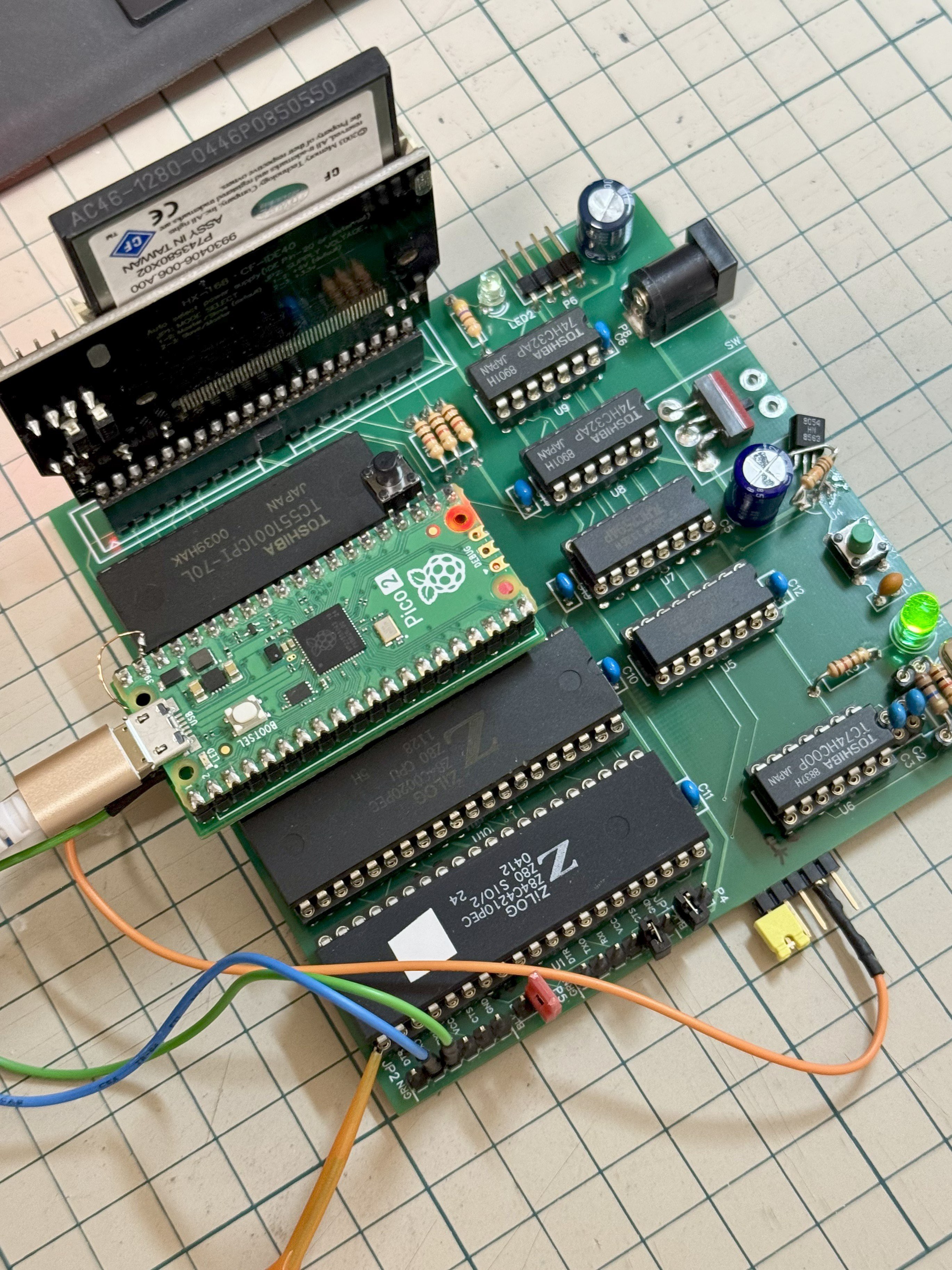
Emulate ROMs at 12MHz With Pico2 PIO

Nothing lasts forever, and that includes the ROMs required to make a retrocomputer run. Even worse, what if you’re rolling your own firmware? Period-appropriate EPROMs and their programmers aren’t always cheap or easy to get a hold of these days. [Kyo-ta04] had that problem, and thanks to them, we now all have a solution: Pico2ROMEmu, a ROM emulator based on, you guessed it, the Raspberry Pi Pico2.

The Pico2ROMEmu in its natural habitat on a Z80 SBC.

The ROM emulator has been tested at 10MHz with a Z80 processor and 12MHz with an MC68000. An interesting detail here is that rather than use the RP2350’s RISC-V or ARM cores, [kyo-ta04] is doing all the work using the chip’s powerful PIO. PIO means “programmable I/O,” and if you need a primer, check this out. Using PIO means the main core of the microcontroller needn’t be involved — and in this context, a faster ROM emulator.

We’ve seen ROM emulators before, of course — the OneROM comes to mind, which can also use the RP2350 and its PIOs. That project hasn’t been chasing these sorts of speeds as it is focused on older, slower machines. That may change in the newest revision. It’s great to see another contender in this space, though, especially one to serve slightly higher-performance retrocomputers.  Code and Gerbers for the Pico2RomeEMU are available on GitHub under an MIT license.

Thanks to [kyo-ta04] for the tip.


Something New Every Day, Something Relevant Every Week?

The site is called Hackaday, and has been for 21 years. But it was only for maybe the first half-year that it was literally a hack a day. By the 2010s, we were putting out four or more per day, and in the later 20-teens, we settled into our current cadence of eight hacks per day, plus some original pieces over the top. That’s a lot of hacks per day! (But “Eight-to-Ten-Hacks-a-Day” just isn’t as catchy.)

With that many posts daily, we also tend to reach out to a broader array of interests. Quite simply, not every hack is necessarily going to be just exactly what you are looking for, but we wouldn’t be writing it up if we didn’t think that someone was looking for it. Maybe you don’t like CAN bus hacks, but you’re into biohacking, or retrocomputing. Our broad group of writers helps to make sure that we’ll get you covered sooner or later.

What’s still surprising to me, though, is that a couple of times per week, there is a hack that is actually relevant to a particular project that I’m currently working on. It’s one thing to learn something new every day, and I’d bet that I do, but it’s entirely another to learn something new and relevant.

So I shouldn’t have been shocked when Tom and I were going over the week’s hacks on the podcast, and he picked an investigation of injecting spray foam into 3D prints. I liked that one too, but for me it was just “learn something new”. Tom has been working on an underwater ROV, and it perfectly scratched an itch that he has – how to keep the top of the vehicle more buoyant, while keeping the whole thing waterproof.

That kind of experience is why I’ve been reading Hackaday for 21 years now, and it’s all of our hope that you get some of that too from time to time. There is a lot of “new” on the Internet, and that’s a wonderful thing. But the combination of new and relevant just can’t be beat! So if you’ve got anything you want to hear more about, let us know.

This article is part of the Hackaday.com newsletter, delivered every seven days for each of the last 200+ weeks. It also includes our favorite articles from the last seven days that you can see on the web version of the newsletter. Want this type of article to hit your inbox every Friday morning? You should sign up!

Electronic Dice Built The Old Fashioned Way

By: Lewin Day

If you wanted to build an electronic dice, you might grab an Arduino and a nice OLED display to whip up something fancy. You could even choose an ESP32 and have it log your rolls to the cloud. Or, you could follow the lead of [Axiometa] and do it the old-school way.

The build is based around the famous 555 timer IC. It’s paired with a 4017 decade counter IC, which advances every time it receives a clock signal from the 555. With the aid of some simple transistor logic, this lights the corresponding LEDs for the numbers 1 to 6, which are laid out like the face of a typical six-sided die. For an added bit of fun, a tilt sensor is used to trigger the 555 and thus the roll of the dice. A little extra tweak to the circuit ensures the 555 keeps counting just a little while after you stop shaking. This makes the action feel like an actual dice roll.

Schematics are available for the curious. We’d love to see this expanded to emulate a range of other dice—like a D20 version that could blink away on the D&D table. We’ve covered some very exciting technology in that area as well.

Sudo Clean Up My Workbench

[Engineezy] might have been watching a 3D printer move when inspiration struck: Why not build a robot arm to clean up his workbench? Why not, indeed? Well, all you need is a 17-foot-long X-axis and a gripper mechanism that can pick up any strange thing that happens to be on the bench.

Like any good project, he did it step by step. Mounting a 17-foot linear rail on an accurately machined backplate required professional CNC assistance. He was shooting for a 1mm accuracy, but decided to settle for 10mm.

With the long axis done, the rest seemed anticlimactic, at least for moving it around. The system can actually support his bodyweight while moving. The next step was to control the arm manually and use a gripper to open a parts bin.

The arm works, but is somewhat slow and needs some automation. A great start to a project that might not be practical, but is still a fun build and might inspire you to do something equally large.

We have large workbenches, but we tend to use tiny ones more often in our office. We also enjoy ones that are portable.

Blue Hedgehog, Meet Boing Ball: Can Sonic Run on Amiga?

The Amiga was a great game system in its day, but there were some titles it was just never going to get. Sonic the Hedgehog was one of them– SEGA would never in a million years been willing to port its flagship platformer to another system. Well, SEGA might not in a million years, but [reassembler] has started that process after only thirty four.

Both the SEGA Mega Drive (that’s the Genesis for North Americans) and Amiga have Motorola 68k processors, but that doesn’t mean you can run code from one on the other: the memory maps don’t match, and the way graphics are handled is completely different. The SEGA console uses so-called “chunky” graphics, which is how we do it today. Amiga, on the other hand, is all about the bitplanes; that’s why it didn’t get a DOOM port back in the day, which may-or-may not be what killed the platform.

In this first video of what promises to be a series, [reassembler] takes us through his process of migrating code from the Mega Drive to Amiga, starting specifically with the SEGA loading screen animation, with a preview of the rest of the work to come. While watching someone wrestle with 68k assembler is always interesting, the automation he’s building up to do it with python is the real star here. Once this port is done, that toolkit should really grease the wheels of bringing other Mega Drive titles over.

It should be noted that since the Mega Drive was a 64 colour machine, [reassembler] is targeting the A1200 for his Sonic port, at least to start. He plans to reprocess the graphics for a smaller-palette A500 version once that’s done. That’s good, because it would be a bit odd to have a DOOM-clone for the A500 while being told a platformer like Sonic is too much to ask. If anyone can be trusted to pull this project off, it’s [reassembler], whose OutRun: Amiga Edition is legendary in the retro world, even if we seem to have missed covering it.

If only someone had given us a tip off, hint hint.

Adding Electronics to a Classic Game

A circular 3D-printed board is shown, with a roughly star-shaped pattern of white LEDs glowing through the surface. Yellow and green LEDs are also visible through the surface at a few points.

Like many classic board games, Ludo offers its players numerous opportunities to inflict frustration on other players. Despite this, [Viktor Takacs] apparently enjoys it, which motivated him to build a thoroughly modernized, LED-based, WiFi-enabled game board for it (GitHub repository).

The new game board is built inside a stylish 3D-printed enclosure with a thin white front face, under which the 115 LEDs sit. Seven LEDs in the center represent a die, and the rest mark out the track around the board and each user’s home row. Up to six people can play on the board, and different colors of the LEDs along the track represent their tokens’ positions. To prevent light leaks, a black plastic barrier surrounds each LED. Each player has one button to control their pieces, with a combination of long and short presses serving to select one of the possible actions.

The electronics themselves are mounted on seven circuit boards, which were divided into sections to reduce their size and therefore their manufacturing cost. For component placement reasons, [Viktor] used a barrel connector instead of USB, but for more general compatibility also created an adapter from USB-C to a barrel plug. The board is controlled by an ESP32-S3, which hosts a server that can be used to set game rules, configure player colors, save and load games, and view statistics for the game (who rolled the most sixes, who sent other players home most often, etc.).

If you prefer your games a bit more complex, we’ve also seen electronics added to Settlers of Catan. On a rather larger scale, there is also this LED-based board game which invites humans onto the board itself.

Thanks to [Victoria Bei] for the tip!

Magic Magikarp Makes Moves

By: Ian Bos
A picture of a life sized magikarp from pokemon

One of the most influential inventions of the 20th century was Big Mouth Billy Bass. A celebrity bigger than the biggest politicians or richest movie stars, there’s almost nothing that could beat Billy. That is, until [Kiara] from Kiara’s Workshop built a Magikarp version of Big Mouth Billy Bass.

Sizing in at over 2 entire feet, the orange k-carp is able to dance, it is able to sing, and it is able to stun the crowd. Magikarp functions the same way as its predecessor; a small button underneath allows the show to commence. Of course, this did not come without its challenges.

Starting the project was easy, just a model found online and some Blender fun to create a basic mold. Dissecting Big Mouth Billy Bass gave direct inspiration for how to construct the new idol in terms of servos and joints. Programming wasn’t even all that much with the use of Bottango for animations. Filling the mold with the silicone filling proved to be a bit more of a challenge.

After multiple attempts with some minor variations in procedure, [Kirara] got the fish star’s skin just right. All it took was a paint job and some foam filling to get the final touches. While this wasn’t the most mechanically challenging animatronic project, we have seen our fair share of more advanced mechanics. For example, check out this animatronic that sees through its own eyes!

Garage Fridge Gets New DIY Controller

By: Lewin Day

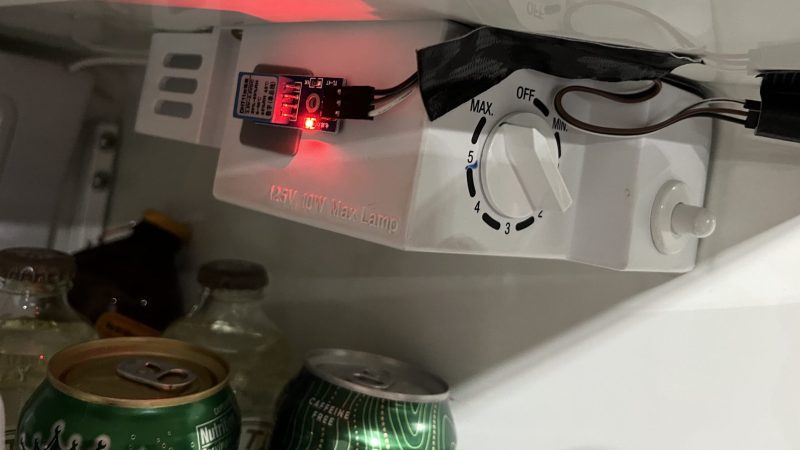
[Rick] had a problem. His garage refrigerator was tasked with a critical duty—keeping refreshing beverages at low temperature. Unfortunately, it had failed—the condenser was forever running, or not running at all. The beverages were either frozen, or lukewarm, regardless of the thermostat setting. There was nothing for it—the controller had to be rebuilt from scratch.

Thankfully, [Rick]’s junk drawer was obliging. He was able to find an Arduino Uno R4, complete with WiFi connectivity courtesy of the ESP32 microcontroller onboard. This was paired with a DHT11 sensor, which provided temperature and humidity measurements. [Rick] began testing the hardware by spitting out temperature readings on the Uno’s LED matrix.

Once that was working, the microcontroller had to be given control over the fridge itself. This was achieved by programming it to activate a Kasa brand smart plug, which could switch mains power to the fridge as needed. The Uno simply emulated the action of the Kasa phone app to switch the smart plug on and off to control the fridge’s temperature, with the fridge essentially running flat out whenever it was switched on. The Uno also logs temperature to a server so [Rick] can make sure temperatures remain in the proper range.

We’ve seen some great beverage-cooling hacks over the years. If you’ve mastered your own hacky methods of keeping the colas chilled, don’t hesitate to let us know on the tipsline.

Reason versus Sentimental Attachment for Old Projects

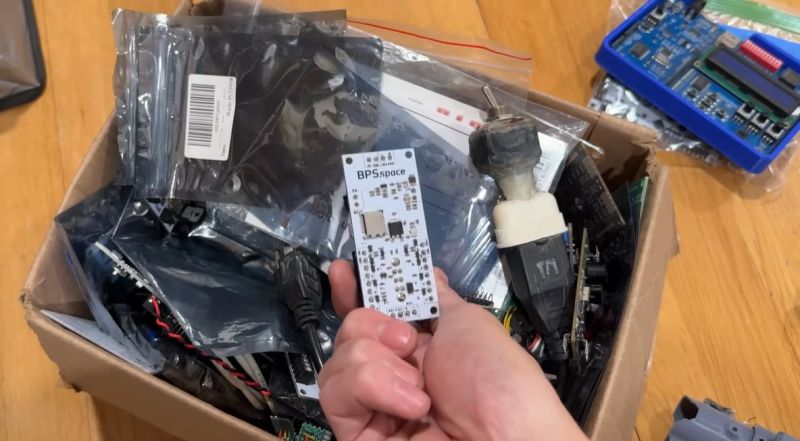
We have probably all been there: digging through boxes full of old boards for projects and related parts. Often it’s not because we’re interested in the contents of said box, but because we found ourselves wondering why in the name of project management we have so many boxes of various descriptions kicking about. This is the topic of [Joe Barnard]’s recent video on his BPS.shorts YouTube channel, as he goes through box after box of stuff.

For some of the ‘trash’ the answer is pretty simple; such as the old rocket that’s not too complex and can have its electronics removed and the basic tube tossed, which at least will reduce the volume of ‘stuff’. Then there are the boxes with old projects, each of which are tangible reminders of milestones, setbacks, friendships, and so on. Sentimental stuff, basically.

Some rules exist for safety that make at least one part obvious, and that is that every single Li-ion battery gets removed when it’s not in use, with said battery stored in its own fire-resistant box. That then still leaves box after box full of parts and components that were ordered for projects once, but not fully used up. Do you keep all of it, just in case it will be needed again Some Day™? The same issue with boxes full of expensive cut-off cable, rare and less rare connectors, etc.

One escape clause is of course that you can always sell things rather than just tossing it, assuming it’s valuable enough. In the case of [Joe] many have watched his videos and would love to own a piece of said history, but this is not an option open to most. Leaving the question of whether gritting one’s teeth and simply tossing the ‘value-less’ sentimental stuff and cheap components is the way to go.

Although there is always the option of renting storage somewhere, this feels like a cheat, and will likely only result in the volume of ‘stuff’ expanding to fill the void. Ultimately [Joe] is basically begging his viewers to help him to solve this conundrum, even as many of them and our own captive audience are likely struggling with a similar problem. Where is the path to enlightenment here?

Hackaday Podcast Episode 348: 50 Grams of PLA Hold a Ton, Phreaknic Badge is Off The Shelf, and Hackers Need Repair Manuals

By: Tom Nardi

Join Hackaday Editors Elliot Williams and Tom Nardi as they go over their picks for the best stories and hacks from the previous week. Things start off with a warning about the long-term viability of SSD backups, after which the discussion moves onto the limits of 3D printed PLA, the return of the Pebble smart watch, some unconventional aircraft, and an online KiCad schematic repository that has plenty of potential. You’ll also hear about a remarkable conference badge made from e-waste electronic shelf labels, filling 3D prints with foam, and a tiny TV powered by the ESP32. The episode wraps up with our wish for hacker-friendly repair manuals, and an interesting tale of underwater engineering from D-Day.

Check out the links below if you want to follow along, and as always, tell us what you think about this episode in the comments!

As always, this episode is available in DRM-free MP3.

Where to Follow Hackaday Podcast

Episode 348 Show Notes:

News:

What’s that Sound?

  • Congratulations to [for_want_of_a_better_handle] for guessing the data center ambiance!

Interesting Hacks of the Week:

Quick Hacks:

Can’t-Miss Articles:

Mac System 7 On a G4? Why Not!

Over the many years Apple Computer have been in operation, they have made a success of nearly-seamlessly transitioning multiple times between both operating systems and their underlying architecture. There have been many overlapping versions, but there’s always a point at which a certain OS won’t run on newer hardware. Now [Jubadub] has pushed one of those a little further than Apple intended, by persuading classic Mac System 7 to run on a G4.

System 7 was the OS your Mac would have run some time in the mid ’90s, whether it was a later 68000 machine or a first-gen PowerMac. In its day it gave Windows 3.x and even 95 a run for their money, but it relied on an older Mac ROM architecture than the one found on a G4. The hack here lies in leaked ROMS, hidden backwards compatibility, and an unreleased but preserved System 7 version originally designed for the ’90s Mac clone programme axed by Steve Jobs.  It’s not perfect, but they achieved the impossible.

As to why, it seems there’s a significant amount of software that needs 7 to run, something mirrored in the non-Mac retrocomputing world. Even this hack isn’t the most surprising System 7 one we’ve seen recently, as an example someone even made a version for x86 machines.


Thumbnail Image Art: Apple PowerMac G4 by baku13, CC BY-SA 3.0

This Week in Security: React, JSON Formatting, and the Return of Shai Hulud

After a week away recovering from too much turkey and sweet potato casserole, we’re back for more security news! And if you need something to shake you out of that turkey-induced coma, React Server has a single request Remote Code Execution flaw in versions 19.0.1, 19.1.2, and 19.2.1.

The issue is insecure deserialization in the Flight protocol, as implemented right in React Server, and notably also used in Next.js. Those two organizations have both issued Security Advisories for CVSS 10.0 CVEs.

There are reports of a public Proof of Concept (PoC), but the repository that has been linked explicitly calls out that it is not a true PoC, but merely research into how the vulnerability might work. As far as I can tell, there is not yet a public PoC, but reputable researchers have been able to reverse engineer the problem. This implies that mass exploitation attempts are not far off, if they haven’t already started.

Legal AI Breaks Attorney-Client Privilege

We often cover security flaws that are discovered by merely poking around the source of a web interface. [Alex Schapiro] went above and beyond the call of duty, manually looking through minified JS, to discover a major data leak in the Filevine legal AI. And the best part, the problem isn’t even in the AI agent this time.

The story starts with subdomain enumeration — the process of searching DNS records, Google results, and other sources for valid subdomains. That resulted in a valid subdomain and a not-quite-valid web endpoint. This is where [Alex] started digging though Javascript, and found an Amazon AWS endpoint, and a reference to BOX_SERVICE. Making requests against the listed endpoint resulted in both boxFolders and a boxToken in the response. What are those, and what is Box?

Box is a file sharing system, similar to a Google Drive or even Microsoft Sharepoint. And that boxToken was a valid admin-level token for a real law firm, containing plenty of confidential records. It was at this point that [Alex] stopped interacting with the Filevine endpoints, and contacted their security team. There was a reasonably quick turnaround, and when [Alex] re-tested the flaw a month later, it had been fixed.

JSON Formatting As A Service

The web is full of useful tools, and I’m sure we all use them from time to time. Or maybe I’m the only lazy one that types a math problem into Google instead of opening a dedicated calculator program. I’m also guilty of pasting base64 data into a conversion web site instead of just piping it through base64 and xxd in the terminal. Watchtowr researchers are apparently familiar with such laziness efficiency, in the form of JSONformatter and CodeBeautify. Those two tools have an interesting feature: an online save function.

You may see where this is going. Many of us use Github Gists, which supports secret gists protected by long, random URLs. JSONformatter and CodeBeautify don’t. Those URLs are short enough to enumerate — not to mention there is a Recent Links page on both sites. Between the two sites, there are over 80,000 saved JSON snippets. What could possibly go wrong? Not all of that JSON was intended to be public. It’s not hard to predict that JSON containing secrets were leaked through these sites.

And then on to the big question: Is anybody watching? Watchtowr researchers beautified a JSON containing a Canarytoken in the form of AWS credentials. The JSON was saved with the 24 hour timeout, and 48 hours later, the Canarytoken was triggered. That means that someone is watching and collecting those JSON snippets, and looking for secrets. The moral? Don’t upload your passwords to public sites.

Shai Hulud Rises Again

NPM continues to be a bit of a security train wreck, with the Shai Hulud worm making another appearance, with some upgraded smarts. This time around, the automated worm managed to infect 754 packages. It comes with a new trick: pushing the pilfered secrets directly to GitHub repositories, to overcome the rate limiting that effected this worm the first time around. There were over 33,000 unique credentials captured in this wave. When researchers at GitGuardian tested that list a couple days later, about 10% were still valid.

This wave was launched by a PostHog credential that allowed a malicious update to the PostHog NPM package. The nature of Node.js means that this worm was able to very quickly spread through packages where maintainers were using that package. Version 2.0 of Shai Hulud also includes another nasty surprise, in the form of a remote control mechanism stealthily installed on compromised machines. It implies that this is not the last time we’ll see Shai Hulud causing problems.

Bits and Bytes

[Vortex] at ByteRay took a look at an industrial cellular router, and found a couple major issues. This ALLNET router has an RCE, due to CGI handling of unauthenticated HTTP requests. It’s literally just /cgi-bin/popen.cgi?command=whoami to run code as root. That’s not the only issue here, as there’s also a hardcoded username and password. [Vortex] was able to derive that backdoor account information and use hashcat to crack the password. I was unable to confirm whether patched firmware is available.

Google is tired of their users getting scammed by spam phone calls and texts. Their latest salvo in trying to defeat such scams is in-call scam protection. This essentially detects a banking app that is opened as a result of a phone call. When this scenario is detected, a warning dialogue is presented, that suggests the user hangs up the call, and forces a 30 second waiting period. While this may sound terrible for sophisticated users, it is likely to help prevent fraud against our collective parents and grandparents.

What seemed to be just an illegal gambling ring of web sites, now seems to be the front for an Advanced Persistent Threat (APT). That term, btw, usually refers to a government-sponsored hacking effort. In this case, instead of a gambling fraud targeting Indonesians, it appears to be targeting Western infrastructure. One of the strongest arguments for this claim is the fact that this network has been operating for over 14 years, and includes a mind-boggling 328,000 domains. Quite the odd one.

❌