How Can Non-Human Identities Enhance AI Security? What are the key challenges faced by organizations in managing cybersecurity for machine identities? With digital systems continue to evolve, cybersecurity professionals are increasingly focusing on the protection and management of Non-Human Identities (NHIs). These machine identities play a pivotal role in ensuring robust AI security and better […]
How Does Non-Human Identities (NHI) Impact Digital Secrets Management? Is your organization adequately prepared to manage non-human identities (NHIs) and protect your digital secrets? That’s a critical question. With cyber threats become more sophisticated, the role of NHIs in digital secrets management becomes increasingly vital. These machine identities are crucial in secure networks, especially in […]
Is Your Organization Missing Out on the Value of Non-Human Identities in Digital Security? The rapid expansion of cloud environments has ushered in a powerful yet complex challenge: managing digital identities that aren’t tied to any one person. These Non-Human Identities (NHIs), which often take the form of machine identities, are integral to a secure […]
The Strategic Role of Non-Human Identities in AI-Powered Cybersecurity Operations What is the role of Non-Human Identities (NHIs) in achieving seamless security for your organization? With digital continues to expand, cybersecurity professionals face the challenges of managing complex systems and ensuring secure operations. NHIs, which are essentially machine identities, play a pivotal role, acting as […]
GCVE would enhance global collaboration, flexibility, and efficiency in tracking security flaws. Duplicate entries and a decentralization policy may create more chaos for defenders.
Authors, Creators & Presenters: Byeongwook Kim (Seoul National University), Jaewon Hur (Seoul National University), Adil Ahmad (Arizona State University), Byoungyoung Lee (Seoul National University)
PAPER
Secure Data Analytics in Apache Spark with Fine-grained Policy Enforcement and Isolated Execution
Cloud based Spark platform is a tempting approach for sharing data, as it allows data users to easily analyze the data while the owners to efficiently share the large volume of data. However, the absence of a robust policy enforcement mechanism on Spark hinders the data owners from sharing their data due to the risk of private data breach. In this respect, we found that malicious data users and cloud managers can easily leak the data by constructing a policy violating physical plan, compromising the Spark libraries, or even compromising the Spark cluster itself. Nonetheless, current approaches fail to securely and generally enforce the policies on Spark, as they do not check the policies on physical plan level, and they do not protect the integrity of data analysis pipeline. This paper presents Laputa, a secure policy enforcement framework on Spark. Specifically, Laputa designs a pattern matching based policy checking on the physical plans, which is generally applicable to Spark applications with more fine-grained policies. Then, Laputa compartmentalizes Spark applications based on confidential computing, by which the entire data analysis pipeline is protected from the malicious data users and cloud managers. Meanwhile, Laputa preserves the usability as the data users can run their Spark applications on Laputa with minimal modification. We implemented Laputa, and evaluated its security and performance aspects on TPC-H, Big Data benchmarks, and real world applications using ML models. The evaluation results demonstrated that Laputa correctly blocks malicious Spark applications while imposing moderate performance overheads.
ABOUT NDSS
The Network and Distributed System Security Symposium (NDSS) fosters information exchange among researchers and practitioners of network and distributed system security. The target audience includes those interested in practical aspects of network and distributed system security, with a focus on actual system design and implementation. A major goal is to encourage and enable the Internet community to apply, deploy, and advance the state of available security technologies.
As a growing number of encounters between civilians and Department of Homeland Security agents — including the widely scrutinized fatal shooting of Renee Good in Minneapolis — are scrutinized in court records and on social media, federal officials are returning to a familiar response: self-defense.
How Not to Lead (Fareed Zakaria, Foreign Policy) America’s allies may comply for now. But the damage to trust will have consequences.
The Great Divorce (Eliot A. Cohen, The Atlantic) The marriage between Europe and the United States has been fraught from the first—and now it might be coming apart.
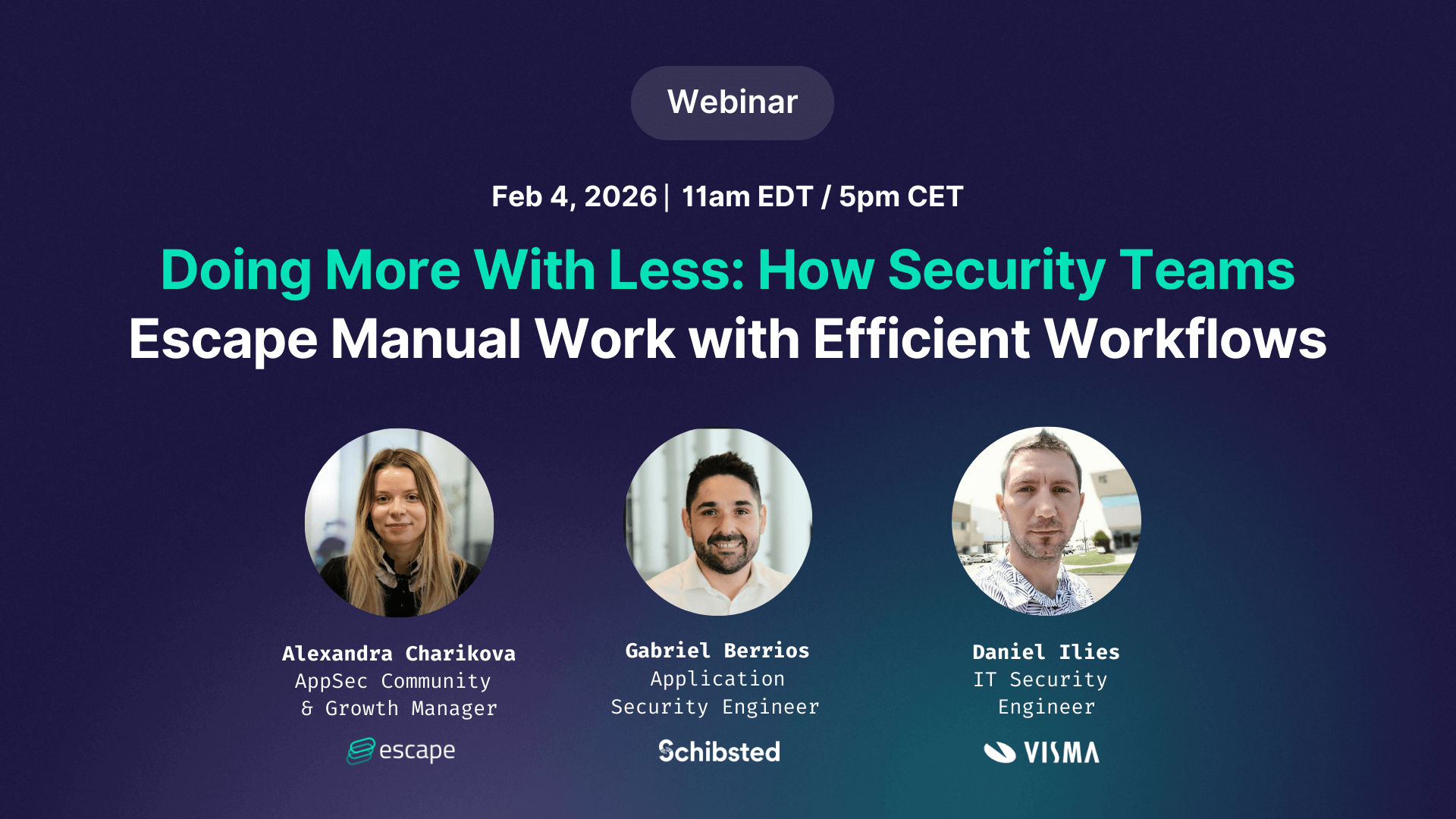
Security teams are under constant pressure to do more with the same resources. Manual processes, fragmented tools, and inefficient workflows can slow teams down and pull focus away from what matters most.
In this live webinar, experienced security practitioners share how they’ve escaped the constraints of limited
Learn about the key differences between DAST and pentesting, the emerging role of AI pentesting, their roles in security testing, and which is right for your business.
Merge a multiphysics simulation with real nuclear reactor inspection data and the result is a revolutionizing tool that predicts component failure before it happens.
Researchers at the U.S. Department of Energy’s (DOE) Argonne National Laboratory have developed an innovative framework to improve maintenance schedules for critical components in nuclear power plants. This breakthrough could save millions of dollars on operating costs while keeping power reliable.
The recent delivery of advanced nuclear fuel to the Idaho National Laboratory’s Transient Reactor Test Facility marks a major milestone for Project Pele, a first-of-its-kind mobile microreactor prototype designed to provide resilient power for military operations.
ISO 27001 is an internationally recognized standard that defines the requirements for establishing, implementing, maintaining, and continuously improving an Information Security Management System (ISMS) within an organization. First introduced in 1999, the standard has evolved through multiple revisions to address changing security needs. The most recent update, ISO 27001:2022, was released on October 25, 2022, […]
The digital landscape is evolving at a rapid pace, and so are the threats that target organizations. With cyberattacks becoming more sophisticated and diverse, traditional security solutions often struggle to keep up. Businesses today need a more unified, proactive, and intelligent approach to detect and respond to threats. This is where Extended Detection and Response
Artificial intelligence (AI) systems rarely fail in obvious ways. No red error screen. No crashed service. No broken button. They fail quietly. Outputs look confident...Read More
This week in scams, attackers are leaning hard on familiar brands, everyday tools, and routine behavior to trigger fast, unthinking reactions. From fake Netflix billing alerts to malicious browser extensions and QR code phishing tied to foreign espionage, the common thread is trust being weaponized at exactly the right moment.
Every week, this roundup breaks down the scam and cybersecurity stories making news and explains how they actually work, so readers can better recognize risk and avoid being manipulated.
Let’s get into it.
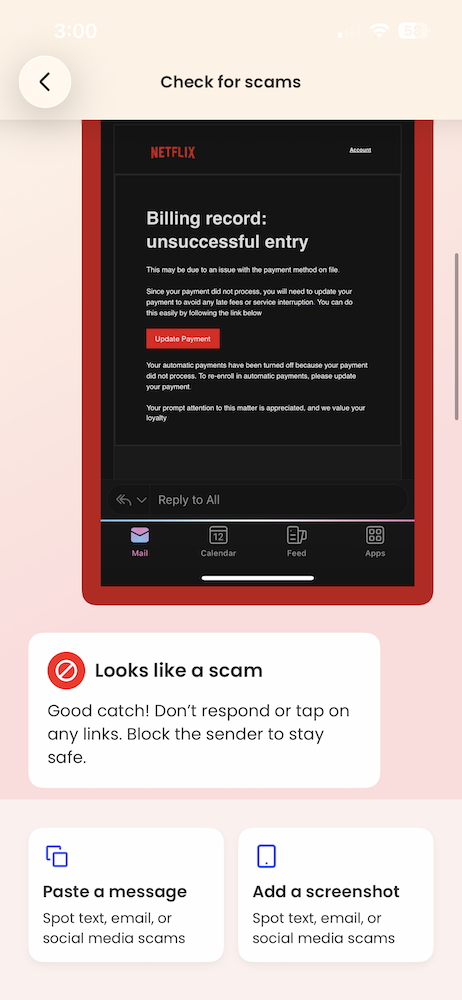
Netflix Billing Emails Are Back… And Still Catching People Off Guard
The big picture:Subscription phishing is resurging, with scammers impersonating Netflix and using fake billing failures to push victims into handing over payment details.
What happened:Multiple Netflix impersonation emails circulated again this month, warning recipients that a payment failed and urging them to “update payment” to avoid service interruption. The messages closely mirror Netflix’s real branding and include polished formatting, official-looking language, and even PDF attachments designed to feel like legitimate billing notices.
What makes these scams effective is timing. Victims often receive them while actively reviewing subscriptions, updating payment methods, or considering canceling services. That context lowers skepticism just enough for a quick click before slowing down to verify.
McAfee’s Scam Detector flagged the messages (which one of our own employees received this week) as phishing, confirming they were designed to steal payment information rather than resolve a real billing issue.
Red flags to watch for:
Unexpected billing problems paired with urgent calls to act
Payment requests delivered by email instead of inside the app
Attachments or buttons asking you to “fix” account issues
Sender addresses that don’t match official Netflix domains
How this scam works:This is classic brand impersonation phishing. Scammers don’t need to hack Netflix itself. They rely on people recognizing the logo, trusting the message, and reacting emotionally to the idea of losing access. The attachment and clean design help bypass instinctive spam filters in the brain, even when technical filters catch it later.
Netflix has warned customers about these scams and offers advice on its site if you encounter one.
What to do instead: If you get a billing alert, don’t click. Open the Netflix app or manually type the site address to check your account. If there’s no issue there, the email wasn’t real.
Fake Ad Blocker Crashes Browsers to Push “Fix It” Malware
The big picture: Attackers are exploiting browser crashes themselves as a social engineering tool, turning technical disruption into a pathway for malware installation.
What happened: Researchers reported a malvertising campaign promoting a fake ad-blocking browser extension called “NexShield,” which falsely claimed to be created by the developer of a well-known, legitimate ad blocker. Once installed, the extension intentionally overwhelmed the browser, causing freezes, crashes, and system instability.
After restart, victims were shown fake security warnings instructing them to “fix” the problem by running commands on their own computer. Following those instructions triggered the download of a remote access tool capable of spying, executing commands, and installing additional malware. The reporting was first detailed by Bleeping Computer, with technical analysis from security researchers.
Red flags to watch for:
Browser extensions promising performance boosts or “ultimate” protection
Crashes immediately after installing a new extension
Pop-ups instructing you to run commands manually
“Security fixes” that require copying and pasting code
How this scam works: This is a variant of ClickFix attacks. Instead of faking a problem, attackers cause a real one, then position themselves as the solution. The crash creates urgency and confusion, making people more likely to follow instructions they’d normally question. It turns frustration into compliance.
FBI Warns QR Code Phishing Is Being Used for Cyber Espionage
The big picture:QR codes are being used as stealth phishing tools, with highly targeted attacks tied to foreign intelligence operations.
What happened:The Federal Bureau of Investigation issued a warning about QR code phishing, or “quishing,” campaigns linked to a North Korean government-backed hacking group. According to reporting by Fox News, attackers sent emails containing QR codes that redirected victims to fake login pages or malware-hosting sites.
In some cases, simply visiting the site allowed attackers to collect device data, location details, and system information, even if no credentials were entered. These campaigns are highly targeted, often aimed at professionals in policy, research, and technology sectors.
Red flags to watch for:
QR codes sent by email or messaging apps
QR codes leading to login pages for work tools or cloud services
Messages that feel personalized but unexpected
Requests to scan instead of click
How this scam works: QR codes hide the destination URL, removing the visual cues people rely on to judge safety. Because scanning feels faster and more “passive” than clicking a link, people often skip verification entirely. That moment of trust is what attackers exploit.
Verify inside official apps. Billing or security issues should be confirmed directly in the app or website you normally use, not through email links or QR codes.
Treat extensions like software installs. Only install browser extensions from trusted publishers you already know, and remove anything that causes instability.
Slow down with QR codes. If a QR code leads to a login page or download, close it and navigate manually instead.
Watch for urgency + familiarity. Scammers increasingly rely on brands, tools, and behaviors you already trust to short-circuit caution.
McAfee will be back next week with another roundup of the scams making headlines and the practical steps you can take to stay safer online.
Microsoft users across the U.S. experienced widespread disruptions Thursday after a technical failure prevented people from sending or receiving email through Outlook, a core service within Microsoft 365.
The outage occurred during U.S. business hours and quickly affected schools, government offices, and companies that rely on Outlook for daily operations. Microsoft confirmed the issue publicly and said it was working to restore service. There is no indication the disruption was caused by a cyberattack, according to company statements.
Still, McAfee warns in these situations to be wary of phishing attempts as scammers latch onto these outages to take advantage of innocent users.
“Outages like this create uncertainty, and scammers move fast to take advantage of it,” said Steve Grobman, McAfee’s Chief Technology Officer. “When people can’t get into email or the tools they use every day, it’s easy to assume something is wrong with your account — and that’s exactly the moment attackers look for.”
“Fake alerts start circulating that look like they’re coming from the real company, with logos and urgent language telling you to reset a password or verify your information,” Grobman added. “Some push fake support numbers or messages claiming they can restore access. If you’re impacted, slow down, go straight to the official source for updates, and don’t share passwords, verification codes, or payment details in response to an unexpected message.”
“Tools that can spot suspicious links and fake login pages help reduce risk — especially when people are trying to get back online quickly,” Grobman said.
Here, we break down what happened and why outages are prime time for scammers.
What happened to Microsoft Outlook?
A Microsoft infrastructure failure disrupted email delivery.
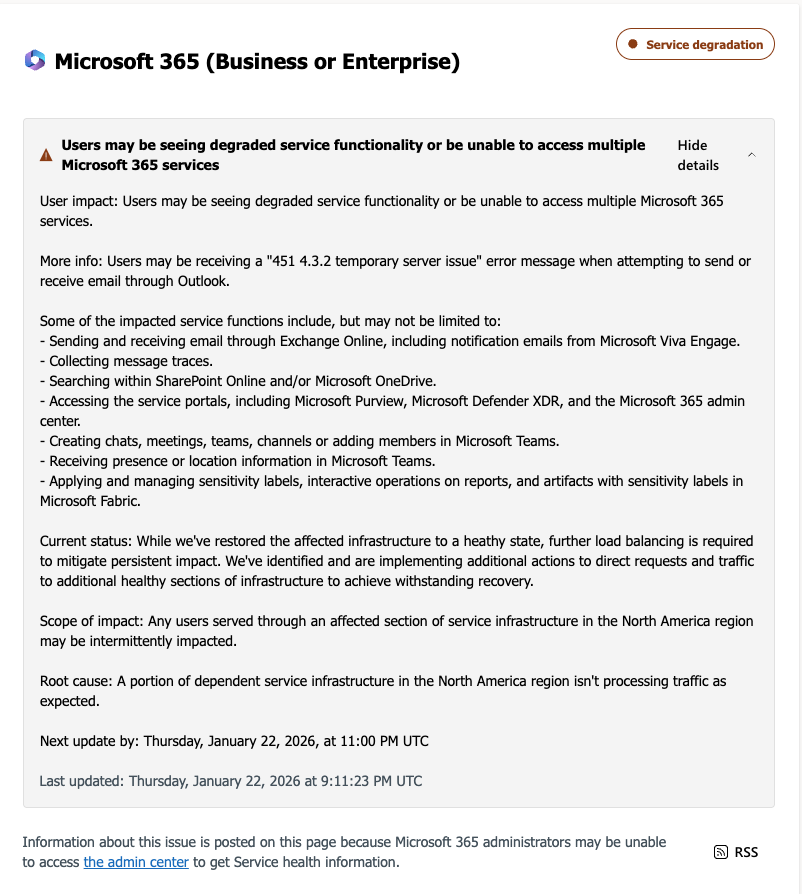
Microsoft said the outage was caused by a portion of its North American service infrastructure that was failing to properly handle traffic. Users attempting to send or receive email encountered a “451 4.3.2 temporary server issue” error message.
Microsoft also warned that related services, including OneDrive search and SharePoint Online, could experience slowdowns or intermittent failures during the incident.
When did the Microsoft outage happen?
The disruption unfolded over several hours on Thursday afternoon (ET).
Based on timelines reported by CNBC and live coverage from Tom’s Guide, the outage progressed as follows:
Around 2:00 p.m. ET: User reports spike across Microsoft services, especially Outlook, according to Down Detector data cited by Tom’s Guide.
2:37 p.m. ET: Microsoft confirms it is investigating an Outlook email issue, per CNBC.
3:17 p.m. ET: Microsoft says it identified misrouted traffic tied to infrastructure problems in North America, CNBC reports.
4:14 p.m. ET: The company announces affected infrastructure has been restored and traffic is being redirected to recover service.
Tom’s Guide reported that while outage reports declined after Microsoft’s fix, some users continued to experience intermittent access issues as systems rebalanced.
Was this a hack or cyberattack?
No. Microsoft says the outage was caused by technical infrastructure issues.
According to CNBC, Microsoft has not indicated that the outage was the result of hacking, ransomware, or any external attack. Instead, the company attributed the disruption to internal infrastructure handling errors, similar to a previous Outlook outage last July that lasted more than 21 hours.
A message sent by Microsoft about the server issue.
Why outages cause widespread disruption
Modern work depends on shared cloud infrastructure.
That sudden loss of access often leaves users unsure whether:
Their account has been compromised
Their data is at risk
They need to take immediate action
That uncertainty is exactly what scammers look for.
How scammers exploit big tech outages
They impersonate the company and trick users into signing in again.
After major outages involving Microsoft, Google, or Amazon Web Services, security researchers, including McAfee, have observed scam campaigns emerge within hours.
These scams typically work by:
Impersonating Microsoft using logos, branding, and language copied from real outage notices
Sending fake “service restoration” emails or texts claiming users must re-authenticate
Linking to realistic login pages designed to steal Microsoft usernames and passwords
Posing as IT support or Microsoft support and directing users to fake phone numbers
Once credentials are stolen, attackers can access email accounts, reset passwords on other services, or launch further phishing attacks from a trusted address.
How to stay safe during a Microsoft outage
Outages are confusing. Scammers rely on urgency and familiarity.
To reduce risk:
Do not click links in emails or texts about outages or “account recovery.”
Go directly to official sources, such as Microsoft’s status page or verified social accounts.
Never re-enter your password through links sent during an outage.
Ignore urgent fixes that ask for downloads, payments, or credentials.
Using advanced artificial intelligence, McAfee’s built-in Scam Detector automatically detects scams across text, email, and video, blocks dangerous links, and identifies deepfakes, helping stop harm before it happens.
McAfee’s identity protection tools also monitor for signs your personal information may be exposed and guide you through recovery if scammers gain access.
FAQ
Q: Is Microsoft Outlook still down? A: Microsoft said Thursday afternoon that it had restored affected infrastructure and was redirecting traffic to recover service, according to CNBC. Some users may still experience intermittent issues.
Q: Was the Microsoft outage caused by hackers? A: No. Microsoft has not reported any cyberattack or data breach related to the outage, per CNBC.
Q: Can scammers really use outages to steal accounts? A: Yes. During major outages, scammers often impersonate companies like Microsoft and trick users into signing in again on fake websites.
Q: Should I reset my password after an outage? A: Only if you clicked a suspicious link or entered your credentials somewhere outside Microsoft’s official site. Otherwise, resetting passwords isn’t necessary.
 Login
Login

_Cagkan_Sayin_Alamy.jpg?width=1280&auto=webp&quality=80&disable=upscale)