 Login
LoginWarning: Phishing Attacks Abuse Free Cloudflare Pages
Malwarebytes warns that threat actors are abusing the free Cloudflare Pages service to host phishing portals, helping the phishing sites avoid detection by security scanners.


Malwarebytes warns that threat actors are abusing the free Cloudflare Pages service to host phishing portals, helping the phishing sites avoid detection by security scanners.

Welcome back, aspiring cyberwarriors!
According to StatCounter, in 2025 Android powers over 3.3 billion users worldwide, dominating the global mobile OS market with a 71.85% share. But beyond phones, Android also powers a wide range of devices, including tablets, TVs, automotive systems, XR devices, and more.
Today, I’d like to show you how all of these devices can be hacked in seconds due to the negligence of their owners.
Android Debug Bridge (ADB) is a versatile command-line tool that allows you to communicate with an Android device or emulator. The ADB command enables various device actions, such as installing and debugging apps. It also provides access to a Unix shell, letting you run a wide range of commands directly on the device.
ADB is a client-server program composed of three main components:
ADB commands from a terminal.ADB can be accessed via both USB and Wi-Fi. When ADB is enabled over Wi-Fi (also known as ADB over TCP/IP), it listens on port 5555 and can accept connections from any device that can reach it — not just those on the same Wi-Fi network, but potentially from other networks via the internet if the device’s port is exposed, effectively opening a door for hackers.
To find systems with exposed ADB, we can use the well-known service Shodan — for example, by using the search query: “Android Debug Bridge port:5555”.

You can use nmap to check if there’s an ADB server on a target host like this:
kali> nmap <IP> -p 5555 -sV
If the service is running and allows unauthorized access, you might be able to see some valuable information, such as the system name, model, and available features.

First of all, we need to install the ADB shell, we can do so with the command:
kali> sudo apt install adb
You can check if the installation succeeded by viewing the help screen:
kali> adb –help

After that, we can try to connect:
kali> adb connect <ip>:<port>

We can check the connected devices, with command:
kali> adb devices
And move directly to the shell:
kali> adb shell

And we’re immediately granted root access to the system. We can do anything we want.
Once ADB shell access is obtained, a single session can be useful but remains limited. Real offensive operations demand persistent access, remote control, and covert data channels. This is where Command and Control (C2) becomes essential. I won’t cover it here, as it’s a broad topic, but you can learn more in our Infrastructure Basics for Hackers course.
ADB is not inherently insecure, but when misconfigured, it becomes one of the fastest ways to compromise an Android-based system. The attacker does not need a CVE or an exploit chain. All they need is port 5555 and silence on the defender’s side.
Thousands of devices remain exposed today—mostly smart TVs, Android TV boxes, routers, IoT appliances, and older smartphones. These devices are often unpatched, unmanaged, and forgotten.
Find out if your phone has been hacked and how to investigate it by attending our Mobile Forensics class.
-1.png)
| "Good information. Everyone who owns a computer should do this training across the country. It should be mandatory!” "Wow, I had no idea of the detail and advanced interrogation these criminals use! This was the most eye-opening session I've seen in a long time and VERY timely” "This was a valuable video. I love the practical tips for how to spot the fake video images - especially the shadows and the lack of glare on the glasses. Thank you!” |
KnowBe4 is here to help you prepare for the evolving AI security landscape. As AI becomes more prevalent in the workplace, new threats and vulnerabilities are emerging. Now is the time to train your users on AI-related security risks! We have 80+ pieces of content in our library specifically addressing AI threats. Here are a few of our most used and highest-rated compliance modules:
We have even more AI security content on the roadmap, so stay subscribed to this newsletter for new releases to help you protect your organization against emerging AI-driven threats. |



Deepfake attacks have become more compelling and realistic than ever before.


Hello, aspiring Cyber Forensic Investigators. In our previous blogpost on Computer Forensics, you learnt in detail about Imaging. In this article, you will learn about DCFLDD, an Imaging tool that made a guest entry in the above-mentioned blogpost. For anyone starting in digital forensics, the first major skill to learn is acquiring a forensically sound […]
The post Beginners guide to DCFLDD Forensic Tool appeared first on Hackercool Magazine.


In August 2025, we discovered a campaign targeting individuals in Turkey with a new Android banking Trojan we dubbed “Frogblight”. Initially, the malware was disguised as an app for accessing court case files via an official government webpage. Later, more universal disguises appeared, such as the Chrome browser.
Frogblight can use official government websites as an intermediary step to steal banking credentials. Moreover, it has spyware functionality, such as capabilities to collect SMS messages, a list of installed apps on the device and device filesystem information. It can also send arbitrary SMS messages.
Another interesting characteristic of Frogblight is that we’ve seen it updated with new features throughout September. This may indicate that a feature-rich malware app for Android is being developed, which might be distributed under the MaaS model.
This threat is detected by Kaspersky products as HEUR:Trojan-Banker.AndroidOS.Frogblight.*, HEUR:Trojan-Banker.AndroidOS.Agent.eq, HEUR:Trojan-Banker.AndroidOS.Agent.ep, HEUR:Trojan-Spy.AndroidOS.SmsThief.de.
While performing an analysis of mobile malware we receive from various sources, we discovered several samples belonging to a new malware family. Although these samples appeared to be still under development, they already contained a lot of functionality that allowed this family to be classified as a banking Trojan. As new versions of this malware continued to appear, we began monitoring its development. Moreover, we managed to discover its control panel and based on the “fr0g” name shown there, we dubbed this family “Frogblight”.
We believe that smishing is one of the distribution vectors for Frogblight, and that the users had to install the malware themselves. On the internet, we found complaints from Turkish users about phishing SMS messages convincing users that they were involved in a court case and containing links to download malware. versions of Frogblight, including the very first ones, were disguised as an app for accessing court case files via an official government webpage and were named the same as the files for downloading from the links mentioned above.
While looking for online mentions of the names used by the malware, we discovered one of the phishing websites distributing Frogblight, which disguises itself as a website for viewing a court file.

The phishing website distributing Frogblight
We were able to open the admin panel of this website, where it was possible to view statistics on Frogblight malware downloads. However, the counter had not been fully implemented and the threat actor could only view the statistics for their own downloads.
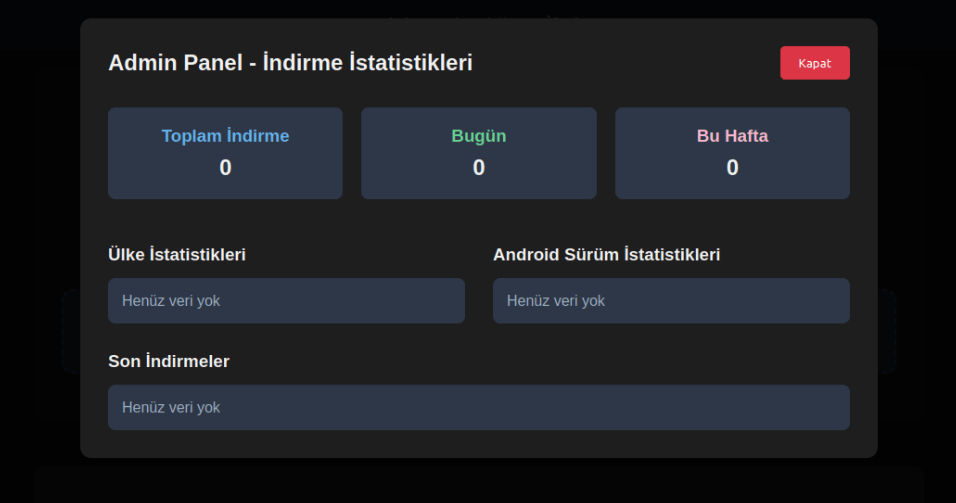
The admin panel interface of the website from which Frogblight is downloaded
Additionally, we found the source code of this phishing website available in a public GitHub repository. Judging by its description, it is adapted for fast deployment to Vercel, a platform for hosting web apps.
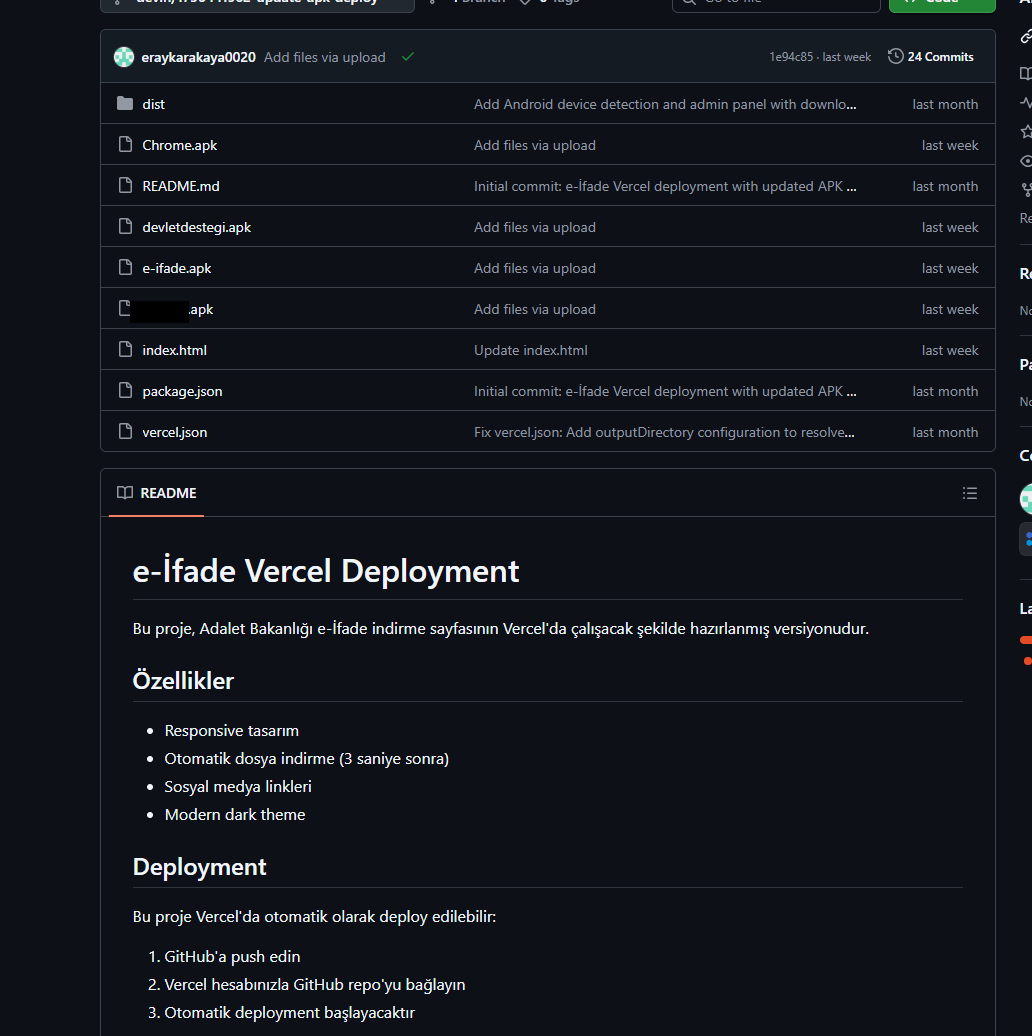
The GitHub repository with the phishing website source code
As already mentioned, Frogblight was initially disguised as an app for accessing court case files via an official government webpage. Let’s look at one of the samples using this disguise (9dac23203c12abd60d03e3d26d372253). For analysis, we selected an early sample, but not the first one discovered, in order to demonstrate more complete Frogblight functionality.
After starting, the app prompts the victim to grant permissions to send and read SMS messages, and to read from and write to the device’s storage, allegedly needed to show a court file related to the user.
The full list of declared permissions in the app manifest file is shown below:
After all required permissions are granted, the malware opens the official government webpage for accessing court case files in WebView, prompting the victim to sign in. There are different sign-in options, one of them via online banking. If the user chooses this method, they are prompted to click on a bank whose online banking app they use and fill out the sign-in form on the bank’s official website. This is what Frogblight is after, so it waits two seconds, then opens the online banking sign-in method regardless of the user’s choice. For each webpage that has finished loading in WebView, Frogblight injects JavaScript code allowing it to capture user input and send it to the C2 via a REST API.
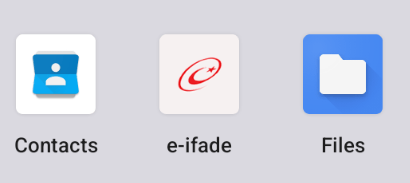
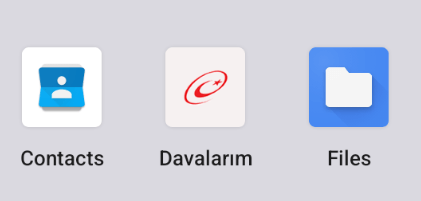
The malware also changes its label to “Davalarım” if the Android version is newer than 12; otherwise it hides the icon.
 |
 |
fetchOutbox and getFileCommands. Other methods are called when specific events occur, for example, after the device screen is turned on, the com.capcuttup.refresh.PersistentService foreground service is launched, or an SMS is received. The full list of all REST API client methods with parameters and descriptions is shown below.
| REST API client method | Description | Parameters |
| fetchOutbox | Request message content to be sent via SMS or displayed in a notification | device_id: unique Android device ID |
| ackOutbox | Send the results of processing a message received after calling the API method fetchOutbox | device_id: unique Android device ID msg_id: message ID status: message processing status error: message processing error |
| getAllPackages | Request the names of app packages whose launch should open a website in WebView to capture user input data | action: same as the API method name |
| getPackageUrl | Request the website URL that will be opened in WebView when the app with the specified package name is launched | action: same as the API method name package: the package name of the target app |
| getFileCommands | Request commands for file operations
Available commands: |
device_id: unique Android device ID |
| pingDevice | Check the C2 connection | device_id: unique Android device ID |
| reportHijackSuccess | Send captured user input data from the website opened in a WebView when the app with the specified package name is launched | action: same as the API method name package: the package name of the target app data: captured user input data |
| saveAppList | Send information about the apps installed on the device | device_id: unique Android device ID app_list: a list of apps installed on the device app_count: a count of apps installed on the device |
| saveInjection | Send captured user input data from the website opened in a WebView. If it was not opened following the launch of the target app, the app_name parameter is determined based on the opened URL | device_id: unique Android device ID app_name: the package name of the target app form_data: captured user input data |
| savePermission | Unused but presumably needed for sending information about permissions | device_id: unique Android device ID permission_type: permission type status: permission status |
| sendSms | Send information about an SMS message from the device | device_id: unique Android device ID sender: the sender’s/recipient’s phone number message: message text timestamp: received/sent time type: message type (inbox/sent) |
| sendTelegramMessage | Send captured user input data from the webpages opened by Frogblight in WebView | device_id: unique Android device ID url: website URL title: website page title input_type: the type of user input data input_value: user input data final_value: user input data with additional information timestamp: the time of data capture ip_address: user IP address sms_permission: whether SMS permission is granted file_manager_permission: whether file access permission is granted |
| updateDevice | Send information about the device | device_id: unique Android device ID model: device manufacturer and model android_version: Android version phone_number: user phone number battery: current battery level charging: device charging status screen_status: screen on/off ip_address: user IP address sms_permission: whether SMS permission is granted file_manager_permission: whether file access permission is granted |
| updatePermissionStatus | Send information about permissions | device_id: unique Android device ID permission_type: permission type status: permission status timestamp: current time |
| uploadBatchThumbnails | Upload thumbnails to the C2 | device_id: unique Android device ID thumbnails: thumbnails |
| uploadFile | Upload a file to the C2 | device_id: unique Android device ID file_path: file path download_id: the file ID on the C2 The file itself is sent as an unnamed parameter |
| uploadFileList | Send information about all files in the target directory | device_id: unique Android device ID path: directory path file_list: information about the files in the target directory |
| uploadFileListLog | Send information about all files in the target directory to an endpoint different from uploadFileList | device_id: unique Android device ID path: directory path file_list: information about the files in the target directory |
| uploadThumbnailLog | Unused but presumably needed for uploading thumbnails to an endpoint different from uploadBatchThumbnails | device_id: unique Android device ID thumbnails: thumbnails |
The app includes several classes to provide the threat actor with remote access to the infected device, gain persistence, and protect the malicious app from being deleted.
capcuttup.refresh.AccessibilityAutoClickServicecapcuttup.refresh.PersistentServicecapcuttup.refresh.BootReceiverIn later versions, new functionality was added, and some of the more recent Frogblight variants disguised themselves as the Chrome browser. Let’s look at one of the fake Chrome samples (d7d15e02a9cd94c8ab00c043aef55aff).
In this sample, new REST API client methods have been added for interacting with the C2.
| REST API client method | Description | Parameters |
| getContactCommands | Get commands to perform actions with contacts Available commands: ● ADD_CONTACT: add a contact to the user device ● DELETE_CONTACT: delete a contact from the user device ● EDIT_CONTACT: edit a contact on the user device |
device_id: unique Android device ID |
| sendCallLogs | Send call logs to the C2 | device_id: unique Android device ID call_logs: call log data |
| sendNotificationLogs | Send notifications log to the C2. Not fully implemented in this sample, and as of the time of writing this report, we hadn’t seen any samples with a full-fledged implementation of this API method | action: same as the API method name notifications: notification log data |
Also, the threat actor had implemented a custom input method for recording keystrokes to a file using the com.puzzlesnap.quickgame.CustomKeyboardService service.
Another Frogblight sample we observed trying to avoid emulators and using geofencing techniques is 115fbdc312edd4696d6330a62c181f35. In this sample, Frogblight checks the environment (for example, device model) and shuts down if it detects an emulator or if the device is located in the United States.
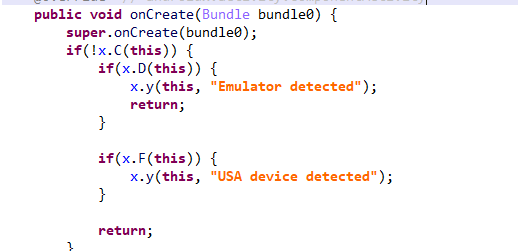
Part of the code responsible for avoiding Frogblight running in an undesirable environment
Later on, the threat actor decided to start using a web socket instead of the REST API. Let’s see an example of this in one of the recent samples (08a3b1fb2d1abbdbdd60feb8411a12c7). This sample is disguised as an app for receiving social support via an official government webpage. The feature set of this sample is very similar to the previous ones, with several new capabilities added. Commands are transmitted over a web socket using the JSON format. A command template is shown below:
{
    "id": <command ID>,
    "command_type": <command name>
    "command_data": <command data>
}
It is also worth noting that some commands in this version share the same meaning but have different structures, and the functionality of certain commands has not been fully implemented yet. This indicates that Frogblight was under active development at the time of our research, and since no its activity was noticed after September, it is possible that the malware is being finalized to a fully operational state before continuing to infect users’ devices. A full list of commands with their parameters and description is shown below:
| Command | Description | Parameters |
| connect | Send a registration message to the C2 | – |
| connection_success | Send various information, such as call logs, to the C2; start pinging the C2 and requesting commands | – |
| auth_error | Log info about an invalid login key to the Android log system | – |
| pong_device | Does nothing | – |
| commands_list | Execute commands | List of commands |
| sms_send_command | Send an arbitrary SMS message | recipient: message destination message: message text msg_id: message ID |
| bulk_sms_command | Send an arbitrary SMS message to multiple recipients | recipients: message destinations message: message text |
| get_contacts_command | Send all contacts to the C2 | – |
| get_app_list_command | Send information about the apps installed on the device to the C2 | – |
| get_files_command | Send information about all files in certain directories to the C2 | – |
| get_call_logs_command | Send call logs to the C2 | – |
| get_notifications_command | Send a notifications log to the C2. This is not fully implemented in the sample at hand, and as of the time of writing this report, we hadn’t seen any samples with a full-fledged implementation of this command | – |
| take_screenshot_command | Take a screenshot. This is not fully implemented in the sample at hand, and as of the time of writing this report, we hadn’t seen any samples with a full-fledged implementation of this command | – |
| update_device | Send registration message to the C2 | – |
| new_webview_data | Collect WebView data. This is not fully implemented in the sample at hand, and as of the time of writing this report, we hadn’t seen any samples with a full-fledged implementation of this command | – |
| new_injection | Inject code. This is not fully implemented in the sample at hand, and as of the time of writing this report, we hadn’t seen any samples with a full-fledged implementation of this command | code: injected code target_app: presumably the package name of the target app |
| add_contact_command | Add a contact to the user device | name: contact name phone: contact phone email: contact email |
| contact_add | Add a contact to the user device | display_name: contact name phone_number: contact phone email: contact email |
| contact_delete | Delete a contact from the user device | phone_number: contact phone |
| contact_edit | Edit a contact on the user device | display_name: new contact name phone_number: contact phone email: new contact email |
| contact_list | Send all contacts to the C2 | – |
| file_list | Send information about all files in the specified directory to the C2 | path: directory path |
| file_download | Upload the specified file to the C2 | file_path: file path download_id: an ID that is received with the command and sent back to the C2 along with the requested file. Most likely, this is used to organize data on the C2 |
| file_thumbnail | Generate a thumbnail from the target image file and upload it to the C2 | file_path: image file path |
| file_thumbnails | Generate thumbnails from the image files in the target directory and upload them to the C2 | folder_path: directory path |
| health_check | Send information about the current device state: battery level, screen state, and so on | – |
| message_list_request | Send all SMS messages to the C2 | – |
| notification_send | Show an arbitrary notification | title: notification title message: notification message app_name: notification subtext |
| package_list_response | Save the target package names | packages: a list of all target package names. Each list element contains: package_name: target package name active: whether targeting is active |
| delete_contact_command | Delete a contact from the user device. This is not fully implemented in the sample at hand, and as of the time of writing this report, we hadn’t seen any samples with a full-fledged implementation of this command | contact_id: contact ID name: contact name |
| file_upload_command | Upload specified file to the C2. This is not fully implemented in the sample at hand, and as of the time of writing this report, we hadn’t seen any samples with a full-fledged implementation of this command | file_path: file path file_name: file name |
| file_download_command | Download file to user device. This is not fully implemented in the sample at hand, and as of the time of writing this report, we hadn’t seen any samples with a full-fledged implementation of this command | file_url: the URL of the file to download download_path: download path |
| download_file_command | Download file to user device. This is not fully implemented in the sample at hand, and as of the time of writing this report, we hadn’t seen any samples with a full-fledged implementation of this command | file_url: the URL of the file to download download_path: downloading path |
| get_permissions_command | Send a registration message to the C2, including info about specific permissions | – |
| health_check_command | Send information about the current device state, such as battery level, screen state, and so on | – |
| connect_error | Log info about connection errors to the Android log system | A list of errors |
| reconnect | Send a registration message to the C2 | – |
| disconnect | Stop pinging the C2 and requesting commands from it | – |
Authentication via WebSocket takes place using a special key.

The part of the code responsible for the WebSocket authentication logic
At the IP address to which the WebSocket connection was made, the Frogblight web panel was accessible, which accepted the authentication key mentioned above. Since only samples using the same key as the webpanel login are controllable through it, we suggest that Frogblight might be distributed under the MaaS model.

The interface of the sign-in screen for the Frogblight web panel
Judging by the menu options, the threat actor can sort victims’ devices by certain parameters, such as the presence of banking apps on the device, and send bulk SMS messages and perform other mass actions.
Since some versions of Frogblight opened the Turkish government webpage to collect user-entered data on Turkish banks’ websites, we assume with high confidence that it is aimed mainly at users from Turkey. Also, based on our telemetry, the majority of users attacked by Frogblight are located in that country.
Even though it is not possible to provide an attribution to any known threat actor based on the information available, during our analysis of the Frogblight Android malware and the search for online mentions of the names it uses, we discovered a GitHub profile containing repos with Frogblight, which had also created repos with Coper malware, distributed under the MaaS model. It is possible that this profile belongs to the attackers distributing Coper who have also started distributing Frogblight.

GitHub repositories containing Frogblight and Coper malware
Also, since the comments in the Frogblight code are written in Turkish, we believe that its developers speak this language.
The new Android malware we dubbed “Frogblight” appeared recently and targets mainly users from Turkey. This is an advanced banking Trojan aimed at stealing money. It has already infected real users’ devices, and it doesn’t stop there, adding more and more new features in the new versions that appear. It can be made more dangerous by the fact that it may be used by attackers who already have experience distributing malware. We will continue to monitor its development.
More indicators of compromise, as well as any updates to these, are available to the customers of our crimeware reporting service. If you are interested, please contact crimewareintel@kaspersky.com.
APK file hashes
8483037dcbf14ad8197e7b23b04aea34
105fa36e6f97977587a8298abc31282a
e1cd59ae3995309627b6ab3ae8071e80
115fbdc312edd4696d6330a62c181f35
08a3b1fb2d1abbdbdd60feb8411a12c7
d7d15e02a9cd94c8ab00c043aef55aff
9dac23203c12abd60d03e3d26d372253
C2 domains
1249124fr1241og5121.sa[.]com
froglive[.]net
C2 IPs
45.138.16.208[:]8080
URL of GitHub repository with Frogblight phishing website source code
https://github[.]com/eraykarakaya0020/e-ifade-vercel
URL of GitHub account containing APK files of Frogblight and Coper
https://github[.]com/Chromeapk
Distribution URLs
https://farketmez37[.]cfd/e-ifade.apk
https://farketmez36[.]sbs/e-ifade.apk
https://e-ifade-app-5gheb8jc.devinapps[.]com/e-ifade.apk




Initial access broker Storm-0249 has evolved from a mass phishing operation into a sophisticated threat actor weaponizing legitimate Endpoint Detection and Response (EDR) processes through sideloading techniques to conceal malicious activity as routine security operations. This represents a significant escalation in the group’s capabilities and poses a critical risk to organizations relying on traditional defense […]
The post Storm-0249: EDR Process Sideloading to Conceal Malicious Activity appeared first on GBHackers Security | #1 Globally Trusted Cyber Security News Platform.

CyberVolk, a pro-Russia hacktivist group first documented in late 2024, has resurfaced with a sophisticated ransomware-as-a-service (RaaS) offering called VolkLocker after months of dormancy caused by Telegram enforcement actions. The group returned in August 2025 with version 2.x, featuring advanced Telegram-based automation and cross-platform capabilities targeting both Linux and Windows systems. VolkLocker is built in […]
The post New VolkLocker Ransomware Variant Targets Both Linux and Windows Systems appeared first on GBHackers Security | #1 Globally Trusted Cyber Security News Platform.

NVIDIA has released urgent security patches for its Merlin machine learning framework after discovering two high-severity deserialization vulnerabilities that could enable attackers to execute malicious code, trigger denial-of-service attacks, and compromise sensitive data on Linux systems. The security bulletin, published on December 9, 2025, identifies critical flaws in the NVTabular and Transformers4Rec components of NVIDIA […]
The post NVIDIA Merlin Vulnerabilities Allows Malicious Code Execution and DoS Attacks appeared first on GBHackers Security | #1 Globally Trusted Cyber Security News Platform.

A critical security vulnerability has been discovered in Plesk, a widely used web hosting control panel, that enables unauthorised users to escalate privileges and gain root-level access to affected systems. This flaw poses a significant threat to web hosting providers and organisations that rely on Plesk for server management. Vulnerability Overview The vulnerability allows malicious […]
The post Critical Plesk Vulnerability Allows Users to Gain Root-Level Access appeared first on GBHackers Security | #1 Globally Trusted Cyber Security News Platform.

