❌

Normal view

There are new articles available, click to refresh the page.
Before yesterdayMain stream

Making a mountain bike data acquisition system

18 January 2026 at 13:00

Professional mountain bike racing is a rather bizarre sport. At the highest level, times between podiums will be less than a second, and countless hours of training and engineering go into those fractions of seconds. An all too important tool for the world cup race team is data acquisition systems (DAQ). In the right hands, they can offer an unparalleled suspension tune for a world cup racer. Sadly DAQs can cost thousands of dollars, so [sghctoma] built one using little more then potentiometer and LEGO.Β 

The hardware is a fairly simple task to solve. A simple Raspberry Pi Pico setup is used to capture potentiometer data. By some simple LEGO linkage and mounts, this data is correlated to the bikes’ wheel travel. Finally, everything is logged onto an SD card in a CSV format. Some buttons and a small AMOLED provide a simple user interface wrapped in a 3D printed case.

Analyzing the data is a rather daunting task. The entire analysis framework is neatly wrapped into a web server. The DAQ can automatically sync with the web interface, and provide suspension metrics in conjunction with action camera footage and a GPS track for further analysis.

However, not all is as it seems when it comes to correlating the suspension data into such a nice UI. A key issue is that with four bar, or even six bar, mountain bike linkage designs, the leverage ratio applied to the shock changes through the wheels travel. That means, when measuring shock travel, it needs to be adjusted to find wheel travel according to manufacturer specifications.

You need to be a bit of a suspension wizard to make sense of the charts. Nevertheless, for the mountain biking hackers out there, everything is available on Github, so if you wish to analyze suspension performance, make sure to check it out!

This isn’t the first time we have seen mountain bike data loggers, make sure to check out this simple Arduino build next!Β 

What Happens When a Bug Rears its Head at Mach Two?

16 January 2026 at 01:00

While some may see amateur rocketry as little more than attaching fins to a motor and letting it fly, it is, in fact, rocket science. This fact became very clear to [BPS.space] when a parachute deployed on a rocket traveling at approximately Mach 1.8.Β 

The rocket design is rather simple β€” essentially just 3D printed fins glued onto a motor with a nose-cone for avionics. A single servo and trim tab provide a modicum of roll control, and a parachute is mounted in the nose along with a homing beacon for faster recovery. Seemingly, the only thing different about this flight is properly validated telemetry and GPS antennae.

After a final ground check of the telemetry and GPS signal quality, everything is ready for what seems like a routine launch. However, somewhere around Mach 1.8, the parachute prematurely deploys, ripping apart the Kevlar rope holding together the three rocket sections. Fortunately, the booster and avionics sections could be recovered from the desert.

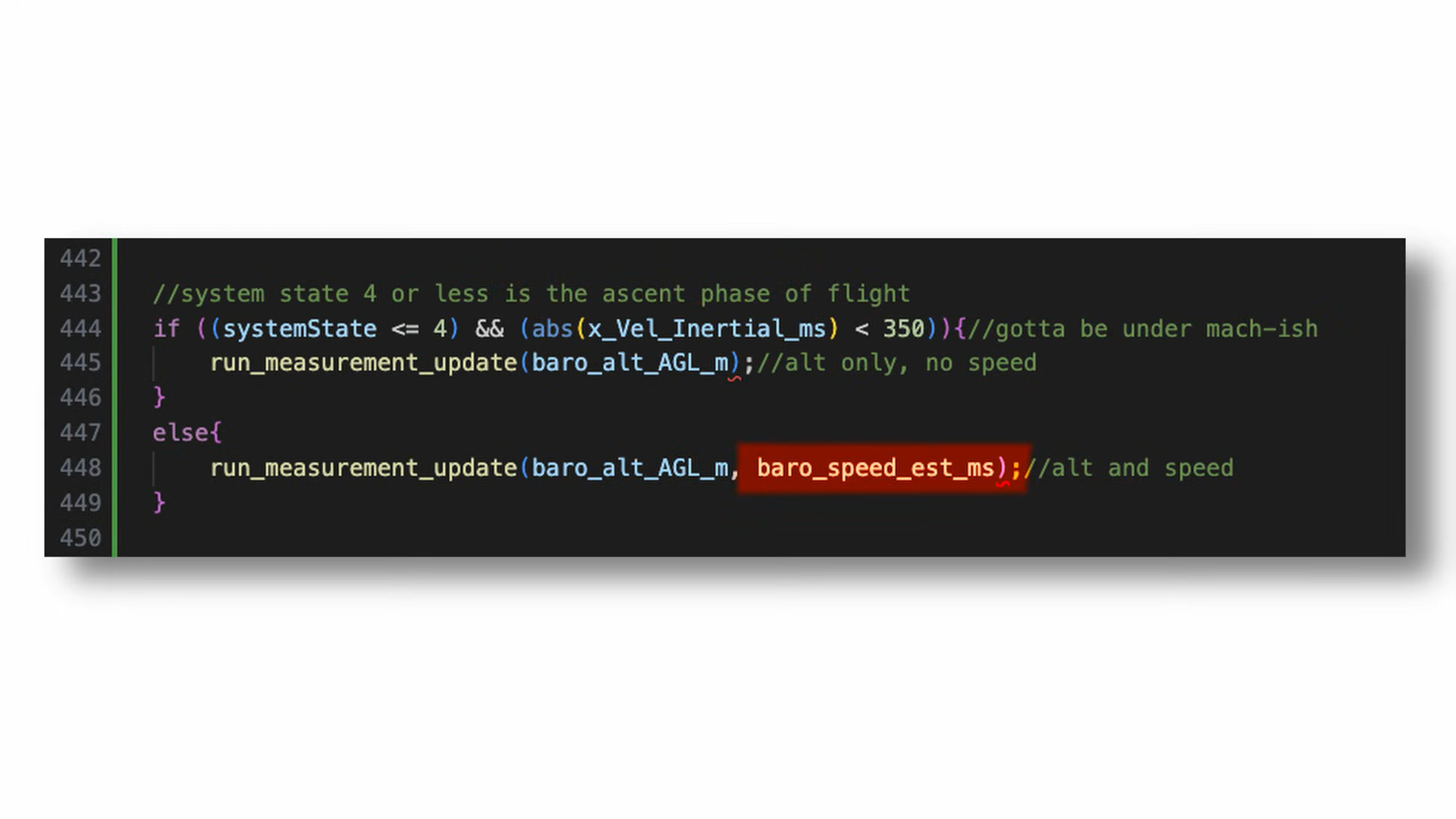
But this begs the question, what could possibly have caused a parachute deployment at nearly twice the speed of sound?[BPS.space] had made a quick untested change to the flight control software, in an attempt to get more accurate speed data. By feeding into the flight controller barometric altitude changes during the decent stage, it should be able to more accurately estimate its position. However, direct static pressure readings at supersonic speeds are not an accurate way of measuring altitude. So, during the boost phase, the speed estimation function should only rely on accelerometer data.

The line in question.

However, a simple mistake in boolean logic resulted in the accelerometer velocity being passed into the velocity estimate function during the boost phase. This gave an erroneous velocity value below zero triggering the parachute deployment. Nevertheless, the test was successful in proving antenna choice resulted in poor telemetry and GPS readings on earlier launches.

If you want to see a far more successful [BPS.space] rocket launch, make sure to check out this self landing rocket next!

An Open Source Electromagnetic Resonance Tablet

14 January 2026 at 04:00

Drawing tablets have been a favorite computer peripheral of artists since its inception in the 1980s. If you have ever used a drawing tablet of this nature, you may have wondered, how it works, and if you can make one. Well, wonder no longer as [Yukidama] has demonstrated an open source electromagnetic resonance (EMR) drawing tablet build!

The principle of simple EMR tablets is quite straight forward. A coil in the tablet oscillates from around 400 kHz to 600 kHz. This induces a current inside a coil within the pen at its resonant frequency. This in turn, results in a voltage spike within the tablet around the pen’s resonant frequency. For pressure sensing, a simple circuit within the pen can shift its resonant frequency, which likewise is picked up within the tablet. The tablet’s input buttons work in similar ways!

But this is merely one dimensional. To sample two dimensions, two arrays of coils are needed. One to sample the horizontal axis, and one the vertical. The driver circuit simply sweeps over the array and samples every coil at any arbitrary speed the driver can achieve.

Finally, [Yukidama] made a last demo by refining the driver board, designed to drive a flexible circuit containing the coils. This then sits behind the screen of a Panasonic RZ series laptop, turning the device into a rather effective drawing tablet!

If tablets aren’t your style, check out this drawing pen.Β 

Thanks [anfractuosity] for the tip!

Playing Factorio on a Floppy Disk Cluster

13 January 2026 at 14:30

While a revolutionary storage system for their time, floppy disks are not terribly useful these days. Though high failure rates and slow speeds are an issue, for this project, the key issue is capacity. That’s because [DocJade’s] goal is playing the video game Factorio off floppy disks.Β 

Storing several gigabytes of data on floppy disks is a rather daunting challenge. But instead of using a RAID array, only a single reader and a custom file system is deployed in this setup. A single disk is dedicated to storing pool information allowing for caching of file locations, reducing disk swaps. The file system can also store single files across multiple disks for storage of larger files. Everything mounts in fuse and is loosely POSIX compliment, but lacks some features like permissions and links.

With the data stored across thousands of disks, the user is prompted to insert a new disk when needed. This ends up being the limiting factor in read and write speeds, rather than the famously slow speeds of floppies. In fact, it takes about a week to load all of Factorio in this manner, even after optimizations to reduce disk swaps. Factorio is also one of the few games that could be installed in this manner, as it loads most of the game into memory at launch. Many other games that dynamically load textures and world maps would simply crash when a chunk is not immediately available.

Not a FactorioΒ fan? No worries, you could always install modern Linux on a floppy!

Play Games in UEFI…to Access Your Computer

9 January 2026 at 07:00

These days, bootstrapping a computer is a pretty straight forward process, at least as far as the user is concerned. But in the olden days, one would have to manually flick switches entering binary code to get the computer to boot. While certainly not as painstaking as manually flipping bits, these games written for UEFI systems hearken back to the days when accessing your computer was a touch more complicated than pressing a power button.

The repository features five games ranging from a falling ball maze to an age verification quiz. The one thing they all have in common is that to complete system boot, you need to win. All are available in UEFI modules which can not only run in QEMU virtual machines, but bare metal if you so choose.

In no particular order, the games featured are a User Evaluation For Ineptness, which presents a simple addition problem for the user to complete. Insult Sword Fighting, which requires the user to select the correct come back to a prompted insult. Fall To Boot, a falling ball maze navigation game. Age Verification, a set of questions about 80s culture to prove the user is old enough to use the computer. And finally, UEFI Says, a simple memory game.

All of these games are fairly simple, but it’s rather fun to see them built using EDK II as a UEFI module. Let us know down in the comments which is your favorite. And if you’re running an ARM computer, you too can join in on the fun!

Thanks [thatsgrand] for the tip!

Β 

Β 

An RP2040 Powered ADS-B Receiver

7 January 2026 at 07:00

If you’ve ever heard the sound of an aircraft passing overhead and looked at an online plane tracker to try and figure out what it was, then you’ve interacted with ADS-B. It’s a protocol designed to enable easier aircraft monitoring, and it just so happens you can decode it yourself with the right hardware and software β€” which is how [John McNelly] came to develop ADSBee, an open source ADS-B receiver based around an RP2040.

ADS-B uses on–off keying (OOK) at 1 Mbps, and operates at 1090 MHz. This might seem like a rather difficult protocol to decode on a microcontroller, but the RP2040’s PIO is up to the task. All it takes is a bit of optimization, and a some basic RF components to amplify and digitize the signals.

However, not all aircraft utilize the 1090 MHz ADS-B implementation, and instead use a related protocol called UAT. Operating at 978 MHz, a second receiver is needed for decoding UAT traffic data, which is where the CC1312 comes into play. ADSBee may even be the first open source implementation of a UAT decoder!

What’s quite impressive is the various form factors the module is available in. Ranging from small solder-down modules to weatherproof outdoor base stations, nearly every potential need for an ADS-B receiver is covered. With POE or ESP32 S3 options available, there is no shortage of networking options either!

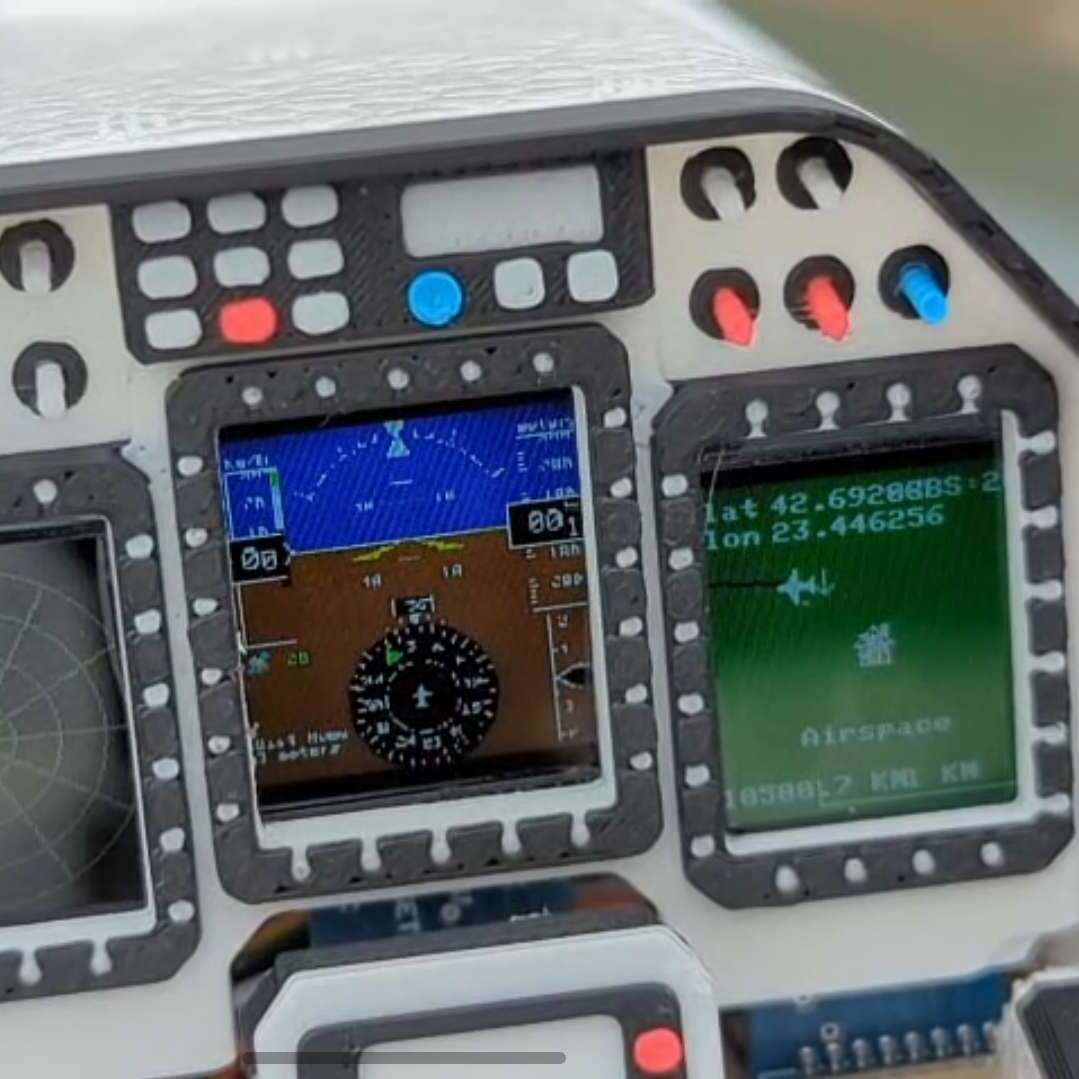
ADSBees have been placed in numerous locations, ranging from base stations to drones. One user even built out a tiny flight display cluster complete with traffic indicators into an FPV drone.

This isn’t the first time we have seen ADS-B receivers used by drone enthusiasts, but this is certainly the most feature rich and complete receiver we have come across.

Print Pixel Art to a Floppy Disk

4 January 2026 at 19:00

Here at Hackaday we love floppy disks. While they are by no means a practical or useful means of storing data in the age of solid state storage, there is something special about the little floppy disc of magnetic film inside that iconic plastic case. That’s why we were so excited to see the tool [dbalsom] developed for printing pixel art in a floppy’s track timing diagrams!

Floppy timing diagrams are usually used to analyze the quality of an individual disk. It represents flux transitions within a single floppy tack as a 2D graph. But it’s also perfectly possible to β€œpaint” images on a floppy this way. Granted, you can’t see these images without printing out a timing diagram, but if you’re painting images onto a floppy, that’s probably the point.

This is where pbm2track comes in handy! It takes bitmap images and encodes them onto floppy emulators, or actual floppies. The results are quite excellent, with near-perfect recreation in floppy graphical views. The results on real floppies are also recognizable as the original image. The concept is similar to a previous tool [dbalsom] created, PNG2disk

If you, too, love the nearly forgotten physical likeness of the save button, make sure to check out this modern Linux on a floppy hack next!

Thanks [gloriouscow] for the tip!

Ray Marching in Excel

4 January 2026 at 10:00

3D graphics are made up of little more then very complicated math. With enough time, you could probably compute a ray marching by hand. Or, you could set up Excel to do it for you!

Ray marching is a form of ray tracing, where a ray is stepped along based on how close it is to the nearest surface. By taking advantage of signed distance functions, such an algorithm can be quite effective, and in some instances much more efficient then traditional ray marching algorithms. But the fact that ray marching is so mathematically well defined is probably why [ExcelTABLE] used it to make a ray traced game in Excel.

Under the hood, the ray marching works by casting a ray out from the camera and measuring its distance from a set of three dimensional functions. If that distance is below a certain value, this is considered a surface hit. On surface hits, a simple normal shader computes pixel brightness. This is then rendered out by variable formatting in the cells of the spreadsheet.

For those of you following along at home, the tutorial should work just fine in any modern spreadsheet software including Google Sheets and LibreOffice Calc. It also provides a great explanation of the math and concepts of ray marching, so is worth a read regardless your opinions on Excel’s status as a so-called β€œprogramming language.”

This is not the first time we have come across a ray tracing tutorial. If computer graphics are your thing, make sure to check out this ray tracing in a weekend tutorial next!

Thanks [Niklas] for the tip!

❌
❌