Normal view

There are new articles available, click to refresh the page.
Before yesterdayMain stream

Keebin’ with Kristina: the One with the Pretty Protoypes

4 December 2025 at 13:00
Illustrated Kristina with an IBM Model M keyboard floating between her hands.

Some like it flat, and there’s nothing wrong with that. What you are looking at is the first prototype of Atlas by [AsicResistor], which is still a work in progress. [AsicResistor] found the Totem to be a bit cramped, so naturally, it was time to design a keyboard from the ground up.

Image by [AsicResistor] via reddit
The case is wood, if that’s not immediately obvious. This fact is easily detectable in the lovely render, but I didn’t want to show you that here.

This travel-friendly keyboard has 34 keys and dual trackpoints, one on each half. If the nubbin isn’t your thing, there’s an optional, oversized trackball, which I would totally opt for. But I would need an 8-ball instead, simply because that’s my number.

A build video is coming at some point, so watch the GitHub, I suppose, or haunt r/ergomechkeyboards.

Flat as it may be, I would totally at least give this keyboard a fair chance. There’s just something about those keycaps, for starters. (Isn’t it always the keycaps with me?) For another, I dig the pinky stagger. I’m not sure that two on each side is nearly enough thumb keys for me, however.

The Foot Roller Scroller Is Not a Crock

Sitting at a keyboard all day isn’t great for anyone, but adding in some leg and/or foot movement throughout the day is a good step in the right direction. Don’t want to just ride a bike all day under your desk? Add something useful like foot pedals.

Image by [a__b] via reddit
The Kinesis Savant pedals are a set of three foot switches that are great for macros, or just pressing Shift all the time. Trust me. But [a__b] wasn’t satisfied with mere clicking, and converted their old pedals into a Bluetooth 5.0 keyboard with a big, fat scroll wheel.

Brain-wise, it has a wireless macro keyboard and an encoder from Ali, but [a__b] plans to upgrade it to a nice!nano in order to integrate it with a Glove80.

Although shown with a NautiCroc, [a__b] says the wheel works well with socks on, or bare feet. (Take it from me, the footfeel of pedals is much more accurate with no shoes on.) Interestingly, much of the inspiration was taken from sewing machines.

As of this writing, [a__b] has mapped all keys using BetterTouchTool for app-specific action, and is out there happily scrolling through pages, controlling the volume, and navigating YouTube videos. Links to CAD and STLs are coming soon.

The Centerfold: LEGO My Ergo

Image by [Flat-Razzmatazz-672] via reddit
This here is a Silakka 54 split keyboard with a custom LEGO case available on Thingiverse. [Flat-Razzmatazz-672] says that it isn’t perfect (could have fooled me!), but it did take a hell of a lot of work to get everything to fit right.

As you might imagine and [Flat-Razzmatazz-672] can attest, 3D printing LEGO is weird. These studs are evidently >= 5% bigger than standard studs, because if you print it as is, the LEGO won’t fit right.

Via reddit

Do you rock a sweet set of peripherals on a screamin’ desk pad? Send me a picture along with your handle and all the gory details, and you could be featured here!

Historical Clackers: the North’s was a Striking Down-striker

Although lovely to gaze upon, the North’s typewriter was a doomed attempt at creating a visible typewriter. That is, one where a person could actually see what they were typing as they typed it.

Image via The Antikey Chop

North’s achieved this feat through the use of vertical typebars arranged in a semi-circle that would strike down onto the platen from behind, making it a rear down-striker.

In order for this arrangement to work, the paper had to be loaded, coiled into one basket, and it was fed into another, hidden basket while typing. This actually allowed the typist to view two lines at a time, although the unfortunate ribbon placement obstructed the immediate character.

The story of North’s typewriter is a fairly interesting one. For starters, it was named after Colonel John Thomas North, who wasn’t really a colonel at all. In fact, North had very little to do with the typewriter beyond bankrolling it and providing a name.

North started the company by purchasing the failed English Typewriter Company, which brought along with it a couple of inventors, who would bring the North’s to fruition. The machine was made from 1892 to 1905. In 1896, North died suddenly while eating raw oysters, though the cause of death was likely heart failure. As he was a wealthy, unpopular capitalist, conspiracy theories abounded surrounding his departure.

Finally, MoErgo Released a New Travel Keyboard, the Go60

It’s true, the MoErgo Glove80 is great for travel. And admittedly, it’s kind of big, both in and out of its (very nice) custom zipper case. But you asked, and MoErgo listened. And soon enough, there will be a new option for even sleeker travel, the Go60. Check out the full spec sheet.

Image by MoErgo via reddit

You may have noticed that it’s much flatter than the Glove80, which mimics the key wells of a Kinesis Advantage quite nicely.

Don’t worry, there are removable palm rests that are a lot like the Glove80 rests. And it doesn’t have to be flat –there is 6-step magnetic tenting (6.2° – 17°), which snaps on or off in seconds. The palm rests have 7-step tenting (6°-21.5°), and they come right off, too.

Let’s talk about those trackpads. They are Cirque 40 mm Glidepoints. They aren’t multi-touch, but they are fully integrated into ZMK and thus are fully programmable, so do what you will.

Are you as concerned about battery life as I am? It’s okay — the Go60 goes fully wired with a TRRS cable between the halves, and a USB connection from the left half to the host. Although ZMK did not support this feature, MoErgo sponsored the founder, [Pete], to develop it, and now it’s just a feature of ZMK. You’re welcome.

Interested? The Go60 will be on Kickstarter first, and then it’ll be available on the MoErgo site. Pricing hasn’t quite been worked out yet, so stay tuned on that front.

Via reddit


Got a hot tip that has like, anything to do with keyboards? Help me out by sending in a link or two. Don’t want all the Hackaday scribes to see it? Feel free to email me directly.
In Which I Vibe-Code a Personal Library System

3 December 2025 at 10:00

When I was a kid, I was interested in a number of professions that are now either outdated, or have changed completely. One of those dreams involved checking out books and things to patrons, and it was focused primarily on pulling out the little card and adding a date-due stamp.

Of course, if you’ve been to a library in the last 20 years, you know that most of them don’t work that way anymore. Either the librarian scans special barcodes, or you check materials out yourself simply by placing them just so, one at a time. Either way, you end up with a printed receipt with all the materials listed, or an email. I ask you, what’s the fun in that? At least with the old way, you’d usually get a bookmark for each book by way of the due date card.

As I got older and spent the better part of two decades in a job that I didn’t exactly vibe with, I seriously considered becoming a programmer. I took Java, Android, and UNIX classes at the local junior college, met my now-husband, and eventually decided I didn’t have the guts to actually solve problems with computers. And, unlike my husband, I have very little imagination when it comes to making them do things.

Fast forward to last weekend, the one before Thanksgiving here in the US. I had tossed around the idea of making a personal library system just for funsies a day or so before, and I brought it up again. My husband was like, do you want to make it tonight using ChatGPT? And I was like, sure — not knowing what I was getting into except for the driver’s seat, excited for the destination.

Vibing On a Saturday Night

I want to make a book storage system. Can you please write a Python script that uses SQL Alchemy to make a book model that stores these fields: title, author, year of publication, genre, and barcode number?

So basically, I envisioned scanning a book’s barcode, pulling it up in the system, and then clicking a button to check it out or check it back in. I knew going in that some of my books don’t have barcodes at all, and some are obliterated or covered up with college bookstore stickers and what have you. More on that later.

First, I was told to pip install sqlalchemy, which I did not have. I was given a python script called books_db.py to get started. Then I asked for code that looks up all the books and prints them, which I was told to add to the script.

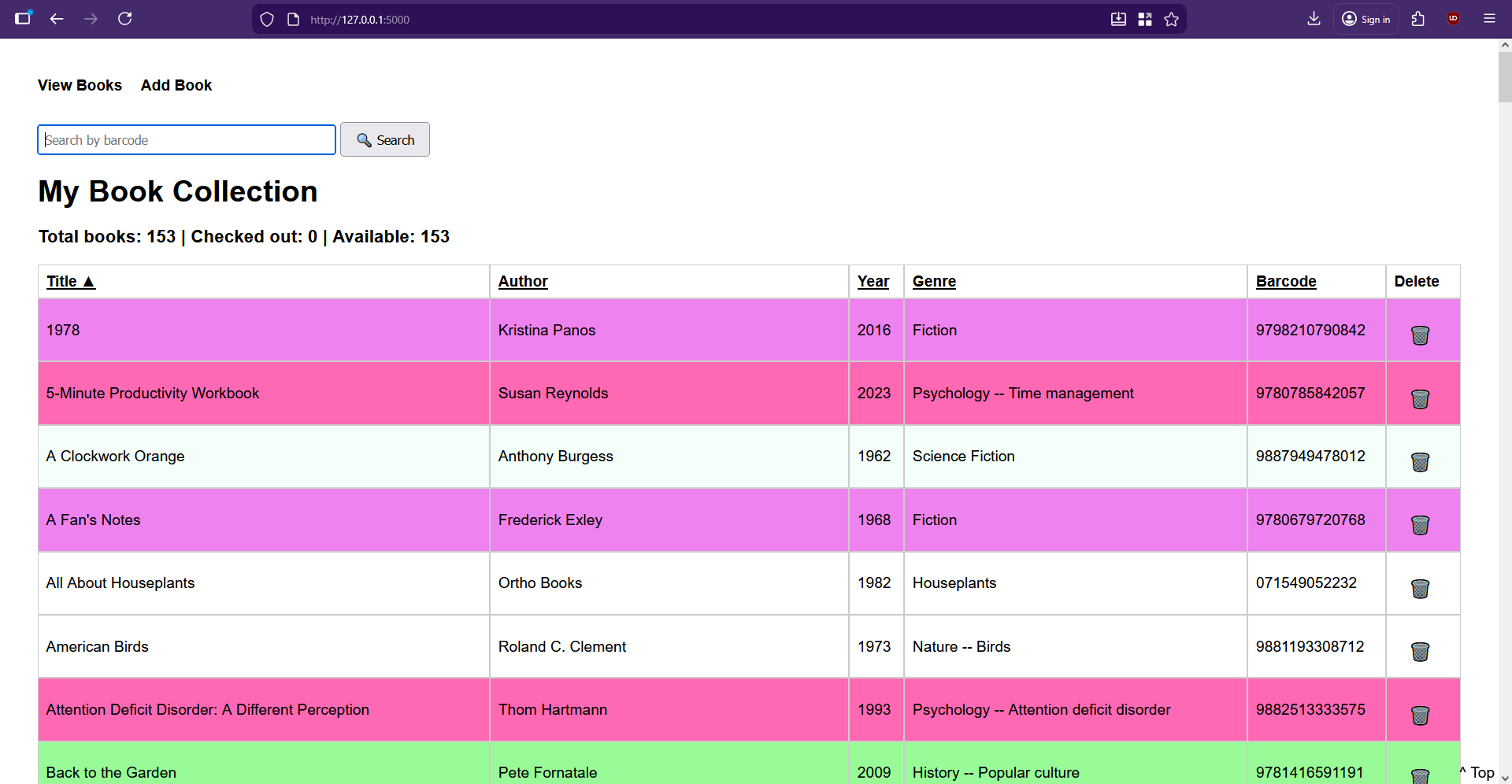
Then things were getting serious. I asked it to write a Flask server and a basic HTML front end for managing the books in the system. I was given the Flask server as app.py, and then some templates: base.html to be used by all pages, and index.html to view all the books, and add_book.html to, you know, add a new book. At that point, I got to see what it had created for the first time, and I thought it was lovely for a black and white table. But it needed color.

Yeah, so I’ve been busy adding books and not CSS color keywords to genres lately.

Check It Out

This is a great book, and you should read it whether you think you have a problem or not.

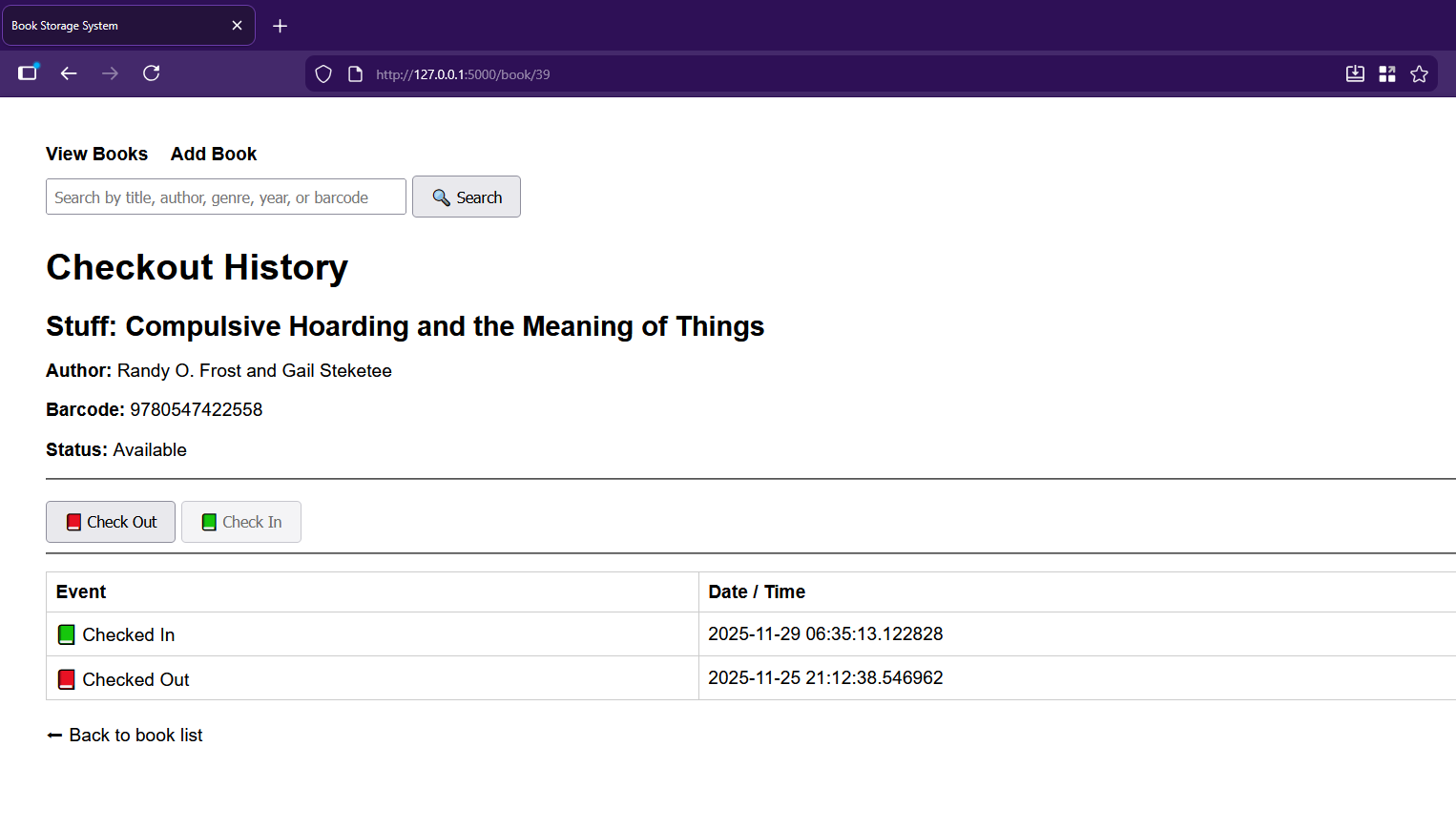
I asked the chat-thing for features and implemented them piecemeal, as you do if you’re not a masochist. First up was a cute little trash-can delete-button for every entry. Then it was time to set up the CheckoutEvent. Each of these events records which book it belongs to, whether it’s a check-out or check-in event, and the timestamp of said event. Of course, then it was time to get the checkout history wired to the front-end and accessible by clicking a book’s title.

All I really had to do was add a history route to app.py, update index.html to make the titles clickable, and create the book_history.html it spat out. Then I had it add the buttons for checking in and out on the new checkout history page, which involved adding routes to app.py as well as a helper to compute the current status.

Then it had me modify the history route and update book_history.html with the actual buttons. And they’re super cute, too — there’s a little red book on the checkout button, and a green book on the check-in.

Barcode Blues

On the index.html page, can you add a barcode number-based search box? And when the user searches, redirect them to the book page for that barcode?

Now it was time to get the barcode scanning situation up and running. I was sure at some point that ChatGPT would time me out for the night since I use the free model, but it just kept helping me do whatever I wanted, and even suggesting new features.

I wanted the barcode handling to be twofold: one, it should definitely pull the checkout page if the book exists in the system, and it should also definitely go to the book-entering page if not.

Yes — that’s a great workflow feature.
We’ll add a barcode search box to your index page, and when someone submits a barcode, the app will:

  1. Look up the book by barcode

  2. Redirect straight to that book’s checkout history page

  3. Show a nice error if the barcode doesn’t exist

I did what it told me, adding a barcode search route in app.py and updating the index() route to use it. I then added its barcode search form to index.html. It was at this point that I had to figure out a way to generate barcodes so I could make little stickers for the books that lack them entirely, or have otherwise obliterated ones.

I have a pretty basic 1D barcode scanning gun, and it won’t scan everything. As I soon found out, it prefers fake EAN barcodes to UPCs altogether. I finally found an online barcode generator and got to work, starting with a list of randomly-generated numbers I made with Excel. I decided I wanted all the fake barcodes to start with 988, which is close enough to the ISBN 978 lead-in, and happens to use my favorite number twice.

We took a brief detour as I asked the chat-thing to make the table to have ascending/descending sorting by clicking the headers. The approach it chose was to keep things server-side, and use little arrows to indicate direction. I added sorting logic to app.py and updated index.html to produce the clickable headers, and also decided that the entries should be color-coded based on genre, and implemented that part without help from GPT. Then I got tired and went to bed.

The Long, Dark Night of the Solo Programmer

I’m of a certain age and now sleep in two parts pretty much every night. In fact, I’m writing this part now at 1:22 AM, blasting Rush (2112) and generally having a good time. But I can tell you that I was not having a good time when I got out of bed to continue working on this library system a couple of hours later.

There I was, entering books (BEEP!), when I decided I’d had enough of that and needed to try adding more features. I cracked my knuckles and asked the chat-thing if it could make it so the search works across all fields — title, author, year, genre, or barcode. It said, cool, we can do that with a simple SQLAlchemy or_ query. I was like, whatever, boss; let’s get crazy.

Can you make it so the search works across all fields?

It had me import or_ and update the search route in app.py to replace the existing barcode search route with a generalized search using POST. Then I was to update index.html to rename the input to a general query. Cool.

But no. I messed it up some how and got an error about a missing {% endblock %}. In my GPT history it says, I’m confused about step 2. Where do I add it? And maybe I was just tired. I swear I just threw the code up there at the top like it told me to. But it said:

Ah! I see exactly why it’s confusing — your current index.html starts with the <h1> and then goes straight into the table. The search form should go right under the <h1> and before the table.

Then I was really confused. Didn’t I already have a search box that only handled barcodes? I sure did, over in base.html. So the new search code ended up there. Maybe that’s wrong. I don’t remember the details, but I searched the broader internet about my two-layer error and got the thing back to a working state many agonizing minutes later. Boy, was I proud, and relieved that I didn’t have to ask my husband to fix my mistake(s) in the morning. I threw my arms in the air and looked around for the cats to tell them the good news, but of course, I was the only one awake.

Moar Features!

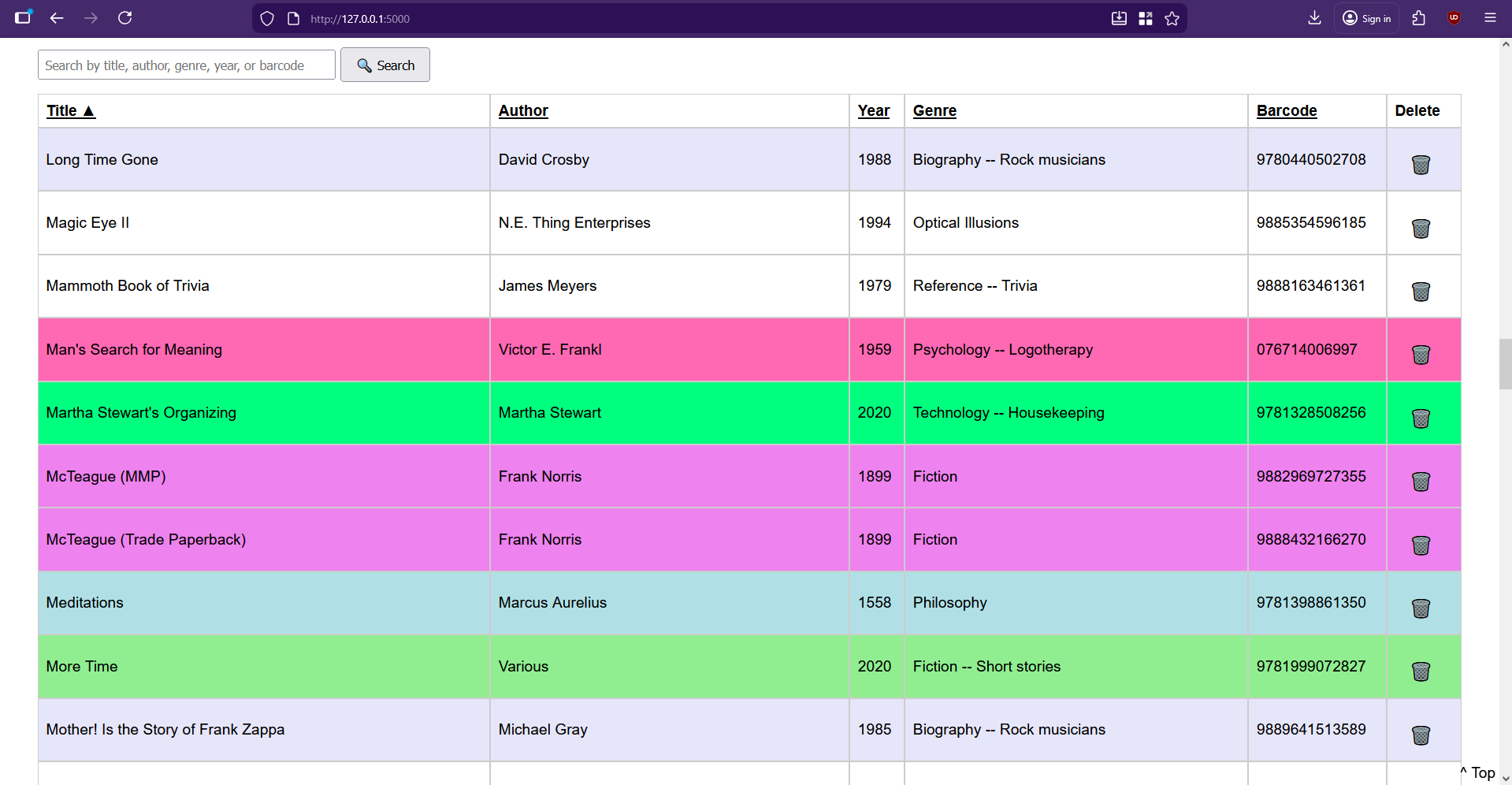
I wasn’t satisfied. I wanted more. I asked it to add a current count of books in the database and display it toward the top. After that, it offered to add a count of currently-checked-out vs. available books, to which I said yes please. Then I wanted an author page that accepts an author’s name and shows all books by that author. I asked for a new page that shows all the books that are checked out. Most recently, I made it so the search box and the column headers persist on scroll.

I’m still trying to think of features, but for now I’m busy entering books, typing up check-out cards on my IBM Wheelwriter 5, and applying library pockets to the inside back covers of all my books. If you want to make your own personal library system, I put everything on GitHub.

On the Shoulders of Giants (and Robots)

I couldn’t have done any of this without my husband’s prompts and guidance, his ability to call shenanigans on GPT’s code whenever warranted, and ChatGPT itself. Although I have programmed in the past, it’s been a good long time since I even printed “Hello, World” in any language, though I did find myself recalling a good deal about this and that syntax.

If you want to make a similar type of niche system for your eyes only, I’d say this could be one way to do it. Wait, that’s pretty non-committal. I’d say just go for it. You have yourself and the broader Internet to check mistakes along the way, and you just might like some of the choices it makes on your behalf.

Hackaday Podcast Episode 347: Breaking Kindles, Baby’s First Synth, and Barcodes!

28 November 2025 at 12:00

This week, Hackaday’s Elliot Williams and Kristina Panos met up over coffee to bring you the latest news, mystery sound, and of course, a big bunch of hacks from the previous seven days or so.

On What’s That Sound, Kristina got sort of close, but of course failed spectacularly. Will you fare better and perhaps win a Hackaday Podcast t-shirt? Mayhap you will.

After that, it’s on to the hacks and such, beginning with an interesting tack to take with a flat-Earther that involves two gyroscopes.  And we take a look at the design requirements when it comes to building synths for three-year-olds.

Then we discuss several awesome hacks such as a vehicle retrofit to add physical heated seat controls, an assistive radio that speaks the frequencies, and an acoustic radiometer build. Finally, we look at the joys of hacking an old Kindle, and get a handle on disappearing door handles.

Check out the links below if you want to follow along, and as always, tell us what you think about this episode in the comments!

Download in DRM-free MP3 and savor at your leisure.

Where to Follow Hackaday Podcast

Episode 347 Show Notes:

News:

  • No news is good news! So we talk about Thanksgiving and what we’ve learned recently.

What’s that Sound?

Interesting Hacks of the Week:

Quick Hacks:

Can’t-Miss Articles:

Keebin’ with Kristina: the One with the Elegant Macro Pad

24 November 2025 at 13:00
Illustrated Kristina with an IBM Model M keyboard floating between her hands.

Some people are not merely satisfied with functionality, or even just good looks. These persnickety snoots (I am one of them) seek something elegant, a true marriage of form and function.

Image by [YANG SHU] via Hackaday.IO
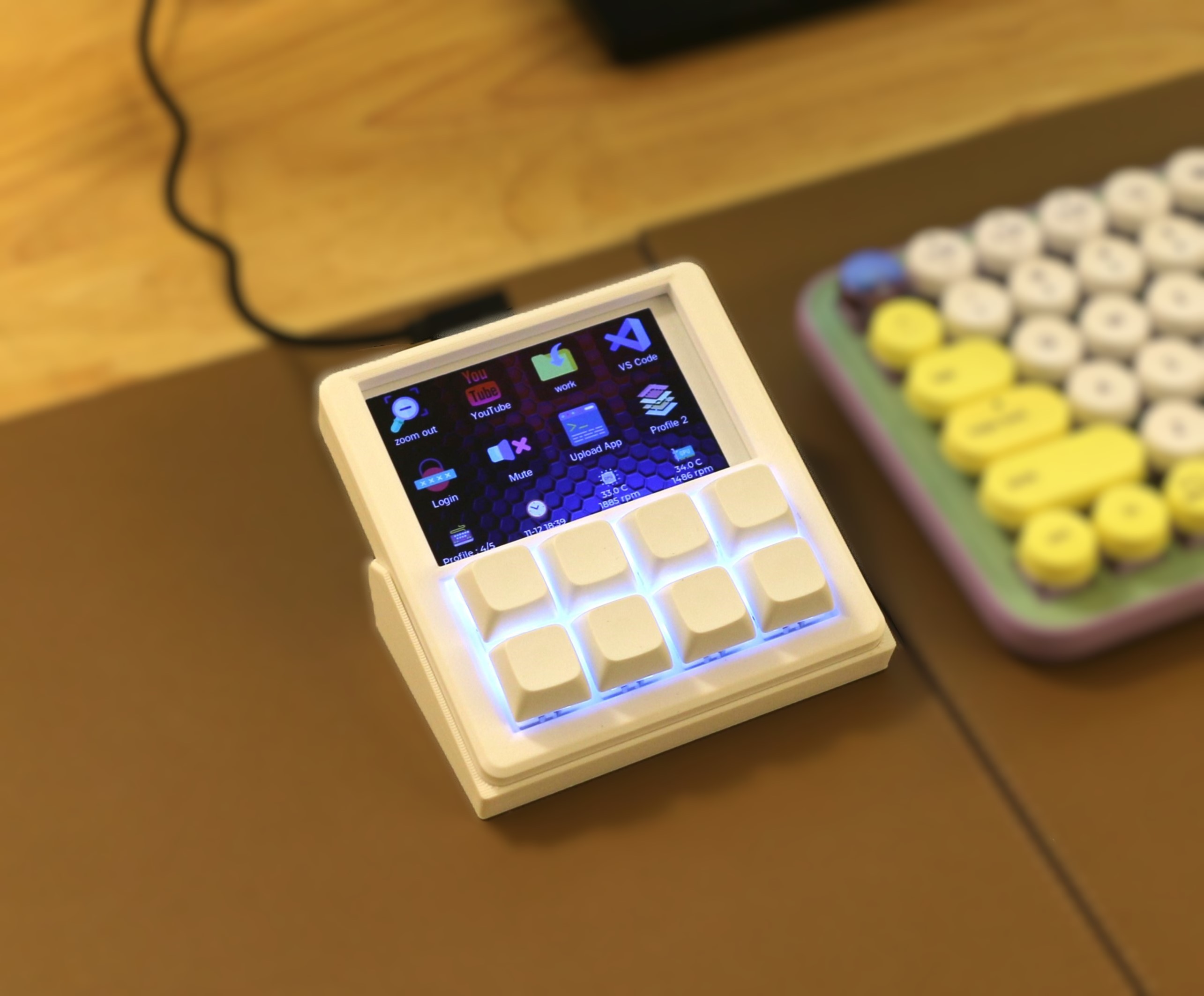
Should such a person be in the market for a macro pad (or ‘macropad’ if you prefer), that snoot should look no further than [YANG SHU]’s 8-key programmable stream deck-like device.

The main goal here was the perfect fusion of display and feel. I’m not sure that an FDM-printed, DIY macro pad can look any better than this one does. But looks are only half the story, of course. There’s also feel, and of course, functionality.

Yes those are (hot-swappable) mechanical key switches, and they are powered by an ESP32-S2. Drawn on the 3.5″ LCD are icons and text for each switch, which of course can be easily changed in the config app.

There’s a three-direction tact switch that’s used to switch between layout profiles, and I’m sure that even this is satisfying on the feel front. Does it get better than this? Besides maybe printing it in black. I ask Hackaday.

KeebDeck Keyboard Gets Two Thumbs Up

Did you make it to Supercon this year? If so, you hold a badge with a special keyboard — a custom job by Hackaday superfriend [Arturo182], aka Solder Party. Were you wondering about its backstory?

Image by [Arturo182] via Solder Party
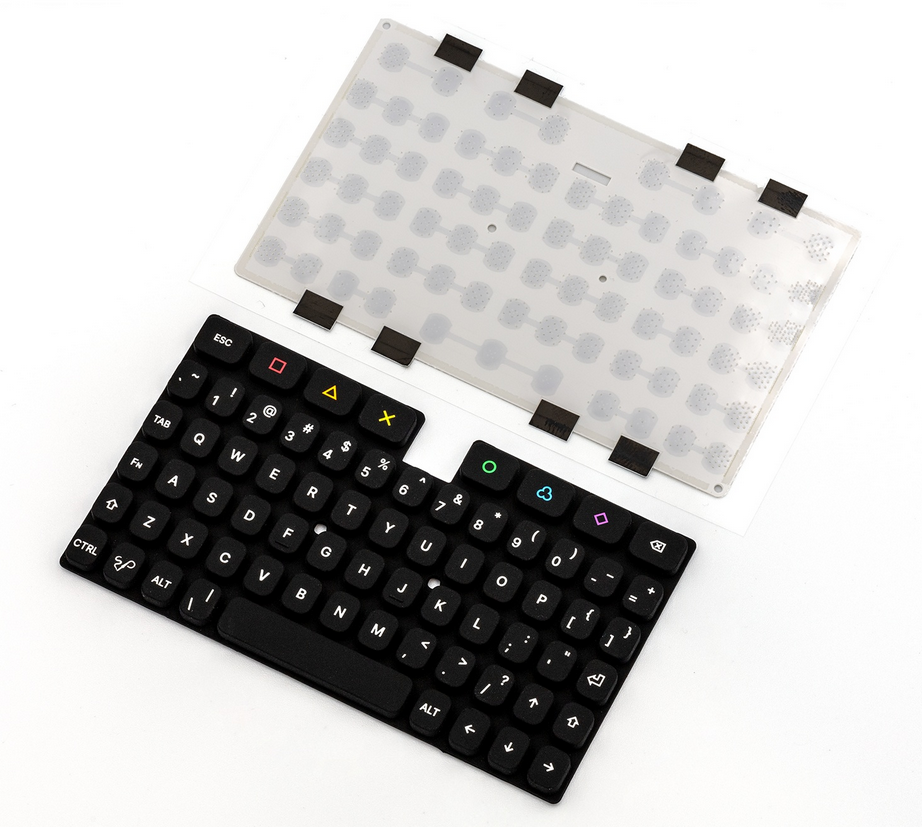
Unsatisfied with having to rely on a dwindling stock of BBQ20 keyboards, [Arturo182] created a fantastic replacement called the KeebDeck Keyboard.

This 69-key alphanumeric silicone number has all the keys a hacker needs, plus a rainbow of extras that can be used for macros. According to [Arturo182], the keyboard has a tactile feel thanks to a snap dome sheet underneath the keys, and this makes it more comfortable for long thumb-typing sessions.

Be sure to check out the teasers at the bottom of the KeebDeck page, because there is some really exciting stuff. If you want to build one, GitHub is your friend, pal.

Thanks for the tip, [Wim Van Gool]!

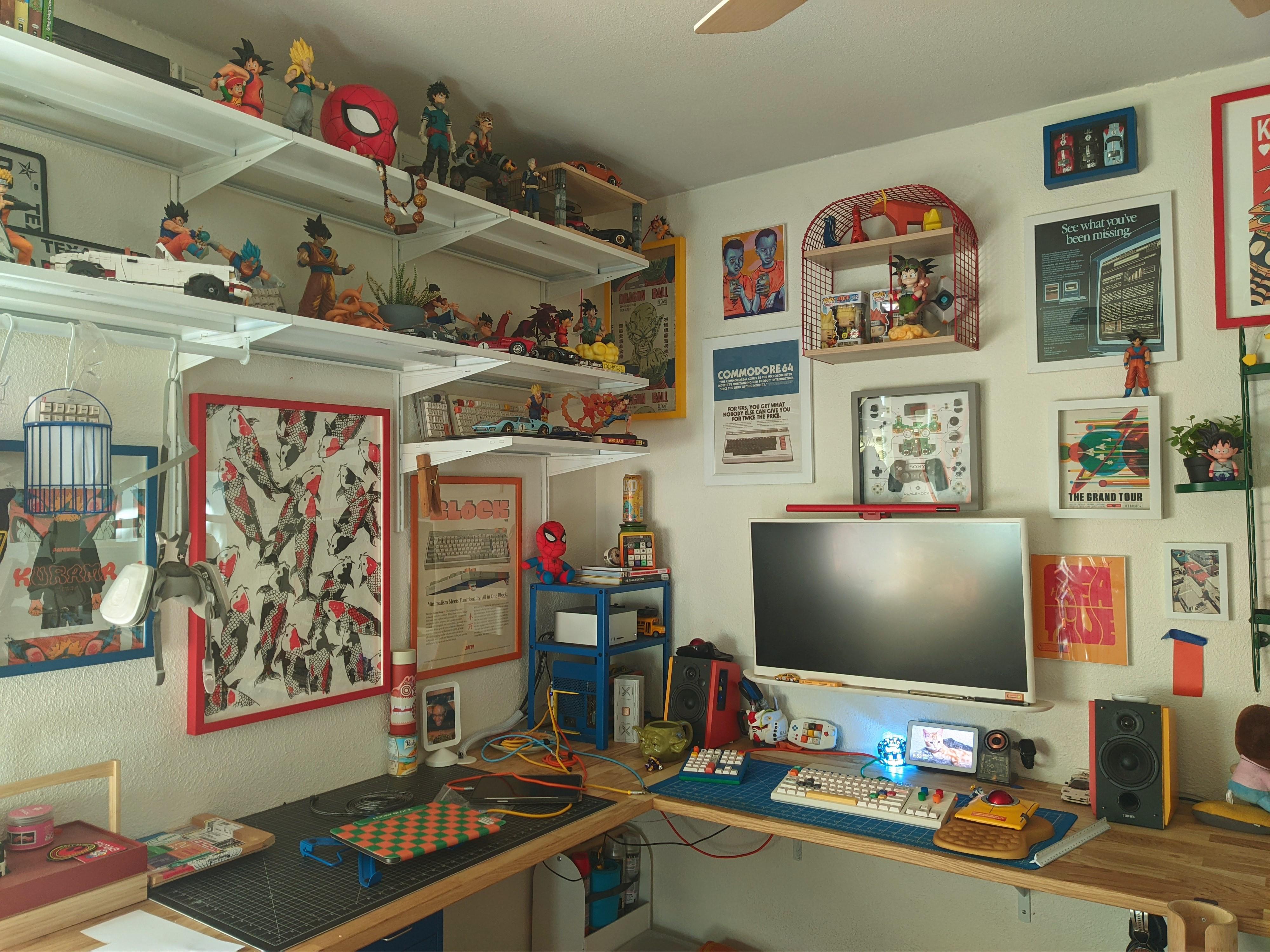
The Centerfold: Controlled Chaos

Image by [Tardigradium] via reddit
Don’t you just love the repeated primary colors throughout this centerfold? I do, and I think this whole arrangement shows amazing restraint. Controlled chaos, if you will. That’s what [Tardigradium]’s wife calls it, anyway.

Here’s what I know: That’s a Nulea m512 mouse, the keyboard is a KBD Craft Sachiel LEGO number, and that there is a Cidoo macro pad. Best of all, [Tardigradium] hand-painted the speakers. Neat-o!

Do you rock a sweet set of peripherals on a screamin’ desk pad? Send me a picture along with your handle and all the gory details, and you could be featured here!

Historical Clackers: the Gerda Typewriter Was One of Accessibility

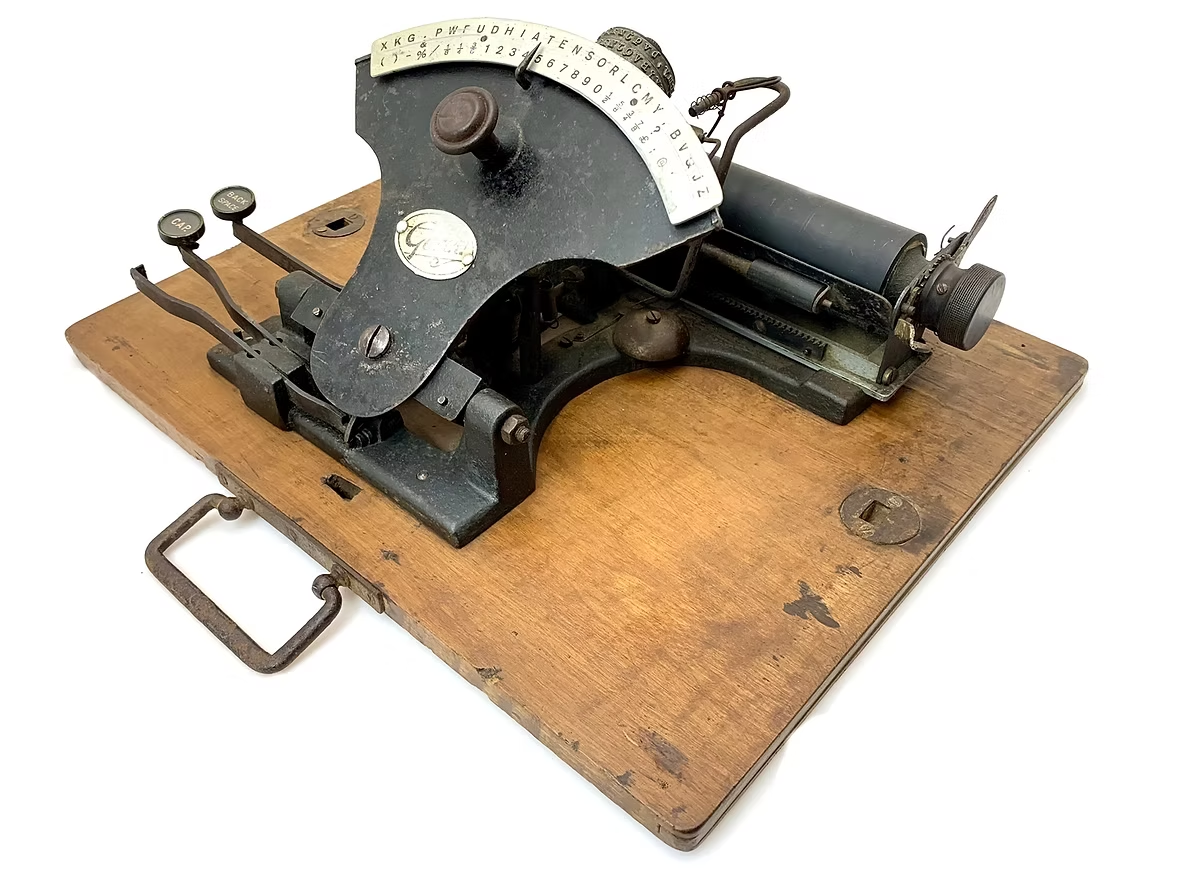
Some of us (okay, I) would have thought that most accessibility inventions are fairly recent, say, from the 1960s onward. But consider the Gerda typewriter, which was created in 1919 to enable blind and one-armed victims of WWI to become employable typists.

Image via The Antikey Chop

According to the Antikey Chop, it’s quite possible that the German government helped grease the wheels of this project so that these soldiers would have a usable typewriter with which to get on with life.

Three versions of this index typewriter were produced: a two-handed Gerda, one with a Braille index, and one with an English index. All entered the market the same year, and were produced for a total of three years.

The Gerda’s typewheel was quite like Blickensderfer, and some even had the DHIATENSOR layout. More expensive than last week’s Clacker (75 Marks), the Gerdas for blind and sighted people with two hands cost 195 Marks, and the one-handed edition was 205 Marks. Some of the two-handed models had rectangular, wooden key-tops, and others had round, glass-topped keys.

Finally, Module-Based Keyboard Is a Sensory Nightmare

Image by Future via Games Radar

I’ve been an early adopter of keyboards in the past. This is usually to bring them to your attention, either before they’re released, or just as they’ve come out. And never have I ever had this poor of an experience.

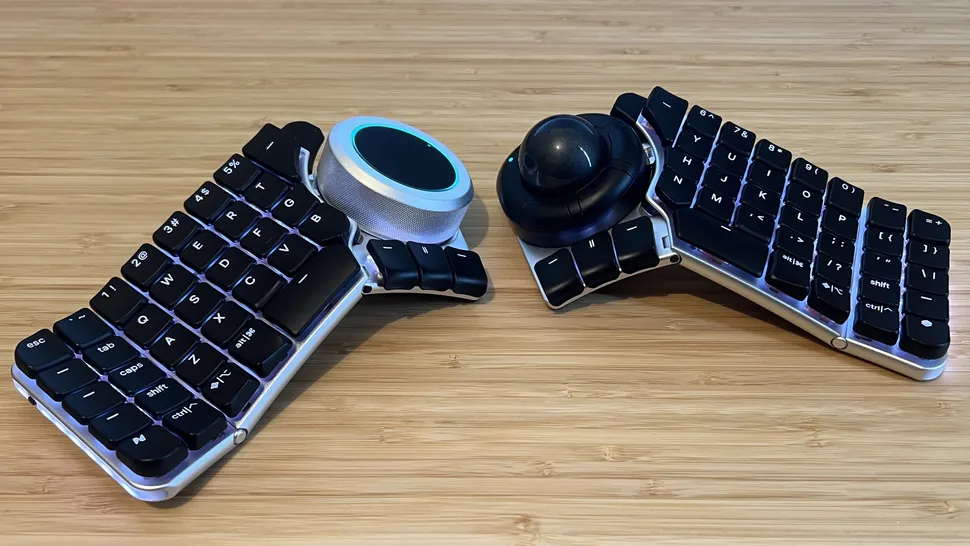
Games Radar recently reviewed a surprisingly not-failed Kickstarter keyboard that actually shipped, the Naya Create. It may not look like it, but the Create is supposed to be a gaming keyboard. What it does look like is mouse-focused, or at least mouse-forward. And that’s the point of it. Evidently.

Those big modules are interchangeable, and there are four of them so far: the Touch (a trackpad), Track (a trackball that falls out reliably), the Tune (a dial), and the Float, which is designed for space mousing around. They sound cool enough, and might actually be the best part of this whole setup.

To fully illustrate my poit I hvemt’t corrected any of the typos experieved typim this semtemve with the Naya Create while tryig to maintain my usual speed.

But according to Games Radar, the Naya Create is so not worth the $850 (!) asking price. It has ‘mushy, low-profile switches’ and clammy caps, and although the reviewer complains about the non-staggered keys, y’all know that those are my preference at this point.

And apparently, by default, Backspace is mapped to the left side. What? Of course, you can remap any key, whenever the software decides to work. Whenever the reviewer tried to save changes, the software would say that the keyboard is disconnected. Wonderful.

Despite these shortcomings, Games Radar says the keyboard is rock-solid aluminium with good hinges. So there’s that. Just, you know, swap out the switches and keycaps, and wait for software updates, I guess.


Got a hot tip that has like, anything to do with keyboards? Help me out by sending in a link or two. Don’t want all the Hackaday scribes to see it? Feel free to email me directly.
Baby’s First Synth was Daddy’s First Project

22 November 2025 at 07:00
A small, colorful synth built for a 3-year-old. It has five pots, four sliders, and a tiny screen.

We absolutely adore inspired labor-of-love tales such as this one. [Alastair] wanted to build a synth for his daughter’s third birthday in spite of having no prior hardware knowledge. It became the perfect excuse to learn about CAD, microcontrollers, PCB design, and of course, 3D printing.

So, why a synth for a toddler? Aside from plain old ‘why not?’, the story goes that she received a Montessori busy-type board which she seemed to enjoy, and it reminded [Alastair] of the control surface of a synth. He wondered how hard it could be to build something similar that made sound and didn’t require constant button presses.

[Alastair] began his journey by dusting off a 15-year-old Arduino Inventors Kit. The initial goal was to get potentiometer readings and map them to 12 discrete values, and then emit MIDI messages. This was easy enough, and it was time to move to a synth module and an Elegoo Nano.

The full adventure is definitely worth the read. Be sure to check out the pink version in action after the break. You really don’t wanna miss the lil’ panda bear. Trust us.

Thanks for the tip, [dole]!

Sweet Sound Sculpture Helps You Sleep Soundly

21 November 2025 at 11:30
A circuit sculpture designed to help you sleep.

Have trouble sleeping, or getting to sleep in the first place? You’ve no doubt heard of white noise machines, but know it would be much cooler to make your own. Enter Noise Maker, a DIY sound sculpture by [optimus103733], who wanted to learn something in the process of creating.

The best thing about this sound sculpture aside from the looks is that you can not only play five different sounds (e.g. birds, traffic, water, frog, white noise), you can mix them together into a rich but relaxing cacophony.

As you can probably see from the picture, Noise Maker is based on the ESP32 and uses an SD card module, an amplifier, and five six pots. Be sure to check out the pictures, because there are three layers of copper connections and a lot of careful bending to make it all come together. In the video after the break, you can hear it in action.

It seems [optimus103733] isn’t completely satisfied and wants to make a few improvements in the future, such as a voltage regulator, a power switch, and a timer to automatically stop playback once (we assume) sleep has come. Evidently the ESP32 struggles a little with mixing six audio sources, but hey, lesson learned.

Wait, why do we sleep in the first place?

Keebin’ with Kristina: the One with the Cipher-Capable Typewriter

17 November 2025 at 13:00
Illustrated Kristina with an IBM Model M keyboard floating between her hands.

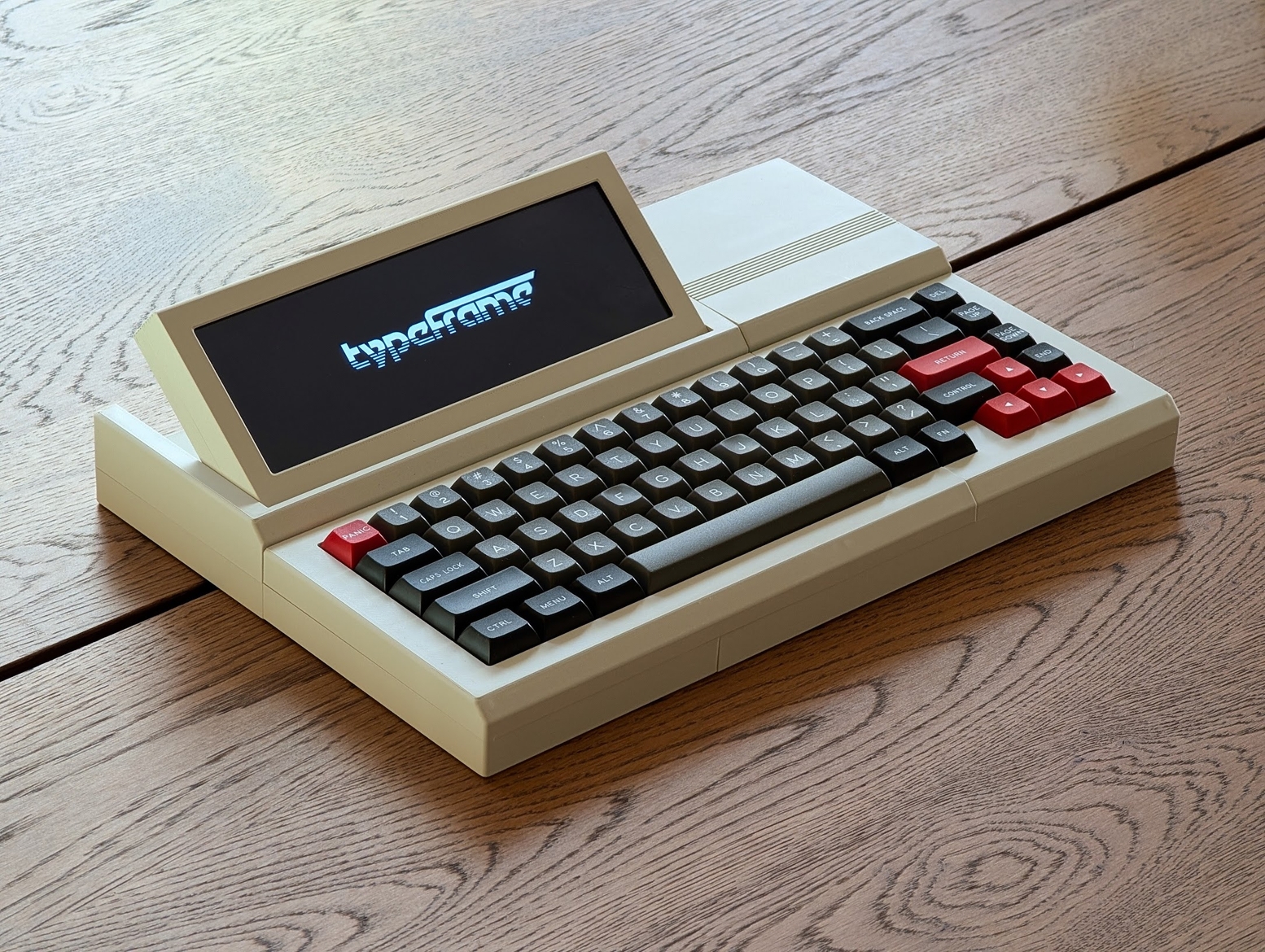
I must confess that my mouth froze in an O when I saw [Jeff]’s Typeframe PX-88 Portable Computing System, and I continue to stare in slack-jawed wonder as I find the words to share it with you. Let me give it a shot.

[Jeff] tells us that he designed Typeframe for his spouse to use as a writer deck. That’s good spousing, if you ask me. Amazingly, this is [Jeff]’s first project of this type and scope, and somehow it’s an elegant, yet easy build that’s quite well documented to boot. Whatever Typeframe’s design may borrow, it seems to give back in spades.

The Typeframe PX-88 Portable Computing System.
Image by [Jeff] via Typeframe.net
Use Typeframe for what you will — cyberdeck, writer deck, travel PC — this baby can handle whatever you throw at it. And of course, it’s open source from front to back.

This Raspberry Pi 4B-based productivity machine has all sorts of neat features. The touch screen flips upward at an angle, so you don’t have to hunch over it or carry a mouse around. Want to sit back a bit while you work? The aesthetically spot-on keyboard is detachable. Yeah.

If that’s not enough to get you interested, Typeframe is designed for simple construction with minimal soldering, and the sliding panels make maintenance a breeze.

A little more about that keyboard — this is Keebin’, after all. It’s an MK Point 65, which boasts hot-swap sockets under those DSA Dolch keycaps. See? Minimal soldering. In fact, the only things you have to solder to make the Typeframe your own are the power switch and the status light. Incredible.

Decktility Goes Where You Go

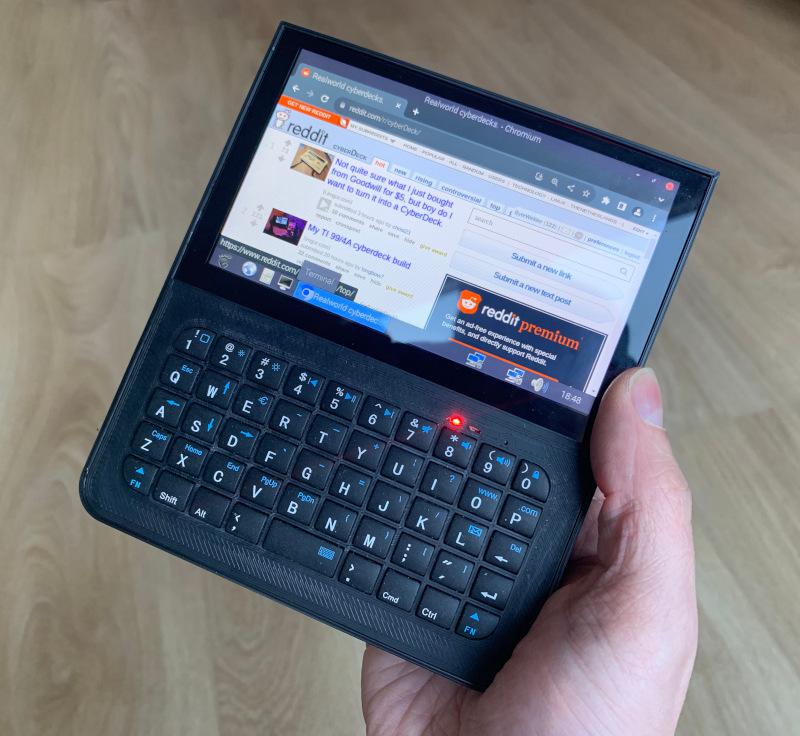
Need something even more portable than the Typeframe? Something that might even fit in your cargo pocket? Decktility could be your answer. You’re gonna have to use your thumbs to type on this one, but that’s the price you pay for ultra portability.

Image by [Ken Van Hoeylandt] via Byte Welder
Built back in 2023, [Ken Van Hoeylandt] combined the Raspberry Pi CM4 with the BigTreeTech Raspberry Pad 5, and “spent many hours developing a case” that fits perfectly. The idea was to push the limits of a Pi-based handheld without it melting down.

The tricky part about using your thumbs is that the experience can be somewhat lacking. But the Bluetooth keyboard [Ken] used actually looks pretty good, and I say this based on this close-up from GitHub. The keys look responsive and the caps aren’t too shallow.

One of the design challenges centered around the batteries — 18650s, because as [Ken] says, flat Li-Pos get spicy when they short-circuit. Both the 18650s and the screen are somewhat heavy, so everything is balanced with the batteries acting somewhat as handles.

This is a great project, and it seems as though [Ken] learned a lot in the process. Be sure to check out the build log for all the gory details.

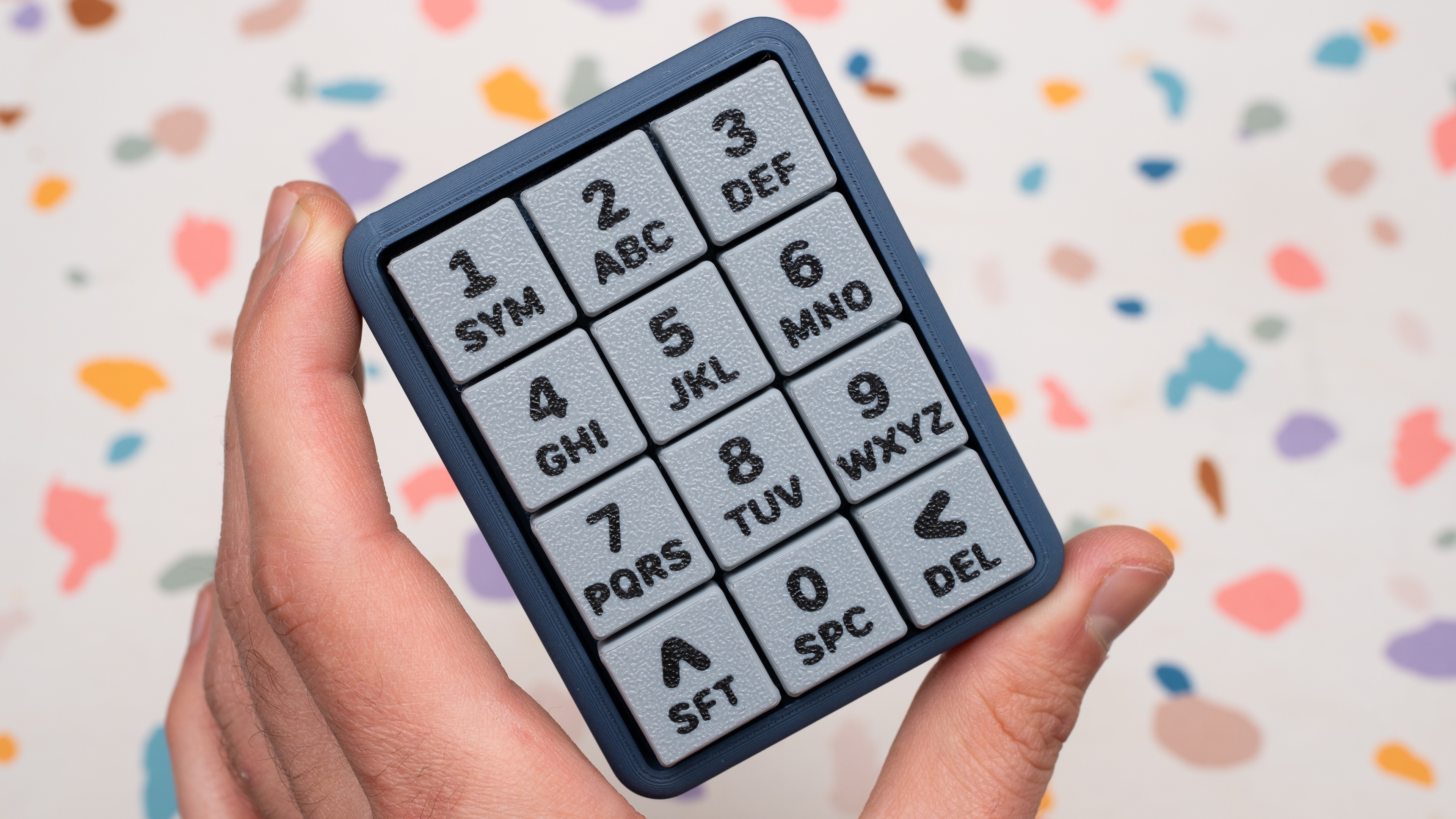
The Centerfold: Party Like It’s Nineteen Nine-T9

Yeah, I know, not your conventional centerfold. The cuteness factor of this 12-key macropad got me, as did the terrazzo party background. But there’s slightly more to [Joe Scotto]’s latest build than meets the eye.

Rather than using predictive typing, the ScottoT9 uses QMK tap dance, wherein a single key can do ‘3, 5, or 100 different things’ depending on how many times you hit it in quick succession. [Joe] reports that it’s surprisingly easy get up to speed on the thing.

This RP2040 Pro Micro-based build is completely open source, including those lovely keycaps. But if you want them to look this good, you may want to just buy some.

Do you rock a sweet set of peripherals on a screamin’ desk pad? Send me a picture along with your handle and all the gory details, and you could be featured here!

Historical Clackers: the Diskret Code Typewriter

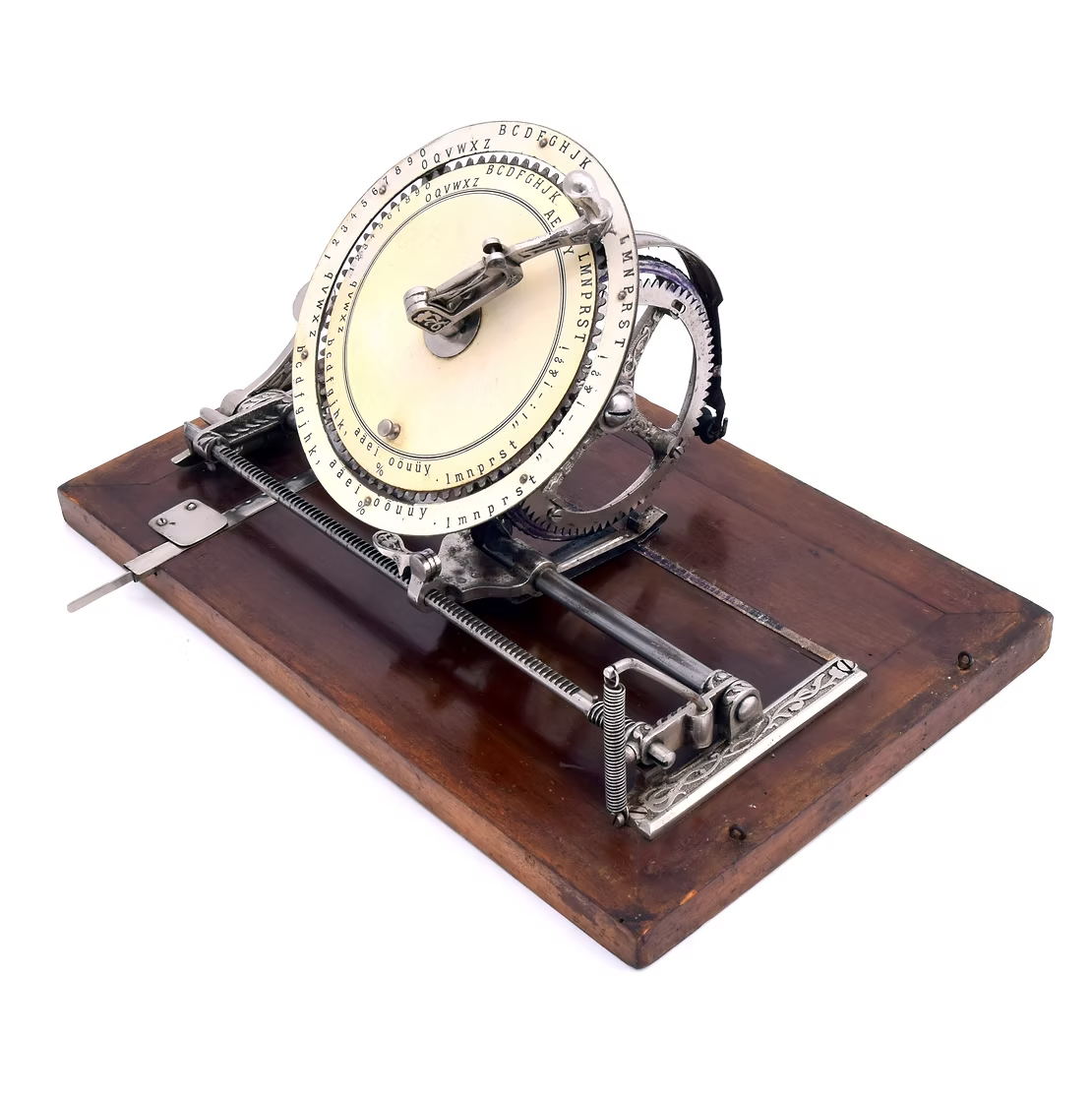
The Diskret (discreet) code typewriter from 1899 is a stunning German beauty of an index typewriter, far removed from the neon-accented see-through plastic label-maker from the late 80s that I often use.

Image via The Antikey Chop

Yet they are of the same spirit: choose a letter with some pointing device, imprint it with some lever action, and repeat.

Stark aesthetic differences aside, the Diskret does far more than my newfangled index typewriter. Designed with two concentric rings, the inner ring can be spun to allow the user to type in code.

For normal typewritering, the typist chose a letter from the outer ring of characters with a lever, which turned the typewheel mounted behind it. Then they would press down to print, and the carriage would advance by one character width to get ready for the next impression.

To use the Diskret as a cipher machine, the typist would spin the inner ring to create a false index, generating a coded letter. The recipient would have to have a Diskret in the same position in order to read the message. Yes, it’s basic, but it was one of the first code typewriters.

Most of this beautiful machine’s metal components were engraved with Jugendstil, or German Art Nouveau embellishments. It came mounted to a thick wood base, and featured a top with handle. A Diskret cost 75 marks, and, at the time, one mark equaled about $4. So, not exactly cheap, but it’s two typewriters in one.

Finally, Will Gen Alpha Cancel Keyboards Altogether?

No, of course not. But a study by the London School of Economics seems to think that the office drones of 2030 or so will skirt future first-draft keyboard use with AI voice typing tools, like everyday, all the time. And yeah, but they’ll have to use a keyboard to edit. Or, get this — they’ll just send voice notes to their bosses all the time. You know, good old unsearchable audio files that will be a pain to sift through later. Sure.

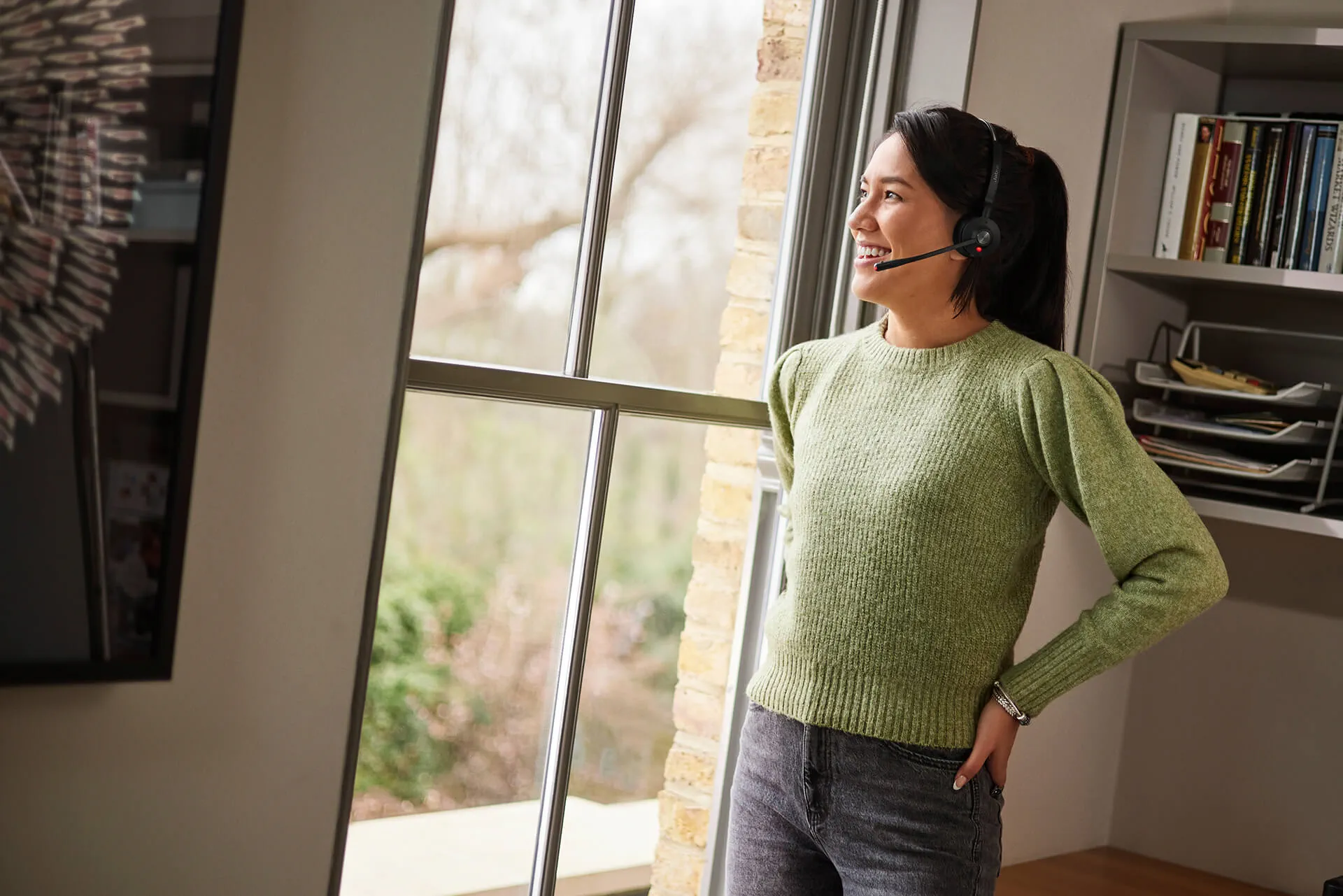
Gen Alpha stares out the window, arms akimbo, leaving a lengthy voice note for their Gen-X boss who just wants to read messages, and quickly. Image via Jabra

Did I mention that the study was done in collusion with Jabra, an audio-video technology company? They make highfalutin’ headsets and such. Ahem.

Now, I have a little secret — Y.T. has used powerful (and not-so-powerful) dictation tools here and there, especially after the surgery, and I could swear I’ve heard others talk-typing around the Hackaday Dungeon, although I can’t be sure. But I really like the act of typing, especially now that it doesn’t cause me intense, weird pain.

If I may cherry-pick a quote from the Fortune article, I choose this one: “speaking replaces typing because it matches how we think: fast, iterative, conversational.” I say all of that depends on your level of written wit, something that gets refined throughout the course of one’s life by, you know, writing or typing, and then reading, editing, removing, replacing, and so forth until it appears flowy and conversational.

And no, I didn’t speak-type a bit of this column. I missed typing on my Kinesis Advantage too much. See you next week-ish.


Got a hot tip that has like, anything to do with keyboards? Help me out by sending in a link or two. Don’t want all the Hackaday scribes to see it? Feel free to email me directly.
❌
❌