❌

Normal view

There are new articles available, click to refresh the page.
Before yesterdayHakin9

Main Tips for Students to Protect Data Privacy

6 January 2023 at 13:51

Main Tips for Students to Protect Data Privacy


As technology becomes increasingly prevalent in our daily lives, it is more important than ever for students to be aware of and protect their data privacy. With the amount of personal information that is shared online, it is easy for sensitive information to fall into the wrong hands. From social media accounts to online class assignments, there are many ways that students can unknowingly compromise their data privacy. That is why students need to be proactive in protecting their information. In this article, we will discuss tips for students to protect their data privacy.

Utilize Strong and Unique Passwords

One of the easiest ways for hackers to gain access to your personal information is through weak or easily guessable passwords. To protect student data privacy, it is crucial to use strong and unique passwords for all of your online accounts. A strong password should be at least 8 characters long and include a combination of upper and lowercase letters, numbers, and special characters. It is also a good idea to use a different password for each of your accounts to prevent all of your accounts from being compromised if one password is discovered. Using a password manager can also help generate and store strong and unique passwords. A password manager is a tool that securely stores your passwords and generates strong passwords for you, making it easier to use unique passwords for all of your accounts without having to remember them all.

Enable Two-factor Authentication

In addition to using strong passwords, enabling two-factor authentication (2FA) on your accounts can add an extra layer of security. 2FA requires you to provide a second form of verification, such as a code sent to your phone, in addition to your password when logging into an account. This helps to prevent unauthorized access even if someone has obtained your password. Many online platforms offer 2FA as an added security measure, so be sure to enable it on any accounts that offer it. Enabling it is a simple process and only takes a few minutes, but it can make a big difference in protecting your data privacy.

Be Cautious with Personal Information

When sharing personal information online, it is important to be selective about what you share and with whom you share it. For instance, if you opt to read useful research texts at Washington City Paper, you must make sure not to give away any confidential data. Consider the privacy settings on your social media accounts and be sure to only share personal information with trusted friends and family. Additionally, be cautious when providing personal information to websites or companies, as this information can be sold or used for targeted advertising. Always be sure to read the privacy policies of any website or company before providing personal information, and opt out of any data-sharing options if desired. It is also a good idea to review the personal information that is publicly available about you online, such as on social media or in search engine results, and remove any information that you do not want to be publicly available.

Use VPN

A virtual private network (VPN) is a tool that encrypts your internet connection and hides your IP address, making it more difficult for others to track your online activity and access your personal information. VPNs are especially useful when using public Wi-Fi, as these networks are often unsecured and can leave you vulnerable to cyber-attacks. Hence, it’s an excellent opportunity to keep college privacy safe. A VPN can also help to protect your online privacy when using a shared device, such as a computer in a library or computer lab. There are many VPN options available, and it is important to do some research and choose a reputable provider.

Be Mindful of Phishing Scams

Phishing scams are a common way for hackers to gain access to personal information. These scams often come in the form of fake emails or websites that look legitimate but are designed to trick you into giving away your personal information. To protect yourself from phishing scams, be wary of emails or links from unfamiliar sources and double-check the URL of a website before entering any personal information. It is also a good idea to install a spam filter on your email account to help identify and block phishing emails.

Take Advantage of Antivirus Programs

Having an antivirus application installed on your computer may help pupils have great academic protection and save it against viruses and other forms of harmful software that might endanger the privacy of their data. Make sure that your antivirus software is always up to date and that you conduct scans on your machine regularly to keep your data safe. In addition to this, it is essential to only download software and applications from reputable sites. Which software is reputable enough?

  • Avast Antivirus Program
  • Bitdefender
  • Norton
  • McAfee
  • Kaspersky

Use Encrypted Messaging Apps

To keep your communication private, consider using encrypted messaging apps. These apps use end-to-end encryption, which means that the messages you send can only be read by the intended recipient and not by anyone else, including the app itself. This can be especially important for students who are discussing sensitive topics or sharing personal information. For instance, writing themes are often discussed among them and according to PaperHelp, their data must be preserved carefully. Some popular encrypted messaging apps include:

  • Signal.
  • WhatsApp.

Utilize A Privacy Screen Protector on Your Device

Nowadays, protecting student privacy is an absolute must. When you are in a public location, you should use a private screen protector, which is a specialized film that can be placed over the screen of your device to prevent other people from seeing what is on your screen. This may be particularly helpful for students who use their devices in crowded locations, such as on a bus or in a library, where there are often a lot of other people in the immediate vicinity. A privacy screen protector may assist in the protection of your data privacy by obstructing the view of people who would otherwise be able to see sensitive information that is shown on your screen.

Be Aware of Online Privacy Laws

It is essential to have a solid understanding of the privacy laws for students and rules that govern internet data protocol as well as the rights you have as a user. This includes the General Data Protection Regulation (GDPR) in the European Union and the Children's Online Privacy Protection Act (COPPA) in the United States, which both aim to protect personal information and give users control over how their data is used. Both of these laws were created to protect student privacy while using the internet. Being aware of these regulations may assist you in understanding your rights as a user and assisting you in making educated choices about the protection of your online privacy.

Conclusion

By following these tips, students can take proactive steps to protect their data privacy and keep their personal information secure. It is important to be aware of the potential risks and take steps to protect yourself, as data credibility is an ongoing concern in the digital age. By taking simple precautions and being vigilant, privacy protections can make understudies’ information untouched and they enjoy the benefits of technology without worrying about their personal information being compromised.

What are the Common Security Weaknesses of Cloud Based Networks?

13 December 2022 at 06:05

META: We’re breaking down what the most common security weaknesses are of the cloud and how to avoid these weaknesses.

The cloud has been hugely impactful on the everyday running of many businesses. Basic operations and data are now stored in the cloud, making for a more organized and more secure data storage option than past examples of physical documents or even data stored in hard drives. However, the cloud isn’t faultless.Β 

The importance of cloud based network monitoring, especially in the case of cloud-based networks, cannot be overstated, but it is just one element of the overall weakness in cloud storage. A weakness that businesses really cannot afford to fall to. In this guide we’re breaking down what the most common security weaknesses are of the cloud and how to avoid these weaknesses.

What is the cloud?

Putting it simply, the cloud is an on-demand data storage facility. With the right authorisation anyone can access the cloud via an internet connection. It puts all your files and data in a non-physical storage bank that are typically run by various servers across different locations.

A common example is Dropbox or Google Drive. You can access these clouds with your own authorisation, typically a login username or email and password, and store and access your documents as you need them.

Businesses use far larger clouds to store all their business and customer data in a remote place that is considered safer to hacking, but as we’ll go on to point out, things are rarely that simple.

Why would anyone hack the cloud?

Data is one of the most valuable assets in the world right now. Oil and gold have nothing on people’s information, and the ability to simply take it β€œlegally” through social media and website browsing is becoming increasingly restricted. The most common way you might see data being siphoned from users and used by businesses is via third-party cookies, but these are about to be scrapped by Google for an alternative expected to drop in 2024. And then there is personal data that is private, like bank details, browsing history, applications, etc.

And that’s just the consumer side of things. The real danger is the data that businesses are holding. Both business and customer documents being stored in the cloud makes for a very attractive target to hackers who might want to infiltrate these systems for many reasons. The most common include ransom, blackmail, activism, or for the sheer challenge.

So, how do these hackers get into the cloud when it was initially deemed so secure?

Unauthorized access

A lot of the methods used to access the cloud illegally come down to authorized and unauthorized access. Unauthorized access is the Mr Robot you’re imagining: someone at a computer using back doors via the public internet to enter the cloud. These methods are possible due to improperly configured security or compromised credentials and might allow them to access the cloud without the awareness of anyone in the organization.

Authorized access

Authorized access is the use of the proper account details and security measures to access the cloud but were perhaps acquired illegally or passed on to someone who isn’t approved to use the details. Unfortunately, a vast majority of cloud and cybersecurity breaches in general are perpetrated internally. That is to say, by employees of the company using the cloud. They can pass on passwords, login details, and some verification details for a fee to hackers, or simply use the information to access the cloud themselves for their own purposes.Β Β 

Others?

Both of these instances are possible due to an improperly maintained cloud, which leads to various problems like misconfiguration, insecure interfaces, and phishing.

Phishing uses manipulation tactics, often in the form of emails or calls, to ask you to give them your personal information, which hackers can then use to access the cloud. Misconfiguration is the leading cause of cloud security breaches and is simply a lack of cloud security management due to the nature of the cloud, which allows for convenient access and data sharing from anywhere in the world. Interfaces designed to make things simpler for the customer is also a security risk since it is the customer’s responsibility to secure their details.

How do you avoid breaches in cloud security?

A lot of these problems can be solved with proper security management to the cloud services by servers and businesses. Unauthorized access is available and exploited due to holes in the system that allow the hacker in. Regular configuration and cloud based network monitoring is vital to keeping a secure cloud.

Elsewhere, the high risk in cybersecurity comes down to education. Retraining of employees is hugely beneficial to cybersecurity. Training on avoiding phishing scams, proper password and verification exercises would aid to plug some of the gaps in your cloud security, as will information on what makes for strong customer security when customers are interfacing with your company website.

Conclusion

It is true that the cloud has better security, but it’s not true that it’s infallible. The user-friendly and convenience-based nature of the cloud allows for a lot of areas that a hacker can get in, even if the end-to-end encryption that is making it popular makes it safer.

Monitoring Docker container metrics and events

2 November 2022 at 06:01

In the last few years, container utilization to build, share, and run applications has grown significantly. This growth comes from the fact that containers give developers the ability to package application code and all its dependencies. Also, with containers, users can gain an extra layer of security thanks to the isolation capabilities it provides. The introduction of Docker containers has paved the way for many organizations to easily host applications within containers. Docker containers are standardized, lightweight, and secure runtime instances of a Docker image.

Containers out-of-the-box do not provide security monitoring. Therefore, it is important to have a comprehensive view of what is happening in runtime. This ensures that containers operate smoothly without security issues that can easily affect other containers and the entire infrastructure. Some security aspects to continuously watch out for when running Docker containers are:

  • Container management: Docker container management involves supervising actions performed on a container to keep it running smoothly. Threat actors can get hold of containers and perform malicious activities such as viewing critical content, opening ports, creating, stopping or even destroying containers. Ability to distinguish unusual Docker events can be challenging. Observing these actions in near real-time as they occur can help organizations running Docker containers make better informed decisions.
  • Container resource consumption: Monitoring the performance of a container provides insight into its resource utilization. Some core resources include CPU, memory, disk, and network traffic. With resource monitoring, organizations can track container resource consumption and set measures to increase efficiency. These actions prevent imbalances of container resources in Dockerized infrastructures. Additionally, it allows better visibility of infrastructures in the event of a security incident.
  • Container health: Container health checks aid an organization in knowing its workload availability. The health status of a container is different from its actual state of operation. For example, a container can run while a web server running in the container may be down and unable to handle requests. This can be due to an attack that, if not monitored, can persist and cause damage to an organization. Monitoring the health status of a container helps to reduce an attack surface and prevent anomalies in the container.

Organizations need to identify and resolve threats quickly and proactively to avoid risks of compromise. For this, keeping track of the above criteria is indispensable and can be accomplished through the use of security monitoring solutions.

Using Wazuh for container monitoring

Wazuh is an open source security platform with unified XDR and SIEM capabilities. Its architecture comprises the Wazuh central components (server, indexer, and dashboard) and a universal agent. The solution provides protection for devices in clouds and on-premises infrastructures. Wazuh has many features ranging from container monitoring, file integrity monitoring, vulnerability detection, security configuration assessment, and more. Wazuh is multi-platform and expands its flexibility through integration with other security solutions.

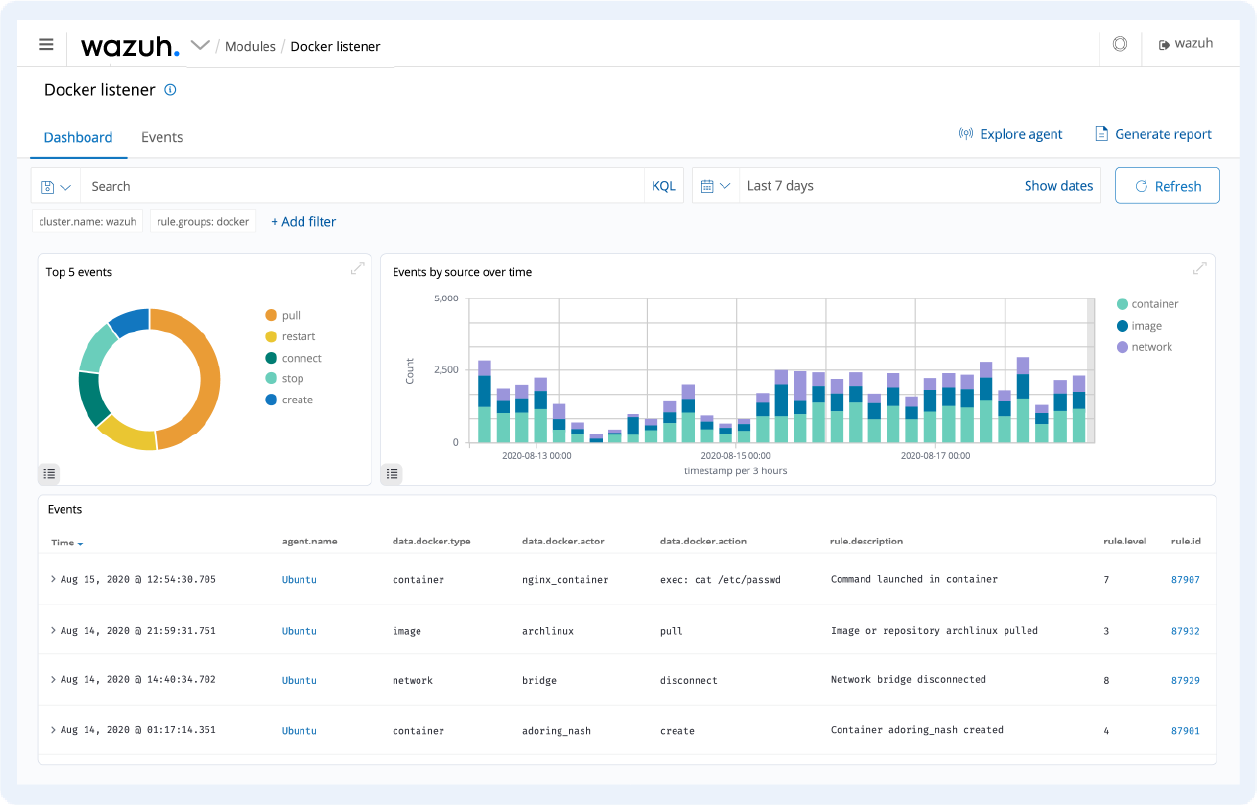
Figure 1 below shows an example of real-time monitoring of Docker containers using Wazuh.

Β 

Figure 1: Real-time monitoring of Docker containers using Wazuh

For the use cases below, the Wazuh agent is installed on endpoints running Docker containers. The agent collects security and runtime data from the containers and forwards it to the Wazuh server for log analysis, correlation, and alerting.

Monitoring container events

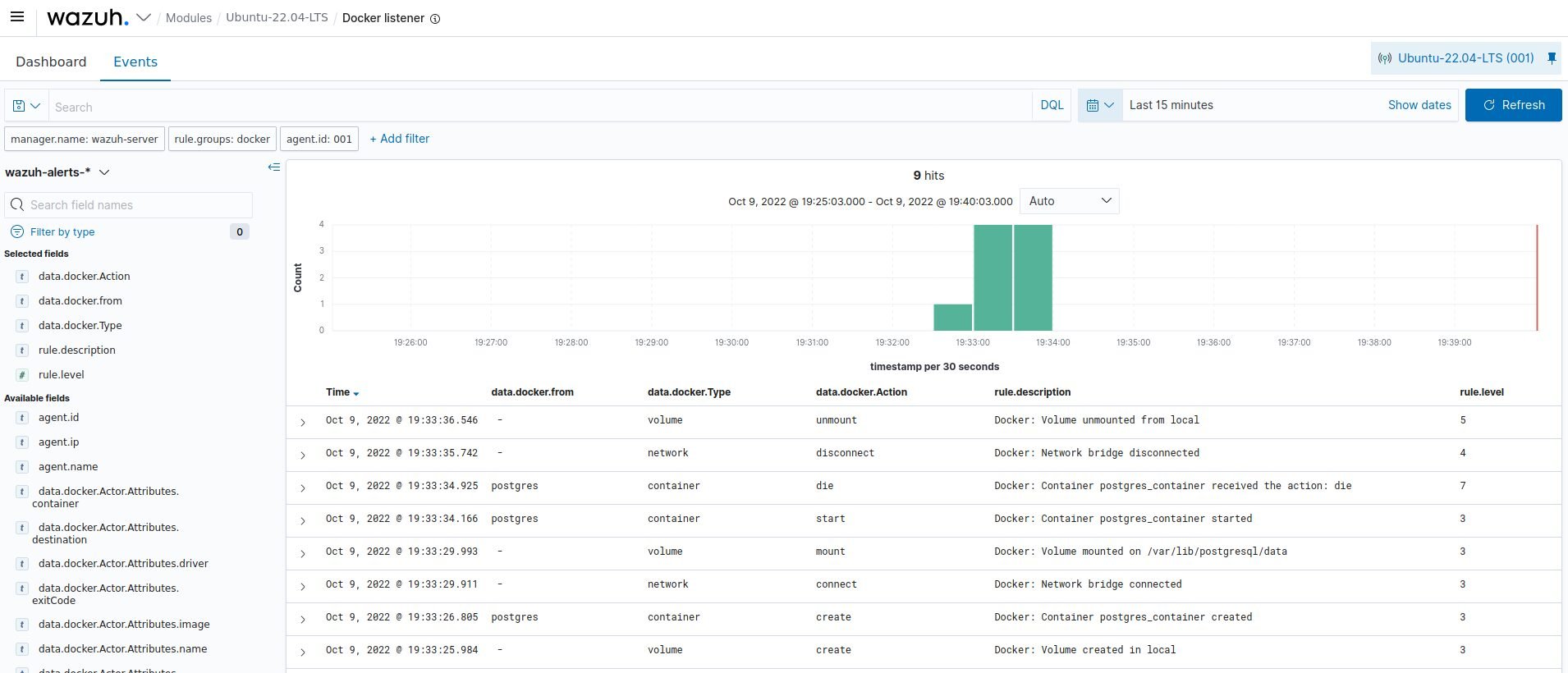
Wazuh has a Docker module that communicates with the Docker Engine API to gather information on Docker containers. The only configuration necessary is to enable the Docker listener module to allow us to monitor Docker events. The Wazuh dashboard in Figure 2 below shows an example of detected container events in a Docker environment.

Figure 2: Docker events detected in a Docker environment

Monitoring container resource utilization

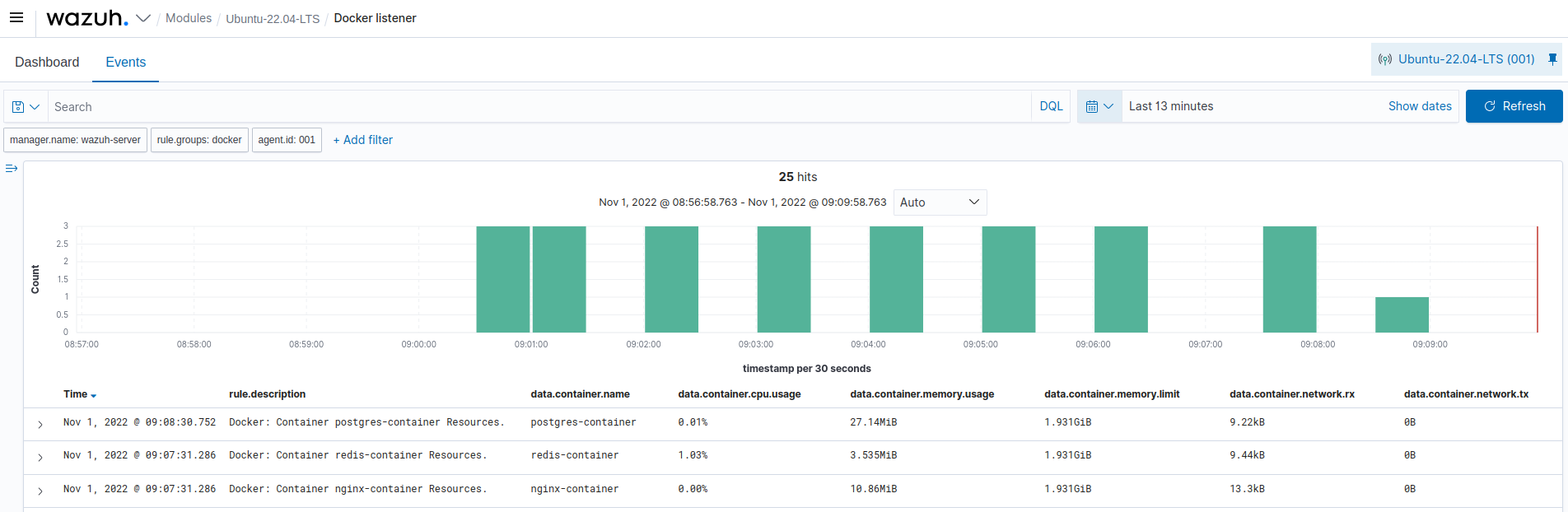
Wazuh can be used to monitor the performance of Docker containers in an endpoint. Β The Wazuh command monitoring module allows you to monitor the output of specific commands and trigger alerts accordingly. This gives organizations a clear view of the container for abnormal activities. The Wazuh dashboard in Figure 3 below shows the CPU, memory, and network traffic consumption of containers in an endpoint.Β 

Figure 3: Resource consumption of containers in a Docker environment

Monitoring container health

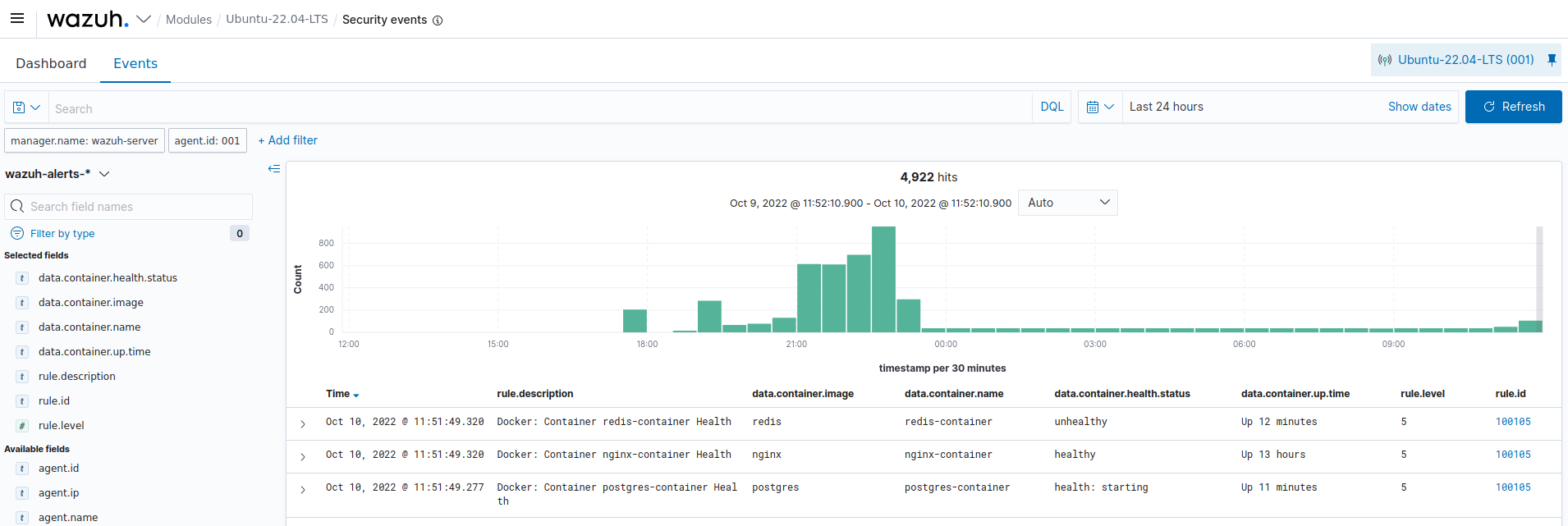
The Wazuh command monitoring module is used to monitor the health status of containers in Dockerized environments. Figure 4 below shows the health status of containers running on an endpoint.

Figure 4: Health status of containers in a Docker environment

Conclusion

Robust monitoring and easy debugging are key factors for container security. This ensures complete coverage of metrics and the events happening in your Dockerized container infrastructures. We have seen how Wazuh facilitates and improves an organization's visibility through its container security monitoring capabilities. Visit this documentation to get a detailed explanation of how to perform container monitoring with Wazuh.

Wazuh is free to use, easy to deploy, and has a continuously growing community that supports thousands of users. To get started with Wazuh, visit the Quickstart installation guide and explore the features it provides.

Vulnerability management with Wazuh open source XDR

12 October 2022 at 04:02

Organizations have a hard time keeping track of vulnerabilities due to the large number of these that are discovered daily. From January to October 2022, over 19,000 vulnerabilities have been discovered, according to CVE Details. These vulnerabilities are disclosed in a publicly known list called the Common Vulnerabilities and Exposures (CVE).Β Β Β 

A vulnerability is a weakness, bug, or flaw in a system that makes it open to exploitation by threat actors. Some notable vulnerabilities include Log4Shell, Follina, and Spring4Shell.

Threat actors make use of exploits to compromise vulnerable endpoints. Exploits are commands, software, or scripts that leverage vulnerabilities to breach an endpoint and compromise the confidentiality, integrity, or availability of data. In the case of Follina, a Remote Code Execution (RCE) vulnerability, a successful exploit grants complete computer control to the attacker.Β 

Due to the ever-increasing vulnerabilities and the risks they pose to organizations, it is necessary to implement a vulnerability management system.Β 

Need for vulnerability management

Vulnerability management involves identifying, classifying, remediating, and mitigating vulnerabilities. Vulnerability management solutions proactively scan devices in a network and identify weaknesses in them. They also categorize these vulnerabilities based on severity and provide remediation steps. These remediation steps can range from software updates to changing default passwords and configuration. Thereby preventing security breaches that can occur if these vulnerabilities get exploited. There are several advantages of having a vulnerability management system. These include:

  • Identifying and patching vulnerabilities. A vulnerability management program allows organizations to know the vulnerabilities they are exposed to. With this, adequate plans can be created to patch the vulnerabilities before threat actors exploit them.Β 
  • Improving security posture: Vulnerable components increase the attack surface of an organization's infrastructure. Therefore, it is important to identify and mitigate vulnerabilities to improve the organization's security posture.
  • Compliance with regulatory requirements: A vulnerability management program is essential for compliance with regulatory requirements such as PCI DSS, HIPAA, or GDPR. It also allows the organization to provide reports needed during a security audit.
  • Risk assessment: A vulnerability management program will allow you to prioritize vulnerabilities based on risk factors. For example, more resources can be assigned to remediate an easily exploited vulnerability that leads to a ransomware incident.

How Wazuh can help

Wazuh is a free and open source unified XDR and SIEM platform. It protects workloads across on-premises, virtualized, containerized, and cloud-based environments.

The Wazuh platform uses a server/agent model:Β 

  • Wazuh central components consist of the Wazuh server, Wazuh indexer, and Wazuh dashboard. These components analyze security data collected from the agents. They support on-premises deployment and can be deployed in the cloud using the Wazuh Cloud solution.Β 
  • The Wazuh agent is a lightweight program that is installed on endpoints. The agents collect security event data from the monitored endpoints and forward these events to the Wazuh server, where log analysis, correlation, and alerting are carried out.Β 

The Wazuh solution also supports agentless monitoring. This can be used for devices such as routers, firewalls, switches, and endpoints on which the Wazuh agent cannot be installed.Β 

Wazuh has several capabilities that help organizations of all sizes protect their assets against security threats. The vulnerability management capabilities of Wazuh include Security Configuration Assessment (SCA), and vulnerability detection.

Security Configuration Assessment (SCA)

Security configuration assessments and hardening are effective ways to reduce an organization’s attack surface. The Wazuh SCA capability access system configurations and generates alerts when these configuration does not meet defined secure system policies.Β 

The SCA policies included out-of-the-box with Wazuh can be used to check for compliance with the Center of Internet Security (CIS) benchmarks. The CIS benchmarks are configuration baselines, best practices, and recommendation that ensures the secure configuration of a system.

These SCA policies are written in YAML, which is easy to understand.Β  Users can also create new policies or modify existing policies to fit their requirements.

Β 

Fig. 1: The Wazuh dashboard showing the result of an SCA check on a Windows device

The result of an SCA check on the Wazuh dashboard provides information about the configuration that was checked and recommendations to harden the system. With the SCA capability, organizations can check for misconfigurations in their infrastructure, remediate them, and ensure compliance with various regulatory frameworks (PCI DSS, GDPR, and NIST).Β 

Wazuh vulnerability detection

Wazuh helps users gain security visibility into the endpoints within their environment using the vulnerability detection module. This module allows you to discover vulnerabilities in the operating system and applications installed on the endpoints monitored by Wazuh.Β 

Vulnerability detection is done through the native integration of Wazuh with external vulnerability feeds indexed by Canonical, Debian, Red Hat, Arch Linux, Amazon Linux Advisories Security (ALAS), Microsoft, and the National Vulnerability Database (NVD).

Wazuh agents extract software inventory data from the monitored endpoints and send this information to the Wazuh server. The software inventory data is correlated with CVE databases maintained on the Wazuh server to identify known vulnerable software.Β 

Fig. 2: The Wazuh dashboard showing the result of a vulnerability detection scan on an Ubuntu device

The result from the vulnerability detection scan includes the CVE entry, the description, the severity level,Β  and the condition of the vulnerability, which suggests possible remediation steps.

Conclusion

Vulnerability management programs help to keep your organization's infrastructure safe by detecting vulnerabilities before it gets exploited while ensuring compliance with regulatory requirements. It allows you to identify and remediate known vulnerabilities that can compromise the integrity of the computer systems and the information stored on them.

With more than 10 million annual downloads and dependable community support, Wazuh stands out as a free open source tool with SIEM and XDR capabilities. It is a free solution that integrates well with third-party solutions and technologies. To deploy Wazuh and explore use cases around vulnerability management, check out the Wazuh documentation.

7 Tips to Build A Banking Application That Will Be User-Friendly

26 September 2022 at 10:07

7 Tips to Build A Banking Application That Will Be User-Friendly


According to Statista, 1.9 billion people globally use online banking services; the number is projected to reach 2.5 billion by 2024. Hence, it is crucial for every bank that wants to succeed and compete in the 21st century to have a user-friendly mobile banking application. According to EPAM Anywhere Business mobile banking app development is similar to other applications. The only significant difference is the extra focus directed at the security stage. So, while security is a huge focus, the same intensity must also be required at how intuitive, and user-friendly the banking app must be. In this article, you will learn seven tips to design a mobile banking application.Β 

Top Tips To Design a Mobile Banking Application

Do Your ResearchΒ 

It would be best if you started your research with a market analysis before you create a banking app. You must also carefully study the market conditions and your competitors. Some critical aspects to focus on when doing your research are user habits, mentality and culture. For instance, in the US, 70% of American citizens have at least a credit card. In this case, you know you would have to input a credit option in your application. After successfully conducting your research, you would have a market analysis, share, habits, user persona profile, and value proposition.

Set Up Your Security BaseΒ 

This is typically the only thing that separates mobile banking apps from others. When building a banking app, you must never forget that you will work with lots of sensitive user data. The following are some of the security bases you should prioritize when you want to build your own banking app.Β 

  • Auto Logout: this logs out users automatically when they are not active on the app for more than 15 minutes, both on the back-end and front-end.
  • Secure Password: this ensures that all users' passwords are hashed before getting stored in a database.Β 
  • Secure Authentication: you set this up by using Apple Keychain for IOS and fingerprint security for Androids.
  • Data Privacy: to create mobile banking applications successfully, you must have limited access to users' passwords, tokens, and other sensitive data and information. You must also ensure all data and information are stored in secure platforms such as Okta, 1Password, etc.Β 

Create A Prototype And Test ItΒ 

As an application developer, you must know that the success of an application rests solely on the number of interactions it generates. Creating a prototype is a typical example. A prototype is simply the simplified version of the product you intend to make. It usually includes the app's structure, logic, and design. However, the prototype of the banking application you will create won't function seamlessly as the final product regarding stability, functionality, and aesthetics. After you have completed the prototype, let users utilize it and gather feedback. This will let you know what works in your prototype and doesn't. You will be able to enact these corrections in the final product. Creating a prototype and testing it is one of the best ways to validate your mobile banking app's design, usability, and functionality.Β 

Design The UI & UXΒ 

Using the information you got from your research, market analysis, prototype feedback, and user interviews, you can now start designing your mobile banking app. When creating the UI of your app, ensure that it is user-friendly. A user-friendly mobile application offers numerous benefits, and the reason is simple. People tend to make mistakes or fear making them whenever they deal with anything connected to their money. A user-friendly mobile application with an intuitive, simple, and friendly design helps them avoid this mistake. When it comes to mobile banking applications, you are not trying to stuff in the most features. What you should prioritize are simple features that are easy to navigate. Your users will thank you for it.Β 

Choose The Right Development Framework

At the early stage of developing a banking application, you must pick the proper development framework. If you are developing a mobile banking app for IOS or Android, it is better to go for Native App development than React Native because of safety. Regarding tech stacks for mobile banking applications made for IOS, XCode, Swift, and iOS SDK are requirements. On the other hand, Android Studio, Java/Kotlin, and Android SDK are the required tools for developing banking applications in Androids.Β 

Make Use of Third-Parties

After you have successfully created your mobile banking application, you must integrate third-party services before you launch it. You might be thinking, "why do I need third-party integration"?. The simple answer is adopting third-party services can make your banking application more user-friendly and also help to retain users' attention to the maximum. Some of the most popular third-party services for mobile banking applications include Segment (a powerful customer data analytical software), Onfido (users verification software), Sendbird (in-app messaging software) and Iterable (in-app notifications software). Before choosing any third-party service, you must ensure it is secure, stable, and actively supported.Β 

Maintain And Improve Even After LaunchingΒ 

After you have set up your security bases, designed your banking application, integrated third-party services, and added an intuitive and user-friendly interface, you can launch your application. However, many developers make the mistake of leaving their mobile applications after launching because they believe they don't need to add extra features so as not to disrupt the positive reviews and feedback they are getting. However, that's not true. Whenever your mobile banking application hits the market, newer and improved requirements and features will appear. You must ensure you implement these features. So, you always look for what users want in their banking apps and use this feedback to improve your banking application.Β 

Final ThoughtsΒ 

Learning how to design a mobile banking application is a significant step toward meeting users' needs. Customers won't need to go to the bank and queue for hours when they can open their phones to do what they want within minutes. However, when creating mobile banking applications, you must focus on data privacy. If you follow the tips in this article, you will have no issue creating a user-friendly mobile banking application. Click this link to learn how to create a successful mobile banking app.Β 

Deception Technologies: Improving Incident Detection and Response by Alex Vakulov

29 August 2022 at 06:15

According to the M-Trends 2021 report by FireEye, the median time for an attacker to remain unnoticed in an enterprise's infrastructure is 24 days. This is enough to identify the weakest points in the infrastructure, gain access, and escalate the attack. It would be a mistake to say that the business owners are not taking steps to protect their assets and data. As per the Ponemon Institute, on average, companies use 47 different cybersecurity solutions and technologies. How effective are these security solutions in times of digital transformation?

Advanced firewalls are becoming vulnerable as the company perimeter is eroded by the adoption of cloud technologies and remote access. Security event monitoring is less effective if the enterprise infrastructure includes a huge array of information assets that generates a large number of false positives. This method requires substantial financial costs and qualified specialists to analyze and identify actual cyber incidents systematically.

Ahead of the curve

The principle of Deception technology was laid down more than twenty years ago by the first network of honeypots. These special computer systems were created to mimic the likely targets of an attacker. Initially, they were used to detect keyloggers and other viruses and evaluate their propagation. However, modern Deception platforms have gone far beyond the usual traps for hackers.

Interest in Deception platforms has grown significantly over the past five years. Still, many customers identify such tools as honeypots. However, honeypots have significant limitations: a narrower scope, difficulties with masking, and the need for constant improvement. Unlike honeypots, Deception tools redirect the attacker to a controlled environment isolated from the production environment.

There are several options for building decoys here. The first method does not require granting local or domain administrator rights. It is focused on the built-in tools offered by operating systems like Group Policies, System Center Configuration Manager, Mobile Device Management, or, for example, using a third-party solution agent. The second method involves granting local administrator rights at the time of distribution. As a result of the implementation of this task, the privileges can be quickly revoked. The third method involves integration with the Local Administrator Password Solution (LAPS).

Today, you can find Deception solutions that use an agent to distribute baits, as well as those that do without it. Some experts believe the latter type is preferable as it does not involve additional load on the infrastructure (but of course, it depends on the pricing and your infrastructure configuration).

The typical Deception platform includes a management server and a decoy server. All traffic between these components is encrypted. Interaction occurs in one direction, from the decoy server to the management server, providing the ability to deploy decoy servers in protected network segments. One or two virtual servers are required to install the solution.

Identifying unknown attack vectorsΒ 

When developing an information security strategy, it is necessary to take into account today's cyber attack trends. If someone really wants to hack you, he will definitely do it. Cybercriminals often have all the financial and technological resources to attack your infrastructure, or they may have enough time to study it and find vulnerabilities that will allow them to penetrate the company's perimeter. So, the critical tasks of information security teams include:

  • Reduction of average incident detection and response time.
  • Minimization of financial and reputational costs as a result of a security incident.

Many threat detection systems are based on the principles of modeling malicious behavior and looking for matches or standard behavior and looking for deviations. They become less effective in the case of complex and previously unknown attacks. Still, modern Deception solutions make it possible to identify unknown attack vectors.Β 

Early detection of illegitimate actions

Deception platforms allow you to create an autonomous virtual environment, which will consist of various false data: databases, servers, configuration files, saved passwords, accounts, etc. They are automatically distributed among the existing information systems of the company. If any endpoint attempts to access any of these assets, it is likely that it has been compromised as there is no legal\logical basis for such activity. Notifications are instantly sent to a centralized server that marks the affected honeypot and records the attack vectors used by cybercriminals. Deception technology tools help detect intruders in the early stages of an attack, which is key to minimizing damage.

Preventing lateral movement

Using compromised user accounts, an attacker can infiltrate a corporate network, escalate privileges, and attempt to move further inside the network. At the stage of internal movement, an attacker may encounter false assets, upon interaction with which a warning will be sent to security specialists. Deception technology allows you to create data that is most attractive to an attacker in order to prompt him to interact with it and continue his movement already inside an isolated environment.

Improving SOC efficiency

False data pieces are indicators for internal monitoring systems that help reduce false positives. Integrating a Deception platform with a SIEM system enables you to make response and monitoring more efficient. Since the platform guarantees a low percentage of false positives, it saves theΒ securityΒ operations center’s (SOC) resources and improves the accuracy of its work.

Real-time forensics

Modern Deception platforms can aggregate forensic data, including indicators of compromise, attacker tactics, methods, and procedures. This allows organizations to be one step ahead by obtaining a complete picture of the attacker's logic and modus operandi. Information obtained from identified security incidents allows you to create a more comprehensive map of the most popular attack vectors specific to your organization.

VDI support

Support for virtual desktop infrastructure (VDI) is an important part of Deception platforms. The high demand for VDI is driven by such trends as employee mobility and the hybrid home-office model.Β 

The VDI migration process entails serious risks in terms of information security, such as:

  • Expansion of the cyber-attack perimeter where a compromise of one device can discredit the entire VDI environment.
  • Problems with ensuring the cybersecurity of a large number of copies of operating systems.
  • Problems with implementation of protection measures specific to VDI. For example, the implementation of a resource-intensive security solution (classic agent-based protection tools) can lead to a decrease in the consolidation ratio of virtual machines or cause delays in the loading and work of operating systems.

Thus, the transition to the WFH and other hybrid models requires not only careful organizational measures from cybersecurity teams but also a thoughtful analysis when choosing cybersecurity solutions. In a VDI environment, protection tools should have the least possible impact on the infrastructure. Such things as shorter waiting times for applications to start result in increased productivity for employees. This is especially critical for big companies.Β 

Developers of Deception tools are constantly expanding the number of honeypots and ways to spread them. Such platforms carefully analyze the behavior pattern of each user. Regardless of the configuration of the protected host (it can be an accountant's computer, a database server, or a developer's laptop), the system will pick up honeypots to match the software used on this host.

Conclusion

An enterprise that uses Deception technology in its cybersecurity strategy can provide a higher level of protection for the entire corporate network and its most critical segments, as well as improve the average time needed to detect and respond to incidents.Β 

Using this technology significantly reduces the burden on cybersecurity professionals by minimizing the number of false positives, providing highly accurate indicators, and reducing the amount of useless alert traffic.

A recurring problem that is regularly faced is the gradual transformation of a product with specialized functionality into a universal harvester. Often a vendor that has created a small successful product to solve a specific problem begins to grow it and adds non-critical functionality. It is important to find a balance and not allow you and the vendor to turn it into a monster with a lot of abstract functions that will be duplicated by other security solutions.


ABOUT THE AUTHOR

Β 

Alex Vakulov is a cybersecurity researcher with over 20 years of experience in malware analysis. Alex has strong malware removal skills. He is writing for numerous tech-related publications sharing his security experience.

Β 

Β 

Β 

Β 

Β 


Β 

❌
❌